



Wrike vs. Zoho Projects: Confronto e Recensioni degli Esperti 2026



Wrike è una piattaforma di gestione dei progetti che aiuta i team a gestire il lavoro in modo efficiente e chiaro. Zoho Projects si concentra sull'organizzazione delle attività e sulla collaborazione del team. Sebbene entrambi gli strumenti favoriscano flussi di lavoro di progetto più fluidi, differiscono nelle opzioni di personalizzazione e integrazione, fattori chiave per i team che cercano la soluzione più adatta.
In questo articolo troverai un confronto dettagliato fra questi software per la gestione dei progetti, esplorandone funzionalità, vantaggi e svantaggi, prezzi e molto altro.
Wrike vs. Zoho Projects: An Overview
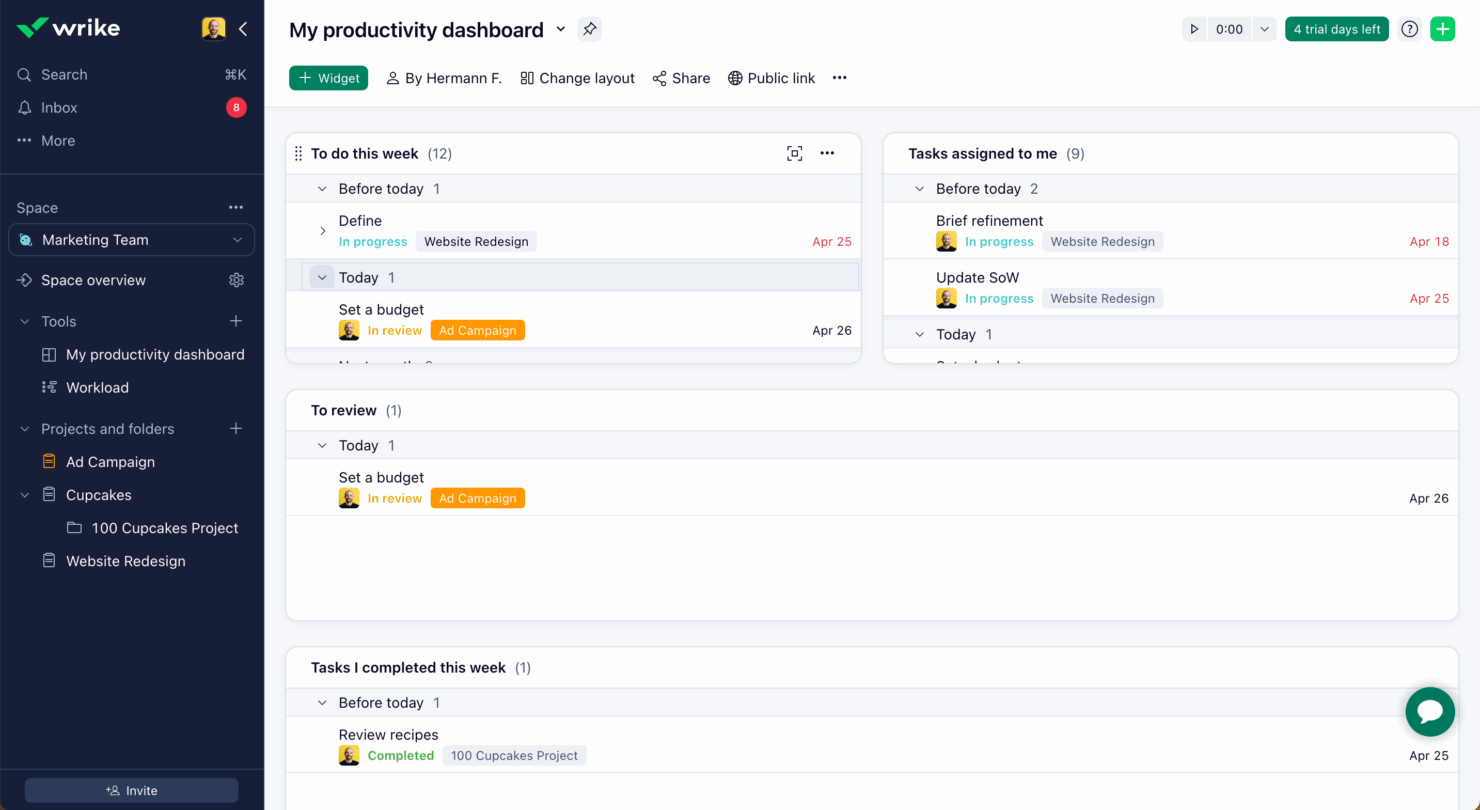
Wrike
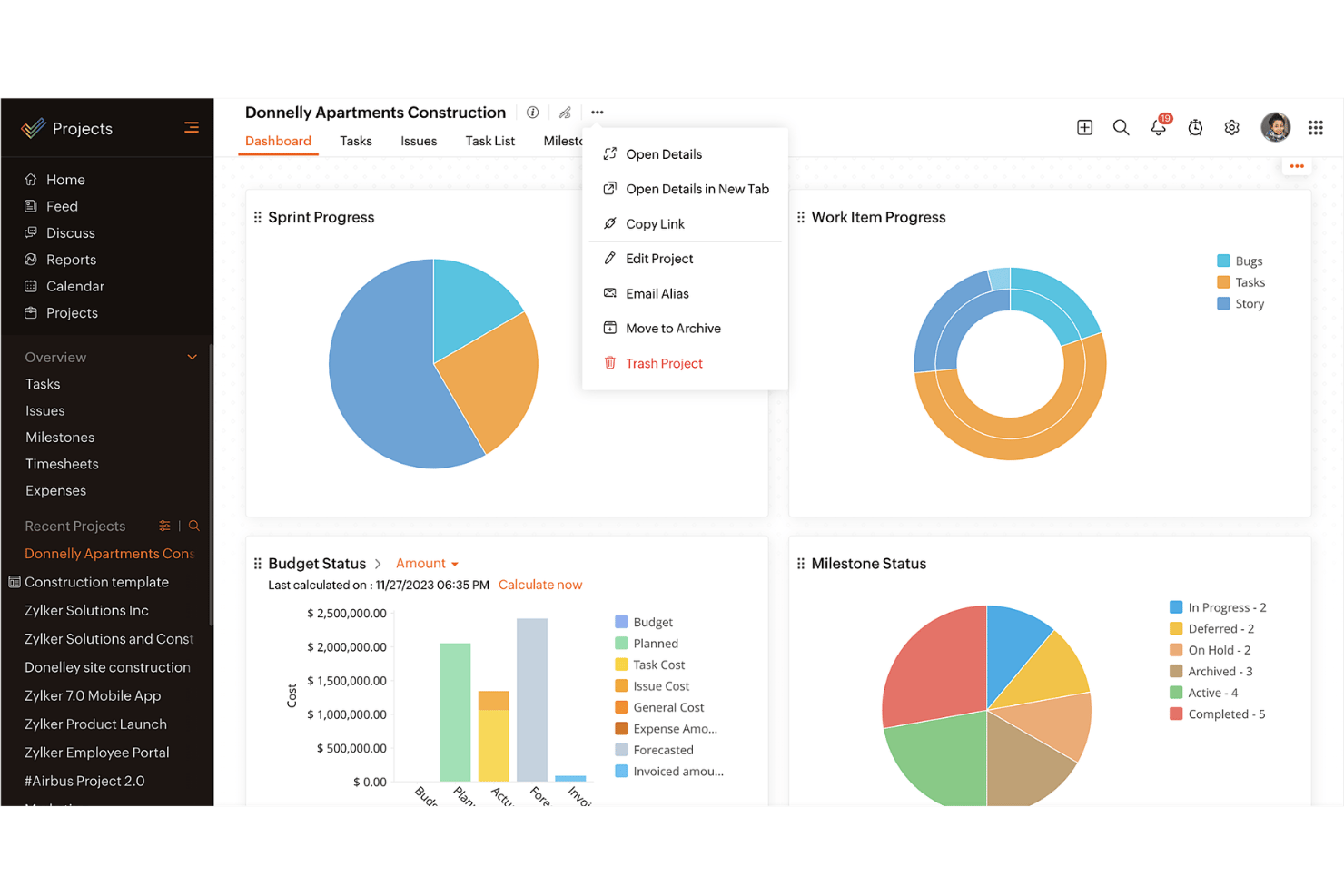
Zoho Projects
Perché fidarsi dei nostri consigli sui software
Il nostro team testa e recensisce software dal 2012. In quanto project manager noi stessi, sappiamo quanto sia difficile — e importante — scegliere il software giusto.
Per questa guida, abbiamo valutato gli strumenti attraverso test pratici e ricerche indipendenti, assegnando un punteggio agli strumenti in base ai nostri criteri di selezione. Ci basiamo inoltre sulle competenze di leader di pensiero del settore e di professionisti attivi nella gestione dei progetti.
Le nostre recensioni riflettono il nostro giudizio editoriale umano, non un discorso di vendita.
Revisori esperti:
Wrike vs. Zoho Projects Pricing Comparison
| Wrike | Zoho Projects | |
|---|---|---|
| Free Trial | Free plan available | Free plan available; 15-day free trial; free demo available |
| Pricing | From $10/user/month (billed annually) | From $4/user/month (billed annually) |
Wrike vs. Zoho Projects Feature Comparison
Questo confronto tra funzionalità mette in risalto le principali caratteristiche offerte da Wrike e Zoho Projects per aiutarti a valutare quale piattaforma supporta meglio le tue esigenze di gestione dei progetti.
| Wrike | Zoho Projects | |
|---|---|---|
| API | ||
| Batch Permissions & Access | ||
| Budgeting | ||
| Calendar Management | ||
| Collaboration Support | ||
| Contact Management | ||
| Contact Sharing | ||
| Customer Management | ||
| Dashboard | ||
| Dashboards | ||
| Data Export | ||
| Data Import | ||
| Data Visualization | ||
| Dependency Tracking | ||
| Document Sharing | ||
| Expense Tracking | ||
| External Integrations | ||
| File Sharing | ||
| Gantt Charts | ||
| Kanban Boards | ||
| Multi-User | ||
| Notifications | ||
| Project Management | ||
| Resource Management | ||
| Scheduling | ||
| Task Scheduling/Tracking | ||
| Third-Party Plugins/Add-Ons | ||
| Time Management | ||
| Travel Management | ||
| Workflow Management |
Wrike vs. Zoho Projects: integrazioni
| Integrazione | Wrike | Zoho Projects |
| Slack | ✅ | ❌ |
| Microsoft Teams | ✅ | ✅ |
| Google Drive | ✅ | ✅ |
| Salesforce | ✅ | ❌ |
| Dropbox | ✅ | ✅ |
| QuickBooks | ❌ | ✅ |
| GitHub | ✅ | ❌ |
| Zoho CRM | ❌ | ✅ |
| API | ✅ | ✅ |
| Zapier | ✅ | ❌ |
Wrike si integra con Slack per supportare la comunicazione in tempo reale e mantenere aggiornato il team senza cambiare strumento. Questo risulta particolarmente utile per i team che si affidano alla messaggistica istantanea.
Zoho Projects si collega a Zoho CRM, consentendo uno scambio di dati fluido tra vendite e gestione progetti per chi utilizza già la suite Zoho. Wrike punta su strumenti di collaborazione in tempo reale, mentre Zoho Projects valorizza l’efficienza dell’ecosistema interno.
Wrike vs. Zoho Projects: sicurezza, conformità e affidabilità
| Fattore | Wrike | Zoho Projects |
| Crittografia dei dati | Wrike utilizza la crittografia avanzata AES-256 per i dati a riposo e in transito. | Zoho Projects impiega la crittografia AES-256 per proteggere i dati sia a riposo che in transito. |
| Conformità normativa | Wrike è conforme al GDPR e offre funzionalità per supportare HIPAA | Zoho Projects è conforme al GDPR e fornisce strumenti di conformità per HIPAA. |
| Affidabilità operativa | Wrike garantisce una disponibilità del 99% grazie a un'infrastruttura solida. | Zoho Projects assicura una disponibilità del 99,9% grazie a una solida architettura server. |
Wrike e Zoho Projects offrono entrambi solidi strumenti di sicurezza e conformità, ma Wrike può offrire un vantaggio grazie alla crittografia avanzata e alle opzioni di conformità mirate.
Nella scelta del fornitore, considera le esigenze specifiche di conformità del tuo settore, gli standard di crittografia, le garanzie di disponibilità e il modo in cui ogni strumento si allinea alle politiche di sicurezza della tua organizzazione.
Wrike vs. Zoho Projects Facilità d'Uso
| Fattore | Wrike | Zoho Projects |
| Interfaccia utente | Wrike offre un'interfaccia pulita e personalizzabile che consente di adattare le dashboard alle proprie esigenze. | Zoho Projects propone un'interfaccia semplice con percorsi di navigazione logici. |
| Esperienza di onboarding | Wrike include tutorial interattivi e risorse per una partenza rapida. | Zoho Projects offre una configurazione guidata con suggerimenti e consigli utili. |
| Supporto | Wrike fornisce assistenza 24/7 con un centro assistenza completo. | Zoho Projects offre supporto durante l'orario lavorativo e una knowledge base estesa. |
La facilità d'uso di Wrike è valorizzata dalla sua interfaccia personalizzabile e dall'assistenza 24/7, rendendolo ideale per i team che necessitano di flessibilità e supporto costante.
Dall’altra parte, Zoho Projects si distingue per la semplicità e una navigazione intuitiva, anche se l'orario limitato del supporto potrebbe rappresentare una difficoltà per alcuni.
Wrike vs Zoho Projects: Pros & Cons
Wrike
- Wrike's proofing feature allows you to compare file versions dynamically.
- The user-friendly interface ensures easy navigation for your team.
- Wrike's AI features are available in all plans at no extra cost.
- It can be unclear where form responses are stored within the tool.
- Some integrations require an additional cost, regardless of the plan.
- Two-factor authentication is only available with the enterprise plan.
Zoho Projects
- Task dependencies are highly visual and easy to set up.
- Built-in time tracking integrates smoothly with billing features.
- Customizable project templates support repeatable workflows.
- Reporting customization can be limited for advanced needs.
- Mobile app notifications do not always sync in real time.
- Gantt chart drag-and-drop can feel sluggish with large projects.
Best Use Cases for Wrike and Zoho Projects
Wrike
- Marketing Teams Wrike’s proofing feature helps you streamline creative approval processes with ease.
- Creative Agencies Wrike’s dynamic file version comparison keeps your creative projects on track.
- IT Departments Wrike’s user-friendly interface simplifies complex project coordination for your team.
- Product Development Wrike’s AI features boost your team’s productivity without extra costs.
- Event Management Wrike’s task scheduling ensures your events are planned and executed flawlessly.
- Construction Projects Wrike’s robust project tracking keeps your construction timelines and budgets in check.
Zoho Projects
- Small Agencies Kanban boards, time tracking, and client billing streamline project delivery and reporting for agency teams.
- IT Departments Issue tracking, blueprint automations, and strong permission controls provide what IT teams need for complex internal projects.
- Consulting Firms Time sheets, detailed reports, and project-level billing help consultants keep track of client hours and invoicing.
- Remote Teams Robust collaboration tools, document sharing, and project forums help distributed users stay connected.
- Marketing Teams Reusable templates, task dependencies, and timeline tracking make repeated campaigns run smoothly and transparently.
- Construction Projects Gantt charts, milestones, and resource allocation features support the scheduling needs of construction and field project managers.
Differences Between Wrike and Zoho Projects
Questo confronto mette in evidenza le principali differenze tra Wrike e Zoho Projects per aiutarti a decidere quale piattaforma si adatta meglio alle tue esigenze.
| Wrike | Zoho Projects | |
|---|---|---|
| Automation | Wrike offers advanced automation capabilities for complex workflows | Zoho Projects includes basic automation tools for task management. |
| Customization | Wrike offers extensive customization with dashboards and workflows. | Zoho Projects provides basic customization options for simpler setups. |
| Integrations | Wrike integrates with a wide range of third-party apps like Slack | Zoho Projects integrates well within the Zoho Ecosystem, like Zoho CRM. |
| Pricing | Wrike uses a tiered subscription with additional costs for premium features. | Zoho Projects follows a tiered pricing model with fewer hidden costs. |
| User Interface | Wrike features a clean, customizable UI for tailored experiences. | Zoho Projects has a straightforward interface with logical navigation. |
| Visit WrikeOpens new window | Read Zoho Projects ReviewOpens new window |
Similarities Between Wrike and Zoho Projects
Sebbene Wrike e Zoho Projects presentino delle differenze, condividono anche diverse funzionalità fondamentali che favoriscono una gestione efficiente dei progetti nei vari team.
| Collaboration | Both tools support team collaboration through features like file sharing and real-time updates. Wrike connects with various communication apps, while Zoho Projects includes built-in chat and discussion forums. |
|---|---|
| Mobile Usability | Wrike and Zoho Projects both offer mobile apps for managing projects on the go. Wrike’s app allows offline access, while Zoho Projects’ app is known for its user-friendly design. |
| Reporting | Both platforms offer reporting tools to help you track project progress. Wrike provides advanced analytics and fully customizable reports, while Zoho Projects includes pre-built reports that can be tailored to your needs. |
| Task Management | Both Wrike and Zoho Projects offer strong task management features that let you assign, track, and prioritize work efficiently. Wrike stands out with its detailed task dependencies, while Zoho Projects offers easy-to-use task lists and Kanban boards. |
| Time Tracking | Both solutions include time tracking to monitor hours spent on tasks. Wrike integrates time tracking directly into its project management workflow, while Zoho Projects provides built-in timers and detailed timesheet reports. |
| Visit WrikeOpens new window Read Zoho Projects ReviewOpens new window | |