



Scoro contro Kantata: confronto e recensioni degli esperti per il 2026



Every missed deadline, every blown budget, every "wait, who's working on what?" moment chips away at your margins, and your sanity. The right platform can be the difference between running your business and your business running you.
Look, if you’re tired of chasing project updates, juggling resource bottlenecks, or struggling to forecast revenue, you’re not alone. Comparing Scoro and Kantata can help you find the right fit to take control of your business and gain visibility across client delivery. Both offer their own spin on professional services automation software, but which actually lines up with your needs?
In this article, you’ll find a real comparison—including pros and cons, key use cases, pricing, security, and what it’s actually like to use each tool. I’ll help you zero in on what matters most so you can make a confident decision.
Scoro vs. Kantata: An Overview
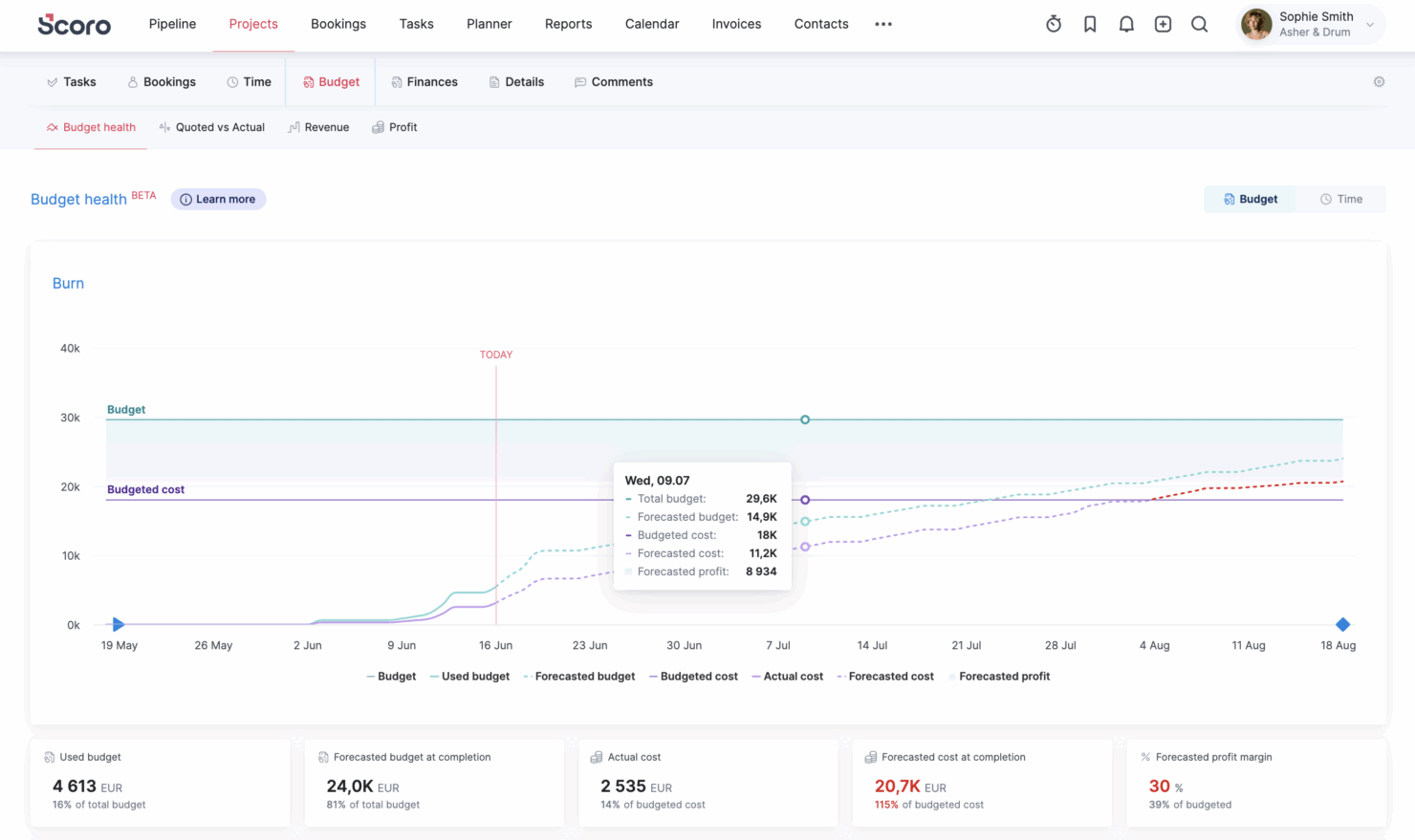
Scoro
Kantata

Perché fidarsi dei nostri consigli sui software
Il nostro team testa e recensisce software dal 2012. In quanto project manager noi stessi, sappiamo quanto sia difficile — e importante — scegliere il software giusto.
Per questa guida, abbiamo valutato gli strumenti attraverso test pratici e ricerche indipendenti, assegnando un punteggio agli strumenti in base ai nostri criteri di selezione. Ci basiamo inoltre sulle competenze di leader di pensiero del settore e di professionisti attivi nella gestione dei progetti.
Le nostre recensioni riflettono il nostro giudizio editoriale umano, non un discorso di vendita.
Revisori esperti:
Scoro vs. Kantata Pricing Comparison
| Scoro | Kantata | |
|---|---|---|
| Free Trial | Free trial available | Free demo available |
| Pricing | From $17/user/month | Pricing upon request |
Prezzi e costi nascosti di Scoro rispetto a Kantata
Scoro utilizza un approccio modulare, combinabile e basato sul numero di utenti, con app principali che offrono maggiore flessibilità man mano che ne aggiungi altre al tuo abbonamento; inoltre, la prova gratuita ti consente di testare il software prima di impegnarti. I prezzi di Kantata non sono trasparenti pubblicamente e richiedono un preventivo personalizzato in base alle dimensioni, alle esigenze e ai requisiti di configurazione della tua organizzazione. Entrambi gli strumenti possono inoltre prevedere costi di onboarding, addebiti per configurazioni personalizzate o impegni contrattuali annuali.
Per scegliere il fornitore giusto, guarda oltre la tariffa mensile e chiarisci quali funzionalità sono incluse di serie e quali sono accessibili solo a pagamento. Chiedi ai fornitori una stima del costo totale basata sui tuoi casi d'uso effettivi e sulle dimensioni del team. Tieni conto dei piani di crescita, così non avrai sorprese dovute all'aumento dei costi se le tue esigenze di erogazione dei servizi si ampliano. Contatta direttamente ciascun fornitore per ricevere un preventivo dettagliato e verifica sempre i termini del contratto per individuare possibili aumenti di prezzo, limitazioni del servizio o impegni obbligatori.
Scoro vs. Kantata Feature Comparison
| Scoro | Kantata | |
|---|---|---|
| API | ||
| Billing/Invoicing | ||
| Budgeting | ||
| CRM Integration | ||
| Dashboards | ||
| Data Export | ||
| Data Import | ||
| Document Management | ||
| Expense Tracking | ||
| External Integrations | ||
| Financial Analysis | ||
| Forecasting | ||
| Gantt Charts | ||
| Inventory Tracking | ||
| Multi-Currency | ||
| Multi-User | ||
| Notifications | ||
| Project Management | ||
| Resource Management | ||
| Scheduling | ||
| Status Notifications | ||
| Task Scheduling/Tracking | ||
| Time Management | ||
| Workflow Management |
Integrazioni di Scoro rispetto a Kantata
| Integrazione | Scoro | Kantata |
|---|---|---|
| Salesforce | ✅ | ✅ |
| Xero | ✅ | ✅ |
| QuickBooks | ✅ | ✅ |
| Slack | ✅ | ✅ |
| Google Calendar | ✅ | ❌ |
| HubSpot | ✅ | ✅ |
| Microsoft Teams | ✅ | ✅ |
| Jira | ✅ | ✅ |
| API | ✅ | ✅ |
| Zapier | ✅ | ✅ |
Scoro e Kantata offrono una copertura delle integrazioni sostanzialmente simile, con differenze riconducibili soprattutto a dettagli minori, come il supporto per Google Calendar e Microsoft Exchange. Poiché entrambe le piattaforme offrono accesso API e connettività Zapier, la scelta migliore dipende meno da importanti lacune nelle integrazioni e più dagli strumenti, dai flussi di lavoro e dalle esigenze di configurazione preferiti dal tuo team.
Scoro rispetto a Kantata: sicurezza, conformità & affidabilità
| Fattore | Scoro | Kantata |
|---|---|---|
| Crittografia dei dati | Utilizza la crittografia SSL/HTTPS per ogni transazione e la crittografia AES-256 per i dati inattivi. | Utilizza la crittografia TLS e AES per i dati in transito e inattivi. |
| Conformità normativa | Certificato GDPR e ISO 27001. | Certificato SOC 1 & SOC 2 Type II e conforme al GDPR e ai requisiti britannici in materia di protezione dei dati per i servizi cloud. |
| Controlli degli accessi | Autorizzazioni basate sui ruoli e opzioni SSO per gestire l'accesso degli utenti. | Controllo degli accessi granulare con SSO e integrazione con i provider di identità. |
| Garanzie di disponibilità | Garantisce una disponibilità del 99,95% con aggiornamenti trasparenti sullo stato del sistema. | Mantiene una disponibilità del 99,8% con uno SLA e monitoraggio 24/7/365. |
Sia Scoro sia Kantata prendono sul serio la sicurezza e la conformità, ma Kantata si distingue per standard di conformità normativa regionale più ampi, pensati per i team che operano in più mercati. Scoro, d'altra parte, offre una disponibilità leggermente superiore, che può essere più importante se l'affidabilità quotidiana della piattaforma è la tua priorità principale.
Scoro rispetto a Kantata: facilità d'uso
| Fattore | Scoro | Kantata |
|---|---|---|
| Interfaccia utente | Design pulito e moderno, con navigazione intuitiva e cruscotti personalizzabili. | Aspetto professionale, ma menu più densi; ideale per i team che gestiscono progetti complessi. |
| Inserimento iniziale | Scoro adatta l'inserimento iniziale alle dimensioni del team; i team più piccoli possono utilizzare risorse autoguidate o aggiungere consulenze con esperti, mentre i team più grandi ricevono pianificazione dei flussi di lavoro, configurazione, migrazione dei dati, formazione o supporto completamente personalizzato. | Richiede una maggiore configurazione e può risultare complesso senza la formazione dedicata offerta dagli specialisti dell'inserimento iniziale. |
| Accesso al supporto | Chat dal vivo e servizio clienti reattivo via e-mail, oltre a un ricco centro assistenza. | Offre assistenza clienti telefonica e via e-mail, oltre a un ampio centro risorse. |
| Risorse per la formazione | Seminari online e raccolta di risorse per l'autoformazione, aggiornati frequentemente. | Base di conoscenze approfondita e pacchetti di formazione a pagamento opzionali. |
Scoro è più semplice da implementare rapidamente per i team nuovi, mentre Kantata è leggermente più complesso per quanto riguarda l'avvio. Ritengo che il design intuitivo di Scoro aiuti gli utenti alle prime armi a diventare operativi più velocemente, mentre Kantata potrebbe essere apprezzato dai team che si trovano a proprio agio con un processo di implementazione più strutturato.
Scoro vs Kantata: Pros & Cons
Scoro
- Excellent multi-entity and multi-currency support for international businesses.
- Deep two-way accounting integrations.
- Scoro is highly-customizable with different permission sets, user-based menus, and settings.
- User interface can feel cluttered for new users (although this can be fixed by creating simplified views via permission sets).
- Some users find the learning curve steep for advanced features.
- Lack of built-in chat/messaging and weaker real-time collaboration features compared to others.
Kantata
- Kantata's task management is intuitive, making it easy for your team to keep projects on track.
- Resource planning features help you allocate team members effectively and avoid burnout.
- The platform improves collaboration with real-time updates and visibility across projects.
- Some users find the interface needs time to get used to, which may slow initial productivity.
- Advanced features might be overwhelming for smaller teams or those new to project management tools.
- Reporting capabilities could be more customizable to fit diverse project needs.
Best Use Cases for Scoro and Kantata
Scoro
- Agencies Scoro connects the sales pipeline, creative delivery, and billing in one place, so agencies can quote, resource, and invoice client work without switching tools.
- Consultancies Scoro's quoting matrix breaks down deliverables by role, hours, and cost, giving consultancies real-time margin and utilization visibility across multi-entity, multi-currency operations.
- Architecture FIrms Scoro ties project phases, budgets, and time tracking together so architecture firms can monitor scope creep and protect fee-based project margins in real time.
- IT Services With Jira integration and effortless time logging from calendars or tasks, Scoro gives IT consultancies clear visibility into billable utilization, project profit, and progress as work gets delivered.
- Event Management Scoro handles multi-currency event quoting, purchase orders for vendors, and phase-based Gantt planning, so event agencies can track supplier costs and protect margins across simultaneous productions.
- Engineering FIrms Scoro unifies resourcing, cost tracking, and reporting across teams and offices, helping engineering firms forecast capacity and keep multi-phase projects profitable.
- Software Development Through native Jira sync, Scoro lets developers keep working in their existing tools while worklogs flow back automatically for accurate reporting, invoicing, and profitability tracking.
Kantata
- Consulting firms Kantata helps you manage multiple client engagements with its comprehensive project tracking and billing features.
- Marketing agencies It supports you with resource planning and time tracking, which are essential for managing creative projects effectively.
- IT services Kantata's detailed project financials and billing capabilities make it a strong choice for IT project management.
- Finance departments Kantata's billing and financial tracking features help you maintain oversight on project profitability.
- HR departments With its resource planning capabilities, Kantata helps you effectively manage and allocate your team’s workload.
Chi dovrebbe usare Scoro e chi dovrebbe usare Kantata?
Scoro è un'ottima scelta per agenzie che lavorano per progetti, aziende con più entità, società di consulenza, studi di architettura e ingegneria, team IT e altre aziende di servizi professionali che desiderano una piattaforma integrata per CRM, progetti, gestione delle risorse, finanze, reportistica e fatturazione. È particolarmente utile se il tuo team desidera una visibilità completa dal contatto potenziale iniziale fino alla fattura finale, senza dover fare affidamento su strumenti non collegati tra loro o su soluzioni alternative per la reportistica. Kantata può ancora essere adatto ai team che dispongono di processi PSA consolidati, ma Scoro rappresenta una scelta convincente per le aziende che desiderano CRM integrato, dati finanziari dei progetti collegati, cruscotti in tempo reale, gestione dei contratti a canone e fatturazione nativa in un unico sistema. Scegli Scoro se la tua priorità è un'adozione più semplice, un monitoraggio più chiaro della redditività e un modo più integrato di gestire il lavoro per i clienti.
Differences Between Scoro and Kantata
| Scoro | Kantata | |
|---|---|---|
| Business Management | All-in-one with CRM, quoting, and billing included. | Focuses on project, resource, and financial management only. |
| Pricing Structure | Transparent, modular pricing built from eight core apps you can mix and match, rather than one fixed package. Combinations start at $17 /user/month. | Opaque quote-based pricing based on business needs. |
| Resource Management | Supports resource and capacity planning, with project budgets, utilization reporting, and cost/profit forecasting. | Places heavy emphasis on advanced resource optimization, utilization, capacity risks, and analytics. |
| User Interface | Simple, modern UI focused on ease of use. | Feature-rich interface geared toward complex, enterprise setups. |
| Visit ScoroOpens new window | Read Kantata ReviewOpens new window |
Similarities Between Scoro and Kantata
| API Access | Both tools enable connectivity to other business systems via API, supporting custom workflows and automation beyond their native integrations. |
|---|---|
| Project Management | Both deliver strong project tracking and task management with visual timelines, letting teams monitor progress and deadlines in one place. |
| Reporting & Analytics | Both have custom report builders and dashboard widgets, enabling real-time insights into project, financial, and resource data. |
| Time Tracking | Each offers built-in time tracking and linking billable hours directly to project budgets and invoices. |
| Visit ScoroOpens new window Read Kantata ReviewOpens new window | |