

10 migliori strumenti per la comunicazione interna nel 2026

Elenco dei migliori strumenti per la comunicazione interna


Gli strumenti per la comunicazione interna sono app e piattaforme che aiutano il tuo team a condividere aggiornamenti, messaggi e file in un unico spazio di lavoro digitale. Se stai cercando modi per mantenere tutti connessi, indipendentemente dal luogo in cui lavorano, sai quanto velocemente le informazioni possano perdersi. Oggi i team ibridi e remoti si affidano a questi strumenti per sostituire le lunghe conversazioni via email, ridurre le riunioni e mantenere i progetti in movimento. In questo elenco troverai le migliori opzioni per le diverse esigenze dei team, così potrai scegliere quella giusta per semplici conversazioni, discussioni sicure o una collaborazione completa con documenti e attività condivisi.
Perché fidarsi dei nostri consigli sui software
Il nostro team testa e recensisce software dal 2012. In quanto project manager noi stessi, sappiamo quanto sia difficile — e importante — scegliere il software giusto.
Per questa guida, abbiamo valutato gli strumenti attraverso test pratici e ricerche indipendenti, assegnando un punteggio agli strumenti in base ai nostri criteri di selezione. Ci basiamo inoltre sulle competenze di leader di pensiero del settore e di professionisti attivi nella gestione dei progetti.
Le nostre recensioni riflettono il nostro giudizio editoriale umano, non un discorso di vendita.
Revisori esperti:
Tabella comparativa degli strumenti per la comunicazione interna
Questa tabella comparativa riassume i dettagli sui prezzi delle mie migliori selezioni di strumenti per la comunicazione interna:
| Tool | Best For | Trial Info | Price | ||
|---|---|---|---|---|---|
| 1 | Il migliore con licenza all-inclusive e onboarding | Demo gratuita disponibile | Prezzo su richiesta | Website | |
| 2 | Intestazioni degli argomenti in stile email ideali per la concentrazione asincrona | Piano gratuito + demo gratuita disponibile | Da $6.67/utente/mese (fatturazione annuale) | Website | |
| 3 | Miglior cronologia messaggi gratuita e illimitata | Prova gratuita di 7 giorni + piano gratuito + demo gratuita disponibile | Da $2.49/postazione/mese (fatturato annualmente) | Website | |
| 4 | I migliori suggerimenti basati sull'IA per la gestione delle attività | Piano gratuito + demo gratuita disponibile | Da $3/utente/mese (fatturato annualmente) | Website | |
| 5 | Le migliori liste condivise di cose da fare e promemoria integrati | Prova gratuita di 30 giorni + piano gratuito disponibile | Da $4.50/utente/mese (fatturazione annuale) | Website | |
| 6 | Migliore integrazione con le app di Microsoft 365 | Piano gratuito disponibile | Da $4/utente/mese (fatturazione annuale) | Website | |
| 7 | Migliori automazioni di workflow integrate | Prova gratuita di 14 giorni + piano gratuito + demo gratuita disponibile | Da $16.20/mese (fatturato annualmente) | Website | |
| 8 | Ideale per soluzioni di comunicazione open-source | Demo gratuita disponibile | Prezzo su richiesta | Website | |
| 9 | La migliore messaggistica in thread per ridurre il disordine | Piano gratuito disponibile | Da $6/utente/mese (fatturazione annuale) | Website | |
| 10 | Ideale per collaborare all'interno di Google Workspace | Prova gratuita di 14 giorni disponibile | Da $4,60/mese (fatturato annualmente) | Website |
Recensioni dei migliori strumenti per la comunicazione interna
Di seguito trovi i miei riepiloghi dettagliati dei migliori strumenti per la comunicazione interna inclusi nel mio elenco. Le mie recensioni offrono una panoramica approfondita delle funzionalità, delle integrazioni e dei casi d’uso ideali di ogni piattaforma, per aiutarti a trovare quella più adatta a te.

Hub
Il migliore con licenza all-inclusive e onboarding

Hub è una piattaforma intranet per i dipendenti che riunisce notizie aziendali, gestione della conoscenza, forum di gruppo, moduli digitali e strumenti di creazione contenuti potenziati dall'IA in un unico spazio di lavoro centralizzato.
Per chi è ideale Hub?
Hub è particolarmente adatto per organizzazioni di piccole e medie dimensioni in cui i team di comunicazione interna e risorse umane guidano l'impegno dei dipendenti e la condivisione della conoscenza.
Perché ho scelto Hub
Ho selezionato Hub tra i migliori perché il modello di licenza tutto incluso elimina davvero la frizione che rallenta la maggior parte delle implementazioni di intranet. Tutte le funzionalità, dall’Assistente di scrittura IA ai sondaggi rapidi e le conferme di lettura obbligatoria, sono disponibili dal primo giorno senza necessità di upgrade a livelli superiori. Apprezzo anche che vengano inclusi due giorni completi di onboarding personalizzato 1:1, così i team non devono configurare uno spazio vuoto da zero.
Funzionalità principali di Hub
- Forum e discussioni di gruppo: Crea forum dedicati per team o argomenti con conversazioni strutturate e permessi dettagliati.
- Wiki aziendale e gestione documenti: Organizza politiche, FAQ e conoscenza aziendale in wiki ricercabili con spazio di archiviazione illimitato.
- Ricerca federata: Cerca tra notizie, documenti, wiki e forum utilizzando tag intelligenti e filtri di contenuto.
- Sondaggi rapidi e votazioni: Raccogli feedback immediato dai dipendenti utilizzando strumenti integrati di sondaggi e votazione.
Integrazioni di Hub
Hub offre integrazioni native con SharePoint, Google Workspace, Box, Microsoft Teams, Slack, BambooHR, Confluence e altro ancora. È disponibile un'API per integrazioni personalizzate.
Pros and Cons
Pros:
- Onboarding personalizzato incluso in ogni piano
- Le conferme di lettura obbligatoria attestano che lo staff ha visualizzato gli aggiornamenti
- L'assistente di scrittura IA velocizza la creazione dei contenuti
Cons:
- La chat in tempo reale è meno sviluppata rispetto ai concorrenti
- Le videochiamate non sono supportate nativamente

Zulip
Intestazioni degli argomenti in stile email ideali per la concentrazione asincrona
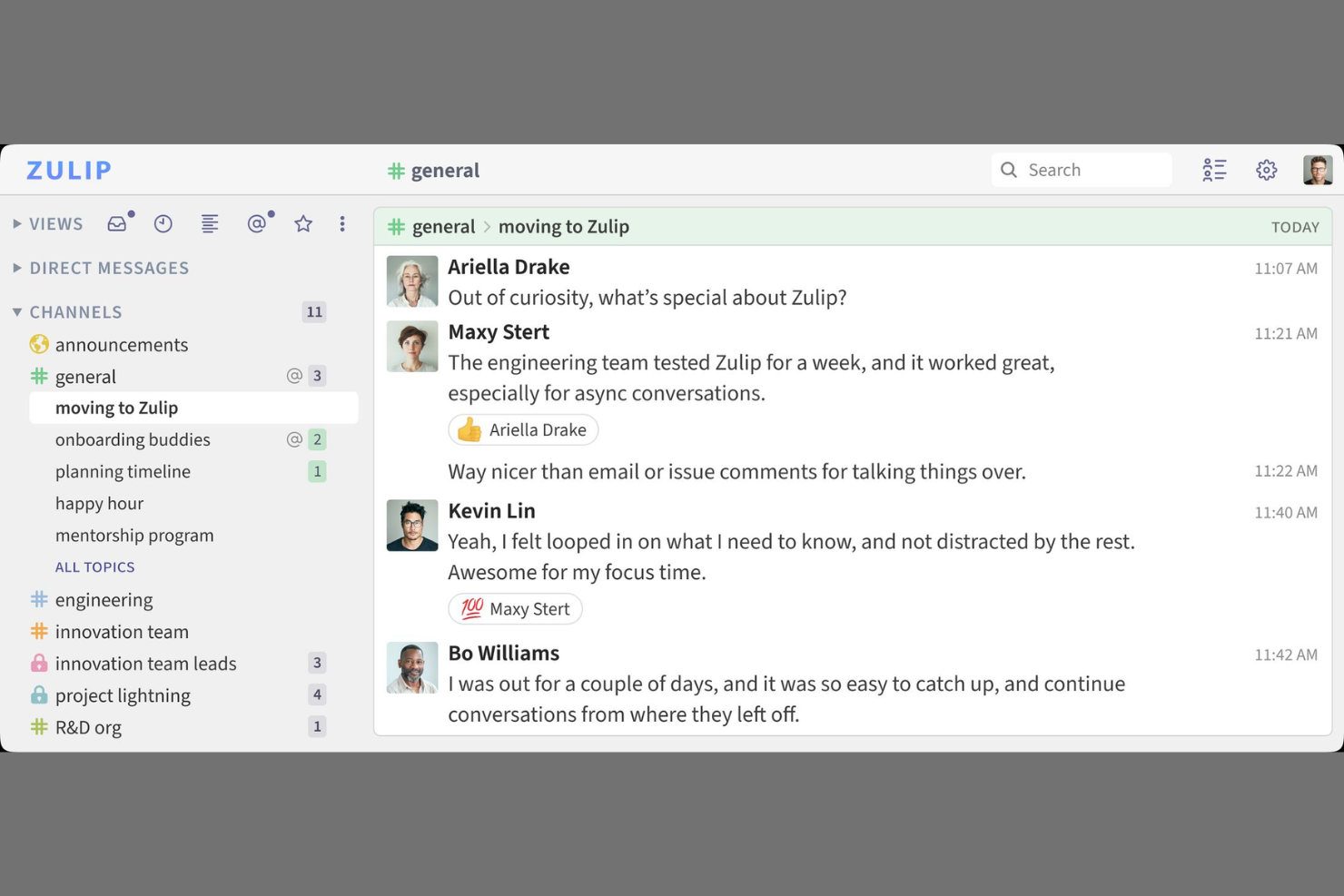
Zulip è un software di chat per team dedicato alla comunicazione interna che organizza i messaggi per argomento in flussi strutturati, supporta conversazioni di gruppo e private e offre accesso sia via web che da dispositivi mobili.
Per chi è ideale Zulip?
Team tecnologici distribuiti che necessitano di una comunicazione interna organizzata e basata su argomenti per progetti che coinvolgono diversi fusi orari.
Perché ho scelto Zulip
Ho scelto Zulip come uno dei migliori perché il mio team si affida alle sue intestazioni degli argomenti in stile email per mantenere ogni conversazione organizzata in thread di argomento, anche quando i messaggi vengono inviati a ore di distanza. Mi piace come la ricerca rapida degli argomenti e i flussi strutturati ci aiutino a rimanere focalizzati su più progetti contemporaneamente.
Funzionalità principali di Zulip
- Permessi dei flussi: Controlla chi può visualizzare o unirsi a specifici flussi di conversazione.
- Modifica dei messaggi: Modifica i messaggi inviati per maggiore chiarezza o correzioni entro una finestra temporale.
- Emoji e reazioni: Rispondi rapidamente ai messaggi con emoji e reazioni personalizzate.
- App desktop e mobile: Accedi alle conversazioni su Zulip da Windows, Mac, Linux, iOS e Android.
Integrazioni di Zulip
Zulip offre integrazioni native con GitHub, Jira, Trac, Sentry, Nagios, Jenkins, Travis CI e GitLab. È inoltre disponibile una API per integrazioni personalizzate.
Pros and Cons
Pros:
- Gli argomenti strutturati mantengono le discussioni organizzate ed evitano confusione
- La ricerca per argomenti funziona bene con volumi elevati di messaggi
- Open source con solide opzioni di controllo amministratore
Cons:
- Meno integrazioni native rispetto ai principali concorrenti
- Manca il monitoraggio automatico della salute del sistema

Pumble
Miglior cronologia messaggi gratuita e illimitata

Pumble è uno strumento di comunicazione per team che permette agli utenti di organizzare le conversazioni per canali, inviare messaggi diretti, condividere file, avviare chiamate vocali e video, e gestire le notifiche su applicazioni web e mobile.
Per chi è ideale Pumble?
Team in crescita e startup che desiderano una comunicazione interna conveniente e collaborativa senza limiti di messaggi.
Perché ho scelto Pumble
Ho scelto Pumble tra i migliori perché il mio team può consultare ogni messaggio passato senza preoccuparsi dei limiti di archiviazione. Mi piace avviare discussioni in thread, gestire i permessi dei canali e utilizzare le chiamate vocali e video integrate per i progetti di gruppo.
Funzionalità principali di Pumble
- Ruoli utente e permessi: Imposta permessi specifici per amministratori e utenti per un migliore controllo dello spazio di lavoro.
- Comunicazione basata su canali: Organizza le conversazioni del team per argomento, progetto o reparto in canali dedicati.
- Messaggi diretti di gruppo: Avvia chat di gruppo private per discussioni rapide a margine.
- Messaggi in evidenza: Metti in evidenza i messaggi importanti così che tutti nel canale possano accedervi rapidamente.
Integrazioni Pumble
Pumble offre integrazioni native con Google Calendar, Google Drive e Zapier, e mette a disposizione un'API per integrazioni personalizzate.
Pros and Cons
Pros:
- Cronologia messaggi ricercabile e illimitata per tutti gli utenti
- Controllo granulare su canali e notifiche
- Include chiamate vocali e video integrate
Cons:
- Meno integrazioni rispetto ai principali concorrenti
- Non dispone di utility di backup automatico

Chanty
I migliori suggerimenti basati sull'IA per la gestione delle attività

Chanty è uno strumento di comunicazione per team dedicato alla collaborazione interna che combina messaggistica a thread, gestione integrata delle attività, condivisione di file, suggerimenti basati sull'intelligenza artificiale e cronologia delle conversazioni ricercabile in un'unica app.
A chi è più adatto Chanty?
Piccole imprese e team di progetto che cercano una collaborazione semplice basata sulla chat con funzionalità di gestione delle attività arricchite dall'IA.
Perché ho scelto Chanty
Ho scelto Chanty tra le migliori opzioni perché ricevo suggerimenti generati dall'IA che aiutano a stabilire le priorità delle attività in tempo reale. Utilizzo la funzione 'da chat ad attività' di Chanty per trasformare le azioni da qualsiasi conversazione direttamente in compiti, mantenendo così la collaborazione focalizzata.
Caratteristiche principali di Chanty
- Conversazioni a thread: Mantieni i messaggi del team organizzati per argomento in thread dedicati.
- Chiamate audio e video: Avvia chiamate dirette o di gruppo istantaneamente all'interno di qualsiasi chat.
- Teambook: Visualizza conversazioni, attività e file condivisi in un unico hub di progetto.
- Messaggi in evidenza: Metti in risalto i messaggi importanti per accedervi facilmente in cima a ogni chat.
Integrazioni di Chanty
Chanty offre integrazioni native con Google Drive, Dropbox, Trello, GitHub, Asana, Jira e Zapier. È disponibile un'API per integrazioni personalizzate.
Pros and Cons
Pros:
- Suggerimenti per le attività potenziati dall'IA
- La conversione da chat ad attività semplifica il monitoraggio dei progetti
- Chiamate audio e video integrate in ogni chat
Cons:
- Controlli amministratore limitati per organizzazioni più grandi
- Nessun accesso per ospiti esterni al team

Flock
Le migliori liste condivise di cose da fare e promemoria integrati

Flock è una piattaforma di comunicazione per il lavoro in team che offre chat di gruppo, videoconferenze, condivisione di file, sondaggi, note e strumenti di produttività integrati, tutto in un'unica app.
Per chi è ideale Flock?
Team piccoli e medi che desiderano un hub centrale per la messaggistica, la collaborazione e una gestione rapida delle attività condivise.
Perché ho scelto Flock
Ho scelto Flock come uno dei miei strumenti preferiti perché mi piace poter creare liste di cose da fare condivise e impostare promemoria direttamente all'interno di una chat. Il mio team gestisce velocemente gli elementi delle checklist senza cambiare app e gli aggiornamenti in tempo reale tengono tutti allineati.
Funzionalità principali di Flock
- Chat in canali: Comunica con i team in canali pubblici o privati organizzati.
- Videoconferenze: Avvia chiamate video direttamente da qualsiasi finestra di chat.
- Condivisione di file: Carica e condividi documenti, immagini e altri file all'interno delle conversazioni.
- Sondaggi e note: Crea sondaggi rapidi o note collaborative per raccogliere feedback e idee.
Integrazioni di Flock
Flock offre integrazioni native con Google Drive, Dropbox, Trello, GitHub, Twitter, Asana e MailChimp. È disponibile un'API per integrazioni personalizzate.
Pros and Cons
Pros:
- Sondaggi integrati e note condivise per team
- Promemoria integrati per azioni di gruppo ed eventi
- Voce, video e condivisione schermo in un'unica app
Cons:
- Funzionalità di ricerca limitata per conversazioni passate
- Pochi controlli avanzati per organizzazioni di grandi dimensioni

Migliore integrazione con le app di Microsoft 365

Microsoft Teams è una piattaforma di comunicazione interna per le aziende che unisce chat, riunioni audio e video, spazi di lavoro condivisi, collaborazione su file e canali di team.
Per chi è più indicato Microsoft Teams?
Microsoft Teams è adatto alle organizzazioni che si affidano a Microsoft 365 per la collaborazione sui documenti, l'integrazione con il calendario e le comunicazioni unificate tra i reparti o i team distribuiti.
Perché ho scelto Microsoft Teams
Ho scelto Microsoft Teams come uno dei migliori perché il mio team può creare, modificare e condividere documenti Word o file Excel in tempo reale durante le chat o le riunioni. Mi piace come le notifiche di Teams si sincronizzino istantaneamente con Outlook, mantenendo tutti aggiornati su riunioni e avanzamento dei progetti.
Funzionalità principali di Microsoft Teams
- Comunicazione basata su canali: Suddividi le conversazioni lavorative in canali dedicati al team o al progetto.
- Videoconferenze: Organizza riunioni virtuali con condivisione schermo, sottotitoli in tempo reale e opzioni di registrazione.
- Cronologia chat persistente: Accedi in qualsiasi momento a conversazioni e allegati sia nei canali sia nelle chat.
- Gestione integrata delle attività: Assegna, segui e gestisci le attività con strumenti integrati come Planner e To Do.
Integrazioni di Microsoft Teams
Microsoft Teams offre integrazioni native nell'ecosistema Microsoft, inclusi Microsoft 365 e Azure. Sono disponibili anche integrazioni native con Trello, Dropbox, Salesforce, ServiceNow, GitHub e Adobe Creative Cloud. È disponibile un'API per integrazioni personalizzate.
Pros and Cons
Pros:
- Supporta la modifica nativa dei documenti
- Risposte in thread per discussioni focalizzate
- Cronologia chat persistente per un recupero rapido delle informazioni
Cons:
- Non offre opzioni di localizzazione dei dati
- Condivisione di file limitata al di fuori delle app di Microsoft 365

Migliori automazioni di workflow integrate
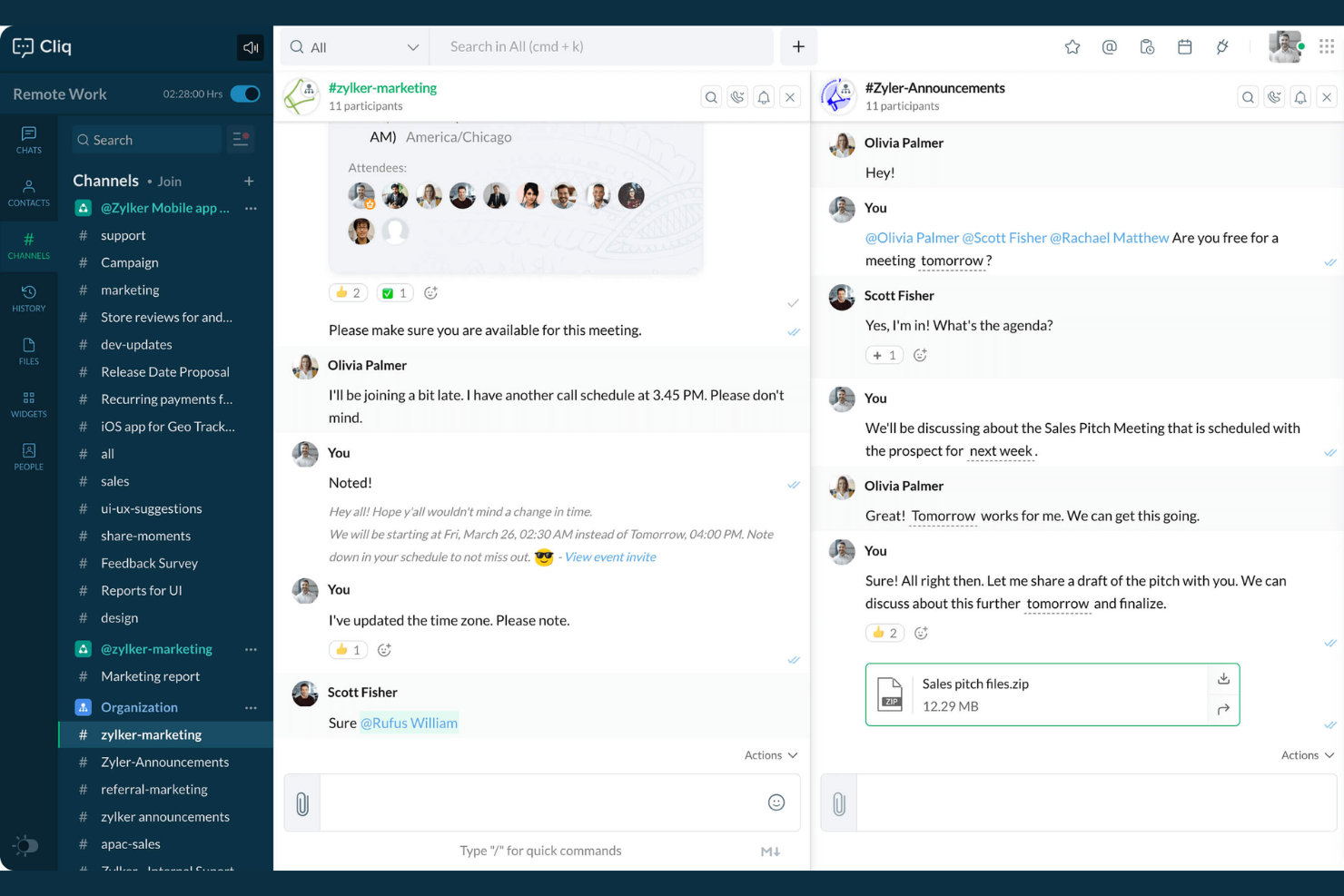
Zoho Cliq è un software di comunicazione interna che combina messaggistica in tempo reale, condivisione di file, canali, chiamate vocali e video, pianificazione di eventi e strumenti integrati per la collaborazione di squadra.
Per chi è più adatto Zoho Cliq?
Le piccole e medie imprese che necessitano di una chat centralizzata, automazione e collaborazione tra team distribuiti o ibridi.
Perché ho scelto Zoho Cliq
Ho scelto Zoho Cliq tra i migliori perché posso automatizzare azioni ripetitive tramite flussi di lavoro integrati come Bot e attività Command. Il mio team utilizza le azioni sui messaggi e i widget della piattaforma per attivare processi di approvazione e promemoria giornalieri direttamente all’interno delle chat.
Funzionalità principali di Zoho Cliq
- Conversazioni a thread: Organizza i messaggi in chat per argomento per una navigazione più facile.
- Chiamate video e audio: Avvia riunioni vocali o video direttamente da chat di gruppo o private.
- Gestione dei canali: Crea canali pubblici o privati per discussioni di team e progetti.
- Ricerca dei messaggi: Cerca nell’intera cronologia delle chat per trovare istantaneamente qualsiasi messaggio o file.
Integrazioni Zoho Cliq
Zoho Cliq offre integrazioni native con le app Zoho, tra cui Zoho CRM, Zoho Projects, Zoho People, Zoho Desk e Zoho Connect, oltre a supportare Google Workspace, Trello, GitHub e Zapier, e mette a disposizione un’API per integrazioni personalizzate.
Pros and Cons
Pros:
- I bot di workflow automatizzano le comunicazioni di routine
- I canali supportano discussioni strutturate e tematiche
- Videochat integrata per riunioni istantanee
Cons:
- Mancano strumenti di archiviazione dei messaggi
- Le notifiche dell'app mobile a volte sono in ritardo

Ideale per soluzioni di comunicazione open-source
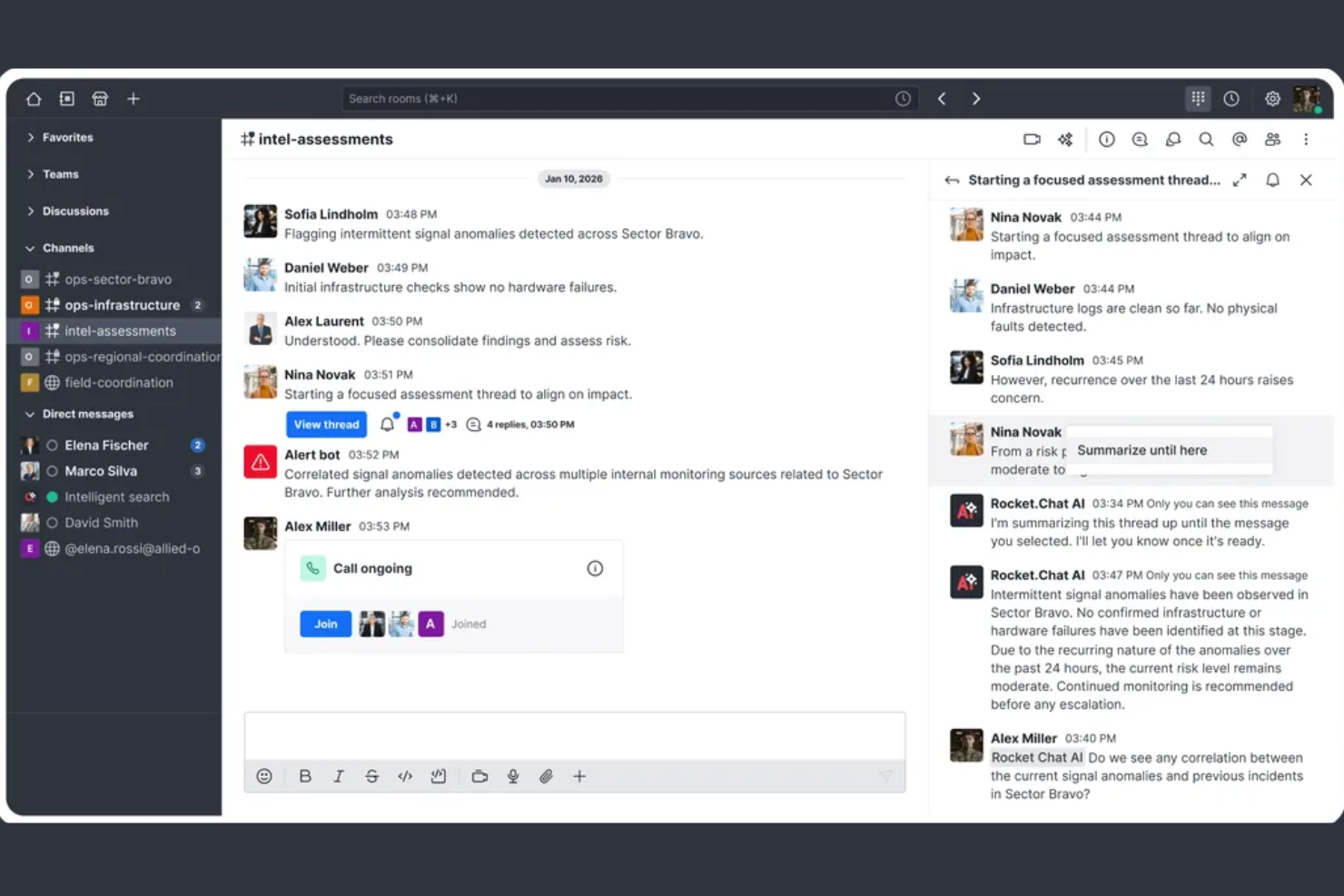
Rocket.Chat è una piattaforma di comunicazione interna open-source che consente messaggistica sicura, condivisione di file, chiamate vocali e video, oltre a un'ampia personalizzazione per i team che necessitano del pieno controllo sulla collaborazione all'interno del luogo di lavoro.
Per chi è più indicato Rocket.Chat?
Organizzazioni con esigenze rigorose di privacy dei dati o che desiderano personalizzare completamente l'ambiente di comunicazione in settori altamente regolamentati.
Perché ho scelto Rocket.Chat
Ho scelto Rocket.Chat tra i migliori perché posso ospitarlo autonomamente, implementare estensioni personalizzate e revisionare l'intero codice open-source. Mi piace avere un controllo preciso sulla residenza dei dati e la trasparenza per la messaggistica interna sensibile.
Caratteristiche principali di Rocket.Chat
- Messaggistica omnicanale: Gestisci chat, email, SMS e thread social da un'unica interfaccia.
- Conversazioni con thread: Organizza discussioni e risposte in thread di messaggi dedicati.
- Permessi basati sui ruoli: Imposta livelli specifici di accesso e moderazione per gli utenti.
- Crittografia end-to-end: Proteggi le comunicazioni riservate con protocolli di crittografia integrati.
Integrazioni Rocket.Chat
Rocket.Chat offre integrazioni native con Atlassian Jira, GitHub, GitLab, Slack, Zapier, Google Workspace, Microsoft 365, Salesforce e Zendesk. È disponibile un'API per integrazioni personalizzate.
Pros and Cons
Pros:
- Piattaforma open-source con opzioni di auto-gestione
- Permessi avanzati per utenti e spazi di lavoro
- Casella di posta omnicanale per tutte le comunicazioni
Cons:
- La configurazione e gli aggiornamenti richiedono competenze tecniche
- Richiede gestione manuale delle patch del server

Twist
La migliore messaggistica in thread per ridurre il disordine
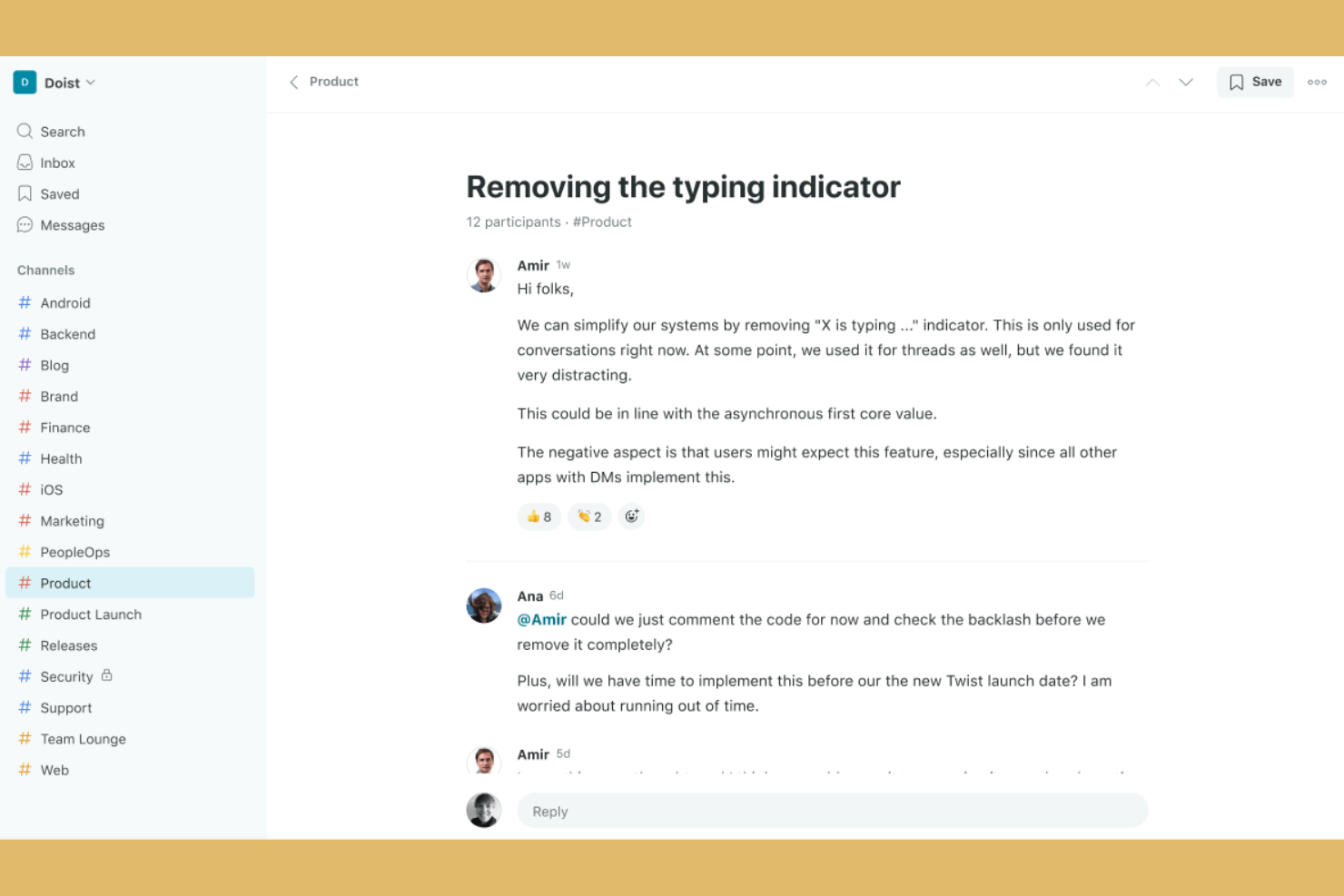
Twist è una piattaforma di comunicazione interna e collaborazione di team che organizza i messaggi in thread strutturati, consentendo discussioni mirate, condivisione di file e una facile ricerca trasversale tra i team.
Per chi è più indicato Twist?
Team che lavorano principalmente in modalità asincrona e aziende distribuite che desiderano discussioni interne organizzate e senza distrazioni.
Perché ho scelto Twist
Ho scelto Twist come una delle migliori soluzioni perché il mio team può mantenere le conversazioni chiare e organizzate grazie ai messaggi strutturati in thread persistenti. Mi piace il fatto che tutte le discussioni siano suddivise in thread all'interno dei canali, permettendoci di ridurre il rumore della chat e monitorare i progetti con vera trasparenza.
Funzionalità principali di Twist
- Impostazioni 'Non disturbare': Imposta le preferenze di notifica per bloccare le interruzioni durante il lavoro concentrato.
- Ricerca nella cronologia dei messaggi: Cerca istantaneamente in tutti i canali e thread conversazioni passate e file.
- Accesso ospite: Invita collaboratori esterni a canali specifici senza concedere l'accesso completo allo spazio di lavoro.
- Directory del team: Visualizza e naviga tra i membri dell'organizzazione con profili di team ricercabili.
Integrazioni di Twist
Twist offre integrazioni native con Google Drive, GitHub, Todoist, Zapier e feed RSS. È disponibile un'API per integrazioni personalizzate.
Pros and Cons
Pros:
- Le conversazioni in thread mantengono gli argomenti organizzati
- Favorisce la comunicazione asincrona tra fusi orari diversi
- Cronologia dei messaggi ricercabile per tutti i thread
Cons:
- Opzioni di personalizzazione delle notifiche limitate
- Poche opzioni di formattazione ed emoji integrate


Google Chat è una piattaforma di comunicazione interna che offre messaggistica diretta, conversazioni di gruppo, chat con discussioni a thread negli Spazi, ricerca di chat e condivisione di file per i team che utilizzano Google Workspace.
Per chi è più adatto Google Chat?
Google Chat è ideale per i team e le organizzazioni che già utilizzano Google Workspace e desiderano semplificare chat, messaggistica e collaborazione all'interno dell'ecosistema Google.
Perché ho scelto Google Chat
Ho scelto Google Chat tra i migliori perché il mio team condivide file di Drive direttamente nelle chat, avvia videochiamate con Google Meet tramite i messaggi e lavora in tempo reale su Documenti o Fogli all'interno di Google Workspace.
Caratteristiche principali di Google Chat
- Spazi per discussioni tematiche: Organizza conversazioni e file per progetto o argomento all'interno di Spazi dedicati.
- Fissaggio dei messaggi: Fissa i messaggi importanti nelle chat di gruppo o negli Spazi per una visibilità costante.
- Reazioni con emoji: Rispondi istantaneamente ai messaggi con reazioni a base di emoji.
- Risposte intelligenti: Rispondi velocemente ai messaggi utilizzando suggerimenti di risposta contestuali.
Integrazioni di Google Chat
Google Chat offre integrazioni native in tutto l'ecosistema Google Workspace, inclusi Gmail, Google Drive, Google Calendar, Google Meet e Google Docs. È disponibile una API per integrazioni personalizzate.
Pros and Cons
Pros:
- Gli Spazi mantengono le discussioni organizzate per argomento
- Conversazioni a thread nelle chat di gruppo
- Condivisione rapida di file Google Workspace
Cons:
- Opzioni limitate di esportazione e archiviazione delle chat
- Nessuna funzione avanzata di tracking dei progetti
Altri strumenti per la comunicazione interna
Ecco alcune opzioni aggiuntive di strumenti per la comunicazione interna che non sono state incluse nel mio elenco, ma che vale comunque la pena prendere in considerazione:
- Zoom Team Chat
Migliore esperienza unificata con riunioni video
- Slack
Ideale per organizzare le chat in canali mirati
- Ryver
La migliore gestione integrata di attività e flussi di lavoro
- ClickUp Chat
La migliore chat con monitoraggio integrato delle attività


Come Valuto gli Strumenti di Comunicazione Interna
Suddivido la mia valutazione in due livelli: la base su cui un team cross-funzionale fa affidamento ogni giorno—canali con discussioni per argomento, condivisione di file, integrazioni con strumenti di project management—e i fattori differenzianti che rendono uno strumento la scelta giusta.
Funzionalità di Base (Requisiti Indispensabili per Questa Lista)
Quando seleziono gli strumenti per la mia lista, valuto ciascuno su una scala da 0 (funzionalità assente) a 5 (eccelle in quest'area) per ogni funzionalità di base elencata di seguito. Poi calcolo il punteggio totale dello strumento come percentuale. Ogni strumento deve raggiungere un punteggio totale minimo del 65% per essere preso in considerazione.
- Messaggistica in Tempo Reale: Valuto se lo strumento supporta conversazioni organizzate per argomenti, menzioni e reazioni—funzionalità che aiutano a mantenere ordinata la discussione di uno sprint invece di seppellire tutto in una sola chat.
- Canali e Spazi di Gruppo: I team di progetto necessitano di spazi dedicati per ciascun flusso di lavoro, quindi cerco canali pubblici/privati con permessi chiari, accessi ospite e opzioni di archiviazione.
- Condivisione e Collaborazione su File: Verifico che i team possano condividere specifiche, bozze o documenti in linea con anteprime e controllo versione, senza dover passare continuamente tra la chat e un drive separato.
- Comunicazione Video e Vocale: Brevi riunioni rapide sostituiscono molte riunioni inutili, quindi valuto se uno strumento offre condivisione dello schermo, registrazione e chiamate di gruppo in modo nativo o solo tramite componenti aggiuntivi.
- Ricerca e Cronologia dei Messaggi: Quando un responsabile chiede perché una decisione è stata presa tre mesi fa, la ricerca deve essere rapida nel trovare quella discussione—cerco filtri per data, persona e canale.
- Integrazioni con Terze Parti: Controllo le connessioni native con strumenti di PM come Jira, Asana e Trello, così gli aggiornamenti e le notifiche dei task fluiscono direttamente nelle conversazioni, senza dover copiare e incollare manualmente.
Una volta che ho una lista di strumenti che soddisfano questi criteri, considero ciò che distingue ciascuna piattaforma.
Fattori Differenzianti (Cosa Distingue i Fornitori)
Ecco come confronto e metto a confronto i vari fornitori:
Funzionalità Distintive
I riassunti di thread generati da AI sono un grande elemento di differenziazione—quando gestisci tre progetti e ti perdi un'intera giornata di discussioni, un riepilogo del canale è molto meglio che scorrere centinaia di messaggi. Valuto anche se uno strumento permette di trasformare direttamente un messaggio chat in un'attività su Jira o Asana. L'automazione del flusso di lavoro è importante: cerco trigger che inviino promemoria o aggiornamenti di stato quando una milestone cambia, così il team rimane allineato senza dover fare seguiti manuali.
Oltre Le Funzionalità
Le certificazioni di sicurezza e conformità come SOC 2 e ISO 27001 sono fondamentali quando il tuo team gestisce roadmap di prodotto sensibili o dati di clienti. Valuto anche quanto un tool si integri nell'ecosistema più ampio di project management—se si sincronizza in modo bidirezionale con piattaforme come Jira o se invia solo notifiche monodirezionali. La trasparenza dei prezzi è un altro fattore importante, soprattutto per quanto riguarda le politiche sugli utenti ospiti, che possono aumentare i costi quando coinvolgi regolarmente collaboratori esterni o stakeholder non interni.
Come scegliere gli strumenti per la comunicazione interna
È facile perdersi in lunghi elenchi di funzionalità e strutture tariffarie complesse. Per aiutarti a mantenere la concentrazione mentre affronti il tuo processo di selezione del software, ecco una lista di fattori da tenere a mente:
| Fattore | Cosa considerare |
|---|---|
| Scalabilità | Lo strumento supporterà il tuo team se raddoppierà le sue dimensioni? Informati sui limiti per gli utenti, sui limiti dei canali e sui controlli amministrativi. |
| Integrazioni | Si collega nativamente ai tuoi sistemi principali (ad esempio, gestione dei progetti, repository del codice e calendari)? Verificalo prima dell'acquisto. |
| Personalizzazione | Puoi adattare notifiche, flussi di lavoro e autorizzazioni ai processi del tuo team, invece di affidarti solo alle impostazioni predefinite? |
| Facilità d'uso | Tutti i membri del team lo adotteranno rapidamente? Prova a fare una dimostrazione con persone di reparti e livelli tecnici diversi. |
| Implementazione e onboarding | Cosa serve per coinvolgere tutti? Cerca configurazione guidata, assistenza nella migrazione e contenuti formativi. |
| Costo | Ci sono costi nascosti per gli utenti attivi, gli archivi o le funzionalità premium? Prevedi il tuo utilizzo nel tempo per evitare sorprese. |
| Misure di sicurezza | Lo strumento supporta SSL, SSO, autorizzazioni granulari e crittografia dei dati? Valuta come protegge le conversazioni sensibili. |
| Disponibilità dell'assistenza | Quando si verificano problemi di assistenza, è disponibile un aiuto 24 ore su 24, 7 giorni su 7? Controlla i canali di supporto e i tempi di risposta, soprattutto in caso di interruzioni critiche. |
Cosa sono gli strumenti per la comunicazione interna?
Gli strumenti per la comunicazione interna sono piattaforme digitali che consentono ai team di inviare messaggi, condividere file e collaborare all'interno di un'organizzazione. Queste piattaforme funzionano come moderni strumenti di messaggistica istantanea che aiutano i team a organizzare le discussioni, coordinare i flussi di lavoro e conservare la documentazione in canali centralizzati e ricercabili. Supportano la comunicazione in tempo reale e asincrona, facilitando la distribuzione degli aggiornamenti aziendali, la condivisione dei podcast aziendali e l'allineamento e l'informazione di tutti sui progetti, nei reparti o nelle diverse sedi.
Funzionalità degli strumenti di comunicazione interna
Quando selezioni gli strumenti di comunicazione interna, presta attenzione alle seguenti funzionalità chiave:
- Messaggistica diretta: consente conversazioni private, individuali, tra i membri del team per domande rapide, argomenti sensibili o discussioni collaterali, senza trasmettere i messaggi a un gruppo più ampio.
- Canali di chat di gruppo: permettono agli utenti di creare canali o stanze per team, progetti o argomenti specifici, mantenendo le conversazioni organizzate e facili da trovare.
- Condivisione di file: consente di caricare, condividere e accedere facilmente a documenti, immagini o altri file direttamente all'interno della piattaforma di comunicazione, spesso con supporto per anteprime e cronologia delle versioni.
- Cronologia dei messaggi consultabile: offre solide funzionalità di ricerca, così gli utenti possono trovare rapidamente messaggi, documenti o collegamenti passati senza dover esaminare registri delle chat interminabili.
- Notifiche e menzioni: offre avvisi personalizzabili per garantire che i membri del team visualizzino gli aggiornamenti importanti o ricevano immediata attenzione quando necessario.
- Conversazioni organizzate per discussioni: supporta la suddivisione delle discussioni in fili specifici per argomento all'interno di un canale, aiutando a prevenire la confusione e a mantenere le conversazioni più organizzate.
- Autorizzazioni e controlli degli accessi: consentono agli amministratori di definire chi può visualizzare, pubblicare o gestire conversazioni e file, garantendo la privacy e livelli di accesso appropriati.
- Accessibilità multipiattaforma: offre un'esperienza coerente sul web e sui dispositivi desktop e mobili, così i team possono comunicare ovunque si trovino.
- Chiamate video e audio: integra funzionalità di riunione vocale e video in tempo reale, insieme a strumenti di lavagna virtuale, per facilitare discussioni più approfondite o brevi momenti di confronto faccia a faccia.
- Integrazioni con altri strumenti: si connette a calendari, sistemi di gestione delle attività o di archiviazione dei file, consentendo agli utenti di centralizzare il lavoro e ricevere aggiornamenti da più piattaforme all'interno dello strumento di comunicazione.
Vantaggi degli strumenti di comunicazione interna
L'implementazione di strumenti di comunicazione interna offre diversi vantaggi al tuo team e alla tua azienda. Eccone alcuni che puoi aspettarti:
- Processo decisionale più rapido: le conversazioni centralizzate velocizzano la collaborazione e riducono i ritardi rispetto ai tradizionali scambi di messaggi di posta elettronica e alla posta elettronica interna standard.
- Maggiore allineamento del team: i canali basati sugli argomenti e le discussioni organizzate per fili consentono a tutti di seguire facilmente gli aggiornamenti dei progetti, sostituire le lunghe riunioni plenarie e dare seguito alle attività da svolgere.
- Migliore conservazione delle conoscenze: la cronologia dei messaggi consultabile e i file condivisi aiutano i team a raccogliere idee, discussioni, decisioni e traguardi di riconoscimento tra colleghi per riferimento futuro.
- Maggiore flessibilità per il lavoro da remoto: l'accesso multipiattaforma e le notifiche in tempo reale mantengono connessi i team distribuiti o ibridi ovunque si trovino.
- Maggiore sicurezza delle informazioni: le autorizzazioni e i controlli degli accessi danno agli amministratori la certezza che le conversazioni e i file sensibili rimangano protetti.
- Riduzione del rumore comunicativo: funzionalità come le menzioni e le notifiche dettagliate aiutano i membri del team a concentrarsi sulle conversazioni più rilevanti.
- Integrazione semplificata dei flussi di lavoro: le integrazioni native con calendari, strumenti di gestione delle attività e sistemi di archiviazione dei file riuniscono i flussi di lavoro in un unico luogo, fornendo metriche utili sui dati per monitorare il coinvolgimento.
Costi e prezzi degli strumenti di comunicazione interna
La selezione degli strumenti di comunicazione interna richiede una conoscenza dei vari modelli e piani tariffari disponibili. I costi variano in base alle funzionalità, alle dimensioni del team, agli elementi aggiuntivi e ad altro ancora. La tabella seguente riassume i piani più comuni, i relativi prezzi medi e le funzionalità generalmente incluse nelle soluzioni di strumenti di comunicazione interna:
Tabella di confronto dei piani per gli strumenti di comunicazione interna
| Tipo di piano | Prezzo medio | Funzionalità comuni |
|---|---|---|
| Piano gratuito | $0 | Chat di gruppo di base, condivisione di file limitata, cronologia consultabile con limitazioni e app mobili e desktop essenziali. |
| Piano personale | $5–$8/utente/mese | Messaggistica illimitata, spazio di archiviazione dei file ampliato, ricerca nella cronologia dei messaggi, integrazioni di base e supporto limitato. |
| Piano aziendale | $10–$15/utente/mese | Ricerca avanzata, controlli amministrativi, autorizzazioni personalizzate, supporto prioritario e più integrazioni e flussi di lavoro. |
| Piano per aziende | $20–$30/utente/mese | Sicurezza avanzata, strumenti per la conformità, supporto premium, funzionalità amministrative avanzate e integrazioni personalizzabili. |
Domande frequenti sugli strumenti di comunicazione interna
Ecco alcune risposte alle domande comuni sugli strumenti di comunicazione interna:
Quali sono le principali difficoltà che i team affrontano quando adottano strumenti di comunicazione interna?
Le difficoltà comuni includono il superamento della resistenza iniziale ai nuovi flussi di lavoro, la definizione di linee guida chiare per l’utilizzo dei canali e la gestione dell’eccesso di notifiche. Quando definiscono una strategia di comunicazione interna, le organizzazioni spesso faticano a superare i profondi silos informativi e a mantenere un forte coinvolgimento dei dipendenti nei diversi reparti, soprattutto quando coordinano un modello di lavoro ibrido. Pianificare la formazione, incoraggiare il feedback regolare dei dipendenti e stabilire norme di comunicazione chiare può facilitare l’adozione, rafforzando al contempo la cultura aziendale complessiva e migliorando il lavoro di squadra quotidiano.
Gli strumenti di comunicazione interna funzionano per organizzazioni di qualsiasi dimensione?
Sì, la maggior parte degli strumenti si adatta bene, dai piccoli team alle grandi aziende. Sono progettati per soddisfare esigenze di comunicazione diverse, sia che si gestisca il personale d’ufficio sia che si gestiscano lavoratori in prima linea che non lavorano alla scrivania. La scelta degli strumenti di comunicazione interna giusti garantisce che il software offra la gestione degli utenti, un livello di sicurezza adeguato e piani flessibili adatti alle dimensioni attuali e future del team, assicurando una comunicazione interna efficace a ogni livello di scala.
In che modo gli strumenti di comunicazione interna possono supportare la collaborazione asincrona?
Gli strumenti di comunicazione interna consentono il lavoro asincrono permettendo ai team di lasciare messaggi, file e aggiornamenti che gli altri possono esaminare e a cui possono rispondere quando sono disponibili. Questo facilita la condivisione delle informazioni tra fusi orari diversi durante le attività quotidiane. Le discussioni organizzate in thread, i moderni strumenti di collaborazione e gli archivi consultabili aiutano a mantenere tutti allineati senza dover essere online contemporaneamente, trasformando la piattaforma in un hub centrale per la condivisione e la gestione delle conoscenze.
Cosa è necessario valutare in termini di sicurezza negli strumenti di comunicazione interna?
Verifica che lo strumento offra crittografia, autenticazione efficace, autorizzazioni e opzioni di conformità, soprattutto se lo colleghi a piattaforme esistenti come SharePoint o a un social network interno. È inoltre opportuno esaminare il modo in cui il fornitore gestisce la privacy dei dati, come protegge la comunicazione in tempo reale e se offre registri di controllo per tutelare la comunicazione dei dipendenti e i dati aziendali sensibili.
Gli strumenti di comunicazione interna possono integrarsi con altri software aziendali?
Sì, molti strumenti di comunicazione interna offrono integrazioni con strumenti di gestione dei progetti, app per la produttività e piattaforme di archiviazione dei file. Questo aiuta a centralizzare le attività e le notizie aziendali, facilitando la gestione del lavoro da parte dei team senza dover passare da un’app all’altra. Collegando i principali canali di comunicazione a questo hub intuitivo per gli utenti, puoi distribuire le comunicazioni interne, pubblicare annunci destinati a tutta l’azienda e diffondere aggiornamenti importanti sull’esperienza dei dipendenti all’intero team da un unico luogo.