

I 10 migliori software di gestione dei progetti automobilistici per il 2026

10 Selezione dei migliori software di gestione dei progetti automobilistici


I migliori software di gestione dei progetti automobilistici ti aiutano a gestire pianificazioni, budget, requisiti di conformità e comunicazioni in un'unica piattaforma. Senza di essi, rischi ritardi dovuti a scadenze non rispettate, sforamenti dei costi dovuti a una gestione inadeguata del budget ed errori causati da aggiornamenti dispersi tra email e fogli di calcolo. Questo rende più difficile completare il lavoro nei tempi previsti e rispettando l'ambito del progetto.
La soluzione giusta ti consente di centralizzare le attività, automatizzare il monitoraggio delle operazioni di routine e migliorare la visibilità tra i team. Ho utilizzato la mia esperienza con decine di strumenti e il lavoro pratico con i team di progetto per identificare le migliori piattaforme, così da aiutarti a migliorare la realizzazione dei progetti e mantenere risultati costanti e di alta qualità.
Perché fidarsi dei nostri consigli sui software
Il nostro team testa e recensisce software dal 2012. In quanto project manager noi stessi, sappiamo quanto sia difficile — e importante — scegliere il software giusto.
Per questa guida, abbiamo valutato gli strumenti attraverso test pratici e ricerche indipendenti, assegnando un punteggio agli strumenti in base ai nostri criteri di selezione. Ci basiamo inoltre sulle competenze di leader di pensiero del settore e di professionisti attivi nella gestione dei progetti.
Le nostre recensioni riflettono il nostro giudizio editoriale umano, non un discorso di vendita.
Revisori esperti:
Tabella comparativa dei software di gestione dei progetti automobilistici
Questa tabella comparativa riassume i dettagli dei prezzi delle mie migliori selezioni di software di gestione dei progetti automobilistici:
| Tool | Best For | Trial Info | Price | ||
|---|---|---|---|---|---|
| 1 | Ideale per la condivisione organizzata di file | Prova gratuita di 14 giorni + demo gratuita disponibile | Da $8/utente/mese (fatturazione annuale) | Website | |
| 2 | Ideale per la pianificazione dei team | Prova gratuita di 30 giorni disponibile | Da $7/utente/mese | Website | |
| 3 | Ideale per il monitoraggio dell'inventario | Demo gratuita disponibile | Da $179/mese (fatturazione annuale) | Website | |
| 4 | Ideale per la comunicazione con i clienti | Demo gratuita disponibile | A partire da $179/mese | Website | |
| 5 | Ideale per officine di riparazione veicoli pesanti | Demo gratuita disponibile | Prezzo su richiesta | Website | |
| 6 | Ideale per strumenti di marketing integrati | Demo gratuita disponibile | Da $179/mese (fatturazione annuale) | Website | |
| 7 | Ideale per la gestione delle attività | Prova gratuita di 14 giorni e demo gratuita disponibili | Da $20/utente/mese | Website | |
| 8 | Ideale per strumenti di reportistica avanzata | Demo gratuita disponibile | A partire da $600/mese | Website | |
| 9 | Ideale per interfaccia facile da usare | Demo gratuita disponibile | Da $179/mese | Website | |
| 10 | Ideale per piccole officine di riparazione | Piano gratuito disponibile | Da $39.99/mese | Website |
Recensione dei migliori software di gestione dei progetti automobilistici
Leggi un riepilogo dettagliato di ciascuna delle mie scelte tra i migliori software di gestione dei progetti automobilistici. Analizzo funzionalità principali, vantaggi e svantaggi, integrazioni e casi d’uso ideali, così puoi trovare la soluzione più adatta alle tue esigenze.

Workzone
Ideale per la condivisione organizzata di file

Workzone è una piattaforma di gestione dei progetti per team di marketing, operazioni e IT che copre il tracciamento delle attività, la gestione del carico di lavoro, la revisione e l'approvazione dei file, la raccolta delle richieste e la collaborazione tra team.
Per chi è ideale Workzone?
Workzone è una buona scelta per team di medie dimensioni in settori come la produzione, il marketing e le operazioni che necessitano di una supervisione strutturata dei progetti su più flussi di lavoro.
Perché ho scelto Workzone
Ho incluso Workzone tra le mie migliori scelte per la capacità delle sue funzioni di gestione documentale e degli asset di gestire l'organizzazione dei file nei progetti multi-team. Nella gestione di progetti automotive, ti trovi spesso a gestire specifiche tecniche, file di design, documenti di conformità e materiali dei fornitori su diversi flussi di lavoro. Workzone consente di archiviare i file direttamente nei progetti utilizzando una gerarchia di cartelle strutturata, con visualizzazione a galleria, controllo delle versioni dei file caricati e strumenti integrati di annotazione e revisione. Il flusso di lavoro delle approvazioni è collegato direttamente a questi asset memorizzati, così le revisioni non si disperdono tra le email.
Funzionalità principali di Workzone
- Pianificazione con diagramma di Gantt: Crea e modifica le tempistiche dei progetti con un diagramma di Gantt drag-and-drop che mostra dipendenze tra attività e percorso critico.
- Gestione del carico di lavoro: Visualizza la capacità del team su tutti i progetti attivi per individuare sovraccarichi e riassegnare compiti prima che le scadenze vengano mancate.
- Moduli di raccolta richieste progetto: Acquisisci le richieste di lavoro in arrivo tramite moduli personalizzabili che confluiscono direttamente nella tua coda progetti.
- Dashboard multi-progetto: Monitora stato delle attività, traguardi e progressi su più progetti contemporaneamente da una vista unica di reportistica.
Integrazioni Workzone
Workzone offre integrazioni native con Microsoft Teams, Slack, Google Drive e OneDrive. Si collega inoltre a Zapier e offre una REST API per integrazioni personalizzate.
Pros and Cons
Pros:
- Log di attività dettagliati tracciano ogni modifica al progetto
- Sei tipi di utenti consentono il controllo preciso degli accessi
- Annotazione dei file e flussi di lavoro approvativi integrati
Cons:
- Nessuna app mobile dedicata disponibile
- I filtri dei report non consentono confronti anno su anno
New Product Updates from Workzone

Workzone Enterprise Adds Multi-Stage Approval Workflows
Workzone Enterprise now includes Approval Workflows, enabling multi-stage document approvals to standardize complex processes and reduce manual effort. For more information, visit Workzone's official site.
 .
.
Float
Ideale per la pianificazione dei team
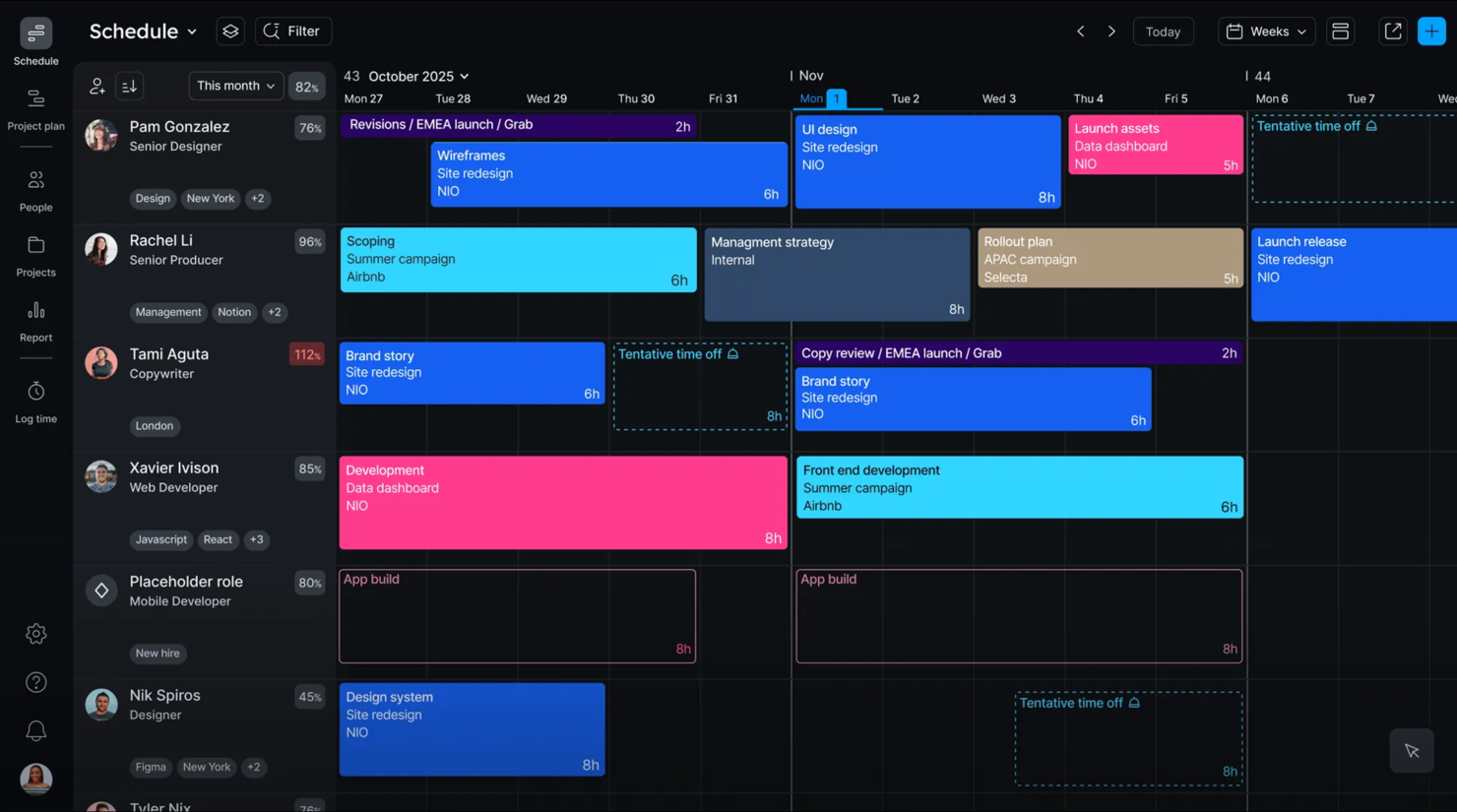
Float è un software di gestione delle risorse e pianificazione pensato per i team che devono organizzare orari e risorse. Offre strumenti per allocare le risorse, monitorare il tempo e pianificare i progetti.
Perché ho scelto Float: Float è perfetto per la pianificazione dei team e consente di pianificare e allocare le risorse. Puoi creare e modificare i programmi in tempo reale per mantenere il team sulla giusta strada. Il software offre funzionalità di rilevamento del tempo che aiutano a monitorare l'avanzamento dei progetti e la produttività. L'interfaccia intuitiva rende facile visualizzare il carico di lavoro del team e prendere decisioni consapevoli.
Funzionalità principali e integrazioni:
Funzionalità includono uno strumento di pianificazione drag-and-drop che semplifica la progettazione e le modifiche. Puoi anche utilizzare la funzione di reportistica per ottenere informazioni sull'utilizzo delle risorse e sulle tempistiche dei progetti.
Le integrazioni includono Slack, Google Calendar, Outlook, Asana, Trello, Jira e Zapier.
Pros and Cons
Pros:
- Pianificazione drag-and-drop semplice
- Aggiornamenti in tempo reale
- Interfaccia intuitiva disponibile
Cons:
- Alcune funzionalità possono risultare complesse
- Curva di apprendimento per i nuovi utenti


Tekmetric è un software di gestione per officine automobilistiche che necessitano di una gestione efficiente dell'inventario. Aiuta consulenti di servizio e proprietari di officine a tenere traccia dell'inventario, gestire gli appuntamenti e fatturare i clienti.
Perché ho scelto Tekmetric: Tekmetric si distingue nel monitoraggio dell'inventario. Puoi controllare l'utilizzo dei ricambi e impostare avvisi per scorte basse, così da non restare mai senza articoli essenziali. La funzione di ispezione digitale del veicolo ti permette di fornire report dettagliati ai tuoi clienti. Inoltre, la fatturazione automatizzata semplifica il processo di emissione delle fatture e fa risparmiare tempo prezioso al tuo team.
Funzionalità principali & integrazioni:
Funzionalità includono uno strumento di reportistica completo che ti permette di analizzare le prestazioni dell’officina e identificare aree di miglioramento. La piattaforma di comunicazione con il cliente mantiene i clienti informati e coinvolti tramite aggiornamenti via SMS ed email.
Integrazioni includono CARFAX, Epicor, Bolt On Technology, ALLDATA e PartsTech.
Pros and Cons
Pros:
- Monitoraggio accurato dell'inventario
- Ispezioni digitali dettagliate dei veicoli
- Capacità di reportistica completa
Cons:
- Alcune funzionalità possono essere complesse
- Accesso offline limitato


Shopmonkey è un software di gestione per officine automobilistiche rivolto alle autofficine, che si concentra sul miglioramento delle interazioni con i clienti. Si rivolge a titolari e responsabili di officine e aiuta a semplificare i flussi di lavoro, gestire gli appuntamenti e migliorare la comunicazione con i clienti.
Perché ho scelto Shopmonkey: Shopmonkey eccelle nel facilitare la comunicazione con i clienti. Puoi inviare aggiornamenti automatici e promemoria ai tuoi clienti per tenerli informati durante tutto il processo di riparazione. Il sistema di messaggistica integrato ti consente di interagire in tempo reale e il software offre anche strumenti per gestire la cronologia dei clienti, così potrai offrire un servizio personalizzato.
Funzionalità e integrazioni di rilievo:
Funzionalità: includono uno strumento di ispezione digitale che fornisce report dettagliati a stakeholder e clienti, aiutando a costruire fiducia. Puoi anche utilizzare la funzionalità di pianificazione per ottimizzare il flusso di lavoro e ridurre i tempi morti.
Integrazioni: includono QuickBooks, CARFAX e PartsTech.
Pros and Cons
Pros:
- Aggiornamenti automatici per i clienti
- Sistema di messaggistica in tempo reale
- Gestione completa della cronologia clienti
Cons:
- Richiede internet per funzionalità complete
- Alcune funzionalità possono risultare complesse

Fullbay è un software gestionale per officine specializzate in veicoli pesanti, pensato per aumentare l'efficienza operativa. Aiuta i titolari e i responsabili di officina a semplificare la fatturazione, la gestione dei ricambi e il monitoraggio degli ordini di riparazione.
Perché ho scelto Fullbay: Fullbay è stato progettato specificamente per le officine di riparazione veicoli pesanti. Puoi gestire gli ordini di riparazione in modo efficiente e assicurarti che il tuo team sia sempre aggiornato su ogni lavoro. Il software offre funzionalità di gestione dei ricambi per monitorare magazzino e ordini, prevenendo ritardi. Il sistema di fatturazione intuitivo ti aiuta a mantenere registri finanziari accurati.
Funzionalità e integrazioni principali:
Funzionalità includono un portale clienti che permette ai clienti di visualizzare la cronologia dei servizi e monitorare le riparazioni, oltre a una funzione di monitoraggio dei tecnici per controllare produttività e avanzamento dei lavori.
Integrazioni includono QuickBooks, FleetNet, MOTOR e Interstate Billing Service.
Pros and Cons
Pros:
- Su misura per officine di veicoli pesanti
- Gestione efficiente degli ordini di riparazione
- Gestione ricambi completa
Cons:
- Curva di apprendimento per le funzioni avanzate
- Richiede una connessione Internet per tutte le funzionalità


AutoLeap è un software gestionale per officine di riparazione auto e può aiutare con la pianificazione, la fatturazione e la gestione delle relazioni con i clienti. Si rivolge ai proprietari di officine che desiderano migliorare le operazioni aziendali e il coinvolgimento dei clienti.
Perché ho scelto AutoLeap: Gli strumenti di marketing integrati di AutoLeap offrono un vantaggio unico alle officine che vogliono rafforzare le interazioni con i clienti. Puoi automatizzare i follow-up e i promemoria per mantenere i clienti coinvolti. Il software include anche un sistema di gestione delle relazioni con i clienti che consente di tracciare le interazioni e le preferenze, così da poter offrire un servizio personalizzato e aumentare i tassi di fidelizzazione.
Funzionalità principali & integrazioni:
Funzionalità includono il monitoraggio in tempo reale e gli avvisi per gestire efficacemente l'inventario, oltre a un pianificatore di appuntamenti facile da usare per mantenere l'officina organizzata e ridurre i tempi morti.
Integrazioni includono QuickBooks, CARFAX e PartsTech.
Pros and Cons
Pros:
- Strumenti di marketing integrati ed efficaci
- Gestione relazioni con i clienti solida
- Follow-up clienti automatizzati
Cons:
- La configurazione iniziale può richiedere tempo
- Curva di apprendimento per i nuovi utenti

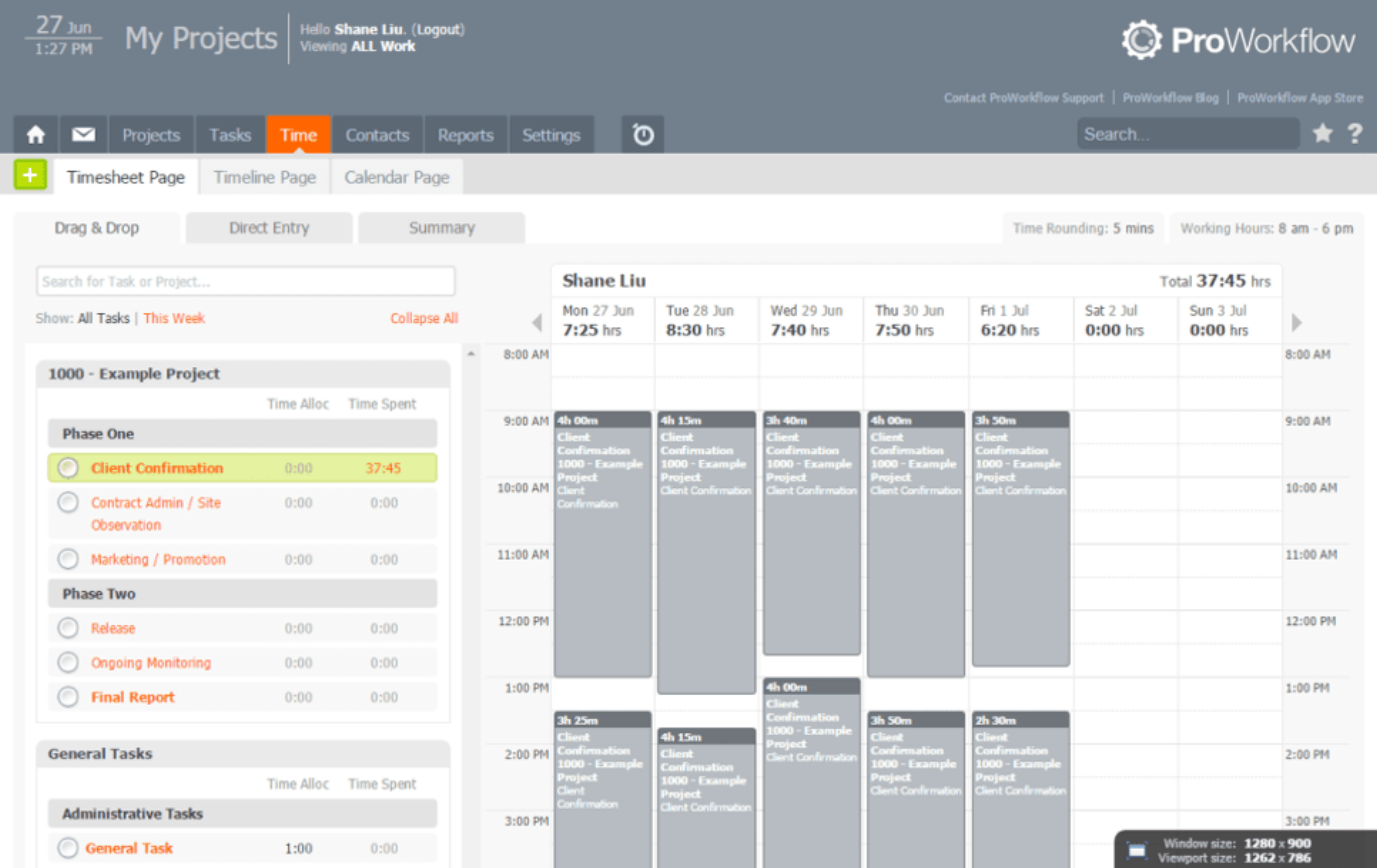
ProWorkflow è uno strumento di gestione progetti per aziende (comprese quelle automobilistiche) che necessitano di una gestione efficiente delle attività. Aiuta project manager e membri del team a organizzare i compiti, monitorare il tempo e gestire le risorse.
Perché ho scelto ProWorkflow: ProWorkflow eccelle nella gestione delle attività ed è ideale per i team che devono rimanere organizzati. Puoi assegnare compiti, impostare scadenze e monitorare i progressi in un unico posto. La funzione di monitoraggio del tempo consente di vedere come la tua squadra utilizza il proprio tempo, aiutando a migliorare la produttività, mentre gli strumenti di allocazione delle risorse permettono di concentrare gli sforzi del team.
Caratteristiche principali & integrazioni:
Caratteristiche includono una dashboard personalizzabile che fornisce una visione chiara dei tuoi progetti. Puoi anche utilizzare gli strumenti di reportistica per ottenere approfondimenti sulle prestazioni del team.
Integrazioni includono Xero, QuickBooks, FreshBooks, MYOB, Box, Dropbox, Google Drive, Microsoft OneDrive e Zapier.
Pros and Cons
Pros:
- Forti capacità di gestione delle attività
- Funzionalità efficaci di monitoraggio del tempo
- Gestione efficiente delle risorse
Cons:
- La configurazione iniziale può essere complessa
- Curva di apprendimento per le funzionalità avanzate

Shop-Ware è un software di gestione per officine automobilistiche rivolto a titolari e responsabili di officine. Aiuta a migliorare l'efficienza del flusso di lavoro e fornisce approfondimenti dettagliati tramite reportistica avanzata.
Perché ho scelto Shop-Ware: Shop-Ware è specializzato in strumenti di reportistica avanzata che offrono una visione approfondita delle tue operazioni. Funzionalità come analisi in tempo reale e report personalizzabili ti permettono di monitorare le performance e prendere decisioni consapevoli. La funzione di ispezione digitale dei veicoli migliora la trasparenza con i clienti e gli strumenti di gestione dell'inventario mantengono il magazzino ordinato così sei sempre preparato.
Caratteristiche salienti & integrazioni:
Funzionalità includono una piattaforma per la comunicazione con i clienti che semplifica le interazioni e funzionalità di gestione del flusso di lavoro che aumentano l'efficienza. Questo ti aiuta a gestire l'officina in modo efficace.
Integrazioni includono PayPal, Stripe, Sendcloud, Scaleflex, Brevo, Clerk.io e Flowbox.
Pros and Cons
Pros:
- Analisi in tempo reale
- Ispezioni digitali
- Gestione dell'inventario efficace
Cons:
- Può risultare inizialmente complesso
- Il processo di configurazione può essere lungo


Shop Boss è un software di gestione officine automobilistiche pensato per i titolari che cercano un sistema intuitivo. Ti aiuta a gestire ordini di riparazione, fatturazione e comunicazioni con i clienti.
Perché ho scelto Shop Boss: L'interfaccia intuitiva di Shop Boss lo rende accessibile a team di tutte le dimensioni. Puoi generare rapidamente ordini di riparazione e fatture riducendo il tempo dedicato alle attività amministrative. La funzione di comunicazione con il cliente mantiene i clienti informati e coinvolti, mentre gli strumenti di pianificazione ti aiutano a gestire gli appuntamenti in modo efficiente, così la tua officina funziona senza intoppi.
Caratteristiche e integrazioni principali:
Caratteristiche includono una funzione di gestione dei ricambi che aiuta a monitorare l'inventario ed evitare esaurimenti di scorte. È inoltre presente un sistema di messaggistica integrato per la comunicazione con il tuo team e i clienti.
Integrazioni includono 360 Payments e PartsTech.
Pros and Cons
Pros:
- Generazione semplice degli ordini di riparazione
- Strumenti di pianificazione efficaci
- Ispezione digitale del veicolo disponibile
Cons:
- Richiede internet per l'utilizzo completo
- Alcuni limiti di personalizzazione


ARI è un software di gestione delle riparazioni automobilistiche pensato per le piccole officine. Aiuta a gestire gli appuntamenti, l'inventario e la fatturazione, rendendo le operazioni quotidiane più semplici ed efficienti.
Perché ho scelto ARI: ARI è perfetto per le piccole officine che cercano una soluzione facile da usare. Offre funzionalità come la programmazione degli appuntamenti e il monitoraggio dell'inventario, essenziali per le piccole imprese. Il sistema di fatturazione è semplice e permette di gestire la contabilità con facilità. L'app mobile di ARI consente di gestire le attività dell'officina anche in movimento.
Funzionalità e integrazioni principali:
Funzionalità includono un portale clienti dove i clienti possono visualizzare veicoli, fatture e preventivi, oltre a un tracker per i beni aziendali per gestire strumenti o attrezzature al di fuori dell'inventario regolare.
Integrazioni includono QuickBooks, CARFAX, PartsTech, Stripe, Square e PayPal.
Pros and Cons
Pros:
- Programmazione degli appuntamenti facile
- Sistema di fatturazione semplice
- Pacchetti di servizi personalizzabili
Cons:
- Funzionalità avanzate limitate
- Non ideale per grandi attività
Altri software di gestione dei progetti automobilistici
Ecco alcune opzioni aggiuntive di software di gestione dei progetti automobilistici che non sono entrate nella mia selezione, ma che vale comunque la pena valutare se non hai trovato quello che cercavi sopra:
- AutoFluent
Ideale per la gestione di più sedi
- AutoRepair Cloud
Ideale per l'accesso da dispositivi mobili
- Quickbase
Ideale per la creazione di app personalizzate
- GoodDay
Ideale per diverse opzioni di visualizzazione delle attività


Come Valuto il Software di Project Management per l’Automotive
Scompongo la mia valutazione in due livelli: la funzionalità di base che uno strumento deve possedere per gestire i flussi di lavoro APQP e il coordinamento dei fornitori, e i fattori differenzianti che distinguono le migliori opzioni.
Funzionalità di Base (Requisiti Minimi per Questa Lista)
Quando seleziono gli strumenti per la mia lista, valuto ciascuno di essi su una scala da 0 (non offre la funzionalità) a 5 (eccelle in quest’area) per ogni funzionalità di base elencata di seguito. Poi, calcolo il punteggio totale dello strumento in percentuale. Ogni strumento deve raggiungere un punteggio minimo totale del 55% per essere considerato per l’inclusione.
- Gestione del Ciclo di Vita dei Programmi Automobilistici: Cerco strutture a fasi-gate che corrispondano alle reali fasi di sviluppo del veicolo, dal concept fino all’SOP, con il monitoraggio delle milestone basato su checkpoint di verifica progettuale e validazione di produzione.
- Supporto ai Flussi di Lavoro APQP & PPAP: Ogni strumento dovrebbe offrire template o flussi di lavoro configurabili per le fasi APQP e il monitoraggio delle submit PPAP, in particolare la capacità di gestire control plan, diagrammi di flusso e documentazione run-at-rate.
- Gestione di BOM & Tracciamento delle Modifiche: Qui è importante gestire gli ECO collegati ai deliverable di progetto. Verifico se le modifiche a livello di componente seguono flussi di approvazione strutturati e rimangono collegate alle attività impattate.
- Collaborazione tra Fornitori & OEM: La visibilità multi-livello è fondamentale. Valuto se fornitori e partner OEM possono condividere deliverable, revisionare documenti e rispettare scadenze in spazi di lavoro condivisi con adeguati controlli di accesso.
- Integrazione con PLM/ERP/CAD: Lo strumento dovrebbe connettersi a sistemi come Teamcenter, Windchill, SAP o piattaforme analoghe affinché i dati di ingegneria e produzione restino sincronizzati con le pianificazioni di programma.
- Gestione di Risorse & Portfolio: Cerco visualizzazioni di portfolio multi-programma che consentano di tracciare allocazione delle risorse e budget su piattaforme veicolari concomitanti, non solo a livello del singolo progetto.
Una volta ottenuta una lista di strumenti che soddisfano i criteri, considero cosa distingue ciascuna piattaforma dalle altre.
Fattori Differenzianti (Cosa Distingue i Fornitori)
Ecco come confronto e metto a confronto i diversi fornitori:
Caratteristiche Eccezionali
Gli strumenti FMEA collegati direttamente alle attività di progetto aiutano i team a identificare i rischi di progettazione e processo prima che causino ritardi al lancio. Valuto anche le viste Gantt con analisi del percorso critico, dato che i programmi veicolari pluriennali hanno centinaia di attività dipendenti tra ingegneria, attrezzature e validazione. Anche un archivio centralizzato e regolamentato dei documenti è fondamentale. Quando si gestiscono registri di omologazione e artefatti ISO 26262, l’archiviazione versionata legata alle milestone di programma evita complicazioni reali in fase di audit.
Oltre le Funzionalità
Le certificazioni di conformità e sicurezza come TISAX e ISO 27001 sono rilevanti quando la piattaforma gestisce dati di progettazione OEM sensibili e IP dei fornitori. Valuto anche la profondità dell’ecosistema di integrazione. I connettori preconfigurati per sistemi PLM ed ERP sono un requisito di base, ma verifico se lo strumento supporta deliverable collegati al CAD e API aperte per stack tecnologici automotive personalizzati. L’assistenza nell’implementazione è un altro fattore che considero. I fornitori con consulenti formati specificamente per il settore automotive e che conoscono le tempistiche APQP tendono a offrire roll-out più rapidi e fluidi rispetto a chi propone un onboarding generico.
Come scegliere un software di gestione dei progetti automobilistici
È facile perdersi in lunghi elenchi di funzionalità e strutture di prezzo complesse. Per aiutarti a rimanere concentrato mentre selezioni le opzioni software, ecco una lista di fattori da tenere a mente:
| Fattore | Cosa considerare |
|---|---|
| Scalabilità | Lo strumento crescerà insieme alla tua attività? Valuta se è in grado di gestire un carico di lavoro maggiore e supportare più utenti man mano che la tua officina si espande. Cerca piani tariffari flessibili che si adattino alla crescita. |
| Integrazioni | Il software funziona con gli strumenti che già utilizzi? Assicurati che si colleghi senza problemi ai tuoi sistemi di contabilità, gestione dell'inventario e CRM. Verifica la compatibilità con strumenti come QuickBooks o CARFAX. |
| Personalizzazione | Puoi adattare il software ai tuoi flussi di lavoro? Cerca opzioni per modificare dashboard, report e autorizzazioni degli utenti. Valuta il livello di controllo che hai sull'interfaccia e sulle sue funzionalità. |
| Semplicità d'uso | Lo strumento è intuitivo per il tuo team? Un'interfaccia facile da usare riduce i tempi di formazione e gli errori. Prova la versione demo per valutare la rapidità con cui il tuo team può abituarsi a utilizzarlo quotidianamente. |
| Implementazione e avvio | Quanto tempo ci vorrà per essere operativi? Considera il supporto fornito durante la configurazione, inclusi video di formazione, webinar e specialisti dedicati all'avvio. Evita gli strumenti con tempi di configurazione troppo lunghi. |
| Costo | Il prezzo rientra nel tuo budget? Confronta il costo con le funzionalità offerte. Non dimenticare di considerare i costi nascosti, come le commissioni di configurazione o gli addebiti per utenti aggiuntivi. |
| Misure di sicurezza | In che modo il software protegge i tuoi dati? Cerca standard di crittografia, protocolli di backup dei dati e conformità a normative come il GDPR. |
| Disponibilità dell'assistenza | Riceverai l'aiuto di cui hai bisogno quando ne hai bisogno? Verifica se l'assistenza è disponibile 24 ore su 24, 7 giorni su 7 e tramite più canali, tra cui chat, telefono ed email. Un'assistenza rapida e affidabile fa risparmiare tempo e riduce la frustrazione. |
Che cos'è il software per la gestione dei progetti automobilistici?
Il software per la gestione dei progetti automobilistici è uno strumento progettato per aiutare le autofficine a gestire le proprie attività in modo più efficiente. I responsabili dell'assistenza, i proprietari delle officine e i tecnici utilizzano questi strumenti per programmare gli appuntamenti, monitorare l'inventario e comunicare con i clienti.
Le funzionalità di pianificazione, gestione dell'inventario e comunicazione con i clienti aiutano a migliorare i flussi di lavoro e il servizio clienti. Questi strumenti semplificano le attività quotidiane, consentendo alla tua officina di funzionare in modo fluido ed efficiente.
Funzionalità del software per la gestione dei progetti automobilistici
Quando scegli un software per la gestione dei progetti automobilistici, cerca le seguenti funzionalità principali:
- Pianificazione: aiuta a gestire gli appuntamenti, ridurre i tempi di inattività e mantenere l'officina organizzata.
- Gestione dell'inventario: monitora ricambi e forniture, così hai a disposizione gli articoli necessari per completare le riparazioni.
- Fatturazione: automatizza i processi di fatturazione, fa risparmiare tempo e riduce gli errori nelle transazioni finanziarie.
- Comunicazione con i clienti: offre strumenti per inviare aggiornamenti e promemoria, migliorando la soddisfazione e il coinvolgimento dei clienti.
- Ispezioni digitali dei veicoli: consente di offrire ai clienti rapporti dettagliati per costruire fiducia e trasparenza nel servizio.
- Strumenti di reportistica: generano informazioni sulle prestazioni, consentendo di prendere decisioni informate e migliorare le attività.
- Gestione dei ricambi: mantiene organizzato l'inventario per prevenire l'esaurimento delle scorte e i ritardi nelle riparazioni.
- Monitoraggio del tempo: controlla come viene impiegato il tempo nei progetti per aumentare produttività ed efficienza.
- Pacchetti di servizi personalizzati: consente di adattare le offerte alle esigenze specifiche dei clienti, migliorando la flessibilità del servizio.
Vantaggi del software per la gestione dei progetti automobilistici
L'implementazione di un software per la gestione dei progetti automobilistici offre diversi vantaggi al tuo team e alla tua attività. Ecco alcuni dei benefici che puoi aspettarti:
- Organizzazione migliorata: le funzionalità di pianificazione e gestione dell'inventario mantengono l'officina operativa in modo fluido e riducono i tempi di inattività.
- Maggiore soddisfazione dei clienti: gli strumenti di comunicazione con i clienti aiutano a mantenerli informati e coinvolti, offrendo esperienze di servizio migliori.
- Risparmio di tempo: la fatturazione e la pianificazione automatizzate liberano tempo per consentire al team di concentrarsi sulle riparazioni e sulle interazioni con i clienti.
- Maggiore trasparenza: le ispezioni digitali dei veicoli forniscono rapporti dettagliati, consentendo di costruire un rapporto di fiducia con i clienti attraverso una comunicazione chiara e onesta.
- Migliore processo decisionale: gli strumenti di reportistica offrono informazioni sulle prestazioni, consentendo di prendere decisioni informate per migliorare le attività.
- Gestione efficiente delle risorse: le funzionalità di gestione dei ricambi prevengono l'esaurimento delle scorte, così hai sempre a disposizione i ricambi necessari per le riparazioni.
Costi e prezzi del software per la gestione dei progetti automobilistici
La scelta di un software per la gestione dei progetti automobilistici richiede la comprensione dei vari modelli di prezzo e dei piani disponibili. I costi variano in base alle funzionalità, alle dimensioni del team, ai componenti aggiuntivi e ad altri fattori. La tabella seguente riassume i piani più comuni, i relativi prezzi medi e le funzionalità tipicamente incluse nelle soluzioni software per la gestione dei progetti automobilistici:
Tabella comparativa dei piani per il software di gestione dei progetti automobilistici
| Tipo di piano | Prezzo medio | Funzionalità comuni |
|---|---|---|
| Piano gratuito | $0 | Pianificazione di base, monitoraggio limitato dell'inventario e fatturazione semplice. |
| Piano personale | $10-$30/user/month | Pianificazione avanzata, gestione dettagliata dell'inventario, strumenti di comunicazione con i clienti e ispezioni digitali dei veicoli. |
| Piano aziendale | $30-$60/user/month | Strumenti di reportistica completi, gestione dei ricambi, monitoraggio del tempo e pacchetti di servizi personalizzati. |
| Piano per grandi aziende | $60-$100/user/month | Suite completa di funzionalità, incluse tutte le integrazioni, analisi avanzate, assistenza prioritaria e ampie opzioni di personalizzazione. |
Domande frequenti sul software di gestione dei progetti automobilistici
Ecco alcune risposte alle domande più comuni sul software di gestione dei progetti automobilistici:
In che modo il software di gestione dei progetti automobilistici gestisce la pianificazione complessa?
Il software di gestione dei progetti automobilistici dispone di strumenti avanzati di pianificazione che consentono di gestire più progetti e attività. Puoi assegnare facilmente le priorità, allocare le risorse e modificare le tempistiche. Questa flessibilità permette al tuo team di adattarsi ai cambiamenti e rispettare le scadenze senza stress.
Il software di gestione dei progetti automobilistici può integrarsi con i sistemi esistenti?
Sì, la maggior parte dei software di gestione dei progetti automobilistici può integrarsi con sistemi esistenti come gli strumenti di contabilità, gestione dell’inventario e CRM. Questo aiuta a ridurre l’inserimento manuale dei dati e gli errori. Prima di scegliere un software, verifica la compatibilità con i sistemi attualmente in uso.
Quali misure di sicurezza sono adottate per proteggere i dati?
Il software di gestione dei progetti automobilistici include generalmente funzioni di sicurezza come la crittografia dei dati, l’autenticazione degli utenti e i backup regolari. Queste misure proteggono le informazioni sensibili dagli accessi non autorizzati e dalle violazioni dei dati.
In che modo questi strumenti supportano la collaborazione con i partner esterni?
Questi strumenti facilitano la collaborazione fornendo accesso condiviso ai dati del progetto e alle piattaforme di comunicazione. Puoi coordinarti facilmente con fornitori, appaltatori e altri partner, così tutti rimangono informati e allineati agli obiettivi del progetto.
Che tipo di assistenza clienti posso aspettarmi?
I fornitori di software di gestione dei progetti automobilistici offrono solitamente diverse opzioni di assistenza, tra cui supporto telefonico, via email e tramite chat. Alcuni forniscono anche risorse formative, guide per gli utenti e webinar per aiutare te e il tuo team a sfruttare al massimo il potenziale del software. Prima di assumere un impegno, verifica la disponibilità e la rapidità di risposta dell’assistenza.
È possibile personalizzare il software in base a esigenze specifiche?
Molte soluzioni software per la gestione dei progetti automobilistici offrono opzioni di personalizzazione, così puoi adattare lo strumento ai tuoi processi e requisiti aziendali specifici. Puoi modificare dashboard, report e autorizzazioni degli utenti in base alle esigenze della tua azienda.