

I 10 migliori strumenti semplici per il monitoraggio del tempo recensiti nel 2026

10 Elenco dei migliori strumenti semplici per il rilevamento del tempo


Gestire un progetto può sembrare come destreggiarsi tra troppe attività contemporaneamente. Vuoi che il tuo team sia produttivo, ma tenere traccia del tempo può essere noioso e fonte di distrazione. È qui che entrano in gioco i semplici strumenti per il rilevamento del tempo. Ti aiutano a monitorare le ore senza aggiungere complicazioni.
In base alla mia esperienza, scegliere lo strumento giusto può fare una grande differenza. Ho esaminato una serie di strumenti per il rilevamento del tempo per trovare i migliori per te. Avrai informazioni imparziali su funzionalità, facilità d'uso e vantaggi.
In questo articolo elenco, ti guiderò alla scoperta delle migliori opzioni. Scoprirai come ogni strumento può adattarsi alle esigenze del tuo team e migliorare la gestione dei progetti. Iniziamo e troviamo la soluzione perfetta per te.
Perché fidarsi dei nostri consigli sui software
Il nostro team testa e recensisce software dal 2012. In quanto project manager noi stessi, sappiamo quanto sia difficile — e importante — scegliere il software giusto.
Per questa guida, abbiamo valutato gli strumenti attraverso test pratici e ricerche indipendenti, assegnando un punteggio agli strumenti in base ai nostri criteri di selezione. Ci basiamo inoltre sulle competenze di leader di pensiero del settore e di professionisti attivi nella gestione dei progetti.
Le nostre recensioni riflettono il nostro giudizio editoriale umano, non un discorso di vendita.
Revisori esperti:
Riepilogo dei migliori strumenti semplici per il rilevamento del tempo
Questa tabella comparativa riassume i dettagli dei prezzi delle mie migliori selezioni di strumenti semplici per il rilevamento del tempo, per aiutarti a trovare quello più adatto al tuo budget e alle esigenze della tua azienda.
| Tool | Best For | Trial Info | Price | ||
|---|---|---|---|---|---|
| 1 | Ideale per il supporto delle estensioni del browser | Piano gratuito + prova gratuita di 7 giorni disponibile | A partire da $3.99/utente/mese (con fatturazione annuale) | Website | |
| 2 | Ideale per le funzionalità HR nel monitoraggio del tempo | Piano gratuito disponibile | A partire da $5.50/utente/mese | Website |
Recensione dei migliori strumenti semplici per il rilevamento del tempo
Di seguito trovi i miei riepiloghi dettagliati dei migliori strumenti semplici per il rilevamento del tempo inclusi nel mio elenco. Le mie recensioni offrono un’analisi approfondita delle funzionalità principali, dei pro e dei contro, delle integrazioni e dei casi d’uso ideali di ogni strumento, per aiutarti a trovare quello più adatto a te.

Clockify
Ideale per il supporto delle estensioni del browser
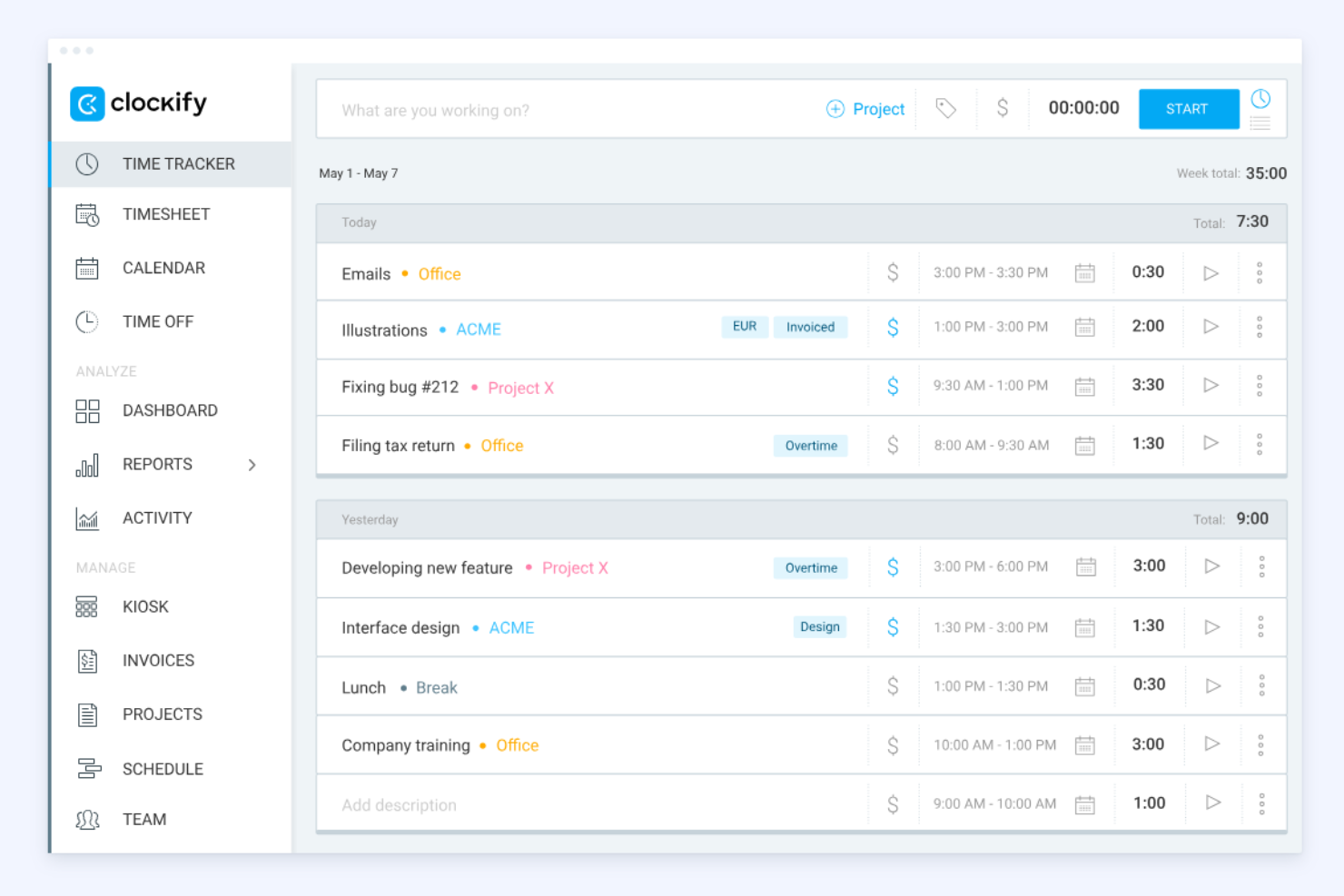
Clockify è uno strumento per il monitoraggio del tempo ampiamente utilizzato da freelance e aziende di tutte le dimensioni. Aiuta gli utenti a monitorare le ore fatturabili e a gestire i progetti in modo efficiente.
Perché ho scelto Clockify: Il supporto per le estensioni del browser è una funzionalità di spicco, che consente di monitorare il tempo direttamente dal browser senza dover passare da un'app web all'altra. È perfetto per chi lavora con più applicazioni web e ha bisogno di un accesso rapido. Clockify offre strumenti dettagliati per la creazione di report, che consentono di analizzare efficacemente l'utilizzo del tempo. È inoltre possibile impostare promemoria per aiutare il team a registrare le proprie ore con costanza.
Funzionalità e integrazioni di spicco:
Le funzionalità includono un facile monitoraggio del tempo tramite timer e schede attività, oltre a strumenti per la gestione dei progetti e della fatturazione che consentono di impostare tariffe e generare report o fatture. Supporta inoltre la gestione dei team con funzionalità quali il monitoraggio delle presenze, la pianificazione e l'approvazione delle schede attività.
Le integrazioni includono Trello, Asana, Atlassian Jira, Slack e altro.
Pros and Cons
Pros:
- Ottimo supporto per le estensioni del browser
- Funzionalità di monitoraggio da dispositivi mobili
- Cinque utenti nel piano gratuito
Cons:
- Nessuna pianificazione automatica o possibilità di scambiare i turni
- Gestione limitata di progetti e attività

Ideale per le funzionalità HR nel monitoraggio del tempo
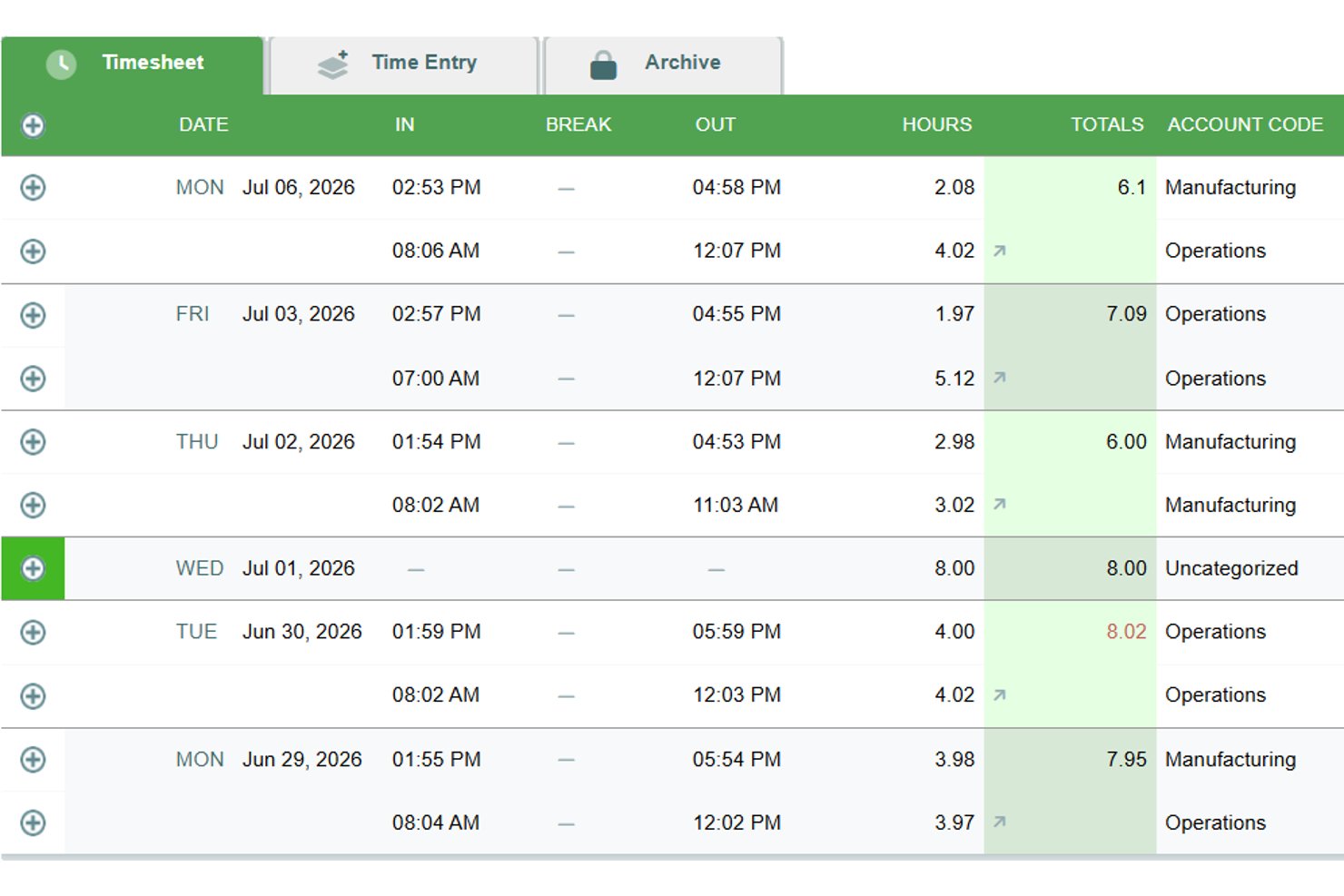

Timesheets.com è una piattaforma di monitoraggio del tempo basata su browser che combina fogli presenze per le paghe, registrazione delle ore fatturabili, analisi dei costi dei lavori a livello di progetto, pianificazione, monitoraggio delle spese e una suite di documenti per le risorse umane in un unico strumento.
Per chi è più adatto Timesheets.com?
Timesheets.com è particolarmente adatto ai piccoli team che necessitano di monitoraggio del tempo, pianificazione e gestione dei documenti per le risorse umane in un'unica soluzione.
Perché ho scelto Timesheets.com
Ho incluso Timesheets.com tra le mie scelte principali perché il suo set di funzionalità per le risorse umane va ben oltre ciò che offre la maggior parte dei semplici strumenti di monitoraggio del tempo. La suite integrata di documenti per le risorse umane gestisce i moduli W-4, I-9, le valutazioni delle prestazioni e i modelli disciplinari, tutto collegato direttamente alla stessa piattaforma in cui i dipendenti registrano le ore. Apprezzo anche il fatto che le regole di maturazione dei permessi retribuiti, inclusi limiti, trasferimento delle ore e politiche 'utilizzali o perderli', siano configurabili senza dover ricorrere a uno strumento separato per le risorse umane.
Funzionalità principali di Timesheets.com
- Tariffe di fatturazione multilivello: Imposta tariffe di fatturazione e di costo distinte a livello di dipendente, progetto o attività per supportare una fatturazione accurata dei clienti e l'analisi dei costi dei lavori.
- Timer simultanei per i progetti: Esegui più timer attivi contemporaneamente, così da passare facilmente da un'attività all'altra senza perdere il tempo registrato.
- Esportazioni per paghe e contabilità: Invia i dati dei fogli presenze direttamente a QuickBooks, Gusto, ADP, Paychex e ad altri sistemi per le paghe tramite esportazioni integrate.
- Monitoraggio di chilometraggio e spese: Registra il chilometraggio con immagini del contachilometri e invia le spese con foto delle ricevute direttamente insieme alle registrazioni del tempo.
Integrazioni di Timesheets.com
Timesheets.com offre integrazioni native con QuickBooks Online, QuickBooks Desktop, Gusto, ADP, Paychex, SurePayroll, Sage, Ceridian, Microsoft Dynamics e Heartland. La sua API supporta integrazioni personalizzate, ma non offre integrazioni native con gli strumenti di gestione dei progetti.
Pros and Cons
Pros:
- Documenti per le risorse umane insieme al monitoraggio del tempo
- Regole configurabili per la maturazione dei permessi retribuiti
- Le tariffe fatturabili multilivello supportano l'analisi dei costi dei lavori
Cons:
- L'esperienza mobile esclusivamente tramite browser sembra datata
- Le modifiche soggette a molte approvazioni rallentano le correzioni
Come Valuto i Tracker di Tempo Semplici
Divido la mia valutazione in due livelli: i requisiti di base essenziali (come un timer a un clic e il tracciamento delle ore fatturabili per il lavoro con i clienti) e i fattori differenzianti che fanno sì che uno strumento sia quello giusto per un determinato team.
Funzionalità di Base (Requisiti Fondamentali per Questa Lista)
Quando seleziono gli strumenti per la mia lista, valuto ciascuno su una scala da 0 (non offre la funzionalità) a 5 (eccelle in questa area) per ogni funzionalità di base elencata di seguito. Poi, calcolo il punteggio totale dello strumento in percentuale. Ogni strumento deve raggiungere un punteggio minimo totale del 65% per essere considerato per l'inclusione.
- Timer a un clic: Controllo se puoi iniziare a tracciare immediatamente dall'interfaccia principale—senza cercare tra i menu o configurare campi prima che il timer inizi a scorrere.
- Inserimento manuale del tempo: I team si dimenticano di avviare il timer. Cerco opzioni flessibili per integrare voci mancanti, come l'aggiunta di intervalli in base alla durata o all'orario di inizio/fine per qualsiasi data passata.
- Assegnazione a progetti e attività: Ogni voce dovrebbe poter essere etichettata con un cliente, progetto o attività affinché il tempo non finisca in un limbo non assegnato a fine mese.
- Vista foglio ore: Valuto se il tempo tracciato viene raggruppato in una griglia giornaliera o settimanale pulita, facile da rivedere, modificare e inviare prima della scadenza del report.
- Reportistica ed esportazione tempi: Estrarre un CSV con le ore del mese scorso suddivise per progetto per una fattura cliente è uno scenario basilare che cerco in ogni strumento che considero.
- Tracciamento delle ore fatturabili: Contrassegnare le voci come fatturabili con tariffe assegnate è importante—soprattutto per chi gestisce più clienti con tariffe diverse.
Una volta che ho una lista di strumenti che soddisfano questi criteri, considero cosa distingue ogni piattaforma.
Fattori Differenzianti (Cosa Distingue i Fornitori)
Ecco come confronto e analizzo i diversi fornitori:
Funzionalità che Fanno la Differenza
La sincronizzazione con il calendario è fondamentale—gli strumenti che importano le riunioni da Google Calendar o Outlook e le convertono in voci di tempo evitano ai project manager di inserire manualmente metà della giornata. Cerco anche il rilevamento dell'inattività e i promemoria intelligenti, che intercettano timer dimenticati prima che si trasformino in stime approssimative. Il tracciamento automatico del tempo va oltre, registrando le attività su app e documenti in background, utile soprattutto per i consulenti che passano frequentemente da una mansione all'altra.
Oltre le Caratteristiche
Un piano gratuito effettivamente utilizzabile è importante—i consulenti freelance e i piccoli team devono poter tracciare il tempo fin dal primo giorno senza approvazione di budget. Valuto anche la rapidità con cui qualcuno può passare dall'iscrizione all'avvio del primo timer. I tracker più semplici richiedono quasi zero configurazione. Anche le integrazioni con strumenti come Jira, Asana e Trello meritano attenzione, poiché inserire un timer direttamente nel proprio strumento di project management significa meno interruzioni e inserimenti più precisi all'interno di team distribuiti.
Come scegliere uno strumento semplice per il rilevamento del tempo
È facile perdersi in lunghi elenchi di funzionalità e strutture di prezzo complesse. Per aiutarti a rimanere concentrato mentre affronti il tuo particolare processo di selezione del software, ecco un elenco di fattori da tenere a mente:
| Fattore | Cosa considerare |
| Scalabilità | Lo strumento può crescere insieme al tuo team? Verifica se supporta un numero crescente di utenti e progetti senza cali di prestazioni. |
| Integrazioni | Si collega agli strumenti che già utilizzi? Verifica la compatibilità con le piattaforme di gestione dei progetti, contabilità e comunicazione per migliorare i flussi di lavoro. |
| Personalizzazione | Puoi adattare lo strumento alle tue esigenze? Cerca opzioni per modificare pannelli di controllo, report e autorizzazioni degli utenti in base ai processi del tuo team. |
| Facilità d'uso | L'interfaccia è intuitiva? Assicurati che i membri del team di ogni livello di competenza tecnologica possano utilizzarla senza una formazione approfondita o confusione. |
| Implementazione e onboarding | Quanto velocemente puoi iniziare? Valuta il processo di configurazione, le risorse formative disponibili e il supporto durante la fase iniziale di implementazione. |
| Costo | Rientra nel tuo budget? Confronta i piani tariffari e considera il costo totale di proprietà, comprese eventuali commissioni aggiuntive per funzionalità o supporto. |
| Misure di sicurezza | Quanto sono sicuri i tuoi dati? Cerca standard di crittografia, procedure di backup dei dati e conformità alle normative sulla privacy come il GDPR. |
| Disponibilità dell'assistenza | Puoi ricevere aiuto quando ne hai bisogno? Verifica se il fornitore offre assistenza 24 ore su 24, 7 giorni su 7, chat dal vivo o un account manager dedicato. |
Che cos'è un semplice strumento per il monitoraggio del tempo?
Un semplice strumento per il monitoraggio del tempo aiuta gli utenti a registrare e gestire in modo efficiente le proprie ore di lavoro. Professionisti come freelance, project manager e team da remoto utilizzano questi strumenti per aumentare la produttività e monitorare le ore fatturabili. Funzionalità come la registrazione del tempo, la reportistica e la gestione dei progetti aiutano gli utenti a organizzare le attività e ottimizzare il flusso di lavoro. Nel complesso, questi strumenti offrono chiarezza sull'allocazione del tempo e migliorano la gestione del tempo.
Funzionalità
Quando scegli un semplice strumento per il monitoraggio del tempo, presta attenzione alle seguenti funzionalità chiave:
- Registrazione del tempo: Registra automaticamente o manualmente le ore di lavoro per garantire un monitoraggio accurato del tempo fatturabile.
- Reportistica: Genera report dettagliati per analizzare la produttività e l'allocazione del tempo tra i progetti.
- Integrazione con la gestione dei progetti: Sincronizza gli strumenti di gestione dei progetti esistenti per perfezionare il flusso di lavoro e la gestione delle attività.
- Accesso mobile: Monitora il tempo in mobilità con le app mobili, garantendo flessibilità ai membri dei team da remoto o in viaggio.
- Fatturazione ed emissione delle fatture: Crea fatture sulla base del tempo registrato per semplificare il processo di fatturazione per i clienti.
- Avvisi personalizzabili: Imposta promemoria per registrare il tempo o invia notifiche agli utenti sulle scadenze imminenti per mantenere i progetti in linea con i programmi.
- Monitoraggio della posizione GPS: Monitora la posizione dei team mobili per garantire un monitoraggio accurato del tempo durante il lavoro sul campo.
- Fogli presenze visivi: Offri una panoramica chiara delle ore registrate per aiutare gli utenti a valutare rapidamente l'utilizzo del proprio tempo.
- Monitoraggio automatico delle attività: Registra il tempo dedicato alle attività senza inserimento manuale per ridurre al minimo gli errori e risparmiare tempo.
- Misure di sicurezza: Proteggi i dati degli utenti con la crittografia e la conformità alle normative sulla privacy come il GDPR.
Vantaggi
L'implementazione di un semplice strumento per il monitoraggio del tempo offre diversi vantaggi al tuo team e alla tua azienda. Eccone alcuni che puoi aspettarti:
- Maggiore produttività: Monitorando le ore e le attività lavorative, i team possono identificare le attività che fanno perdere tempo e concentrarsi su ciò che conta davvero.
- Fatturazione accurata: Le funzionalità automatizzate di registrazione del tempo e di emissione delle fatture aiutano a garantire che ai clienti vengano addebitati correttamente i costi delle ore lavorate.
- Migliore gestione dei progetti: L'integrazione con gli strumenti di gestione dei progetti consente un coordinamento efficiente delle attività e la gestione delle scadenze.
- Maggiore responsabilità: Il monitoraggio del tempo promuove la trasparenza e il senso di responsabilità tra i membri del team, incoraggiandoli a rimanere concentrati sulle attività.
- Processo decisionale informato: Report e analisi dettagliati forniscono informazioni sull'allocazione del tempo, aiutando i manager a prendere decisioni basate sui dati.
- Modalità di lavoro flessibili: L'accesso mobile e il monitoraggio GPS supportano il lavoro da remoto e i team sul campo, consentendo loro di registrare il tempo da qualsiasi luogo.
- Risparmio sui costi: Ottimizzando la gestione del tempo, le aziende possono ridurre i costi degli straordinari e migliorare l'efficienza complessiva.
Costi e prezzi
La scelta di un semplice strumento per il monitoraggio del tempo richiede la comprensione dei vari modelli e piani tariffari disponibili. I costi variano in base alle funzionalità, alle dimensioni del team, ai componenti aggiuntivi e ad altri fattori. La tabella seguente riassume i piani comuni, i relativi prezzi medi e le funzionalità generalmente incluse nelle soluzioni semplici per il monitoraggio del tempo:
Tabella comparativa dei piani per semplici strumenti di monitoraggio del tempo
| Tipo di piano | Prezzo medio | Funzionalità comuni |
| Piano gratuito | $0 | Monitoraggio di base del tempo, progetti limitati e reportistica di base. |
| Piano personale | $2.99-$12/mese | Monitoraggio del tempo, integrazione con la gestione dei progetti, accesso mobile e reportistica di base. |
| Piano aziendale | $15-$30/mese | Reportistica avanzata, emissione di fatture, avvisi personalizzabili e assistenza prioritaria. |
| Piano per imprese | $30-$50/mese | Integrazioni personalizzate, account manager dedicato, funzionalità di sicurezza avanzate e analisi approfondite. |
Domande frequenti sui semplici strumenti di monitoraggio del tempo
Ecco alcune risposte alle domande più comuni sui semplici strumenti di monitoraggio del tempo:
Come scelgo il semplice strumento di monitoraggio del tempo giusto per il mio team?
Inizia valutando le esigenze del tuo team, come l’integrazione con la gestione dei progetti o l’accesso da dispositivi mobili. Considera le dimensioni del team e il livello di reportistica di cui hai bisogno. Prova alcuni strumenti con periodi di prova gratuiti per vedere quale interfaccia preferisce il tuo team. Non dimenticare di confrontare i piani tariffari in base al tuo budget.
I semplici strumenti di monitoraggio del tempo possono integrarsi con il software che utilizzo attualmente?
Sì, molti semplici strumenti di monitoraggio del tempo offrono integrazioni con strumenti diffusi, come software per la gestione dei progetti e la contabilità. Consulta il sito web dello strumento per un elenco delle integrazioni supportate. Se non si integra con il tuo software, valuta la possibilità di utilizzare uno strumento come Zapier per creare connessioni personalizzate.
La sicurezza dei dati è un problema con i semplici strumenti di monitoraggio del tempo?
Sì, la sicurezza dei dati dovrebbe essere una priorità. Cerca strumenti che offrano crittografia, backup regolari dei dati e conformità alle normative sulla privacy come il GDPR. Chiedi ai fornitori informazioni sulle loro misure di sicurezza e leggi le recensioni per capire come gestiscono la protezione dei dati.
I semplici strumenti di monitoraggio del tempo funzionano offline?
Alcuni semplici strumenti di monitoraggio del tempo offrono funzionalità offline, consentendoti di registrare le ore senza una connessione a Internet. Una volta ricollegato, i dati vengono sincronizzati automaticamente. Controlla l’elenco delle funzionalità dello strumento per assicurarti che l’accesso offline sia disponibile, soprattutto se il tuo team lavora in aree con connettività limitata.
Quanto tempo richiede l'implementazione di un semplice strumento di monitoraggio del tempo?
Il tempo di implementazione varia a seconda dello strumento e delle dimensioni del team. Alcuni strumenti offrono una configurazione rapida con tour interattivi del prodotto e modelli. La maggior parte dei fornitori mette a disposizione risorse formative per aiutarti a iniziare. Prevedi da alcuni giorni a una settimana per l’implementazione completa, inclusa la formazione del team.
Cosa succede ora:
Se stai cercando semplici strumenti di monitoraggio del tempo, contatta gratuitamente un consulente SoftwareSelect per ricevere consigli.
Compili un modulo e fai una breve chiacchierata durante la quale il consulente approfondirà le tue esigenze specifiche. In seguito riceverai una lista ristretta di software da valutare. Ti accompagnerà anche durante l'intero processo di acquisto, comprese le negoziazioni sul prezzo.