

10 alternative a Zoho Assist per l’assistenza remota nel 2026

10 Elenco delle migliori alternative a Zoho Assist


Gestire un progetto può essere impegnativo, soprattutto quando il tuo strumento per desktop remoto non soddisfa le esigenze del tuo team. Potresti trovare Zoho Assist carente sotto alcuni aspetti e iniziare quindi a cercare la migliore alternativa per le sfide della tua azienda.
In base alla mia esperienza, il software per desktop remoto giusto può migliorare significativamente la collaborazione e la produttività. Hai bisogno di strumenti affidabili, facili da usare e adattati alle tue esigenze specifiche.
In questo articolo condividerò le mie migliori alternative a Zoho Assist. Ho testato e recensito ogni opzione in modo indipendente, fornendoti informazioni imparziali per aiutarti a prendere una decisione consapevole. Che tu stia cercando funzionalità, prezzi o esperienza utente, troverai tutto ciò che ti serve.
Che cos'è Zoho Assist?
Zoho Assist è un software per desktop remoto che ti aiuta a fornire sessioni di assistenza remota e ad accedere a computer remoti. I professionisti IT e i team di supporto lo usano comunemente per diagnosticare e gestire i sistemi in modo efficiente. Funzionalità come il controllo remoto, il trasferimento di file e il supporto multipiattaforma aiutano a risolvere rapidamente i problemi e a mantenere la produttività. Nel complesso, Zoho Assist offre un'opzione pratica per le soluzioni di assistenza remota.
Tabella comparativa delle alternative a Zoho Assist
Questa tabella comparativa riassume i dettagli sui prezzi delle mie migliori alternative a Zoho Assist:
| Tool | Best For | Trial Info | Price | ||
|---|---|---|---|---|---|
| 1 | Ideale per l'assistenza remota gratuita | Piano gratuito disponibile | Prezzi su richiesta | Website | |
| 2 | Ideale per l'assistenza remota immediata | Prova gratuita di 14 giorni | Da $30/utente/mese (fatturati annualmente) | Website | |
| 3 | Ideale per l'accesso remoto gratuito | Prova gratuita di 30 giorni | A partire da $24.9/mese (con fatturazione annuale) | Website | |
| 4 | Ideale per il supporto remoto tutto-in-uno | Prova gratuita di 14 giorni | A partire da $30/utente/mese (fatturato annualmente) | Website | |
| 5 | Ideale per sessioni rapide a bassa latenza | Prova gratuita + demo gratuita disponibili | A partire da $28.90/mese (con fatturazione annuale) | Website | |
| 6 | Ideale per un accesso remoto semplice | Not available | Gratuito | Website | |
| 7 | Ideale per rigorosi requisiti di sicurezza | Versione di prova gratuita disponibile | Prezzi su richiesta | Website | |
| 8 | Ideale per l'accesso illimitato | Prova gratuita di 15 giorni disponibile | Da $16.90/utente/mese (fatturato annualmente) | Website | |
| 9 | Ideale per la gestione unificata | Prova gratuita + demo gratuita | Prezzi su richiesta | Website | |
| 10 | Ideale per l'accesso remoto sicuro | Prova gratuita di 7 giorni | A partire da $1.84/utente/mese (con fatturazione annuale) | Website |
Perché fidarsi dei nostri consigli sui software
Il nostro team testa e recensisce software dal 2012. In quanto project manager noi stessi, sappiamo quanto sia difficile — e importante — scegliere il software giusto.
Per questa guida, abbiamo valutato gli strumenti attraverso test pratici e ricerche indipendenti, assegnando un punteggio agli strumenti in base ai nostri criteri di selezione. Ci basiamo inoltre sulle competenze di leader di pensiero del settore e di professionisti attivi nella gestione dei progetti.
Le nostre recensioni riflettono il nostro giudizio editoriale umano, non un discorso di vendita.
Revisori esperti:
Recensioni delle migliori alternative a Zoho Assist
Di seguito trovi i miei riepiloghi dettagliati delle migliori alternative a Zoho Assist incluse nel mio elenco. Le mie recensioni offrono un’analisi approfondita delle funzionalità principali, dei pro e dei contro, delle integrazioni e dei casi d’uso ideali di ogni strumento, per aiutarti a trovare quello più adatto a te.

HelpWire
Ideale per l'assistenza remota gratuita

HelpWire è un software di supporto remoto che consente di connettersi ai clienti e assisterli da remoto. I team di assistenza clienti e i professionisti IT lo utilizzano per individuare e risolvere problemi tecnici.
Perché è una buona alternativa a Zoho Assist: HelpWire offre supporto remoto gratuito, rappresentando una scelta conveniente per le aziende con budget limitati. Le sue funzionalità includono accesso remoto sicuro, compatibilità multipiattaforma e diagnostica in tempo reale. Queste funzionalità garantiscono che il tuo team possa risolvere rapidamente i problemi dei clienti. La configurazione semplice del software e l'interfaccia intuitiva ne aumentano l'attrattiva per le attività di assistenza.
Funzionalità e integrazioni di rilievo:
Le funzionalità includono diagnostica in tempo reale, condivisione sicura dei file e supporto multipiattaforma. Queste funzionalità consentono al tuo team di fornire un'assistenza efficiente senza compromettere la sicurezza. L'interfaccia intuitiva di HelpWire facilita inoltre la navigazione, riducendo la curva di apprendimento per i nuovi utenti.
Le integrazioni non sono elencate pubblicamente.
Pros and Cons
Pros:
- Opzione di supporto gratuito disponibile
- Accesso remoto sicuro
- Diagnostica in tempo reale
Cons:
- Funzionalità avanzate limitate
- Opzioni di personalizzazione di base

Ideale per l'assistenza remota immediata
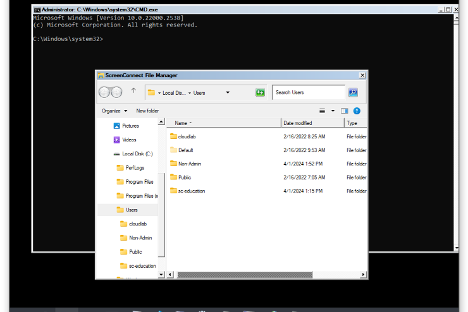
ConnectWise ScreenConnect è un software per l'assistenza remota progettato per offrire assistenza remota rapida e sicura ai professionisti IT di vari settori, tra cui istruzione, finanza e assistenza sanitaria. Offre funzioni chiave, come l'accesso remoto 24 ore su 24, 7 giorni su 7, la gestione degli accessi privilegiati e il supporto per l'accesso non presidiato e i dispositivi mobili.
Perché è una valida alternativa a Zoho Assist: ConnectWise ScreenConnect offre assistenza remota immediata, rendendolo ideale per i team che necessitano di un accesso rapido ai dispositivi. Le sue funzionalità, come le connessioni remote sicure, la gestione degli accessi privilegiati e il supporto per i dispositivi mobili, aiutano il tuo team a gestire le operazioni IT in modo efficiente. L'attenzione del software alla riduzione dei tempi di inattività garantisce il mantenimento della produttività del tuo team. Inoltre, le sue solide misure di sicurezza, come la crittografia AES e l'autenticazione a più fattori, offrono tranquillità.
Funzionalità distintive e integrazioni:
Le funzionalità includono l'accesso remoto 24 ore su 24, 7 giorni su 7, il supporto per l'accesso non presidiato e la compatibilità con i dispositivi mobili. Queste funzionalità consentono al tuo team di connettersi facilmente ai dispositivi e di gestire le operazioni IT senza difficoltà. Nella mia esperienza, le avanzate misure di sicurezza del software rappresentano un vantaggio significativo per la protezione dei dati sensibili.
Le integrazioni includono i servizi di help desk ConnectWise, ConnectWise Automate, Microsoft Intune e altro ancora.
Pros and Cons
Pros:
- Funzionalità di assistenza remota immediata
- Connessioni remote sicure
- Supporto per i dispositivi mobili
Cons:
- Possibili problemi di qualità video e audio
- Richiede una gestione adeguata per garantire la sicurezza

Ideale per l'accesso remoto gratuito
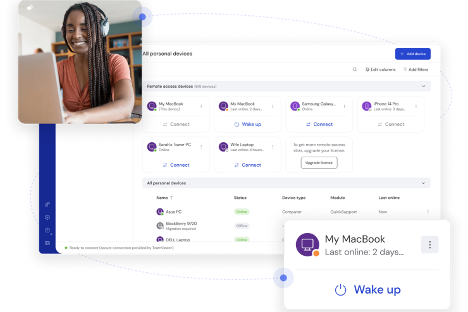
TeamViewer è un software per desktop remoto che consente di connettersi ai dispositivi e gestirli da remoto. I team di supporto IT e le aziende lo utilizzano per facilitare la risoluzione dei problemi e la gestione da remoto.
Perché è una buona alternativa a Zoho Assist: TeamViewer è una soluzione gratuita per l'accesso remoto, ideale se hai bisogno di soluzioni convenienti. Le sue funzionalità, come il trasferimento semplice dei file, la compatibilità multipiattaforma e la stampa da remoto, migliorano le tue capacità di supporto. Puoi connetterti rapidamente a qualsiasi dispositivo senza difficoltà. Questi elementi lo rendono un valido concorrente quando si prendono in considerazione alternative a Zoho Assist.
Funzionalità e integrazioni principali:
Le funzionalità includono il controllo e la stampa da remoto, nonché l'accesso remoto non presidiato. Queste funzionalità consentono di gestire facilmente i dispositivi e garantiscono che il tuo team possa fornire supporto senza essere fisicamente presente. Inoltre, l'accesso multipiattaforma di TeamViewer supporta diversi sistemi operativi, un aspetto essenziale negli ambienti IT eterogenei.
Le integrazioni includono Microsoft Teams, ServiceNow, Salesforce, Jira, Zendesk, Freshworks, Microsoft Intune, Zoho, Microsoft Entra ID e altro ancora.
Pros and Cons
Pros:
- Prezzo conveniente
- Supporto multipiattaforma
- Trasferimento semplice dei file
Cons:
- Problemi di connessione segnalati
- Rallentamenti occasionali nelle connessioni

LogMeIn
Ideale per il supporto remoto tutto-in-uno
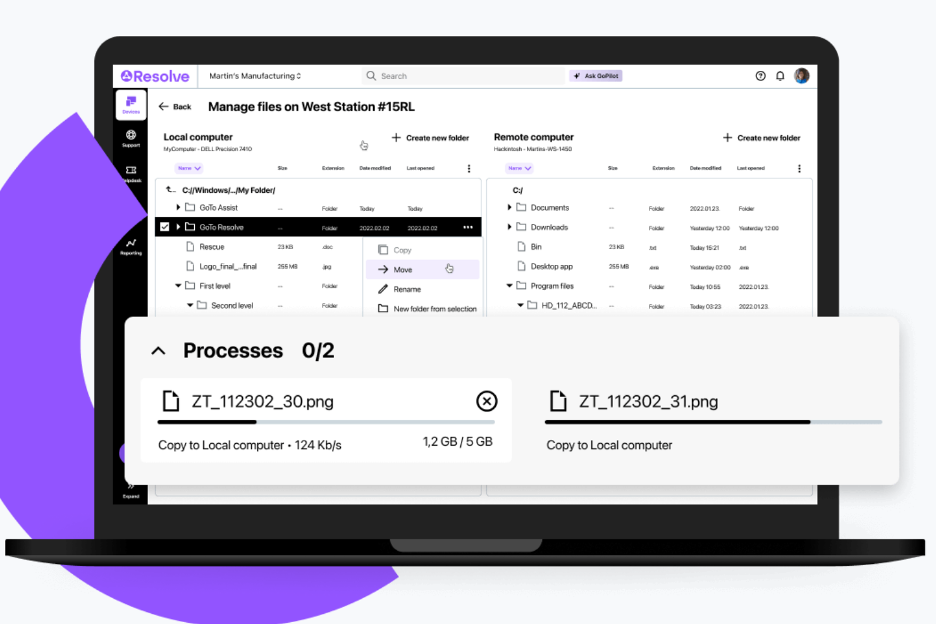
LogMeIn è una soluzione di accesso e supporto remoto progettata per i professionisti IT e i provider di servizi gestiti (MSP) al fine di semplificare la gestione IT. Svolge funzioni chiave, come il supporto remoto, la gestione dei dispositivi terminali e l'accesso sicuro ai file.
Perché è una buona alternativa a Zoho Assist: LogMeIn offre un supporto remoto completo grazie a funzionalità come la gestione basata sull'intelligenza artificiale, la gestione automatizzata dei dispositivi e misure di sicurezza avanzate. La sua interfaccia intuitiva e il monitoraggio remoto fluido lo rendono ideale per i team IT. L'aumento della produttività e la semplificazione della gestione IT sono al centro dell'offerta di LogMeIn, che risponde alle esigenze delle organizzazioni alla ricerca di una soluzione di supporto completa.
Funzionalità e integrazioni distintive:
Le funzionalità includono strumenti basati sull'intelligenza artificiale per una maggiore efficienza, la gestione automatizzata dei dispositivi e misure di sicurezza avanzate. Queste funzionalità semplificano le attività IT complesse per aumentare la produttività del tuo team. La gestione dei dispositivi mobili di LogMeIn garantisce la possibilità di gestire i dispositivi in mobilità senza complicazioni.
Le integrazioni includono ServiceNow, Salesforce, Jira Service Desk e altro.
Pros and Cons
Pros:
- Strumenti di gestione basati sull'intelligenza artificiale
- Gestione automatizzata dei dispositivi
- Misure di sicurezza avanzate
Cons:
- Elevato consumo di risorse sui dispositivi
- Curva di apprendimento ripida

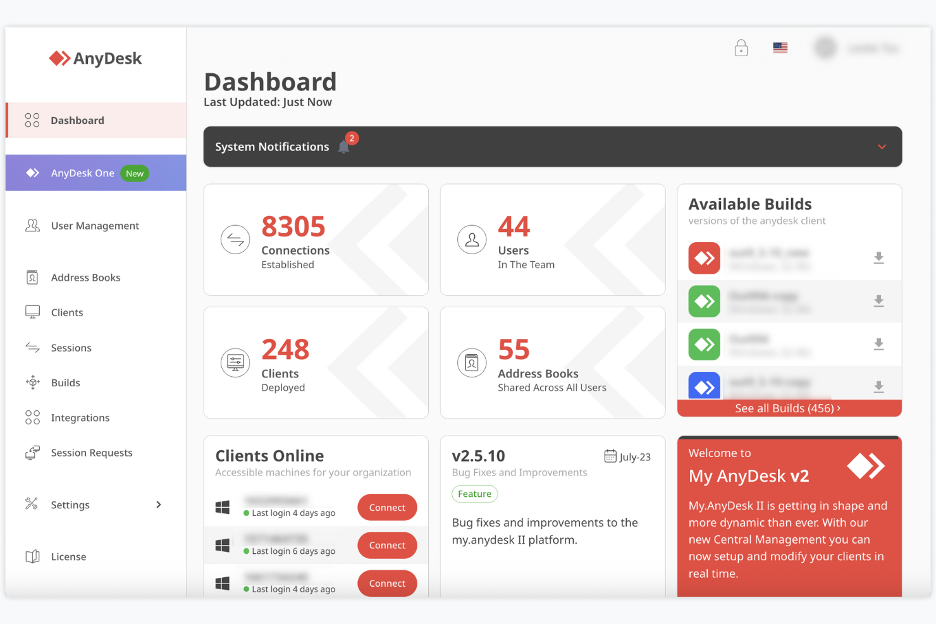
AnyDesk è uno strumento per desktop remoto e assistenza che consente di accedere e controllare computer o dispositivi da qualsiasi luogo. È utilizzato da liberi professionisti, piccoli team, personale IT e altri utenti che necessitano di accesso e assistenza da remoto.
Perché AnyDesk è una buona alternativa a Zoho Assist: AnyDesk offre la condivisione del desktop senza latenza e un controllo remoto stabile, così tu e il tuo team potete lavorare su dispositivi remoti come se foste proprio lì. Consente di controllare tastiera e mouse permettendo al contempo ad altri di interagire con il tuo schermo, oltre a condividere rapidamente file e dati. Grazie alle sessioni remote con ritardo minimo e alla rapida trasmissione dei dati con lo standard di crittografia avanzato (AES), è particolarmente utile se hai spesso bisogno di un accesso o di un'assistenza remota rapidi.
Funzionalità e integrazioni principali:
Le funzionalità includono il controllo remoto di desktop e server, la condivisione dello schermo da qualsiasi dispositivo (PC, dispositivo mobile o tablet) e il trasferimento di file tra dispositivi durante le sessioni. Supporta inoltre l'accesso interattivo, consentendo di visualizzare e controllare gli schermi remoti.
Le integrazioni includono il supporto per Windows, macOS, Linux, Android, iOS e altri sistemi.
Pros and Cons
Pros:
- Accesso remoto a bassa latenza
- Supporto per numerose piattaforme
- Sono supportati il trasferimento di file e il controllo remoto
Cons:
- La versione gratuita è limitata per l'uso aziendale
- Mancano strumenti avanzati per la gestione dei team

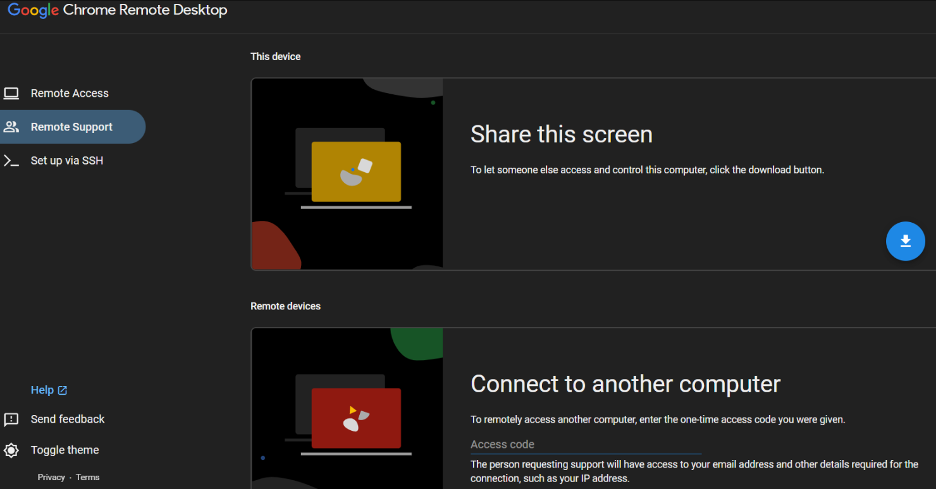
Chrome Remote Desktop è uno strumento di accesso remoto che consente agli utenti di connettersi in modo sicuro ad altri computer tramite il browser Chrome o un Chromebook. Privati e piccole aziende lo scelgono per uso personale e per il supporto IT di base.
Perché è una buona alternativa a Zoho Assist: Chrome Remote Desktop offre un accesso remoto semplice con una configurazione minima, rendendolo accessibile agli utenti che necessitano di connessioni rapide. La sua integrazione con il browser Chrome elimina la necessità di installare software aggiuntivo. È possibile accedere ai propri dispositivi da qualsiasi luogo, aumentando la flessibilità. L'interfaccia intuitiva dello strumento è facile da usare e riduce la curva di apprendimento per i nuovi utenti.
Funzionalità e integrazioni principali:
Le funzionalità includono l'accesso remoto tramite il browser Chrome, il supporto per più sistemi operativi e la possibilità di condividere lo schermo con altri. Queste funzionalità consentono di connettersi facilmente ai propri dispositivi. Nella mia esperienza, la semplicità dello strumento è un vantaggio significativo per gli utenti che necessitano di un accesso remoto intuitivo.
Le integrazioni non sono elencate pubblicamente.
Pros and Cons
Pros:
- Facile da configurare
- Non è necessario alcun software aggiuntivo
- Accesso da qualsiasi luogo
Cons:
- Trasferimento di file non disponibile
- Nessuna stampa remota

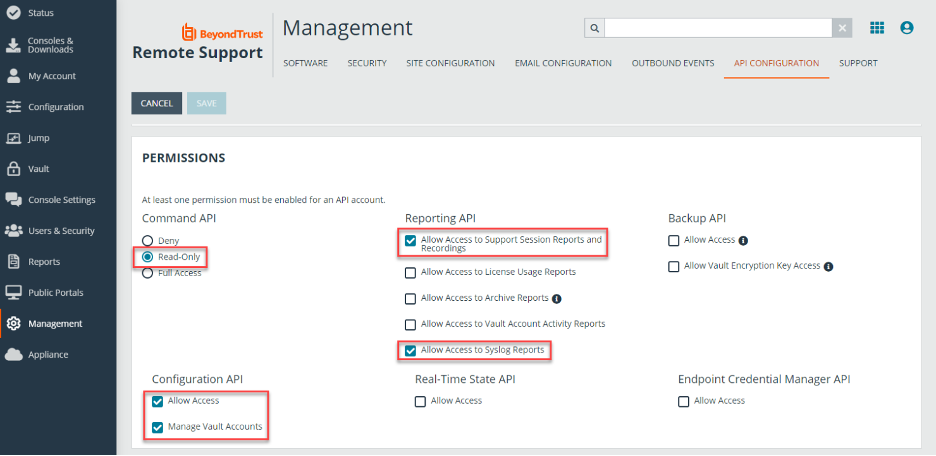
BeyondTrust Remote Support è uno strumento di accesso e supporto remoto basato sul cloud che i team IT utilizzano per risolvere in sicurezza i problemi dei dispositivi. Aiuta il tuo team a supportare gli utenti, gestire i sistemi remoti e svolgere attività di assistenza da qualsiasi luogo.
Perché BeyondTrust Remote Support è una buona alternativa a Zoho Assist: offre controlli completi che aiutano a soddisfare rigorosi requisiti di sicurezza. Puoi impostare regole di accesso restrittive, in modo che il tuo team possa accedere solo ai sistemi sui quali è autorizzato a lavorare. Il monitoraggio delle sessioni e i registri di controllo dettagliati forniscono una documentazione chiara di ciò che avviene durante le attività di assistenza. Questi controlli contribuiscono a proteggere maggiormente gli ambienti sensibili durante l'accesso remoto.
Caratteristiche e integrazioni principali:
Le caratteristiche includono registrazioni delle sessioni che aiutano a esaminare le attività di assistenza, la condivisione remota della fotocamera per consentire agli utenti di mostrarti ciò che vedono e strumenti di chat che permettono di assistere i clienti. Queste caratteristiche semplificano la risoluzione dei problemi per il tuo team, anche quando non è facile raggiungere i sistemi. Puoi inoltre utilizzare la condivisione dello schermo per guidare gli utenti nella risoluzione dei problemi senza creare confusione.
Le integrazioni includono ServiceNow, BMC, Salesforce, Okta e altro ancora.
Pros and Cons
Pros:
- Ampie opzioni di controllo degli accessi
- Ampie opzioni di controllo degli accessi
- Condivisione dello schermo su richiesta
Cons:
- Numerose impostazioni da gestire
- Macchinoso per i team di piccole dimensioni

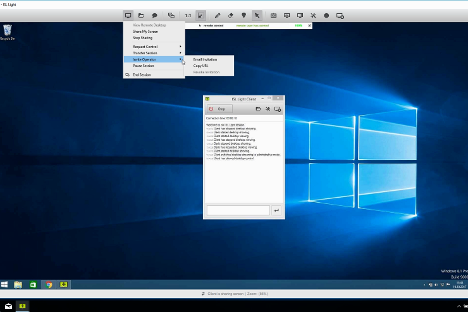
ISL Online è uno strumento per l'accesso e il supporto remoto che consente al tuo team di connettersi a dispositivi Windows, Mac, Linux e mobili da qualsiasi luogo. I team IT, il personale dell'help desk e i fornitori di supporto lo utilizzano per il supporto remoto e l'accesso non presidiato.
Perché ISL Online è una buona alternativa a Zoho Assist: ISL Online offre una licenza che consente di supportare utenti e dispositivi illimitati, ideale se il tuo team gestisce numerosi endpoint. Puoi accedere alle macchine remote senza limiti per dispositivo e configurare l'accesso non presidiato, così il tuo team può fornire assistenza da remoto quando necessario. Lo strumento offre una sicurezza avanzata con crittografia AES-256, autenticazione a due fattori e autorizzazioni basate sui ruoli, così puoi mantenere il controllo di diversi dispositivi. Ottieni accesso completo e funzionalità di supporto remoto senza doverti preoccupare continuamente dei limiti della licenza.
Funzionalità e integrazioni principali:
Le funzionalità includono il trasferimento di file tra macchine locali e remote, la registrazione delle sessioni per la verifica e la revisione e il supporto per l'accesso remoto, anche su dispositivi mobili. Consente inoltre di connettersi tramite Protocollo Desktop remoto/Shell sicura (RDP/SSH), se necessario, e di gestire centralmente le autorizzazioni degli utenti. Il sistema supporta più monitor e il riavvio remoto con riconnessione.
Le integrazioni includono ServiceNow, Freshworks, HaloITSM e altro.
Pros and Cons
Pros:
- Dispositivi illimitati con una sola licenza
- Crittografia AES e controlli degli accessi
- Funziona su dispositivi Windows, Mac, Linux e mobili
Cons:
- La licenza per utenti simultanei può limitare i team
- Interfaccia meno moderna rispetto ad alcuni strumenti

NinjaOne
Ideale per la gestione unificata

NinjaOne è un software di gestione degli endpoint progettato per consentire ai professionisti IT e agli MSP di gestire e monitorare i dispositivi in modo efficiente. Svolge funzioni chiave come il monitoraggio remoto, la gestione delle patch e la gestione degli asset IT.
Perché è una valida alternativa a Zoho Assist: NinjaOne offre una gestione unificata, rendendolo ideale per i team che necessitano di una supervisione completa dei propri ambienti IT. Funzionalità come l'applicazione automatizzata delle patch, il monitoraggio in tempo reale e la reportistica dettagliata aiutano il team a mantenere sicurezza e prestazioni. Il suo pannello di controllo intuitivo offre una visione centralizzata di tutti i dispositivi, facilitando decisioni rapide. La scalabilità del software supporta infrastrutture IT in crescita.
Funzionalità e integrazioni distintive:
Le funzionalità includono la gestione automatizzata delle patch, gli avvisi in tempo reale e una reportistica completa. Queste funzionalità garantiscono che il team possa gestire proattivamente i problemi IT senza interventi manuali. Il pannello di controllo centralizzato di NinjaOne aiuta a tenere sotto controllo tutti i dispositivi in un unico luogo, migliorando l'efficienza.
Le integrazioni includono ConnectWise Screen Connect, Autotask, Zendesk, ServiceNow, Microsoft Entra e altro ancora.
Pros and Cons
Pros:
- Gestione automatizzata delle patch
- Monitoraggio in tempo reale
- Gestione centralizzata dei dispositivi
Cons:
- I dettagli sui prezzi non sono trasparenti
- Complessità per gli utenti non tecnici

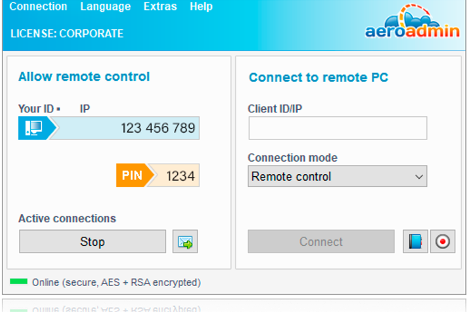
RemotePC è un software di accesso remoto sicuro progettato per una vasta gamma di utenti, tra cui singoli individui, piccoli uffici, team e aziende. Svolge funzioni chiave, tra cui l'accesso remoto a più computer, i trasferimenti di file e la stampa remota.
Perché è una buona alternativa a Zoho Assist: RemotePC offre accesso illimitato agli utenti, una caratteristica ideale se il tuo team necessita di ampie funzionalità di accesso remoto. Le sue funzioni includono trasferimenti sicuri di file, strumenti di collaborazione e accesso assistito per l'assistenza clienti. La scalabilità e la facilità d'uso del software lo rendono una scelta pratica sia per applicazioni personali sia aziendali. Le misure di sicurezza, come TLS v 1.2 con crittografia AES-256, ne aumentano l'attrattiva per le esigenze di assistenza IT.
Funzionalità e integrazioni principali:
Le funzionalità includono la stampa remota, una lavagna per la collaborazione e l'accesso da dispositivi mobili. Queste funzionalità aiutano il tuo team a lavorare in modo efficiente da qualsiasi luogo. Gli strumenti di gestione e monitoraggio degli utenti di RemotePC sono inoltre utili per le aziende che necessitano di supervisione.
Le integrazioni includono Zendesk, Freshdesk, Jira, Okta, G Suite, OneLogin e altro.
Pros and Cons
Pros:
- Licenze utente illimitate
- Trasferimenti sicuri di file
- Accesso da dispositivi mobili disponibile
Cons:
- Nessuna demo disponibile
- Nessun piano gratuito disponibile
Altre alternative a Zoho Assist
Ecco alcune ulteriori alternative a Zoho Assist che non sono state incluse nel mio elenco, ma che vale comunque la pena valutare:
- Parallels Access
Ideale per l'integrazione di Windows su Mac
- TSplus Remote Support
Ideale per soluzioni personalizzate per settore
- Dameware Remote Support
Ideale per il supporto in sede


Come valuto le alternative a Zoho Assist
Valuto su due livelli: requisiti di base indispensabili, come l'accesso non presidiato e il controllo multipiattaforma, poi elementi distintivi come le integrazioni con gli strumenti di gestione dei progetti e la registrazione degli audit, che separano i migliori strumenti dagli altri.
Funzionalità principali (requisiti indispensabili per questo elenco)
Quando seleziono gli strumenti per il mio elenco, assegno a ciascuno un punteggio su una scala da 0 (la funzionalità non è disponibile) a 5 (eccelle in quest'area) per ogni funzionalità principale elencata di seguito. Poi calcolo il punteggio totale dello strumento trasformandolo in una percentuale. Ogni strumento deve raggiungere un punteggio totale minimo del 65% per essere preso in considerazione.
- Controllo remoto dello schermo: valuto quanto sia reattiva l'esperienza di controllo in tempo reale, soprattutto quando un tecnico deve riavviare servizi, modificare configurazioni o illustrare a un interlocutore un risultato durante una chiamata.
- Accesso non presidiato: cerco connessioni affidabili e sempre attive a macchine prive di interfaccia, comprese le opzioni per raggruppare i dispositivi e per effettuare distribuzioni in blocco che rendano pratica la gestione di decine di server di progetto.
- Compatibilità multipiattaforma: i team di progetto lavorano in ambienti eterogenei, quindi verifico se ogni strumento supporta Windows, macOS, Linux, iOS e Android, comprese le connessioni da dispositivi mobili a computer desktop per la risoluzione dei problemi in mobilità.
- Trasferimento di file durante la sessione: lo spostamento dei file di progetto durante una sessione live è importante, quindi valuto se lo strumento supporta i trasferimenti tramite trascinamento in entrambe le direzioni senza limiti restrittivi sulle dimensioni dei file.
- Supporto per più sessioni e più monitor: verifico se i tecnici possono eseguire sessioni parallele e passare da un monitor all'altro, una necessità frequente quando si fornisce assistenza per configurazioni di sviluppo o progettazione con più schermi.
- Sicurezza e crittografia delle sessioni: in questo caso verifico la crittografia end-to-end, l'MFA e i registri di audit delle sessioni, in particolare per i team che gestiscono dati sensibili dei clienti o lavorano in base a requisiti di conformità come SOC 2 o GDPR.
Dopo aver raccolto un elenco di strumenti che soddisfano questi criteri, considero ciò che distingue ogni piattaforma.
Fattori distintivi (ciò che differenzia i fornitori)
Ecco come confronto i diversi fornitori:
Funzionalità distintive
Cerco integrazioni native con strumenti di gestione dei progetti e di gestione dei ticket come Jira, ServiceNow o Slack, poiché avviare una sessione remota direttamente da un ticket fa risparmiare tempo prezioso durante la risposta agli incidenti. Anche la registrazione delle sessioni è un elemento distintivo che valuto: è utile per le analisi successive agli incidenti, gli audit dei clienti e la documentazione per l'inserimento dei nuovi membri. Sono importanti anche le funzionalità di collaborazione integrate, come chat, VoIP e annotazione dello schermo, quando si accompagna un interlocutore in una dimostrazione dal vivo invece di limitarsi a riparare una macchina.
Oltre le funzionalità
La struttura dei prezzi è molto importante in questo caso. Verifico se un fornitore addebita il costo per tecnico o per dispositivo, poiché questa distinzione può modificare drasticamente i costi a seconda delle dimensioni del team e del numero di endpoint. Anche la conformità è un altro fattore che valuto attentamente: i team che assistono clienti in settori regolamentati hanno bisogno della copertura SOC 2, GDPR o HIPAA, e non tutti gli strumenti la offrono. Considero inoltre la semplicità di distribuzione, in particolare se uno strumento supporta installazioni invisibili o distribuzioni basate su MDM per i team distribuiti che gestiscono centinaia di endpoint.
Perché cercare un'alternativa a Zoho Assist?
Sebbene Zoho Assist sia una buona scelta di software per desktop remoto, ci sono diversi motivi per cui alcuni utenti cercano soluzioni alternative. Potresti cercare un'alternativa a Zoho Assist perché:
- Hai bisogno di funzionalità di sicurezza più avanzate
- Il tuo team richiede un accesso mobile migliore
- Cerchi più opzioni di personalizzazione
- Hai bisogno di una soluzione più scalabile
- Il tuo team opera al di fuori dell'area geografica in cui Zoho Assist è disponibile
Se ti riconosci in una di queste situazioni, sei nel posto giusto. Il mio elenco contiene diverse opzioni di software per desktop remoto più adatte ai team che affrontano queste difficoltà con Zoho Assist e cercano soluzioni alternative.
Funzionalità principali di Zoho Assist
Ecco alcune delle funzionalità principali di Zoho Assist, per aiutarti a confrontare ciò che offrono le soluzioni alternative:
- Assistenza remota: Assistenza immediata per gli utenti, che consente di risolvere rapidamente i problemi.
- Accesso non presidiato: Gestisci i dispositivi senza la presenza dell'utente, offrendo flessibilità al tuo team.
- Trasferimento file: Condivisione semplice dei file tra dispositivi per facilitare la collaborazione.
- Registrazione delle sessioni: Registra le sessioni per consultarle in futuro e utilizzarle a scopo formativo.
- Strumenti di annotazione: Evidenzia e aggiungi annotazioni durante le sessioni per migliorare la comunicazione.
- Reportistica avanzata: Genera report dettagliati sull'utilizzo per ottenere analisi e informazioni più approfondite.
- Supporto per dispositivi mobili: Accedi da remoto ai dispositivi mobili, garantendo assistenza ovunque ti trovi.
- Integrazione API/SDK: Personalizza e integra il servizio con altre applicazioni per creare soluzioni su misura.
- Gestione della coda di assistenza: Organizza e assegna la priorità alle richieste di assistenza in modo efficiente.
- Personalizzazione: Opzioni per l'interfaccia e il branding, in linea con l'identità della tua azienda.