

10 alternative a Google Calendar per la pianificazione nel 2026

Elenco delle alternative a Google Calendar


Una valida alternativa a Google Calendar offre una pianificazione affidabile, una condivisione semplice e integrazioni adatte al flusso di lavoro del tuo team, senza vincolarti all’ecosistema di Google. Se stai cercando alternative a Google Calendar, probabilmente devi affrontare problemi di privacy, opzioni di personalizzazione limitate o la necessità di coordinarti su piattaforme diverse. Questo elenco ti aiuterà a confrontare le migliori opzioni per 2026, così potrai trovare uno strumento di calendario adatto alle tue esigenze di pianificazione, che supporti lo stile di collaborazione del tuo team e mantenga i tuoi dati dove desideri.
Che cos’è Google Calendar?
Google Calendar è uno strumento di pianificazione basato sul cloud che consente agli utenti di creare, gestire e condividere eventi e promemoria su diversi dispositivi. Supporta la collaborazione in tempo reale, si integra con altre app di Google Workspace e offre funzionalità come eventi ricorrenti, calendari con codici colore e notifiche automatiche. Team e singoli utenti utilizzano Google Calendar per organizzare riunioni, monitorare le scadenze e coordinare gli impegni, rendendolo un hub centrale per la gestione del tempo sia in ambito personale sia professionale.
Tabella comparativa delle alternative a Google Calendar
Questa tabella comparativa riassume i dettagli dei prezzi delle migliori alternative a Google Calendar che ho selezionato:
| Tool | Best For | Trial Info | Price | ||
|---|---|---|---|---|---|
| 1 | Ideale per la prenotazione di appuntamenti con i clienti | Prova gratuita di 7 giorni | Da $20/mese | Website | |
| 2 | Ideale per il coordinamento di eventi di team | Piano gratuito disponibile | Prezzi su richiesta | Website | |
| 3 | Ideale per la programmazione semplice di incontri | Disponibile piano gratuito | Da $6.99/utente/mese (fatturato annualmente) | Website | |
| 4 | Ideale per combinare note e pianificazione | Piano gratuito disponibile | Da $10/utente/mese | Website | |
| 5 | Ideale per la sincronizzazione tra dispositivi Apple | Piano gratuito disponibile | Prezzi su richiesta | Website | |
| 6 | Ideale per la creazione di eventi tramite linguaggio naturale | Piano gratuito disponibile | Da $4.75/utente/mese (fatturazione annuale) | Website | |
| 7 | Ideale per chi desidera privacy nella pianificazione | Piano gratuito disponibile | A partire da $3.99/mese (fatturato annualmente) | Website | |
| 8 | Ideale per gestire più calendari in un'unica visualizzazione | Versione di prova gratuita disponibile | Da $15/mese (fatturato annualmente) | Website | |
| 9 | Ideale per l'integrazione con le app Microsoft 365 | Prova gratuita di 30 giorni | Da $9.99/mese | Website | |
| 10 | Il migliore per la personalizzazione open-source | Piano gratuito disponibile | Prezzo su richiesta | Website |
Perché fidarsi dei nostri consigli sui software
Il nostro team testa e recensisce software dal 2012. In quanto project manager noi stessi, sappiamo quanto sia difficile — e importante — scegliere il software giusto.
Per questa guida, abbiamo valutato gli strumenti attraverso test pratici e ricerche indipendenti, assegnando un punteggio agli strumenti in base ai nostri criteri di selezione. Ci basiamo inoltre sulle competenze di leader di pensiero del settore e di professionisti attivi nella gestione dei progetti.
Le nostre recensioni riflettono il nostro giudizio editoriale umano, non un discorso di vendita.
Revisori esperti:
Recensioni delle alternative a Google Calendar
Di seguito trovi le mie analisi dettagliate delle migliori alternative a Google Calendar incluse nel mio elenco. Le mie recensioni offrono una panoramica approfondita delle funzionalità, delle integrazioni e dei casi d’uso migliori di ogni strumento, per aiutarti a trovare quello più adatto a te.

Ideale per la prenotazione di appuntamenti con i clienti

Acuity Scheduling è pensato per aziende e professionisti che necessitano di gestire appuntamenti e prenotazioni dei clienti online. A differenza di Google Calendar, permette ai clienti di prenotare, riprogrammare e pagare gli appuntamenti tramite una pagina di prenotazione personalizzata. Questo lo rende una soluzione ideale per chi offre servizi e desidera automatizzare la pianificazione riducendo le comunicazioni avanti e indietro.
Perché Acuity Scheduling è una valida alternativa a Google Calendar
Per chiunque abbia bisogno di un calendario che gestisca le prenotazioni dei clienti, Acuity Scheduling offre funzionalità che Google Calendar non ha. Ho scelto Acuity perché offre ai tuoi clienti una pagina di prenotazione personalizzata dove possono prenotare, riprogrammare o cancellare appuntamenti senza il tuo intervento. Puoi anche impostare promemoria automatizzati e ricevere pagamenti direttamente attraverso la piattaforma. Questo rende Acuity Scheduling particolarmente utile per attività basate sui servizi che desiderano automatizzare la gestione degli appuntamenti e ridurre la coordinazione manuale.
Funzionalità principali di Acuity Scheduling
Altre caratteristiche che rendono Acuity Scheduling interessante per attività basate su appuntamento includono:
- Moduli di accettazione personalizzati: Raccogli informazioni e preferenze dei clienti prima della conferma dell'appuntamento.
- Sincronizzazione del calendario: Si sincronizza con Google Calendar, iCloud, Outlook e Office 365 per evitare doppie prenotazioni.
- Programmazione di classi di gruppo: Ti permette di organizzare e gestire sessioni di gruppo o corsi insieme ad appuntamenti individuali.
- Disponibilità personalizzabile: Definisci orari specifici, giorni di chiusura e tipologie di appuntamento per un controllo totale sulla tua agenda.
Integrazioni di Acuity Scheduling
Le integrazioni includono Squarespace, Zoom, Google Meet, GoToMeeting, Mailchimp, QuickBooks, Stripe, Square, PayPal e FreshBooks.
Pros and Cons
Pros:
- Accetta pagamenti dai clienti
- Conversione automatica del fuso orario
- Integrazione avanzata con Squarespace
Cons:
- Configurazione iniziale complessa
- Eccessivo per utenti singoli

Ideale per il coordinamento di eventi di team
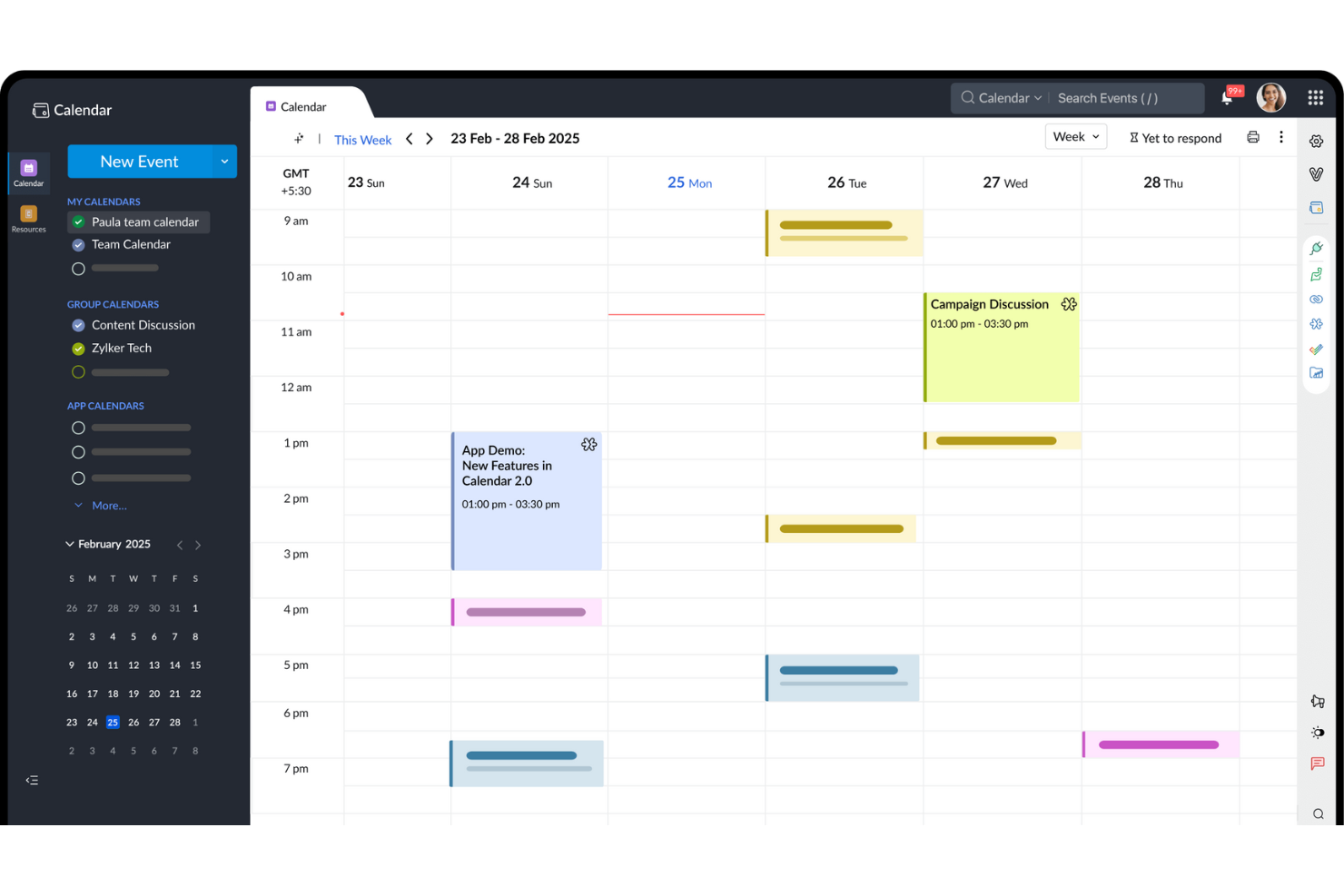
I team che cercano un calendario pensato per la programmazione e il coordinamento di gruppo potrebbero prendere in considerazione Zoho Calendar. È progettato per organizzazioni che necessitano di calendari condivisi, prenotazione delle risorse e gestione degli eventi tra reparti o team distribuiti. Diversamente da Google Calendar, Zoho Calendar offre controlli di condivisione dettagliati e si integra perfettamente con altre app Zoho per flussi di lavoro di squadra unificati.
Perché Zoho Calendar è una valida alternativa a Google Calendar
Quando il tuo team ha bisogno di un coordinamento avanzato degli eventi, Zoho Calendar offre funzionalità che vanno oltre la semplice pianificazione. Ho scelto Zoho Calendar perché consente di creare calendari di gruppo, gestire risorse condivise come le sale riunioni e impostare permessi personalizzati per i diversi membri del team. La piattaforma supporta anche inviti agli eventi e monitoraggio delle risposte (RSVP), rendendo più facile organizzare riunioni tra reparti. Se la priorità è gestire eventi e risorse del team in un unico posto, Zoho Calendar rappresenta una valida alternativa a Google Calendar.
Funzionalità principali di Zoho Calendar
Oltre alla sua efficacia nel coordinamento degli eventi di team, Zoho Calendar include molte altre utili funzionalità:
- Viste multiple del calendario: Passa tra le viste giornaliera, settimanale, mensile e agenda per visualizzare il programma in diversi formati.
- Pubblicazione calendario pubblico: Condividi i calendari pubblicamente con un link o incorporali nei siti web.
- Promemoria via email: Imposta notifiche email automatiche per eventi e riunioni in arrivo.
- Sottoscrizione a calendari: Iscriviti a calendari esterni tramite iCal o CalDAV per visualizzare tutti gli eventi in un unico posto.
Integrazioni di Zoho Calendar
Le integrazioni includono Zoho Mail, Zoho Meeting, Zoho CRM, Zoho Bookings, Zoho Connect, Zoho Cliq, Microsoft Teams, Google Calendar, Webex e Outlook.
Pros and Cons
Pros:
- Incorporamento facile nei siti web
- Piani altamente convenienti
- Etichette colorate personalizzate per eventi
Cons:
- App mobile poco intuitiva
- Esperienza limitata come servizio autonomo

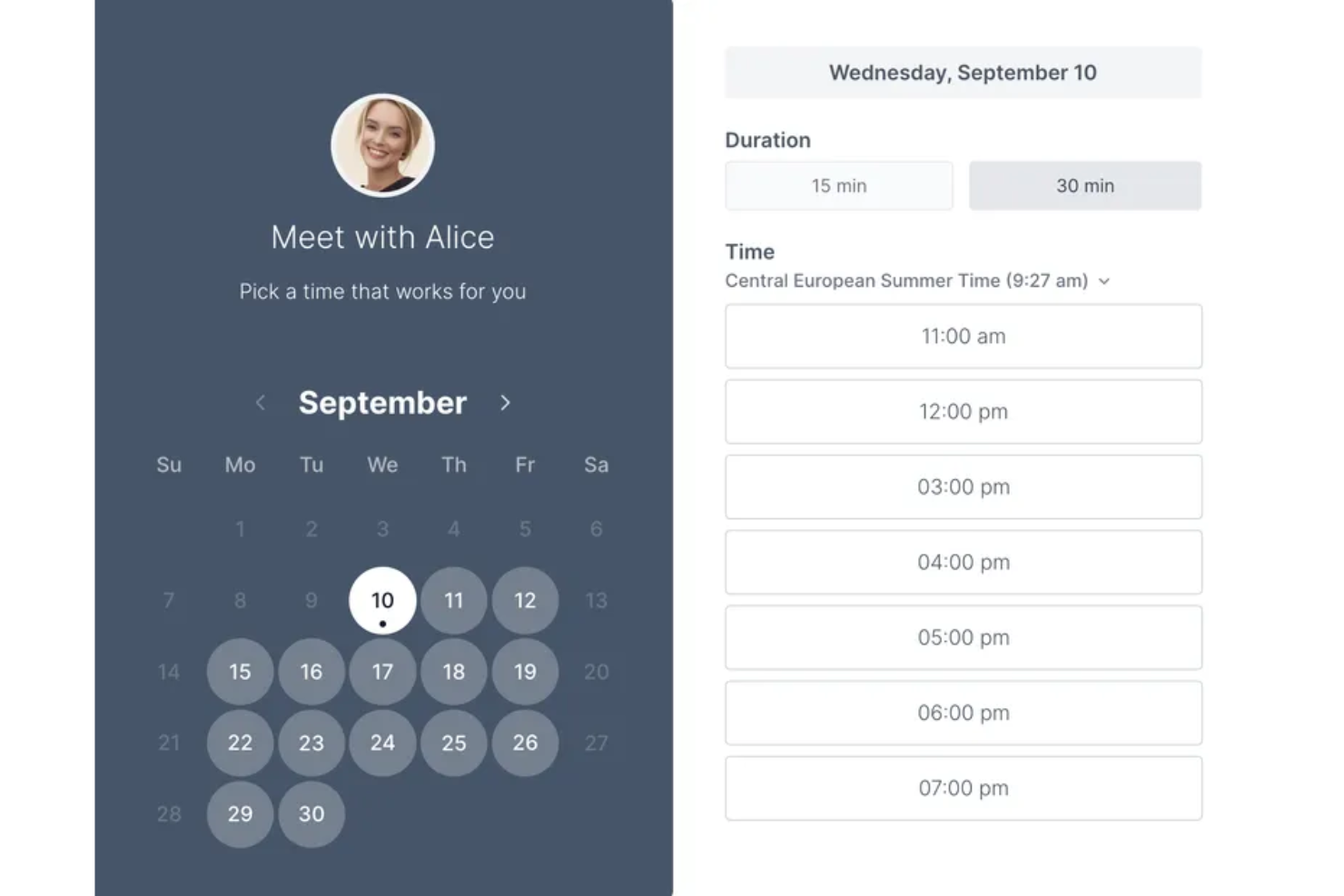
Se cerchi un modo semplice per programmare incontri, Koalendar è pensato per garantire semplicità e rapidità. È ideale per insegnanti, liberi professionisti e piccoli team che desiderano evitare la complessità degli strumenti di calendario tradizionali. Koalendar si distingue da Google Calendar offrendo una pagina di prenotazione pulita e link agli incontri immediati, senza configurazioni aggiuntive o elementi superflui.
Perché Koalendar è una buona alternativa a Google Calendar
A differenza degli strumenti di pianificazione più complessi, Koalendar si concentra sul rendere la programmazione degli incontri il più semplice possibile. Ho scelto Koalendar perché permette di creare una pagina di prenotazione condivisibile in pochi secondi, così chiunque può fissare un appuntamento senza scambiarsi email infinite. Lo strumento genera automaticamente i link per le riunioni e si sincronizza con i tuoi calendari esistenti per evitare doppie prenotazioni. Per chi cerca una soluzione semplice per gestire gli incontri, Koalendar rappresenta un’alternativa snella a Google Calendar.
Funzionalità principali di Koalendar
Altre funzionalità che rendono Koalendar interessante per una programmazione semplice includono:
- Connessioni con più calendari: Collega diversi account Google per gestire la disponibilità su più calendari.
- Moduli di prenotazione personalizzabili: Aggiungi domande personalizzate per raccogliere informazioni dagli invitati prima degli incontri.
- Rilevamento automatico del fuso orario: Rileva e mostra gli orari delle prenotazioni nel fuso orario locale di ciascun invitato.
- Tempi di buffer tra gli incontri: Imposta intervalli automatici per evitare appuntamenti consecutivi senza pause.
Integrazioni di Koalendar
Le integrazioni includono Google Calendar, Outlook Calendar, iCloud Calendar, Google Meet, Microsoft Teams, Zoom, Stripe, Gmail, Google Drive e WordPress.
Pros and Cons
Pros:
- Piano gratuito molto generoso
- Sincronizzazione diretta con Google Meet
- Pagine pubbliche essenziali
Cons:
- Limiti nella personalizzazione di base
- Elenco integrazioni più ridotto

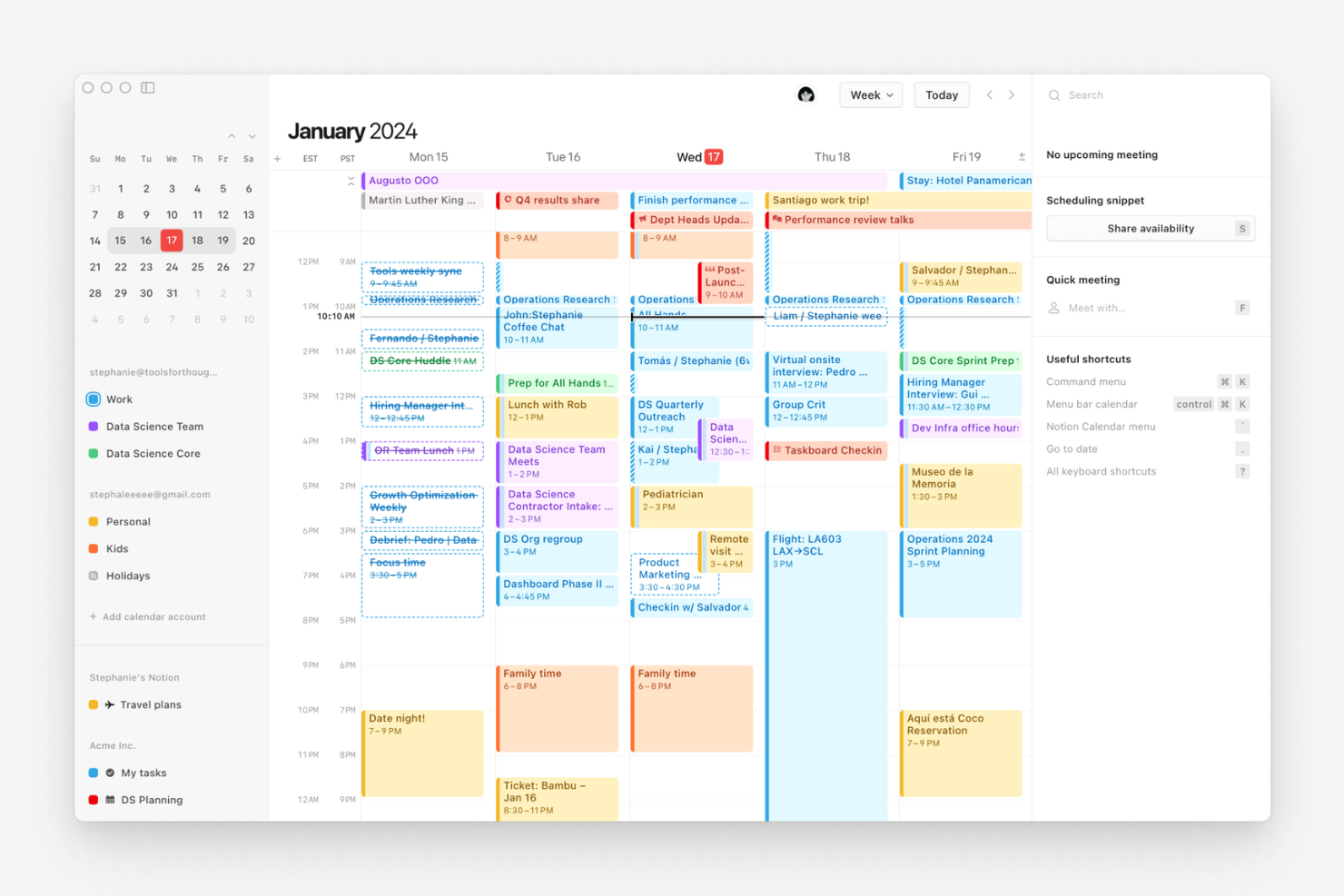
Notion Calendar riunisce appunti, documenti e pianificazione in un unico spazio di lavoro unificato. È progettato per team e professionisti che desiderano collegare i dettagli delle riunioni, i piani di progetto e i documenti direttamente agli eventi in calendario. A differenza di Google Calendar, Notion Calendar ti permette di collegare e visualizzare le pagine di Notion insieme al tuo programma, rendendo più semplice gestire contesto e contenuti insieme.
Perché Notion Calendar è una valida alternativa a Google Calendar
Se desideri un calendario che unisca i tuoi appunti e la pianificazione, Notion Calendar merita attenzione. Ho scelto Notion Calendar perché consente di allegare pagine, documenti e database di Notion direttamente agli eventi, così tutto il contesto delle riunioni e i dettagli dei progetti restano connessi. Puoi visualizzare e modificare le note collegate direttamente dal calendario, cosa che Google Calendar non offre. Questo rende Notion Calendar particolarmente utile per i team che devono gestire sia gli orari che le informazioni di supporto in un unico luogo.
Funzioni principali di Notion Calendar
Altre funzioni che rendono Notion Calendar una scelta eccellente per team e professionisti includono:
- Visualizzazioni multiple del calendario: Passa tra visualizzazioni giornaliere, settimanali e mensili per vedere il tuo programma da diverse prospettive.
- Eventi a colori: Assegna colori agli eventi per un’organizzazione visiva e filtraggio rapidi.
- Sincronizzazione con Google Calendar: Collega il tuo Google Calendar per visualizzare e gestire eventi di entrambe le piattaforme in un unico posto.
- Supporto ai fusi orari: Pianifica e visualizza eventi in diversi fusi orari con regolazioni automatiche.
Integrazioni di Notion Calendar
Le integrazioni includono Notion, Google Calendar, Google Meet, Zoom e Arc.
Pros and Cons
Pros:
- Scorciatoie da tastiera veloci
- Strumenti semplici per il calcolo dei fusi orari
- Gratuito con un account Notion
Cons:
- Manca un'app autonoma per le attività
- Difficile da usare offline
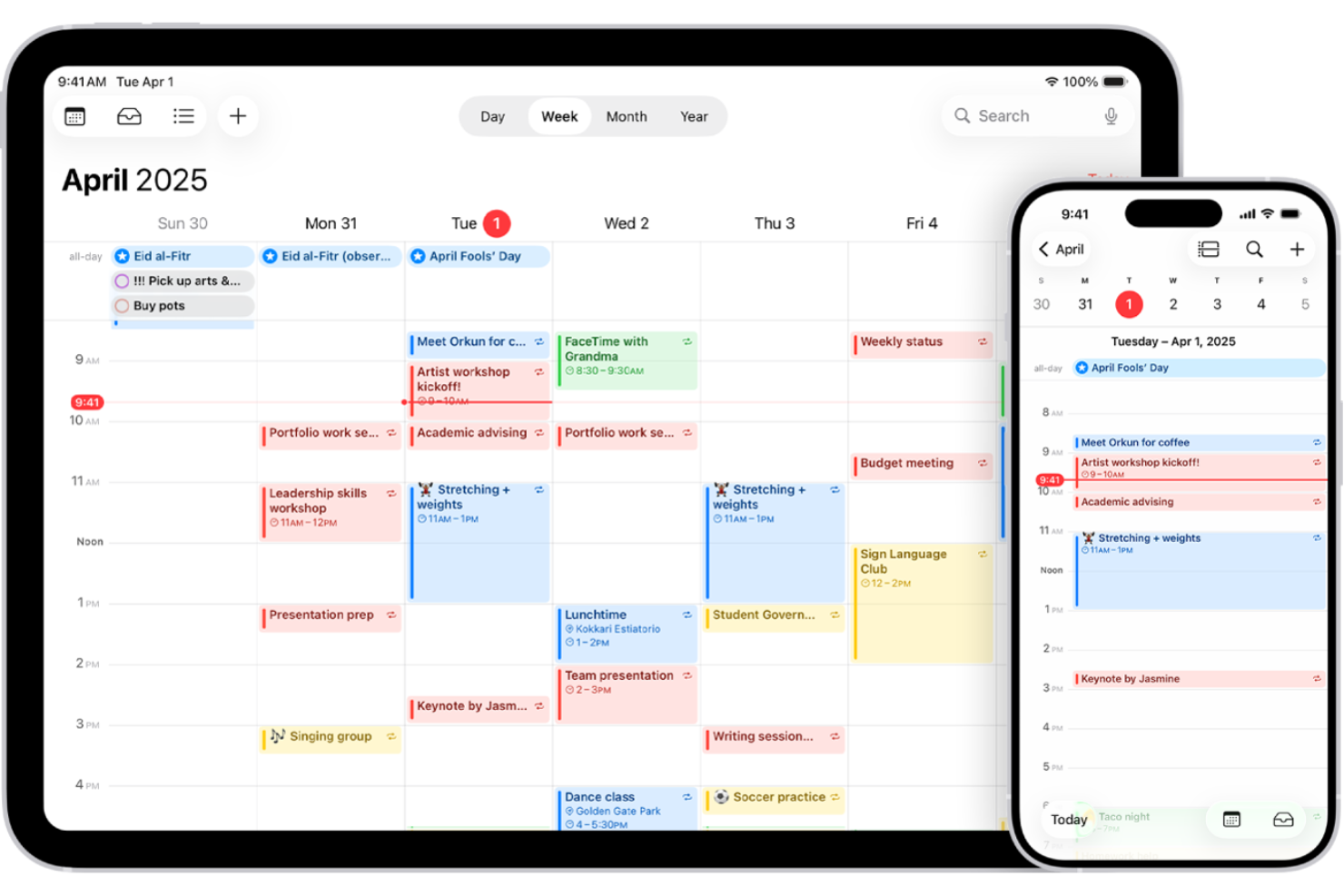
Se il tuo team utilizza dispositivi Apple, Calendario Apple offre una soluzione per gestire il calendario che si sincronizza istantaneamente su iPhone, iPad, Mac e Apple Watch. È una scelta ideale per professionisti e aziende che desiderano un'integrazione nativa con l'ecosistema Apple e controlli avanzati sulla privacy. A differenza di Google Calendar, Calendario Apple consente di gestire eventi, notifiche e calendari condivisi senza uscire dall'ambiente Apple.
Perché Calendario Apple è una valida alternativa a Google Calendar
Per chi è fortemente integrato nell'ecosistema Apple, Calendario Apple si distingue per la sincronizzazione istantanea su tutti i dispositivi Apple. Ho scelto Calendario Apple perché puoi creare, modificare e visualizzare eventi su iPhone, iPad, Mac o Apple Watch, e tutte le modifiche appaiono ovunque in tempo reale. Il calendario supporta anche calendari condivisi e notifiche per gli eventi che funzionano in modo nativo con le app e i widget incorporati Apple. Se desideri un calendario completamente integrato con i tuoi dispositivi Apple, questa è una valida alternativa a Google Calendar.
Funzionalità principali di Calendario Apple
Altre funzioni di Calendario Apple lo rendono un’alternativa distintiva a Google Calendar:
- Creazione eventi con linguaggio naturale: Aggiungi eventi semplicemente scrivendo frasi come “Pranzo con Sam domani alle 13”.
- Supporto per più calendari: Crea e gestisci calendari separati per lavoro, personale o progetti condivisi.
- Avvisi basati sulla posizione: Imposta promemoria che si attivano quando arrivi o lasci una determinata posizione.
- Integrazione con Siri: Usa i comandi vocali per programmare o controllare eventi direttamente da qualsiasi dispositivo Apple.
Integrazioni Calendario Apple
Le integrazioni includono iCloud, Microsoft Exchange, Google Calendar, Yahoo e server CalDAV.
Pros and Cons
Pros:
- Design pulito e minimale
- Creazione rapida tramite Siri
- Consumo batteria molto ridotto
Cons:
- L'interfaccia web è basica
- Manca la funzione di link per prenotazioni


Se desideri un calendario che trasformi istantaneamente il linguaggio naturale in eventi, Fantastical merita un'occhiata. È pensato per professionisti e team che necessitano di una pianificazione rapida e flessibile su dispositivi Apple, senza la frizione dell'inserimento manuale. Fantastical si distingue da Google Calendar per l'inserimento tramite linguaggio naturale, le proposte avanzate di riunioni e un'interfaccia raffinata progettata per utenti macOS e iOS.
Perché Fantastical è una valida alternativa a Google Calendar
A differenza della maggior parte delle app calendario, Fantastical consente di creare eventi semplicemente digitando o parlando in modo naturale, un grande risparmio di tempo per i professionisti impegnati. Ho scelto Fantastical perché il suo sistema di elaborazione del linguaggio naturale trasforma frasi come “Pranzo con Sam domani alle 13” in eventi completi sul calendario. L'app supporta inoltre azioni rapide per la pianificazione, come trascinare e rilasciare eventi o proporre orari per le riunioni direttamente dal calendario. Se cerchi un calendario che velocizzi la creazione di eventi e riduca l'inserimento manuale, Fantastical è una valida alternativa a Google Calendar.
Funzionalità principali di Fantastical
Altre funzionalità che rendono Fantastical interessante per team e professionisti includono:
- Set di calendari: Raggruppa più calendari e passa da uno all'altro con un solo clic.
- Previsioni meteo: Visualizza aggiornamenti meteo integrati direttamente nel calendario.
- Rilevamento delle chiamate in conferenza: Identifica automaticamente e aggiunge i link per accedere a Zoom, Microsoft Teams e Google Meet.
- Supporto per i fusi orari: Organizza eventi in diversi fusi orari con regolazioni automatiche.
Integrazioni di Fantastical
Le integrazioni includono Google Calendar, iCloud, Microsoft 365, Exchange, Todoist, Zoom, Microsoft Teams, Webex, GoToMeeting e Cardhop.
Pros and Cons
Pros:
- Ottima sincronizzazione del widget meteo
- Flusso rapido di creazione eventi
- Sincronizzazione profonda con l'ecosistema Apple
Cons:
- Nessuna versione nativa per Windows
- Può scaricare rapidamente la batteria
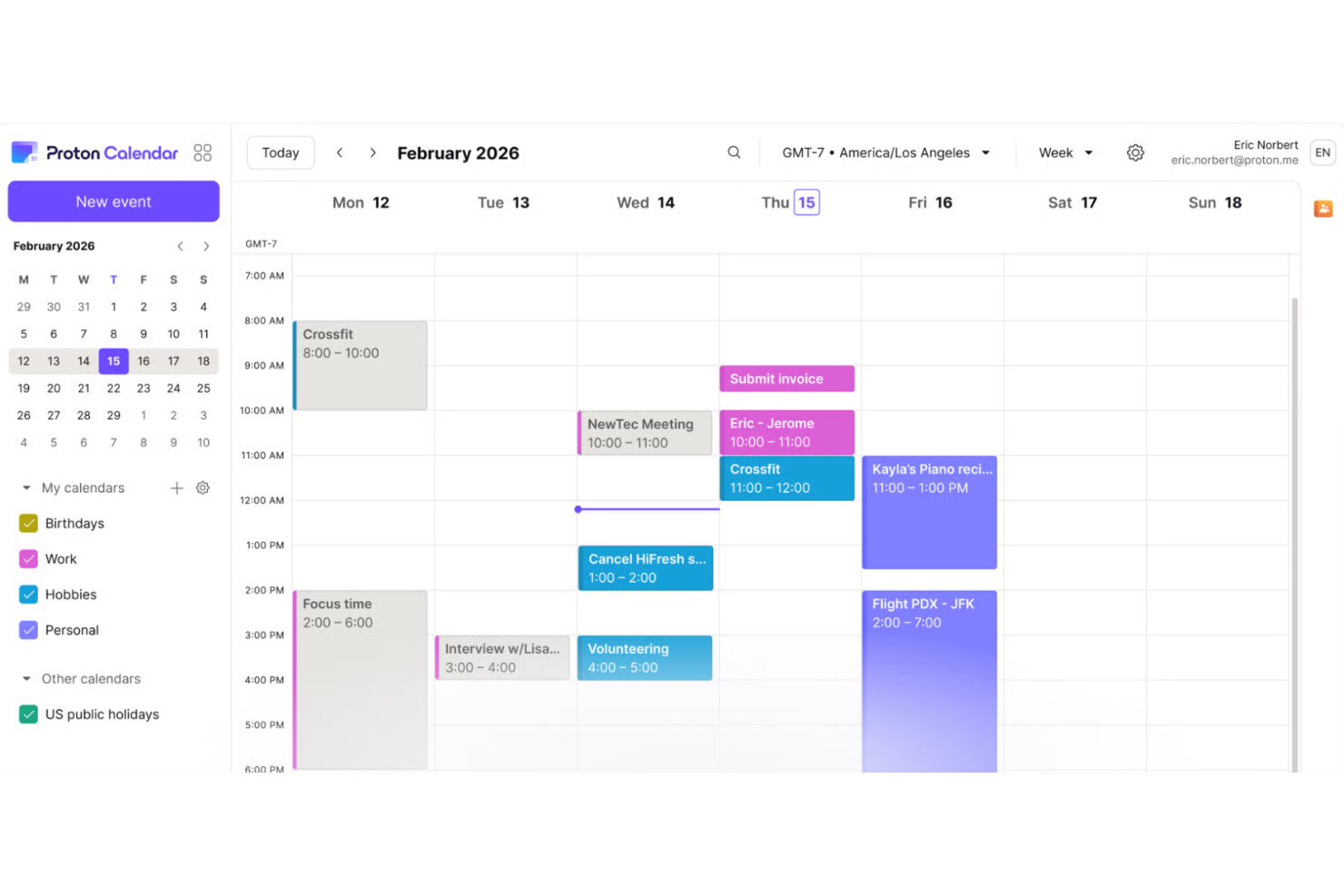
Se la privacy è la tua massima priorità nella gestione del calendario, Proton Calendar è progettato con la crittografia end-to-end al centro. Questo strumento è una scelta solida per professionisti, organizzazioni e chiunque gestisca informazioni sensibili e desideri avere più controllo sui propri dati rispetto a Google Calendar. Proton Calendar si distingue mantenendo privati i tuoi eventi, inviti e dettagli personali—anche per il fornitore stesso.
Perché Proton Calendar è una valida alternativa a Google Calendar
Per chi ha bisogno della privacy sopra ogni cosa, Proton Calendar offre un livello di protezione che Google Calendar non raggiunge. Ho scelto Proton Calendar perché utilizza la crittografia end-to-end per tutti i dettagli degli eventi, così solo tu e i tuoi invitati potete vedere il tuo programma. Lo strumento mantiene inoltre privati i metadati degli eventi e le notifiche, caratteristica particolarmente importante per chi gestisce informazioni riservate o sensibili. L'impegno di Proton Calendar verso la privacy lo rende una scelta solida per chiunque desideri mantenere i dati di pianificazione al sicuro e lontani da terze parti.
Funzionalità principali di Proton Calendar
Altre funzionalità di Proton Calendar lo rendono una scelta pratica per utenti attenti alla privacy che cercano alternative a Google Calendar:
- Supporto a più calendari: Crea e gestisci diversi calendari separati all'interno di un unico account, per progetti o aree diverse della tua vita.
- Codifica colori per eventi: Assegna colori a eventi e calendari per organizzare visivamente il tuo programma.
- Accesso multipiattaforma: Usa Proton Calendar sul web, iOS e Android per pianificare da qualsiasi dispositivo.
- Integrazione con l'ecosistema Proton: Connessione perfetta con Proton Mail e Proton Drive per una suite di produttività unificata e centrata sulla privacy.
Integrazioni di Proton Calendar
Le integrazioni includono Proton Mail, Proton Drive, Proton Pass, Proton VPN, Proton Authenticator, Proton Meet, Proton Docs e Proton Sheets.
Pros and Cons
Pros:
- Si applicano le leggi svizzere sulla privacy
- Blocca gli inviti indesiderati agli eventi
- Codice open source
Cons:
- Set di funzionalità molto basilare
- Mancano integrazioni approfondite


Se gestisci più calendari lavorativi e personali, Morgen offre una visualizzazione unificata che mantiene tutto organizzato in un unico posto. Questo strumento è particolarmente adatto a professionisti e team che hanno bisogno di coordinarsi tra diversi account e piattaforme senza perdere un colpo. Morgen si distingue perché ti permette di gestire, programmare e dare priorità agli eventi provenienti da Google, Microsoft, Apple e altri provider—tutto da un unico pannello.
Perché Morgen è una valida alternativa a Google Calendar
Morgen si distingue per la capacità di riunire più calendari in una sola visualizzazione unificata. L’ho scelto come alternativa a Google Calendar perché ti permette di collegare e gestire i calendari di Google, Microsoft, Apple e altri provider senza dover passare da un'app all'altra. Il pannello di Morgen facilita la visione di tutti i tuoi impegni in un colpo d'occhio e ti aiuta a evitare doppie prenotazioni. I suoi link di pianificazione integrati permettono anche agli altri di prenotare appuntamenti con te su tutti i calendari collegati, una funzionalità che Google Calendar non offre nativamente.
Funzionalità principali di Morgen
Altre funzionalità di Morgen lo rendono un'opzione flessibile per team e singoli che cercano alternative a Google Calendar:
- Time blocking: Riserva sessioni di lavoro focalizzato direttamente sul calendario per proteggere il tuo tempo da riunioni e interruzioni.
- Gestione delle attività: Aggiungi attività accanto ai tuoi eventi e gestisci la tua lista di cose da fare dalla stessa interfaccia.
- Supporto multipiattaforma: Usa Morgen su Windows, macOS, Linux, iOS e Android, così potrai accedere alla tua agenda da qualsiasi dispositivo.
- Notifiche personalizzate: Imposta promemoria personalizzati per eventi e attività per restare sempre aggiornato sui tuoi impegni.
Integrazioni di Morgen
Le integrazioni includono Google Calendar, Outlook Calendar, iCloud, Fastmail, Notion, Obsidian, Linear, Todoist, ClickUp e Zoom.
Pros and Cons
Pros:
- Eccellente gestione integrata delle attività
- Creazione rapida di link di prenotazione
- Funziona bene su tutte le piattaforme
Cons:
- Esperienza app mobile basilare
- Manca una pianificazione avanzata con IA

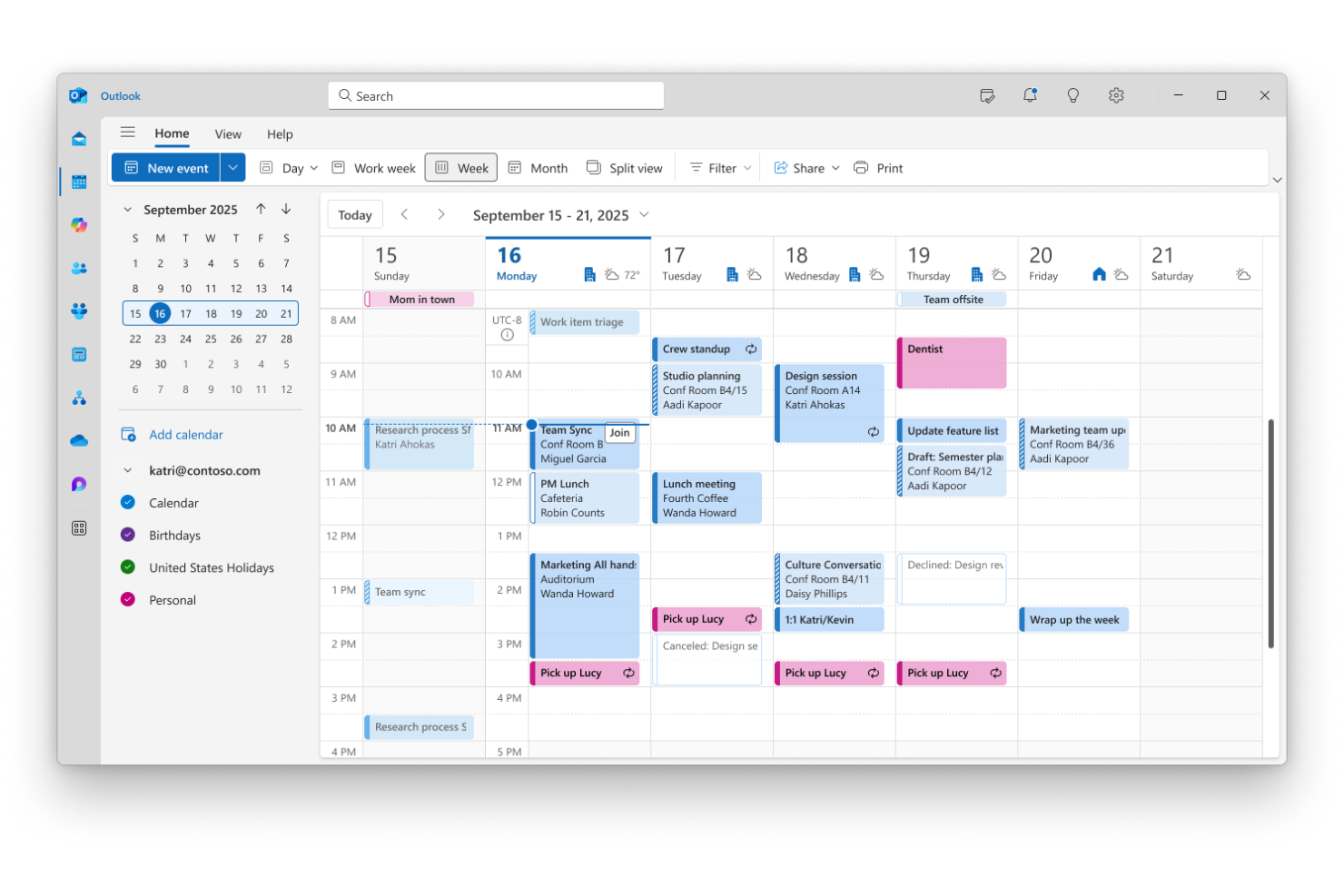
Per i team che utilizzano già le app Microsoft 365, Microsoft Outlook offre una soluzione di calendario che si integra perfettamente nei flussi di lavoro esistenti. È una scelta valida per aziende e professionisti che necessitano di una profonda integrazione tra e-mail, calendario e strumenti di produttività. Outlook si distingue da Google Calendar perché consente di gestire riunioni, attività e file all'interno di un'unica piattaforma unificata.
Perché Microsoft Outlook è una valida alternativa a Google Calendar
Quando il team si affida alle app Microsoft 365, il calendario di Outlook si distingue per la perfetta integrazione con l'intera suite. Ho scelto Outlook perché consente di pianificare riunioni, condividere calendari e gestire gli inviti direttamente insieme alla posta elettronica, ai documenti e alle chat di Teams. Il calendario si collega a Microsoft To Do e OneNote, così puoi trasformare gli eventi in attività operative o appunti delle riunioni senza cambiare piattaforma. Per chiunque voglia che il calendario lavori fianco a fianco con gli strumenti di produttività, Outlook offre un livello di connettività che Google Calendar non riesce a eguagliare.
Funzionalità principali di Microsoft Outlook
Altre funzionalità di Microsoft Outlook lo rendono un'opzione versatile per la gestione del calendario:
- Categorie del calendario con codifica a colori: assegna colori diversi ai calendari o ai tipi di evento per un'organizzazione visiva immediata.
- Pubblicazione dei calendari condivisi: pubblica i calendari sul Web o condividili con i colleghi per una collaborazione semplice.
- Regolazione automatica del fuso orario: pianifica e visualizza gli eventi in più fusi orari senza conversioni manuali.
- Monitoraggio RSVP integrato: monitora le risposte dei partecipanti direttamente all'interno degli inviti agli eventi.
Integrazioni di Microsoft Outlook
Le integrazioni includono Microsoft Teams, OneDrive, SharePoint, Microsoft To Do, OneNote, Dynamics 365, Power Automate, Yammer, Skype for Business ed Excel.
Pros and Cons
Pros:
- Integrazione perfetta con Teams
- Posta elettronica e calendario solidi
- Gestisce volumi enormi di utenti
Cons:
- La versione per Mac può presentare problemi
- Eccessivo per esigenze semplici

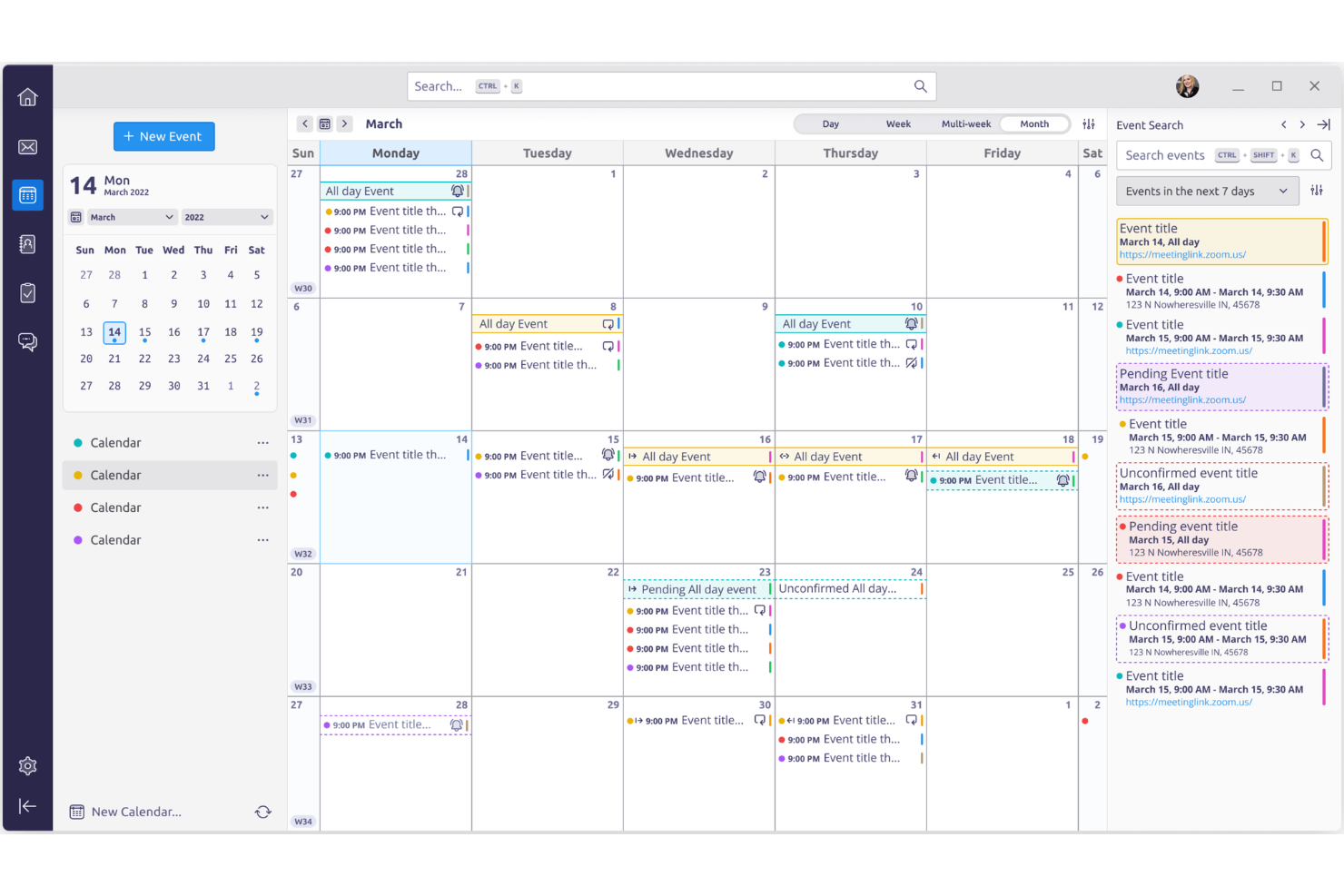
Thunderbird Calendar si distingue per chi desidera avere il pieno controllo sull'esperienza di pianificazione grazie alla personalizzazione open source. Questo strumento è particolarmente adatto a professionisti esperti di tecnologia, piccole imprese e organizzazioni che necessitano di adattare le funzionalità del calendario o i flussi di lavoro oltre ciò che permette Google Calendar. Con Thunderbird Calendar, puoi modificare, estendere e integrare il tuo calendario per soddisfare esigenze specifiche, senza restare vincolato a un fornitore.
Perché Thunderbird Calendar è una valida alternativa a Google Calendar
Se desideri un calendario che puoi davvero rendere 'tuo', Thunderbird Calendar ti offre questa flessibilità grazie alla personalizzazione open source. Ho scelto Thunderbird Calendar perché ti permette di modificare il codice, installare componenti aggiuntivi sviluppati dalla comunità e persino creare le tue estensioni per adattarlo al tuo flusso di lavoro. Lo strumento supporta script avanzati e automazioni, permettendoti di personalizzare pianificazione, notifiche e gestione eventi in modi che le piattaforme chiuse come Google Calendar non possono eguagliare. Per chi dà valore all'adattabilità e al controllo, Thunderbird Calendar offre un livello di libertà unico.
Funzionalità principali di Thunderbird Calendar
Altre funzionalità di Thunderbird Calendar lo rendono una scelta flessibile per team e singoli che cercano alternative a Google Calendar:
- Gestione di calendari multipli: Organizza e visualizza più calendari affiancati all'interno della stessa interfaccia.
- Collegamento tra attività ed eventi: Collega direttamente le attività agli eventi del calendario per una migliore coordinazione del flusso di lavoro.
- Accesso offline: Visualizza e modifica il calendario anche senza connessione a Internet.
- Supporto a ICS e CalDAV: Importa, esporta e sincronizza calendari utilizzando standard aperti ampiamente adottati.
Integrazioni di Thunderbird Calendar
Le integrazioni includono Google Calendar, Microsoft Exchange, Nextcloud, ownCloud, Kolab, Apple iCloud, Yahoo Mail, Fastmail, Zoho Mail e Mailfence.
Pros and Cons
Pros:
- Interfaccia altamente personalizzabile
- Sincronizzazione email nativa profonda
- Nessuna raccolta dati
Cons:
- Sincronizzazione tra dispositivi poco fluida
- Configurazione iniziale complessa
Altre alternative a Google Calendar
Ecco alcune ulteriori alternative a Google Calendar che non sono state incluse nel mio elenco, ma che vale comunque la pena prendere in considerazione:


Come valuto le alternative a Google Calendar
Divido la mia valutazione in due livelli: la base che uno strumento deve soddisfare per sostituire Google Calendar nella pianificazione della squadra e le funzionalità che distinguono le opzioni migliori.
Funzionalità essenziali per questo elenco
Quando seleziono gli strumenti per il mio elenco, assegno a ciascuno un punteggio su una scala da 0 (non offre la funzionalità) a 5 (eccelle in quest'area) per ogni funzionalità essenziale elencata di seguito. Poi converto il punteggio totale dello strumento in una percentuale. Ogni strumento deve raggiungere un punteggio totale minimo del 65% per essere preso in considerazione.
- Gestione degli eventi del calendario: verifico se ogni strumento gestisce bene gli aspetti di base — eventi ricorrenti, promemoria, inviti ai partecipanti e RSVP — poiché sono gli elementi fondamentali della pianificazione quotidiana.
- Sincronizzazione di più calendari: la maggior parte dei responsabili di progetto gestisce calendari personali e di lavoro su Google, Outlook e iCal, quindi valuto l'affidabilità della sincronizzazione di ogni strumento tra i diversi fornitori.
- Pianificazione e condivisione con la squadra: i calendari condivisi e le visualizzazioni della disponibilità sono importanti quando si coordinano revisioni degli sprint o riunioni quotidiane tra le squadre di prodotto, ingegneria e progettazione.
- Integrazione con attività e progetti: cerco un collegamento chiaro tra gli eventi del calendario e le attività o le scadenze, sia che sia integrato sia che avvenga tramite integrazioni con strumenti come Jira o Asana.
- Supporto dei fusi orari: per le squadre distribuite che organizzano riunioni quotidiane tra continenti, valuto se lo strumento rileva automaticamente i fusi orari e visualizza con precisione gli orari dei partecipanti.
- Accessibilità multipiattaforma: un calendario che funziona solo su computer mostra rapidamente i suoi limiti, quindi verifico la presenza di applicazioni mobili native, sincronizzazione in tempo reale e funzionalità coerenti tra i dispositivi.
Una volta ottenuto un elenco di strumenti che soddisfano questi criteri, considero ciò che distingue ogni piattaforma.
Fattori distintivi (ciò che distingue i fornitori)
Ecco come confronto i diversi fornitori:
Funzionalità distintive
Cerco funzionalità di pianificazione basate sull'IA in grado di trovare automaticamente gli spazi liberi all'interno di una squadra, una caratteristica utile quando si coordina una sessione di pianificazione dello sprint con otto persone di tre squadre diverse. Anche il blocco del tempo è un elemento distintivo che considero importante, soprattutto negli strumenti che consentono ai manager di proteggere il tempo dedicato alla concentrazione nei calendari della propria squadra. Sono importanti anche le visualizzazioni delle risorse e del carico di lavoro: vedere chi è sovraccarico insieme al suo calendario fornisce ai responsabili di progetto il contesto necessario per riassegnare il lavoro prima che le scadenze slittino.
Oltre le funzionalità
È molto importante quanto bene un calendario si colleghi al tuo insieme di strumenti per la gestione dei progetti esistente. Verifico se gli strumenti offrono integrazioni native con piattaforme come Jira, Asana o ClickUp, in modo che le scadenze e gli eventi degli sprint confluiscano effettivamente nel calendario senza inserimenti manuali. La struttura dei prezzi è un altro fattore che valuto, in particolare se i piani gratuiti sono sufficientemente funzionali da consentire a un singolo responsabile di progetto di effettuare una valutazione prima di coinvolgere un'intera squadra. Considero anche quanto sia facile migrare i calendari condivisi e integrare squadre distribuite con SSO e controlli amministrativi.
Perché cercare un’alternativa a Google Calendar?
Sebbene Google Calendar sia una buona scelta di software per calendari, ci sono diversi motivi per cui alcuni utenti cercano soluzioni alternative. Potresti essere alla ricerca di un’alternativa a Google Calendar perché…
- Hai bisogno di aggiornamenti in tempo reale per i calendari condivisi
- Vuoi controlli più avanzati sulle autorizzazioni
- Hai bisogno di integrazioni con strumenti specifici del settore
- Hai bisogno di accesso offline o di un’app desktop
- Vuoi incorporare i calendari nel tuo sito web
- Hai bisogno di un supporto migliore per gli eventi ricorrenti complessi
Se ti riconosci in una di queste situazioni, sei nel posto giusto. Il mio elenco contiene diverse alternative a Google Calendar più adatte ai team che affrontano queste difficoltà con Google Calendar e cercano soluzioni alternative.
Google Calendar: funzionalità principali
Ecco alcune delle funzionalità principali di Google Calendar, per aiutarti a confrontare ciò che offrono le soluzioni alternative:
- Creazione di eventi con promemoria personalizzabili
- Calendari condivisi per team o gruppi
- Integrazione con Gmail e Google Meet
- Visualizzazioni multiple del calendario (giorno, settimana, mese, agenda)
- Codifica a colori per calendari ed eventi diversi
- App mobili per iOS e Android
- Regolazione automatica del fuso orario
- Condivisione pubblica del calendario tramite link univoci
- Opzioni di pianificazione per eventi ricorrenti
- Integrazione di attività e appuntamenti