

10 migliori alternative a Calendly per prenotare riunioni nel 2026

Elenco delle migliori alternative a Calendly


Gestire efficacemente il calendario del tuo team può essere un grattacapo. Programmare riunioni, gestire appuntamenti e assicurarti che tutti siano sulla stessa lunghezza d’onda può richiedere molto del tuo prezioso tempo. È qui che entra in gioco un software per la programmazione degli appuntamenti come Calendly.
Tuttavia, Calendly potrebbe non soddisfare le esigenze di tutti. Forse cerchi maggiori possibilità di personalizzazione, facilità d’uso, un piano tariffario migliore o funzionalità specifiche che Calendly non offre. Qualunque sia il motivo, non sei l’unico a cercare delle alternative.
Ho individuato e testato le migliori alternative a Calendly che potrebbero adattarsi meglio alle tue esigenze. In questo articolo condividerò informazioni imparziali su ciascuna di esse, aiutandoti a trovare la soluzione di programmazione giusta per le sfide specifiche del tuo team.
Che cos’è Calendly?
Calendly è un software per la gestione del calendario che semplifica il processo di programmazione consentendo agli utenti di impostare la propria disponibilità e condividerla con altri. Viene utilizzato comunemente da professionisti come team di vendita, consulenti e freelance che devono prenotare riunioni in modo efficiente. Calendly offre funzionalità come promemoria automatici, rilevamento del fuso orario e integrazione del calendario con altre app, che contribuiscono a ridurre i conflitti di programmazione e a risparmiare tempo. Nel complesso, Calendly offre un modo intuitivo per prenotare appuntamenti senza il continuo scambio di e-mail.
Confronto tra le alternative a Calendly
Questa tabella comparativa riassume i dettagli sui prezzi delle mie migliori alternative a Calendly.
| Tool | Best For | Trial Info | Price | ||
|---|---|---|---|---|---|
| 1 | Ideale per soluzioni specifiche per settore | Prova gratuita di 7 giorni | A partire da $20/mese | Website | |
| 2 | Ideale per pagine di prenotazione personalizzabili | Prova gratuita di 14 giorni e piano gratuito disponibili | A partire da $14.40/utente/mese | Website | |
| 3 | Ideale per i sondaggi sulle riunioni di gruppo | Piano gratuito disponibile | A partire da $6.95/utente/mese (con fatturazione annuale) | Website | |
| 4 | Ideale per il prezzo dell'offerta a vita | Piano gratuito disponibile | A partire da $29 (pagamento unico) | Website | |
| 5 | Ideale per gli utenti dell'ecosistema Google | Prova gratuita di 14 giorni | $7.56/mese | Website | |
| 6 | Ideale per la pianificazione basata sull'IA | Piano gratuito disponibile | A partire da $10/postazione/mese | Website | |
| 7 | Ideale per la gestione degli appuntamenti con branding | Prova gratuita di 7 giorni + demo gratuita disponibile | A partire da $9/mese (con fatturazione annuale) | Website | |
| 8 | Ideale per personalizzare i tipi di riunione | Prova gratuita di 14 giorni + piano gratuito disponibile | A partire da $9.99/utente/mese (fatturato annualmente) | Website | |
| 9 | Beste voor Gantt-diagramfunctionaliteit | Gratis abonnement beschikbaar | Vanaf $4.92/maand | Website | |
| 10 | Ideale per la gestione delle relazioni con i clienti | Prova gratuita disponibile | A partire da $29/mese (con fatturazione annuale) | Website |
Perché fidarsi dei nostri consigli sui software
Il nostro team testa e recensisce software dal 2012. In quanto project manager noi stessi, sappiamo quanto sia difficile — e importante — scegliere il software giusto.
Per questa guida, abbiamo valutato gli strumenti attraverso test pratici e ricerche indipendenti, assegnando un punteggio agli strumenti in base ai nostri criteri di selezione. Ci basiamo inoltre sulle competenze di leader di pensiero del settore e di professionisti attivi nella gestione dei progetti.
Le nostre recensioni riflettono il nostro giudizio editoriale umano, non un discorso di vendita.
Revisori esperti:
Recensioni delle migliori alternative a Calendly
Di seguito trovi i miei riepiloghi dettagliati delle migliori alternative a Calendly incluse nel mio elenco. Le mie recensioni offrono una panoramica dettagliata delle funzionalità principali, dei pro e dei contro, delle integrazioni e dei casi d’uso ideali di ogni strumento, per aiutarti a trovare la migliore app di programmazione per te.

Ideale per soluzioni specifiche per settore

Acuity Scheduling è uno strumento online per la programmazione degli appuntamenti, con soluzioni di pianificazione personalizzate. È pensato per i settori che necessitano di funzionalità specifiche per le prenotazioni e di una gestione flessibile degli appuntamenti.
Perché Acuity Scheduling è una valida alternativa a Calendly: Acuity Scheduling offre soluzioni specifiche per settore, adattandosi alle esigenze di pianificazione uniche con pagine di prenotazione e moduli di raccolta dati personalizzabili. Puoi gestire facilmente più sedi e gli orari del personale. La capacità di gestire fusi orari diversi e inviare promemoria automatici contribuisce a ottimizzare il processo di gestione degli appuntamenti. Questo lo rende uno strumento prezioso per le aziende con esigenze di pianificazione specializzate.
Funzionalità e integrazioni principali:
Le funzionalità includono l'autoprogrammazione da parte dei clienti, che consente loro di prenotare quando preferiscono. Puoi anche accettare pagamenti direttamente tramite l'interfaccia di programmazione, semplificando il processo di pagamento. Acuity Scheduling offre report dettagliati che consentono di analizzare le tendenze delle prenotazioni.
Le integrazioni includono Google Meet, Zoom, QuickBooks, Stripe, PayPal, GoToMeeting, Squarespace, Zapier e altro.
Pros and Cons
Pros:
- Personalizzazione specifica per settore
- Gestione di più sedi
- Promemoria automatici
Cons:
- Curva di apprendimento per i nuovi utenti
- La configurazione può essere complessa

Ideale per pagine di prenotazione personalizzabili
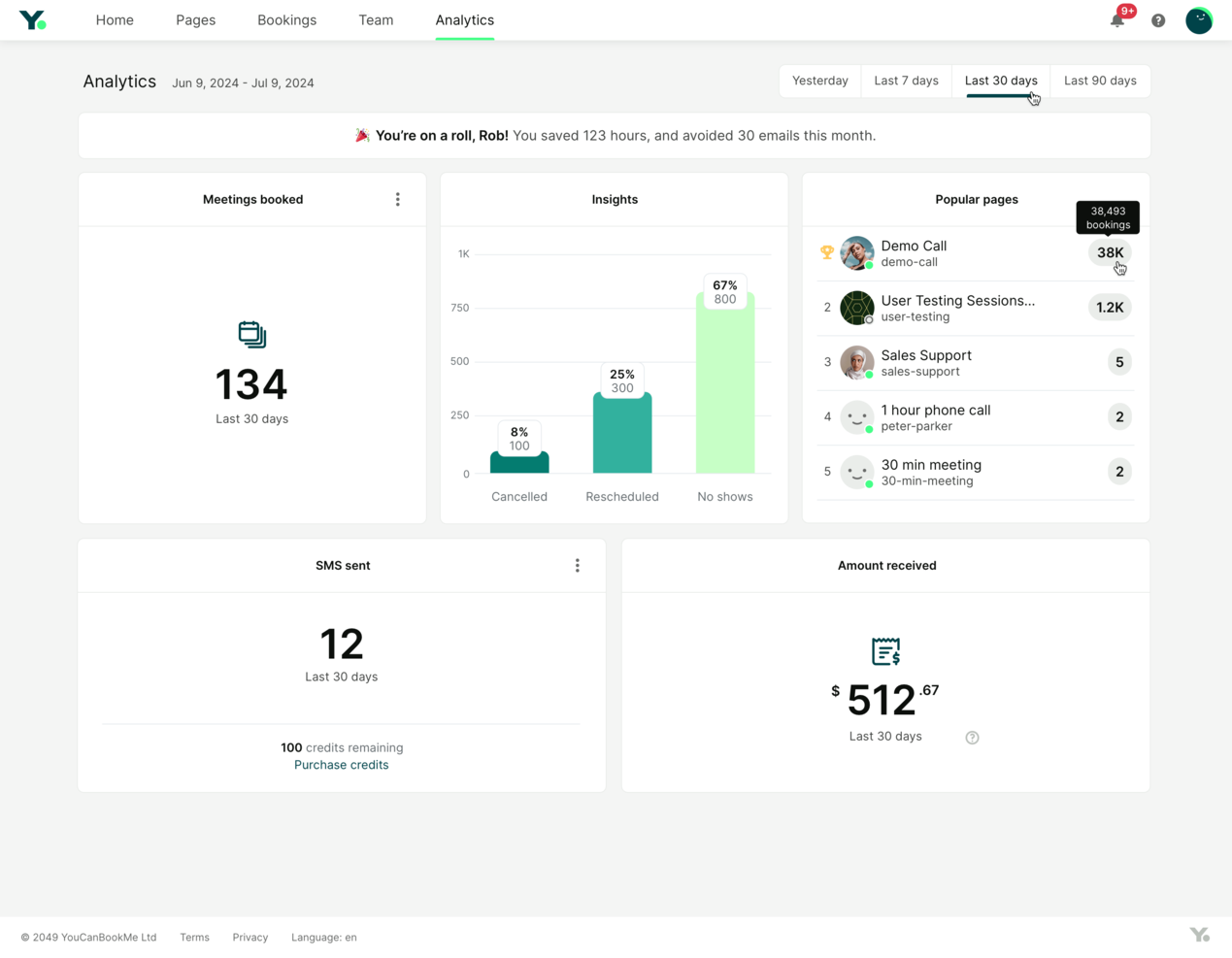
YouCanBookMe è uno strumento di pianificazione online che aiuta i professionisti a gestire gli appuntamenti con facilità. Ottimizza i processi di prenotazione e migliora le interazioni con i clienti.
Perché YouCanBookMe è una buona alternativa a Calendly: YouCanBookMe consente di creare pagine di prenotazione, offrendo un'esperienza personalizzata ai clienti. È possibile modificare l'aspetto e le impostazioni per allinearli all'identità del proprio marchio. Funzionalità come il rilevamento del fuso orario e i promemoria automatici mantengono organizzata la propria agenda e riducono il rischio di appuntamenti mancati. Questa flessibilità e attenzione ai dettagli rendono YouCanBookMe un'opzione valida per chi necessita di soluzioni di pianificazione più personalizzate.
Funzionalità e integrazioni principali:
Le funzionalità includono la possibilità di impostare intervalli di tempo tra gli appuntamenti, consentendo di avere tempo sufficiente per prepararsi. È inoltre possibile creare e gestire più profili di prenotazione, supportando diversi servizi o membri del team. Lo strumento fornisce analisi dettagliate, aiutando a monitorare e ottimizzare le prestazioni della pianificazione.
Le integrazioni includono Google Calendar, Microsoft Outlook, Zoom, Slack, Zapier, iCloud Calendar, Office 365, Stripe, Microsoft Teams e altro ancora.
Pros and Cons
Pros:
- Pagine di prenotazione personalizzabili
- Promemoria automatici
- Rilevamento del fuso orario
Cons:
- Funzionalità avanzate limitate
- Richiede tempo per la configurazione

Doodle
Ideale per i sondaggi sulle riunioni di gruppo
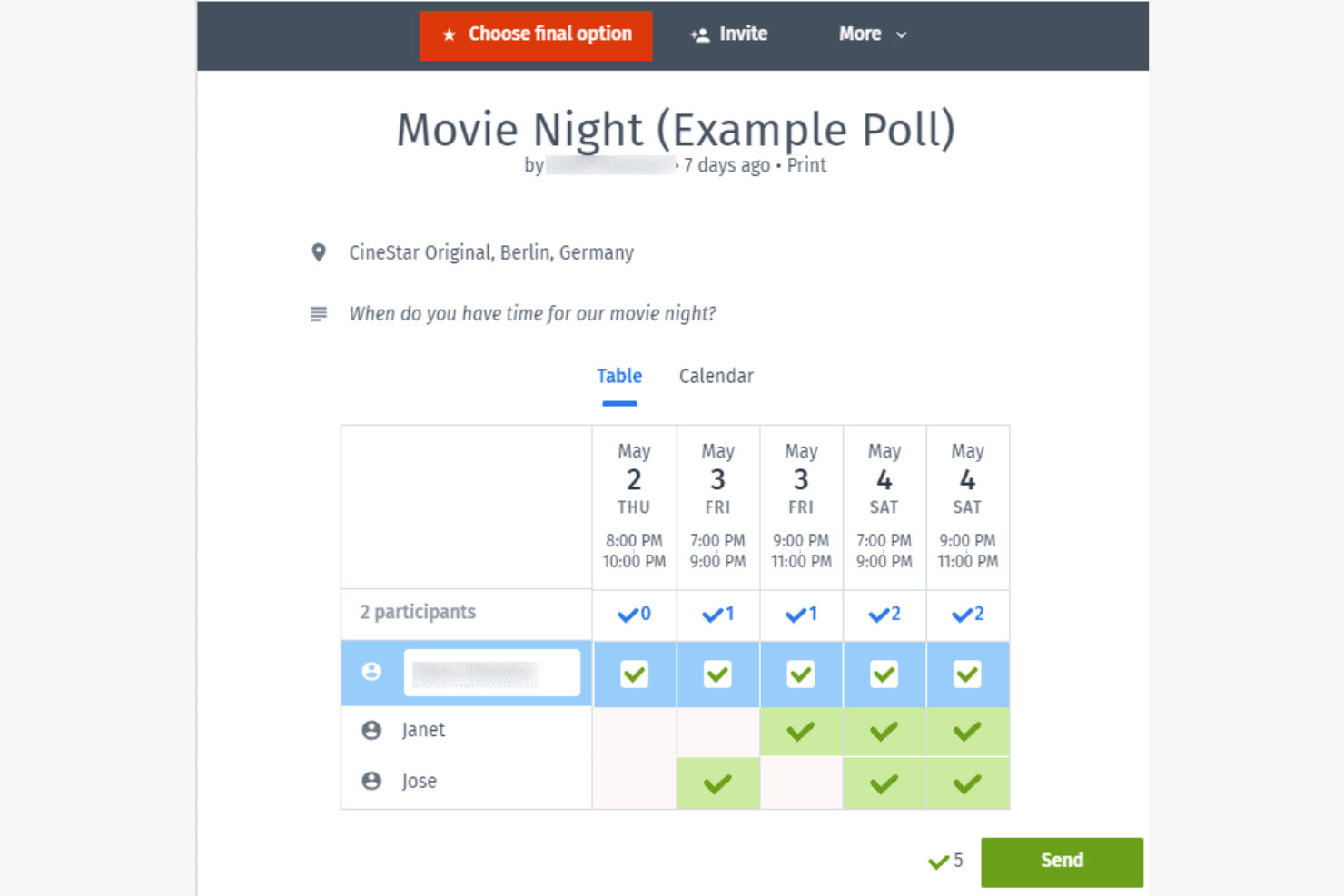
Doodle è uno strumento di pianificazione progettato per semplificare il processo di ricerca dell'orario migliore per le riunioni di gruppo. È popolare tra i team e le organizzazioni che devono coordinarsi con più partecipanti.
Perché Doodle è una buona alternativa a Calendly: la funzionalità di sondaggio di Doodle consente ai partecipanti di votare gli orari preferiti per le riunioni, rendendolo ideale per la pianificazione di gruppo. Puoi creare sondaggi, inviarli e vedere rapidamente quale orario è più adatto a tutti. Questa funzionalità è particolarmente utile per i team più numerosi o per gli eventi in cui trovare un orario comune è difficile. L'interfaccia intuitiva di Doodle consente a chiunque di partecipare facilmente.
Funzionalità e integrazioni distintive:
Le funzionalità includono opzioni di personalizzazione del marchio, che ti consentono di personalizzare la tua interfaccia di pianificazione. Puoi anche impostare scadenze per le risposte ai sondaggi, assicurandoti di ricevere feedback tempestivi. La vista calendario di Doodle offre una panoramica chiara di tutti gli orari proposti per le riunioni, aiutandoti a prendere decisioni informate sulla pianificazione degli appuntamenti.
Le integrazioni includono Google Calendar, Microsoft Outlook, Slack, Zoom, Microsoft Teams, Zapier e altro.
Pros and Cons
Pros:
- Pianificazione di gruppo semplice
- Sondaggi sugli orari delle riunioni
- Impostazione delle scadenze per le risposte
Cons:
- Funzionalità avanzate limitate
- Personalizzazione di base per gli utenti gratuiti

TidyCal
Ideale per il prezzo dell'offerta a vita
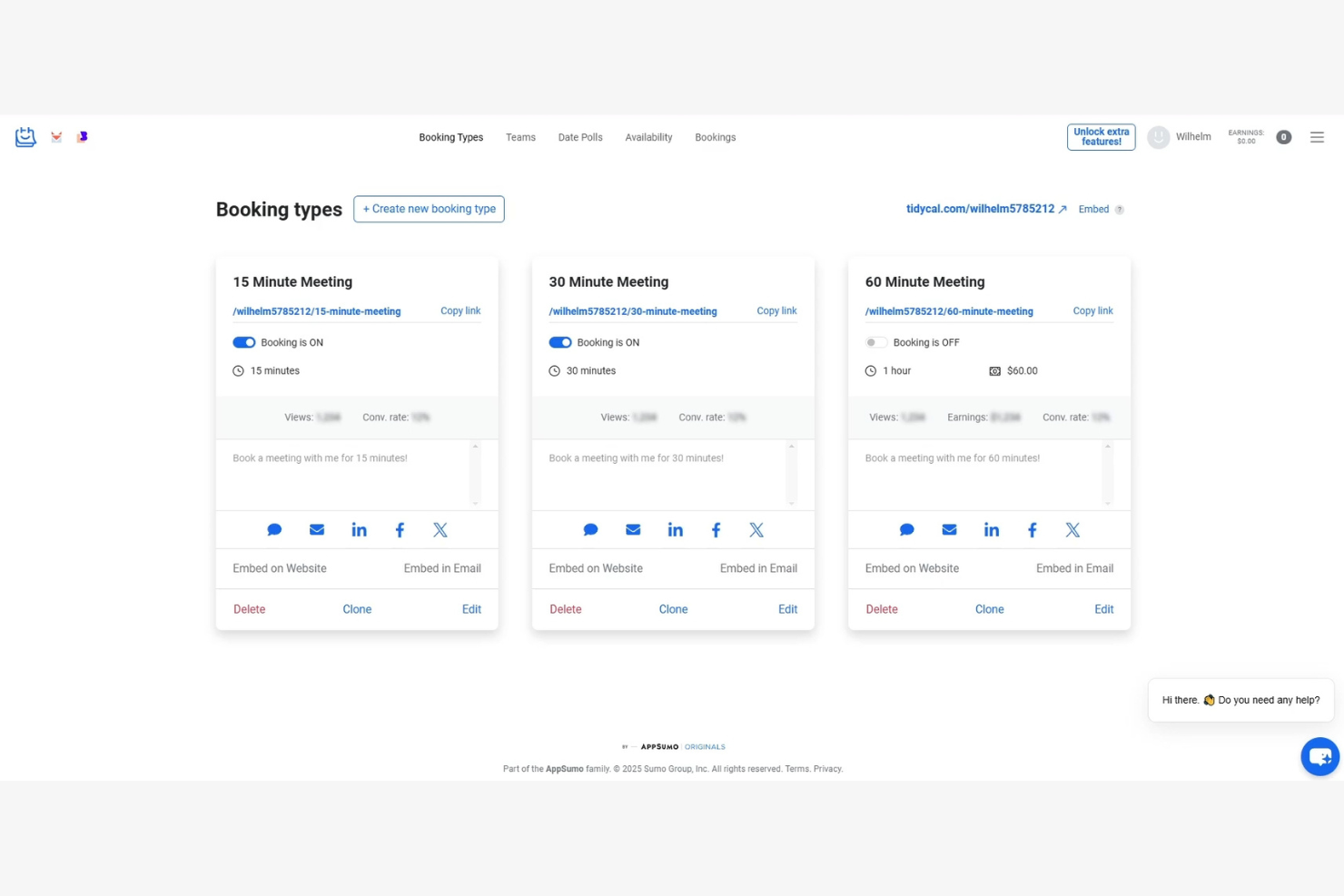
TidyCal è uno strumento di pianificazione progettato per imprenditori e piccole aziende che cercano un modo conveniente per gestire gli appuntamenti. Aiuta gli utenti a organizzare i propri calendari in modo efficiente senza i costi ricorrenti associati a molti altri strumenti.
Perché TidyCal è una buona alternativa a Calendly: TidyCal offre un'offerta a vita, rendendolo una scelta conveniente rispetto al modello in abbonamento di Calendly. Offre un'interfaccia facile da usare, nella quale è possibile impostare la propria disponibilità e consentire ai clienti di prenotare del tempo con te. Funzionalità come il rilevamento del fuso orario e la sincronizzazione del calendario garantiscono la precisione degli appuntamenti. Questo lo rende ideale per chi desidera una pianificazione semplice senza spese continue.
Funzionalità e integrazioni distintive:
Le funzionalità includono pagine di prenotazione personalizzabili, che consentono di adattarne l'aspetto e lo stile per abbinarli al proprio marchio. È inoltre possibile impostare intervalli di pausa tra gli appuntamenti per avere un po' di margine. La conversione automatica del fuso orario di TidyCal garantisce che le riunioni vengano programmate correttamente, indipendentemente dalla posizione dei clienti.
Le integrazioni includono Google Calendar, Outlook Calendar, Apple Calendar, Zapier e altro.
Pros and Cons
Pros:
- Opzione di pagamento unico
- Pagine di prenotazione personalizzabili
- Conversione automatica del fuso orario
Cons:
- Funzionalità avanzate limitate
- Potrebbe non essere adatto a team numerosi

Ideale per gli utenti dell'ecosistema Google
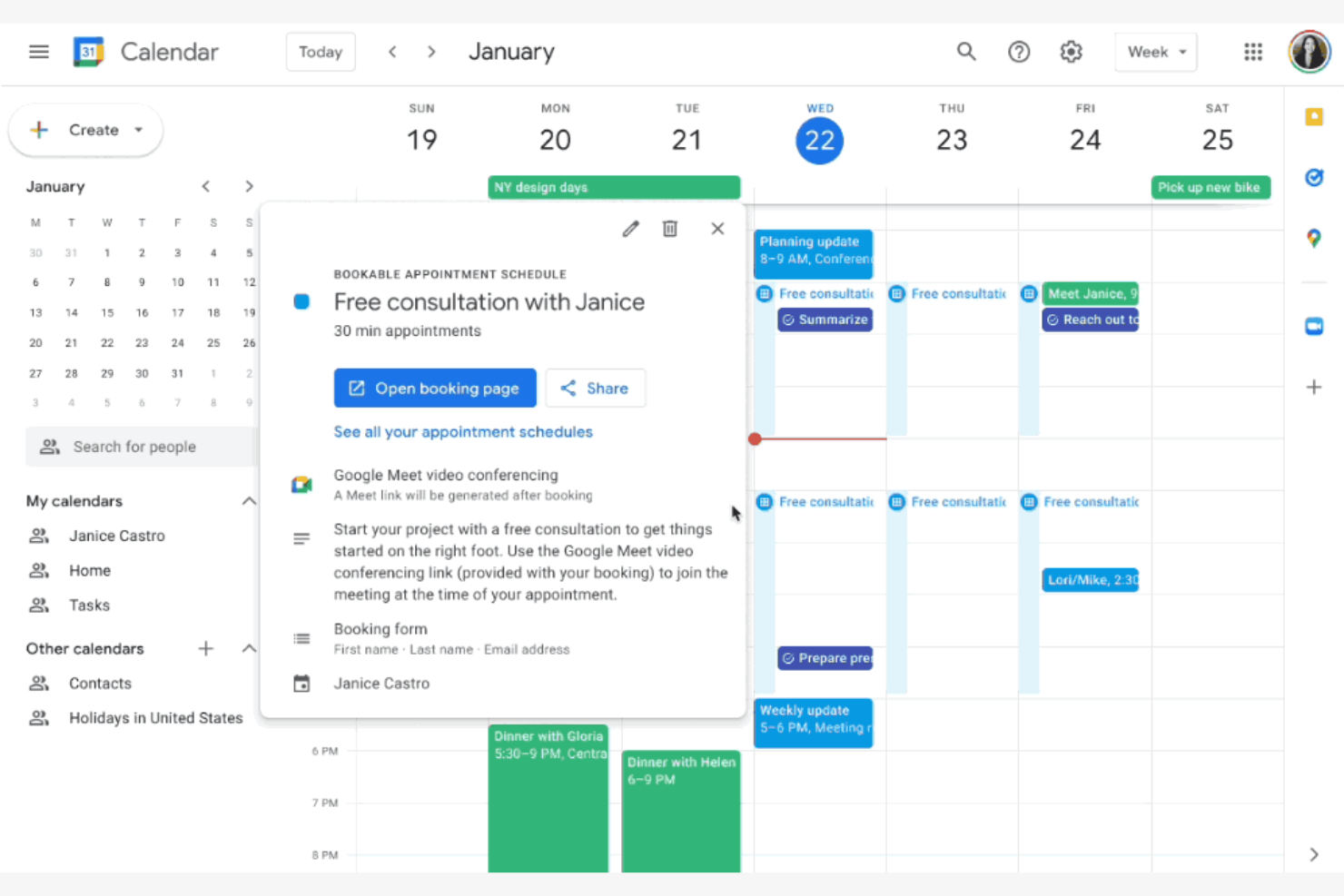
Google Calendar è uno strumento di calendario digitale ampiamente utilizzato da privati e aziende per pianificare e gestire gli eventi. È popolare tra gli utenti che fanno già parte dell'ecosistema Google, offrendo un accesso facile e l'integrazione con altri servizi Google.
Perché Google Calendar è una buona alternativa a Calendly: Google Calendar è ideale per gli utenti che desiderano l'integrazione e i collegamenti con Gmail e altre app Google. La possibilità di aggiungere automaticamente gli eventi da Gmail e condividere i calendari con altri lo rende una scelta conveniente. Gli utenti possono anche impostare facilmente promemoria ed eventi ricorrenti. L'interfaccia intuitiva dello strumento e la sua accessibilità su più dispositivi lo rendono una scelta pratica sia per uso personale che professionale.
Funzionalità e integrazioni distintive:
Le funzionalità includono la possibilità di creare più calendari per scopi diversi, contribuendo a mantenere organizzati gli eventi di lavoro e personali. È possibile impostare notifiche specifiche per gli eventi per tenere sotto controllo la propria agenda. La funzione di codifica a colori consente di distinguere visivamente i diversi tipi di eventi e le relative priorità.
Le integrazioni includono Gmail, Google Meet, Microsoft Outlook, Slack, Zoom, Trello, Salesforce, Asana, Zapier, HubSpot, Microsoft Teams e altro.
Pros and Cons
Pros:
- Si integra con i servizi Google
- Accessibile su tutti i dispositivi
- Interfaccia intuitiva
Cons:
- Mancano flussi di lavoro avanzati per le prenotazioni
- Funzionalità limitate per la pianificazione del team

Reclaim
Ideale per la pianificazione basata sull'IA
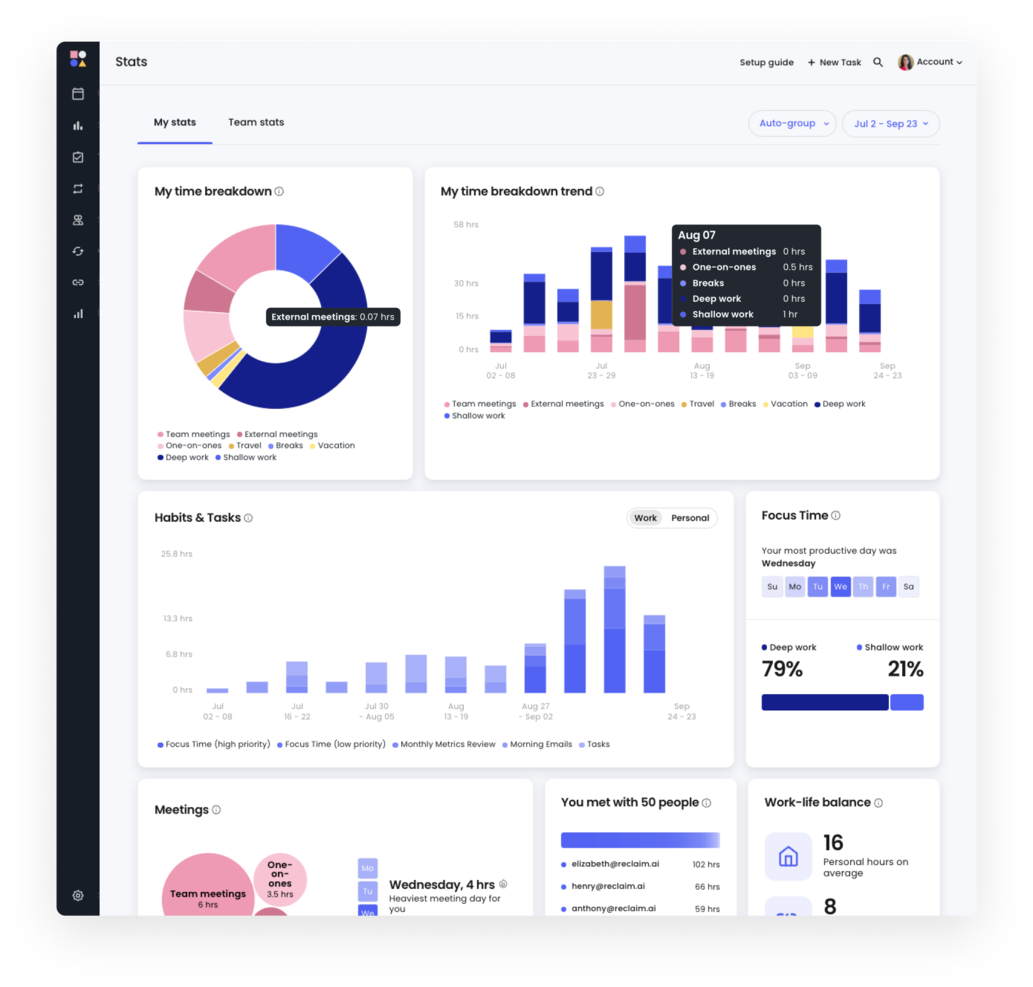
Reclaim è uno strumento di calendario basato sull'IA, progettato per singoli individui e team al fine di aumentare la produttività automatizzando le attività di pianificazione. Viene utilizzato principalmente da professionisti di vari settori, come risorse umane, vendite e ingegneria, per ottimizzare l'equilibrio tra vita professionale e privata.
Perché Reclaim è una buona alternativa a Calendly: Reclaim automatizza la pianificazione degli appuntamenti, protegge il tempo dedicato alla concentrazione e coordina le attività, distinguendosi così da Calendly. Queste funzionalità aiutano gli utenti a recuperare tempo e a ridurre i conflitti di pianificazione, offrendo un'esperienza più automatizzata ed efficiente.
Funzionalità e integrazioni principali:
Le funzionalità includono la gestione delle attività, la protezione del tempo dedicato alla concentrazione e il monitoraggio delle abitudini. È possibile impostare intervalli di tempo cuscinetto per garantire pause tra le riunioni e utilizzare la pianificazione intelligente per modificare automaticamente il calendario in base alle priorità. Il flusso di lavoro basato sull'IA di Reclaim aiuta a gestire in modo efficiente la settimana lavorativa, sostenendo la produttività.
Le integrazioni includono Google Calendar, Slack, Asana, Zoom, ClickUp, Microsoft Outlook, Jira, Todoist e altro.
Pros and Cons
Pros:
- Protezione del tempo dedicato alla concentrazione
- Intervalli cuscinetto integrati per la gestione del tempo
- Modifiche intelligenti alle riunioni
Cons:
- Curva di apprendimento più ripida
- Richiede l'integrazione con il calendario

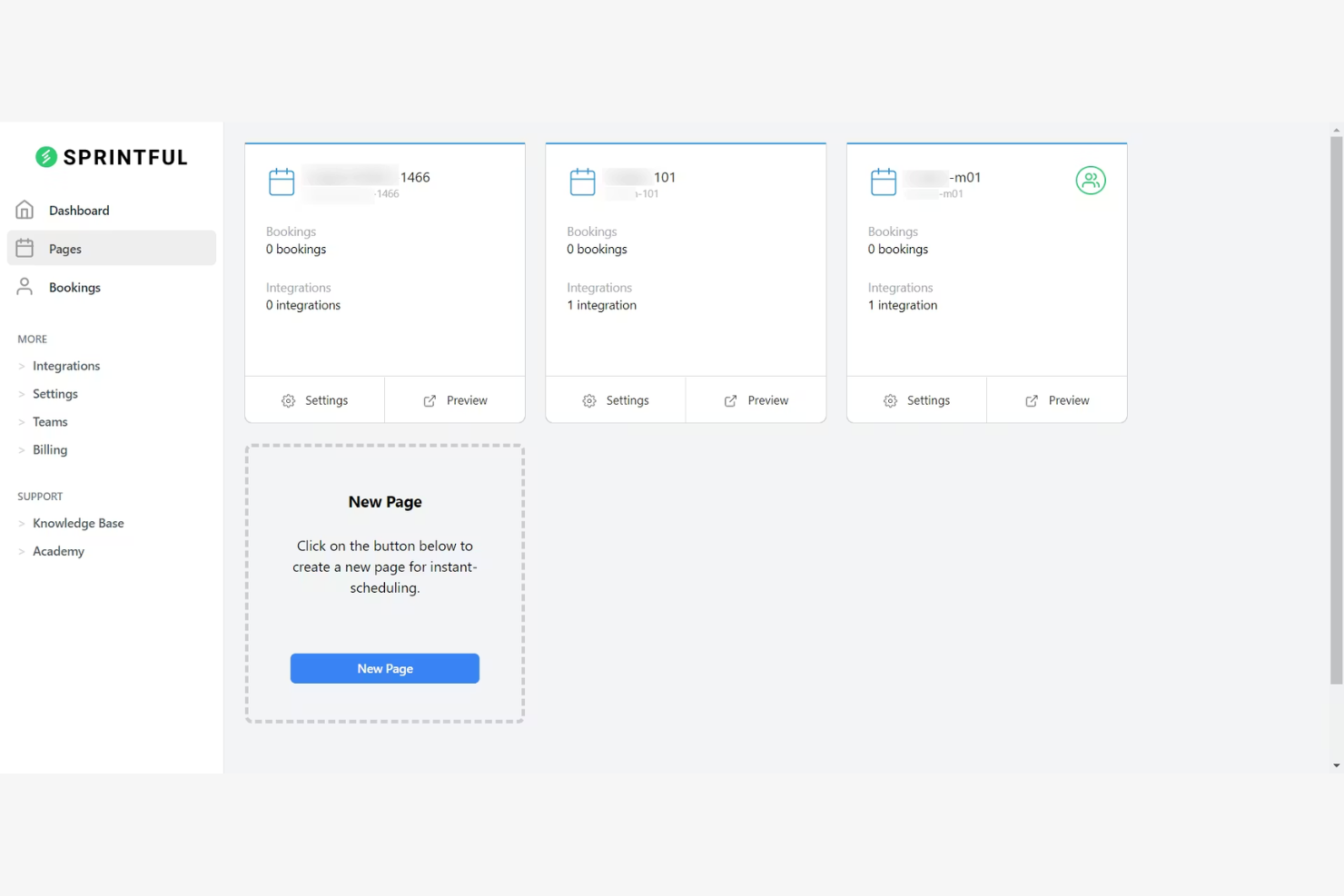
Sprintful è uno strumento di pianificazione online progettato per consentire ad aziende e professionisti di gestire appuntamenti e riunioni in modo efficiente. È rivolto agli utenti che necessitano di soluzioni di pianificazione personalizzate, con opzioni di branding per adattarsi all'identità della propria azienda.
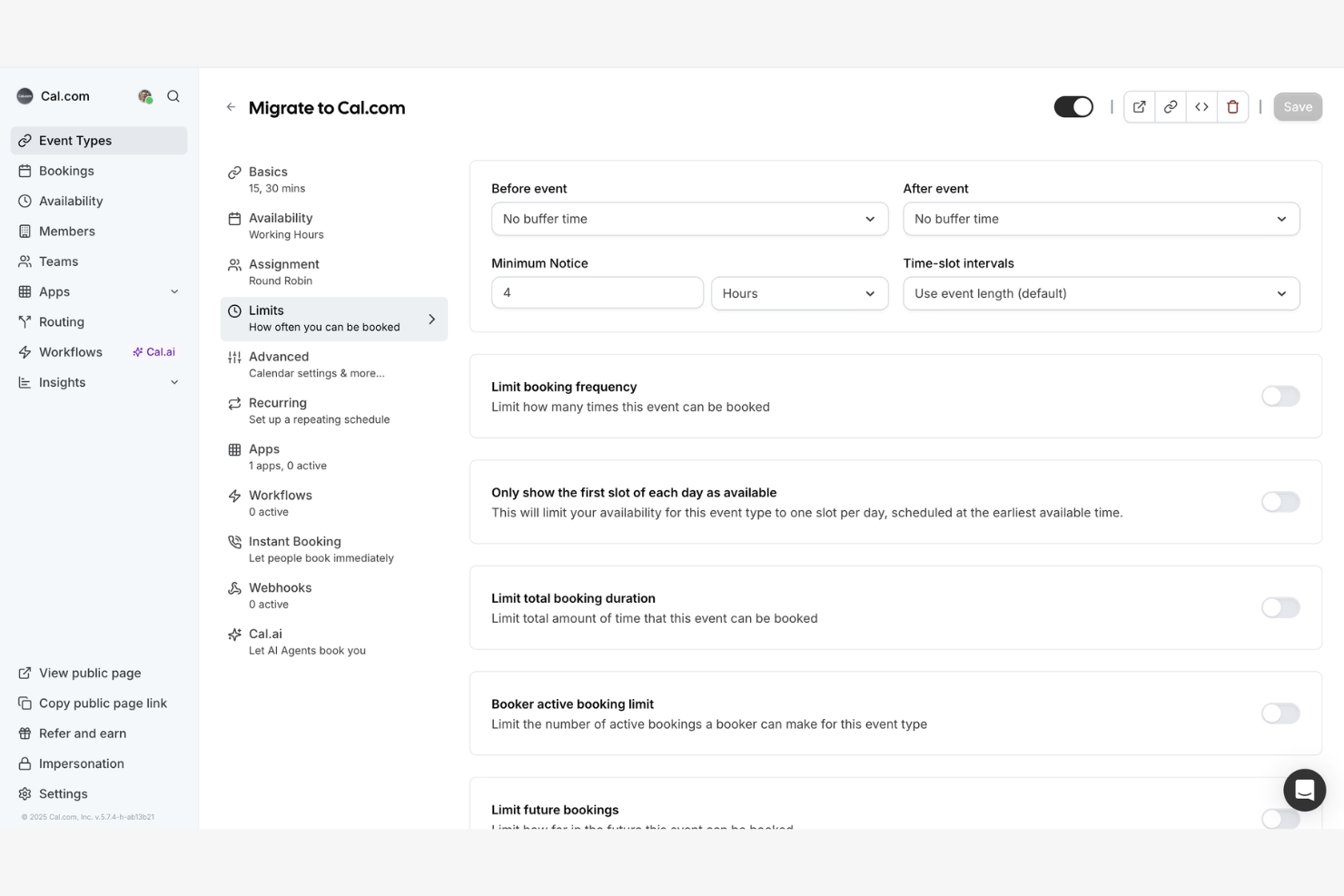
Perché Sprintful è una valida alternativa a Calendly: Sprintful offre pagine di prenotazione personalizzate con i colori, i loghi e i temi del tuo brand. Questo contribuisce a creare un'esperienza coerente per i tuoi clienti. Inoltre, Sprintful dispone di opzioni di pianificazione flessibili, tra cui intervalli di buffer e appuntamenti ricorrenti, per supportare le esigenze della tua azienda.
Funzionalità e integrazioni principali:
Le funzionalità includono la possibilità per più membri del team di gestire i propri appuntamenti tramite un unico account. Puoi anche configurare promemoria automatici per ridurre le assenze e assicurarti che gli orari delle riunioni vengano rispettati. La funzione di reportistica di Sprintful ti consente di monitorare le prenotazioni e ottenere informazioni sull'efficienza della tua pianificazione.
Le integrazioni includono Google Calendar, Microsoft Outlook, Zoom, Slack, Stripe, Microsoft Teams, Zapier e altro ancora.
Pros and Cons
Pros:
- Opzioni di branding personalizzate
- Impostazioni di pianificazione flessibili
- Promemoria automatici
Cons:
- Funzionalità avanzate limitate
- Può essere complesso per i principianti

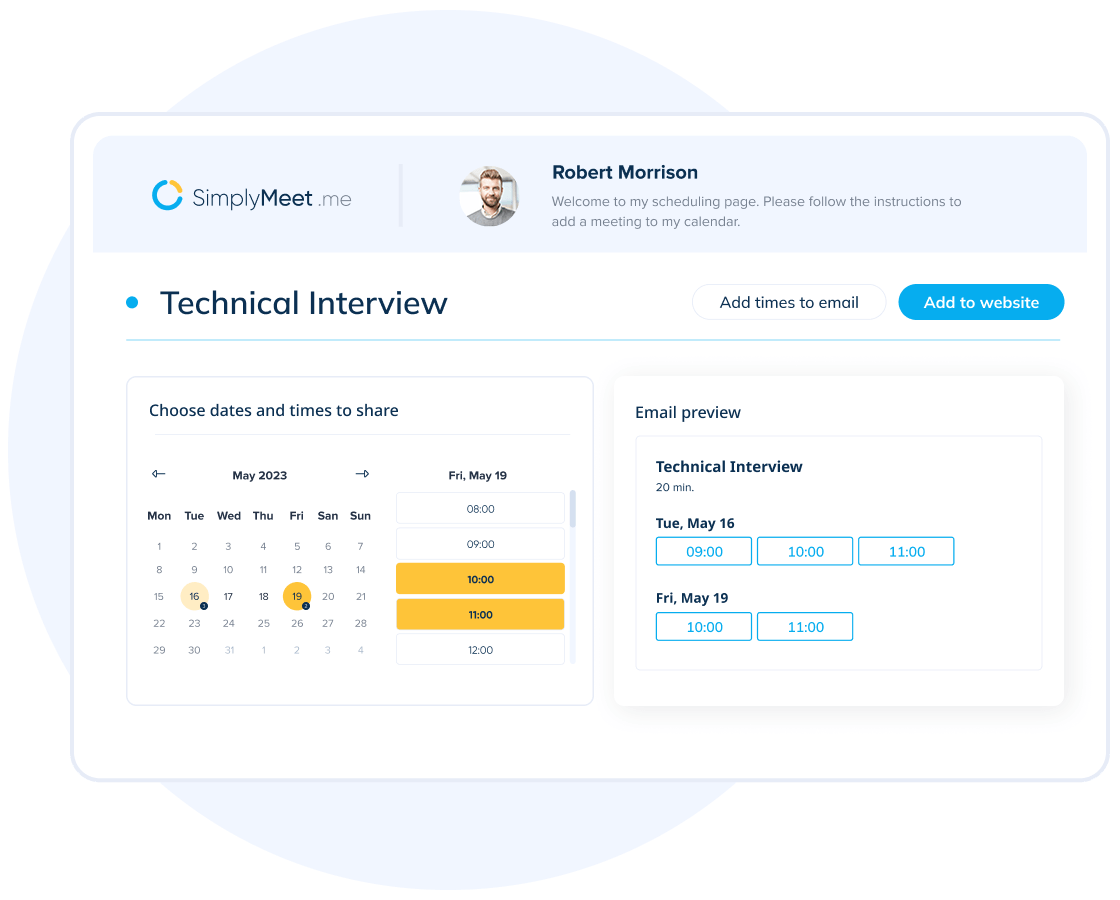
SimplyMeet.me è uno strumento di pianificazione online progettato per semplificare il processo di organizzazione delle riunioni per professionisti e team. Offre un modo semplice per gestire in modo efficiente diversi tipi di riunioni.
Perché SimplyMeet.me è una buona alternativa a Calendly: SimplyMeet.me consente di personalizzare i tipi di riunione per supportare diverse esigenze di pianificazione. È possibile impostare durate e disponibilità differenti, offrendo opzioni ai propri clienti. La sua interfaccia intuitiva garantisce la possibilità di modificare rapidamente le impostazioni in base alle proprie preferenze. Questa adattabilità rende SimplyMeet.me una scelta pratica per chi desidera un maggiore controllo sulla propria pianificazione.
Funzionalità e integrazioni principali:
Le funzionalità includono promemoria automatici per avvisare i partecipanti in anticipo sulle riunioni, riducendo le assenze. È inoltre possibile creare link di prenotazione personalizzati, facilitando la programmazione di appuntamenti da parte dei clienti. SimplyMeet.me offre analisi per monitorare la propria attività di pianificazione e migliorarne l'efficienza.
Le integrazioni includono Google Calendar, Microsoft Outlook, Zoom, Microsoft Teams, Slack, iCloud Calendar, Office 365 e altro ancora.
Pros and Cons
Pros:
- Tipi di riunione personalizzati
- Opzioni di pianificazione flessibili
- Promemoria automatici
Cons:
- Funzionalità avanzate limitate
- Richiede tempo per la configurazione


HoneyBook
Ideale per la gestione delle relazioni con i clienti
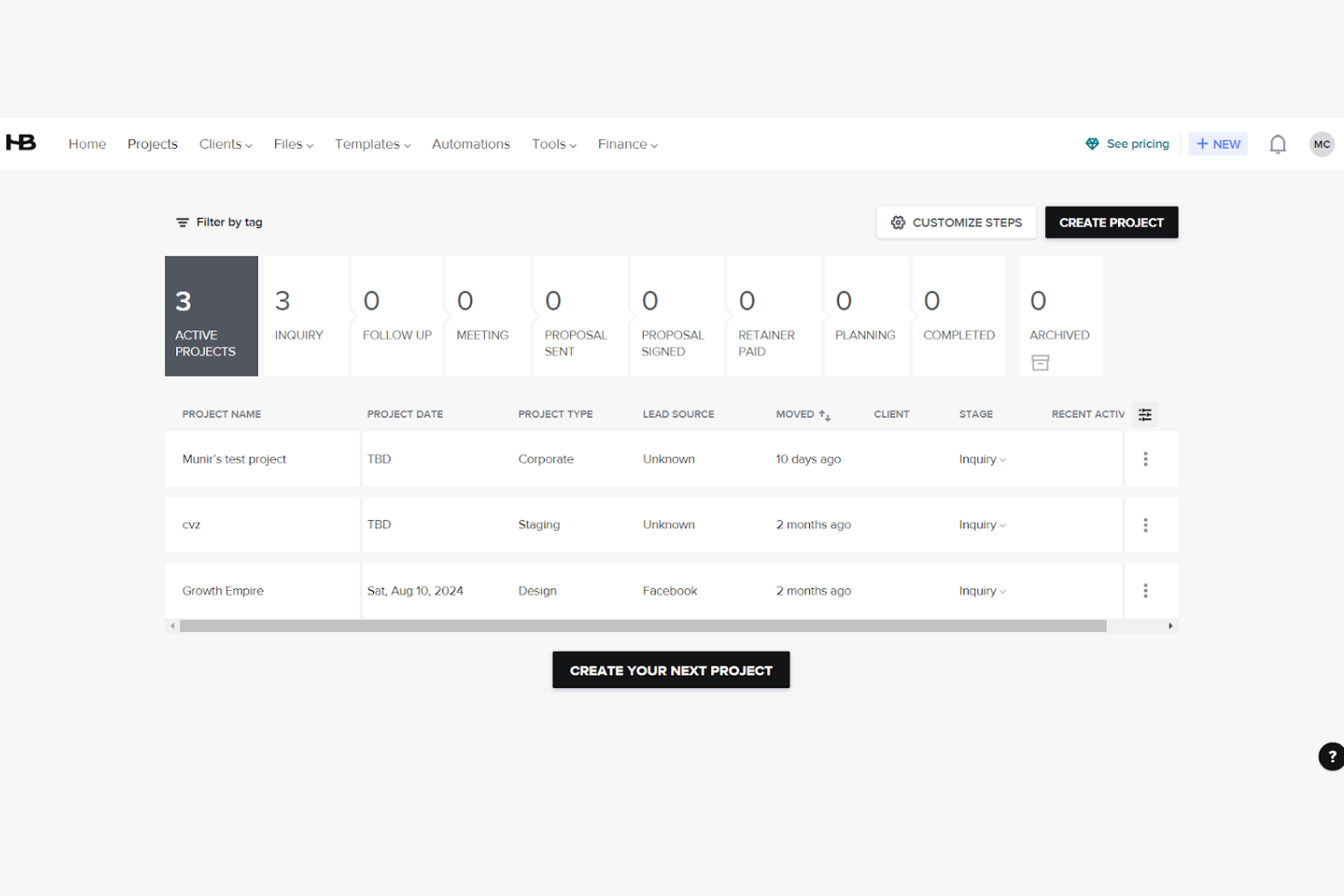
HoneyBook è una piattaforma di gestione aziendale per gestire progetti, acquisire clienti e ottimizzare le attività amministrative. Sebbene non sia principalmente uno strumento di pianificazione, può essere adatto alle aziende che offrono servizi e desiderano integrare la pianificazione in un flusso di lavoro più ampio per la gestione dei clienti.
Perché HoneyBook è una buona alternativa a Calendly: HoneyBook offre molto più della semplice pianificazione. Puoi gestire progetti, contratti e fatture in un unico luogo, ottenendo una soluzione completa per le esigenze della tua azienda. Lo strumento consente inoltre di automatizzare i flussi di lavoro, facendoti risparmiare tempo e riducendo le attività manuali. Questo rende HoneyBook una scelta preziosa per chi desidera integrare la pianificazione con funzioni più ampie di gestione aziendale.
Funzionalità e integrazioni principali:
Le funzionalità includono modelli per proposte, contratti e fatture, che ti consentono di mantenere coerenza nelle interazioni con i clienti. Puoi anche configurare promemoria automatici per i pagamenti, così da garantire transazioni puntuali. La funzione di gestione delle attività di HoneyBook ti aiuta a tenere traccia delle tappe fondamentali e delle scadenze dei progetti.
Le integrazioni includono QuickBooks, Google Calendar, Gmail, Zapier, Zoom, Calendly, Slack e altro.
Pros and Cons
Pros:
- Promemoria automatici per i pagamenti
- Funzionalità di gestione delle attività
- Integra la pianificazione con le funzioni aziendali
Cons:
- Potrebbe richiedere assistenza per la configurazione
- Potrebbe non essere adatto a tutti i settori
Altre alternative a Calendly
Ecco alcune alternative aggiuntive a Calendly che non sono state incluse nel mio elenco, ma che vale comunque la pena prendere in considerazione:
- Book Like A Boss
Ideale per gli imprenditori
- Zoho Bookings
Ideale per l'integrazione con l'ecosistema Zoho
- Cirrus Insight
Ideale per gli utenti Salesforce


Come valuto le alternative a Calendly
Valuto gli strumenti su due livelli: le funzionalità fondamentali di pianificazione che ciascuno deve offrire, come la disponibilità del team e la sincronizzazione dei calendari, e gli elementi distintivi più importanti per i PM che gestiscono attività interfunzionali.
Funzionalità fondamentali (requisiti essenziali per questo elenco)
Quando seleziono gli strumenti per il mio elenco, assegno a ciascuno un punteggio su una scala da 0 (non offre la funzionalità) a 5 (eccelle in quest'area) per ogni funzionalità fondamentale elencata di seguito. Quindi, converto il punteggio totale dello strumento in una percentuale. Ogni strumento deve raggiungere un punteggio totale minimo del 75% per essere preso in considerazione.
- Pianificazione automatizzata delle riunioni: verifico se gli invitati possono prenotare autonomamente in base alla disponibilità in tempo reale, ad esempio quando un cliente sceglie un orario per la riunione di avvio senza dover gestire neanche una conversazione via e-mail.
- Sincronizzazione dei calendari: ogni strumento dovrebbe sincronizzarsi bidirezionalmente con Google, Outlook, iCloud ed Exchange, così i PM che gestiscono più calendari evitano sovrapposizioni.
- Pianificazione per team e gruppi: cerco opzioni di prenotazione a rotazione, collettiva e di gruppo, essenziali quando una revisione dello sprint richiede la presenza dello sviluppatore responsabile, di un progettista e di un PM nella stessa chiamata.
- Pagine di prenotazione personalizzabili: sono importanti tipi di evento configurabili, domande preliminari, intervalli di sicurezza e identità del marchio. Un collegamento per un incontro quotidiano di 15 minuti dovrebbe avere un aspetto e un comportamento diversi rispetto a una chiamata esplorativa di 60 minuti.
- Integrazione con le videoconferenze: valuto se lo strumento genera automaticamente collegamenti Zoom, Google Meet o Microsoft Teams al momento della prenotazione, così gli organizzatori non devono incollare manualmente gli URL in ogni invito.
- Automazione dei flussi di lavoro e notifiche: conferme, promemoria e messaggi automatici successivi aiutano a mantenere le riunioni sotto controllo. Verifico inoltre se lo strumento si collega alle piattaforme PM e CRM per i flussi di lavoro successivi alla prenotazione.
Una volta ottenuto un elenco di strumenti che soddisfano questi criteri, considero ciò che distingue ciascuna piattaforma.
Fattori distintivi (ciò che differenzia i fornitori)
Ecco come confronto i diversi fornitori:
Funzionalità di spicco
I sondaggi sulle riunioni sono un elemento importante: quando si cerca di coordinare cinque parti interessate per una revisione dello sprint, permettere a tutti di votare gli orari è più efficace che inviare un collegamento per la prenotazione a rotazione. Cerco inoltre moduli di instradamento che indirizzino chi effettua la prenotazione al PM o al team corretto in base alle risposte fornite, facendo risparmiare tempo durante le chiamate esplorative. Analisi e report completano il quadro. Monitorare il tasso di assenze e il volume delle prenotazioni aiuta a pianificare la capacità dei team di progetto.
Oltre le funzionalità
È importante quanto bene uno strumento si colleghi alla tua infrastruttura PM. Verifico la presenza di integrazioni native con piattaforme come Jira, Asana o monday.com, così le riunioni prenotate possono essere collegate direttamente alle attività o alle epiche. Anche la struttura dei prezzi è un fattore determinante. Uno strumento che riserva la pianificazione dei team a un piano aziendale può diventare rapidamente poco pratico per un PMO in crescita. Valuto inoltre l'esperienza rivolta ai clienti, in particolare la possibilità di utilizzare il marchio del cliente e i componenti incorporabili, poiché agenzie e società di consulenza hanno bisogno di pagine di prenotazione coerenti con il proprio marchio quando pianificano riunioni con parti interessate esterne.
Perché cercare un’alternativa a Calendly?
Sebbene Calendly sia una buona scelta come software per la programmazione degli appuntamenti, presenta alcune funzionalità limitate e ci sono diversi motivi per cui alcuni utenti cercano un nuovo strumento di programmazione. Potresti cercare un’alternativa a Calendly perché:
- Hai bisogno di opzioni CRM più personalizzate
- Le esigenze di programmazione del tuo team richiedono integrazioni avanzate con il calendario
- Desideri piani a pagamento convenienti
- La tua attività opera in più fusi orari
- Hai bisogno di un’assistenza clienti migliore
Se ti riconosci in una di queste situazioni, sei nel posto giusto. Il mio elenco contiene diverse opzioni che integrano flussi di lavoro più adatti ai team che affrontano queste difficoltà e cercano alternative a Calendly.
Funzionalità
Ecco alcune delle funzionalità principali di Calendly, che ti aiuteranno a mettere a confronto ciò che offrono le soluzioni alternative:
- Automazione della pianificazione: Supporta la pianificazione degli appuntamenti a rotazione per le riunioni, facendoti risparmiare tempo.
- Integrazioni: Si connette in tempo reale a strumenti come Google Calendar e Microsoft Outlook Calendar per gestire la pianificazione di gruppo ed evitare doppie prenotazioni.
- Tipi di eventi personalizzati: Ti consente di creare formati di riunione personalizzati per esigenze specifiche.
- Accesso da dispositivi mobili e browser: Ti permette di pianificare appuntamenti e gestire gli orari delle riunioni mentre sei in movimento tramite l'app mobile e l'accesso web.
- Promemoria automatici: Invia notifiche e promemoria via e-mail per ridurre cancellazioni e assenze, aiutando inoltre gli invitati a ricordare le riunioni.
- Analisi: Tiene traccia delle prestazioni delle riunioni per aiutarti a migliorare i processi di pianificazione degli appuntamenti.
- Moduli di instradamento: Indirizza gli utenti alla pagina di prenotazione appropriata in base alle informazioni raccolte.
- Strumenti di gestione per amministratori: Fornisce il controllo sulle attività del pannello di controllo degli utenti e sulle pagine di pianificazione.
- Funzionalità di sicurezza: Garantisce la protezione dei dati e la conformità agli standard sulla privacy.