
Trouver le meilleur logiciel d’assistance technique: 2026 Revue d’expert

10 Séléction de meilleurs logiciels d’assistance technique
Here's my pick of the 10 best software from the 20 tools reviewed.


FAQ sur les logiciels d’assistance technique
Vous ne savez pas par où commencer? Parcourez notre FAQ pour obtenir des informations sur les bases des logiciels d’assistance technique.
Qu'est-ce qu'un logiciel d'assistance technique?
Un logiciel d’assistance technique est une plateforme digitale où les clients peuvent envoyer des requêtes pour être enregistrées, organisées et résolues. Il peut s’agir d’éléments tels que la gestion des tickets, la suite d’automatisation, le reporting et l’optimisation. Il peut également fournir un forum de connaissances pour la résolution libre-service des demandes répétées ou en cours.
Quels sont les avantages des logiciels d'assistance technique?
Les avantages du logiciel d’assitance technique incluent un règlement plus rapides des problèmes techniques, la satisfaction de la clientèle, l’augmentation des revenus, l’augmentation de la productivité et une meilleure satisfaction au travail.
Pourquoi le logiciel d'assistance technique est-il important?
Le logiciel d’assistance technique est important parce qu’il unifie toutes les communications et tous les enregistrements concernant vos problèmes de support, fournissant un système unique pour communiquer, suivre, gérer et analyser efficacement les problèmes.
Vous ne recherchez pas un outil d’assistance technique? Consultez nos autres listes de logiciels pour gérer les équipes, les ressources et les projets.
- Suivi des bugs: Si une grande partie du trafic de votre service d’assistance concerne les rapports de bug, il est peut-être temps de commencer à investir dans des outils de suivi des bugs comme DoneDone, Trackduck ou DebugMe.
- Outils de communication: Parfois, les problèmes se résument à une mauvaise communication entre les équipes et les services; si c’est le cas pour vous, mettez en place des outils de communication qui répondent aux besoins uniques de votre entreprise.
- Logiciel de collaboration: Une collaboration transparente entre les projets, le département, les membres de l’équipe et les clients assure le bon déroulement des choses du début à la fin; n’hésitez pas à consulter nos suggestions pour 10 outils de collaboration en ligne, si vous ne l’avez pas déjà fait.
Cela vous permettra de comparer et d’évaluer rapidement les meilleurs logiciels de helpdesk, y compris les logiciels de tickets d’assistance technique et les logiciels d’assistance informatique.
Comme nos lieux de travail sont de plus en plus interconnectés, les logiciels d’assistance technique sont plus utiles que jamais dans un large éventail d’applications. Les équipes de produits, les studios de développement, les sociétés d’ e-commerce et de nombreux autres types d’équipes adoptent des systèmes de tickets qui rationalisent la façon dont ils gèrent le service à la clientèle et le support informatique.
Comparez et évaluez rapidement les 10 meilleures solutions de logiciel d’assistance technique
Il existe deux principaux types de logiciels d’assistance technique: ceux destinés à aider vos employés et ceux destinés à aider vos clients. Les deux sont importants et, selon vos besoins, il se peut que vous soyez attiré par des outils qui répondent à l’un ou l’autre ou aux deux types. Pourquoi avez-vous besoin d’un logiciel d’assistance? L’amélioration du “parcours client” a permis d’augmenter le chiffre d’affaires jusqu’à 15% tout en augmentant la satisfaction des clients d’environ 20%. D’autre part, vos employés internes peuvent perdre jusqu’à deux semaines de travail par année en raison de problèmes technologiques et informatiques.
Sachant cela, il est facile de voir l’importance d’un logiciel d’assistance technique pour vos clients, votre personnel ou les deux. Un service d’assistance informatique robuste peut vous aider à satisfaire vos clients, vous aider à identifier les problèmes et à les diriger vers les bonnes personnes pour les résoudre, et aider votre équipe de support à gérer leur charge de travail.
Vous vous demandez peut-être: Ok, alors….quels sont les meilleurs logiciels d’assistance technique? De quoi mon équipe a-t-elle besoin? Quelle est la meilleure façon de prendre ces décisions? Bien que nous ne puissions certainement pas trouver la solution d’assistance technique idéale pour chaque groupe, nous pouvons vous donner un aperçu concis du meilleur logiciel de gestion d’assistance technique disponible aujourd’hui.
Dans cet article, nous allons:
- Partagez avec vous les meilleurs outils de gestion de service à inclure dans votre liste de sélection de logiciels d’assistance technique.
- Expliquer ce que sont les outils de centre d’assistance informatique.
- Expliquez comment les outils logiciels d’assistance technique peuvent vous aider à rationaliser le service à la clientèle et/ou le service aux employés.
- Répondez à quelques FAQ sur les outils du système d’assistance technique.
- Vous dire ce que vous devez rechercher dans les outils logiciels de support informatique et nos critères d’évaluation.
A la fin de cet article, vous devriez avoir une liste complète des meilleurs logiciels d’assistance technique sur le marché. De cette façon, vous pouvez faire le meilleur choix pour votre entreprise et votre équipe.
La liste des meilleurs logiciels d’assistance technique

Nous avons fait des recherches approfondies pour trouver le meilleur logiciel d’assistance informatique qui soit pour vous. Que vos priorités soient un système de tickets robuste ou une solution de service d’assistance complète, je crois qu’il y en a pour tous les goûts.
The Digital Project Manager est sponsorisé par le lecteur. Lorsque vous cliquez sur les liens de notre site, nous pouvons gagner une commission. En Savoir Plus.
-

Insightful
Visit WebsiteThis is an aggregated rating for this tool including ratings from Crozdesk users and ratings from other sites.4.8 -
Accelo
Visit WebsiteThis is an aggregated rating for this tool including ratings from Crozdesk users and ratings from other sites.4.4 -
Forecast
Visit WebsiteThis is an aggregated rating for this tool including ratings from Crozdesk users and ratings from other sites.4.6




Atera provides a comprehensive IT management solution designed to meet the needs of businesses and IT professionals looking for an efficient helpdesk software. It caters to managed service providers (MSPs) and internal IT departments by offering tools that enhance service delivery and problem resolution.
Why I Picked Atera
I picked Atera for its robust helpdesk and ticketing system, which stands out in the realm of IT management. This system includes email-to-ticket conversion and automated ticket routing, which can significantly improve your team's response time and customer satisfaction. Additionally, Atera's remote monitoring and management capabilities allow you to troubleshoot and resolve issues without being on-site, addressing the challenge of managing multiple client locations. These features make Atera a strong contender for those in need of efficient helpdesk software.
Atera Key Features
In addition to its helpdesk capabilities, Atera offers a variety of features that can enhance your IT management experience.
- Automation Tools: Automate routine tasks such as onboarding and patch management to save time and reduce manual errors.
- AI Tagging: Leverage artificial intelligence to categorize and prioritize tickets automatically, ensuring critical issues are addressed promptly.
- Real-Time Monitoring: Monitor client systems in real-time to detect and address potential problems before they impact operations.
- 24/7 Live Chat Support: Access round-the-clock support to resolve any issues that may arise while using the platform.
Atera Integrations
Integrations include Acronis, AnyDesk, Webroot, Bitdefender, Splashtop, TeamViewer, QuickBooks, Xero, FreshBooks, and Dropbox.
Pros and Cons
Pros:
- Offers comprehensive remote monitoring and management features.
- Integrates multiple IT management tools into one platform.
- Includes AI-driven automation for proactive issue resolution.
Cons:
- Less granular control for highly complex custom workflows or integrations.
- Reporting features may incur additional costs for advanced needs.
New Product Updates from Atera

Atera Enhances IT Autopilot With Automation and File Support
Atera’s IT Autopilot gets three major boosts: you can now attach common files for deeper analysis, automate IT tasks with clear workflows, and choose how the system follows up when users go silent. These updates help streamline IT operations and improve resolution efficiency. For more information, visit Atera’s official site.
 .
.

Used by over 150,000 businesses, including Panasonic, HP, and Pearson, Freshdesk (a product of Freshworks Inc.) lets you streamline your support channels (email, phone, chat and more) so that you can then notice trends and assign tickets accordingly. Some features include: automation of repetitive tasks, dissemination of tutorials to customers, and community management. For many teams, the biggest advantage is the time saved in managing client communications. Shaun Bettman, CEO and Chief Mortgage Broker of Eden Emerald Mortgages, shared his experience: “Freshdesk has reduced our average response time to less than thirty minutes, so that my team was able to devote all their energies to assisting clients with their finance needs and not get bogged down in emails.”
One of Freshdesk’s standout strengths is the ability to set service-level agreements (SLAs) and track them through advanced reporting tools. This makes it easy to monitor performance, ensure commitments are met, and spot areas for improvement. From knowledge management to reporting and collaboration, these capabilities make Freshdesk an extraordinarily helpful tool for support teams.
Integrations listed include Google Apps, JIRA, various live chat apps, Zoho CRM, FreshBooks, QuickBooks, DropBox, Box, OneDrive, MailChimp, iContact, SurveyMonkey, and many more, including a whole host of selection through a paid Zapier plan.
The app would not accommodate the uploading of larger documents or files, which may not be ideal in many circumstances. Additionally, having the ability to set reminders on tickets would be an asset for anyone whose workload is particularly demanding.
Freshdesk starts at $18/user/month
21 days Free Trial, No Credit card required
Also has a freemium version
New Product Updates from Freshdesk

Freshdesk Enhances Contact Data Management and Social Identity Fields
Freshdesk now lets you manage social handles and handle large contact lists with ease, streamlining customer profiles and data tasks. For more information, visit Freshdesk’s official site.
 .
.
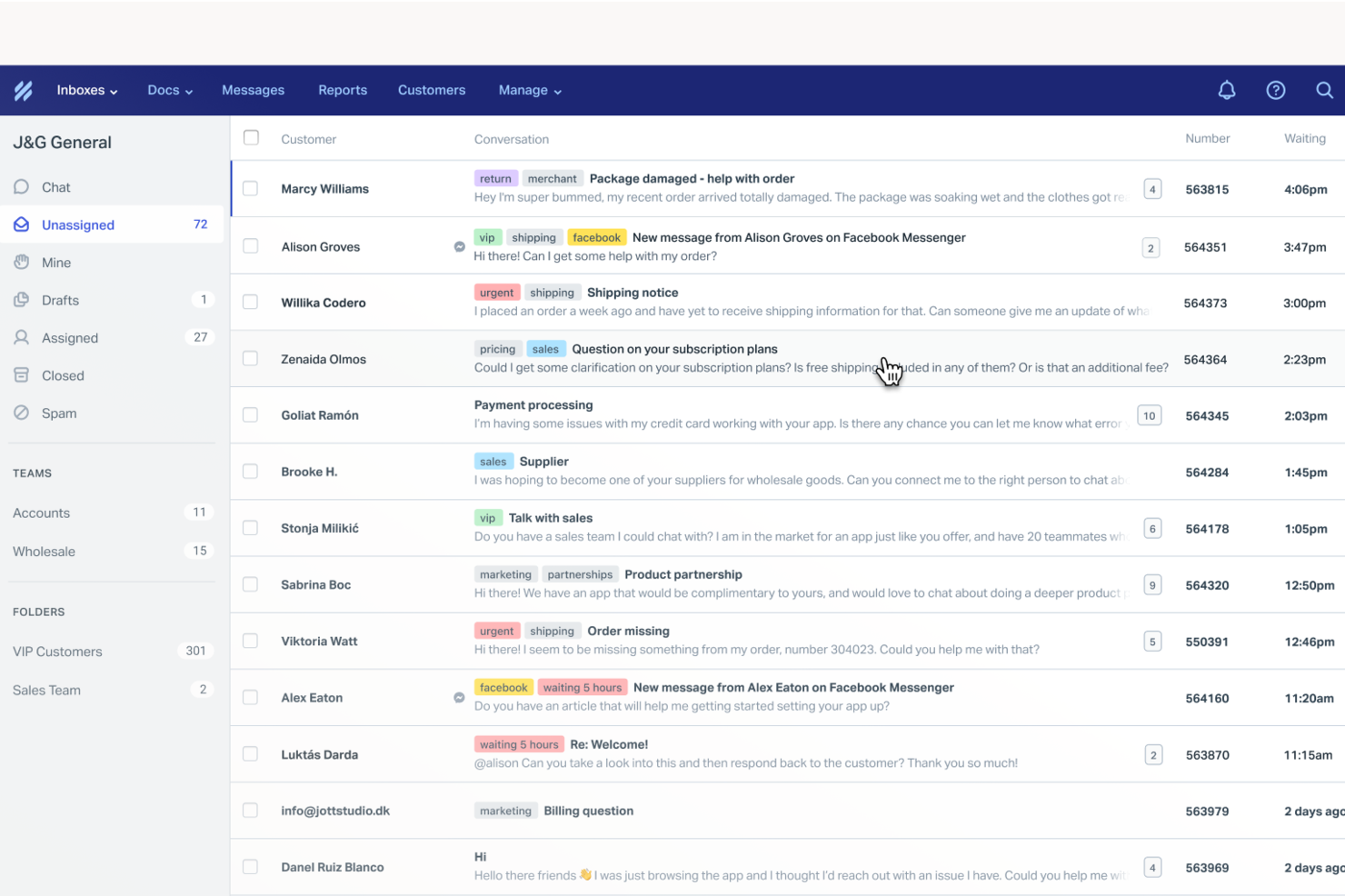
Help Scout is a help desk platform built for SMB support teams. It helps teams deliver personalized, human responses while scaling support across email and chat. By automating routine tasks and providing a shared inbox for streamlined communication, Help Scout addresses common challenges in customer service, ensuring that your team can focus on building meaningful relationships and resolving complex issues efficiently.
Why I Picked Help Scout
I picked Help Scout because of its shared inbox that keeps customer conversations organized and visible for the whole team. Assignment and internal notes make handoffs clean while preserving context. Additionally, the knowledge base empowers your customers to find answers on their own, reducing the volume of incoming queries. Help Scout's live chat functionality enables real-time interaction with customers, offering the immediacy that many businesses need to maintain high satisfaction levels.
Help Scout Key Features
In addition to its standout features, I also found that Help Scout offers:
- AI Drafts: This feature assists your team by suggesting responses to customer inquiries, saving time and ensuring consistent communication.
- Automated Workflows: Streamline your support process by automating repetitive tasks, allowing your team to focus on more critical issues.
- Custom Fields: Organize customer data effectively, enabling your team to provide personalized support tailored to individual needs.
Help Scout Integrations
Integrations include Salesforce, HubSpot, Jira, Slack, Shopify, Mailchimp, WooCommerce, Stripe, Trello, and Google Apps. Users can also create custom apps and integrations using the Help Scout API.
Pros and Cons
Pros:
- Quick to implement and onboard new agents
- Collision detection prevents duplicate replies
- User-friendly interface and design
Cons:
- Knowledge base customization varies by plan
- Pricing increases as mailboxes scale
New Product Updates from Help Scout

Help Scout Enhances Support Management With AI and Integrations
Help Scout introduces smarter routing, WhatsApp and Aircall integrations, and new AI enhancements to help teams manage conversations, automate workflows, and support customers across more channels. For more information, visit Help Scout’s official site.
 .
.

SysAid is an IT Service Management (ITSM), service desk, and help desk software platform that supports core ITIL practices. It provides the essential tools IT teams need to manage incidents, service requests, assets, and workflows in a structured way.
SysAid places a strong emphasis on automation, offering ticket, task, self-service, and workflow automation features that allow you to define rules and reduce manual effort. Ticket automation helps route requests to the appropriate team or queue based on predefined conditions. Task automation supports repetitive actions, such as common IT maintenance tasks, while workflow automation lets you define structured steps for processes like employee onboarding or change approvals.
Additional standout features include remote control capabilities that allow agents to troubleshoot issues directly on a user’s device, asset management that links hardware and software details to tickets, and reporting tools that help you track KPIs and other service desk metrics.
SysAid also offers a marketplace with pre-built integrations, including tools such as Microsoft Teams, Jira, TeamViewer, SolarWinds, Azure, and Slack. You can also connect SysAid to thousands of additional applications through Zapier.
Pricing is available upon request, and SysAid offers a free trial.
New Product Updates from SysAid

SysAid Adds Direct Knowledge Base Linking in Service Records
SysAid now allows linking knowledge base articles directly to service records, enhancing centralized access to information and speeding up issue resolution. For more information, visit SysAid's official site.
 .
.

Freshservice’s modern and intuitive UI requires minimal to no training, and is customizable to IT and non-IT needs. It automates tasks and provides support for issues raised via email, self-service portal, phone, chat, or in-person. Freshservice maintains records of contracts, hardware, software, and other vital customer-data assets.
For organizations managing complex operations, it can make a measurable difference. Logan Jacobson, Manager of Technology Asset Management at Smartsheet, shared his team’s experience: “It used to take up to four hours to provision software. Now we're able to provision it within minutes. Everyone uses Freshservice. It has been instrumental in streamlining our operations not only within the IT department but also across various business functions.”
Built in user-portal, reporting, workflows, and continuous updates mean that you have all the basic functionality you would expect for a helpdesk tool as well as a roadmap for constant improvement.
They offer the whole gamut of helpdesk tools: incident management, change management, release management, vendor relationships all with robust analyzing tools to make sure common problems are tracked and improved.
The biggest cons that I noticed was that it doesn’t work with corrective actions (CAPA) and that it doesn’t manage portfolios or offer product road mapping. These services can be supplemented with another app or service, but that will obviously increase the cost of your overall set-up.
Freshservice scored favorably on our features and functionality evaluation criteria section because it truly is a jack-of-all-trades. The software lets you track assets, manage problems, manage self-service portals, navigate advanced incident management, organize contracts and licenses, and more.
Integrations listed include Slack, DocuSign, Jira, Freshbooks, Google calendar, Survey Monkey, Dropbox, and many more through Zapier.
Freshservice starts at $19/user/month and has a 21-day free trial.
New Product Updates from Freshservice

Freshservice Enhances Global Search and Dashboards With Task Support
Freshservice enhances Global Search and Dashboards by adding support for ticket, problem, change, and release tasks, along with custom task views. This update helps teams search, track, and report on tasks from one centralized interface. For more information, visit Freshservice's official site.
 .
.

Designed specifically for online sellers, eDesk offers a suite of features that reduce repetitive tasks and improve response times, making it easier to manage customer queries and enhance engagement. For businesses aiming to boost customer loyalty and sales, eDesk's AI-driven capabilities provide the efficiency and automation needed to transform your support operations.
Why I Picked eDesk
I picked eDesk for its unique ability to centralize customer messages and order details, which is crucial for ecommerce businesses managing high volumes of inquiries. The intelligent ticket routing and smart replies feature enhances response accuracy and speed, allowing your team to focus on more complex issues. Additionally, the AI chatbot, capable of handling over 70% of customer queries, ensures support is available 24/7, addressing the common challenge of providing round-the-clock assistance without increasing headcount.
eDesk Key Features
In addition to centralized ecommerce communication, eDesk offers:
- Unified Inbox: Consolidates all customer messages across various platforms into a single view, simplifying communication management.
- Pre-Sales Support Tools: Provides tools to help convert inquiries into sales, directly impacting your revenue.
- Performance Measurement: Offers insights into customer interactions and team performance to help you refine your support strategy.
- Scalable Integration: Supports integrations with over 300 platforms, ensuring seamless connectivity with your existing systems.
eDesk Integrations
Integrations include Amazon, eBay, Shopify, Walmart, Etsy, BigCommerce, WooCommerce, Allegro, Magento, and Back Market.
Pros and Cons
Pros:
- Reduces switching between inboxes and marketplace portals
- Gives agents full customer context in one view
- Helps manage high ticket volumes during peak sales periods
Cons:
- Setup requires connecting multiple storefronts and channels
- Reporting focuses on operations, not deep analytics


If you manage a team that juggles customer inquiries from multiple channels, SparrowDesk might be the solution you need. It combines AI-driven automation with an intuitive interface to streamline your helpdesk operations. Whether you're in retail, tech, or any customer-centric industry, SparrowDesk aims to reduce manual workload by automating a majority of customer interactions, enhancing both efficiency and customer satisfaction.
Why I Picked SparrowDesk
I picked SparrowDesk for its standout AI capabilities that directly address the needs of modern helpdesk teams. Its AI Agents automate repetitive queries, freeing up your team to focus on complex issues that require a human touch. The AI Copilot further assists by providing agents with real-time summaries and smart replies, making it easier to manage high volumes of inquiries. These features are designed to improve response times and ensure consistent, on-brand communication across all customer interactions.
SparrowDesk Key Features
In addition to its AI capabilities, SparrowDesk offers a suite of features tailored for effective helpdesk management.
- Omnichannel Inbox: Consolidate customer interactions from chat and email into a single, easy-to-manage inbox.
- Service Level Agreements (SLA): Set response and resolution targets to meet customer expectations consistently.
- Interactive Analytics: Gain insights into team performance and customer trends with real-time dashboards.
- Quick-Action Macros: Automate frequent tasks with pre-set macros to boost efficiency.
SparrowDesk Integrations
Native integrations are not currently listed by SparrowDesk.
Pros and Cons
Pros:
- No code workflow builder automates routing and notifications
- Copilot features summarize long conversations inside the agent inbox
- AI agents designed to auto resolve many repetitive tickets
Cons:
- Limited native integrations could hinder seamless connectivity
- Channels currently focus on email and live chat, not voice or social

monday Service is a comprehensive service management platform designed to streamline and enhance service delivery across various organizational functions. It offers out-of-the-box solutions tailored for diverse service use cases, including ticket management, multi-channel support, AI and automations, a service catalog, and managing the employee lifecycle. Caleb Johnstone, SEO Director at Paperstack, shared how impactful the platform has been for his team: “monday.com Help Desk is the solution that has transformed our ticketing system to make our processes easier and quicker to respond. The best thing about it is that it can be tailored to our requirements without overwhelming the staff.”
Key features include an intuitive ticketing system that allows for the efficient management and tracking of customer inquiries. The platform's customizable workflows and automation capabilities can also help reduce manual efforts and improve response times. Additionally, monday Service offers a centralized communication hub, enabling seamless collaboration among support team members.
The tool's user-friendly dashboards and reporting tools also provide valuable insights into support metrics, helping teams to continuously optimize their performance. Overall, monday Service's blend of user-centric design and powerful functionalities makes it an effective solution for delivering exceptional customer support.
monday Service integrates well with several tools, including DocuSign, Gmail, Azure DevOps, Microsoft Teams, Microsoft Outlook, and Slack.


SuperOps is a PSA-RMM software designed to help managed service providers (MSPs) and IT teams monitor infrastructure and deliver exceptional support. It offers tools to prioritize issues, centralize communication, and automate routine tasks, enhancing service delivery.
I like SuperOps for its conversational workspace, which provides technicians with all the context they need within each ticket. This setup eliminates the need to switch between tabs, enabling your team to resolve issues faster and more effectively. Additionally, the auto-tracking of time spent on tickets ensures accurate billing for clients.
Another great feature is the platform's automation capabilities through Runbooks. By turning repetitive processes into standardized workflows, tasks are completed more quickly and consistently. Event-based triggers can apply these Runbooks automatically, reducing manual intervention and allowing your team to focus on more complex issues.
One thing I find especially unique is that, aside from its service desk through its PSA suite, you can fully integrate with its RMM product, which includes asset management, policy management, network monitoring, endpoint security, and more. This means that you can get more context around tickets and have more visibility around activities.
Integrations include Acronis, ESET, Sophos, SentinelOne, Emsisoft, Bitdefender, Splashtop, TeamViewer, Connectwise Control, Xero, Quickbooks, and Azure.
New Product Updates from SuperOps

SuperOps Adds HTML Support for Ticket Closure Emails
SuperOps introduces HTML embedding for ticket closure emails. This update allows teams to include custom content such as CSAT survey links and branded elements in resolution emails. For more information, visit SuperOps’ official site.
 .
.
Zoho Desk
Best context-aware help desk software with multi-channel capabilities

Zoho Desk is a cloud-based customer service application with contextual AI that helps your company build stronger relationships with customers. For organizations handling high volumes of requests, the platform can be a game-changer. Miguel Angel Gongora Meza, Founder & Director of Evolution Treks Peru, explained: “Zoho Desk provided our cooperative with the organization that we required to oversee dozens of requests per day by travelers intending to go to Peru, and I loved how tickets, emails, and follow-ups were all visible in a single transparent perspective.”
Zoho Desk has great features for prioritizing, managing, and closing customer support tickets. Users have control over tickets submitted to the support team via email, phone, chat, social media, a self-service portal, forums, and web forms. All tickets are presented in one place, and team members can set priorities and close tickets in the preferred order.
The tool allows teams to create a Knowledge Base of customer support articles, so your team can quickly find appropriate solutions for customer tickets. Zoho Desk’s Help Center features also allow customers to create a ticket and track it online themselves.
Zoho Desk’s AI and automation features take into account an appropriate resolution time based on your business hours when a customer ticket is created. If those parameters are missed, the ticket will be escalated automatically. Tasks such as ticket assignment, service escalations, notification rules, live chat widget and time-based actions can be automated by setting workflow rules.
The tool provides detailed reports and analytics about your support center performance, such as the average resolution time, the number of tickets closed per agent per day, the number of tickets opened per product and more.
The platform integrates with Zoho customer relationship management (CRM), as well as other Zoho Apps. The tool also offers an API for further integrations.
Pricing starts at $20/agent/month billed annually.
Comparatif des meilleurs logiciels d’assistance technique
| Tool | Best For | Trial Info | Price | ||
|---|---|---|---|---|---|
| 1 | Best with remote monitoring and management | 30-day free trial + free demo available | From $149/technician/month (billed annually) | Website | |
| 2 | Best enterprise helpdesk software | Free demo + 14-day free trial available | From $19/user/month (billed annually) | Website | |
| 3 | Best for personalized customer support | Free trial available | From $25/user/month (billed annually) | Website | |
| 4 | Best for its automation capabilities | 14-day free trial | Pricing upon request | Website | |
| 5 | Best IT service desk for beginners | 14-day free trial available | From $19/user/month (billed annually) | Website | |
| 6 | Best for centralized ecommerce communication | 14-day free trial | From $39/agent/month | Website | |
| 7 | Best for AI copilot assistance | 14-day free trial available | From $16/user/month (billed annually) | Website | |
| 8 | Best for customizable helpdesk boards | Free trial available | From $26/seat/month (3 seat minimum) | Website | |
| 9 | Best for MSPs and IT teams | 14-day free trial | From $89/user/month (billed annually) | Website | |
| 10 | Best context-aware help desk software with multi-channel capabilities | 15-day free trial + free plan | From $7/user/month (billed annually) | Website |

Critères de comparaison des logiciels d’assistance technique
Quels sont les critères que nous utilisons pour déterminer le meilleur logiciel d’assistance technique? Qu’est-ce que cela signifie d’avoir un logiciel d’assistance technique qui se démarque des autres? Comment évaluons-nous les systèmes de tickets d’assistance dans le cadre de la comparaison de nos systèmes de tickets?
Nous aimons être totalement transparents dans nos méthodes d’évaluation, c’est pourquoi nous avons détaillé pour vous qui, quoi, où, pourquoi et comment.
- Interface utilisateur (IU): Dans quelle mesure le logiciel d’assistance technique est-il bien conçu? Offre-t-il des affichages clairs et une navigation intuitive? Est-il esthétiquement agréable ou conçu pour tout type d’entreprise?
- Facilité d’utilisation: Est-ce facile à apprendre et à maîtriser? Y a-t-il des tutoriels et de la formation? Quel est le support technique et utilisateur offert par l’éditeur du logiciel?
- Intégrations: Est-il facile de se connecter avec d’autres outils? Des fonctionnalités pré-intégrées? Combien d’intégrations différentes sont disponibles et dans quelle mesure sont-elles faciles (ou coûteuses) à mettre en œuvre?
- Valeur pour $: Combien cela coûte-t-il? Existe-t-il différents niveaux? A quelles fonctionnalités avez-vous accès à chaque étape?
- Caractéristiques et fonctionnalités: Combien de fonctions et de fonctionnalités clés du logiciel d’assistance technique offre-t-il et quelles sont leurs puissances? Plus précisément, j’ai cherché:
- Système de ticket multi-canaux: Les outils doivent être dotés d’un logiciel robuste de gestion des tickets. Ils devraient rationaliser les tickets provenant de sources multiples afin que vous puissiez communiquer entre les canaux (courriel, téléphone, etc.) à partir d’un seul endroit. Il devrait vous aider à gérer ces tickets de streaming en vous offrant la possibilité de baliser, catégoriser, prioriser et assigner automatiquement les tickets entrants à partir de n’importe quel canal. Comparaison du système de ticket du service d’assistance entre les niveaux de produits.
- Collaboration: Les outils doivent tenir les utilisateurs informés des propriétaires de tickets, des statuts, des réponses et des priorités pour aider à synchroniser les efforts de votre équipe.
- Automatisations: Les systèmes d’assistance technique devraient offrir la possibilité de définir des déclencheurs basés sur le temps et les événements, ainsi que des workflows personnalisés avec des automatismes qui acheminent les tickets vers le bon utilisateur pour la meilleure réponse.
- Rapports et analyses: Le système d’assistance devrait offrir des tableaux de bord configurables qui affichent les données clés du service d’assistance ainsi que des rapports en direct pour obtenir une vue d’ensemble des opérations en cours.
- Système de gestion des connaissances: ITSM utilise un référentiel de problèmes déjà résolus. Il peut s’agir d’un site Web libre-service public pour les clients ou d’un dépôt interne pour les représentants et les techniciens du service à la clientèle. Devrait intégrer des technologies de recherche avancées (comme la suggestion automatique) pour aider les utilisateurs à trouver des réponses rapidement.
- Libre-service: Cela inclut des choses comme la documentation produit, les correctifs téléchargeables, les forums ou les communautés d’utilisateurs qui aident les clients à résoudre leurs problèmes. Les outils devraient fournir un moyen de soumettre des problèmes lorsque les clients ne peuvent pas les résoudre par le libre-service.
Autres logiciels d’assistance technique
Vous n’aimez aucune des ressources ci-dessus? Vous avez de la chance. Il y a toujours des douzaines d’autres logiciels de support informatique et d’outils d’assistance technique qui peuvent marcher pour votre entreprise. Les options logicielles d’assistance technique ci-dessous ne sont que quelques-unes de vos options, mais un peu de recherche vous permettra d’en découvrir davantage. N’ayez pas peur de consacrer du temps à la recherche et au développement. Vous ne voulez vous contenter que de l’outil qui vous convient parfaitement, à vous et à votre équipe.
- Tidio
For custom workflow automation
- InvGate Service Management
For IT service teams
- ManageEngine ServiceDesk Plus
Helpdesk software for incident management processes
- Salesforce Service Cloud
Help desk software for cloud-based flexibility
- Zendesk
Help desk software for productivity and customer experience
- Front
Front - Best help desk software for efficient customer communication
- NinjaOne
For simplifying IT operations
- Front
For automating ticket routing
- EngageBay
For creating personalized ticket views
- Gorgias
Helpdesk software for ecommerce businesses


Vous voulez de l’aide pour réduire les options?
Cet outil est très utile. Nous nous sommes associés à Crozdesk pour vous donner accès à leur “Software Finder”.
Si vous saisissez certains détails sur votre projet et les fonctionnalités que vous recherchez dans un outil de gestion de projet, une liste d’outils correspondant à vos préférences sera générée. Vous fournissez votre email, et ils vous envoient un beau guide PDF avec un résumé de vos meilleures options.
?
Que pensez-vous de ces solutions d’assistance technique??
Il existe de nombreux systèmes d’assistance technique parmi lesquels vous pouvez choisir – le vrai problème est de trouver le meilleur pour vous. Une fois que vous avez une liste des incontournables, vous pouvez commencer à restreindre vos choix en la comparant à la sélection ci-dessus.
Y a-t-il quelque chose que nous avons manqué selon vous? Avez-vous une expérience personnelle avec l’un de ces logiciels que vous aimeriez partager? Partagez le dans les commentaires de cet article. Nous aimerions avoir de votre avis.