

2026’nın En İyi E-posta Dosyalama Yazılımları

En İyi E-posta Dosyalama Yazılımları Kısa Listesi


E-posta dosyalama yazılımı, ihtiyacınız olanı hızlıca bulabilmeniz ve gelen kutunuzu kontrol altında tutabilmeniz için e-postaları düzenlemenize, kategorilere ayırmanıza ve depolamanıza yardımcı olur. En iyi e-posta dosyalama yazılımını arıyorsanız, muhtemelen dağınık gelen kutularını karıştırmaktan, önemli mesajları kaçırmaktan veya proje iletişimlerini düzenli tutmakta zorlanmaktan yorulmuşsunuzdur.
Bu rehberde, yoğun ekipler ve profesyoneller için e-posta yönetimini kolaylaştıran güvenilir araçları bulacaksınız. Her çözümün en iyi yaptığı işleri açıklayacağım; böylece iş akışınıza en uygun seçeneği belirleyebilir ve sonunda gelen kutunuzun kontrolünü elinize alabilirsiniz.
Why Trust Our Software Recommendations
Our team has been testing and reviewing software since 2012. As project managers ourselves, we know how difficult—and important—it is to choose the right software.
For this guide, we evaluated tools using hands-on testing and independent research, scoring tools using our selection criteria. We also draw on insights from industry thought leaders and practicing project management experts.
Our reviews reflect our human editorial judgment, not a sales pitch.
Expert reviewers:
E-posta Dosyalama Yazılımları Karşılaştırma Tablosu
Bu karşılaştırma tablosu, en iyi e-posta dosyalama yazılımları için fiyatlandırma ayrıntılarını özetlemektedir:
| Tool | Starting Price | Website | |
|---|---|---|---|
| Best for SharePoint-based email compliance filing | — | $4.15/user/month 30-day free trial | Website |
| Best for document-centric email management | 4.6 out of 5 | $210/month Free demo available | Website |
| Best for secure email and document collaboration | 4.3 out of 5 | Pricing upon request Free demo available | Website |
| Best for bulk inbox cleanup | 4.3 out of 5 | $9.99/month Free plan available | Website |
| Best for legal email and document management | 4.1 out of 5 | Pricing upon request Free demo available | Website |
| Best for collaborative inbox management | — | $25/seat/month 14-day free trial + free demo available | Website |
| Best for one-click Outlook email filing | — | $4.99/user/month 30-day free trial available | Website |
| Best for compliant email organization | — | Pricing upon request Free demo + free trial available | Website |
| Best for automated Outlook email filing | — | Pricing upon request 14-day free trial available | Website |
| Best for project-based email organization | — | Pricing upon request Free demo available | Website |
E-posta Dosyalama Yazılımı İncelemeleri
Aşağıda, kısa listeme giren en iyi e-posta dosyalama yazılımlarına ilişkin ayrıntılı özetlerimi bulabilirsiniz. İncelemelerim, size en uygun yazılımı bulmanıza yardımcı olmak için her yazılımın özelliklerine, entegrasyonlarına ve en iyi kullanım alanlarına ayrıntılı bir bakış sunmaktadır.

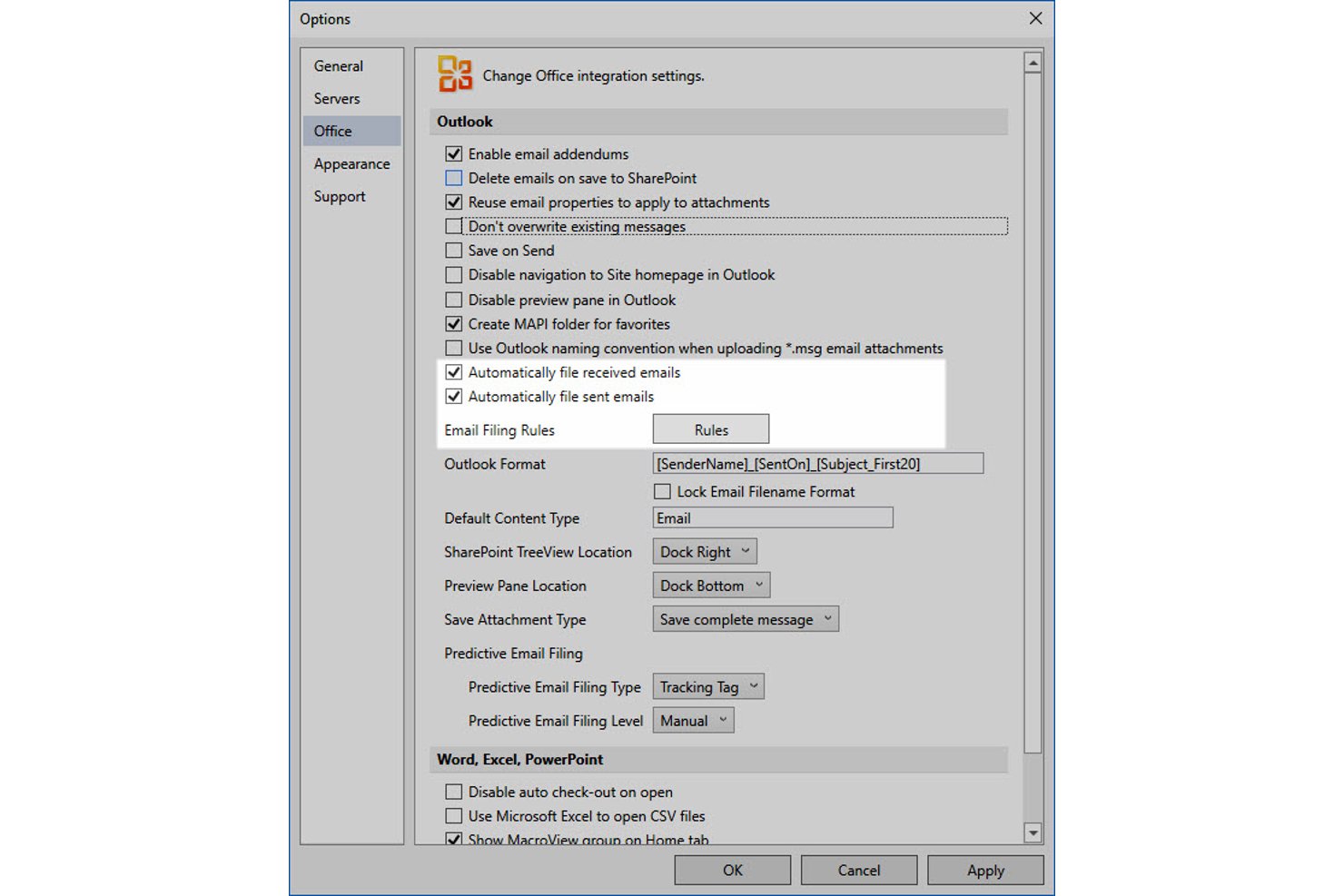
MacroView is a Microsoft 365 add-on suite that lets teams file, organize, and retrieve emails and documents directly within SharePoint, Teams, and OneDrive—with rule-based automated filing, audit history, and records management built in.
Who Is MacroView Best For?
MacroView is a strong fit for Microsoft 365-based organizations in compliance-heavy industries like legal, construction, and government that need structured email records in SharePoint.
Why I Picked MacroView
MacroView earns its spot on my shortlist because it turns SharePoint into a true email records system, not just a file dump. I picked it specifically for teams that need centrally governed, rule-based filing: SureFile lets admins define org-wide routing rules by sender, domain, or subject keyword, so emails land in the right project folder without relying on individual discipline. Audit history and in-place records declaration, accessible right from Outlook, make compliance filing genuinely traceable.
MacroView Key Features
- Save on Send: Prompts you to file outgoing emails into SharePoint at the moment of sending, so nothing gets missed.
- 35+ metadata capture: Saves emails as .msg records with over 35 properties, including To, CC, BCC, Conversation ID, and Sent On.
- Cross-device filing via MacroView Mail: Lets you file emails from iOS, Android, macOS, OWA, and both classic and new Outlook.
- Provisioner: Bulk-creates SharePoint project sites, libraries, and folder hierarchies pre-configured for email and document storage.
MacroView Integrations
MacroView offers native integrations across the Microsoft ecosystem, including SharePoint, Microsoft Teams, OneDrive, Outlook, and Azure. Custom integrations with other business systems are available through professional services.
Pros and Cons
Pros:
- Rule-based filing across Outlook and devices
- Audit trail and in-place records declaration
- Centralized email filing with SharePoint governance
Cons:
- Duplicate detection method not transparently documented
- No support for Gmail or Google Workspace

Best for document-centric email management
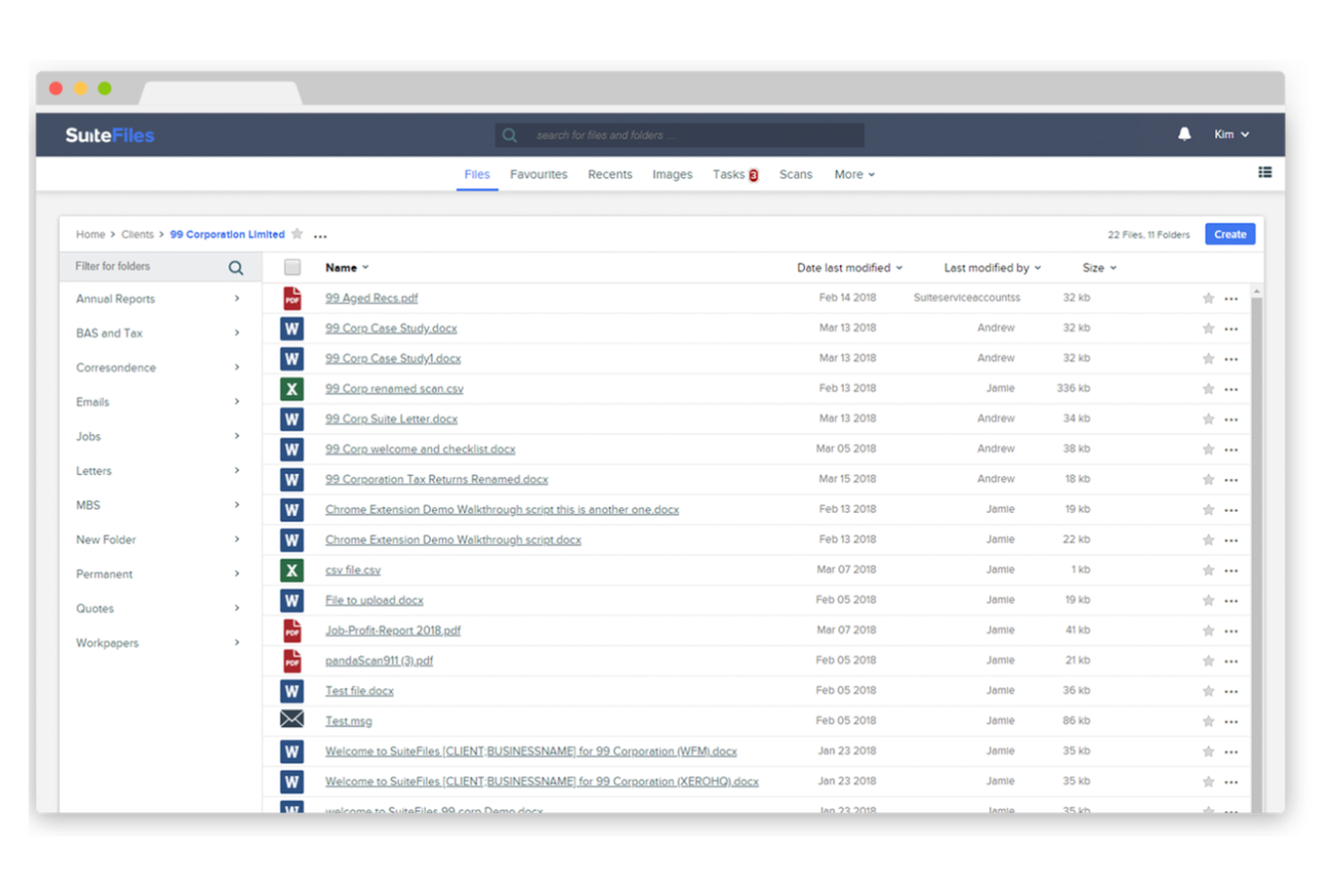
SuiteFiles is a document management and email filing software for Microsoft 365 users that lets you capture, organize, and search emails directly within your cloud file system.
Who Is SuiteFiles Best For?
Small and midsize professional services firms using Microsoft 365 who need integrated email and document management.
Why I Picked SuiteFiles
I picked SuiteFiles as one of the best because I like how it’s built specifically for Microsoft 365 users—my team can file emails straight from Outlook into shared folders without leaving our workflow. I use its email-to-folder automation to keep client communications organized alongside documents. I also rely on its search and tagging features to quickly find any email or attachment stored in our cloud file system.
SuiteFiles Key Features
- Email thread capture: Save entire email conversations as a single thread in your file system.
- Attachment extraction: Automatically extract and store email attachments in relevant folders.
- Permission controls: Set granular access permissions for filed emails and folders.
- Audit logging: Track all email filing actions for compliance and review.
SuiteFiles Integrations
SuiteFiles has native integrations across the Microsoft ecosystem, including Microsoft 365, Outlook, and Azure, and also integrates natively with Xero, DocuSign, and Zapier. An API is available for custom integrations.
Pros and Cons
Pros:
- Searchable email archive within Microsoft 365
- Captures full email threads automatically
- Allows folder-level permission management
Cons:
- No built-in analytics for email activity
- Limited automation for email categorization

iManage
Best for secure email and document collaboration
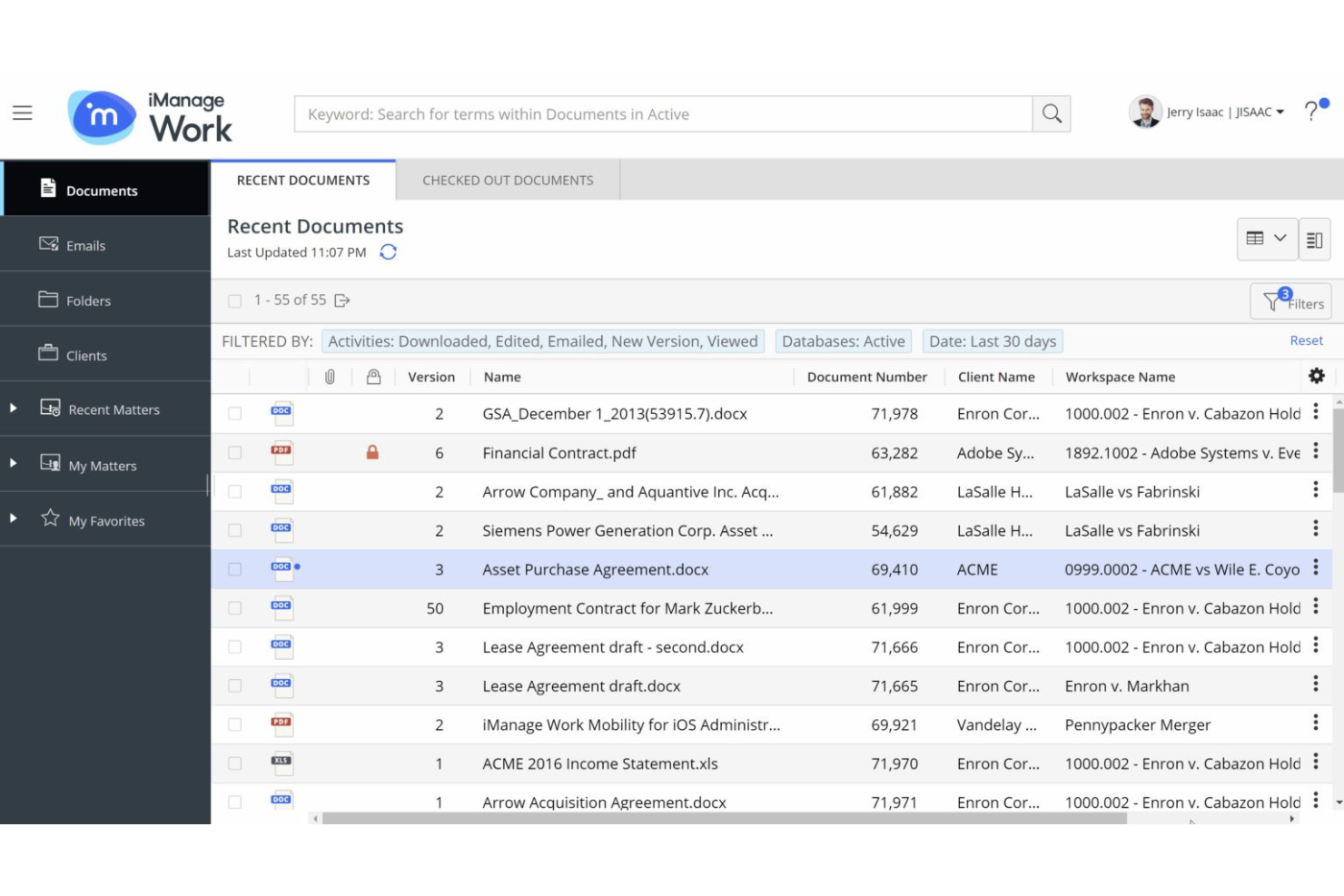
iManage is a document and email management platform for legal professionals that combines secure email filing, advanced search, version control, and collaboration tools in a single workspace.
Who Is iManage Best For?
Law firms and corporate legal departments needing secure document and email management.
Why I Picked iManage
I picked iManage as one of the best because I rely on its secure document and email management features built specifically for legal professionals. I like that my team can file emails directly from Outlook into Matter Workspaces, keeping everything organized and compliant. The platform’s version control and advanced search make it easy for us to retrieve and manage sensitive correspondence alongside documents.
iManage Key Features
- AI-powered email filing: Uses machine learning to suggest the right workspace for each email.
- Threaded email view: Displays related email conversations in a single, organized thread.
- Granular access controls: Lets you set detailed permissions for email visibility and actions.
- Audit logging: Tracks all email filing and access activity for compliance.
iManage Integrations
iManage offers native integrations across the Microsoft ecosystem, including Microsoft 365, Outlook, and Teams, and has an API for custom integrations.
Pros and Cons
Pros:
- Supports both cloud and on-premises deployments
- Enables granular access controls for sensitive emails
- Offers AI-powered email filing suggestions
Cons:
- Interface can feel overwhelming for new users
- Requires frequent updates for optimal security

Best for bulk inbox cleanup
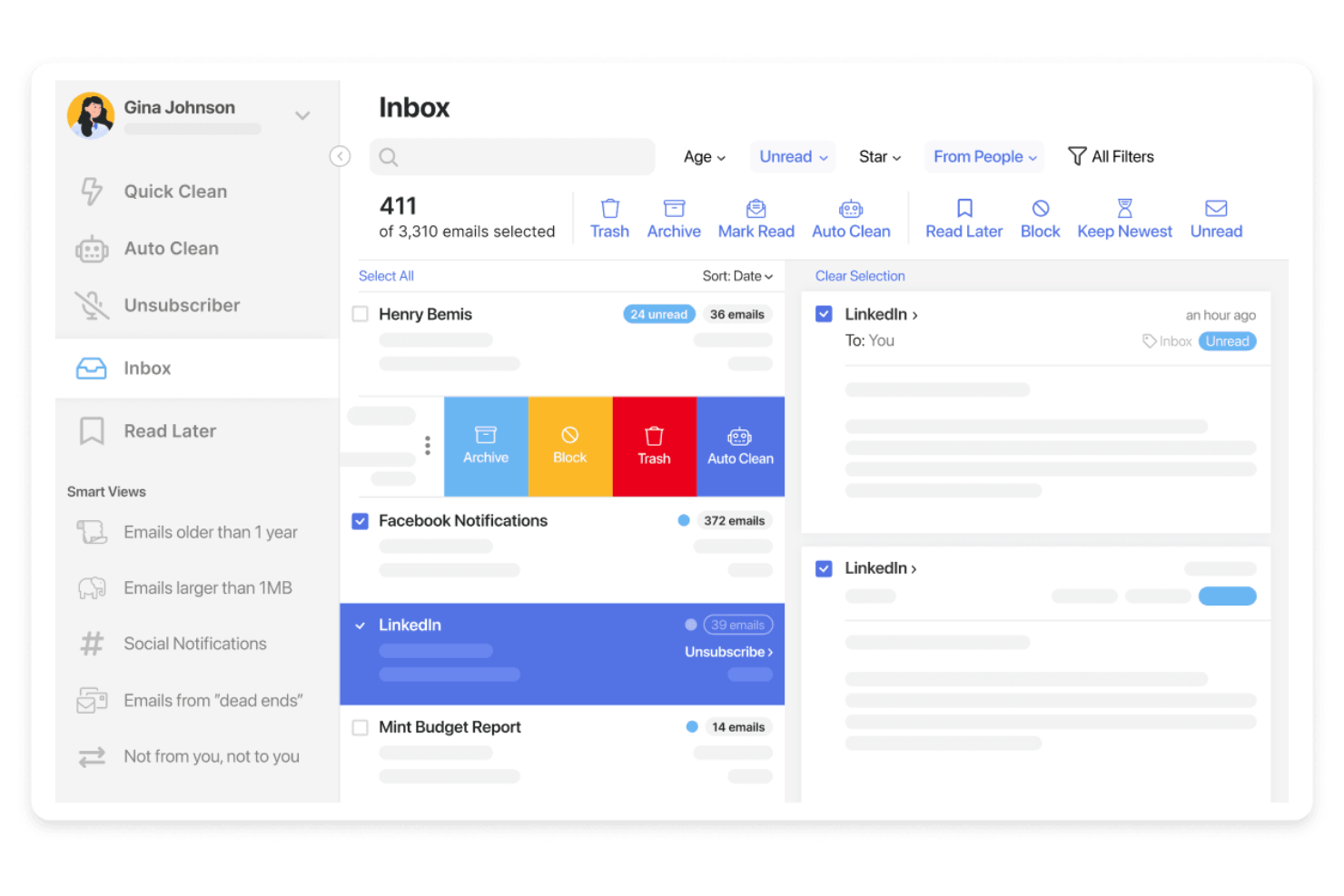
Clean Email is an email filing software platform that offers bulk email cleaning, smart automation rules, and advanced filtering tools for organizing and managing inboxes across multiple email providers.
Who Is Clean Email Best For?
Individuals and small teams who need bulk email organization and automation across multiple accounts.
Why I Picked Clean Email
I picked Clean Email as one of the best because I rely on its bulk email cleaning tools to quickly organize thousands of messages at once. I like using its smart automation rules to set up recurring filters for newsletters and notifications. My team uses the Auto Clean feature to keep our shared inboxes tidy without manual sorting.
Clean Email Key Features
- Unsubscriber tool: Lets you remove yourself from unwanted mailing lists in one click.
- Smart Views: Groups emails by category, sender, or age for easier review.
- Privacy Guard: Scans your inbox for data breaches and compromised accounts.
- Multiple account support: Manage and organize emails across several inboxes from one dashboard.
Clean Email Integrations
Native integrations are not currently listed.
Pros and Cons
Pros:
- Smart Views group emails by sender or category
- Privacy Guard checks for compromised accounts
- Supports multiple email providers and accounts
Cons:
- No built-in email scheduling or snooze
- Lacks shared inbox or team features
Best for legal email and document management
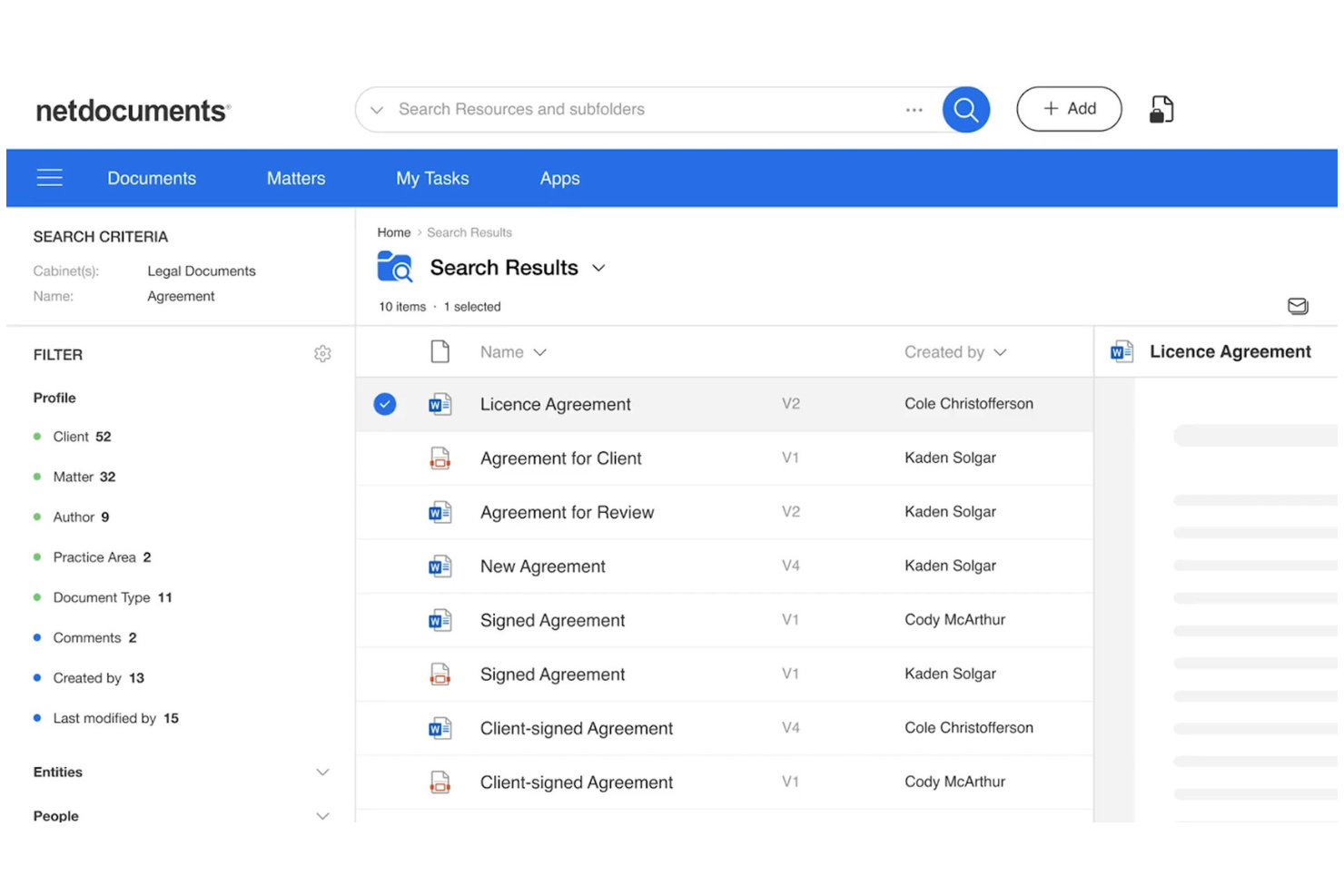
NetDocuments is a cloud-based email management platform designed for legal professionals, offering secure email capture, filing, search, and compliance features within a unified workspace.
Who Is NetDocuments Best For?
Law firms and legal departments needing secure, cloud-based email management and compliance.
Why I Picked NetDocuments
I picked NetDocuments as one of the best because I rely on its secure cloud-based email management to keep sensitive legal correspondence protected and organized. I like that it offers advanced compliance controls and audit trails, which help my team meet strict regulatory requirements. The platform’s unified workspace lets us capture, file, and search emails alongside documents, making it easy to manage everything in one place.
NetDocuments Key Features
- Predictive email filing: Suggests the best workspace or folder for each email.
- Outlook integration: Lets you file and manage emails directly from Microsoft Outlook.
- Threaded conversation view: Groups related emails together for easier tracking.
- Granular access controls: Allows you to set permissions for email visibility and actions.
NetDocuments Integrations
NetDocuments offers native integrations across the Microsoft ecosystem, including Microsoft 365, Outlook, and Teams. An API is available for custom integrations.
Pros and Cons
Pros:
- Threaded conversation view for email chains
- Audit trails for all filed emails
- Predictive filing suggests relevant folders automatically
Cons:
- Limited bulk email filing options
- Occasional sync delays with large mailboxes


Front is a collaborative email management platform that combines shared inboxes, team workflows, internal comments, and integrations with popular business apps for organizing and managing email conversations.
Who Is Front Best For?
Teams in customer support, sales, or operations who need to manage high-volume shared inboxes collaboratively.
Why I Picked Front
I picked Front as one of the best because I rely on its shared inboxes and collaborative email management to keep my team aligned on high-volume conversations. I like using internal comments and assignments to clarify ownership and context on each thread. My team uses message templates and workflow rules to organize, file, and route emails without losing track of important requests.
Front Key Features
- Analytics dashboard: Track team email metrics and response times in real time.
- Rules engine: Automate filing, tagging, and routing of incoming emails.
- Multi-channel inbox: Manage email, SMS, and social messages in one place.
- Custom tags: Organize and categorize emails for quick retrieval.
Front Integrations
Front offers 100+ native integrations, including Salesforce, HubSpot, Asana, Jira, Slack, Trello, Google Workspace, Microsoft 365, Dropbox, Aircall, and connects with Zapier. An API is available for custom integrations.
Pros and Cons
Pros:
- Rules automate email categorization and archiving
- Internal comments keep filing context visible
- Shared inboxes support team-based email filing
Cons:
- Limited bulk email filing actions
- No offline access for email filing

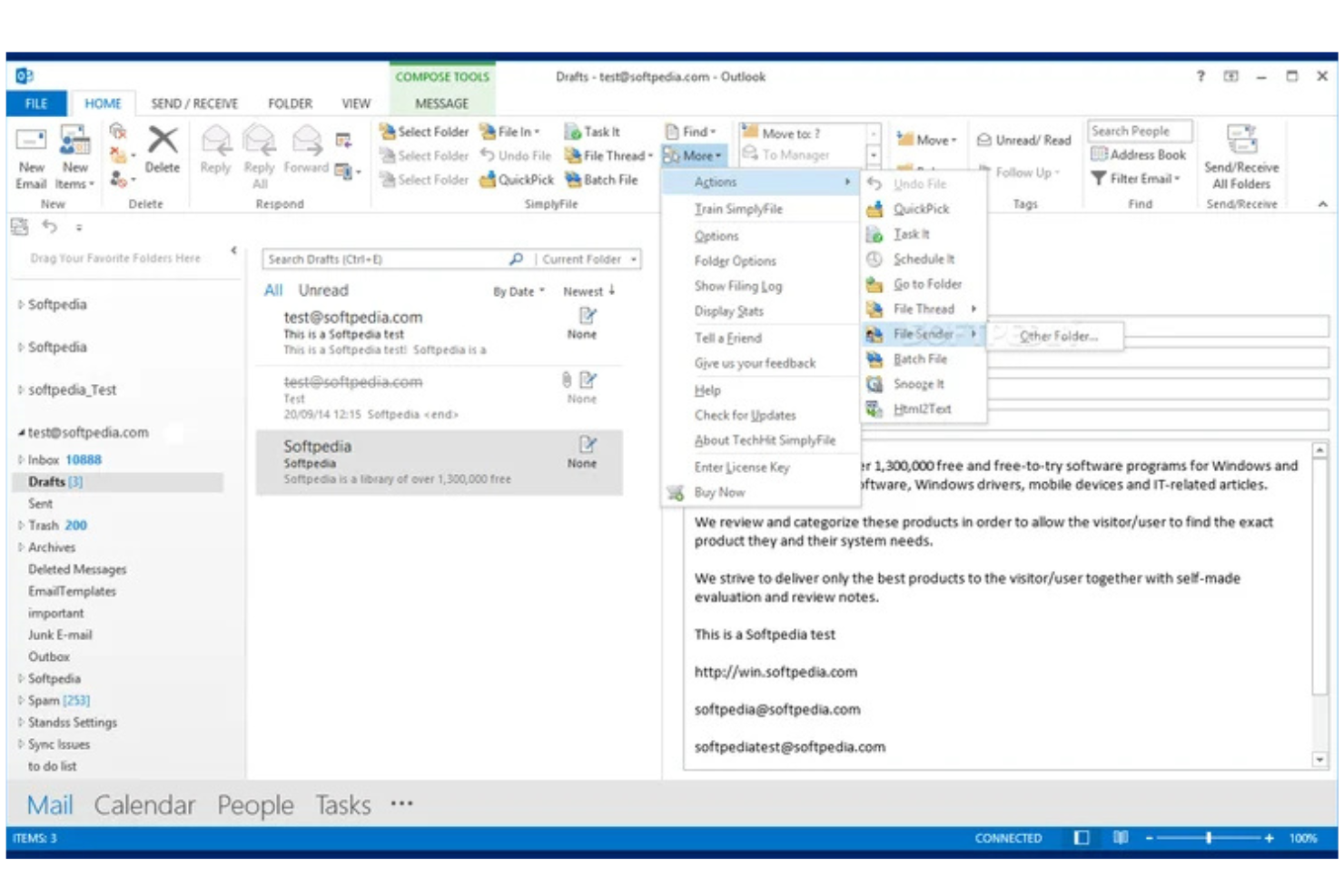
SimplyFile is an Outlook add-in for email filing that uses machine learning to suggest folders, supports one-click filing, and offers customizable rules for organizing messages.
Who Is SimplyFile Best For?
Outlook users in small to midsize businesses who need fast, folder-based email organization.
Why I Picked SimplyFile
I picked SimplyFile as one of the best because its one-click email filing for Outlook is genuinely fast and accurate. I like how it predicts the right folder for each message using machine learning so that I can file emails with a single click. The customizable filing rules let my team automate repetitive sorting tasks and keep our inboxes organized.
SimplyFile Key Features
- Batch filing: File multiple emails to their respective folders in one action.
- Quick pick folders: Access a list of recently used folders for faster manual filing.
- Folder search: Instantly search and select any folder within Outlook for filing.
- Sent item filing: Automatically file sent emails to project or client folders.
SimplyFile Integrations
SimplyFile offers native integrations across the Microsoft ecosystem, including Microsoft Outlook and Microsoft 365. An API is not available for custom integrations.
Pros and Cons
Pros:
- Supports batch filing of multiple emails
- Accurate folder suggestions using machine learning
- One-click filing directly from Outlook inbox
Cons:
- No support for cloud-based email platforms
- Only works with Microsoft Outlook

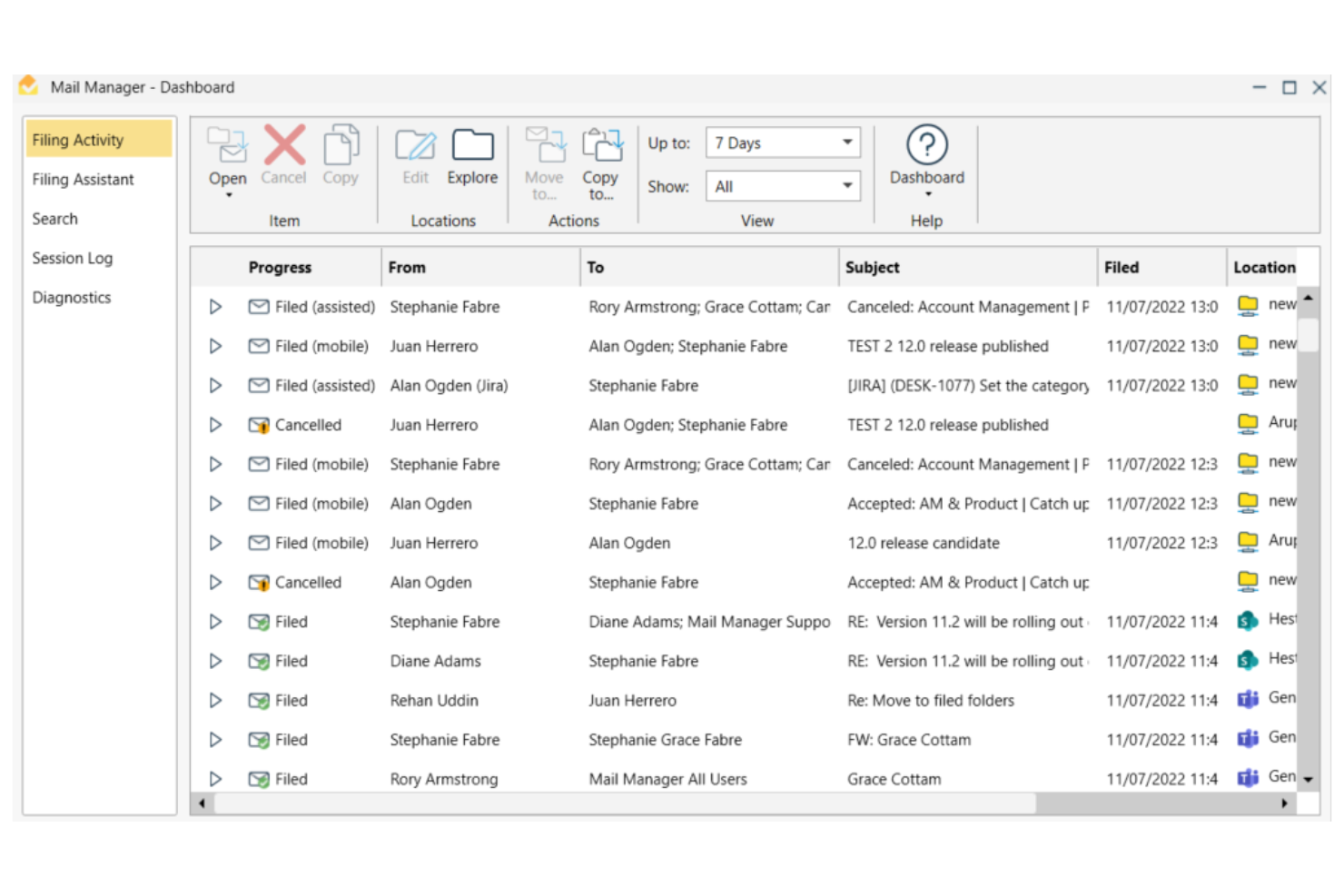
Ideagen Mail Manager is an email management platform for filing, searching, and organizing emails, with features for compliance, advanced search, and shared mailboxes.
Who Is Ideagen Mail Manager Best For?
Project-based teams in architecture, engineering, and construction firms needing advanced email search and compliance tools.
Why I Picked Ideagen Mail Manager
I picked Ideagen Mail Manager as one of the best because I rely on its advanced search to quickly retrieve project emails, even from shared mailboxes. I like that it enforces email filing compliance, which is essential for regulated industries. The tool’s ability to capture and organize correspondence across teams helps my projects stay audit-ready.
Ideagen Mail Manager Key Features
- Automated email filing: Automatically prompts users to file emails to the correct location.
- Outlook integration: Works directly within Microsoft Outlook for seamless workflow.
- Duplicate email detection: Identifies and prevents duplicate emails from being filed.
- Access control settings: Lets administrators manage user permissions for email access and filing.
Ideagen Mail Manager Integrations
Ideagen Mail Manager offers native integrations across the Microsoft ecosystem, including Microsoft Outlook, Microsoft 365, and SharePoint. An API is available for custom integrations.
Pros and Cons
Pros:
- Supports filing to network drives and cloud storage
- Sent email filing to project folders
- Customizable rules for automated sorting
Cons:
- Requires Outlook add-in installation for all users
- Lacks built-in AI-powered categorization features

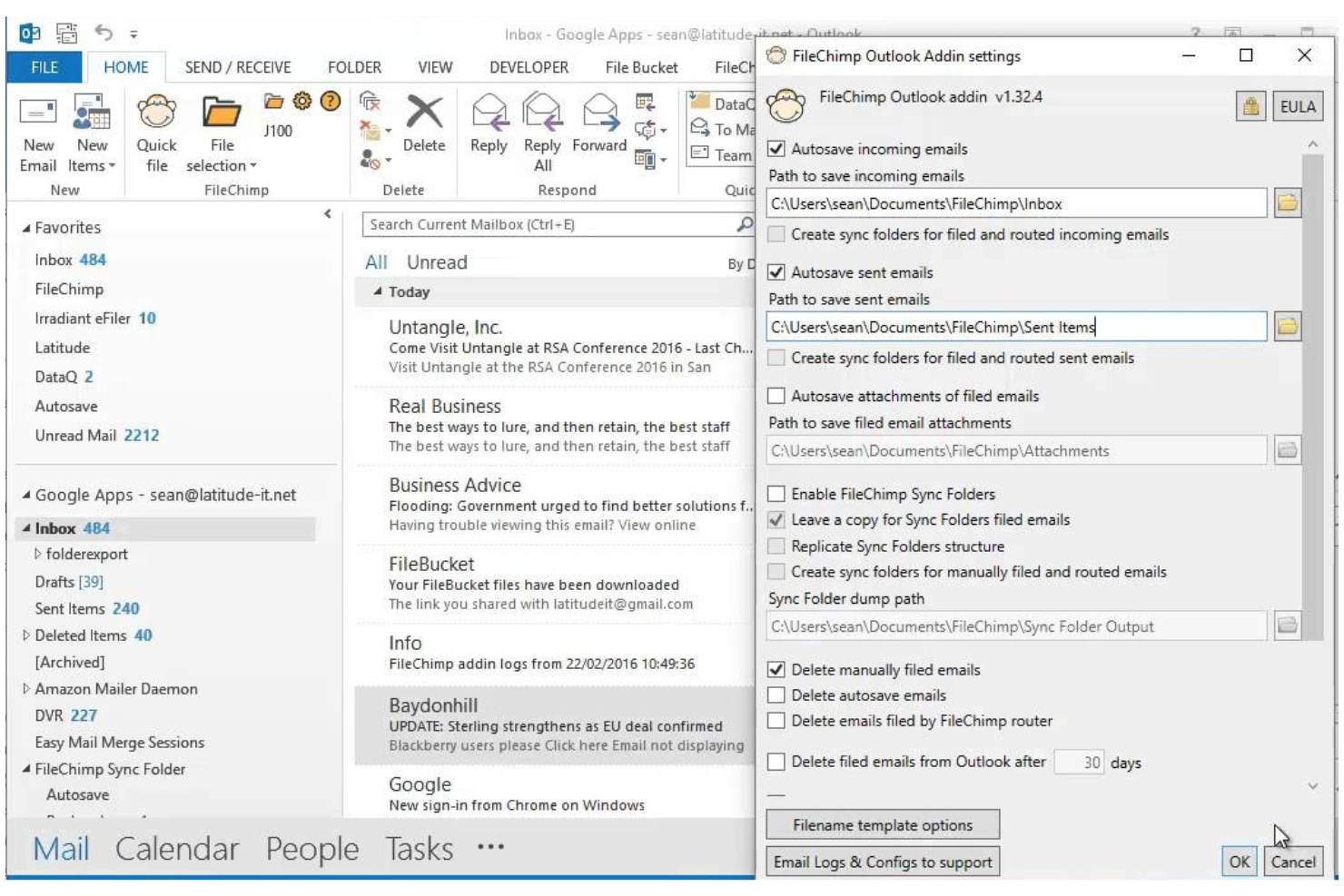
FileChimp is an Outlook add-in for email filing that lets you automatically organize emails and attachments into custom folder structures on your local drive or network.
Who Is FileChimp Best For?
Outlook users in small to midsize businesses who need automated email and attachment filing to local or network folders.
Why I Picked FileChimp
I picked FileChimp as one of the best because I like how it automates email and attachment filing directly from Outlook to local or network folders. My team uses its rule-based engine to sort emails by project or client, and I appreciate that we can customize folder structures to match our workflows. The drag-and-drop mapping tool makes setup quick, so we’re able to get organized fast without IT support.
FileChimp Key Features
- Attachment extraction: Automatically saves email attachments to designated folders.
- Duplicate detection: Flags and manages duplicate emails and files during filing.
- Folder monitoring: Watches specified folders and processes new emails as they arrive.
- Custom naming rules: Lets you define how filed emails and attachments are named.
FileChimp Integrations
FileChimp offers native integration with Microsoft Outlook and connects with Zapier. An API is available for custom integrations.
Pros and Cons
Pros:
- Offers duplicate detection for filed items
- Supports custom folder structures and rules
- Automates filing of emails and attachments
Cons:
- No support for cloud storage platforms
- Interface design feels outdated


CMap Mail is an email filing software add-in designed for project-centric teams, offering automated email capture, project-based organization, and seamless integration with the CMap project management platform.
Who Is CMap Mail Best For?
Project-focused professional services teams that need automated email capture and filing linked to project records.
Why I Picked CMap Mail
I picked CMap Mail as one of the best because I like how it captures and files emails automatically to the right project records without manual sorting. My team uses its deep integration with the CMap platform to keep all project communications organized and accessible. I appreciate that it links emails directly to project timelines and client records, which helps us keep everything connected as we work.
CMap Mail Key Features
- Outlook add-in: Lets you file emails directly from Microsoft Outlook.
- Bulk email filing: Allows you to file multiple emails at once to project folders.
- Attachment management: Saves and organizes email attachments alongside project records.
- Audit trail: Tracks all filed emails and attachments for compliance and reference.
CMap Mail Integrations
CMap Mail offers native integration with Microsoft Outlook and the CMap project management platform, and it connects with Zapier. An API is available for custom integrations.
Pros and Cons
Pros:
- Detects and prevents duplicate email filing
- Maintains a searchable audit trail of filed emails
- Links emails directly to CMap project records
Cons:
- No AI-driven filing or categorization features
- No direct integration with cloud storage platforms
Diğer E-posta Dosyalama Yazılımları
Kısa listeme giremeyen ancak yine de göz atmaya değer bazı ek e-posta dosyalama yazılımı seçenekleri şunlardır:
- Newforma
For project email management in AEC
- Inbox Zero
For inbox productivity workflows
- SaneBox
For AI email prioritization
- Help Scout
For shared inbox collaboration
- Mailgun
For developer email automation
- eM Client
For desktop email with archiving
- BIGContacts
For CRM with email tracking
- Mailbird
For customizable email management
- InboxAlly
For improving email deliverability
- Zoho Desk
For email-based support ticketing
- Thunderbird
For open-source email filtering
- Mailspring
For cross-platform email management
- ArcTitan
For cloud email archiving and compliance


How I Evaluate Email Filing Software
I evaluate these tools in two layers: the core filing and retrieval basics every project team needs, and the differentiators—like audit trails and PM integrations—that set tools apart.
Core Functionality (Table Stakes for This List)
When I'm selecting tools for my list, I rank each one on a scale from 0 (does not offer the functionality) to 5 (excels in this area) for each core functionality listed below. Then, I calculate the tool's total score into a percentage. Each tool needs to achieve a minimum total score of 65% to be considered for inclusion.
- Email Capture & Filing: I check whether a tool can pull emails and attachments from Outlook, Gmail, or both into organized project folders without stripping metadata.
- Shared Project Repository: Teams need a single place to access filed correspondence, so I look for multi-user repositories with role-based access controls.
- Automated Filing Rules: I evaluate how each tool routes emails to the right project—whether by sender domain, subject keywords, or project-specific metadata tags.
- Duplicate Prevention: When three people on a project thread all file the same email, the system should catch it. I look for message-ID-level deduplication.
- Search & Retrieval: Finding a subcontractor's email from six months ago shouldn't take 20 minutes. I look for full-text search across bodies, attachments, and metadata.
- PM/Document System Integration: I check for native connectors to platforms like SharePoint, Procore, or Autodesk Construction Cloud that keep email records aligned with project data.
Once I have a list of tools that meet this criteria, I consider what sets each platform apart.
Differentiating Factors (What Sets Vendors Apart)
Here's how I compare and contrast different vendors:
Standout Features
AI-powered classification is a major differentiator—tools that learn from filing history and auto-suggest the correct project folder save real effort on high-volume programs. Compliance audit trails also matter. When a contractual dispute surfaces, you need an immutable log showing who filed what and when. For bulk historical migration, I check whether a tool can import legacy PST archives without forcing your team to re-file old emails manually.
Beyond Features
Licensing flexibility is something I evaluate closely. Large project teams often include external contractors and consultants who need filing access but shouldn't require a full seat license. Security certifications like SOC 2 and ISO 27001 signal that a vendor takes data protection seriously—especially when filed emails contain sensitive contract details. I also consider implementation support, because rolling out a filing system across a 200-person project team without structured onboarding and taxonomy templates usually leads to inconsistent adoption.
E-posta Dosyalama Yazılımı Nasıl Seçilir?
Uzun özellik listeleri ve karmaşık fiyatlandırma yapılarına kendinizi kaptırmanız kolaydır. Kendinize özgü yazılım seçim süreciniz üzerinde çalışırken odağınızı korumanıza yardımcı olmak için göz önünde bulundurmanız gereken faktörleri içeren bir kontrol listesi hazırladım:
| Faktör | Dikkat Edilmesi Gerekenler |
|---|---|
| Ölçeklenebilirlik | Ekip veya işletmeniz büyüdükçe yazılım mevcut ve gelecekteki e-posta hacminizi yönetebilecek mi? |
| Entegrasyonlar | Mevcut e-posta sağlayıcılarınıza, üretkenlik araçlarınıza ve iş birliği platformlarınıza yerel olarak bağlanabiliyor mu? |
| Özelleştirilebilirlik | Dosyalama kurallarını, klasör yapılarını ve iş akışlarını ekibinizin kendine özgü ihtiyaçlarına göre uyarlayabilir misiniz? |
| Kullanım kolaylığı | Ekibiniz yazılımı hızlı bir şekilde benimseyecek mi, yoksa kapsamlı eğitim ve sürekli destek mi gerektirecek? |
| Uygulama ve başlangıç süreci | Kurulum ne kadar sürecek ve sağlayıcı geçiş ile eğitim için hangi kaynakları veya desteği sunuyor? |
| Maliyet | Fiyatlandırma kademeleri açık mı ve kullanım alışkanlıklarınızla bütçe kısıtlamalarınıza uygun mu? |
| Güvenlik önlemleri | Araç; şifreleme, erişim kontrolleri ve ilgili veri koruma standartlarına uyumluluk sunuyor mu? |
| Destek erişilebilirliği | Özellikle kritik çalışma saatlerinde sohbet, telefon veya e-posta yoluyla zamanında yardım alabiliyor musunuz? |
E-posta Dosyalama Yazılımı Nedir?
E-posta dosyalama yazılımı, e-posta mesajlarını kuralları veya akıllı algoritmaları kullanarak otomatik olarak düzenleyen, sıralayan ve arşivleyen bir e-posta yönetimi yazılımı türüdür. Ekiplerin e-postaları kaydetmesine, ekip üyeleriyle paylaşmasına ve iletişimi merkezi bir sistemde düzenli tutmasına yardımcı olur.
Birçok araç, OneDrive veya bir eklenti gibi entegrasyonlarla hepsi bir arada çözüm sunarak depolanan verileri yönetmeyi ve bunlara erişmeyi kolaylaştırır. Genel kullanıcı deneyimini iyileştirerek bu platformlar manuel çabayı azaltır ve gelen kutularını düzenli tutar. Bazı çözümler ayrıca işletmelerin yüksek hacimli e-posta iş akışlarını nasıl daha verimli yönettiğini göstermek için müşteri hikâyelerini de öne çıkarır.
Özellikler
E-posta dosyalama yazılımı seçerken aşağıdaki temel özelliklere dikkat edin:
- Otomatik klasör dosyalama: E-postaları gönderen, konu veya özel kurallara göre otomatik olarak belirlenen klasörlere taşır ve manuel sıralama ihtiyacını azaltır.
- Toplu işlemler: Aynı anda birden fazla e-postayı seçmenize, dosyalamanıza, arşivlemenize veya silmenize olanak tanıyarak yüksek hacimli gelen kutularını yönetirken zaman kazandırır.
- Ek yönetimi: E-posta eklerini kolayca bulup kullanabilmeniz ve başvurabilmeniz için ayrı olarak düzenler, depolar ve dizinler.
- Birden çok hesap desteği: Tek bir arayüz üzerinden çeşitli hesaplardan gelen e-postaları yönetmenize ve dosyalamanıza olanak tanır.
- Özel kural oluşturma: Ekibinizin iş akışına ve tercihlerine uygun kişiselleştirilmiş dosyalama kuralları oluşturmanızı sağlar.
- Gelişmiş arama: Dosyalanmış veya arşivlenmiş e-postaları tarih, gönderen veya anahtar kelimeler gibi filtreleri kullanarak hızla bulmanızı sağlayan güçlü arama araçları sunar.
- Zamanlanmış dosyalama: Yazılımın e-postaları otomatik olarak dosyalaması veya arşivlemesi için belirli zamanlar ayarlamanıza olanak tanıyarak gelen kutunuzu düzenli tutar.
- Denetim izleri: Uyumluluk ve hesap verebilirlik amacıyla dosyalama işlemlerini izler ve kaydeder, e-posta yönetimi geçmişini incelemeyi kolaylaştırır.
- Kullanıcı erişim denetimleri: Yöneticilerin e-postaları kimlerin görüntüleyebileceğini, dosyalayabileceğini veya silebileceğini belirlemesine olanak tanıyarak güvenli ekip iş birliğini destekler.
Yaygın E-posta Dosyalama Yazılımı Yapay Zekâ Özellikleri
Yukarıda listelenen standart e-posta dosyalama yazılımı özelliklerinin ötesinde, bu çözümlerin çoğu aşağıdaki gibi özelliklerle yapay zekâyı kullanmaya başlamıştır:
- Akıllı e-posta kategorilendirme: E-posta içeriğini ve bağlamını analiz etmek için yapay zekâ kullanır; manuel kural kurulumu gerektirmeden e-postaları otomatik olarak en uygun klasörlere atar.
- Tahmine dayalı dosyalama önerileri: Dosyalama alışkanlıklarınızdan öğrenir ve yeni e-postaların nereye dosyalanması gerektiğini önererek tekrarlanan görevlerin düzenlenmesini hızlandırır.
- Spam ve kimlik avı tespiti: Şüpheli veya istenmeyen e-postaları belirlemek ve filtrelemek için yapay zekâ algoritmalarından yararlanır; böylece gelen kutusu karmaşasını ve güvenlik risklerini azaltır.
- Otomatik e-posta önceliklendirme: Acil ilgilenilmesi gereken e-postaları öne çıkarmak veya işaretlemek için mesajın aciliyetini ve gönderenin önemini analiz eder.
- Niyet tanıma: Bir e-postadan takip veya zamanlama gibi gereken amacı ya da işlemi algılar ve kullanıcılara önerilen sonraki adımları sunar.
Avantajlar
E-posta dosyalama yazılımını uygulamak ekibiniz ve işletmeniz için çeşitli avantajlar sağlar. Yararlanabileceğiniz avantajlardan bazıları şunlardır:
- Daha hızlı gelen kutusu düzeni: Otomatik dosyalama ve toplu işlemler gelen kutularını düzenli tutar ve manuel sıralamaya harcanan zamanı azaltır.
- Geliştirilmiş e-posta erişimi: Gelişmiş arama ve yapılandırılmış arşivleme, ihtiyaç duyduğunuzda önemli mesajları ve ekleri kolayca bulmanızı sağlar.
- Tutarlı uyumluluk: Denetim izleri ve kullanıcı erişim denetimleri, ekibinizin veri saklama ve gizlilik gerekliliklerini karşılamasına yardımcı olur.
- Geliştirilmiş ekip iş birliği: Birden çok hesap desteği ve paylaşılan dosyalama kuralları, e-posta yönetiminde herkesin aynı anlayışta olmasını sağlar.
- Azaltılmış güvenlik riskleri: Yerleşik güvenlik önlemleri ve izin ayarları, hassas bilgileri yetkisiz erişime karşı korur.
- Kişiselleştirilmiş iş akışları: Özel kural oluşturma ve zamanlanmış dosyalama, sistemi ekibinizin kendine özgü süreçlerine göre uyarlamanıza olanak tanır.
- Daha iyi önceliklendirme: Yapay zekâ destekli özellikler acil e-postaları öne çıkarır ve sonraki adımları önererek ekiplerin en önemli konulara odaklanmasına yardımcı olur.
Maliyetler ve Fiyatlandırma
E-posta dosyalama yazılımı seçmek, mevcut çeşitli fiyatlandırma modellerini ve planları anlamayı gerektirir. Maliyetler özelliklere, ekip büyüklüğüne, eklentilere ve diğer unsurlara göre değişir. Aşağıdaki tablo, e-posta dosyalama yazılımı çözümlerinde yaygın planları, ortalama fiyatlarını ve genellikle sunulan özellikleri özetlemektedir:
E-posta Dosyalama Yazılımı İçin Plan Karşılaştırma Tablosu
| Plan Türü | Ortalama Fiyat | Yaygın Özellikler |
|---|---|---|
| Ücretsiz Plan | $0 | Temel e-posta dosyalama, sınırlı depolama, tek hesap desteği ve temel arama işlevi. |
| Kişisel Plan | $5-$15/kullanıcı/ay | Çoklu hesap desteği, özel kurallar, ek yönetimi ve öncelikli e-posta desteği. |
| İşletme Planı | $15-$30/kullanıcı/ay | Ekip iş birliği araçları, gelişmiş arama, denetim kayıtları, kullanıcı erişim denetimleri ve entegrasyon seçenekleri. |
| Kurumsal Plan | $30-$60/kullanıcı/ay | Gelişmiş güvenlik, uyumluluk özellikleri, özel destek, gelişmiş analizler ve özel işe alıştırma süreci. |
E-posta Dosyalama Yazılımı Hakkında Sık Sorulan Sorular
E-posta dosyalama yazılımı hakkında sık sorulan bazı soruların yanıtları burada yer alıyor:
E-posta dosyalama yazılımı birden fazla e-posta sağlayıcısıyla çalışabilir mi?
Evet, çoğu e-posta dosyalama yazılımı Gmail, Outlook ve Exchange gibi popüler sağlayıcılarla entegrasyonu destekler. Bu esneklik, farklı hesaplardan gelen e-postaları tek bir yerde yönetmenize ve düzenlemenize olanak tanır; bu özellik, özellikle farklı platformların bir arada kullanıldığı ekipler için faydalıdır.
E-posta dosyalama yazılımı uyumluluğa nasıl yardımcı olur?
E-posta dosyalama yazılımı; denetim kayıtları, saklama politikaları ve güvenli depolama sağlayarak uyumluluğa yardımcı olur. Bu özellikler, veri saklama, gizlilik ve erişim denetimiyle ilgili sektör düzenlemelerine ve kurum içi politikalara uymayı kolaylaştırır.
Mevcut e-postaları yeni bir dosyalama sistemine taşımak zor mudur?
Hayır, çoğu çözüm mevcut e-postaları ve klasör yapılarını içe aktarmak için taşıma araçları veya rehberli işe alıştırma süreci sunar. Önemli verileri kaybetmeden sorunsuz bir geçiş yapmanıza yardımcı olmak için adım adım sihirbazlar, şablonlar veya destek personeli sunan platformları tercih edin.
E-posta dosyalama yazılımından hangi güvenlik önlemlerini beklemeliyim?
Aktarım sırasında ve depolama esnasında veriler için şifreleme, kullanıcı erişim denetimleri ve düzenli güvenlik güncellemeleri beklemelisiniz. Bazı çözümler, hassas bilgileri korumak için uyumluluk sertifikaları ve gelişmiş tehdit algılama da sunar.
Belirli projeler veya müşteriler için dosyalama kurallarını otomatikleştirebilir miyim?
Evet, çoğu e-posta dosyalama yazılımı e-postaları projeye, müşteriye, gönderene veya anahtar kelimelere göre otomatik olarak dosyalamak için özel kurallar oluşturmanıza olanak tanır. Bu otomasyon zamandan tasarruf sağlar ve ekibiniz genelinde tutarlı bir düzen oluşturulmasını güvence altına alır.
Kurulum veya günlük kullanım sırasında desteğe ihtiyacım olursa ne olur?
Çoğu sağlayıcı canlı sohbet, e-posta veya telefon aracılığıyla destek sunar; ayrıca birçok sağlayıcıda aranabilir yardım merkezleri ve topluluk forumları bulunur. İhtiyaç duyduğunuzda yardım alabileceğinizden emin olmak için destek saatlerini ve yanıt sürelerini kontrol edin.