

2026’da Küçük İşletmeler İçin En İyi 10 Müşteri Yönetimi Yazılımı

Küçük İşletmeler İçin Müşteri Yönetimi Yazılımları Kısa Listesi


Müşteri yönetimi yazılımı, küçük işletmenizin kişileri düzenlemesine, etkileşimleri takip etmesine ve satış ya da hizmet iş akışlarını tek bir yerde kolaylaştırmasına yardımcı olur. Müşterilerinizle iletişimi sürdürmenin, iletişimi merkezileştirmenin ve işletmeniz büyürken ekibinizi desteklemenin en iyi yolunu arıyorsanız doğru yerdesiniz. Bu kadar çok seçenek varken hangi araçların ihtiyaçlarınıza, bütçenize ve günlük işleyişinize gerçekten uyduğunu bilmek zor olabilir.
Bu liste, 2026 yılında küçük işletmeler için en iyi müşteri yönetimi yazılımlarını ayrıntılarıyla ele alır; böylece özellikleri karşılaştırabilir, temel farklılıkları görebilir ve ekibiniz için güvenle karar verebilirsiniz.
Why Trust Our Software Recommendations
Our team has been testing and reviewing software since 2012. As project managers ourselves, we know how difficult—and important—it is to choose the right software.
For this guide, we evaluated tools using hands-on testing and independent research, scoring tools using our selection criteria. We also draw on insights from industry thought leaders and practicing project management experts.
Our reviews reflect our human editorial judgment, not a sales pitch.
Expert reviewers:
Karşılaştırma Tablosu: Küçük İşletmeler İçin Müşteri Yönetimi Yazılımları
Bu karşılaştırma tablosu, küçük işletmeler için en iyi müşteri yönetimi yazılımı seçimlerimin fiyatlandırma ayrıntılarını özetler.
| Tool | Starting Price | Website | |
|---|---|---|---|
| Best for linking sales, projects, and billing | — | $12/user/month Free plan + 14-day free trial | Website |
| Best for simple, intuitive user experience | 4.9 out of 5 | $15/user/month 30-day free trial available | Website |
| Best for action-focused contact management | 4.7 out of 5 | $9.95/user/month 21-day free trial | Website |
| Best with Microsoft 365 ecosystem integration | 4.6 out of 5 | $210/user/month Not available | Website |
| Best for marketing and sales alignment | 4.4 out of 5 | $20/user/month Free plan available | Website |
| Best for project and task integration | 4.2 out of 5 | $29/user/month 14-day free trial + free demo available | Website |
| Best with advanced automation tools | 4.4 out of 5 | $25/user/month Free plan + 30-day free trial available | Website |
| Best for automated follow-up sequences | 4.1 out of 5 | $299/month Free trial + free demo available | Website |
| Best for visual sales pipeline management | — | $14/user/month 14-day free trial available | Website |
| Best for AI-powered lead scoring | — | $9/user/month 21-day free trial | Website |
Küçük İşletmeler İçin En İyi Müşteri Yönetimi Yazılımları
Aşağıda, kısa listeme giren küçük işletmelere yönelik müşteri yönetimi yazılımlarının ayrıntılı özetlerini bulabilirsiniz. İncelemelerim, size en uygun seçeneği bulmanıza yardımcı olmak için her platformun özelliklerine, en uygun kullanım alanlarına ve entegrasyonlarına ayrıntılı bir bakış sunar.

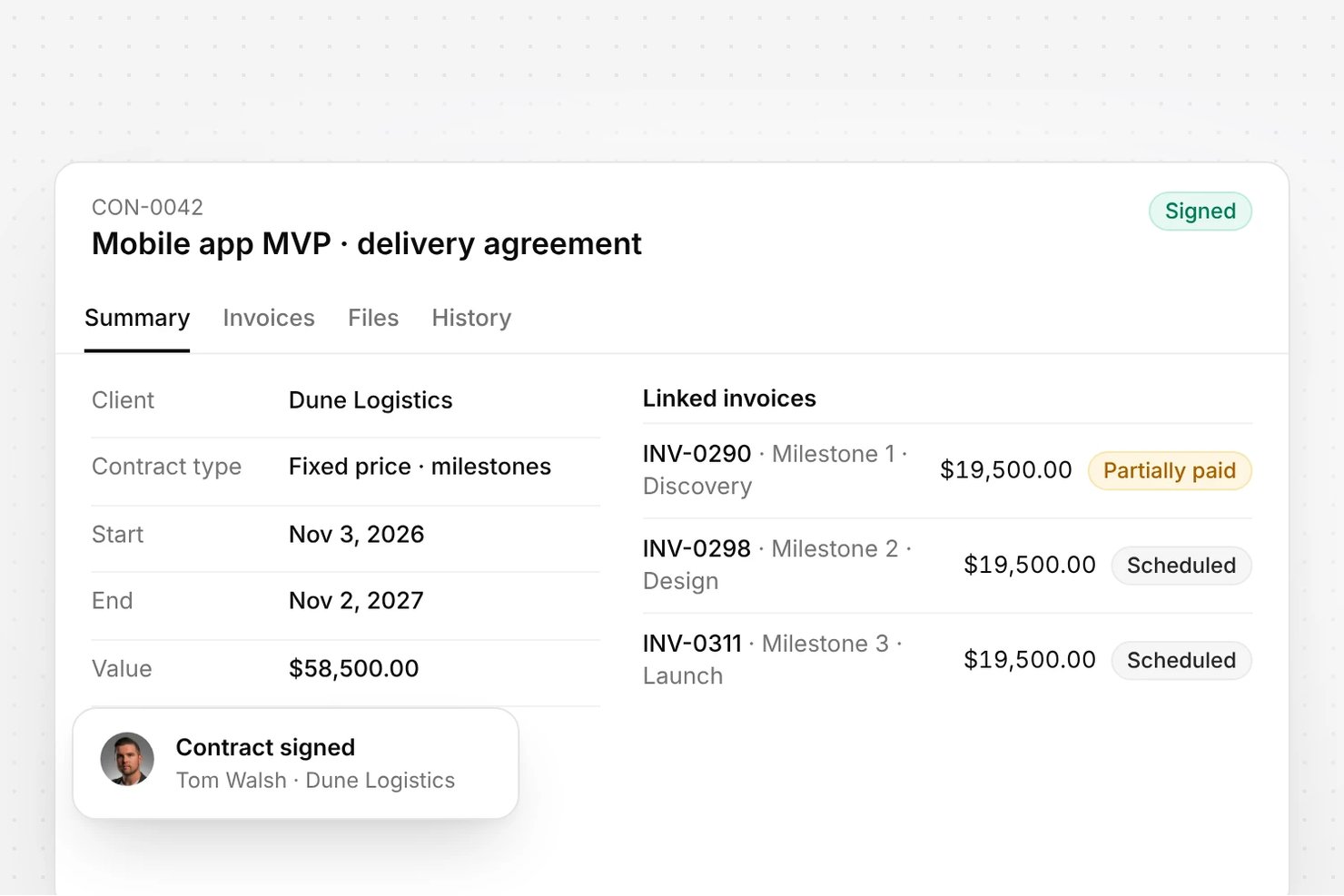
Olqan is a business operating platform that combines CRM, project delivery, invoicing, time tracking, and client portal access in one tool for small businesses and freelancers.
Who Is Olqan Best For?
Olqan is a strong fit for small teams and freelancers who need to manage client work, projects, and billing in one place without juggling multiple tools.
Why I Picked Olqan
I picked Olqan as one of the best because it genuinely links sales, projects, and billing inside a single workspace rather than treating them as separate modules. A deal won in the Sales Hub can connect directly to a client-linked project, with time logs feeding into invoices through the Finance Console. I also like that the client portal gives customers visibility into project files, task status, and invoices without any extra tool.
Olqan Key Features
- Lead scoring: Automatically identifies and ranks promising leads based on captured data in the Sales Hub.
- Sales pipeline customization: Lets you build pipelines with custom stages, fields, and workflows to match your sales process.
- Burndown charts: Tracks team velocity and sprint progress visually across active projects.
- E-signatures: Sends contracts directly to clients and collects legally binding electronic signatures without leaving the platform.
Olqan Integrations
Olqan documents integrations with QuickBooks, Google Calendar, Slack, Stripe, PayPal, Microsoft Teams, and Google Meet. It also integrates with Square, WhatsApp, and Google Drive, supports webhooks, and lists Dropbox.
Pros and Cons
Pros:
- Client portal shares project updates
- Quick setup and CSV imports
- Client, project, and billing work connect
Cons:
- No phone app for on-the-go access
- No unified client communication timeline

Best for simple, intuitive user experience
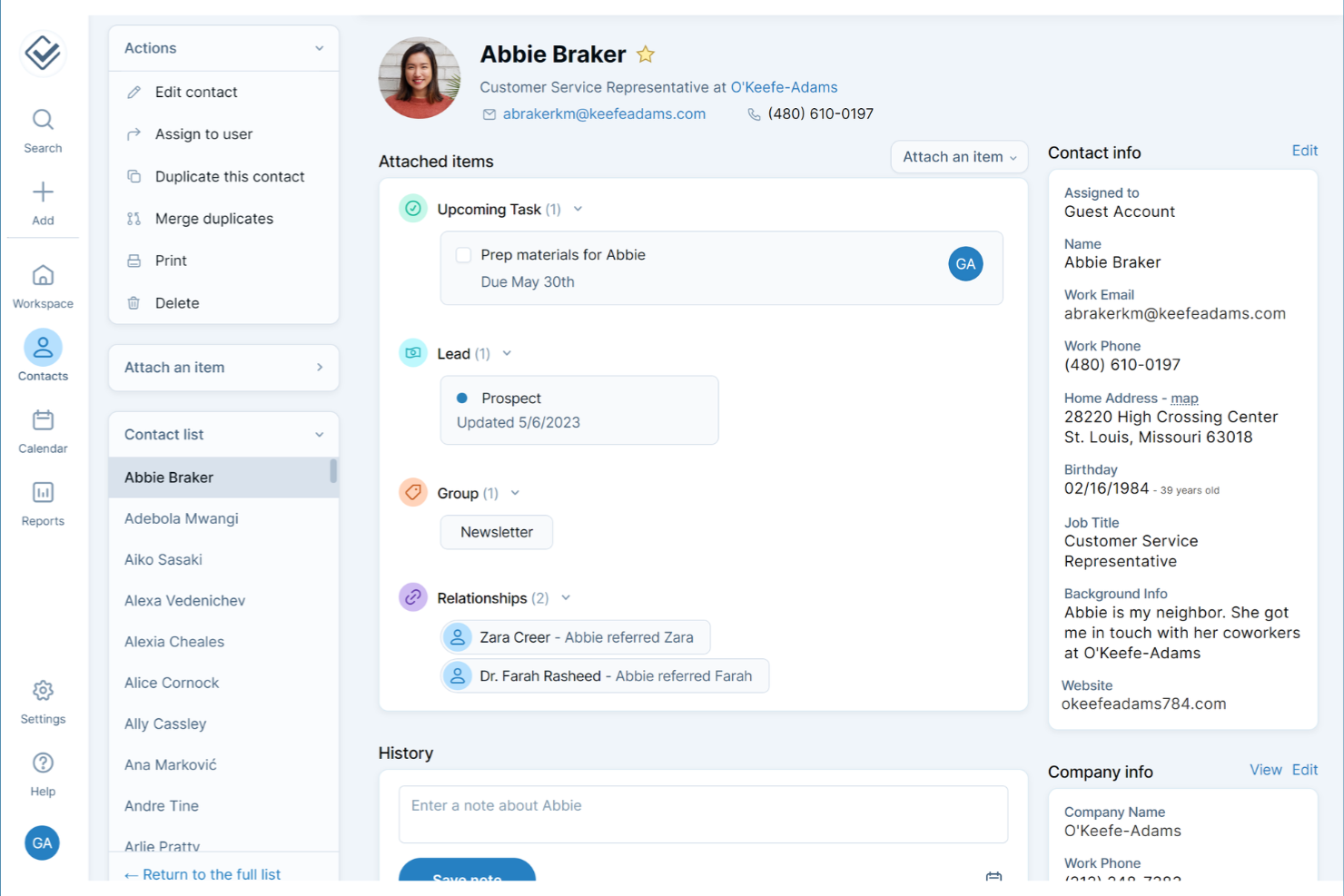
If you’re looking for a client management tool that skips the clutter and confusion, Less Annoying CRM is designed with simplicity at its core. It’s a strong fit for small business owners and solo professionals who want to manage the entire customer experience from contacts, to follow-ups, and tasks without a steep learning curve. The interface keeps everything straightforward, so you can focus on building client relationships instead of figuring out your software.
Why I Picked Less Annoying CRM
What sets Less Annoying CRM apart is its focus on a simple, intuitive user experience that doesn’t overwhelm small business teams. The dashboard puts contacts, tasks, and follow-ups front and center, so you always know what needs attention. I appreciate how the tool keeps navigation minimal, with everything just a click or two away. For small businesses and startups that want to avoid unnecessary complexity, Less Annoying CRM makes it easy to stay organized and on top of client relationships.
Less Annoying CRM Key Features
Some other features in Less Annoying CRM that small businesses may find useful include:
- Calendar and Event Scheduling: Schedule meetings, calls, and deadlines with a built-in calendar that syncs with your contacts.
- Pipeline Management: Track leads and deals through customizable pipelines to monitor sales progress.
- Team Collaboration Tools: Share contacts, notes, and tasks with team members for better coordination.
- Daily Agenda Emails: Receive a daily summary email with your upcoming tasks and events.
Less Annoying CRM Integrations
Native integrations are not currently listed by Less Annoying CRM. However, it does offer an open API for custom integrations.
Pros and Cons
Pros:
- Built-in calendar supports event scheduling and reminders
- Daily agenda emails help users stay on top of follow-ups
- Contact records include unlimited custom fields for client details
Cons:
- Reporting options are limited compared to other CRMs
- Lacks native integrations with popular accounting or marketing tools
Best for action-focused contact management
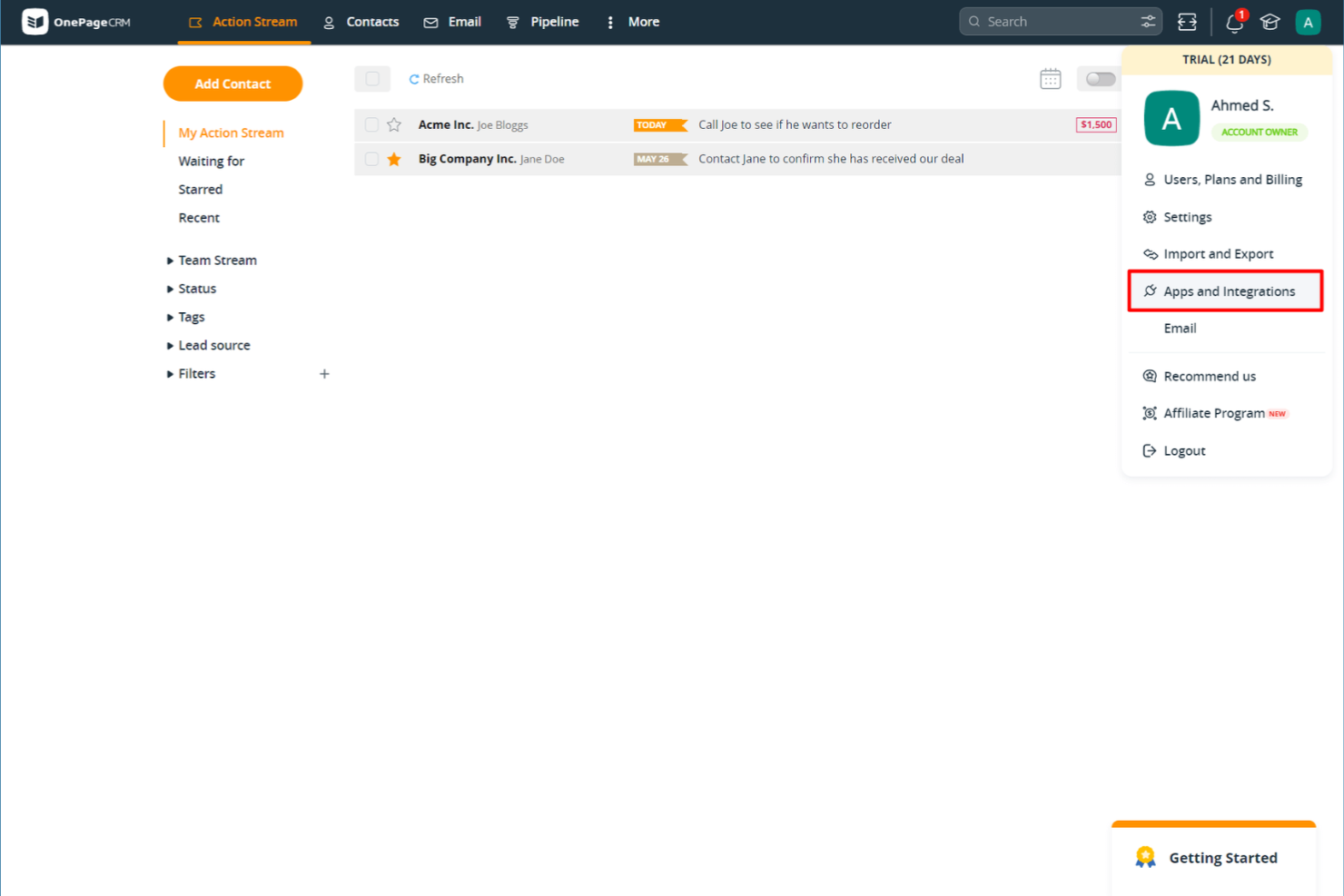
If you want a client management tool that keeps your team focused on next steps, OnePageCRM is worth a look. It’s designed for small businesses and sales teams that need a simple way to turn contacts into actionable tasks. With its action-focused approach, OnePageCRM helps you avoid letting leads slip through the cracks.
Why I Picked OnePageCRM
What sets OnePageCRM apart is its focus on turning every contact into a clear, actionable next step. Instead of just storing client information, the platform prompts you to assign and track follow-up actions for each contact, which helps small business teams stay proactive. I appreciate how the Next Action sales method is built right into the workflow, making it easy to prioritize and manage daily client tasks. For small businesses that want to keep momentum with leads and clients, this action-focused approach is a practical fit.
OnePageCRM Key Features
Some other features in OnePageCRM that small business users may find helpful include:
- Contact Import and Export: Quickly bring in or move out contact lists using CSV files or integrations.
- Email Sync and Templates: Connect your email account to send, receive, and track emails directly from the platform.
- Deal Management: Organize, track, and update sales opportunities with a simple pipeline view.
- Mobile App: Access contacts, actions, and deals on the go with dedicated iOS and Android apps.
OnePageCRM Integrations
Integrations include Gmail, Outlook, Mailchimp, Zapier, Xero, Google Calendar, Slack, HubSpot, and Pipedrive. Additionally, OnePageCRM offers an open API for custom integrations.
Pros and Cons
Pros:
- Email sync allows sending and tracking messages from the CRM
- Sales pipeline view offers simple drag-and-drop deal tracking
- Action-focused task lists help teams prioritize daily follow-ups
Cons:
- Bulk editing contacts is not available for all data fields
- No built-in marketing automation for email campaigns

Best with Microsoft 365 ecosystem integration
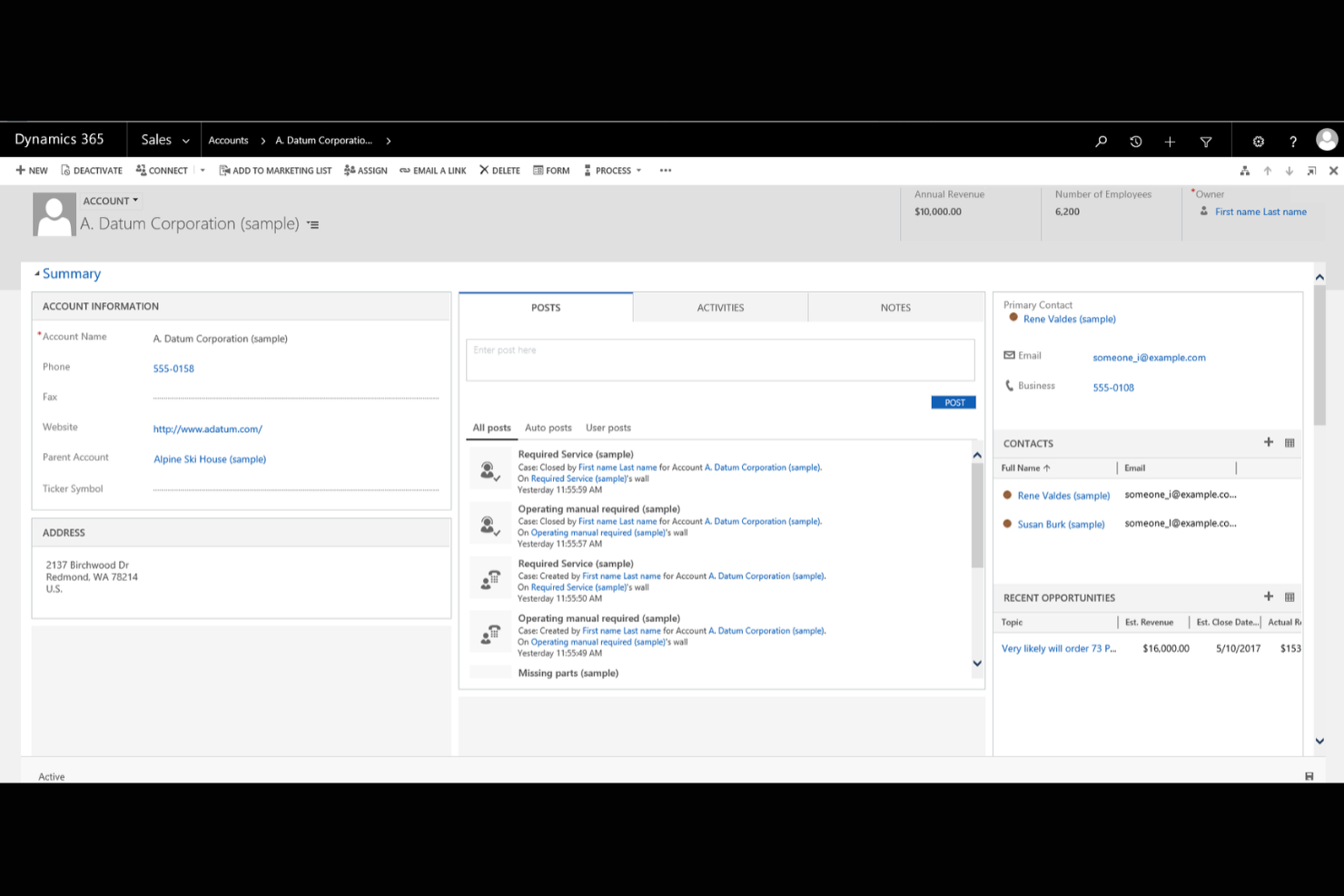
If your business already relies on Microsoft 365 tools, Microsoft Dynamics 365 offers a client management platform that fits right into your existing workflows. It’s designed for small businesses that want to connect sales, customer service, and marketing data across familiar Microsoft apps. With deep integration into Outlook, Teams, and Excel, Dynamics 365 helps you manage client relationships without switching between multiple systems.
Why I Picked Microsoft Dynamics 365
What sets Microsoft Dynamics 365 apart for small businesses is how deeply it connects with the Microsoft 365 ecosystem. I picked it because you can manage client data, track communications, and schedule meetings directly from familiar tools like Outlook and Teams. The platform also lets you automate workflows between Dynamics 365 and Excel, making it easier to update records and generate reports without manual data entry. For businesses already using Microsoft apps, this level of integration helps keep client management organized and efficient.
Microsoft Dynamics 365 Key Features
Some other features in Microsoft Dynamics 365 that small business users may find valuable include:
- Customizable Dashboards: Create visual dashboards to track sales, service, and marketing metrics in real time.
- Case Management: Organize and resolve customer service requests with built-in case tracking tools.
- Lead and Opportunity Management: Capture, qualify, and manage leads and sales opportunities from a single interface.
- Role-Based Access Controls: Set permissions and data visibility based on user roles within your organization.
Microsoft Dynamics 365 Integrations
Integrations include Microsoft 365, Power BI, LinkedIn Sales Navigator, Outlook, SharePoint, Teams, Azure, Adobe Sign, and OneDrive. Microsoft Dynamics 365 also offers an API for custom integrations.
Pros and Cons
Pros:
- Built-in case management supports structured customer service workflows
- Customizable dashboards let you track sales and service metrics
- Deep integration with Outlook, Teams, and other Microsoft 365 apps
Cons:
- Integration with non-Microsoft tools is more limited than that of some competitors
- Initial setup and configuration can require significant IT resources

HubSpot
Best for marketing and sales alignment
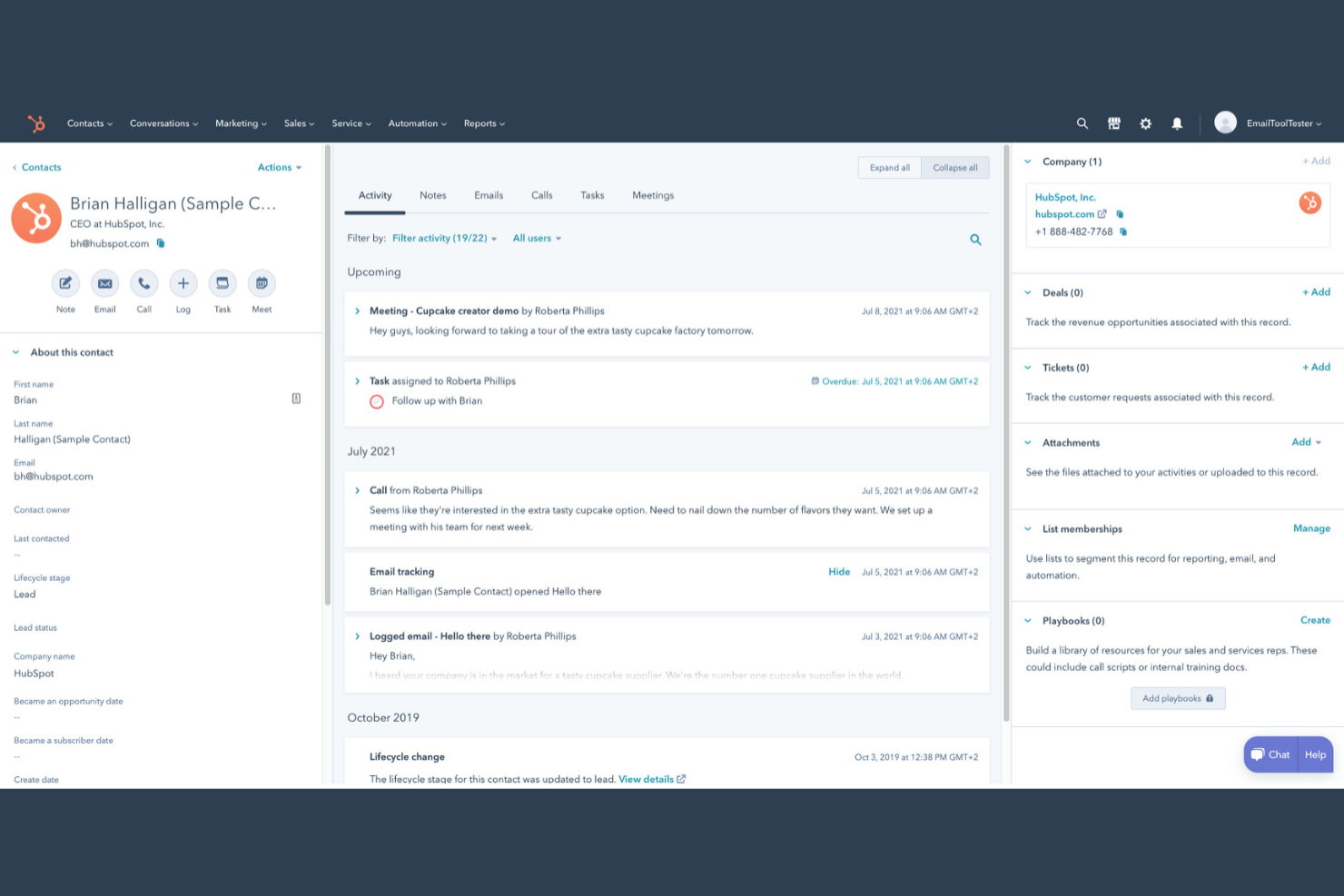
If you’re looking for a client management platform that connects your marketing and sales teams, HubSpot is worth a look. This tool is designed for small businesses that want to manage contacts, automate outreach, and track deals in one place. HubSpot stands out for its unified approach to client data, making it easier to align your sales and marketing efforts.
Why I Picked HubSpot
I chose HubSpot because it brings marketing and sales activities together in a way that’s especially useful for small businesses managing client relationships. The platform lets you track every client interaction, from first website visit to closed deal, all in one place. I like that you can automate email marketing campaigns and set up lead nurturing workflows that keep both sales and marketing teams on the same page. HubSpot’s shared contact database and deal pipelines help ensure no client details slip through the cracks as your team grows.
HubSpot Key Features
Some other features in HubSpot that small businesses may find useful include:
- Meeting Scheduler: Book appointments directly through the CRM system and sync with your calendar.
- Live Chat Widget: Add real-time chat to your website to connect with visitors and capture leads.
- Task Management: Assign, track, and prioritize tasks for your team within each client record.
- Document Tracking: Upload, share, and monitor client engagement and customer interactions with sales documents right from the platform.
HubSpot Integrations
Integrations include Salesforce, Shopify, WordPress, Slack, Zoom, Microsoft Outlook, Gmail, Mailchimp, SurveyMonkey, and Eventbrite.
Pros and Cons
Pros:
- Provides customizable pipelines for tracking deals and client status
- Offers built-in email tracking and automated follow-up reminders
- Centralizes client communication history across marketing and sales teams
Cons:
- Integration setup can be time-consuming for non-technical users
- Advanced automation features require upgrading to higher-tier plans

Best for project and task integration
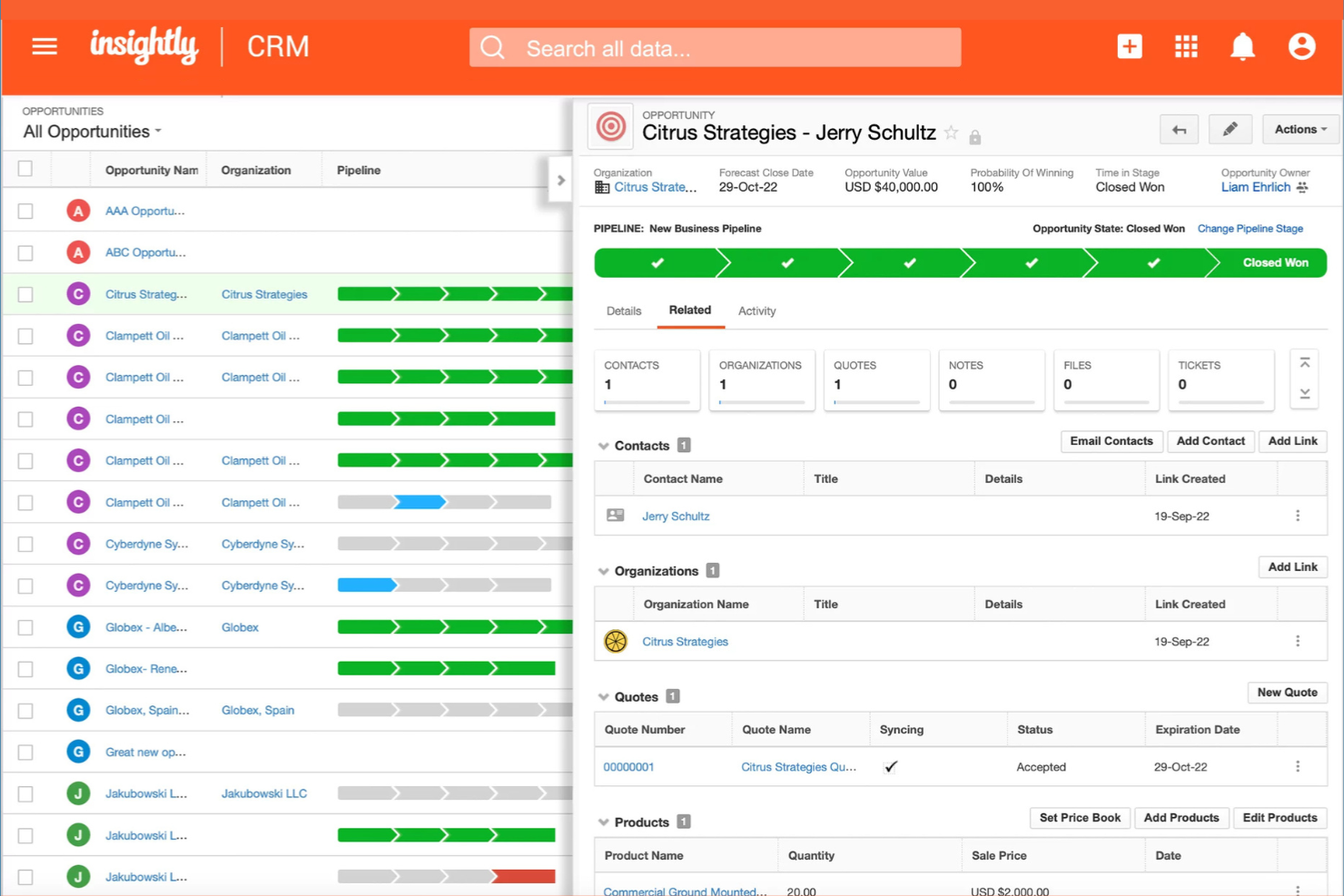
If your small business needs client management that connects directly with project and task workflows, Insightly is worth a look. This platform is designed for teams that want to manage customer relationships and project delivery in one place. It helps you link contacts, sales, and project tasks so nothing falls through the cracks as you move from deal to delivery.
Why I Picked Insightly
What sets Insightly apart for me is how it brings project and task management directly into the client management workflow. You can convert opportunities into projects with a single click, keeping all related client information and activities connected throughout the process. I appreciate that you can assign tasks, set milestones, and track project progress right alongside your client records. For small businesses juggling both sales and project delivery, Insightly’s integrated approach helps keep everything organized and visible in one place.
Insightly Key Features
Some other features in Insightly that small business teams may find valuable include:
- Relationship Linking: Connect contacts, organizations, and opportunities to see how everyone and everything is related.
- Custom Fields and Page Layouts: Tailor records and views to match your business’s unique processes and data needs.
- Email Templates and Tracking: Create reusable email templates and track when messages are opened or clicked.
- Workflow Automation: Set up automated actions and notifications based on triggers you define.
Insightly Integrations
Integrations include Gmail, Outlook, Mailchimp, QuickBooks, Slack, Dropbox, Google Drive, Microsoft Teams, Xero, and HubSpot. Insightly also offers an API for custom integrations.
Pros and Cons
Pros:
- Email templates and tracking support client communication efforts
- Custom fields and layouts adapt to unique business processes
- Workflow automation reduces manual data entry for small teams
Cons:
- Bulk data import can require manual cleanup and mapping
- Mobile app features are less extensive than the web version

Best with advanced automation tools
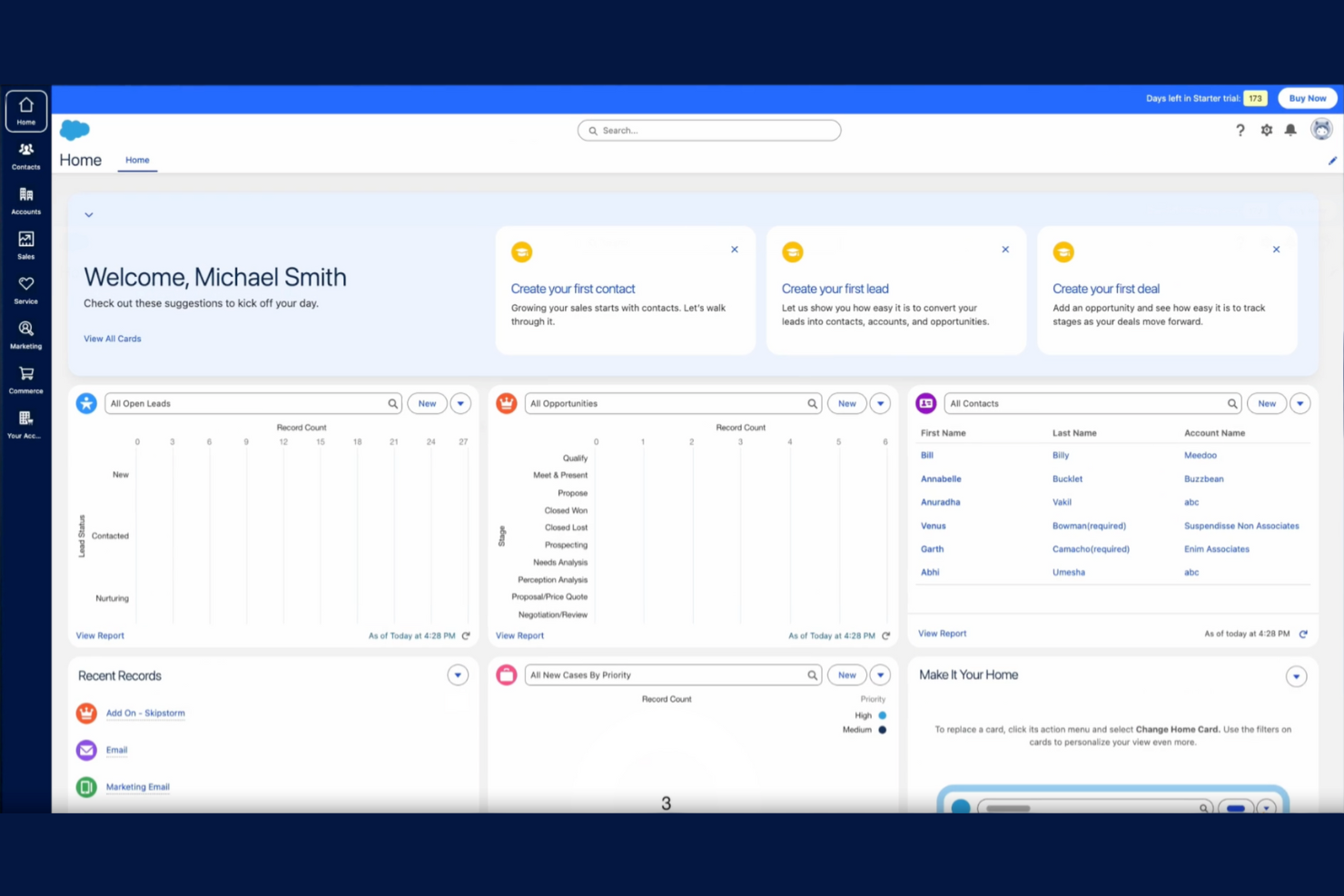
Salesforce gives small businesses access to automation tools that are usually reserved for larger organizations. If your team needs to manage complex client workflows, automate repetitive tasks, or set up custom sales processes, Salesforce offers a flexible platform to do it. Its advanced automation features help small businesses handle growing client lists and evolving sales cycles without losing track of important details.
Why I Picked Salesforce
What sets Salesforce apart as a small business CRM is its advanced automation capabilities that go far beyond basic client tracking. You can build custom workflows to automate lead assignments, follow-up reminders, and approval processes, which helps teams stay organized as client volume grows. I appreciate how Salesforce’s automation tools let you set up triggers and actions based on client behavior, so nothing falls through the cracks. For small businesses ready to scale, these user-friendly features make it possible to handle more clients without adding manual work.
Salesforce Key Features
Some other features in Salesforce that small businesses may find valuable include:
- Opportunity Management: Track and optimize every stage of your sales pipeline and update deal progress in real time.
- Contact and Account Management: Store detailed client information, notes, and communication history in one place.
- Customizable Dashboards: Build visual dashboards to monitor sales performance, forecasts, and client activity.
- Mobile App Access: Manage client records and sales tasks from anywhere using the Salesforce mobile app.
Salesforce Integrations
Integrations include Outlook, Gmail, Slack, Mailchimp, HubSpot, QuickBooks, DocuSign, Zoom, LinkedIn Sales Navigator, and Google Drive. Salesforce also offers an API for custom integrations.
Pros and Cons
Pros:
- Built-in reporting tools support detailed sales and client analysis
- Highly customizable fields and layouts for unique business needs
- Advanced workflow automation reduces manual client management tasks
Cons:
- Subscription costs are higher than many small business alternatives
- Initial setup and configuration can require significant time investment
Keap
Best for automated follow-up sequences

Keap stands out for small businesses that want to automate client follow-up and nurture leads without manual effort. It’s built for service providers and solopreneurs who need to keep track of contacts, appointments, and communications in one place. With Keap, you can set up automated email and text sequences that help you stay connected with clients at every stage.
Why I Picked Keap
Automated follow-up is where Keap really shines for small business client management. You can build custom email and text message sequences that trigger based on client actions, so you never miss a chance to follow up or nurture a lead. I like that Keap also lets you set reminders and automate appointment scheduling, which helps keep client communications timely and organized. For businesses that rely on consistent outreach and want to reduce manual follow-up, Keap’s automation tools are a strong fit.
Keap Key Features
Some other features in Keap that small business users may find useful include:
- Built-In CRM: Store, organize, and segment all your client contact details in one place.
- Invoice and Payment Processing: Send invoices and accept payments directly through the platform.
- Landing Page Builder: Create custom landing pages to capture leads and grow your contact list.
- Sales Pipeline Management: Track deals and opportunities as they move through your sales process.
Keap Integrations
Integrations include QuickBooks, Gmail, Outlook, Zapier, WordPress, Shopify, Facebook Ads, Google Calendar, Stripe, and PayPal.
Pros and Cons
Pros:
- CRM includes tagging and segmentation for targeted communication
- Built-in invoicing and payment tools support service businesses
- Automated follow-up sequences can be customized for each client
Cons:
- Pricing increases significantly as your contact list grows
- Workflow builder can be complex for first-time users

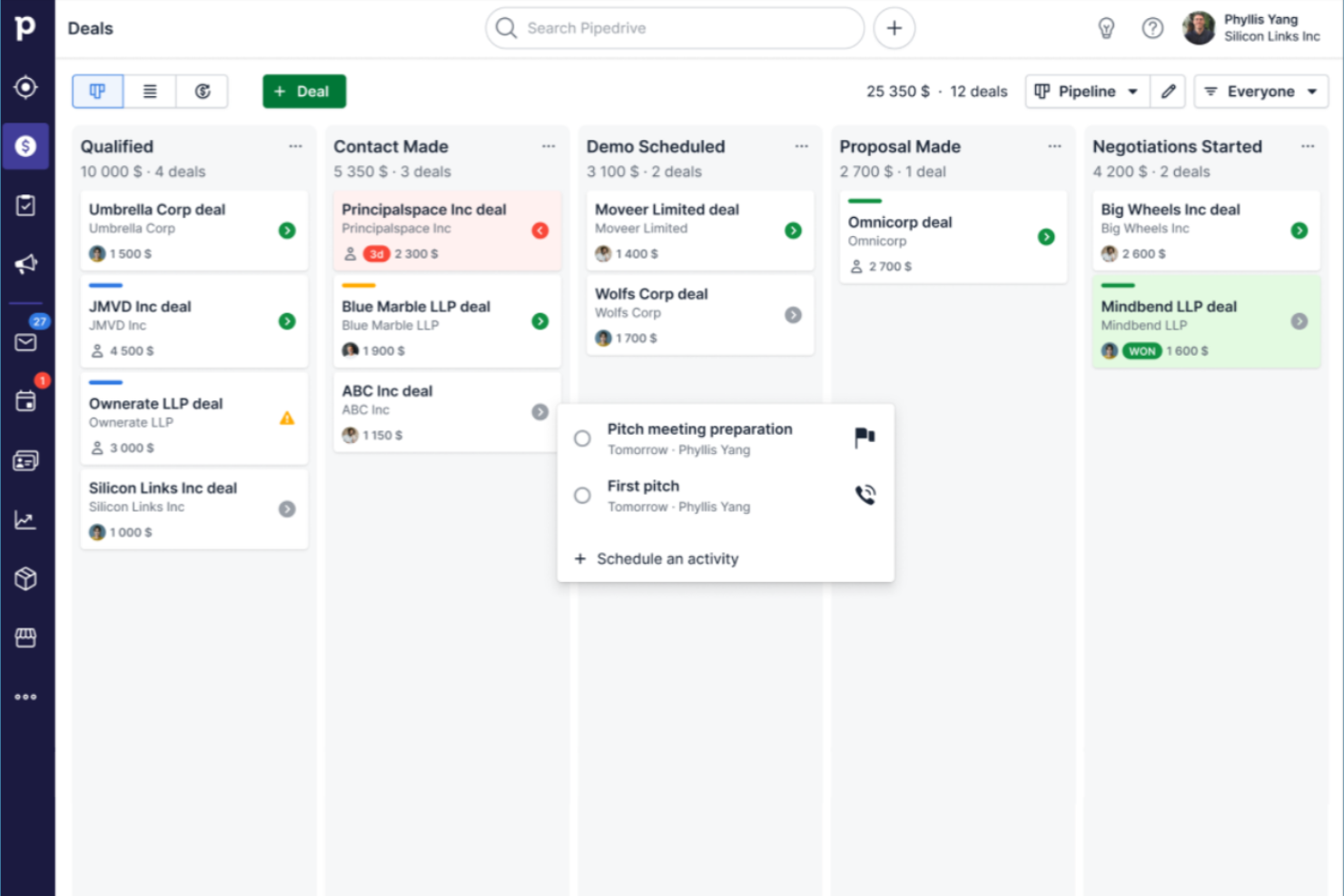
Sales-focused teams that want a clear, visual way to manage deals often turn to Pipedrive. This CRM is built for small businesses that need to track leads, activities, and progress through customizable pipeline stages. Its drag-and-drop interface helps you quickly spot bottlenecks and keep your sales process moving.
Why I Picked Pipedrive
What drew me to Pipedrive is its focus on visual sales pipeline management, which is especially valuable for small businesses that need to keep deals organized and moving forward. The drag-and-drop pipeline lets you see every deal’s stage at a glance and quickly update progress as things change. I like that you can customize pipeline stages to match your unique sales process, making it easy to adapt as your business grows. For teams that want a clear, actionable overview of their sales activity, Pipedrive’s visual approach stands out.
Pipedrive Key Features
Some other features in Pipedrive that small business teams may find useful include:
- Email Integration: Connect your email account to send, receive, and track messages directly within Pipedrive.
- Activity Reminders: Set reminders for calls, meetings, and follow-ups to keep deals moving.
- Contact and Organization Management: Store and organize detailed information about clients and companies in one place.
- Customizable Reports: Generate and customize sales and activity reports to monitor team performance.
Pipedrive Integrations
Integrations include Gmail, Outlook, Mailchimp, Trello, Slack, Zapier, Google Calendar, HubSpot, QuickBooks, and Microsoft Teams. Pipedrive also offers an open API for custom integrations.
Pros and Cons
Pros:
- Activity reminders help teams stay on top of follow-ups
- Email sync allows tracking conversations within each deal
- Visual pipelines make it simple to track deal progress
Cons:
- Workflow automation is only available on higher-priced plans
- Reporting features are limited on lower-tier plans
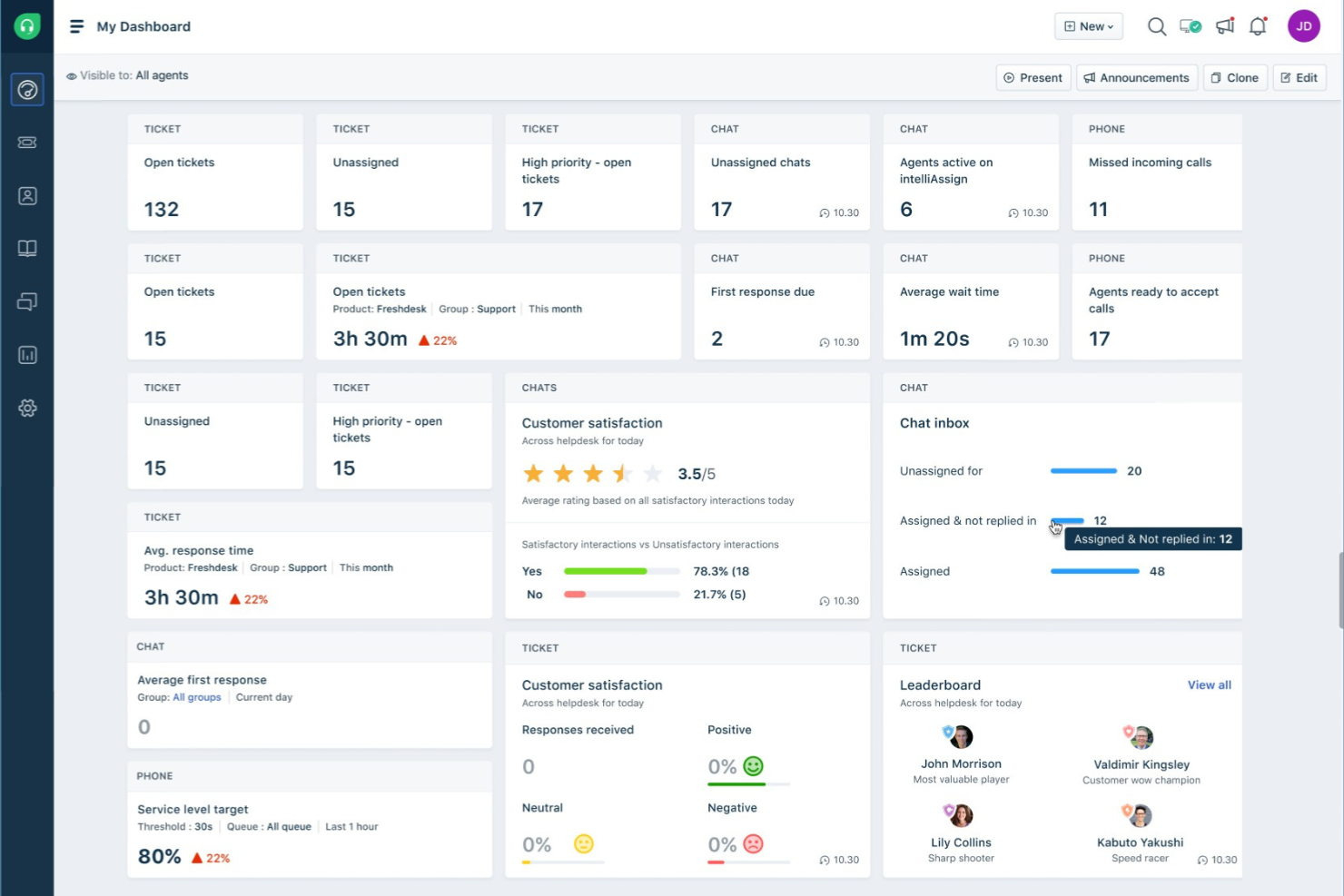
Freshworks CRM stands out for small businesses that want to prioritize leads using AI-driven insights. It’s built for sales teams and client-focused professionals who need to identify and act on high-potential opportunities quickly. With its AI-powered lead scoring, Freshworks CRM helps you focus your efforts where they matter most.
Why I Picked Freshworks CRM
What drew me to Freshworks CRM is its advanced use of AI to help small businesses focus on the right leads. The platform’s AI-powered lead scoring automatically analyzes contact behavior and engagement, ranking leads so your team can prioritize outreach. I like that it also offers predictive contact scoring, which helps you spot deals that are most likely to close. For small businesses that need to make the most of limited sales resources, these AI-driven features can make a real difference in how you manage and convert leads.
Freshworks CRM Key Features
Some other features in Freshworks CRM that small business teams may find useful include:
- Built-In Phone and Email: Make calls and send emails directly from the CRM, with automatic logging of all communications.
- Workflow Automation: Set up rules to automate repetitive tasks like follow-ups and data entry.
- Customizable Sales Pipelines: Design multiple pipelines to match different sales processes or business lines.
- Mobile App: Access contacts, deals, and tasks from anywhere using iOS and Android devices.
Freshworks CRM Integrations
Integrations include Gmail, Outlook, Mailchimp, Zapier, Slack, Google Calendar, QuickBooks, Shopify, Microsoft Teams, and Zoom.
Pros and Cons
Pros:
- Workflow automation reduces manual follow-up and data entry tasks
- Built-in phone and email tools centralize client communications
- AI-powered lead scoring helps prioritize high-potential sales opportunities
Cons:
- Bulk data import and export options are less flexible than alternatives
- Advanced features are only available on higher-tier plans
Küçük İşletmeler İçin Diğer Müşteri Yönetimi Yazılımları
Kısa listeme girmeyen ancak yine de göz atmaya değer küçük işletmelere yönelik bazı ek müşteri yönetimi yazılımı seçenekleri şunlardır:
- Bitrix24
For built-in team collaboration features
- monday CRM
For customizable workflow boards
- Zoho CRM
For multichannel communication tracking
- Act!
For in-depth contact history tracking
- Nimble
For social media contact enrichment
- HoneyBook
For workflow automation in creative services
- SuiteDash
For all-in-one client portals
- Bonsai
For contract and proposal management
- Zendesk
For integrated customer support tools
- Dubsado
For customizable client intake forms
- Rednote CRM
For WhatsApp integration


How I Evaluate Client Management Software for Small Businesses
I split my evaluation into baseline functionality every tool must cover and the differentiators that separate a capable platform from one a small agency or consultant will actually stick with.
Core Functionality (Table Stakes For This List)
When I'm selecting tools for my list, I rank each one on a scale from 0 (does not offer the functionality) to 5 (excels in this area) for each core functionality listed below. I then calculate the tool's total score into a percentage, using 65% as a benchmark to help assess its overall fit for the list.
- Client Database: I check whether the tool stores full contact records with notes, tags, custom fields, and a timeline of past interactions tied to projects and invoices.
- Project & Task Management: Each tool should let you create tasks and projects linked directly to client records, with assignments, deadlines, and views like Kanban or Gantt.
- Client Communication: I look for two-way email sync or in-app messaging that threads conversations to specific clients and projects rather than living in a separate inbox.
- Client Portal: The platform should offer a shared workspace where clients can view progress, upload files, leave comments, or approve deliverables without needing a full license.
- Billing & Invoicing: I evaluate whether invoicing ties back to client accounts or tracked time, with support for payment gateways like Stripe or PayPal to close the loop on collections.
- Automation & Workflow: Tools earn higher marks when they include a workflow builder with triggers and conditions, such as auto-assigning onboarding tasks when a new client record is created.
Once I have a list of tools that meet the criteria, I consider what sets each platform apart.
Differentiating Factors (What Sets Vendors Apart)
Here's how I compare and contrast different vendors:
Standout Features
I look for built-in time tracking that converts logged hours directly into client invoices. Tools like HoneyBook and Dubsado handle this natively, while others require a third-party integration. Proposal and e-signature tools also matter because they let you move a client from signed contract to active project without leaving the platform. Beyond that, I check whether the client portal supports white-label branding so your clients see your logo and colors instead of the vendor's.
Beyond Features
I check whether client and portal users count as paid seats, since agencies inviting dozens of external collaborators can see costs spike fast on per-user plans. Pricing transparency matters just as much as the sticker price. I also evaluate how quickly a small team without dedicated IT staff can go live. Prebuilt templates for onboarding sequences or invoicing workflows cut setup from weeks to days. Finally, native integrations with QuickBooks, Xero, Stripe, and Google Calendar are near-mandatory for keeping client records, payments, and scheduling in sync without duct-taping tools together through workarounds.
Küçük Bir İşletme İçin Müşteri Yönetimi Yazılımı Nasıl Seçilir
Uzun özellik listeleri ve karmaşık fiyatlandırma yapıları arasında kaybolmak kolaydır. Kendinize özgü yazılım seçme sürecinizi yürütürken odağınızı korumanıza yardımcı olmak için göz önünde bulundurmanız gereken faktörleri içeren bir kontrol listesi hazırladık:
| Faktör | Dikkat Edilmesi Gerekenler |
|---|---|
| Ölçeklenebilirlik | Daha fazla müşteri, kullanıcı veya hizmet ekledikçe yazılım işletmenizi destekleyecek mi? Kullanıcı sınırlarını, veri kotalarını ve yükseltme seçeneklerini kontrol edin. |
| Entegrasyonlar | Araç, mevcut e-posta, takvim, muhasebe veya pazarlama platformlarınıza yerel olarak bağlanıyor mu? Buradaki eksiklikler manuel iş yükü oluşturabilir. |
| Özelleştirilebilirlik | Alanları, iş akışlarını ve panoları süreçlerinize uyacak şekilde uyarlayabilir misiniz? Katı sistemler, iş akışınızı değiştirmenize neden olabilir. |
| Kullanım kolaylığı | Ekibiniz aracı ne kadar hızlı öğrenip benimseyebilir? Açık bir gezinme yapısı, minimum eğitim gereksinimi ve mantıklı bir arayüz arayın. |
| Uygulama ve başlangıç süreci | Çalışmaya başlamak için hangi kaynaklar ve ne kadar zaman gerekiyor? Kurulum sırasında veri aktarımını, eğitimi ve sağlayıcı desteğini göz önünde bulundurun. |
| Maliyet | Ekibiniz büyüdükçe fiyatlandırma katmanları şeffaf ve öngörülebilir mi? Eklenti ücretlerine, minimum kullanıcı sayılarına veya zorunlu yıllık sözleşmelere dikkat edin. |
| Güvenlik önlemleri | Yazılım şifreleme, kullanıcı izinleri ve ilgili standartlara uyumluluk sunuyor mu? Verilerin nerede saklandığını ve yedekleme politikalarını sorun. |
| Destek erişilebilirliği | Hangi destek kanalları sunuluyor ve hangi saatlerde hizmet veriliyor? Ekibiniz standart çalışma saatleri dışında çalışıyorsa, 7/24 destek kritik olabilir. |
Küçük İşletmeler için Müşteri Yönetimi Yazılımı Nedir?
Müşteri yönetimi yazılımı, müşterilerinizle ilgili tüm etkileşimleri ve bilgileri düzenlemenize, takip etmenize ve yönetmenize yardımcı olan dijital bir araçtır. İletişim bilgilerini, iletişim geçmişini, görevleri ve satış faaliyetlerini tek bir yerde merkezileştirir; böylece genel resmi oluşturmak için elektronik tablolar, gelen kutusu yazışmaları ve yapışkan notlar arasında gidip gelmeniz gerekmez.
Küçük işletmeler için bu araçlar veri depolamaktan fazlasını yapar. Yalın bir ekiple bile takip süreçlerinize, fırsatları izlemenize ve tutarlı hizmet sunmanıza yapı kazandırırlar. Hafızaya veya gayriresmî süreçlere güvenmek yerine müşteri durumu, sorumluluklar ve sonraki adımlar hakkında ortak bir görünürlük elde edersiniz. Doğru sistem daha güçlü ilişkileri, daha güvenilir takip süreçlerini ve ölçeklenebilir iş akışlarını destekler; böylece büyüme otomatik olarak karmaşa anlamına gelmez.
Küçük İşletmeler için Müşteri Yönetimi Yazılımının Özellikleri
Küçük bir işletme için müşteri yönetimi yazılımı seçerken aşağıdaki temel özelliklere dikkat edin:
- İletişim yönetimi: Müşteri iletişim bilgilerini, notları ve ilgili belgeleri merkezi bir veritabanında saklayın, düzenleyin ve güncelleyin.
- Etkileşim takibi: Müşteri etkileşimlerinin eksiksiz bir geçmişini tutmak için aramaları, e-postaları, toplantıları ve diğer iletişimleri kaydedin.
- Görev ve etkinlik yönetimi: Zamanında işlem yapılmasını sağlamak için her müşteriyle ilgili görevleri veya takip işlemlerini atayın, planlayın ve izleyin.
- Satış hattı yönetimi: Satış fırsatlarını veya proje aşamalarını görselleştirip yönetin; ilk temastan kapanışa kadar ilerlemeyi izlemenize yardımcı olur.
- Belge depolama: Sözleşmeleri, teklifleri ve müşteriyle ilgili diğer dosyaları platform içinde güvenli bir şekilde yükleyin, paylaşın ve yönetin.
- Takvim entegrasyonu: Toplantıların veya takip işlemlerinin kaçırılmasını önlemek için randevuları, son tarihleri ve hatırlatıcıları mevcut takviminizle senkronize edin.
- Raporlama ve analiz: İş kararlarına yön vermek için müşteri etkinliği, satış performansı ve ekip verimliliği hakkında raporlar oluşturun; ayrıca yapay zekâ destekli müşteri yönetimi araçları, müşteri ihtiyaçları ve davranışları hakkında öngörücü içgörüler sağlar.
- Role dayalı erişim denetimleri: Ekip üyelerinin yalnızca rollerine uygun müşteri verilerine ve özelliklere erişmesini sağlamak için izinleri belirleyin.
- Özel alanlar ve etiketler: Sistemi benzersiz müşteri takip ihtiyaçlarınıza uyarlamak için özel veri alanları veya etiketler ekleyin.
- Mobil erişim: Hareket hâlindeyken müşteri bilgilerini ve görevlerini yönetmek için bir mobil uygulama veya duyarlı bir web arayüzü kullanın.
Küçük Bir İşletme için Müşteri Yönetimi Yazılımının Faydaları
Küçük bir işletme için müşteri yönetimi yazılımını uygulamak, ekibiniz ve işletmeniz açısından çeşitli faydalar sağlar. Yararlanabileceğiniz birkaç fayda şunlardır:
- Merkezi müşteri bilgileri: Tüm ekibinizin erişebileceği tek bir konumda tüm iletişim bilgilerini, iletişim geçmişini ve belgeleri saklayın.
- Geliştirilmiş takip: Hiçbir müşteri talebinin veya fırsatın gözden kaçırılmamasını sağlamak için görev yönetimini ve hatırlatıcıları kullanın.
- Daha güçlü müşteri ilişkileri: Her etkileşimi takip edin ve eksiksiz müşteri geçmişine dayalı olarak iletişimi kişiselleştirin.
- Daha yüksek ekip sorumluluğu: Sorumlulukları netleştirmek ve hassas verileri korumak için görevler atayın, ilerlemeyi izleyin ve role dayalı izinler belirleyin.
- Daha iyi karar verme: Müşteri etkinliğini, satış performansını ve ekip iş yükünü anlamak için gerçek zamanlı raporlara ve analizlere erişin.
- Daha hızlı işe alıştırma: Yeni ekip üyelerinin kısa sürede işe uyum sağlaması için şablonlardan, ürün tanıtımlarından ve veri içe aktarma araçlarından yararlanın.
- Geliştirilmiş hareketlilik: Mobil erişim veya bulut tabanlı platformları kullanarak müşteri bilgilerini ve görevleri her yerden yönetin.
Küçük İşletmeler İçin Müşteri Yönetimi Yazılımının Maliyetleri ve Fiyatlandırması
Küçük bir işletme için müşteri yönetimi yazılımı seçmek, mevcut çeşitli fiyatlandırma modellerini ve planları anlamayı gerektirir. Maliyetler özelliklere, ekip büyüklüğüne, eklentilere ve diğer unsurlara göre değişir. Aşağıdaki tabloda, küçük işletmelere yönelik müşteri yönetimi yazılımı çözümlerinde yaygın planlar, ortalama fiyatları ve genellikle sunulan özellikler özetlenmektedir:
KOBİ'ler İçin Müşteri Yönetimi Yazılımı Plan Karşılaştırma Tablosu
| Plan Türü | Ortalama Fiyat | Yaygın Özellikler |
|---|---|---|
| Ücretsiz Plan | $0 | Temel kişi yönetimi, sınırlı görev takibi, temel raporlama ve e-posta desteği. |
| Kişisel Plan | $5-$25/kullanıcı/ay | Kişi ve anlaşma yönetimi, takvim entegrasyonu, basit otomasyon ve sınırlı özelleştirme seçenekleri. |
| İşletme Planı | $25-$60/kullanıcı/ay | Gelişmiş raporlama, iş akışı otomasyonu, belge depolama, diğer araçlarla entegrasyonlar ve mobil erişim. |
| Kurumsal Plan | $60-$120/kullanıcı/ay | Özel roller ve izinler, gelişmiş güvenlik, öncelikli destek, API erişimi ve işe alıştırma yardımı. |
KOBİ Müşteri Yönetimi Yazılımı SSS
Küçük işletmeler için müşteri yönetimi yazılımı hakkında sık sorulan bazı soruların yanıtları:
Küçük işletmemin müşteri yönetimi yazılımına ihtiyacı olup olmadığını nasıl anlarım?
Elektronik tabloları veya yalnızca e-postayı kullanarak müşteri bilgilerini, takip işlemlerini ya da iletişim geçmişini izlemekte zorlanıyorsanız müşteri yönetimi yazılımını değerlendirmenin zamanı gelmiştir. Bu araçlar bilgileri düzenlemenize, hatırlatıcıları otomatikleştirmenize ve müşteri tabanınız büyüdükçe hiçbir şeyin gözden kaçmamasını sağlamanıza yardımcı olur.
Müşteri yönetimi yazılımı mevcut araçlarımla entegre olabilir mi?
Evet, küçük işletmelere yönelik müşteri yönetimi yazılımlarının çoğu popüler e-posta, takvim, muhasebe ve pazarlama platformlarıyla entegrasyon sunar. Bir çözüm seçmeden önce, manuel veri girişini ve iş akışı kesintilerini önlemek için ekibinizin hâlihazırda kullandığı araçlarla bağlantı kurabildiğinden emin olun.
Müşteri yönetimi yazılımı ile CRM arasındaki fark nedir?
Müşteri yönetimi yazılımı; müşteri bilgilerini düzenlemeye, etkileşimleri takip etmeye ve görevleri yönetmeye odaklanır. CRM (müşteri ilişkileri yönetimi) sistemleri genellikle bu özellikleri içerir, ancak daha büyük veya daha karmaşık kuruluşlar için tasarlanmış gelişmiş satış, pazarlama ve analiz araçları da sunabilir.
Müşteri yönetimi yazılımı hassas müşteri verilerini depolamak için güvenli midir?
Evet, saygın müşteri yönetimi yazılımları verilerinizi korumak için şifreleme, erişim denetimleri ve düzenli güvenlik güncellemeleri kullanır. İşletmenizin gizlilik ve mevzuat gerekliliklerini karşıladığından emin olmak için her zaman sağlayıcının güvenlik politikalarını ve uyumluluk sertifikalarını inceleyin.
Müşteri yönetimi yazılımını uygulamak ne kadar sürer?
Uygulama süresi kullanılan araca ve ekip büyüklüğüne göre değişir. Birçok küçük işletme, şablonları, ürün tanıtımlarını ve veri içe aktarma araçlarını kullanarak birkaç gün içinde çalışmaya başlayabilir. Özel iş akışları veya entegrasyonlar içeren daha karmaşık kurulumların tamamen yapılandırılması ve ekibinizin işe alıştırılması birkaç hafta sürebilir.