

2026’da İncelenen En İyi 10 Yapay Zekâ Elektronik İmza Yazılımı

En İyi Yapay Zekâlı Elektronik İmza Yazılımları Kısa Listesi


İmzalar basit görünebilir — ta ki onları sözleşmeler, e-postalar ve hatırlatıcılar arasında takip etmeye çalışana kadar. Yapay zekâlı elektronik imza yazılımları bu sorunu doğrudan ele alır. Yalnızca imzanızı dijitalleştirmekle kalmaz; eksik alanları tespit etmek, imza atacak kişilere rehberlik etmek ve bitmek bilmeyen yazışmaları azaltmak için otomasyon ve zekâdan yararlanır.
Yazılımları bağımsız olarak inceleyen biri olarak yapay zekânın dijital imzalama süreçlerini nasıl yeniden tanımladığını gördüm — her büyüklükteki ekip için bu süreçleri daha hızlı, daha güvenli ve daha akıllı hâle getiriyor.
Bu makalede, 2026 yılı için en iyi yapay zekâlı elektronik imza yazılımı seçimlerimi ve doğru seçeneği belirleyebilmeniz için her birini öne çıkaran özellikleri bulacaksınız.
Why Trust Our Software Recommendations
Our team has been testing and reviewing software since 2012. As project managers ourselves, we know how difficult—and important—it is to choose the right software.
For this guide, we evaluated tools using hands-on testing and independent research, scoring tools using our selection criteria. We also draw on insights from industry thought leaders and practicing project management experts.
Our reviews reflect our human editorial judgment, not a sales pitch.
Expert reviewers:
Yapay Zekâlı Elektronik İmza Yazılımları Karşılaştırma Tablosu
Bu karşılaştırma tablosu, en iyi yapay zekâlı elektronik imza yazılımı seçimlerimin fiyatlandırma ayrıntılarını özetlemektedir:
| Tool | Starting Price | Website | |
|---|---|---|---|
| Best for small businesses | 4.7 out of 5 | $10/user/month 14-day free trial | Website |
| Best for legal teams | 4.8 out of 5 | Pricing upon request Free demo available | Website |
| Best for global compliance | 4.6 out of 5 | $10/month Free plan available | Website |
| Best for secure cloud storage | 4.3 out of 5 | CAD$21/user/month 14-day free trial | Website |
| Best for contract lifecycle managemen | 4.4 out of 5 | Pricing upon request Free demo available | Website |
| Best for mobile PDF document signing | — | $4.99/month Free plan available | Website |
| Best for PDF editing | — | $9/user/month Free plan available | Website |
| Best for contract simplicity | 4.8 out of 5 | $3/contract Free demo available | Website |
| Best for team collaboratio | — | $200/user/month 21-day free trial | Website |
| Best with no-code drag-and-drop workflow builder | 4.7 out of 5 | $19.50/month Free plan available | Website |
En İyi Yapay Zekâlı Elektronik İmza Yazılımları İncelemesi
Aşağıda, kısa listeme giren en iyi yapay zekâlı elektronik imza yazılımlarının ayrıntılı özetlerini bulabilirsiniz. İncelemelerim, ihtiyaçlarınıza en uygun seçeneği bulmanıza yardımcı olmak için her aracın temel özelliklerine, avantajlarına & dezavantajlarına, entegrasyonlarına ve ideal kullanım alanlarına ayrıntılı bir bakış sunuyor.

Signeasy
Best for small businesses

Signeasy is an e-signature platform tailored for small businesses seeking simplicity and efficiency in document handling. It offers reusable templates and facilitates quick signing and sending of documents, making it ideal for teams that need straightforward e-signature software without unnecessary complexity.
Why I picked Signeasy: Signeasy is designed with small businesses in mind, focusing on ease of use and rapid deployment for signature requests. The intuitive interface requires minimal training, allowing your team to get started quickly.
The platform’s features, like document templates and offline signing, make it versatile for various needs. It’s perfect for businesses that need a straightforward, no-fuss electronic signature tool for faster signed agreements.
Standout features & integrations:
Features include an intuitive drag-and-drop interface for easy document setup. The offline signing feature allows you to collect signatures without an internet connection. Additionally, the app supports multiple file formats to accommodate different document types.
Integrations include Google Workspace, Microsoft 365, Dropbox, Box, Evernote, Slack, Zoho CRM, Salesforce, HubSpot, and OneDrive.
Pros and Cons
Pros:
- Accommodates various file formats
- Versatile document templates
- Quick setup and deployment
Cons:
- Customization options are minimal
- No bulk sending options

Juro
Best for legal teams

Juro is a contract management platform designed for legal teams seeking efficiency in drafting, managing, and executing contracts. It caters to businesses that require a streamlined approach to contract workflows and collaboration.
Why I picked Juro: Juro is tailored to meet the needs of legal teams with its intuitive contract editor and automation capabilities. Its browser-native platform allows for easy access and editing from anywhere.
The software’s collaborative features also enable multiple stakeholders to work on documents simultaneously, reducing back-and-forth emails. It’s an excellent choice for legal teams aiming to enhance productivity and reduce contract turnaround times.
Standout features & integrations:
Features include a real-time editor that lets your team make changes instantly. The automated approval workflows ensure contracts move quickly through the necessary stages. Additionally, the contract analytics provide insights into contract performance and bottlenecks.
Integrations include Salesforce, Slack, Google Drive, Zapier, HubSpot, Microsoft Teams, Dropbox, Greenhouse, Okta, and Workday.
Pros and Cons
Pros:
- Browser-native for easy access
- Automated approval workflows
- Intuitive contract editor
Cons:
- It can be complex initially for new users
- Requires internet for full functionality
Docusign
Best for global compliance

Docusign is an electronic signature tool widely used by businesses of all sizes to facilitate secure and efficient document signing. It’s particularly favored by industries requiring strict compliance with global regulations.
Why I picked Docusign: Docusign excels in ensuring compliance with a variety of international standards, making it ideal for businesses operating globally. It supports a range of document types and provides a detailed audit trail for each transaction.
The tool’s security features include advanced encryption and multi-factor authentication. These features collectively cater to organizations needing to meet stringent legal and regulatory requirements.
Standout features & integrations:
Features include custom workflows that allow your team to automate document signing processes. The in-person signing feature is great for face-to-face interactions, and the mobile app sends you live notifications while letting you manage documents on the go.
Integrations include Salesforce, Microsoft 365, Google Workspace, Dropbox, SAP, Oracle, Box, Evernote, Workday, and NetSuite.
Pros and Cons
Pros:
- Multi-factor authentication
- Advanced encryption security
- Detailed audit trails
Cons:
- Customer support can be slow
- Occasional mobile app issues

Box
Best for secure cloud storage

Box AI (with Box Sign) brings intelligence to every stage of your content lifecycle — from document creation and signing to secure storage and workflow automation. It’s built for teams that want to handle e-signatures within a broader, AI-powered content management ecosystem that prioritizes security, compliance, and insight.
Why I picked Box AI: Box AI goes beyond standard e-signature capabilities by combining Box Sign with powerful AI-driven features that extract insights, automate document routing, and secure every interaction. Instead of switching between apps, you can create, sign, analyze, and store contracts directly in Box — all within a single governed platform.
It’s ideal for organizations that need more than just signatures. Box AI helps unlock the value hidden in your documents by summarizing content, identifying missing fields, and maintaining airtight security standards. Whether it’s automating approvals or detecting anomalies in signer behavior, it’s designed to make every step faster, safer, and smarter.
Standout features & integrations:
Features include AI-powered data extraction that pulls structured information from contracts and forms, helping users quickly find key details. Intelligent signature workflows automatically detect where signatures and initials are needed, flag missing fields, and route documents to the right people. Advanced access controls and threat detection features protect sensitive information, while detailed audit trails maintain accountability and compliance.
Integrations include Microsoft 365, Google Workspace, Salesforce, Slack, Okta, Zoom, Docusign, Adobe Acrobat, Apple iWork, and IBM.
Pros and Cons
Pros:
- Integrated with the Box cloud platform
- Advanced access controls
- Secure document storage
Cons:
- Some advanced features need extra setup
- Limited offline capabilities

Ironclad
Best for contract lifecycle managemen

Ironclad is a contract lifecycle management tool designed for legal teams and businesses that handle complex agreements. It helps automate and manage the entire contract process, from creation to execution and beyond.
Why I picked Ironclad: Ironclad excels in managing the full lifecycle of contracts, making it ideal for organizations with complex legal needs. Its automated contract workflows and customizable templates simplify contract management.
The platform also offers real-time collaboration, allowing multiple stakeholders to work on contracts simultaneously. It’s especially beneficial for teams that need a comprehensive solution to streamline contract processes.
Standout features & integrations:
Features include an intuitive dashboard that provides a clear overview of contract statuses. The analytics feature offers insights into contract performance and trends. Additionally, the platform supports electronic signatures, making contract execution quick and efficient.
Integrations include Salesforce, Docusign, Adobe Sign, Microsoft 365, Google Workspace, Slack, Box, Dropbox, SAP, and Oracle.
Pros and Cons
Pros:
- Customizable contract templates
- Real-time collaboration capabilities
- Detailed contract lifecycle management
Cons:
- Customer support can be slow
- Requires training for full utilization


Sign AI is a mobile-based digital signature app built for users who handle documents on the go. It focuses on providing a fast way for people to sign, edit, and save PDF files using their mobile devices.
Why I picked Sign AI: Sign AI is specifically designed for mobile signing and editing of PDFs, making it a solid choice for individuals who need to mark up or sign documents away from their desks. You can import documents straight from your phone, apply a signature with one tap, and share the file immediately.
It also allows you to write text directly on the PDF, highlight sections, or draw using a digital pen. Everything runs within the app, eliminating the need for additional tools. That’s what makes it ideal for quick edits and approvals on mobile.
Standout features & integrations:
Features include tools to crop, rotate, and reorder pages within PDF documents. You can use different pen styles and colors to draw or annotate. The app also includes basic file organization features, allowing you to manage documents within folders.
Integrations include Google Drive, Dropbox, OneDrive, Box, Gmail, and WhatsApp.
Pros and Cons
Pros:
- Built-in document organizer
- Easy pen tools for markup
- Works offline without issue
Cons:
- No desktop version available
- Limited security settings


Lumin PDF is a document management tool designed for individuals and businesses that require efficient editing and management of PDFs. It offers a range of tools for annotating, editing, and sharing PDF documents, making it useful for teams that handle a large number of PDF files.
Why I picked Lumin PDF: Lumin PDF provides extensive PDF editing capabilities, which are helpful for teams needing to modify and collaborate on documents. The tool enables real-time collaboration, allowing your team to work together from different locations.
You can annotate documents directly within the platform, making it easy to highlight important information. It’s particularly beneficial for teams that frequently edit and share PDF files.
Standout features & integrations:
Features include a user-friendly interface that simplifies the editing process. The real-time collaboration allows your team to work on documents simultaneously. Additionally, the platform offers tools for annotating and highlighting text, making it easier to convey important points in documents.
Integrations include Google Drive, Dropbox, OneDrive, Box, Evernote, Slack, Microsoft 365, Salesforce, HubSpot, and Asana.
Pros and Cons
Pros:
- Supports multiple file formats
- Easy document sharing
- Extensive annotation tools
Cons:
- Occasional performance issues with large files
- Some features need a premium subscription

Best for contract simplicity

ContractCrab is a contract management tool designed for small to medium-sized businesses that need a straightforward approach to handling contracts. It focuses on simplifying the process of creating, managing, and executing contracts without unnecessary complexity.
Why I picked ContractCrab: ContractCrab is built for businesses that want to manage contracts with ease and efficiency. It offers a simple interface that requires minimal training, allowing your team to get started quickly.
The software’s customizable templates and basic automation help streamline contract workflows. It’s a great fit for companies looking for a no-fuss contract management solution.
Standout features & integrations:
Features include user-friendly document templates that make contract creation quick and easy. The automated reminders help your team stay on top of deadlines. Additionally, the platform supports electronic signatures, which simplifies the execution process.
Integrations include Salesforce, Google Workspace, Microsoft 365, Dropbox, Box, Slack, HubSpot, QuickBooks, Xero, and Trello.
Pros and Cons
Pros:
- Supports electronic signatures
- Automated reminders for deadlines
- Customizable contract templates
Cons:
- Customization options are minimal
- No bulk sending options


Aline is a contract management software designed for teams in legal, procurement, finance, and sales to efficiently manage contracts. It offers tools for drafting, negotiating, and signing contracts, making it ideal for collaborative environments.
Why I picked Aline: Aline is tailored for teams needing collaboration during the contract lifecycle. Its AI-driven workflows and electronic signatures enhance efficiency, while robust collaboration tools ensure everyone stays informed.
The tool’s ability to integrate with multiple platforms makes it versatile for different team needs. It’s ideal for teams seeking to enhance contract management through effective collaboration.
Standout features & integrations:
Features include AI-driven playbooks that guide you through contract creation. The redlining tool allows your team to make and track changes easily. Additionally, the AI Repository centralizes all contract data for quick access and analysis.
Integrations include Salesforce, HubSpot, Google Drive, Dropbox, Microsoft 365, Slack, Box, Adobe Sign, Docusign, and SAP.
Pros and Cons
Pros:
- Unlimited electronic signatures
- Centralized contract repository
- AI-driven contract workflows
Cons:
- Some features need customization
- Slight learning curve for new users

Best with no-code drag-and-drop workflow builder
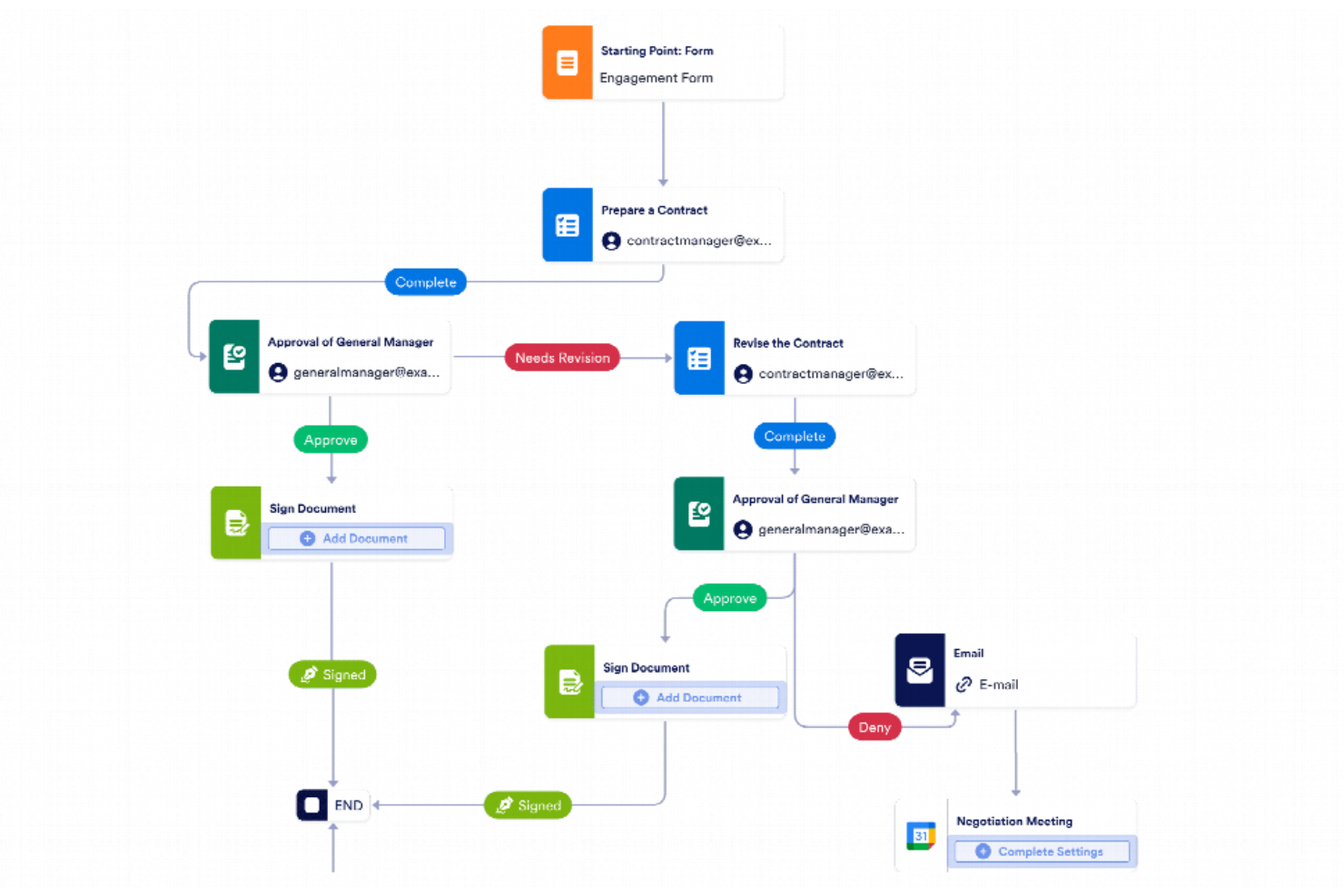
Jotform Workflows gives teams in any industry a way to automate document approvals and collect electronic signatures as part of custom, no-code workflows.
Who Is Jotform Workflows Best For?
Small to midsize businesses and teams that need to automate document approvals and collect signatures without coding.
Why I Picked Jotform Workflows
I picked Jotform Workflows as one of the best because I can build signature collection and approval flows visually using its no-code drag-and-drop builder. My team is able to map out multi-step document processes, assign signers, and automate reminders without writing a single line of code. I like that we can quickly adapt workflows as requirements change, making it easy to keep up with shifting project needs.
Jotform Workflows Key Features
- E-signature fields: Add legally binding signature fields to any document or form step.
- Conditional logic: Set up rules to route documents or trigger actions based on responses.
- Automated notifications: Send email alerts to signers and approvers at each workflow stage.
- Audit trail: Track every action and signature with a detailed activity log.
Jotform Workflows Integrations
Integrations include Google Drive, Dropbox, Slack, Microsoft Teams, Airtable, Square, PayPal, Stripe, Authorize.Net, and OneDrive.
Pros and Cons
Pros:
- Automated reminders for pending signature requests
- Conditional logic for multi-step approvals
- Native e-signature field for document signing
Cons:
- Bulk sending of signature requests not supported
- Lacks built-in identity verification for signers
New Product Updates from Jotform Workflows
Jotform Workflows Adds Wait Element for Timed Automation
Jotform Workflows introduces a Wait element for pausing and resuming workflows based on dates and times. This helps teams automate time-sensitive actions without manual follow-ups. For more information, visit Jotform’s official site.
 .


How I Evaluate AI Electronic Signature Software
Every tool here needs to deliver real AI value—I look for AI that saves PMs time, like auto-detecting fields in a 40-page SOW or flagging risky clauses before routing to stakeholders. I split my evaluation into core functionality a tool must have to make the list and differentiating factors that separate the strongest options.
Core Functionality (Table Stakes For This List)
When I'm selecting tools for my list, I rank each one on a scale from 0 (does not offer the functionality) to 5 (excels in this area) for each core functionality listed below. Then, I calculate the tool's total score into a percentage. Each tool needs to achieve a minimum total score of 65% to be considered for inclusion.
- Electronic Signature Execution: I check for legally binding e-signatures with signer authentication—think multi-factor ID verification before a contractor signs a change order.
- AI Field Detection: Smart field placement matters. I look for AI that scans a 30-page SOW and accurately tags signature, date, and initial fields on its own.
- AI Contract Intelligence: I evaluate whether the AI can extract key clauses, flag risk areas, or summarize obligations—useful when reviewing vendor agreements mid-project.
- Automated Approval Workflows: Multi-party routing with conditional logic is what I look for, like sequencing sign-offs from a project sponsor before reaching legal.
- PM Tool Integrations: The tool should connect with platforms like Asana, Jira, or Smartsheet so signing requests trigger directly from project milestones.
- Audit Trail & Compliance: Full activity logs and compliance with e-signature laws like ESIGN, UETA, and eIDAS are what I evaluate to confirm global team readiness.
Once I have a list of tools that meet this criteria, I consider what sets each platform apart.
Differentiating Factors (What Sets Vendors Apart)
Here's how I compare and contrast different vendors:
Standout Features
AI-powered smart reminders stand out because they predict the right time to nudge a signer—helpful when a delayed approval is blocking a sprint. I also look for AI template generation that learns from repeated documents like SOWs or NDAs and builds reusable templates automatically. An AI analytics dashboard adds real value too, giving PMs visibility into signing bottlenecks and average turnaround times so they can forecast approval delays before they ripple into the schedule.
Beyond Features
Pricing and scalability matter a lot here—I check whether AI features are bundled into standard plans or locked behind premium tiers, since project teams often scale up with external contractors and consultants. Vendor transparency around AI is another factor I evaluate closely, especially whether documents are used to train models. Implementation speed also weighs in; a tool that takes weeks to configure across your PM stack delays the value you're trying to capture in the first place.
Yapay Zekâlı Elektronik İmza Yazılımı Nasıl Seçilir?
Uzun özellik listeleri ve karmaşık fiyatlandırma yapıları içinde kaybolmak kolaydır. Kendinize özgü yazılım seçimi sürecinizde ilerlerken odaklanmanızı korumanıza yardımcı olmak için göz önünde bulundurmanız gereken faktörlerin bir kontrol listesini aşağıda bulabilirsiniz:
| Faktör | Dikkat Edilmesi Gerekenler |
|---|---|
| Ölçeklenebilirlik | Yazılım işletmenizle birlikte büyüyebilir mi? Artan belge hacmini ve ek kullanıcıları herhangi bir sorun yaşamadan yönetip yönetemeyeceğini değerlendirin. |
| Entegrasyonlar | Zaten kullandığınız araçlara bağlanabiliyor mu? CRM'niz, bulut depolama alanınız ve diğer temel platformlarınızla yerel entegrasyonları kontrol edin. |
| Özelleştirilebilirlik | Çözümü iş akışlarınıza uyacak şekilde uyarlayabilir misiniz? Şablonları, iş akışlarını ve kullanıcı izinlerini özelleştirme seçeneklerini arayın. |
| Kullanım kolaylığı | Arayüz sezgisel mi? Ekibinizin kapsamlı eğitim veya destek almadan kullanabildiğinden emin olun; böylece zamandan tasarruf eder ve hayal kırıklığını azaltırsınız. |
| Uygulama ve işe alıştırma | Ne kadar hızlı kullanmaya başlayabilirsiniz? Eğitim kaynaklarının, kurulum sırasında desteğin ve yeni kullanıcılar için öğrenme eğrisinin mevcut olup olmadığını değerlendirin. |
| Maliyet | Abonelik dışındaki toplam maliyetler nelerdir? Premium özellikler veya ek kullanıcılar için alınabilecek ekstra ücretler de dahil olmak üzere fiyatlandırma modellerini değerlendirin. |
| Güvenlik önlemleri | Verilerinizi nasıl koruyor? Şifreleme, veri koruma düzenlemelerine uyum ve güvenli erişim denetimleri gibi özellikleri arayın. |
| Uyumluluk gereksinimleri | Sektöre özgü düzenlemeleri karşılıyor mu? HIPAA veya GDPR gibi sektörünüzle ilgili yasal standartlara uyumu desteklediğinden emin olun. |
Yapay Zekâ Elektronik İmza Yazılımı Nedir?
Yapay zekâ elektronik imza yazılımı, verimliliği ve güvenliği artırmak için yapay zekâ kullanarak belgelerin dijital olarak imzalanmasını sağlayan bir araçtır. Hukuk ekipleri, insan kaynakları departmanları ve satış uzmanları gibi profesyoneller, belge süreçlerini hızlandırmak ve evrak işlerini azaltmak için bu araçları kullanır.
Yapay zekâ imza yazılımı, özünde Docusign veya Adobe Sign gibi elektronik imza araçlarının bir sonraki aşamasıdır. Geleneksel olarak e-imza araçları yalnızca dijital olarak imza yerleştirmenize yardımcı olur. Ancak artık yapay zekâ ile güçlendirildikleri için basit imzalamanın ötesine geçerler — şunları yapabilirler:
- İmza veya paraf gereken yerleri otomatik olarak tespit etmek.
- Eksik alanları veya tamamlanmamış belgeleri işaretlemek.
- Uygun imzacıları veya yönlendirme sırasını önermek.
- Güvenlik amacıyla imzacıların kimliklerini veya anormallikleri doğrulamak.
- Bir kişinin belgeyi incelemek için ne kadar zaman harcadığı gibi imzalama içgörüleri oluşturmak.
Yani artık mesele yalnızca imzalamak değil — tüm belge iş akışındaki sürtüşmeyi ortadan kaldırmak.
Özellikler
Yapay zekâ elektronik imza yazılımı seçerken yalnızca imzalama işlemini basitleştiren değil, aynı zamanda yaygın iş akışı darboğazlarını ortadan kaldıran özellikleri arayın:
- Otomatikleştirilmiş iş akışları: Yapay zekâ, rutin onayları otomatikleştirerek, darboğazları belirleyerek ve belgelerin her aşamada sorunsuz şekilde ilerlemesini sağlayarak manuel yazışma trafiğini azaltır — bitmek bilmeyen e-posta hatırlatmalarına gerek kalmaz.
- Akıllı belge tespiti: İmza yerlerini aramayı unutun. Yapay zekâ parafların, tarihlerin veya alanların nereye ait olduğunu otomatik olarak tanıyabilir ve belgeler gönderilmeden önce eksik bilgileri işaretleyebilir.
- Gerçek zamanlı takip: Belge durumu (ne zaman açıldığı, görüntülendiği veya imzalandığı) hakkında anında görünürlük elde edin ve bir kişinin yanıt vermesi çok uzun sürüyorsa akıllı hatırlatmalar veya eskalasyonlar alın.
- Güvenli kimlik doğrulama: Basit e-posta doğrulamasının ötesinde, yapay zekâ destekli araçlar anormallikleri tespit edebilir, kimlikleri doğrulayabilir ve davranış analizi ile çok faktörlü kimlik doğrulama yoluyla güvenliği artırabilir.
- Özelleştirilebilir ve uyarlanabilir şablonlar: Belgelerinizi yalnızca standartlaştırmakla kalmayan, aynı zamanda önceki imzalama modellerine veya sık kullanılan alanlara göre uyarlanan şablonlarla zamandan tasarruf edin.
- Denetim izleri ve uyumluluk: Kimin, ne zaman ve nerede imzaladığı gibi belge etkinliklerinin yapay zekâ tarafından oluşturulan ayrıntılı kaydını tutarak denetimler, hukuki incelemeler ve uyumluluk raporlaması için şeffaflık sağlayın.
- Entegrasyonlar ve veri senkronizasyonu: Tek bir doğru bilgi kaynağı oluşturmak için CRM'lere, proje yönetimi araçlarına veya bulut depolama alanlarına bağlanın. Yapay zekâ; kişileri eşleştirmeye, onayları yönlendirmeye ve veri alanlarını otomatik olarak doldurarak tekrarları azaltmaya yardımcı olabilir.
- İş birliğine dayalı düzenleme: Ekiplerin belgeleri gerçek zamanlı olarak düzenlemesine, yorum yapmasına ve son hâline getirmesine olanak tanıyın. Yapay zekâ, çakışan düzenlemeleri veya güncel olmayan sürümleri işaretleyerek iş birliğinin düzenli ve verimli kalmasını sağlayabilir.
- Mobil erişilebilirlik: Sözleşmeleri herhangi bir cihazda inceleyin, imzalayın ve yönetin. Birçok yapay zekâ aracı, küçük ekranlar için yerleşimleri veya alan görünürlüğünü otomatik olarak optimize eder.
- Yapay zekâ destekli içgörüler: İmza verilerini eyleme dönüştürün. İşlem tamamlama sürelerini analiz edin, tekrarlanan darboğazları belirleyin ve imzalama ile onay süreçlerinizi iyileştirmenin yollarını ortaya çıkarın.
- Yüz yüze ve hibrit imzalama: Karma ortamlarda faaliyet gösteren ekipler için esneklik sağlayarak uzaktan ve yüz yüze imzalamaları aynı doğrulama ve denetim takibi düzeyiyle destekleyin.
Faydalar
Yapay zekâlı elektronik imza yazılımını uygulamak, ekibiniz ve işletmeniz için çeşitli avantajlar sağlar. İşte yararlanabileceğiniz avantajlardan bazıları:
- Zaman tasarrufu: Otomatik iş akışları ve gerçek zamanlı takip, manuel belge işlemleri ve takipler için harcanan zamanı azaltır.
- Gelişmiş güvenlik: Güvenli kimlik doğrulama ve denetim kayıtları, hassas bilgileri korur ve veri düzenlemelerine uyumluluğu sağlar.
- Geliştirilmiş iş birliği: Gerçek zamanlı iş birliği özellikleri, birden fazla paydaşın birlikte çalışmasına olanak tanıyarak iletişim hatalarını azaltır ve onayları hızlandırır.
- Artırılmış esneklik: Mobil erişilebilirlik ve yüz yüze imzalama seçenekleri, farklı konumlardaki veya durumlardaki kullanıcılar için kolaylık sağlar.
- Maliyet azaltma: Kâğıt tabanlı süreçleri ortadan kaldırarak baskı, depolama ve posta maliyetlerinden tasarruf edersiniz.
- Ölçeklenebilirlik: Artan belge hacimlerini ve kullanıcı sayılarını işleyebilen ölçeklenebilir çözümlerle işletmenizin büyümesine kolayca uyum sağlayın.
- Daha iyi karar alma: Yapay zekâ destekli içgörüler, değerli veri analizleri sunarak bilinçli işletme kararları almanıza yardımcı olur.
Maliyetler ve Fiyatlandırma
Yapay zekâlı elektronik imza yazılımını seçmek, mevcut çeşitli fiyatlandırma modellerinin ve planların anlaşılmasını gerektirir. Maliyetler özelliklere, ekip büyüklüğüne, eklentilere ve daha fazlasına göre değişir. Aşağıdaki tablo, yapay zekâlı elektronik imza yazılımı çözümlerinde yaygın planları, ortalama fiyatlarını ve genellikle sunulan özellikleri özetlemektedir:
Yapay Zekâlı Elektronik İmza Yazılımı İçin Plan Karşılaştırma Tablosu
| Plan Türü | Ortalama Fiyat | Yaygın Özellikler |
|---|---|---|
| Ücretsiz Plan | $0 | Temel elektronik imzalama, sınırlı belge depolama ve standart destek. |
| Kişisel Plan | $5-$25/kullanıcı/ay | Sınırsız belge imzalama, belge şablonları ve mobil uygulama erişimi. |
| İşletme Planı | $25-$50/kullanıcı/ay | Gelişmiş güvenlik özellikleri, entegrasyon olanakları ve ekip iş birliği araçları. |
| Kurumsal Plan | $50-$100+/kullanıcı/ay | Özel iş akışları, özel hesap yöneticisi ve kurumsal düzeyde destek. |
Yapay Zekâ Elektronik İmza Yazılımı SSS
Yapay zekâ elektronik imza yazılımı hakkında sık sorulan soruların bazı yanıtları:
Docusign AI özellikleri devre dışı bırakılabilir mi?
Evet, hesap ayarlarındaki AI Veri Denetimleri aracılığıyla Docusign AI özelliklerini devre dışı bırakabilirsiniz. Bu, AI’ın belge süreçlerinizde nasıl kullanılacağı üzerinde kontrol sahibi olmanızı sağlar. Bu ayarları düzenleyerek AI’ın ekibinizin özel ihtiyaçlarına ve tercihlerine göre kullanılmasını sağlayabilirsiniz.
AI bir imzayı tanıyabilir mi?
AI, gerçekliğini ve tutarlılığını kontrol ederek elektronik imzaların doğrulanmasına yardımcı olabilir (imzanızı depolayarak veya kopyalayarak değil). Her imzanın geçerli olduğunu doğrulamak için meta verileri ve imzalama davranışını (zaman damgaları veya belge bağlamı gibi) analiz eder. Bu, gizliliğinizden veya kişisel bilgilerinizden ödün vermeden imzalama sürecinin doğruluğunu ve güvenliğini artırır.
Elektronik imzanın dezavantajları nelerdir?
Elektronik imzalar çok sayıda avantaj sunsa da bazı dezavantajları da vardır. Bilgisayar korsanlığı ve veri ihlalleri gibi güvenlik endişeleri potansiyel risklerdir. Belgelerinizi korumak ve güveni sürdürmek için şifreleme ve çok faktörlü kimlik doğrulama gibi önlemleri uygulamanız önemlidir.
Yapay zekâ elektronik imza yazılımı ne kadar güvenlidir?
Yapay zekâ elektronik imza yazılımı genellikle güvenlidir ve verilerinizi korumak için şifreleme ile diğer güvenlik önlemlerinden yararlanır. Ancak her aracın güvenlik protokollerini değerlendirmelisiniz. Verilerinizin güvenliğini sağlamak için denetim kayıtları, güvenli depolama ve sektör standartlarına uygunluk gibi özellikleri arayın.
AI elektronik imza süreçlerini nasıl iyileştirir?
AI, görevleri otomatikleştirerek ve veri analizi aracılığıyla içgörüler sunarak elektronik imza süreçlerini iyileştirir. Manuel hataların azaltılmasına ve iş akışlarının hızlandırılmasına yardımcı olur. AI, geçmiş eylemlerden öğrenerek öneriler sunabilir ve ekibinizin belge imzalama faaliyetlerini kolaylaştırabilir.
AI elektronik imza yazılımı hukuken bağlayıcı mıdır?
Evet, birçok yargı bölgesinde her iki tarafın elektronik imzasını taşıyan çoğu sözleşme hukuken bağlayıcıdır. Elektronik imzalar Avrupa’da eIDAS ve ABD’de ESIGN Act gibi düzenlemelere uygundur. Ancak yerel yasalara tam uyumu sağlamak için bulunduğunuz konumdaki yasal gereklilikleri doğrulamalısınız.