

2026’da Görüntülü Toplantılar için En İyi 10 Zoom Alternatifi

En İyi Zoom Alternatifleri Kısa Listesi


Bir proje yöneticisi olarak ekipleri koordine etmek, programları yönetmek ve etkili iletişim sağlamak gibi günlük zorluklarla karşılaşırsınız. Görüntülü konferans ve çevrim içi toplantı yazılımları bu sorunları hafifletmeye yardımcı olabilir, ancak ihtiyaçlarınıza uygun iş birliği araçlarını bulmak önemlidir. Ekibinizin gelişmiş güvenlik, mevcut araçlarla entegrasyon veya daha iyi bir kullanıcı deneyimi gibi özel gereksinimlerine daha iyi uyum sağlamak için Zoom toplantılarına bir alternatif arıyor olabilirsiniz.
Deneyimlerime göre bu ihtiyaçları anlamak, doğru çözümü seçmenin anahtarıdır. Bu makalede, en iyi ücretsiz Zoom alternatiflerini tarafsız bir şekilde inceleyecek ve her birinin farklı iş zorluklarına neden benzersiz biçimde uygun olduğunu ele alacağım. Ekibiniz için en iyi aracı seçmenize yardımcı olabilecek bilgileri bulacaksınız.
Zoom nedir?
Zoom, sizin ve ekibinizin sanal olarak bağlantı kurmasını sağlayan bir görüntülü konferans platformu ve çevrim içi toplantı yazılımıdır. Pandemi sırasında popülerlik kazandıktan sonra eğitim, sağlık ve kurumsal sektörler de dâhil olmak üzere çeşitli sektörlerdeki profesyoneller tarafından yaygın olarak kullanılmaya başlanmış ve iletişim ile iş birliği için güvenilir bir platform sunmuştur. Ekran paylaşımı, toplantı odaları ve toplantı kaydı özellikleri; toplantıları koordine etmeye, tartışmaları kolaylaştırmaya ve önemli bilgileri kaydetmeye yardımcı olur. Genel olarak Zoom, uzaktan veya hibrit çalışma ortamlarında iletişimi ve üretkenliği sürdürmek için değerli bir çözüm sunar.
Zoom Alternatifleri Karşılaştırma Tablosu
Bu karşılaştırma tablosu, en iyi Zoom alternatifi seçimlerimin fiyatlandırma ayrıntılarını özetlemektedir:
| Tool | Starting Price | Website | |
|---|---|---|---|
| Best for Google Workspace integration | 4.5 out of 5 | Pricing upon request Free plan available | Website |
| Best for user privacy and data ownership | 4.5 out of 5 | $1/user/month Free plan available; 14-day free trial | Website |
| Best for Microsoft 365 integration | 4.3 out of 5 | $4/user/month Free plan + 1-month free trial available | Website |
| Best for AI-assisted customer conversations | 4.3 out of 5 | Pricing upon request 14-day free trial + free demo available | Website |
| Best for AI-unified communications for employees | 4.3 out of 5 | $30/user/month 14-day free trial + free demo | Website |
| Best for security-controlled external meetings | 4.3 out of 5 | $12/organizer/month Free trial + free demo available | Website |
| Best for small-business webinars and meeting engagement | — | $27.99/user/month Free demo available | Website |
| Best for gaming and social interaction | — | $2.99/user/month Free plan available | Website |
| Best for pair programming and debugging | — | $20/user/month Free plan available | Website |
| Best for open-source video conferencing | — | Free forever Free forever | Website |
Why Trust Our Software Recommendations
Our team has been testing and reviewing software since 2012. As project managers ourselves, we know how difficult—and important—it is to choose the right software.
For this guide, we evaluated tools using hands-on testing and independent research, scoring tools using our selection criteria. We also draw on insights from industry thought leaders and practicing project management experts.
Our reviews reflect our human editorial judgment, not a sales pitch.
Expert reviewers:
En İyi Zoom Alternatifleri İncelemeleri
Aşağıda, kısa listeme giren en iyi Zoom alternatiflerinin ayrıntılı özetlerini bulabilirsiniz. İncelemelerim; size en uygun aracı bulmanıza yardımcı olmak için her aracın temel özelliklerini, avantajlarını ve dezavantajlarını, entegrasyonlarını, süre sınırlarını ve ideal kullanım alanlarını ayrıntılı biçimde ele alıyor.

Best for Google Workspace integration
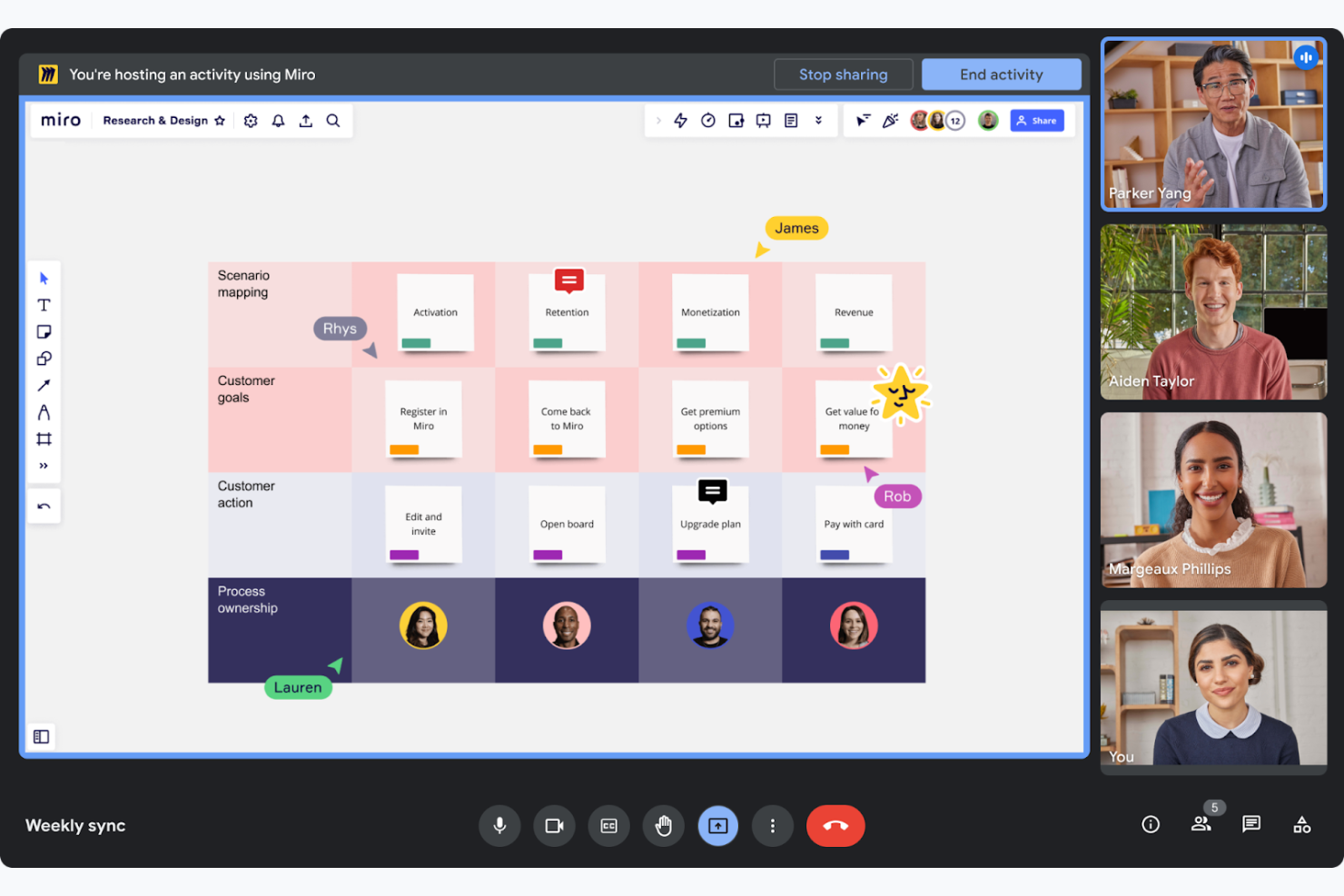
Google Meet is a video conferencing tool designed to facilitate virtual meetings and collaboration for businesses and educational institutions. It allows your team to conduct meetings with ease, directly from their web browsers or mobile devices.
Why it's a good Zoom alternative: Google Meet forms part of Google Workspace, enabling you to schedule one-on-one or team meetings directly from Google Calendar and collaborate on Google Docs during calls. This tight integration coordinates workflows for teams already using Google's suite of productivity tools. Additionally, its browser-based operation means you don't need to install any additional software, making it accessible and convenient.
Standout features and integrations:
Features include real-time live captions powered by Google's speech recognition technology, enhancing accessibility. The platform supports up to 250 participants per call, making it suitable for large meetings. You can also record meetings and save them directly to Google Drive, ensuring easy access and sharing.
Integrations include Google Calendar, Google Drive, Gmail, Google Docs, Google Sheets, Google Slides, Miro, and more.
Pros and Cons
Pros:
- Easy meeting scheduling
- Real-time captions available
- Supports large meetings
Cons:
- Occasional connectivity issues
- Basic interface design

Best for user privacy and data ownership
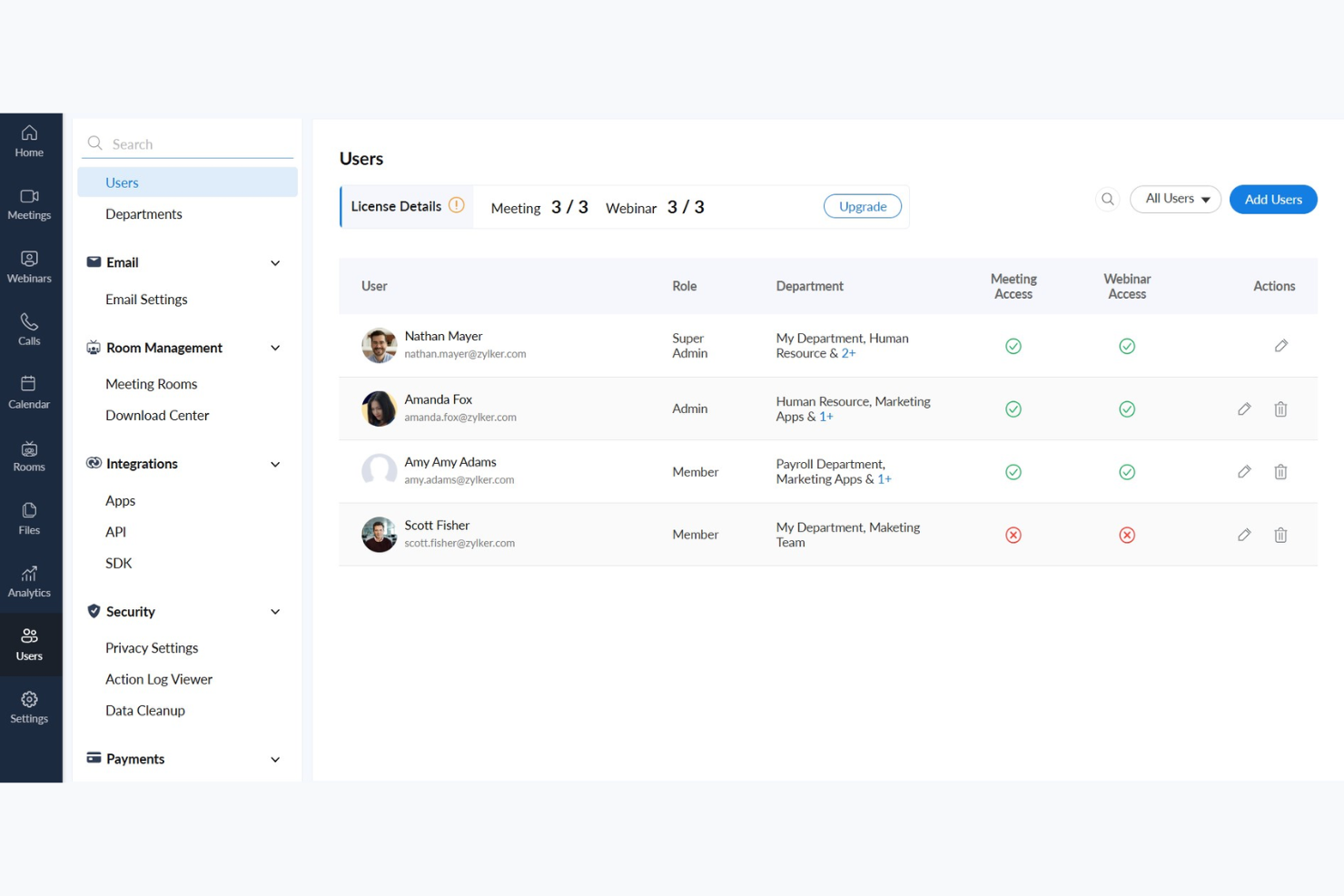
Zoho Meeting is a web-based conferencing solution designed for businesses that need secure and reliable online meeting tools. It serves professionals and teams looking to conduct webinars and virtual meetings efficiently.
Why it's a good Zoom alternative: Zoho Meeting prioritizes user privacy and data ownership, making it a preferred choice for those concerned about data security. It offers features such as meeting encryption and customizable registration forms, helping to ensure that your team's information is protected. The platform also provides detailed analytics and reports for webinars so you can track engagement and refine your presentations.
Standout features and integrations:
Features include screen sharing, which allows you to present your ideas visually to participants. The platform supports webinar polls and Q&A sessions, enabling you to engage your audience effectively. You can also record meetings and webinars, providing a valuable resource for future reference and training.
Integrations include Zoho CRM, Zoho Projects, Zoho Connect, Google Calendar, Microsoft Outlook, Slack, and more.
Pros and Cons
Pros:
- Meeting encryption available
- Detailed analytics for webinars
- Focus on privacy and data security
Cons:
- Limited scalability for large events
- Limited advanced features

Best for Microsoft 365 integration
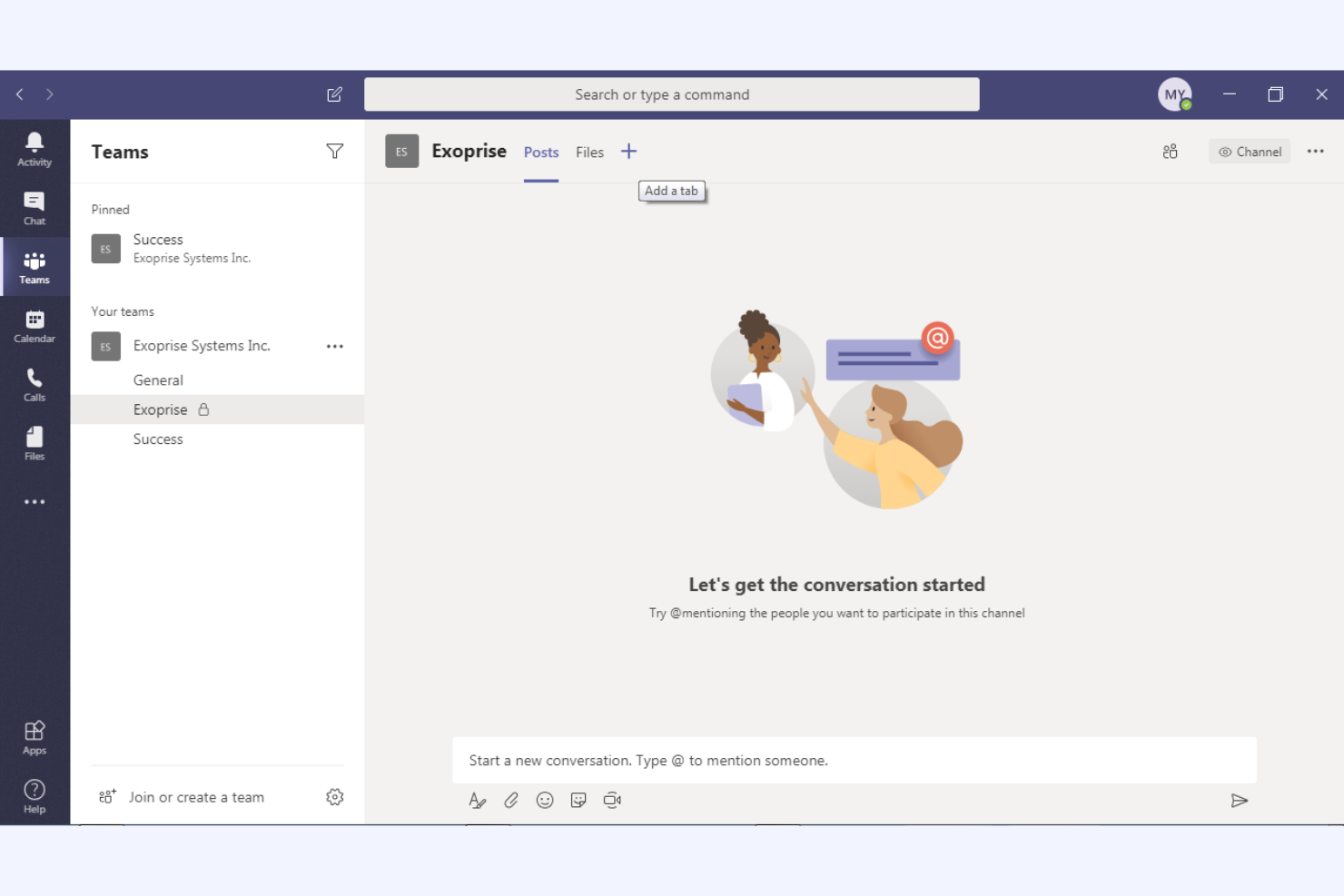
Microsoft Teams is a collaboration platform that integrates chat, video conferencing, and file sharing, designed mainly for business and educational users. It helps your team communicate efficiently and manage projects within a unified workspace.
Why it's a good Zoom alternative: Microsoft Teams offers deep integration with the Microsoft 365 ecosystem, enhancing productivity through real-time document collaboration features and calendar syncing. These capabilities make it ideal if your organization already uses Microsoft products. Additionally, its extensive chat and channel functionalities support ongoing team communication and project management, providing a deeper solution than Zoom's video-focused platform.
Standout features and integrations:
Features include task management tools that let you assign and track tasks within your team. The platform includes a built-in wiki for documenting and sharing knowledge, and it supports live events for larger audiences, making it versatile for different communication needs.
Integrations include Microsoft Outlook, SharePoint, OneDrive, Power BI, Trello, Asana, GitHub, Salesforce, and more.
Pros and Cons
Pros:
- Real-time document collaboration
- Supports large virtual events
- Deep Microsoft 365 integration
Cons:
- Can be resource-intensive
- Limited customization options

Dialpad
Best for AI-assisted customer conversations
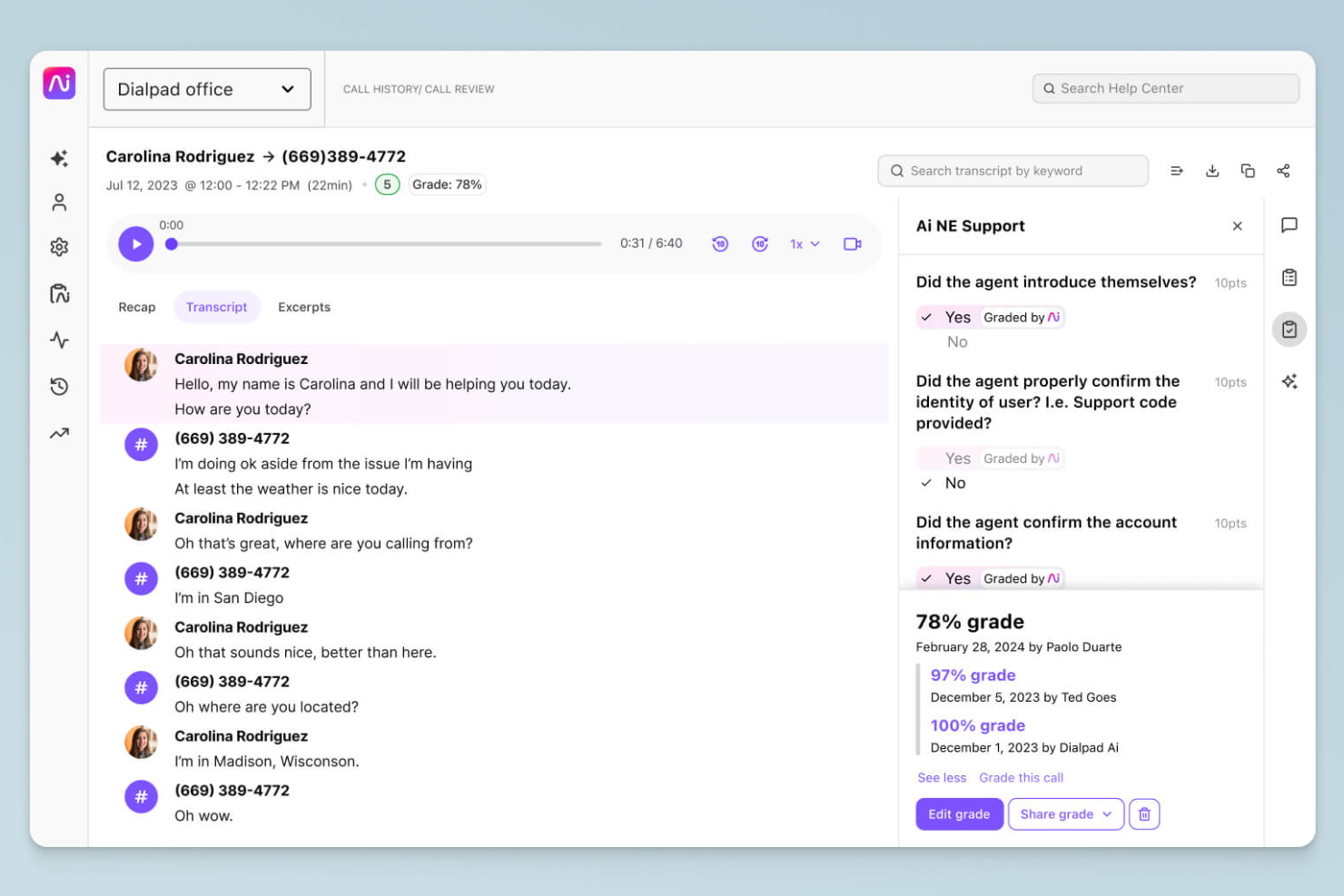
Dialpad is a cloud-based communication platform to enhance communication with AI-driven insights. It caters to companies seeking efficient voice, video, and messaging solutions to support customer and team interactions.
Why it's a good Zoom alternative: Dialpad's AI-powered features provide real-time transcription and voice analytics, offering valuable insights during calls. This allows your team to make informed decisions and improve customer interactions. With built-in call routing and customizable workflows, Dialpad supports efficient communication processes, making it a versatile alternative to Zoom's video-centric approach.
Standout features and integrations:
Features include voice intelligence that offers real-time call coaching and sentiment analysis, helping your team improve conversations. The platform supports cloud recording, cloud storage, and playback of calls, which is useful for training and quality assurance. Additionally, Dialpad provides a unified communication experience with voice, video, and messaging in one app.
Integrations include Salesforce, Microsoft 365, Google Workspace, Slack, HubSpot, Zendesk, ServiceNow, Okta, and more.
Pros and Cons
Pros:
- Efficient call routing
- Real-time transcription
- AI-driven call insights
Cons:
- Occasional system outages
- Hardware compatibility
Best for AI-unified communications for employees
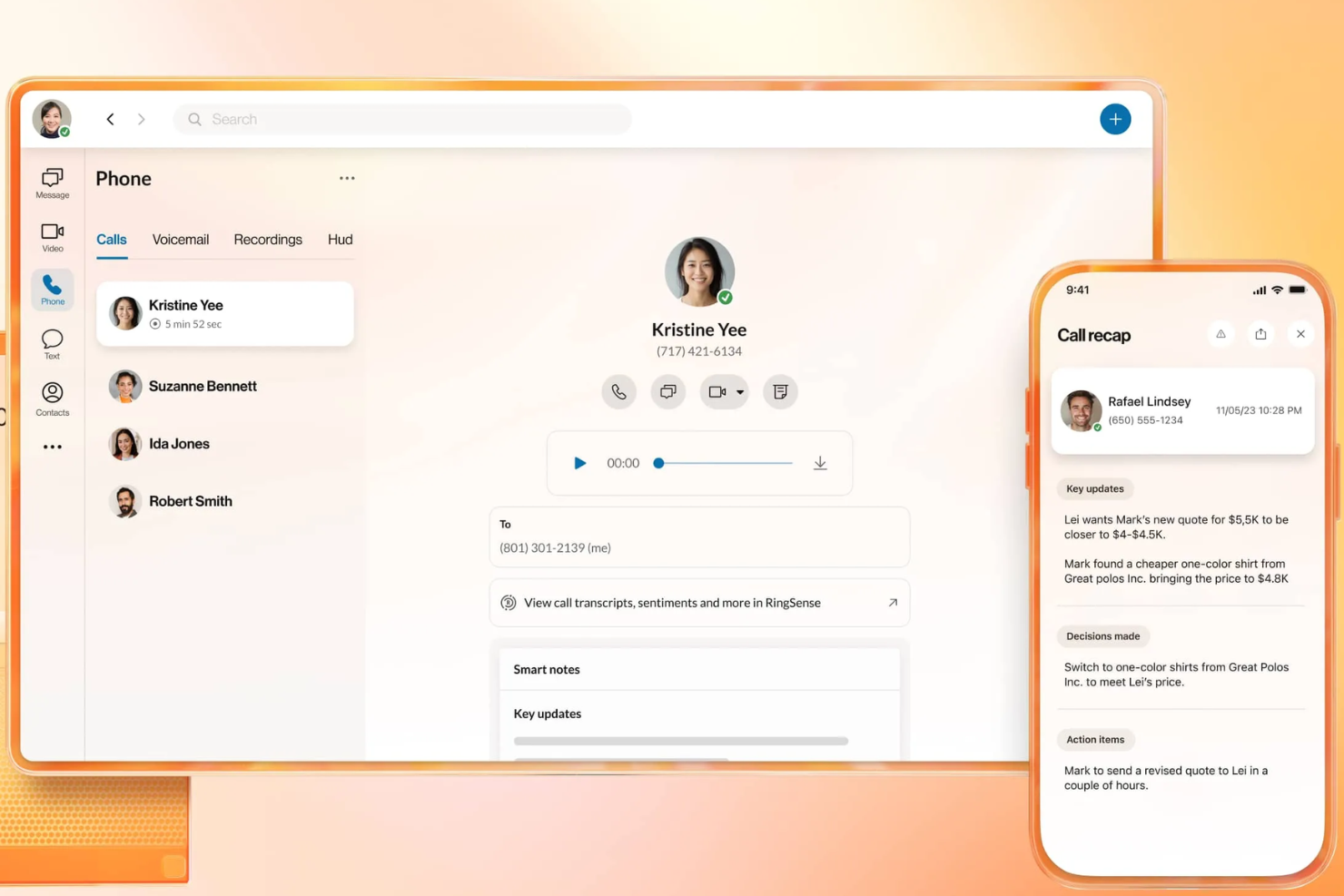
RingEX is a cloud-based communication platform designed to enhance a business's communication capabilities with advanced features. It offers reliable voice, video, and messaging solutions for team collaboration.
Why it's a good Zoom alternative: RingEX offers AI-driven insights and analytics, enabling your team to make informed decisions during calls. The platform supports features such as call recording and real-time transcription, providing useful resources for training and quality assurance. Additionally, RingEX's customizable workflows and robust call management tools make it a versatile choice for businesses of all sizes.
Standout features and integrations:
Features include advanced call routing that ensures calls are directed to the right team members. The platform provides call analytics, giving you insights into your team's communication patterns. You can also use video conferencing with screen sharing capabilities, enhancing collaboration during virtual meetings.
Integrations include Microsoft 365, Google Workspace, Salesforce, Slack, Zendesk, HubSpot, Zapier, Microsoft Teams, Okta, and more.
Pros and Cons
Pros:
- Suitable for large enterprises
- Customizable call management
- AI-driven call analytics
Cons:
- Inconsistent call reliability
- Complex setup and user interface
Best for security-controlled external meetings
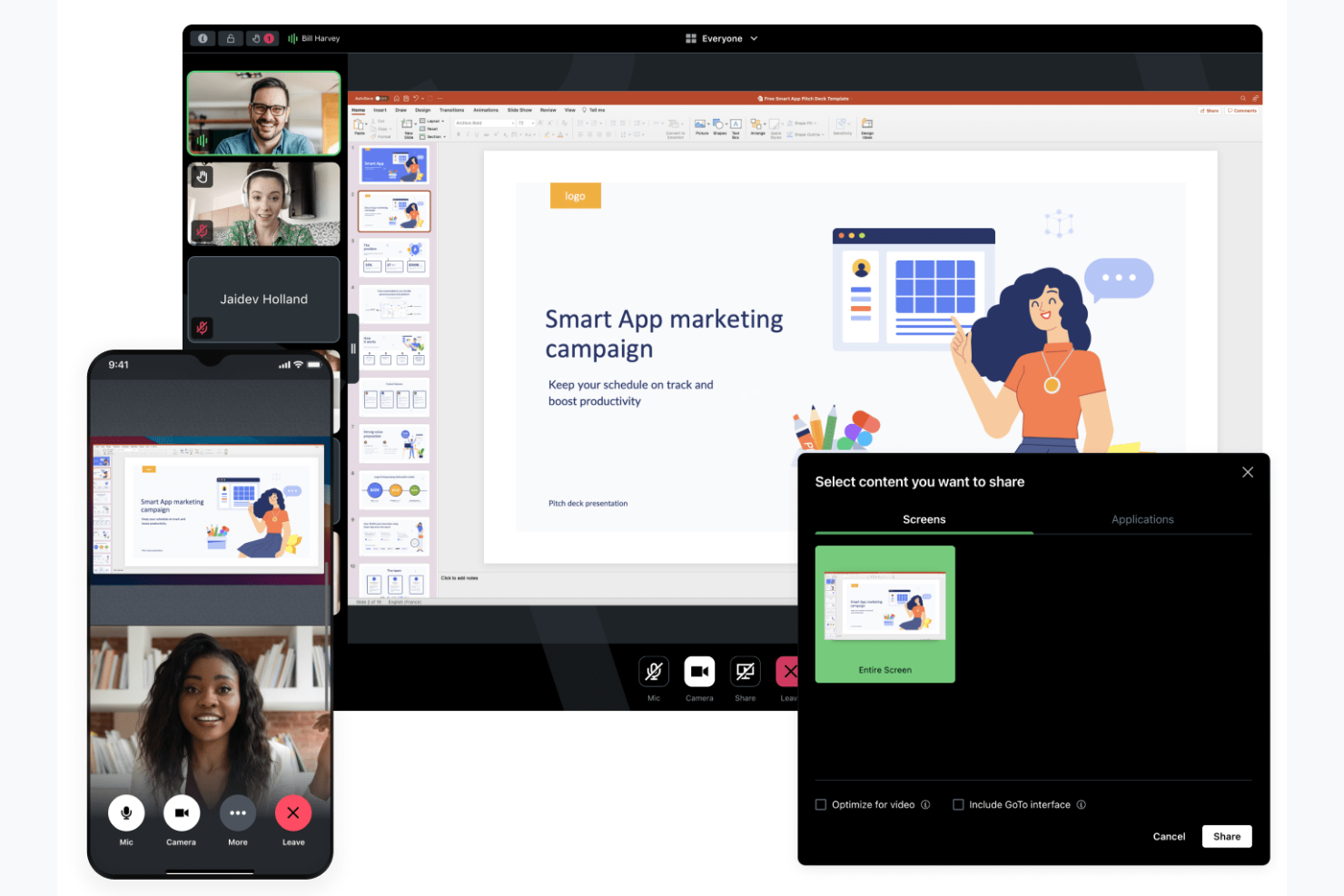
GoTo Meeting is a web conferencing tool designed for businesses that need a reliable platform for hosting virtual meetings. It serves professionals across industries, offering features to support efficient communication and collaboration.
Why it's a good Zoom alternative: GoTo Meeting focuses on providing secure and flexible meeting options with security features such as meeting encryption and admin controls, and customizable meeting settings. These capabilities help your meetings stay private and tailored to your needs. The platform supports HD video conferencing and offers mobile apps, making it convenient for teams on the go.
Standout features and integrations:
Features include a "Call Me" option that simplifies joining meetings by calling participants directly and drawing tools that let you annotate shared screens for better collaboration. You can also take advantage of the personalized meeting rooms, which provide a consistent space for your team to gather.
Integrations include Salesforce, Google Calendar, Zapier, Zoho CRM, Zendesk, Outlook, Trello, and more.
Pros and Cons
Pros:
- HD video quality conferencing
- Flexible meeting settings
- Secure meeting encryption
Cons:
- Multiple steps are required to join a workflow
- Dated interface compared to some competitors

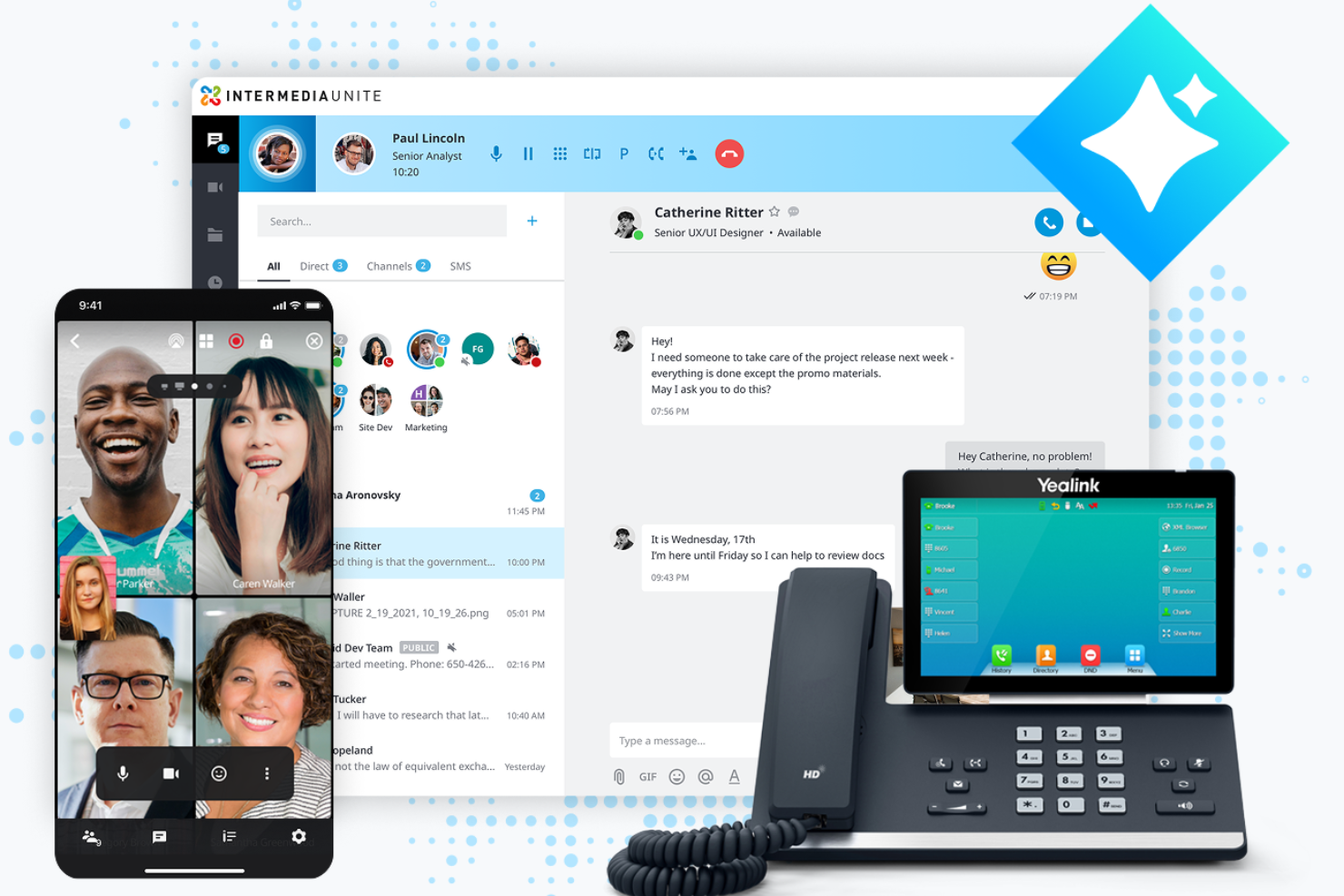
AnyMeeting is a video conferencing platform designed for small to medium-sized businesses looking for an extensive communication solution. Part of the Intermedia Unite cloud-based platform, it offers tools for hosting virtual meetings, webinars, and conference calls, supporting collaboration and connectivity.
Why it's a good Zoom alternative: AnyMeeting provides an all-in-one communication suite with features such as webinar hosting and meeting transcription. These capabilities make it suitable for businesses that need more than just video meetings. AnyMeeting offers screen sharing and customizable meeting layouts, allowing your team to tailor meetings to suit their specific needs.
Standout features and integrations:
Features include meeting transcription, which automatically records and transcribes your meetings for easy reference. The platform offers webinar hosting capabilities, providing tools to engage large audiences and customized layouts to enhance the overall meeting experience.
Integrations include Microsoft Office 365, Google Calendar, Slack, Salesforce, Zendesk, and more.
Pros and Cons
Pros:
- Customizable meeting layouts
- Meeting transcription available
- Supports webinar hosting
Cons:
- Limited scalability for larger enterprises
- Limited advanced features

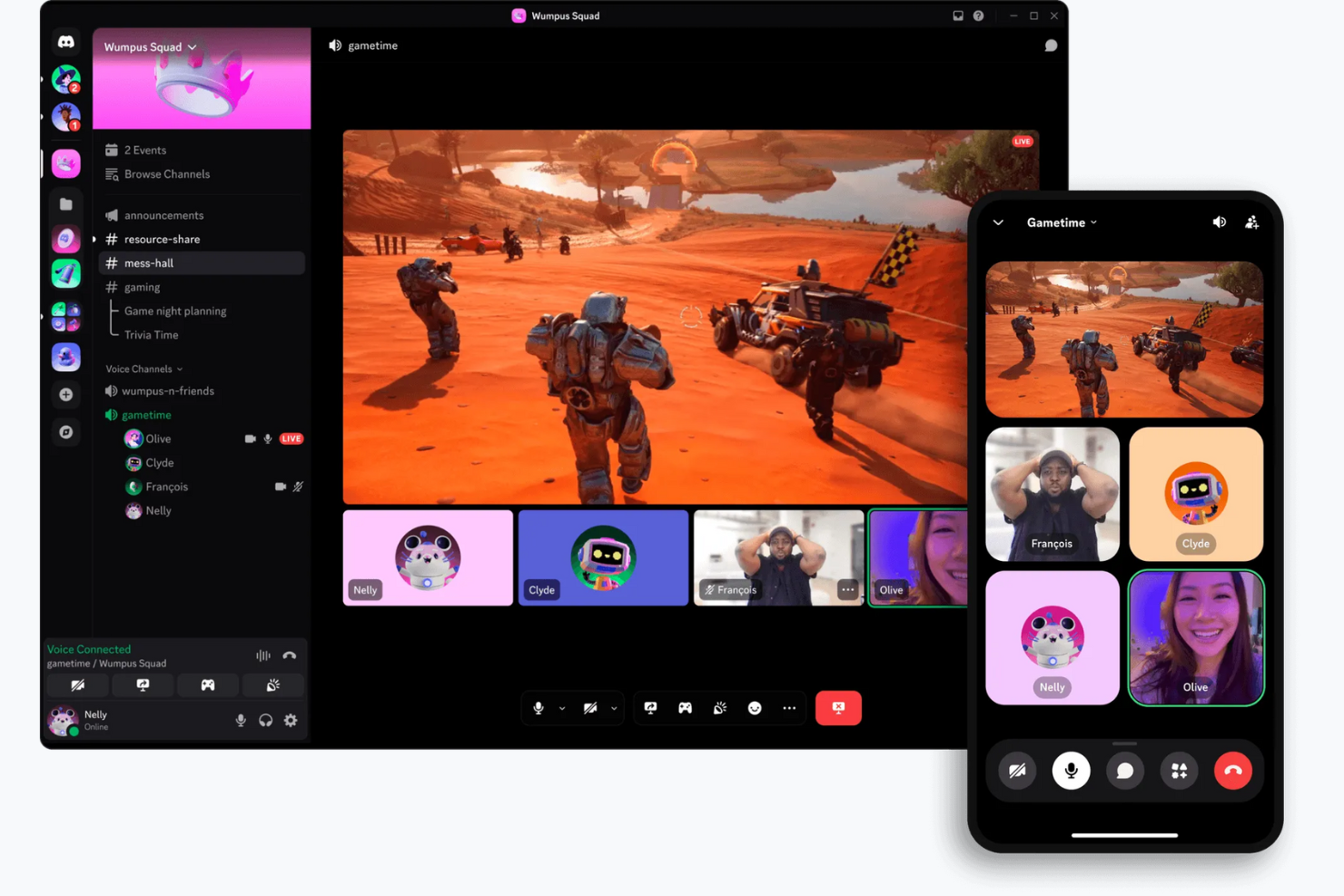
Discord is a communication platform designed primarily for gamers and social communities. Providing voice, video, and text chat capabilities, it's widely used by gaming enthusiasts and online communities for real-time interaction and collaboration.
Why it's a good Zoom alternative: Discord offers persistent voice channels, allowing your team to join and leave conversations at will, unlike Zoom's scheduled meetings. The platform provides customizable server settings and roles to manage user permissions and create organized discussion spaces. Additionally, Discord's free version and community-focused features, such as public servers and user-friendly interfaces, make it ideal for informal gatherings and social interactions.
Standout features and integrations:
Features include screen sharing, which lets you share your screen with others for collaborative gaming or working, as well as video and voice calls. You can also use Discord's direct messaging feature to communicate privately with individuals or through small calls.
Integrations include Spotify, Twitch, YouTube, Reddit, Patreon, Steam, GitHub, and more.
Pros and Cons
Pros:
- Community-focused features
- Customizable server settings
- Persistent voice channels
Cons:
- Low file upload size limits
- Limited enterprise compliance and auditing

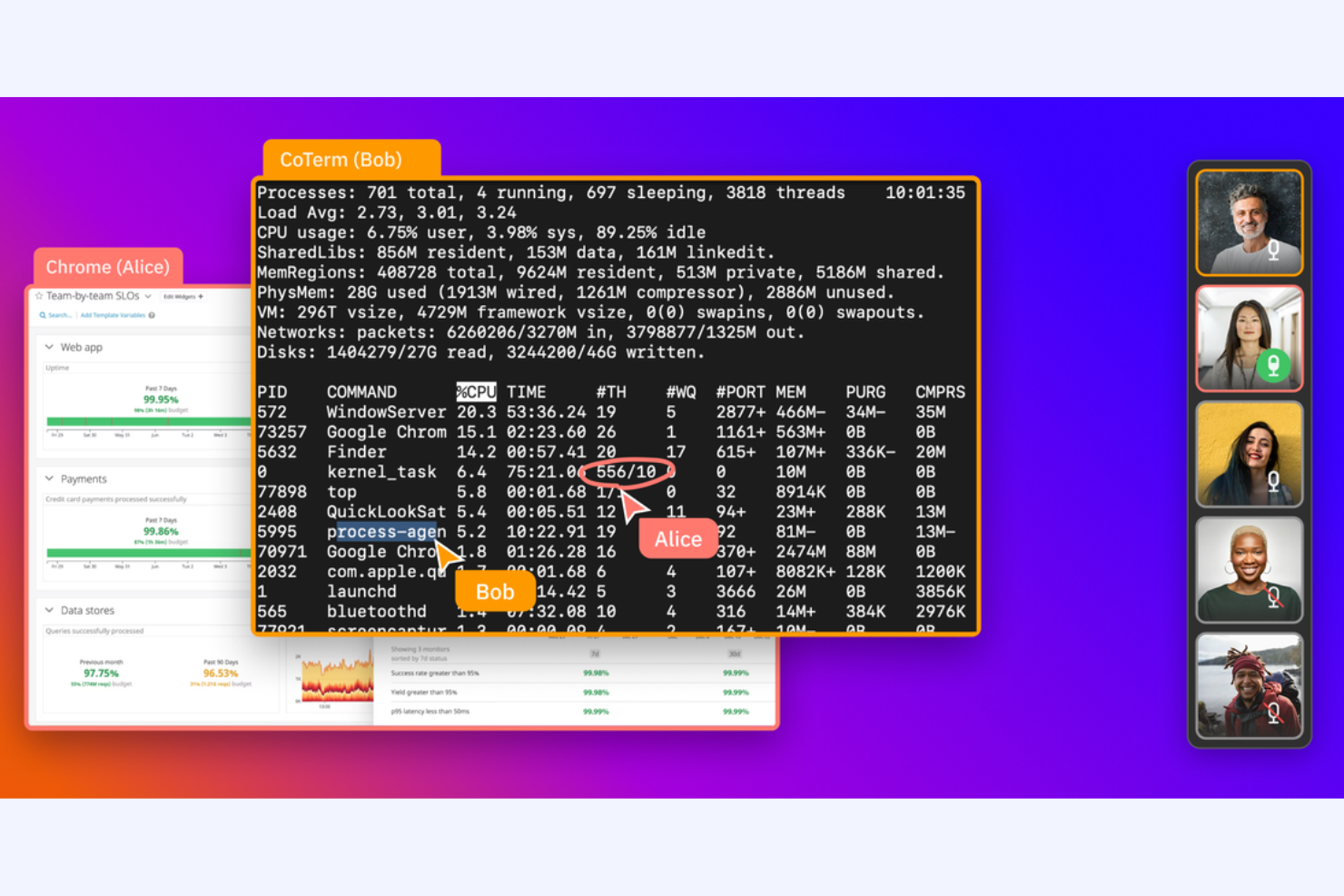
CoScreen is a screen-sharing tool for developers and teams that require real-time collaboration. It's used by software engineers and tech teams to facilitate pair programming and debugging sessions.
Why it's a good Zoom alternative: CoScreen allows multiple users to share their screens simultaneously, making it ideal for technical collaboration. Unlike Zoom, which focuses on video meetings, CoScreen emphasizes real-time code editing and problem-solving. Its low-latency performance ensures that your team's interactions are smooth and efficient, allowing for effective collaboration in coding environments.
Standout features and integrations:
Features include simultaneous screen sharing, which lets everyone on your team share their screen at the same time. You can also use low-latency video calls to ensure smooth communication during sessions. CoScreen supports real-time code editing, making it a valuable tool for developers working together on projects.
Integrations include Slack, GitHub, Jira, Asana, Google Calendar, Zoom, Visual Studio Code, IntelliJ IDEA, and more.
Pros and Cons
Pros:
- Real-time code editing
- Low-latency performance
- Ideal for pair programming
Cons:
- Limited non-technical features
- Geared towards developers

Jitsi is an open-source video conferencing tool for individuals and teams seeking flexible and secure communication solutions. It provides a platform for hosting virtual meetings without requiring user accounts, downloads, or a paid plan.
Why it's a good Zoom alternative: Jitsi meetings offer control over your data and privacy, which is ideal if you're concerned about security. You can customize and host your own server, ensuring that your free video conferencing meetings are more secure, and its open-source nature means you can modify and extend the platform to fit your specific requirements, unlike Zoom, which is a closed system.
Standout features and integrations:
Features include high-quality video and audio, ensuring clear communication during longer meetings. You can also use the platform's chat feature for text-based communication alongside video calls. Jitsi supports screen sharing, allowing you to present information and collaborate effectively with your team.
Integrations vary depending on hosting/setup; can be extended via open-source plugins and APIs
Pros and Cons
Pros:
- Self-hosting option
- High data privacy
- Open-source flexibility
Cons:
- Limited support for large meetings
- May require technical knowledge
Diğer Zoom Alternatifleri
İşte kısa listeme girmeyen ancak yine de göz atmaya değer bazı ek görüntülü konferans yazılımı Zoom alternatifleri:
- Nextiva
For SMBs replacing separate phone & meeting tools
- ON24
For data-driven webinars
- TeamViewer
For remote support
- ClickMeeting
For large webcasts and hosted video conferences
- Miro
For dedicated visual collaboration
- eyeson
For low-bandwidth video calls


How I Evaluate Zoom Alternatives
I split my evaluation into two layers: baseline must-haves (like HD video, recording, and PM integrations) and differentiators that set the best tools apart for project teams.
Core Functionality (Table Stakes For This List)
When I'm selecting tools for my list, I rank each one on a scale from 0 (does not offer the functionality) to 5 (excels in this area) for each core functionality listed below. Then, I calculate the tool's total score into a percentage. Each tool needs to achieve a minimum total score of 65% to be considered for inclusion.
- HD Video & Audio Quality: I evaluate whether the platform delivers stable, high-definition video for calls ranging from a quick 1:1 check-in to a 50+ person sprint review or client demo.
- Screen Sharing & Collaboration: Project teams live in boards, timelines, and docs, so I look for smooth screen sharing with annotation, remote control, and multi-presenter support during working sessions.
- Meeting Recording & Transcription: Capturing sprint planning decisions and stakeholder feedback matters, so each tool is evaluated on cloud recording, auto-transcription accuracy, and searchability of past sessions.
- Chat & Messaging: Beyond in-meeting chat, I check for persistent channels and threaded conversations that keep project discussions organized between meetings.
- Calendar & PM Tool Integrations: I look for native connections to Google Calendar, Outlook, and PM tools like Jira, Asana, or Monday so meetings link directly to the workflows they support.
- Scheduling & Meeting Management: Recurring ceremonies like standups and retros need easy scheduling, so I evaluate host controls, unique meeting links, waiting rooms, and automated invites.
Once I have a list of tools that meet this criteria, I consider what sets each platform apart.
Differentiating Factors (What Sets Vendors Apart)
Here's how I compare and contrast different vendors:
Standout Features
AI-powered meeting summaries are a big differentiator. I look for tools that auto-generate action items and key decisions so project leads can skip manual note-taking after every standup or retro. Breakout rooms also matter when you're running workshops or sprint planning with multiple sub-teams who need parallel working time. For distributed teams across time zones, async video messaging is worth evaluating too, since it lets stakeholders record quick status updates instead of scheduling yet another live call.
Beyond Features
Pricing structure matters a lot when you're switching from Zoom. I evaluate whether per-host licensing makes sense for teams where only a few PMs run meetings versus per-user models that cover everyone. Security is another key factor—I check for E2EE, SSO, and compliance certifications like SOC 2 and GDPR, especially for teams handling sensitive client project data. Integration depth also goes beyond just having a connector. I look at how tightly a tool links to your PM stack, like whether a meeting auto-attaches to a Jira ticket or syncs notes into Confluence.
Neden bir Zoom alternatifi aramalısınız?
Zoom, görüntülü konferans ve çevrim içi toplantı yazılımı için iyi bir seçenek olsa da bazı kullanıcıların alternatif çözümler aramasının çeşitli nedenleri vardır. Şu nedenlerle bir Zoom alternatifi arıyor olabilirsiniz…
- Daha gelişmiş güvenlik özelliklerine ihtiyacınız vardır
- Ekibiniz araçlarla daha iyi entegrasyon gerektiriyordur
- Büyük toplantılarda sınırlamalarla karşılaşıyorsunuzdur
- Daha fazla özelleştirme seçeneği istiyorsunuzdur
- Ekibiniz sık sık bağlantı sorunları yaşıyordur
Bunlardan herhangi biri size uyuyorsa doğru yere geldiniz. Listemde, Zoom ile ilgili bu zorluklarla karşılaşan ve alternatif çözümler arayan ekipler için daha uygun olan çeşitli görüntülü konferans ve çevrim içi toplantı yazılımı seçenekleri yer alıyor.
Zoom'un Temel Özellikleri
Zoom'un temel özelliklerinden bazıları aşağıda verilmiştir; böylece alternatif çözümlerin sunduklarını karşılaştırabilirsiniz:
- Sanal arka planlar: Toplantı arka planınızı herhangi bir görsel veya videoyla değiştirerek gizliliğinizi korumanıza ve dikkat dağıtıcı unsurları azaltmanıza yardımcı olur.
- Alt grup odaları: Atölye çalışmaları veya ekip etkinlikleri sırasında odaklanmış görüşmeler yapmak için toplantınızı daha küçük grup görüşmelerine ayırın.
- Ekran paylaşımı: Toplantılar sırasında bilgileri etkili bir şekilde sunmak için masaüstünüzü veya belirli uygulamaları ekibinizle paylaşın.
- Kayıt ve dökümler: Toplantıları kaydedin ve otomatik olarak dökümler oluşturun; böylece katılamayanlar için bir kaynak sağlayın.
- Toplantı sohbeti: Katılımcılara mesaj göndermek, dosya paylaşmak ve toplantılar sırasında iletişimi geliştirmek için sohbet özelliğini kullanın.
- Anketler ve yoklamalar: Toplantı içi yoklamalar ve anketlerle geri bildirim toplayın veya hızlıca karar verin ve katılımcıların etkin şekilde sürece dahil olmasını sağlayın.
- Uçtan uca şifreleme: Verilerinizi ve iletişimlerinizi koruyan şifrelemeyle toplantılarınızın güvenli olmasını sağlayın.
- Bekleme odası: Oturum başlamadan önce katılımcıları bir bekleme odasına alarak toplantınıza ne zaman katılacaklarını kontrol edin.
- Açıklama araçları: Paylaşılan içeriği vurgulamak veya üzerine notlar eklemek için açıklama araçlarını kullanarak iş birliğini ve anlayışı geliştirin.
- Sanal el kaldırma: Daha büyük toplantıları verimli bir şekilde yönetmeye yardımcı olmak için konuşmak isteyen katılımcıların sanal el kaldırmasına olanak tanıyın.