

2026’da En İyi 10 Dahili İletişim Aracı

En İyi Dahili İletişim Araçları Kısa Listesi


Dahili iletişim araçları, ekibinizin güncellemeleri, mesajları ve dosyaları tek bir dijital çalışma alanında paylaşmasına yardımcı olan uygulamalar ve platformlardır. Herkes nerede çalışıyor olursa olsun bağlantıda kalmanın yollarını arıyorsanız, işlerin ne kadar hızlı gözden kaçabileceğini bilirsiniz. Günümüzün hibrit ve uzaktan çalışan ekipleri, karmaşık e-posta yazışmalarının yerini almak, toplantıları azaltmak ve projelerin ilerlemesini sağlamak için bu araçlara güveniyor. Bu listede, farklı ekip ihtiyaçları için en iyi seçenekleri bulacaksınız; böylece basit konuşmalar, güvenli tartışmalar veya paylaşılan belgeler ve görevlerle eksiksiz iş birliği için doğru aracı seçebilirsiniz.
Why Trust Our Software Recommendations
Our team has been testing and reviewing software since 2012. As project managers ourselves, we know how difficult—and important—it is to choose the right software.
For this guide, we evaluated tools using hands-on testing and independent research, scoring tools using our selection criteria. We also draw on insights from industry thought leaders and practicing project management experts.
Our reviews reflect our human editorial judgment, not a sales pitch.
Expert reviewers:
Dahili İletişim Araçları Karşılaştırma Tablosu
En iyi dahili iletişim aracı seçimlerimin fiyatlandırma ayrıntılarını bu karşılaştırma tablosunda özetledim:
| Tool | Starting Price | Website | |
|---|---|---|---|
| Best with all-inclusive licensing and onboarding | 4.5 out of 5 | £3.75/user/month Free demo available | Website |
| Best email-style topic headers for async focus | 4.8 out of 5 | $6.67/user/month Free plan + free demo available | Website |
| Best free unlimited message history | 4.7 out of 5 | $2.49/seat/month 7-day free trial + free plan + free demo available | Website |
| Best AI-powered suggestions for task management | 4.6 out of 5 | $3/user/month Free plan + free demo available | Website |
| Best built-in shared to-do lists and reminders | 4.5 out of 5 | $4.50/user/month 30-day free trial + free plan available | Website |
| Best for managing secure, self-hosted messaging | — | Pricing upon request 30-day free trial | Website |
| Best built-in workflow automations | 4.4 out of 5 | $16.20/month 14-day free trial + free plan + free demo available | Website |
| Best integration with Microsoft 365 apps | 4.3 out of 5 | $4/user/month Free plan + 1-month free trial available | Website |
| Best for open-source communication solutions | 4.2 out of 5 | Pricing upon request Free plan + free demo available | Website |
| Best threaded messaging to reduce clutter | 4.2 out of 5 | $6/user/month Free plan available | Website |
En İyi Dahili İletişim Araçları İncelemeleri
Aşağıda, kısa listeme giren en iyi dahili iletişim araçlarının ayrıntılı özetlerini bulabilirsiniz. İncelemelerim, sizin için en iyi aracı bulmanıza yardımcı olmak amacıyla her platformun özelliklerine, entegrasyonlarına ve en uygun kullanım alanlarına ayrıntılı bir bakış sunuyor.

Hub
Best with all-inclusive licensing and onboarding
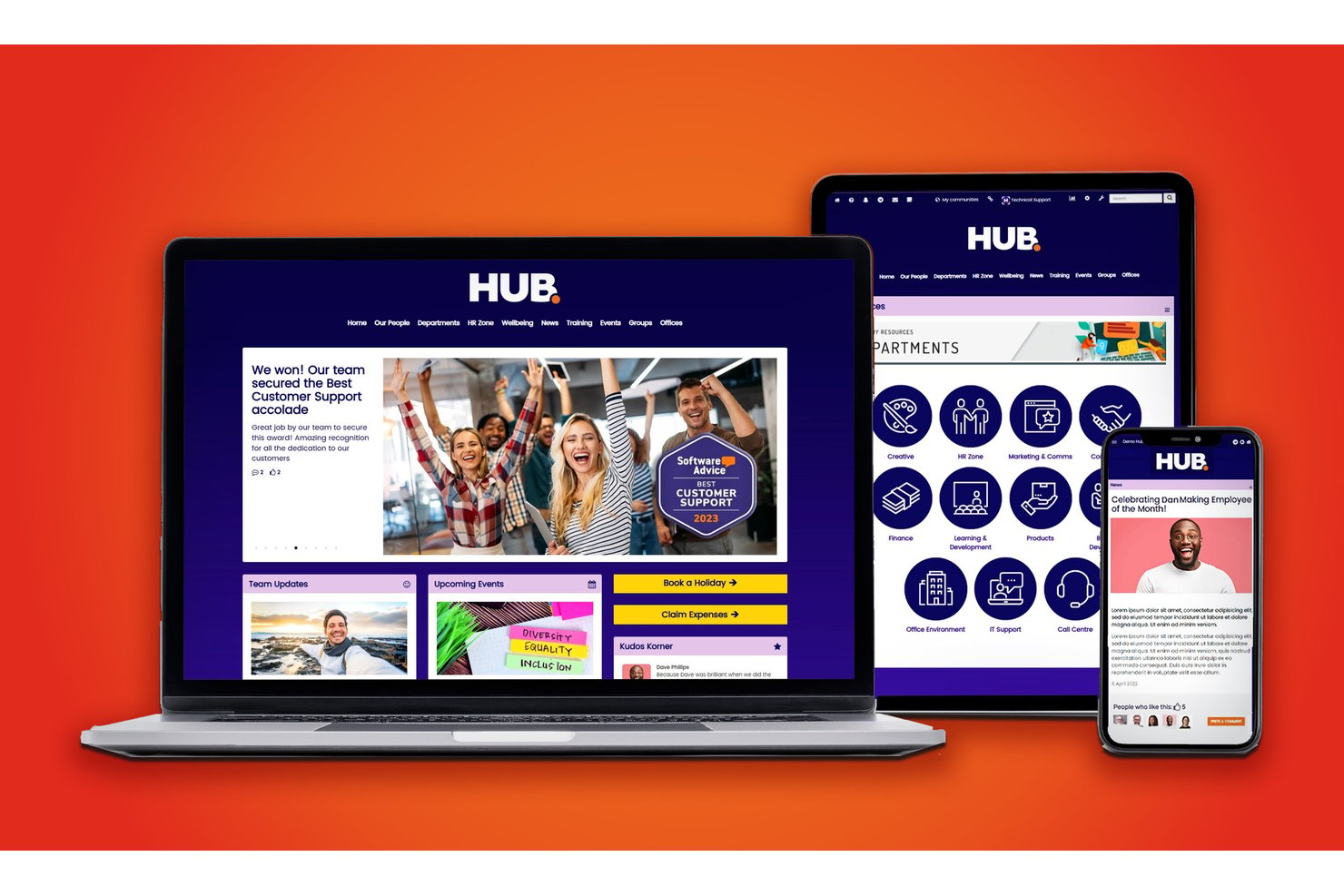
Hub is an employee intranet platform that brings together company news, knowledge management, group forums, digital forms, and AI-powered content tools in one centralized workspace.
Who Is Hub Best For?
Hub is a strong fit for small and mid-sized organizations where internal communications and HR teams are leading the charge on employee engagement and knowledge sharing.
Why I Picked Hub
Hub earns its spot as one of the best on my shortlist because the all-inclusive license model genuinely removes the friction that slows most intranet rollouts. Every feature, from the AI Writing Assistant to pulse polls and must-read receipts, is unlocked from day one with no tier upgrades required. I also love that two full days of personalized 1:1 onboarding are bundled in, so teams aren't left to self-configure a blank workspace from scratch.
Hub Key Features
- Group forums and discussions: Create dedicated forums for teams or topics with threaded conversations and granular permissions.
- Company wiki and document management: Organize policies, FAQs, and company knowledge into searchable wikis with unlimited storage.
- Federated search: Search across news, documents, wikis, and forums using smart tags and content filters.
- Pulse surveys and polls: Gather instant feedback from employees using built-in survey and polling tools.
Hub Integrations
HUB offers native integrations with SharePoint, Google Workspace, Box, Microsoft Teams, Slack, BambooHR, Confluence, and more. An API is available for custom integrations.
Pros and Cons
Pros:
- AI writing assistant speeds up content creation
- Must-read receipts confirm staff have seen updates
- Personalized onboarding included with every plan
Cons:
- Video calling is not natively supported
- Real-time chat is less developed than competitors

Zulip
Best email-style topic headers for async focus

Zulip is a team chat software for internal communication that organizes messages by topic in threaded streams, supports group and private conversations, and provides both web and mobile access.
Who Is Zulip Best For?
Distributed tech teams that need organized, topic-driven internal communication for cross-time-zone projects.
Why I Picked Zulip
I picked Zulip as one of the best because my team relies on its email-style topic headers to keep every conversation organized in threaded topics, even when messages are sent hours apart. I like how quick topic search and structured streams help us stay focused on multiple projects at once.
Zulip Key Features
- Stream permissions: Control who can view or join specific conversation streams.
- Message editing: Edit sent messages for clarity or corrections within a time window.
- Emoji and reactions: Respond quickly to messages with emojis and custom reactions.
- Desktop and mobile apps: Access Zulip conversations across Windows, Mac, Linux, iOS, and Android.
Zulip Integrations
Zulip offers native integrations with GitHub, Jira, Trac, Sentry, Nagios, Jenkins, Travis CI, and GitLab. It also provides an API for custom integrations.
Pros and Cons
Pros:
- Open source with strong admin control options
- Topic search works well with large message volumes
- Threaded topics keep discussions avoidably organized
Cons:
- Lacks automated system health monitoring
- Fewer built-in integrations than major competitors

Pumble
Best free unlimited message history

Pumble is a team communication tool that lets users organize conversations by channels, send direct messages, share files, start voice and video calls, and manage notifications across web and mobile apps.
Who Is Pumble Best For?
Growing teams and startups that want budget-friendly internal communication and collaboration without message limits.
Why I Picked Pumble
I picked Pumble as one of the best because my team can reference every past message without worrying about storage limits. I like starting threaded discussions, managing channel permissions, and using built-in voice and video calls for group projects.
Pumble Key Features
- User roles and permissions: Set specific admin and user permissions for better workspace control.
- Channel-based communication: Organize team conversations by topic, project, or department in dedicated channels.
- Group direct messages: Start private group chats for quick side discussions.
- Message pinning: Pin important messages so everyone in the channel can quickly access them.
Pumble Integrations
Pumble offers native integrations with Google Calendar, Google Drive, and Zapier, and provides an API for custom integrations.
Pros and Cons
Pros:
- Includes built-in voice and video calls
- Granular control over channels and notifications
- Unlimited searchable message history for all users
Cons:
- Lacks automated backup utilities
- Fewer integrations compared to major competitors

Chanty
Best AI-powered suggestions for task management
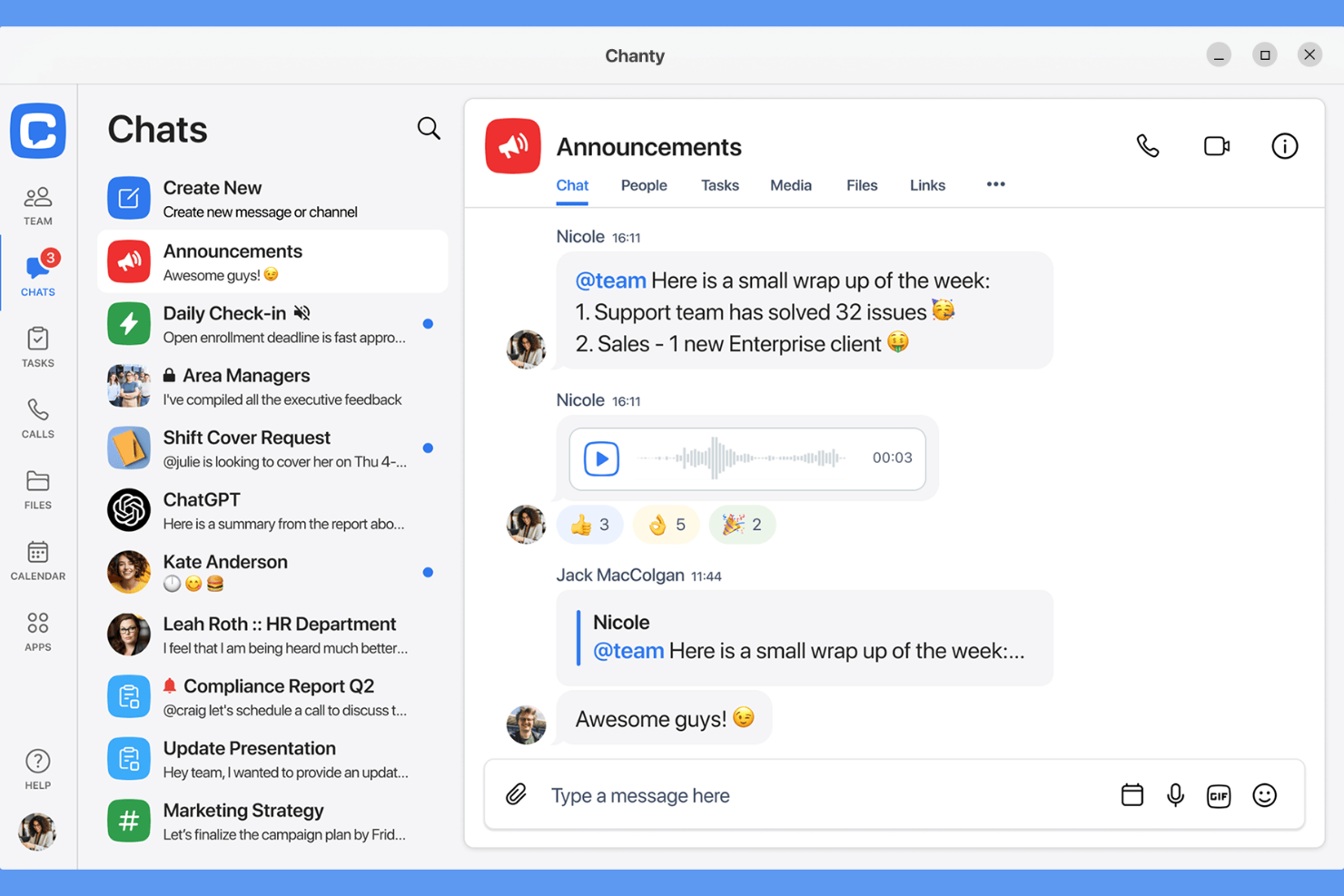
Chanty is a team communication tool for internal collaboration that combines threaded messaging, built-in task management, file sharing, AI-powered suggestions, and searchable conversation history in one app.
Who Is Chanty Best For?
Small businesses and project teams looking for simple, chat-based collaboration with AI-augmented task management features.
Why I Picked Chanty
I picked Chanty as one of the best options because I get AI-generated suggestions that help prioritize tasks in real time. I use Chanty’s chat-to-task feature to turn action items into tasks directly from any conversation, which keeps my collaboration focused.
Chanty Key Features
- Threaded conversations: Keep team messages organized by topic in dedicated threads.
- Audio and video calls: Start direct or group calls instantly within any chat.
- Teambook: View conversations, tasks, and shared files in a single project hub.
- Pin messages: Highlight important messages for easy access at the top of each chat.
Chanty Integrations
Chanty offers native integrations with Google Drive, Dropbox, Trello, GitHub, Asana, Jira, and Zapier. An API is available for custom integrations.
Pros and Cons
Pros:
- Audio and video calling are built into every chat
- Chat-to-task conversion simplifies project tracking
- AI-powered task suggestions
Cons:
- No guest access for non-team collaborators
- Limited admin controls for larger organizations

Flock
Best built-in shared to-do lists and reminders
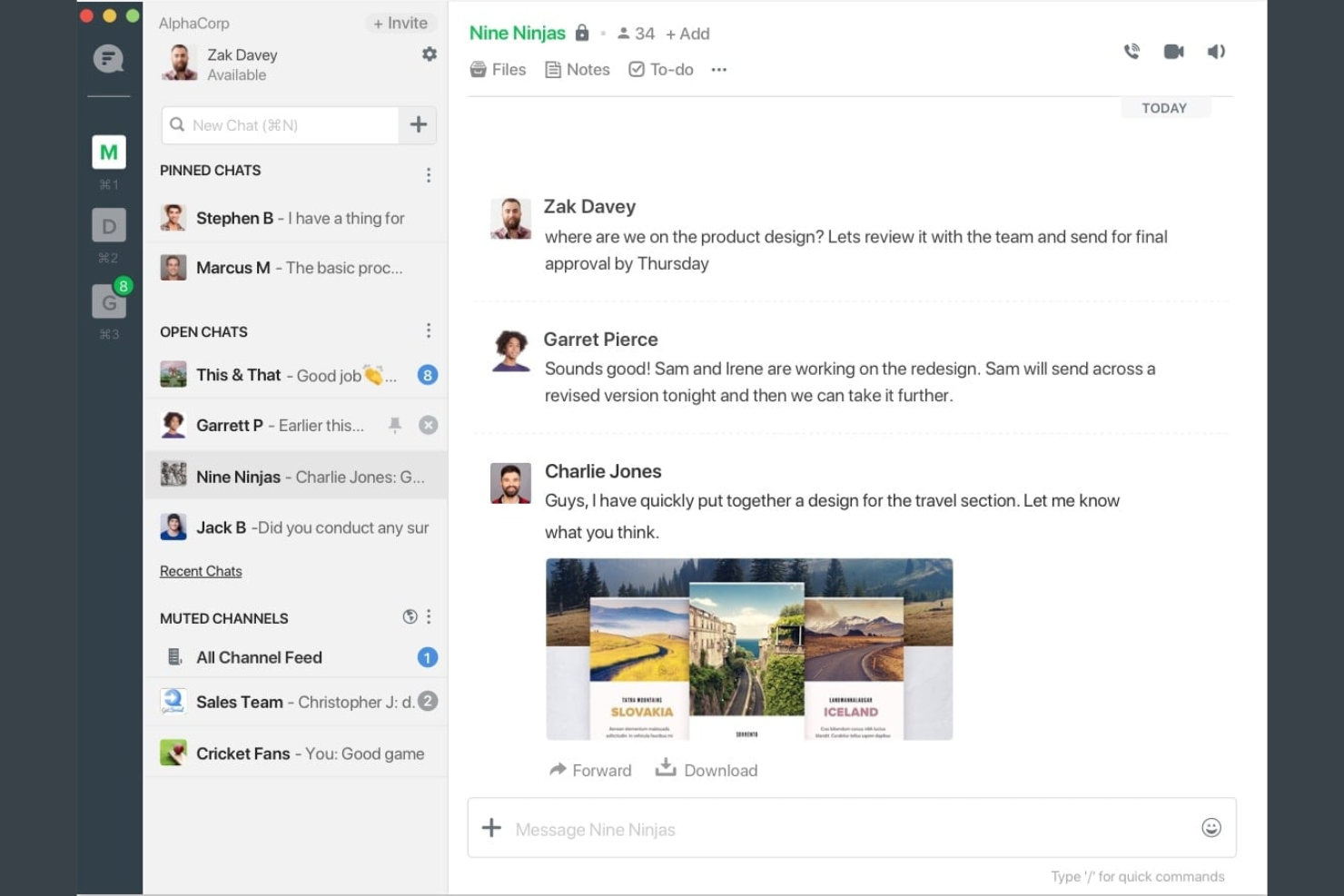
Flock is a team communication platform for internal collaboration that offers group chat, video conferencing, file sharing, polls, notes, and built-in productivity tools all in one app.
Who Is Flock Best For?
Small and midsize teams who want a central hub for messaging, collaboration, and quick shared task management.
Why I Picked Flock
I picked Flock as one of my top tools because I like being able to create shared to-do lists and set reminders right inside a chat. My team quickly runs checklist items without switching between apps, and real-time updates keep everyone aligned.
Flock Key Features
- Channel chat: Communicate with teams in organized public or private channels.
- Video conferencing: Start video calls directly from any chat window.
- File sharing: Upload and share documents, images, and other files within conversations.
- Polls and notes: Create quick polls or collaborative notes to capture feedback and ideas.
Flock Integrations
Flock offers native integrations with Google Drive, Dropbox, Trello, GitHub, Twitter, Asana, and MailChimp. An API is available for custom integrations.
Pros and Cons
Pros:
- Voice, video, and screen sharing in one app
- In-app reminders for group actions and events
- Built-in polls and shared notes for teams
Cons:
- Few advanced controls for large organizations
- Limited search functionality for past conversations


Mattermost is an internal communication platform built for technical and operational teams that need private, self-hosted messaging, channel-based chat, file sharing, workflow automation, and real-time collaboration.
Who Is Mattermost Best For?
IT and DevOps teams who need a secure, self-managed communication solution for collaborating on sensitive projects or in highly regulated industries.
Why I Picked Mattermost
I picked Mattermost as one of the best because I can deploy it entirely on my own servers, control all message retention, and use granular user permissions for sensitive discussions. I like that my team can integrate custom bots to automate workflows, too.
Mattermost Key Features
- Channel-based messaging: Organize conversations and projects into topic-specific channels.
- Threaded discussions: Separate message threads for focused conversations within channels.
- Integrated task management: Assign, track, and manage tasks alongside chat functions.
- Full message search: Instantly search all historical messages, files, and users in one interface.
Mattermost Integrations
Mattermost offers native integrations with GitHub, GitLab, Jira, Jenkins, and ServiceNow. It also supports custom integrations via its API and has marketplace extensions for tools like Zoom and PagerDuty.
Pros and Cons
Pros:
- Fine-grained user and team permissions
- Channel and thread-based messaging
- Full control over deployment and data
Cons:
- Requires dedicated server infrastructure management
- Requires technical resources to maintain servers

Best built-in workflow automations
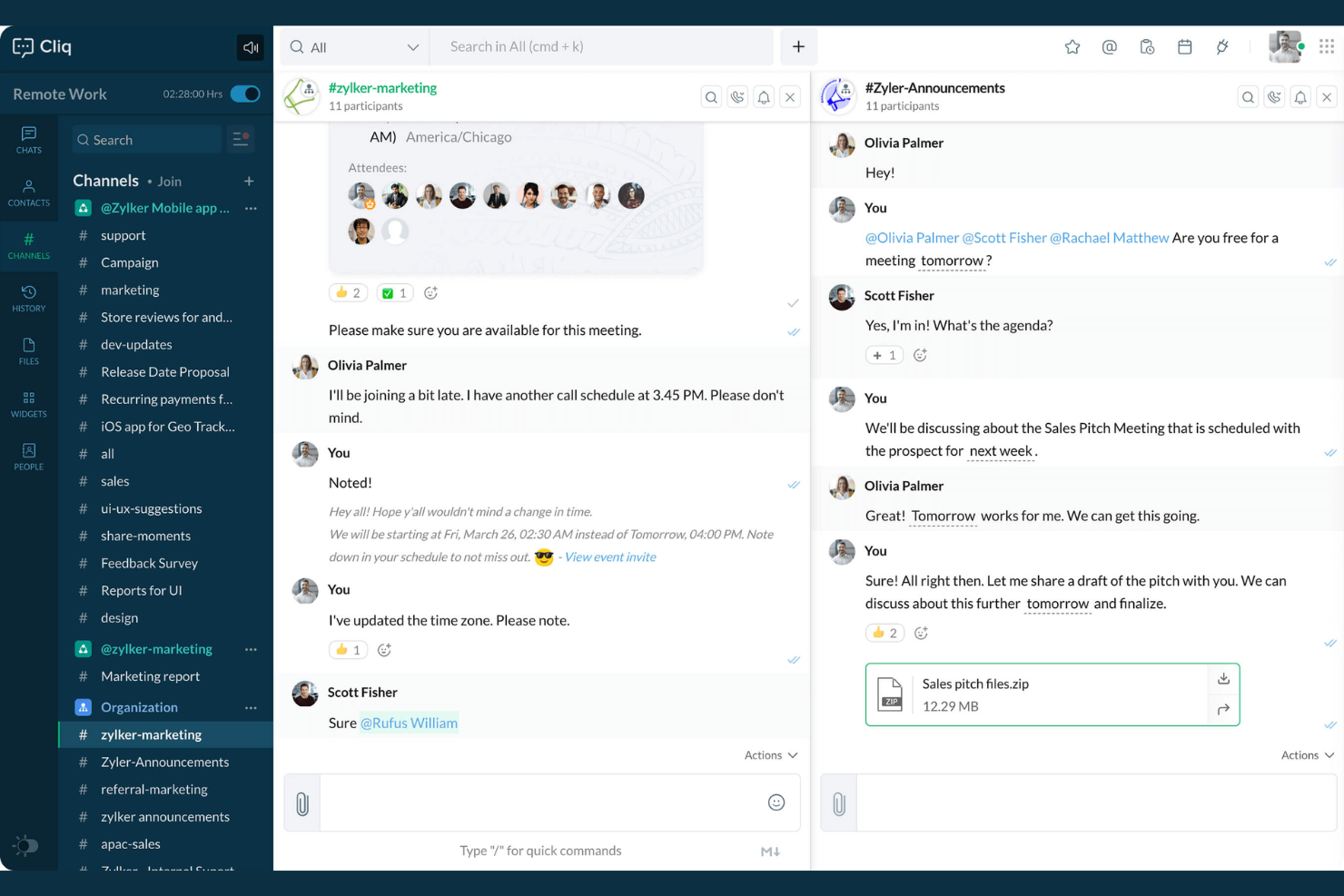
Zoho Cliq is an internal communication software that combines real-time messaging, file sharing, channels, voice and video calls, event scheduling, and built-in tools for team collaboration.
Who Is Zoho Cliq Best For?
Small to mid-sized businesses need centralized chat, automation, and collaboration across distributed or hybrid teams.
Why I Picked Zoho Cliq
I picked Zoho Cliq as one of the best because I can automate repetitive actions with built-in workflows like Bots and Command tasks. My team uses the platform’s message actions and widgets to trigger approval processes and daily reminders right inside our chat streams.
Zoho Cliq Key Features
- Threaded conversations: Organize chat messages by topic for easier navigation.
- Video and audio calls: Start voice or video meetings directly from group or private chats.
- Channel management: Create open or private channels for team and project discussions.
- Message search: Search the full chat history to find any message or file instantly.
Zoho Cliq Integrations
Zoho Cliq offers native integrations with Zoho apps, including Zoho CRM, Zoho Projects, Zoho People, Zoho Desk, and Zoho Connect, plus supports Google Workspace, Trello, GitHub, and Zapier, and provides an API for custom integrations.
Pros and Cons
Pros:
- Built-in video chat for instant meetings
- Channels support structured, topic-based discussions
- Workflow bots automate routine communication tasks
Cons:
- Mobile app notifications are sometimes delayed
- Lacks message archiving tools

Best integration with Microsoft 365 apps

Microsoft Teams is an internal communication platform for businesses that brings together chat, audio and video meetings, shared workspaces, file collaboration, and team channels.
Who Is Microsoft Teams Best For?
Microsoft Teams fits organizations that rely on Microsoft 365 for document collaboration, calendar integration, and unified communications across departments or distributed teams.
Why I Picked Microsoft Teams
I picked Microsoft Teams as one of the best because my team can create, edit, and share Word docs or Excel files in real time during chats or meetings. I like how Teams notifications sync instantly with Outlook, keeping everyone on track with meetings and project updates.
Microsoft Teams Key Features
- Channel-based communication: Segment work conversations into dedicated team or project channels.
- Video conferencing: Host virtual meetings with screen sharing, live captions, and recording options.
- Persistent chat history: Access message threads and file attachments anytime within channels and chats.
- Integrated task management: Assign, track, and manage tasks with built-in tools like Planner and To Do.
Microsoft Teams Integrations
Microsoft Teams has native integrations across the Microsoft ecosystem, including Microsoft 365 and Azure. It also offers native integrations with Trello, Dropbox, Salesforce, ServiceNow, GitHub, and Adobe Creative Cloud. An API is available for custom integrations.
Pros and Cons
Pros:
- Persistent chat history for quick information retrieval
- Threaded replies support focused discussions
- Supports native document editing
Cons:
- Limited file sharing outside Microsoft 365 apps
- Lacks data residency location options

Best for open-source communication solutions
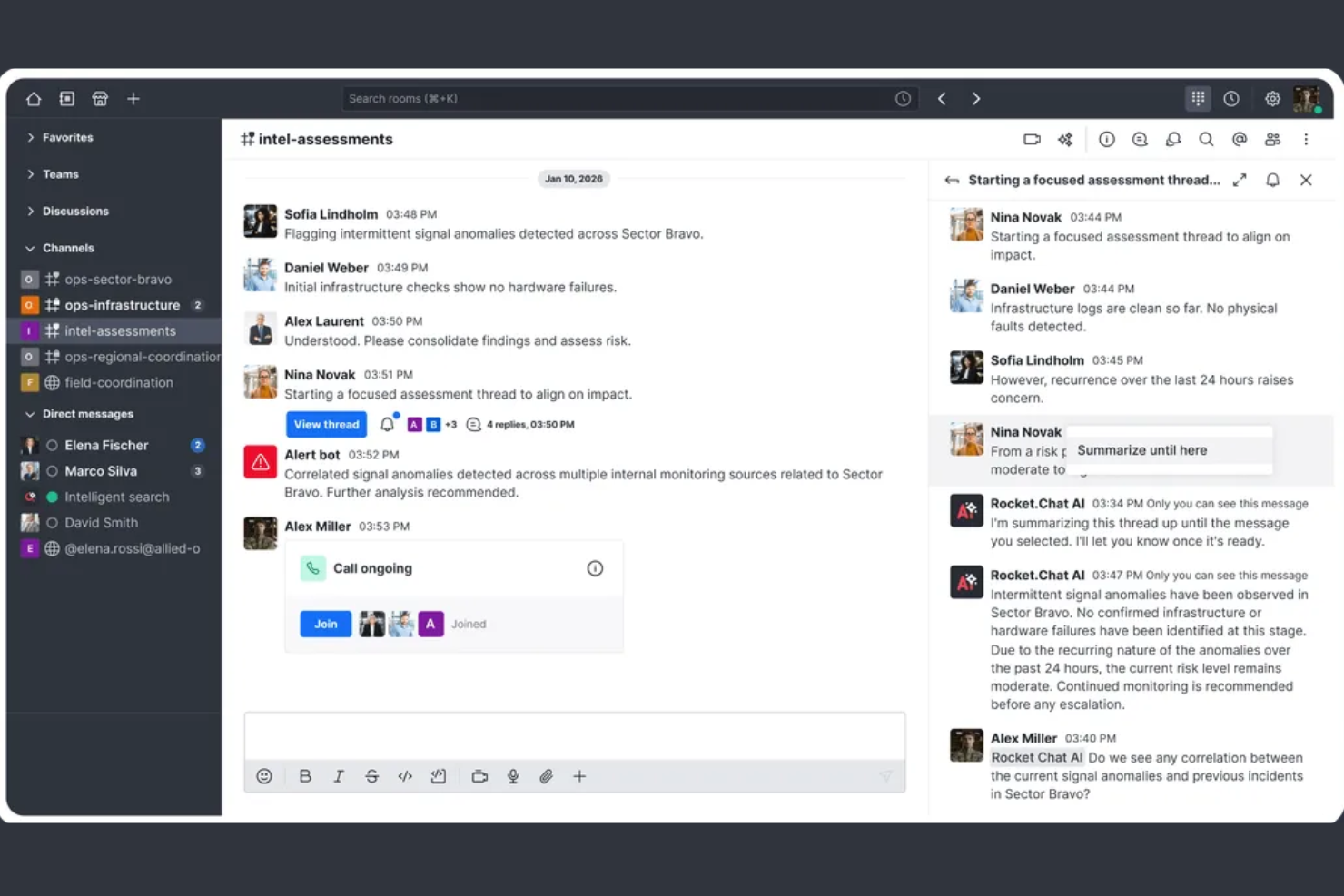
Rocket.Chat is an open-source internal communication platform that enables secure messaging, file sharing, voice and video calls, and extensive customization for teams needing full control over their workplace collaboration.
Who Is Rocket.Chat Best For?
Organizations with strict data privacy needs or those wanting to fully customize their communication environment in highly regulated sectors.
Why I Picked Rocket.Chat
I picked Rocket.Chat as one of the best because I can host it myself, deploy custom extensions, and review the full open-source code. I like having granular data residency control and transparency for sensitive internal messaging.
Rocket.Chat Key Features
- Omnichannel messaging: Manage chat, email, SMS, and social threads from one interface.
- Threaded conversations: Organize discussions and follow-ups within dedicated message threads.
- Role-based permissions: Set specific access and moderation levels for users.
- End-to-end encryption: Protect confidential communications with built-in encryption protocols.
Rocket.Chat Integrations
Rocket.Chat offers native integrations with Atlassian Jira, GitHub, GitLab, Slack, Zapier, Google Workspace, Microsoft 365, Salesforce, and Zendesk. An API is available for custom integrations.
Pros and Cons
Pros:
- Omnichannel inbox for all communications
- Advanced user and workspace permissions
- Open-source platform with self-hosting options
Cons:
- Requires manual server patch management
- Setups and updates require technical expertise

Twist
Best threaded messaging to reduce clutter
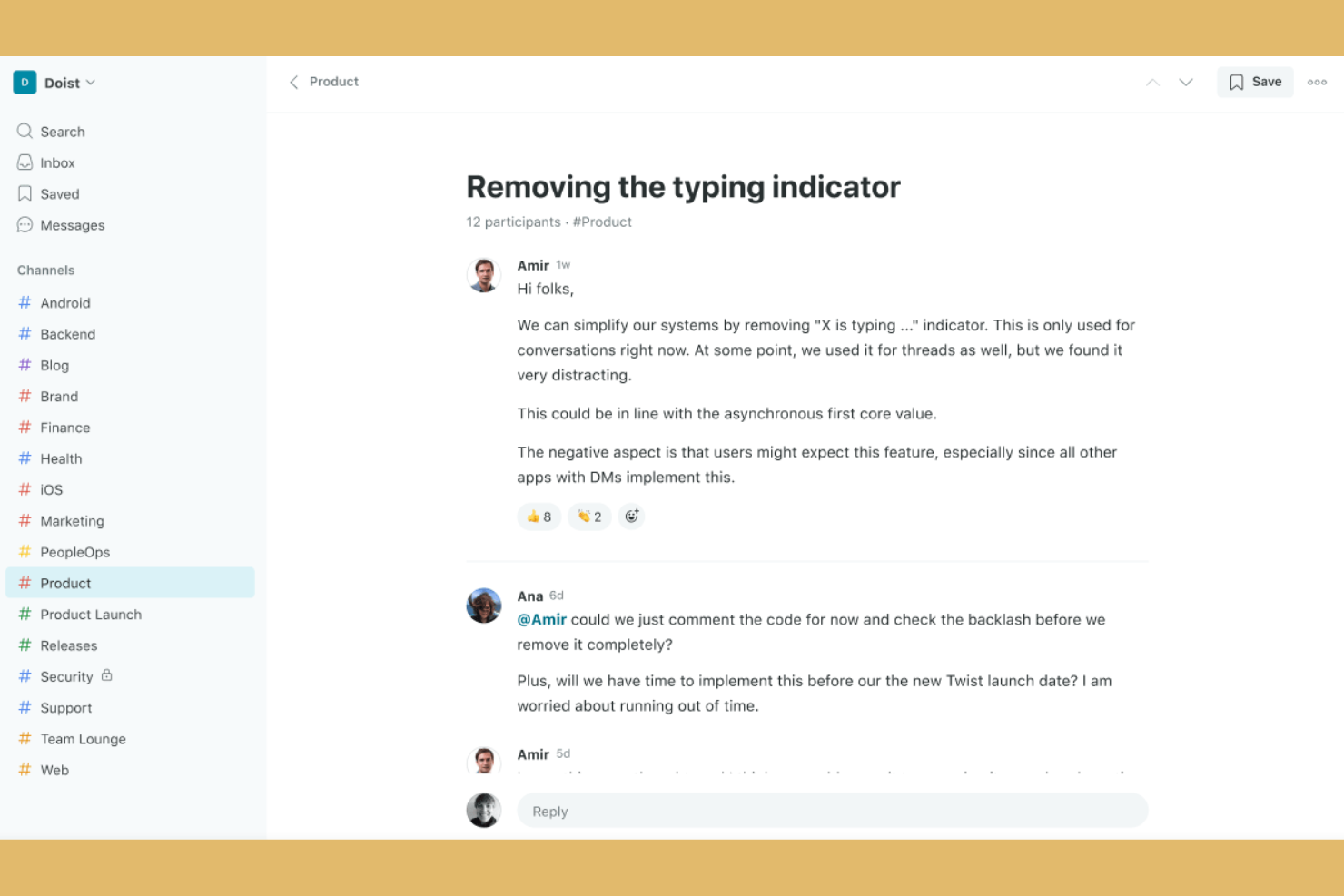
Twist is an internal communication and team collaboration platform that organizes messages in structured threads, enabling focused discussions, sharing of files, and easy cross-team search.
Who Is Twist Best For?
Async-first teams and distributed companies that want organized, distraction-free internal discussions.
Why I Picked Twist
I picked Twist as one of the best because my team can keep conversations clear and organized with persistent threaded messaging. I like how all discussions are broken into threads inside channels, letting us minimize chat noise and track projects with true transparency.
Twist Key Features
- Do not disturb settings: Set notification preferences to block interruptions during focused work.
- Message history search: Instantly search all channels and threads for past conversations and files.
- Guest access: Invite external collaborators to specific channels without giving full workspace access.
- Team directory: View and navigate the organization’s members with searchable team profiles.
Twist Integrations
Twist offers native integrations with Google Drive, GitHub, Todoist, Zapier, and RSS feeds. An API is available for custom integrations.
Pros and Cons
Pros:
- Searchable message history for all threads
- Enables async communication across time zones
- Threaded conversations keep topics organized
Cons:
- Few built-in formatting and emoji options
- Limited notification customization options
Diğer Dahili İletişim Araçları
Kısa listeme giremeyen ancak yine de göz atmaya değer bazı ek dahili iletişim aracı seçenekleri şunlardır:
- Google Chat
For collaborating within Google Workspace
- Zoom Team Chat
Unified experience with video meetings
- Slack
For organizing chats into focused channels
- ProofHub
Collaborative proofing for creative teams
- Webex
Enterprise-grade video and team messaging
- Troop Messenger
Self-destructing messaging for secure data
- Spike
Email chat hybrid for unified conversations
- Element
Encrypted messaging with decentralization
- MangoApps
All-in-one platform for intranet and chat
- Ryver
Built-in task and workflow management


How I Evaluate Internal Communication Tools
I split my evaluation into two layers: the baseline a cross-functional team relies on daily—threaded channels, file sharing, PM integrations—and the differentiators that make one tool the right fit.
Core Functionality (Table Stakes For This List)
When I'm selecting tools for my list, I rank each one on a scale from 0 (does not offer the functionality) to 5 (excels in this area) for each core functionality listed below. Then, I calculate the tool's total score into a percentage. Each tool needs to achieve a minimum total score of 65% to be considered for inclusion.
- Real-Time Messaging: I evaluate whether the tool supports threaded conversations, mentions, and reactions—features that keep a sprint discussion organized instead of buried in a single chat stream.
- Channels and Group Spaces: Project teams need dedicated spaces per workstream, so I look for public/private channels with clear permissions, guest access, and archiving options.
- File Sharing and Collaboration: I check whether teams can share specs, mockups, or docs inline with previews and version tracking rather than bouncing between the chat tool and a separate drive.
- Video and Voice Communication: Quick huddles replace a lot of unnecessary meetings, so I evaluate whether a tool offers screen sharing, recording, and group calls natively or only through add-ons.
- Search and Message History: When a stakeholder asks why a scope decision was made three months ago, search needs to surface that thread fast—I look for filters by date, person, and channel.
- Third-Party Integrations: I check for native connections to PM tools like Jira, Asana, and Trello, so task updates and notifications flow directly into conversations without manual copy-pasting.
Once I have a list of tools that meet this criteria, I consider what sets each platform apart.
Differentiating Factors (What Sets Vendors Apart)
Here's how I compare and contrast different vendors:
Standout Features
AI-powered thread summaries are a major differentiator—when you're juggling three projects and missed a full day of discussion, a channel recap beats scrolling through hundreds of messages. I also evaluate whether a tool lets you turn a chat message into a task directly inside Jira or Asana. Workflow automation matters here too: I look for triggers that post reminders or status updates when a milestone shifts, keeping the team aligned without manual follow-ups.
Beyond Features
Security and compliance certifications like SOC 2 and ISO 27001 matter when your team handles sensitive product roadmaps or client data. I also evaluate how well a tool fits into the broader PM ecosystem—whether it syncs bi-directionally with platforms like Jira or just pushes one-way notifications. Pricing transparency is another factor I weigh, especially guest user policies that can quietly inflate costs when you're looping in contractors or external stakeholders on a regular basis.
Dahili İletişim Araçları Nasıl Seçilir?
Uzun özellik listeleri ve karmaşık fiyatlandırma yapıları arasında kaybolmak kolaydır. Kendinize özgü yazılım seçim sürecinizde ilerlerken odağınızı korumanıza yardımcı olmak için göz önünde bulundurmanız gereken faktörleri aşağıda bir kontrol listesi hâlinde bulabilirsiniz:
| Faktör | Dikkat Edilmesi Gerekenler |
|---|---|
| Ölçeklenebilirlik | Boyutunuz iki katına çıkarsa araç ekibinizi destekleyebilecek mi? Kullanıcı sınırlarını, kanal kotalarını ve yönetici kontrollerini sorun. |
| Entegrasyonlar | Temel sistemlerinize (ör. proje yönetimi, kod depoları, takvimler) yerel olarak bağlanıyor mu? Satın almadan önce bunu doğrulayın. |
| Özelleştirilebilirlik | Bildirimleri, iş akışlarını ve izinleri yalnızca varsayılanlarla sınırlı kalmadan ekibinizin süreçlerine uyacak şekilde ayarlayabiliyor musunuz? |
| Kullanım kolaylığı | Tüm ekip üyeleri aracı hızla benimseyecek mi? Farklı departmanlardan ve teknik seviyelerden kişilerle demo yapmayı deneyin. |
| Uygulama ve işe alıştırma | Herkesin sisteme dahil olması için ne gerekiyor? Rehberli kurulum, geçiş desteği ve eğitim içerikleri sunan araçları tercih edin. |
| Maliyet | Aktif kullanıcılar, arşivler veya premium özellikler için gizli maliyetler var mı? Beklenmedik durumlarla karşılaşmamak için kullanımınızı zaman içinde öngörün. |
| Güvenlik önlemleri | Araç SSL, SSO, ayrıntılı izinler ve veri şifrelemeyi destekliyor mu? Hassas konuşmaları nasıl koruduğunu değerlendirin. |
| Destek erişilebilirliği | Destek sorunları ortaya çıktığında 7/24 yardım mevcut mu? Özellikle kritik kesintiler için destek kanallarını ve yanıt sürelerini kontrol edin. |
Dahili İletişim Araçları Nedir?
Dahili iletişim araçları, ekiplerin bir kuruluş içinde mesaj göndermesini, dosya paylaşmasını ve iş birliği yapmasını sağlayan dijital platformlardır. Bu platformlar, ekiplerin tartışmaları düzenlemesine, iş akışlarını koordine etmesine ve belgeleri merkezi, aranabilir kanallarda tutmasına yardımcı olan modern anlık mesajlaşma araçları olarak işlev görür. Gerçek zamanlı ve eşzamansız iletişimi destekleyerek şirket güncellemelerini dağıtmayı, kurumsal podcast'leri paylaşmayı ve projeler, departmanlar veya konumlar genelinde herkesin uyumlu ve bilgili kalmasını kolaylaştırırlar.
Dahili İletişim Araçlarının Özellikleri
Dahili iletişim araçlarını seçerken aşağıdaki temel özelliklere dikkat edin:
- Doğrudan mesajlaşma: Mesajları daha geniş bir gruba yayınlamadan hızlı sorular, hassas konular veya yan görüşmeler için ekip üyeleri arasında özel, bire bir konuşmalar yapılmasını sağlar.
- Grup sohbeti kanalları: Kullanıcıların belirli ekipler, projeler veya konular için kanallar ya da odalar oluşturmasına olanak tanır; böylece konuşmalar düzenli tutulur ve kolayca bulunabilir.
- Dosya paylaşımı: Belgelerin, görsellerin veya diğer dosyaların doğrudan iletişim platformu üzerinden kolayca yüklenmesine, paylaşılmasına ve bunlara erişilmesine olanak tanır; çoğu zaman önizleme ve sürüm geçmişi desteği sunar.
- Aranabilir mesaj geçmişi: Kullanıcıların sonsuz sohbet kayıtlarını incelemek zorunda kalmadan geçmiş mesajları, belgeleri veya bağlantıları hızla bulabilmesi için güçlü arama işlevleri sunar.
- Bildirimler ve bahsetmeler: Ekip üyelerinin önemli güncellemeleri görmesini veya gerektiğinde anında dikkat çekilmesini sağlamak için özelleştirilebilir uyarılar sunar.
- Konulara ayrılmış konuşmalar: Bir kanal içindeki görüşmelerin konuya özel başlıklara ayrılmasını destekler; bu da karışıklığın önlenmesine ve konuşmaların daha düzenli tutulmasına yardımcı olur.
- İzinler ve erişim denetimleri: Yöneticilerin konuşmaları ve dosyaları kimlerin görüntüleyebileceğini, paylaşım yapabileceğini veya yönetebileceğini belirlemesini sağlar; böylece gizlilik ve uygun erişim düzeyleri güvence altına alınır.
- Platformlar arası erişilebilirlik: Web, masaüstü ve mobil cihazlarda tutarlı bir deneyim sunarak ekiplerin her yerden iletişim kurabilmesini sağlar.
- Video ve sesli görüşmeler: Daha kapsamlı görüşmeleri veya hızlı yüz yüze durum kontrollerini kolaylaştırmak için sanal beyaz tahta araçlarının yanı sıra gerçek zamanlı sesli ve görüntülü toplantı özelliklerini de entegre eder.
- Diğer araçlarla entegrasyonlar: Takvimlere, görev yönetimi veya dosya depolama sistemlerine bağlanarak kullanıcıların çalışmalarını merkezileştirmesine ve iletişim aracı içinde birden fazla platformdan güncellemeler almasına olanak tanır.
Dahili İletişim Araçlarının Faydaları
Dahili iletişim araçlarını uygulamak ekibiniz ve işletmeniz için çeşitli faydalar sağlar. Yararlanabileceğiniz birkaç avantaj şunlardır:
- Daha hızlı karar alma: Merkezileştirilmiş konuşmalar, geleneksel e-posta iletişimi dizilerine ve standart dahili e-postalara kıyasla iş birliğini hızlandırır ve gecikmeleri azaltır.
- Daha net ekip uyumu: Konu tabanlı kanallar ve başlıklara ayrılmış görüşmeler, herkesin proje güncellemelerini takip etmesini, uzun kapsamlı toplantıların yerini almasını ve yapılacak işlerin takibini kolaylaştırır.
- Gelişmiş bilgi kalıcılığı: Aranabilir mesaj geçmişi ve paylaşılan dosyalar, ekiplerin fikirleri, görüşmeleri, kararları ve çalışanların birbirini takdir etmesine ilişkin dönüm noktalarını ileride başvurmak üzere kaydetmesine yardımcı olur.
- Uzaktan çalışma için daha fazla esneklik: Platformlar arası erişim ve gerçek zamanlı bildirimler, dağınık veya hibrit ekiplerin her yerden bağlantıda kalmasını sağlar.
- Daha güçlü bilgi güvenliği: İzinler ve erişim denetimleri, yöneticilere hassas konuşmaların ve dosyaların korunduğuna dair güven verir.
- Azaltılmış iletişim gürültüsü: Bahsetmeler ve ayrıntılı bildirimler gibi özellikler, ekip üyelerinin en alakalı konuşmalara odaklanmasına yardımcı olur.
- Basitleştirilmiş iş akışı entegrasyonu: Takvimler, görev yöneticileri ve dosya depolama sistemleriyle yerel entegrasyonlar, iş akışlarını tek bir yerde bir araya getirerek etkileşimi izlemek için yararlı veri ölçümleri sunar.
Dahili İletişim Araçlarının Maliyetleri ve Fiyatlandırması
Dahili iletişim araçlarını seçmek, mevcut çeşitli fiyatlandırma modellerinin ve planların anlaşılmasını gerektirir. Maliyetler özelliklere, ekip büyüklüğüne, eklentilere ve daha fazlasına göre değişir. Aşağıdaki tablo, dahili iletişim aracı çözümlerinde yaygın planları, ortalama fiyatlarını ve genellikle sunulan özellikleri özetlemektedir:
Dahili İletişim Araçları için Plan Karşılaştırma Tablosu
| Plan Türü | Ortalama Fiyat | Yaygın Özellikler |
|---|---|---|
| Ücretsiz Plan | $0 | Temel grup sohbeti, sınırlı dosya paylaşımı, sınırlamalara tabi aranabilir geçmiş ve temel mobil ve masaüstü uygulamaları. |
| Kişisel Plan | $5–$8/kullanıcı/ay | Sınırsız mesajlaşma, genişletilmiş dosya depolama alanı, mesaj geçmişinde arama, temel entegrasyonlar ve sınırlı destek. |
| İşletme Planı | $10–$15/kullanıcı/ay | Gelişmiş arama, yönetici denetimleri, özel izinler, öncelikli destek ve daha fazla entegrasyon ve iş akışı. |
| Kurumsal Plan | $20–$30/kullanıcı/ay | Gelişmiş güvenlik, uyumluluk araçları, ayrıcalıklı destek, gelişmiş yönetici özellikleri ve özelleştirilebilir entegrasyonlar. |
Dahili İletişim Araçları Hakkında SSS
Dahili iletişim araçları hakkında sık sorulan bazı soruların yanıtlarını burada bulabilirsiniz:
Ekipler dahili iletişim araçlarını kullanmaya başladığında karşılaştığı başlıca zorluklar nelerdir?
Yaygın zorluklar arasında yeni iş akışlarına yönelik başlangıçtaki direncin aşılması, kanalların kullanımına ilişkin net yönergelerin belirlenmesi ve bildirim yoğunluğunun yönetilmesi yer alır. Dahili bir iletişim stratejisi oluştururken kuruluşlar genellikle derin bilgi silolarıyla ve özellikle hibrit çalışma modelini koordine ederken farklı departmanlar arasındaki güçlü çalışan etkileşimini sürdürmekle mücadele eder. Eğitim planlamak, düzenli çalışan geri bildirimlerini teşvik etmek ve net iletişim kuralları belirlemek, benimsemeyi kolaylaştırırken genel şirket kültürünüzü güçlendirebilir ve günlük ekip çalışmasını iyileştirebilir.
Dahili iletişim araçları her büyüklükteki kuruluş için işe yarar mı?
Evet, çoğu araç küçük ekiplerden büyük işletmelere kadar iyi ölçeklenir. İster ofis çalışanlarını ister masa başında çalışmayan saha çalışanlarını yönetin, bu araçlar çeşitli iletişim ihtiyaçlarını karşılamak üzere tasarlanmıştır. Doğru dahili iletişim araçlarını seçmek, yazılımın kullanıcı yönetimi ve yeterli güvenlik sunmasını, ayrıca ekibinizin mevcut ve gelecekteki büyüklüğüne uygun esnek planlara sahip olmasını sağlar; böylece her ölçekte etkili dahili iletişim kurulabilir.
Dahili iletişim araçları eşzamansız iş birliğini nasıl destekleyebilir?
Dahili iletişim araçları, ekiplerin başkalarının uygun olduklarında inceleyip yanıtlayabileceği mesajlar, dosyalar ve güncellemeler bırakmasına olanak tanıyarak eşzamansız çalışmayı mümkün kılar. Bu, günlük operasyonlar sırasında farklı saat dilimleri arasında bilgi paylaşımını kolaylaştırır. Konu dizileri, modern iş birliği araçları ve aranabilir geçmişler, herkesin aynı anda çevrimiçi olmasına gerek kalmadan uyum içinde çalışmasına yardımcı olur; böylece platform, bilgi paylaşımı ve bilgi yönetimi için merkezi bir merkeze dönüşür.
Dahili iletişim araçlarında güvenlik açısından neleri değerlendirmelisiniz?
Özellikle SharePoint veya dahili bir sosyal ağ gibi mevcut platformlara bağlayacaksanız, aracın şifreleme, güçlü kimlik doğrulama, izinler ve uyumluluk seçenekleri sunduğundan emin olun. Ayrıca sağlayıcının veri gizliliğini nasıl ele aldığını, gerçek zamanlı iletişimi nasıl güvence altına aldığını ve çalışan iletişimini ve hassas kurumsal verileri korumak için denetim günlükleri sunup sunmadığını da incelemek isteyeceksiniz.
Dahili iletişim araçları diğer iş yazılımlarıyla entegre olabilir mi?
Evet, birçok dahili iletişim aracı proje yönetimi araçları, üretkenlik uygulamaları ve dosya depolama platformlarıyla entegrasyonlar sunar. Bu, görevleri ve şirket haberlerini merkezileştirmeye yardımcı olarak ekiplerin birden fazla uygulama arasında geçiş yapmadan işlerini yönetmesini kolaylaştırır. Ana iletişim kanallarınızı bu kullanıcı dostu merkezi merkeze bağlayarak dahili iletişimleri dağıtabilir, şirket genelindeki duyuruları yayımlayabilir ve kritik çalışan deneyimi güncellemelerini tek bir yerden tüm ekibe iletebilirsiniz.