

2026 İçin En İyi 10 Küçük İşletme Müşteri Veritabanı Yazılımı

10 Küçük İşletmeler İçin En İyi Müşteri Veritabanı Yazılımları Kısa Listesi


Küçük işletmeler için en iyi müşteri veritabanı yazılımı, müşteri verilerini düzenlemeyi, her etkileşimi takip etmeyi ve müşteri yönetimini kolaylaştırmayı sağlar. Böylece elektronik tablolar ve e-posta karmaşasıyla uğraşmak yerine işletmenizi ve ilişkilerinizi büyütmeye odaklanabilirsiniz. Doğru araç olmadan müşterileri elde tutmakta, küçük işletmenizi büyütmekte ve müşterileriniz arasında iyi bir itibarı korumakta zorlanırsınız.
Küçük işletmelerde ve girişimlerde operasyon alanında edindiğim 10 yılı aşkın deneyimden yararlanarak önde gelen seçenekleri kendim test ettim. Aşağıda, işletmeniz için en uygun seçeneği hızla bulmanıza, zamandan ve stresten tasarruf etmenize ve müşterilerinizle güçlü ilişkiler sürdürmenize yardımcı olmak için temel özellikleri, avantajları ve dezavantajları açıklıyorum.
Yazılım Önerilerimize Neden Güvenebilirsiniz?
Ekibimiz 2012’den beri yazılımları test ediyor ve inceliyor. Biz de proje yöneticisi olduğumuz için doğru yazılımı seçmenin ne kadar zor ve önemli olduğunu biliyoruz.
Bu rehber için araçları uygulamalı testler ve bağımsız araştırmalarla değerlendirdik ve seçim kriterlerimize göre puanladık. Ayrıca sektörün fikir önderlerinin ve alanında çalışan proje yönetimi uzmanlarının görüşlerinden de yararlanıyoruz.
İncelemelerimiz bir satış konuşması değil, editör ekibimizin kendi değerlendirmesidir.
Uzman inceleyenler:
Küçük İşletmeler İçin Müşteri Veritabanı Yazılımları Karşılaştırma Tablosu
Bu karşılaştırma tablosu, küçük işletmeler için en iyi müşteri veritabanı yazılımı seçimlerimdeki fiyatlandırma ayrıntılarını özetlemektedir:
| Tool | Starting Price | Website | |
|---|---|---|---|
| Best for simple CRM needs | 4.7 out of 5 | $22/user/month Free plan + 14-day free trial available | Website |
| Best for task management features | 4.7 out of 5 | $9/user/month Free plan + free demo available | Website |
| Best for sales-focused teams | 4.4 out of 5 | $19/month Free demo available | Website |
| Best for social media integration | 4.5 out of 5 | $24.90/user/month 14-day free trial available | Website |
| Best for Google Workspace users | 4.5 out of 5 | $29/user/month 14-day free trial + free demo available | Website |
| Best for small business marketing | 4.3 out of 5 | Pricing upon request 14-day free trial + demo available | Website |
| Best for enterprise scalability | — | $70/user/month 30-day free trial | Website |
| Best for marketing automation | — | $8.99/user/month Free plan available | Website |
| Best for project management integration | — | $29/user/month 14-day free trial + demo available | Website |
| Best for ease of use | — | $13/user/month 14-day free trial + free demo available | Website |
Küçük İşletmeler İçin En İyi Müşteri Veritabanı Yazılımları İncelemeleri
Aşağıda, kısa listeme giren küçük işletmeler için en iyi müşteri veritabanı yazılımlarının ayrıntılı özetlerini bulabilirsiniz. İncelemelerim, size en uygun aracı bulmanıza yardımcı olmak için her bir aracın temel özelliklerine, avantajlarına ve dezavantajlarına, entegrasyonlarına ve ideal kullanım alanlarına ayrıntılı bir bakış sunuyor.

Best for simple CRM needs
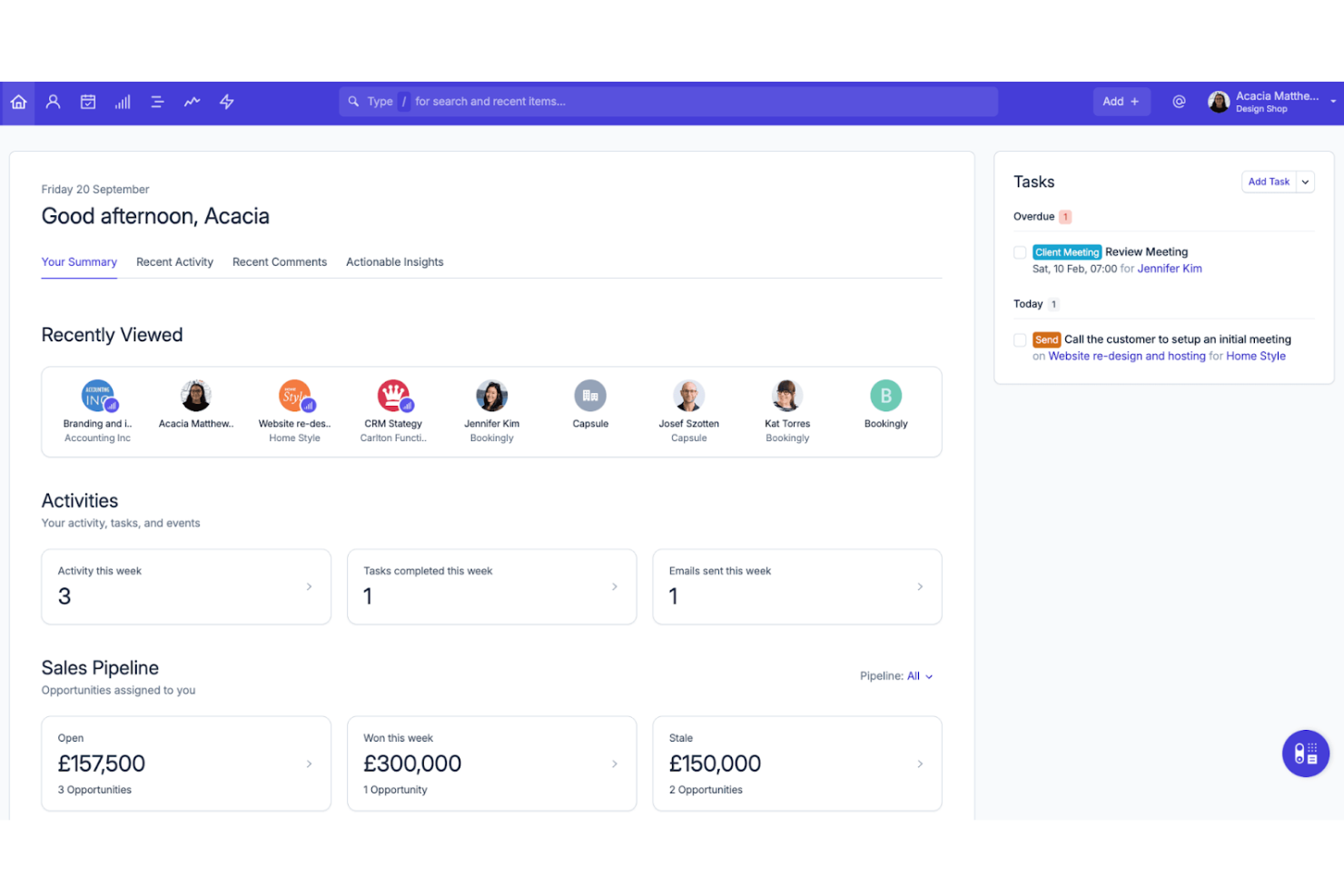
Capsule CRM lands on my shortlist because it does the fundamentals of client tracking exceptionally well without complexity getting in the way.
What stands out is how the contact management is structured for quick lookup, history, and relationship-view—when small businesses need to focus on straightforward sales follow-up, this works. I appreciate how the sales pipeline view and custom fields support simple, tailored workflows without extra noise.
Capsule CRM’s Best For
- Small businesses needing simple client tracking and sales pipelines
- Teams that want basic relationship and activity history
Capsule CRM’s Not Great For
- Organizations with advanced reporting or automation needs
- Businesses managing complex sales processes or large datasets
What sets Capsule CRM apart
Capsule CRM sticks to simple, straightforward sales and client tracking, similar to the way Trello keeps task management focused and minimal. You work with contacts, deals, and activity timelines instead of getting lost in a maze of extras. This feels different from larger platforms like Salesforce, which I find expect you to customize and configure as you go.
Tradeoffs with Capsule CRM
By keeping the CRM simple, Capsule gives up advanced automation and reporting, so teams needing deep analytics or complex workflow rules usually hit a ceiling.
Pros and Cons
Pros:
- Helps organize contacts with tags and filters
- Clean and intuitive interface for small teams
- Easy to set up and start using
Cons:
- Storage limits on lower-tier plans
- No built-in email marketing functionality

ClickUp
Best for task management features

ClickUp lands on my list because its task management features are some of the most robust and flexible I've used for client tracking. When small businesses need a database that goes beyond simple contact storage, ClickUp gives you custom fields, detailed task assignment, and relationship linking to create a tailored client workspace without heavy setup.
What stands out for me is how easily you can connect client records directly to tasks, notes, and conversations in one place. For teams juggling follow-ups, project updates, and client histories, this interconnected setup means you rarely have to dig through different apps to stay on top of client needs.
ClickUp’s Best For
- Small businesses building a custom client tracking tool
- Teams needing client records tied to tasks and docs
ClickUp’s Not Great For
- Companies needing advanced sales pipelines or CRM automation
- Businesses wanting out-of-the-box industry-specific client management
What sets ClickUp apart
ClickUp approaches client management with the mindset of extreme customization. Instead of limiting you to a fixed CRM style, it lets you piece together fields, relationships, and workflows for exactly how your business manages client work. Unlike HubSpot or Salesforce, this means you shape the workspace to fit your process, not the other way around.
I often see this work best when teams want task management and client data tied together, without strict CRM templates.
Tradeoffs with ClickUp
ClickUp optimizes for flexibility, but you sacrifice ready-made CRM reports and advanced deal pipeline tools, so out-of-the-box sales analytics are limited.
Pros and Cons
Pros:
- Includes built-in time tracking features
- Offers multiple task views for flexibility
- Highly customizable to fit your workflow
Cons:
- Advanced features may require higher-tier plans
- Can be overwhelming with numerous features

Best for sales-focused teams

I picked Zendesk Sell for sales-focused teams that need to manage client relationships and track deals without getting bogged down by clunky admin work. When small businesses want a client database that syncs pipeline activity, contacts, and communications in one place, it handles that better than most CRMs I’ve tested. I especially like the built-in activity tracking, which makes follow-ups and sales forecasting less work for everyone.
Teams should choose Zendesk Sell when staying close to changing client needs and sales cycles drives success.
Zendesk Sell’s Best For
- Sales-driven teams that need a focused client database
- Small businesses that manage outbound sales pipelines
Zendesk Sell’s Not Great For
- Teams needing advanced marketing automation
- Businesses wanting industry-specific CRM customization
What Sets Zendesk Sell Apart
Zendesk Sell structures every workflow around the sales pipeline, which simplifies how small businesses track leads and stay organized. Unlike HubSpot, which mixes sales and marketing, Zendesk Sell expects you to focus on sales activity first and everything else second. In practice, this works best when keeping tabs on sales tasks and communications is what actually drives your day-to-day priorities.
Tradeoffs with Zendesk Sell
Zendesk Sell optimizes for sales pipeline tracking, but you lose out on advanced marketing features and broader client engagement tools, so you may need a separate solution for campaigns or relationship marketing.
Pros and Cons
Pros:
- Customizable sales pipelines
- Intuitive interface with easy navigation
- Efficient sales tracking and organization
Cons:
- Customer support lacks phone assistance
- Limited advanced customization options

Nimble
Best for social media integration
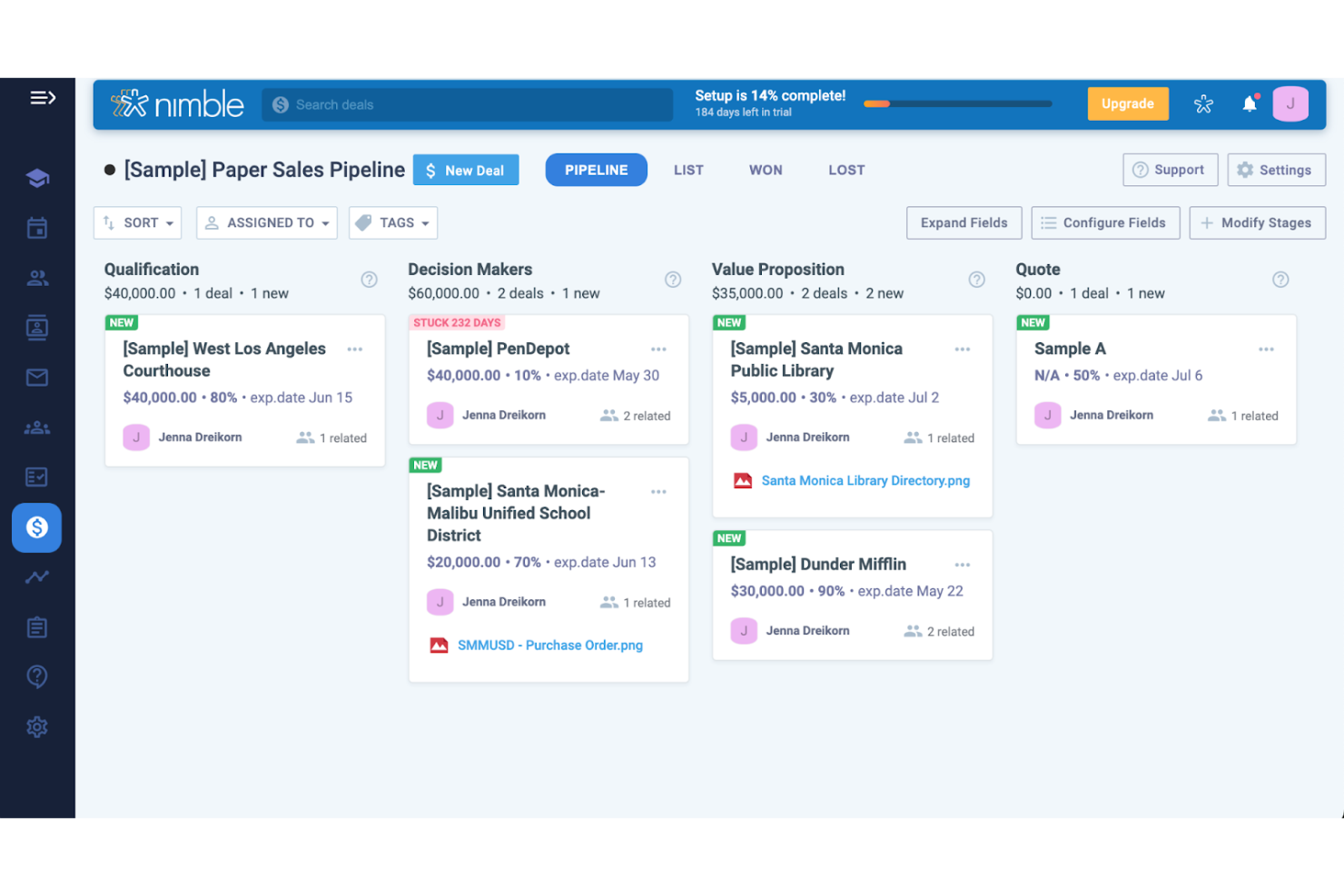
Nimble is on my list because it connects contact database management directly with social media channels, something most client database software overlooks. I’ve used Nimble in teams that lean heavily on LinkedIn, Twitter, and Facebook to build customer relationships, and it automatically pulls and updates contact data from those networks.
What I appreciate most is how Nimble lets you see a client’s full social profile right next to their record, which means you can reference past interactions and get context without switching tools. For anyone whose client base is active on social, this setup is refreshingly direct and keeps outreach personal.
Nimble’s Best For
- Small businesses using social media to build client relationships
- Teams needing unified social and contact insights in one place
Nimble’s Not Great For
- Companies managing high-volume or complex, hierarchical client data
- Teams without a strong social selling component
What sets Nimble apart
Nimble stands out by making social data central to client management, not just an add-on. The platform expects you to interact and engage with contacts through their public social presence alongside traditional CRM activities.
Unlike tools like HubSpot, which separate databases and social feeds, Nimble fuses them so you work from a single profile when researching, updating, or reaching out. This works best when you rely on up-to-date social streams for building and maintaining client relationships.
Tradeoffs with Nimble
Nimble optimizes for integrated social context, but this means its database tools are less suited to advanced segmentation or custom fields. If you need complex structures or reporting, you may hit limits.
Pros and Cons
Pros:
- Lightweight tool that doesn’t overwhelm users
- Combines communication channels in one place
- Easy to set up for small teams
Cons:
- No built-in phone support for customers
- Can’t handle complex workflows effectively

Best for Google Workspace users
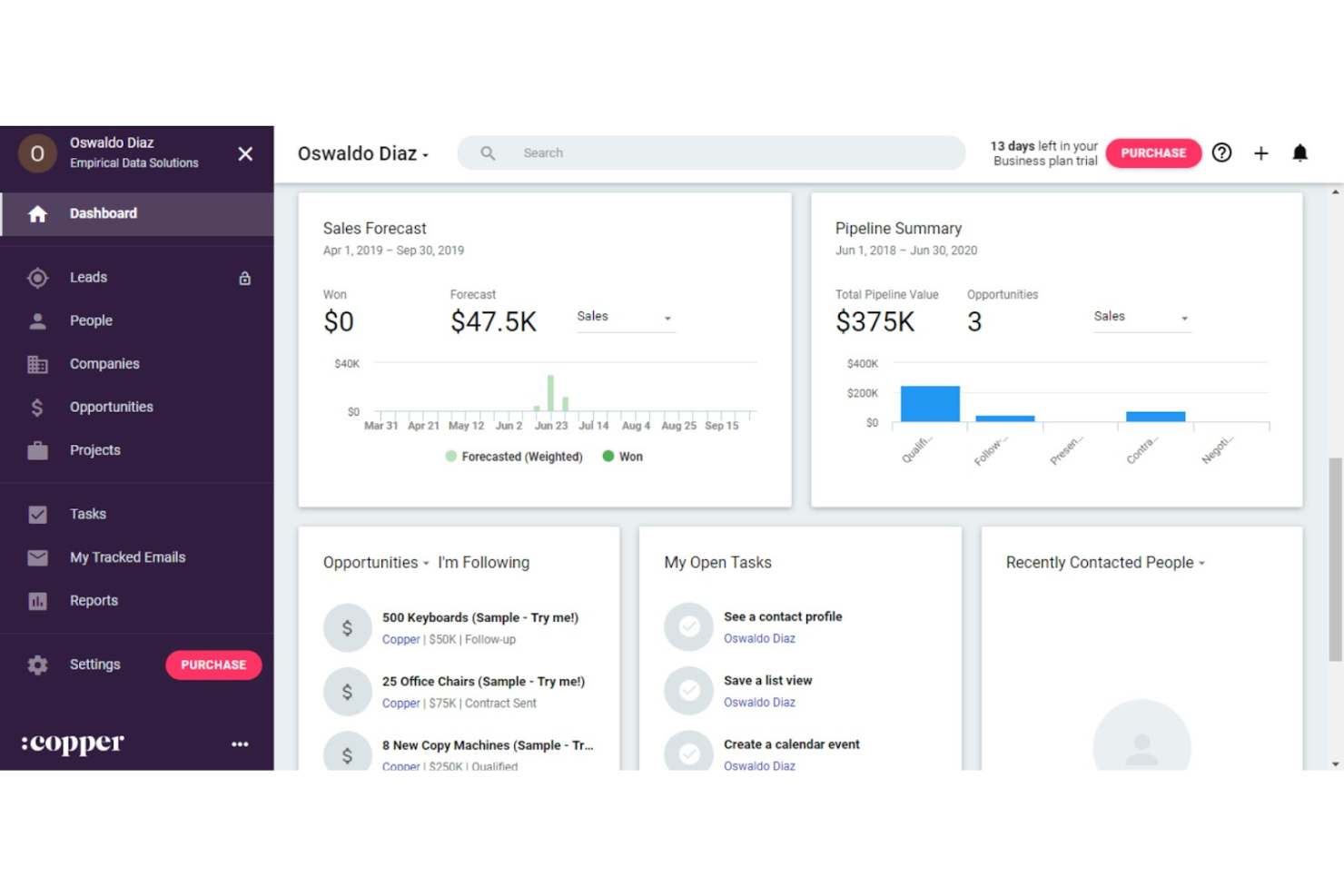
Copper CRM lands on this list because it’s so deeply built for teams working in Google Workspace. If your business lives in Gmail, Sheets, and Drive, Copper feels more like an extension than a separate tool. I appreciate how it lets you auto-capture contacts, track deal activity, and update opportunities straight from your inbox.
What’s unique is how smoothly it links with Google Calendar and automates relationship tracking, keeping your client database up to date without duplicate work.
Copper CRM’s Best For
- Small businesses using Google Workspace as their main platform
- Teams that want automatic contact and opportunity updates in Gmail
Copper CRM’s Not Great For
- Businesses needing advanced custom reporting or analytics
- Companies not committed to Google Workspace tools
What sets Copper CRM apart
Copper stands out by embedding itself right inside Google Workspace, so client tracking happens where you already do your daily work. Unlike Salesforce, which requires you to switch platforms and adapt to a new environment, Copper keeps your sales process visible inside Gmail and Google Calendar. This works well if your workflows are already built around those tools and you want less context-switching.
Tradeoffs with Copper CRM
Copper optimizes for natural fit in Google Workspace, but you lose out on highly advanced reporting or customizable dashboards. If you outgrow basic workflow needs, you might feel boxed in by its limits.
Pros and Cons
Pros:
- Simplifies sales tracking with visual pipelines
- Automates data entry from emails
- Integrates naturally with existing Google tools
Cons:
- Advanced features require higher-tier subscriptions
- Limited custom reports for detailed analysis

Best for small business marketing

Ontraport lands on this list because it brings small business marketing and client database management under one roof, without the typical complexity. I see small teams get the most value when they need reliable contact management, automated follow-ups, and campaign tracking in a single platform.
What I appreciated most during testing is how funnel automation, CRM records, and segmentation all tie together, making life easier, especially, I imagine, for small businesses who want nimble marketing and database workflows.
Ontraport's Best For
- Small businesses that need integrated CRM and marketing automation
- Teams focused on automating client follow-ups and segmentation
Ontraport's Not Great For
- Businesses with complex, multi-department sales structures
- Teams needing deep customization for industry-specific workflows
What sets Ontraport apart
Ontraport is designed for small businesses that want marketing automation and client management tightly woven together. Unlike dedicated CRMs like HubSpot or generalist tools like Airtable, it expects you to build marketing automations and manage your contacts from one place. This works best when you want marketing, email follow-up, and contact data to live inside a single workflow, without bouncing between systems.
Tradeoffs with Ontraport
Ontraport optimizes for easy all-in-one automation, but you lose the depth and complexity you get in tools that handle intricate sales processes or support multi-division needs. If your workflows require granular pipeline controls or tailored, industry-specific workflows, you’ll hit limits fast.
Pros and Cons
Pros:
- Scalable features that grow with your business
- Customizable dashboards to fit your needs
- Flexible automation for various business processes
Cons:
- Complex setup may require time and training
- Steep learning curve for new users


Microsoft Dynamics CRM makes my shortlist because it’s one of the few client database platforms that adapts fast when your business outgrows entry-level tools. I find it’s the best fit when small businesses need something scalable for future growth, with built-in automation and tailored dashboards for sales and customer data. I especially like its custom entity model, so you can shape data structures as client relationships get more complex.
Microsoft Dynamics CRM’s Best For
- Small businesses planning for rapid, long-term growth
- Sales teams handling complex, multi-stage client data
Microsoft Dynamics CRM’s Not Great For
- Solo operators or businesses with simple databases
- Teams looking for a lightweight, low-maintenance tool
What sets Microsoft Dynamics CRM apart
Microsoft Dynamics CRM is shaped for businesses that want their client database to evolve with them. Unlike tools like HubSpot, which favor simple pipelines and lighter sales processes, Dynamics builds on the assumption that teams will want to customize objects, automate complex relationships, and integrate with a wider suite of Microsoft tools. In practice, this feels like working within a framework that expects your needs and data structures to keep scaling as you grow.
Tradeoffs with Microsoft Dynamics CRM
Dynamics optimizes for long-term flexibility and custom setup, but the setup process takes longer and usually requires more admin than with a turnkey CRM.
Pros and Cons
Pros:
- Strong security features for data protection
- Supports complex sales processes effectively
- Offers advanced data analytics tools
Cons:
- Occasional performance issues with large data sets
- Requires significant time to implement fully


Agile CRM earns its spot because of how well it connects client records with its built-in marketing automation. When I tested workflows, I found the drag-and-drop campaign builder practical for targeting contact segments and tracking outcomes. Teams usually reach for Agile CRM once basic spreadsheets stop scaling and timely follow-ups start slipping.
What I appreciate most is its ability to centralize client history while automating emails, web engagement, and follow-up tasks; you can actually see personal touchpoints drive engagement without losing track of conversation context.
Agile CRM’s Best For
- Small businesses needing marketing automation with contact management
- Teams that want to automate personalized follow-ups and campaigns
Agile CRM’s Not Great For
- Businesses needing detailed reporting across multiple business units
- Companies with complex sales workflows or high-volume support queues
What sets Agile CRM apart
Agile CRM takes a marketing-first approach to client management. Instead of focusing just on organizing contacts like HubSpot or Pipedrive, it expects you to blend contact data with targeted campaigns from day one. In practice, this works well if you want relationship tracking tied directly to nurture actions, not managed separately. The automation is woven into daily client interactions, so you see how engagement efforts connect to outcomes.
Tradeoffs with Agile CRM
Agile CRM optimizes for blending contacts and marketing, but that focus means you give up granular sales or operations features. As a result, teams with complex pipelines or heavy service needs hit limits and may need to supplement with other tools.
Pros and Cons
Pros:
- Features web engagement tools for lead capture
- Offers built-in capabilities for direct calls
- Includes lead scoring even on the free plan
Cons:
- Limited customization for advanced workflows
- There can be a steep learning curve for beginners


Insightly makes the cut for me because it links CRM and project management in a way that helps small businesses keep client relationships and project delivery in sync. I see teams using it to move quickly from a sales opportunity to managing related project work in context, with all client details carried over.
What I like most is how the contact database connects directly to project milestones, pipelines, and task assignments. This works best when you want to keep teams on the same page about both project progress and client communication.
Insightly’s Best For
- Small businesses needing unified CRM and project workflow tracking
- Teams managing the full client lifecycle from lead to project
Insightly’s Not Great For
- Companies needing advanced marketing automation features
- Businesses that manage projects outside of a CRM context
What sets Insightly apart
Insightly takes a unique approach by blending contact management and project delivery in one system. It’s built for small businesses that want every client detail linked directly to the tasks and projects serving those clients. Unlike Salesforce, which can feel heavy and siloed, Insightly expects you to manage both sales and delivery in a single workflow.
This works best when you want your pipeline and projects tightly connected so nothing falls through.
Tradeoffs with Insightly
Insightly optimizes for uniting CRM and project work, but you lose depth in marketing automation and customization compared to tools designed purely for those needs. That tradeoff can matter if you expect heavy workflow tailoring or advanced marketing features.
Pros and Cons
Pros:
- Drag-and-drop pipeline management
- Workflow automation reduces manual tasks
- Email tracking for engagement insights
Cons:
- Customer support may require extra fees
- Additional costs for advanced features


Nutshell CRM does an excellent job organizing and searching client data, which I find essential when teams outgrow spreadsheets. You get helpful reporting tools that show client activity and sales trends, and the single-list client view makes it easy to keep everything together as your business scales.
What stands out for me is how quickly you can filter and act on client records without fuss.
Nutshell CRM’s Best For
- Small businesses tracking sales, contacts, and interactions in one place
- Teams needing quick access and action on client records
Nutshell CRM’s Not Great For
- Large companies with advanced customization or automation needs
- Organizations needing deep vertical-specific CRM features
What sets Nutshell CRM apart
Nutshell CRM is designed for small businesses that need a straightforward way to handle client relationships. It leans into making contact management and sales tracking feel intuitive, which is why I suggest it for teams new to CRM software. Unlike Salesforce, which expects you to spend time customizing everything, Nutshell’s approach is to keep things as out-of-the-box as possible so you can focus on the work itself.
Tradeoffs with Nutshell CRM
By optimizing for simplicity and quick setup, you lose out on specialized automation or industry-specific workflows. Teams needing detailed customization won’t find enough control here.
Pros and Cons
Pros:
- Visual sales pipeline aids in tracking
- Effective email automation for campaigns
- Quick setup without extensive customization
Cons:
- No built-in phone dialer functionality
- Advanced reporting options are restricted
Küçük İşletmeler İçin Diğer Müşteri Veritabanı Yazılımları
İşte kısa listeme girmeyen ancak yine de incelemeye değer bazı ek küçük işletme müşteri veritabanı yazılımı seçenekleri:
- Bitrix24
For team collaboration
- Salesflare
For automated data entry
- GoodDay
For customizable workspaces
- Less Annoying CRM
For simple CRM needs
- Salesforce CRM
For enterprise customization
- Creatio AI CRM
For low-code development
- Bigin by Zoho CRM
For micro-businesses
- Zoho CRM
For small business budgets
- Kintone
For custom app creation
- Freshsales
For AI-driven insights
- Pipedrive
For visual sales pipelines
- monday.com
For team project tracking
- Close
For remote sales teams
- GoHighLevel
For agency solutions


How I Evaluate Client Database Software for Small Business
When an agency PM jumps on a client call and needs instant context—past projects, notes, contacts—I evaluate two layers: baseline must-haves and the differentiators that set tools apart.
Core Functionality (Table Stakes For This List)
When I'm selecting tools for my list, I rank each one on a scale from 0 (does not offer the functionality) to 5 (excels in this area) for each core functionality listed below. Then, I calculate the tool's total score into a percentage. Each tool needs to achieve a minimum total score of 65% to be considered for inclusion.
- Centralized Client Records: I look for profiles that store contacts, custom fields, and project history so your team pulls up a full client snapshot in one view.
- Interaction & Communication Tracking: Each tool should log emails, calls, and meeting notes on the client timeline—not buried in a separate inbox or external app.
- Project-Client Linking: I evaluate how directly you can tie a client record to active projects and deliverables—like pulling up all open work for a retainer client.
- Document & File Management: Contracts, SOWs, and briefs should attach to client records with version tracking, so you're never searching shared drives mid-meeting.
- Client Segmentation & Filtering: I check for tags, custom fields, and saved filters that let you sort clients by project status, account type, or engagement tier.
- Small Business Accessibility: Pricing tiers, onboarding effort, and feature availability should suit teams of one to twenty without requiring enterprise-level budgets or setup.
Once I have a list of tools that meet this criteria, I consider what sets each platform apart.
Differentiating Factors (What Sets Vendors Apart)
Here's how I compare and contrast different vendors:
Standout Features
Automated workflow triggers make a real difference—when a project stage changes, the tool should fire off follow-up tasks or client notifications without manual effort. I also look for client portal access, which lets clients check project status and approve deliverables on their own instead of emailing you for updates. Reporting and client insights round things out. Dashboards that surface project profitability and engagement frequency per account help small teams prioritize where to focus.
Beyond Features
Integration support matters a lot here. I check whether a tool connects natively with project management platforms like Asana or Monday and syncs with Gmail or Outlook, since small teams can't afford to manually copy data between systems. Time-to-value is another factor I weigh—tools with CSV import, guided setup, and ready-made templates let a three-person agency get running in a day instead of a week. Pricing transparency also shapes my evaluation, especially whether core features stay accessible on entry-level plans as your team grows.
Küçük İşletmeler İçin Müşteri Veritabanı Yazılımı Nasıl Seçilir?
Uzun özellik listeleri ve karmaşık fiyatlandırma yapılarına kapılmak kolaydır. Kendinize özgü yazılım seçme sürecinizde ilerlerken odağınızı korumanıza yardımcı olmak için göz önünde bulundurmanız gereken faktörlerin bir kontrol listesini burada bulabilirsiniz:
| Faktör | Göz önünde bulundurulması gerekenler |
| Ölçeklenebilirlik | Yazılımın işletmenizle birlikte büyüdüğünden emin olun. Baştan sona yenileme gerektirmeden daha fazla kullanıcıyı ve daha büyük veri kümelerini destekleyen seçenekleri arayın. |
| Entegrasyonlar | Sorunsuz bir iş akışını sürdürmek için e-posta platformları veya muhasebe yazılımları gibi ekibinizin hâlihazırda kullandığı araçlara bağlanıp bağlanmadığını kontrol edin. |
| Özelleştirilebilirlik | Özel alanlardan kişiselleştirilmiş panolara kadar yazılımı belirli iş süreçlerinize uyacak şekilde uyarlayıp uyarlayamayacağınızı belirleyin. |
| Kullanım Kolaylığı | Ekibiniz zamanını yazılımı öğrenmeye değil, kullanmaya ayırmalıdır. Sezgisel arayüzlere sahip ve asgari düzeyde eğitim gerektiren seçenekleri tercih edin. |
| Bütçe | Özellikleri karşılayabileceğiniz bütçeyle dengeleyin. Yükseltmeler ve destek de dâhil olmak üzere başlangıç maliyetlerini ve uzun vadeli giderleri göz önünde bulundurun. |
| Güvenlik Önlemleri | Güçlü şifreleme ve GDPR gibi düzenlemelere uyumlulukla müşteri verilerinizi koruyun. Yazılımın güvenlik sertifikalarını doğrulayın. |
Küçük İşletmeler İçin Müşteri Veritabanı Yazılımlarındaki Trendler
Araştırmam sırasında farklı müşteri veritabanı yazılımı sağlayıcılarından sayısız ürün güncellemesi, basın bülteni ve sürüm günlüğü inceledim. Takip ettiğim yeni ortaya çıkan trendlerden bazıları şunlar:
- Yapay zekâ destekli kişiselleştirme: Satıcılar, müşteri etkileşimleri için kişiselleştirilmiş öneriler sunmak üzere yapay zekâ özellikleri ekliyor. Salesforce gibi araçlar, müşteri verilerini analiz etmek ve sonraki adımları önermek için yapay zekâ kullanıyor. Bu, işletmelerin bireysel müşteri ihtiyaçlarını etkili bir şekilde karşılamak üzere stratejilerini uyarlamasına yardımcı oluyor.
- Ses tanıma entegrasyonu: Kullanıcıların veri girmesine veya sistemi ellerini kullanmadan sorgulamasına olanak tanıyan sesli komutlar giderek yaygınlaşıyor. Zoho CRM gibi satıcılar, kullanıcı etkileşimini ve veri girişini iyileştirmek, bunları daha hızlı ve kolay hâle getirmek için bu özelliği araştırıyor.
- Tahmine dayalı analiz: Daha fazla satıcı, işletmelerin satış trendlerini ve müşteri davranışlarını öngörmesine yardımcı olmak için tahmine dayalı analiz kullanıyor. Bu trend, işletmelerin müşteri ihtiyaçlarını önceden tahmin etmesini ve yaklaşımlarını buna göre ayarlamasını sağladığı için planlama ve strateji açısından faydalıdır.
- Veri gizliliği geliştirmeleri: Artan veri gizliliği düzenlemeleriyle birlikte satıcılar, güvenlik özelliklerini geliştirmeye odaklanıyor. HubSpot CRM gibi araçlar, güvenli veri işleme ve GDPR gibi standartlara uyumluluğa öncelik vererek işletmelerin müşteri bilgilerini etkili bir şekilde koruyabilmesini sağlıyor.
- Çok kanallı iletişim: Satıcılar, birden fazla iletişim kanalını platformlarına entegre ederek işletmelerin müşterilerle e-posta, sohbet, sosyal medya ve daha fazlası aracılığıyla etkileşim kurmasına olanak tanıyor. Bu trend, tutarlı iletişimin sürdürülmesine ve müşterilere bulundukları kanaldan ulaşılmasına yardımcı olarak etkileşimi ve memnuniyeti artırıyor.
Küçük İşletmeler için Müşteri Veritabanı Yazılımı Nedir?
Küçük işletmeler için müşteri veritabanı yazılımı, müşteri bilgilerini düzenlemenize, etkileşimleri yönetmenize ve satışları tek bir yerden takip etmenize yardımcı olan bir araçtır. Küçük şirketlerdeki satış personeli, pazarlamacılar ve müşteri hizmetleri temsilcileri, müşteri bilgilerini düzenli tutmak, potansiyel müşterileri takip etmek ve her ilişkinin geçmişini eksiksiz görmek için bu yazılımı kullanır.
Bu yazılım, müşteri listelerini yönetmenin yarattığı karmaşayı ortadan kaldırır; daha hızlı yanıt vermenize, önemli bilgileri hatırlamanıza ve ekibinizdeki herkesin gelişmelerden haberdar olmasına yardımcı olur. Bu, özellikle ekip üyelerinin birçok görevi yerine getirdiği ve müşterileri yönetmenin bu görevlerden yalnızca biri olduğu, zaman ve kaynakları sınırlı küçük işletmeler için faydalıdır.
Küçük İşletmeler için Müşteri Veritabanı Yazılımının Özellikleri
Küçük işletmeler için müşteri veritabanı yazılımında aranması gereken bazı temel özellikleri aşağıda bulabilirsiniz.
- İletişim yönetimi: Müşteri bilgilerini, satın alma geçmişini ve tercihlerini merkezi bir konumda düzenleyerek bunlara erişmeyi ve güncellemeyi kolaylaştırır.
- Satış takibi: Ekiplerin anlaşmaları etkili bir şekilde sonuçlandırmaya odaklanmasına yardımcı olmak için satış faaliyetlerini, potansiyel müşteri oluşturma çalışmalarını ve satış hattındaki ilerlemeyi izler.
- E-posta entegrasyonu: İletişimleri takip etmek ve etkileşimleri doğrudan CRM üzerinden yönetmek için e-posta platformunuza bağlanarak iletişim tutarlılığını artırır.
- Otomasyon özellikleri: Takip mesajları, hatırlatıcılar ve bildirimler gibi tekrarlayan görevleri otomatikleştirerek daha stratejik çalışmalar için zaman kazandırır.
- Raporlama ve analiz: Satış performansı, müşteri davranışı ve pazarlama kampanyaları hakkında içgörüler sunarak veriye dayalı karar alma süreçlerine yardımcı olur.
- Mobil erişim: Kullanıcıların müşteri verilerini, ekip görevlerini ve izinlerini hareket hâlindeyken yönetmesine olanak tanıyarak her yerden üretkenlik sağlar.
- Güvenlik özellikleri: Müşteri verilerinin korunmasını ve GDPR gibi gizlilik düzenlemelerine uyulmasını sağlayarak hassas bilgileri güvence altına alır.
- Tahmine dayalı analiz: İşletmelerin pazar değişikliklerinin önünde kalmasını sağlamak üzere planlama ve stratejiye yardımcı olmak için satış trendlerini ve müşteri ihtiyaçlarını öngörür.
- Çok kanallı iletişim: E-ticaret platformları ve telefon numaraları dâhil olmak üzere birden fazla iletişim kanalını entegre ederek müşterilerle platformlar arasında tutarlı etkileşim kurulmasına olanak tanır.
- Kanban görünümleri: İş akışlarını yönetmek için görsel bir yaklaşım sunarak görevleri, satış hunilerini ve ekip önceliklerini bir bakışta takip etmeyi kolaylaştırır.
- Elektronik imza işlevi: Ekiplerin imzalanmış belgeleri doğrudan CRM içinde göndermesine, almasına ve depolamasına olanak tanıyarak sözleşme sürecini kolaylaştırır ve anlaşmaların daha hızlı sonuçlandırılmasına yardımcı olur.
Küçük İşletmeler için Müşteri Veritabanı Yazılımının Faydaları
Müşteri veritabanı yönetimi yazılımını uygulamak, ekibiniz ve küçük işletmeniz için çeşitli faydalar sağlayabilir. Yararlanabileceğiniz birkaç faydayı aşağıda bulabilirsiniz:
- Geliştirilmiş organizasyon ve veri yönetimi: Müşteri bilgilerini merkezileştirerek ekibinizin verilere daha kolay erişmesini ve verileri verimli bir şekilde yönetmesini sağlar.
- Artırılmış satış verimliliği: Satış faaliyetlerini takip eder ve takip işlemlerini otomatikleştirerek ekibinizin anlaşmaları sonuçlandırmaya odaklanmasına yardımcı olur.
- Daha iyi karar alma: Stratejik iş kararlarına yön veren içgörüler sağlamak için raporlama ve analiz özellikleri sunar.
- Artan hareketlilik: Müşteri verilerine mobil erişim sağlayarak ekibinizin hareket hâlindeyken üretken kalmasına olanak tanır.
- Daha güçlü müşteri ilişkileri: Müşterilerle tutarlı ve kişiselleştirilmiş etkileşimi sürdürmek için iletişim kanallarını entegre eder ve etkileşimleri otomatikleştirir.
- Veri güvenliği: Güveni oluşturmak için gizlilik düzenlemelerine uygun şekilde müşteri verilerinin korunmasını sağlar.
- Öngörülü planlama: Müşteri ihtiyaçlarını ve satış trendlerini öngörmek için öngörülü analizlerden yararlanarak proaktif karar almayı destekler.
Küçük İşletmeler için Müşteri Veritabanı Yazılımı Maliyetleri ve Fiyatlandırması
Herhangi bir küçük işletme için müşteri veritabanı yazılımı seçmek, mevcut çeşitli fiyatlandırma modellerinin ve planların anlaşılmasını gerektirir. Maliyetler, ücretsiz müşteri yönetimi yazılımlarından, özelliklere, ekip büyüklüğüne, eklentilere ve daha fazlasına bağlı olarak ayda $100s+ tutabilen kurumsal planlara kadar değişir. Aşağıdaki tablo, küçük işletmelere yönelik müşteri veritabanı yazılımı çözümlerinde yaygın planları, ortalama fiyatlarını ve genellikle sunulan özellikleri özetlemektedir:
Küçük İşletmeler için Müşteri Veritabanı Yazılımı Planları Karşılaştırma Tablosu
| Plan Türü | Ortalama Fiyat | Yaygın Özellikler |
| Ücretsiz Plan | $0 | Temel kişi yönetimi, sınırlı depolama ve e-posta desteği. |
| Kişisel Plan | $5-$25/kullanıcı/ay | Kişi yönetimi, e-posta entegrasyonu, görev yönetimi ve mobil erişim. |
| İşletme Planı | $25-$50/kullanıcı/ay | Gelişmiş raporlama, otomasyon özellikleri, satış takibi ve entegrasyonlar. |
| Kurumsal Plan | $50-$100/kullanıcı/ay | Özelleştirilebilir panolar, özel destek, API erişimi ve geliştirilmiş güvenlik. |
Küçük İşletmeler için Müşteri Veritabanı Yazılımı Hakkında SSS
Küçük işletmeler için müşteri veritabanı yazılımı hakkında sık sorulan bazı soruların yanıtları:
Müşteri veritabanı yazılımı kullandığım diğer araçlarla entegre olabilir mi?
Evet, birçok müşteri veritabanı yazılımı seçeneği kullandığınız diğer araçlarla çalışabilir. Bu yazılımlar genellikle e-posta hizmetleri, takvimler ve muhasebe yazılımlarıyla bağlantı kurar. Seçim yapmadan önce işlerinizi kolaylaştırmak için yazılımın hâlihazırda kullandığınız araçlarla bağlantı kurup kuramayacağını kontrol edin.
Müşteri bilgilerim müşteri veritabanı yazılımıyla güvende mi?
Müşteri bilgilerinizin güvende tutulması önemlidir. İyi müşteri veritabanı yazılımları verilerinizi korumak için güçlü güvenlik önlemleri kullanır. Veri şifreleme, düzenli yedekleme sunan ve veri koruma yasalarına uyan yazılımları tercih edin. Ayrıca güçlü parolalar kullanmak ve bilgilere kimlerin erişebileceğini sınırlamak da akıllıca olacaktır.
Küçük işletmeler için müşteri veritabanı yazılımının maliyeti ne kadar?
Müşteri veritabanı yazılımının maliyeti değişiklik gösterir. Bazıları temel özelliklere sahip ücretsiz sürümler sunarken, diğerleri ihtiyaç duyduğunuz özelliklere ve yazılımı kullanacak kullanıcı sayısına bağlı olarak aylık ücretler uygular. Bütçenize uyan ve işletmenizin ihtiyaçlarını karşılayan seçeneği bulmak için farklı seçenekleri karşılaştırmanız en iyisidir.
Yeni bir müşteri veritabanı yazılımına geçmek ne kadar zor?
Yeni bir yazılıma geçmek biraz zaman alabilir, ancak birçok sağlayıcı bu süreci kolaylaştırmak için yardım sunar. Sağlayıcıların veri aktarımı için kılavuzları, müşteri desteği veya hizmetleri olabilir. Geçiş yapmadan önce sorunları önlemek ve işletmenizin sorunsuz çalışmaya devam etmesini sağlamak için süreci planlayın.
Müşteri veritabanı yazılımı müşteri ilişkilerimi geliştirmeye yardımcı olabilir mi?
Evet, müşteri veritabanı yazılımı kullanmak müşterilerinizle daha iyi ilişkiler kurmanıza yardımcı olabilir. Tüm müşteri bilgilerinizi tek bir yerde tutarak etkileşimleri takip etmeyi ve geri dönüş yapmayı kolaylaştırır. Bu, müşterilerinizin ihtiyaçlarını anlamanıza ve daha iyi hizmet sunmanıza yardımcı olur; böylece daha fazla satış ve daha memnun müşteriler elde edebilirsiniz.