

Os 10 melhores softwares de aprovação de faturas para 2026

Lista restrita de software de aprovação de faturas


O software de aprovação de faturas automatiza a revisão, o encaminhamento e a autorização de faturas antes do pagamento, ajudando a sua equipa a controlar as despesas e a reduzir erros manuais. Se está à procura do melhor software de aprovação de faturas, é provável que esteja a enfrentar desafios como aprovações lentas, faturas perdidas ou lacunas de conformidade que colocam os seus projetos e relações com fornecedores em risco. Esta lista ajudá-lo-á a comparar as principais soluções, a perceber quais são as funcionalidades mais importantes para o seu fluxo de trabalho e a escolher uma plataforma adequada às necessidades da sua equipa — para poder manter os projetos em andamento e garantir a precisão financeira.
Why Trust Our Software Recommendations
Our team has been testing and reviewing software since 2012. As project managers ourselves, we know how difficult—and important—it is to choose the right software.
For this guide, we evaluated tools using hands-on testing and independent research, scoring tools using our selection criteria. We also draw on insights from industry thought leaders and practicing project management experts.
Our reviews reflect our human editorial judgment, not a sales pitch.
Expert reviewers:
Tabela comparativa de software de aprovação de faturas
Esta tabela comparativa resume os detalhes de preços das minhas principais escolhas de software de aprovação de faturas:
| Tool | Best For | Trial Info | Price | ||
|---|---|---|---|---|---|
| 1 | Best for collaborative invoice communication | Free demo available | Pricing upon request | Website | |
| 2 | Best for invoice approvals across legal entities | Free demo available | From $499/month (billed annually) | Website | |
| 3 | Best for global payment compliance | Free demo available | From $249/month | Website | |
| 4 | Best for rapid cloud-based deployment | Demo available upon request | From £129 | Website | |
| 5 | Best for high-volume invoice processing | Free demo available | Pricing upon request | Website | |
| 6 | Best for procurement workflow integration | Free trial + free demo available | From $225/user/month (billed annually) | Website | |
| 7 | Best for secure financial data storage | Free demo available | Pricing upon request | Website | |
| 8 | Best with AI-powered exception handling | Free demo available | Pricing upon request | Website | |
| 9 | Best with document management integration | Free demo available | Pricing upon request | Website | |
| 10 | Best for mid-sized finance teams | Free demo available | Pricing upon request | Website |
Avaliações de software de aprovação de faturas
Apresentamos abaixo os meus resumos detalhados dos softwares de aprovação de faturas que entraram na minha lista restrita. As minhas avaliações oferecem uma análise detalhada das funcionalidades, dos casos de utilização mais adequados e das integrações de cada software, para ajudá-lo a encontrar a melhor opção para si.

Stampli
Best for collaborative invoice communication

Stampli puts collaborative invoice communication at the center of its platform, making it a strong fit for teams that need to resolve invoice questions quickly. The tool appeals to finance departments and AP teams that deal with frequent back-and-forth between approvers, vendors, and stakeholders. By centralizing conversations and documentation on each invoice, Stampli helps teams reduce delays and confusion during the approval process.
Why I Picked Stampli
What sets Stampli apart is its focus on making invoice communication transparent and actionable for everyone involved. The platform attaches conversations, questions, and supporting documents directly to each invoice, so nothing gets lost in email threads or side chats. I picked Stampli because its collaborative approach helps teams resolve approval issues faster and keeps all stakeholders in the loop. For organizations where invoice questions and clarifications are frequent, Stampli’s communication tools make the approval process much smoother.
Stampli Key Features
In addition to its collaborative communication tools, Stampli offers several other features for invoice approval:
- AI-powered data capture: The platform uses AI to extract invoice details and reduce manual entry.
- Custom approval workflows: Teams can configure multi-level approval paths to match internal policies.
- Audit trail tracking: Every action on an invoice is logged for compliance and transparency.
- Vendor portal: Vendors can submit invoices and track payment status directly through Stampli.
Stampli Integrations
Integrations include NetSuite, Sage Intacct, QuickBooks, Microsoft Dynamics, SAP, and Infor.
Pros and Cons
Pros:
- No changes to existing ERP
- Smart AI coding assistant
- Fast ERP integration rollout
Cons:
- Search function can be slow
- Requires active team training

Precoro
Best for invoice approvals across legal entities
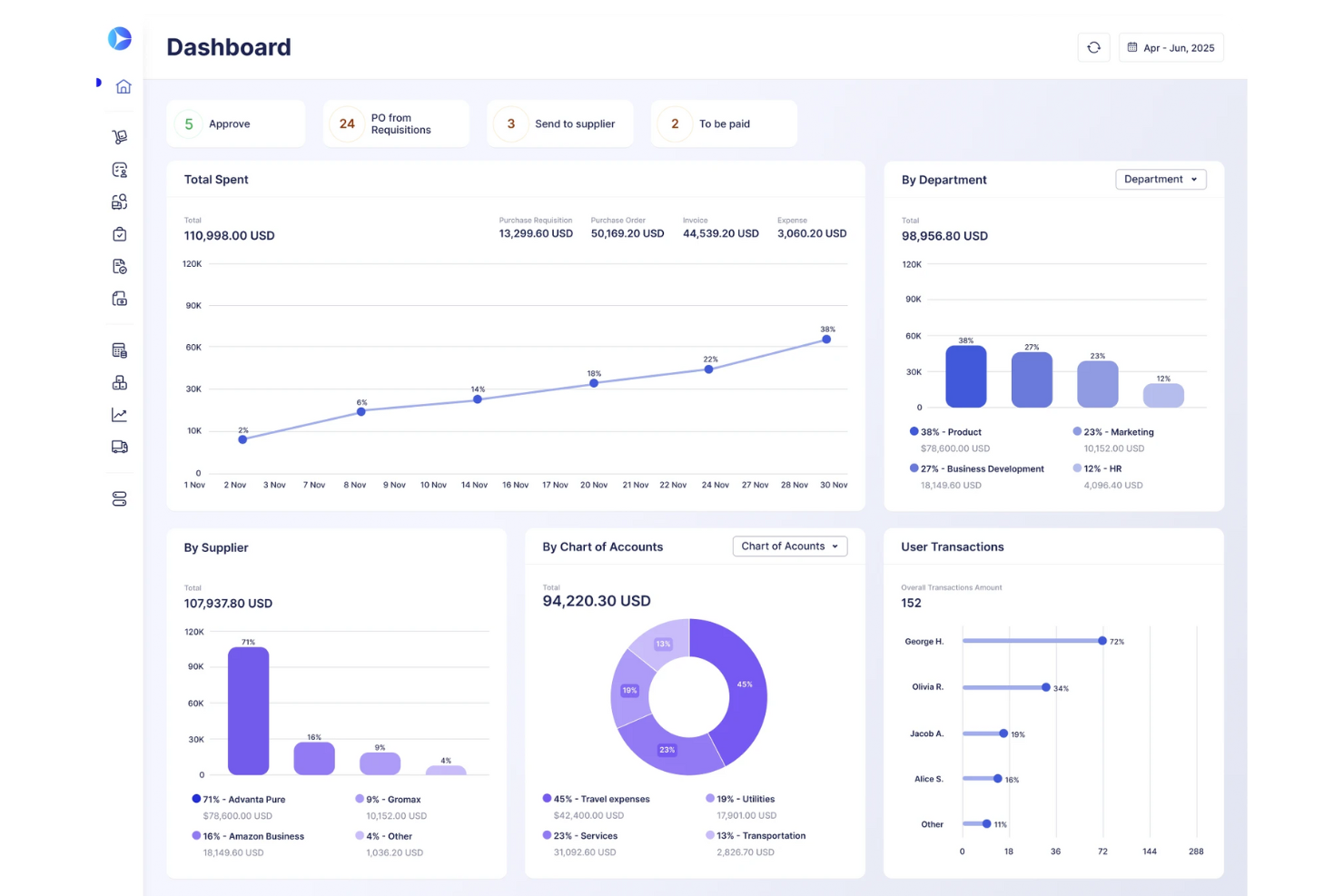
Precoro is a procurement and accounts payable platform that centralizes purchase requisitions, purchase orders, invoice capture, multi-step approval workflows, PO matching, and supplier management.
Who Is Precoro Best For?
Precoro is a strong fit for mid-sized companies managing procurement and AP across multiple business entities or subsidiaries.
Why I Picked Precoro
I picked Precoro as one of the best because it handles invoice approvals across multiple legal entities without forcing you to rebuild workflows from scratch for each one. Every entity shares the same configurable approval logic, so a holding company managing several subsidiaries can enforce consistent spend controls and PO matching across all of them from a single account. I also like that suppliers can submit invoices directly through the Supplier Portal, where invoices that exceed PO totals or contain unmatched line items are automatically flagged and routed for review.
Precoro Key Features
- Budget limit enforcement: Blocks users from proceeding when a required spend amount exceeds the available budget, with automatic approver notifications when overruns are permitted.
- Custom approval reports: Generates reports that include approver names, step completion timestamps, pending steps, and responsible parties, with filtering and export options.
- Mobile invoice approvals: Lets approvers review, approve, or reject invoices and access related documents directly from the iOS or Android app.
- Multi-currency document support: Processes procurement documents in 300 major currencies across purchase orders, invoices, and receipts.
Precoro Integrations
Precoro offers dozens of native integrations, including NetSuite, QuickBooks Online, Xero, BILL, Slack, Microsoft Teams, and Power BI. It also provides an API and SFTP connector for custom integrations.
Pros and Cons
Pros:
- Supplier submissions flag purchase-order mismatches for review
- Invoice recognition cuts repetitive data entry
- Configurable invoice routing clarifies approval ownership
Cons:
- Mobile workflows feel less polished than desktop
- Approval delays lack automatic escalation
New Product Updates from Precoro

Precoro Expands PunchOut Orders With Shipping and Amazon Status
Precoro expands PunchOut workflows with dedicated shipping addresses, automatic PR cancellation, and Amazon Business order status. These updates help teams keep PunchOut orders consistent and reduce manual follow-up. For more information, visit Precoro’s official site.
 .

Tipalti
Best for global payment compliance
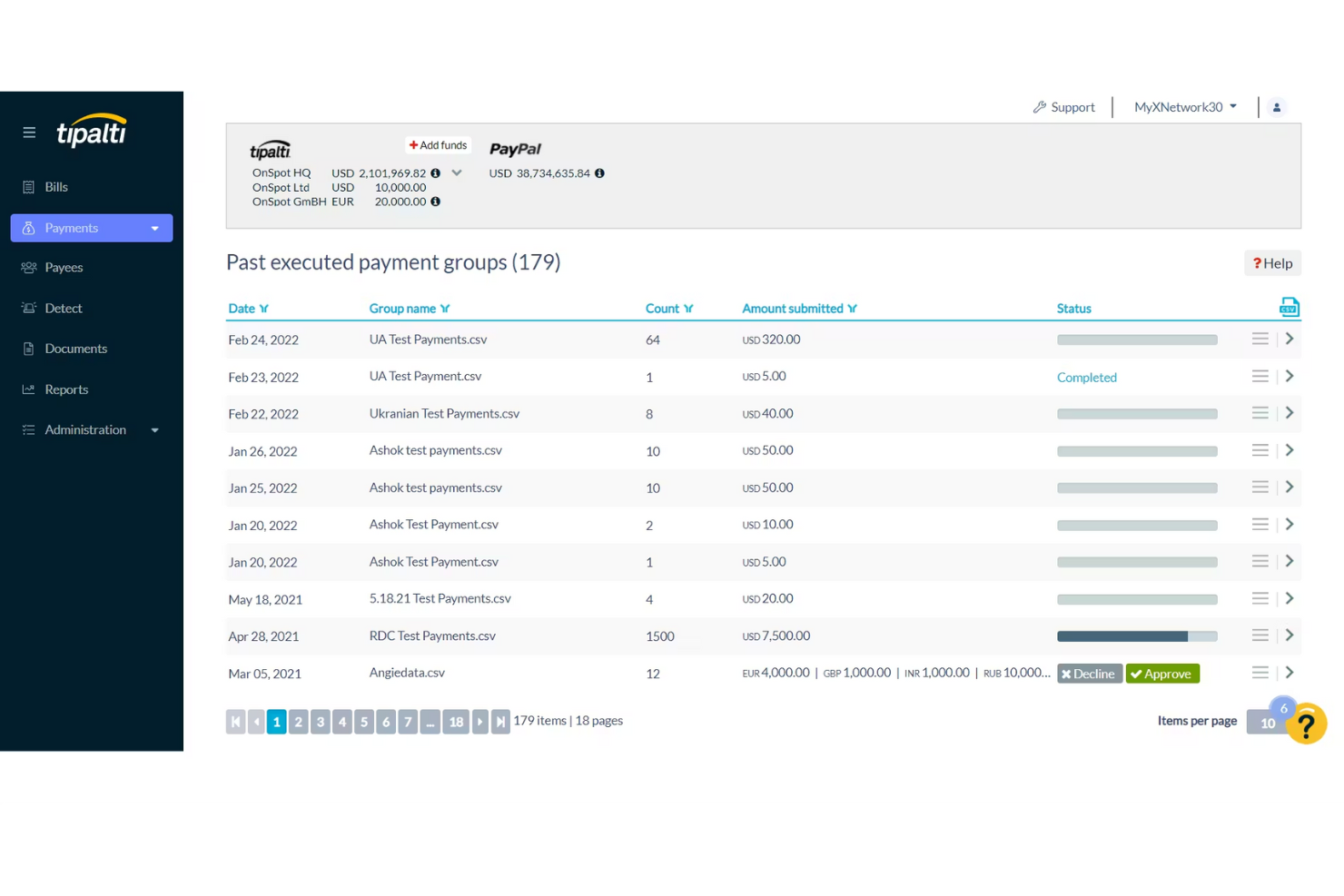
For finance teams handling international payments and compliance, Tipalti offers a specialized solution. It’s designed for organizations that need to manage invoice approvals while meeting complex global tax and regulatory requirements. Tipalti helps you automate approvals and payment processes across multiple countries, reducing the risk of compliance errors.
Why I Picked Tipalti
Tipalti stands out for teams that need to manage invoice approvals while staying compliant with global payment regulations. The platform automates tax form collection and validation, which helps reduce the risk of errors and penalties when paying vendors in different countries. I picked Tipalti because it also screens payees against international watchlists and supports multi-currency payments, making it easier to handle cross-border transactions. These features are especially important for businesses operating internationally or working with a diverse supplier base.
Tipalti Key Features
Some other features that make Tipalti useful for invoice approval include:
- Automated invoice capture: Extracts invoice data automatically to reduce manual entry.
- Customizable approval workflows: Lets you set up multi-step approval processes tailored to your organization’s needs.
- Supplier portal: Provides vendors with a self-service portal to submit invoices and track payment status.
- Real-time payment status tracking: Allows your team to monitor payment progress and resolve issues quickly.
Tipalti Integrations
Integrations include NetSuite, Sage Intacct, QuickBooks, Xero, Microsoft Dynamics, and Workday.
Pros and Cons
Pros:
- Massive ERP integration list
- Reduces payment error rates
- Automates vendor onboarding
Cons:
- Support can be inconsistent
- High monthly minimum fees
Yooz
Best for rapid cloud-based deployment
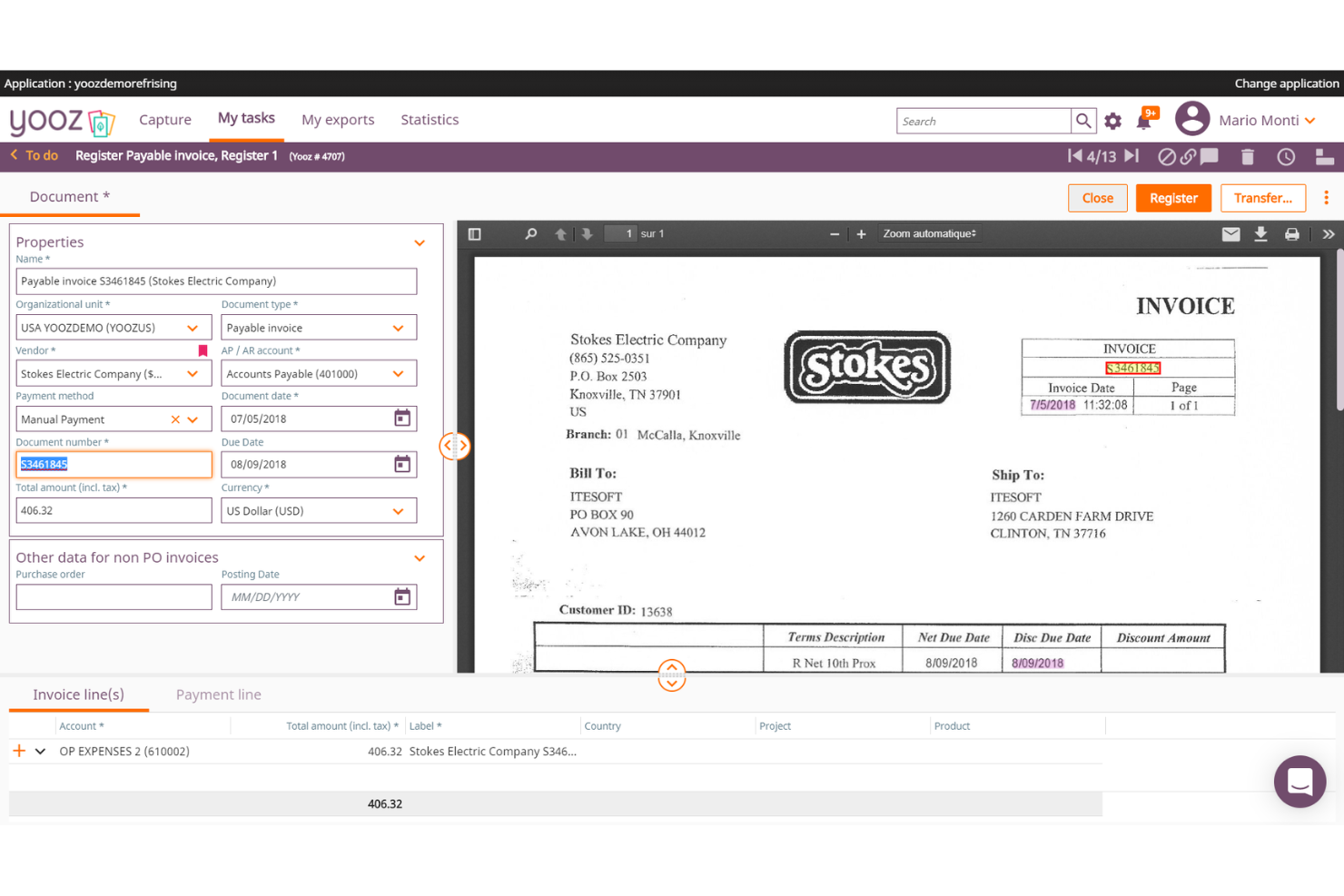
If your team needs to get up and running with invoice approval software quickly, Yooz is built for rapid cloud-based deployment. It’s a strong fit for finance teams in growing businesses that want to automate invoice capture, approval, and payment without a lengthy setup. Yooz helps you digitize accounts payable processes with minimal IT involvement.
Why I Picked Yooz
Yooz caught my attention because it’s designed for teams that need to deploy invoice approval workflows without waiting weeks or months. Its cloud-based platform lets you automate invoice capture and approval routing almost immediately after setup, which is ideal for businesses with limited IT resources or urgent process needs. I picked Yooz for its ability to digitize accounts payable quickly, using features like real-time invoice scanning and configurable approval paths. This makes it a strong choice for organizations that want to modernize their invoice processes with minimal disruption.
Yooz Key Features
Some other features that make Yooz appealing for invoice approval include:
- Mobile approval app: Lets users review and approve invoices from their smartphones.
- Duplicate invoice detection: Flags potential duplicate invoices before they enter the approval workflow.
- Audit trail reporting: Tracks every action taken on each invoice for compliance and transparency.
- Purchase order matching: Automatically matches invoices to purchase orders and receipts to reduce manual checks.
Yooz Integrations
Integrations include Sage, QuickBooks, Microsoft Dynamics, SAP, and Oracle NetSuite.
Pros and Cons
Pros:
- Easy drag-and-drop workflows
- Real-time GL account coding
- Extremely strong AI extraction
Cons:
- Exporting data can be clunky
- UI takes time to master
Best for high-volume invoice processing

AvidXchange is built for finance teams that need to process and approve large volumes of invoices quickly and accurately. It’s especially useful for organizations in industries like real estate, construction, and utilities where invoice volume and complexity can overwhelm manual processes. If your business faces bottlenecks or errors with high-volume invoice workflows, AvidXchange offers automation and tracking features designed to keep approvals moving at scale.
Why I Picked AvidXchange
For organizations that handle thousands of invoices each month, AvidXchange stands out for its ability to automate high-volume invoice processing from capture to approval. The platform uses intelligent data capture to extract invoice details and route them through customizable approval workflows, which helps reduce manual entry and errors. I appreciate that AvidXchange also provides real-time tracking and status updates for every invoice, so finance teams can monitor progress and address bottlenecks quickly. These features make it a strong choice for businesses that need to keep large-scale invoice approvals accurate and on schedule.
AvidXchange Key Features
In addition to its automation for high-volume invoice processing, AvidXchange offers several other features that support invoice approval workflows:
- Vendor portal: Vendors can submit invoices and check payment status directly through a dedicated portal.
- Custom approval hierarchies: Set up multi-level approval chains tailored to your organization’s structure.
- Audit-ready reporting: Generate detailed reports that track invoice history and approval actions for compliance.
- Payment scheduling: Schedule payments to vendors directly from the platform, reducing the need for manual intervention.
AvidXchange Integrations
Integrations include QuickBooks, NetSuite, Sage, Microsoft Dynamics, MRI Software, and RealPage.
Pros and Cons
Pros:
- Strong supplier network access
- Paperless invoice conversion
- Automates B2B payment routing
Cons:
- Support response can be slow
- Hard to customize workflows

Best for procurement workflow integration
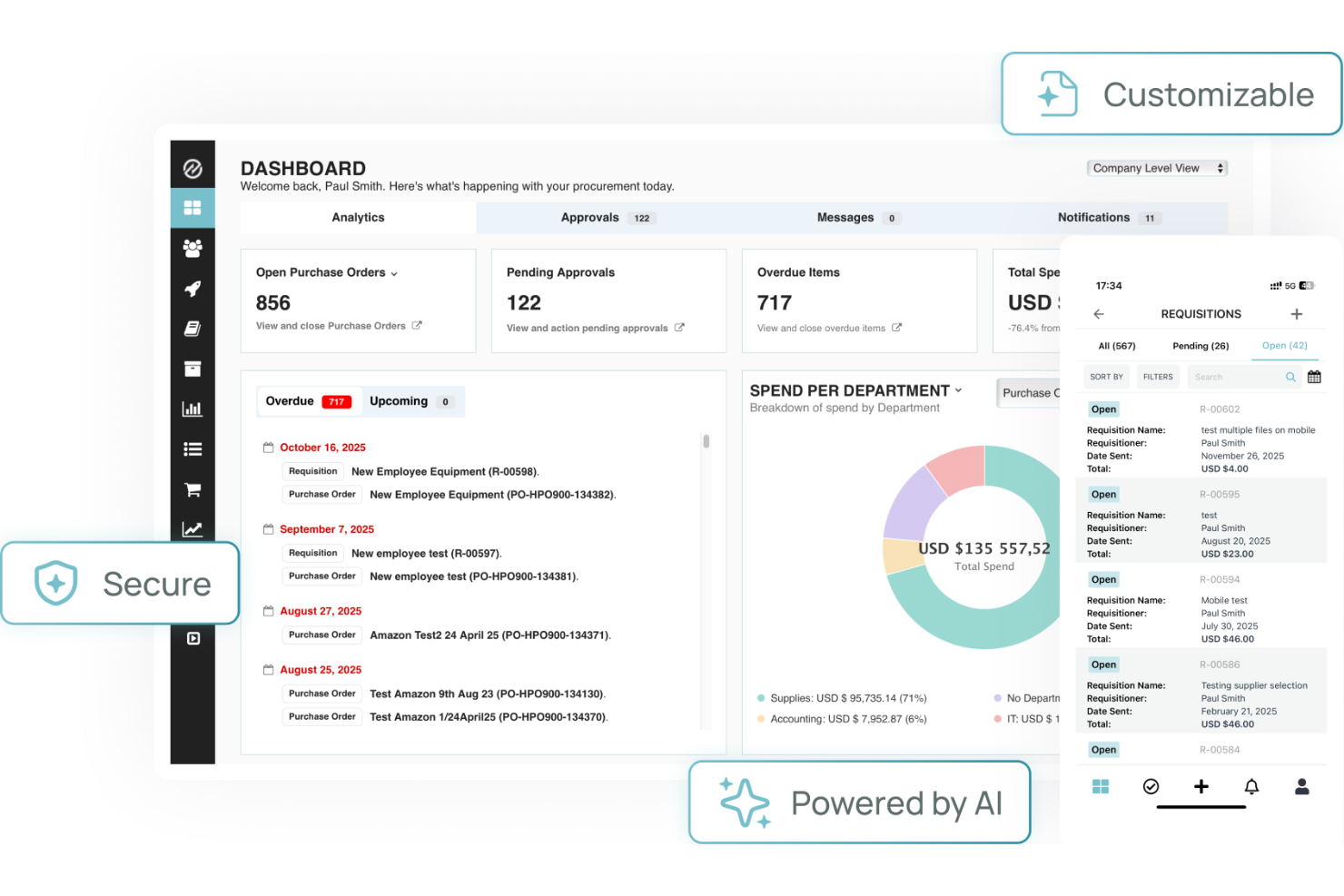
Tradogram stands out for teams that need invoice approval tightly connected to procurement workflows. It’s designed for businesses that want to manage purchasing, contracts, and approvals in one place, making it especially useful for procurement and finance professionals. By linking invoice approvals directly to purchase orders and budgets, Tradogram helps reduce mismatches and manual tracking across the procurement process.
Why I Picked Tradogram
Tradogram’s ability to connect invoice approvals directly to procurement workflows makes it a strong choice for organizations with complex purchasing needs. The platform links invoices to purchase orders, contracts, and budgets, so you can track every approval step in context. I picked Tradogram because it helps teams enforce procurement policies and reduce errors by tying invoice approvals to the original purchasing process. For businesses that want to keep procurement and finance tightly aligned, Tradogram’s workflow integration stands out.
Tradogram Key Features
Some other features that make Tradogram useful for invoice approval include:
- Customizable approval hierarchies: Set up multi-level approval chains to match your organization’s structure.
- Document management: Attach and store supporting documents directly with each invoice.
- Spend analytics dashboard: Monitor and analyze spending patterns across suppliers and departments.
- Supplier management tools: Track supplier performance and maintain a centralized supplier database.
Tradogram Integrations
Integrations include QuickBooks, Xero, Sage, NetSuite, and Microsoft Dynamics.
Pros and Cons
Pros:
- Customizable approval limits
- Good inventory tracking sync
- Easy to adopt across teams
Cons:
- Support is email focused
- Limited accounting sync tools
SoftCo
Best for secure financial data storage
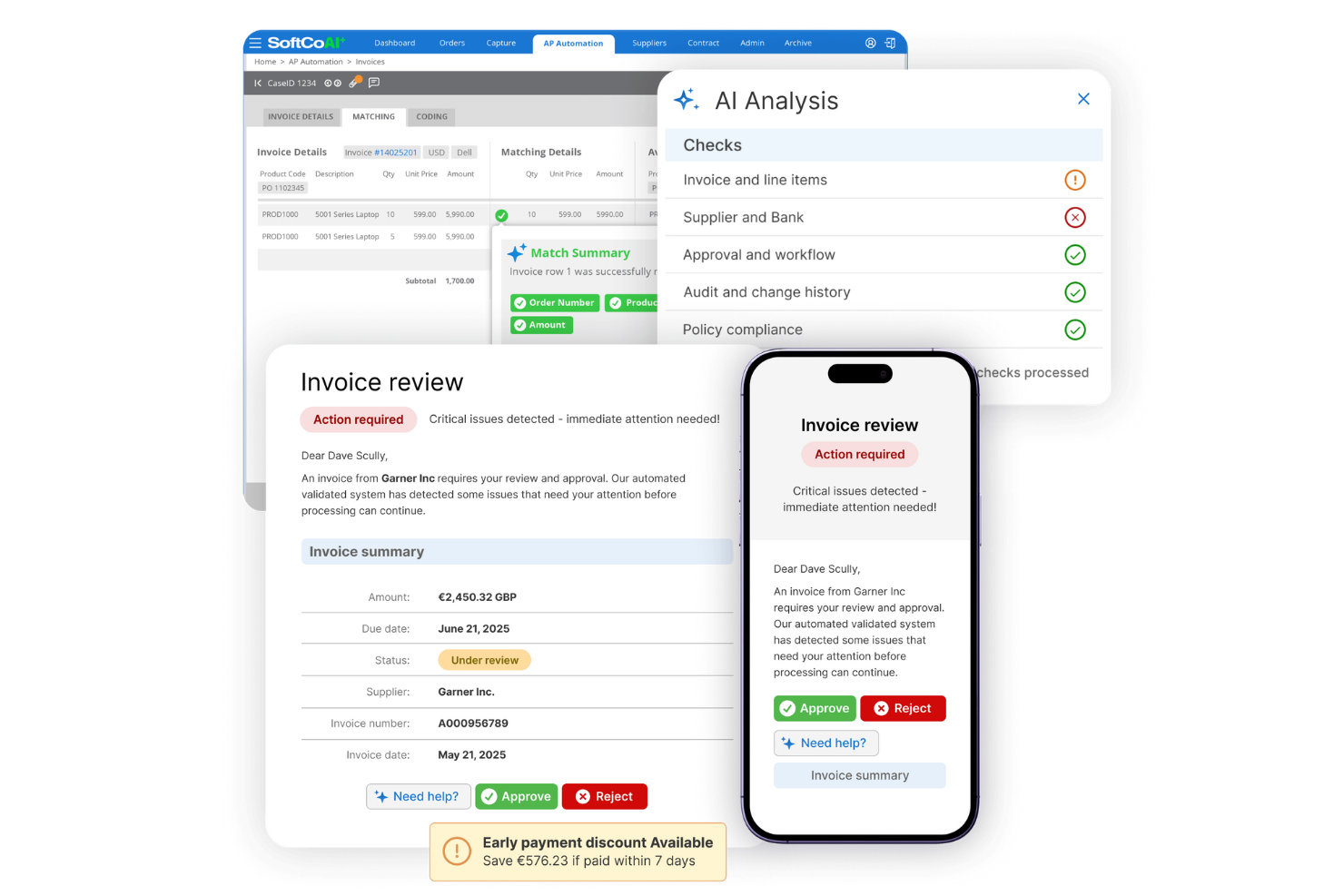
SoftCo is designed to provide AP automation for finance teams that need to prioritize secure storage and management of sensitive financial documents. It’s especially relevant for organizations in regulated industries where compliance and data protection are non-negotiable. With SoftCo, you can optimize your AP process while ensuring all financial data is encrypted and securely archived.
Why I Picked SoftCo
Security is a top concern for many finance teams handling sensitive invoice data, which is why I picked SoftCo for this shortlist. SoftCo offers encrypted document storage and strict access controls, making it a strong choice for organizations with compliance requirements or those operating in highly regulated sectors. The platform also provides automated audit trails, so every action on an invoice is tracked and securely logged. These features help ensure that financial data stays protected throughout the entire invoice approval process.
SoftCo Key Features
In addition to its security-focused capabilities, SoftCo offers several other features for invoice approval:
- Automated invoice capture: Extracts data from invoices using OCR to reduce manual entry.
- Configurable approval workflows: Lets you design multi-level approval paths to match your organization’s policies.
- Supplier portal: Provides vendors with a secure space to submit invoices and track payment status.
- ERP system integration: Connects directly with leading ERP platforms to sync invoice and payment data.
SoftCo Integrations
Integrations include Microsoft Dynamics, SAP, Oracle, NetSuite, and Sage.
Pros and Cons
Pros:
- Automates recurring invoices
- Great vendor management UI
- Strong compliance standards
Cons:
- Mobile app is very basic
- Needs dedicated IT resources

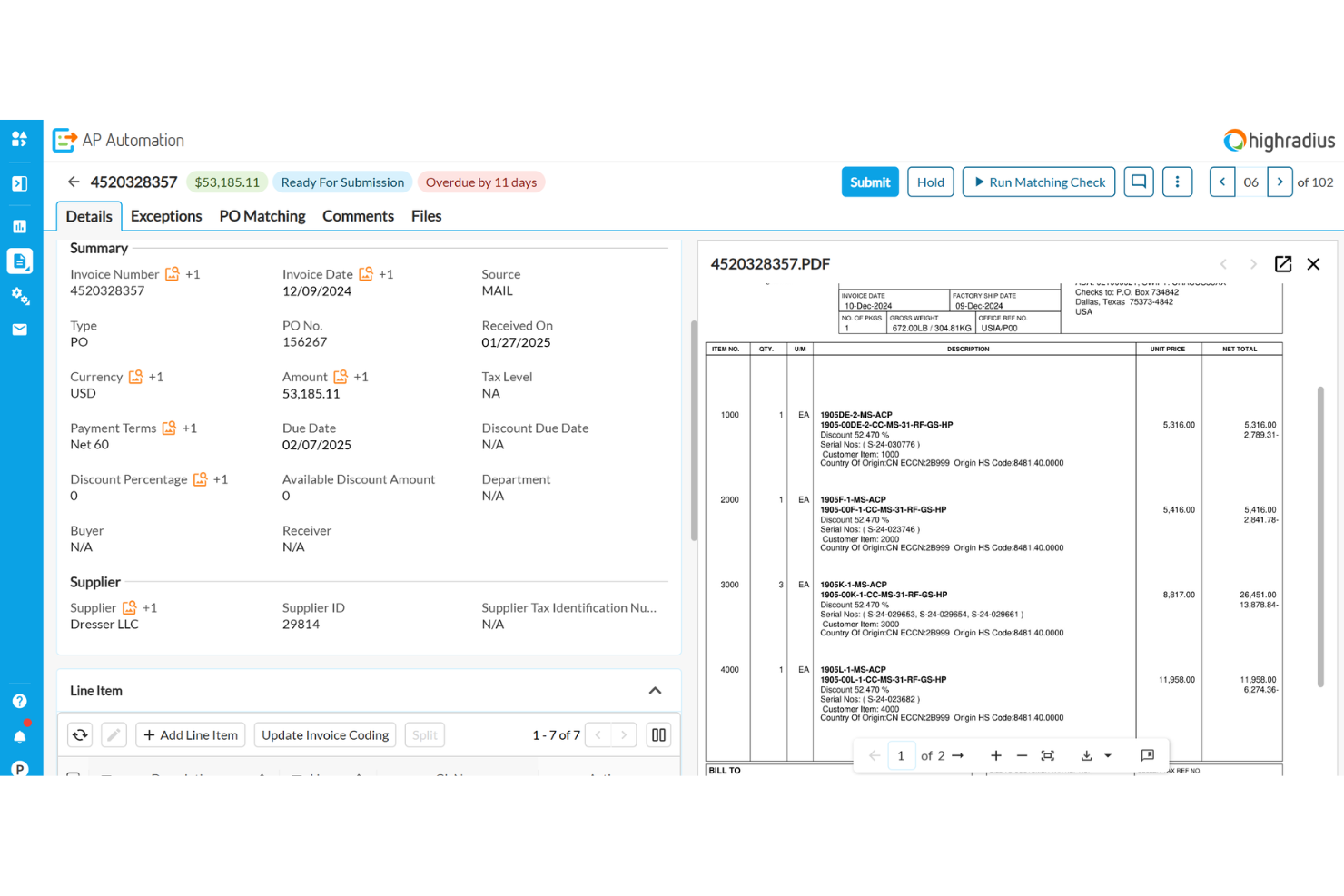
HighRadius uses AI to help finance teams resolve invoice exceptions and approval bottlenecks faster. It’s a strong fit for enterprises and shared services centers that deal with complex, high-volume invoice workflows and frequent exceptions. If your business struggles with manual exception handling or delayed approvals, HighRadius brings automation and intelligence to speed up resolution and keep processes moving.
Why I Picked HighRadius
What sets HighRadius apart is its use of AI to automatically identify and resolve exceptions in invoice approval workflows. The platform analyzes invoice data and flags discrepancies or missing information, then suggests next steps or routes issues to the right approver. I picked HighRadius because its exception management dashboard gives finance teams real-time visibility into bottlenecks and unresolved items. This focus on AI-powered exception handling makes it a strong choice for organizations that need to reduce manual intervention and keep invoice approvals on track.
HighRadius Key Features
In addition to its AI-driven exception handling, HighRadius offers several other features that support invoice approval processes:
- Automated invoice capture: The system extracts invoice data from emails and scanned documents without manual entry.
- Custom workflow design: Configure multi-step approval workflows to match your organization’s policies.
- Role-based access controls: Set permissions for users based on their responsibilities in the approval process.
- Audit trail tracking: Maintain a detailed log of all invoice actions and approvals for compliance and review.
HighRadius Integrations
Integrations include SAP, Oracle, NetSuite, Microsoft Dynamics, Workday, and JD Edwards.
Pros and Cons
Pros:
- Predictive cash flow insights
- Great exception handling rules
- Massive enterprise scalability
Cons:
- Implementation takes months
- Requires heavy IT involvement
Quadient
Best with document management integration
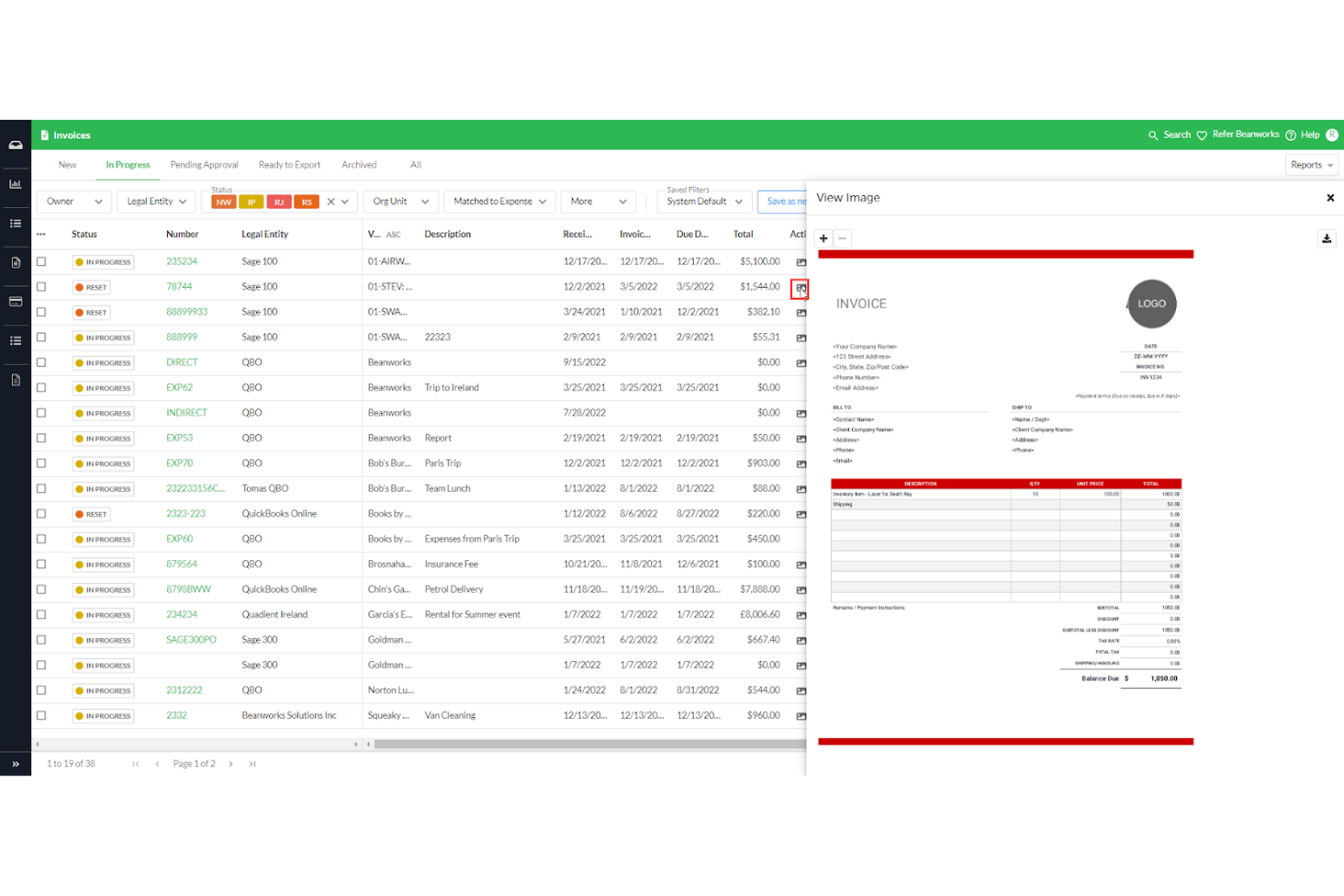
For teams that need invoice approval tightly connected to document management, Quadient offers a specialized solution. It’s designed for organizations that handle large volumes of documents and require seamless integration between approval workflows and document storage. With its focus on document management integration, Quadient helps you keep invoice records organized and accessible throughout the approval process.
Why I Picked Quadient
Quadient stands out for teams that need invoice approval workflows directly connected to document management systems. Its ability to link invoices with supporting documents and maintain a centralized repository makes it a strong fit for organizations with strict record-keeping or compliance needs. I picked Quadient because it lets you manage, retrieve, and audit invoice documents without leaving the approval platform. This integration helps reduce manual document handling and ensures all invoice-related files stay organized and accessible.
Quadient Key Features
Some other features that caught my attention include:
- Automated workflow routing: Route invoices to the right approvers based on custom rules.
- Digital signature support: Capture and store electronic signatures for invoice approvals.
- Real-time status tracking: Monitor the progress of each invoice through the approval process.
- Customizable approval templates: Set up and reuse approval templates tailored to your organization’s needs.
Quadient Integrations
Integrations include Microsoft SharePoint, Salesforce, Microsoft Dynamics 365, SAP, Oracle, DocuSign, Adobe Sign, Box, Dropbox, and Google Drive.
Pros and Cons
Pros:
- Automated duplicate catches
- Strong Sage and Xero sync
- Centralized invoice dashboard
Cons:
- Search filters are cumbersome
- Expense module is quite basic

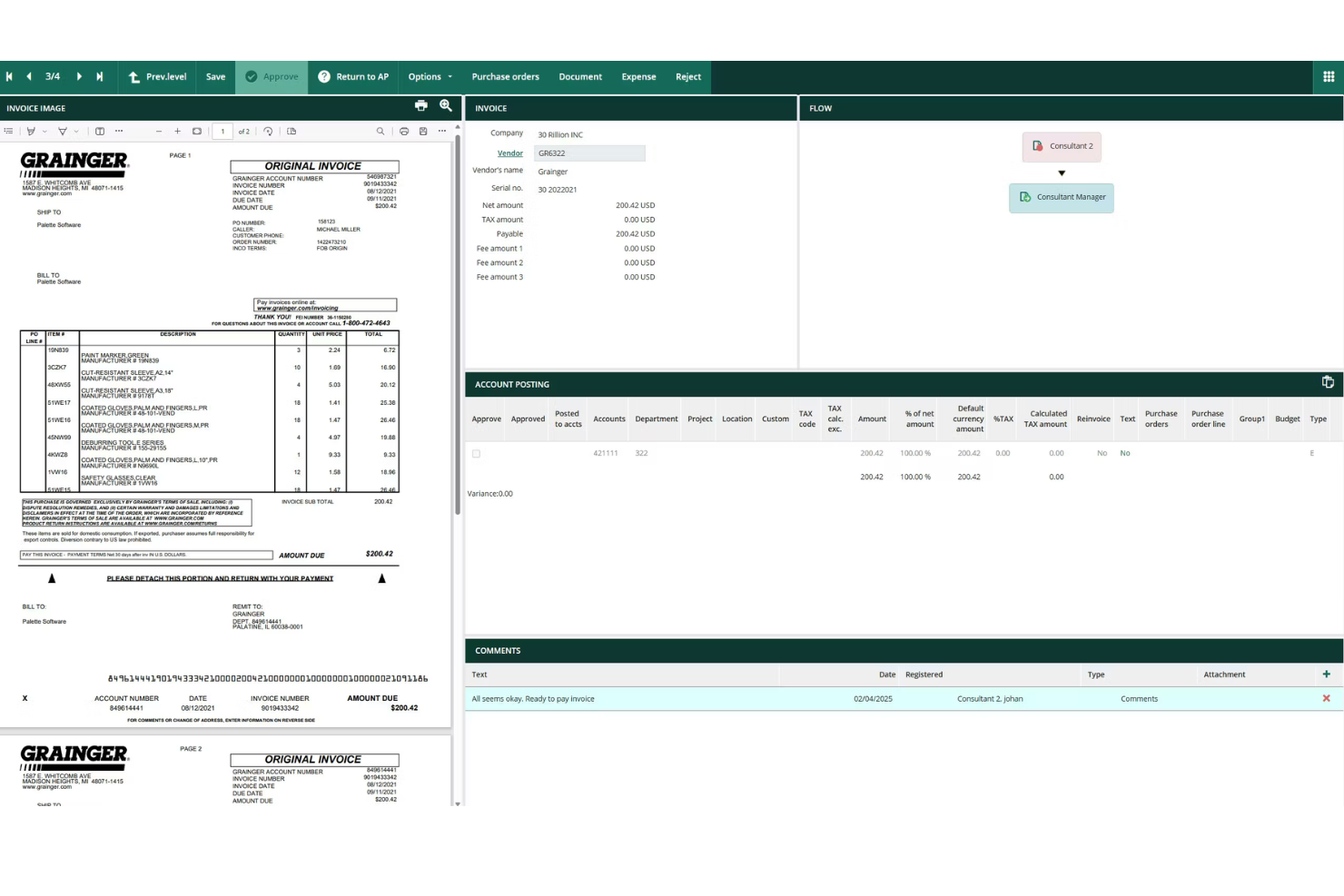
Rillion is designed for mid-sized finance teams that need to manage invoice approvals without adding complexity. The platform offers automated approval workflows and customizable controls that help teams handle growing invoice volumes and distributed approvers. If your organization is outgrowing manual processes but doesn’t need enterprise-level overhead, Rillion provides a focused solution for scaling up invoice management.
Why I Picked Rillion
Rillion stands out for mid-sized finance teams that need structure without the overhead of enterprise systems. The platform offers automated invoice capture and approval routing, which helps teams manage increasing invoice volumes as they grow. I picked Rillion because its customizable approval workflows let you match your organization’s policies and adapt as your team changes. For finance teams that want to move beyond manual processes but don’t need a complex solution, Rillion provides the right balance of automation and control.
Rillion Key Features
Some other features that make Rillion useful for invoice approval include:
- Mobile approvals: Approvers can review and approve invoices directly from their mobile devices.
- Duplicate invoice detection: The system flags potential duplicate invoices before they enter the approval workflow.
- Automated reminders: Rillion sends notifications to approvers when invoices are pending action.
- Document archiving: All invoices and related documents are stored securely for future reference and audits.
Rillion Integrations
Integrations include Microsoft Dynamics, SAP Business One, NetSuite, Monitor ERP, and Visma.
Pros and Cons
Pros:
- Intuitive user dashboard
- Easy PO matching capabilities
- Fast implementation timeline
Cons:
- Limited complex custom routing
- Lacks deep global compliance
Outros softwares de aprovação de faturas
Eis algumas opções adicionais de software de aprovação de faturas que não entraram na minha lista restrita, mas que vale a pena conhecer:
- Approval Max
For audit-ready approval trails
- ApprovalSoft
For customizable approval routing
- Procurify
For managing multi-location approvals
- cloudsquid
With real-time budget tracking
- Esker
For AI-driven data capture
- ProcureDesk
For multi-level approval routing
- Concur
With travel and expense integration


How I Evaluate Invoice Approval Software
I split my evaluation into two layers: the baseline a tool must have to make the list, and the differentiators that set the best options apart for project-driven teams approving contractor invoices.
Core Functionality (Table Stakes For This List)
When I'm selecting tools for my list, I rank each one on a scale from 0 (does not offer the functionality) to 5 (excels in this area) for each core functionality listed below. Then, I calculate the tool's total score into a percentage. Each tool needs to achieve a minimum total score of 65% to be considered for inclusion.
- Configurable Approval Workflows: I check whether routing rules can flex around real project needs—like splitting a high-value subcontractor invoice through both a project manager and a finance director before release.
- Invoice Capture & Digitization: Whether a tool uses OCR or AI to pull line-item data from uploaded or emailed invoices matters, especially when your team processes dozens of contractor invoices weekly.
- PO & Budget Matching: I evaluate how each platform handles matching invoices against purchase orders, receipts, or project budgets—and whether it flags discrepancies like over-billing before an approver even sees the invoice.
- Project Cost Allocation: The ability to split a single invoice across multiple projects, tasks, or cost codes is something I look for, since shared vendor costs across workstreams are common in agency and consulting environments.
- Audit Trail & Compliance Logs: Every approval, rejection, edit, and comment should be timestamped and tied to a named user—I look for logs that are exportable and detailed enough to satisfy internal audits or client billing disputes.
- Accounting/ERP Integration: I evaluate native connections to platforms like QuickBooks, Xero, NetSuite, or Sage, and check whether syncs run in both directions so approved invoices flow into your books without manual re-entry.
Once I have a list of tools that meet this criteria, I consider what sets each platform apart.
Differentiating Factors (What Sets Vendors Apart)
Here's how I compare and contrast different vendors:
Standout Features
AI anomaly detection is a big differentiator—I look for tools that catch duplicate invoices or off-contract pricing before they reach an approver's queue. Real-time budget dashboards also matter, especially when you need to see how pending approvals affect project burn rates mid-sprint. Mobile approval apps round things out for teams where project managers are frequently on-site or traveling and can't afford to hold up payment cycles.
Beyond Features
Integration ecosystem matters a lot here—I check whether a tool connects natively with project management platforms like Jira, Asana, or Procore, since approvals without project context slow everything down. I also evaluate industry fit, particularly whether the platform supports project-based cost structures like cost codes or WIP reporting. Pricing transparency is another factor I weigh, especially whether a vendor charges per approver seat, invoice volume, or entity, since that directly affects scalability as your project portfolio grows.
Como escolher um software de aprovação de faturas
É fácil ficar preso a listas extensas de funcionalidades e estruturas de preços complexas. Para o ajudar a manter o foco enquanto trabalha no seu processo específico de seleção de software, eis uma lista de fatores a ter em conta:
| Fator | O que deve considerar |
|---|---|
| Escalabilidade | O software será capaz de gerir o volume atual e futuro de faturas? Informe-se sobre os limites de utilizadores, a expansão dos fluxos de trabalho e o suporte para várias entidades. |
| Integrações | Permite uma ligação nativa ao seu ERP, sistema de contabilidade ou sistema de aprovisionamento? Verifique se existem integrações diretas, e não apenas opções de API. |
| Personalização | Pode adaptar os fluxos de aprovação, as funções dos utilizadores e as notificações de modo a corresponderem às suas políticas? Evite sistemas rígidos que o obriguem a alterar os seus processos. |
| Facilidade de utilização | A sua equipa conseguirá adotá-lo rapidamente? Procure uma navegação clara, necessidades mínimas de formação e um fluxo de aprovação lógico. |
| Implementação e integração inicial | Quanto tempo demorará a configuração e de que recursos necessitará? Informe-se sobre o apoio à migração, a formação e os prazos habituais para a entrada em produção. |
| Custo | Os níveis de preços são transparentes e previsíveis? Considere o custo total de propriedade, incluindo a configuração, o apoio e quaisquer taxas por fatura. |
| Medidas de segurança | A ferramenta disponibiliza encriptação, controlos de acesso e registos de auditoria? Confirme se cumpre as suas normas de proteção de dados e conformidade. |
| Requisitos de conformidade | O software ajudá-lo-á a cumprir os regulamentos do setor ou da região? Procure funcionalidades que suportem trilhos de auditoria, retenção e elaboração de relatórios. |
O que é um software de aprovação de faturas?
O software de aprovação de faturas é uma ferramenta digital que facilita a aprovação automatizada de faturas, encaminhando-as, analisando-as e autorizando-as para pagamento dentro de uma organização. Centraliza os dados das faturas, impõe fluxos de aprovação e mantém registos de auditoria para apoiar a conformidade e a transparência. As equipas financeiras utilizam estes sistemas para reduzir erros manuais, acelerar as aprovações e garantir que apenas as faturas validadas são pagas.
Funcionalidades do software de aprovação de faturas
Ao selecionar um software de aprovação de faturas, procure as seguintes funcionalidades essenciais:
- Captura automatizada de faturas: Digitaliza as faturas recebidas e extrai os principais campos de dados, reduzindo a introdução manual e os erros.
- Fluxos de aprovação personalizados: Permite conceber e impor processos de aprovação em várias etapas que correspondam às políticas e à hierarquia da sua organização.
- Controlos de acesso baseados em funções: Restringe as permissões dos utilizadores para que apenas os membros autorizados da equipa possam visualizar, editar ou aprovar faturas.
- Registos de auditoria: Regista todas as ações realizadas numa fatura, fornecendo um histórico detalhado para efeitos de conformidade e responsabilização.
- Acompanhamento do estado das faturas: Apresenta atualizações em tempo real sobre a fase do processo de aprovação em que se encontra cada fatura, ajudando as equipas a evitar estrangulamentos.
- Integrações com ERP e sistemas de contabilidade: Liga-se diretamente aos seus sistemas financeiros existentes para sincronizar os dados das faturas e o estado dos pagamentos.
- Portais de fornecedores: Permite aos fornecedores enviar faturas de forma segura, verificar o progresso da aprovação e comunicar com a sua equipa.
- Deteção de faturas duplicadas: Assinala possíveis envios duplicados para evitar pagamentos repetidos e reduzir o risco de fraude.
- Armazenamento de documentos: Armazena faturas e documentos relacionados num repositório centralizado e pesquisável, para uma recuperação fácil e preparação para auditorias.
Benefícios do software de aprovação de faturas
A implementação de um software de aprovação de faturas proporciona vários benefícios à sua equipa e à sua empresa. Eis alguns dos benefícios que pode esperar:
- Aprovações mais rápidas: Os fluxos de trabalho automatizados e o acompanhamento do estado em tempo real ajudam as faturas a avançar rapidamente por cada etapa de aprovação.
- Conformidade reforçada: Os registos de auditoria e os controlos de acesso baseados em funções apoiam o cumprimento das políticas internas e dos requisitos regulamentares.
- Redução dos erros manuais: A captura automatizada de faturas e a deteção de duplicados minimizam os erros de introdução de dados e evitam pagamentos repetidos.
- Maior visibilidade: Os painéis centralizados e o armazenamento de documentos proporcionam às equipas financeiras uma visão clara do estado e do histórico das faturas.
- Melhoria das relações com os fornecedores: Os portais de fornecedores e as ferramentas de comunicação transparentes mantêm os fornecedores informados e reduzem os litígios relacionados com pagamentos.
- Maior segurança: O armazenamento encriptado e os controlos de acesso protegem os dados financeiros sensíveis contra acessos não autorizados.
- Integração mais fácil: As ligações diretas aos sistemas ERP e de contabilidade garantem que os dados das faturas permanecem exatos e atualizados em todas as plataformas.
Custos e preços do software de aprovação de faturas
A seleção de um software de aprovação de faturas exige uma compreensão dos vários modelos de preços e planos disponíveis. Os custos variam consoante as funcionalidades, a dimensão da equipa, os complementos e outros fatores. A tabela abaixo resume os planos comuns, os respetivos preços médios e as funcionalidades normalmente incluídas nas soluções de software de aprovação de faturas:
Tabela de comparação de planos de software de aprovação de faturas
| Tipo de plano | Preço médio | Funcionalidades comuns |
|---|---|---|
| Plano gratuito | $0 | Captura básica de faturas, fluxos de aprovação limitados, acesso para um único utilizador e relatórios básicos. |
| Plano pessoal | $15-$49/utilizador/mês | Suporte para vários utilizadores, fluxos de aprovação padrão, armazenamento de documentos e notificações por e-mail. |
| Plano empresarial | $150-$899/mês | Personalização avançada de fluxos de trabalho, integrações com ERP, registos de auditoria, portais de fornecedores e suporte prioritário. |
| Plano empresarial de grande dimensão | $1000+/utilizador/mês | Integrações personalizadas, segurança avançada, ferramentas de conformidade, gestão de conta dedicada e suporte assegurado por SLA. |
Perguntas frequentes sobre software de aprovação de faturas
Eis algumas respostas a perguntas frequentes sobre software de aprovação de faturas:
Como é que o software de aprovação de faturas se integra nos sistemas contabilísticos existentes?
A maioria dos softwares de aprovação de faturas liga-se a sistemas contabilísticos ou ERP através de integrações diretas ou APIs. Isto permite sincronizar automaticamente os dados das faturas, o estado dos pagamentos e as informações dos fornecedores, reduzindo a introdução manual de dados e mantendo os registos financeiros atualizados.
O software de aprovação de faturas consegue processar aprovações com vários níveis ou condicionais?
Sim, a maioria das soluções suporta fluxos de trabalho de aprovação com vários níveis e condicionais. Pode configurar regras com base no montante da fatura, no departamento ou no projeto, garantindo que as pessoas certas analisam e autorizam cada fatura antes do pagamento.
Que medidas de segurança devo procurar num software de aprovação de faturas?
Procure funcionalidades como encriptação de dados, controlos de acesso baseados em funções e registos de auditoria detalhados. Estas salvaguardas ajudam a proteger informações financeiras sensíveis e apoiam a conformidade com os regulamentos internos e externos.
Quanto tempo demora a implementar um software de aprovação de faturas?
Os prazos de implementação variam, mas a maioria das soluções baseadas na nuvem pode ser configurada entre alguns dias e algumas semanas. Fatores como a migração de dados, a personalização dos fluxos de trabalho e a formação dos utilizadores podem afetar o prazo total.
É possível aprovar faturas a partir de um dispositivo móvel?
Sim, muitas plataformas de aprovação de faturas disponibilizam aplicações móveis ou interfaces Web adaptáveis. Isto permite aos utilizadores analisar, aprovar ou rejeitar faturas em qualquer lugar, o que pode ajudar a evitar estrangulamentos no processo de aprovação.