

10 softwares de motores de regras de negócio selecionados para 2026

Seleção de software de motores de regras de negócio


O software de motores de regras de negócio permite-lhe definir, gerir e automatizar a lógica de decisão em todos os seus sistemas, sem codificar regras diretamente. Se está à procura do melhor software de motores de regras de negócio, é provável que queira melhorar a forma como a sua equipa gere lógicas complexas, se adapta a requisitos em mudança e mantém os processos consistentes à medida que a sua empresa cresce. Com tantas opções disponíveis, pode ser difícil saber qual a plataforma que se adequa às suas necessidades técnicas, requisitos de integração e preferências de fluxo de trabalho. Esta lista irá ajudá-lo a comparar as principais soluções, compreender os seus pontos fortes e escolher a ferramenta certa para apoiar os seus objetivos de automatização e conformidade.
Why Trust Our Software Recommendations
Our team has been testing and reviewing software since 2012. As project managers ourselves, we know how difficult—and important—it is to choose the right software.
For this guide, we evaluated tools using hands-on testing and independent research, scoring tools using our selection criteria. We also draw on insights from industry thought leaders and practicing project management experts.
Our reviews reflect our human editorial judgment, not a sales pitch.
Expert reviewers:
Tabela comparativa de software de motores de regras de negócio
Esta tabela comparativa resume os detalhes de preços das minhas principais escolhas de software de motores de regras de negócio:
| Tool | Best For | Trial Info | Price | ||
|---|---|---|---|---|---|
| 1 | Best for audit workflow integration | Not available | Pricing upon request | Website | |
| 2 | Best for large-scale enterprise automation | Free demo + free trial available | Pricing upon request | Website | |
| 3 | Best for spreadsheet-style rule editing | 30-day free trial + free plan + free demo available | From $291/month (billed annually) | Website | |
| 4 | Best for rapid rule deployment | Free demo available | Pricing upon request | Website | |
| 5 | Best for no-code rule configuration | Free demo available | Pricing upon request | Website | |
| 6 | Best for workflow-driven rule execution | Not available | Pricing upon request | Website | |
| 7 | Best for cloud-native rule management | Free plan + free demo available | From €50/month | Website | |
| 8 | Best for visual decision modeling | Free trial + free demo available | Pricing upon request | Website | |
| 9 | Best for integration with legacy systems | Free trial available | Pricing upon request | Website | |
| 10 | Best for open-source flexibility | Not available | From $5,460/license | Website |
Avaliações de software de motores de regras de negócio
Apresentamos abaixo os meus resumos detalhados do software de motores de regras de negócio que integrou a minha seleção. As minhas avaliações analisam detalhadamente as funcionalidades, os melhores casos de utilização e as integrações de cada plataforma, para ajudá-lo a encontrar a opção mais adequada para si.

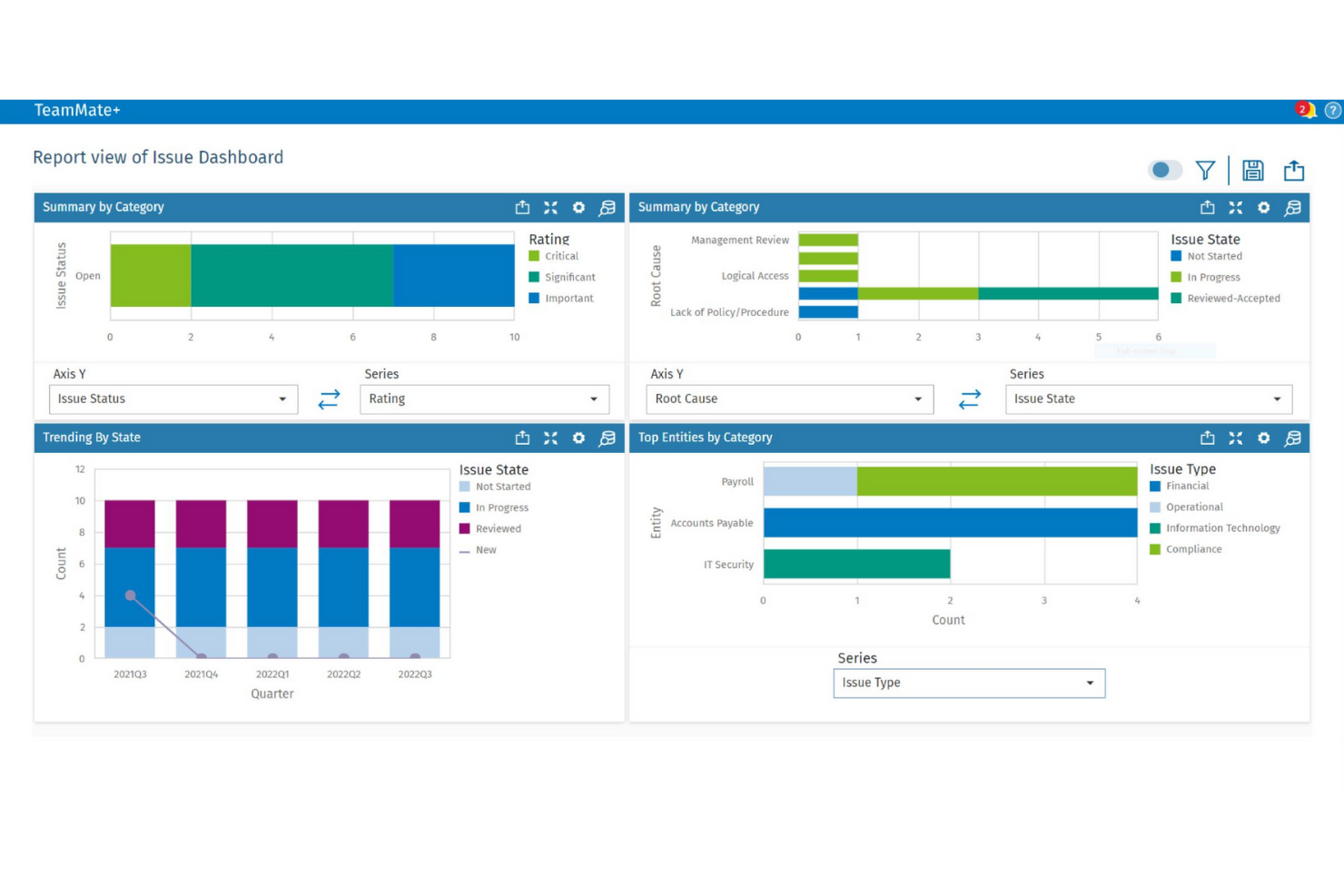
TeamMate is designed for audit teams that need to embed business rules directly into their audit workflows. It’s especially useful for internal audit departments in large organizations that want to automate risk assessments, approvals, and documentation processes. By integrating business rules with audit planning and execution, TeamMate+ helps teams maintain consistency and compliance across complex audit cycles.
Why I Picked TeamMate
What sets TeamMate apart is its focus on embedding business rules directly into audit workflows. This approach allows audit teams to automate risk scoring, approvals, and escalation processes as part of their day-to-day work. I picked TeamMate because it supports configurable rule sets that adapt to different audit types and regulatory requirements. Its ability to link business logic with audit planning and execution makes it a strong fit for organizations that need to maintain audit consistency and compliance.
TeamMate Key Features
I also found several other features that support business rules management in audit environments:
- Automated Task Assignment: Assign audit tasks based on predefined rules and team member roles.
- Customizable Templates: Create and reuse audit templates that include embedded business logic.
- Real-Time Dashboards: Monitor audit progress and rule-triggered events through interactive dashboards.
- Document Version Control: Track changes and maintain a full history of audit documentation updates.
TeamMate Integrations
Native integrations are not currently listed. However, an API is available for custom integrations.
Pros and Cons
Pros:
- Tracks rule-triggered actions in audit logs
- Supports granular permissions for rule management
- Audit workflows include embedded business rules logic
Cons:
- Interface updates can disrupt saved workflows
- Reporting customization options are restricted

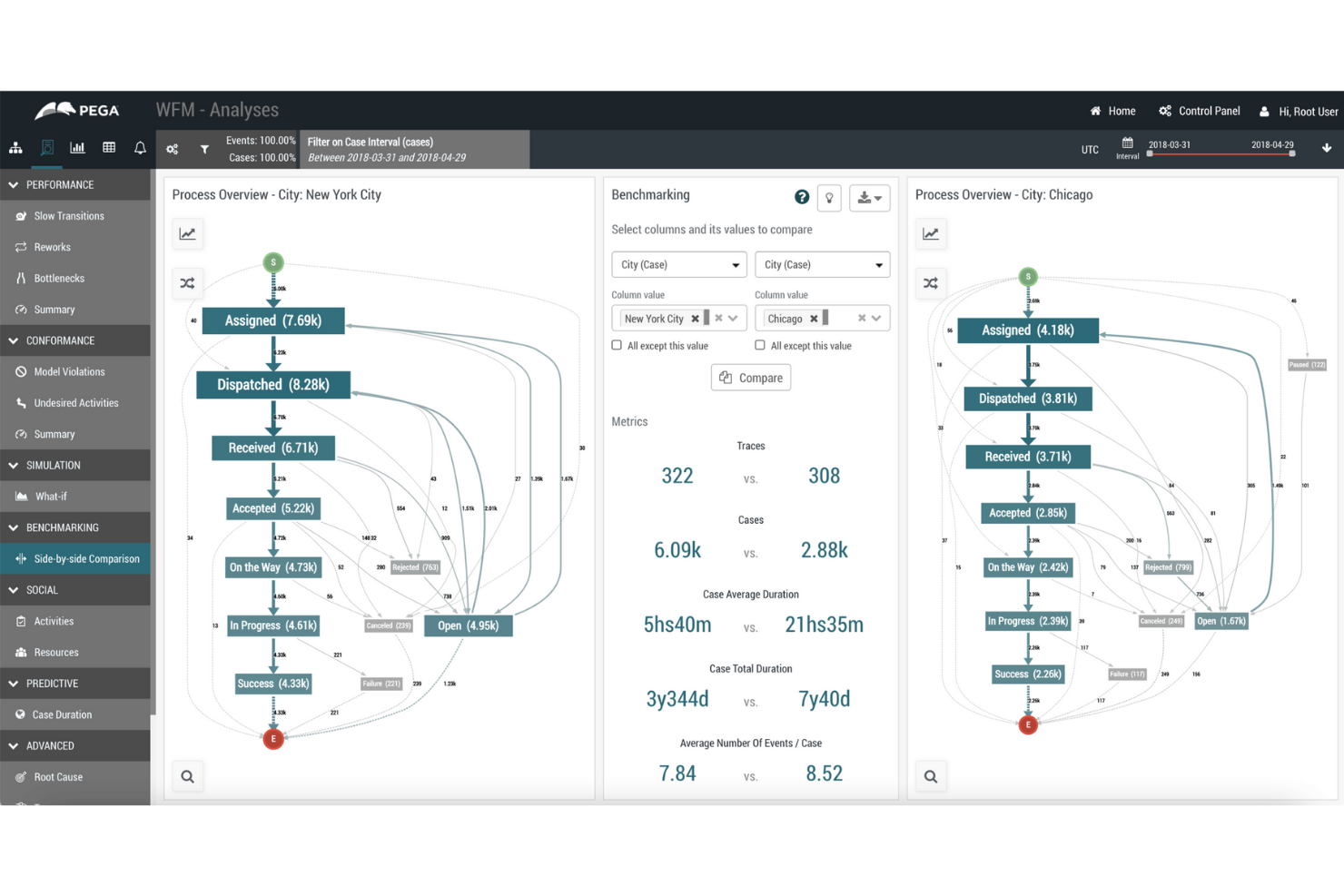
Pega’s business rules engine is built for organizations managing complex, high-volume processes across multiple departments or regions. It’s especially relevant for large enterprises in finance, insurance, and government that need to automate decision-making at scale. With Pega, teams can centralize, update, and audit business logic while supporting advanced workflow automation and compliance requirements.
Why I Picked Pega
For organizations that need to automate business rules at scale, Pega stands out with its ability to handle complex, enterprise-wide logic. The platform supports centralized rule management, so teams can update and govern decision logic across multiple business units from a single location. I appreciate that Pega includes advanced audit and compliance tracking, which is essential for regulated industries. Its support for dynamic, event-driven workflows also makes it a strong choice for enterprises with high transaction volumes and evolving requirements.
Pega Key Features
Some other features that make Pega a strong option for business rules management include:
- Visual Rule Designer: Build and modify rules using a drag-and-drop interface without writing code.
- Decision Table Support: Define and manage complex decision logic using spreadsheet-like tables.
- Real-Time Analytics Integration: Connect rules to real-time data streams for adaptive decision-making.
- Case Management Tools: Link business rules directly to case workflows for end-to-end process automation.
Pega Integrations
Integrations include REST APIs, SOAP APIs, enterprise systems connectors, cloud platform support, legacy system integration tooling, and more.
Pros and Cons
Pros:
- Scalable for high-volume transaction environments
- Supports complex, multi-step workflow automation
- Centralizes business rules for global enterprises
Cons:
- Upgrades can be resource-intensive for IT teams
- Requires specialized expertise for advanced configuration

Best for spreadsheet-style rule editing
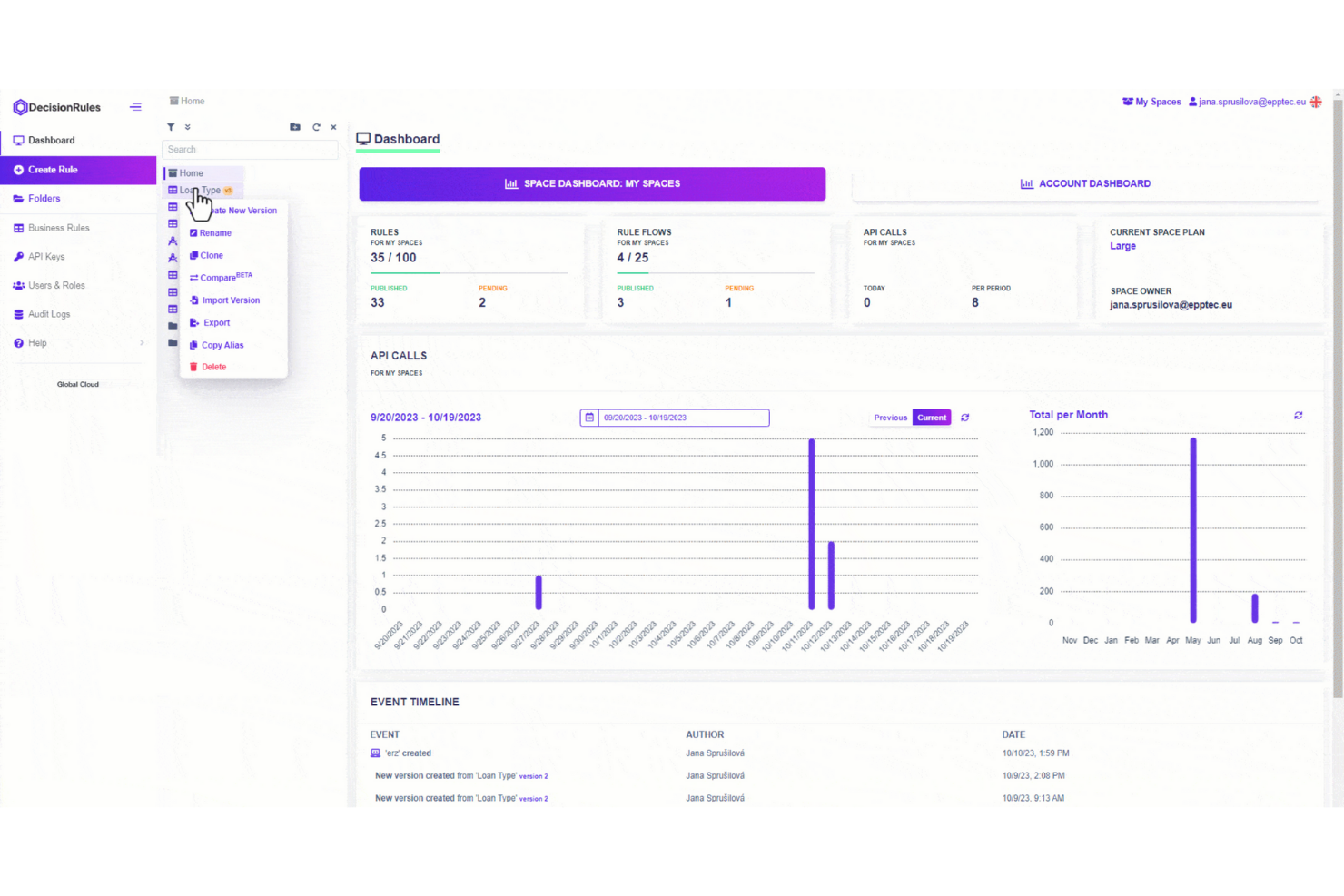
DecisionRules stands out for teams that want to manage business rules in a familiar, spreadsheet-like interface. It’s a strong fit for operations, finance, or product managers who need to build, test, and update rules without coding. The tool helps you translate complex decision logic into editable tables, making rule management accessible and transparent for non-technical users.
Why I Picked DecisionRules
Unlike many business rules engines, DecisionRules uses a spreadsheet-style editor that makes rule creation and updates feel intuitive for anyone familiar with Excel or Google Sheets. This approach is especially helpful for teams that want to manage complex logic without writing code or relying on IT. I picked DecisionRules because it lets you define, test, and deploy rules directly in table formats, so you can visualize and adjust logic in real time. The tool also supports bulk editing and versioning, which helps teams keep track of changes and collaborate on rule management.
DecisionRules Key Features
Some other features that make DecisionRules stand out include:
- API Integration: Connect rules directly to your applications using REST API endpoints.
- Rule Chaining: Link multiple rules together to handle complex decision logic.
- Built-In Testing Environment: Test rules with sample data before deploying them live.
- Audit Logs: Track all changes and rule executions for compliance and troubleshooting.
DecisionRules Integrations
Integrations include Salesforce, Jira, Excel, Google Sheets, AWS, Azure, Power BI, Tableau, Datadog, Anthropic, and more.
Pros and Cons
Pros:
- Rule chaining handles complex decision logic
- Built-in rule testing environment for validation
- Spreadsheet-style editor supports non-technical users
Cons:
- Limited support for advanced scripting languages
- No on-premises deployment option available

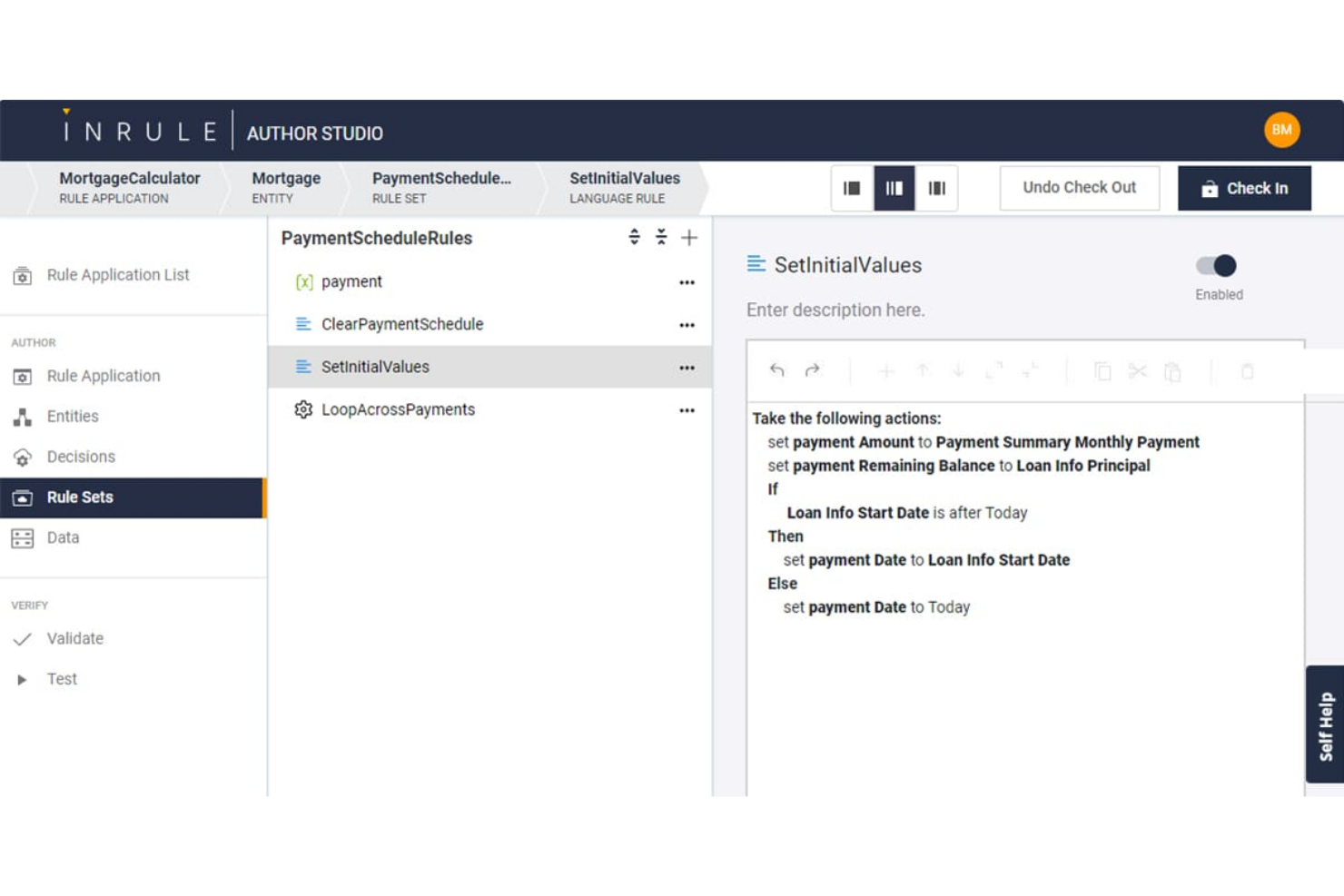
InRule is built for teams that need to deploy and update business rules quickly without heavy developer involvement. It’s a strong fit for enterprises in finance, insurance, and healthcare that require frequent rule changes to keep up with regulations or market shifts. With its low-code interface and real-time rule editing, InRule helps organizations respond rapidly to evolving business logic needs.
Why I Picked InRule
Rapid rule deployment is where InRule really shines for business rules engine software. The platform lets users author, test, and deploy rules in real time, so you can respond to business changes without waiting on development cycles. I picked InRule because its low-code environment allows both technical and non-technical users to update rules directly in production. Its simulation and impact analysis tools also help teams validate rule changes before they go live, reducing risk and speeding up decision-making.
InRule Key Features
Some other features that make InRule stand out for business rules management include:
- Decision Tables: Build and manage complex decision logic using spreadsheet-like tables.
- Natural Language Authoring: Write and edit rules in plain language for easier collaboration.
- Version Control: Track, compare, and roll back rule changes as needed.
- REST API Support: Connect InRule to other systems and trigger rules through API calls.
InRule Integrations
Integrations include Salesforce, Microsoft Dynamics, Snowflake, and APIs for custom integrations.
Pros and Cons
Pros:
- Natural language authoring for business users
- Decision tables support complex rule logic
- Real-time rule deployment without code changes
Cons:
- Advanced analytics features are not built-in
- On-premises deployment requires additional setup

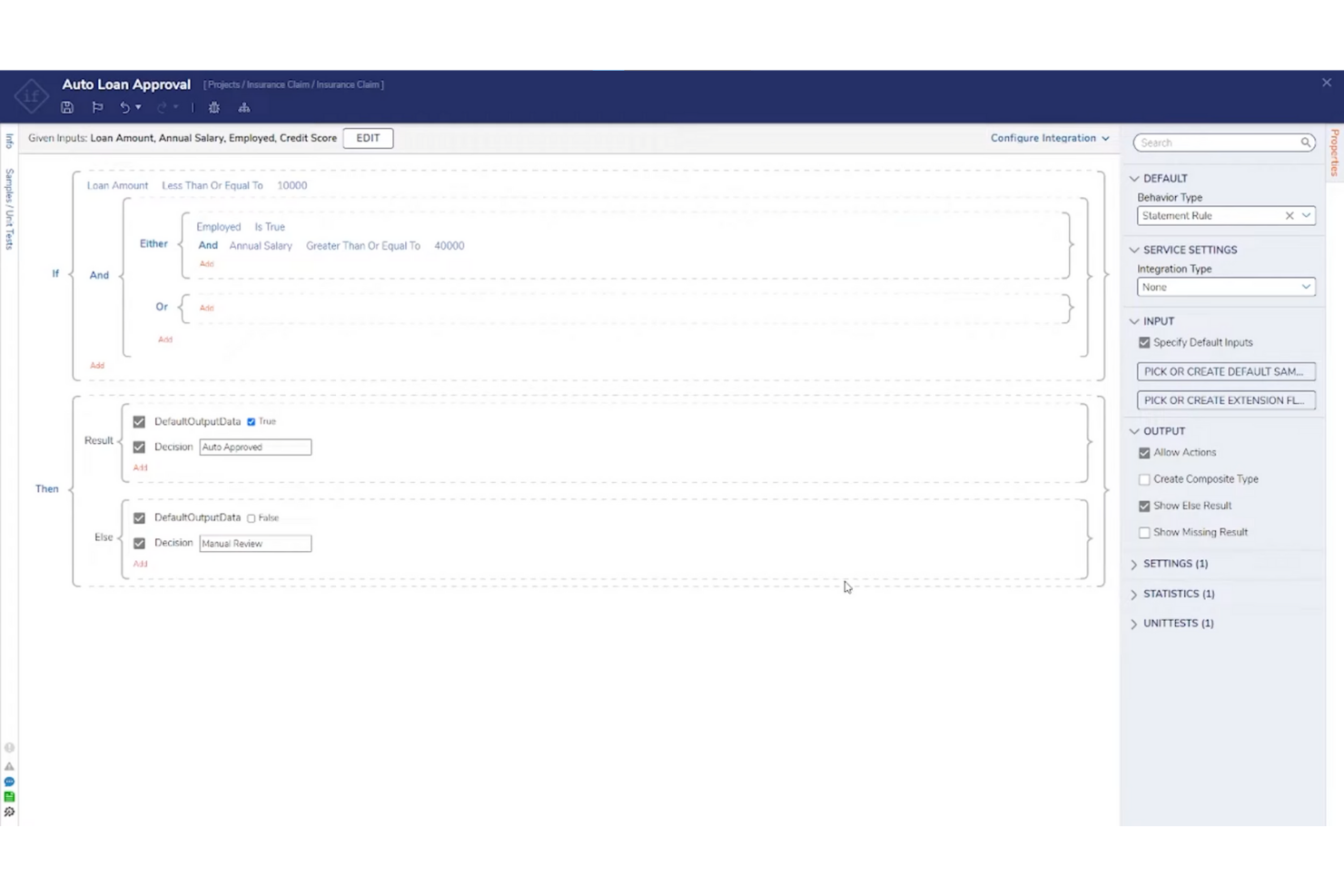
Decisions is designed for teams that want to configure and automate business rules without writing code. It’s a strong fit for operations managers, compliance teams, and business analysts who need to adapt processes quickly as requirements shift. The platform’s no-code interface helps you build, test, and deploy rules directly, reducing reliance on IT and speeding up change cycles.
Why I Picked Decisions
What drew me to Decisions is its focus on no-code rule configuration, which is especially useful for teams that want to empower business users to manage logic directly. The platform offers a drag-and-drop rule designer and visual workflow builder, so you can create and update rules without programming knowledge. I picked Decisions because it supports real-time testing and validation, letting you see the impact of changes before deploying them. This approach helps organizations respond quickly to new requirements and reduces bottlenecks that often come with IT-driven rule management.
Decisions Key Features
Some other features that stood out to me include:
- Business Metrics Tracking: Monitor rule outcomes and performance with built-in analytics tools.
- Version Control: Manage rule changes and roll back to previous versions as needed.
- Audit Logging: Track all rule modifications and user actions for compliance.
- Rule Scheduling: Set rules to activate or expire automatically based on date or event triggers.
Decisions Integrations
Integrations include Microsoft Dynamics, Salesforce, SAP, Oracle, AWS, Azure, Google Cloud, Slack, ServiceNow, Twilio, and more.
Pros and Cons
Pros:
- Real-time rule testing previews logic outcomes
- Built-in version control manages rule updates
- Drag-and-drop designer supports rapid rule changes
Cons:
- User interface can feel dated in places
- Complex workflows may require vendor support


FlowWright is designed for teams that need to embed business rules directly into automated workflows. It’s especially useful for organizations in manufacturing, logistics, or operations where process automation and rule execution must work hand in hand. By combining workflow automation with a built-in rules engine, FlowWright helps you manage complex decision logic as part of your end-to-end business processes.
Why I Picked FlowWright
What sets FlowWright apart is its ability to tightly couple business rules with workflow automation, making it a strong choice for workflow-driven rule execution. The platform lets you design, execute, and manage rules as part of larger process flows, so decision logic is always in sync with operational steps. I picked FlowWright because it offers a visual workflow designer that integrates rule evaluation directly into process diagrams. This approach helps teams automate complex, multi-step processes where rules and workflows need to interact smoothly.
FlowWright Key Features
In addition to its workflow-driven approach, FlowWright offers several other features worth noting:
- Rule Versioning: Maintain and manage multiple versions of business rules for audit and rollback purposes.
- Custom Scripting Support: Incorporate C# scripts directly into rules for advanced logic.
- Email Notification Triggers: Set up automated email alerts based on rule outcomes.
- Role-Based Access Control: Define user permissions for rule creation, editing, and execution.
FlowWright Integrations
Integrations include OneDrive, Slack, Google Drive, Microsoft Azure, and more.
Pros and Cons
Pros:
- Enterprise-grade architecture
- Shared decision table logic
- Flexible graphical rule creation
Cons:
- Limited mobile-focused UI support
- Advanced testing requires developer skills

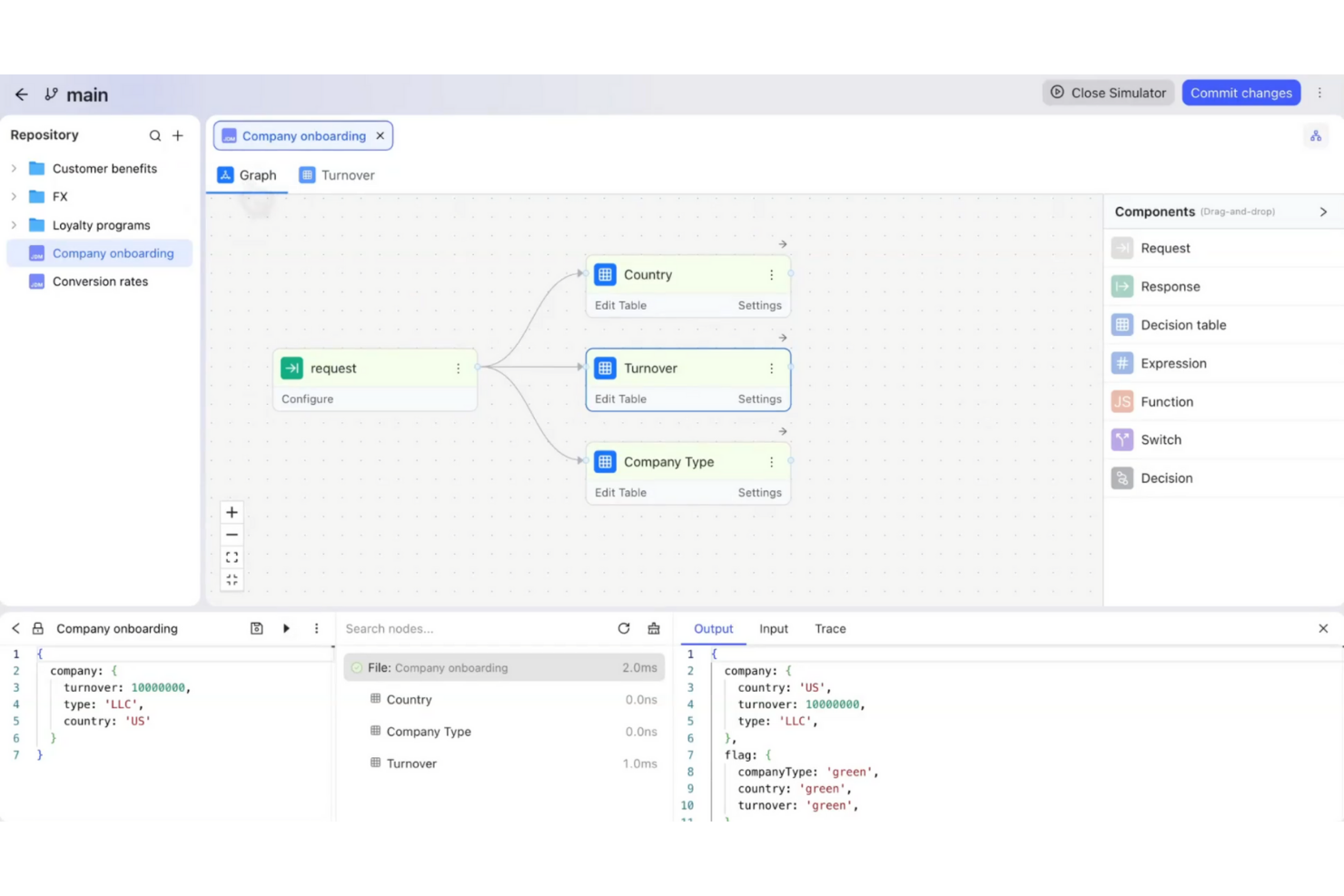
GoRules is a cloud-native business rules engine designed for teams that need flexible, API-driven rule management. It’s a strong fit for SaaS providers, fintechs, and digital businesses looking to centralize and automate decision logic without heavy infrastructure. If you want to update rules quickly and keep your systems agile, GoRules offers a modern approach to rule deployment and governance.
Why I Picked GoRules
I chose GoRules because it’s built specifically for cloud-native rule management, which is a priority for teams running distributed or API-first applications. The platform lets you define, test, and deploy rules directly through a web interface or via REST API, making it easy to integrate with modern cloud architectures. I like that GoRules supports versioning and audit trails for every rule change, so you can track updates and maintain compliance. Its real-time rule execution and centralized management help teams keep business logic consistent across multiple environments.
GoRules Key Features
Some other features that make GoRules stand out for business rules automation include:
- Rule Simulation: Test new or updated rules in a sandbox environment before deploying them to production.
- Role-Based Access Control: Assign permissions and manage user roles to control who can view, edit, or deploy rules.
- JSON Logic Support: Author and manage rules using JSON logic, making it easy to work with structured data.
- Webhook Integration: Trigger external workflows or notifications automatically when specific rules are executed.
GoRules Integrations
Integrations include Azure AD, Okta, and any OpenID Connect provider for SSO, as well as native SDKs for Rust, Node.js, Python, Go, Java, Kotlin, and Swift.
Pros and Cons
Pros:
- Supports JSON logic for flexible rule authoring
- Real-time rule execution via REST API
- Cloud-native deployment with multi-cloud support
Cons:
- Smaller community compared to legacy vendors
- No visual rule builder for non-technical users

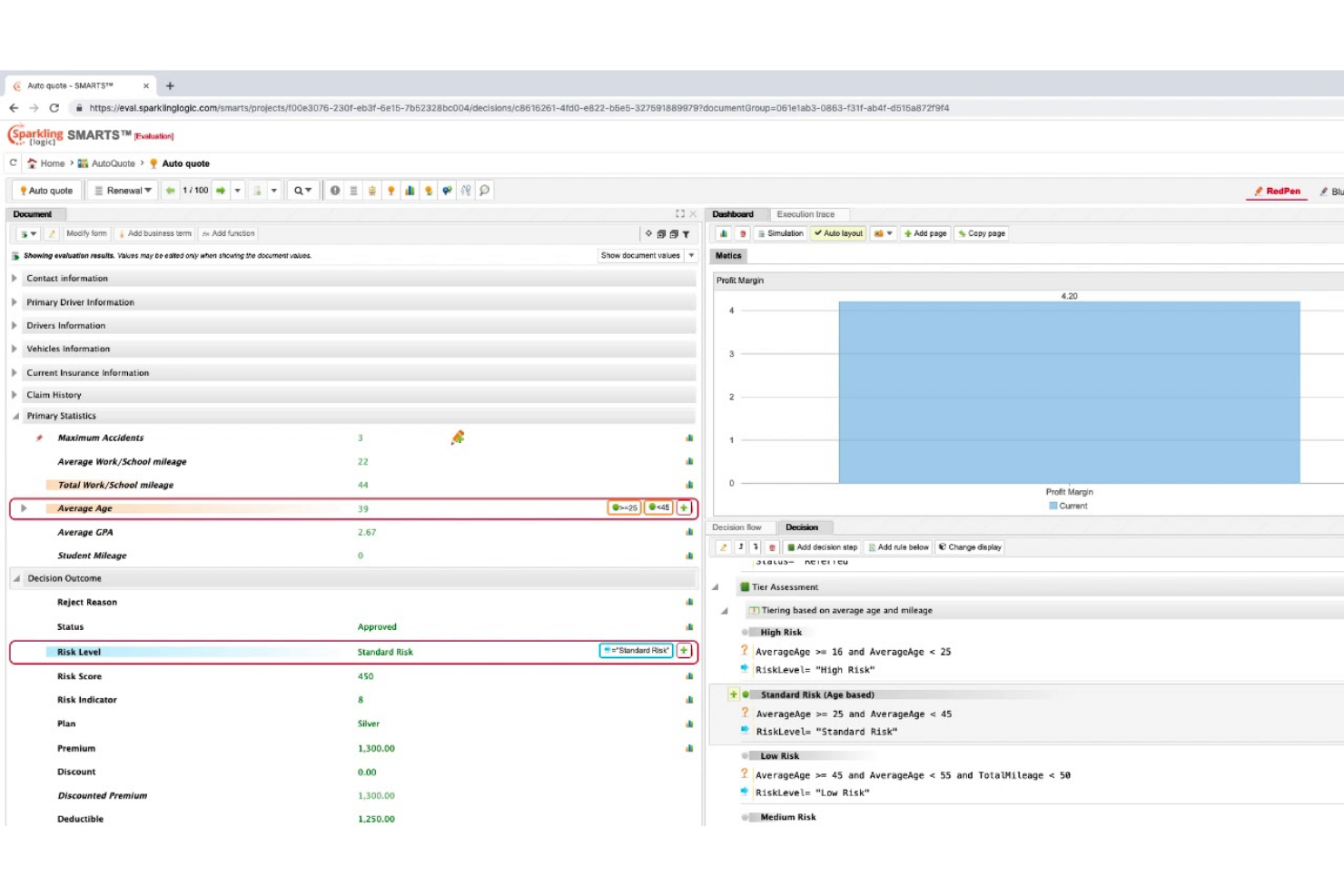
Sparkling Logic offers a visual approach to decision modeling that appeals to teams managing complex business logic. It’s especially useful for analysts and product owners who want to map, test, and optimize rules using flowcharts and decision tables. The platform helps you visualize dependencies and outcomes, making it easier to align stakeholders and adapt rules as requirements change.
Why I Picked Sparkling Logic
What sets Sparkling Logic apart is its focus on visual decision modeling, which is especially valuable for teams that need to map out and communicate complex business logic. The platform lets you build and manage rules using flowcharts and decision tables, so you can see how decisions connect and evolve. I picked Sparkling Logic because it supports real-time rule testing and simulation, helping you validate outcomes before deploying changes. This visual approach makes it easier to collaborate with stakeholders and adapt rules as business needs shift.
Sparkling Logic Key Features
In addition to its visual modeling capabilities, I also found these features worth noting:
- RedPen Rule Authoring: Create and edit rules using a guided, form-based interface.
- Automated Rule Discovery: Analyze historical data to suggest new rules automatically.
- Decision Analytics Dashboard: Monitor rule performance and outcomes with built-in analytics.
- Role-Based Access Control: Assign permissions and manage user roles for secure collaboration.
Sparkling Logic Integrations
Native integrations are not currently listed.
Pros and Cons
Pros:
- Automated rule discovery suggests new decision logic
- RedPen authoring guides non-technical rule creation
- Visual rule modeling supports complex logic mapping
Cons:
- Limited community support and user forums
- Documentation lacks detailed implementation examples

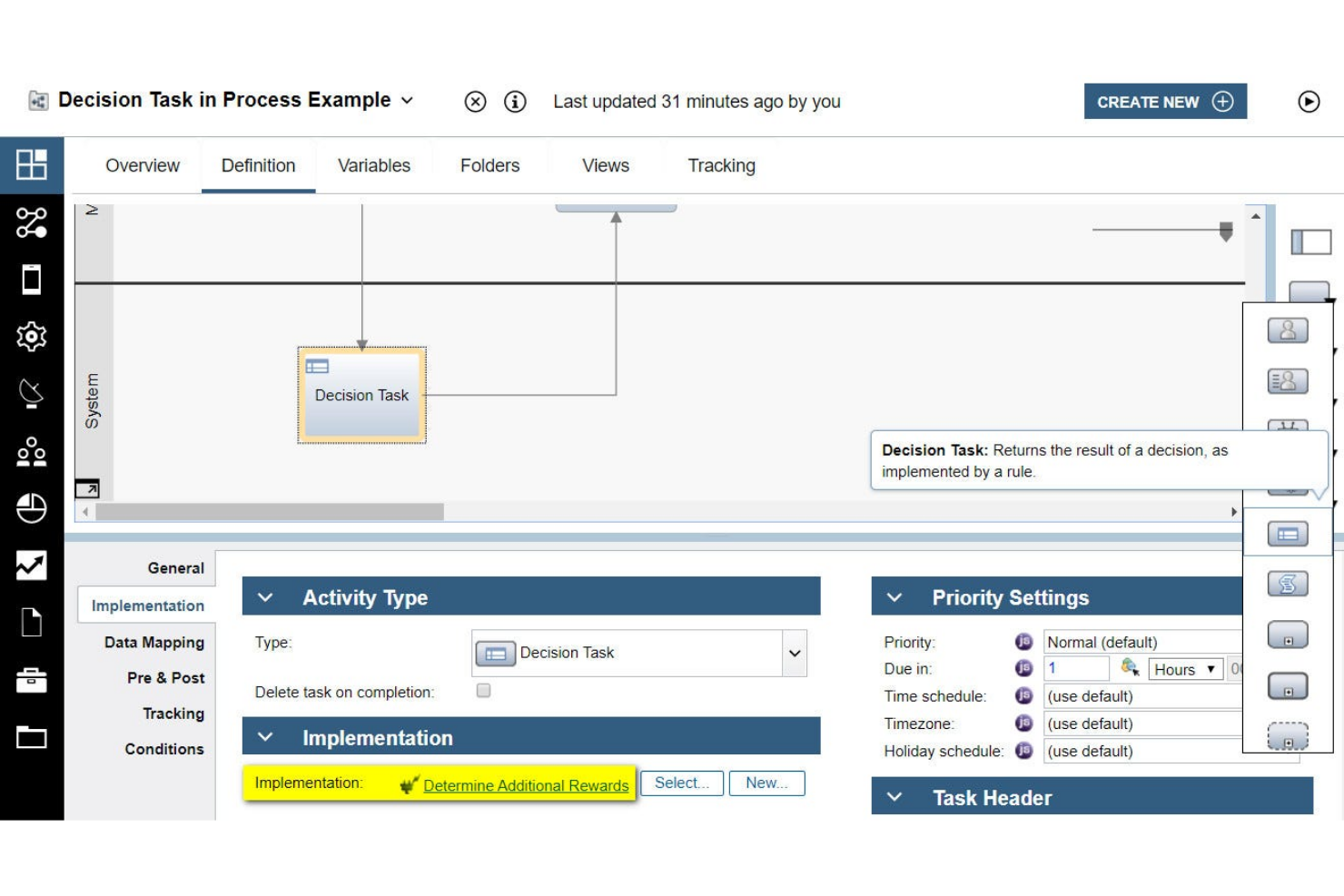
IBM Operational Decision Manager’s business rules management system is built for organizations that need to modernize decision automation while maintaining deep integration with legacy systems. It’s especially relevant for enterprises in finance, insurance, and government that rely on mainframes or older infrastructure. The platform helps you centralize, update, and govern complex business logic without disrupting existing operations.
Why I Picked IBM Operational Decision Manager
What sets IBM Operational Decision Manager apart is its strong focus on supporting legacy system integration, which is a major concern for large enterprises with established infrastructure. The platform offers tools for connecting business rules directly to mainframes and older databases, so you can automate decisions without overhauling your existing tech stack. I picked IBM Operational Decision Manager because it provides centralized rule management and governance features that help maintain consistency across distributed systems. This makes it a practical choice for organizations that need to modernize decision logic while keeping legacy operations running smoothly.
IBM Operational Decision Manager Key Features
Some other features that caught my attention include:
- Decision Modeling Notation (DMN) Support: Create and manage decision models using industry-standard DMN diagrams.
- Role-Based Access Control: Assign permissions and manage user roles for rule editing and deployment.
- Simulation and Testing Tools: Run simulations to validate rule changes before production deployment.
- Automated Rule Deployment: Deploy updated rules to multiple environments with automated workflows.
IBM Operational Decision Manager Integrations
Native integrations are not currently listed.
Pros and Cons
Pros:
- Includes simulation and rule testing tools
- Offers DMN and decision table modeling
- Supports mainframe and legacy system integration
Cons:
- Limited out-of-the-box rule templates
- Cloud and on-prem features differ
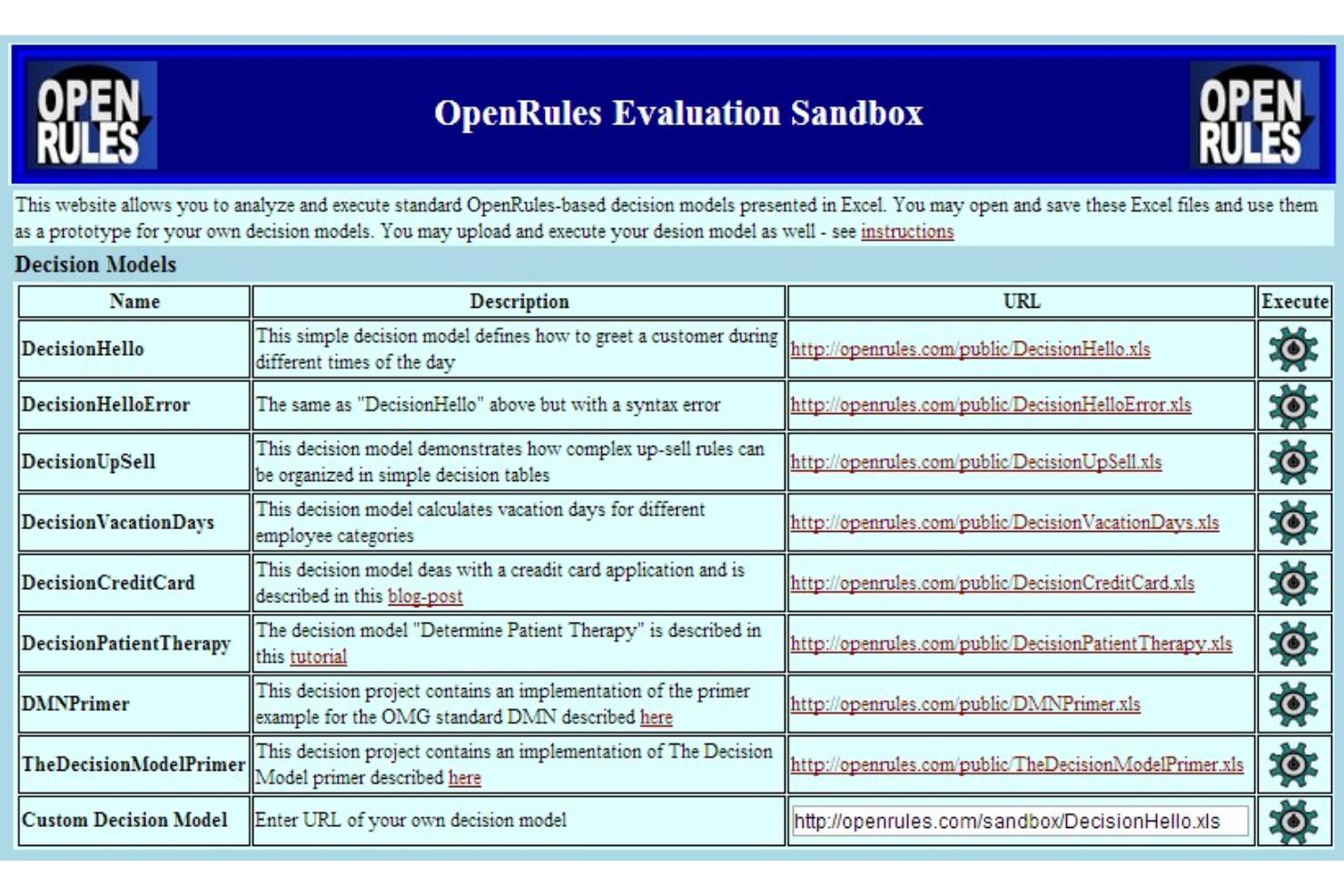
OpenRules stands out for teams that want full control over their business rules engine and prefer open-source solutions. It’s a strong fit for developers and IT teams in regulated industries who need to customize, audit, and extend rule logic without vendor lock-in. The platform helps you build, test, and deploy decision models using familiar tools like Excel and Java.
Why I Picked OpenRules
OpenRules offers a level of open-source flexibility that’s hard to find in other business rules engines. You can modify, extend, and audit the source code, which is especially valuable for organizations with strict compliance or customization needs. I picked OpenRules because it lets teams define rules in Excel or Java, making it accessible for both technical and non-technical users. This approach supports transparency and control, which are key for teams that want to avoid vendor lock-in and tailor their decision logic.
OpenRules Key Features
Some other features worth highlighting include:
- Decision Model and Notation (DMN) Support: Build and execute decision models using DMN standards for consistency and clarity.
- RESTful API Integration: Connect rule services to external applications through RESTful endpoints.
- Rule Testing Framework: Validate and test business rules with built-in testing tools before deployment.
- Deployment to Cloud Platforms: Deploy rule engines to cloud environments like AWS and Azure for scalability.
OpenRules Integrations
Native integrations are not currently listed.
Pros and Cons
Pros:
- Offers a REST API for external integrations
- Supports DMN and Excel-based rule modeling
- Fully open-source with a transparent codebase
Cons:
- User interface is primarily code and spreadsheet-based
- Limited vendor-provided technical support options
Outro software de motores de regras de negócio
Eis algumas opções adicionais de software de motores de regras de negócio que não integraram a minha seleção, mas que vale a pena conhecer:
- Progress Corticon
For complex decision automation
- SAS
For analytics-driven rule creation
- Knack
For custom database-driven rule logic
- Flowable
For BPMN-based rule automation


How I Evaluate Business Rules Engine Software
I look at two layers: the baseline capabilities a tool must have—like a visual rule editor and real-time execution—and the differentiators that set the best options apart for PMO teams.
Core Functionality (Table Stakes For This List)
When I'm selecting tools for my list, I rank each one on a scale from 0 (does not offer the functionality) to 5 (excels in this area) for each core functionality listed below. Then, I calculate the tool's total score into a percentage. Each tool needs to achieve a minimum total score of 65% to be considered for inclusion.
- Rule Authoring Interface: I evaluate whether business users can create and modify rules through a visual builder or natural language forms rather than relying on developers to hardcode logic.
- Conditional Logic Engine: The engine should handle decision tables, nested if-then-else chains, and Boolean operators—like routing approvals based on project budget, risk tier, and team capacity.
- Rule Execution & Runtime: I check whether rules fire in real-time against live triggers (e.g., a status change in Jira) or only run in scheduled batches, and how each tool handles throughput at scale.
- Rule Versioning & Governance: Audit trails and rollback matter when PMO teams manage dozens of active rules. I look for version history, role-based permissions, and lifecycle approval workflows.
- API & System Integration: A rules engine only adds value if it connects to your existing stack. I evaluate REST/SOAP API coverage and native connectors to PM platforms, ERPs, and iPaaS tools.
- Testing & Simulation Tools: Before pushing a rule live, you need a sandbox. I look for what-if simulation, sample data testing, and regression checks so a misconfigured rule doesn't derail active projects.
Once I have a list of tools that meet the criteria, I consider what sets each platform apart.
Differentiating Factors (What Sets Vendors Apart)
Here's how I compare and contrast different vendors:
Standout Features
Pre-built rule templates can shave days off deployment—I look for libraries that include PM-specific patterns like escalation triggers or SLA breach alerts. Analytics dashboards also matter. I want to see which rules fire most often, where bottlenecks form, and how rule changes affect project outcomes over time. Collaborative rule management is another separator. When PMO leads and IT need to co-author rules, tools with commenting, approval workflows, and shared ownership make cross-functional coordination far smoother.
Beyond Features
Integration ecosystem depth is one of the first things I check—a rules engine that doesn't connect to your Jira instance or ERP is shelf-ware waiting to happen. Compliance certifications like SOC 2 Type II and ISO 27001 also carry real weight, especially when rules govern resource allocation or budget approvals with sensitive data. I evaluate licensing models closely too, since per-execution pricing can spiral fast when you're running hundreds of automated checks across a large project portfolio.
Como escolher software de motores de regras de negócio
É fácil ficar preso a longas listas de funcionalidades e estruturas de preços complexas. Para o ajudar a manter-se concentrado enquanto analisa o seu processo específico de seleção de software, apresentamos uma lista de fatores a ter em consideração:
| Fator | O que considerar |
|---|---|
| Escalabilidade | A ferramenta irá suportar o volume atual e previsto de regras, o número de utilizadores e a carga de transações? Peça aos fornecedores exemplos reais de escalabilidade. |
| Integrações | O software liga-se nativamente aos seus sistemas essenciais (ERP, CRM, bases de dados)? Verifique a existência de conectores pré-configurados e opções de API. |
| Personalização | Pode adaptar a lógica das regras, os fluxos de trabalho e os resultados aos seus processos empresariais sem uma intervenção significativa da equipa de TI? |
| Facilidade de utilização | Os utilizadores empresariais poderão criar, testar e atualizar regras de forma autónoma ou será necessária a intervenção da equipa de TI para cada alteração? |
| Implementação e integração inicial | Que recursos, formação e apoio à migração disponibiliza o fornecedor? Informe-se sobre os prazos de integração inicial e o esforço interno necessário. |
| Custo | Os níveis de preços são transparentes e previsíveis à medida que a utilização aumenta? Esteja atento a custos ocultos associados a utilizadores, transações ou integrações. |
| Medidas de segurança | A ferramenta suporta os requisitos da sua organização em matéria de proteção de dados, controlo de acessos e auditoria? Solicite documentação relativa às certificações. |
| Requisitos de conformidade | A plataforma suporta os regulamentos específicos do setor (como HIPAA, RGPD ou SOX) relevantes para a sua empresa? |
O que é o software de motores de regras de negócio?
O software de motor de regras empresariais, frequentemente designado por BRMS (sistema de gestão de regras empresariais), é uma ferramenta que permite às organizações definir, gerir e automatizar a lógica de decisão separadamente do código da aplicação. Estas plataformas ajudam as equipas a criar, atualizar e auditar regras — como verificações de elegibilidade, aprovações ou requisitos de conformidade — sem depender de programadores. Ao centralizar a gestão de regras, as empresas podem simplificar as operações, apoiar a gestão de processos empresariais e possibilitar casos de utilização como a deteção de fraude e a fixação dinâmica de preços, especialmente nos serviços financeiros e nas instituições financeiras. Com uma interface intuitiva e uma integração perfeita entre sistemas, estas ferramentas ajudam as organizações a responder rapidamente às mudanças, mantendo simultaneamente a consistência e a transparência na tomada de decisões.
Funcionalidades
Ao selecionar software de motor de regras empresariais, procure as seguintes funcionalidades principais:
- Interface de criação de regras: Disponibiliza um ambiente visual ou baseado em texto para criar, editar e organizar regras empresariais sem escrever código de aplicação.
- Versionamento de regras: Regista as alterações às regras ao longo do tempo, permitindo aos utilizadores rever, reverter ou auditar versões anteriores à medida que as necessidades empresariais evoluem.
- Teste e simulação de regras: Permite aos utilizadores validar a lógica e os resultados das regras utilizando dados de exemplo antes de implementar alterações nos sistemas de produção.
- Processamento em lote: Processa grandes volumes de dados ou transações através de regras definidas numa única operação, suportando a automatização de decisões com elevado débito.
- Deteção de conflitos e lacunas: Identifica regras sobrepostas, contraditórias ou em falta, ajudando a manter a consistência lógica e a evitar erros nas decisões automatizadas.
- Controlo de acesso baseado em funções: Restringe as permissões de criação, edição e implementação de regras com base nas funções dos utilizadores, apoiando os requisitos de governação e conformidade.
- Conectores de integração: Permitem ligações diretas a bases de dados, aplicações e outros sistemas, para que as regras possam aceder a dados em tempo real e desencadear ações subsequentes.
- Registo de auditoria: Regista todas as alterações às regras, execuções e ações dos utilizadores, fornecendo um histórico transparente para fins de conformidade e resolução de problemas.
- Gestão de implementação: Suporta a publicação, atualização e reversão de regras em diferentes ambientes, como desenvolvimento, teste e produção.
- Monitorização e elaboração de relatórios: Disponibiliza painéis e relatórios para acompanhar as métricas de execução das regras, os erros e os resultados empresariais, permitindo uma otimização contínua.
Benefícios
A implementação de software de motor de regras empresariais proporciona vários benefícios à sua equipa e à sua empresa. Eis alguns dos benefícios que pode esperar:
- Alterações mais rápidas às regras: Os utilizadores empresariais podem atualizar diretamente a lógica de decisão através de uma interface visual, reduzindo a dependência dos programadores e acelerando a resposta a novos requisitos.
- Tomada de decisões consistente: A gestão centralizada das regras garante que as decisões automatizadas seguem a mesma lógica em todos os sistemas e processos.
- Melhor capacidade de auditoria: As funcionalidades integradas de versionamento, registos de auditoria e elaboração de relatórios facilitam o acompanhamento das alterações e a demonstração da conformidade com normas internas e externas.
- Redução do risco operacional: As ferramentas de deteção de conflitos e lacunas ajudam a evitar regras contraditórias ou em falta, minimizando os erros nos processos automatizados.
- Maior agilidade: As equipas podem adaptar-se rapidamente a alterações regulamentares ou a mudanças nas prioridades empresariais, atualizando as regras sem voltar a implementar o código da aplicação.
- Melhor colaboração: Os controlos de acesso baseados em funções e a documentação clara das regras apoiam a colaboração entre as equipas de negócio, conformidade e TI.
- Automatização escalável: O processamento em lote e os conectores de integração permitem às organizações automatizar decisões complexas e de grande volume à medida que crescem.
Custos e preços
A seleção de software de motor de regras empresariais exige uma compreensão dos vários modelos de preços e planos disponíveis. Os custos variam consoante as funcionalidades, a dimensão da equipa, os complementos, entre outros fatores. A tabela abaixo resume os planos comuns, os respetivos preços médios e as funcionalidades normalmente incluídas nas soluções de software de motor de regras empresariais:
Tabela de comparação de planos de software de motores de regras empresariais
| Tipo de plano | Preço médio | Funcionalidades comuns |
|---|---|---|
| Plano gratuito | $0 | Criação básica de regras, execuções de regras limitadas, acesso para um único utilizador e apoio da comunidade. |
| Plano pessoal | $50–$300/utilizador/mês | Editor visual de regras, integrações básicas, controlo de versões das regras e apoio por e-mail. |
| Plano empresarial | $300–$1000+/utilizador/mês | Colaboração entre vários utilizadores, integrações avançadas, processamento em lote, registos de auditoria e acesso baseado em funções. |
| Plano empresarial avançado | $1000–$4000+/utilizador/mês | Integrações personalizadas, integração inicial dedicada, ferramentas de conformidade, apoio premium e segurança avançada. |
Perguntas frequentes sobre software de motores de regras empresariais
Eis algumas respostas a perguntas comuns sobre software de motores de regras empresariais:
O software de motores de regras empresariais pode ser utilizado por utilizadores não técnicos?
Sim, a maioria dos softwares de motores de regras empresariais foi concebida com editores visuais e interfaces sem código, para que analistas de negócio e outros utilizadores não técnicos possam criar, modificar e testar regras sem escrever código. Isto ajuda as equipas a responder rapidamente a requisitos em mudança, sem terem de aguardar pela disponibilidade de recursos de desenvolvimento.
Como é que o software de motores de regras empresariais se integra com os sistemas existentes?
O software de motores de regras empresariais disponibiliza normalmente conectores de integração, APIs ou webhooks para estabelecer ligação a bases de dados, CRMs, ERPs e outras aplicações empresariais. Ao avaliar as opções, verifique se a ferramenta é compatível de forma nativa com os seus sistemas essenciais ou se será necessário desenvolver uma integração personalizada.
Quais são os principais desafios ao implementar software de motores de regras empresariais?
Os desafios comuns incluem a migração de regras existentes de sistemas antigos, o alinhamento da lógica das regras com os processos empresariais e a garantia de que todas as partes interessadas compreendem como utilizar a nova plataforma. Planear formação, documentação e implementações faseadas pode ajudar a resolver estas questões.
Como é que os motores de regras empresariais apoiam os requisitos de conformidade e auditoria?
O software de motores de regras empresariais disponibiliza registos de auditoria, controlo de versões das regras e relatórios detalhados para acompanhar alterações e execuções de regras. Estas funcionalidades ajudam as organizações a demonstrar a conformidade com políticas internas e regulamentações externas, mantendo um registo transparente das decisões automatizadas.
É possível testar as regras antes de as implementar em produção?
Sim, a maioria dos softwares de motores de regras empresariais inclui funcionalidades de teste e simulação de regras. Estas permitem aos utilizadores validar a lógica e os resultados das regras utilizando dados de exemplo, reduzindo o risco de erros ou consequências não intencionais quando as regras entram em funcionamento.