

10 Software de Fluxos de Trabalho Baseado na Nuvem para 2026

Lista restrita de software de fluxo de trabalho baseado na nuvem


O software de fluxo de trabalho baseado na nuvem permite à sua equipa conceber, automatizar e gerir processos empresariais inteiramente online, para que possa coordenar o trabalho a partir de qualquer lugar e adaptar-se rapidamente à medida que as prioridades mudam. Se procura o melhor software de fluxo de trabalho baseado na nuvem, é provável que queira reduzir as etapas manuais, manter os projetos em andamento e dar a todos visibilidade sobre o que está a acontecer — sem o incómodo das ferramentas instaladas localmente. Esta lista ajudá-lo-á a comparar as principais plataformas, compreender quais as funcionalidades mais importantes para as suas necessidades e tomar uma decisão confiante para a próxima fase de crescimento da sua equipa.
Why Trust Our Software Recommendations
Our team has been testing and reviewing software since 2012. As project managers ourselves, we know how difficult—and important—it is to choose the right software.
For this guide, we evaluated tools using hands-on testing and independent research, scoring tools using our selection criteria. We also draw on insights from industry thought leaders and practicing project management experts.
Our reviews reflect our human editorial judgment, not a sales pitch.
Expert reviewers:
Tabela de comparação de software de fluxo de trabalho baseado na nuvem
Esta tabela de comparação resume os detalhes de preços das minhas principais escolhas de software de fluxo de trabalho baseado na nuvem.
| Tool | Best For | Trial Info | Price | ||
|---|---|---|---|---|---|
| 1 | Best with AI-powered workflow building | 30-day free trial available | Pricing upon request | Website | |
| 2 | Best for quick workflow deployment | 14-day free trial + free demo available | From $11/user/month (billed annually) | Website | |
| 3 | Best with open-source workflow customization | Free trial available | From €20/month (billed annually) | Website | |
| 4 | Best for secure document-centric workflows | 14-day free trial | From CAD$21/user/month (billed annually) | Website | |
| 5 | Best for process mapping and automation | 30-day free trial + free demo available | From $15,000/year (billed annually) | Website | |
| 6 | Best for software development teams | Free plan available | From $7/user/month (billed annually) | Website | |
| 7 | Best for customizable task automation | Free plan available | From $7/user/month (billed annually) | Website | |
| 8 | Best for complex data pipeline management | Free plan available | Pricing upon request | Website | |
| 9 | Best for enterprise workload orchestration | Free demo available | Not available | Website | |
| 10 | Best with native Google Cloud integrations | Not available | Not available | Website |
Avaliações de software de fluxo de trabalho baseado na nuvem
Seguem-se os meus resumos detalhados do software de fluxo de trabalho baseado na nuvem que entrou na minha lista restrita. As minhas avaliações analisam detalhadamente as funcionalidades, integrações e melhores casos de utilização de cada plataforma, para o ajudar a encontrar a mais adequada para si.

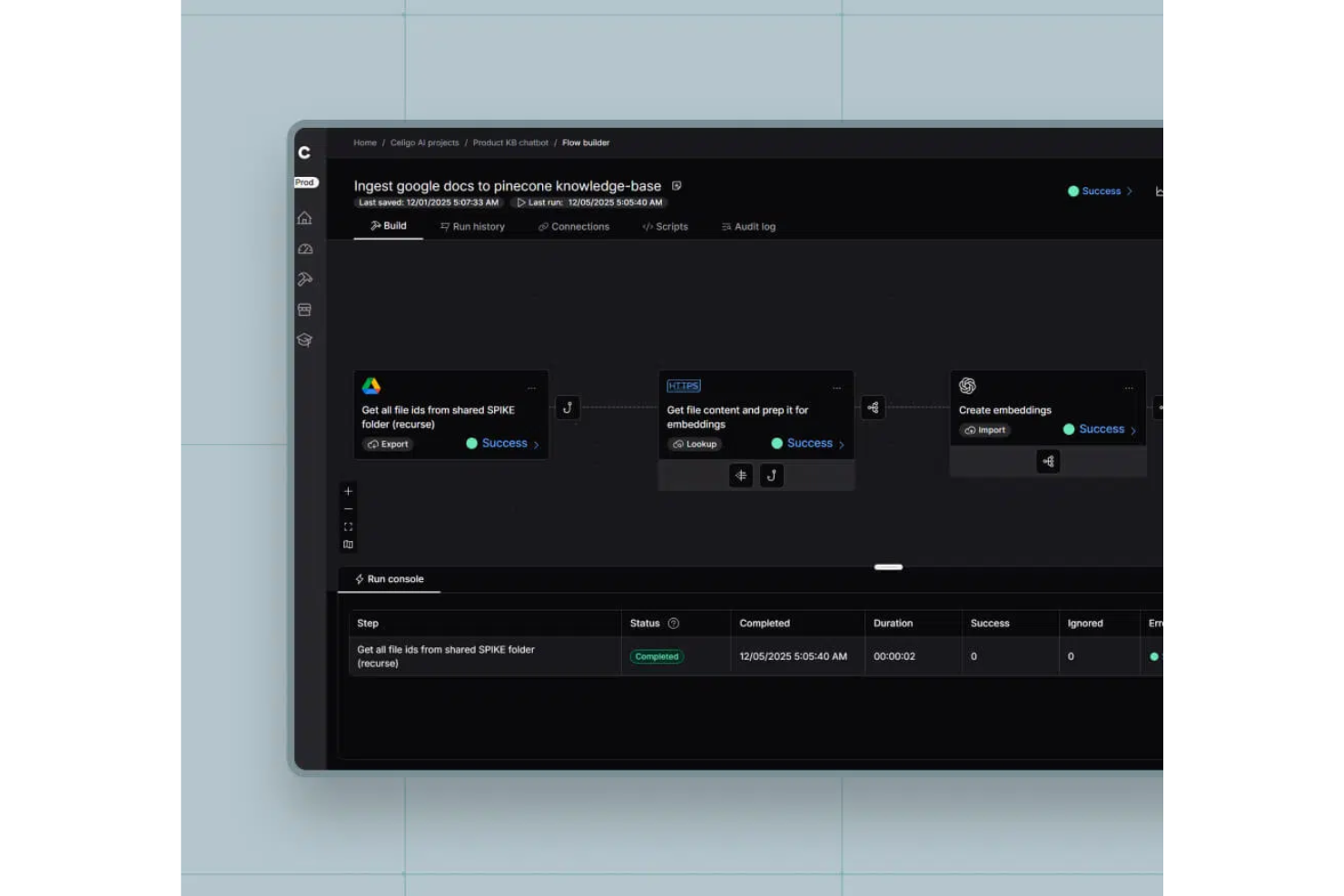
Celigo is a cloud-based workflow automation platform that connects cloud apps, automates business processes, and offers a visual interface for building and managing integrations.
Who Is Celigo Best For?
Celigo is a good fit for IT teams and operations leaders at mid-sized to large enterprises who need to automate and connect multiple cloud applications.
Why I Picked Celigo
I picked Celigo as one of the best because its AI-powered workflow builder lets me automate complex business processes without heavy manual setup. I like how the platform suggests workflow steps and mappings based on my data and app connections. My team is able to quickly build, test, and deploy automations using these AI-driven recommendations.
Celigo Key Features
- Visual flow designer: Build and edit workflows using a drag-and-drop interface.
- Error management dashboard: Monitor, troubleshoot, and resolve integration errors in real time.
- Reusable integration templates: Access a library of prebuilt templates for common business processes.
- Role-based access controls: Set permissions and manage user access for workflow and integration management.
Celigo Integrations
Celigo offers 1,000+ native connectors, including Salesforce, NetSuite, SAP, Microsoft Dynamics 365, Shopify, Amazon, QuickBooks, HubSpot, Jira, Slack, and Google Sheets. An API is available for custom integrations.
Pros and Cons
Pros:
- Detailed error management and monitoring tools
- AI-powered workflow automation suggestions
- Visual workflow builder with drag-and-drop design
Cons:
- Some connectors require additional configuration steps
- Advanced scripting requires JavaScript knowledge
New Product Updates from Celigo
Celigo Adds Agent Groups, Redshift, and Network Policies
Celigo adds on-premise agent groups, Amazon Redshift data ingestion, and network policies for webhooks and APIs. These updates improve availability, data syncing, and access control. For more information, visit Celigo’s official site.
 .
Cflow
Best for quick workflow deployment
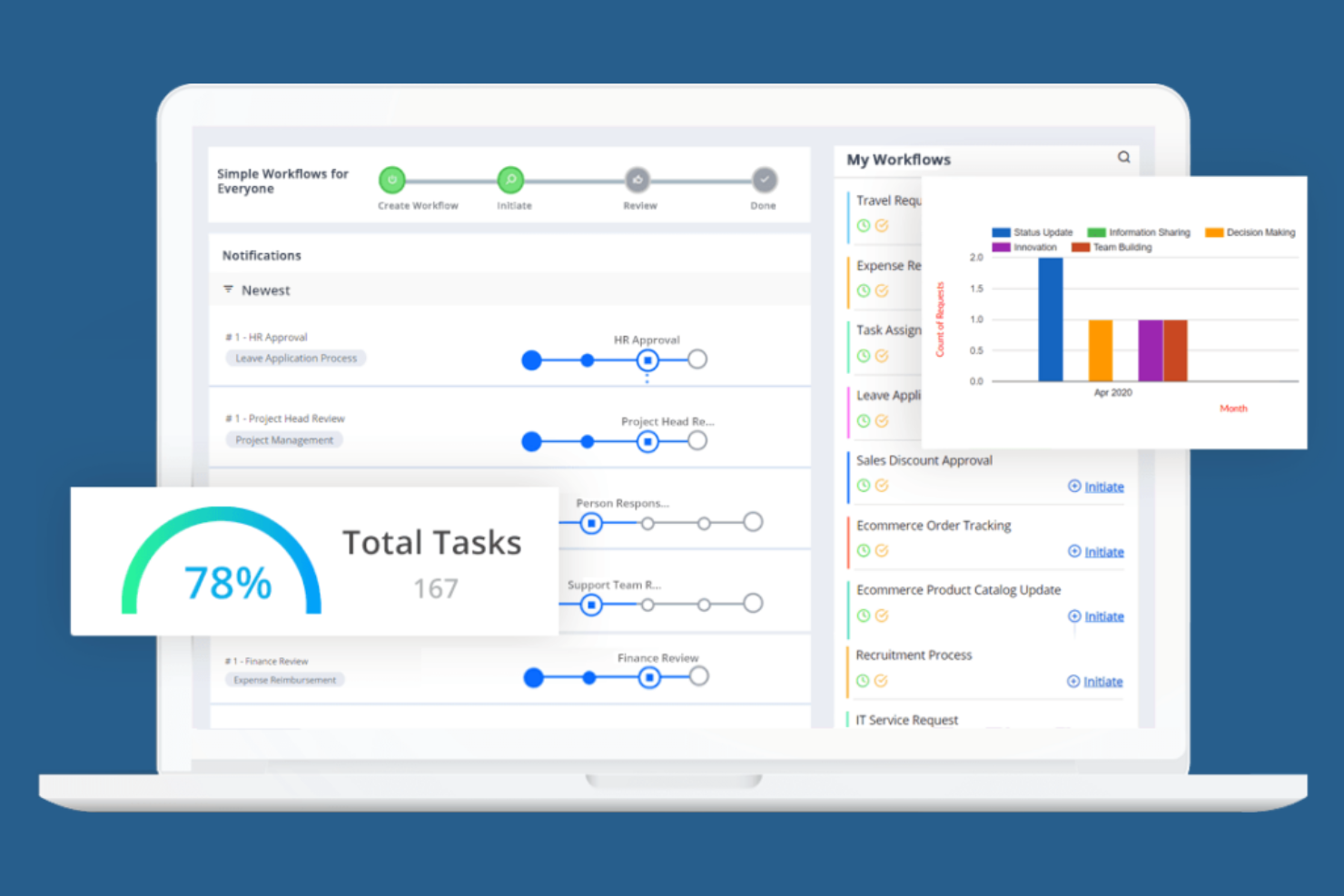
Cflow is designed for teams that need to deploy automated workflows quickly, without heavy IT involvement. It appeals to small and midsize businesses looking to digitize approvals, requests, and routine processes with minimal setup. The platform’s no-code workflow builder and ready-to-use templates help users launch new workflows in minutes.
Why I Picked Cflow
When speed is a top priority for workflow automation, Cflow stands out for its quick deployment capabilities. I picked Cflow because its no-code workflow builder lets users design and launch automated processes without technical expertise. The platform also offers a library of pre-built workflow templates, so teams can get started with common business processes right away. For organizations that need to digitize approvals, requests, or document routing in the cloud with minimal setup time, Cflow is a practical choice.
Cflow Key Features
In addition to its rapid deployment tools, Cflow includes several other features that support workflow automation in the cloud:
- Custom Form Designer: Build and modify forms with a drag-and-drop interface for capturing process data.
- Role-Based Access Control: Set permissions and manage user access based on roles within your organization.
- Automated Notifications: Send email or in-app alerts to keep stakeholders updated on workflow progress.
- Audit Trails: Track every action and change within workflows for compliance and transparency.
Cflow Integrations
Integrations include SAP, QuickBooks, Slack, Google Workspace, and Microsoft 365.
Pros and Cons
Pros:
- Good for HR and finance ops
- Easy mobile workflow approval
- Affordable cloud pricing
Cons:
- Analytics could be deeper
- Basic UI design feels dated

n8n
Best with open-source workflow customization

If you’re looking for a workflow automation platform with deep customization and open-source flexibility, N8n is worth considering. It’s built for technical teams and developers who want to design, modify, and self-host complex workflows without vendor lock-in. N8n’s node-based editor and open-source codebase let you tailor automations to fit unique business processes or compliance needs.
Why I Picked N8n
What sets N8n apart is its open-source approach to workflow automation, which gives teams full control over how their workflows are built and deployed. I picked N8n because it lets users customize every step of their automation, from building custom nodes to self-hosting the entire platform for greater data privacy. The visual node-based editor makes it possible to design complex, multi-step workflows that can be tailored to unique business requirements. For teams that want to avoid vendor lock-in and need flexibility to adapt workflows as their processes evolve, N8n offers a level of customization that’s hard to match in cloud based workflow software.
N8n Key Features
Some other features that make N8n appealing for workflow automation include:
- Version Control Support: Integrate with Git to manage workflow versions and track changes over time.
- Built-In Scheduler: Trigger workflows automatically based on time or recurring intervals.
- Error Workflow Handling: Configure custom error workflows to manage exceptions and failures.
- Environment Variables Management: Store and manage sensitive data or configuration settings securely within workflows.
N8n Integrations
Integrations include Slack, Discord, GitHub, Airtable, Google Workspace, PostgreSQL, and Mailchimp.
Pros and Cons
Pros:
- Visual builder is very clean
- Huge community integrations
- Deep custom node scripting
Cons:
- Less enterprise compliance
- Debugging nodes can be hard

Box
Best for secure document-centric workflows
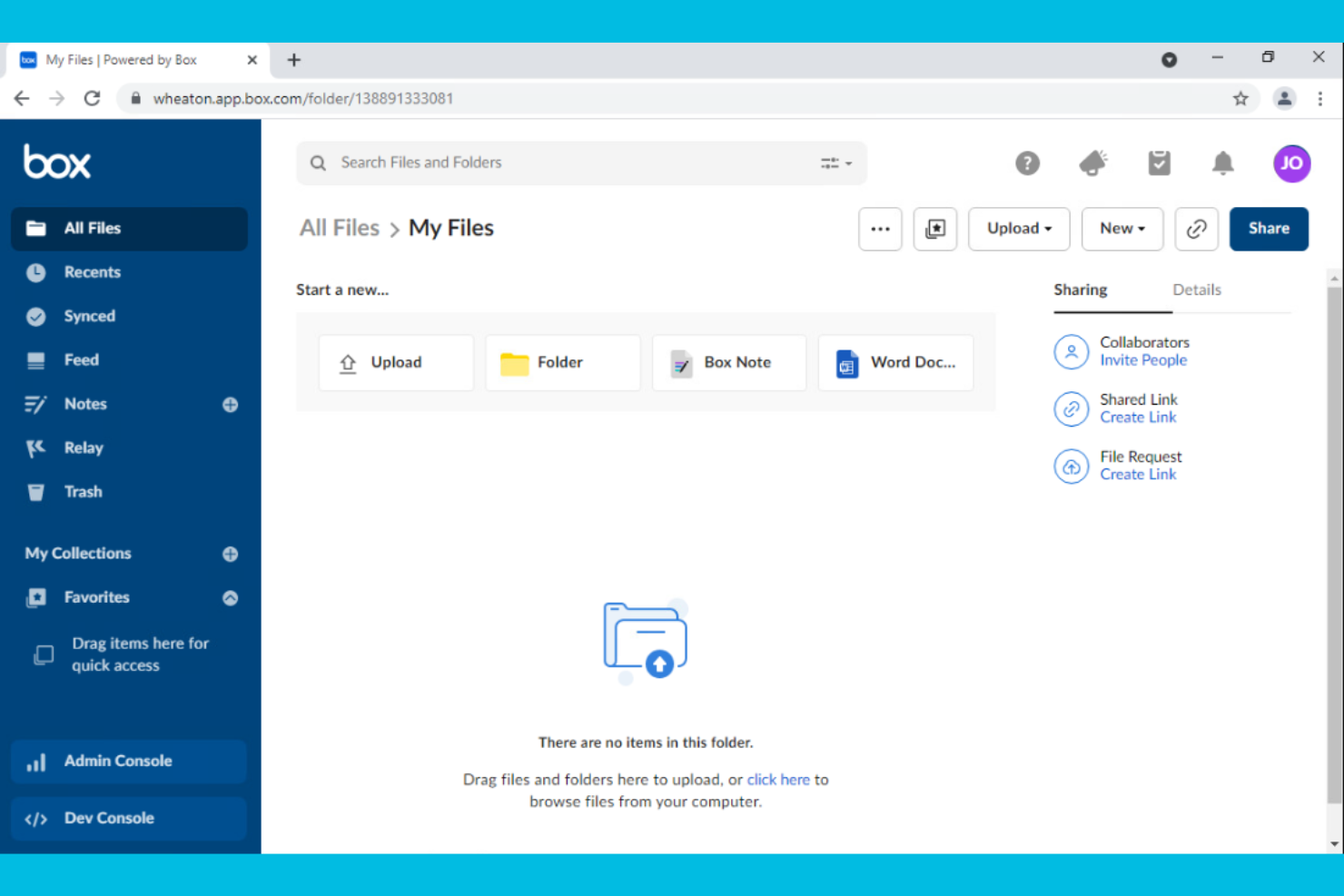
Box is designed for organizations that need to manage, share, and secure documents as part of their workflow. It’s a strong fit for teams in regulated industries or any business where document security and compliance are top priorities. With features for granular file permissions and automated document routing, Box helps teams keep sensitive information protected while moving work forward.
Why I Picked Box
When document security is a top concern, Box offers a workflow platform built around protecting sensitive files. I picked Box because it provides advanced security controls like granular permission settings and detailed audit trails, which are essential for teams handling confidential information. The platform also supports automated document workflows, allowing users to route, review, and approve files without compromising compliance. For organizations that need to balance collaboration with strict data protection, Box delivers a focused solution.
Box Key Features
In addition to its security-focused workflow tools, Box offers several other features that support document-centric processes:
- Version History: Track and restore previous versions of documents directly within the platform.
- eSignature Integration: Collect legally binding electronic signatures without leaving Box.
- Task Assignment: Assign tasks to team members and monitor progress on document-related work.
- Collaboration Workspaces: Create shared folders and workspaces for real-time document collaboration.
Box Integrations
Integrations include Microsoft 365, Google Workspace, Salesforce, Slack, Zoom, Okta, and ServiceNow.
Pros and Cons
Pros:
- Seamless e-signature add-ons
- Automated retention policies
- Easy document approvals
Cons:
- Workflow UI is very basic
- Relay feature costs extra

Nintex
Best for process mapping and automation
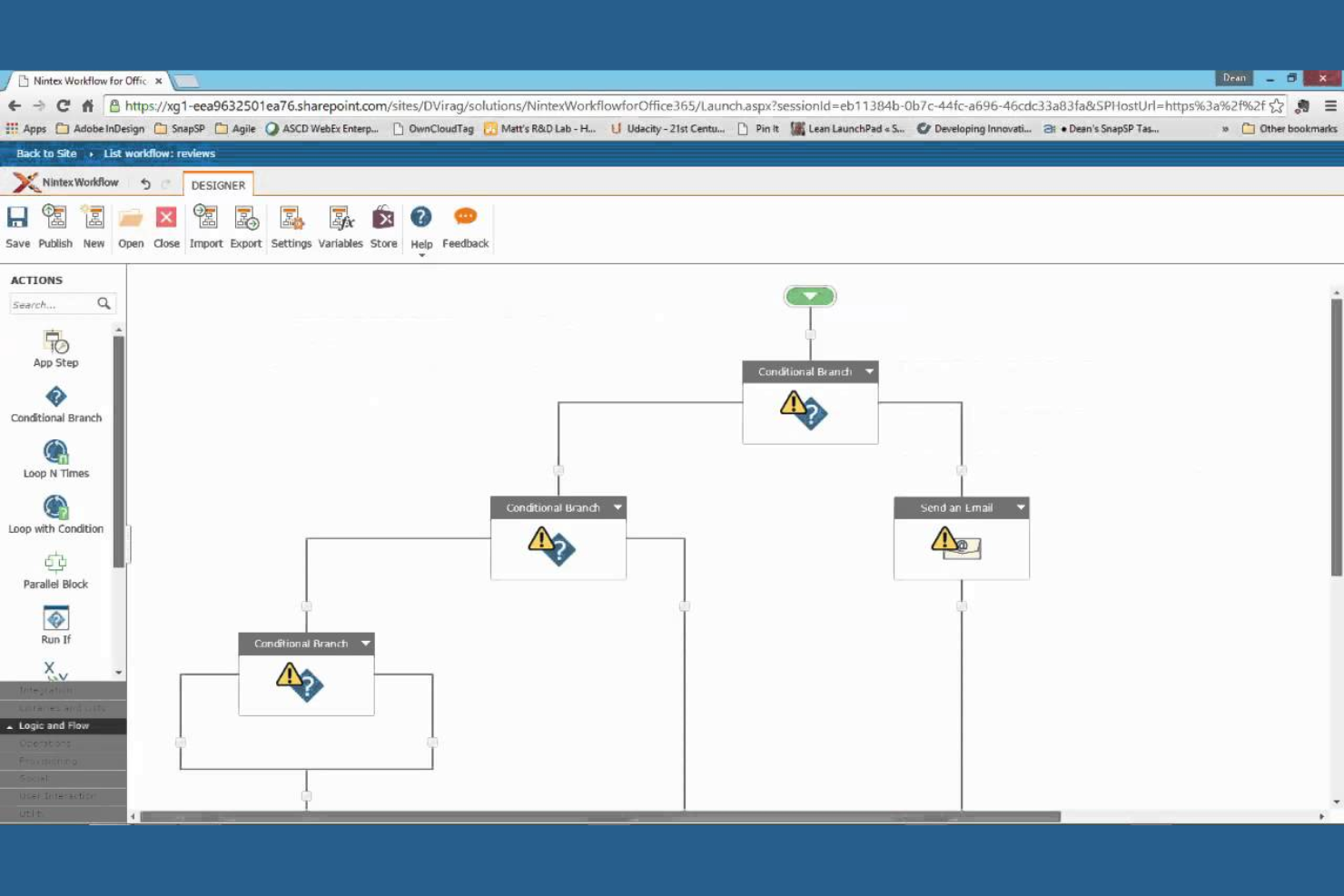
Nintex stands out for teams that need to map, automate, and optimize business processes without heavy IT involvement. Operations leaders and process analysts use it to visually design workflows, automate approvals, and document procedures across departments. Its drag-and-drop process mapping and automation tools help organizations standardize and improve complex workflows in regulated or fast-changing environments.
Why I Picked Nintex
For organizations that need to document and automate business processes visually, Nintex offers a focused set of tools for process mapping and automation. I picked Nintex because its drag-and-drop process designer lets teams quickly build, share, and update workflow diagrams without coding. The platform also supports automated approval routing and digital forms, which help standardize processes and reduce manual errors. If your team needs to map out complex procedures and automate repetitive steps in a cloud environment, Nintex provides a purpose-built solution.
Nintex Key Features
In addition to its process mapping and automation capabilities, Nintex offers several other features that support workflow management in the cloud:
- Document Generation: Automatically create and distribute documents based on workflow data and templates.
- Workflow Analytics: Track workflow performance and identify bottlenecks with built-in reporting tools.
- eSignature Integration: Collect digital signatures directly within automated workflows.
- Mobile App: Access, manage, and approve workflows from mobile devices.
Nintex Integrations
Integrations include Microsoft 365, SharePoint, Salesforce, ServiceNow, Box, Dropbox, and Adobe Sign.
Pros and Cons
Pros:
- Strong document generation
- Connects hybrid cloud apps
- Deep SharePoint integrations
Cons:
- Slow support resolution times
- Form builder is inflexible
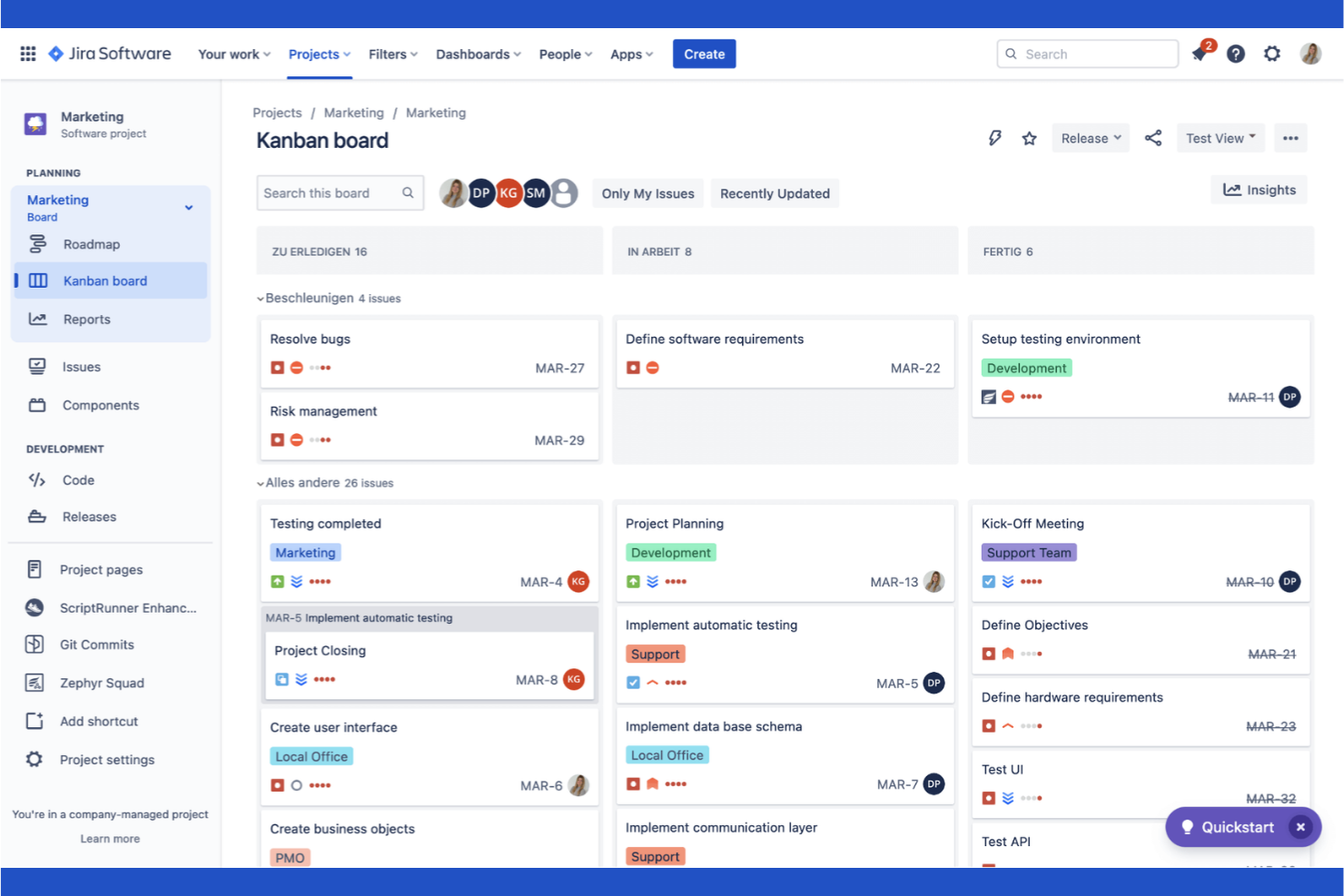
Atlassian brings together a suite of tools designed specifically for software development teams managing complex projects in the cloud. It’s especially useful for engineering leads, product managers, and DevOps teams who need to coordinate code, track issues, and automate deployment workflows. With integrated solutions for code repositories, agile boards, and incident management, Atlassian helps teams keep every part of the software delivery process connected.
Why I Picked Atlassian
For software development teams, Atlassian stands out by offering purpose-built tools that address the unique demands of building, shipping, and maintaining code in the cloud. I picked Atlassian because it brings together agile project tracking, code management, and incident response in a single ecosystem. Features like Jira’s customizable agile boards and Bitbucket’s integrated code repositories help teams manage sprints, track bugs, and collaborate on code reviews without switching platforms. This focus on the full software development lifecycle makes Atlassian a strong fit for teams that need to keep engineering, product, and operations tightly aligned.
Atlassian Key Features
Some other features that make Atlassian valuable for cloud-based workflows include:
- Confluence Knowledge Base: Create, organize, and share project documentation and team knowledge in a centralized space.
- Automation Rules: Set up custom triggers and actions to automate repetitive tasks across projects.
- Service Desk Portal: Manage IT requests and support tickets with a dedicated help desk interface.
- Advanced Reporting Dashboards: Build visual dashboards to track project metrics, team performance, and workflow bottlenecks.
Atlassian Integrations
Integrations include Slack, Microsoft Teams, GitHub, GitLab, Zendesk, AWS, and Figma.
Pros and Cons
Pros:
- Strong CI/CD pipeline sync
- Vast marketplace extensions
- Highly customizable rules
Cons:
- Cloud outages affect workflows
- Heavy focus on IT and dev ops

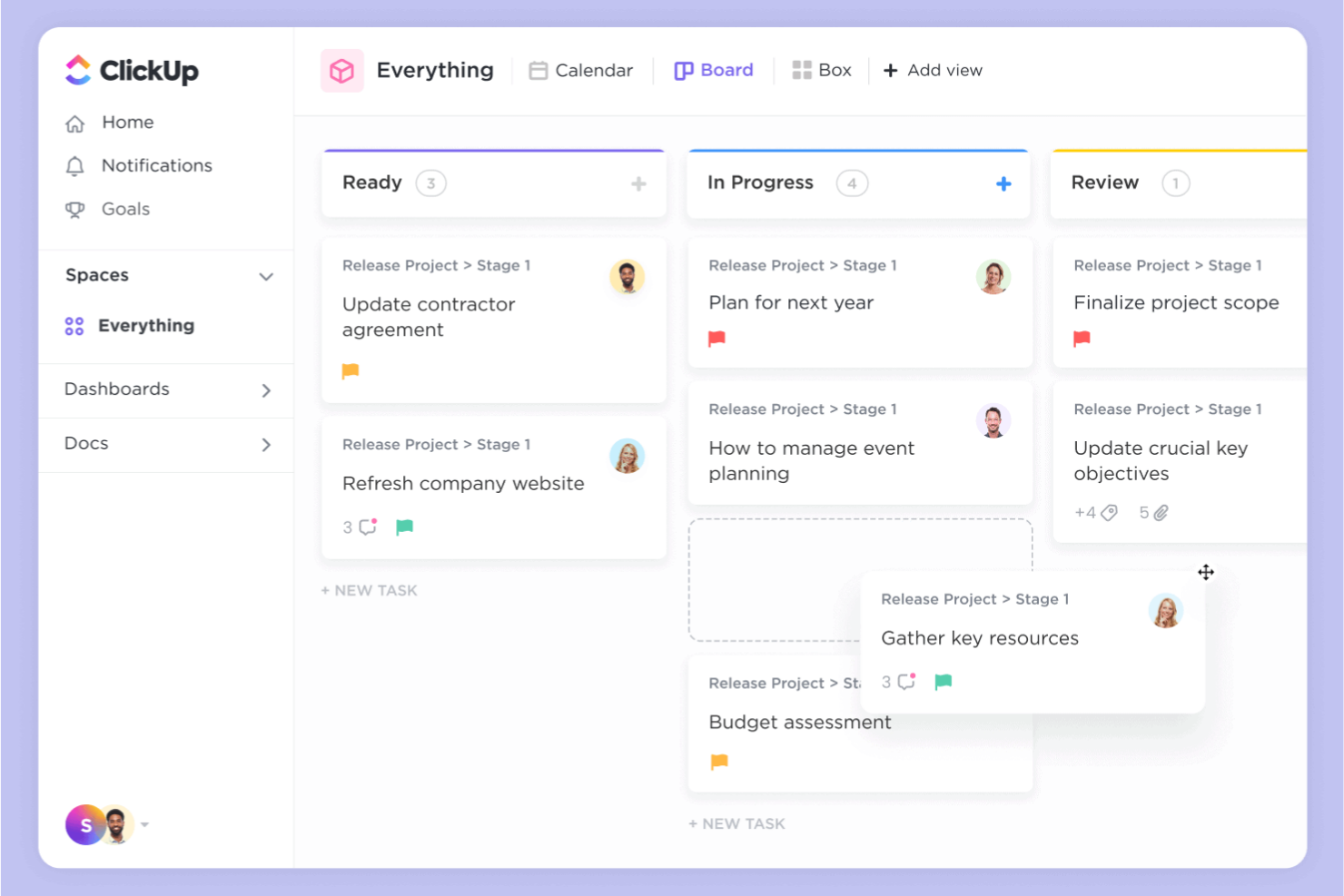
ClickUp gives teams a flexible way to build, automate, and manage workflows in the cloud. It’s a strong fit for project managers and cross-functional teams who need to tailor task processes to fit unique business needs. If you’re looking for granular control over task automation and workflow customization, ClickUp stands out with its adaptable approach.
Why I Picked ClickUp
I chose ClickUp because its customizable task automation stands out among cloud based workflow software. The platform lets you create custom automations for tasks, statuses, and notifications, so you can adapt workflows to match your team’s exact processes. I like that you can set up conditional logic and multi-step automations without coding, which helps teams handle complex or repetitive work. ClickUp’s automation builder gives you the flexibility to streamline approvals, handoffs, and recurring tasks in a way that fits your unique requirements.
ClickUp Key Features
Some other features in ClickUp help teams manage and optimize their workflows in the cloud:
- Custom Views: Choose from list, board, calendar, or Gantt views to visualize work in the way that fits your process.
- Docs and Wikis: Create and share documentation, SOPs, and knowledge bases directly within your workspace.
- Goal Tracking: Set, track, and update progress on team or project goals alongside your workflow tasks.
- Time Tracking: Log time spent on tasks and generate reports to monitor productivity and resource allocation.
ClickUp Integrations
Integrations include Slack, Google Workspace, GitHub, GitLab, Zoom, HubSpot, Zendesk, and Salesforce.
Pros and Cons
Pros:
- Cost-effective cloud pricing
- Huge integration ecosystem
- Real-time team collaboration
Cons:
- Mobile app lacks some features
- Automation limits on low tiers

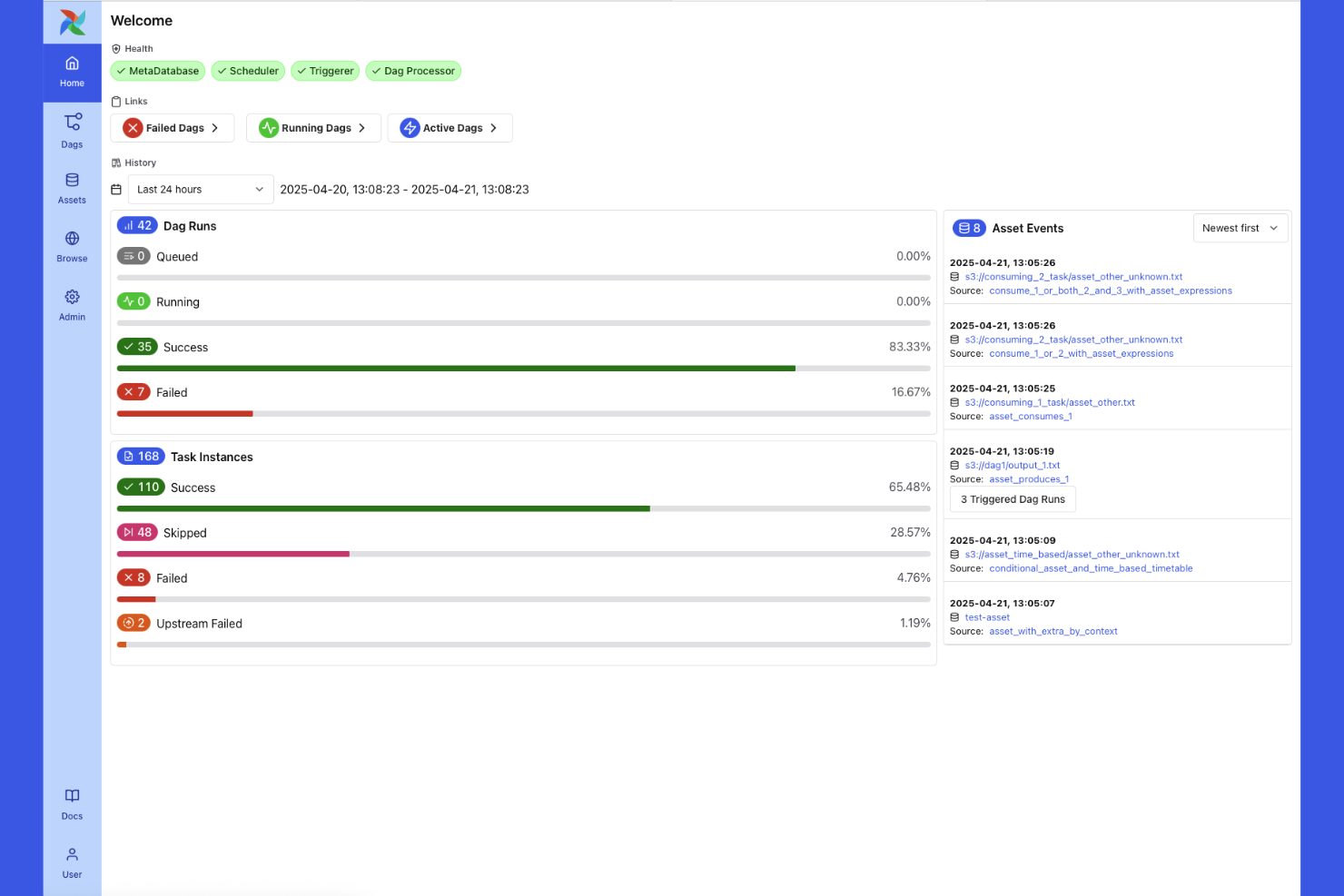
Apache Airflow is an open-source platform built for teams that need to design, schedule, and monitor complex data workflows in the cloud. Data engineers and analytics teams use it to orchestrate multi-step pipelines, automate dependencies, and manage data movement across systems. Its modular architecture and Python-based workflow definitions make it especially useful for organizations handling large-scale, dynamic data processes.
Why I Picked Apache Airflow
When managing intricate data workflows in the cloud, Apache Airflow offers a level of control and flexibility that’s hard to match. I picked Airflow because it lets you define complex, multi-step pipelines as code using Python, which is ideal for teams handling dynamic data dependencies and frequent changes. Its Directed Acyclic Graph (DAG) structure makes it possible to visualize, schedule, and monitor every stage of a data pipeline in detail. For organizations that need to orchestrate large-scale, interdependent data processes, Airflow’s modular approach and extensibility make it a strong fit.
Apache Airflow Key Features
Some other features that make Apache Airflow valuable for cloud-based workflow management include:
- Role-Based Access Control: Assign granular permissions to users and groups for secure workflow management.
- REST API: Interact programmatically with Airflow to trigger workflows, fetch logs, or manage tasks from external systems.
- Pluggable Executors: Choose from different execution backends, such as Celery or Kubernetes, to scale task processing.
- Built-In Scheduler: Automatically triggers tasks based on time, event, or external signals without manual intervention.
Apache Airflow Integrations
Integrations include AWS, Google Cloud Platform, Microsoft Azure, Snowflake, PostgreSQL, Databricks, and Kubernetes.
Pros and Cons
Pros:
- Deep task dependency tracking
- Integrates with any cloud data
- Massive open-source community
Cons:
- Not for business workflows
- Hard to maintain at scale

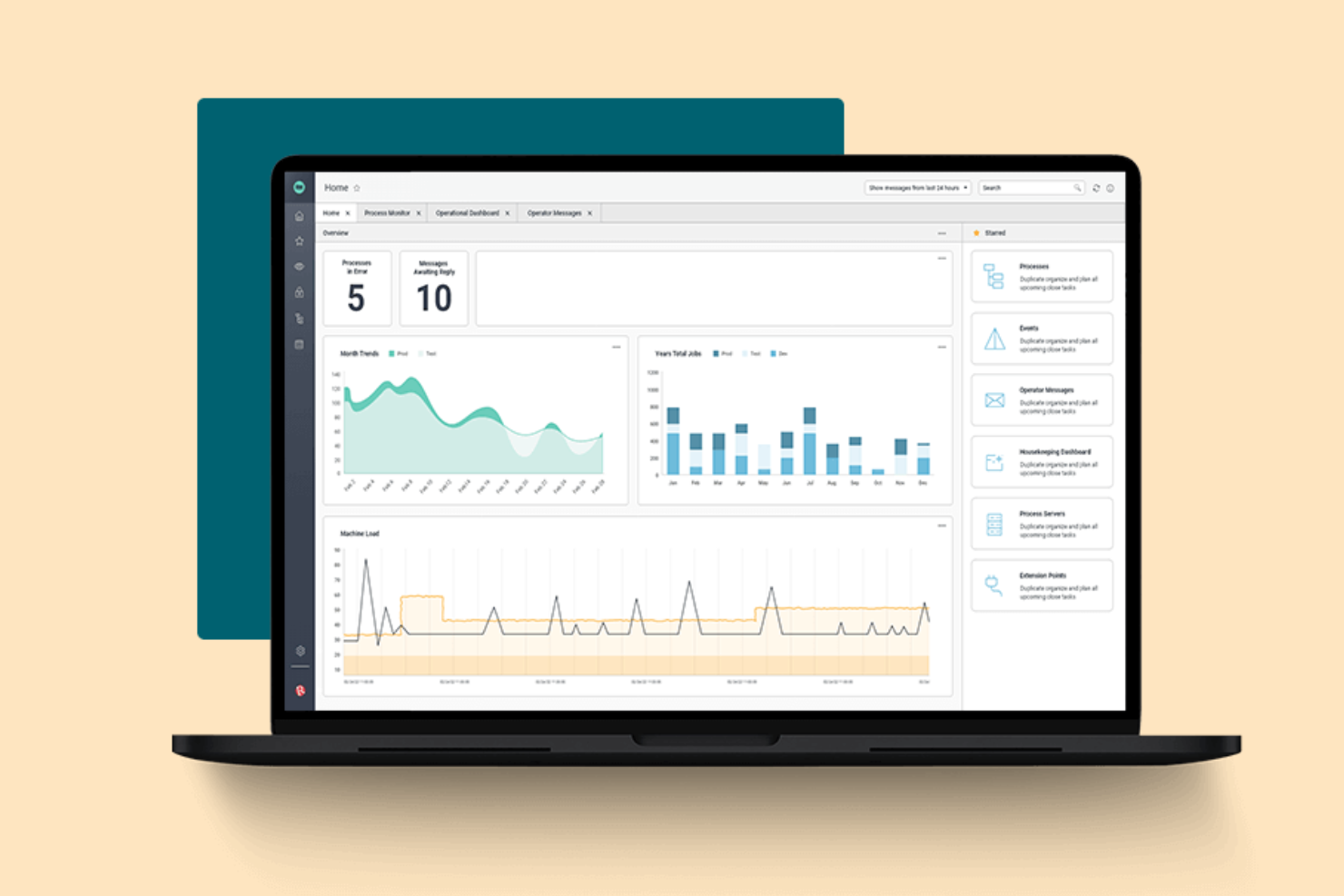
Redwood Software offers a cloud-based platform designed for orchestrating complex, enterprise-scale workloads. It’s built for IT leaders and operations teams in large organizations that need to automate, schedule, and monitor critical business processes across multiple systems. If your business manages high-volume, cross-application workflows, Redwood Software provides centralized control and visibility that’s hard to match.
Why I Picked Redwood Software
What sets Redwood Software apart is its focus on enterprise workload orchestration, which is essential for organizations managing complex, interconnected processes. The platform offers advanced scheduling and automation tools that let you coordinate workflows across ERP, cloud, and on-premises systems from a single dashboard. I appreciate how Redwood Software supports event-driven automation and real-time monitoring, so you can respond quickly to business-critical events. For teams that need to orchestrate high-volume, multi-system workflows with precision, Redwood Software delivers the control and scalability required.
Redwood Software Key Features
Some other features in Redwood Software help teams manage and optimize enterprise workflows in the cloud:
- Self-Service Automation Portal: Give business users a portal to launch and monitor their own automated processes without IT intervention.
- Audit Trails: Track every workflow action and change with detailed, exportable logs for compliance and governance.
- Role-Based Access Controls: Assign granular permissions to users and groups to manage workflow visibility and actions.
- API Integration Framework: Connect with external applications and services using built-in API connectors for seamless data exchange.
Redwood Software Integrations
Integrations include SAP, Oracle, ServiceNow, Snowflake, AWS, Microsoft Azure, and Boomi.
Pros and Cons
Pros:
- Highly reliable job execution
- Strong cloud security models
- Zero infrastructure to manage
Cons:
- Long deployment timelines
- UI feels very technical
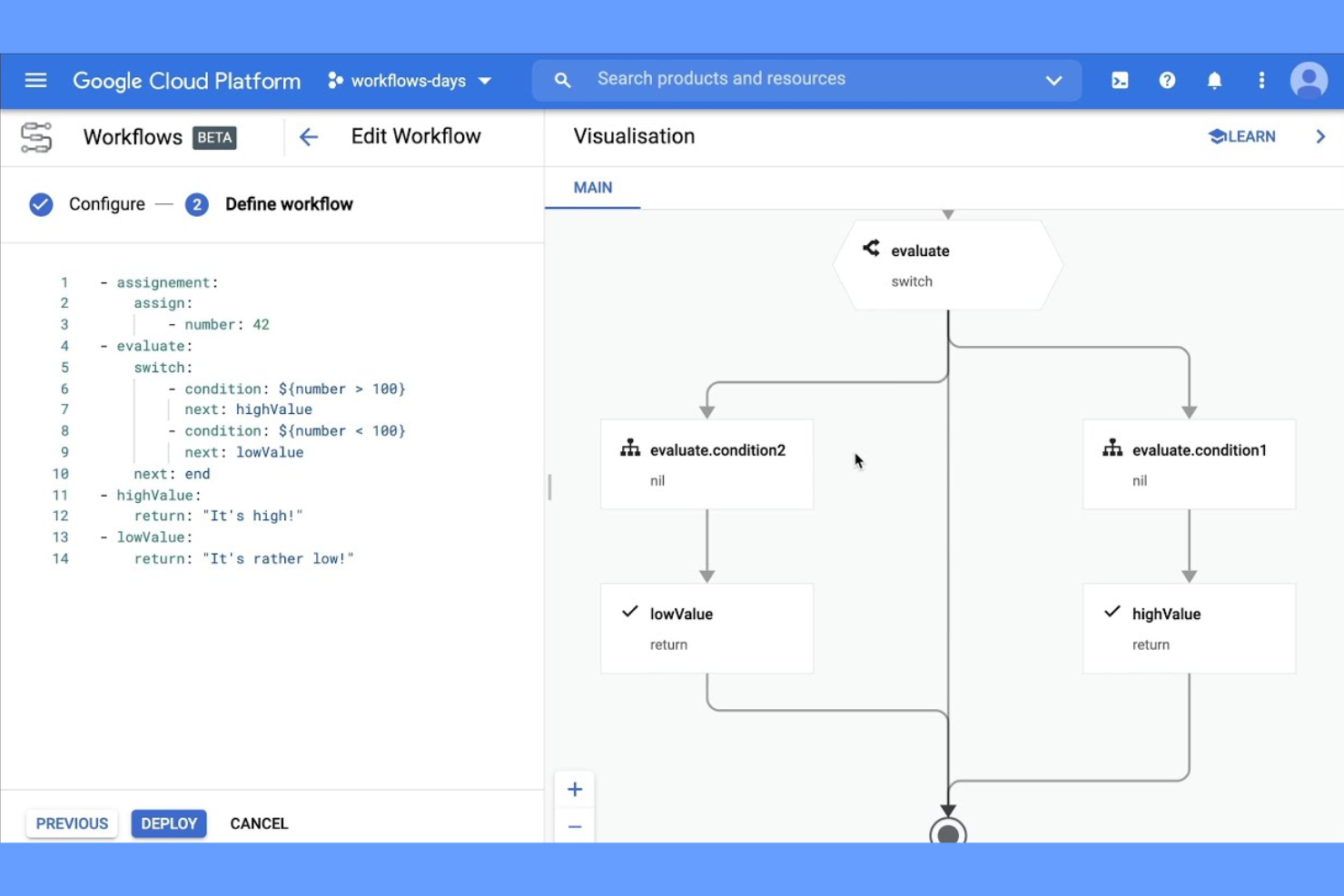
If your team relies on Google Cloud services, Google Cloud Workflows offers a way to automate and connect those services with minimal overhead. This tool is built for cloud architects, developers, and IT teams who need to coordinate APIs, microservices, and serverless functions within the Google Cloud ecosystem. It’s especially useful for orchestrating multi-step processes that span multiple Google Cloud products without leaving the platform.
Why I Picked Google Cloud Workflows
For teams already invested in Google Cloud, Google Cloud Workflows stands out because it’s purpose-built for orchestrating native Google Cloud services. You can design workflows that call Google Cloud Functions, trigger Cloud Run jobs, and manage Pub/Sub messaging all within a single, unified environment. I picked this tool because it lets you visually define and manage complex, multi-step processes that leverage the full range of Google Cloud APIs. This makes it a strong fit for organizations that want to automate and connect their cloud infrastructure without relying on third-party connectors.
Google Cloud Workflows Key Features
Some other features in Google Cloud Workflows help teams automate and manage cloud-based processes more efficiently:
- YAML-Based Workflow Definitions: Build and edit workflows using a human-readable YAML syntax for version control and collaboration.
- Error Handling and Retries: Configure custom error handling and automatic retries for each workflow step.
- Built-In Logging and Monitoring: Access detailed logs and performance metrics through Google Cloud’s operations suite.
- Conditional Logic Support: Add if/else branching and switch statements to control workflow execution paths.
Google Cloud Workflows Integrations
Integrations include Cloud Functions, Cloud Run, BigQuery, Pub/Sub, Compute Engine, and Cloud Storage.
Pros and Cons
Pros:
- Pay per execution pricing
- Fast microservice connections
- Scales automatically to zero
Cons:
- Locked into GCP ecosystem
- Not for visual business users
Outro software de fluxo de trabalho baseado na nuvem
Eis algumas opções adicionais de software de fluxo de trabalho baseado na nuvem que não entraram na minha lista restrita, mas que continuam a merecer atenção:
- Lark Suite
For integrated collaboration tools
- ActiveBatch
For cross-platform job scheduling
- Kissflow
For no-code workflow design
- Pipefy
For workflow requests and approvals


How I Evaluate Cloud Based Workflow Software
I split my evaluation into two layers: baseline requirements every tool must meet—like building automated task flows—and the differentiators that separate good tools from the right tool for your team.
Core Functionality (Table Stakes For This List)
When I'm selecting tools for my list, I rank each one on a scale from 0 (does not offer the functionality) to 5 (excels in this area) for each core functionality listed below. Then, I calculate the tool's total score into a percentage. Each tool needs to achieve a minimum total score of 65% to be considered for inclusion.
- Visual Workflow Builder: I look for a drag-and-drop canvas where you can map multi-step processes—like a creative approval chain—with branching, parallel paths, and reusable templates.
- Workflow Automation Engine: Each tool's if/then logic, conditional routing, and scheduled triggers matter here—think auto-assigning a QA reviewer when a dev task moves to "done."
- Cloud-Based Real-Time Collaboration: I evaluate whether distributed teams get role-based access, in-context commenting, and live status updates across devices without version conflicts.
- Task & Project Tracking: Multiple view types (Kanban, Gantt, calendar, list) with dependencies and status tracking are what I check for, especially for managing cross-functional sprints.
- Third-Party Integrations: The tool's native connectors to everyday platforms like Slack, Jira, Google Workspace, and Salesforce—plus API and webhook support—are key to fitting into existing stacks.
- Reporting & Dashboards: I evaluate whether you can build custom dashboards that surface cycle times, bottleneck patterns, and workload distribution rather than just basic activity logs.
Once I have a list of tools that meet this criteria, I consider what sets each platform apart.
Differentiating Factors (What Sets Vendors Apart)
Here's how I compare and contrast different vendors:
Standout Features
Custom form intake is a big one—I look for tools that let you build request forms that trigger automatic routing, so a new project brief from marketing lands with the right PM instantly. Resource and capacity planning also matters, especially for PMOs juggling multiple projects where workload visibility prevents over-allocation. For agency teams, I check whether the platform offers client-facing portals where external stakeholders can submit requests and track deliverables without needing a paid seat.
Beyond Features
Security and compliance posture is something I always evaluate—SOC 2 Type II and SSO/SAML support matter when your workflows handle sensitive project data or client information. I also consider implementation speed, particularly whether a platform offers pre-built templates for common use cases like IT change management or marketing campaign launches. Industry and team fit rounds out my evaluation; a tool built for agency workflows with client-facing needs differs greatly from one designed for enterprise PMOs managing cross-departmental portfolios.
Como escolher software de fluxo de trabalho baseado na nuvem
É fácil perder-se em listas extensas de funcionalidades e estruturas de preços complexas. Para o ajudar a manter-se concentrado enquanto percorre o seu processo específico de seleção de software, eis uma lista de verificação dos fatores a ter em conta:
| Fator | O que considerar |
|---|---|
| Escalabilidade | O software acompanhará o crescimento da sua equipa, os novos fluxos de trabalho ou o aumento da complexidade dos processos ao longo do tempo? Verifique os limites relativos a utilizadores, fluxos de trabalho e armazenamento. |
| Integrações | A ferramenta liga-se nativamente aos seus sistemas existentes, como o Slack, o Google Workspace ou o Salesforce? Considere quanto trabalho manual é necessário para colmatar eventuais lacunas. |
| Personalização | Pode adaptar fluxos de trabalho, formulários e permissões aos processos da sua equipa sem uma intervenção significativa do departamento de TI? Procure ferramentas de criação de arrastar e largar ou motores de regras. |
| Facilidade de utilização | A sua equipa adotará rapidamente a ferramenta ou será necessária uma formação extensa? Teste a interface com um pequeno grupo antes de tomar uma decisão. |
| Implementação e integração inicial | Quanto tempo demorará a começar a trabalhar? Informe-se sobre o apoio à migração, os recursos de integração inicial e a necessidade de recorrer a consultores externos. |
| Custo | Os escalões de preços são claros e previsíveis à medida que a utilização aumenta? Esteja atento a custos adicionais relativos a utilizadores, armazenamento ou funcionalidades premium. |
| Medidas de segurança | O software disponibiliza encriptação, controlos de acesso e registos de auditoria? Confirme a conformidade com as políticas de segurança da sua organização e as normas do setor. |
| Disponibilidade do suporte | Que canais de suporte são disponibilizados e durante que horário? Considere se precisará de ajuda 24 horas por dia, 7 dias por semana, ou de um gestor de conta dedicado para fluxos de trabalho críticos. |
O que é o software de fluxo de trabalho baseado na nuvem?
O software de gestão de fluxos de trabalho baseado na nuvem é uma plataforma digital que ajuda as equipas a conceber, automatizar e gerir processos empresariais totalmente online, funcionando como um importante motor da transformação digital. Estas ferramentas de gestão de fluxos de trabalho centralizam tarefas, aprovações e partilha de documentos num único espaço de trabalho acessível a partir de qualquer dispositivo. Ao transferirem os fluxos de trabalho para a nuvem, as organizações podem coordenar equipas distribuídas, acompanhar o progresso em tempo real e adaptar rapidamente os processos à medida que as necessidades mudam.
Funcionalidades do software de fluxos de trabalho baseado na nuvem
Ao escolher um software de gestão de fluxos de trabalho baseado na nuvem, esteja atento às seguintes funcionalidades principais:
- Automatização de fluxos de trabalho: Automatiza tarefas repetitivas e encaminha itens através de processos com várias etapas, com base em regras predefinidas, utilizando conceitos de Robotic Process Automation (RPA) para reduzir os processos manuais e os erros.
- Atribuição de tarefas: Permite atribuir tarefas a indivíduos ou equipas, definir prazos e monitorizar o progresso a partir de um painel centralizado.
- Gestão de documentos: Fornece armazenamento seguro, partilha e controlo de versões para ficheiros e documentos utilizados nos fluxos de trabalho.
- Encaminhamento de aprovações: Permite o encaminhamento automático ou manual de pedidos, formulários ou documentos para as partes interessadas adequadas, para análise e aprovação.
- Colaboração em tempo real: Permite a edição simultânea, a publicação de comentários e a comunicação no âmbito de tarefas ou documentos, mantendo todos alinhados.
- Construtor de formulários personalizados: Permite criar e modificar formulários para recolha de dados, receção de pedidos ou iniciação de processos sem programação.
- Permissões baseadas em funções: Controla o acesso a fluxos de trabalho, documentos e dados com base nas funções dos utilizadores, garantindo que as informações sensíveis só estão disponíveis para utilizadores autorizados.
- Registos de auditoria: Regista todas as atividades, alterações e aprovações dos fluxos de trabalho, fornecendo um histórico claro para fins de conformidade e responsabilização.
- Capacidades de integração: Liga-se a outras ferramentas empresariais, como sistemas de correio eletrónico, calendários ou CRM, para sincronizar dados e desencadear ações entre plataformas.
Vantagens do software de fluxos de trabalho baseado na nuvem
A implementação de software de gestão de fluxos de trabalho baseado na nuvem proporciona várias vantagens à sua equipa e à sua empresa. Eis algumas das que pode esperar:
- Gestão centralizada de processos: Todas as tarefas, documentos e aprovações são geridos num único espaço de trabalho online, facilitando a coordenação de equipas distribuídas.
- Tempos de execução mais rápidos: O encaminhamento automático e as notificações ajudam a fazer avançar o trabalho rapidamente em cada etapa, reduzindo estrangulamentos e atrasos.
- Maior visibilidade: Os painéis em tempo real e os registos de auditoria permitem acompanhar o progresso, identificar problemas e elaborar relatórios sobre o desempenho dos fluxos de trabalho a qualquer momento.
- Colaboração reforçada: O chat integrado, os comentários e a edição simultânea mantêm todos alinhados e reduzem a necessidade de trocas sucessivas de mensagens de correio eletrónico.
- Maior conformidade: As permissões baseadas em funções e os registos detalhados de atividades ajudam a proteger dados sensíveis e a cumprir os requisitos regulamentares.
- Escalabilidade para o crescimento: A infraestrutura na nuvem e a gestão flexível de utilizadores permitem adicionar novos fluxos de trabalho ou membros da equipa à medida que a empresa evolui.
- Menores custos de infraestrutura informática: Não são necessários servidores locais nem atualizações manuais, uma vez que o software é mantido e atualizado pelo fornecedor.
Custos e preços do software de fluxos de trabalho baseado na nuvem
A escolha de um software de gestão de fluxos de trabalho baseado na nuvem exige uma compreensão dos vários modelos de preços e planos disponíveis. Os custos variam consoante as funcionalidades, a dimensão da equipa, os complementos e outros fatores. A tabela abaixo resume os planos mais comuns, os seus preços médios e as funcionalidades normalmente incluídas nas soluções de software de fluxos de trabalho baseadas na nuvem:
Tabela comparativa de planos de software de fluxos de trabalho baseado na nuvem
| Tipo de plano | Preço médio | Funcionalidades comuns |
|---|---|---|
| Plano gratuito | $0 | Automatização básica de fluxos de trabalho, número limitado de utilizadores, gestão de tarefas essencial e partilha básica de documentos. |
| Plano pessoal | $7-$25/utilizador/mês | Acesso para um único utilizador, armazenamento ampliado, formulários personalizados e suporte por correio eletrónico. |
| Plano empresarial | $15-$50/utilizador/mês | Colaboração entre vários utilizadores, automatização avançada de fluxos de trabalho, integrações, encaminhamento de aprovações e análise de dados. |
| Plano empresarial de grande dimensão | $1000+/mês | Utilizadores ilimitados, segurança avançada, permissões personalizadas, registos de auditoria, suporte dedicado e SLAs. |
Perguntas frequentes sobre software de fluxos de trabalho baseado na nuvem
Eis algumas respostas a perguntas comuns sobre software de fluxos de trabalho baseado na nuvem:
Qual é o nível de segurança do software de fluxos de trabalho baseado na nuvem?
O software de fluxos de trabalho baseado na nuvem utiliza normalmente encriptação, controlos de acesso e auditorias de segurança regulares para proteger os seus dados. Reveja sempre as certificações de segurança do fornecedor e informe-se sobre a conformidade com normas como a SOC 2 ou a ISO 27001 antes de tomar uma decisão.
Posso integrar o software de fluxos de trabalho baseado na nuvem com as ferramentas que já utilizo?
Sim, a maioria dos softwares de fluxos de trabalho baseados na nuvem disponibiliza integrações com ferramentas empresariais populares, como correio eletrónico, calendários, sistemas CRM e plataformas de armazenamento de ficheiros. Consulte o mercado de integrações ou a documentação da API para confirmar a compatibilidade com o seu conjunto tecnológico atual.
O que acontece se a minha equipa ultrapassar o plano atual?
A maioria dos fornecedores disponibiliza planos escaláveis que permitem adicionar utilizadores, fluxos de trabalho ou armazenamento à medida que as suas necessidades mudam. Consulte antecipadamente as opções de atualização e os escalões de preços para evitar custos inesperados ou interrupções à medida que a sua equipa cresce.
Quanto tempo demora a implementar software de fluxos de trabalho baseado na nuvem?
O tempo de implementação varia, mas muitas plataformas disponibilizam recursos de integração, como modelos, visitas guiadas ao produto e vídeos de formação, para o ajudar a começar rapidamente. Para fluxos de trabalho complexos ou equipas grandes, planeie uma implementação faseada e reserve tempo para a formação dos utilizadores.
O software de fluxos de trabalho baseado na nuvem é adequado para equipas remotas ou distribuídas?
Sim, o software de fluxos de trabalho baseado na nuvem foi concebido para permitir o acesso remoto, possibilitando que as equipas distribuídas colaborem, acompanhem o progresso e gerem aprovações a partir de qualquer lugar com ligação à Internet. Esta flexibilidade apoia ambientes de trabalho híbridos e totalmente remotos.