

10 melhores alternativas ao ClockShark em 2026

Lista das melhores alternativas ao ClockShark


O ClockShark funciona bem para o controlo do tempo no terreno, mas não se adequa a todas as equipas, processos de processamento salarial ou configurações de custeio de trabalhos. As melhores alternativas ao ClockShark oferecem às equipas no terreno mais formas de registar horas, monitorizar os custos de mão de obra, gerir trabalhos e enviar dados precisos para o processamento salarial. Comparei as principais opções para os setores da construção, dos serviços e para outras equipas móveis, concentrando-me nas funcionalidades mais importantes no terreno: rastreio por GPS, custeio de trabalhos, gestão de equipas, relatórios diários e integrações com sistemas de processamento salarial.
O que é o ClockShark?
O ClockShark é uma plataforma de controlo do tempo e gestão de trabalhos para equipas móveis dos setores da construção, dos serviços no terreno e de outras indústrias baseadas em projetos. Utiliza o rastreio por GPS, registos de entrada através de dispositivos móveis e códigos de trabalho para registar quando e onde os colaboradores trabalham. As equipas podem utilizar esses dados de tempo para o processamento salarial, o custeio de trabalhos, a elaboração de relatórios e a conformidade laboral. É particularmente adequado para empresas com equipas que trabalham em vários locais.
Tabela comparativa das alternativas ao ClockShark
Esta tabela comparativa resume os detalhes de preços das principais alternativas ao ClockShark que selecionei:
| Tool | Best For | Trial Info | Price | ||
|---|---|---|---|---|---|
| 1 | Best for integrated payroll and attendance | 30-day free trial + free demo available | From $80/month | Website | |
| 2 | Best for construction time and cost codes | Free trial available | Pricing upon request | Website | |
| 3 | Best for time tracking with daily reports | Free demo available | Pricing upon request | Website | |
| 4 | Best for construction payroll compliance | Free demo available | Pricing upon request | Website | |
| 5 | Best for real-time employee GPS tracking | Free trial available | From $5.99/user/month | Website | |
| 6 | Best for GPS-tracked construction crews | 14-day free trial + free demo + free plan available | From $9.99/user/month (billed annually) | Website | |
| 7 | Best for GPS-verified job site time | 14-day free trial | From $6/user/month (billed annually) | Website | |
| 8 | Best for GPS time and mileage tracking | 14-day free trial | From $4/user/month | Website | |
| 9 | Best for trades service operations | Free demo available | Pricing upon request | Website | |
| 10 | Best for biometric job site clock-ins | Free demo available | Pricing upon request | Website |
Why Trust Our Software Recommendations
Our team has been testing and reviewing software since 2012. As project managers ourselves, we know how difficult—and important—it is to choose the right software.
For this guide, we evaluated tools using hands-on testing and independent research, scoring tools using our selection criteria. We also draw on insights from industry thought leaders and practicing project management experts.
Our reviews reflect our human editorial judgment, not a sales pitch.
Expert reviewers:
Avaliações das alternativas ao ClockShark
Abaixo encontram-se os meus resumos detalhados das melhores alternativas ao ClockShark que incluí na minha lista restrita. As minhas avaliações apresentam uma análise detalhada das funcionalidades, dos casos de utilização ideais e das capacidades de cada ferramenta, para o ajudar a encontrar a melhor opção para si.

TimeTrex
Best for integrated payroll and attendance
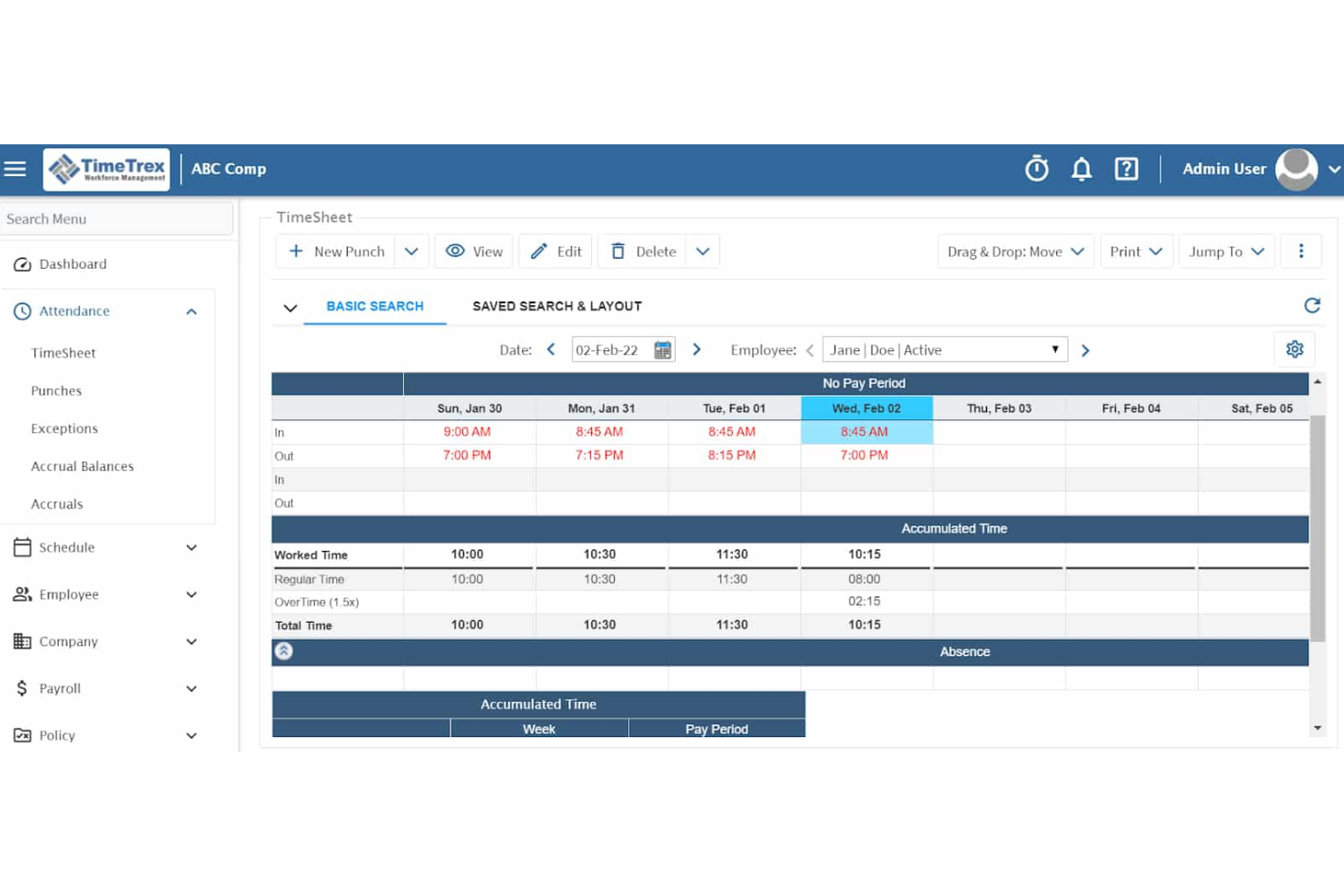
TimeTrex is a workforce management platform for businesses that want to track employee time, attendance, and payroll from a single dashboard, making it especially appealing for organizations needing accurate, integrated labor management across multiple locations or departments.
Who Is TimeTrex Best For?
TimeTrex is a good fit for HR and payroll teams in multi-location businesses that need unified time, attendance, and payroll management.
Why TimeTrex Is a Good ClockShark Alternative
I picked TimeTrex as one of the best because its fully integrated time tracking, attendance, and payroll tools let my team handle all labor management from one dashboard. In practice, I can automate scheduling, monitor attendance across multiple locations, and run payroll without toggling between different platforms. That unified workflow makes it easy to keep everything accurate and in sync.
TimeTrex Key Features
- Automated overtime calculations: Apply predefined overtime rules to ensure wage compliance across shifts.
- Geofencing for mobile clock-ins: Limit where employees can clock in or out to authorized locations using mobile devices.
- Employee self-service portal: Let employees view schedules, request time-off, and check pay stubs from one dashboard.
- Customizable reporting: Generate detailed time, attendance, and payroll reports tailored to your team’s needs.
TimeTrex Integrations
TimeTrex offers native integrations with QuickBooks, Sage, ADP, Paychex, and Xero. An API is available for custom integrations.
Pros and Cons
Pros:
- Automated overtime calculations for compliance
- Geofencing restricts mobile clock-ins to worksites
- Runs payroll, attendance, and scheduling together
Cons:
- Interface looks outdated compared to peers
- Setup process can be time-consuming
New Product Updates from TimeTrex
TimeTrex Redesigns Workforce Management With New Payroll, Scheduling, and AI Tools
TimeTrex redesigns its workforce management experience with new dashboards, scheduling and timesheet tools, a rebuilt payroll workflow, and expanded AI assistance. These updates give teams more flexible ways to manage schedules, payroll, reporting, and employee data. For more information, visit TimeTrex’s official site.
 .

Arcoro
Best for construction time and cost codes

Arcoro’s ExakTime is a time tracking platform designed for construction and field service teams who need to capture hours, track locations, and manage job costs across multiple job sites.
Who Is Arcoro Best For?
Arcoro is a solid choice for construction and field teams who need to track hours and job costs across multiple sites.
Why Arcoro Is a Good ClockShark Alternative
I like using Arcoro when my team needs to track hours and job costs on multiple construction sites. Its built-in cost codes make it simple to see how labor is spent across different projects. Location tracking and live jobsite data help me keep projects running on budget.
Arcoro Key Features
- Mobile time clock: Workers can clock in and out using smartphones or tablets on any jobsite.
- Photo verification: Employees can snap a photo when clocking in to verify their identity and location.
- GPS geofencing: Set up jobsite boundaries to ensure time is only recorded when workers are within designated areas.
- Payroll integrations: Export time data directly to leading payroll systems for accurate processing.
Arcoro Integrations
Arcoro ExakTime offers native integrations with payroll systems like QuickBooks, Sage, Viewpoint Vista, Foundation, ADP, and Spectrum. An API is available for custom integrations.
Pros and Cons
Pros:
- Real-time GPS geofencing for attendance accuracy
- Photo verification adds jobsite accountability
- Built-in cost codes for project tracking
Cons:
- Reporting options are less customizable
- Mobile app can be slow to sync

RAKEN is a construction-focused time tracking platform designed for field teams who want to simplify daily reporting, manage hours on site, and stay on top of labor costs.
Who Is RAKEN Best For?
RAKEN is a strong fit for field operations leads and project managers in construction who need daily reporting and jobsite time tracking.
Why RAKEN Is a Good ClockShark Alternative
I picked RAKEN as a top ClockShark alternative because I can use it to track hours in real time while generating field-focused daily reports. I like that my project managers can review labor costs and document site activity the same day, without chasing down manual logs. This approach keeps projects aligned and budgets on target.
RAKEN Key Features
- Mobile time clock: Crew members can clock in and out directly from mobile devices on the jobsite.
- Cost code tracking: Assign hours to specific cost codes for accurate labor cost allocation.
- Photo and document attachments: Attach photos and files to daily logs for clear project documentation.
- Payroll export options: Export time data into payroll-ready formats to speed up wage processing.
RAKEN Integrations
RAKEN offers native integrations with Procore, Foundation Software, and Vista. An API is available for custom integrations.
Pros and Cons
Pros:
- Field teams can clock in from any device
- Tracks hours by cost code for projects
- Captures daily field data with photo logs
Cons:
- Lacks shift scheduling and crew dispatch tools
- Not built for desk-based workforce management

hh2
Best for construction payroll compliance

hh2 delivers construction-focused payroll and time tracking software designed for contractors, project managers, and field crews who need job-cost accuracy and industry-specific compliance in their daily workflows.
Who Is hh2 Best For?
Contractors, project managers, and field crews in construction who need accurate job-cost tracking and payroll compliance.
Why hh2 Is a Good ClockShark Alternative
I picked hh2 because it nails construction payroll workflows that go beyond basic timekeeping. My team uses hh2 to accurately track mobile crew hours and assign labor to specific cost codes, keeping us compliant with construction regulations and union rules. I also like how hh2 automates certified payroll reporting for government-funded jobs.
hh2 Key Features
- Cloud-based time entry: Access the platform from any device for real-time time tracking and approvals.
- Supervisor time approval workflow: Let supervisors review and approve crew hours before payroll processing.
- Integration with accounting systems: Sync payroll and job cost data with major construction accounting software.
- Equipment hours tracking: Record equipment usage alongside labor hours for more precise project costing.
hh2 Integrations
hh2 offers native integrations with construction accounting systems including Sage 300 Construction and Real Estate, Sage 100 Contractor, Viewpoint Vista, Viewpoint Spectrum, and Foundation Software. An API is available for custom integrations.
Pros and Cons
Pros:
- Supervisor approval for field crew hours
- Tracks job-cost allocation for every timesheet
- Handles union and certified payroll requirements
Cons:
- Reports may require manual adjustment for audits
- Interface can feel dated and complex

Best for real-time employee GPS tracking

Buddy Punch suits operations managers, HR teams, and field service coordinators who need a straightforward way to monitor employee hours and verify attendance from anywhere, combining digital time clocks with location-aware controls.
Who Is Buddy Punch Best For?
Field service coordinators and mobile workforce managers who need to track employees across multiple job sites will get the most value from Buddy Punch.
Why Buddy Punch Is a Good ClockShark Alternative
I picked Buddy Punch as one of the best because its real-time employee GPS tracking gives me a live, map-based view of remote worker locations. I use geofencing to set approved job sites, and my team gets automatic alerts if someone clocks in or out from an unapproved area. This makes it easy to verify attendance across multiple sites without manual checks.
Buddy Punch Key Features
- Customizable overtime rules: Set specific overtime thresholds for your team based on your company’s unique policies.
- Automatic break tracking: Configure unpaid or paid break periods to be tracked automatically during employee shifts.
- Punch rounding: Apply rounding rules to clock-in and clock-out times to match your payroll preferences.
- Job and task codes: Assign hours to specific jobs or tasks for more detailed reporting and labor cost breakdowns.
Buddy Punch Integrations
Buddy Punch offers native integrations with QuickBooks Online, QuickBooks Desktop, ADP, Paychex, Zapier, and provides an API for custom integrations.
Pros and Cons
Pros:
- Custom overtime and break rules available
- Geofencing sends alerts for unapproved sites
- Real-time GPS tracking for remote workers
Cons:
- Map-based location data may lag occasionally
- GPS drains mobile device battery quickly

BusyBusy
Best for GPS-tracked construction crews

BusyBusy is a time tracking platform built for construction and field service teams who need to monitor crew hours, project progress, and job costs while moving between job sites.
Who Is BusyBusy Best For?
BusyBusy is a solid pick for construction and field service teams that need to track hours, job costs, and crew locations across job sites.
Why BusyBusy Is a Good ClockShark Alternative
I picked BusyBusy as a top alternative because its GPS time tracking is tailor-made for construction crews moving between job sites. I use it to log crew hours, track real-time locations, and monitor project progress from anywhere, which solves headaches tied to mobile workforce oversight. BusyBusy handles job costing and payroll data collection on the go for field-based teams.
BusyBusy Key Features
- Mobile app time entry: Capture work hours directly on any mobile device through the BusyBusy app.
- Photo and document attachments: Attach photos or files to time logs for job documentation and reporting.
- Equipment tracking: Monitor equipment usage and assignment alongside employee timecards.
- Customizable reports: Generate on-demand reports tailored to projects, locations, or employee groups.
BusyBusy Integrations
Native integrations are not clearly documented. BusyBusy offers an API for custom integrations.
Pros and Cons
Pros:
- Offers on-demand, project-specific reports
- Lets users attach photos to time logs
- Tracks crew locations using GPS in real time
Cons:
- Reports can take time to customize
- Integrations require API or manual export
Workyard
Best for GPS-verified job site time

Workyard is a job tracking platform designed for construction, field service, and operations teams who need accurate, real-time visibility into worker hours and job site activity across multiple locations.
Who Is Workyard Best For?
Workyard is a solid fit for field service and construction teams that need GPS-verified time tracking across multiple job sites.
Why Workyard Is a Good clockshark Alternative
I picked Workyard as a top ClockShark alternative because its GPS-verified job site time tracking gives my team precise, real-time visibility into worker hours across multiple job sites. I rely on its accurate mobile time clocks and detailed location data to reduce buddy punching and ensure payroll accuracy for distributed teams.
Workyard Key Features
- Payroll export tools: Send approved time and cost data straight into payroll systems without retyping.
- Cost code tracking: Assign time entries to specific cost codes for job costing analysis.
- Task assignment: Create, prioritize, and assign jobs or tasks to workers directly from the platform.
- Photo attachments: Allow crew members to attach site photos to shifts or job entries for audit trails and documentation.
Workyard Integrations
Workyard offers native integrations with QuickBooks, Gusto, ADP, and Sage, and provides an API for custom integrations.
Pros and Cons
Pros:
- Lets workers add photos as shift documentation
- Assigns cost codes to track job expenses
- GPS-verified worker location data for each shift
Cons:
- Task management lacks advanced scheduling features
- GPS tracking may quickly drain mobile batteries

Timeero
Best for GPS time and mileage tracking

Timeero is a location-aware time tracking platform designed for teams with field employees, remote workers, or mobile crews who need precise records of hours worked and travel activities.
Who Is Timeero Best For?
Timeero is right for field service teams, mobile crews, and remote workers who need accurate GPS-based time and distance tracking.
Why Timeero Is a Good ClockShark Alternative
I picked Timeero because it offers accurate GPS time and mileage tracking, which is critical for teams with field employees. In practice, my team is able to capture precise travel routes and verify job locations using GPS breadcrumb trails. I also appreciate the mileage reimbursement tracking that helps manage travel-related expenses without extra manual work.
Timeero Key Features
- Mobile time clock: Employees can clock in and out using the Timeero mobile app.
- Geofencing: Set location-based reminders or restrictions for starting and ending shifts.
- Daily map view: Review daily routes and locations where employees worked on a map.
- Time off tracking: Request, approve, and manage vacation and sick leave within the platform.
Timeero Integrations
Timeero offers native integrations with QuickBooks Online, ADP, Gusto, Xero, and Paychex. An API is available for custom integrations.
Pros and Cons
Pros:
- Geofencing for site-specific clock-ins
- Built-in mileage reimbursement calculations
- Accurate GPS tracking with breadcrumb trails
Cons:
- Limited customization for reporting formats
- No desktop time clock option

Best for trades service operations

ServiceTitan is a cloud-based platform for field service businesses that need to manage scheduling, dispatching, technician workflows, time tracking, and invoicing all in one place.
Who Is ServiceTitan Best For?
ServiceTitan is a fit for field service businesses in the trades industry who need to centralize scheduling, dispatch, and technician workflows.
Why ServiceTitan Is a Good ClockShark Alternative
I picked ServiceTitan because it covers the scheduling and dispatch demands that come up in trades service operations. I use it to manage technician workflows, keep track of job times, and handle invoicing all in one system. This setup means I can move from scheduling to billing without switching platforms.
ServiceTitan Key Features
- Custom reports: Build detailed, exportable reports on technician hours, payroll, and job performance.
- Mobile technician app: Technicians get a mobile app to track time, update job status, and complete forms onsite.
- GPS tracking: See real-time GPS locations for all technicians while they’re clocked in or traveling between jobs.
- Payroll integration: Export time tracking data directly to payroll systems to reduce manual entry and payroll errors.
ServiceTitan Integrations
ServiceTitan offers native integrations with QuickBooks, Intacct, Zapier, and Sage Intacct. An open API is available for custom integrations.
Pros and Cons
Pros:
- Detailed payroll and labor reporting tools
- Mobile app supports job status and forms
- Advanced technician dispatch and schedule optimization
Cons:
- Interface complexity slows down new users
- Setup requires significant time and support


SmartBarrel is a construction-focused time tracking platform designed for contractors and field teams who need accurate job site attendance, real-time labor insights, and simplified compliance reporting.
Who Is SmartBarrel Best For?
SmartBarrel suits construction teams and contractors who need secure, on-site time tracking and reliable job site attendance records.
Why SmartBarrel Is a Good ClockShark Alternative
I picked SmartBarrel as a strong ClockShark alternative because I can capture job site clock-ins with biometric hardware that verifies attendance using facial recognition. My team relies on SmartBarrel’s live job site dashboards to monitor shifts and compliance, so I know our field crew records are accurate and auditable.
SmartBarrel Key Features
- Digital timesheets: Automatically collect and organize time logs for each worker in a centralized dashboard.
- Payroll export tools: Generate reports and export timesheet data directly to payroll systems.
- Job costing by project: Track labor hours against specific projects and cost codes for accurate job costing.
- Daily field reporting: Capture site activity, weather, and job progress details each day for compliance and audit trails.
SmartBarrel Integrations
Native integrations are not clearly documented. SmartBarrel offers an API for custom integrations.
Pros and Cons
Pros:
- Live dashboard shows real-time site attendance
- Hardware device designed for rough construction environments
- Facial recognition prevents buddy punching on site
Cons:
- Native integrations not clearly documented
- Limited reporting customization options
Outras alternativas ao ClockShark
Eis algumas opções adicionais de alternativas ao ClockShark que não foram incluídas na minha lista restrita, mas que vale a pena conhecer:
- Hubstaff
For GPS tracking across field teams
- Homebase
For shift-based home-services scheduling
- Jibble
For free GPS tracking with face ID
- QuickBooks Time
For QuickBooks-connected time tracking
- Deputy
For shift scheduling and time tracking
- Clockify
For free general-purpose time tracking
- Knowify
For labor-burden job costing
- Contractor Foreman
For crew time tied to cost codes
- Connecteam
For geofenced deskless team tracking
- Jobber
For field service scheduling and time


How I Evaluate ClockShark Alternatives
I evaluate ClockShark alternatives based on two things: the core functionality each tool needs to cover and the features that set the strongest options apart. Core requirements include mobile time tracking, GPS tracking, job costing, scheduling, timesheet approvals, and payroll integrations. I then look at differentiators such as offline reliability, crew-level clock-ins, construction-specific workflows, and the depth of payroll and accounting integrations.
Core Functionality (Table Stakes for This List)
When selecting tools for this list, I score each one from 0 (does not offer the functionality) to 5 (excels in this area) across the core functions below. I convert the total score into a percentage and use 65% as the benchmark for determining whether a tool is a strong enough fit for the list.
- Mobile time tracking: I look for native mobile apps that let field crews clock in and out, switch between jobs or tasks, and record work details from the field.
- GPS and geofencing: I assess how each tool verifies worker locations, including GPS tracking and geofenced boundaries around job sites.
- Employee scheduling: I look for tools that let managers assign crews to jobs or shifts, make schedule changes, and notify workers of updates.
- Job and task costing: Each tool should connect tracked labor hours to specific jobs, tasks, or cost codes so teams can monitor labor costs by project.
- Timesheet approval workflows: I assess how managers review, edit, and approve timesheets, including controls such as permissions, audit trails, and bulk approvals.
- Payroll and accounting integrations: I look for connections with commonly used payroll and accounting systems that allow approved time data to move into downstream workflows.
Once I have a list of tools that meet these criteria, I consider what sets each platform apart.
Differentiating Factors (What Sets Vendors Apart)
Here's how I compare and contrast different vendors:
Standout Features
Offline time tracking matters when crews work in areas with unreliable cell service. I look for tools that save time entries, notes, and photos offline, then sync them once a connection returns. Crew-level clock-in is another differentiator, especially on larger job sites where a foreman may need to clock in an entire team or move workers between tasks during a shift. I also consider whether the software tracks equipment and materials alongside labor, which can provide a more complete view of job costs.
Beyond Features
I look at how well each tool fits construction and field service workflows. Platforms built for these industries typically support concepts like cost codes, crews, foremen, and job sites rather than forcing teams into generic workforce-management processes. I also consider practical requirements for field crews, including multilingual support, simple sign-in options, shared-device access, and kiosk mode.
Integration depth matters too. Contractors may rely on accounting and payroll systems such as Sage, Foundation, or QuickBooks Desktop, so I look beyond the number of integrations and consider what data actually moves between systems.
Porque procurar uma alternativa ao ClockShark?
Embora o ClockShark seja uma boa opção de software de controlo do tempo, há várias razões pelas quais alguns utilizadores procuram soluções alternativas. Pode estar à procura de uma alternativa ao ClockShark porque…
- Precisa de um custeio de trabalhos ou orçamento de projetos mais detalhado
- Pretende integrações de processamento salarial para além das opções padrão
- Gere equipas em vários países ou regiões
- Necessita de um funcionamento fiável sem ligação à Internet em locais de trabalho remotos
- Procura uma forma mais simples de cumprir a legislação laboral
Se alguma destas situações lhe parece familiar, veio ao lugar certo. A minha lista inclui várias opções de software de controlo do tempo mais adequadas para equipas que enfrentam estes desafios com o ClockShark e procuram soluções alternativas.
Principais funcionalidades do ClockShark
Eis algumas das principais funcionalidades do ClockShark a considerar ao comparar alternativas:
- Registo de tempo em dispositivos móveis: Os funcionários podem registar a entrada e a saída, alternar entre trabalhos e tarefas e adicionar notas utilizando as aplicações móveis do ClockShark.
- GPS e geocerca: O rastreio por GPS regista a localização dos trabalhadores enquanto estes têm o ponto registado, enquanto a geocerca ajuda as equipas a gerir os locais onde os funcionários iniciam e terminam os seus turnos.
- Apuramento de custos por trabalho e tarefa: As horas de trabalho podem ser atribuídas a trabalhos e tarefas específicos, proporcionando aos gestores uma visão mais clara dos custos de mão de obra por projeto.
- Planeamento dos funcionários: Os gestores podem criar horários, atribuir trabalhos e turnos e enviar atualizações dos horários aos funcionários no terreno.
- Gestão de folhas de horas: Os gestores podem rever, editar e aprovar as folhas de horas dos funcionários antes de enviarem os dados de tempo para o processamento salarial.
- Integrações com processamento salarial e contabilidade: O ClockShark liga-se a plataformas de processamento salarial e contabilidade, como o QuickBooks, o Xero e o ADP.
- Registo de tempo offline: Os funcionários podem continuar a registar o tempo quando o acesso à Internet não está disponível e sincronizar os seus registos assim que restabelecem a ligação.
- Registo de tempo das equipas: Os supervisores podem registar a entrada de vários funcionários e gerir o tempo das equipas que trabalham no mesmo trabalho.
- Relatórios: O ClockShark fornece relatórios sobre as horas dos funcionários, os trabalhos, os custos de mão de obra, as horas extraordinárias e outros dados da força de trabalho.
- KioskClock: As equipas podem utilizar um dispositivo partilhado como ponto central de registo de entradas, em vez de exigir que cada funcionário utilize o seu próprio telemóvel.
Custos e preços das alternativas ao ClockShark
A seleção de alternativas ao ClockShark exige uma compreensão dos vários modelos de preços e planos disponíveis. Os custos variam consoante as funcionalidades, o tamanho da equipa, os complementos e outros fatores. A tabela abaixo resume os planos comuns, os seus preços médios e as funcionalidades normalmente incluídas nas soluções alternativas ao ClockShark:
Tabela de comparação de planos das alternativas ao ClockShark
| Tipo de plano | Preço médio | Funcionalidades comuns |
|---|---|---|
| Plano gratuito | $0 | Registo de tempo básico, número limitado de utilizadores, relatórios básicos e registo de entradas através de dispositivos móveis. |
| Plano pessoal | $5-$10/utilizador/mês | Aplicações móveis e Web, acompanhamento individual de trabalhos, verificação por GPS e apuramento básico de custos por trabalho. |
| Plano empresarial | $10-$25/utilizador/mês | Gestão de equipas, geocerca, ferramentas de planeamento, integrações com processamento salarial e relatórios avançados. |
| Plano empresarial avançado | $25-$50/utilizador/mês | Funções e permissões personalizadas, acesso à API, conformidade avançada, integrações premium e suporte ao abrigo de SLA. |