



ProjectManager vs. Teamwork.com: Confronto & Recensioni Esperte per il 2026



Juggling deadlines, client demands, and shifting priorities can make picking project management software feel impossible. You’re deciding between ProjectManager and Teamwork.com, both claiming to handle your chaos and drive work forward. But which one actually delivers for your team’s way of working and the day-to-day realities of professional services?
In this article, I’ll compare the two platforms head-to-head. You’ll get a clear look at pros and cons, use cases, pricing, security, and usability—giving you the answers you need to choose the right project management software for professional services.
ProjectManager vs. Teamwork.com: An Overview
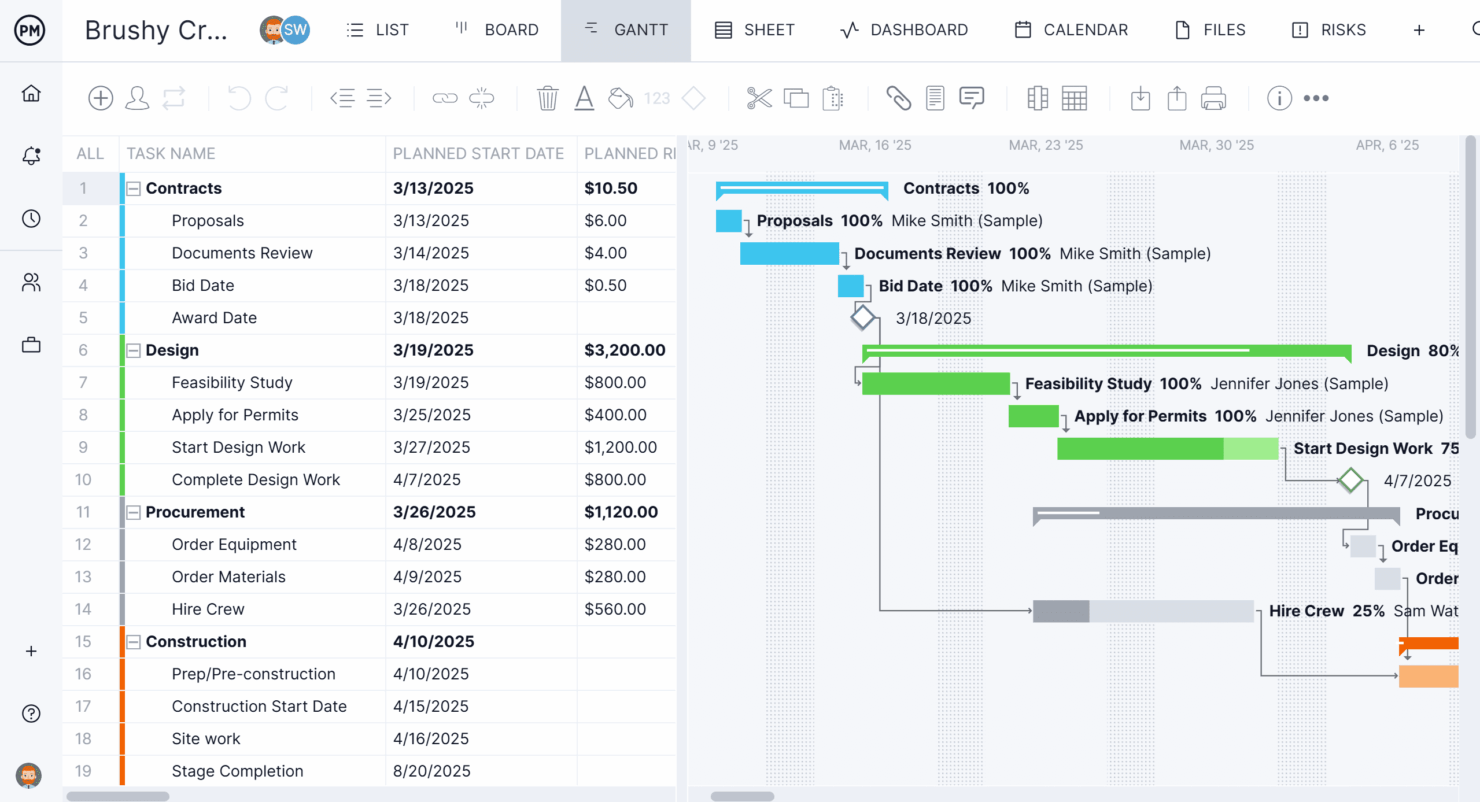
ProjectManager
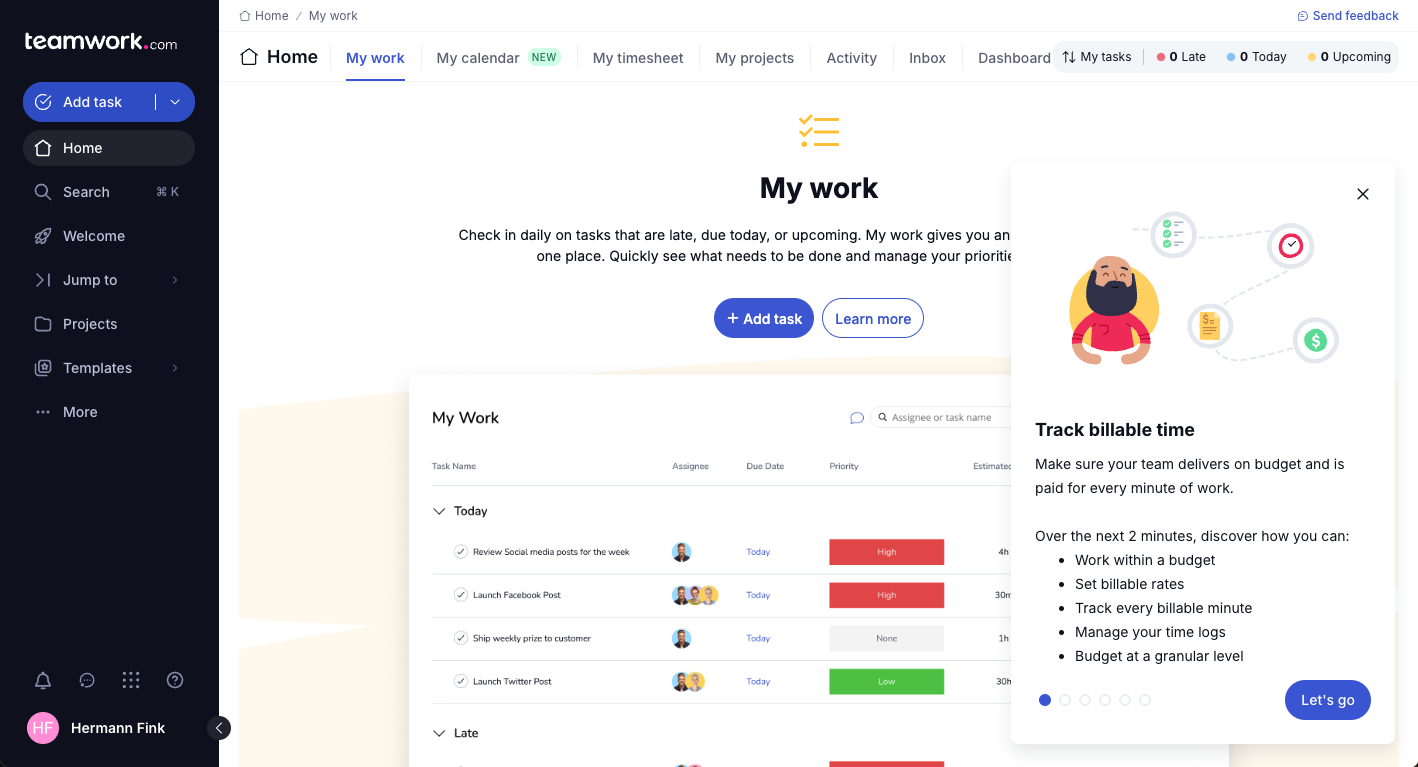
Teamwork.com


Perché fidarsi dei nostri consigli sui software
Il nostro team testa e recensisce software dal 2012. In quanto project manager noi stessi, sappiamo quanto sia difficile — e importante — scegliere il software giusto.
Per questa guida, abbiamo valutato gli strumenti attraverso test pratici e ricerche indipendenti, assegnando un punteggio agli strumenti in base ai nostri criteri di selezione. Ci basiamo inoltre sulle competenze di leader di pensiero del settore e di professionisti attivi nella gestione dei progetti.
Le nostre recensioni riflettono il nostro giudizio editoriale umano, non un discorso di vendita.
Revisori esperti:
ProjectManager vs. Teamwork.com Pricing Comparison
| ProjectManager | Teamwork.com | |
|---|---|---|
| Free Trial | 30-day free trial | 14-day free trial |
| Pricing | From $15/user/month | From $9.99/user/month (billed annually) |
ProjectManager vs. Teamwork.com: Prezzi e Costi Nascosti
ProjectManager offre diversi livelli di abbonamento, aumentando il prezzo in base alla dimensione del team e al set di funzionalità. Alcune funzionalità premium, come i report avanzati o le integrazioni, potrebbero richiedere piani di fascia superiore. Anche Teamwork.com basa i suoi prezzi sul livello del pacchetto e sul numero di utenti, con strumenti specifici come la gestione delle risorse e la sicurezza avanzata disponibili solo nei piani più costosi. Entrambi gli strumenti possono introdurre costi extra per componenti aggiuntivi, utilizzo API o supporto all’onboarding.
Per scegliere il fornitore giusto, va oltre il prezzo base e analizza le funzionalità indispensabili per il tuo team, il numero di utenti e le possibili necessità di crescita. Considera le esigenze di onboarding, la probabilità di dover aggiungere componenti in futuro e come ciascuna piattaforma raggruppa le sue funzionalità avanzate. Esaminare cosa è incluso in ogni livello ti aiuta a evitare brutte sorprese sui costi e a scegliere lo strumento che si adatta davvero al tuo flusso di lavoro e alla tua scala.
ProjectManager vs. Teamwork.com Feature Comparison
Quando metto a confronto ProjectManager e Teamwork.com, in sostanza si tratta di due piattaforme che coprono molto bene gli stessi fondamenti principali della gestione dei progetti. Entrambe offrono una gestione strutturata delle attività, viste multiple dei progetti come Gantt o bacheche, collaborazione in tempo reale e dashboard di reportistica per monitorare avanzamento, costi e carico di lavoro su tutti i progetti. In pratica, significa che puoi pianificare le tempistiche, assegnare i compiti, comunicare con il tuo team (e i clienti) e seguire le performance senza necessità di strumenti esterni: entrambe sono progettate per gestire end-to-end l’erogazione di progetti nei team di servizi professionali.
Dove si differenziano è la specializzazione. Ho riscontrato che ProjectManager punta maggiormente sull’esecuzione di progetti tradizionali con caratteristiche di spicco come dashboard in tempo reale, gestione predittiva del carico di lavoro e report altamente personalizzabili che offrono visibilità immediata su metriche come costi, carico di lavoro e avanzamento senza necessità di configurazione. Teamwork.com, invece, è chiaramente pensato per il lavoro su clienti: si distingue per strumenti integrati di rilevazione delle ore, fatturazione e controllo della redditività, oltre a funzionalità rivolte ai clienti come permessi e viste condivise che facilitano la gestione dei progetti fatturabili e il coinvolgimento degli stakeholder.
| ProjectManager | Teamwork.com | |
|---|---|---|
| API | ||
| Batch Permissions & Access | ||
| Budgeting | ||
| Calendar Management | ||
| Collaboration Support | ||
| Contact Management | ||
| Contact Sharing | ||
| Customer Management | ||
| Dashboard | ||
| Dashboards | ||
| Data Export | ||
| Data Import | ||
| Data Visualization | ||
| Dependency Tracking | ||
| Document Sharing | ||
| Expense Tracking | ||
| External Integrations | ||
| File Sharing | ||
| Gantt Charts | ||
| Kanban Boards | ||
| Multi-User | ||
| Notifications | ||
| Project Management | ||
| Resource Management | ||
| Scheduling | ||
| Task Scheduling/Tracking | ||
| Third-Party Plugins/Add-Ons | ||
| Time Management | ||
| Travel Management | ||
| Workflow Management |
ProjectManager vs. Teamwork.com Integrazioni
| Integrazione | ProjectManager | Teamwork.com |
|---|---|---|
| Google Drive | ❌ | ✅ |
| Microsoft Teams | ✅ | ✅ |
| Slack | ✅ | ✅ |
| Jira | ✅ | ✅ |
| QuickBooks | ❌ | ✅ |
| HubSpot | ❌ | ✅ |
| Xero | ❌ | ✅ |
| Salesforce | ❌ | ✅ |
| API | ✅ | ✅ |
| Zapier | ✅ | ✅ |
Entrambi gli strumenti coprono le principali esigenze di condivisione file in cloud e comunicazione, ma Teamwork.com si distingue per una copertura più ampia: integra meglio contabilità, CRM e piattaforme di vendita. ProjectManager ha generalmente meno integrazioni native e si affida spesso a Zapier per collegarsi agli strumenti di tutti i giorni. Poiché entrambi offrono supporto ad API e Zapier, il tuo team può colmare la maggior parte delle lacune, ma se preferisci soluzioni pronte all’uso per funzionalità aggiuntive come finanza o CRM, Teamwork.com rappresenta qui la scelta migliore.
ProjectManager vs. Teamwork.com Sicurezza, Conformità & Affidabilità
| Fattore | ProjectManager | Teamwork.com |
|---|---|---|
| Crittografia dei dati | Crittografa i dati in transito utilizzando SSL e li archivia in modo sicuro su AWS con pratiche di crittografia standard del settore. | Crittografa i dati sia in transito sia a riposo utilizzando protocolli standard del settore. |
| Conformità normativa | Conforme SOC 2 Tipo 2 e allineato con il NIST Cybersecurity Framework. | Certificato SOC 2 (Tipo 1 & 2) e ISO/IEC 27001:2022. |
| Uptime & Affidabilità | Ospitato su AWS con replica multi-zona e monitoraggio continuo per uptime e performance. | Punta al 99,9% di uptime con monitoraggio continuo e frequenti backup automatici. |
| Controlli di accesso | Utilizza controlli di accesso rigorosi con accesso ai dati monitorato e permessi del personale limitati. | Offre controlli di accesso basati sui ruoli e pone enfasi sulla proprietà dei dati e sulla protezione della privacy. |
Entrambe le piattaforme danno molta importanza alla sicurezza, ma mettono in evidenza punti di forza diversi. ProjectManager punta maggiormente sull'affidabilità dell'infrastruttura con la ridondanza AWS, il monitoraggio continuo e solidi controlli operativi. Teamwork.com si distingue invece per le certificazioni e la governance dei dati, con la ISO 27001 accanto alla SOC 2 e una chiara attenzione alla proprietà dei dati, aspetto rilevante soprattutto se collabori con clienti che danno priorità ai framework di conformità.
ProjectManager vs. Teamwork.com Facilità d'Uso
| Fattore | ProjectManager | Teamwork.com |
|---|---|---|
| Interfaccia utente | Layout pulito e intuitivo con facile navigazione tra i progetti. | Design moderno e intuitivo con dashboard personalizzabili. |
| Esperienza di onboarding | Configurazione guidata e progetti di esempio per un rapido onboarding del team. | Checklist integrate, video tutorial e centro assistenza per onboarding. |
| Gestione delle attività | Aggiunta rapida delle attività e modifica in blocco da più viste. | Bacheche drag-and-drop e modelli di attività semplificano la configurazione. |
| Assistenza clienti | Offre chat, documentazione di supporto e tutorial per la risoluzione dei problemi. | Chat 24/7, supporto telefonico nei livelli superiori e dettagliate guide online. |
Entrambe le piattaforme sono abbastanza semplici da usare, ma propongono esperienze leggermente diverse. Per quanto posso osservare, ProjectManager risulta più strutturato e familiare per chi ha già utilizzato strumenti tradizionali di project management, soprattutto grazie all'approccio "Gantt-first". Teamwork.com appare invece più accessibile fin da subito, in particolare per i team che lavorano con i clienti, grazie all'interfaccia più pulita e alla forte attenzione a guidare l'utente attraverso onboarding e semplicità d'utilizzo.
ProjectManager vs Teamwork.com: Pros & Cons
ProjectManager
- Gantt chart features let you filter for the critical path, track dependencies, and set baselines.
- Detailed reporting tools let you monitor progress, resource allocation, and performance.
- Built-in time tracking features simplify the process of logging time and monitoring productivity.
- It may lack some customization options compared to other tools.
- The tool has a steeper learning curve than some competitors due to the extensive feature set.
- The tool’s resource management capabilities are more limited than you would get in a dedicated resourcing tool.
Teamwork.com
- You can manage workloads and resources effectively with its robust features.
- Teamwork's collaboration tools, like chat and message boards, keep your team connected.
- The platform's Academy offers useful videos to help you use it effectively.
- You might find the interface overwhelming with its many features.
- Some users feel the mobile app could be more intuitive.
- The learning curve can be steep for new users without prior experience.
Best Use Cases for ProjectManager and Teamwork.com
ProjectManager
- Construction projects You can manage project timelines and resources with ProjectManager's robust scheduling tools.
- IT teams Your team will benefit from task management features that help track software development progress.
- Marketing campaigns You can improve collaboration and keep campaigns and other marketing efforts on schedule.
- Small businesses You can stay organized with features that support project planning and execution and reduce complexity.
- Remote teams You can coordinate work with ProjectManager's collaboration tools, even if your team isn’t in the same place.
- Event planning You can manage logistics and timelines with ProjectManager's scheduling and task management capabilities.
Teamwork.com
- Creative Agencies Teamwork.com supports your agency with tools for managing client projects and tracking billable hours.
- Remote Teams Use Teamwork to stay connected with your team through its communication and collaboration features.
- Marketing Departments Manage your marketing campaigns with task lists, calendars, and resource allocation.
- Consulting Firms Track time and manage multiple client projects efficiently with Teamwork’s time tracking capabilities.
- Event Planning Organize events with ease using project timelines and task dependencies.
- Product Development Coordinate product launches with detailed task management and team collaboration features.
Chi dovrebbe usare ProjectManager e chi dovrebbe scegliere Teamwork.com?
ProjectManager è ideale per i team che desiderano una pianificazione classica dei progetti, monitoraggio in tempo reale e una curva di apprendimento semplice—come reparti IT, società di consulenza o agenzie con workflow collaudati. Teamwork.com è pensato per i servizi alla clientela, agenzie e studi che gestiscono molti clienti o esigenze di fatturazione, ed è perfetto se cerchi forti integrazioni, viste avanzate di portafoglio o supporto extra per l'onboarding.
Se la tua azienda ha bisogno di collaborazione avanzata e di funzionalità orientate al cliente, punta su Teamwork.com. Per tempistiche strette, progetti strutturati, consegne prevedibili e controlli di progetto tradizionali, consiglio ProjectManager.
Differences Between ProjectManager and Teamwork.com
| ProjectManager | Teamwork.com | |
|---|---|---|
| Automation | Limited workflow automation capabilities. | Offers workflow automation and task dependencies. |
| Client Billing | Lacks built-in invoicing and billing features. | Includes client billing, time tracking, and invoicing tools. |
| Integrations | Fewer direct integrations, relies on core productivity. | Broader integrations across CRM, accounting, and sales tools. |
| Onboarding Support | Streamlined but less hand-holding onboarding experience. | Rich guided onboarding with checklists, tours, and tutorials. |
| Portfolios | Basic project grouping and status views. | Advanced portfolio management with resource allocation. |
| Read ProjectManager ReviewOpens new window | Read Teamwork.com ReviewOpens new window |
Similarities Between ProjectManager and Teamwork.com
| Multiple Project Views | Both support multiple ways to visualize work, including Gantt charts, Kanban boards, and list views, so you can plan and track projects in the format that suits your workflow. |
|---|---|
| Real-Time Dashboards | ProjectManager and Teamwork.com have customizable dashboards showing real-time project health, letting teams monitor workload, budgets, and deadlines. |
| Reporting Tools | Both provide reporting features, with export options and ready-made templates to help teams share project progress and resource usage with stakeholders. |
| Task Management | Both offer drag-and-drop boards, list views, and checklists for fast, visual task tracking; each supports due dates, recurring tasks, priorities, and file attachments. |
| Read ProjectManager ReviewOpens new window Read Teamwork.com ReviewOpens new window | |
| Team Collaboration | Each project management tool includes built-in collaboration tools like comments, file sharing, and notifications, making it easy for teams to communicate and stay aligned without leaving the platform. |
| Time Tracking | Each software solution includes built-in time tracking and timesheets for tasks and projects, letting you log work hours directly in the platform for accurate reporting. |
| Read ProjectManager ReviewOpens new window Read Teamwork.com ReviewOpens new window | |