

10 strumenti di analisi dei processi scelti per il 2026

Elenco ristretto di strumenti di analisi dei processi


Gli strumenti di analisi dei processi sono piattaforme software che aiutano a mappare, visualizzare e valutare i processi aziendali per individuare inefficienze e aree di miglioramento. Se stai cercando i migliori strumenti di analisi dei processi, probabilmente vuoi ottenere una visibilità più chiara sui flussi di lavoro, gestire dipendenze complesse e favorire decisioni migliori nei tuoi progetti. Con così tante opzioni disponibili, è essenziale trovare una soluzione che risponda alle esigenze del tuo team, si integri con i sistemi esistenti e tenga il passo con l'evoluzione delle esigenze dei progetti. Questo elenco ti aiuterà a confrontare i principali strumenti per il 2026, così potrai scegliere con sicurezza la piattaforma giusta per ottimizzare i tuoi processi e ottenere risultati migliori.
Perché fidarsi dei nostri consigli sui software
Il nostro team testa e recensisce software dal 2012. In quanto project manager noi stessi, sappiamo quanto sia difficile — e importante — scegliere il software giusto.
Per questa guida, abbiamo valutato gli strumenti attraverso test pratici e ricerche indipendenti, assegnando un punteggio agli strumenti in base ai nostri criteri di selezione. Ci basiamo inoltre sulle competenze di leader di pensiero del settore e di professionisti attivi nella gestione dei progetti.
Le nostre recensioni riflettono il nostro giudizio editoriale umano, non un discorso di vendita.
Revisori esperti:
Tabella comparativa degli strumenti di analisi dei processi
Questa tabella comparativa riassume i dettagli dei prezzi delle mie migliori selezioni di strumenti di analisi dei processi:
| Tool | Best For | Trial Info | Price | ||
|---|---|---|---|---|---|
| 1 | Ideale per avanzate capacità di data mining | Piano gratuito + demo gratuita disponibile | Prezzo su richiesta | Website | |
| 2 | Ideale per la configurazione rapida dell'automazione dei flussi di lavoro | Prova gratuita + demo gratuita disponibile | Da $3,000/mese (fatturazione annuale) | Website | |
| 3 | Ideale per il monitoraggio delle prestazioni in tempo reale | Demo gratuita disponibile | Prezzo su richiesta | Website | |
| 4 | Ideale per funzionalità collaborative di diagrammazione | Demo gratuita + prova gratuita di 30 giorni disponibile | Da $6/mese | Website | |
| 5 | Ideale per l'integrazione con ambienti SAP | Prova gratuita di 30 giorni + demo gratuita disponibile | Prezzo su richiesta | Website | |
| 6 | Ideale per la modellazione personalizzabile dei processi | Demo gratuita disponibile | Prezzo su richiesta | Website | |
| 7 | Ideale per documentazione pronta per audit | Prova gratuita di 14 giorni + demo gratuita disponibile | Prezzo su richiesta | Website | |
| 8 | Ideale per gli standard di modellazione dettagliati | Demo gratuita + prova gratuita di 30 giorni disponibile | Da $245/licenza | Website | |
| 9 | Ideale per l’analisi guidata dalla simulazione | Demo gratuita disponibile | Prezzo su richiesta | Website | |
| 10 | Ideale per l'integrazione unificata e low-code | Demo gratuita disponibile | Prezzo su richiesta | Website |
Recensioni degli strumenti di analisi dei processi
Di seguito sono riportati i miei riepiloghi dettagliati degli strumenti di analisi dei processi inclusi nel mio elenco ristretto. Le mie recensioni offrono una panoramica dettagliata delle funzionalità, delle capacità e dei migliori casi d’uso di ciascuna piattaforma, per aiutarti a trovare quella più adatta a te.

Celonis
Ideale per avanzate capacità di data mining

Celonis offre avanzate funzionalità di data mining e process intelligence alle organizzazioni che necessitano di una profonda visibilità sulle operazioni aziendali complesse. È particolarmente utile per i team aziendali di finanza, supply chain e IT che vogliono scoprire inefficienze e varianti di processo nascoste. Il punto di forza della piattaforma risiede nella capacità di analizzare dati in tempo reale provenienti da più sistemi e fornire insight attuabili per il miglioramento dei processi.
Perché ho scelto Celonis
Ciò che distingue Celonis nell'analisi dei processi sono le sue avanzate capacità di data mining, che vanno ben oltre la tradizionale mappatura dei flussi di lavoro. La piattaforma utilizza algoritmi di process mining per estrarre e visualizzare i flussi di processo direttamente dai tuoi sistemi aziendali, rivelando inefficienze e deviazioni spesso trascurate dall'analisi manuale. Ho scelto Celonis perché offre analisi dei processi in tempo reale e analisi delle cause radice, permettendo ai team di individuare rapidamente i colli di bottiglia e ottimizzare le operazioni. Queste caratteristiche la rendono una scelta ideale per le organizzazioni che necessitano di insight dettagliati e guidati dai dati su tutti i loro processi.
Caratteristiche principali di Celonis
Altre funzionalità che rendono Celonis prezioso per l'analisi dei processi includono:
- Action Flows: Automatizza le risposte agli insight di processo tramite workflow configurabili.
- Collaboration Hub: Condividi risultati e collabora direttamente con i membri del team sulla piattaforma.
- Pre-Built Connectors: Integra con i principali sistemi aziendali come SAP, Oracle e Salesforce.
- Custom Dashboard Builder: Progetta dashboard personalizzate per visualizzare metriche di processo e KPI.
Integrazioni di Celonis
Le integrazioni native non sono attualmente elencate.
Pros and Cons
Pros:
- Process mining in tempo reale su più sistemi
- Rilevamento automatico delle cause radice dei problemi di processo
- Costruttore di dashboard personalizzate per analisi su misura
Cons:
- Supporto limitato per sistemi più piccoli o legacy
- Le funzionalità avanzate richiedono una significativa preparazione dei dati

Ideale per la configurazione rapida dell'automazione dei flussi di lavoro

ProcessMaker offre una piattaforma low-code progettata per i team che hanno bisogno di automatizzare e analizzare rapidamente flussi di lavoro complessi. È particolarmente adatta per reparti IT, responsabili operativi e team di trasformazione digitale che desiderano ridurre i passaggi manuali e migliorare la visibilità dei processi. Lo strumento si distingue per la rapidità di configurazione dell'automazione dei flussi di lavoro, rendendo più semplice adattare i processi al variare delle esigenze aziendali.
Perché ho scelto ProcessMaker
Ho scelto ProcessMaker perché la sua rapida configurazione dell'automazione dei flussi di lavoro risponde direttamente all'esigenza di implementare e modificare rapidamente i processi. Il designer di processi drag-and-drop della piattaforma consente di costruire e modificare i flussi di lavoro senza dover ricorrere a una programmazione complessa, ideale per i team che hanno bisogno di adattarsi rapidamente ai cambiamenti delle richieste. Apprezzo anche il cruscotto analitico integrato, che permette di monitorare le prestazioni e individuare tempestivamente i colli di bottiglia. Queste caratteristiche rendono ProcessMaker una scelta solida per le organizzazioni che desiderano accelerare l'analisi e l'automazione dei processi senza lunghi cicli di sviluppo.
Funzionalità Chiave di ProcessMaker
Altre funzionalità che rendono ProcessMaker utile per l'analisi dei processi includono:
- Form Builder: Crea moduli personalizzati per acquisire e validare i dati di processo in ogni fase del flusso di lavoro.
- Controllo degli Accessi Basato sui Ruoli: Assegna permessi e gestisci l'accesso degli utenti alle informazioni sensibili sui processi.
- Versionamento dei Processi: Tieni traccia delle modifiche e mantieni più versioni dei flussi di lavoro per esigenze di audit e conformità.
- Integrazione REST API: Connetti sistemi esterni e automatizza lo scambio di dati all'interno del tuo stack tecnologico.
Integrazioni ProcessMaker
Le integrazioni native attualmente non sono elencate.
Pros and Cons
Pros:
- Implementazione rapida di flussi di lavoro automatizzati
- Mappatura visiva dei processi con strumenti drag-and-drop
- Analisi e reportistica dei processi integrati
Cons:
- Prezzo iniziale elevato per piccoli team
- Approfondimenti avanzati sui processi basati su AI limitati

Ideale per il monitoraggio delle prestazioni in tempo reale
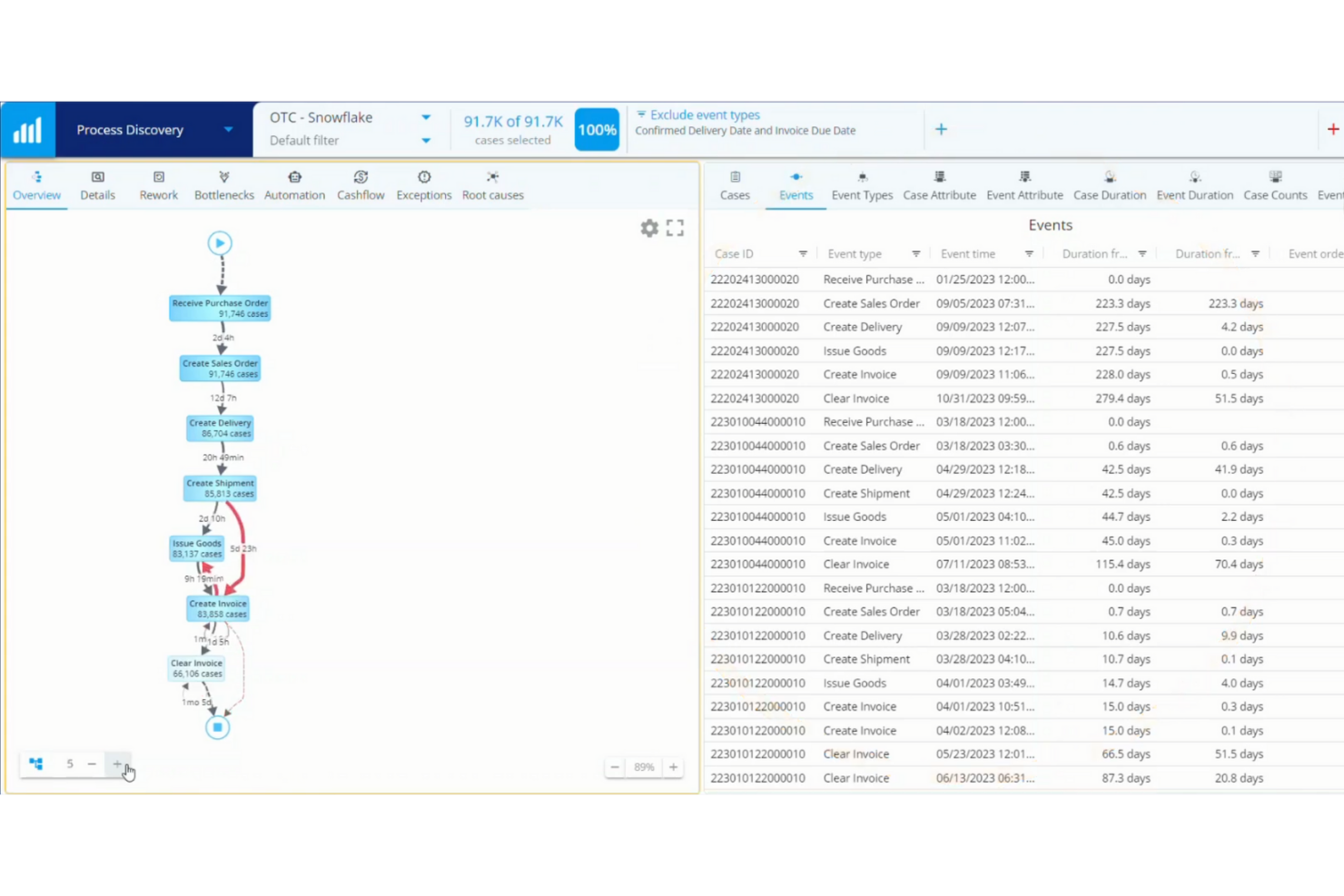
QPR ProcessAnalyzer è progettato per i team che necessitano di visibilità in tempo reale sulle prestazioni dei processi e sui colli di bottiglia. È particolarmente indicato per responsabili delle operazioni e analisti in settori come finanza, produzione e logistica che vogliono monitorare, analizzare e ottimizzare i processi mentre avvengono. Le dashboard in tempo reale della piattaforma e l'analisi automatica delle cause principali aiutano gli utenti a identificare rapidamente inefficienze e problemi di conformità.
Perché ho scelto QPR ProcessAnalyzer
QPR ProcessAnalyzer si distingue per la sua capacità di offrire monitoraggio delle prestazioni in tempo reale su processi aziendali complessi. Le dashboard dinamiche e gli avvisi automatici consentono ai team di seguire gli indicatori chiave di processo e rilevare colli di bottiglia mentre si verificano, una caratteristica essenziale per le organizzazioni che devono reagire rapidamente a problemi operativi. Ho scelto QPR ProcessAnalyzer perché offre anche analisi automatica delle cause principali, aiutando gli utenti ad approfondire i motivi delle deviazioni di processo senza indagini manuali. Questa attenzione a insight immediati e azionabili lo rende una scelta valida per l'analisi dei processi in ambienti dinamici.
Funzionalità principali di QPR ProcessAnalyzer
Altre funzionalità che rendono QPR ProcessAnalyzer utile per l'analisi dei processi includono:
- Motore di scoperta dei processi: Mappa automaticamente i flussi di processo reali a partire dai log degli eventi per una visualizzazione accurata.
- Verifica della conformità: Confronta l'esecuzione reale dei processi con modelli predefiniti per identificare deviazioni.
- Reportistica personalizzabile: Consente agli utenti di creare report su misura con filtri e opzioni di approfondimento.
- Connettività alle fonti dati: Si collega direttamente a ERP, CRM e altri sistemi aziendali per l'acquisizione continua dei dati.
Integrazioni di QPR ProcessAnalyzer
Le integrazioni includono SAP, Oracle, Salesforce, Microsoft, IBM, Workday, ServiceNow, Epicor, Infor e altro.
Pros and Cons
Pros:
- Le dashboard in tempo reale si aggiornano con dati di processo live
- L’analisi automatica delle cause principali individua i problemi di processo
- La reportistica personalizzabile supporta opzioni di filtro avanzate
Cons:
- Le opzioni di visualizzazione sono limitate per i flussi complessi
- La documentazione può essere scarsa per le funzionalità avanzate

Ideale per funzionalità collaborative di diagrammazione

Visual Paradigm è progettato per i team che hanno bisogno di creare, condividere e perfezionare diagrammi di processo insieme in tempo reale. È particolarmente utile per analisti di business, consulenti IT e team multifunzionali che desiderano mappare flussi di lavoro, modellare sistemi e documentare i processi in modo collaborativo. Le funzionalità integrate di commento, versionamento e modifica dal vivo della piattaforma aiutano i team a rimanere allineati mentre progettano e migliorano i processi aziendali.
Perché ho scelto Visual Paradigm
Per i team che devono lavorare insieme sui diagrammi di processo, Visual Paradigm offre una serie di funzionalità collaborative che si distinguono nell'ambito dell'analisi dei processi. Ho scelto Visual Paradigm perché la sua modifica dal vivo, i commenti in-app e il controllo delle versioni consentono a più utenti di contribuire e perfezionare i diagrammi contemporaneamente. Lo strumento supporta un'ampia gamma di tipi di diagrammi, tra cui BPMN, flowchart e UML, così da poter documentare e analizzare i processi da diverse prospettive. Queste funzionalità collaborative di diagrammazione aiutano i team ad allinearsi rapidamente sui cambiamenti di processo e a mantenere la documentazione aggiornata.
Funzionalità principali di Visual Paradigm
Altre funzionalità che rendono Visual Paradigm utile per l'analisi dei processi includono:
- Animazione dei processi: Permette di animare i diagrammi di processo per visualizzare il flusso passo dopo passo.
- Generazione documentale: Crea automaticamente la documentazione dei processi a partire dai diagrammi in vari formati.
- Strumenti di Enterprise Architecture: Supporta framework come TOGAF e ArchiMate per la modellazione dell’allineamento tra business e IT.
- Opzioni di importazione ed esportazione: Consente di importare o esportare diagrammi in formati come Visio, PDF e file immagine.
Integrazioni di Visual Paradigm
Le integrazioni native non sono attualmente elencate.
Pros and Cons
Pros:
- La collaborazione in tempo reale supporta team di processo distribuiti
- Template BPMN, UML e flowchart inclusi
- L’animazione dei processi visualizza l’esecuzione passo a passo
Cons:
- Nessuna funzionalità di simulazione dei processi integrata
- Automazione limitata per attività ripetitive di diagrammazione


SAP Signavio è progettato per le organizzazioni che necessitano di un'analisi approfondita dei processi strettamente connessa ai sistemi e ai dati SAP. È particolarmente indicato per team IT aziendali, responsabili dei processi aziendali e leader della trasformazione che desiderano modellare, analizzare e ottimizzare i processi all'interno di ecosistemi SAP complessi. L'integrazione con gli ambienti SAP aiuta i team a individuare inefficienze, allineare le modifiche ai processi alle realtà di sistema e favorire il miglioramento continuo su larga scala.
Perché ho scelto SAP Signavio
Quando l'analisi dei processi deve essere strettamente allineata ai sistemi SAP, SAP Signavio è costruito appositamente per questo ambito. Ho scelto SAP Signavio perché offre una connettività nativa ai dati e alle applicazioni SAP, consentendo di mappare, analizzare e ottimizzare i processi direttamente all'interno del tuo ecosistema SAP. Le funzionalità di process mining della piattaforma ti permettono di visualizzare i reali flussi di processo basati su dati SAP effettivi, mentre gli strumenti di collaborazione aiutano i team a documentare e perfezionare i processi tra le diverse unità aziendali. Queste caratteristiche lo rendono particolarmente prezioso per le organizzazioni che utilizzano SAP e vogliono promuovere il miglioramento dei processi con la massima visibilità sulla propria realtà operativa.
Caratteristiche principali di SAP Signavio
Altre funzionalità che rendono SAP Signavio una scelta valida per l'analisi dei processi includono:
- Notazioni di modellazione dei processi personalizzabili: Supporta BPMN, DMN e altri linguaggi di modellazione standard del settore per diagrammi flessibili.
- Documentazione automatica dei processi: Genera automaticamente la documentazione dei processi dai modelli per supportare conformità e audit.
- Controlli di accesso basati sui ruoli: Permettono di gestire permessi e visibilità per diversi utenti e team.
- Analisi dell'impatto delle modifiche: Evidenzia come le modifiche proposte ai processi possono influire su flussi di lavoro e sistemi correlati.
Integrazioni SAP Signavio
Le integrazioni includono SAP S/4HANA, SAP ECC, SAP SuccessFactors, SAP Ariba, SAP Concur, SAP Business AI e altro ancora.
Pros and Cons
Pros:
- Process mining integrato per dati SAP
- Integrazione nativa con applicazioni business SAP
- Analisi dell'impatto delle modifiche per aggiornamenti ai processi
Cons:
- Le analisi avanzate richiedono moduli SAP aggiuntivi
- Funzionalità limitata al di fuori degli ambienti SAP


Bizagi offre una piattaforma di automazione dei processi progettata per team che necessitano di una modellazione dei processi altamente personalizzabile. È particolarmente utile per analisti aziendali e responsabili delle operazioni che desiderano mappare, automatizzare e ottimizzare flussi di lavoro complessi con un controllo dettagliato. La flessibilità della piattaforma aiuta le organizzazioni ad adattare i processi a requisiti unici e a standard normativi specifici.
Perché ho scelto Bizagi
Ciò che distingue Bizagi nell'analisi dei processi è il suo forte focus sulla modellazione personalizzabile dei processi. La piattaforma consente di creare mappe di processo dettagliate con ramificazioni avanzate, logiche condizionali e assegnazioni di ruoli, così da poter riflettere la complessità reale nei flussi di lavoro. Ho scelto Bizagi perché supporta una documentazione granulare dei processi e la simulazione, aiutando i team a testare e perfezionare i processi prima dell'implementazione. Questo livello di personalizzazione è particolarmente prezioso per organizzazioni con esigenze di conformità uniche o operazioni altamente specializzate.
Funzionalità principali di Bizagi
Oltre alla flessibilità di modellazione, Bizagi offre diverse altre funzionalità per l'analisi dei processi:
- Strumenti di simulazione dei processi: Testa le performance del processo in diversi scenari grazie alle capacità di simulazione integrate.
- Portale di collaborazione: Condividi i modelli di processo e raccogli feedback dagli stakeholder in un ambiente centralizzato.
- Integrazione con la gestione documentale: Allegare e gestire i documenti di supporto direttamente nei flussi di processo.
- Tracciamento del registro delle attività: Monitora e registra ogni modifica ai modelli di processo per garantire conformità e trasparenza.
Integrazioni Bizagi
Le integrazioni includono Zendesk, Salesforce, AWS, DocuSign, Box, Dropbox e altri.
Pros and Cons
Pros:
- La modellazione conforme a BPMN supporta gli standard di settore
- Gli strumenti di simulazione permettono il testing dei processi su diversi scenari
- Il portale di collaborazione consente di raccogliere feedback dagli stakeholder
Cons:
- L'implementazione on-premises richiede risorse IT significative
- Le prestazioni possono rallentare con modelli di processo complessi


BIC Process Design di GBTEC si distingue per i team che necessitano di documentazione dei processi pronta per l’audit e supporto alla conformità. È particolarmente utile per settori regolamentati, revisori interni e responsabili della conformità che devono garantire che ogni processo sia documentato, versionato e tracciabile. L’attenzione della piattaforma alla documentazione strutturata e alle tracce di audit automatizzate aiuta le organizzazioni a rispettare severi standard normativi e di qualità.
Perché ho scelto GBTEC
Per le organizzazioni che devono mantenere una documentazione pronta all’audit, BIC Process Design di GBTEC offre una soluzione mirata. Ho scelto GBTEC perché fornisce il controllo versione automatizzato e registri dettagliati delle modifiche, facilitando il tracciamento di ogni aggiornamento ai fini della conformità. Lo strumento supporta anche la modellizzazione strutturata dei processi con flussi di lavoro di approvazione integrati, per garantire che ogni processo sia revisionato e documentato secondo gli standard regolamentari. Queste funzionalità lo rendono una scelta solida per i team che devono dimostrare trasparenza e responsabilità dei processi durante gli audit.
Funzionalità principali di GBTEC
Oltre agli strumenti di documentazione orientati all’audit, GBTEC offre diverse altre funzionalità per l’analisi dei processi:
- Modellazione dei processi Drag-and-Drop: Consente di costruire e modificare rapidamente i diagrammi di processo tramite un editor visivo intuitivo.
- Dashboard di reportistica personalizzabili: Fornisce dashboard configurabili per monitorare le prestazioni dei processi e i KPI.
- Spazi di lavoro collaborativi: Permettono a più utenti di lavorare insieme su modelli e documentazione di processo in tempo reale.
- Gestione integrata dei rischi: Consente di collegare le valutazioni del rischio direttamente alle fasi del processo per un migliore controllo.
Integrazioni di GBTEC
Le integrazioni native non sono attualmente elencate.
Pros and Cons
Pros:
- Tracce di audit automatizzate per la documentazione dei processi
- Gestione dei rischi integrata ai processi
- Collaborazione in tempo reale sui modelli di processo
Cons:
- Le analisi avanzate richiedono moduli separati
- La gestione degli utenti può essere complessa per team numerosi


Enterprise Architect è progettato per le organizzazioni che necessitano di modellare, analizzare e gestire processi aziendali complessi utilizzando framework standard di settore. È particolarmente adatto per architetti d'impresa, analisti di business e team IT che richiedono il supporto per standard come BPMN, UML e ArchiMate su un'unica piattaforma. L'approfondita copertura degli standard di modellazione aiuta i team a documentare, allineare e ottimizzare i processi in contesti estesi, regolamentati o altamente strutturati.
Perché ho scelto Enterprise Architect
Quando si ha bisogno di uno strumento di analisi dei processi che supporti un’ampia gamma di standard di modellazione, Enterprise Architect è difficile da eguagliare. Ho scelto Enterprise Architect perché copre BPMN, UML, ArchiMate e altri framework in un unico ambiente, rendendo più facile mantenere coerenza tra diversi tipi di documentazione di processo. Il supporto della piattaforma per modellazione dettagliata, validazione e tracciabilità aiuta i team a garantire che i processi siano allineati agli standard di settore e ai requisiti normativi. Questo livello di profondità negli standard di modellazione è particolarmente prezioso per le organizzazioni con paesaggi di processo complessi o altamente regolamentati.
Funzionalità principali di Enterprise Architect
Altre funzionalità che rendono Enterprise Architect prezioso per l’analisi dei processi includono:
- Strumenti di simulazione: consentono di simulare i processi aziendali per testare i flussi e identificare i colli di bottiglia.
- Gestione dei requisiti: offre strumenti per acquisire, tracciare e gestire i requisiti insieme ai modelli di processo.
- Portale di collaborazione: offre un portale web per la condivisione dei modelli e la raccolta di feedback dagli stakeholder.
- Reportistica personalizzata: consente di generare report personalizzati dai modelli di processo in diversi formati.
Integrazioni di Enterprise Architect
Le integrazioni native non sono attualmente elencate.
Pros and Cons
Pros:
- Supporta gli standard BPMN, UML e ArchiMate
- Strumenti integrati di simulazione e validazione dei processi
- La tracciabilità dei requisiti collega i modelli alla documentazione
Cons:
- Le funzionalità collaborative richiedono configurazione aggiuntiva
- Opzioni limitate di distribuzione cloud disponibili

AnyLogic si distingue per i team che hanno bisogno di simulare e analizzare processi aziendali complessi prima di apportare modifiche. È particolarmente adatto a ricercatori operativi, ingegneri di processo e analisti che vogliono testare scenari e prevedere risultati utilizzando modelli dinamici. L'approccio basato sulla simulazione della piattaforma aiuta le organizzazioni a visualizzare i colli di bottiglia, sperimentare miglioramenti nei processi e prendere decisioni supportate dai dati.
Perché ho scelto AnyLogic
Diversamente dalla maggior parte degli strumenti di analisi dei processi, AnyLogic consente di costruire modelli di simulazione che riflettono i processi aziendali reali e di testarne le prestazioni in diversi scenari. Ho scelto AnyLogic perché le sue opzioni di modellazione a eventi discreti, basate su agenti e sulla dinamica dei sistemi offrono la flessibilità di analizzare qualsiasi cosa, dalle catene di fornitura ai flussi di lavoro dell'assistenza clienti. L'ambiente di modellazione visuale della piattaforma rende possibile sperimentare modifiche ai processi e vedere l'impatto prima dell'implementazione. Questo approccio guidato dalla simulazione è particolarmente prezioso per i team che hanno bisogno di prevedere esiti e ottimizzare processi in ambienti complessi e dinamici.
Caratteristiche Principali di AnyLogic
Altre caratteristiche che rendono AnyLogic utile per l'analisi dei processi includono:
- Condivisione Modelli su Cloud: consente agli utenti di pubblicare e condividere modelli di simulazione online per la collaborazione.
- Strumenti di Animazione Personalizzabili: offre strumenti visuali per animare in tempo reale i flussi di processo e le risorse.
- Importazione ed Esportazione Dati: supporta l'integrazione con fogli di calcolo e database per l'importazione di dati di processo e l'esportazione dei risultati.
- Confronto tra Scenari: permette agli utenti di eseguire e confrontare diversi scenari di processo affiancati.
Integrazioni di AnyLogic
Le integrazioni native non sono attualmente elencate.
Pros and Cons
Pros:
- Strumenti di animazione visualizzano dinamicamente i flussi di processo
- La condivisione su cloud consente accesso collaborativo ai modelli
- L’importazione dati supporta l’integrazione con fonti esterne
Cons:
- Richiede conoscenza di Java per personalizzazioni avanzate
- Modelli di mappatura dei processi limitati per avvii rapidi

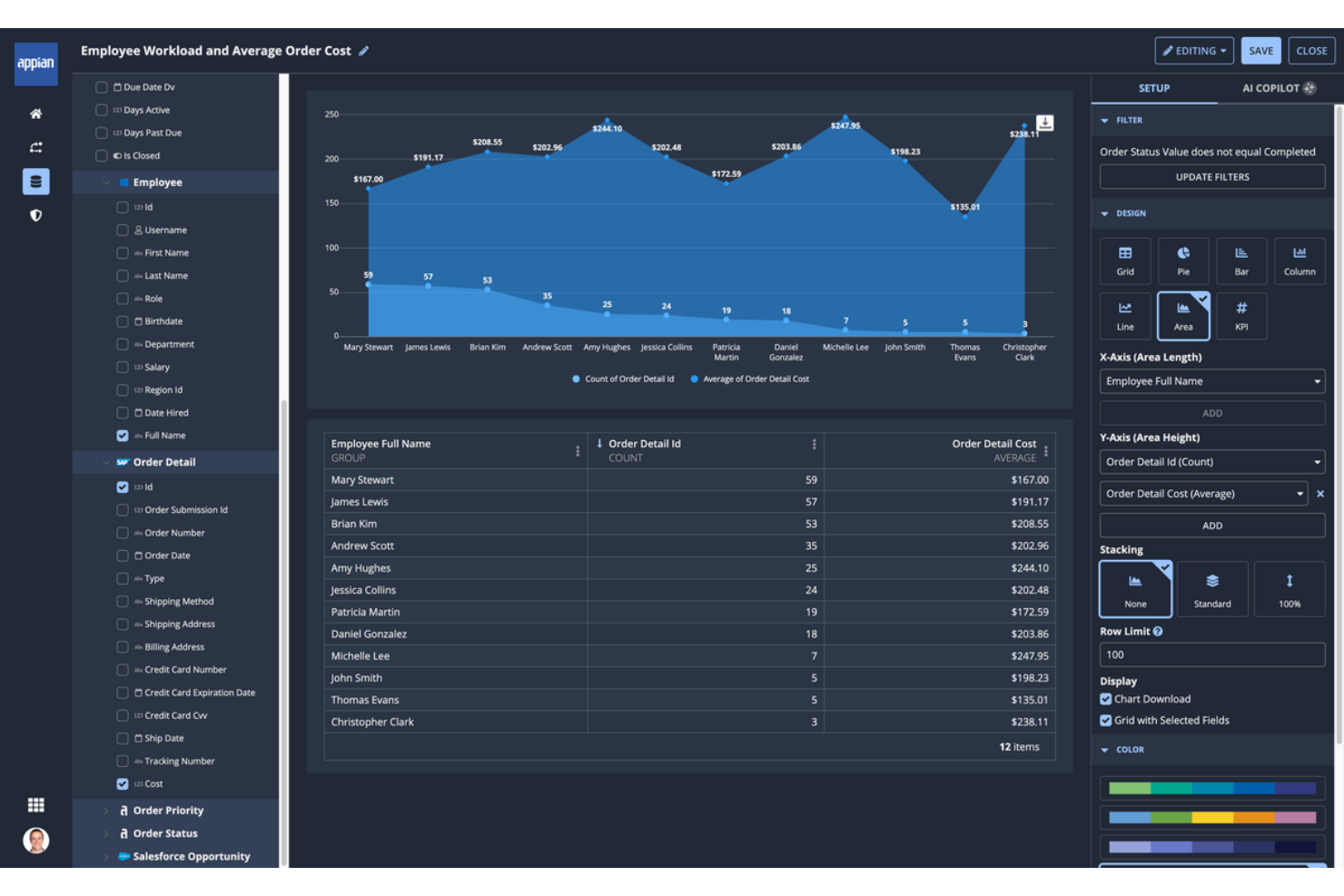
Appian Process HQ si distingue per i team che desiderano combinare intelligenza dei processi e automazione low-code in un'unica piattaforma. È particolarmente adatto a responsabili IT e analisti di business che vogliono unificare i dati, automatizzare i flussi di lavoro e analizzare i processi senza ricorrere a una programmazione complessa. L'approccio unico della piattaforma aiuta le organizzazioni ad adattare rapidamente i processi e integrare i sistemi tra i dipartimenti.
Perché ho scelto Appian Process HQ
Per l'analisi dei processi, ho scelto Appian Process HQ perché unisce in modo unico automazione low-code e intelligenza dei processi in un solo ambiente. La piattaforma consente di progettare, analizzare e ottimizzare i flussi di lavoro con strumenti visivi, così puoi adattare rapidamente i processi quando cambiano le esigenze aziendali. Il suo tessuto dati unificato connette informazioni provenienti da più fonti, rendendo più semplice analizzare i processi end-to-end senza gestire manualmente i dati. Questo approccio è particolarmente utile per i team che vogliono automatizzare e analizzare i processi senza dipendere pesantemente dalle risorse IT.
Funzionalità principali di Appian Process HQ
Altre funzionalità che rendono Appian Process HQ utile per l'analisi dei processi includono:
- Motore di Process Mining: Individua inefficienze nei processi analizzando i registri degli eventi dai sistemi collegati.
- Raccomandazioni basate su AI: Ricevi suggerimenti automatizzati per il miglioramento dei processi, basati su dati in tempo reale.
- Designer di regole aziendali: Configura e gestisci la logica di business in modo visivo senza scrivere codice.
- Controlli di accesso basati sui ruoli: Definisci permessi e gestisci l'accesso degli utenti ai dati sensibili dei processi.
Integrazioni di Appian Process HQ
Le integrazioni native non sono attualmente elencate.
Pros and Cons
Pros:
- Automazione low-code integrata nell'analisi dei processi
- Modellazione visiva dei processi per rapidi cambiamenti dei flussi di lavoro
- Tessuto dati unificato per l'analisi cross-system
Cons:
- Le analisi avanzate richiedono una significativa preparazione dei dati
- Alcune funzionalità richiedono l'adozione dell'ecosistema Appian
Altri strumenti di analisi dei processi
Ecco alcune opzioni aggiuntive di strumenti di analisi dei processi che non sono state incluse nel mio elenco ristretto, ma che vale comunque la pena considerare:
- ProcessGene
Ideale per la gestione dei processi tra più organizzazioni
- Orbus Software
Ideale per l'allineamento con l'architettura d'impresa
- ARIS Express
Ideale per il process mapping entry-level


Come Valuto gli Strumenti di Analisi dei Processi
Divido la valutazione in due livelli: le capacità di base che ogni strumento idoneo deve avere e i fattori che fanno la differenza quando si tratta di individuare i colli di bottiglia nella delivery o verificare la conformità dei processi.
Funzionalità di Base (Requisiti Minimi per Questa Lista)
Quando seleziono gli strumenti per la mia lista, valuto ciascuno su una scala da 0 (non offre la funzionalità) a 5 (eccelle in quest'area) per ogni funzionalità di base elencata di seguito. Poi calcolo il punteggio totale dello strumento in percentuale. Ogni strumento deve raggiungere un punteggio minimo totale del 65% per essere preso in considerazione.
- Mappatura e Modellazione dei Processi: Verifico se è possibile diagrammare i flussi di lavoro in notazioni standard come BPMN o swimlane, e non solo tramite forme di base su una tela.
- Process Discovery & Mining: Qui è importante la capacità di ingestione dei log degli eventi. Cerco strumenti che possano ricostruire come si è realmente svolto uno sprint o un ciclo di rilascio.
- Analisi delle Prestazioni e KPI: I dashboard devono mostrare metriche come tempo di ciclo e throughput. Valuto la qualità delle funzioni di analisi dati offerte da ogni strumento.
- Simulazione e Analisi What-If: Ricerco la capacità di modellare scenari, ad esempio testando in anticipo come l'aggiunta di un gate QA influenzerebbe i tempi di consegna.
- Rilevamento Collo di Bottiglia e Deviazioni: Gli strumenti devono segnalare dove l'esecuzione reale si discosta dal processo progettato, come un ritardo ricorrente nel passaggio tra team.
- Collaborazione e Documentazione: Valuto repository condivisi, cronologia delle versioni e commenti. I team interfunzionali devono poter co-gestire gli artefatti di processo.
Una volta ottenuto un elenco di strumenti che soddisfano i criteri, considero cosa distingue le varie piattaforme.
Fattori Differenzianti (Cosa Distingue i Fornitori)
Ecco come confronto i diversi fornitori:
Caratteristiche Distintive
Le analisi potenziate dall'intelligenza artificiale sono un differenziatore fondamentale. Cerco strumenti che segnalino proattivamente i pattern, come la previsione di un collo di bottiglia in uno sprint prima che blocchi la delivery. Anche i connettori nativi alle piattaforme di project management sono importanti, perché determinano la velocità con cui puoi iniziare ad analizzare i dati reali di progetto. Un gemello digitale del processo spinge oltre il livello, fornendo una replica aggiornata in tempo reale che ti permette di monitorare la conformità mentre il team lavora.
Oltre le Caratteristiche
L'ecosistema di integrazione è la prima cosa che valuto. Uno strumento che non può estrarre i log degli eventi dal tuo stack di progetto attuale è inutilizzabile in partenza. Considero anche la distribuzione e la scalabilità, soprattutto se la piattaforma può passare da un progetto pilota di un solo team a un deployment aziendale senza problemi di performance. Anche la trasparenza dei prezzi è fondamentale. Cerco modelli di licensing chiari che permettano di iniziare in piccolo e crescere, poiché spesso l'analisi dei processi parte da una prova concettuale prima che la direzione assegni un budget.
Come scegliere gli strumenti di analisi dei processi
È facile perdersi tra lunghi elenchi di funzionalità e strutture di prezzo complesse. Per aiutarti a rimanere concentrato mentre affronti il tuo specifico processo di selezione del software, ecco un elenco dei fattori da tenere presenti:
| Fattore | Cosa considerare |
|---|---|
| Scalabilità | Lo strumento supporterà le tue esigenze di mappatura dei processi man mano che la tua organizzazione cresce o cambia struttura? |
| Integrazioni | Lo strumento si connette nativamente ai sistemi esistenti (ERP, CRM, HRIS) per evitare il lavoro manuale? |
| Personalizzazione | Puoi adattare i modelli dei processi, i campi e i flussi di lavoro in modo che corrispondano alla terminologia e alle esigenze del tuo team? |
| Facilità d'uso | I membri dei vari reparti riusciranno a utilizzare lo strumento con una formazione minima e senza frustrazioni? |
| Implementazione e onboarding | Quanto tempo servirà per diventare operativi e di quali risorse o supporto avrai bisogno internamente? |
| Costo | I livelli di prezzo sono chiari e corrispondono all'utilizzo e al numero di utenti previsti nel tempo? |
| Misure di sicurezza | Lo strumento offre accesso basato sui ruoli, registri di controllo e conformità a standard come ISO o GDPR? |
| Requisiti di conformità | Lo strumento può aiutarti a rispettare le normative specifiche del settore o gli standard di audit pertinenti al tuo ambito? |
Cosa sono gli strumenti di analisi dei processi?
Gli strumenti di analisi dei processi sono piattaforme software che aiutano le squadre a visualizzare, documentare e valutare i processi aziendali. Questi strumenti supportano la gestione dei processi aziendali (BPM) aiutando le squadre a mappare i flussi di lavoro, definire i dati in ingresso e in uscita, identificare le ridondanze e valutare le opportunità per l'analisi a valore aggiunto e l'analisi delle lacune. I responsabili di progetto, gli analisti e i responsabili dei processi li utilizzano per l'analisi dei processi aziendali, la gestione dei flussi di lavoro e le iniziative di miglioramento continuo. Fornendo una visione chiara di come viene svolto il lavoro, questi strumenti supportano decisioni basate sui dati, aiutano le squadre a progettare un nuovo processo quando necessario e migliorano il valore complessivo dell'azienda. Molte organizzazioni fanno inoltre riferimento a casi di studio per valutare risultati e migliori pratiche.
Funzionalità
Quando selezioni gli strumenti di analisi dei processi, presta attenzione alle seguenti funzionalità chiave:
- Modellazione dei processi: consente di creare diagrammi visivi dei flussi di lavoro, semplificando la mappatura di ogni passaggio e la comprensione dei collegamenti tra le attività.
- Controllo delle versioni: tiene traccia delle modifiche alla documentazione dei processi nel tempo, consentendo di esaminare le versioni precedenti e mantenere una cronologia di controllo.
- Strumenti di collaborazione: consentono a più utenti di lavorare insieme sulle mappe dei processi, lasciare commenti e condividere riscontri in tempo reale.
- Report e analisi: forniscono cruscotti e report che evidenziano le prestazioni dei processi, i colli di bottiglia e le aree di miglioramento.
- Accesso basato sui ruoli: consente di impostare autorizzazioni per utenti diversi, garantendo che le informazioni sensibili sui processi siano accessibili solo alle persone autorizzate.
- Documentazione dei processi: consente di allegare note dettagliate, istruzioni e file di supporto a ogni passaggio del processo, per maggiore chiarezza e conformità.
- Opzioni di esportazione e condivisione: supporta l'esportazione delle mappe dei processi e della documentazione in formati come PDF, Word o file immagine, per una facile condivisione con le parti interessate.
- Funzionalità di integrazione: si collega ad altri sistemi aziendali, come le piattaforme ERP o CRM, per acquisire dati o attivare automaticamente i flussi di lavoro.
- Flussi di lavoro per l'approvazione: consentono di configurare fasi di revisione e approvazione per le modifiche ai processi, garantendo che gli aggiornamenti siano verificati prima della loro pubblicazione.
Vantaggi
L'implementazione di strumenti di analisi dei processi offre diversi vantaggi alla tua squadra e alla tua azienda. Ecco alcuni dei benefici che puoi aspettarti:
- Maggiore visibilità dei processi: le funzionalità di modellazione visiva e documentazione offrono a tutti una visione chiara di come viene svolto il lavoro tra le varie squadre.
- Conformità migliorata: il controllo delle versioni, le cronologie di controllo e i flussi di lavoro per l'approvazione aiutano a soddisfare i requisiti normativi e a mantenere registri accurati.
- Ottimizzazione più rapida dei processi: report e analisi evidenziano i colli di bottiglia e le inefficienze, semplificando l'individuazione delle aree di miglioramento.
- Collaborazione migliorata: gli strumenti di modifica e commento in tempo reale favoriscono il lavoro di squadra e mantengono le parti interessate allineate sulle modifiche ai processi.
- Riduzione degli errori manuali: le funzionalità di integrazione e la documentazione standardizzata riducono al minimo il rischio di errori e problemi di inserimento dei dati.
- Inserimento più semplice: la documentazione dettagliata dei processi e l'accesso basato sui ruoli aiutano i nuovi membri della squadra a comprendere rapidamente flussi di lavoro e responsabilità.
- Migliore gestione delle modifiche: i flussi di lavoro per l'approvazione e il monitoraggio delle modifiche garantiscono che gli aggiornamenti siano revisionati e comunicati prima dell'implementazione.
Costi e prezzi
La scelta degli strumenti di analisi dei processi richiede una conoscenza dei vari modelli e piani tariffari disponibili. I costi variano in base alle funzionalità, alle dimensioni della squadra, ai componenti aggiuntivi e ad altri fattori. La tabella seguente riassume i piani più comuni, i relativi prezzi medi e le funzionalità tipicamente incluse nelle soluzioni di analisi dei processi:
Tabella comparativa dei piani per gli strumenti di analisi dei processi
| Tipo di piano | Prezzo medio | Funzionalità comuni |
|---|---|---|
| Piano gratuito | $0 | Modellazione di base dei processi, numero limitato di utenti, opzioni di esportazione di base e supporto della comunità. |
| Piano personale | $5-$15/utente/mese | Accesso per un singolo utente, mappe dei processi illimitate, analisi di base e supporto via email. |
| Piano aziendale | $20-$40/utente/mese | Collaborazione multiutente, report avanzati, opzioni di integrazione, controllo delle versioni e accesso basato sui ruoli. |
| Piano per grandi aziende | $50-$3000/utente/mese | Integrazioni personalizzate, cronologie di controllo, supporto dedicato, funzionalità di conformità e controlli di sicurezza avanzati. |
Domande frequenti sugli strumenti di analisi dei processi
Ecco alcune risposte alle domande più comuni sugli strumenti di analisi dei processi:
In che modo gli strumenti di analisi dei processi supportano i requisiti di conformità e audit?
Gli strumenti di analisi dei processi supportano la conformità fornendo il controllo delle versioni, i registri di controllo e i flussi di lavoro di approvazione. Queste funzionalità aiutano a tenere traccia delle modifiche, documentare la responsabilità dei processi e conservare i registri necessari per gli audit normativi o le revisioni interne.
Gli strumenti di analisi dei processi possono integrarsi con altri sistemi aziendali?
Sì, la maggior parte degli strumenti di analisi dei processi offre funzionalità di integrazione con sistemi come piattaforme ERP, CRM e HR. Le integrazioni aiutano ad automatizzare il flusso dei dati, attivare flussi di lavoro e ridurre l’inserimento manuale, rendendo la gestione dei processi più efficiente e accurata.
Cosa devo considerare quando trasferisco la documentazione dei processi esistente in un nuovo strumento?
Inizia esaminando la documentazione attuale per verificarne completezza e accuratezza. Cerca nel nuovo strumento opzioni di importazione come il supporto per file CSV, XML o diagrammi. Pianifica una migrazione graduale e coinvolgi le parti interessate principali per assicurarti che nulla venga perso o rappresentato in modo errato.
Gli strumenti di analisi dei processi sono adatti ai piccoli team o solo alle grandi organizzazioni?
Gli strumenti di analisi dei processi possono essere utilizzati sia dai piccoli team sia dalle grandi organizzazioni. Molti fornitori offrono piani e funzionalità scalabili, permettendoti di iniziare in piccolo e ampliare l’utilizzo man mano che crescono le tue esigenze, senza sovraccaricare il team con complessità non necessarie.
Con quale frequenza devono essere riesaminati e aggiornati i processi aziendali in questi strumenti?
Riesamina e aggiorna i processi aziendali almeno una volta all’anno o ogni volta che si verificano cambiamenti significativi nelle operazioni, nelle normative o nella struttura del team. Gli aggiornamenti regolari aiutano a mantenere accurata la documentazione e garantiscono che i flussi di lavoro rimangano efficienti e conformi.