

I 10 migliori software per RFP nel 2026

Selezione di software per RFP


Il software per RFP è uno strumento digitale che ti aiuta a gestire, automatizzare e monitorare i processi di richiesta di proposta del tuo team dall’inizio alla fine. Se stai cercando il miglior software per RFP, probabilmente vuoi risparmiare tempo, ridurre il lavoro manuale e concludere più affari, anche se i requisiti e i cicli di revisione continuano a evolversi.
Di seguito troverai un elenco curato di strumenti che hanno dimostrato di aiutare i project manager e i team addetti alle proposte a gestire requisiti complessi, mantenere allineati gli stakeholder e presentare più rapidamente proposte vincenti. Usa questa guida per confrontare le opzioni e scegliere il miglior software per RFP per il flusso di lavoro specifico del tuo team.
Perché fidarsi dei nostri consigli sui software
Il nostro team testa e recensisce software dal 2012. In quanto project manager noi stessi, sappiamo quanto sia difficile — e importante — scegliere il software giusto.
Per questa guida, abbiamo valutato gli strumenti attraverso test pratici e ricerche indipendenti, assegnando un punteggio agli strumenti in base ai nostri criteri di selezione. Ci basiamo inoltre sulle competenze di leader di pensiero del settore e di professionisti attivi nella gestione dei progetti.
Le nostre recensioni riflettono il nostro giudizio editoriale umano, non un discorso di vendita.
Revisori esperti:
Tabella di confronto dei software per RFP
Questa tabella di confronto riepiloga i dettagli sui prezzi delle mie migliori selezioni di software per RFP
| Tool | Best For | Trial Info | Price | ||
|---|---|---|---|---|---|
| 1 | Il migliore con rilevamento automatico dei conflitti | Demo gratuita disponibile | Prezzo su richiesta | Website | |
| 2 | Ideale per librerie di contenuti IA a manutenzione zero | Garanzia di rimborso di 30 giorni con condizioni; demo gratuita disponibile | A partire da $899/mese (fatturati annualmente) | Website | |
| 3 | Ideale per workflow di progetto aziendali complessi | Demo gratuita disponibile | Prezzo su richiesta | Website | |
| 4 | Ideale per la co-creazione simultanea tra più utenti | Demo gratuita disponibile | Prezzi su richiesta | Website | |
| 5 | Ideale per l'intero ciclo di vita documentale | Prova gratuita di 14 giorni + demo gratuita disponibile | Da $19/postazione/mese (fatturato annualmente) | Website | |
| 6 | Ideale per la redazione narrativa generativa end-to-end | Demo gratuita disponibile | Prezzi su richiesta | Website | |
| 7 | Ideale per RFP guidati dall'approvvigionamento e valutazione dei fornitori | Demo gratuita disponibile | Prezzi su richiesta | Website | |
| 8 | Ideale per la raccolta della conoscenza tribale guidata dagli agenti | Demo gratuita disponibile | Prezzi su richiesta | Website | |
| 9 | Ideale per la valutazione imparziale dei fornitori su larga scala | Demo gratuita disponibile | Prezzi su richiesta | Website | |
| 10 | Ideale per l'approvvigionamento e la valutazione di RFP governative | Demo gratuita disponibile | Prezzi su richiesta | Website |
Recensioni dei software per RFP
Di seguito sono riportati i miei riepiloghi dettagliati dei migliori software per RFP entrati nella mia selezione. Le mie recensioni offrono una panoramica dettagliata delle funzionalità, delle integrazioni e dei migliori casi d’uso di ciascuna piattaforma, per aiutarti a trovare il software più adatto a te.

Il migliore con rilevamento automatico dei conflitti
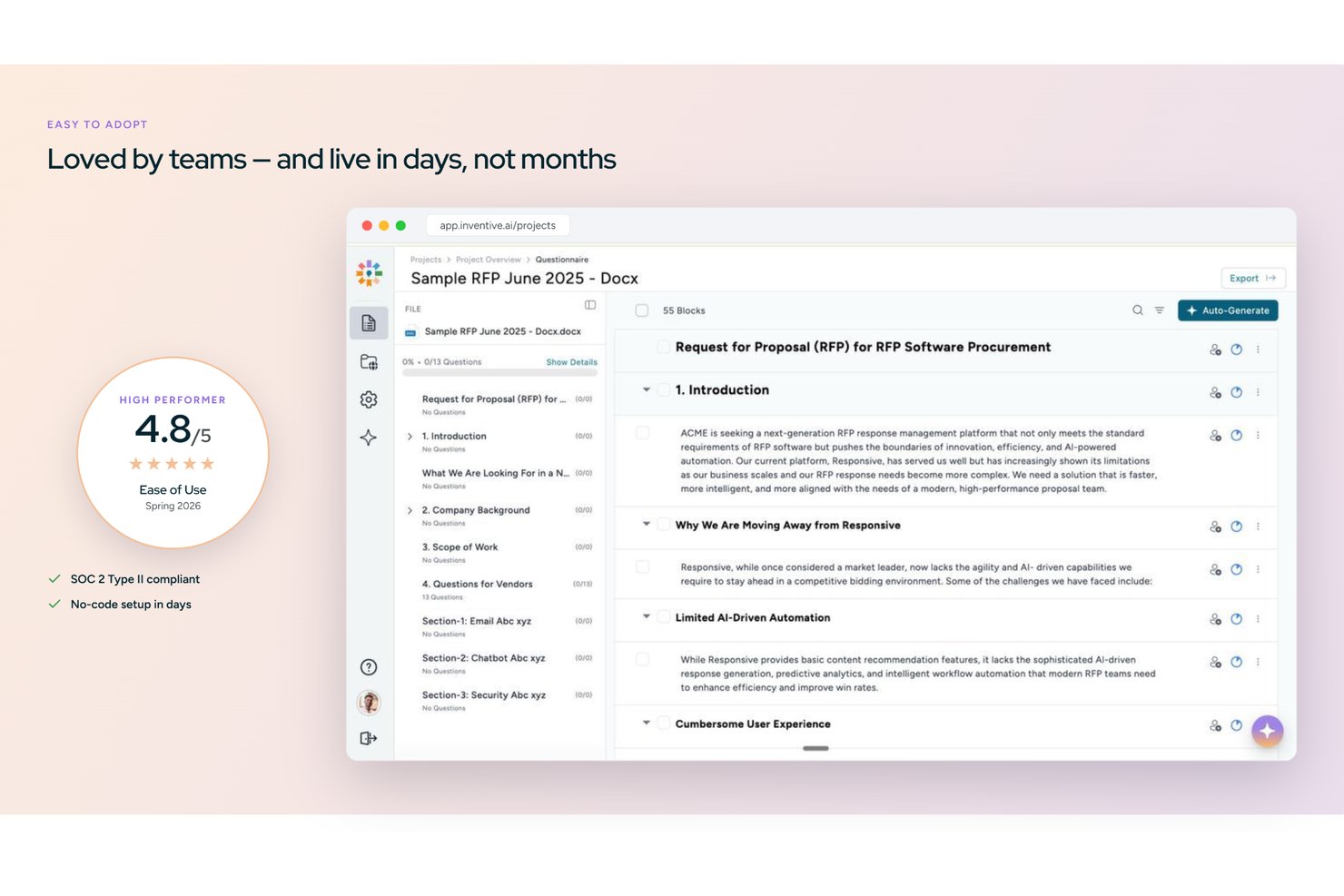
Inventive AI è una piattaforma nativa di intelligenza artificiale per la risposta a RFP che automatizza la generazione di bozze su RFP, RFI, DDQ e questionari di sicurezza utilizzando un hub di conoscenza centralizzato, rilevamento dei conflitti e import/export in più formati.
Per chi è più indicato Inventive AI?
Inventive AI è particolarmente adatto a team di proposta e pre-vendita di aziende di medie e grandi dimensioni che gestiscono un elevato volume di RFP, RFI e questionari di sicurezza.
Perché ho scelto Inventive AI
Ho scelto Inventive AI come uno dei migliori perché il suo AI Content Manager rileva attivamente informazioni contrastanti tra le fonti collegate prima che venga inviata qualsiasi risposta. Se una pagina prezzi e una presentazione prodotto forniscono risposte diverse alla stessa domanda RFP, la piattaforma lo segnala direttamente. Mi piace anche l'Analyzer Agent, che esegue un controllo di conformità sulle bozze completate, verificando che ogni requisito sia soddisfatto e che il tono rimanga coerente in tutte le sezioni.
Funzionalità principali di Inventive AI
- Hub di conoscenza unificato: Centralizza le coppie di domande/risposte aziendali, documenti di prodotto e precedenti RFP per la generazione di risposte guidate dall'AI.
- Analyzer Agent: Esegue cicli di revisione per confermare che ogni requisito RFP sia soddisfatto e verifica la coerenza del tono nelle bozze.
- Esportazione in più formati: Consente l'esportazione delle risposte completate in Word, Excel, PDF, CSV e modelli personalizzati con brand.
- Integrazione con Jira e Salesforce: Sincronizza i dati delle proposte e dei progetti direttamente con sistemi di project management e CRM.
Integrazioni di Inventive AI
Inventive AI offre integrazioni native con Salesforce, Jira, Slack, Microsoft 365, Google Workspace e HubSpot. È disponibile un'API per integrazioni personalizzate.
Pros and Cons
Pros:
- Il rilevamento dei conflitti individua automaticamente contenuti contraddittori nella proposta
- L'AI redige risposte tra RFP e DDQ
- L'hub di conoscenza segnala e aggiorna risposte obsolete
Cons:
- Piattaforma più recente con una comunità di utenti ridotta
- I report analitici sono meno maturi rispetto ai concorrenti affermati
Ideale per librerie di contenuti IA a manutenzione zero
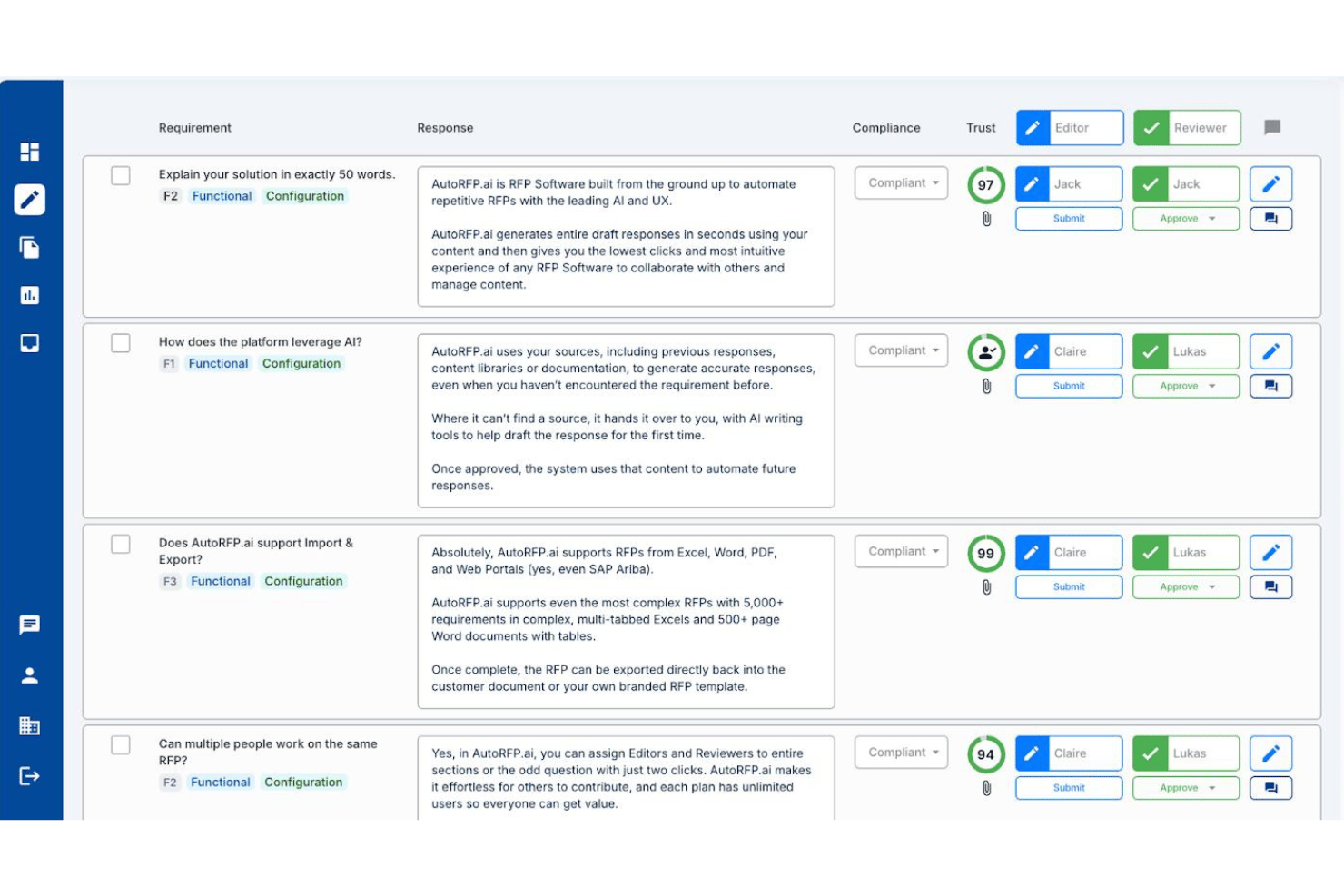
AutoRFP.ai è una piattaforma nativa dell'IA per le risposte alle RFP che automatizza la generazione delle prime bozze, gestisce i flussi di lavoro degli esperti in materia interfunzionali e mantiene una libreria di contenuti che si autoalimenta tra RFP, DDQ e questionari di sicurezza.
Per chi è più adatto AutoRFP.ai?
AutoRFP.ai è adatto ai team che si occupano di proposte e hanno bisogno che l'IA gestisca automaticamente l'aggiornamento della libreria di contenuti, senza che nessuno debba mantenere manualmente un database di domande e risposte.
Perché ho scelto AutoRFP.ai
AutoRFP.ai è entrato nella mia rosa di candidati perché è l'unico strumento per RFP che ho visto in grado di eliminare davvero l'onere della manutenzione della libreria di contenuti. Invece di curare manualmente un database di domande e risposte, la piattaforma apprende da ogni risposta approvata e si sincronizza automaticamente con fonti come SharePoint, Confluence e Notion. Mi piacciono anche i punteggi di affidabilità associati a ogni bozza generata dall'IA, che indicano i livelli di confidenza e citano le fonti, così i revisori non devono indovinare la qualità delle risposte.
Funzionalità principali di AutoRFP.ai
- Analisi Sì/No: analizza i documenti RFP in arrivo alla ricerca di elementi decisivi e automatizza le decisioni di partecipazione o non partecipazione prima che il team impegni risorse.
- Agente del portale con estensione del browser: risponde direttamente all'interno di portali di approvvigionamento come SAP Ariba, Coupa e Workday tramite un'estensione per Chrome o Edge, senza dover ricreare i documenti.
- Flusso di lavoro con menzioni tramite Slack e Teams: consente ai responsabili delle proposte di menzionare gli esperti in materia direttamente in Slack o Microsoft Teams per raccogliere risposte senza coinvolgere i collaboratori in una piattaforma separata.
- Supporto alle risposte multilingue: redige e localizza le risposte in oltre 44 lingue, inclusa la localizzazione automatica tra inglese statunitense e inglese britannico.
Integrazioni di AutoRFP.ai
AutoRFP.ai pubblicizza oltre 18 integrazioni, tra cui Salesforce, SharePoint, Confluence, Notion, Slack, Microsoft Teams, Drata e Vanta. Supporta inoltre API REST, webhook e connessioni al server MCP per flussi di lavoro personalizzati.
Pros and Cons
Pros:
- La libreria di contenuti IA non richiede manutenzione
- Avvio rapido con prime bozze in 48 ore
- Punteggi di affidabilità e citazioni per ogni risposta
Cons:
- Nessun diagramma di Gantt o integrazione con strumenti di gestione dei progetti
- L'analisi dei risultati non monitora la qualità delle vittorie e delle sconfitte

Ideale per workflow di progetto aziendali complessi

Responsive è una piattaforma software RFP aziendale progettata per centralizzare la gestione delle richieste, automatizzare i flussi di lavoro di risposta, integrarsi con gli strumenti aziendali e supportare grandi team che gestiscono proposte complesse e ad alto volume.
Per chi è ideale Responsive?
Responsive è adatto a grandi aziende e team di proposta che gestiscono workflow RFP e di conformità ad alto volume e su più dipartimenti.
Perché ho scelto Responsive
Ho scelto Responsive come uno dei migliori software di risposta RFP perché gestisce workflow di progetto aziendali complessi con spazi di lavoro personalizzabili, permessi granulari e librerie di risposte automatizzate. Lo utilizzo per coordinare grandi team assegnando attività tra le unità aziendali e la sua automazione dei workflow permette al mio team di semplificare revisione, conformità e approvazioni su RFP critiche.
Funzionalità chiave di Responsive
- Suggerimento di contenuto abilitato all'IA: suggerisce risposte rilevanti dalla tua libreria di contenuti mentre compili le RFP.
- Tracciamento delle versioni: tiene traccia di tutte le modifiche e degli aggiornamenti ai documenti di progetto.
- Workflow integrato di firma elettronica: ti permette di raccogliere firme direttamente all'interno delle proposte e delle risposte.
Integrazioni di Responsive
Responsive offre più di 30 integrazioni native, tra cui Salesforce, Slack, Google Drive, Microsoft 365, HubSpot, Box, OneDrive, SharePoint e Dropbox, e fornisce un'API per integrazioni personalizzate.
Pros and Cons
Pros:
- Supporta una libreria di risposte automatizzata per risposte più rapide
- Offre controlli sui permessi per grandi team
- Gestisce workflow di approvazione e conformità a più step
Cons:
- Opzioni limitate per il trial o la demo self-service
- Può risultare troppo complesso per alcune PMI

Ideale per la co-creazione simultanea tra più utenti
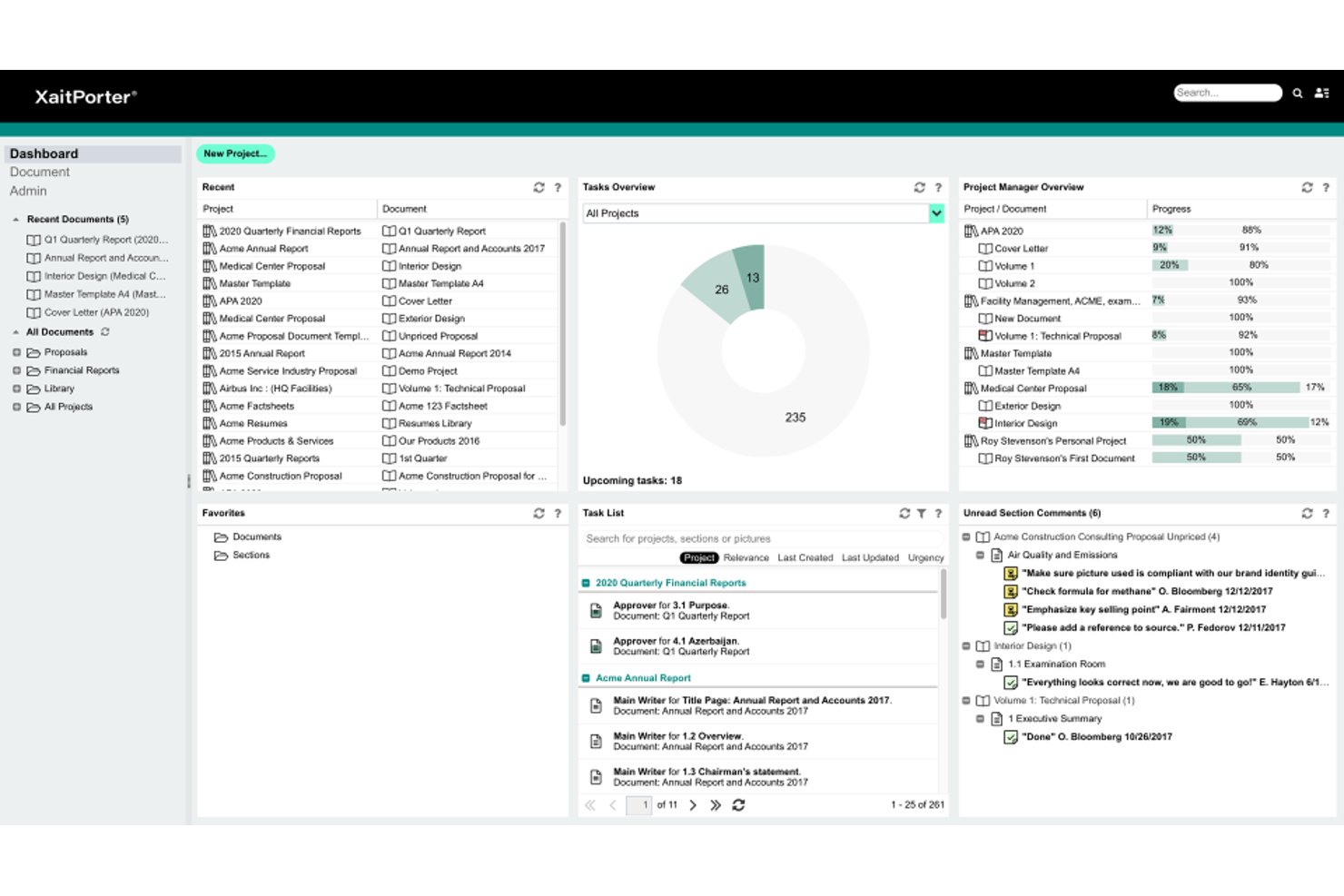
XaitPorter è una piattaforma per proposte e risposte a RFP che riunisce co-creazione in tempo reale, assemblaggio strutturato dei documenti, riutilizzo dei contenuti basato sull'intelligenza artificiale e formattazione automatizzata per offerte e gare d'appalto ampie e complesse.
Per chi è più adatto XaitPorter?
XaitPorter è particolarmente adatto ai team aziendali che si occupano di proposte e offerte e che gestiscono risposte a gare d'appalto ampie e complesse, con molti collaboratori che lavorano in parallelo.
Perché ho scelto XaitPorter
XaitPorter merita un posto nella mia selezione perché nessun altro strumento che ho visto gestisce la co-creazione simultanea tra più utenti alla scala effettivamente richiesta dalle gare d'appalto più grandi. In una proposta documentata di Aker BP hanno lavorato contemporaneamente sullo stesso documento 34 autori e 41 revisori, con autorizzazioni a livello di sezione che mantenevano protetti i contenuti sensibili. Apprezzo anche il fatto che XaitAI proponga risposte preapprovate da una libreria di contenuti condivisa in base al contesto di scrittura, così i collaboratori non duplicano il lavoro tra le varie sezioni.
Funzionalità principali di XaitPorter
- Formattazione e numerazione automatizzate: XaitPorter gestisce automaticamente la formattazione, la numerazione e l'indicizzazione dei documenti, così i collaboratori non devono gestire manualmente il layout.
- Autorizzazioni a livello di sezione: L'accesso alle singole sezioni del documento può essere limitato in base al ruolo, mantenendo i contenuti sensibili accessibili solo ai collaboratori autorizzati.
- Registro di controllo: Ogni azione nel documento viene registrata, offrendo ai responsabili del progetto una cronologia completa delle modifiche, delle approvazioni e delle attività dei collaboratori.
- Integrazione con Salesforce: XaitPorter si collega direttamente a Salesforce, consentendo ai team che si occupano delle proposte di gestire il lavoro sulle RFP direttamente dal loro CRM esistente.
Integrazioni di XaitPorter
XaitPorter dispone di integrazioni documentate con Salesforce e XaitCPQ, mantenendo il lavoro sulle proposte all'interno del CRM e allineando i prezzi al contenuto della proposta. Offre inoltre un'API aperta per connessioni personalizzate.
Pros and Cons
Pros:
- La libreria di risposte riutilizzabili riduce la ripetizione nella stesura
- La modifica simultanea supporta team numerosi che lavorano alle offerte
- Le dashboard chiariscono la responsabilità delle sezioni e le approvazioni
Cons:
- Tabelle e formattazione possono richiedere correzioni manuali
- I suggerimenti dell'IA richiedono contenuti selezionati e aggiornati
PandaDoc
Ideale per l'intero ciclo di vita documentale

PandaDoc è una piattaforma di automazione dei documenti per team RFP che gestisce la creazione di documenti, la gestione dei modelli, le firme elettroniche, i flussi di lavoro per l'approvazione e la collaborazione per proposte e contratti.
A Chi È Meglio Adatto PandaDoc?
PandaDoc è una soluzione ideale per i team di vendita e proposte nelle aziende in crescita che hanno bisogno di una piattaforma all-in-one per gestire documenti di RFP e contratti.
Perché Ho Scelto PandaDoc
Ho scelto PandaDoc come uno dei migliori perché posso gestire ogni fase del ciclo di vita dei documenti RFP in un'unica piattaforma, inclusi creazione, instradamento dei flussi di lavoro e firme elettroniche sicure. Il mio team utilizza le sue funzionalità di libreria di modelli e contenuti per standardizzare le risposte alle proposte su larga scala. Mi affido ai suoi flussi di lavoro di approvazione integrati per mantenere la conformità dei contratti tra i team globali.
Funzionalità Principali di PandaDoc
- Generatore di moduli: consente di creare moduli compilabili per raccogliere dati RFP.
- Analisi dei documenti: traccia quando i destinatari aprono, visualizzano o interagiscono con i documenti.
- Invio massivo: consente di inviare un documento a molti destinatari contemporaneamente per la distribuzione di RFP.
Integrazioni PandaDoc
PandaDoc offre oltre 30 integrazioni native, tra cui Salesforce, HubSpot, Pipedrive, Zoho CRM, Slack, Dropbox, QuickBooks, PayPal e Stripe. È disponibile una API per integrazioni personalizzate.
Pros and Cons
Pros:
- Monitoraggio dei documenti end-to-end con marcature temporali
- Libreria di modelli multiutente per standardizzazione
- Integrazioni nativamente CRM per sincronizzazione del pipeline
Cons:
- Accesso offline limitato per la modifica dei documenti
- Il controllo delle versioni manca di funzionalità collaborative


AutogenAI è una piattaforma di scrittura di proposte basata sull'intelligenza artificiale che aiuta i team di gare e proposte a qualificare le opportunità, redigere risposte alle RFP, gestire i flussi di lavoro per l'invio e revisionare i contenuti in base ai requisiti della richiesta.
Per chi è più adatto AutogenAI?
AutogenAI è particolarmente adatto ai team di gare e proposte di organizzazioni medio-grandi che rispondono a RFP complesse e ad alto rischio e necessitano di una redazione basata sull'intelligenza artificiale, dalla prima scaletta fino al documento pronto per l'invio.
Perché ho scelto AutogenAI
Ho scelto AutogenAI come una delle migliori soluzioni perché copre l'intero percorso di risposta a una proposta in un'unica piattaforma: dall'utilizzo di Extract per analizzare un'RFP ricevuta ed evidenziare ogni requisito, fino alla generazione di una prima bozza strutturata tramite Ideator ed Editor, utilizzando la propria libreria di conoscenze. Ciò che apprezzo particolarmente è la fase Gamma Review, che verifica la risposta completata rispetto ai criteri di valutazione della richiesta prima dell'invio, così da evitare che eventuali lacune sfuggano all'ultimo momento.
Funzionalità principali di AutogenAI
- Assistente alla ricerca: Raccoglie e analizza informazioni dalla libreria di conoscenze e da fonti Internet per definire la strategia della proposta prima ancora che venga scritta una parola.
- Revisione Black Hat: Analizza un'RFP ricevuta per individuare come la risposta possa distinguersi dalla concorrenza.
- Storyboard: Trasforma i requisiti complessi di un'RFP in una scaletta narrativa strutturata che guida la prima bozza.
- Integrazione con Salesforce: Crea proposte direttamente dalle opportunità in Salesforce, mantenendo collegati la pipeline BD e il flusso di lavoro delle proposte.
Integrazioni di AutogenAI
AutogenAI offre integrazioni native con SharePoint e Salesforce, oltre a un'API pubblica per integrazioni personalizzate. Supporta inoltre le connessioni Zapier.
Pros and Cons
Pros:
- Accelera le prime bozze per le risposte alle gare
- Trova casi di studio riutilizzabili nella libreria
- Organizza le revisioni delle proposte e le attività di gara
Cons:
- Non crea né distribuisce richieste dal lato dell'acquirente
- Le bozze generate possono ripetere o riportare in modo errato i contenuti

Ideale per RFP guidati dall'approvvigionamento e valutazione dei fornitori
Approvvigionamento e RFx di Gainfront è una piattaforma di approvvigionamento che gestisce eventi RFI, RFP e RFQ dalla creazione fino alla valutazione e all'aggiudicazione dei fornitori, con strutture degli eventi generate dall'IA, punteggi ponderati e una base di conoscenza delle risposte ad autoapprendimento.
Per chi è più adatto Gainfront?
Gainfront è particolarmente adatto ai team di approvvigionamento che gestiscono eventi di approvvigionamento formali e necessitano di una valutazione strutturata dei fornitori integrata nel processo RFP.
Perché ho scelto Gainfront
Ho incluso Gainfront tra le mie scelte principali perché è progettato specificamente per gli eventi di approvvigionamento guidati dall'approvvigionamento, in cui la valutazione dei fornitori è parte integrante del processo RFP e non un'attività successiva. Mi piace il modo in cui il suo sistema di punteggio ponderato indirizza le sezioni finanziarie ai revisori della finanza e quelle operative ai responsabili delle operazioni, per poi consolidare tutto in un'unica percentuale che consente il confronto fianco a fianco. La sua IA genera inoltre strutture degli eventi allineate alla categoria a partire dai requisiti di approvvigionamento, così i team che gestiscono eventi RFI, RFP e RFQ non devono partire da una pagina vuota.
Funzionalità principali di Gainfront
- Base di conoscenza ad autoapprendimento: Acquisisce politiche, certificazioni, dati dei fornitori e documenti contrattuali, quindi sintetizza le risposte provenienti da più fonti utilizzando l'NLP.
- Instradamento delle risposte in base al livello di affidabilità: Contrassegna automaticamente le risposte come ad alta, media o bassa affidabilità, inoltrando le domande a bassa affidabilità a un esperto della materia con i documenti delle fonti pertinenti allegati.
- Eventi di approvvigionamento con distinta base dettagliata: Converte le distinte base di più stabilimenti in eventi di approvvigionamento strutturati collegati a dati dei fornitori riconciliati.
- Individuazione dei fornitori basata su rischio e diversità: Filtra e invita i fornitori sulla base dei punteggi di affidabilità, dei profili di rischio, delle certificazioni di diversità e dei dati ESG nella fase RFP.
Integrazioni di Gainfront
Le integrazioni native non sono documentate chiaramente. Gainfront descrive connessioni a sistemi CRM, piattaforme di approvvigionamento, database dei fornitori, registri esterni delle certificazioni e archivi di documenti.
Pros and Cons
Pros:
- Il punteggio ponderato consolida le valutazioni interfunzionali
- L'IA riutilizza le risposte accettate e segnala i contenuti obsoleti
- I moduli RFQ hanno contribuito a individuare fornitori idonei
Cons:
- Gli utenti hanno segnalato prestazioni lente e bug occasionali
- Un revisore ha ritenuto la navigazione confusa


Tribble è una piattaforma di gestione della conoscenza, guidata dall'IA, pensata per acquisire, organizzare e recuperare il sapere tribale derivante dalle interazioni degli agenti e dai flussi di lavoro interni.
Per chi è ideale Tribble?
Tribble è una soluzione ideale per i team di assistenza clienti e operations di organizzazioni in rapida crescita che hanno bisogno di acquisire e valorizzare la conoscenza istituzionale.
Perché ho scelto Tribble
Ho scelto Tribble tra le mie principali opzioni perché voglio che i miei agenti siano in grado di documentare soluzioni sfumate e lezioni apprese in tempo reale da casi concreti. Utilizzo i suoi strumenti per la raccolta guidata dagli agenti per documentare il sapere tribale maturato sul campo senza interrompere il flusso di lavoro. L'IA di Tribble poi organizza e rende disponibile questa informazione così che il mio team possa trovare rapidamente risposte pertinenti quando emergono nuovi progetti o richieste di offerta (RFP).
Funzionalità principali di Tribble
- Ricerca alimentata dall'IA: Trova istantaneamente frammenti di conoscenza rilevanti usando query in linguaggio naturale.
- Integrazione con le piattaforme di chat: Acquisisci e recupera conoscenza direttamente all'interno di Slack e Microsoft Teams.
- Suggerimenti di contenuto automatici: Proponi articoli e soluzioni correlate durante la stesura delle RFP.
Integrazioni di Tribble
Tribble offre integrazioni native con Salesforce, HubSpot, SharePoint, Google Drive, Confluence, Notion, Slack, Microsoft Teams, Gong, Clari, DocuSign, Box e OneDrive, ed è disponibile un'API per integrazioni personalizzate.
Pros and Cons
Pros:
- Gli agenti possono raccogliere conoscenza dal vivo durante i progetti
- L'IA organizza e tagga rapidamente le conoscenze tribali
- Permessi basati sui ruoli per i contenuti RFP sensibili
Cons:
- Richiede manutenzione manuale della base di conoscenza
- Non supporta modelli per RFP standardizzate

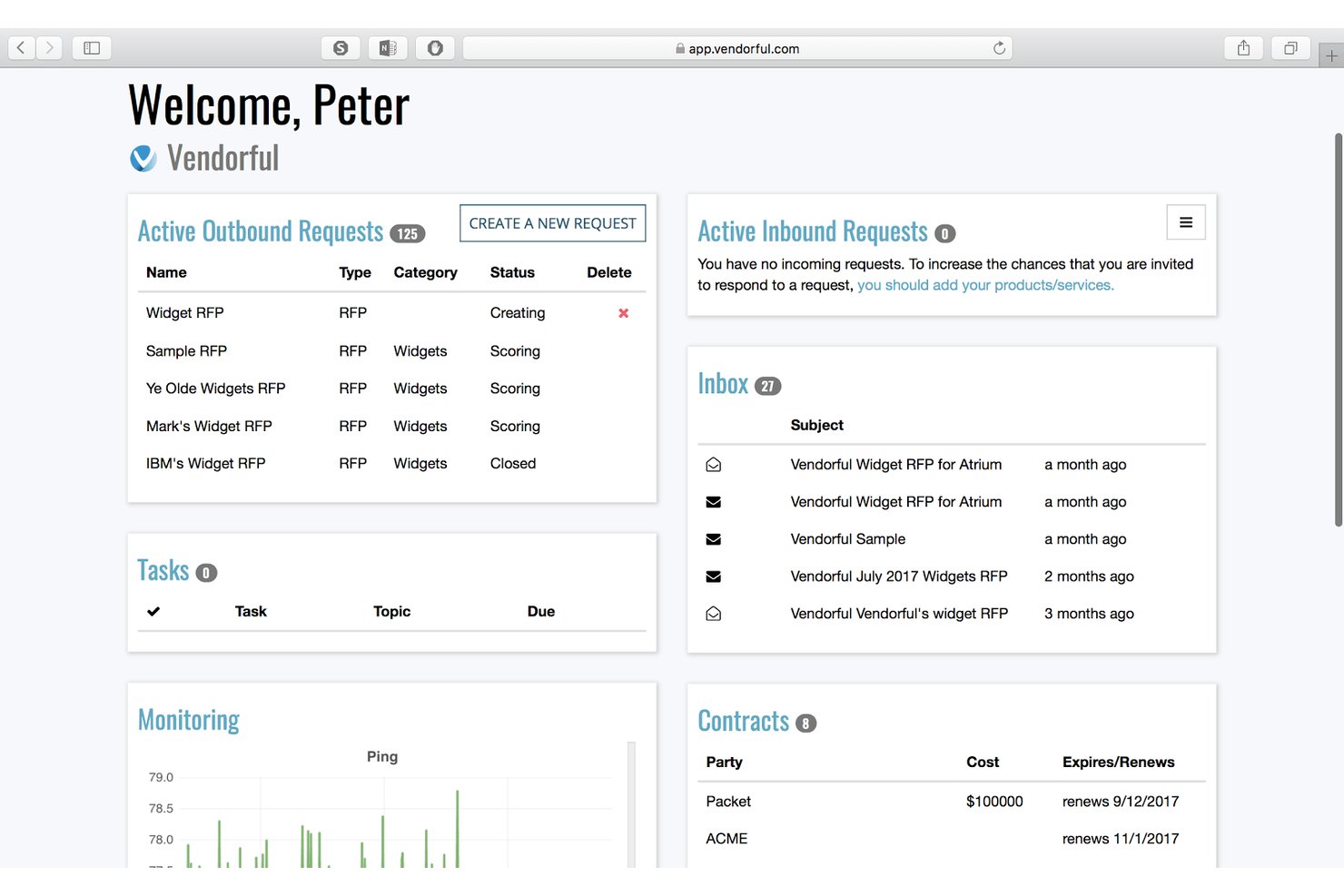
Vendorful è una piattaforma di gestione delle risposte a e-RFX e RFP che combina un generatore di RFP con funzionalità di trascinamento, un archivio di contenuti riutilizzabili, la stesura assistita delle risposte tramite IA, la valutazione anonima dei fornitori e strumenti di gestione delle relazioni con i fornitori.
Per chi è più adatto Vendorful?
Vendorful è particolarmente adatto ai team di approvvigionamento che gestiscono eventi di approvvigionamento ad alto volume e necessitano di un processo di valutazione strutturato e in grado di ridurre i pregiudizi tra più parti interessate.
Perché ho scelto Vendorful
Ho scelto Vendorful come una delle soluzioni migliori perché la sua funzionalità di valutazione anonima è qualcosa che, sinceramente, non riscontro in molti strumenti per RFP. Quando il mio team gestisce un evento di approvvigionamento con più valutatori, ciascuno assegna un punteggio alle risposte dei fornitori senza sapere quale fornitore le abbia inviate, eliminando così il favoritismo e il pregiudizio di ancoraggio che distorcono i risultati nei fogli di calcolo condivisi. Abbinando questa funzione alla valutazione ponderata affiancata e all'aggregazione automatica delle proposte, si ottiene un processo di valutazione realmente efficace anche su larga scala.
Caratteristiche principali di Vendorful
- Generatore RFX con funzionalità di trascinamento: Crea eventi RFP, RFQ, RFI e IFB utilizzando un generatore di questionari con modelli riutilizzabili, domande ponderate e copia e incolla in blocco.
- Assistente IA per la stesura delle risposte: Genera suggerimenti per le risposte addestrati sui contenuti selezionati manualmente dal tuo archivio di conoscenze, trasformando la scrittura in un'attività di revisione.
- Gestione delle relazioni con i fornitori: Monitora i dati dei fornitori, gli indicatori KPI delle prestazioni, i contratti e i flussi di lavoro di inserimento in un unico modulo integrato.
- Integrazioni con i sistemi aziendali: Connettiti a SAP, Ariba, Coupa, Oracle e altre piattaforme di approvvigionamento tramite API REST o opzioni iPaaS integrate.
Integrazioni di Vendorful
Vendorful si integra con SAP, Ariba, Coupa, Oracle, PeopleSoft, Bravo, BirchStreet e Archer. Offre inoltre un'API REST e opzioni iPaaS integrate per collegare i dati dei fornitori ad altri sistemi.
Pros and Cons
Pros:
- La valutazione anonima riduce il pregiudizio di ancoraggio dei valutatori
- I confronti ponderati consolidano le valutazioni del team
- I contenuti riutilizzabili velocizzano le risposte ai questionari
Cons:
- Le risposte dell'IA richiedono una revisione manuale
- Il processo formale di approvazione rimane poco chiaro
Ideale per l'approvvigionamento e la valutazione di RFP governative
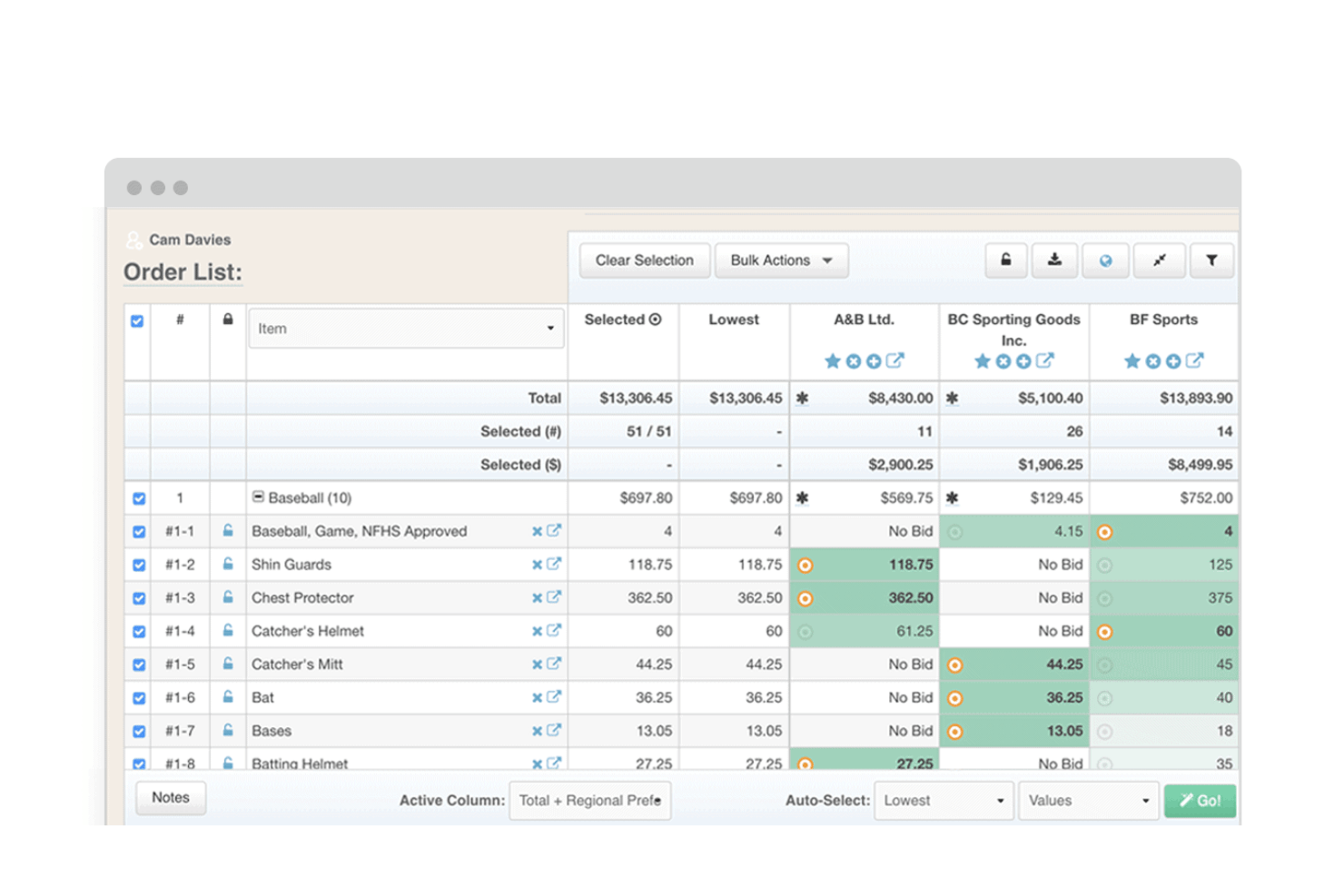
Euna Procurement è una piattaforma di approvvigionamento elettronico per il settore pubblico che copre l'approvvigionamento, la creazione di gare, il coinvolgimento dei fornitori, la valutazione delle proposte e la gestione di contratti e fatture per i team di approvvigionamento degli enti pubblici.
Per chi è più adatto Euna Procurement?
Euna Procurement è particolarmente adatto ai team di approvvigionamento degli enti governativi e del settore pubblico che devono gestire processi di approvvigionamento conformi alle normative, dalla creazione di RFP e dal coinvolgimento dei fornitori fino alla valutazione delle proposte e alla gestione dei contratti.
Perché ho scelto Euna Procurement
Ho scelto Euna Procurement come una delle soluzioni migliori perché è progettato appositamente per ciò che fanno i team di approvvigionamento degli enti pubblici: pubblicare gare e gestire valutazioni strutturate e verificabili. Il Generatore di gare supporta modelli riutilizzabili con segnaposto dinamici, assegnazioni delle sezioni agli stakeholder e registri automatici delle modifiche, così il tuo team può produrre RFP conformi senza dover ricominciare ogni volta da zero. Mi piace anche il fatto che le schede di valutazione digitali consentano ai valutatori di registrare punteggi, commenti e confronti dei prezzi in un unico spazio di lavoro condiviso, mantenendo organizzate e difendibili le valutazioni delle offerte.
Funzionalità principali di Euna Procurement
- Diffusione delle gare: Invia le gare ai fornitori attraverso la rete Euna Supplier Network e distribuisci aggiornamenti e integrazioni direttamente nella piattaforma.
- Registrazione e profili dei fornitori: I fornitori si registrano autonomamente e inseriscono codici merceologici, certificazioni e classificazioni di diversità in registri centralizzati e consultabili.
- Consulente AI per le gare: Esamina e perfeziona i documenti di gara utilizzando l'intelligenza artificiale prima della pubblicazione, per segnalare problemi e migliorare la conformità.
- Ricezione delle richieste di approvvigionamento: Ricevi, assegna, assegna una priorità e approva le richieste di approvvigionamento in una coda centralizzata con aggiornamenti automatici sullo stato.
Integrazioni di Euna Procurement
Euna Procurement si collega a oltre 25 sistemi ERP, tra cui Tyler Munis, Skyward e Frontline. Supporta inoltre API e webhook, con oltre 150 percorsi API per integrazioni personalizzate.
Pros and Cons
Pros:
- Le schede di valutazione organizzano le revisioni dei valutatori
- Le offerte e le scadenze centralizzate migliorano il monitoraggio
- Gli utenti riferiscono un risparmio di tempo rispetto all'approvvigionamento manuale
Cons:
- Non è documentata alcuna libreria riutilizzabile di risposte alle proposte
- Le proposte chiuse non possono essere modificate dopo le scadenze
Altri software per RFP
Ecco alcune ulteriori opzioni di software per RFP che non sono entrate nella mia selezione, ma che vale comunque la pena esaminare:
- Loopio
Ideale per automatizzare le librerie di risposte agli RFP
- Expedience Software
Ideale per l'automazione delle risposte in formato Word nativo
- Upland Qvidian
Ideale per risposte RFP riutilizzabili basate sui contenuti
- VisibleThread
Ideale per compliance matrix shredding deterministico


Come valuto il software per RFP
Divido la mia valutazione in tre parti, attribuendo il peso maggiore alle funzionalità fondamentali: creare risposte riutilizzabili e valutare le offerte in base a criteri prestabiliti. Successivamente, cerco funzionalità distintive come la stesura delle risposte tramite IA. Infine, considero l'onboarding, la migrazione dei contenuti e il rapporto qualità-prezzo per il team.
Funzionalità fondamentali (requisiti essenziali per questo elenco)
Quando seleziono gli strumenti da inserire nel mio elenco, assegno a ciascuno un punteggio su una scala da 0 (la funzionalità non è disponibile) a 5 (eccelle in quest'area) per ogni funzionalità fondamentale indicata di seguito. Converto quindi il totale in una percentuale per contribuire a valutare l'idoneità complessiva di ciascuno strumento, attribuendo un peso aggiuntivo alle funzionalità che ho ritenuto essenziali.
- Creazione di documenti RFP (essenziale): cerco modelli personalizzabili e riutilizzabili che strutturino RFP, RFI e RFQ, includendo sezioni che i team possano adattare a ciascun progetto di approvvigionamento.
- Gestione delle risposte alle proposte (essenziale): valuto il modo in cui i team redigono e organizzano le risposte, riutilizzano i contenuti approvati e coordinano le risposte quando esperti in materia diversi sono responsabili di sezioni differenti.
- Valutazione dei fornitori: cerco criteri definiti, punteggi ponderati e dati consolidati forniti dai valutatori per confrontare le offerte in modo coerente e documentare le decisioni di selezione.
- Collaborazione e approvazioni: verifico la presenza di commenti, visibilità delle revisioni e instradamento delle approvazioni, affinché collaboratori e revisori possano completare i propri passaggi prima delle scadenze per la presentazione.
- Monitoraggio delle RFP: considero se i team possono visualizzare responsabilità, scadenze e stato di più RFP attive o risposte a proposte in un unico luogo.
- Libreria dei contenuti: valuto la facilità con cui i team possono cercare, categorizzare e mantenere risposte riutilizzabili e materiali di proposte precedenti, inclusa la cronologia delle versioni.
Una volta ottenuto un elenco di strumenti che soddisfano i criteri, considero ciò che distingue ciascuna piattaforma.
Fattori distintivi (ciò che differenzia i fornitori)
Ecco come confronto i diversi fornitori:
Funzionalità distintive
Verifico se il motore di risposta basato sull'IA di uno strumento apprende realmente dalle proposte precedenti o si limita a offrire suggerimenti generici. I migliori redigono risposte iniziali che riflettono lo stile comunicativo della tua organizzazione e i successi precedenti. Valuto anche l'analisi automatica, poiché reinserire manualmente le domande di una RFP di 200 pagine richiede moltissimo tempo. Strumenti come Loopio e Responsive gestiscono questo aspetto in modo diverso, quindi confronto la precisione con cui ciascuno estrae e categorizza i requisiti in arrivo. Infine, esamino l'output delle proposte con il branding per verificare se le risposte finalizzate vengono esportate come materiali rifiniti e coerenti con il marchio, senza ulteriore lavoro di progettazione.
Oltre le funzionalità
Valuto quanto bene ciascuno strumento si integri nello stack tecnologico esistente del team, soprattutto per quanto riguarda le integrazioni con CRM e sistemi di archiviazione dei documenti. Uno strumento per le proposte che si sincronizza con Salesforce o HubSpot mantiene l'attività relativa alle risposte collegata ai dati della pipeline, mentre la connettività con SharePoint o Google Drive evita la duplicazione delle librerie di contenuti. Considero anche il supporto durante l'onboarding, poiché la migrazione di anni di proposte precedenti in una nuova libreria di contenuti può rallentare l'adozione se il fornitore non offre assistenza pratica per la migrazione. Anche la sicurezza è importante: le autorizzazioni basate sui ruoli e i registri di controllo proteggono i contenuti sensibili relativi a prezzi e aspetti legali, un requisito imprescindibile per i settori regolamentati.
Come scegliere un software per RFP
È facile perdersi in lunghi elenchi di funzionalità e strutture tariffarie complesse. Per aiutarti a rimanere concentrato mentre analizzi il processo di selezione del software specifico per le tue esigenze, ecco una lista di fattori da tenere a mente:
| Fattore | Cosa considerare |
|---|---|
| Scalabilità | Il software si adatterà alla crescita del volume di lavoro e delle dimensioni del team? Nel tempo potrà supportare più reparti o aree geografiche? |
| Integrazioni | Si connette nativamente al CRM, alla gestione documentale e alle piattaforme di comunicazione che già utilizzi? |
| Personalizzazione | È possibile allineare flussi di lavoro, campi e formati dei documenti ai tuoi processi e alle tue strutture di approvazione specifici? |
| Facilità d’uso | L’interfaccia utente è semplice per gli utenti non tecnici? Gli stakeholder possono collaborare senza ulteriore formazione o intervento del reparto IT? |
| Implementazione e onboarding | Quanto tempo richiede la configurazione? Quale livello di assistenza e quali risorse offre il fornitore per guidare l’implementazione? |
| Costo | Le fasce di prezzo sono trasparenti e prive di costi nascosti? I costi aumentano in modo ragionevole con l’aumentare dell’utilizzo? |
| Misure di sicurezza | Il fornitore offre crittografia, controlli degli accessi e registri di audit per soddisfare i tuoi standard di protezione dei dati? |
| Disponibilità dell’assistenza | Quali canali di assistenza sono disponibili e possono essere utilizzati durante le fasi critiche o le scadenze dei tuoi progetti? |
Che cos’è un software per RFP?
Il software per RFP è uno strumento digitale che aiuta le organizzazioni a gestire l’intero processo di risposta alle richieste di proposta o di emissione delle stesse. Centralizza la creazione dei documenti, monitora le scadenze, ottimizza la collaborazione e organizza i dati delle proposte per facilitarne la revisione e l’invio. Questo software riduce gli errori, migliora il coordinamento del team e garantisce la conformità ai requisiti degli acquirenti durante i cicli di approvvigionamento ad alta priorità.
Funzionalità dei software per RFP
Quando si seleziona un software per RFP, è importante prestare attenzione alle seguenti funzionalità chiave:
- Archivio documentale centralizzato: Archivia, organizza e gestisci tutte le RFP, gli allegati e i materiali correlati in un'unica posizione sicura, per facilitarne l'accesso e il controllo delle versioni.
- Strumenti di collaborazione: Consenti a più parti interessate di contribuire, commentare o rivedere le risposte nello stesso spazio di lavoro, riducendo la confusione e le attività duplicate.
- Monitoraggio di scadenze e traguardi: Imposta scadenze, assegna attività e attiva promemoria per assicurarti che nessun componente della risposta venga tralasciato o inviato in ritardo.
- Gestione dei modelli: Crea, modifica e riutilizza modelli di risposta per accelerare il processo di proposta e garantire messaggi e identità del marchio coerenti.
- Libreria dei contenuti: Salva risposte approvate e predefinite, informazioni sull'azienda e contenuti standard da inserire rapidamente nelle nuove risposte.
- Progettazione di flussi di lavoro personalizzati: Adatta l'assegnazione delle attività e le fasi di approvazione ai processi di revisione e approvazione delle RFP della tua organizzazione.
- Funzionalità di importazione/esportazione: Importa rapidamente i dettagli delle RFP da diversi formati di file ed esporta le risposte nei formati richiesti dal cliente senza problemi di formattazione.
- Controlli delle autorizzazioni degli utenti: Definisci livelli di accesso dettagliati e diritti di attribuzione per ogni utente, così da proteggere i dati sensibili e garantire la responsabilità.
- Traccia di controllo e registri delle attività: Monitora in tempo reale modifiche, revisioni e approvazioni per garantire la conformità e una supervisione trasparente dei progetti.
Funzionalità comuni di intelligenza artificiale nei software per RFP
Oltre alle funzionalità standard dei software per RFP elencate in precedenza, molte di queste soluzioni integrano l'intelligenza artificiale con funzionalità come:
- Suggerimenti automatici per le risposte: L'intelligenza artificiale analizza le risposte e le librerie precedenti per suggerire istantaneamente risposte personalizzate alle nuove domande delle RFP, riducendo il tempo necessario per la redazione manuale.
- Abbinamento intelligente dei contenuti: L'intelligenza artificiale analizza i requisiti delle RFP e li abbina ai contenuti preapprovati più pertinenti o agli esperti in materia presenti nell'organizzazione.
- Analisi intelligente dei documenti: L'intelligenza artificiale legge e struttura i documenti RFP ricevuti, estraendo criteri chiave, scadenze e requisiti di conformità per predisporre rapidamente la risposta.
- Valutazione della qualità delle risposte: L'intelligenza artificiale esamina le bozze e assegna un punteggio alle risposte in base a chiarezza, pertinenza e conformità, segnalando in tempo reale potenziali punti deboli o incoerenze.
- Previsione della probabilità di aggiudicazione: L'intelligenza artificiale utilizza i dati storici relativi a vittorie e sconfitte e le caratteristiche delle proposte per stimare la probabilità di aggiudicarsi un'opportunità prima di impegnare risorse.
Vantaggi dei software per RFP
L'implementazione di un software per RFP offre diversi vantaggi al tuo team e alla tua azienda. Eccone alcuni di cui potrai beneficiare:
- Tempi di risposta più rapidi: I flussi di lavoro automatizzati, i modelli e le librerie dei contenuti riducono il lavoro manuale e accelerano l'intero processo di proposta.
- Conformità migliorata: Le tracce di controllo integrate, i flussi di lavoro di approvazione e la gestione strutturata dei dati aiutano il team a soddisfare i requisiti dei clienti e normativi.
- Collaborazione migliore: Gli spazi di lavoro condivisi e le autorizzazioni basate sui ruoli consentono un lavoro di squadra costante e una chiara attribuzione delle responsabilità tra i reparti.
- Maggiore coerenza dei contenuti: La gestione dei modelli e le librerie di risposte standardizzate assicurano che le proposte mantengano un linguaggio e una qualità coerenti.
- Monitoraggio dei progressi più semplice: La gestione delle scadenze e gli aggiornamenti dello stato in tempo reale consentono di monitorare i traguardi e affrontare i colli di bottiglia prima che diventino problemi.
- Riduzione del rischio di errori: Il controllo centralizzato dei documenti e il monitoraggio automatico delle versioni riducono al minimo gli errori e la necessità di revisioni dell'ultimo minuto.
- Percentuali di aggiudicazione più elevate: Report intelligenti, approfondimenti basati sull'intelligenza artificiale e indicazioni sulle offerte basate sui dati consentono di concentrare le risorse sulle opportunità RFP più promettenti.
Costi e prezzi dei software per RFP
La scelta di un software per RFP richiede la comprensione dei diversi modelli e piani tariffari disponibili. I costi variano in base alle funzionalità, alle dimensioni del team, ai componenti aggiuntivi e ad altri fattori. La tabella seguente riassume i piani più comuni, i relativi prezzi medi e le funzionalità generalmente incluse nelle soluzioni software per RFP:
Tabella comparativa dei piani per i software per RFP
| Tipo di piano | Prezzo medio | Caratteristiche comuni |
|---|---|---|
| Piano gratuito | $0 | Archiviazione di base dei documenti, accesso per un singolo utente, modelli di risposta limitati e gestione di base delle attività. |
| Piano personale | $19-$50/utente/mese | Più opzioni di modelli, monitoraggio delle scadenze, libreria di contenuti, notifiche via e-mail e funzionalità di esportazione. |
| Piano aziendale | $60-$100/utente/mese | Collaborazione avanzata, personalizzazione dei flussi di lavoro, dashboard analitiche, integrazioni CRM e assistenza prioritaria. |
| Piano per grandi aziende | $300-$1000+/mese | Flussi di lavoro personalizzati, utenti illimitati, autorizzazioni avanzate, SSO, registri di audit, avviamento dedicato e SLA. |
Domande frequenti sul software per RFP
Ecco alcune risposte alle domande comuni sul software per RFP:
Il software per RFP può aiutare a gestire le scadenze e le assegnazioni al team?
Sì, la maggior parte dei software per RFP include l’assegnazione delle attività, il monitoraggio delle tappe fondamentali, la gestione delle risposte e promemoria automatici per mantenere tutti nei tempi previsti. In questo modo è più facile coordinare il lavoro, evitare il mancato rispetto delle scadenze e gestire proposte con più collaboratori.
Quanto sono sicuri i dati archiviati nel software per RFP?
La maggior parte dei fornitori di software per RFP utilizza una crittografia avanzata, SOC 2, controlli di accesso rigorosi e registri di audit per proteggere i dati. Esamina sempre i questionari sulla sicurezza, le certificazioni e le politiche del fornitore per assicurarti che siano in linea con i requisiti della tua organizzazione in materia di protezione dei dati.
È possibile integrare il software per RFP con altri strumenti aziendali?
Sì, molte soluzioni per RFP offrono integrazioni con CRM, sistemi di gestione dei documenti e piattaforme di collaborazione. Questa connettività riduce l’inserimento manuale dei dati, contribuisce a mantenere un’unica fonte di verità e semplifica i flussi di lavoro per le RFP nei principali sistemi aziendali.
Le piattaforme software per RFP supportano la gestione delle librerie di contenuti?
Sì, una libreria di contenuti integrata è una funzionalità standard della maggior parte dei software per RFP. Consente di archiviare risposte approvate, documenti tecnici e risorse riutilizzabili, rendendo molto più rapida la creazione delle proposte e garantendo coerenza tra le risposte.
Cosa dovrei cercare quando valuto un software per RFP per un team numeroso?
Cerca una gestione scalabile degli utenti, autorizzazioni avanzate, accesso basato sul cloud e ampie risorse per l’avviamento. I team numerosi spesso traggono vantaggio da flussi di lavoro personalizzati e analisi avanzate per monitorare attività e risultati tra i vari reparti.