

I 10 migliori software di pianificazione della produzione recensiti nel 2026

10 Elenco dei migliori software per la pianificazione della produzione


Gestire i programmi di produzione può essere davvero un mal di testa. Bisogna coordinare scadenze, risorse e imprevisti che possono compromettere l'intero piano. È qui che entra in gioco il software per la pianificazione della produzione. Ti aiuta a rimanere organizzato, ridurre lo stress e mantenere il lavoro in movimento.
Ho testato e recensito le migliori soluzioni per la pianificazione della produzione per aiutarti a trovare quella più adatta al tuo team. In base alla mia esperienza, scegliere lo strumento giusto può fare una differenza significativa.
In questo articolo troverai una panoramica imparziale delle funzionalità, della facilità d'uso e degli elementi che distinguono ciascuna opzione. Continua a leggere per scoprire come questi strumenti possono aiutarti a risolvere le difficoltà di pianificazione e a gestire i tuoi progetti senza intoppi.
Perché fidarsi dei nostri consigli sui software
Il nostro team testa e recensisce software dal 2012. In quanto project manager noi stessi, sappiamo quanto sia difficile — e importante — scegliere il software giusto.
Per questa guida, abbiamo valutato gli strumenti attraverso test pratici e ricerche indipendenti, assegnando un punteggio agli strumenti in base ai nostri criteri di selezione. Ci basiamo inoltre sulle competenze di leader di pensiero del settore e di professionisti attivi nella gestione dei progetti.
Le nostre recensioni riflettono il nostro giudizio editoriale umano, non un discorso di vendita.
Revisori esperti:
Tabella comparativa dei software per la pianificazione della produzione
Questa tabella comparativa riassume i dettagli sui prezzi delle mie migliori selezioni di software per la pianificazione della produzione:
| Tool | Best For | Trial Info | Price | ||
|---|---|---|---|---|---|
| 1 | Best for mobile shop-floor data capture | Free demo available | Pricing upon request | Website | |
| 2 | Best for e-commerce production synchronization | Free plan available | From $299/month | Website | |
| 3 | Best for preconfigured industry templates | Free demo available | Pricing upon request | Website | |
| 4 | Best for custom workflows | Free demo available | From $15/user/month | Website | |
| 5 | Best for single-database ERP | Free demo available | Pricing upon request | Website | |
| 6 | Best for complex supply chains | Free demo available | Pricing upon request | Website | |
| 7 | Best for cloud-native automotive manufacturing | Free demo available | Pricing upon request | Website | |
| 8 | Best for multi-plant MES standardization | Free demo available | Pricing upon request | Website | |
| 9 | Best for integrated finance and manufacturing | Free demo available | Pricing upon request | Website | |
| 10 | Best for global financial consolidation | Free trial + free demo available | Pricing upon request | Website |
Recensioni dei migliori software per la pianificazione della produzione
Di seguito trovi i miei riepiloghi dettagliati delle migliori opzioni di software per la pianificazione della produzione. Le mie recensioni offrono un’analisi approfondita delle funzionalità principali, dei pro e dei contro, delle integrazioni e dei casi d’uso ideali di ogni strumento, per aiutarti a trovare quello più adatto alle tue esigenze.

Fulcrum
Best for mobile shop-floor data capture

Fulcrum is a production scheduling software designed for manufacturers who need real-time data to manage their operations. It helps optimize production schedules, inventory, and workflow management.
Why I picked Fulcrum: It excels in providing real-time data, allowing you to make quick decisions based on the latest information. Live tracking of production activities keeps you continuously informed, while the intuitive dashboard gives you a clear view of operations. You can also adapt to changing demands by efficiently scheduling resources with its flexible scheduling features.
Standout Features and Integrations:
Features include advanced analytics for tracking production efficiency, built-in job costing to monitor production expenses, and a drag-and-drop scheduling tool for quick workflow adjustments.
Integrations include QuickBooks Online, Xero, Shopify, Slack, Microsoft Teams, HubSpot, Zapier, and more.
Pros and Cons
Pros:
- Detailed job costing
- Flexible scheduling options
- Visual schedule management
Cons:
- Limited reporting filters
- No native financials

Katana
Best for e-commerce production synchronization
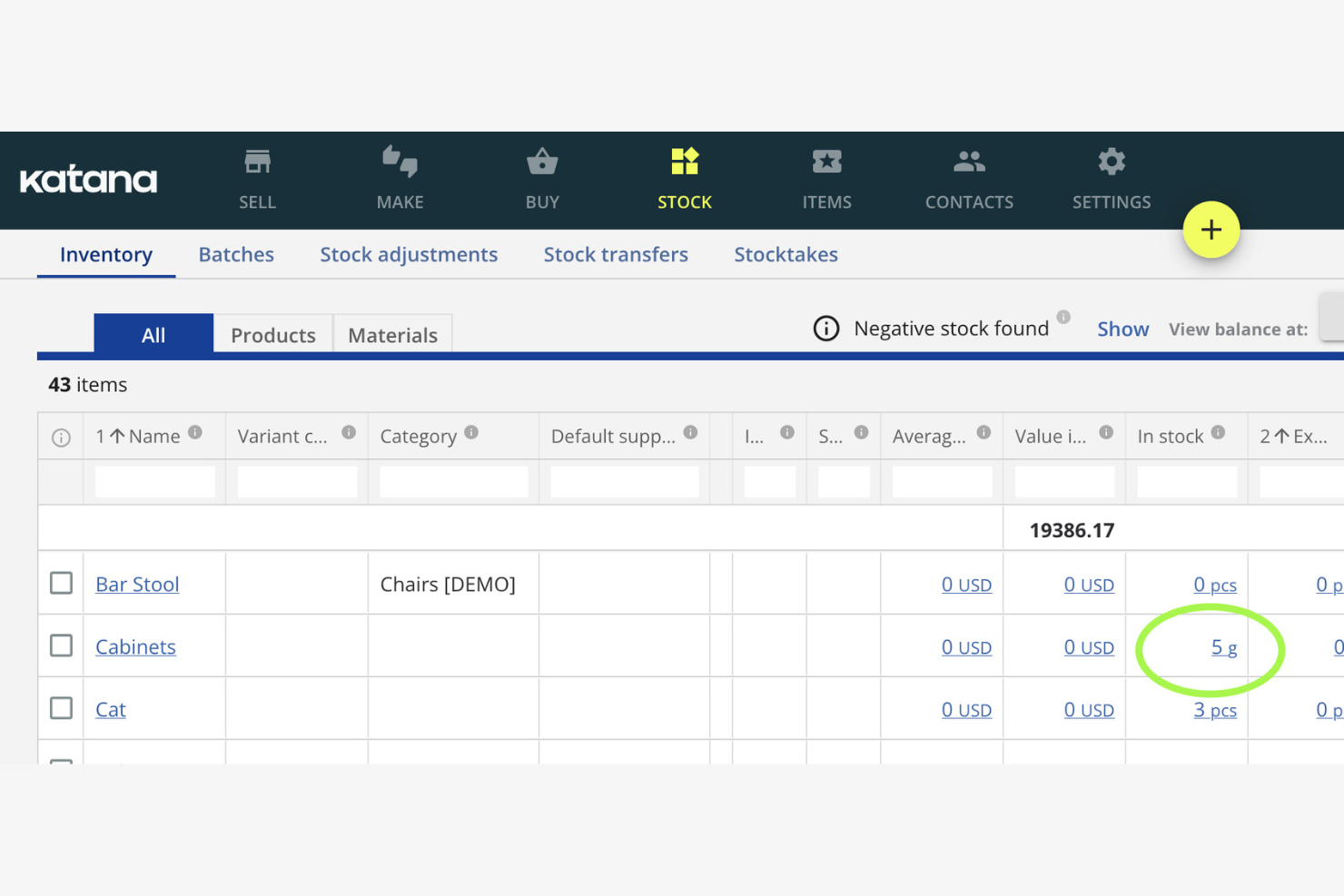
Katana is a production scheduling software tailored for small manufacturers. It helps you manage inventory, orders, and production tasks efficiently.
Why I picked Katana: It's designed for small manufacturers, focusing on ease of use and simplicity as a modern manufacturing software platform. The real-time inventory management keeps you updated on stock levels, helping you avoid production delays and reduce lead times. Its visual dashboard makes it easy to see your production schedule, including active work orders. The integration with e-commerce platforms keeps your sales and production in sync.
Standout Features and Integrations:
Features include batch tracking to trace goods movement, purchasing tools to make sure raw materials are available on time, and sales order management to support efficient fulfillment.
Integrations include Shopify, WooCommerce, QuickBooks Online, Xero, Zapier, BigCommerce, Amazon, Etsy, and more.
Pros and Cons
Pros:
- Syncs with e-commerce platforms
- Visual scheduling board
- Real-time updates
Cons:
- Basic reporting tools
- Not ideal for large operations

Infor is a production scheduling software aimed at various industries, including manufacturing and distribution. It helps manage production schedules, inventory, and supply chain processes efficiently.
Why I picked Infor: It's known for providing industry-specific solutions, offering tailored features for different sectors. The software includes advanced scheduling tools and resource planning capabilities that adapt to your industry's needs and support day-to-day operations. Its analytics provide insights to improve decision-making. The demand planning capabilities help you meet customer needs without overstocking.
Standout Features and Integrations:
Features include capacity planning to optimize resources, inventory management tools to maintain optimal stock levels, and real-time visibility into your production processes.
Integrations include Salesforce, Microsoft Dynamics, AutoCAD, Ariba, and more.
Pros and Cons
Pros:
- Real-time process visibility
- Strong demand planning tools
- Tailored for specific industries
Cons:
- Manual data entry hurdles
- High dependency on technical resources

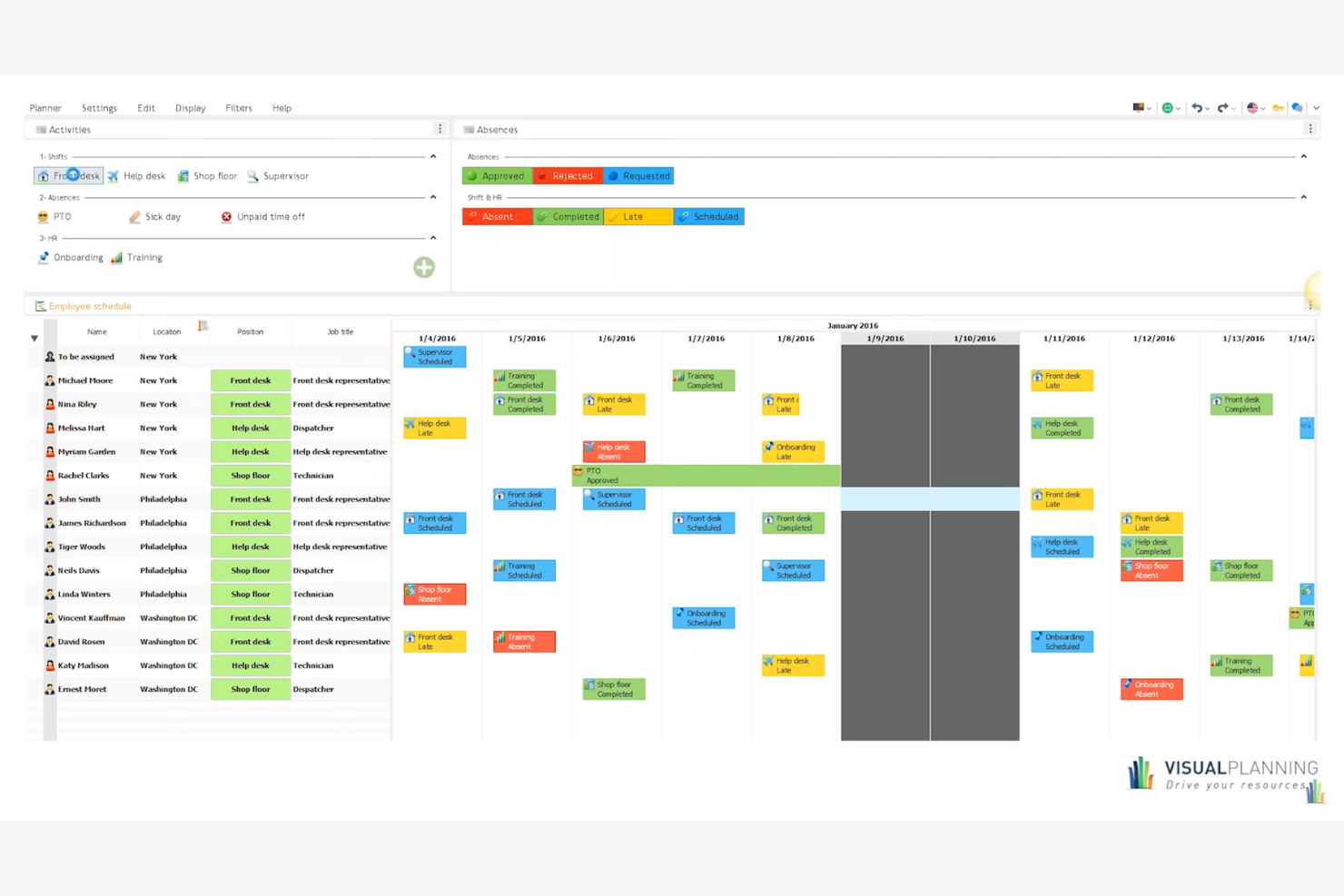
Visual Planning is a versatile production scheduling software designed for various industries, including manufacturing and construction. It helps you manage resources, schedules, and tasks efficiently, providing a tailored experience for different business needs.
Why I picked Visual Planning: It's known for its custom workflows, allowing you to adapt the tool to your specific processes, including manufacturing production and manufacturing scheduling. The drag-and-drop scheduling feature makes it easy to adjust plans and support on-time delivery. Its mobile app lets you access schedules and make updates from anywhere.
Standout Features and Integrations:
Features include customizable dashboards for clear project visibility, resource management tools to allocate tasks effectively, built-in automation to reduce manual scheduling, and real-time collaboration features to keep teams aligned.
Integrations include Microsoft Excel, Google Calendar, Outlook, Salesforce, SAP, Dropbox, and more.
Pros and Cons
Pros:
- Mobile app access
- Multi-resource scheduling
- Highly customizable workflows
Cons:
- Rigid license management
- Slow performance with large datasets

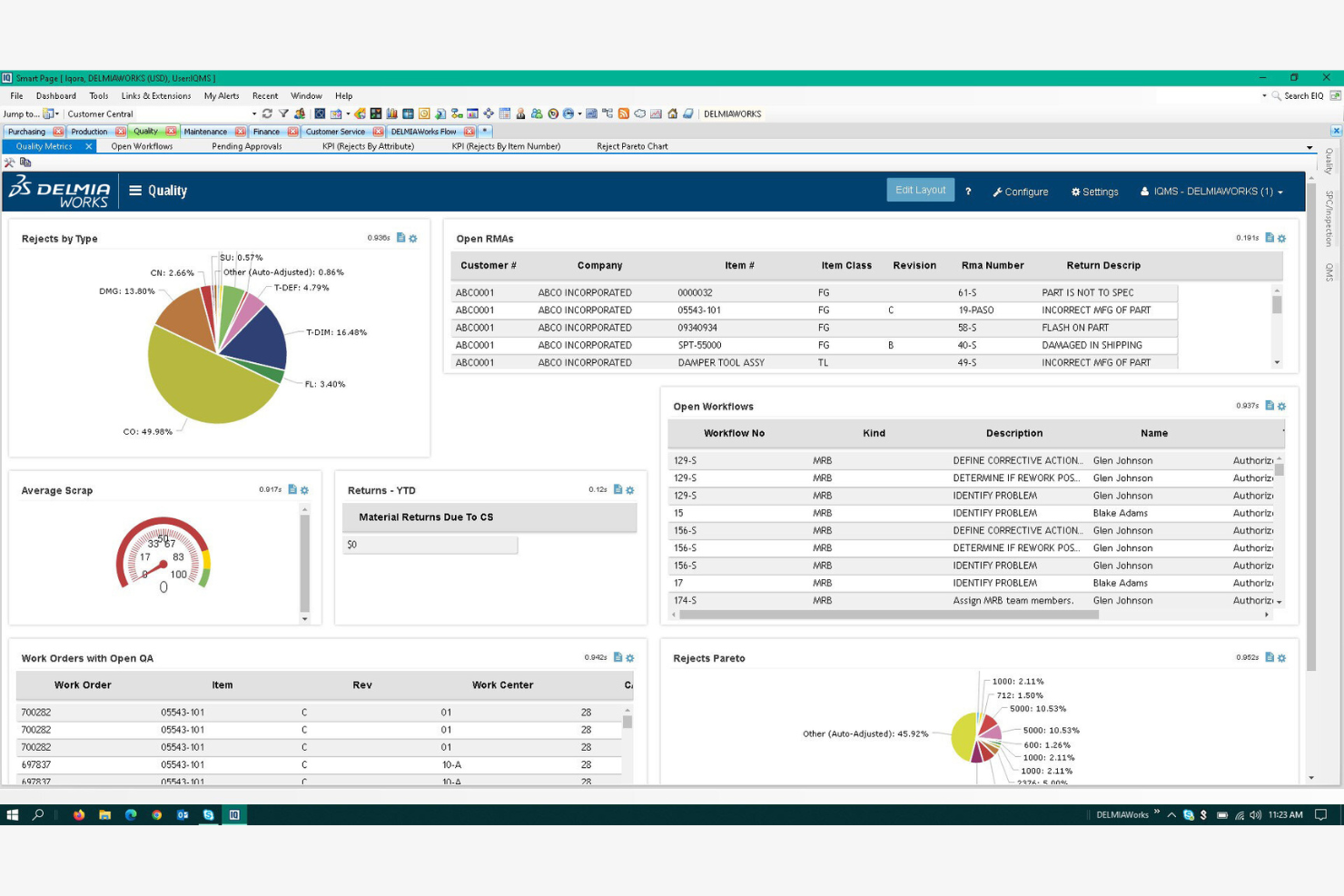
DELMIAWorks is a production scheduling software designed for manufacturers looking to integrate ERP functionalities. It helps manage production schedules, inventory, and operations efficiently.
Why I picked DELMIAWorks: It's ideal for manufacturers needing ERP integration, offering a unified solution for managing production and business processes. The software provides real-time data visibility, helping you make informed decisions quickly and run what-if scenarios to evaluate operational changes. Its scheduling tools are tailored to maximize manufacturing efficiency and balance production capacity. The quality management features are built to maintain high production standards.
Standout Features and Integrations:
Features include adaptive advanced planning and scheduling, real-time shop floor monitoring, and built-in material requirements planning to make sure you have the right materials at the right time.
Integrations include SOLIDWORKS, QuickBooks, Salesforce, AutoCAD, and more.
Pros and Cons
Pros:
- Integrates with major ERP systems
- Real-time data access
- Supports complex manufacturing processes
Cons:
- High implementation barrier
- Lack of a native web interface
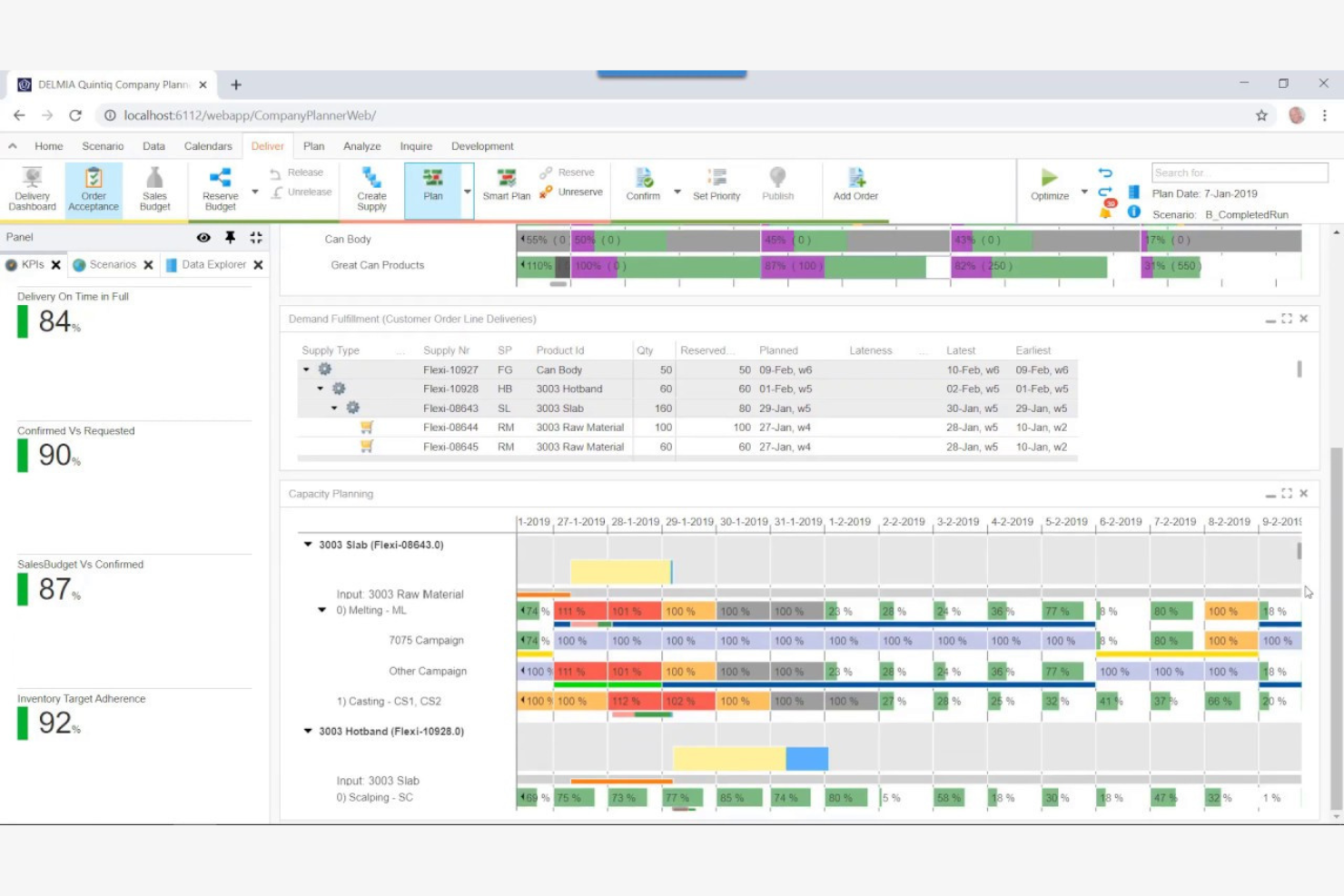
DELMIA Quintiq is a production planning software designed for businesses with complex supply chains. It helps manage planning, scheduling, and optimization of resources across various industries.
Why I picked DELMIA Quintiq: It's tailored for complex supply chains, providing advanced planning capabilities powered by optimization algorithms. The software offers optimization tools that help you improve resource utilization across operations. Its scenario planning feature allows you to test different strategies before implementation. You can also benefit from its real-time data analytics and performance metrics to make informed decisions.
Standout Features and Integrations:
Features include multi-site scheduling for coordinated resource allocation, demand forecasting to anticipate market needs, and capacity planning to meet production goals without overextending resources.
Integrations include SAP, Oracle, Microsoft Dynamics, JD Edwards, IBM Maximo, Salesforce, Infor, Manhattan Associates, Blue Yonder, Ariba, and more.
Pros and Cons
Pros:
- Supports multi-site operations
- Strong optimization capabilities
- Handles complex scheduling scenarios
Cons:
- Limited out-of-the-box solutions
- Requires significant customization
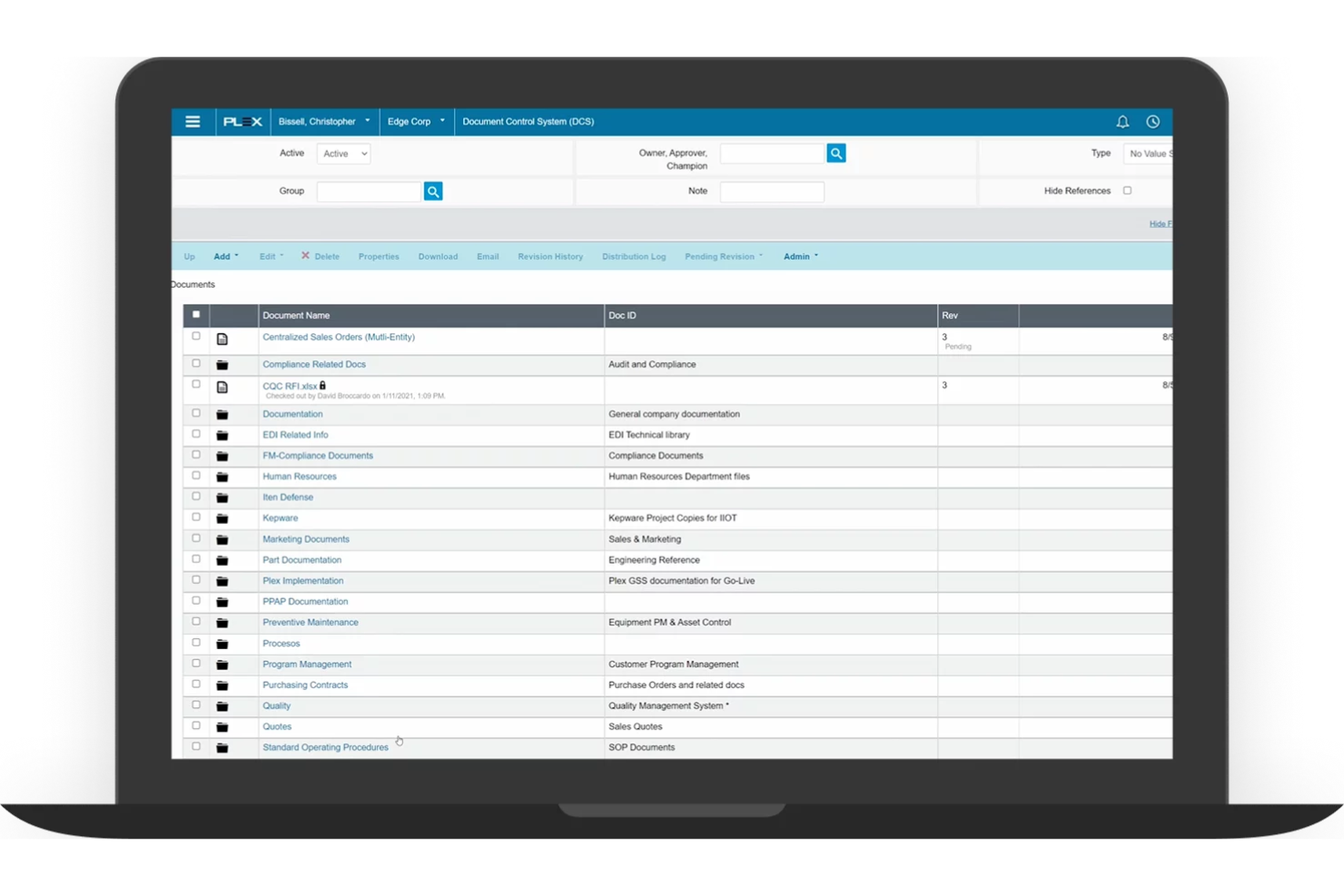
Plex is a cloud-based production scheduling software designed for manufacturers. It helps manage production processes, inventory, and quality control efficiently.
Why I picked Plex: It's known for its cloud-based planning, supporting your production planning process with easy access to real-time data from anywhere. The software's real-time monitoring helps you track production activities as they happen and optimize throughput. Its quality management features help your products meet the necessary standards. You can also leverage its detailed reporting tools to gain insights into your operations.
Standout Features and Integrations:
Features include precise shop floor management, real-time production tracking, and built-in compliance management tools that help you adhere to industry regulations.
Integrations include Salesforce, Microsoft Dynamics, QuickBooks, and more.
Pros and Cons
Pros:
- Cloud-based accessibility
- Strong compliance management
- Real-time production tracking
Cons:
- New interface lacks working versions of key tools
- Designed to replace your entire business software

Siemens Opcenter is a production scheduling software designed for large-scale manufacturers. It helps optimize production processes, manage resources, and improve overall efficiency.
Why I picked Siemens Opcenter: It offers scalability, making it suitable for growing operations. The software provides advanced planning capabilities that adapt to changing production demands and support a flexible scheduling process. Its real-time data access allows you to monitor and adjust schedules as needed. The simulation tools help you test different scenarios to find the best solutions.
Standout Features and Integrations:
Features include detailed production tracking for end-to-end visibility, built-in quality management to meet industry standards, and capacity planning to allocate resources effectively across operations.
Integrations include Teamcenter, MindSphere, TIA Portal, Infor, and more.
Pros and Cons
Pros:
- Flexible capacity planning
- Advanced simulation tools
- Supports large-scale operations
Cons:
- Windows-only limitation
- Poor documentation examples

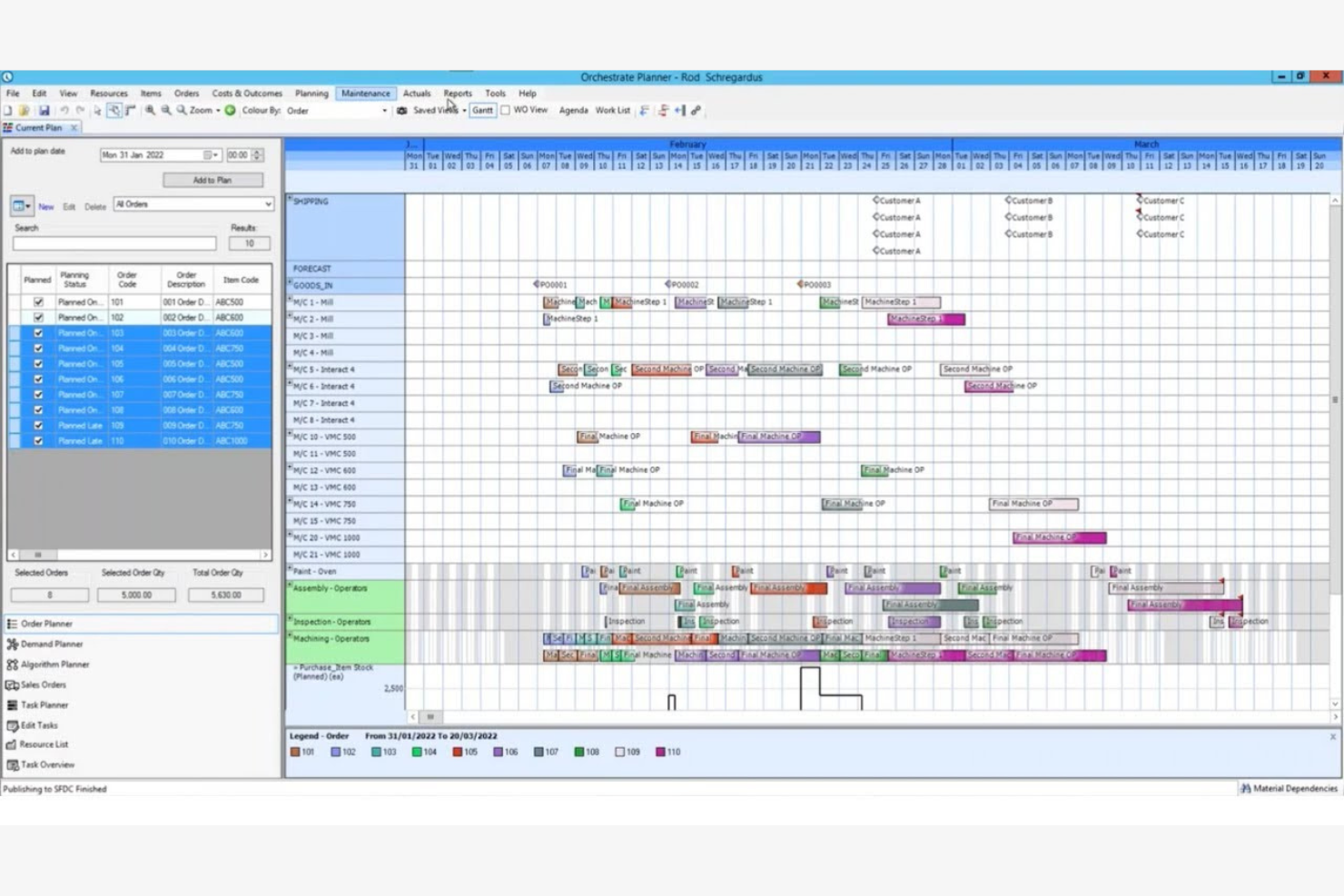
Access Orchestrate offers production scheduling software tailored for midsize businesses. It helps manage production planning, inventory, and workflow processes efficiently.
Why I picked Access Orchestrate: It provides solutions specifically for midsize businesses with tools that can scale with your operation and improve long-term profitability. The software's intuitive interface makes it easy for your team to adopt and utilize. It includes planning features that help optimize your production schedules. You can also track inventory levels to make sure you have the necessary materials on hand.
Standout Features and Integrations:
Features include real-time visibility into production processes to make informed decisions quickly. Built-in reporting highlights performance gaps and cost drivers, helping improve operational efficiency and profitability. Resource management tools to allocate tasks efficiently.
Integrations include Salesforce, QuickBooks, Xero, Sage, HubSpot, and more.
Pros and Cons
Pros:
- Strong reporting tools
- Live production status tracking
- Integrated planning features
Cons:
- No built-in API
- Heavy internet reliance
Best for global financial consolidation
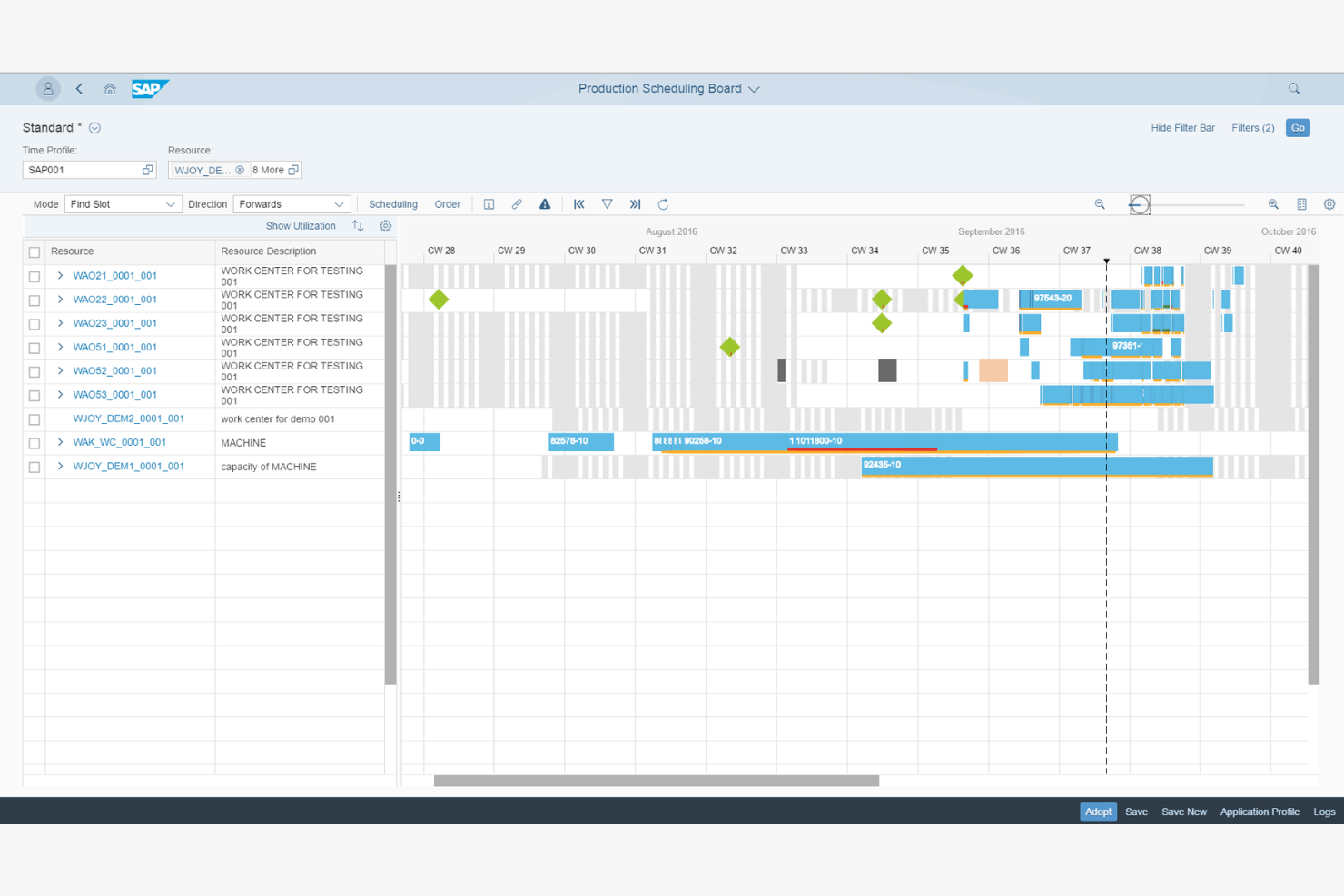
SAP S/4HANA Manufacturing for planning and scheduling offers production scheduling software for large global enterprises. It helps manage complex manufacturing processes, optimize supply chains, and improve efficiency across operations.
Why I picked SAP S/4HANA Manufacturing for planning and scheduling: It's designed for global enterprises, providing extensive features to manage large-scale operations. The software's advanced analytics help you make data-driven decisions. Its integration with supply chain processes keeps operations running smoothly across different regions. The real-time visibility feature keeps you updated on all production activities.
Standout Features and Integrations:
Features include demand-driven replenishment to maintain optimal inventory levels, predictive analytics for forecasting, and production planning with detailed scheduling features to meet output targets.
Integrations include Microsoft Azure, Amazon Web Services, Google Cloud, IBM Cloud, Salesforce, Microsoft Dynamics, SAP HANA, Ariba, and more.
Pros and Cons
Pros:
- Flexible production planning
- Live visibility into orders and capacity
- Built for complex, multi-site production
Cons:
- No built-in supply network planning
- Consultant-dependent implementation
Altri software per la pianificazione della produzione
Ecco alcune opzioni aggiuntive di software per la pianificazione della produzione che non sono entrate nel mio elenco, ma che vale comunque la pena prendere in considerazione:
- Eyelit APS
For compliance needs
- MRPeasy
For fast MRP setup for small factories
- Fishbowl Inventory
For inventory management
- Microsoft Dynamics 365 Business Central
For small to medium businesses


How I Evaluate Production Scheduling Software
When a planner needs to resequence 50 jobs after a machine goes down, I look for two things: baseline scheduling capabilities and the differentiators that separate a good tool from the right one.
Core Functionality (Table Stakes For This List)
When I'm selecting tools for my list, I rank each one on a scale from 0 (does not offer the functionality) to 5 (excels in this area) for each core functionality listed below. Then, I calculate the tool's total score into a percentage. Each tool needs to achieve a minimum total score of 65% to be considered for inclusion.
- Production Gantt Scheduling: I check whether the Gantt view covers multiple resources or lines and lets planners filter by work center, job status, or due date at a glance.
- Finite Capacity Planning: Every schedule is useless if it ignores real constraints, so I evaluate how well a tool models machine capacity, labor shifts, and tooling limits together.
- Drag-and-Drop Rescheduling: When a rush order lands or a machine goes offline, I look for rescheduling that recalculates downstream dependencies automatically after a single drag action.
- Material & Inventory Sync: I evaluate whether the scheduler pulls live inventory and BOM data so planners can spot a resin shortage or missing component before it stalls a production run.
- ERP/MES Integration: Pre-built connectors to systems like SAP, Oracle, Epicor, or Microsoft Dynamics matter here, along with open APIs for linking to MES and shop-floor data sources.
- Schedule Optimization & KPIs: I look for rule-based or algorithmic logic that minimizes changeovers or prioritizes on-time delivery, paired with dashboards tracking utilization and throughput.
Once I have a list of tools that meet this criteria, I consider what sets each platform apart.
Differentiating Factors (What Sets Vendors Apart)
Here's how I compare and contrast different vendors:
Standout Features
What-if scenario simulation is a major differentiator. I want planners to model a machine breakdown or surprise rush order and compare schedule impacts before committing changes. AI-powered optimization builds on this by auto-generating sequences that cut changeovers or prioritize at-risk due dates. For teams managing multiple facilities, I also evaluate multi-plant coordination to confirm a tool can balance workloads across sites from one centralized view.
Beyond Features
Industry fit matters a lot here. A tool built for discrete manufacturing may fall flat for a process or batch-mode environment, so I check whether a vendor supports the buyer's specific production mode. Implementation and time-to-value are other factors I weigh heavily because schedulers often need shop-floor buy-in to succeed. I also evaluate deployment options, since some plants require on-premise or hybrid hosting to meet OT security policies or data residency requirements that cloud-only platforms can't satisfy.
Come scegliere un software per la pianificazione della produzione
È facile perdersi in lunghi elenchi di funzionalità e strutture tariffarie complesse. Per aiutarti a rimanere concentrato mentre affronti il tuo processo di selezione del software, ecco una lista di fattori da tenere a mente:
| Fattore | Cosa considerare |
| Scalabilità | Il software può crescere insieme alla tua attività? Valuta se è in grado di gestire un aumento del volume di produzione o l'aggiunta di nuove sedi senza problemi. Assicurati che supporti la crescita futura senza richiedere una revisione completa. |
| Integrazioni | Si collega agli strumenti che utilizzi attualmente? Verifica la compatibilità con i tuoi sistemi ERP, CRM o di contabilità esistenti. Evita le soluzioni che richiedono l'inserimento manuale dei dati o procedure complesse per integrarsi con il tuo ecosistema tecnologico. |
| Personalizzazione | Puoi adattare il software ai tuoi processi? Cerca opzioni che consentano di modificare flussi di lavoro, pannelli di controllo e report. Evita le soluzioni rigide che ti costringono a cambiare i processi già definiti. |
| Facilità d'uso | Il software è intuitivo per il tuo team? Testa l'interfaccia utente e la navigazione. Una curva di apprendimento ripida può rallentare l'adozione e ridurre la produttività. Scegli uno strumento che il tuo team possa imparare a utilizzare rapidamente con una formazione minima. |
| Implementazione e avviamento | Quanto tempo sarà necessario per diventare operativi? Considera il tempo e le risorse necessari per la configurazione. Cerca soluzioni che offrano supporto per l'avviamento, compresi materiali formativi, per consentire una transizione fluida. |
| Costo | Il prezzo rientra nel tuo budget? Valuta il costo totale di proprietà, comprese le tariffe di abbonamento, i costi di configurazione e gli eventuali componenti aggiuntivi. Fai attenzione ai costi nascosti e assicurati che il prezzo sia proporzionato al valore offerto. |
| Misure di sicurezza | I tuoi dati e le tue operazioni sono protetti? Verifica la crittografia dei dati, i backup regolari e la conformità agli standard del settore. Assicurati che il fornitore abbia adottato misure per prevenire le violazioni dei dati e proteggere le informazioni sensibili. |
Che cos'è il software per la pianificazione della produzione?
Il software per la pianificazione della produzione è uno strumento che aiuta le aziende a pianificare, gestire e ottimizzare i processi produttivi. Utilizzato generalmente da responsabili della produzione, pianificatori e professionisti delle operazioni, offre valore migliorando l'efficienza e riducendo i tempi di inattività. Funzionalità come l'allocazione delle risorse, la gestione dell'inventario e il monitoraggio in tempo reale aiutano a coordinare le attività produttive e a rispettare le scadenze. Nel complesso, questi strumenti migliorano la produttività e favoriscono decisioni migliori nelle attività manifatturiere.
Funzionalità
Quando scegli un software per la pianificazione della produzione, presta attenzione alle seguenti funzionalità chiave:
- Allocazione delle risorse: aiuta ad assegnare in modo efficiente attività e risorse per ottimizzare i programmi di produzione e ridurre i colli di bottiglia.
- Gestione dell'inventario: monitora i livelli delle scorte.
- Monitoraggio in tempo reale: fornisce aggiornamenti in tempo reale sui processi produttivi, consentendo di apportare rapidamente modifiche e prendere decisioni informate.
- Previsione della domanda: prevede le future esigenze di produzione sulla base dei dati storici.
- Pannelli di controllo personalizzabili: consentono di personalizzare le visualizzazioni e i report.
- Gestione della qualità: garantisce che i prodotti soddisfino gli standard del settore.
- Funzionalità di integrazione: si collegano ai sistemi esistenti, come ERP o CRM.
- Analisi avanzate: offrono informazioni sulle prestazioni e sulle tendenze della produzione.
- Monitoraggio della conformità: controlla e documenta il rispetto delle normative del settore.
Vantaggi
L'implementazione di un software per la pianificazione della produzione offre diversi vantaggi al tuo team e alla tua azienda. Eccone alcuni:
- Maggiore efficienza: l'allocazione delle risorse e il monitoraggio in tempo reale aiutano a ottimizzare i flussi di lavoro, riducendo i tempi di inattività e aumentando la produttività.
- Migliore controllo dell'inventario: le funzionalità di gestione dell'inventario aiutano a mantenere livelli di scorte ottimali, prevenendo carenze e scorte eccessive.
- Processo decisionale ottimizzato: le analisi avanzate e la previsione della domanda forniscono informazioni che guidano decisioni basate sui dati e la pianificazione strategica.
- Garanzia della qualità: gli strumenti di gestione della qualità monitorano gli standard di produzione, aiutandoti a fornire prodotti uniformi e di alta qualità.
- Conformità normativa: le funzionalità di monitoraggio della conformità aiutano a rispettare le normative del settore, riducendo al minimo i rischi ed evitando sanzioni.
- Operazioni integrate: collegati ai sistemi esistenti per mantenere il flusso dei dati e migliorare l'efficienza operativa complessiva.
Costi e prezzi
La scelta di un software per la pianificazione della produzione richiede la comprensione dei diversi modelli e piani tariffari disponibili. I costi variano in base alle funzionalità, alle dimensioni del team, ai componenti aggiuntivi e ad altri fattori. La tabella seguente riassume i piani più comuni, i relativi prezzi medi e le funzionalità generalmente incluse nelle soluzioni software per la pianificazione della produzione:
Tabella comparativa dei piani per il software di pianificazione della produzione
| Tipo di piano | Prezzo medio | Funzionalità comuni |
| Piano gratuito | $0 | Pianificazione di base, reportistica limitata e gestione di base dell'inventario. |
| Piano personale | $15-$60/utente/mese | Pianificazione avanzata, analisi di base e assistenza via e-mail. |
| Piano aziendale | $50-$500/utente/mese | Monitoraggio in tempo reale, capacità di integrazione e reportistica dettagliata. |
| Piano per aziende | $800+/mese | Pannelli di controllo personalizzabili, analisi avanzate e assistenza clienti dedicata. |
Domande frequenti sul software di pianificazione della produzione
Ecco alcune risposte alle domande comuni sul software di pianificazione della produzione:
Quali settori traggono maggiori vantaggi dal software di pianificazione della produzione?
Settori come quello manifatturiero, automobilistico, aerospaziale e della produzione alimentare traggono grandi vantaggi dal software di pianificazione della produzione. Questi strumenti aiutano a gestire processi produttivi complessi, migliorare l’efficienza e mantenere la qualità. Se operi in un settore con esigenze di pianificazione complesse o scadenze rigide, valuta l’implementazione di questo software per migliorare le operazioni e la produttività.
In che modo il software di pianificazione della produzione contribuisce a migliorare il flusso di lavoro del mio team?
Il software di pianificazione della produzione semplifica l’assegnazione delle attività, la gestione delle scadenze e l’allocazione delle risorse su un’unica piattaforma. Questo ti aiuta a individuare i colli di bottiglia, evitare le prenotazioni eccessive e modificare rapidamente le priorità.
Il software di pianificazione della produzione può integrarsi con i sistemi esistenti?
Sì, la maggior parte dei software di pianificazione della produzione può integrarsi con sistemi esistenti come software ERP, CRM e di contabilità. L’integrazione contribuisce a garantire il flusso dei dati tra le piattaforme, riducendo l’inserimento manuale dei dati e gli errori. Prima dell’acquisto, verifica la compatibilità del software con gli strumenti attuali per evitare potenziali problemi di integrazione.
Come posso determinare il software più adatto alle dimensioni della mia azienda?
Considera le dimensioni del team, il volume di produzione e le esigenze specifiche. Le piccole aziende potrebbero optare per opzioni più semplici ed economiche con funzionalità di base. Le aziende più grandi potrebbero aver bisogno di funzionalità avanzate come il monitoraggio in tempo reale e l’analisi dei dati. Valuta le esigenze attuali e future per scegliere una soluzione scalabile.
Cosa devo aspettarmi durante il processo di implementazione?
Aspettati un periodo di configurazione, formazione e adattamento. Il processo di implementazione varia a seconda del software, ma in genere include la migrazione dei dati, la configurazione del sistema e la formazione degli utenti. Scegli un fornitore che offra assistenza per l’avvio, come tutorial e servizio clienti, per garantire una transizione fluida per il tuo team.
È disponibile assistenza tecnica per il software di pianificazione della produzione?
Sì, la maggior parte dei fornitori offre assistenza tecnica, ma il livello del servizio varia. Cerca fornitori con più canali di assistenza, come telefono, e-mail e chat. Alcuni offrono assistenza 24 ore su 24, 7 giorni su 7, mentre altri hanno orari limitati.