

I 10 migliori software per la gestione delle riunioni nel 2026

Elenco dei migliori software per la gestione delle riunioni


Il software per la gestione delle riunioni ti aiuta a organizzare, programmare e documentare le riunioni, così il tuo team può rimanere allineato e concentrato. Se stai cercando le migliori soluzioni per la gestione delle riunioni, probabilmente ti trovi a gestire calendari pieni, ordini del giorno sparsi e troppe attività successive che finiscono per essere trascurate.
Lo strumento giusto può ridurre la confusione, migliorare la collaborazione, utilizzare flussi di lavoro automatizzati per gestire le attività ripetitive e mantenere le riunioni orientate all’azione.
Perché fidarsi dei nostri consigli sui software
Il nostro team testa e recensisce software dal 2012. In quanto project manager noi stessi, sappiamo quanto sia difficile — e importante — scegliere il software giusto.
Per questa guida, abbiamo valutato gli strumenti attraverso test pratici e ricerche indipendenti, assegnando un punteggio agli strumenti in base ai nostri criteri di selezione. Ci basiamo inoltre sulle competenze di leader di pensiero del settore e di professionisti attivi nella gestione dei progetti.
Le nostre recensioni riflettono il nostro giudizio editoriale umano, non un discorso di vendita.
Revisori esperti:
Tabella comparativa dei software per la gestione delle riunioni
Questa tabella comparativa riassume i dettagli sui prezzi delle mie migliori selezioni di software per la gestione delle riunioni:
| Tool | Best For | Trial Info | Price | ||
|---|---|---|---|---|---|
| 1 | Ideale per la creazione collaborativa dell'ordine del giorno | Piano gratuito disponibile | Da $7/utente/mese (fatturazione annuale) | Website | |
| 2 | Ideale per le riunioni retrospettive dei team agili | Versione gratuita disponibile | A partire da $8/utente attivo/mese | Website | |
| 3 | Ideale per evidenziazioni e sintesi istantanee delle chiamate | Piano gratuito + demo gratuita disponibile | A partire da $15/utente/mese (fatturazione annuale) | Website | |
| 4 | Ideale per insight sul dialogo basati su AI | Prova gratuita di 14 giorni + demo gratuita disponibile | A partire da $19/utente/mese (fatturazione annuale) | Website | |
| 5 | Ideale per la presa di appunti in tempo reale durante le riunioni | Piano gratuito + demo gratuita disponibile | Da $8,33/utente/mese (fatturazione annuale) | Website | |
| 6 | Ideale per trascrizione vocale automatica | Piano gratuito + demo gratuita disponibile | A partire da $10/postazione/mese (fatturazione annuale) | Website | |
| 7 | Ideale per condividere trascrizioni di riunioni ricercabili | Piano gratuito disponibile | Da $8.17/mese (fatturato annualmente) | Website | |
| 8 | Ideale per flussi strutturati di gestione delle riunioni | Demo gratuita disponibile | Prezzo su richiesta | Website | |
| 9 | Ideale per appunti di riunioni video con timestamp | Piano gratuito + prova gratuita + demo gratuita disponibili | Da $18/utente/mese (fatturato annualmente) | Website | |
| 10 | Ideale per integrare le note con strumenti di progetto | Piano gratuito disponibile | Da $19/utente/mese (fatturazione annuale) | Website |
Recensioni dei migliori software per la gestione delle riunioni
Di seguito trovi i miei riepiloghi dettagliati dei migliori software per la gestione delle riunioni inclusi nel mio elenco. Le mie recensioni offrono una panoramica dettagliata delle funzionalità, delle integrazioni e dei casi d’uso migliori di ciascuna piattaforma, per aiutarti a trovare quella più adatta a te.

Fellow
Ideale per la creazione collaborativa dell'ordine del giorno

Fellow è un assistente alle riunioni basato su intelligenza artificiale che registra, trascrive e riepiloga le riunioni su Zoom, Google Meet, Microsoft Teams e Slack, supportando anche la creazione collaborativa dell'ordine del giorno e il monitoraggio delle attività da svolgere.
Per chi è ideale Fellow?
Fellow è perfetto per manager e responsabili di team in aziende tecnologiche di medie dimensioni che hanno bisogno di programmare riunioni, organizzare frequenti incontri individuali e gestire sincronizzazioni tra team.
Perché ho scelto Fellow
Ho scelto Fellow tra i migliori perché la sua funzione di ordine del giorno collaborativo cambia davvero il modo in cui iniziano le riunioni. Prima di ogni riunione, ogni partecipante può aggiungere direttamente i propri punti da discutere a un ordine del giorno condiviso, così nessuno arriva impreparato.
Apprezzo anche i briefing pre-riunione, che raccolgono automaticamente le informazioni di contesto, consentendo di arrivare pronti. Se unisci a questo il monitoraggio delle attività che si sincronizza con strumenti come Asana e Jira, i follow-up vengono davvero realizzati.
Funzionalità principali di Fellow
- Automazioni per riunioni: registra automaticamente le riunioni selezionate, invita i partecipanti ad aggiungere punti all'ordine del giorno e invia promemoria pre-riunione senza alcuna configurazione manuale.
- Oltre 500 modelli di riunione: accedi a una libreria di modelli di ordine del giorno per qualsiasi tipo di riunione e personalizza i tuoi per adattarli ai formati ricorrenti del tuo team.
- Libreria di registrazioni AI: archivia tutte le riunioni registrate in una libreria centralizzata e ricercabile con controlli di accesso basati sui ruoli, così solo le persone giuste possono trovare i contenuti giusti.
- Intelligenza tra riunioni: usa l'agente AI Ask Fellow per cercare tra tutte le trascrizioni e i riepiloghi precedenti e recuperare decisioni o contesti da qualsiasi riunione passata.
Integrazioni di Fellow
Fellow offre oltre 50 integrazioni native, tra cui Slack, Zoom, Google Meet, Microsoft Teams, Asana, Jira, Linear, Salesforce, HubSpot e Confluence. Si collega anche con Zapier ed è dotato di API per integrazioni personalizzate.
Pros and Cons
Pros:
- Gli ordini del giorno condivisi tengono tutti i partecipanti preparati
- Le attività vengono distribuite automaticamente dopo la fine delle riunioni
- Ottimi strumenti per il monitoraggio di incontri individuali
Cons:
- La ricerca nelle note delle riunioni precedenti risulta macchinosa
- I modelli possono essere poco intuitivi da personalizzare

Parabol
Ideale per le riunioni retrospettive dei team agili

Parabol è uno strumento per riunioni agili che struttura retrospettive, sessioni di sprint poker, standup e check-in di squadra, con modelli preimpostati, input anonimo e acquisizione di task direttamente nel tuo strumento di gestione backlog.
A chi è rivolto Parabol?
Parabol è ideale per i team scrum e gli agile coach che gestiscono retrospettive regolari, revisioni di sprint e sessioni di pianificazione in ambienti distribuiti o ibridi.
Perché ho scelto Parabol
Ho incluso Parabol tra le mie scelte migliori perché è l'unico strumento di riunione che conosco sviluppato specificamente attorno alle cerimonie agili e non semplicemente adattato a esse. Mi piace il modo in cui il formato delle retrospettive impone fasi strutturate: raccolta anonima degli input, raggruppamento di riflessioni simili, discussione e acquisizione dei task, tutto in un unico flusso.
Quello che mi conquista è la funzione sprint poker, che si sincronizza direttamente con il tuo strumento di backlog e aggiorna i punti storia in tempo reale mentre il team effettua le stime, così non serve duplicare il lavoro dopo la sessione.
Funzionalità principali di Parabol
- Oltre 40 modelli di riunione: Scegli tra formati predefiniti per retrospettive e riunioni di stima, oppure crea il tuo modello da zero.
- Riepiloghi automatici delle riunioni: Parabol genera automaticamente un riepilogo alla fine di ogni riunione, senza prendere appunti manualmente.
- Timer integrati per le discussioni: Imposta limiti di tempo sugli argomenti all'ordine del giorno per mantenere le discussioni focalizzate durante le sessioni dal vivo.
- Team health check: Esegui un sondaggio anonimo all'inizio della riunione per raccogliere il sentiment del team prima che inizi la discussione.
Integrazioni Parabol
Parabol offre un set limitato di integrazioni native focalizzate sulla gestione del backlog e sulla comunicazione del team, tra cui Jira, GitHub, GitLab, Linear, Azure DevOps, Slack, Microsoft Teams, Mattermost, Zoom e Google Calendar. L'integrazione con Jira Server è disponibile con il piano Enterprise.
Pros and Cons
Pros:
- Le riflessioni anonime prevengono il pensiero di gruppo durante le retrospettive
- Storico completo delle riunioni per ogni team
- Open-source con opzione self-hosting disponibile
Cons:
- Interfaccia disponibile solo in inglese
- I riepiloghi via email vengono inviati indipendentemente dalla presenza
Fathom
Ideale per evidenziazioni e sintesi istantanee delle chiamate

Fathom è un assistente AI per prendere appunti che registra, trascrive e sintetizza automaticamente le videochiamate ed estrae i punti d’azione da ogni riunione.
Per chi è ideale Fathom?
Fathom è una soluzione ideale per i team di vendita e customer success che gestiscono grandi volumi di videochiamate o webinar e necessitano di una documentazione rapida e precisa di ogni conversazione.
Perché ho scelto Fathom
Ho scelto Fathom come uno dei migliori perché fornisce il riepilogo della riunione subito dopo la fine della chiamata, senza alcuna attesa. Quello che apprezzo particolarmente è la funzione 'Chiedi a Fathom', che permette di interrogare le riunioni precedenti in linguaggio naturale per ottenere rapidamente contesto.
Trovo anche molto utile l’opzione di registrazione senza bot: Fathom può registrare le chiamate senza inserire un bot visibile nella riunione.
Funzionalità chiave di Fathom
- Evidenziazione durante la chiamata: Segna i momenti chiave durante una chiamata in diretta così che vengano subito ritagliati e siano recuperabili al termine della riunione.
- Sincronizzazione automatica con CRM: Invia appunti e sintesi delle riunioni direttamente ai CRM collegati come Salesforce e HubSpot senza inserimento manuale dei dati.
- Trascrizioni con nomi dei relatori: Le trascrizioni identificano ciascun partecipante per nome, facilitando il tracciamento di chi ha detto cosa in tutta la conversazione.
- Libreria di chiamate del team: Conserva e organizza tutte le chiamate registrate in uno spazio di lavoro condiviso per consentire al tuo team di cercare e rivedere le riunioni passate.
Integrazioni Fathom
Fathom offre integrazioni native con HubSpot, Salesforce, Close CRM, Slack, Asana, Google Meet, Zoom e Microsoft Teams, oltre a integrazioni partner con strumenti come Pylon, Twine e GetAccept. È inoltre compatibile con Zapier e dispone di un’API per integrazioni personalizzate.
Pros and Cons
Pros:
- Piano gratuito generoso con registrazioni illimitate
- Clip condivisibili da qualsiasi riunione registrata
- Conforme a HIPAA, SOC 2 Tipo II e GDPR
Cons:
- L’app mobile è solo per iOS
- Non può elaborare file audio o video caricati

Avoma
Ideale per insight sul dialogo basati su AI
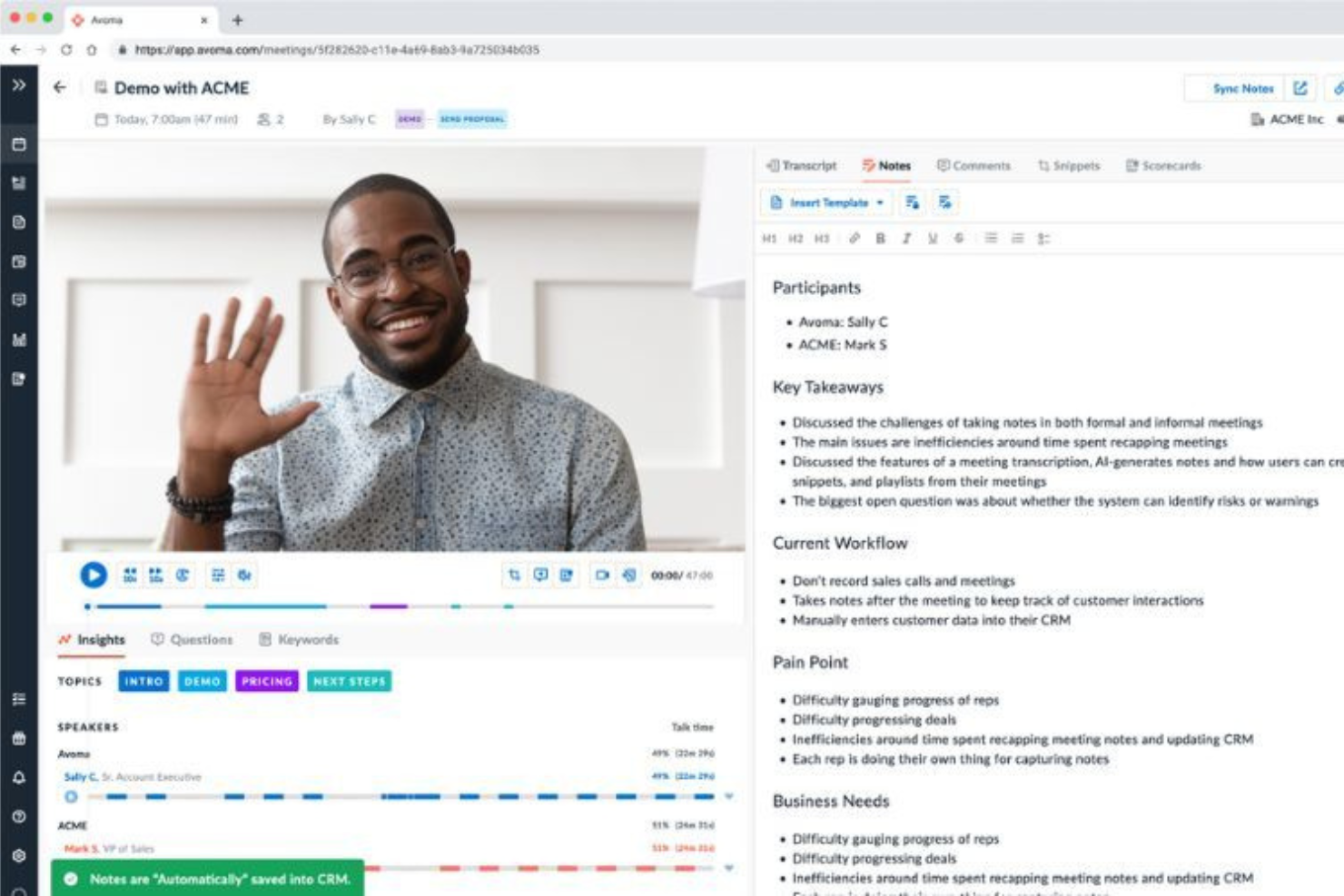
Avoma è un assistente per riunioni basato su intelligenza artificiale che combina registrazione delle chiamate, gestione dell'agenda, presa di appunti automatica e analisi dei modelli di conversazione in un unico spazio di lavoro connesso.
Per chi è ideale Avoma?
Avoma è particolarmente adatto per team di vendita B2B e team customer success che necessitano di una intelligence strutturata sulle conversazioni durante l’intero ciclo commerciale.
Perché ho scelto Avoma
Ho incluso Avoma tra le mie scelte migliori perché la sua conversation intelligence è più avanzata rispetto alla maggior parte degli strumenti per riunioni. L’assegnazione di punteggi alle chiamate tramite AI avviene automaticamente sul 100% delle chiamate registrate, fornendo ai responsabili delle vendite dati di coaching coerenti e imparziali senza dover revisionare manualmente le registrazioni.
Apprezzo molto anche i 'Smart Tracker' personalizzati, che utilizzano il matching semantico per tracciare in modo preciso parole chiave e argomenti nelle chiamate. Questa attenzione alle sfumature lo rende molto più utile degli strumenti che si limitano a cercare le corrispondenze esatte delle parole chiave.
Funzionalità chiave di Avoma
- Email di follow-up generate tramite AI: Redige automaticamente le email di follow-up dopo ogni riunione registrata, basandosi su trascrizioni e appunti della riunione.
- Assistente di risposta live: Suggerisce risposte in tempo reale durante le chiamate attive per aiutare i commerciali a gestire le obiezioni sul momento.
- Punteggio delle chiamate secondo metodologie di vendita (AI): Valuta automaticamente le chiamate rispetto a framework come MEDDIC e SPICED senza input manuale da parte dei commerciali.
- Analisi dei modelli conversazionali: Scompone metriche come rapporto tra tempo di parola e di ascolto e tendenze degli argomenti nelle chiamate registrate del team.
Integrazioni di Avoma
Avoma offre integrazioni native con Zoom, Google Meet, Microsoft Teams, Salesforce, HubSpot, Pipedrive, Slack, Aircall, RingCentral e Salesloft. Si collega anche con Zapier e offre un'API per integrazioni personalizzate.
Pros and Cons
Pros:
- Aggiornamento automatico dei campi CRM dopo le chiamate
- Trascrizione disponibile in oltre 75 lingue
- Prezzi modulari: acquisti solo ciò di cui hai bisogno
Cons:
- Pensato principalmente per team a contatto con il cliente
- L'attribuzione dell'oratore nelle trascrizioni va migliorata

Otter.ai
Ideale per la presa di appunti in tempo reale durante le riunioni
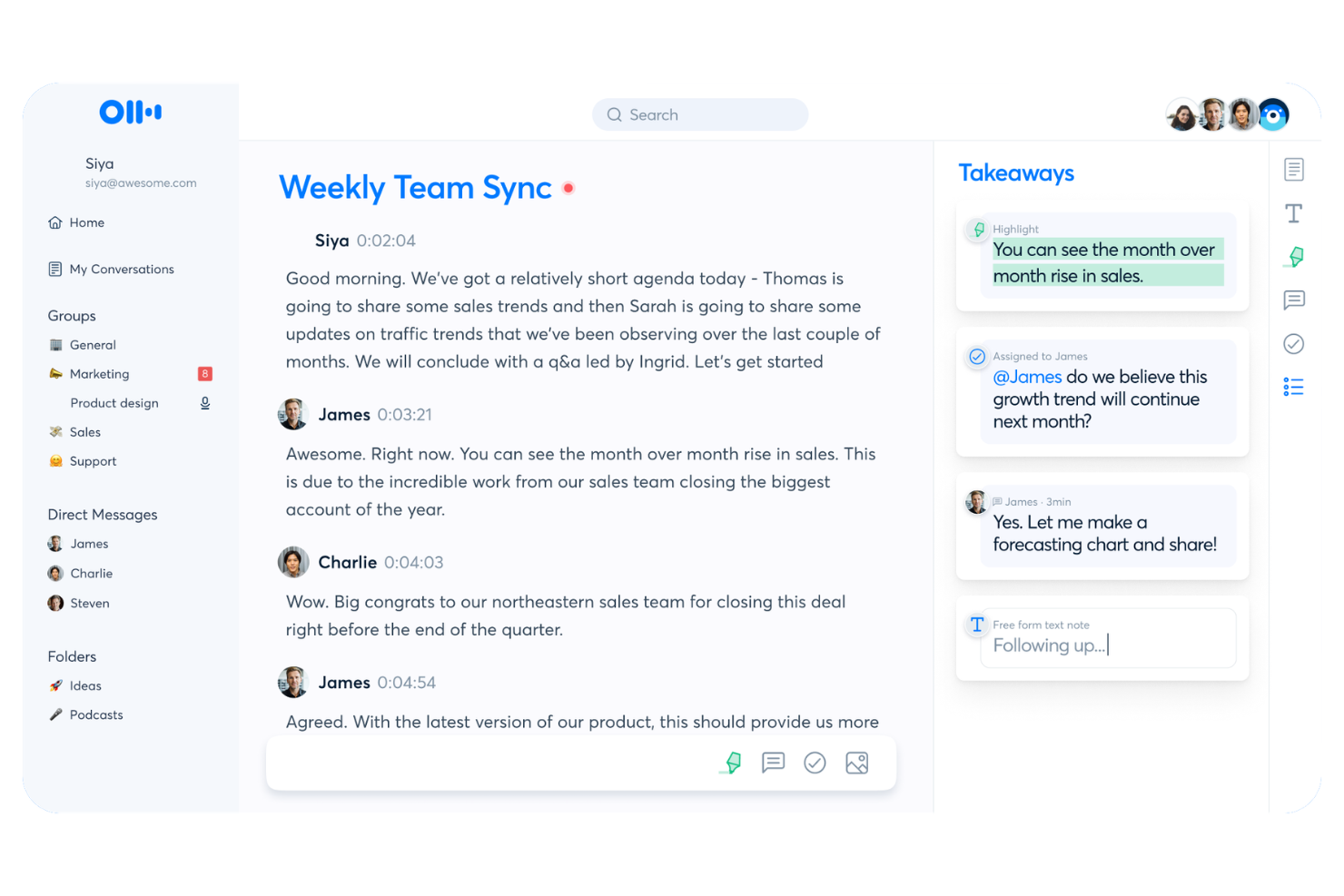
Otter.ai è una piattaforma per la presa di appunti durante le riunioni che cattura trascrizioni in tempo reale, genera riepiloghi istantanei e consente ai partecipanti di collaborare sugli appunti direttamente durante la chiamata.
Per chi è ideale Otter.ai?
Otter.ai è particolarmente adatto ai team che partecipano a riunioni rapide e hanno bisogno di velocizzare il processo decisionale grazie a un registro condiviso e in tempo reale di decisioni e attività da svolgere.
Perché ho scelto Otter.ai
Otter.ai si guadagna un posto nella mia selezione perché la trascrizione in tempo reale è il suo vero punto di forza. Mentre la maggior parte degli strumenti trascrive dopo la riunione, Otter mostra le parole sullo schermo non appena vengono pronunciate, con l'indicazione del relatore in tempo reale.
Apprezzo anche la funzione OtterPilot, che si unisce automaticamente alle chiamate e consente ai partecipanti di leggere, evidenziare e commentare la trascrizione in diretta durante la riunione. Questo la rende particolarmente utile per i team distribuiti, per cui non tutti riescono a seguire l'audio facilmente.
Caratteristiche principali di Otter.ai
- Rilevamento automatico delle attività: Otter identifica ed estrae le attività dalla trascrizione affinché nulla venga dimenticato dopo la chiamata.
- Riepiloghi delle riunioni tramite IA: Genera un riassunto condensato dell'intera conversazione al termine di ogni riunione.
- Otter AI Chat: Consente di porre domande riguardo ai contenuti delle riunioni precedenti e di ottenere risposte direttamente dalle trascrizioni archiviate.
- Area di lavoro condivisa: Organizza tutti gli appunti delle riunioni in uno spazio condiviso dove i membri del team possono cercare e accedere agli incontri passati.
Integrazioni di Otter.ai
Otter.ai offre oltre 30 integrazioni native, tra cui Zoom, Google Meet, Microsoft Teams, Slack, HubSpot, Salesforce, Notion, Jira, Google Docs e Asana. Si collega inoltre con Zapier e fornisce un'API per integrazioni personalizzate.
Pros and Cons
Pros:
- L'app mobile cattura le riunioni in presenza
- Archivio delle trascrizioni ricercabile per tutte le riunioni
- Il vocabolario personalizzato migliora la precisione della trascrizione
Cons:
- Opzioni limitate di automazione delle attività post-riunione
- Il bot OtterPilot si unisce visibilmente alle chiamate

Ideale per trascrizione vocale automatica
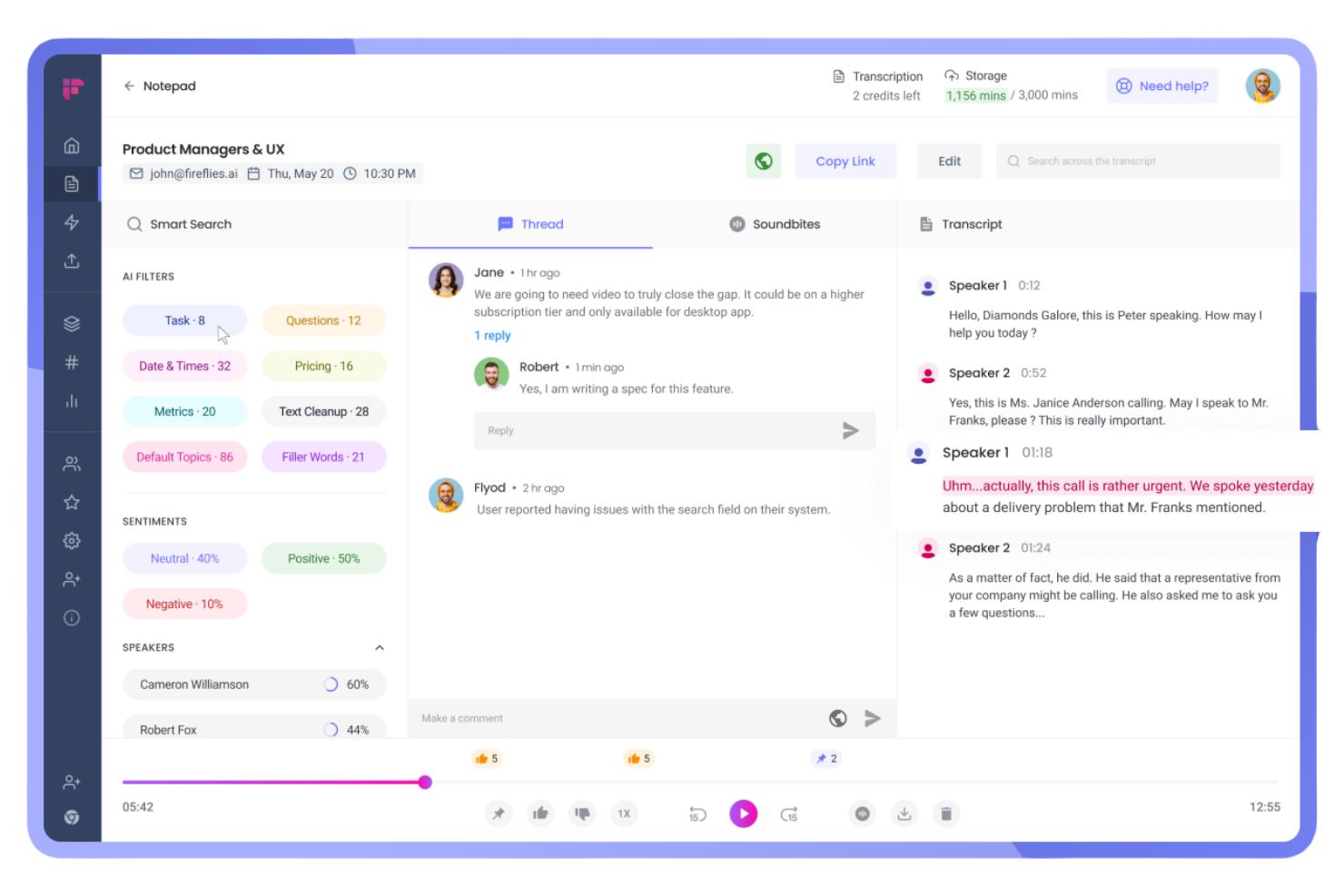
Fireflies.ai è una piattaforma di intelligenza vocale che si unisce automaticamente alle tue riunioni per registrare, trascrivere e analizzare le conversazioni, con trascrizioni ricercabili, rilevamento degli argomenti e riassunti generati dall'IA integrati.
Per chi è ideale Fireflies.ai?
Fireflies.ai è particolarmente indicato per team di vendita, assistenza clienti e customer success distribuiti che hanno bisogno di registri accurati e ricercabili di ogni conversazione con i clienti.
Perché ho scelto Fireflies.ai
Ho scelto Fireflies.ai tra i migliori perché la sua accuratezza nella trascrizione è davvero difficile da superare. Vanta un'accuratezza del 95% in oltre 100 lingue, con riconoscimento automatico degli interlocutori che etichetta chi ha detto cosa durante la trascrizione.
Apprezzo anche il rilevamento automatico della lingua, che cambia tra una riunione e l'altra senza necessità di configurazioni manuali. Per i team che gestiscono chiamate a catena, la funzione AskFred permette di interrogare le trascrizioni passate ponendo domande in linguaggio naturale invece di scorrere tutte le note.
Funzionalità principali di Fireflies.ai
- Riassunti riunione IA: Genera automaticamente riassunti condensati degli incontri con i punti chiave di discussione al termine di ogni chiamata.
- Tracciatore di argomenti: Segnala e categorizza parole o frasi specifiche nelle trascrizioni così puoi filtrare le riunioni per argomento.
- Soundbites: Permette di estrarre brevi segmenti audio o video da qualsiasi riunione registrata per condividere momenti isolati.
- Collaborazione inline: Puoi aggiungere commenti e reazioni direttamente sulle righe della trascrizione, così i colleghi possono annotare senza uscire dalla piattaforma.
Integrazioni di Fireflies.ai
Fireflies.ai offre integrazioni native con oltre 100 app, tra cui Zoom, Google Meet, Microsoft Teams, Slack, HubSpot, Salesforce, Notion, Confluence, Asana e Linear. Si collega anche con Zapier e mette a disposizione un'API per integrazioni personalizzate.
Pros and Cons
Pros:
- Trascrizione supporta nativamente oltre 100 lingue
- Clipping di soundbite audio condivisibili dalle registrazioni
- L'analisi del sentiment rileva cambiamenti nel tono della riunione
Cons:
- La densità di funzionalità può risultare opprimente
- L'accuratezza diminuisce con interlocutori che parlano sovrapposti

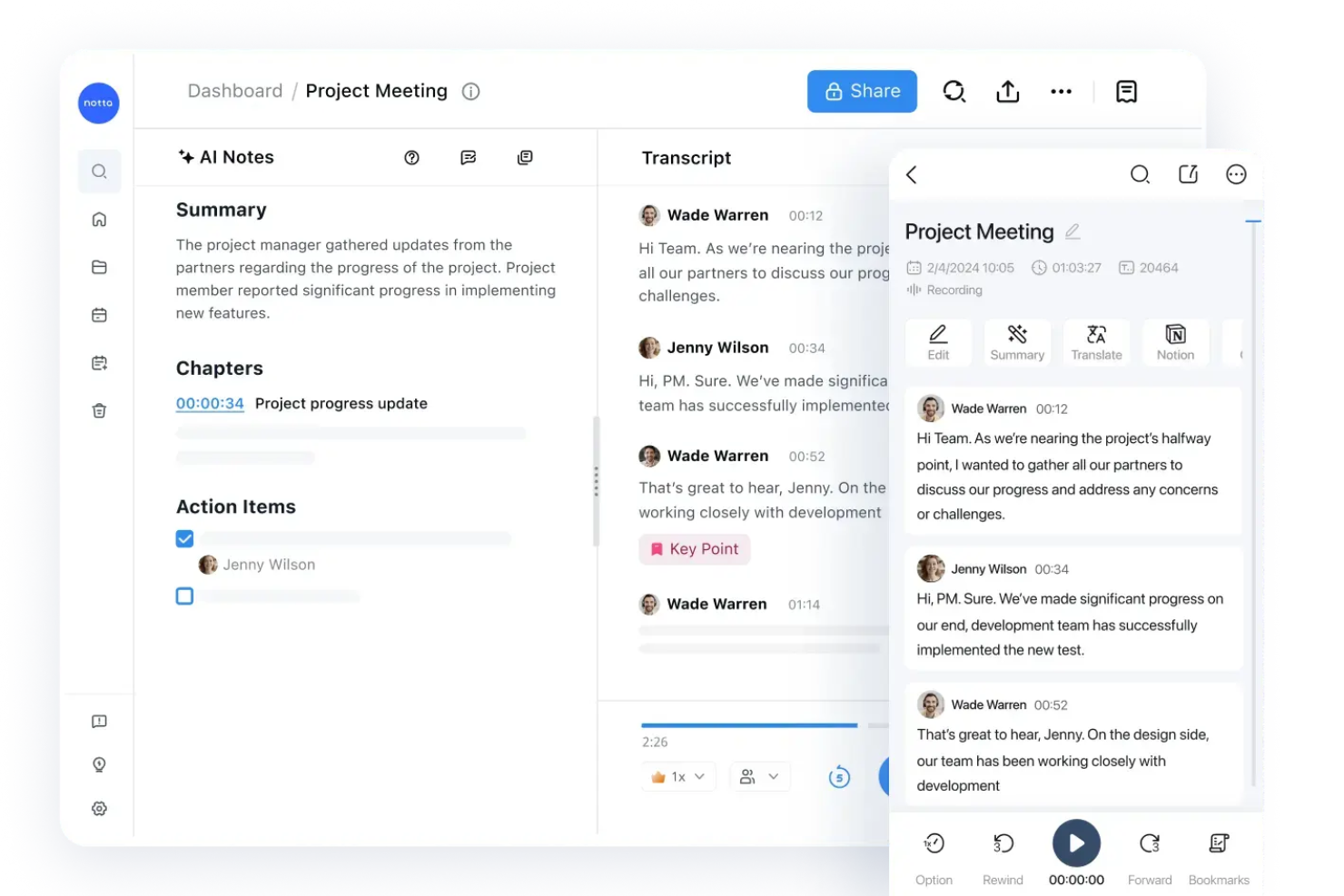
Notta è un assistente per riunioni alimentato da intelligenza artificiale che registra e trascrive riunioni dal vivo e file audio, organizzando poi il risultato in trascrizioni condivisibili e ricercabili con riepiloghi automatici generati dall’IA e punti d’azione.
Per chi è ideale Notta?
Notta è particolarmente adatto per team che lavorano principalmente in modo asincrono e necessitano che chi non ha potuto partecipare alle riunioni possa rapidamente cercare e consultare ciò che è stato discusso o deciso.
Perché ho scelto Notta
Ho incluso Notta tra le mie migliori scelte per l’efficienza con cui gestisce l’intero ciclo di vita delle trascrizioni, dalla registrazione alla condivisione. Le trascrizioni sono ricercabili per parole chiave e indicizzate temporalmente, così chi ha perso una riunione può andare direttamente all’esatto momento in cui qualcosa è stato detto.
Apprezzo anche la possibilità di aggiungere segnalibri a righe specifiche per evidenziare punti chiave, cose da fare o note di progetto, e poter condividere la trascrizione con tali evidenziazioni già visibili ai destinatari.
Funzionalità principali di Notta
- Riepiloghi automatici delle riunioni generati dall’IA: Notta produce automaticamente riepiloghi sintetici dopo ogni riunione, così non è necessario leggere l’intera trascrizione.
- Estrazione dei punti d’azione: L’intelligenza artificiale individua e separa automaticamente i punti d’azione dalla trascrizione, creando un elenco dedicato.
- Trascrizione multilingue: Notta supporta la trascrizione in oltre 58 lingue, compreso il cambio lingua in tempo reale durante la riunione.
- Bot per la partecipazione automatica alle riunioni: Il bot di Notta si unisce automaticamente alle chiamate programmate e avvia la registrazione tramite sincronizzazione con il calendario.
Integrazioni di Notta
Notta offre oltre 20 integrazioni native, tra cui Zoom, Google Meet, Microsoft Teams, Webex, Slack, Notion, Google Docs, Salesforce, HubSpot e ClickUp. Si connette anche con Zapier e supporta la sincronizzazione dei calendari con Google Calendar e Outlook Calendar per la registrazione automatica delle riunioni.
Pros and Cons
Pros:
- La funzione mappa mentale facilita le sessioni di brainstorming
- Converte le note in infografiche e tabelle
- Trascrizione bilingue per meeting multilingue
Cons:
- La precisione diminuisce con interventi sovrapposti
- Il piano gratuito limita le registrazioni a tre minuti

MeetingBooster è una piattaforma di gestione delle riunioni basata sulla creazione di agende, presa di appunti strutturata e generazione formale dei verbali, con monitoraggio delle attività integrato e gestione delle serie di riunioni ricorrenti.
A chi è più adatto MeetingBooster?
MeetingBooster è ideale per organizzazioni in ambienti con molte regole di governance, come amministrazioni comunali, consigli e comitati, dove verbali formali, decisioni documentate e agende strutturate sono un requisito standard.
Perché ho scelto MeetingBooster
Ho scelto MeetingBooster tra i migliori perché nessun altro strumento che ho provato applica la struttura delle riunioni in modo così rigoroso. Adoro la funzione Notecard, che ti guida durante una riunione dal vivo passo dopo passo, catturando note, decisioni e attività direttamente su ciascun punto all’ordine del giorno in tempo reale.
Quando la riunione termina, posso scegliere uno stile per i verbali, rivedere la bozza e distribuire i verbali finalizzati in pochi minuti, senza dover riformattare nulla. È l'unico strumento che ho utilizzato in cui agenda, note e verbali sono davvero parte di un unico flusso di lavoro connesso.
Le principali funzionalità di MeetingBooster
- Processo di approvazione dell'agenda: Consente di sottoporre le agende a un workflow di approvazione con controllo delle versioni prima dell'inizio delle riunioni, così tutti i partecipanti approvano la struttura in anticipo.
- Analisi delle riunioni: Monitora la partecipazione, i costi delle riunioni, le percentuali di completamento dei compiti e i report di stato delle riunioni per individuare andamenti nel tempo.
- Presa di appunti specifica per partecipante: Assegna la responsabilità della presa di appunti a specifici partecipanti, permettendo a ciascuno di scrivere note collegate direttamente al proprio ruolo nella riunione.
- Strumenti per le decisioni: Utilizza strumenti integrati di voto, analisi pro/contro e valutazione durante una riunione per prendere e registrare formalmente le decisioni di gruppo.
Integrazioni di MeetingBooster
MeetingBooster si integra nativamente con Microsoft Outlook, Microsoft Teams, SharePoint, Google Calendar e Active Directory. Supporta inoltre integrazioni con Jira, Microsoft Planner, Trello e Slack tramite la propria API, e si collega con Zapier e Microsoft Power Automate. Un'API è disponibile per integrazioni personalizzate.
Pros and Cons
Pros:
- Strumenti integrati per voto e monitoraggio delle decisioni
- Verbali formali generati automaticamente dalle note
- Monitoraggio delle attività trasversale alle riunioni con scadenze
Cons:
- Flessibilità limitata nell'assegnazione delle attività
- È difficile condividere i ruoli tra presentatore e colui che prende appunti

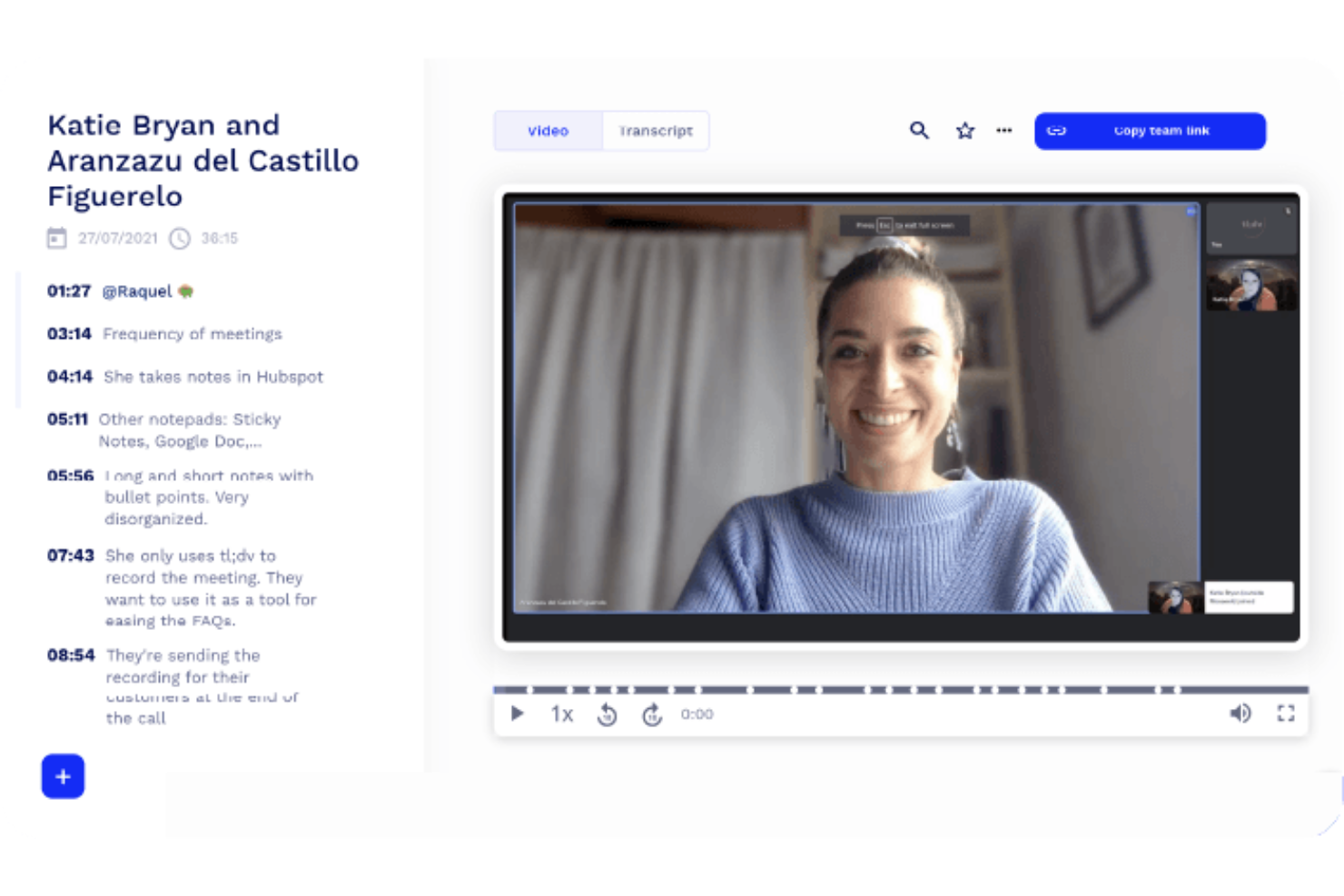
tl;dv è uno strumento per la registrazione delle riunioni e la presa di appunti che consente di catturare incontri video con momenti salienti contrassegnati da timestamp, riepiloghi generati dall’IA e clip condivisibili dalle chiamate su Zoom, Google Meet e Microsoft Teams.
Per chi è più adatto tl;dv?
tl;dv è una scelta naturale per i team di prodotto e ricerca che hanno bisogno di ritagliare, contrassegnare e condividere i momenti chiave delle riunioni senza dover guardare le registrazioni complete.
Perché ho scelto tl;dv
tl;dv merita un posto nella mia shortlist perché i suoi appunti con timestamp risultano davvero più utili rispetto a quanto offerto dalla maggior parte dei registratori di riunioni. Mi piace che ogni nota generata dall’IA sia collegata direttamente all’esatto momento nel video, così chiunque riveda la registrazione può saltare subito al contesto invece di scorrere minuti di riprese.
Le funzioni di ritaglio e creazione di bobine permettono al mio team di selezionare momenti specifici e condividerli in modo asincrono, cosa che trovo particolarmente utile per far emergere approfondimenti di ricerca agli stakeholder che non erano presenti.
Funzionalità principali di tl;dv
- Report IA su più riunioni: Consulta e riassumi insight da più riunioni registrate contemporaneamente, individuando tendenze senza dover rivedere ogni singola registrazione.
- Modelli di appunti personalizzabili: Imposta formati strutturati di riepilogo, incluse metodologie di vendita come MEDDIC, nella lingua preferita dal tuo team.
- Registrazione automatica nel CRM: Invia note delle chiamate e risultati delle trattative direttamente nel CRM dopo ogni riunione, senza inserimento manuale dei dati.
- Trascrizione multilingue: Trascrive e traduce gli incontri in oltre 30 lingue, con localizzazione completa disponibile in 7 di esse.
Integrazioni di tl;dv
tl;dv offre integrazioni native con Zoom, Google Meet, Microsoft Teams, Salesforce, HubSpot, Pipedrive, Zoho, Slack, Google Docs e Notion, con oltre 6.000 app aggiuntive disponibili tramite Zapier. È disponibile anche un’API per integrazioni personalizzate.
Pros and Cons
Pros:
- Timestamp con un clic durante le chiamate dal vivo
- Clip e bobine dalle riunioni registrate
- Ricerca su più riunioni tra tutte le registrazioni
Cons:
- Il piano gratuito elimina le registrazioni dopo 3 mesi
- Analisi quantitative limitate sui dati delle chiamate

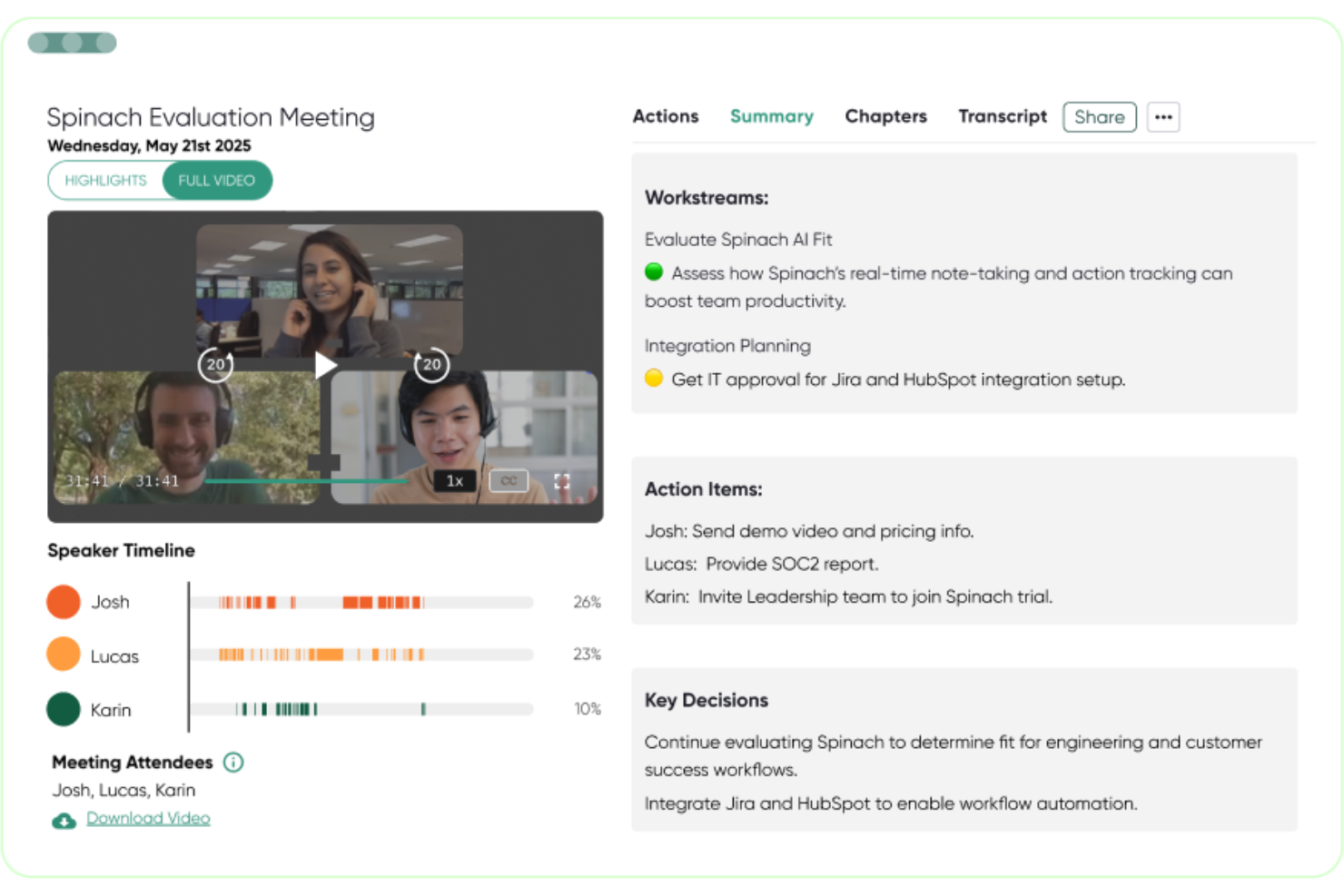
Spinach AI è un assistente con intelligenza artificiale per le riunioni che registra, trascrive e riassume automaticamente gli incontri, inviando poi compiti, decisioni e follow-up direttamente nei tuoi strumenti di project management.
A chi è rivolto Spinach AI?
Spinach AI è particolarmente adatto per i team di prodotto e ingegneria che svolgono frequentemente stand-up, revisione degli sprint e riunioni di allineamento interfunzionali all'interno di strumenti come Jira o Linear.
Perché ho scelto Spinach AI
Spinach AI merita il suo posto nella mia shortlist per come colma il divario tra ciò che viene discusso in una riunione e ciò che effettivamente viene realizzato. Mi piace il fatto che, quando Spinach AI rileva un'attività da svolgere, possa creare automaticamente una segnalazione in Jira, Linear o Asana, senza che nessuno debba copiare le note al termine della chiamata.
Apprezzo anche molto la funzione di aggiornamento automatico CRM: le chiamate di vendita e customer success inviano i follow-up direttamente su HubSpot o Salesforce non appena la riunione si conclude.
Funzionalità principali di Spinach AI
- Trascrizione multilingue: Spinach AI trascrive le riunioni in 100 lingue, rendendolo utilizzabile da team distribuiti a livello globale.
- Generazione email di riepilogo: Al termine di ogni riunione, Spinach AI redige e invia automaticamente una email riassuntiva a tutti i partecipanti.
- Coach AI per riunioni: Spinach AI analizza i modelli delle riunioni e propone insight per aiutare i manager a condurre one-to-one e riunioni di team più efficaci.
- Agenda condivisa: I team possono collaborare alla costruzione dell'agenda della riunione prima dell'avvio della chiamata.
Integrazioni di Spinach AI
Spinach AI offre integrazioni native con Jira, Asana, Trello, Linear, ClickUp, monday.com, Notion, Confluence, Slack, HubSpot, Salesforce, Zoho e Attio. Funziona inoltre come fonte di riunioni con Google Meet, Microsoft Teams e Zoom. Spinach AI si collega con Zapier e offre una API per integrazioni personalizzate.
Pros and Cons
Pros:
- Riepiloghi organizzati per decisioni e attività
- Pensato appositamente per meeting di tipo agile
- Non è necessaria la creazione di agenti AI personalizzati
Cons:
- Il formato dei riepiloghi può risultare incoerente
- Nessuna opzione per creare agenti AI da zero
Altri software per la gestione delle riunioni
Ecco alcune opzioni aggiuntive di software per la gestione delle riunioni che non sono state incluse nel mio elenco, ma che vale comunque la pena prendere in considerazione:
- MeetGeek
Ideale per riepiloghi video automatizzati delle riunioni
- Sembly AI
Ideale per la trascrizione di riunioni multilingue
- Hive Notes
Ideale per la presa di appunti collaborativa in tempo reale


Come Valuto i Software di Gestione Riunioni
La mia valutazione si sviluppa su due livelli: la base che ogni strumento deve soddisfare—costruzione dell'agenda, tracciamento delle azioni, sincronizzazione con tool di PM—e i fattori distintivi che rendono i migliori adatti a team cross-funzionali.
Funzionalità Principali (Requisiti Minimi per Questa Lista)
Quando seleziono gli strumenti per la mia lista, valuto ciascuno su una scala da 0 (non offre la funzionalità) a 5 (eccelle in quest'area) per ogni funzionalità principale elencata di seguito. Poi calcolo il punteggio totale dello strumento e lo converto in percentuale. Ogni tool deve raggiungere un punteggio totale minimo del 65% per essere considerato per l'inclusione.
- Costruzione e Condivisione dell'Agenda: Cerco strumenti che permettano ai team di costruire e distribuire in modo collaborativo le agende prima della riunione—come aggiungere punti con durata temporizzata per una sessione di pianificazione sprint settimanale in modo che tutti arrivino preparati.
- Note Collaborative in Tempo Reale: Lo strumento deve supportare più partecipanti che scrivono note simultaneamente, come accade quando uno Scrum Master e un product owner collaborano nella documentazione delle decisioni durante una sessione di grooming del backlog.
- Tracciamento delle Azioni: Valuto quanto bene ogni piattaforma gestisce l'assegnazione di compiti con responsabili e date di scadenza durante la riunione, poi come vengono visualizzati i compiti incompleti negli incontri successivi affinché nulla venga dimenticato.
- Integrazione con il Calendario: Controllo la sincronizzazione bidirezionale con Google Calendar e Outlook, assicurandomi che le riunioni si popolino automaticamente con agende e contesto senza bisogno di creare manualmente ogni volta.
- Integrazione con Tool di Project Management: Qui conta la capacità dello strumento di inviare direttamente le azioni in piattaforme come Jira, Asana o Monday—valuto se la sincronizzazione è bidirezionale e se importa il contesto rilevante del progetto.
- Registrazione e Trascrizione delle Riunioni: Esamino se lo strumento registra le riunioni e genera trascrizioni ricercabili, facilitando il recupero di ciò che è stato discusso in una review con stakeholder o in una retrospettiva a settimane di distanza.
Dopo aver identificato gli strumenti che rispettano questi criteri, considero cosa rende unica ogni piattaforma.
Fattori Distintivi (Cosa Distingue i Fornitori)
Ecco come confronto i diversi fornitori:
Funzionalità di Spicco
Le sintesi generate dall’IA sono importanti perché risparmiano ai project manager la fatica di scrivere email di resoconto dopo ogni standup o incontro con stakeholder—cerco strumenti che estraggono automaticamente decisioni e step successivi. Anche la continuità nelle riunioni ricorrenti è un aspetto che valuto con attenzione. Quando i punti irrisolti vengono riportati dall'agenda della review della scorsa settimana a quella di questa, la responsabilità resta visibile senza interventi manuali. Le analitiche sulle riunioni aiutano inoltre i responsabili PMO a identificare fenomeni come il sovraccarico di meeting o bassi tassi di completamento delle azioni tra i team.
Oltre le Funzionalità
La struttura dei prezzi è uno degli aspetti che verifico subito—soprattutto se stakeholder esterni, come clienti o fornitori, possono partecipare alle riunioni senza occupare posti a pagamento. La profondità dell'ecosistema di integrazione pesa molto, dato che uno strumento compatibile con Jira ma non con Asana limita la sua adattabilità per team con metodologie miste. Valuto anche la scalabilità, esaminando se una piattaforma supporta permessi basati sui ruoli e gerarchie di workspace che crescono da un piccolo team agile a un intero PMO con più programmi in parallelo.
Come scegliere un software per la gestione delle riunioni
È facile perdersi in lunghi elenchi di funzionalità e strutture tariffarie complesse. Per aiutarti a rimanere concentrato mentre porti avanti il tuo processo unico di selezione del software, ecco un elenco dei fattori da tenere a mente:
| Fattore | Cosa considerare |
|---|---|
| Scalabilità | Lo strumento supporterà il tuo team mentre cresce e sarà in grado di gestire più progetti o riunioni ricorrenti tra diversi reparti? |
| Integrazioni | Si collega in modo affidabile al calendario, agli strumenti per videochiamate e chat e agli strumenti di gestione dei progetti, adattandosi al tuo flusso di lavoro senza soluzioni manuali alternative? |
| Personalizzazione | Puoi adattare i modelli delle riunioni, le autorizzazioni e i report ai processi o alle esigenze di conformità del tuo team? |
| Facilità d’uso | L’interfaccia è abbastanza intuitiva per utenti con diversi livelli di competenza tecnica? Le parti interessate lo adotteranno davvero nelle loro attività quotidiane? |
| Implementazione e inserimento | Quanto tempo e supporto ti serviranno per avviare lo strumento e formare l’intero team? Le risorse formative sono accessibili a tutti gli utenti? |
| Costo | In che modo i livelli di prezzo si adattano al numero di utenti, alla crescita prevista e alle funzionalità necessarie? Fai attenzione ai costi nascosti relativi a spazio di archiviazione, conformità o analisi. |
| Misure di sicurezza | La piattaforma soddisfa i tuoi requisiti in materia di protezione dei dati, controllo degli accessi e privacy, soprattutto per i contenuti riservati o soggetti a normative? |
| Disponibilità dell’assistenza | Quando si verificano problemi, puoi ricevere assistenza tempestiva durante il tuo principale orario di lavoro e attraverso i canali che preferisci? |
Che cos’è un software per la gestione delle riunioni?
Il software per la gestione delle riunioni aiuta i team a organizzare, condurre e documentare le riunioni centralizzando ordini del giorno, note, attività da svolgere e attività successive. Questi strumenti semplificano la programmazione, favoriscono la collaborazione e garantiscono la responsabilità, mantenendo visibili le decisioni e le attività importanti tra i vari progetti.
Il software per la gestione delle riunioni spesso si integra con calendari, piattaforme video e sistemi di gestione dei progetti, così le riunioni rimangono orientate all’azione e i risultati non vengono persi.
Funzionalità
Quando selezioni un software per la gestione delle riunioni, presta attenzione alle seguenti funzionalità chiave:
- Creazione dell'ordine del giorno: Crea, condividi e modifica collaborativamente gli ordini del giorno prima delle riunioni, così che tutti abbiano chiari gli argomenti, gli obiettivi e le responsabilità.
- Redazione collaborativa delle note: Acquisisci in tempo reale i verbali delle riunioni e i punti discussi con più collaboratori, assicurandoti che nulla di fondamentale venga trascurato.
- Monitoraggio delle attività: Assegna azioni di follow-up con responsabili e scadenze durante la riunione e monitora il completamento nelle sessioni future.
- Registro delle decisioni: Registra gli accordi e le decisioni chiave in un registro accessibile e organizzato, per facilitarne la consultazione e garantire la responsabilità.
- Integrazione con il calendario: Sincronizza il software con Google, Outlook o altri calendari per semplificare la pianificazione e mantenere le riunioni visibili a tutti i partecipanti interessati.
- Integrazione con le videoconferenze: Partecipa direttamente alle videochiamate dall'app e importa i dettagli da piattaforme come Zoom, Teams o Meet.
- Modelli per riunioni ricorrenti: Standardizza riunioni rapide, revisioni dei progetti o retrospettive utilizzando modelli predefiniti per risparmiare tempo e promuovere la coerenza.
- Allegati ai documenti: Aggiungi file, presentazioni o documenti di supporto pertinenti agli ordini del giorno o alle note delle riunioni, per accedervi facilmente prima, durante e dopo le riunioni.
- Autorizzazioni e controllo degli accessi: Controlla chi può visualizzare, modificare o condividere gli ordini del giorno e le note, preservando la riservatezza quando necessario.
- Archivi consultabili: Trova rapidamente discussioni, decisioni o note passate, così che i membri del team possano consultare il contesto storico ed evitare di ripetere conversazioni.
Funzionalità comuni di intelligenza artificiale dei software per la gestione delle riunioni
Oltre alle funzionalità standard dei software per la gestione delle riunioni elencate sopra, molte di queste soluzioni stanno integrando l'intelligenza artificiale con funzionalità come:
- Trascrizione automatica delle riunioni: L'intelligenza artificiale ascolta le tue riunioni e genera trascrizioni accurate e consultabili, così puoi rivedere le discussioni o condividere le note con i membri del team assenti.
- Riepiloghi generati dall'intelligenza artificiale: Ricevi istantaneamente brevi riepiloghi dei punti chiave, delle decisioni e delle attività, risparmiando tempo nella redazione manuale delle note e della documentazione di follow-up.
- Estrazione intelligente delle attività: L'intelligenza artificiale identifica e assegna le attività dalle conversazioni, riducendo il rischio che vengano trascurate e garantendo la responsabilità senza ulteriore lavoro amministrativo.
- Suggerimenti intelligenti per l'ordine del giorno: In base alle riunioni precedenti e al contesto del progetto, l'intelligenza artificiale consiglia argomenti o punti pertinenti per mantenere le riunioni concentrate e produttive.
- Identificazione dei partecipanti: L'intelligenza artificiale distingue i partecipanti nelle trascrizioni, attribuendo commenti e decisioni alle persone corrette per una maggiore chiarezza e responsabilità.
- Analisi del sentiment: L'intelligenza artificiale valuta il tono e il livello di coinvolgimento delle discussioni, aiutando i responsabili a individuare potenziali problemi o tendenze nel morale del team nel tempo.
Vantaggi
L'implementazione di un software per la gestione delle riunioni offre diversi vantaggi al tuo team e alla tua azienda. Eccone alcuni:
- Organizzazione migliorata: Centralizza ordini del giorno, note e attività, così che i team possano monitorare decisioni e compiti in tutte le riunioni e i progetti.
- Maggiore responsabilità: Assegna le attività di follow-up e registra i risultati, rendendo chiaro chi è responsabile di ogni attività o decisione e riducendo gli impegni non rispettati.
- Risparmio di tempo: Utilizza modelli, integrazioni e talvolta funzionalità di intelligenza artificiale per automatizzare le attività ripetitive di preparazione e follow-up, liberando tempo da dedicare alla realizzazione effettiva dei progetti.
- Risultati delle riunioni coerenti: Standardizza i formati e i processi delle riunioni, aiutando i team a evitare ordini del giorno incompleti e assicurando che gli argomenti importanti vengano trattati.
- Maggiore allineamento dei progetti: Sincronizza i risultati delle riunioni con gli strumenti di gestione dei progetti, così che attività e decisioni confluiscano direttamente nei flussi di lavoro del team per un'esecuzione fluida.
- Conformità semplificata: Offre controlli delle autorizzazioni e archivi consultabili, supportando quando necessario i requisiti di trasparenza, conservazione dei dati o governance.
- Informazioni più utili sulle riunioni: Fornisce analisi e pannelli di controllo per aiutare i responsabili a dimensionare correttamente la frequenza delle riunioni, gestire il coinvolgimento e ridurre il sovraccarico di riunioni.
Costi e prezzi
La scelta di un software per la gestione delle riunioni richiede la comprensione dei vari modelli e piani tariffari disponibili. I costi variano in base alle funzionalità, alle dimensioni del team, agli elementi aggiuntivi e ad altro ancora. La tabella seguente riassume i piani comuni, i relativi prezzi medi e le funzionalità tipicamente incluse nelle soluzioni software per la gestione delle riunioni:
Tabella di confronto dei piani per il software di gestione delle riunioni
| Tipo di piano | Prezzo medio | Funzionalità comuni |
|---|---|---|
| Piano gratuito | $0 | Agende di base, presa di appunti collaborativa limitata, accesso per un singolo utente, modelli di riunione limitati e integrazioni di base. |
| Piano personale | $5-$15/utente/mese | Riunioni illimitate, raccolta personale di agende, ricerca avanzata, sincronizzazione del calendario e semplice monitoraggio delle attività. |
| Piano aziendale | $15-$30/utente/mese | Spazi di lavoro per i team, automazione delle riunioni ricorrenti, integrazioni con la gestione dei progetti, dashboard per i report e controllo delle autorizzazioni. |
| Piano aziendale | $30-$50/utente/mese | Sicurezza avanzata, supporto alla conformità, controlli amministrativi granulari, assistenza dedicata, ruoli personalizzati e registri di audit. |
Domande frequenti sul software di gestione delle riunioni
Ecco alcune risposte alle domande comuni sul software di gestione delle riunioni:
Il software di gestione delle riunioni può contribuire a ridurre le riunioni non necessarie?
Sì, molte piattaforme offrono strumenti di analisi e per le riunioni ricorrenti, consentendo di individuare le sessioni a basso valore, monitorare la partecipazione e ottimizzare la frequenza delle riunioni. Questo aiuta i team a recuperare tempo e a concentrarsi sulle discussioni che producono risultati.
In che modo il software di gestione delle riunioni supporta i team distribuiti?
Le soluzioni basate sul cloud consentono ai team remoti o ibridi di collaborare su agende, appunti e attività in tempo reale. Le integrazioni con le applicazioni per videoconferenze e chat mantengono tutti connessi prima, durante e dopo le riunioni.
Cosa dovrei valutare in termini di sicurezza e conformità?
Verifica la presenza di funzionalità come autorizzazioni granulari, crittografia dei dati, registri di audit e conformità a standard quali SOC 2 e GDPR. Questo è particolarmente importante per le riunioni riservate delle risorse umane, legali o del consiglio di amministrazione.
Questi strumenti possono funzionare con il nostro sistema di gestione dei progetti esistente?
Sì, la maggior parte delle principali soluzioni offre integrazioni native con piattaforme diffuse come Asana, Jira o monday.com. In questo modo le attività passano dalle riunioni al processo di gestione delle attività del team, garantendo un follow-up costante.
Esistono opzioni gratuite o meno costose per i team più piccoli o le startup?
Sì, la maggior parte dei fornitori offre piani gratuiti o convenienti piani personali con le funzionalità essenziali. Con la crescita dell’organizzazione, spesso è possibile passare a un piano superiore per aggiungere le funzionalità avanzate, la sicurezza e i controlli amministrativi necessari per i team più grandi.