

Le 19 migliori app per la concentrazione per il 2026

Elenco delle migliori app per la concentrazione


Le app per la concentrazione sono strumenti digitali che ti aiutano a bloccare le distrazioni, gestire la tua attenzione e rimanere concentrato sulle attività durante tutta la giornata lavorativa. Se stai cercando le migliori app per la concentrazione, probabilmente devi gestire priorità che cambiano, notifiche costanti e la pressione di ottenere risultati senza perdere lo slancio. L’app giusta può offrirti un maggiore controllo sul tuo flusso di lavoro, sia che tu abbia bisogno di un blocco rigoroso dei siti web, di timer Pomodoro o di analisi dettagliate dell’utilizzo. In questo elenco troverai opzioni pensate per diversi stili di lavoro e piattaforme, così potrai scegliere lo strumento più adatto alle esigenze del tuo team e mantenere la concentrazione nel 2026.
Perché fidarsi dei nostri consigli sui software
Il nostro team testa e recensisce software dal 2012. In quanto project manager noi stessi, sappiamo quanto sia difficile — e importante — scegliere il software giusto.
Per questa guida, abbiamo valutato gli strumenti attraverso test pratici e ricerche indipendenti, assegnando un punteggio agli strumenti in base ai nostri criteri di selezione. Ci basiamo inoltre sulle competenze di leader di pensiero del settore e di professionisti attivi nella gestione dei progetti.
Le nostre recensioni riflettono il nostro giudizio editoriale umano, non un discorso di vendita.
Revisori esperti:
Tabella comparativa delle app per la concentrazione
Questa tabella comparativa riassume i dettagli sui prezzi delle mie migliori selezioni di app per la concentrazione:
| Tool | Best For | Trial Info | Price | ||
|---|---|---|---|---|---|
| 1 | Ideale per il monitoraggio visivo dei progressi con timer | Piano gratuito disponibile | Download gratuito | Website | |
| 2 | Ideale per il blocco di siti web su più dispositivi | Prova gratuita di 7 giorni disponibile | Da $3.33/mese (fatturazione annuale) | Website | |
| 3 | Ideale per intervalli di lavoro senza distrazioni | Prova gratuita di 7 giorni disponibile | Da $3.33/mese (fatturato annualmente) | Website | |
| 4 | Ideale per combinare attività e sessioni Pomodoro | Piano gratuito disponibile | Download gratuito | Website | |
| 5 | Ideale per analisi dettagliate sull'uso delle app | Piano gratuito disponibile | Download gratuito | Website | |
| 6 | Ideale per limiti giornalieri personalizzabili | Piano gratuito disponibile | Gratis da scaricare | Website | |
| 7 | Ideale per introdurre ritardi intenzionali all'apertura delle app | Non disponibile | Da $5.99/mese (fatturazione annuale) | Website | |
| 8 | Ideale per incentivi gamificati alla produttività | Piano gratuito disponibile | Gratis da scaricare | Website | |
| 9 | Ideale per regole avanzate di blocco su browser | Piano gratuito disponibile | Download gratuito | Website | |
| 10 | Ideale per il blocco rigoroso dei siti web su Mac | Piano gratuito disponibile | Download gratuito | Website |
Recensioni delle migliori app per la concentrazione
Di seguito trovi i miei riepiloghi dettagliati delle app per la concentrazione incluse nel mio elenco. Le mie recensioni analizzano in dettaglio le funzionalità, i migliori casi d’uso e le capacità di ogni strumento, per aiutarti a trovare quello più adatto a te.

Forest
Ideale per il monitoraggio visivo dei progressi con timer

Forest utilizza un approccio visivo per aiutarti a rimanere concentrato, facendo crescere alberi virtuali mentre lavori. Questa app è adatta ai professionisti che desiderano una sensazione concreta di progresso nella gestione del tempo. Se cerchi uno strumento che trasformi la produttività in un’esperienza visiva, Forest si distingue grazie al suo sistema di piantumazione di alberi basato su un timer.
Perché ho scelto Forest
Ho scelto Forest perché il suo sistema di monitoraggio visivo dei progressi con timer offre un modo unico per rafforzare la concentrazione. L’app ti permette di piantare un albero virtuale che cresce mentre rimani concentrato, dandoti una rappresentazione visiva chiara della tua produttività. Trovo che la foresta in crescita motivi gli utenti a evitare le distrazioni, poiché uscire dall’app fa appassire l’albero. Questo approccio è particolarmente utile per chi desidera una sensazione più tangibile di realizzazione mentre gestisce la propria attenzione.
Caratteristiche principali di Forest
Altre funzionalità di Forest la rendono una scelta versatile per chiunque voglia migliorare la concentrazione:
- Modalità whitelist: consente di selezionare quali app o siti web sono permessi durante le sessioni di concentrazione, dandoti più controllo sul tuo ambiente digitale.
- Statistiche giornaliere e settimanali: monitora il tempo concentrato e mostra le tendenze per aiutarti a comprendere le tue abitudini di lavoro.
- Modalità team: ti consente di partecipare a sessioni di concentrazione con amici o colleghi, favorendo la responsabilizzazione di gruppo.
- Tag personalizzabili: ti permette di categorizzare le sessioni di concentrazione per progetto o compito, rendendo più facile rivedere come impieghi il tuo tempo.
Integrazioni Forest
Le integrazioni native attualmente non sono elencate.
Pros and Cons
Pros:
- La crescita visiva degli alberi motiva sessioni di concentrazione costanti
- Sessioni basate su timer adatte a flussi di lavoro tipo Pomodoro
- La modalità team consente sfide collaborative per la concentrazione
Cons:
- Opzioni di esportazione dei report limitate per i team
- Nessun supporto integrato per schedulazioni ricorrenti


Freedom ti permette di controllare le distrazioni bloccando siti web e app su tutti i tuoi dispositivi contemporaneamente. Questo strumento è particolarmente utile per team remoti, liberi professionisti e chiunque abbia bisogno di mantenere la concentrazione in un ambiente multi-dispositivo. Se cerchi un modo per stabilire dei confini tra lavoro e distrazioni, il blocco multipiattaforma di Freedom si distingue tra le app per la concentrazione.
Perché ho scelto Freedom
Ciò che rende Freedom diverso è la sua capacità di bloccare siti web e applicazioni fonte di distrazione su più dispositivi contemporaneamente. Questo è particolarmente prezioso per chi lavora sia su laptop che su smartphone, poiché le distrazioni possono facilmente passare da un dispositivo all'altro. Ho scelto Freedom perché puoi iniziare una sessione sul computer e avere le stesse restrizioni applicate istantaneamente anche su telefono o tablet. Questo approccio di blocco unificato aiuta a mantenere la concentrazione ovunque si svolga il tuo lavoro.
Funzionalità principali di Freedom
Altre funzionalità di Freedom lo rendono una scelta flessibile per gestire le distrazioni:
- Modalità Bloccata: Impedisce di terminare una sessione in anticipo, aggiungendo un livello extra di impegno al tuo tempo di concentrazione.
- Liste di Blocco Personalizzate: Ti permette di creare e salvare più elenchi di siti e app da bloccare per diversi tipi di sessioni lavorative.
- Sessioni Programmate: Ti consente di impostare blocchi ricorrenti in anticipo, così non devi ricordarti di avviarli manualmente.
- Paesaggi sonori di sottofondo: Offre suoni di sottofondo integrati per aiutarti a creare un ambiente di lavoro più favorevole alla concentrazione.
Integrazioni di Freedom
Al momento non sono elencate integrazioni native.
Pros and Cons
Pros:
- Blocca siti web e app su tutti i dispositivi
- La modalità bloccata impedisce di terminare le sessioni in anticipo
- Liste di blocco personalizzate per diversi scenari lavorativi
Cons:
- Alcuni utenti segnalano problemi di aggiramento del blocco su Android
- Nessun report integrato su analisi o produttività


Session Pomodoro adotta un approccio unico alla concentrazione, guidando gli utenti attraverso intervalli di lavoro strutturati e privi di distrazioni. Questo strumento è particolarmente utile per professionisti, freelance e team da remoto che desiderano suddividere il lavoro in sprint focalizzati e minimizzare le interruzioni. Con timer integrati e analisi delle sessioni, Session Pomodoro ti aiuta a mantenere lo slancio e monitorare i tuoi schemi di produttività nel tempo.
Perché ho scelto Session Pomodoro
Ciò che distingue Session Pomodoro è l'attenzione nel creare intervalli di lavoro realmente senza distrazioni, fondamentale per chiunque voglia sviluppare abitudini di lavoro profondo. Ho scelto Session Pomodoro perché combina un'interfaccia minimalista con un timer integrato che ti aiuta a organizzare la giornata in sprint focalizzati. L'app offre anche funzionalità come analisi delle sessioni e promemoria automatici per le pause, così puoi monitorare i tuoi progressi ed evitare il burnout. Per chi desidera proteggere la propria attenzione e lavorare in intervalli definiti, Session Pomodoro offre un ambiente di concentrazione difficile da trovare altrove.
Funzionalità principali di Session Pomodoro
Altre funzionalità di Session Pomodoro ti aiutano a personalizzare l'esperienza di focus e a supportare il tuo flusso di lavoro:
- Blocco delle distrazioni: Blocca l'accesso a siti web fonte di distrazione durante le sessioni attive.
- Note di sessione: Ti permette di annotare rapidamente appunti o intenzioni prima di iniziare una sessione.
- Integrazione musica per la concentrazione: Offre opzioni incorporate di musica di sottofondo per aiutarti a concentrarti.
- Report giornalieri e settimanali: Fornisce riepiloghi delle sessioni completate e dei trend di concentrazione.
Integrazioni di Session Pomodoro
Le integrazioni native al momento non sono elencate.
Pros and Cons
Pros:
- Opzioni di musica per la concentrazione integrate nelle sessioni
- Funzionalità note di sessione per le intenzioni pre-sessione
- Blocco delle distrazioni per siti web specifici
Cons:
- Nessuna app mobile per dispositivi Android
- Mancano analisi avanzate per i trend a lungo termine

Focus To-Do unisce la gestione delle attività e i timer Pomodoro in un'unica app, rendendola una scelta pratica per chi desidera strutturare la giornata lavorativa in sprint focalizzati. Questo strumento è particolarmente utile per project manager, studenti e lavoratori da remoto che hanno bisogno di bilanciare liste di attività con sessioni di lavoro a blocchi di tempo. Se cerchi un modo per collegare le attività direttamente ai cicli Pomodoro, Focus To-Do offre un approccio strettamente integrato.
Perché ho scelto Focus To-Do
Combinare la gestione delle attività con i timer Pomodoro in un solo posto è ciò che distingue Focus To-Do tra le app dedicate alla concentrazione. Se vuoi collegare la tua lista di cose da fare direttamente a sessioni di lavoro temporizzate, questo strumento ti permette di assegnare cicli Pomodoro alle singole attività e monitorare i tuoi progressi man mano che avanzi. Ho scelto Focus To-Do perché offre una struttura chiara per suddividere il lavoro in sprint gestibili, particolarmente utile per chi deve gestire più priorità. Le analisi integrate, inoltre, aiutano a visualizzare quanto tempo dedichi a ciascuna attività, consentendoti di adattare il flusso di lavoro secondo necessità.
Caratteristiche principali di Focus To-Do
Altre funzionalità di Focus To-Do completano il suo approccio alla gestione della concentrazione e della produttività:
- Sincronizzazione tra dispositivi: Mantiene attività e timer aggiornati su dispositivi desktop e mobile.
- Promemoria e date di scadenza: Ti permette di impostare promemoria e scadenze per ogni attività per aiutarti a restare in carreggiata.
- Sotto-attività: Consente di suddividere le attività più grandi in passaggi più piccoli e gestibili all'interno della tua lista principale.
- Monitoraggio delle abitudini: Include un tracker abitudini integrato per monitorare le routine quotidiane insieme alle attività lavorative.
Integrazioni di Focus To-Do
Attualmente non sono elencate integrazioni native.
Pros and Cons
Pros:
- Combina timer Pomodoro e liste di attività
- Offre una funzione integrata di monitoraggio delle abitudini
- Sincronizza i dati su più piattaforme di dispositivi
Cons:
- Non dispone di funzionalità di blocco di siti web o app
- Nessuna visualizzazione calendario per la pianificazione delle attività

Se vuoi capire esattamente come viene speso il tuo tempo sul telefono, StayFree ti offre analisi dettagliate sull'uso delle app e sul tempo trascorso davanti allo schermo. Questo strumento è particolarmente adatto a project manager, liberi professionisti e a chiunque abbia bisogno di individuare le distrazioni digitali e impostare limiti d'uso. StayFree si distingue perché offre report dettagliati e avvisi personalizzabili che ti aiutano a prendere il controllo delle tue abitudini digitali.
Perché ho scelto StayFree
Quando hai bisogno di individuare esattamente dove va il tuo tempo digitale, StayFree offre una delle analisi più dettagliate sull'uso delle app disponibili tra le app per la concentrazione. Ho scelto StayFree perché traccia il tempo davanti allo schermo e l'utilizzo delle app minuto per minuto, offrendoti un quadro chiaro delle tue abitudini. Lo strumento consente anche di impostare limiti giornalieri per specifiche app e invia avvisi quando sei vicino a superare questi limiti. Per chiunque sia seriamente intenzionato a ridurre le distrazioni e migliorare la propria concentrazione, queste analisi e controlli fanno di StayFree una scelta solida.
Funzionalità principali di StayFree
Altre funzionalità di StayFree ti aiutano a gestire la concentrazione e le abitudini digitali in modo più proattivo:
- Grafici storici sull'utilizzo: Ti permette di visualizzare le tendenze dell'uso delle app su base giornaliera, settimanale o mensile.
- Notifiche personalizzabili: Ti consente di impostare promemoria e avvisi personalizzati per determinati modelli di utilizzo.
- Esportazione dati: Ti permette di esportare le statistiche d'uso per ulteriori analisi o per report.
- Supporto ai widget: Offre widget per la schermata principale per accedere rapidamente alle statistiche di utilizzo attuali.
Integrazioni StayFree
Al momento non sono elencate integrazioni native.
Pros and Cons
Pros:
- Monitora l'uso delle app con analisi dettagliate
- Permette di impostare limiti giornalieri per l'uso delle app
- Invia avvisi quando vengono raggiunti i limiti
Cons:
- Disponibile solo per dispositivi Android
- Non supporta il monitoraggio di team o gruppi

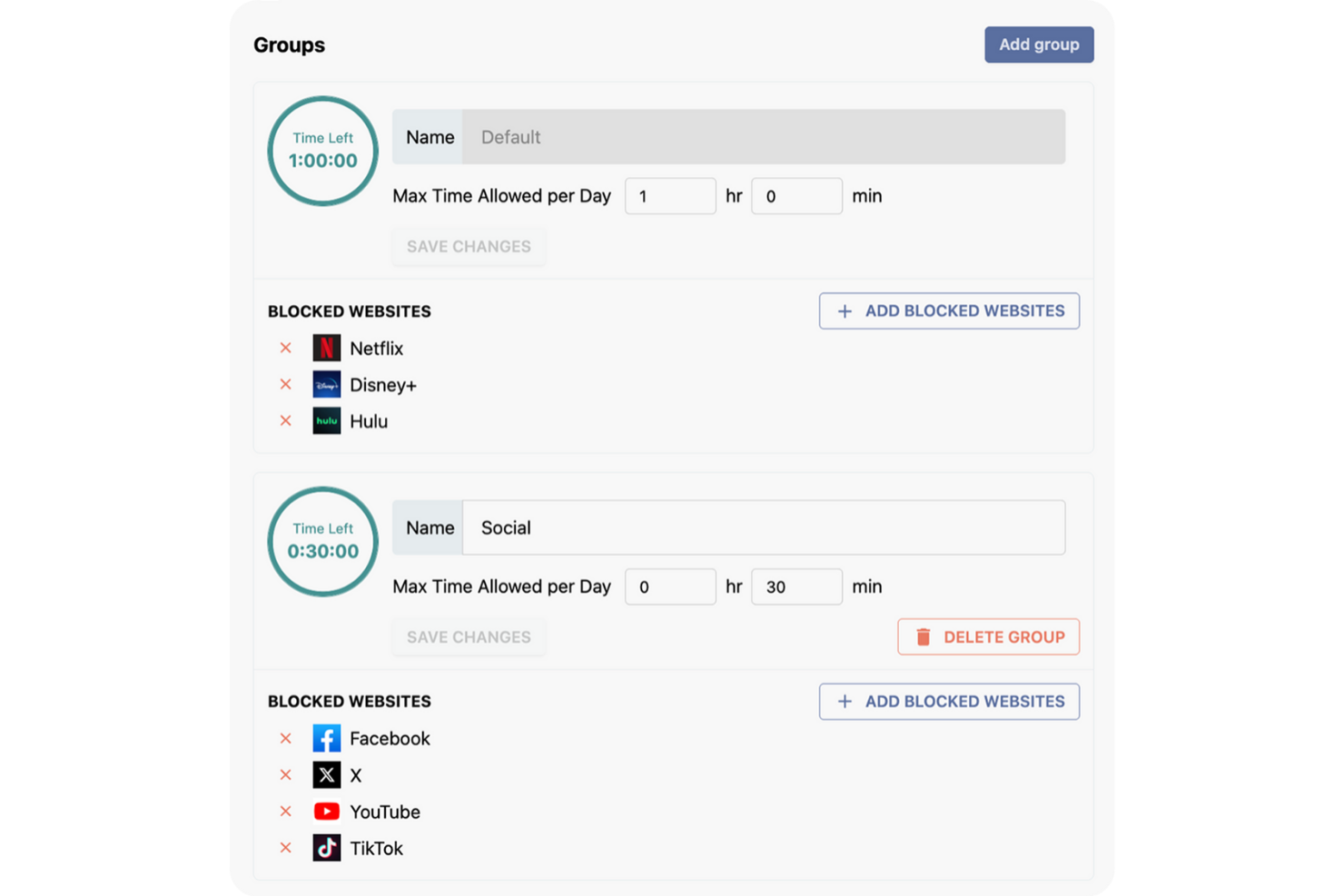
Stay Focused è pensato per chi desidera un controllo rigoroso sulle proprie abitudini digitali quotidiane, in particolare per chi ha bisogno di stabilire limiti precisi sui siti web fonte di distrazione. Questo strumento è ideale per project manager, liberi professionisti e lavoratori da remoto che vogliono personalizzare quali siti siano accessibili e per quanto tempo ogni giorno. Grazie alle sue impostazioni flessibili sui limiti giornalieri, Stay Focused ti aiuta a imporre confini e a ritrovare la concentrazione durante le ore di lavoro.
Perché ho scelto Stay Focused
A differenza di molte app per la concentrazione che offrono solo blocchi di base, Stay Focused ti permette di impostare limiti giornalieri altamente personalizzabili per siti specifici o categorie. Ho scelto Stay Focused perché consente di definire esattamente quanto tempo puoi trascorrere ogni giorno su siti distrattivi, fino al minuto. Puoi anche creare eccezioni, bloccare interi domini o persino programmare periodi di concentrazione ricorrenti. Questo livello di controllo è particolarmente utile se desideri adattare i confini digitali alle tue specifiche abitudini lavorative e agli obiettivi di produttività.
Funzionalità principali di Stay Focused
Altre funzionalità che troverai in Stay Focused includono:
- Opzione Nucleare: Blocca temporaneamente tutti i siti presenti nella tua lista bloccata per un periodo impostato, ignorando tutte le altre impostazioni esistenti.
- Pianificazione giorni e orari attivi: Ti permette di specificare in quali giorni e orari Stay Focused deve applicare le restrizioni.
- Modalità Sfida: Ti richiede di completare un compito o rispondere a una domanda prima di modificare le impostazioni, aggiungendo difficoltà alla disattivazione dei blocchi.
- Lista siti consentiti: Ti consente di creare una whitelist di siti che restano accessibili anche quando le restrizioni sono attive.
Integrazioni Stay Focused
Le integrazioni native non sono attualmente elencate.
Pros and Cons
Pros:
- Limiti giornalieri personalizzabili per singoli siti web
- L’Opzione Nucleare blocca tutti i siti istantaneamente
- La Modalità Sfida impedisce la facile disattivazione dei blocchi
Cons:
- Non tiene traccia di analisi dettagliate sull’utilizzo
- Senza funzionalità di gestione per team o gruppi


one sec introduce una pausa deliberata prima che tu apra app o siti web distraenti, aiutandoti a interrompere abitudini automatiche. Questo strumento è particolarmente utile per professionisti, studenti e chiunque desideri ridurre l'uso inconsapevole delle app durante la giornata lavorativa. Aggiungendo un breve ritardo e un invito alla consapevolezza, one sec ti incoraggia a fare scelte più intenzionali riguardo la tua attenzione digitale.
Perché ho scelto one sec
A differenza della maggior parte delle app per la concentrazione, one sec interrompe l'impulso di aprire app distraenti aggiungendo un breve e intenzionale ritardo. Ho scelto one sec perché utilizza una pausa forzata e un invito alla respirazione consapevole per aiutarti a riflettere se desideri davvero aprire un'app o un sito. Questo approccio è particolarmente efficace per spezzare l'abitudine dello scrolling automatico e costruire routine digitali più consapevoli. Per chi fatica a controllare l'uso impulsivo delle app, il ritardo intenzionale di one sec crea un momento prezioso per ristabilire la concentrazione.
Funzionalità principali di one sec
Altre funzionalità di one sec ti aiutano a personalizzare l'esperienza e monitorare i tuoi progressi:
- Blocco di app e siti web: Ti consente di impostare ritardi intenzionali sia per le app che per i siti web su più dispositivi.
- Dashboard di analisi: Mostra statistiche dettagliate su quante volte tenti di aprire app o siti bloccati.
- Supporto scorciatoie e automazione: Integra Apple Shortcuts per flussi di lavoro e trigger personalizzati.
- Pianificazione modalità concentrazione: Ti permette di programmare orari specifici in cui ritardi o blocchi sono attivi.
Integrazioni di one sec
Le integrazioni native attualmente non sono elencate.
Pros and Cons
Pros:
- Tempi di ritardo personalizzabili per ciascuna app
- Invito alla respirazione consapevole prima dell'apertura dell'app
- Traccia e mostra le statistiche di apertura delle app
Cons:
- Richiede permessi a livello di dispositivo per la configurazione
- Il ritardo può essere aggirato con tentativi ripetuti

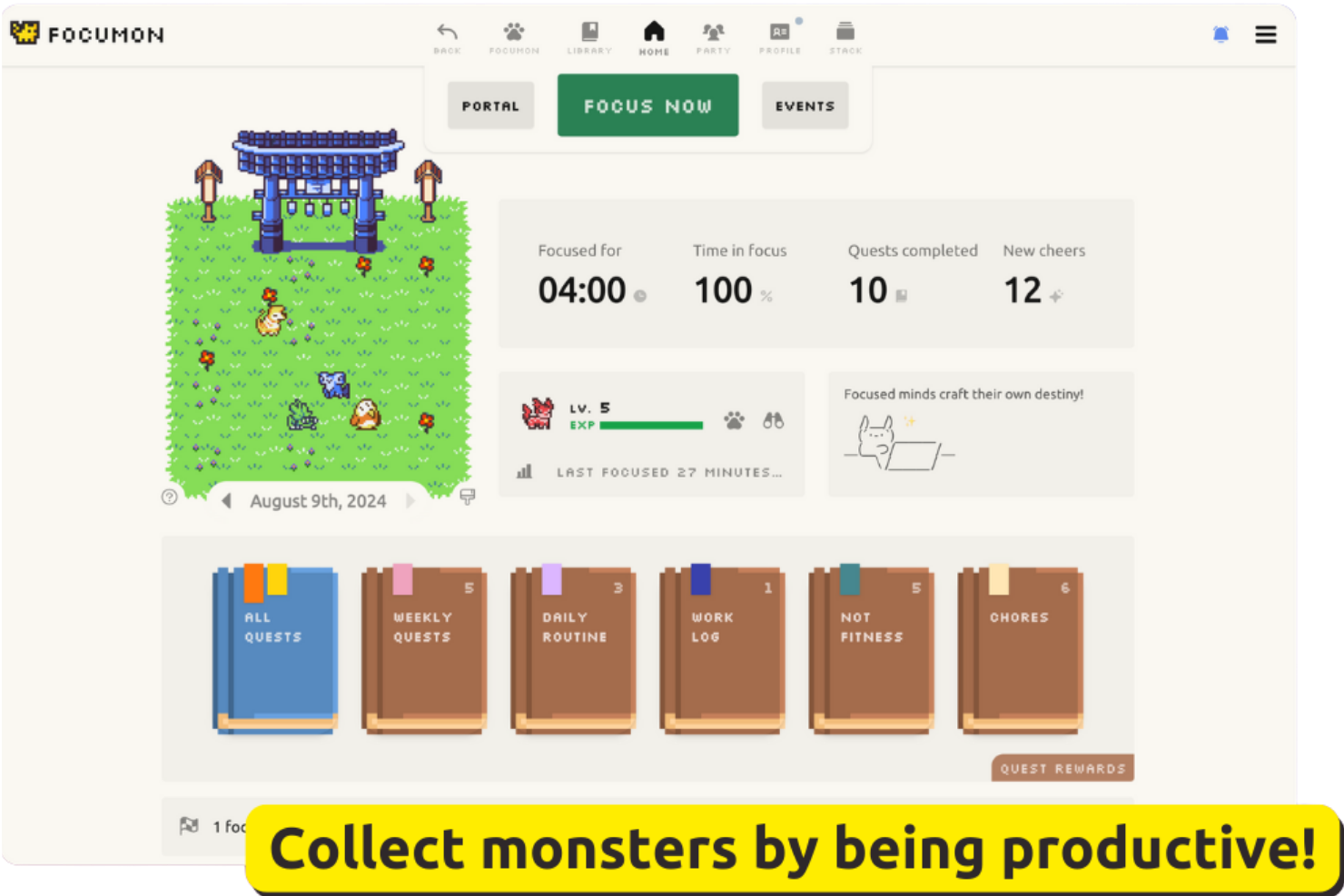
Focumon trasforma la produttività in un gioco, permettendoti di guadagnare e collezionare creature digitali man mano che completi le attività. Questo approccio è adatto a team e singoli che desiderano un modo giocoso per mantenere alta la motivazione e la responsabilità. Se cerchi un'app per la concentrazione che premi i tuoi progressi con incentivi concreti e gamificati, Focumon offre un approccio unico alla costruzione delle abitudini.
Perché ho scelto Focumon
Ciò che distingue Focumon è l'uso creativo degli incentivi gamificati per stimolare la produttività. Ho scelto Focumon perché trasforma il completamento delle attività in un'esperienza gratificante, permettendoti di collezionare ed evolvere creature digitali mentre resti concentrato. La piattaforma introduce anche elementi di competizione e collaborazione, consentendo agli utenti di unirsi a team e partecipare a sfide produttive. Per chi trova poco stimolanti le app di concentrazione tradizionali, l'approccio giocoso di Focumon può rendere la costruzione di migliori abitudini davvero coinvolgente.
Funzionalità principali di Focumon
Oltre al suo sistema di ricompense gamificate, ho trovato interessanti anche queste funzionalità:
- Timer di concentrazione giornaliero: Tiene traccia delle sessioni di lavoro concentrate e aiuta a monitorare le serie di produttività.
- Integrazione lista delle attività: Ti permette di creare, organizzare e spuntare le attività direttamente dalla piattaforma.
- Analisi dei progressi: Fornisce report visivi sulle attività completate e sulle tendenze di concentrazione nel tempo.
- Avatar personalizzabili: Permette di personalizzare le proprie creature digitali con accessori e temi unici.
Integrazioni di Focumon
Le integrazioni native attualmente non sono elencate.
Pros and Cons
Pros:
- Il sistema di ricompense gamificate stimola la concentrazione costante
- Le sfide di squadra incentivano la responsabilità di gruppo
- Le analisi visive dei progressi permettono di seguire le tendenze di produttività
Cons:
- I progressi si azzerano se viene interrotta la serie quotidiana
- Nessuna funzionalità offline per le sessioni di concentrazione


LeechBlock NG è un'estensione del browser pensata per chi ha bisogno di un controllo dettagliato sui siti web fonte di distrazione. È particolarmente utile per professionisti e studenti che vogliono impostare programmi di blocco articolati e regole personalizzate per siti diversi. Se stai cercando un'app per la concentrazione che ti consenta di regolare precisamente quando e come bloccare i siti, LeechBlock NG offre un livello di flessibilità difficile da eguagliare.
Perché ho scelto LeechBlock NG
LeechBlock NG si distingue per la sua capacità di creare regole di blocco del browser altamente personalizzate, indispensabili per chi necessita di un controllo rigoroso sulle distrazioni online. Ho scelto LeechBlock NG perché permette di impostare molteplici set di blocco, ognuno con la propria pianificazione, limiti di tempo ed eccezioni. Puoi bloccare i siti in base a giorni specifici, orari o anche dopo una certa quantità di tempo trascorsa a navigare. Per chi desidera adattare la propria app di concentrazione a routine lavorative complesse o obiettivi personali di produttività, LeechBlock NG offre una flessibilità senza pari.
Caratteristiche principali di LeechBlock NG
Altre funzionalità che rendono LeechBlock NG interessante per la gestione della concentrazione includono:
- Protezione tramite password: Richiede una password per accedere ai siti bloccati o modificare le impostazioni.
- Modalità blocco totale: Blocca istantaneamente tutti i siti specificati per un periodo stabilito.
- Messaggi di blocco personalizzabili: Permette di mostrare messaggi personalizzati quando si tenta di accedere a un sito bloccato.
- Dashboard delle statistiche: Monitora e mostra la tua attività di navigazione e di blocco nel tempo.
Integrazioni di LeechBlock NG
Non sono attualmente elencate integrazioni native.
Pros and Cons
Pros:
- Supporta set e regole di blocco personalizzati illimitati
- La protezione tramite password impedisce di aggirare le restrizioni
- La modalità blocco totale permette un blocco immediato e completo
Cons:
- Nessuna app mobile o sincronizzazione tra dispositivi
- Non ha un timer integrato per la concentrazione né la funzione Pomodoro

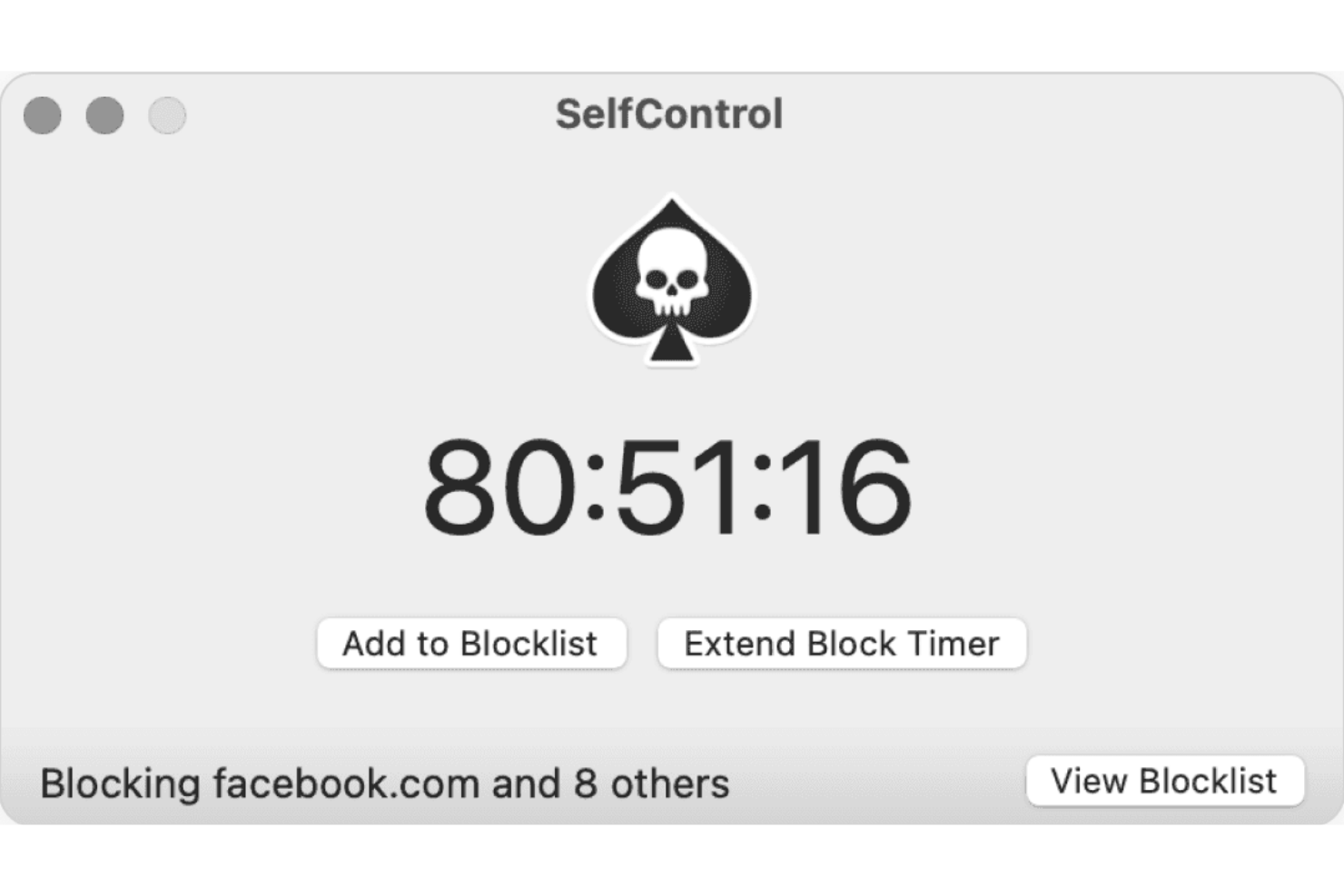
Se ti serve un approccio senza scuse per bloccare le distrazioni sul tuo Mac, SelfControl è l'app fatta per te. Questa applicazione è perfetta per studenti, freelance e chiunque desideri applicare un blocco rigoroso dei siti web che non può essere annullato—nemmeno riavviando il dispositivo. SelfControl è una scelta valida se cerchi un'app per la concentrazione che renda impossibile accedere ai siti bloccati fino allo scadere del timer.
Perché ho scelto SelfControl
Ciò che distingue SelfControl è il suo approccio intransigente al blocco dell'accesso ai siti web fonte di distrazione sui dispositivi Mac. Ho scelto SelfControl perché, una volta avviata una sessione di blocco, non c'è modo di disattivarla—nemmeno riavviando il computer o eliminando l'app. Questa applicazione severa è ideale per chi necessita di uno strumento in grado di eliminare ogni tentazione di eludere le proprie regole. Per gli utenti che fanno fatica con l'autodisciplina o necessitano di una barriera dura contro le distrazioni online, il timer irrevocabile e la blacklist di SelfControl la rendono particolarmente efficace.
Funzionalità Principali di SelfControl
Altre funzionalità che rendono SelfControl utile per le sessioni di concentrazione includono:
- Blocco personalizzato: Ti consente di aggiungere qualsiasi sito web o server di posta alla tua blacklist personale.
- Timer regolabile: Permette di impostare sessioni di blocco da 15 minuti fino a 24 ore.
- Codice open source: Offre trasparenza e la possibilità per gli utenti di revisionare o modificare l'app.
- Applicazione leggera: Funziona con risorse di sistema minime e non richiede servizi in background.
Integrazioni di SelfControl
Al momento non sono elencate integrazioni native.
Pros and Cons
Pros:
- I siti bloccati restano inaccessibili anche dopo il riavvio
- Impossibile disattivare il timer una volta avviato
- Open source per trasparenza e contributo della comunità
Cons:
- Nessuna pianificazione o sessioni di blocco ricorrenti
- Non è possibile aggiungere siti alla whitelist durante una sessione di blocco
Altre app per la concentrazione
Ecco alcune ulteriori opzioni di app per la concentrazione che non sono entrate nel mio elenco, ma che vale comunque la pena provare:
- Focus Friend
Ideale per integrazione con partner di responsabilità
- Cold Turkey Blocker
Ideale per blocchi programmati
- Habitify
Ideale per monitorare le abitudini insieme alle attività


Come Valuto le App per la Concentrazione
Cerco strumenti che superino due soglie: i requisiti di base—come il blocco delle distrazioni e il tracciamento delle sessioni—e i fattori che differenziano una app dall'altra per adattarsi meglio al modo in cui lavorano realmente i team di progetto.
Funzionalità di Base (Requisiti Minimi per Questa Lista)
Quando seleziono strumenti per la mia lista, valuto ciascuno su una scala da 0 (non offre la funzionalità) a 5 (eccelle in quest'area) per ognuna delle funzioni di base elencate di seguito. Poi, calcolo il punteggio totale dello strumento come percentuale. Ogni app deve raggiungere un punteggio totale minimo del 65% per essere considerata idonea all'inclusione.
- Blocco delle Distrazioni: Verifico che l'app blocchi siti web, applicazioni e notifiche—e se offre modalità rigide o lockdown che impediscono di aggirare i blocchi durante uno sprint.
- Timer per la Concentrazione o Pomodoro: Il timer dovrebbe supportare diversi stili di sessione, come gli intervalli Pomodoro classici o periodi di deep-work più lunghi per pianificare sessioni e gestire il backlog.
- Tracciamento & Analisi delle Sessioni: Cerco la cronologia delle sessioni registrate e rapporti di tendenza che aiutino a vedere dove vanno effettivamente le ore di concentrazione durante la settimana lavorativa.
- Integrazione con Task o Progetti: Collegare una sessione di concentrazione a un task specifico in strumenti come Asana, Jira o Todoist trasforma i dati temporali in qualcosa di utile per standup e revisioni di sprint.
- Disponibilità su Più Dispositivi: Valuto se l'app funziona su desktop, mobile e browser con dati sincronizzati, così la configurazione della concentrazione ti segue tra laptop e telefono.
- Regole Lavoro/Pausa Personalizzabili: Una buona app per la concentrazione consente di configurare la durata delle sessioni, gli intervalli di pausa e le liste di blocco per ogni progetto—così potrai distinguere le regole per il lavoro creativo da quelle per le attività amministrative.
Una volta ottenuta la lista degli strumenti che soddisfano i criteri, considero ciò che distingue ogni piattaforma.
Fattori di Differenziazione (Cosa Distingue i Fornitori)
Ecco come confronto le diverse soluzioni:
Funzionalità Distintive
Le sessioni di concentrazione di gruppo sono fondamentali per i project leader da remoto—app come Flown e Focusmate permettono ai membri del team distribuito di lavorare insieme in tempo reale, aumentando la responsabilità durante gli sprint. Cerco anche la sincronizzazione del calendario che importa programmi da Google Calendar o Outlook e blocca automaticamente il tempo di concentrazione attorno alle riunioni già pianificate. Funzionalità di gamification come streak e premi virtuali aiutano a consolidare abitudini di concentrazione per settimane, non solo per un pomeriggio produttivo.
Oltre le Funzionalità
Il modello di prezzo è importante—verifico se l'app offre un piano gratuito per i PM individuali che esplorano opzioni e prezzi trasparenti per utente in modo che sia scalabile per l'intero team di progetto. Anche privacy e gestione dei dati meritano attenzione, specie per app che monitorano l'attività sullo schermo o la navigazione. Valuto se il fornitore è chiaro su quali dati raccoglie e come li archivia. Le capacità di amministrazione per il team completano la valutazione; gli scrum master e i coordinatori di programma hanno bisogno di dashboard aggregati e controlli condivisi per le liste di blocco senza sfociare nel micromanagement.
Come scegliere le app per la concentrazione
È facile perdersi in lunghi elenchi di funzionalità e strutture tariffarie complesse. Per aiutarti a rimanere concentrato mentre affronti il tuo processo di selezione del software, ecco un elenco di fattori da tenere a mente:
| Fattore | Cosa considerare |
|---|---|
| Scalabilità | Lo strumento riuscirà a soddisfare le tue esigenze man mano che il team o il carico di lavoro crescono? Considera i limiti per gli utenti e le possibilità di aggiornamento. |
| Integrazioni | L’app si connette agli strumenti che già utilizzi, come calendari o piattaforme di gestione dei progetti? Verifica la presenza di integrazioni native, non solo dell’accesso tramite API. |
| Personalizzazione | Puoi personalizzare gli elenchi di blocco, i programmi e le notifiche in base al tuo flusso di lavoro? Evita gli strumenti che impongono strutture rigide se le tue esigenze sono specifiche. |
| Semplicità d’uso | L’interfaccia è intuitiva per tutti gli utenti? Verifica che la navigazione sia chiara e che i requisiti di formazione siano minimi, soprattutto per i team distribuiti. |
| Implementazione e avvio | Quanto velocemente può iniziare a lavorare il tuo team? Cerca risorse per l’avvio, supporto alla migrazione e verifica se la configurazione richiede il coinvolgimento del reparto IT. |
| Costo | Il modello tariffario è adatto al tuo budget e alle tue modalità di utilizzo? Fai attenzione ai costi nascosti, agli addebiti per utente o agli aggiornamenti necessari per le funzionalità principali. |
| Misure di sicurezza | In che modo lo strumento protegge i tuoi dati e la tua privacy? Verifica la crittografia, le politiche di conservazione dei dati e i controlli amministrativi, soprattutto se gestisci informazioni sensibili. |
| Disponibilità dell’assistenza | Quali canali di assistenza sono disponibili e in quali orari? Valuta se hai bisogno di chat dal vivo, assistenza telefonica o solo via email e se l’assistenza è inclusa o a pagamento. |
Cosa sono le app per la concentrazione?
Le app per la concentrazione sono app di produttività progettate per aiutare gli utenti a ridurre al minimo le distrazioni e mantenere la concentrazione durante le sessioni di lavoro o di studio. Queste app efficaci spesso bloccano l'accesso a siti che distraggono, come i social media, programmano periodi di concentrazione e monitorano i modelli di produttività per ridurre la procrastinazione e aiutarti a ottenere di più in meno tempo. Disponibili su piattaforme come App Store e Google Play, molte offrono una versione gratuita e supportano dispositivi con macOS e Windows. Alcune includono anche funzioni di gamification per rendere più coinvolgente il mantenimento della concentrazione.
Funzioni delle app per la concentrazione
Quando scegli le app per la concentrazione, presta attenzione alle seguenti funzioni chiave:
- Blocco di siti web e app: impedisce l'accesso a siti web o applicazioni che distraggono durante i periodi di concentrazione programmati, aiutando gli utenti a rimanere concentrati sul lavoro.
- Sessioni programmate: consente agli utenti di impostare orari specifici per i periodi di concentrazione o di pausa, supportando routine di lavoro strutturate e la gestione del tempo.
- Liste di blocco personalizzate: consente agli utenti di creare liste personalizzate di siti o app da bloccare, adattando l'esperienza ai fattori di distrazione individuali.
- Modalità di blocco: applica restrizioni che non possono essere facilmente aggirate, assicurando che gli utenti rimangano fedeli alle proprie sessioni di concentrazione.
- Monitoraggio della produttività: monitora il tempo trascorso in modalità concentrazione e fornisce report o analisi per aiutare gli utenti a comprendere e migliorare le proprie abitudini.
- Protezione tramite password: richiede una password per modificare o disattivare le impostazioni di blocco, aggiungendo un ulteriore livello di responsabilità.
- Messaggi motivazionali: visualizza messaggi personalizzati o preimpostati quando gli utenti tentano di accedere a contenuti bloccati, rafforzando gli obiettivi di concentrazione.
- Promemoria per le pause: avvisa gli utenti quando è il momento di fare una pausa, favorendo ritmi di lavoro sani e riducendo il rischio di esaurimento.
- Supporto per più dispositivi: consente di bloccare e monitorare l'attività su più dispositivi, garantendo una concentrazione costante sia sul computer sia sui dispositivi mobili.
- Profili utente: consente a più utenti di configurare preferenze e programmi individuali, rendendo l'app adatta ai team o ai dispositivi condivisi.
Vantaggi delle app per la concentrazione
L'implementazione di app per la concentrazione offre diversi vantaggi al tuo team e alla tua azienda. Eccone alcuni di cui potrai beneficiare:
- Riduzione delle distrazioni digitali: bloccare l'accesso a siti e app che distraggono aiuta gli utenti a mantenere la concentrazione ed evitare interruzioni durante le sessioni di lavoro.
- Migliore gestione del tempo: le sessioni programmate e i promemoria per le pause incoraggiano abitudini di lavoro strutturate e un uso più consapevole del tempo.
- Maggiore responsabilità: le modalità di blocco e la protezione tramite password rendono più difficile aggirare le restrizioni, aiutando gli utenti a perseguire i propri obiettivi di concentrazione.
- Migliori informazioni sulla produttività: il monitoraggio della produttività e le analisi offrono agli utenti e ai responsabili una visione dei modelli di concentrazione e delle aree da migliorare.
- Strategie di concentrazione personalizzate: le liste di blocco personalizzate e i messaggi motivazionali consentono agli utenti di adattare l'app ai propri fattori di distrazione e alle proprie preferenze.
- Concentrazione costante su più dispositivi: il supporto per più dispositivi assicura il mantenimento dei limiti di concentrazione sia quando si lavora su un computer sia su un dispositivo mobile.
- Routine di lavoro più sane: i promemoria integrati per le pause aiutano a prevenire l'esaurimento e promuovono abitudini di lavoro sostenibili ed equilibrate.
Costi e prezzi delle app per la concentrazione
La scelta delle app per la concentrazione richiede una conoscenza dei vari modelli e piani tariffari disponibili. I costi variano in base alle funzioni, alle dimensioni del team, ai componenti aggiuntivi e ad altri fattori. La tabella seguente riassume i piani più comuni, i relativi prezzi medi e le funzioni tipicamente incluse nelle soluzioni per la concentrazione:
Tabella comparativa dei piani per le app di concentrazione
| Tipo di piano | Prezzo medio | Funzioni comuni |
|---|---|---|
| Piano gratuito | $0 | Blocco di base di siti web e app, sessioni programmate limitate, report semplici e supporto per un singolo dispositivo. |
| Piano personale | $5–$10/user/month | Liste di blocco illimitate, programmazione avanzata, monitoraggio della produttività, protezione tramite password e sincronizzazione su più dispositivi. |
| Piano aziendale | $10–$25/user/month | Gestione del team, profili utente, controlli amministrativi centralizzati, analisi dell'utilizzo e supporto prioritario. |
| Piano per grandi aziende | $25–$50/user/month | Integrazioni personalizzate, misure di sicurezza avanzate, assistenza per l'avvio, funzioni per la conformità e gestione dedicata dell'account. |
Domande frequenti sulle app per la concentrazione
Ecco alcune risposte alle domande comuni sulle app per la concentrazione:
Le app per la concentrazione possono essere utilizzate su più dispositivi?
Sì, molte app per la concentrazione offrono il supporto per più dispositivi. Questo consente di bloccare le distrazioni e monitorare le sessioni di concentrazione sia sui dispositivi desktop sia su quelli mobili, garantendo limiti coerenti indipendentemente dal luogo in cui lavori.
In che modo le app per la concentrazione gestiscono le pause programmate?
La maggior parte delle app per la concentrazione consente di programmare sia i periodi di concentrazione sia le pause. L’app ti avviserà quando è il momento di fare una pausa, aiutandoti a mantenere un ritmo di lavoro sano ed evitare il burnout.
Le app per la concentrazione sono adatte ai team o solo ai singoli?
Sì, diverse app per la concentrazione includono funzionalità per i team. Queste possono comprendere controlli amministrativi centralizzati, profili utente e report per l’intero team, rendendole utili sia per i singoli sia per i gruppi.
Cosa succede se devo accedere a un sito bloccato durante una sessione?
Alcune app per la concentrazione consentono l’accesso di emergenza o richiedono una password per ignorare un blocco, mentre altre applicano modalità di blocco rigide che non possono essere aggirate. Controlla le impostazioni dell’app per verificare quale approccio si adatta alle tue esigenze.
Le app per la concentrazione archiviano o condividono i miei dati?
La maggior parte delle app per la concentrazione archivia i dati di utilizzo localmente o nel cloud, a seconda del prodotto. Consulta l’informativa sulla privacy e le misure di sicurezza di ciascuna app per capire come vengono gestiti i tuoi dati e se vengono condivisi con terze parti.