

10 migliori alternative a Zoho Creator per app senza codice nel 2026

Selezione di alternative a Zoho Creator


Una valida alternativa a Zoho Creator offre al tuo team la flessibilità necessaria per creare applicazioni con poco codice, integrazioni affidabili e controllo sui flussi di lavoro, senza vincoli nei confronti del fornitore. Se stai cercando le migliori alternative, probabilmente hai bisogno di un software di automazione tutto-in-uno basato sul cloud, in grado di ottimizzare i processi, supportare la gestione dei dati e migliorare il ciclo di vita dello sviluppo delle applicazioni. Molte piattaforme si concentrano sulla facilità d'uso grazie a un'interfaccia intuitiva, supportando al contempo team con diversi livelli di competenza tecnica, dalle piccole imprese alle organizzazioni più grandi.
Che cos'è Zoho Creator?
Zoho Creator è una piattaforma per lo sviluppo di applicazioni con poco codice che consente agli utenti di creare applicazioni aziendali personalizzate con una codifica minima. Offre strumenti per progettare flussi di lavoro, automatizzare i processi e integrarsi con altri software. I project manager, i team IT e gli utenti aziendali utilizzano Zoho Creator per creare applicazioni web e per dispositivi mobili adattate alle esigenze della propria organizzazione. La sua interfaccia con funzionalità di trascinamento e rilascio e i modelli predefiniti aiutano i team a lanciare rapidamente soluzioni senza una conoscenza approfondita della programmazione.
Tabella comparativa delle alternative a Zoho Creator
Questa tabella comparativa riassume i dettagli sui prezzi delle migliori alternative a Zoho Creator che ho selezionato:
| Tool | Best For | Trial Info | Price | ||
|---|---|---|---|---|---|
| 1 | Ideale per la personalizzazione open-source | Prova gratuita di 15 giorni + piano gratuito + demo gratuita disponibile | Da $15/utente/mese | Website | |
| 2 | Ideale per il design dell'UI drag-and-drop | Demo gratuita disponibile | Prezzi su richiesta | Website | |
| 3 | Ideale per la rapida distribuzione di app aziendali | Piano gratuito + demo gratuita disponibili | Da $1090/mese | Website | |
| 4 | Ideale per la creazione visiva di app web | Prova gratuita + piano gratuito disponibile | Da $59 al mese (fatturazione annuale) | Website | |
| 5 | Ideale con integrazione Microsoft 365 | Prova gratuita + piano gratuito disponibili | Da $20/utente/mese (fatturato annualmente) | Website | |
| 6 | Ideale per la prototipazione di app mobili | Piano gratuito disponibile | Da $36/mese (fatturati annualmente) | Website | |
| 7 | Ideale per soluzioni cloud scalabili | Piano gratuito + demo gratuita disponibile | Da $36.300 (fatturato annualmente) | Website | |
| 8 | Ideale per lo sviluppo di app multipiattaforma | Piano gratuito disponibile | Da $19/mese (fatturazione annuale) | Website | |
| 9 | Ideale per creare portali rivolti ai clienti | Piano gratuito disponibile | Da $20/mese (fatturazione annuale) | Website | |
| 10 | Ideale per la modernizzazione dei sistemi legacy | Prova gratuita + demo gratuita disponibili | Prezzi su richiesta | Website |
Perché fidarsi dei nostri consigli sui software
Il nostro team testa e recensisce software dal 2012. In quanto project manager noi stessi, sappiamo quanto sia difficile — e importante — scegliere il software giusto.
Per questa guida, abbiamo valutato gli strumenti attraverso test pratici e ricerche indipendenti, assegnando un punteggio agli strumenti in base ai nostri criteri di selezione. Ci basiamo inoltre sulle competenze di leader di pensiero del settore e di professionisti attivi nella gestione dei progetti.
Le nostre recensioni riflettono il nostro giudizio editoriale umano, non un discorso di vendita.
Revisori esperti:
Recensioni delle alternative a Zoho Creator
Di seguito trovi i miei riepiloghi dettagliati delle migliori alternative a Zoho Creator incluse nella mia selezione. Le mie recensioni offrono una panoramica approfondita delle funzionalità, delle integrazioni e dei casi d’uso ideali di ciascuna piattaforma, per aiutarti a trovare quella più adatta a te.

Appsmith
Ideale per la personalizzazione open-source
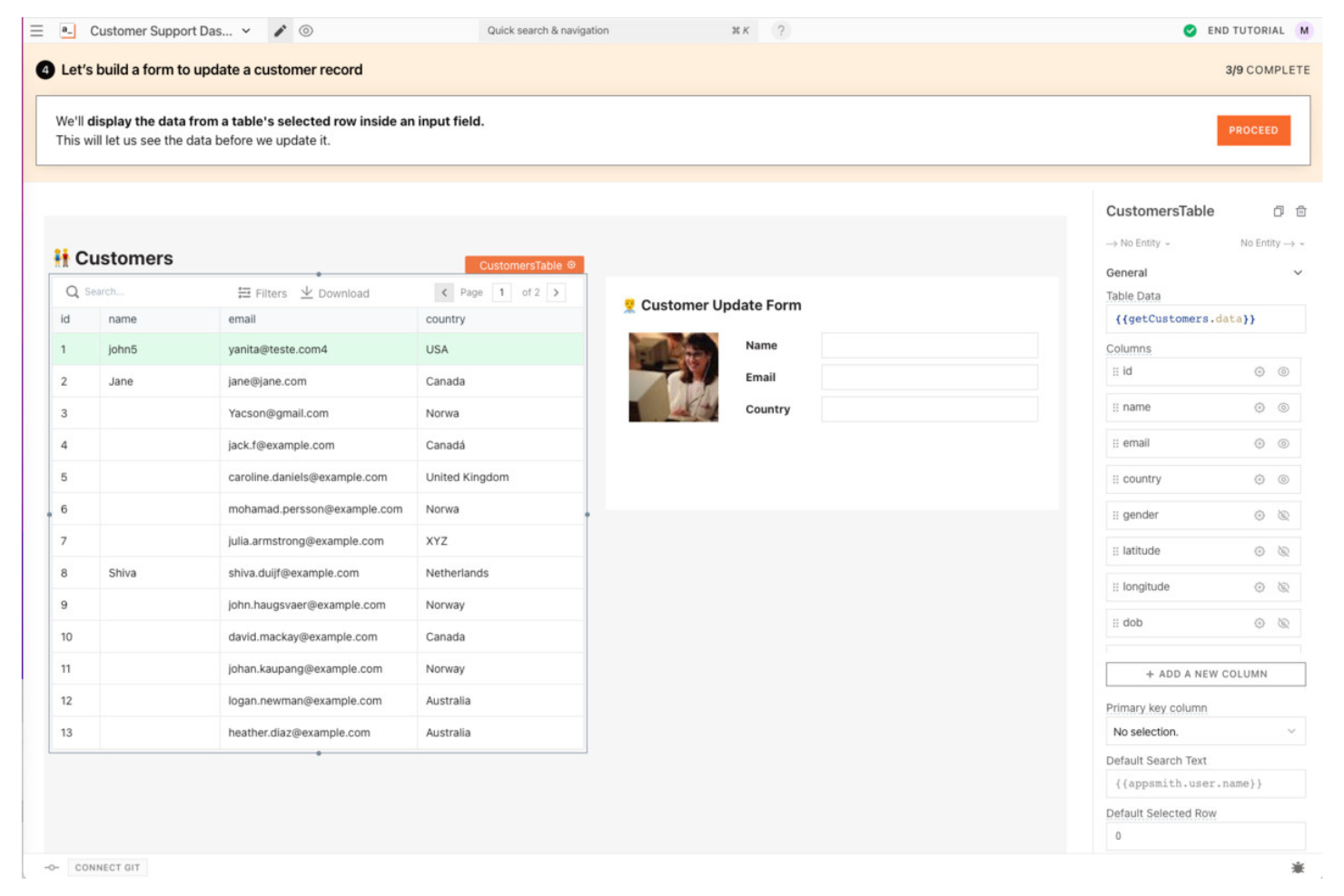
Sviluppatori e team tecnici alla ricerca di un'alternativa open-source altamente personalizzabile a Zoho Creator spesso scelgono Appsmith. La piattaforma è progettata per chi desidera il pieno controllo sulla logica dell'app, sui componenti dell'interfaccia utente e sulle integrazioni, senza vincoli del fornitore. Appsmith si distingue perché permette l'hosting autonomo, l'estensione con codice personalizzato e la connessione a quasi qualsiasi fonte di dati.
Perché Appsmith è una valida alternativa a Zoho Creator
Se desideri il pieno controllo sul codice e il deployment della tua applicazione, Appsmith è una solida alternativa a Zoho Creator. Ho scelto Appsmith perché è open-source, quindi puoi gestire autonomamente l'hosting e personalizzare ogni aspetto delle tue applicazioni. La piattaforma ti consente di scrivere JavaScript personalizzato per la logica aziendale e di estendere i componenti dell'interfaccia utente per soddisfare esigenze specifiche. Per i team che necessitano di una flessibilità superiore rispetto a quella offerta dagli strumenti low-code proprietari, la personalizzazione open-source di Appsmith si distingue.
Caratteristiche principali di Appsmith
Altre funzionalità degne di nota di Appsmith includono:
- Editor drag-and-drop per l’interfaccia utente: organizza e configura visivamente i componenti dell'interfaccia senza scrivere codice.
- Libreria di widget predefiniti: accesso a una raccolta di widget pronti all’uso per moduli, tabelle, grafici e altro.
- Integrazione con il controllo di versione: collega repository Git per sviluppo e deployment collaborativi.
- Controlli di accesso basati su ruoli: assegna permessi e gestisci l’accesso degli utenti per diversi ambienti applicativi.
Integrazioni Appsmith
Le integrazioni includono Airtable, Asana, AWS Lambda, Dropbox, Freshdesk, GitHub, Google Drive, HubSpot, Jira e altri.
Pros and Cons
Pros:
- Opzione di hosting autonomo per il pieno controllo dei dati
- Codice open-source che permette una personalizzazione profonda
- Supporta JavaScript personalizzato per la logica aziendale
Cons:
- Nessun designer integrato per l'automazione dei flussi di lavoro
- Le funzionalità avanzate possono richiedere competenze di sviluppo

Ideale per il design dell'UI drag-and-drop
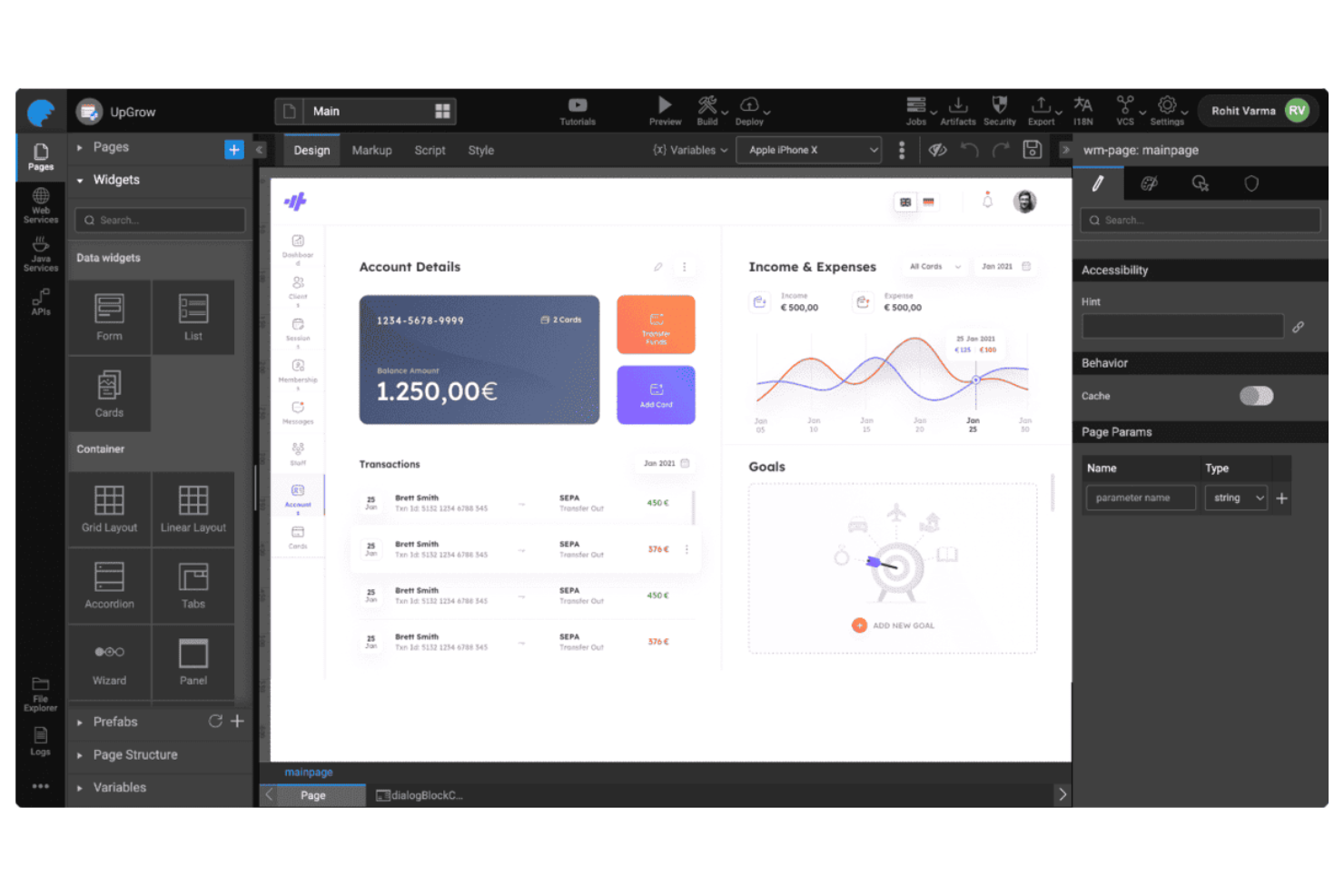
Se stai cercando un'alternativa a Zoho Creator con un approccio fortemente visivo, WaveMaker mette il design dell'interfaccia drag-and-drop al centro della sua piattaforma. È particolarmente utile per i team di prodotto e i reparti IT che desiderano creare app web e mobile moderne senza la necessità di scrivere molto codice. WaveMaker si distingue per i suoi controlli dell'interfaccia utente precisi al pixel e la possibilità di personalizzare visivamente i layout, rendendo più facile offrire applicazioni rifinite e intuitive.
Perché WaveMaker è una buona alternativa a Zoho Creator
A differenza di molte piattaforme low-code, WaveMaker pone un forte accento sul design dell'interfaccia utente tramite drag-and-drop, motivo per cui l'ho scelta come alternativa a Zoho Creator. La piattaforma offre una vasta gamma di widget preconfigurati e un controllo a livello di pixel sui layout, così puoi creare interfacce altamente personalizzate senza scrivere codice. Apprezzo anche il fatto che WaveMaker supporti il design responsivo nativamente, permettendoti di creare applicazioni impeccabili su qualsiasi dispositivo. Per i team che vogliono dare priorità al design visivo e all'esperienza utente, WaveMaker offre una flessibilità che va oltre quanto proposto da Zoho Creator.
Caratteristiche principali di WaveMaker
Altre funzionalità di WaveMaker che vale la pena evidenziare includono:
- API Integration Studio: Connettiti a REST, SOAP e API di terze parti direttamente dalla piattaforma.
- Gestione degli accessi basata sui ruoli: Assegna permessi e gestisci i ruoli utente per un accesso sicuro all'app.
- Distribuzione automatizzata delle app: Distribuisci applicazioni in cloud o on-premise con un solo clic.
- Integrazione con il controllo di versione: Integra con repository Git per gestire le versioni dell'app e collaborare sul codice.
Integrazioni di WaveMaker
Le integrazioni native attualmente non sono elencate.
Pros and Cons
Pros:
- Builder UI drag-and-drop con precisione al pixel
- Controllo di versione integrato con integrazione Git
- Supporta la distribuzione su più piattaforme cloud
Cons:
- Tempi limitati di template preimpostati per prototipazione rapida
- La documentazione può risultare incoerente tra le varie funzionalità
Mendix
Ideale per la rapida distribuzione di app aziendali

Mendix è una piattaforma low-code progettata per i team che hanno bisogno di distribuire rapidamente applicazioni di livello aziendale e su larga scala. È particolarmente indicata per i reparti IT e le grandi organizzazioni che desiderano modernizzare flussi di lavoro complessi o digitalizzare processi legacy. Mendix si distingue per i suoi strumenti avanzati di collaborazione, le opzioni di distribuzione multi-cloud e il supporto sia per applicazioni web che mobile.
Perché Mendix è una valida alternativa a Zoho Creator
Per i team concentrati su una rapida distribuzione di applicazioni aziendali, Mendix offre funzionalità che vanno oltre quelle di Zoho Creator. Ho scelto Mendix perché il suo ambiente di sviluppo visuale supporta sia la personalizzazione senza codice sia quella avanzata con codice professionale, rendendolo adatto a esigenze aziendali complesse. Gli strumenti di collaborazione integrati della piattaforma aiutano i team interfunzionali a lavorare insieme su grandi progetti senza attriti. Inoltre, Mendix consente la distribuzione multi-cloud e on-premise, fondamentale per le organizzazioni con rigidi requisiti infrastrutturali.
Funzionalità principali di Mendix
Altre funzionalità di Mendix da evidenziare includono:
- Sviluppo assistito dall'IA: Mendix Assist fornisce suggerimenti basati sull'intelligenza artificiale per velocizzare la progettazione e la logica delle app.
- Marketplace di componenti riutilizzabili: Accesso a una libreria di widget, connettori e modelli predefiniti per accelerare lo sviluppo.
- Strumenti di test automatizzati: Funzionalità di test integrate che permettono di validare il funzionamento dell'app prima della distribuzione.
- Controlli di accesso basati sui ruoli: Imposta permessi granulari per utenti e team, per gestire la sicurezza dei dati e la conformità.
Integrazioni Mendix
Le integrazioni includono AWS, Microsoft Azure, Salesforce, SAP, Snowflake, Oracle, Okta, HubSpot, Slack, Dropbox e altro ancora.
Pros and Cons
Pros:
- Supporta distribuzione multi-cloud e on-premise
- Offre suggerimenti di sviluppo assistito dall'IA
- Include un marketplace per componenti riutilizzabili
Cons:
- La personalizzazione è limitata rispetto allo sviluppo completamente in codice
- Il vincolo con il fornitore rende difficile la migrazione

Bubble
Ideale per la creazione visiva di app web

Se vuoi realizzare app web personalizzate senza scrivere codice, Bubble offre un approccio visivo difficilmente eguagliabile. È particolarmente utile per startup, product manager e team digitali che hanno bisogno di prototipare o lanciare rapidamente applicazioni web interattive. A differenza di Zoho Creator, Bubble ti permette di controllare al livello del singolo pixel il design e la logica dell'app, rappresentando una scelta eccellente per i team con esigenze specifiche di interfaccia o workflow.
Perché Bubble è una valida alternativa a Zoho Creator
Per i team che desiderano il pieno controllo visivo sulla creazione di app web, Bubble offre una flessibilità progettuale che Zoho Creator non può eguagliare. Ho scelto Bubble perché il suo editor drag-and-drop consente di personalizzare ogni elemento della pagina, supportando layout precisi al pixel e workflow interattivi. È inoltre possibile definire logiche complesse e interazioni dinamiche sui dati direttamente nell'interfaccia visiva. Bubble è quindi perfetto per chiunque debba creare applicazioni web altamente personalizzate e interattive senza ricorrere alla programmazione tradizionale.
Funzionalità principali di Bubble
Altre funzionalità di Bubble degne di nota includono:
- Componenti riutilizzabili: Crea e gestisci elementi personalizzati che possono essere riutilizzati su più pagine o app.
- Connettore API: Connettiti a servizi esterni e API direttamente dalla tua app Bubble.
- Controllo delle versioni: Gestisci le modifiche all'app e torna facilmente alle versioni precedenti se necessario.
- Autenticazione utente integrata: Aggiungi iscrizione, login e permessi per gli utenti senza plugin aggiuntivi.
Integrazioni di Bubble
Non sono attualmente elencate integrazioni native.
Pros and Cons
Pros:
- Controllo al pixel sul design dell'app web
- Database integrato per l'archiviazione dinamica dei dati
- Editor visivo dei workflow per logiche complesse
Cons:
- Nessuna opzione di distribuzione nativa su app mobile
- L'esportazione del codice non è supportata

Ideale con integrazione Microsoft 365
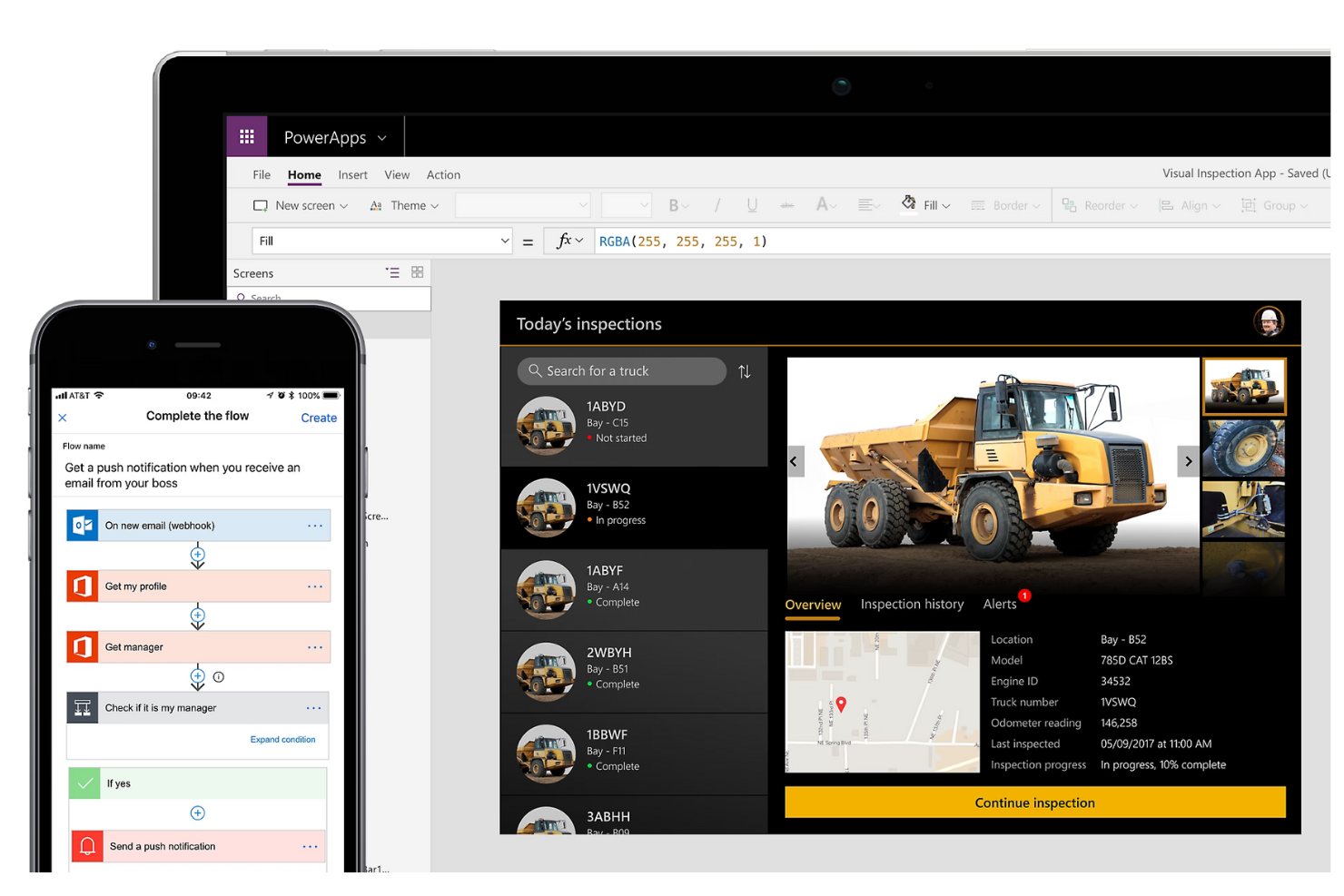
Per le organizzazioni già investite in Microsoft 365, Microsoft Power Apps offre un'estensione naturale per la creazione di applicazioni aziendali personalizzate. La piattaforma è particolarmente utile per i team IT e gli analisti di business che vogliono automatizzare i processi e collegare i dati tra i servizi Microsoft. La sua profonda integrazione con strumenti come SharePoint, Teams ed Excel la distingue da Zoho Creator e altre alternative.
Perché Microsoft Power Apps è una valida alternativa a Zoho Creator
Quando la tua azienda si affida a Microsoft 365, Power Apps diventa una solida alternativa a Zoho Creator grazie alle sue connessioni native con l'ecosistema Microsoft. Ho scelto Power Apps per la sua capacità di creare app che funzionano direttamente con le liste di SharePoint, i canali di Teams e i file di Excel senza configurazioni aggiuntive. La piattaforma supporta inoltre l'automazione tramite Power Automate, consentendo di avviare flussi di lavoro tra i servizi Microsoft. Per i team che già utilizzano strumenti Microsoft, questo livello di integrazione è difficile da eguagliare con altre piattaforme low-code.
Funzionalità principali di Microsoft Power Apps
Altre funzionalità di Microsoft Power Apps degne di nota includono:
- AI Builder: Aggiungi funzionalità guidate dall'IA come l'elaborazione dei moduli e i modelli predittivi alle tue app.
- Strumenti di progettazione responsiva: Crea applicazioni che si adattano automaticamente ai layout di dispositivi mobili, tablet e desktop.
- Integrazione con Dataverse: Archivia e gestisci i dati aziendali in modo sicuro utilizzando Microsoft Dataverse come backend.
- Sicurezza basata sui ruoli: Imposta permessi dettagliati per utenti e gruppi all'interno delle tue applicazioni.
Integrazioni di Microsoft Power Apps
Le integrazioni includono Microsoft 365, SharePoint, Teams, Excel, Dynamics 365, OneDrive, Outlook, Azure, SQL Server e altri.
Pros and Cons
Pros:
- Integrazione diretta con i servizi Microsoft 365
- Funzionalità AI integrate per il miglioramento delle app
Cons:
- Automazione estesa con flussi di lavoro Power Automate
- I connettori personalizzati richiedono licenza premium
- Personalizzazione limitata per integrazioni non Microsoft
Adalo
Ideale per la prototipazione di app mobili

Creare app mobili visivamente è al centro di ciò che Adalo offre. È una soluzione ideale per product manager, agenzie e fondatori che devono prototipare e lanciare rapidamente app mobili native per iOS e Android. A differenza di Zoho Creator, Adalo punta su un design mobile-first e sulla pubblicazione diretta negli app store, rendendolo perfetto per i team che danno priorità all’esperienza mobile.
Perché Adalo è una buona alternativa a Zoho Creator
Se la priorità del tuo team è prototipare rapidamente app mobili, Adalo si distingue come una valida alternativa a Zoho Creator. Ho scelto Adalo perché permette di progettare visivamente app mobili native e di visualizzarle istantaneamente su dispositivi reali. Con la sua interfaccia drag-and-drop puoi creare schermi interattivi, collegare dati e aggiungere logica senza scrivere codice. Adalo supporta inoltre la pubblicazione diretta sia su Apple App Store che su Google Play, qualcosa che Zoho Creator non offre nativamente.
Funzionalità principali di Adalo
Altre funzionalità di Adalo degne di nota includono:
- Marketplace di componenti: Accedi a una libreria di componenti predefiniti per estendere le funzionalità dell’app.
- Azioni personalizzate: Configura logiche e integrazioni personalizzate con servizi esterni tramite chiamate API.
- Autenticazione utente: Aggiungi flussi di registrazione, login e recupero password direttamente nella tua app.
- Notifiche push: Invia aggiornamenti in tempo reale e avvisi agli utenti sui loro dispositivi.
Integrazioni di Adalo
Le integrazioni includono Xano, Stripe, IAPHUB, Google Sheets, Airtable, QuickBooks, HubSpot, Mailchimp, Zoom, Google Maps e altri.
Pros and Cons
Pros:
- Pubblicazione diretta negli store iOS e Android
- Editor drag-and-drop per layout mobili nativi
- Supporto integrato per le notifiche push
Cons:
- Nessun strumento di reportistica o analisi integrato
- Supporto limitato per relazioni dati complesse


Se il tuo team deve creare app complesse di livello enterprise che si scalano nel cloud, OutSystems merita sicuramente attenzione. La piattaforma è pensata per i reparti IT e i team di sviluppo software che desiderano fornire applicazioni sicure e ad alte prestazioni con esigenze avanzate di integrazione e distribuzione. A differenza di Zoho Creator, OutSystems supporta lo sviluppo full-stack e offre strumenti integrati per la gestione di soluzioni critiche su larga scala.
Perché OutSystems è una valida alternativa a Zoho Creator
Per le organizzazioni che devono distribuire applicazioni su larga scala, OutSystems si distingue come alternativa a Zoho Creator grazie al suo focus su soluzioni cloud-native di livello aziendale. Ho scelto OutSystems per la sua capacità di gestire flussi di lavoro complessi, grandi volumi di utenti ed esigenze di sicurezza rigorose. La piattaforma offre strumenti integrati per la distribuzione automatizzata, il monitoraggio delle prestazioni e una scalabilità avanzata tra i diversi ambienti cloud. Se il tuo team sta costruendo applicazioni mission-critical che devono crescere insieme al business, OutSystems fornisce funzionalità che vanno ben oltre le piattaforme low-code di base.
Funzionalità principali di OutSystems
Altre funzionalità di OutSystems che hanno attirato la mia attenzione includono:
- Progettazione dei flussi di lavoro visiva: Crea e modifica la logica delle applicazioni utilizzando un’interfaccia drag-and-drop.
- Componenti UI riutilizzabili: Accedi a una libreria di elementi di interfaccia predefiniti per uno sviluppo delle app più rapido.
- Strumenti di test integrati: Esegui test automatici e manuali direttamente sulla piattaforma.
- Distribuzione multicanale: Lancia applicazioni su web, mobile e tablet da un unico codice sorgente.
Integrazioni OutSystems
Non sono attualmente elencate integrazioni native.
Pros and Cons
Pros:
- Sviluppo full-stack per app enterprise complesse
- Automazione della distribuzione integrata per ambienti cloud
- Builder visuale dei workflow per prototipazione rapida
Cons:
- L’ottimizzazione delle prestazioni può richiedere molte risorse
- Risorse della community limitate rispetto ai concorrenti

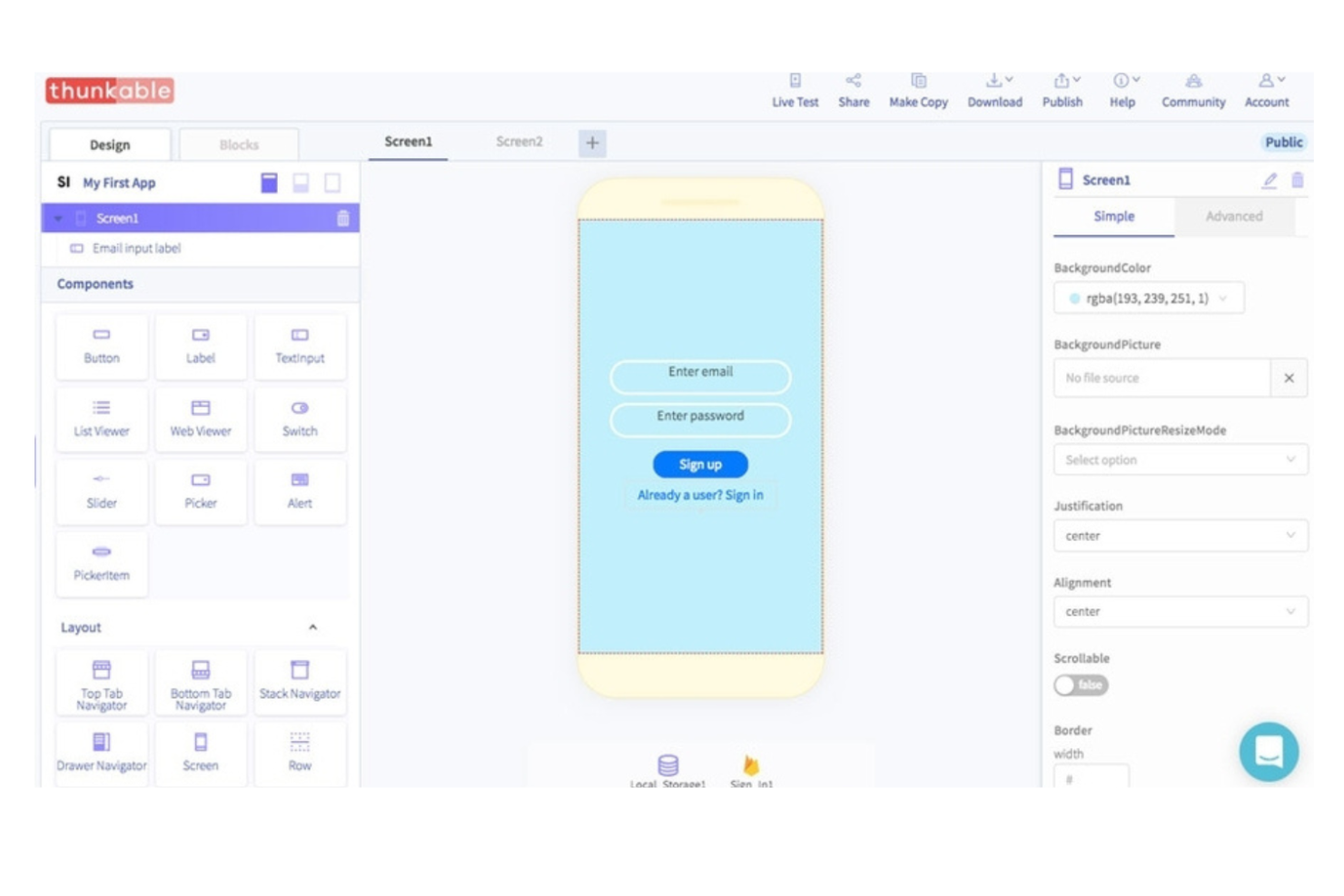
Thunkable ti offre la possibilità di creare app sia per iOS che per Android da un unico progetto. È particolarmente utile per i team di prodotto, gli educatori e le startup che desiderano lanciare app multipiattaforma senza dover gestire codici separati. A differenza di Zoho Creator, Thunkable mette l'accento sui blocchi logici visuali e sui test in tempo reale sui dispositivi, rendendo più semplice creare e iterare esperienze mobili su più piattaforme contemporaneamente.
Perché Thunkable è una valida alternativa a Zoho Creator
Per i team focalizzati sullo sviluppo di app multipiattaforma, Thunkable offre un netto vantaggio rispetto a Zoho Creator. Ho scelto Thunkable perché consente di progettare e distribuire app native sia per iOS che per Android a partire da un unico progetto, eliminando la necessità di mantenere build separate. I suoi blocchi logici visuali rendono possibile creare comportamenti complessi delle app senza codice, e puoi testare le modifiche istantaneamente su dispositivi reali. Questo approccio è particolarmente utile se il tuo team deve offrire esperienze mobili coerenti su più piattaforme.
Funzionalità principali di Thunkable
Altre funzionalità degne di nota di Thunkable includono:
- Interfaccia drag-and-drop: Crea schermate delle app in modo visivo disponendo i componenti su una tela.
- Gestione dei media: Aggiungi elementi come immagini, audio e video direttamente nei tuoi progetti di app.
- API Web personalizzate: Collega fonti dati e servizi esterni utilizzando blocchi API configurabili.
- Anteprima live dell'app: Visualizza aggiornamenti in tempo reale sul tuo dispositivo mentre apporti modifiche nell'editor.
Integrazioni di Thunkable
Le integrazioni includono Cloudinary, Airtable, Firebase, Google Sheets, Webflow, Xano, Backendless, RevenueCat, Figma e altro.
Pros and Cons
Pros:
- Blocchi logici visuali per costruire flussi di lavoro delle app
- Anteprima live su dispositivo per test immediati
- Supporta connessioni API Web personalizzate
Cons:
- Nessun sistema di gestione utenti integrato
- Le animazioni avanzate richiedono strumenti esterni
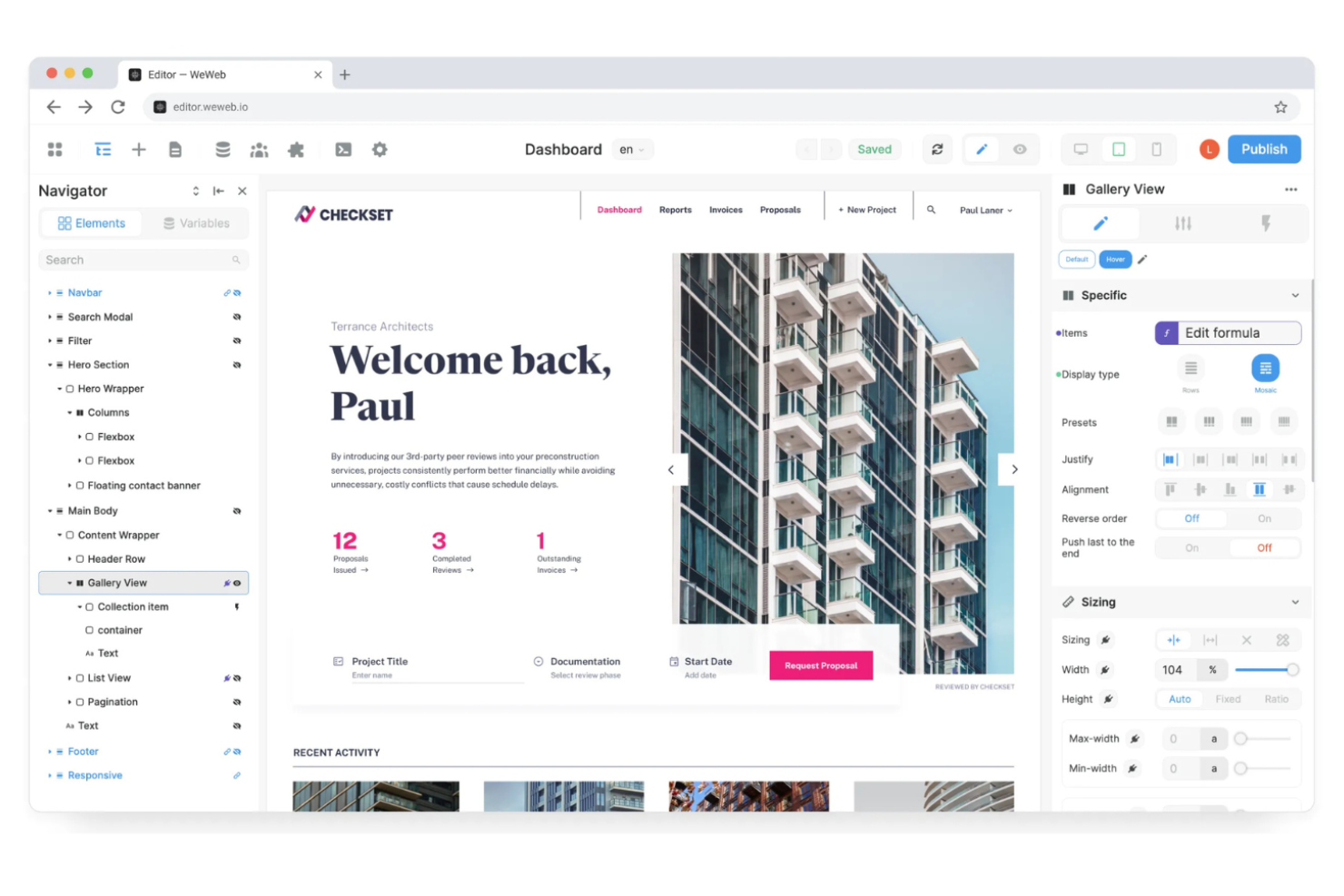
Se hai bisogno di creare portali sicuri e interattivi rivolti ai clienti, WeWeb offre un approccio flessibile che si distingue da Zoho Creator. È una soluzione adatta ad agenzie, fornitori SaaS e team interni che vogliono realizzare app web brandizzate con un controllo dettagliato sui permessi degli utenti e sulle fonti dati. L’editor visuale e la configurazione indipendente dal backend di WeWeb consentono di collegarsi a qualsiasi API o database, facilitando la creazione di esperienze personalizzate per i clienti senza limitazioni sul backend.
Perché WeWeb è una valida alternativa a Zoho Creator
Quando la tua priorità è sviluppare portali rivolti ai clienti, WeWeb ti offre maggiore flessibilità rispetto a Zoho Creator. Ho scelto WeWeb perché permette di progettare app web completamente personalizzate con autenticazione avanzata e controlli di accesso dettagliati, essenziali per i portali dei clienti. Puoi collegarti a qualsiasi backend o API, così non sei legato a un’unica fonte dati o a un workflow specifico. Questo rende WeWeb una scelta solida se vuoi offrire esperienze sicure e su misura a diversi gruppi di clienti.
Funzionalità principali di WeWeb
Altre funzionalità di WeWeb che meritano attenzione includono:
- Page builder drag-and-drop: Organizza e personalizza i layout dei portali in modo visivo, senza codice.
- Logica condizionale: Imposta workflow dinamici e regole di visualizzazione in base alle azioni degli utenti o ai dati.
- Componenti riutilizzabili: Crea e gestisci componenti personalizzati da utilizzare in più progetti.
- Controllo versione: Tieni traccia delle modifiche e ripristina versioni precedenti dei tuoi portali.
Integrazioni WeWeb
Le integrazioni includono Airtable, Anthropic, Auth0, Cloudinary, Google Sheets, Intercom, Slack, Stripe, Supabase e altro ancora.
Pros and Cons
Pros:
- Supporta ruoli e permessi utente dettagliati
- Si collega nativamente a molteplici fonti backend
- Offre componenti riutilizzabili per accelerare lo sviluppo
Cons:
- Richiede autenticazione esterna per SSO
- Manca di strumenti di automazione dei workflow integrati


Per i team che devono affrontare la sfida di modernizzare i sistemi legacy, LANSA offre una piattaforma specializzata che crea un ponte tra vecchie e nuove tecnologie. È una soluzione ideale per i dipartimenti IT e le aziende che hanno bisogno di aggiornare le applicazioni aziendali principali senza dover ricostruire l'intero sistema. A differenza di Zoho Creator, LANSA si concentra sull'integrazione e sull'estensione delle infrastrutture legacy esistenti, facilitando l'implementazione di applicazioni web e mobile moderne sopra i sistemi consolidati.
Perché LANSA è una valida alternativa a Zoho Creator
LANSA si distingue per i team che hanno bisogno di modernizzare sistemi legacy senza dover ripartire da zero. Ho scelto LANSA perché permette di sviluppare applicazioni web e mobile che si collegano direttamente ad ambienti legacy come IBM i, AS/400 e altri. Il suo ambiente di sviluppo low-code supporta sia la creazione di nuove applicazioni sia l'estensione della logica aziendale già in uso, cosa su cui Zoho Creator non si concentra. Per le organizzazioni con infrastrutture legacy critiche, LANSA offre un percorso di modernizzazione mantenendo i sistemi centrali operativi.
Funzionalità principali di LANSA
Altre caratteristiche di LANSA che mi hanno colpito includono:
- Visual LANSA IDE: Sviluppa e gestisci applicazioni utilizzando un ambiente grafico di sviluppo.
- Deployment con singola base di codice: Distribuisci app su web, desktop e mobile partendo da un'unica base di codice.
- Gestione integrata dei cambiamenti: Traccia, gestisci e annulla le modifiche direttamente sulla piattaforma.
- Controlli di sicurezza integrati: Applica funzionalità di autenticazione e autorizzazione direttamente nelle tue applicazioni.
Integrazioni LANSA
Attualmente non sono elencate integrazioni native.
Pros and Cons
Pros:
- Base di codice unica per il deployment su web e mobile
- Gestione dei cambiamenti integrata per aggiornamenti delle applicazioni
- IDE visuale per lo sviluppo rapido di applicazioni
Cons:
- Modelli preimpostati limitati per interfacce moderne
- Meno integrazioni di terze parti rispetto ai concorrenti low-code
Altre alternative a Zoho Creator
Ecco alcune alternative aggiuntive a Zoho Creator che non sono state incluse nella mia selezione, ma che vale comunque la pena prendere in considerazione:
- Lightning App Builder
Ideale per lo sviluppo di app guidate dal CRM
- Kissflow
Ideale per funzionalità di automazione dei flussi di lavoro
- Glide
Ideale per creare strumenti interni progettati prima per i dispositivi mobili


Come valuto le alternative a Zoho Creator
Divido la mia valutazione in due livelli: le funzionalità di base che ogni strumento deve avere e gli elementi distintivi, come la creazione di applicazioni con l'intelligenza artificiale o i portali per i clienti, che rendono una soluzione più adatta ai team di progetto.
Funzionalità principali (requisiti minimi per questo elenco)
Quando seleziono gli strumenti per il mio elenco, assegno a ciascuno un punteggio su una scala da 0 (non offre la funzionalità) a 5 (eccelle in quest'area) per ognuna delle funzionalità principali indicate di seguito. Poi calcolo il punteggio totale dello strumento e lo converto in percentuale. Ogni strumento deve raggiungere un punteggio totale minimo del 65% per essere preso in considerazione.
- Creazione di applicazioni a basso codice: cerco un ambiente di sviluppo visivo con funzionalità di trascinamento, in cui un responsabile PMO possa creare rapidamente un'applicazione personalizzata per la raccolta delle richieste di progetto o di risorse senza dover scrivere molto codice.
- Automazione personalizzata dei flussi di lavoro: ogni strumento dovrebbe consentire di progettare automazioni composte da più passaggi, come l'assegnazione automatica delle attività quando cambia lo stato di un progetto o l'attivazione di flussi di approvazione per le richieste relative all'ambito.
- Gestione dei dati relazionali: verifico se è possibile collegare le tabelle relative a progetti, attività e membri del team, in modo che gli aggiornamenti si propaghino tra i record come avverrebbe in un database progettato appositamente.
- Viste e modelli per progetti: le bacheche Kanban, i diagrammi di Gantt e le viste temporali predefinite sono importanti perché riducono i tempi di configurazione quando si crea da zero un monitoraggio degli sprint o un pannello di controllo del portafoglio progetti.
- Integrazioni e API di terze parti: valuto la libreria di connettori nativi e l'accesso alle API per strumenti come Slack, Jira e Google Workspace, da cui la maggior parte dei team di progetto dipende già quotidianamente.
- Accesso basato sui ruoli e collaborazione: i team hanno bisogno di autorizzazioni granulari, affinché un cliente possa visualizzare solo il proprio portale mentre i responsabili interni dei progetti possano accedere ai pannelli di controllo completi e ai diritti di modifica in tutti gli spazi di lavoro.
Una volta ottenuto un elenco di strumenti che soddisfano questi criteri, considero ciò che distingue ogni piattaforma.
Fattori distintivi (ciò che differenzia i fornitori)
Ecco come confronto i diversi fornitori:
Funzionalità distintive
Lo sviluppo assistito dall'intelligenza artificiale è un importante elemento distintivo. Cerco piattaforme in cui sia possibile descrivere un monitoraggio dei progetti in linguaggio naturale e ottenere in pochi minuti una bozza funzionante dell'applicazione. Anche i portali esterni sono importanti quando il team ha bisogno che clienti o collaboratori inviino aggiornamenti senza avere accesso completo ai pannelli di controllo interni. Il controllo delle versioni e gli ambienti di prova isolati completano il quadro, soprattutto per i team PMO che gestiscono più applicazioni, dove una distribuzione errata potrebbe interrompere i flussi di lavoro dei progetti attivi.
Oltre le funzionalità
La struttura dei prezzi merita particolare attenzione. Alcune piattaforme applicano un costo per utente, mentre altre fatturano per applicazione o in base al volume di record, e il modello sbagliato può far aumentare rapidamente i costi man mano che il PMO cresce. Valuto anche la rapidità con cui un team può passare dalla registrazione a un'applicazione di progetto funzionante. I modelli predefiniti e l'avvio guidato riducono considerevolmente questo intervallo. Anche il livello di sicurezza è importante, soprattutto per i team che gestiscono materiali sensibili. Verifico la conformità SOC 2, il supporto SSO e la registrazione degli audit.
Perché cercare un'alternativa a Zoho Creator?
Sebbene Zoho Creator sia una buona scelta tra le alternative a Zoho Creator, ci sono diversi motivi per cui alcuni utenti cercano soluzioni alternative. Potresti cercare un'alternativa a Zoho Creator perché…
- Hai bisogno di controlli più avanzati sulle autorizzazioni degli utenti
- Vuoi pubblicare applicazioni native per dispositivi mobili
- Hai bisogno di un'integrazione più approfondita con database esterni
- Hai bisogno di una gestione del marchio e di funzionalità white label più flessibili
- Vuoi strumenti di analisi e reportistica integrati
- Hai bisogno del supporto per l'automazione di flussi di lavoro complessi
Se ti riconosci in una di queste situazioni, sei nel posto giusto. La mia lista contiene diverse alternative a Zoho Creator più adatte ai team che affrontano queste difficoltà con Zoho Creator e sono alla ricerca di soluzioni alternative.
Funzionalità principali di Zoho Creator
Ecco alcune delle funzionalità principali di Zoho Creator, che ti aiuteranno a mettere a confronto ciò che offrono le soluzioni alternative:
- Costruttore visivo di app con trascinamento
- Creazione di moduli personalizzati e raccolta dati
- Automazione dei flussi di lavoro con logica e trigger
- Distribuzione multipiattaforma (web, iOS, Android)
- Controlli di accesso degli utenti basati sui ruoli
- Integrazione con Zoho e app di terze parti
- Dashboard integrate di analisi e reportistica
- Supporto per script e funzioni personalizzati
- Strumenti di collaborazione in tempo reale
- Opzioni di pubblicazione e condivisione delle app