

Planview-anmeldelse: Fordele, ulemper, funktioner & priser



Planview is a project portfolio management tool that helps organizations align their projects with strategic goals. It best serves large enterprises and industries like IT, finance, and healthcare, where managing complex project portfolios is critical. Planview's value lies in its ability to provide clarity and control over resources, enabling your team to make informed decisions and achieve strategic outcomes.
In this article, you'll find a detailed review of Planview's features, pros and cons, best and worst use cases, pricing, and more. If you're looking to enhance your project management capabilities and align your team's efforts with your strategic goals, this guide is for you.
Planview Evaluation Summary
- Pricing upon request
- Free trial + free demo available
Why Trust Our Software Recommendations
Our team has been testing and reviewing software since 2012. As project managers ourselves, we know how difficult—and important—it is to choose the right software.
For this guide, we evaluated tools using hands-on testing and independent research, scoring tools using our selection criteria. We also draw on insights from industry thought leaders and practicing project management experts.
Our reviews reflect our human editorial judgment, not a sales pitch.
Expert reviewers:
Planview Overview
In my opinion, Planview works best for large teams that need deep visibility into projects and portfolios. It stands out with strong planning tools and strategy alignment, especially if you're juggling complex initiatives. Compared to others, it’s great for high-level decision-making but less ideal if you want something simple and quick to roll out. The UI feels a little dated and clunky at times, and your team might need time to learn it. But if you're after power and customization over simplicity, this one’s worth considering.

pros
-
Planview's robust reporting tools help your team make data-driven decisions.
-
Its project visualization features enhance your team's strategic planning.
-
The tool scales well for large enterprises managing complex portfolios.
cons
-
Some end users find the interface less intuitive than they’d like.
-
The initial setup and configuration can be time-consuming for your team.
-
Planview might feel overwhelming if your team has simpler project needs.
-

Celoxis
Visit WebsiteThis rating combines scores from multiple user review sites to reflect overall customer sentiment about the product.4.5 -
Smartsheet
Visit WebsiteThis rating combines scores from multiple user review sites to reflect overall customer sentiment about the product.4.5 -
Accelo
Visit WebsiteThis rating combines scores from multiple user review sites to reflect overall customer sentiment about the product.4.4





Core Features
Resource Management
Planview lets your team allocate and track resources efficiently, ensuring you use them optimally. It provides a clear view of resource availability and utilization.
Project Visualization
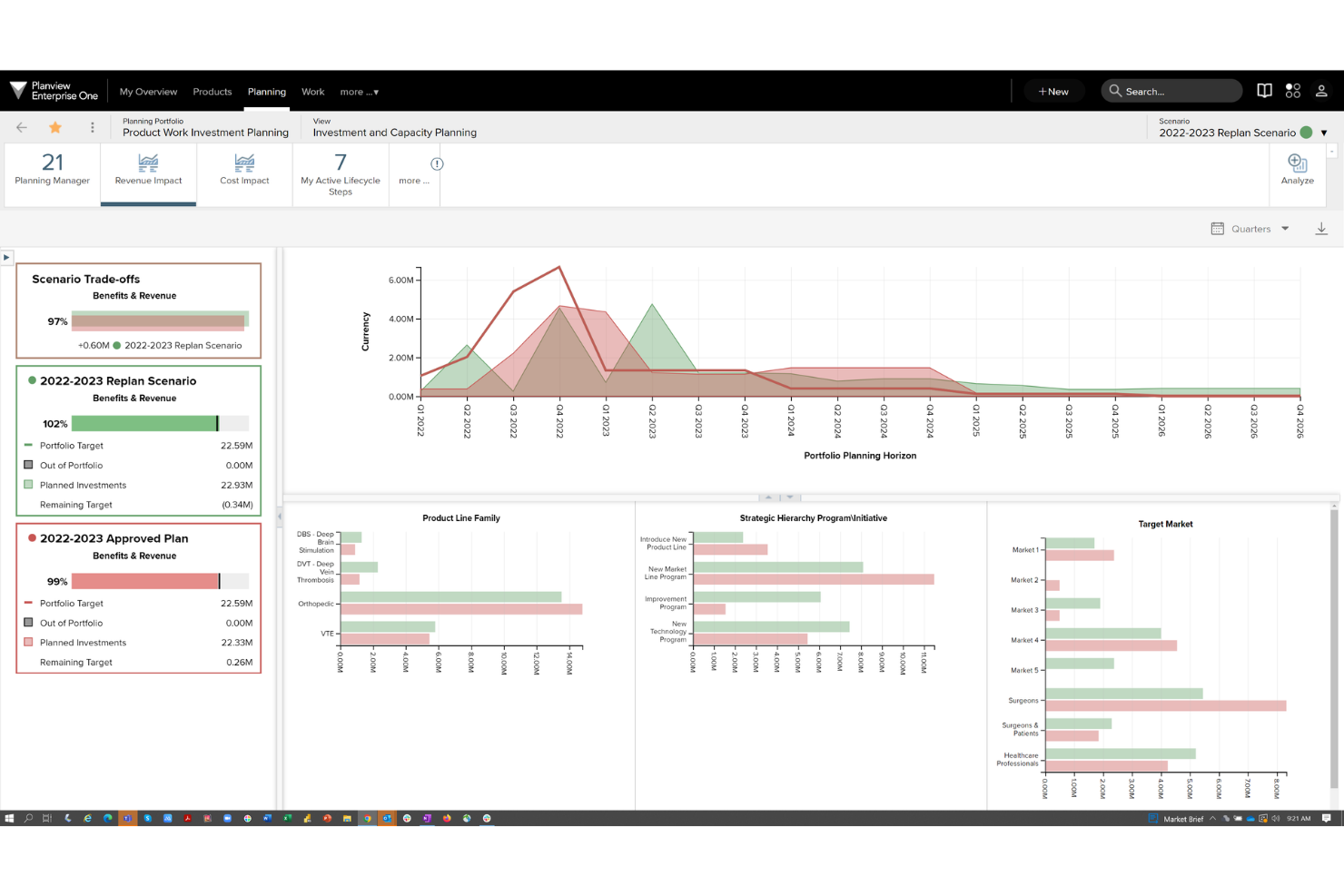
You can use Gantt charts, Kanban boards, and dashboards to visualize your projects, making planning and tracking simpler. This feature helps your team stay aligned with project timelines.
Reporting Tools
With robust reporting, you can generate detailed reports to make informed decisions. It helps your team understand project performance and areas needing attention.
Portfolio Management
Planview allows you to manage multiple projects within a portfolio, aligning them with strategic goals. It provides oversight and control over your project landscape.
Risk Management
Identify and mitigate project risks with Planview’s risk management tools. This helps your team anticipate and address potential issues before they escalate.
Strategic Alignment
Ensure your projects align with your organizational goals through Planview’s strategic alignment features. It guides your team in prioritizing initiatives that matter most.

Ease of Use
Planview offers a wide range of features, but its complexity can be challenging for new users. The interface may feel overwhelming for teams unfamiliar with advanced project management tools.
However, once users adapt to the layout, they gain access to powerful functionality that supports complex project needs. The learning curve is noticeable, but the depth of tools can be worth it for managing large portfolios.

Planview Specs
- A/B Testing
- API
- Collaboration Support
- Custom Data Forms
- Dashboard
- Dashboards
- Data Export
- Data Import
- Developer Tools
- External Integrations
- Feedback Management
- Gantt Charts
- Google Apps Integration
- Multi-User
- Notifications
- Prioritization
- Product Catalog
- Release Management
- Reports
- Resource Management
- Review Monitoring
- Roadmapping
- Scheduling
- Task Scheduling/Tracking




Planview FAQs
How does Planview handle data security and compliance?
Can Planview support remote teams effectively?
Is Planview suitable for agile project management?
How customizable is Planview for specific project needs?
What kind of training resources does Planview provide?
How does Planview facilitate strategic planning?
Can Planview integrate with my existing tools and systems?
How does Planview ensure user adoption and engagement?
Hvad sker der nu?
Vil du komme i kontakt med andre digitale projektledere for at dele ressourcer og bedste praksis? Bliv medlem af vores fællesskab og få adgang til over 100 skabeloner, prøver og eksempler, og kom i kontakt med hundredvis af andre digitale projektledere på Slack.