



monday.com vs. Jira: Sammenligning og ekspertanmeldelser for 2026



monday.com tilbyder en fleksibel platform, der tilpasser sig dit teams behov for projektstyring, mens Jira er skræddersyet til softwareudviklingsteams, der har brug for at spore problemer på et detaljeret niveau. Begge værktøjer kan hjælpe dig med at forbedre din arbejdsgang, men de adskiller sig markant i deres tilgang.
Jeg har testet og gennemgået hvert værktøj samt dets funktioner, fordele og ulemper og priser ved hjælp af min omfattende erfaring med projektstyring. Find ud af, hvilken projektstyringssoftware der passer bedst til dit teams mål.
monday AI Workspace vs. Jira: An Overview
monday AI Workspace

Jira
Why Trust Our Software Recommendations
Our team has been testing and reviewing software since 2012. As project managers ourselves, we know how difficult—and important—it is to choose the right software.
For this guide, we evaluated tools using hands-on testing and independent research, scoring tools using our selection criteria. We also draw on insights from industry thought leaders and practicing project management experts.
Our reviews reflect our human editorial judgment, not a sales pitch.
Expert reviewers:
monday AI Workspace vs. Jira Pricing Comparison
| monday AI Workspace | Jira | |
|---|---|---|
| Free Trial | Free plan available | Free plan + 14-day free trial available |
| Pricing | From $9/user/month (billed annually) | From $8.48/user/month |
Priser på monday.com vs. Jira og skjulte omkostninger
monday.coms priser bruger en abonnementsmodel med flere niveauer, som inkluderer en gratis plan. Omkostningerne varierer afhængigt af antallet af brugere og de funktioner, du vælger. Jiras priser følger også en model med flere niveauer, og omkostningerne skalerer i henhold til antallet af brugere og de specifikke funktioner, der kræves, mens mere avancerede funktioner er tilgængelige i premium-planer.
For at vælge den rigtige prisplan til dit team skal du vurdere de vigtigste funktioner, du har brug for, og forudse fremtidig vækst eller yderligere krav, så det valgte projektstyringsværktøj kan skaleres efter projektets behov, og du kan undgå potentielle uventede omkostninger.
monday AI Workspace vs. Jira Feature Comparison
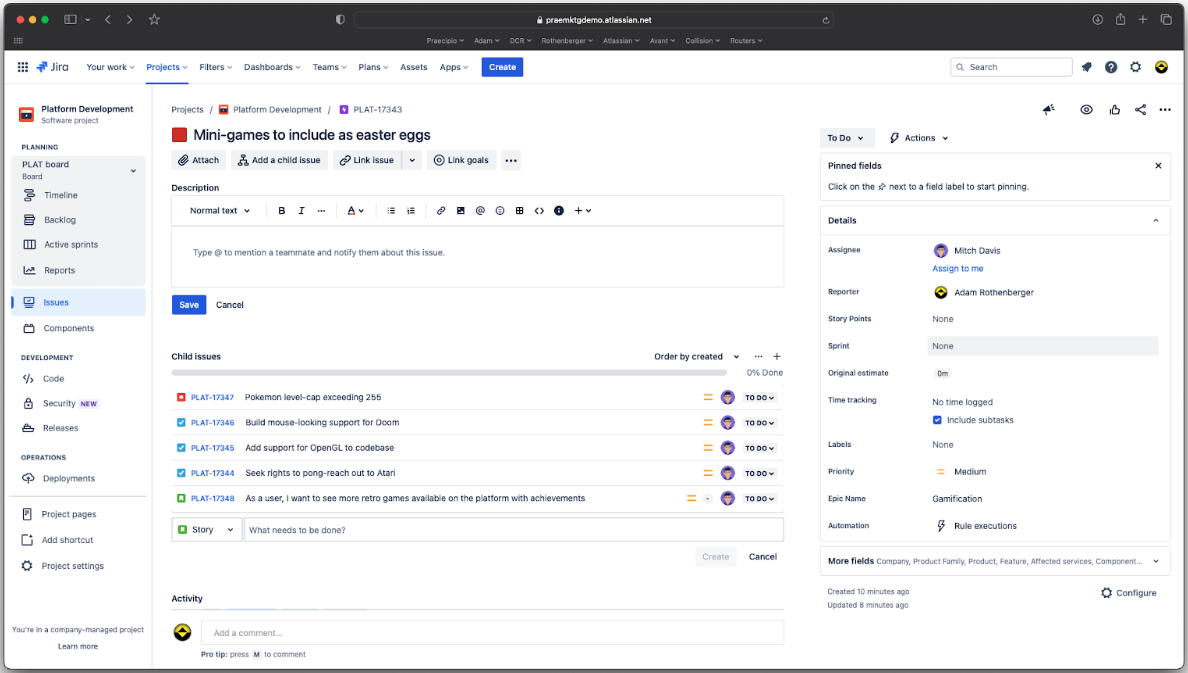
monday.coms automatiseringsfunktioner gør det muligt at strømline gentagne opgaver, hvilket gør værktøjet ideelt til styring af marketingkampagner med mange forskellige elementer. Jiras problemsporing er fantastisk for medlemmer af softwareudviklingsteams, der har brug for effektivt at administrere og prioritere fejlrettelser.
| monday AI Workspace | Jira | |
|---|---|---|
| API | ||
| Calendar Management | ||
| Collaboration Support | ||
| Dashboards | ||
| Data Export | ||
| Data Import | ||
| External Integrations | ||
| File Sharing | ||
| Gantt Charts | ||
| Kanban Boards | ||
| Multi-User | ||
| Notifications | ||
| Project Management | ||
| Task Scheduling/Tracking | ||
| Time Management |
monday.com vs. Jira-integrationer
| Integration | monday.com | Jira |
|---|---|---|
| ✅ | ❌ | |
| HubSpot | ✅ | ✅ |
| Miro | ❌ | ✅ |
| Slack | ✅ | ✅ |
| GitHub | ✅ | ✅ |
| Figma | ❌ | ✅ |
| Adobe XD | ❌ | ✅ |
| Jenkins | ❌ | ✅ |
| API | ✅ | ✅ |
| Zapier | ✅ | ✅ |
monday.coms integration med HubSpot giver dig mulighed for at automatisere CRM-opdateringer, hvilket er nyttigt for salgsteams, der sporer kundeinteraktioner. Jiras integration med GitHub er fantastisk for udviklingsteams, der har brug for at spore kodeændringer sammen med projektopgaver.
monday.com vs. Jiras sikkerhed, overholdelse & pålidelighed
| Faktor | monday.com | Jira |
|---|---|---|
| Databeskyttelse | monday.com bruger datakryptering under overførsel og ved lagring for at beskytte brugerdata. | Jira anvender kryptering og tilbyder tilpasselige tilladelser til dataadgang. |
| Lovgivningsmæssig compliance | monday.com overholder GDPR og kan levere databehandleraftaler. | Jira overholder GDPR og tilbyder sikkerhedsfunktioner i virksomhedsklasse. |
| Oppetidens pålidelighed | monday.com garanterer 99,9 % oppetid med robust infrastruktursupport. | Jira tilbyder en SLA med 99,9 % oppetid og anvender redundante systemer. |
monday.com og Jira tilbyder begge stærke sikkerheds- og complianceforanstaltninger, men deres tilgang til brugerkontrol og tilpasning adskiller dem. Vurder, hvilken platforms sikkerhedsfunktioner der bedst matcher dit teams specifikke lovgivningsmæssige krav og behov for databeskyttelse.
monday.com vs. Jira – brugervenlighed
| Faktor | monday.com | Jira |
|---|---|---|
| Brugergrænseflade | monday.com tilbyder en visuelt brugervenlig grænseflade med træk-og-slip-funktioner. | Jira har en mere kompleks grænseflade og kræver kendskab til dens struktur. |
| Introduktionsoplevelse | monday.com gør introduktionen enklere med guidede vejledninger og skabeloner. | Introduktionen til Jira kan være udfordrende og kan kræve selvstændig læring. |
| Tilpasning | monday.com tilbyder tilpasselige arbejdsgange og dashboards. | Jira tilbyder omfattende tilpasningsmuligheder, men kræver teknisk viden. |
monday.com er nemmere at navigere i takket være det intuitive design, hvilket gør det hurtigt at lære og tilpasse sig. Jiras kompleksitet kan virke overvældende, men platformen giver effektive tilpasningsmuligheder for dem, der investerer tiden. Hvis du har brug for en enkel opsætning, skal du vælge monday.com. Jira er bedre til detaljeret projektovervågning, hvis du kan håndtere en stejlere læringskurve.
monday AI Workspace vs Jira: Pros & Cons
monday AI Workspace
- The interface is easy to use, with simple drag and drop timeline and charting mechanics.
- You can create forms that live within your project as a view.
- There is a long list of supported integrations
- The Gantt view isn't useful for building a project.
- Recurring tasks are considered automations and limited to higher tier plans.
- There is a steep learning curve for beginners.
Jira
- Agile workflow management supports Scrum and Kanban and can improve your teams' productivity.
- Automation rules are easy to set up, which helps your team speed up their work.
- Custom filters can be created and accessed quickly, which improves your team's efficiency.
- Field names can be confusing, which might slow down your team's workflow.
- The interface can be too crowded in Scrum projects, which can make it hard for your team to navigate.
- There's a lack of resource management capabilities, which could limit your team's planning.
Best Use Cases for monday AI Workspace and Jira
monday AI Workspace
- Creative departments With features like collaborative docs and a proofing screen, creative teams can improve feedback loops and increase delivery speeds.
- Marketing teams Its customizable dashboards and automation features let you track campaigns and workflows efficiently.
- Content creation monday.com's file management and commenting capabilities let teams manage media files and improve collaboration.
- Event planners The platform’s timeline views and easy collaboration features make managing multiple events straightforward.
- Product development You can track progress and updates across teams to maintain alignment and meet deadlines.
- Remote teams With collaborative features and real-time updates, remote teams can maintain productivity and communication effortlessly.
Jira
- Software development Jira’s agile tools like Scrum and Kanban boards make it perfect for managing software projects.
- IT departments Its issue tracking capabilities help your team efficiently handle technical support and bug fixes.
- Tech startups Jira offers customization capabilities that allow your team to scale and adapt as your projects grow.
- Agile teams Sprint planning and backlog management features keep your agile processes organized and effective.
- Large enterprises Jira’s automation rules can streamline your complex workflows and improve team productivity.
- Project managers Its reporting and analytics provide insights that help you make informed decisions quickly.
Hvem bør bruge monday.com, og hvem bør bruge Jira?
Efter min mening er monday.com ideelt til kreative teams og virksomheder, der sætter pris på visuel projektstyring og har brug for en brugervenlig platform til samarbejde. Det passer til teams, der ønsker fleksibilitet og enkelhed i håndteringen af forskellige projekter uden en stejl læringskurve.
Jeg mener, at Jira er bedst til softwareudviklingsteams og personer i tekniske brancher, som har brug for robust problemsporing og kan håndtere en mere kompleks grænseflade. Det er et godt valg for agile teams, der har brug for omfattende tilpasningsmuligheder og er fortrolige med en mere teknisk opsætning.
Differences Between monday AI Workspace and Jira
| monday AI Workspace | Jira | |
|---|---|---|
| Automation | monday.com offers strong automations for repetitive tasks within your custom workflows. | Jira offers advanced automations that are better for technical workflows. |
| Customization | monday.com allows easy dashboard customization without requiring technical skills. | Jira offers extensive customization, but requires technical expertise. |
| Onboarding | monday.com provides guided tutorials and templates for easy onboarding. | Jira's onboarding can be challenging and you might need to undertake some self-directed learning. |
| User Interface | monday.com has a visually intuitive interface with easy drag-and-drop features. | Jira's interface is more complex and requires more getting used to. |
| Visit monday AI WorkspaceOpens new window | Read Jira ReviewOpens new window |
Similarities Between monday AI Workspace and Jira
| Cloud-Based Access | monday.com and Jira are cloud-based and offer mobile apps, so you and your team can access projects from anywhere, anytime. |
|---|---|
| Collaboration | Both monday.com and Jira offer robust collaboration features, like real-time updates and team messaging, to keep your team connected. |
| Integrations | They both provide extensive integration capabilities with tools like Slack and API. |
| Security | monday.com and Jira prioritize security, encryption, and compliance with standards like GDPR to keep your data protected. |
| Task Management | Both platforms excel in task management and include features for assigning, tracking, and managing tasks effectively. |
| Visit monday AI WorkspaceOpens new window Read Jira ReviewOpens new window | |