

De 10 bedste e-mail-apps anmeldt i 2026

Kortliste over de bedste e-mailapps


Det kan være lidt af et jongleringsnummer at administrere projekter, og e-mails gør ofte kaosset større. Du har brug for en sikker e-mailapp, der hjælper dig med at holde orden og sikrer, at dit team holder kursen. Efter min erfaring kan den rigtige mailklient gøre hele forskellen.
Jeg har testet og anmeldt utallige e-mailapps for at finde de bedste muligheder til dig. Mit mål er at dele uvildig indsigt, der imødekommer dine behov. Uanset om det handler om integration med andre værktøjer eller unikke funktioner, er der noget for alle teams.
I denne artikel guider jeg dig gennem mine bedste valg og fremhæver, hvad der får hver enkelt til at skille sig ud. Lad os finde den e-mailapp, der passer til din arbejdsgang og hjælper dig med at administrere projekter mere effektivt.
Why Trust Our Software Recommendations
Our team has been testing and reviewing software since 2012. As project managers ourselves, we know how difficult—and important—it is to choose the right software.
For this guide, we evaluated tools using hands-on testing and independent research, scoring tools using our selection criteria. We also draw on insights from industry thought leaders and practicing project management experts.
Our reviews reflect our human editorial judgment, not a sales pitch.
Expert reviewers:
Sammenligningstabel for e-mailapps
Denne sammenligningstabel opsummerer prisoplysningerne for mine bedste e-mailapps:
| Tool | Best For | Trial Info | Price | ||
|---|---|---|---|---|---|
| 1 | Best for business integration | Free 14-day free trial + free plan available | From $4.03/user/month (billed annually) | Website | |
| 2 | Best for Google Workspace users | Free plan available | From $7/user/month (billed annually) | Website | |
| 3 | Best for Apple device integration | Free plan available | From $0.99/month | Website | |
| 4 | Best for free domain options | Free demo available | Free forever plan | Website | |
| 5 | Best for large email storage | Free 14-day trial + free plan available | From $5/month | Website | |
| 6 | Best for AI-based features | Free plan available | From $14.99/month | Website | |
| 7 | Best for open-source customization | Free to use | Free forever plan | Website | |
| 8 | Best for privacy | Free 7-day trial + free plan available | From $3/month | Website | |
| 9 | Best for Windows users | 30-day free trial | From $9.99/month | Website | |
| 10 | Best for AI-powered assistance | Free plan available | From $25/user/month (billed annually) | Website |
Anmeldelse af de bedste e-mailapps
Nedenfor er mine detaljerede opsummeringer af de bedste e-mailapps, der kom med på min kortliste. Mine anmeldelser giver et detaljeret indblik i de vigtigste funktioner, fordele og ulemper, integrationer og ideelle anvendelsesområder for hvert værktøj for at hjælpe dig med at finde det bedste til dig.

Mailbird
Best for business integration
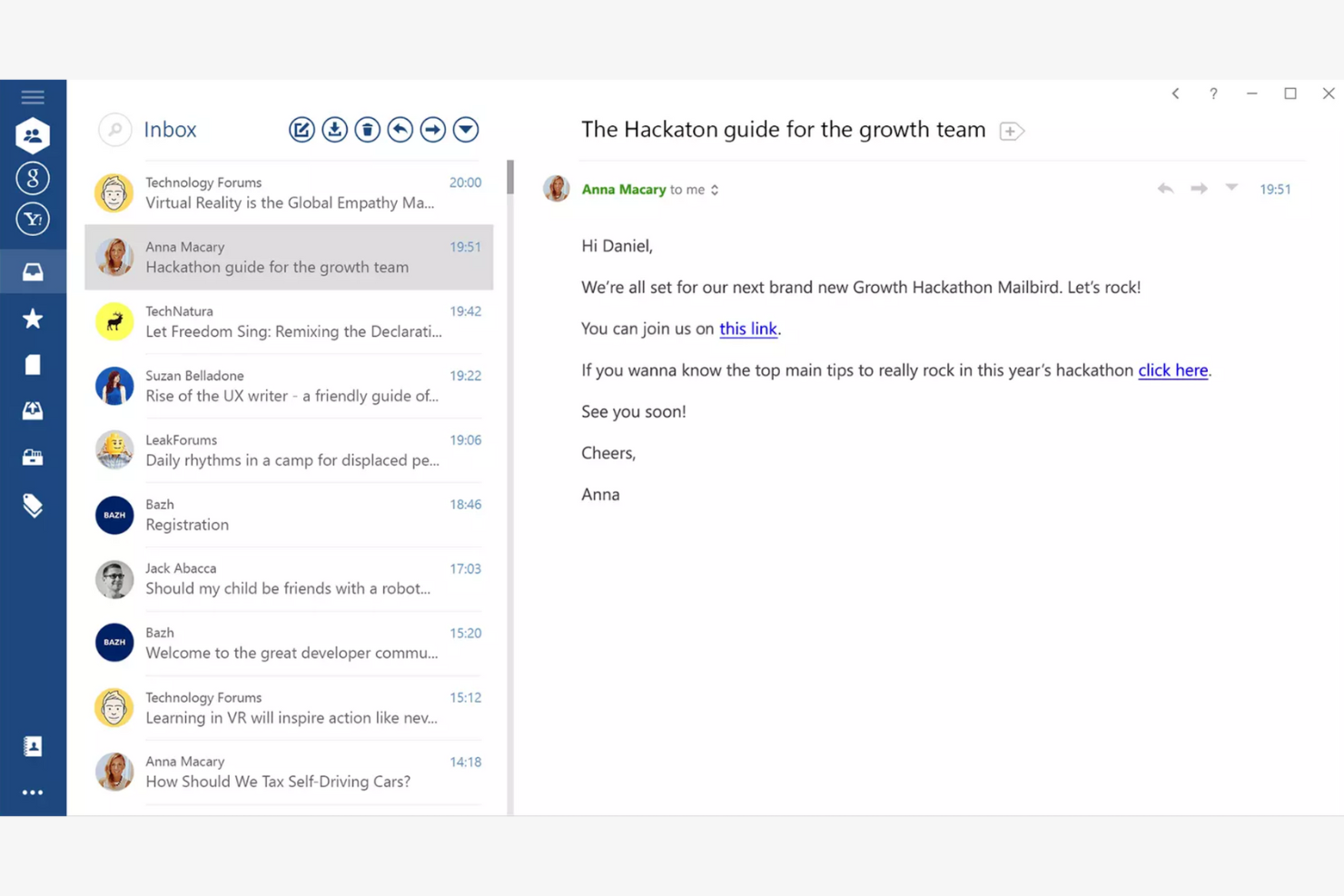
Mailbird is an email client tailored for Windows users, providing an all-in-one platform for managing multiple email accounts. It boosts productivity by offering features that simplify email management and communication.
Why I picked Mailbird: Mailbird is designed specifically for Windows, making it a great choice if your team already uses this operating system. The app's unified inbox lets you manage multiple accounts efficiently, while the speed reader feature helps you process emails quickly. The app's customization options also let you personalize your email experience to fit your needs.
Standout Features and Integrations:
Features include a snooze function to temporarily hide emails and keyboard shortcuts that make navigation quicker and easier. You can also customize the layout to fit your workflow.
Integrations include Slack, Google Calendar, Asana, Dropbox, Evernote, Trello, Facebook, Twitter, WeChat, ZeroBounce, and more.
Pros and Cons
Pros:
- Local-client architecture that keeps data on your device
- Customizable interface
- Unified inbox for multiple accounts
Cons:
- Shallow inbox automation and management tools
- Limited support for non-Windows platforms

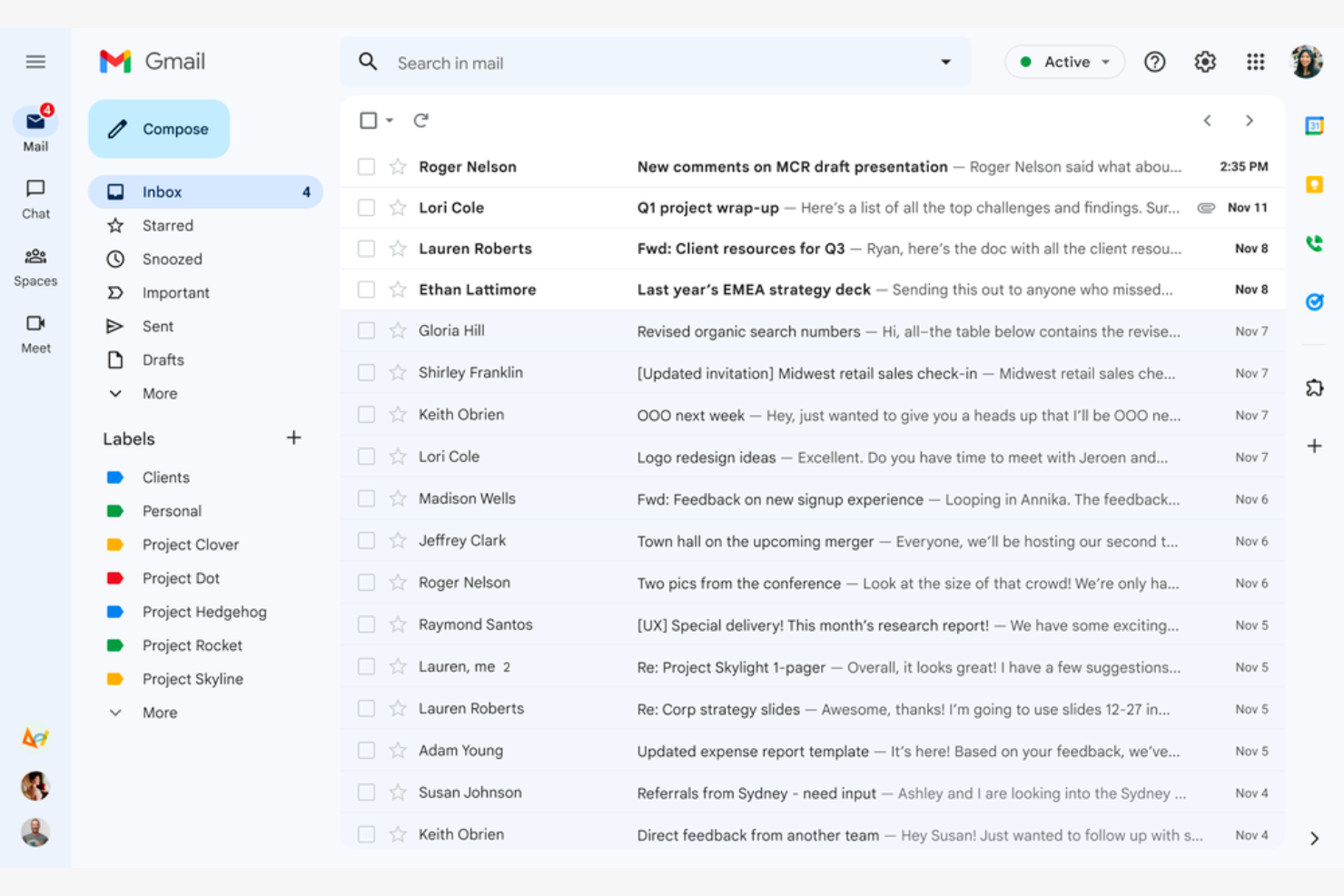
Google Gmail is a widely used email service that caters mainly to Google Workspace users. It offers essential email functions that integrate with Google services, giving both individuals and businesses a connected experience.
Why I picked Google Gmail: Google Gmail is ideal for Google Workspace users because it integrates with Google Drive, Calendar, and Docs. The conversation view groups your emails into threads so you never lose track of the discussion, while labels and filters help you categorize and sort emails efficiently. The Google Gmail app's spam filtering helps keep your inbox clean and protects you from phishing scams.
Standout Features and Integrations:
Features include 15GB of free storage, smart reply suggestions, and advanced search capabilities. You can schedule emails to be sent later, which is handy for coordinating with teams across time zones. The priority inbox also automatically highlights important emails so you never miss critical messages.
Integrations include Google Workspace and more.
Pros and Cons
Pros:
- Search functionality
- Integrates with the Google ecosystem
- Spam and phishing detection
Cons:
- Privacy concerns surrounding Google's data-driven business model
- No folder organization

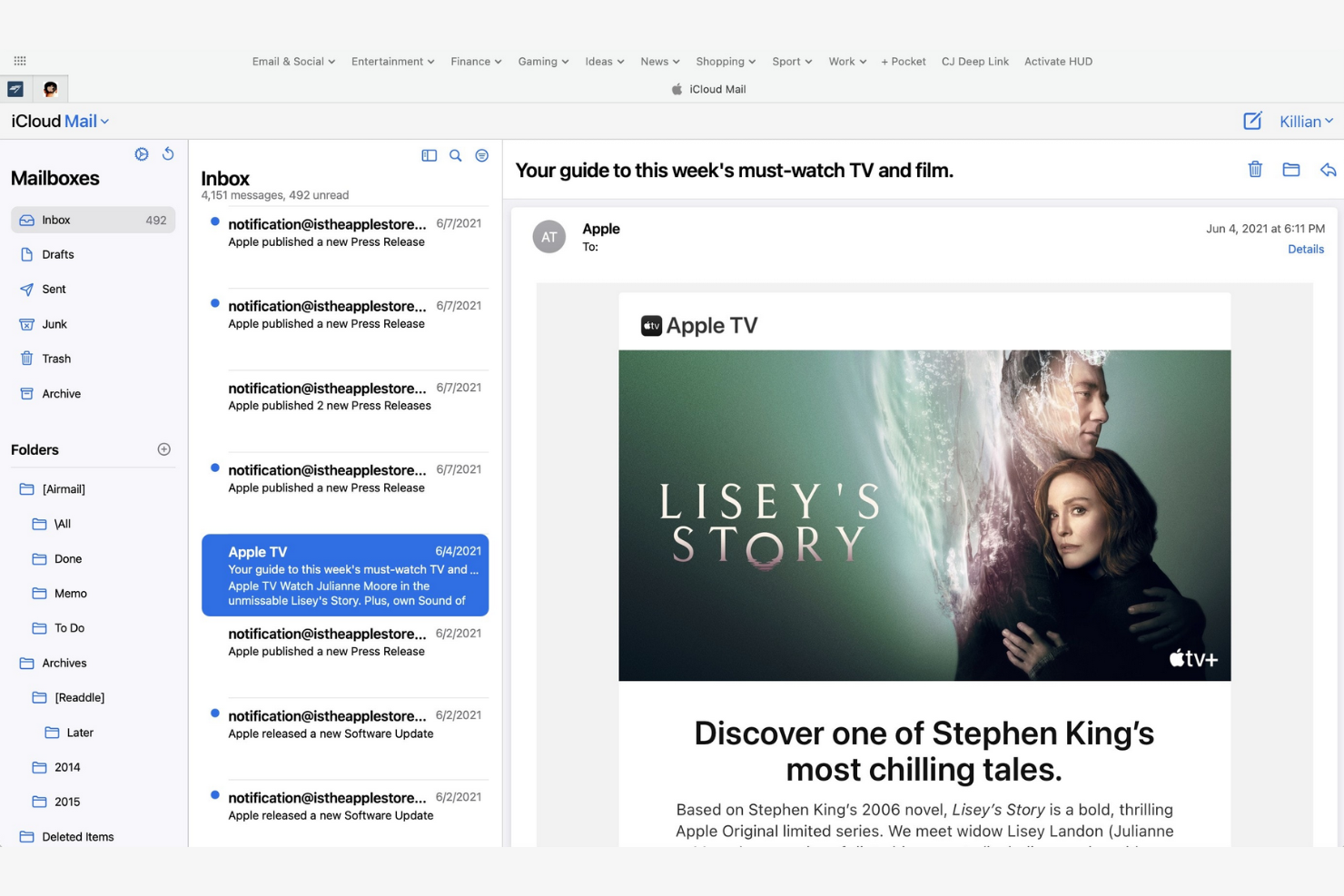
Apple iCloud Mail is an Apple-native email app that offers integration across iPhones, iPads, and Macs. It helps users stay organized and efficient with a suite of essential email management tools.
Why I picked Apple iCloud Mail: Apple iCloud Mail is tailored for Apple users, delivering consistent performance across all your Apple devices. The app's iCloud integration lets you quickly sync emails, contacts, and calendars, while the Handoff feature lets you switch between devices without losing your place. Also, the app's user-friendly interface makes managing emails straightforward.
Standout Features and Integrations:
Features include a priority inbox for important emails, customizable swipe gestures, and support for rich text formatting. You can manage multiple email accounts in one place, and the VIP feature also lets you set notifications for emails from important contacts so you never miss high-priority messages.
Integrations are not publicly listed.
Pros and Cons
Pros:
- Strong privacy protection and minimal data scanning
- Intuitive interface
- Integrates with Apple's ecosystem
Cons:
- Slow search
- Limited free space


mail.com is an email service catering to business owners who need customizable domain options. It lets users create professional-looking email addresses with tailored domain names.
Why I picked mail.com: mail.com's standout feature is free domain options, which let you personalize your email address with a custom domain name. This flexibility is ideal for both individuals and small businesses looking to upgrade their email presence. The tool's simple interface makes managing emails straightforward. The ability to use different domain names sets mail.com apart from other email apps.
Standout Features and Integrations:
Features include unlimited email storage and a customizable spam filter. You can also use the integrated online calendar to manage your schedule efficiently.
Integrations include Opera, Google Chrome, Safari, Mozilla Firefox, Mail Backup X, Mailspring, and more.
Pros and Cons
Pros:
- Intuitive interface
- Generous features included in the free plan
- Wide range of custom domain names
Cons:
- Poor spam protection
- Ads in the free version


Yahoo! Mail is an email service that offers users ample storage for their emails and attachments. Its high-capacity email inbox makes it ideal for both personal and business communication.
Why I picked Yahoo! Mail: Yahoo! Mail's expansive storage capacity is a key feature for users who manage a large volume of emails. You can store thousands of emails without worrying about running out of space. The intuitive interface lets you manage emails efficiently, and thanks to its customizable themes, you can personalize your email experience.
Standout Features and Integrations:
Features include an easy-to-use search function and a built-in calendar that lets you organize your schedule directly from your inbox. You can also customize the interface with unique themes to suit your preferences.
Integrations include Google Drive, Microsoft Office Online, Grammarly, Shift, WiseStamp, CredentialingSpectrum, Reoon Email Verifier, Rambox, Oki-Toki, and more.
Pros and Cons
Pros:
- Built-in calendar and reminder viewer
- Customizable themes available
- Generous email storage space
Cons:
- Track record of major data breaches
- Frequent upselling


Edison Mail is designed for users who value smart features and efficient email management. It increases productivity by automating routine tasks and providing intelligent insights.
Why I picked Edison Mail: Edison Mail's AI-powered features help you manage emails more efficiently. The app includes smart notifications that alert you to important emails, and the one-tap unsubscribe feature is a lifesaver for decluttering your inbox. The built-in assistant also organizes your travel and package information, keeping everything in one place.
Standout Features and Integrations:
Features include a focused inbox that prioritizes emails based on importance and customizable swipe gestures to speed up email management. You can also use dark mode to reduce eye strain during late-night work sessions.
Integrations include Google Workspace, Apple iCloud, Yahoo! Mail, AOL, Hotmail, Amazon, Walmart, Microsoft 365, and more.
Pros and Cons
Pros:
- Focused inbox for priority emails
- One-tap unsubscribing and bulk cleanup features
- Smart notifications
Cons:
- Subscription required
- Syncing errors

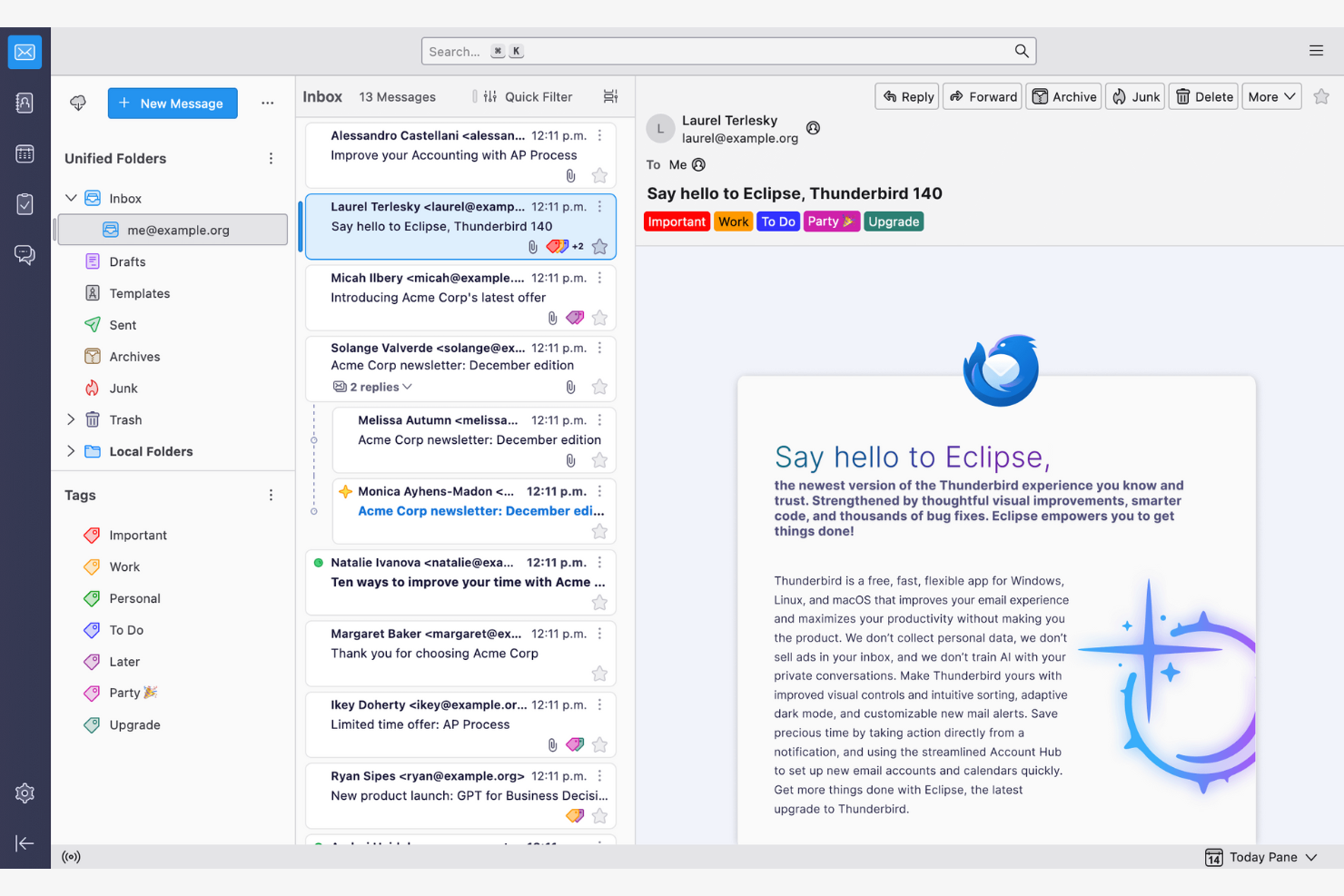
Thunderbird is an open-source email client that lets users customize and control their email environment. Its features make email management and communication more efficient.
Why I picked Thunderbird: Thunderbird is highly customizable, appealing to users who want to tailor it to their specific needs. You can use add-ons to upgrade the app's functionality, while the tabbed email feature lets you manage multiple conversations at once. Because the app is open-source, you can modify it to suit your preferences.
Standout Features and Integrations:
Features include a smart folder system to organize emails across different accounts, powerful spam filtering to block unwanted emails, and a quick filter toolbar to find emails more efficiently.
Integrations include Google Gmail, Yahoo! Mail, McAfee LiveSafe, Kasm Workspaces, Greatmail, PDFCreator, Mailfence, Aid4Mail, 1Tool CRM, and more.
Pros and Cons
Pros:
- Strong spam filtering and privacy options
- Unified inbox with tabs
- Customizable with add-ons
Cons:
- Basic user interface
- No native mobile app

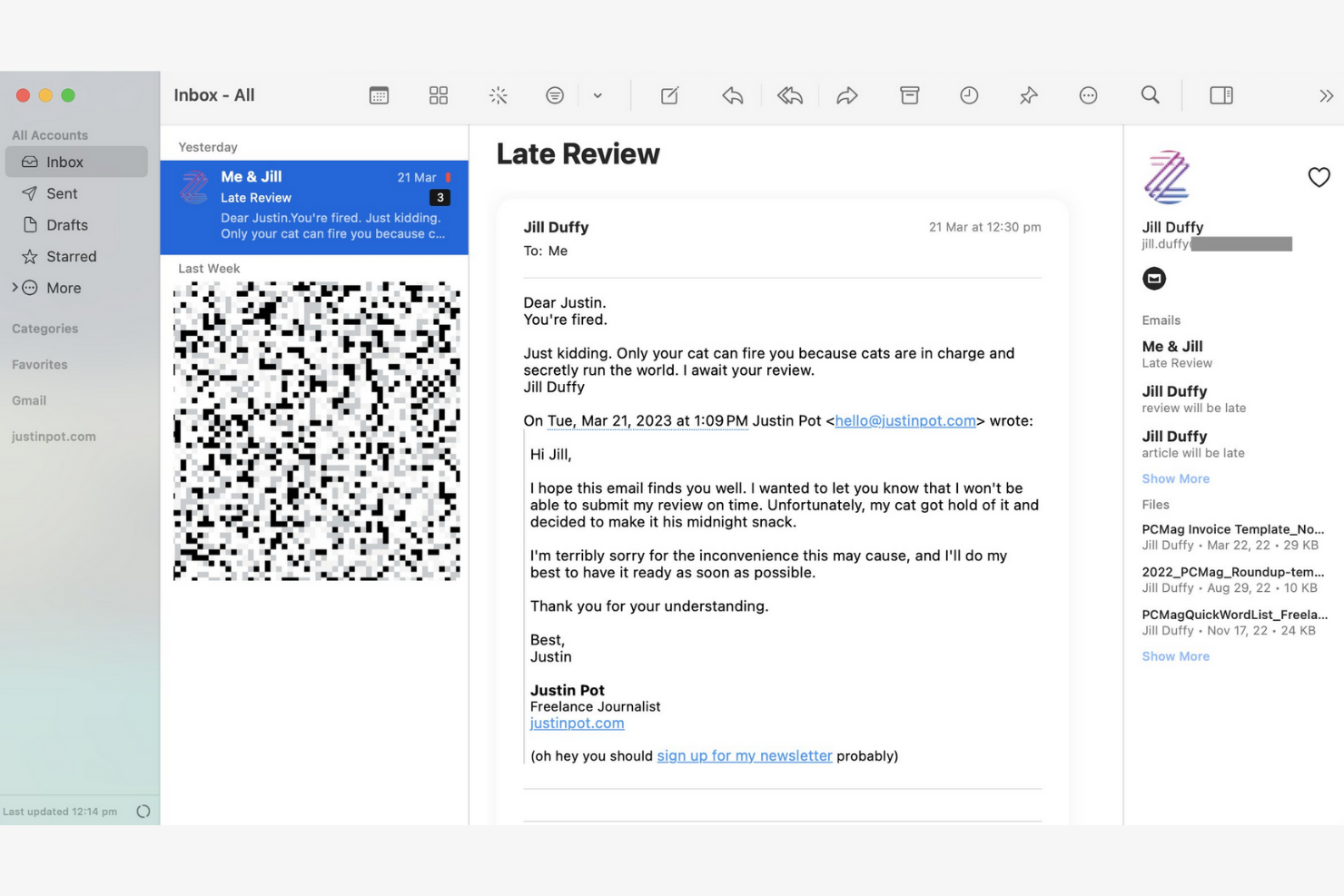
Canary Mail is an email client designed for individuals and teams who prioritize privacy and security in their communications. Its end-to-end encryption keeps your emails confidential and secure.
Why I picked Canary Mail: Canary Mail stands out for its commitment to privacy, offering a suite of data-protection features. You can encrypt emails with a single tap, giving you peace of mind for sensitive communications. The app's focus on security doesn't compromise usability, and the intuitive interface makes it simple to manage your emails while keeping them secure.
Standout Features and Integrations:
Features include search tools that help you find emails quickly, read receipts that show when your emails have been opened, and a snooze feature that temporarily hides emails so you can focus on more important tasks.
Integrations include Google Gmail, Apple iCloud, Proton Mail, Todoist, Asana, and more.
Pros and Cons
Pros:
- Unified inbox across multiple devices
- An AI copilot that functions offline
- Built-in encryption and privacy controls
Cons:
- The best Copilot features require a paid monthly subscription
- Complex encryption


Microsoft Outlook is an email client and personal information manager designed for businesses and professionals. Its integrated calendar features make communicating and scheduling more efficient.
Why I picked Microsoft Outlook: Outlook's strong integration with Microsoft Office makes it ideal for businesses that rely on Microsoft products. You can schedule meetings directly from your inbox to help your team stay organized, and the focused inbox feature shows you your most important emails first. The app's integrated calendar also lets you coordinate schedules.
Standout Features and Integrations:
Features include email categorization to manage messages efficiently, customizable rules to automate email sorting and prioritization, and a built-in task manager to keep track of your to-do lists.
Integrations include Microsoft 365 and more.
Pros and Cons
Pros:
- AI assistance
- Focused inbox for important emails
- Strong integration with the Microsoft 365 ecosystem
Cons:
- Requires regular updates
- Complex interface for new users


Superhuman Mail is an email client tailored for busy professionals who need to manage their emails quickly and efficiently. It focuses on delivering a fast email experience with advanced features that increase productivity.
Why I picked Superhuman Mail: Superhuman Mail prioritizes speed and efficiency, making it a top choice for users who want to process emails quickly. The app's keyboard shortcuts let you navigate and manage emails without a mouse, and the split inbox feature helps you focus by isolating important emails. Also, the app's undo send feature gives you further peace of mind.
Standout Features and Integrations:
Features include a powerful search function to find emails instantly, read-status indicators to see when emails have been opened, and follow-up reminders so you never miss an important response. Superhuman Mail also includes its own built-in AI assistant to help with drafting emails and scheduling meetings.
Integrations include HubSpot, Pipedrive, Salesforce, and more.
Pros and Cons
Pros:
- Minimal, distraction-free interface
- AI integration
- Keyboard shortcuts
Cons:
- Less intuitive for users who prefer traditional mouse-based navigation
- High subscription price relative to other providers
Andre e-mailapps
Her er nogle yderligere muligheder for e-mailapps, som ikke kom med på min kortliste, men som stadig er værd at undersøge:
- Mailspring
For cross-platform use
- Spark
For team collaboration
- SaneBox
For email prioritization
- Gmelius
For turning Gmail into a workspace
- Clean Email
For inbox organization
- eM Client
For customization
- Missive
For dedicated team spaces


How I Evaluate Email Apps
I evaluate email apps on two levels: the baseline a PM needs—like task conversion and inbox collaboration—and the differentiators that make one tool click where another doesn't.
Core Functionality (Table Stakes For This List)
When I'm selecting tools for my list, I rank each one on a scale from 0 (does not offer the functionality) to 5 (excels in this area) for each core functionality listed below. Then, I calculate the tool's total score into a percentage. Each tool needs to achieve a minimum total score of 65% to be considered for inclusion.
- Email Send & Receive: I check whether the app supports multi-account access across Gmail, Outlook, and IMAP/SMTP so PMs can manage client and internal accounts from one place.
- Inbox Organization: Sorting, labeling, filtering, and archiving matter—especially when you're juggling dozens of stakeholder threads across multiple active projects at once.
- Email-to-Task Conversion: I look for the ability to turn an email into a trackable task with due dates and assignees, like converting a client change request into a backlog item.
- Project Management Integrations: Native connections to tools like Asana, Jira, Monday, ClickUp, or Trello help ensure emails don't live in a silo outside your delivery workflow.
- Shared Inbox Collaboration: For agency and cross-functional teams, I evaluate whether the app supports thread assignment, internal comments, and visibility into who's handling what.
- Calendar & Scheduling: Meeting scheduling, deadline reminders, and two-way calendar sync with Google or Outlook keep project timelines connected to everyday communication.
Once I have a list of tools that meet this criteria, I consider what sets each platform apart.
Differentiating Factors (What Sets Vendors Apart)
Here's how I compare and contrast different vendors:
Standout Features
AI-assisted drafting is a big differentiator—tools that can summarize long threads or suggest replies save PMs real time during peak delivery weeks. I also look for follow-up automation, like scheduled nudges when a stakeholder hasn't responded to a blocker. A unified project inbox that groups all emails by initiative or client is another feature I weigh, since it cuts down the time spent hunting for context across scattered threads.
Beyond Features
Integration depth matters beyond just having a connector—I check whether the link to tools like Jira or Asana supports bi-directional sync, so task updates flow back into email threads. Security is another factor I weigh, especially for PMs handling client data under SOC 2 or GDPR requirements. Cross-platform availability also plays a role; field-based coordinators in construction or logistics need reliable mobile apps with offline sync, not just a browser tab.
Sådan vælger du en e-mailapp
Det er nemt at fare vild i lange funktionslister og komplekse prisstrukturer. For at hjælpe dig med at holde fokus, mens du arbejder dig gennem din unikke proces for valg af software, får du her en tjekliste over faktorer, du bør have i tankerne:
| Faktor | Hvad skal du overveje? |
|---|---|
| Skalerbarhed | Vil appen vokse sammen med dit team? Overvej fremtidig e-mailmængde, tilføjelse af brugere og behov for lagerplads. Undersøg, om appen understøtter jeres vækst uden ekstra omkostninger. |
| Integrationer | Fungerer appen sammen med dine eksisterende værktøjer? Se efter indbyggede integrationer med kalendere, opgavestyringsværktøjer og CRM-systemer for at forenkle arbejdsgangene. |
| Tilpasningsmuligheder | Kan du tilpasse appen, så den passer til dine behov? Vurder mulighederne for at justere layoutet, oprette brugerdefinerede mapper og tilpasse personlige arbejdsgange, så de passer til dit teams arbejdsstil. |
| Brugervenlighed | Er appen intuitiv for alle brugere? Test grænsefladen for enkelhed, og undersøg, om indlæringskurven er minimal, så du undgår forsinkelser på grund af oplæring. |
| Implementering og introduktion | Hvor hurtigt kan du komme i gang? Vurder opsætningsprocessen, tilgængeligheden af vejledninger og understøttelsen af migrering af eksisterende e-mails for at minimere nedetid. |
| Pris | Passer prisen til dit budget? Sammenlign abonnementer, skjulte gebyrer og langsigtede omkostninger. Se efter gratis prøveperioder, så du kan teste appen, før du binder dig. |
| Sikkerhedsforanstaltninger | Hvor sikre er dine data? Kontrollér krypteringsstandarder, muligheder for sikkerhedskopiering af data og overholdelse af databeskyttelsesregler for at beskytte følsomme oplysninger. |
| Tilgængelig support | Hvilken hjælp er tilgængelig, når der opstår problemer? Undersøg, om der er support døgnet rundt, svartider og kundeservicekanaler, så du kan få hjælp, når du har brug for det. |
Hvad er en e-mailapp?
En e-mailapp er et softwareværktøj, der giver brugerne mulighed for at sende, modtage og administrere e-mails. Fagfolk som projektledere, marketingmedarbejdere og virksomhedsledere bruger disse værktøjer til at styrke kommunikation og organisering. Funktioner som kategorisering af e-mails, kalenderintegrationer og tilpassede notifikationer hjælper med at administrere opgaver, planlægge og holde orden. Disse værktøjer giver en struktureret måde at håndtere kommunikation effektivt på, hvilket sparer tid og reducerer rod.
Funktioner
Når du vælger en e-mailapp, bør du holde øje med følgende vigtige funktioner:
- Kategorisering af e-mails: Sorterer automatisk e-mails i mapper, så du nemmere kan prioritere og administrere meddelelser effektivt.
- Kalenderintegration: Synkroniserer med kalendere for at forenkle planlægningen og hjælpe dig med aldrig at gå glip af vigtige begivenheder.
- Tilpassede notifikationer: Giver dig mulighed for at indstille advarsler for bestemte e-mails, så du bliver mindre distraheret og kan fokusere på dine prioriteter.
- Ende-til-ende-kryptering: Sikrer dine e-mails og beskytter følsomme oplysninger mod uautoriseret adgang.
- Samlet indbakke: Samler flere e-mailkonti i én grænseflade.
- Udsættelsesfunktion: Skjuler midlertidigt e-mails, så du kan fokusere på aktuelle opgaver uden at miste overblikket over vigtige meddelelser.
- Læsekvitteringer: Giver dig besked, når modtagere åbner dine e-mails.
- Avanceret søgning: Finder hurtigt bestemte e-mails ved hjælp af søgeord eller filtre, så du sparer tid og besvær.
- Tilpassede temaer: Lader dig personliggøre appens udseende, så det passer til dine præferencer og forbedrer brugervenligheden.
- Påmindelser om opfølgning: Minder dig om at vende tilbage til e-mails, så vigtig kommunikation bliver fulgt op.
Fordele
Implementering af en e-mailapp giver flere fordele for dit team og din virksomhed. Her er nogle af dem, du kan se frem til:
- Bedre organisering: Funktioner til kategorisering af e-mails og samlet indbakke hjælper dig med at holde meddelelser organiserede og nemme at finde.
- Forbedret sikkerhed: Ende-til-ende-kryptering beskytter følsomme oplysninger og giver dig ro i sindet.
- Bedre tidsstyring: Tilpassede notifikationer og påmindelser om opfølgning hjælper dig med at fokusere på det vigtigste.
- Øget produktivitet: Integration med kalendere og avancerede søgefunktioner forenkler arbejdsgangene og sparer tid.
- Personlig oplevelse: Tilpassede temaer lader dig skræddersy appens udseende efter dine præferencer, hvilket øger brugervenligheden.
- Effektiv sporing af kommunikation: Læsekvitteringer fortæller dig, når modtagere åbner dine e-mails, så du bedre kan vurdere engagementet.
- Prioritering af opgaver: Udsættelsesfunktionen hjælper dig med at administrere opgaver ved midlertidigt at skjule ikke-hastende e-mails.
Omkostninger & priser
Når du vælger en e-mailapp, er det nødvendigt at forstå de forskellige prismodeller og abonnementer, der er tilgængelige. Omkostningerne varierer afhængigt af funktioner, teamets størrelse, tilføjelser og meget mere. Tabellen nedenfor opsummerer almindelige abonnementer, deres gennemsnitspriser og typiske funktioner, der er inkluderet i e-mailløsninger:
Sammenligningstabel over abonnementer til e-mailapps
| Abonnementstype | Gennemsnitspris | Almindelige funktioner |
|---|---|---|
| Gratis abonnement | $0 | Grundlæggende e-mailfunktioner, begrænset lagerplads og reklamer. |
| Personligt abonnement | $0-$10/bruger/måned | Tilpasningsmuligheder for temaer, grundlæggende support og mere lagerplads. |
| Virksomhedsabonnement | $3-$20/bruger/måned | Avancerede sikkerhedsfunktioner, integration med kalendere og prioriteret support. |
| Abonnement til større virksomheder | $12-$40+/bruger/måned | Omfattende sikkerhed, en fast kundekontakt og tilpassede integrationer. |
Ofte stillede spørgsmål om e-mailapps
Her er nogle svar på almindelige spørgsmål om e-mailapps:
Hvordan flytter jeg mine e-mails til en ny e-mailapp?
Ja, de fleste e-mailapps har værktøjer eller vejledninger, der hjælper dig med at flytte e-mails. Når du skifter, bør du sikkerhedskopiere dine eksisterende e-mails og kontakter. Mange apps tilbyder importmuligheder eller integration med din nuværende udbyder, så processen bliver nemmere. Undersøg, om din nye app har et værktøj til flytning eller en supporttjeneste, der kan hjælpe dig.
Kan en e-mailapp hjælpe mig med at administrere flere projekter og interessenter?
Ja, mange e-mailapps tilbyder etiketter, mapper og automatisering, som hjælper dig med at følge kommunikationen på tværs af forskellige projekter og interessenter. Brug disse værktøjer til at kategorisere e-mails efter projekt eller kunde, og indstil advarsler for tråde med høj prioritet.
Kan jeg bruge en e-mailapp offline?
Ja, mange e-mailapps tilbyder offlineadgang, men funktionerne kan være begrænsede. Du kan ofte læse og skrive e-mails offline, men det kan kræve en internetforbindelse at sende og modtage beskeder. Kontrollér, at den valgte app understøtter offlinetilstand, hvis det er vigtigt for dig, især hvis du rejser ofte.
Hvordan understøtter e-mailapps teamsamarbejde?
E-mailapps med indbyggede samarbejdsfunktioner, såsom delte indbakker eller kommentarfunktioner, giver dit team mulighed for at se fremskridt, tildele beskeder og undgå dobbelte svar. Nogle gør det endda muligt at omdanne e-mails direkte til opgaver eller supportsager.
Hvilke sikkerhedsforanstaltninger bør jeg se efter i en e-mailapp?
Se efter e-mailapps, der tilbyder kryptering, tofaktorgodkendelse og spamfiltre. Disse funktioner beskytter dine data og mindsker risikoen for uautoriseret adgang. Kontrollér, om appen overholder de databeskyttelsesregler, der er relevante for din branche, så dine oplysninger forbliver sikre.
Hvordan kan jeg automatisere gentagne opgaver i min e-mailapp?
Mange e-mailapps lader dig automatisere rutinehandlinger med regler, filtre eller integrationer. Konfigurer automatisk sortering og standardsvar, eller opret forbindelse til arbejdsgangsværktøjer som Slack eller Trello for at spare tid.