



Asana kontra Zoho Projects: Ekspertsammenligning og -anmeldelser 2026



Asana tilbyder en strømlinet tilgang til organisering af dit teams arbejdsgange, mens Zoho Projects leverer en integreret platform til fleksibel projektstyring. Begge værktøjer har til formål at hjælpe dig med at forbedre teamets produktivitet, men de adskiller sig med hensyn til brugerflade og tilpasningsmuligheder.
Jeg har evalueret og sammenlignet disse værktøjer samt deres vigtigste funktioner, fordele og ulemper og priser ved hjælp af min ekspertise som projektleder. Læs min sammenligning nedenfor for at finde ud af, hvilken projektstyringssoftware der er det rette værktøj til dine projekter og processer.
Asana vs. Zoho Projects: An Overview
Asana


Zoho Projects
Why Trust Our Software Recommendations
Our team has been testing and reviewing software since 2012. As project managers ourselves, we know how difficult—and important—it is to choose the right software.
For this guide, we evaluated tools using hands-on testing and independent research, scoring tools using our selection criteria. We also draw on insights from industry thought leaders and practicing project management experts.
Our reviews reflect our human editorial judgment, not a sales pitch.
Expert reviewers:
Asana vs. Zoho Projects Pricing Comparison
| Asana | Zoho Projects | |
|---|---|---|
| Free Trial | Free plan + free demo available | Free plan available |
| Pricing | From $10.99/user/month (billed annually) | From $4/user/month (billed annually) |
Priser på Asana vs. Zoho Projects & skjulte omkostninger
Asanas priser følger en trinvist opbygget abonnementsmodel med en gratis basisversion og premiumplaner, der udvides med flere funktioner og mere kundesupport. Zoho Projects' priser følger også en trinvis model med en gratis plan og betalingsmuligheder, der tilbyder mere funktionalitet og flere sikkerhedsforanstaltninger.
For at vælge den bedste projektstyringssoftware til dig skal du vurdere dit teams specifikke forretningsbehov, overveje hvilke projektstyringsfunktioner du rent faktisk vil bruge, og tage højde for eventuelle skjulte omkostninger for at vælge den løsning, der passer bedst til dit budget og din arbejdsgang.
Asana vs. Zoho Projects Feature Comparison
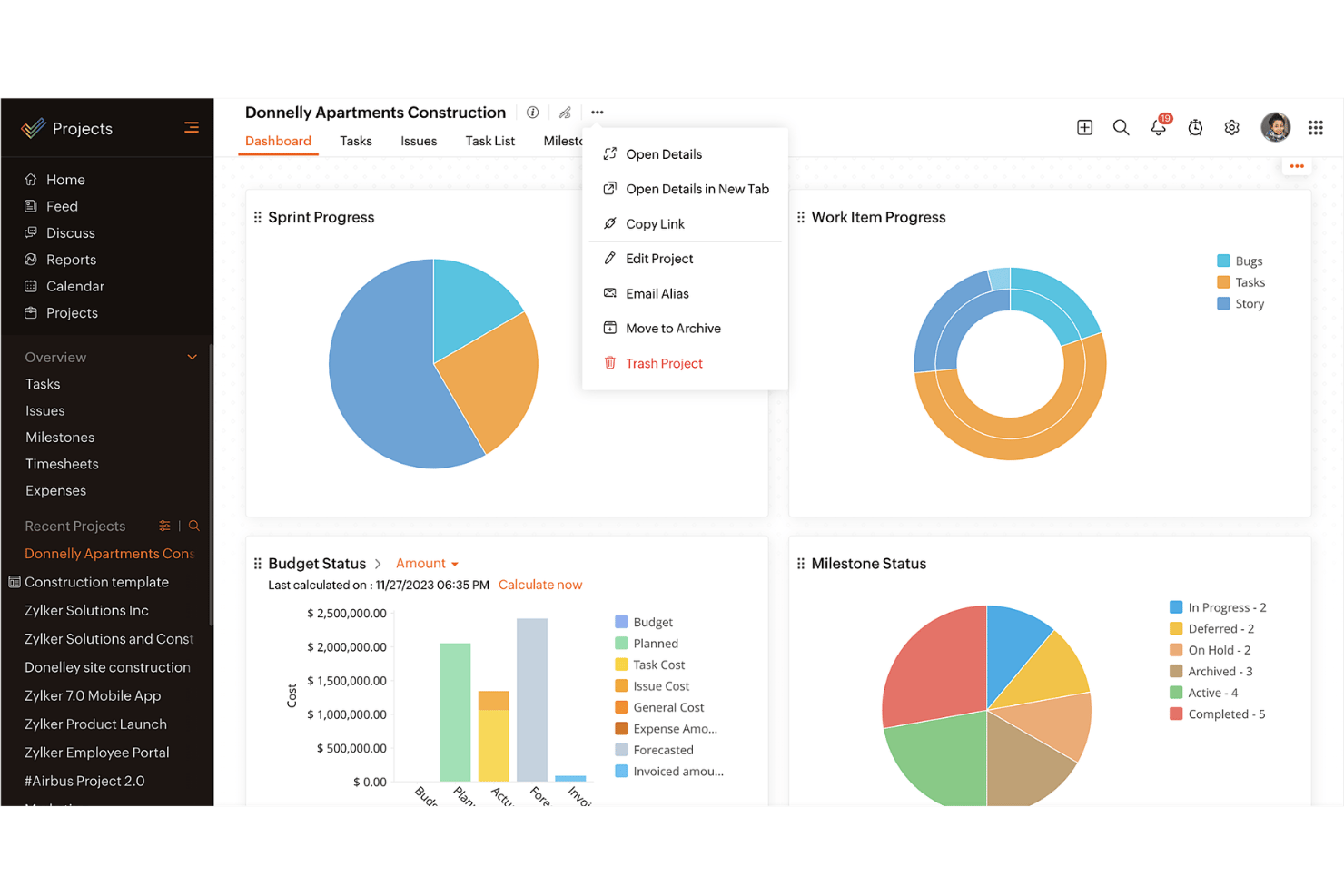
Med Asanas opgavestyringsfunktion kan du nemt organisere daglige opgaver og underopgaver samt visualisere projektets tidslinjer. Det er perfekt til teams, der har brug for funktioner til tydelig opgavefordeling og klare deadlines. Zoho Projects’ integration med andre Zoho-applikationer er fantastisk for virksomheder, der allerede befinder sig i Zoho-økosystemet.
| Asana | Zoho Projects | |
|---|---|---|
| API | ||
| Batch Permissions & Access | ||
| Budgeting | ||
| Calendar Management | ||
| Collaboration Support | ||
| Contact Management | ||
| Contact Sharing | ||
| Customer Management | ||
| Dashboard | ||
| Dashboards | ||
| Data Export | ||
| Data Import | ||
| Data Visualization | ||
| Dependency Tracking | ||
| Document Sharing | ||
| Expense Tracking | ||
| External Integrations | ||
| File Sharing | ||
| Gantt Charts | ||
| Kanban Boards | ||
| Multi-User | ||
| Notifications | ||
| Project Management | ||
| Resource Management | ||
| Scheduling | ||
| Task Scheduling/Tracking | ||
| Third-Party Plugins/Add-Ons | ||
| Time Management | ||
| Travel Management | ||
| Workflow Management |
Integrationer i Asana vs. Zoho Projects
| Integration | Asana | Zoho Projects |
|---|---|---|
| Slack | ✅ | ✅ |
| Microsoft Teams | ✅ | ✅ |
| Google Drive | ✅ | ✅ |
| Dropbox | ✅ | ✅ |
| Salesforce | ✅ | ❌ |
| Zendesk | ✅ | ✅ |
| Evernote | ✅ | ❌ |
| QuickBooks | ❌ | ❌ |
| API | ✅ | ✅ |
| Zapier | ✅ | ✅ |
Asanas integration med Slack gør det muligt nemt at omdanne samtaler til opgaver, hvilket kan gøre dine arbejdsgange hurtigere og forbedre kommunikationen. Zoho Projects' integration med Zendesk gør det muligt at omdanne supportsager til opgaver, hvilket er nyttigt til håndtering af opfølgning efter en lancering.
Sikkerhed, overholdelse af regler \u0026 pålidelighed i Asana vs. Zoho Projects
| Faktor | Asana | Zoho Projects |
|---|---|---|
| Databeskyttelse | Asana opretholder databeskyttelse gennem overholdelse af GDPR og regelmæssige revisioner. | Zoho Projects tilbyder databeskyttelse gennem overholdelse af GDPR og kryptering. |
| Kryptering | Asana bruger AES-256-kryptering til data i hvile og TLS til data under overførsel. | Zoho Projects anvender AES-256-kryptering og sikre datacentre. |
| Oppetid | Asana garanterer 99.9% oppetid for virksomhedskunder. | Zoho Projects leverer 99.9% oppetid med redundante datacentre. |
Asana og Zoho Projects prioriterer begge sikkerhed og overholdelse af regler. Overvej dit teams specifikke behov for databeskyttelse, gennemgå leverandørens certificeringer for overholdelse af regler, og prioritér funktioner, der er i overensstemmelse med dine sikkerhedspolitikker.
Asana vs. Zoho Projects – brugervenlighed
| Faktor | Asana | Zoho Projects |
|---|---|---|
| Brugerflade | Asana tilbyder en enkel og brugervenlig brugerflade med træk-og-slip-funktioner. | Zoho Projects har en brugerflade, der kan tilpasses, men med en stejlere indlæringskurve. |
| Introduktion | Asana tilbyder interaktive vejledninger og hurtige opsætningsguider. | Zoho Projects tilbyder omfattende introduktionsvideoer og detaljerede vejledninger. |
| Support | Asana tilbyder omfattende onlineressourcer samt support døgnet rundt til virksomhedskunder. | Zoho Projects tilbyder adskillige hjælpeartikler og en vidensbase. |
Asana udmærker sig ved at være brugervenligt takket være den overskuelige brugerflade og den hurtige introduktion. Zoho Projects er ganske vist effektivt, men kan være mere udfordrende på grund af de komplekse tilpasningsmuligheder, som kan kræve lidt mere tid at sætte sig ind i.
Asana vs Zoho Projects: Pros & Cons
Asana
- You can easily track tasks and deadlines using Asana's intuitive interface.
- Asana's collaboration tools help your team communicate effectively in real-time.
- There are extensive customization options so you can tailor workflows and views to your specific needs.
- The reporting capabilities are somewhat basic, which may not satisfy teams needing detailed analytics.
- It can feel overwhelming if your team is small or your projects are simple.
- You might find the notification system a bit excessive or distracting.
Zoho Projects
- Task dependencies are highly visual and easy to set up.
- Built-in time tracking integrates smoothly with billing features.
- Customizable project templates support repeatable workflows.
- Reporting customization can be limited for advanced needs.
- Mobile app notifications do not always sync in real time.
- Gantt chart drag-and-drop can feel sluggish with large projects.
Best Use Cases for Asana and Zoho Projects
Asana
- Creative agencies You can manage creative workflows and client projects with Asana’s visual boards and timeline features.
- Tech startups You can coordinate product development and team tasks using Asana’s real-time updates and goal-setting tools.
- Marketing teams You can plan campaigns and track progress with Asana’s clear timelines and task comments.
- Nonprofits Asana lets you manage volunteer tasks, events, and fundraising efforts with clear task assignments and timelines.
- Remote teams You can collaborate effectively with Asana’s real-time updates and communication features.
- Event planners You can organize events easily with Asana’s task management and timeline visualization features.
Zoho Projects
- Small Agencies Kanban boards, time tracking, and client billing streamline project delivery and reporting for agency teams.
- IT Departments Issue tracking, blueprint automations, and strong permission controls provide what IT teams need for complex internal projects.
- Consulting Firms Time sheets, detailed reports, and project-level billing help consultants keep track of client hours and invoicing.
- Remote Teams Robust collaboration tools, document sharing, and project forums help distributed users stay connected.
- Marketing Teams Reusable templates, task dependencies, and timeline tracking make repeated campaigns run smoothly and transparently.
- Construction Projects Gantt charts, milestones, and resource allocation features support the scheduling needs of construction and field project managers.
Hvem bør bruge Asana, og hvem bør bruge Zoho Projects?
Efter min mening er Asana bedst til kreative teams og nystartede virksomheder, der har brug for et enkelt og intuitivt værktøj til hurtigt at håndtere opgaver og samarbejde. Hvis du arbejder i en større organisation eller branche, der kræver omfattende tilpasning og integration med andre forretningsværktøjer, er Zoho Projects det bedste valg.
Fra mit perspektiv passer Asana til teams, der ønsker enkel opgavestyring, mens Zoho Projects er ideelt til dem, der har brug for detaljeret kontrol og omfattende projektopfølgning. Zoho Projects tilbyder også mere omfattende funktioner til en konkurrencedygtig pris.
Differences Between Asana and Zoho Projects
| Asana | Zoho Projects | |
|---|---|---|
| Automation | Asana provides basic automation for task management. | Zoho Projects offers more advanced automation features for more complex project workflows. |
| Customization | Asana has limited customization and focuses on simplicity. | Zoho Projects offers extensive customization to fit complex needs. |
| User Interface | Asana has a clean, intuitive interface that makes adoption quicker. | Zoho Projects offers a customizable interface that requires more setup. |
| Read Asana ReviewOpens new window | Read Zoho Projects ReviewOpens new window |
Similarities Between Asana and Zoho Projects
| Cloud-Access | Both are cloud-based, so you can access your projects from anywhere. This is essential for remote work setups. |
|---|---|
| Collaboration | Both project management platforms provide team collaboration tools so your team members can communicate and share updates within the platform efficiently. |
| Mobile Apps | Each tool offers a mobile app that helps you manage tasks, stay updated on the go, and be productive outside the office. |
| Reporting | They both include reporting features that let you generate insights and track project performance. |
| Task Management | Both Asana and Zoho Projects offer task management features that let you assign tasks, set deadlines, and track progress easily. |
| Read Asana ReviewOpens new window Read Zoho Projects ReviewOpens new window | |