

2026’nın En İyi 10 Fatura Otomasyon Yazılımı

En İyi Fatura Otomasyonu Yazılımları Kısa Listesi


Fatura otomasyonu yazılımları, veri yakalamadan onay ve ödemeye kadar tüm faturalama sürecini dijitalleştirir ve basitleştirir. En iyi fatura otomasyonu yazılımını arıyorsanız muhtemelen manuel işleri azaltmak, hataları en aza indirmek ve ödenecek hesaplarınız hakkında daha iyi görünürlük elde etmek istiyorsunuz. Piyasada bu kadar çok seçenek varken hız, doğruluk ve mevcut sistemlerinizle entegrasyon açısından hangi araçların gerçekten beklentileri karşıladığını bilmek zor olabilir. Bu kılavuz, önde gelen çözümleri karşılaştırmanıza yardımcı olacak ve böylece 2026 yılında ekibinizin iş akışına ve işletme hedeflerinize en uygun seçeneği bulabileceksiniz.
Why Trust Our Software Recommendations
Our team has been testing and reviewing software since 2012. As project managers ourselves, we know how difficult—and important—it is to choose the right software.
For this guide, we evaluated tools using hands-on testing and independent research, scoring tools using our selection criteria. We also draw on insights from industry thought leaders and practicing project management experts.
Our reviews reflect our human editorial judgment, not a sales pitch.
Expert reviewers:
Fatura Otomasyonu Yazılımı Karşılaştırma Tablosu
Bu karşılaştırma tablosu, en iyi fatura otomasyonu yazılımı seçeneklerim için fiyatlandırma ayrıntılarını özetlemektedir:
| Tool | Starting Price | Website | |
|---|---|---|---|
| Best for collaborative invoice processing | 4.8 out of 5 | Pricing upon request Free demo available | Website |
| Best for global payables automation | 4.5 out of 5 | $99/month Free demo available | Website |
| Best for real-time invoice automation | 4.4 out of 5 | £129 Demo available upon request | Website |
| Best for spend and invoice management | 4.5 out of 5 | $12/user/month Free plan + free demo available | Website |
| Best for mid-market invoice automation | 4.4 out of 5 | Pricing upon request Free demo available | Website |
| Best for AI invoice data capture | 4.4 out of 5 | $18,000/year 14-day free trial + free demo available | Website |
| Best for cloud-based AP automation | 4.3 out of 5 | Pricing upon request Free demo available | Website |
| Best for AI invoice processing | — | Pricing upon request Free demo available | Website |
| Best for AP automation with analytics | 2.3 out of 5 | Pricing upon request Free demo available | Website |
| Best for small business invoice management | — | $49/user/month Free plan + free demo available | Website |
Fatura Otomasyonu Yazılımı İncelemeleri
Aşağıda kısa listeme giren en iyi fatura otomasyonu yazılımlarının ayrıntılı özetlerini bulabilirsiniz. İncelemelerim, size en uygun seçeneği bulmanıza yardımcı olmak için her platformun özelliklerine, entegrasyonlarına ve fiyatlandırmasına ayrıntılı bir bakış sunmaktadır.

Stampli
Best for collaborative invoice processing
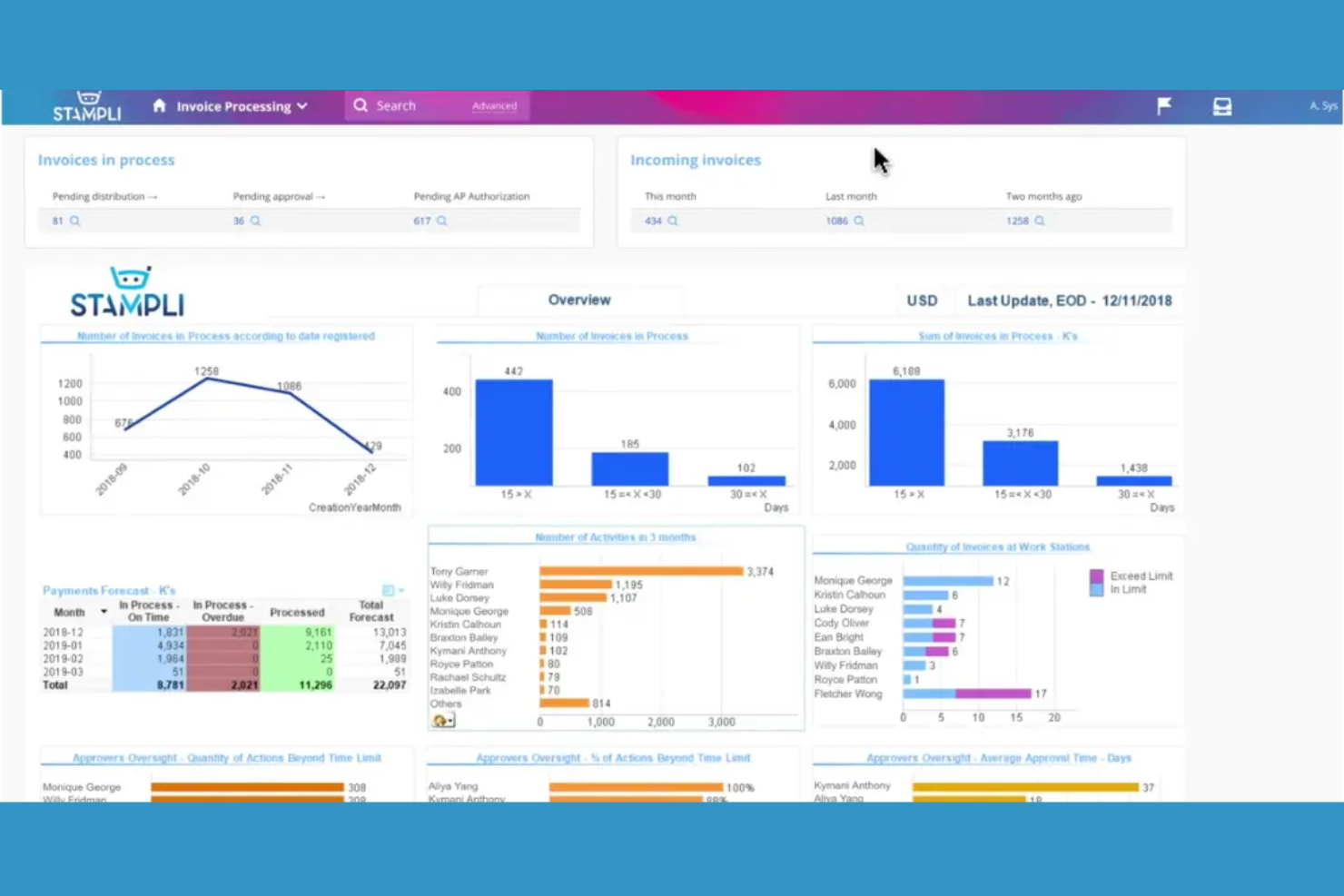
Stampli is an invoice automation platform that combines AP workflow management, team collaboration, AI-driven invoice coding, and document capture in one system.
Who Is Stampli Best For?
AP teams at mid-sized and enterprise companies that need collaborative invoice management and AI-powered coding.
Why I Picked Stampli
I picked Stampli as one of the best because I rely on its collaborative invoice management features to keep AP, procurement, and department heads in sync on every invoice. I like how the AI-powered coding automatically suggests GL codes and flags anomalies, which saves my team time on manual review. My team also uses the built-in communication threads to resolve invoice questions directly within the platform.
Stampli Key Features
- Vendor portal: Lets vendors submit invoices and check payment status online.
- Duplicate invoice detection: Flags potential duplicate invoices before processing.
- Audit trail: Tracks every action taken on invoices for compliance.
- Mobile app: Allows invoice review and approval from any device.
Stampli Integrations
Stampli offers native integrations with Oracle NetSuite, Sage Intacct, QuickBooks Online, Microsoft Dynamics 365, SAP, Acumatica, and more. An API is available for custom integrations.
Pros and Cons
Pros:
- Duplicate invoice detection with audit trails
- Direct integration with major ERP platforms
- Flexible approval routing by department
Cons:
- No support for cross-border invoice payments
- Vendor portal lacks advanced self-service options
Tipalti
Best for global payables automation
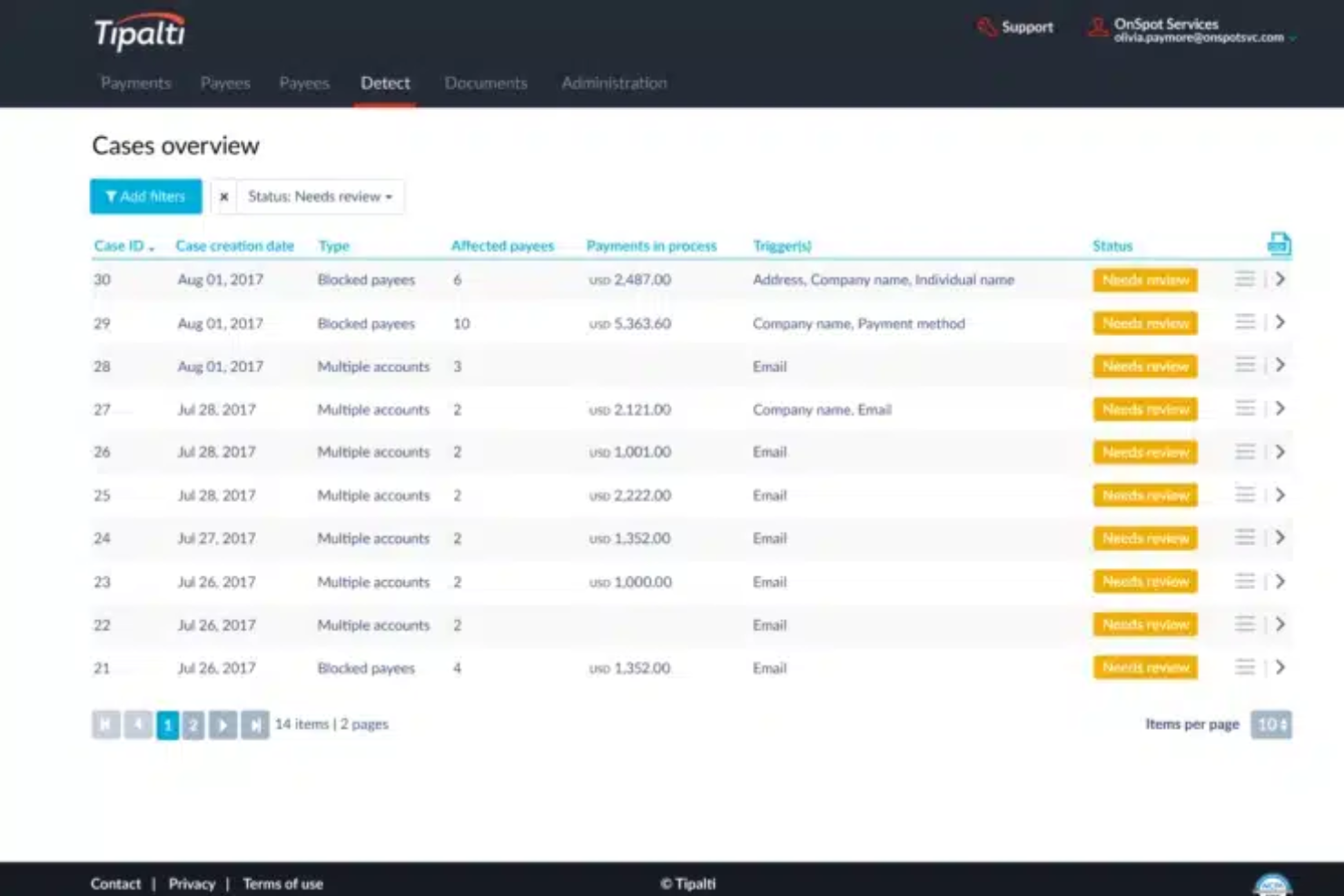
Tipalti is an invoice automation software platform that combines global invoice processing, supplier management, tax compliance, and payment reconciliation in one system.
Who Is Tipalti Best For?
Finance teams at multinational companies that need automated invoice processing and built-in tax compliance.
Why I Picked Tipalti
I picked Tipalti as one of the best because I rely on its built-in tax compliance to handle global supplier payments without manual intervention. I use the platform’s automated invoice capture and validation to process high volumes of invoices across multiple entities. The system’s end-to-end audit trail lets my team track every approval and payment for compliance reporting.
Tipalti Key Features
- PO matching: Matches invoices to purchase orders and receipts automatically.
- Supplier portal: Lets vendors submit invoices and track payment status.
- Multi-currency support: Processes invoices and payments in over 120 currencies.
- Automated approval workflows: Routes invoices for approval based on custom rules.
Tipalti Integrations
Tipalti offers native integrations with Oracle NetSuite, QuickBooks Online, Xero, Sage Intacct, Oracle, Microsoft Dynamics 365, SAP, Workday, Slack, and more. An API is available for custom integrations.
Pros and Cons
Pros:
- Mobile app for invoice capture and approvals
- AI-driven data extraction from multiple sources
- Real-time fraud detection on invoice processing
Cons:
- Limited flexibility for custom approval workflows
- ACH and wire transfer fees can add up

Yooz
Best for real-time invoice automation
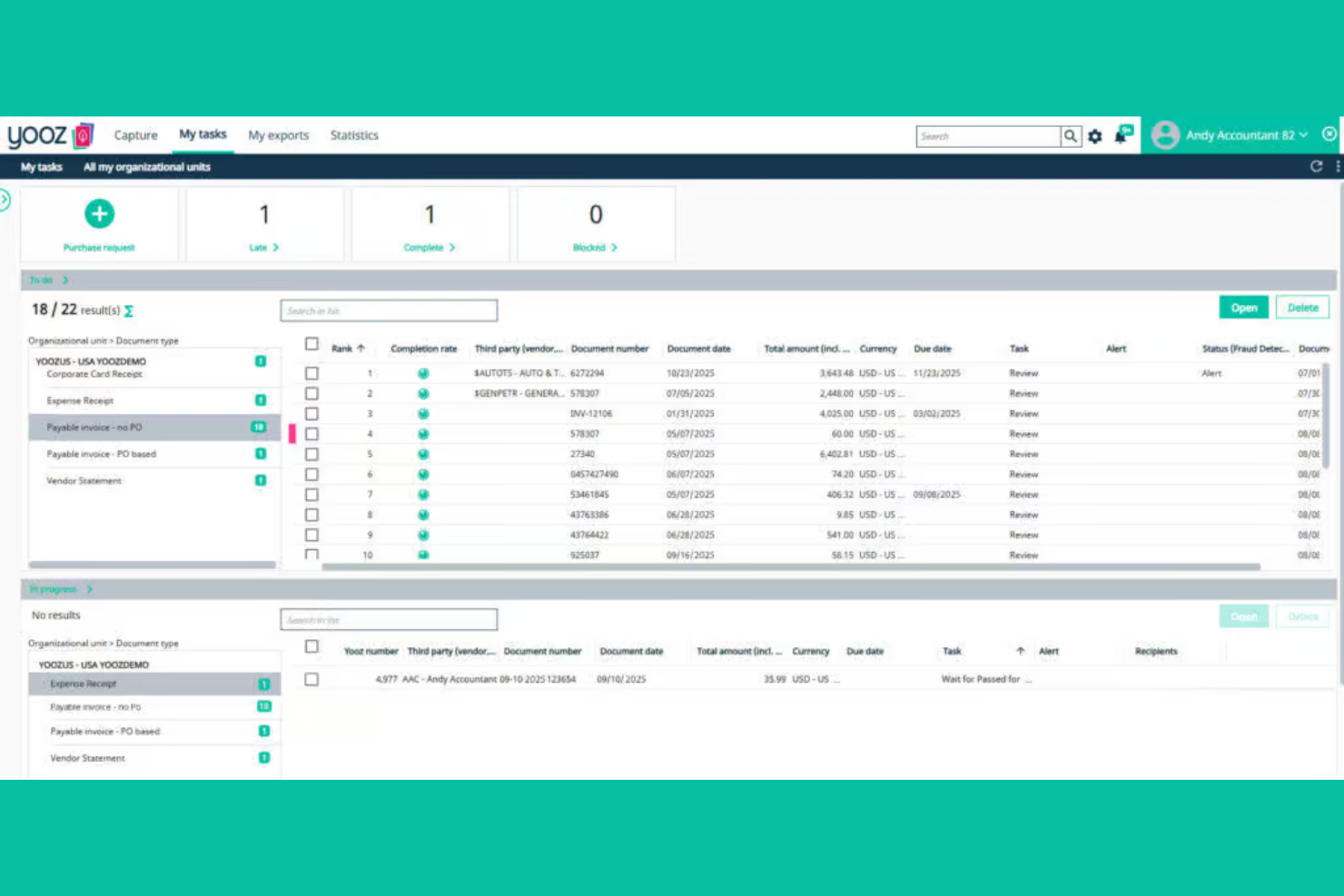
Yooz is an invoice automation software platform that combines AI-driven data capture, real-time invoice processing, fraud detection, and customizable approval workflows for accounts payable teams.
Who Is Yooz Best For?
Accounts payable teams in mid-sized to large organizations that need real-time invoice processing and advanced fraud detection.
Why I Picked Yooz
I picked Yooz as one of the best because I like how its real-time invoice automation flags suspicious transactions instantly, which helps my team catch fraud before it hits our books. I use the AI-driven data extraction to process invoices from email, scan, or mobile upload without manual entry. The customizable approval workflows let me set up multi-level reviews that fit our internal controls.
Yooz Key Features
- Mobile invoice capture: Snap and upload invoices directly from your phone.
- Duplicate invoice detection: Automatically flags potential duplicate submissions for review.
- Purchase order matching: Matches invoices to purchase orders and receipts for validation.
- Audit trail: Maintains a detailed log of all invoice actions and approvals.
Yooz Integrations
Yooz offers 250+ native integrations, including Sage Intacct, QuickBooks, Microsoft Dynamics 365, SAP, Oracle NetSuite, Xero, Blackbaud, Sage 50, and more. An API is available for custom integrations.
Pros and Cons
Pros:
- Strong multi-entity and multi-currency support
- Real-time duplicate invoice detection
- Fast invoice capture with OCR and mobile app
Cons:
- Vendor portal lacks self-service features
- Advanced analytics require higher-tier plans

Brex
Best for spend and invoice management
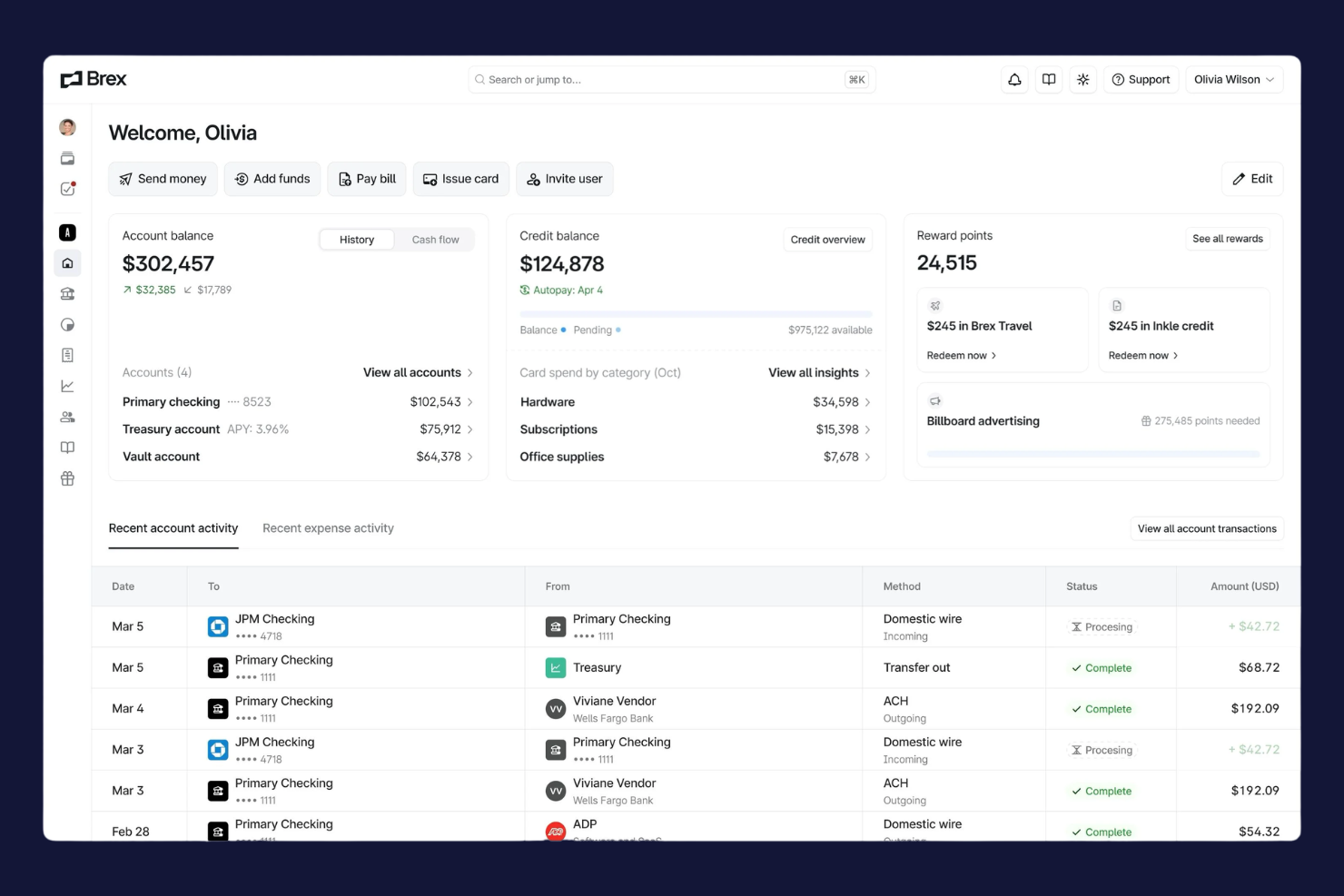
Brex is a spend management platform for finance teams that combines corporate cards, invoice automation, bill pay, and real-time expense tracking in one system.
Who Is Brex Best For?
Finance teams at fast-growing startups and global companies that need unified spend, card, and invoice management.
Why I Picked Brex
I picked Brex as one of the best because I use its real-time spend controls and global payments to manage invoices and expenses across multiple entities. I like that I can issue virtual cards for vendors and automate invoice approvals in one dashboard. My team is able to sync transactions instantly with our accounting system, which keeps our books up to date.
Brex Key Features
- Automated invoice capture: Extracts invoice data from uploads and emails for processing.
- Multi-entity management: Lets you manage invoices and payments across subsidiaries in one platform.
- Custom approval workflows: Allows you to set up multi-level invoice approval chains.
- Audit-ready reporting: Generates detailed reports for compliance and audit requirements.
Brex Integrations
Brex offers native integrations with QuickBooks Online, NetSuite, Xero, Sage Intacct, Rippling, Gusto, Slack, and Plaid, and connects with Zapier. An API is available for custom integrations.
Pros and Cons
Pros:
- Fast ACH and wire payment processing
- Built-in spend controls for each department
- Multi-entity support for global teams
Cons:
- No advanced purchase order matching
- Limited support for non-US bank accounts
Best for mid-market invoice automation
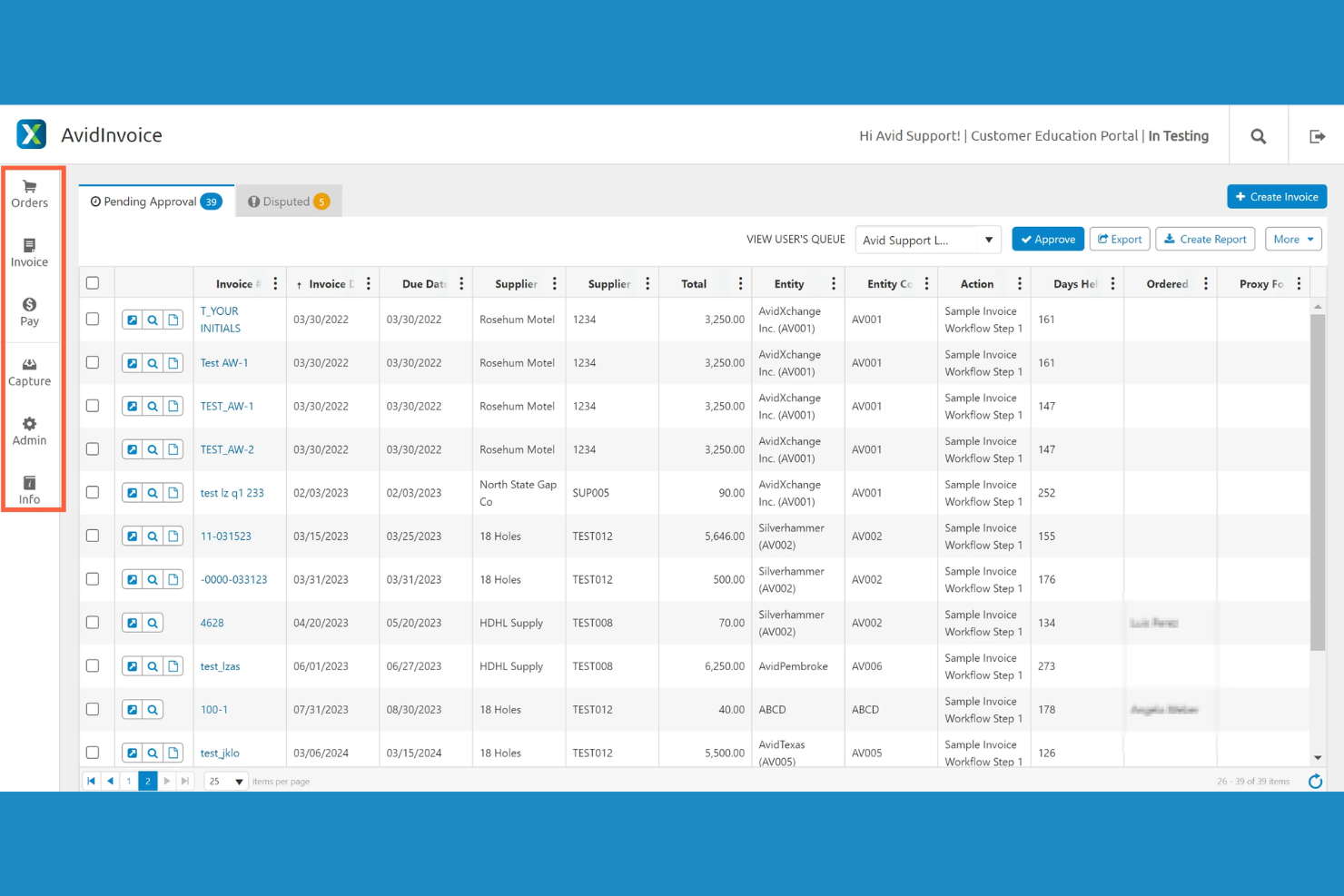
AvidXchange is an invoice automation software platform that digitizes invoice capture, automates approval workflows, and connects with accounting systems for mid-market businesses.
Who Is AvidXchange Best For?
Accounts payable teams at mid-market companies in real estate, construction, or community management.
Why I Picked AvidXchange
I picked AvidXchange as one of the best because I rely on its invoice automation software to handle high invoice volumes for mid-market businesses. I use its configurable approval workflows to match our internal controls, and the platform’s deep integrations with industry-specific accounting systems let my team keep everything in sync without manual entry.
AvidXchange Key Features
- Invoice capture automation: Digitizes and extracts data from invoices using OCR technology.
- Supplier portal: Lets vendors submit invoices and check payment status online.
- Audit trail tracking: Records every action taken on each invoice for compliance.
- Customizable notifications: Send alerts for pending approvals and status changes.
AvidXchange Integrations
AvidXchange offers native integrations with Oracle NetSuite, QuickBooks, Sage Intacct, Microsoft Dynamics 365, MRI Software, Yardi, RealPage, Oracle, SAP, TimberScan, and Viewpoint, and provides an API for custom integrations.
Pros and Cons
Pros:
- Flexible payment options including virtual cards
- Centralized dashboard for invoice status tracking
- Automated invoice approval routing for large teams
Cons:
- Some users report duplicate invoice notifications
- Invoice search functionality can be slow

Rossum
Best for AI invoice data capture
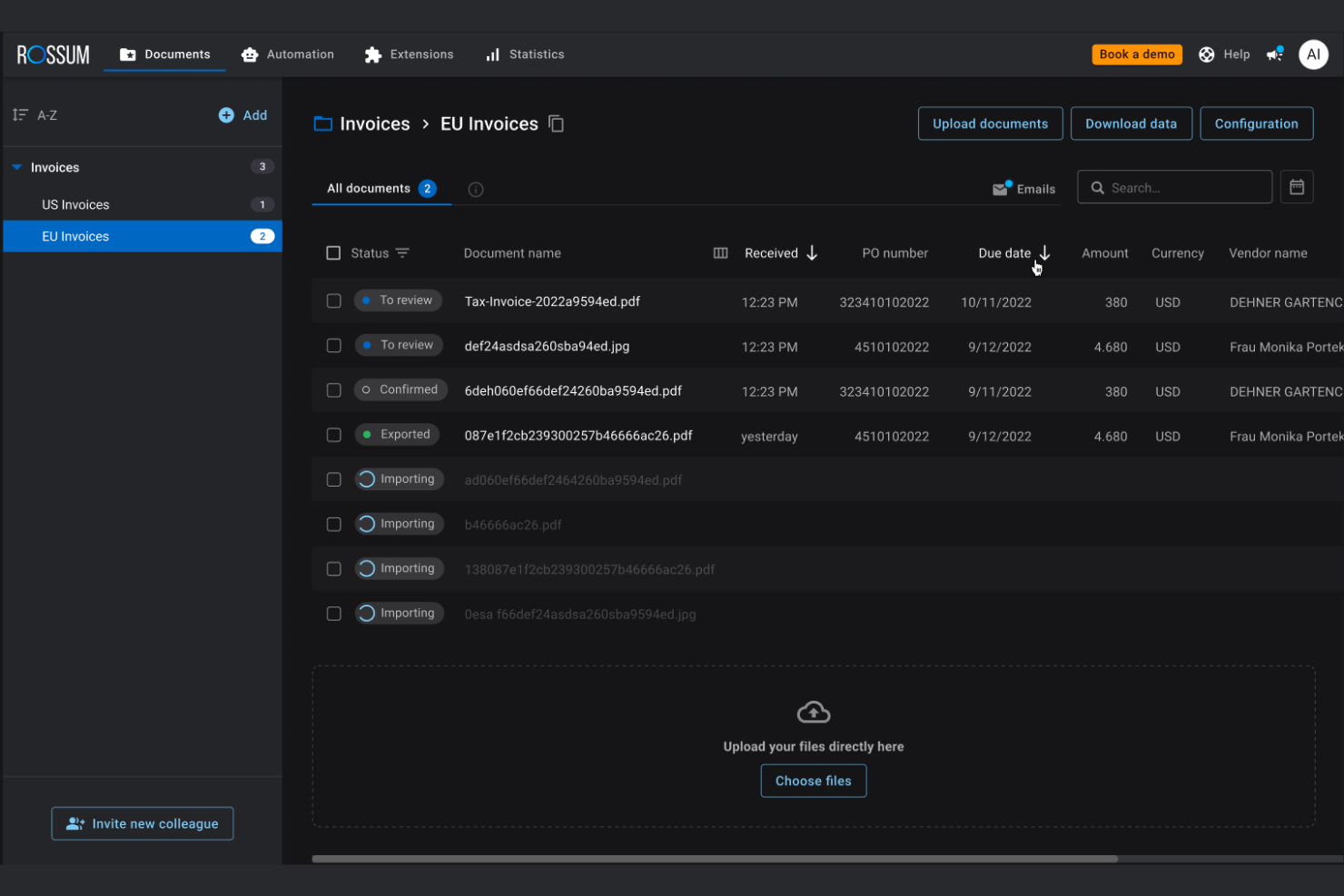
Rossum is an invoice automation platform that uses AI to extract, validate, and organize invoice data from multiple formats and integrates with your existing accounts payable systems.
Who Is Rossum Best For?
Large accounts payable teams in finance, logistics, or retail that need AI-powered data capture for high invoice volumes.
Why I Picked Rossum
I picked Rossum as one of the best because its AI-powered data capture stands out for handling complex, multi-format invoices without heavy template setup. I like how it learns from corrections, so my team can process new invoice layouts quickly. The validation engine flags anomalies and missing fields, which helps us catch issues before approval.
Rossum Key Features
- Custom workflow builder: Design and automate multi-step invoice approval processes tailored to your team’s needs.
- Role-based access controls: Set granular permissions for users across different departments and locations.
- Audit trail: Track every action taken on an invoice with a detailed, time-stamped log.
- API integrations: Connect Rossum with ERP, accounting, and procurement systems for smooth data flow.
Rossum Integrations
Rossum offers native integrations with SAP, Oracle NetSuite, Microsoft Dynamics 365, Coupa, Blue Prism, UiPath, and connects with Zapier. An API is available for custom integrations.
Pros and Cons
Pros:
- Detailed audit trail for compliance tracking
- Integrates with major ERP and RPA tools
- AI learns from user corrections over time
Cons:
- Processing speed slows with very large batches
- Customization requires technical expertise
Medius
Best for cloud-based AP automation
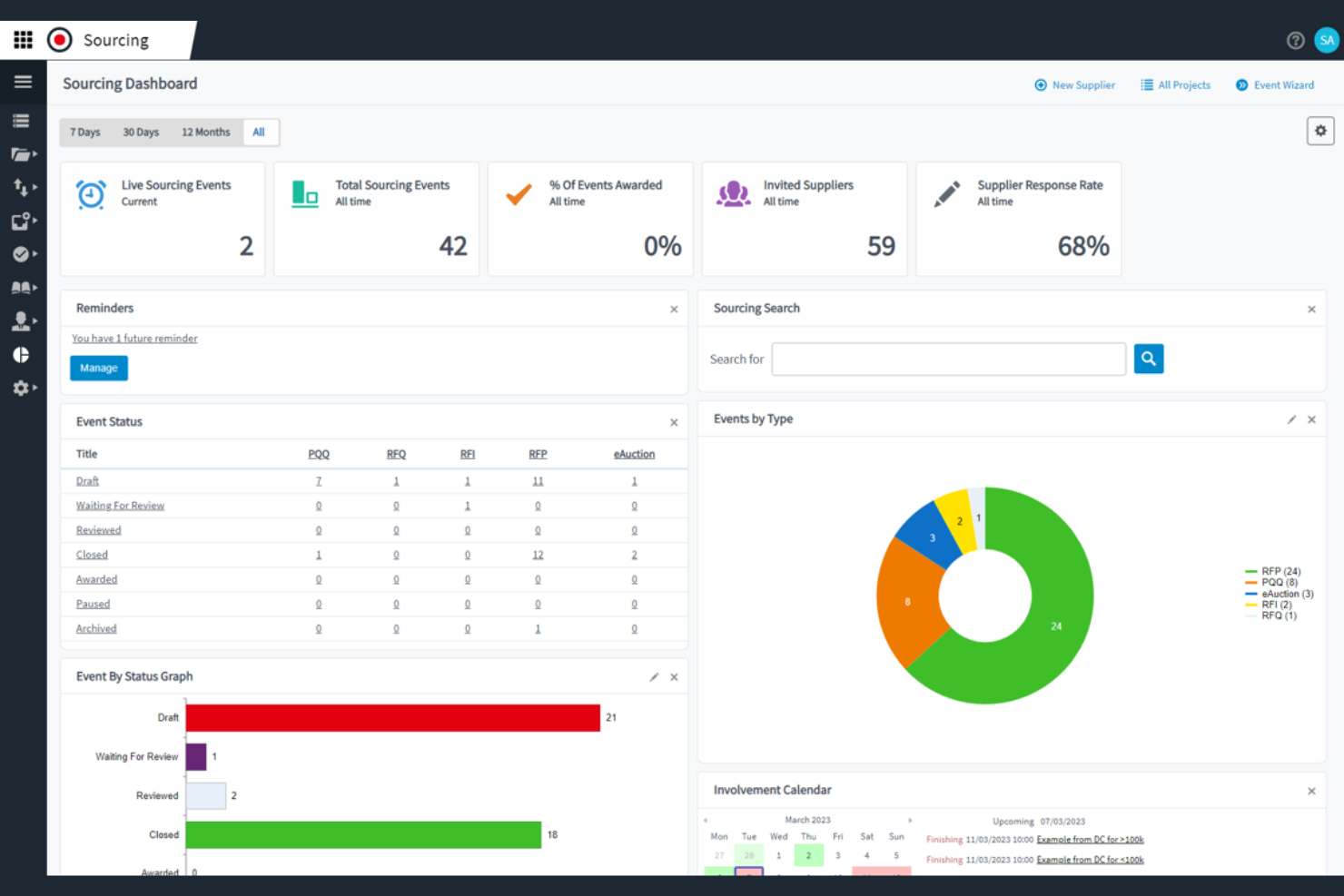
Medius is an invoice automation platform for finance teams that combines AP workflow automation, spend analytics, fraud detection, and supplier management in one system.
Who Is Medius Best For?
Medius is a strong fit for enterprise finance teams that need advanced AP automation and spend analytics.
Why I Picked Medius
I picked Medius as one of the best because I rely on its advanced spend analytics and fraud detection to spot unusual invoice activity before it becomes a problem. I like how the platform automates AP workflows and provides real-time visibility into spend patterns. My team uses the audit trail and exception handling features to keep our compliance tight and our processes transparent.
Medius Key Features
- Invoice capture automation: Uses AI to extract and enter invoice data automatically.
- PO matching engine: Matches invoices to purchase orders and receipts for validation.
- Supplier self-service portal: Lets suppliers submit invoices and track payment status online.
- Multi-currency support: Handles invoices and payments in multiple currencies for global operations.
Medius Integrations
Medius offers native integrations with SAP, Microsoft Dynamics 365, Oracle, Infor M3, Sage, and more, and provides an API for custom integrations.
Pros and Cons
Pros:
- Vendor portal for real-time invoice status
- Centralized communication threads for invoice questions
- AI-driven invoice coding suggestions save time
Cons:
- Limited language support for global teams
- No built-in payment processing feature

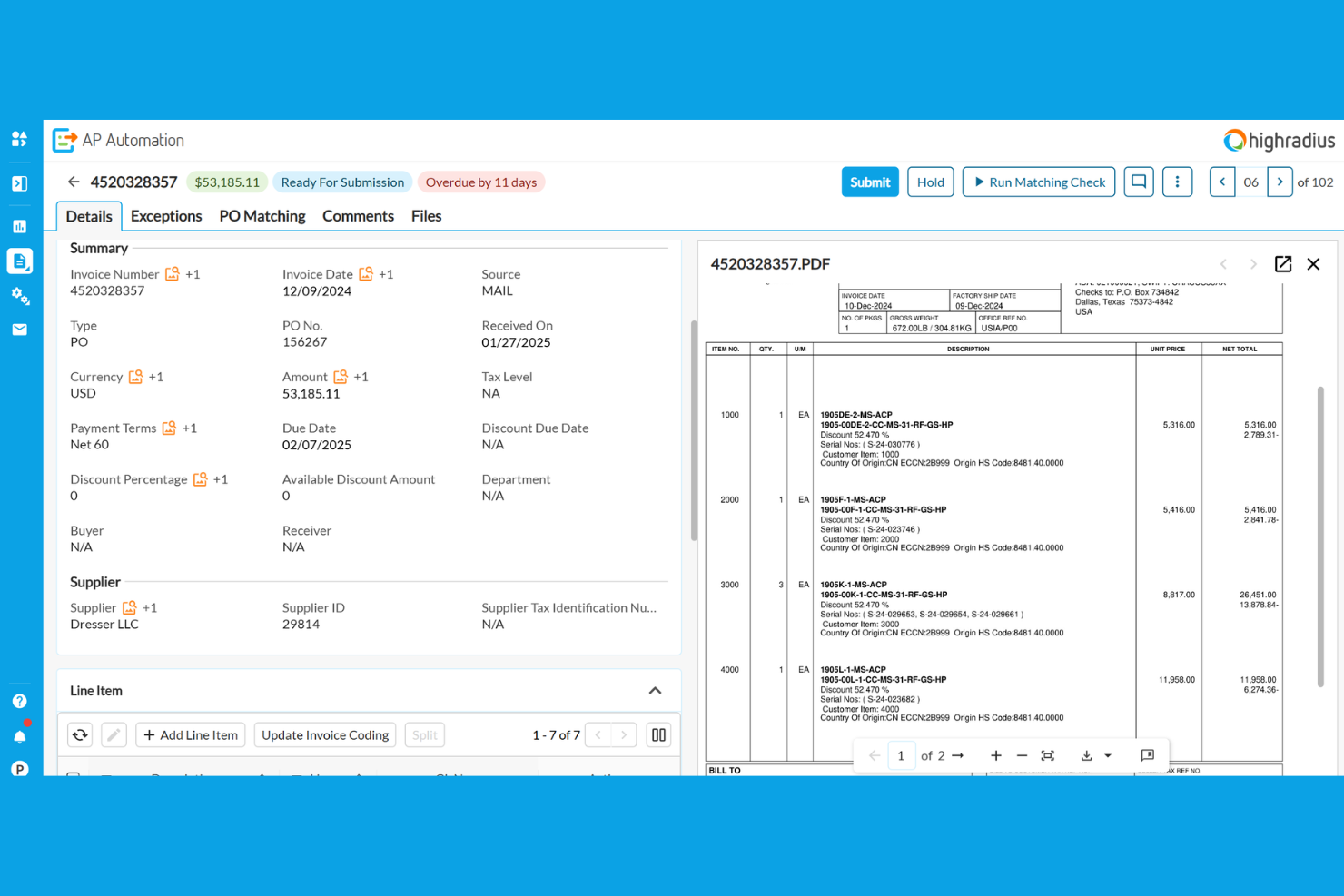
HighRadius is an invoice automation platform for finance teams that combines AI-powered invoice processing, cash application, credit management, and collections in one system.
Who Is HighRadius Best For?
HighRadius is a strong fit for large enterprise finance teams in manufacturing, distribution, and retail sectors.
Why I Picked HighRadius
I picked HighRadius as one of the best because I rely on its AI-powered invoice automation and cash application to handle high transaction volumes with minimal manual intervention. I like how the platform uses machine learning to match payments to invoices and flag exceptions for review. My team uses its real-time dashboards to monitor receivables and automate dispute management, which keeps our process moving fast.
HighRadius Key Features
- Automated invoice delivery: Sends invoices to customers through email or customer portals automatically.
- Customer self-service portal: Lets customers view, download, and pay invoices online.
- Configurable approval workflows: Allows you to set up multi-level invoice approval processes.
- ERP integration connectors: Connects directly with SAP, Oracle, Microsoft Dynamics, and other major ERP systems.
HighRadius Integrations
HighRadius offers native integrations with SAP, Oracle, Microsoft Dynamics 365, NetSuite, Sage, Infor, Workday, and Salesforce, and provides an API for custom integrations.
Pros and Cons
Pros:
- Customizable dashboards for invoice analytics
- Automated matching with purchase orders
- AI-powered invoice data extraction accuracy
Cons:
- Mobile app functionality is not fully developed
- Occasional sync delays with ERP systems

Quadient
Best for AP automation with analytics

Quadient is an invoice automation software platform that combines document management, digital workflow routing, and automated invoice capture for accounts payable teams.
Who Is Quadient Best For?
Accounts payable teams in mid-sized and large organizations that need advanced document management and workflow controls.
Why I Picked Quadient
I picked Quadient as one of the best because I rely on its advanced document management to organize, store, and retrieve invoices with granular access controls. I use its workflow designer to build multi-step approval processes that match our internal policies. The platform’s audit-ready tracking lets my team monitor every document change and approval in real time.
Quadient Key Features
- Automated invoice capture: Uses OCR to extract data from scanned and emailed invoices.
- Supplier portal: Lets vendors submit invoices and track payment status online.
- Duplicate invoice detection: Flags potential duplicate invoices before processing.
- Multi-currency support: Handles invoices and payments in multiple currencies.
Quadient Integrations
Quadient offers native integrations with Oracle NetSuite, Microsoft Dynamics 365, Sage, QuickBooks, Xero, and provides an API for custom integrations.
Pros and Cons
Pros:
- Detailed audit trails for compliance tracking
- Cloud-based platform with remote access
- Automated three-way matching for invoices
Cons:
- Supplier onboarding tools are basic
- Limited language support for global teams


BILL is an invoice automation platform for finance teams that handles accounts payable, accounts receivable, digital payments, and document management in one system.
Who Is BILL Best For?
Accounts payable and receivable teams at mid-sized businesses that need automated workflows and deep accounting integrations.
Why I Picked BILL
I picked BILL as one of the best because I rely on its automated AP and AR workflows to handle high invoice volumes without manual entry. I like that I can set up custom approval chains and sync transactions directly with QuickBooks or NetSuite. My team uses the document management feature to keep all invoice records organized and audit-ready.
BILL Key Features
- Vendor management: Lets you store and manage vendor details and payment preferences.
- Recurring payments: Schedule and automate recurring invoice payments to vendors.
- Mobile app: Approve, pay, and track invoices from your phone.
- Audit trail: Tracks every action taken on invoices for compliance and transparency.
BILL Integrations
BILL offers native integrations with QuickBooks, Xero, Oracle NetSuite, Sage Intacct, Microsoft Dynamics 365, Acumatica, and more. An API is available for custom integrations.
Pros and Cons
Pros:
- Vendor network for faster electronic payments
- ACH, check, and international payment options
- Approval workflows with role-based permissions
Cons:
- Batch payment processing can experience delays
- International payments have limited currency support
Diğer Fatura Otomasyonu Yazılımları
İşte kısa listeme girmeyen ancak yine de göz atmaya değer bazı ek fatura otomasyonu yazılımı seçenekleri:
- Rillion
For user-friendly invoice automation
- Concur Invoice
For compliant invoice processing
- FreshBooks
For small business invoicing
- Sage Intacct
For cloud financial management
- Coupa
For spend and AP management
- Xero
For cloud accounting and invoicing
- Docsumo
For AI invoice data extraction
- Order.co
For automated purchasing and invoicing
- Lido
For spreadsheet-based invoice automation


How I Evaluate Invoice Automation Software
I evaluate these tools in two layers: the core capabilities—like milestone-based invoicing and accounting sync—every tool must have, and the differentiators that set the best options apart.
Core Functionality (Table Stakes For This List)
When I'm selecting tools for my list, I rank each one on a scale from 0 (does not offer the functionality) to 5 (excels in this area) for each core functionality listed below. Then, I calculate the tool's total score into a percentage. Each tool needs to achieve a minimum total score of 65% to be considered for inclusion.
- Project-Based Invoice Generation: I check whether a tool can produce invoices tied to milestones, deliverables, or retainer schedules rather than forcing you to build each invoice from scratch.
- Time & Expense Billing: Approved timesheets and logged expenses should flow into invoices with the correct rates applied, so I look at how each tool handles role-based or client-specific billing rules.
- Recurring & Scheduled Invoicing: For retainer clients or phased engagements, I evaluate whether the tool supports automated invoice runs on custom schedules or event-based triggers.
- Accounting & ERP Integration: I look for native, bidirectional sync with platforms like QuickBooks, Xero, or NetSuite so invoice and payment data stays consistent across systems.
- Payment Tracking & AR Management: Each tool should surface real-time invoice status, aging balances, and outstanding receivables at the project level rather than only at the account level.
- Approval Routing & Tax Compliance: I evaluate how the tool handles multi-step invoice approvals across project teams and whether it supports multi-currency and regional tax configurations.
Once I have a list of tools that meet the criteria, I consider what sets each platform apart.
Differentiating Factors (What Sets Vendors Apart)
Here's how I compare and contrast different vendors:
Standout Features
Budget burn alerts are a big differentiator. I look for tools that flag when billable spend trends past a set threshold so billing conversations happen before margin erosion sets in. Client-facing portals also matter, especially for agencies managing multiple accounts where clients expect to review and approve invoices on their own. For longer engagements, I evaluate whether a tool supports revenue recognition methods like percentage-of-completion, which keeps financials accurate across multi-phase projects.
Beyond Features
I evaluate how well each tool connects to the project management platforms teams already use, like Jira, Asana, or monday.com. A tool with deep native integrations cuts down on manual data handoffs between delivery and finance. Pricing transparency is another focus area. I check whether costs scale predictably as headcount or project volume grows, since hidden fees for payment processing or premium connectors can erode the ROI quickly. Reporting also matters. Project profitability dashboards that tie invoiced revenue back to logged effort help PMs prove margin health to leadership.
Fatura Otomasyonu Yazılımı Nasıl Seçilir?
Uzun özellik listeleri ve karmaşık fiyatlandırma yapıları içinde kaybolmak kolaydır. Kendinize özgü yazılım seçim sürecinizi yürütürken odağınızı korumanıza yardımcı olmak için göz önünde bulundurmanız gereken faktörleri aşağıda bir kontrol listesi hâlinde bulabilirsiniz:
| Faktör | Göz önünde bulundurulması gerekenler |
|---|---|
| Ölçeklenebilirlik | İşletmeniz büyüdükçe yazılım fatura hacminizi kaldırabilecek mi? Kullanıcı sınırlarını ve işlem limitlerini sorun. |
| Entegrasyonlar | Muhasebe, ERP ve tedarik sistemlerinize yerel olarak bağlanabiliyor mu? Teknoloji yığınınızla uyumluluğunu kontrol edin. |
| Özelleştirilebilirlik | İş akışlarını, onay kurallarını ve bildirimleri süreçlerinize uyacak şekilde düzenleyebiliyor musunuz? Sizi geçici çözümlere zorlayan katı sistemlerden kaçının. |
| Kullanım kolaylığı | Ekibiniz yazılımı hızlı bir şekilde benimseyecek mi? Sezgisel gezinme ve minimum eğitim gereksinimleri arayın. Arayüzü test etmek için bir demo talep edin. |
| Uygulama ve kullanıma alma | Kurulum ne kadar sürecek ve hangi destek sağlanacak? Veri taşıma yardımı, eğitim kaynakları ve tipik kullanıma geçiş zaman çizelgelerini sorun. |
| Maliyet | Fiyatlandırma kademeleri açık ve öngörülebilir mi? Entegrasyonlar, kullanıcılar veya gelişmiş özellikler için alınan ek ücretlere dikkat edin. Toplam sahip olma maliyetini karşılaştırın. |
| Güvenlik önlemleri | Satıcı şifreleme, denetim günlükleri ve erişim kontrolleri sunuyor mu? Şirketinizin veri koruma standartlarına uyumluluğu sağlayın. |
| Destek hizmetinin kullanılabilirliği | Hangi destek kanalları sunuluyor ve hangi saatlerde hizmet veriliyor? 7/24 yardıma veya özel hesap yönetimine ihtiyacınız olup olmadığını değerlendirin. |
Fatura Otomasyonu Yazılımı Nedir?
Fatura otomasyon yazılımı, fatura yakalama, onaylama ve işleme süreçlerini kolaylaştırmaya yardımcı olan bir borç hesapları otomasyonu ve fatura otomasyonu çözümüdür. Manuel süreçleri ve görevleri, işlem süresini azaltan ve zaman alan iş akışlarını ortadan kaldıran bir otomasyon çözümüyle değiştirir. Bu araçlar, fatura yaşam döngüsünün tamamını yönetmek, borç hesapları sürecini iyileştirmek ve tedarikçi ilişkilerini güçlendirmek için iş kurallarını uygular. Birçok platform ayrıca tahmin yapma, kredi kartı gibi ödeme yöntemlerini işleme ve erken ödeme indirimleri gibi fırsatları değerlendirme özelliklerini de içerir. Fatura iş akışlarını otomatikleştirerek finans ekipleri verimliliği en üst düzeye çıkarabilir, hataları azaltabilir ve borç hesapları operasyonları hakkında daha iyi görünürlük elde edebilir.
Özellikler
Her başarılı fatura otomasyon yazılımında bulunması gereken temel özellikler şunlardır:
- Fatura yakalama: E-posta, PDF veya taranmış belgelerden gelen faturaları dijitalleştirerek aranabilir ve işlenmeye hazır hale getirir.
- Onay iş akışları: Faturaların incelenmesi ve onaylanması için doğru kişilere yönlendirilmesini otomatikleştirerek darboğazları ve manuel takip gereksinimini azaltır.
- Sipariş eşleştirme: Doğruluğu sağlamak ve fazla ödeme ya da sahtekârlığı önlemek için faturaları satın alma siparişleri ve teslimat makbuzlarıyla karşılaştırır.
- Yinelenen fatura tespiti: Çifte ödemeleri önlemeye ve kayıtların düzenli kalmasına yardımcı olmak için olası yinelenen faturaları işaretler.
- Denetim izi: Bir fatura üzerinde gerçekleştirilen her işlemi izleyerek uyumluluk ve iç incelemeler için şeffaf bir kayıt sağlar.
- Tedarikçi portalı: Tedarikçilerin fatura göndermesine, ödeme durumunu kontrol etmesine ve borç hesapları ekibinizle doğrudan iletişim kurmasına olanak tanır.
- ERP ve muhasebe entegrasyonları: Veri senkronizasyonu yapmak ve manuel veri girişini azaltmak için mevcut finansal sistemlerinize doğrudan bağlanır.
- Özelleştirilebilir bildirimler: İşlem gerektiğinde veya son tarihler yaklaşırken onaylayanlara ya da finans personeline uyarılar ve hatırlatıcılar gönderir.
- Raporlama ve analiz: Fatura durumunu, onay sürelerini ve harcama eğilimlerini izlemek için gösterge panoları ve dışa aktarılabilir raporlar sunar.
- Kullanıcı izinleri: Hangi kullanıcıların faturaları görüntüleyebileceğini, düzenleyebileceğini veya onaylayabileceğini kontrol etmenizi sağlayarak iç kontrolleri ve güvenlik politikalarını destekler.
Yaygın Fatura Otomasyon Yazılımı Yapay Zekâ Özellikleri
Yukarıda listelenen standart fatura otomasyon yazılımı özelliklerinin yanı sıra bu çözümlerin çoğu aşağıdaki gibi özelliklerle yapay zekâyı bünyesine katıyor:
- Akıllı veri çıkarma: Manuel veri girişini ve hataları azaltmak için yapay zekâyı kullanarak satıcı adı, fatura numarası ve tutarlar gibi temel fatura ayrıntılarını çok çeşitli biçimlerden tanır ve çıkarır.
- Otomatik büyük defter kodlama: Sınıflandırmayı hızlandırmak ve hataları azaltmak için fatura içeriğine ve geçmiş kodlama kalıplarına dayanarak büyük defter kodlarını önermek veya atamak üzere yapay zekâyı kullanır.
- Anormallik tespiti: Ekiplerin sahtekârlığı veya uyumluluk sorunlarını erken fark etmesine yardımcı olmak için alışılmadık fatura tutarlarını, yinelenen gönderimleri veya şüpheli tedarikçileri işaretlemek üzere yapay zekâdan yararlanır.
- Tahmine dayalı onay yönlendirme: Geçmiş onay davranışlarından öğrenmek ve faturaları en uygun onaylayanlara otomatik olarak yönlendirmek için yapay zekâyı kullanarak gecikmeleri en aza indirir.
- Akıllı istisna yönetimi: Eksik satın alma siparişleri veya uyuşmayan tutarlar gibi istisnaları belirlemek ve kategorilere ayırmak, ayrıca çözüm için sonraki adımları önermek üzere yapay zekâyı uygular.
Avantajlar
Fatura otomasyon yazılımını uygulamak ekibiniz ve işletmeniz için çeşitli avantajlar sağlar. Yararlanabileceğiniz avantajlardan bazıları şunlardır:
- Daha hızlı fatura onayları: Otomatik iş akışları ve bildirimler, faturaların inceleme ve onay sürecinde hızla ilerlemesine yardımcı olur (özel fatura onay araçları bu adım için daha odaklı destek sağlayabilir).
- Azalan manuel veri girişi: Dijital yakalama ve yapay zekâ destekli çıkarma, tekrarlayan yazma işlemlerini ortadan kaldırır ve insan hatası riskini azaltır.
- Gelişmiş uyumluluk ve denetime hazırlık: Yerleşik denetim izleri ve izin kontrolleri, düzenleyici gereklilikleri karşılamayı ve denetimlere hazırlanmayı kolaylaştırır.
- Borç hesaplarına ilişkin daha iyi görünürlük: Gerçek zamanlı gösterge panoları ve raporlama, finans ekiplerine fatura durumu, harcama eğilimleri ve darboğazlar hakkında net bir görünüm sunar.
- Yinelenen veya sahte ödemelerde daha düşük risk: Yinelenen fatura tespiti ve anormallik uyarıları, ödemeler yapılmadan önce sorunların fark edilmesine yardımcı olur.
- Daha kolay tedarikçi iş birliği: Tedarikçi portalları ve otomatik durum güncellemeleri, tedarikçileri bilgilendirir ve karşılıklı iletişim gereksinimini azaltır.
- Finansal sistemlerle sorunsuz entegrasyon: ERP ve muhasebe platformlarına doğrudan bağlantılar, veri tutarlılığını sağlar ve mutabakat çalışmalarını azaltır.
Maliyetler ve Fiyatlandırma
Fatura otomasyonu yazılımını seçmek, mevcut çeşitli fiyatlandırma modellerinin ve planların anlaşılmasını gerektirir. Maliyetler özelliklere, ekip büyüklüğüne, eklentilere ve daha fazlasına göre değişir. Aşağıdaki tablo, fatura otomasyonu yazılımı çözümlerinde yaygın olarak sunulan planları, ortalama fiyatlarını ve tipik özelliklerini özetlemektedir:
Fatura Otomasyonu Yazılımı için Plan Karşılaştırma Tablosu
| Plan Türü | Ortalama Fiyat | Yaygın Özellikler |
|---|---|---|
| Ücretsiz Plan | $0 | Temel fatura yakalama, sınırlı onay iş akışları, kısıtlı entegrasyonlar ve temel raporlama. |
| Bireysel Plan | $10-$30/kullanıcı/ay | Sınırsız fatura, standart onay iş akışları, e-posta desteği ve muhasebe yazılımına dışa aktarma. |
| İşletme Planı | $30-$80/kullanıcı/ay | Gelişmiş onay yönlendirme, satın alma siparişi eşleştirme, denetim izleri, ERP entegrasyonları ve analizler. |
| Kurumsal Plan | $80-$200/kullanıcı/ay | Özel iş akışları, çoklu kuruluş desteği, gelişmiş güvenlik, özel destek ve uyumluluk araçları. |
SSS
Fatura otomasyonu yazılımı hakkında sık sorulan bazı soruların yanıtları aşağıdadır:
Fatura otomasyonu yazılımı mevcut muhasebe sistemimle entegre olabilir mi?
Evet, çoğu fatura otomasyonu yazılımı popüler muhasebe ve ERP sistemleriyle entegrasyonlar sunar. Bir çözüm seçmeden önce mevcut teknoloji altyapınızla uyumluluğunu kontrol edin ve kullanılabilir bağlayıcılar veya API’ler hakkında bilgi alın.
Fatura otomasyonu yazılımını uygulamak ne kadar sürer?
Uygulama süresi değişiklik gösterir, ancak çoğu ekip birkaç hafta içinde sistemi kullanmaya başlayabilir. Veri taşıma, iş akışı özelleştirmesi ve kullanıcı eğitimi gibi faktörler süreyi etkileyebilir; bu nedenle beklentileri tedarikçinizle erkenden netleştirin.
Fatura otomasyonu yazılımı hassas finansal veriler için güvenli midir?
Evet, güvenilir çözümler verilerinizi korumak için şifreleme, erişim kontrolleri ve denetim günlükleri kullanır. Kuruluşunuzun gereksinimlerini karşıladığından emin olmak için her zaman bir tedarikçinin güvenlik sertifikalarını ve uyumluluk standartlarını inceleyin.
Otomasyon yazılımıyla hangi tür faturalar işlenebilir?
Çoğu platform PDF’ler, taranmış görüntüler ve elektronik faturalar dahil olmak üzere çok çeşitli fatura biçimlerini işler. Bazı çözümler uluslararası faturaları ve çoklu para birimi işlemlerini de destekler.
Fatura otomasyonu yazılımını kullanmak için teknik uzmanlığa ihtiyacım var mı?
Hayır, modern fatura otomasyonu araçlarının çoğu teknik bilgiye sahip olmayan kullanıcılar için tasarlanmıştır. Ekibinizin hızlı bir şekilde başlamasına yardımcı olmak için kullanımı kolay arayüzler, işe alıştırma kaynakları ve müşteri desteği sunan çözümleri tercih edin.