

2026’da Eğitim İçin En İyi 10 Belge Yönetimi Yazılımı

Eğitim İçin En İyi Belge Yönetimi Yazılımları Kısa Listesi


Eğitim alanında belgeleri yönetmek bunaltıcı olabilir. Öğrenci kayıtları, uyumluluk görevleri ve ekip iş birliğiyle ilgilenirken aynı zamanda düzenli kalmaya çalışırsınız. Evraklar ve dijital dosyalar arasında kaybolmak kolaydır.
Eğitim için belge yönetimi yazılımları bu işi kolaylaştırır. Dosyaları düzenler, depolar ve bunlara hızlı erişim sağlayarak zamandan tasarruf etmenize, hataları azaltmanıza ve ekibinizle daha verimli çalışmanıza yardımcı olurlar.
Deneyimlerime göre doğru araç büyük fark yaratır. Birkaç seçeneği test edip inceledim ve yaygın sorunları nasıl çözdüklerine yakından baktım.
Bu makalede özellikler, fiyatlandırma ve kullanılabilirlik hakkında tarafsız bilgilerle en iyi seçimlerimi paylaşacağım. Böylece size en uygun seçeneği bulabilir ve belgeleri daha verimli yönetebilirsiniz.
Why Trust Our Software Recommendations
Our team has been testing and reviewing software since 2012. As project managers ourselves, we know how difficult—and important—it is to choose the right software.
For this guide, we evaluated tools using hands-on testing and independent research, scoring tools using our selection criteria. We also draw on insights from industry thought leaders and practicing project management experts.
Our reviews reflect our human editorial judgment, not a sales pitch.
Expert reviewers:
Karşılaştırma Tablosu: Eğitim İçin Belge Yönetimi Yazılımları
Bu karşılaştırma tablosu, eğitim için en iyi belge yönetimi yazılımı seçimlerimin fiyatlandırma ayrıntılarını özetlemektedir:
| Tool | Starting Price | Website | |
|---|---|---|---|
| Best for secure file sharing | 4.4 out of 5 | $55/user/month Free demo + free trial available | Website |
| Best for customizable workflows | 4.5 out of 5 | $50/user/month Free demo available | Website |
| Best for Microsoft 365 native compliance | — | Pricing upon request Free trial + free demo available | Website |
| Best with metadata-driven document organization | 4.4 out of 5 | $65/user/month Free demo available | Website |
| Best for AI-powered document organization | 4.4 out of 5 | Pricing upon request 14-day free trial + free demo available | Website |
| Best for prebuilt workflow templates for schools | 4.6 out of 5 | $73/user/month Free demo available | Website |
| Best for automated compliance workflows | 4.5 out of 5 | Pricing upon request Free demo available | Website |
| Best for document retention & lifecycle management | 4.4 out of 5 | Pricing upon request Free demo available | Website |
| Best for automating policy & procedure management | — | Pricing upon request Free demo available | Website |
| Best with education-focused system integrations | — | Pricing upon request Free demo available | Website |
Eğitim İçin En İyi Belge Yönetimi Yazılımları İncelemeleri
Aşağıda, kısa listeme giren eğitim için en iyi belge yönetimi yazılımlarının ayrıntılı özetlerini bulabilirsiniz.
İncelemelerim, size en uygun aracı bulmanıza yardımcı olmak için her aracın temel özelliklerine, artılarına ve eksilerine, entegrasyonlarına ve ideal kullanım alanlarına ayrıntılı bir bakış sunar.

Best for secure file sharing
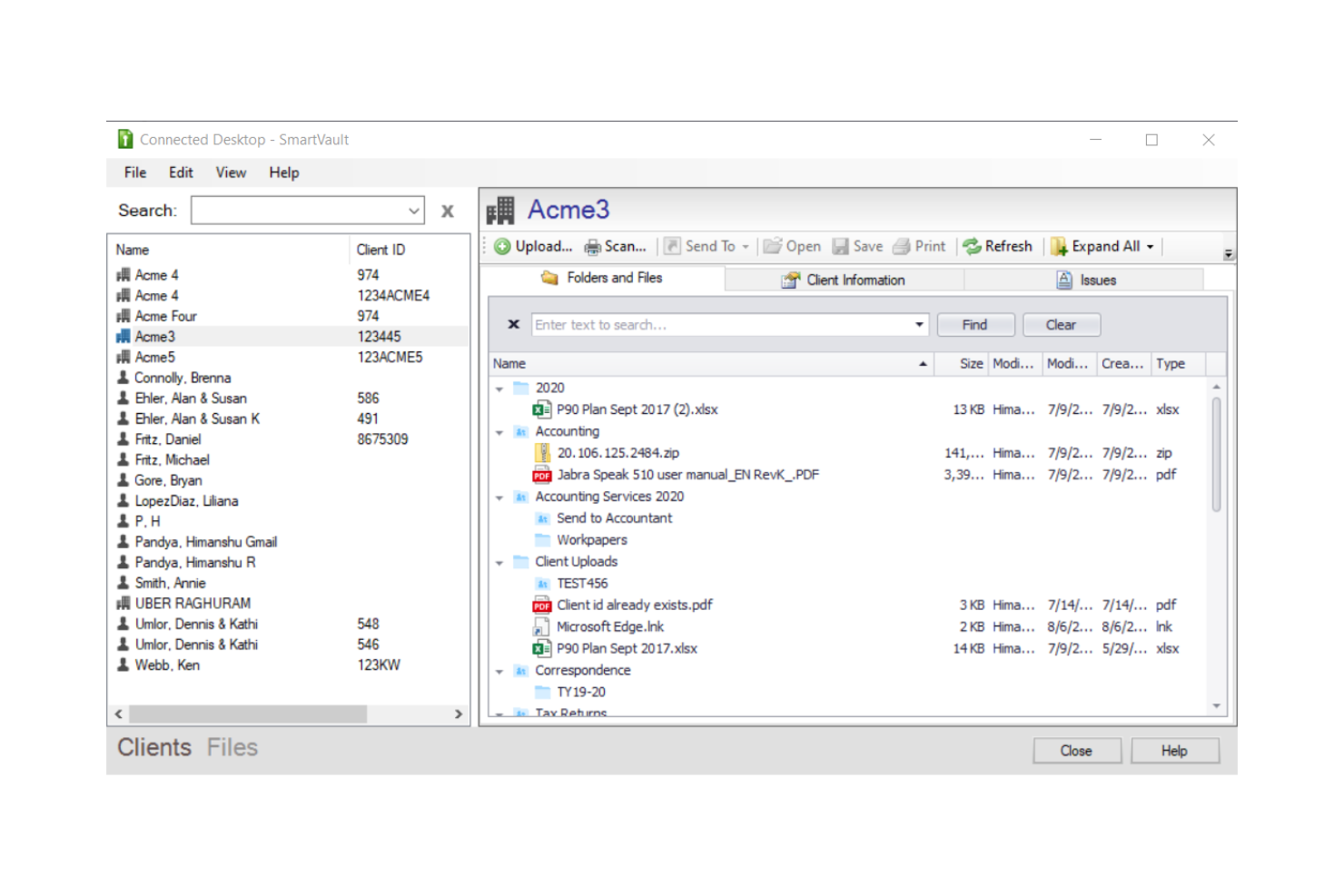
SmartVault is a cloud-based document management platform that combines secure file storage, branded client portals, document collection, eSignature workflows, and role-based access controls with built-in compliance support for FERPA and other regulatory standards.
Who Is SmartVault Best For?
SmartVault is a strong fit for school administrators and compliance-focused institutions that prioritize FERPA-aligned document security and controlled access over real-time collaboration.
Why I Picked SmartVault
SmartVault earns its spot on my shortlist because of how seriously it takes secure file sharing in environments where data sensitivity is non-negotiable. I love that you can set granular, role-based permissions so a parent only sees their child's documents, while teachers access shared class materials and administrators retain full control. Every file transfer is encrypted, and the audit log tracks exactly who accessed or downloaded what, which I find invaluable for FERPA compliance reviews.
SmartVault Key Features
- Unlimited cloud storage: Store and organize all educational files and records without worrying about hitting storage caps.
- Custom-branded student portals: Deploy secure, school-branded portals for students, parents, or staff to access documents.
- Audit trails and activity logs: Track every access and change made to documents for compliance and accountability.
- eSignature support: Send documents for electronic signature with built-in DocuSign integration for rapid approvals.
SmartVault Integrations
SmartVault offers native integrations with DocuSign, QuickBooks, Intuit Lacerte, Intuit ProSeries, Xero, and FreshBooks, and provides an API for custom integrations.
Pros and Cons
Pros:
- Encrypted file transfers meet FERPA requirements
- Audit logs track every file interaction
- Granular role-based access per user
Cons:
- Built primarily for accounting firms, not education
- No real-time collaborative document editing

Square 9
Best for customizable workflows
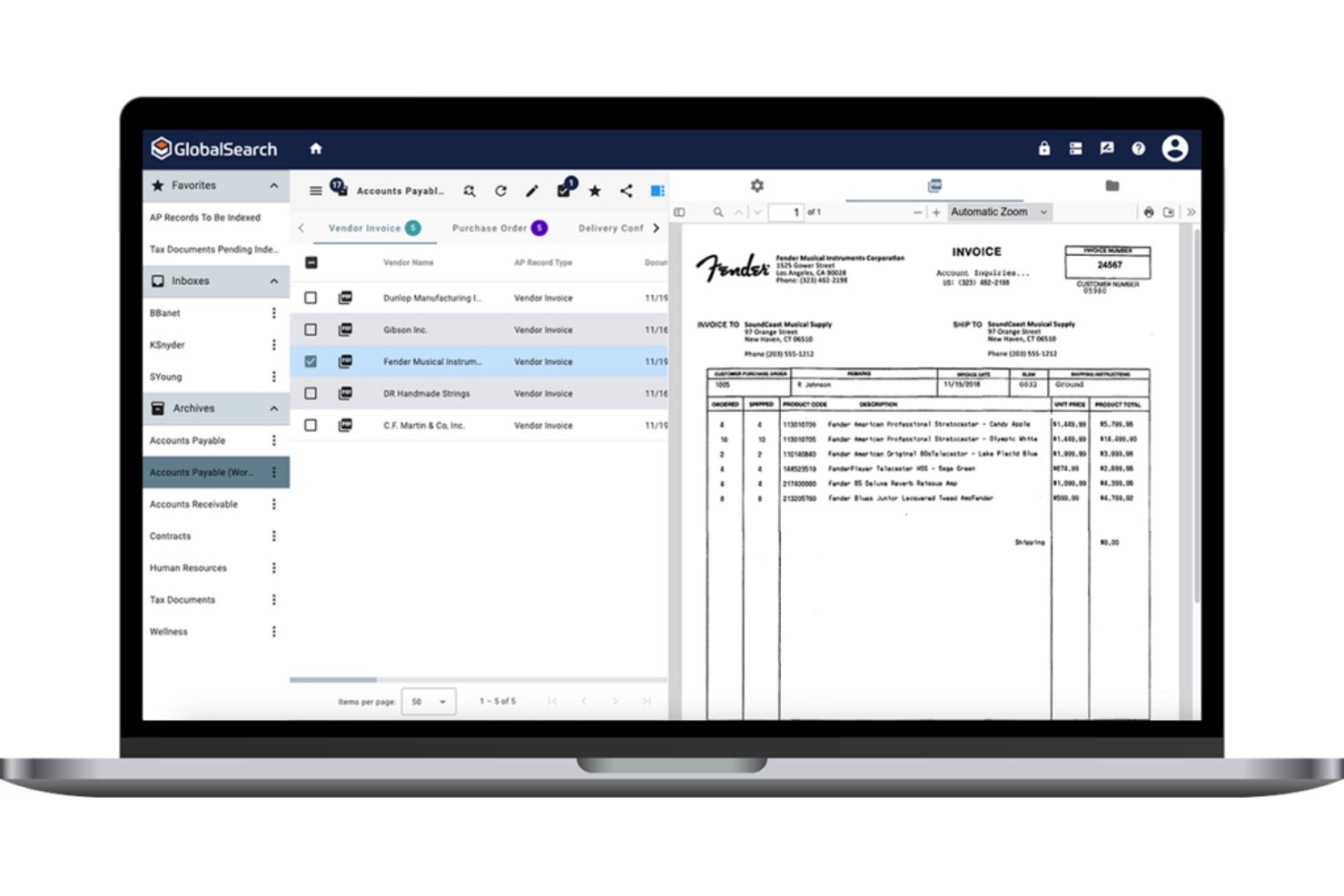
Square 9 is an enterprise content management platform that combines document capture, OCR-based indexing, workflow automation, and records management with education-specific tools for handling student records and compliance documentation.
Who Is Square 9 Best For?
Square 9 suits K-12 districts and higher education institutions that need structured records management and automated approval workflows across administrative departments.
Why I Picked Square 9
Square 9 earns its spot on my shortlist because of how far its workflow customization goes. I use GlobalAction to build multi-step approval chains for curriculum submissions or grant documentation, routing each step to the right department automatically. GlobalCapture's AI-driven OCR then captures incoming paper forms and indexes them into the correct workflow, which means student records and compliance documents land exactly where they need to be without any manual sorting.
Square 9 Key Features
- Full-text search with OCR: Find digitized student records and scanned documents using keyword and metadata searches powered by optical character recognition.
- Education-oriented records management: Apply retention policies and automate archival or deletion of student documents to meet compliance requirements.
- Granular permission controls: Set access levels at the user, group, and folder levels for sensitive academic and administrative files.
- FERPA and HIPAA compliance: Protect student and staff data with encryption, audit trails, and compliance-aligned data governance features.
Square 9 Integrations
Native integrations include Microsoft 365, Active Directory, Okta, SharePoint, and SQL Server. An API is available for custom integrations.
Pros and Cons
Pros:
- FERPA-aligned compliance and audit trail support
- OCR converts scanned student records instantly
- Highly configurable multi-step approval workflows
Cons:
- Interface feels dated compared to cloud-native competitors
- Implementation requires significant IT involvement

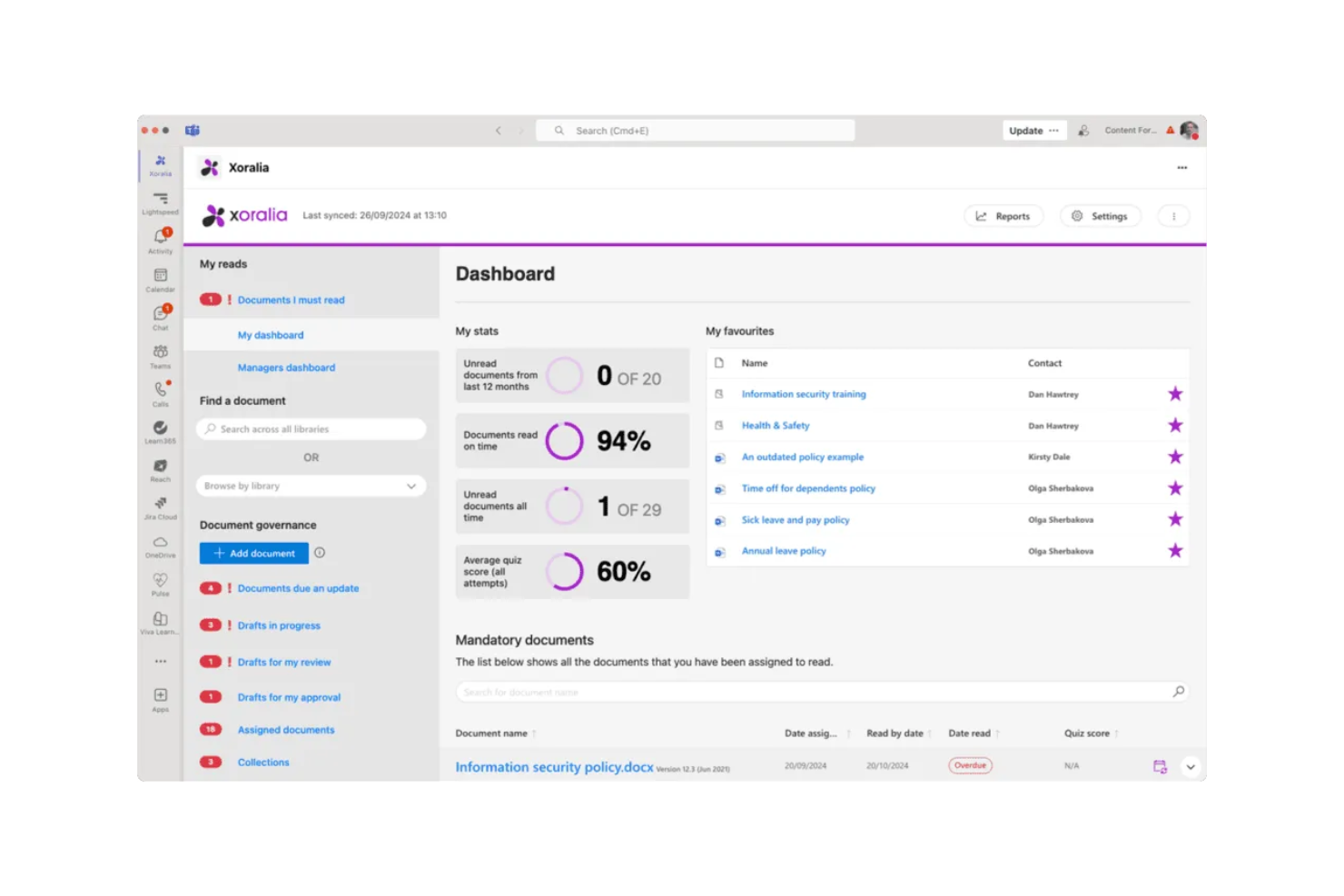
Xoralia is a policy and compliance document management platform built natively on Microsoft 365 and SharePoint, covering document lifecycle workflows, mandatory-read attestation, version control, and audit-ready compliance tracking.
Who Is Xoralia Best For?
Xoralia suits compliance officers and policy managers at universities and colleges already running Microsoft 365 who need a governed, audit-ready document workflow.
Why I Picked Xoralia
I picked Xoralia as one of the best because it runs entirely inside your institution's existing Microsoft 365 tenant. That matters in practice: when a university pushes a FERPA policy update to 500 staff, Xoralia handles distribution, mandatory-read attestation, and timestamped audit logging without moving data outside your environment. Its AI knowledge assistant runs via Azure OpenAI inside your tenant, so staff can query policy content directly without a third-party model ever touching your documents.
Xoralia Key Features
- Metadata tagging and advanced search: Quickly find documents using custom tags and full-text search filters built for policy and compliance needs.
- External policy publishing: Publish select policies to a public website for access by students, parents, or external regulators.
- Automated review and approval workflows: Route documents for periodic review and approval to assigned users with audit-ready logs.
- Role-based access controls: Limit access to specific documents by user, group, or department using your existing Entra ID (Azure AD) structure.
Xoralia Integrations
Xoralia has native integrations across the Microsoft ecosystem, including Microsoft 365 and Azure. An API is available for custom integrations.
Pros and Cons
Pros:
- Automated policy review cycles with assigned ownership
- Audit logs stored inside your own tenant
- Mandatory-read attestation built into document workflows
Cons:
- Requires existing Microsoft 365 infrastructure to function
- No free plan for educational institutions

M-Files
Best with metadata-driven document organization
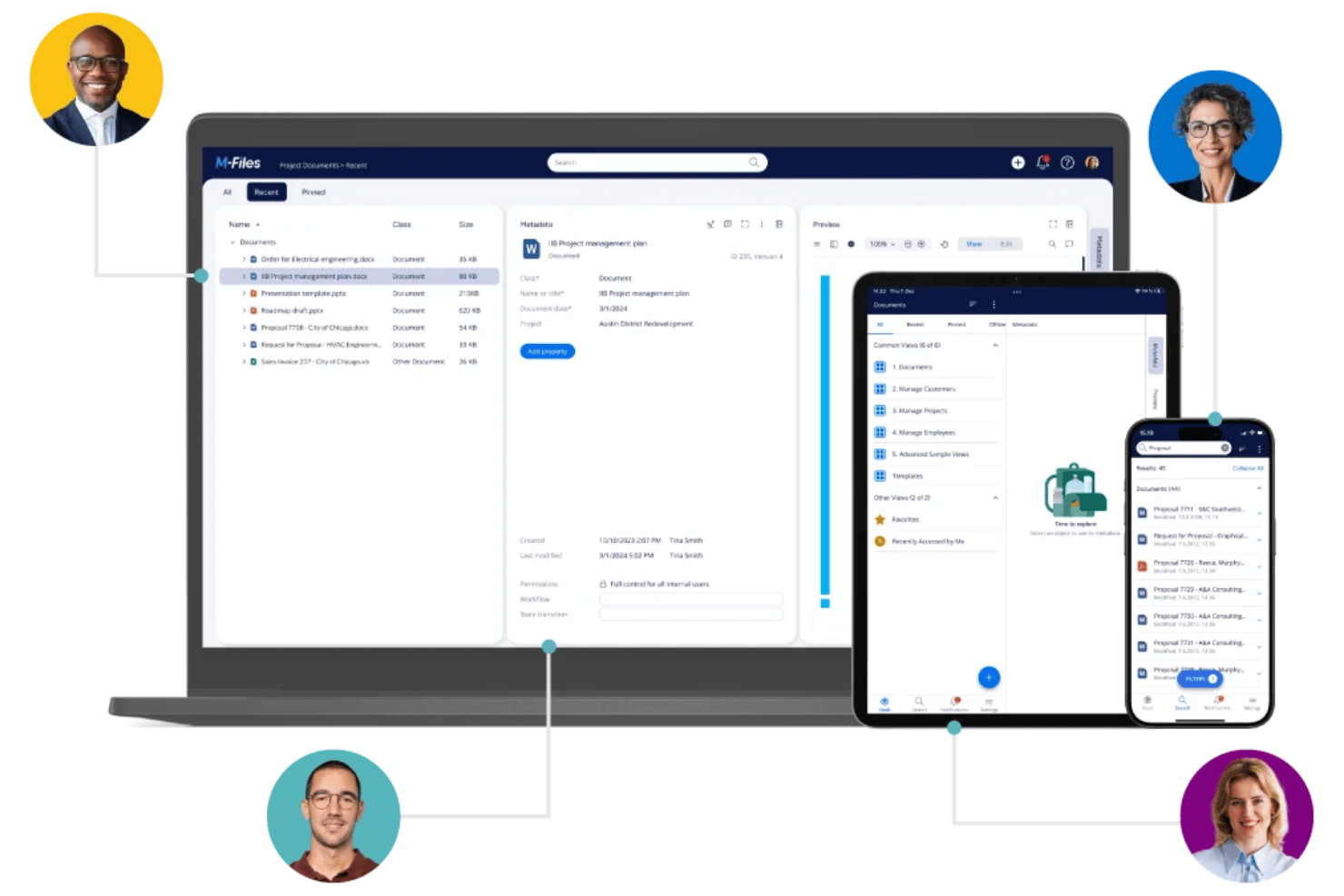
M-Files is a document management platform that organizes files through metadata rather than folder structures, offering version control, workflow automation, and compliance governance across institutional content.
Who Is M-Files Best For?
M-Files suits research program administrators and institutional teams managing large volumes of compliance-sensitive documents across multiple departments.
Why I Picked M-Files
M-Files earns its spot as one of the best on my shortlist because its metadata-driven approach changes how institutions handle documents. Rather than burying accreditation records inside nested folders, M-Files tags every document with contextual metadata, so the same file surfaces whether you search by course, department, or compliance category. I also like M-Files Aino, the built-in AI that automatically extracts and classifies metadata on upload, cutting manual tagging for teams managing high document volumes.
M-Files Key Features
- Microsoft 365 native integration: Users can manage, edit, and share documents directly within Teams, SharePoint, and Outlook.
- Workflow automation tools: Drag-and-drop visual designer lets you build and manage document review and approval processes.
- Granular access permissions: Admins can control document access for students, faculty, and external collaborators at folder and file levels.
- Comprehensive audit trails: Every access, edit, and share action is logged for compliance and reporting needs.
M-Files Integrations
M-Files has native integrations across the Microsoft ecosystem, including Microsoft 365 and Azure, plus native integrations with Salesforce, DocuSign, and SharePoint. An API is available for custom integrations.
Pros and Cons
Pros:
- Version history logs every document revision automatically
- AI auto-classifies scanned transcripts and student records
- Metadata tags replace confusing nested folder structures
Cons:
- No native real-time co-editing for documents
- Initial metadata schema setup is time-intensive
Revver
Best for AI-powered document organization
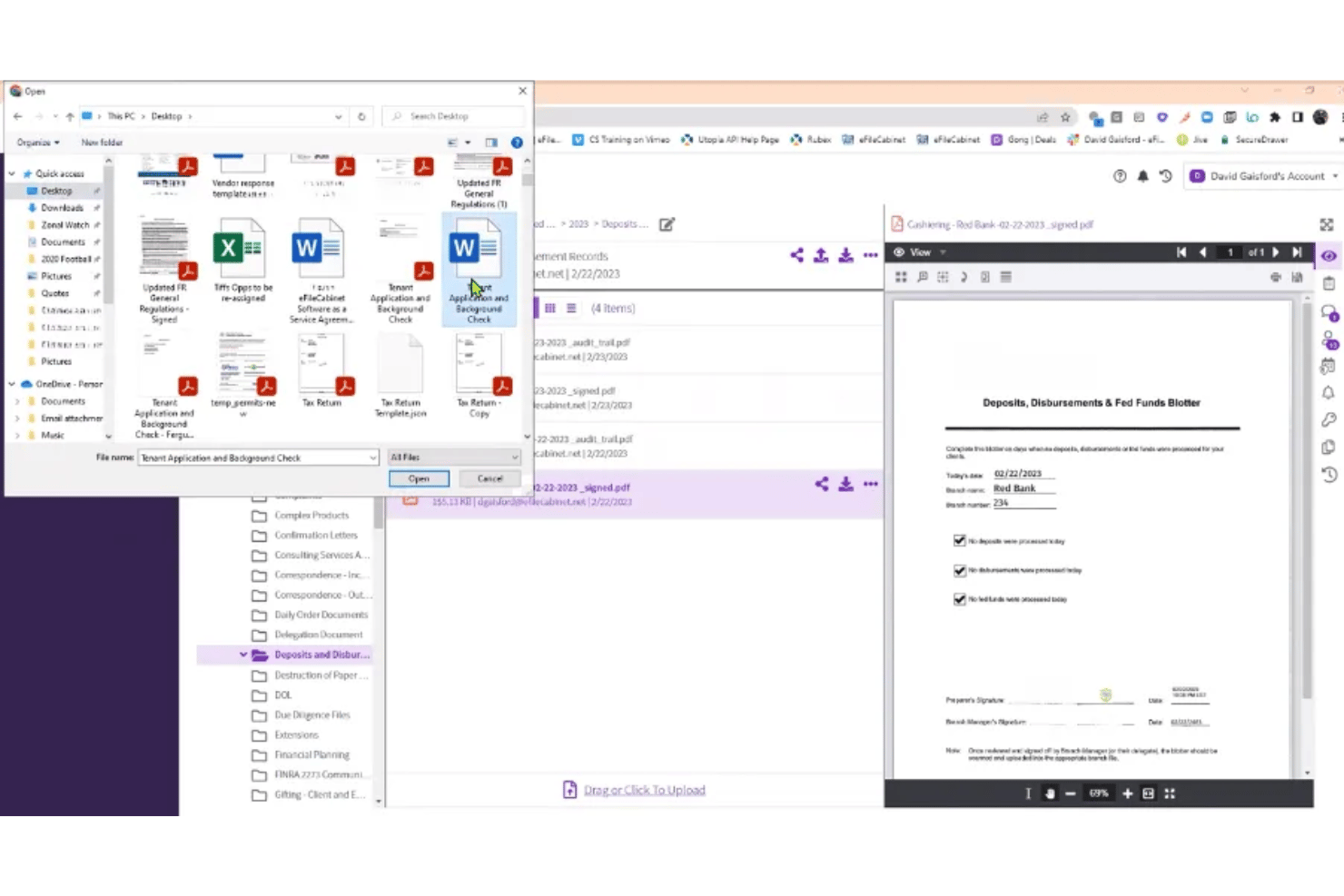
Revver is a cloud-based document management platform that combines AI-powered file organization, no-code workflow automation, version control, and secure file sharing in one system.
Who Is Revver Best For?
Revver is a strong fit for small to mid-sized institutions and administrative teams that manage high document volumes and need automated organization without technical complexity.
Why I Picked Revver
Revver earns its spot on my shortlist because its AI Smart Suite handles the organizational work that education teams typically do by hand. Smart Classification and Smart Filing automatically sort incoming documents into the correct folders, so a new syllabus or grant report lands where it belongs without anyone touching it. Smart Extract AI then pulls metadata from those files, making them instantly searchable across a large academic document archive.
Revver Key Features
- Granular access controls: Set folder-level or file-level permissions for users, groups, and guests.
- Document version history: Keep a complete log of all previous document versions and restore when needed.
- Integrated eSignature: Request legally binding signatures directly within the platform for academic documents.
- No-code workflow automation: Build custom approval workflows using a visual interface without any coding required.
Revver Integrations
Revver offers native integrations with Microsoft 365, DocuSign, and more, and provides an API for custom integrations.
Pros and Cons
Pros:
- No-code workflows simplify academic approval processes
- OCR makes scanned student records searchable
- AI automatically sorts and files incoming documents
Cons:
- Real-time co-editing not natively supported
- No free plan for budget-limited institutions

Best for prebuilt workflow templates for schools
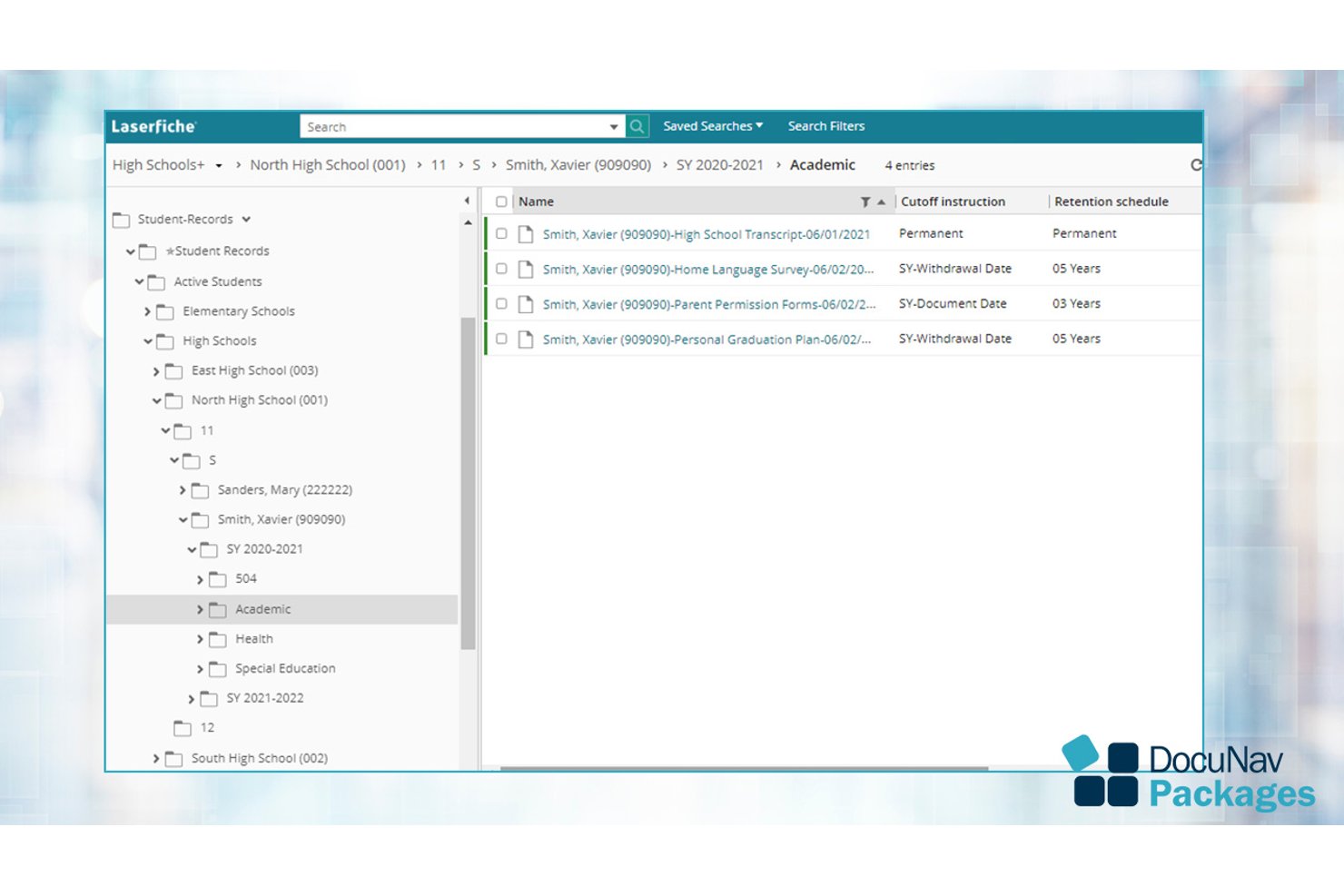
Laserfiche is an AI-powered document management and process automation platform built for institutions that need centralized content storage, workflow automation, electronic forms, and compliance-ready records management.
Who Is Laserfiche Best For?
Laserfiche is a strong fit for K-12 districts and higher education institutions managing student records, enrollment workflows, and compliance requirements at scale.
Why I Picked Laserfiche
I picked Laserfiche as one of the best because its Solution Marketplace ships ready-made workflows built specifically for schools, including Student Registration and Enrollment, Field Trip Request Forms, and Student Absence Notifications. A district can automate a paper-based routing process in days rather than months. I also like how Smart Fields automatically extract and classify data across student records, cutting down on manual entry across enrollment and HR processes.
Laserfiche Key Features
- AI-assisted smart fields: Automatically extract and classify metadata from documents using built-in artificial intelligence.
- Granular permissions: Configure access controls at the user, group, and folder levels for sensitive academic and student files.
- Audit trail and compliance tracking: Log all document actions and maintain digital records to support FERPA and institutional policies.
- Microsoft 365 integration: Edit, store, and collaborate on Word, Excel, and PowerPoint files directly within Laserfiche.
Laserfiche Integrations
Laserfiche has native integrations across the Microsoft ecosystem, including Microsoft 365 and Azure, and offers an API for custom integrations.
Pros and Cons
Pros:
- OCR converts scanned student files automatically
- FERPA-compliant records management built in
- Prebuilt school workflow templates ship ready-made
Cons:
- Complex initial configuration for smaller IT teams
- No free plan for budget-limited institutions

DocuWare
Best for automated compliance workflows
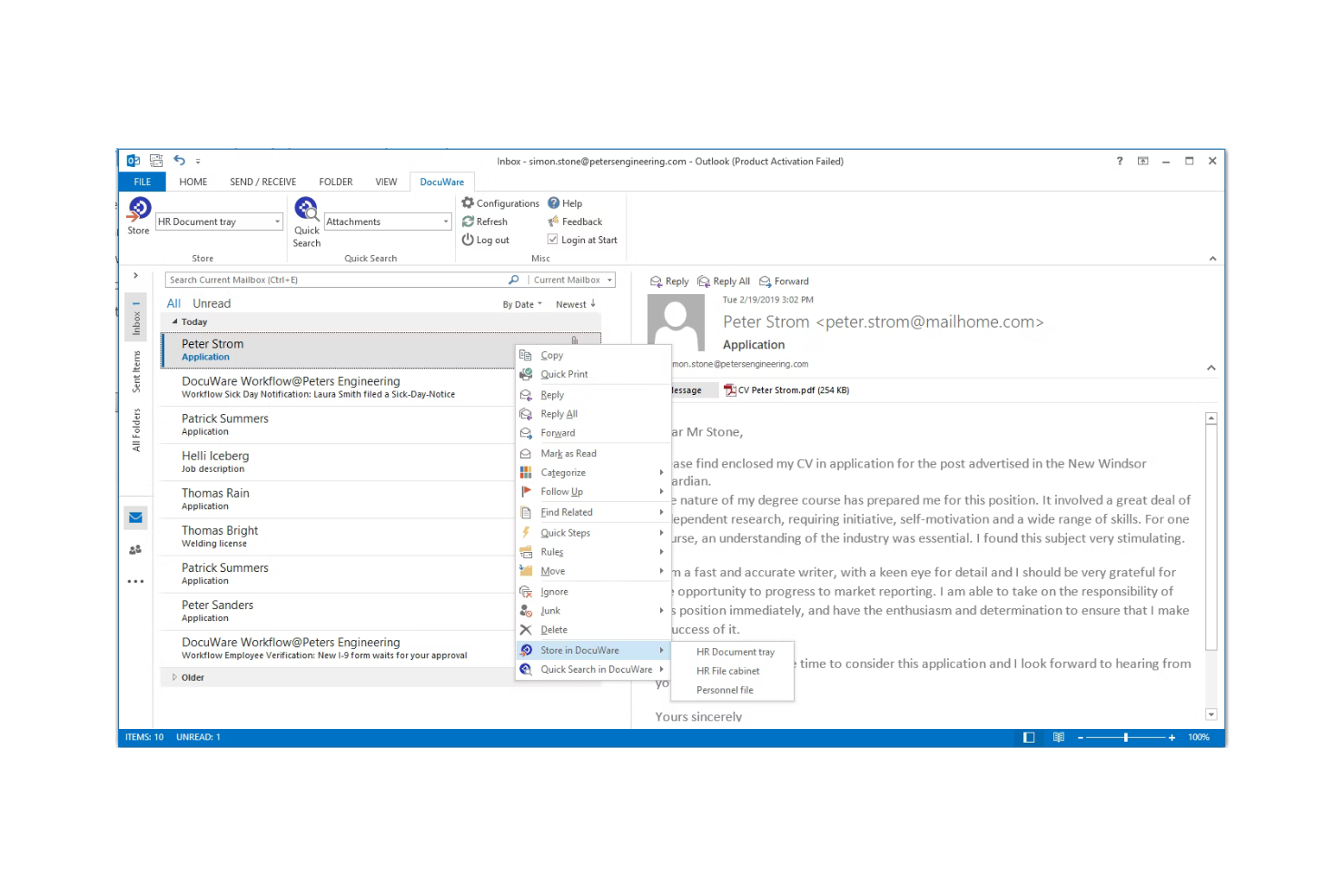
DocuWare is a cloud-based document management and workflow automation platform that centralizes institutional records, automates approval processes, and handles compliance archiving across departments like admissions, financial aid, and student services.
Who Is DocuWare Best For?
It's a strong fit for colleges and universities that manage compliance-heavy document workflows across multiple departments like admissions, HR, and financial aid.
Why I Picked DocuWare
I've included DocuWare in my top picks because its automated compliance workflows are purpose-built for higher education's regulatory demands. I particularly like its automated retention scheduling, which enforces FERPA and HIPAA rules without requiring manual intervention from staff. Its drag-and-drop workflow builder lets institutions route enrollment forms, financial aid approvals, and transcript requests through defined review steps automatically.
DocuWare Key Features
- Intelligent document processing: Uses OCR and AI to extract and index text and handwritten data from scanned documents.
- Granular permission controls: Allows administrators to set user, role, or group-based access to sensitive educational files.
- Integration with student information systems: Connects seamlessly to platforms like Microsoft, Oracle, and SIS tools for unified data management.
- Mobile scanning and access: Enables users to scan, store, and retrieve documents directly from smartphones or tablets.
DocuWare Integrations
DocuWare offers native integrations with Microsoft 365, SharePoint, Oracle, SAP, Outlook, and DocuSign. An API is available for custom integrations.
Pros and Cons
Pros:
- Automated retention scheduling for institutional recordkeeping
- OCR makes scanned student records searchable
- Strong audit trails for compliance documentation
Cons:
- Less suited for real-time collaborative editing
- Initial configuration requires significant IT involvement
Best for document retention & lifecycle management
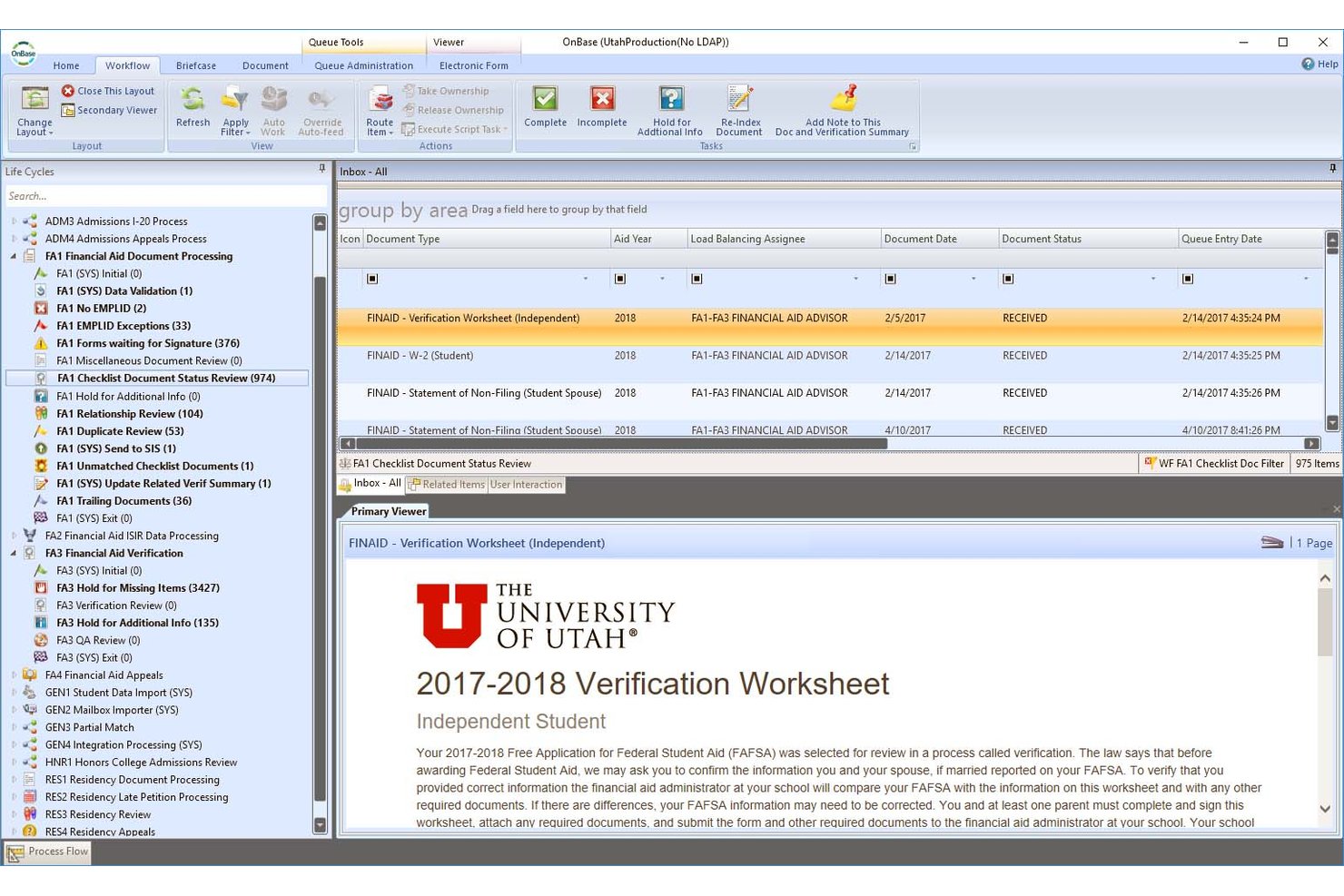
Hyland OnBase is an enterprise content management platform that combines document capture, records retention, workflow automation, and compliance governance for managing institutional content across education environments.
Who Is Hyland OnBase Best For?
OnBase suits large colleges and universities that need enterprise-grade records governance, compliance controls, and automated document retention across multiple departments.
Why I Picked Hyland OnBase
I picked OnBase as one of the best because its records management engine handles the full document lifecycle, not just storage. It automates policy-driven retention schedules and secure destruction across student records, transcripts, and financial aid files under FERPA. I also like how its curriculum review workflow routes course approvals through faculty, deans, and trustees automatically, with a complete audit trail at every step.
Hyland OnBase Key Features
- Document capture automation: Automatically imports, classifies, and indexes files from email, scanners, and digital forms.
- Granular user permissions: Lets admins set view, edit, and delete rights at document, folder, or group level.
- Full-text OCR search: Enables users to search scanned and uploaded documents by extracted or tagged keywords.
- Records audit trails: Tracks and logs every file action such as access, changes, and approvals for compliance monitoring.
Hyland OnBase Integrations
Hyland OnBase offers native integrations with Ellucian, Anthology, Oracle, Workday, Salesforce, and Microsoft 365. An API is available for custom integrations.
Pros and Cons
Pros:
- OCR converts scanned transcripts into searchable text
- Automates retention schedules for student records
- FERPA-aligned records governance built in
Cons:
- Too complex for smaller educational institutions
- Implementation demands significant dedicated IT resources

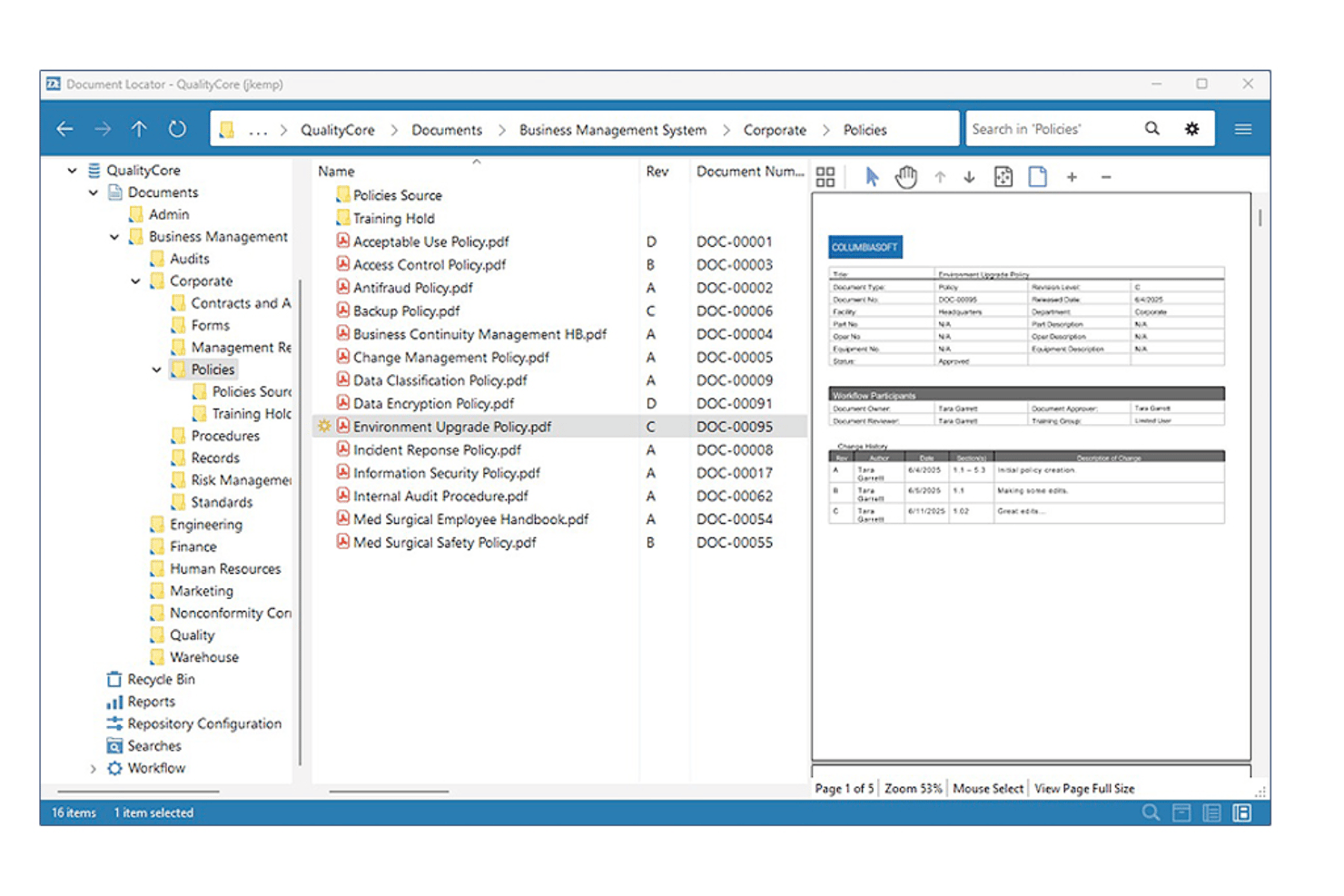
Document Locator is a Windows-integrated document management system that combines version control, automated workflow, records management, and policy administration for organizations handling large volumes of regulated documents.
Who Is Document Locator Best For?
It's a strong fit for administrative teams in educational institutions that manage high volumes of regulated records and need structured policy compliance workflows.
Why I Picked Document Locator
I picked Document Locator as one of the best because its Required Reading module is purpose-built for policy distribution and acknowledgement tracking. When an institution updates its code of conduct or financial aid procedures, I can route the document to specific staff, capture sign-off records, and maintain a full audit trail automatically. Version control keeps every revision timestamped, so nothing gets lost across policy update cycles.
Document Locator Key Features
- Automated workflow engine: Define multi-step approval processes with notifications and routing for educational documents.
- Role-based security: Set detailed permissions for users, groups, or departments managing or accessing sensitive files.
- Full-text and metadata search: Locate documents using keywords, tags, or field-based filters across all stored content.
- Digital signature integration: Collect electronic signatures with native support for DocuSign and Adobe Acrobat.
Document Locator Integrations
Document Locator offers native integrations with Microsoft 365, DocuSign, Adobe Acrobat, and SharePoint. An API is available for custom integrations.
Pros and Cons
Pros:
- Granular permission controls for staff and faculty
- Automated policy acknowledgement tracking built in
- Strong audit trails for compliance-heavy institutions
Cons:
- Windows-centric setup limits cross-platform flexibility
- No real-time collaborative editing for documents
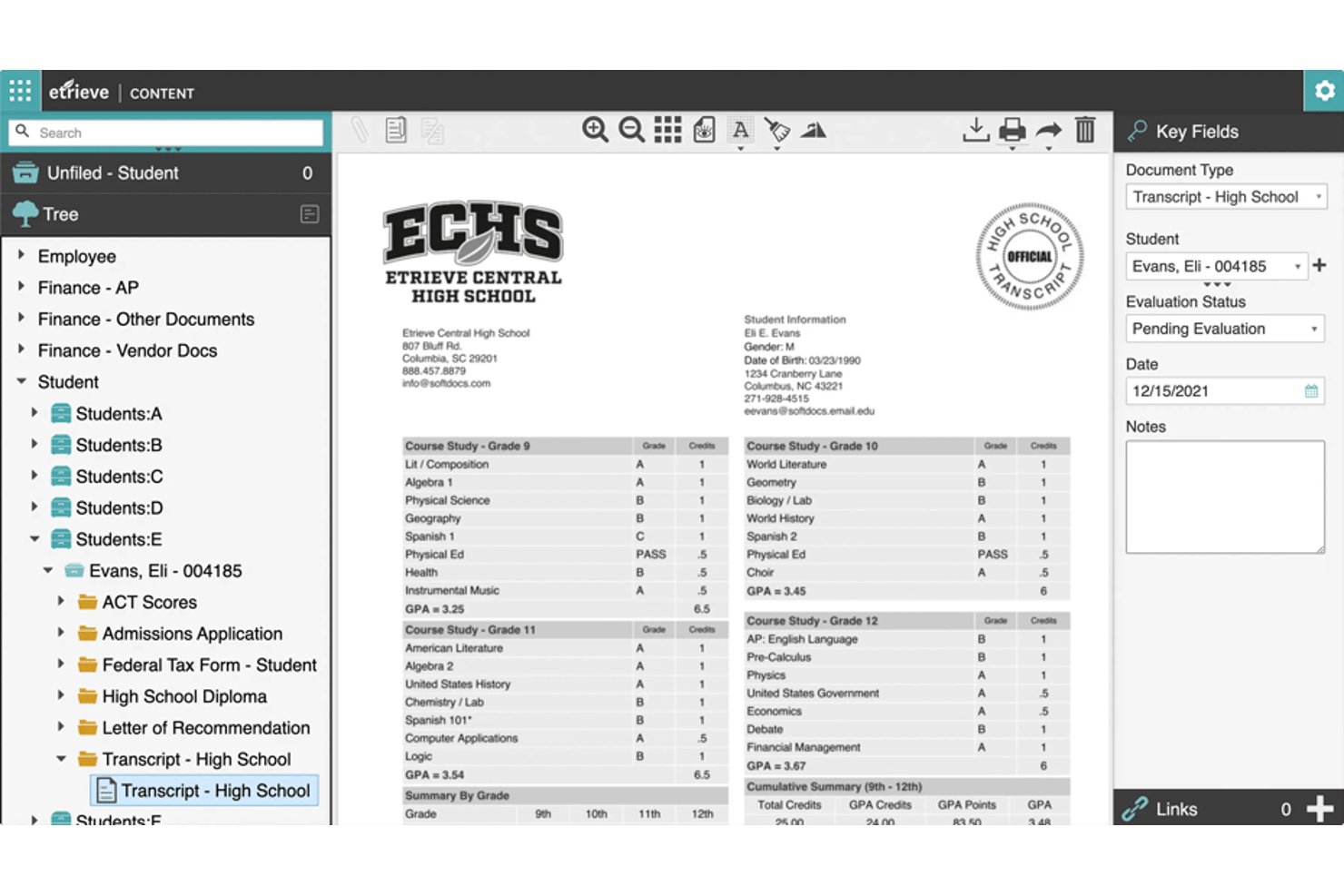
Softdocs is an education-focused document management platform built around electronic forms, workflow automation, e-signatures, and records storage for higher ed and K-12 institutions.
Who Is Softdocs Best For?
Softdocs is a strong fit for IT and operations teams at colleges, universities, and K-12 districts managing records, approvals, and compliance workflows.
Why I Picked Softdocs
Softdocs earns its spot on my shortlist because no other document management platform matches its depth of education SIS integrations. I've found its bi-directional connections to Ellucian, Jenzabar, and PowerSchool genuinely useful, pulling student data directly into forms and approval workflows without manual rekeying. Its Intelligent Transcript Processing converts incoming transcripts into structured data that routes automatically through admissions workflows.
Softdocs Key Features
- User-friendly e-form builder: Design custom digital forms for campus processes without coding skills.
- Workflow automation designer: Create multi-step, automated approval and routing workflows using a visual drag-and-drop interface.
- Role-based permissions: Set granular access controls at the folder, document, or workflow level for staff, faculty, and students.
- Audit trails and compliance tracking: Monitor all document actions and approvals, supporting FERPA and institutional data governance needs.
Softdocs Integrations
Softdocs offers native integrations with Ellucian Banner, Ellucian Colleague, Jenzabar, PowerSchool, Infinite Campus, and Anthology, with an API available for custom integrations.
Pros and Cons
Pros:
- Handles high-volume transcript processing automatically
- Strong FERPA compliance and audit trail support
- Built specifically for education institution workflows
Cons:
- Implementation requires dedicated IT involvement
- Not suited for non-education organizations
Eğitim İçin Diğer Belge Yönetimi Yazılımları
İşte kısa listeme giremeyen ancak yine de göz atmaya değer bazı ek eğitim için belge yönetimi yazılımı seçenekleri:


Eğitim İçin Belge Yönetimi Yazılımı Nedir?
Eğitim için belge yönetimi yazılımları, eğitim kurumlarının belgelerini verimli bir şekilde yönetmesine ve düzenlemesine yardımcı olur. Şu gibi özellikler sunabilir:
- Dijital belge depolama
- Güvenli dosya paylaşımı
- Otomatik iş akışı yönetimi
- Uyumluluk takibi
- Transkript yönetimi
Eğitim profesyonelleri, yöneticiler ve BT departmanları genellikle eğitim için belge yönetimi yazılımlarını kullanır. Bu yazılımlar belge erişilebilirliğini iyileştirme, veri güvenliğini sağlama ve manuel evrak işlerini azaltma gibi ihtiyaçları karşılar.
Eğitim İçin Belge Yönetimi Yazılımı Seçim Kriterleri
Bu listeye dahil edilecek en iyi eğitim için belge yönetimi yazılımını seçerken, bu araçların ele aldığı yaygın işletme ihtiyaçlarını ve sorun noktalarını göz önünde bulundurdum. Buna belge erişilebilirliğini iyileştirme ve veri güvenliğini sağlama gibi konular da dahildi. Değerlendirmemi düzenli ve adil tutmak için aşağıdaki çerçeveyi de kullandım:
Temel Özellikler (toplam puanın %25'i)
Bu listeye dahil edilebilmesi için her aracın aşağıdaki temel özellikleri sunması gerekiyordu:
- Dijital belge depolama
- Güvenli dosya paylaşımı
- Otomatik iş akışı yönetimi
- Uyumluluk takibi
- Transkript özellikleri
Öne Çıkan Ek Özellikler (toplam puanın %25'i)
Rakipleri daha da daraltmaya yardımcı olmak için benzersiz veya özellikle değerli özellikleri de aradım. Bunlardan bazıları şunlardı:
- Yapay zekâ destekli veri çıkarma
- Özelleştirilebilir panolar
- Mevcut sistemlerle entegrasyon
- Mobil erişim ve yönetim
- Gelişmiş analiz ve raporlama
Sektör Uzmanlığı (toplam puanın %10'u)
Her aracın sektör uzmanlığı hakkında fikir edinmek için aşağıdakileri değerlendirdim:
- Eğitim sektöründe geçirilen yıl sayısı
- Eğitim alanındaki müşteri sayısı
- Örnek olay incelemeleri veya başarı öyküleri
- Sektöre özgü sertifikalar
- Eğitim konferanslarına katılım
İlk Kullanıma Hazırlama (toplam puanın %10'u)
Her araç için ilk kullanıma hazırlama deneyimini değerlendirmek amacıyla aşağıdakileri dikkate aldım:
- Eğitim materyallerinin bulunabilirliği
- İlk kurulumun kolaylığı
- İlk kullanıma hazırlama uzmanlarına erişim
- Kurulum sırasında özelleştirme seçenekleri
- Tam olarak kullanıma hazır hâle gelmek için gereken süre
Müşteri Desteği (toplam puanın %10'u)
Her aracın sunduğu müşteri desteği düzeyini değerlendirmek için aşağıdakileri dikkate aldım:
- Canlı desteğin bulunabilirliği
- Yardım taleplerine yanıt süresi
- Kendi kendine yardım kaynaklarının kalitesi
- Özel müşteri yöneticilerinin bulunabilirliği
- Kullanıcıların destek deneyimleri hakkındaki geri bildirimleri
Fiyatına Göre Değer (toplam puanın %10'u)
Her aracın fiyatlandırmasını ve potansiyel yatırım getirisini değerlendirmek için aşağıdakileri dikkate aldım:
- Fiyatlandırma yapısının şeffaflığı
- Rakiplerin fiyatlandırmasıyla karşılaştırma
- Fiyatlandırma planlarının esnekliği
- Temel fiyata gerekli özelliklerin dâhil olması
- Müşterilerin algılanan değer hakkındaki geri bildirimleri
Müşteri Yorumları (toplam puanın %10'u)
Mevcut müşterilerin genel memnuniyeti hakkında fikir edinmek için müşteri yorumlarını incelerken aşağıdakileri dikkate aldım:
- Genel memnuniyet puanları
- Hizmet güvenilirliği hakkındaki yorumlar
- Kullanım kolaylığı hakkındaki geri bildirimler
- Müşteri desteğiyle ilgili deneyimler
- Tekrarlanan sorunlara ilişkin bildirimler
Eğitim İçin Bir Belge Yönetimi Yazılımı Nasıl Seçilir?
Uzun özellik listeleri ve karmaşık fiyatlandırma yapıları içinde kaybolmak kolaydır. İşletmeniz için en önemli konulara öncelik vermenize yardımcı olmak amacıyla aşağıdaki faktörleri göz önünde bulundurun:
| Faktör | Dikkate Alınması Gerekenler |
|---|---|
| İş Hedefleri | Sağlayıcının yeteneklerini hedeflerinizle uyumlu hâle getirin. Örneğin, uyumluluğu iyileştirmeniz gerekiyorsa güçlü uyumluluk yönetimi özelliklerine sahip bir sağlayıcı seçin. |
| Özelliklerin Kapsamı ve SLA'lar | Hangi özelliklerin dâhil olduğunu ve hizmet düzeyi anlaşmalarını kontrol edin. Bunların çalışma süresi ve yanıt süreleriyle ilgili beklentilerinizi karşıladığından emin olun. |
| Destek Bulunabilirliği | Ekibinizin sürekli erişime ihtiyacı varsa 7/24 destek sunan sağlayıcıları arayın. Kendi kendine yardım kaynaklarının ve canlı destek seçeneklerinin kalitesini değerlendirin. |
| Maliyetler ve Fiyatlandırma Yapısı | Fiyatlandırma planlarını inceleyin ve bütçenize uygun olduklarından emin olun. Şeffaflık arayın ve gizli ücretlerden kaçının. |
| İletişim ve Raporlama | Sağlayıcının düzenli güncellemeler ve ayrıntılı raporlama sunduğundan emin olun. Bu, performansı izlemenize ve bilinçli kararlar almanıza yardımcı olur. |
| Entegrasyon Yetenekleri | Kesintileri önlemek için aracın CRM veya ERP çözümleri gibi mevcut sistemlerinizle entegre olup olmadığını kontrol edin. |
| Kullanıcı Deneyimi | Ekibiniz için kullanım kolaylığını değerlendirin. Karmaşık bir arayüz, benimsenme sürecini ve üretkenliği yavaşlatabilir. |
| Ölçeklenebilirlik | Sağlayıcının sizinle birlikte büyüyebileceğinden emin olun. Kurumunuz genişlerse araç, artan belge hacimlerini ve kullanıcı sayısını karşılayabilmelidir. |
Özellikler
Eğitim için geliştirilen her başarılı belge yönetimi yazılımında bulunması gereken temel özellikler şunlardır:
- Dijital belge depolama: Belgeleri bulutta güvenli bir şekilde depolar ve her yerden kolayca erişilebilir hale getirir.
- Güvenli dosya paylaşımı: Ekibinizin belgeleri güvenli bir şekilde paylaşmasını sağlar ve hassas bilgilerin korunmasını temin eder.
- Otomatik iş akışı yönetimi: Tekrarlayan görevleri kolaylaştırarak belge işleme süreçlerinde zaman kazandırır ve hataları azaltır.
- Uyumluluk takibi: Kurumunuzun FERPA ve HIPAA gibi düzenlemelere uyum sağlamasına yardımcı olarak yasal riskleri azaltır.
- Transkript hizmetleri: Kurumlar arasında akademik kayıtların güvenli bir şekilde paylaşılmasını kolaylaştırarak kabul sürecini basitleştirir.
- E-imza entegrasyonu: Belgelerin dijital olarak imzalanmasını sağlar, onay süreçlerini hızlandırır ve evrak işlerini azaltır.
- Yapay zekâ destekli veri çıkarma: Belgelerden verileri otomatik olarak çıkararak doğruluğu artırır ve manuel veri girişini azaltır.
- Mobil erişim ve yönetim: Belgelere mobil cihazlardan erişim sağlayarak uzaktan çalışma esnekliğini artırır.
- Özelleştirilebilir gösterge panelleri: Belge iş akışlarının kişiselleştirilmiş görünümlerini sunarak ekibinizin ilerlemeyi ve performansı takip etmesine yardımcı olur.
- Mevcut sistemlerle entegrasyon: Mevcut yazılımınızla sorunsuz çalışmayı sağlayarak uygulama sırasında yaşanabilecek kesintileri en aza indirir.
Avantajlar
Eğitim için belge yönetimi yazılımıyla iş ortaklığı yapmak, ekibiniz ve işletmeniz için çeşitli avantajlar sunar. Yararlanabileceğiniz avantajlardan bazıları şunlardır:
- Geliştirilmiş erişilebilirlik: Dijital belge depolama, ekibinizin dosyalara her yerden erişmesini sağlayarak esnekliği artırır.
- Geliştirilmiş güvenlik: Güvenli dosya paylaşımı, hassas bilgileri koruyarak veri ihlali riskini azaltır.
- Artırılmış verimlilik: Otomatik iş akışı yönetimi, tekrarlayan görevleri üstlenerek zaman kazandırır ve hataları azaltır.
- Düzenlemelere uyum: Uyumluluk takibi, kurumunuzun yasal gereklilikleri karşılamasına yardımcı olarak olası para cezalarını en aza indirir.
- Basitleştirilmiş süreçler: Transkript hizmetleri, akademik kayıtların yönetimini kolaylaştırarak kabul ve yatay geçiş süreçlerini daha verimli hale getirir.
- Daha hızlı onaylar: E-imza entegrasyonu imzalama süreçlerini hızlandırarak belge onaylarındaki gecikmeleri azaltır.
- Daha iyi veri yönetimi: Yapay zekâ destekli veri çıkarma, veri doğruluğunu artırır ve manuel veri girişi görevlerini azaltır.
Maliyetler ve Fiyatlandırma
Eğitim için belge yönetimi yazılımı; çeşitli işletme ihtiyaçlarına, ölçeklere ve koşullara uyum sağlamak amacıyla genellikle özel fiyatlandırmayla sunulur. Yazılım sağlayıcıları genel olarak aşağıdaki fiyatlandırma modellerinden biriyle çalışır:
- Abonelik tabanlı: Genellikle aylık veya yıllık olarak yinelenen bir ücret talep eder ve hizmetlere sürekli erişim sağlar.
- Proje tabanlı: Maliyetler, belirli bir proje veya görevin tamamlanmasına göre belirlenir.
- Kullanıcı başına: Fiyatlandırma kullanıcı sayısına göre değişir ve farklı ekip büyüklükleri için ölçeklenebilirlik sağlar.
- Kademeli fiyatlandırma: Farklı fiyat noktalarında çeşitli hizmet paketi düzeyleri sunarak ihtiyaçlara göre esneklik sağlar.
- Kullandıkça öde: Ücretleri gerçek kullanıma göre belirler ve değişken ihtiyaçlar için ideal olabilir.
Fiyatlandırmayı Etkileyen Temel Faktörler
Belirli fiyatlandırma modelinin yanı sıra, eğitim için belge yönetimi yazılımının maliyetini etkileyebilecek bazı ek faktörler şunlardır:
- Özelleştirme düzeyi: Daha fazla özelleştirme ek kaynaklar gerektirebilir ve maliyetleri artırabilir.
- Uyumluluk gereklilikleri: Sektör düzenlemelerine uymak, özelliklere karmaşıklık ve maliyet ekleyebilir.
- Kullanıcı sayısı: Daha fazla kullanıcı, kaynaklar üzerindeki talebin artması nedeniyle genellikle daha yüksek maliyet anlamına gelir.
- Entegrasyon ihtiyaçları: Mevcut sistemlere bağlanmak ek geliştirme gerektirebilir ve fiyatlandırmayı etkileyebilir.
- Veri hacmi: Daha yüksek miktarda veri depolama ve işleme, maliyetlerin artmasına neden olabilir.
Yazılım sağlayıcılarından özel teklifler almaya başlamadan önce bu faktörlerin farkında olmak, ne beklemeniz gerektiğini anlamanıza ve teklifleri daha etkili bir şekilde karşılaştırmanıza yardımcı olur.
SSS
Eğitim için belge yönetimi yazılımı hakkında sık sorulan soruların bazı yanıtları:
Eğitim için belge yönetimi yazılımı uyumluluğu nasıl iyileştirir?
Belge yönetimi yazılımı, uyumluluğu izlemeye yönelik araçlar sağlayarak kurumunuzun FERPA ve HIPAA gibi düzenlemelere uyum sağlamasına yardımcı olur. Hassas bilgileri korumak için güvenli depolama ve erişim denetimleri sunar. Bu, veri ihlali riskini azaltır ve kurumunuzun yasal standartları karşılamasına yardımcı olur.
Belge yönetimi yazılımı seçerken nelere dikkat etmeliyim?
Kurumunuzun hedefleriyle uyumlu olan ve ihtiyaç duyduğunuz özellikleri sunan bir yazılım arayın. Eğitim sektörü için uygunluğunu ve sağlayıcının destek sunma durumunu değerlendirin. Ayrıca, bütçenize uyduğundan ve iyi bir değer sunduğundan emin olmak için fiyatlandırma yapısını kontrol edin.
Belge yönetimi yazılımı mevcut sistemlerle entegre olabilir mi?
Evet, birçok belge yönetimi yazılımı çözümü CRM veya ERP çözümleri gibi hâlihazırda kullandığınız sistemlerle entegre olabilir. Bu, sorunsuz bir geçişin sağlanmasına yardımcı olur ve operasyonlarınızdaki kesintiyi en aza indirir. Uyumluluğu sağlamak için yazılımı seçmeden önce entegrasyon özelliklerini kontrol etmeniz önemlidir.
Belge yönetimi yazılımı veri güvenliğini nasıl sağlar?
Belge yönetimi yazılımı, verilerinizi korumak için şifreleme, erişim denetimleri ve denetim izleri gibi güvenlik önlemleri sağlayabilir. Ayrıca sektör düzenlemelerine uymanıza yardımcı olmak için uyumluluk izleme özelliği sunabilir. Verilerinizin korunduğundan emin olmak için mevcut güvenlik özelliklerini anlamanız çok önemlidir.
Bir yazılım sağlayıcısından ne tür müşteri desteği beklemeliyim?
İyi bir müşteri desteği; 7/24 erişilebilirlik, hızlı yanıt süreleri ve bilgili destek personeline erişim içerebilir. Yazılım sağlayıcıları ayrıca kılavuzlar ve eğitimler gibi kendi kendine yardım kaynakları da sunabilir. Bekleyebileceğiniz destek deneyimi hakkında fikir edinmek için müşteri yorumlarını kontrol edin.
Belge yönetimi yazılımı iş birliğini nasıl geliştirebilir?
Belge yönetimi yazılımı, güvenli dosya paylaşımı ve ortak düzenleme gibi araçlar sunarak ekibinizin birlikte çalışmasını kolaylaştırabilir. Birçok platform bulut erişimi sağlar ve ekip üyelerinin belgelere her yerden erişmesine olanak tanır. Bu esneklik, daha verimli ekip çalışmasına ve üretkenliğe yol açabilir.