

2026 İçin Seçilmiş En İyi 10 Zaman ve Gider Takip Yazılımı

10 Zaman & Gider Takibi Yazılımı Kısa Listesi


Zaman ve gider takibi yazılımı, ekibinizin çalışma saatlerini kaydetmesine, proje maliyetlerini izlemesine ve giderleri tek bir yerde yönetmesine yardımcı olur. Doğru aracı arıyorsanız muhtemelen ekibinizi proje teslimine odaklı tutarken doğru faturalandırma, gerçek zamanlı görünürlük ve kolay raporlama ihtiyacını dengelemeye çalışıyorsunuzdur.
Bu kadar çok seçenek varken hangi platformun iş akışınıza uyduğunu, sistemlerinizle entegre olduğunu ve uyumluluk ihtiyaçlarınızı desteklediğini bilmek zordur. Bu kılavuz, 2026 yılının en iyi çözümlerini inceleyerek özellikleri karşılaştırmanıza, temel farklılıkları görmenize ve işletmeniz için en uygun seçeneği belirlemenize yardımcı olur.
Why Trust Our Software Recommendations
Our team has been testing and reviewing software since 2012. As project managers ourselves, we know how difficult—and important—it is to choose the right software.
For this guide, we evaluated tools using hands-on testing and independent research, scoring tools using our selection criteria. We also draw on insights from industry thought leaders and practicing project management experts.
Our reviews reflect our human editorial judgment, not a sales pitch.
Expert reviewers:
Zaman ve Gider Takibi Yazılımı Karşılaştırma Tablosu
Bu karşılaştırma tablosu, en iyi zaman ve gider takibi yazılımı seçimlerimin fiyatlandırma ayrıntılarını özetler:
| Tool | Starting Price | Website | |
|---|---|---|---|
| Best as AI for business | 4.4 out of 5 | $8/user/month Free trial + Free demo available | Website |
| Best for advanced payroll integration | 4.5 out of 5 | $50/user/month 30-day free trial + free demo available | Website |
| Best for project resource reconciliation | 4.8 out of 5 | $4.99/user/month Free plan + 7-day trial + demo available | Website |
| Best for flexible task-based tracking | 4.8 out of 5 | $5/user/month Free plan + 14-day free trial + free demo available | Website |
| Best for detailed productivity analytics | 4.7 out of 5 | $3.99/user/month Free plan + free trial + free demo available | Website |
| Best for visual project budget tracking | 4.4 out of 5 | $9/user/month Free trial + free plan available | Website |
| Best for receipt scanning automation | 4.5 out of 5 | $5/user/month Not available | Website |
| Best for architecture and design firms | — | $99/month 30-day free trial + free demo available | Website |
| Best for compliance-driven organizations | — | $400/month Free demo available | Website |
| Best for automated expense report creation | — | Pricing upon request Free demo available | Website |
Zaman ve Gider Takibi Yazılımı İncelemeleri
Aşağıda, kısa listeme giren zaman ve gider takibi yazılımlarına ilişkin ayrıntılı özetlerimi bulabilirsiniz. İncelemelerim, her platformun özelliklerine, entegrasyonlarına ve en uygun kullanım alanlarına ayrıntılı bir bakış sunarak sizin için en iyi seçeneği bulmanıza yardımcı olur.

Best as AI for business
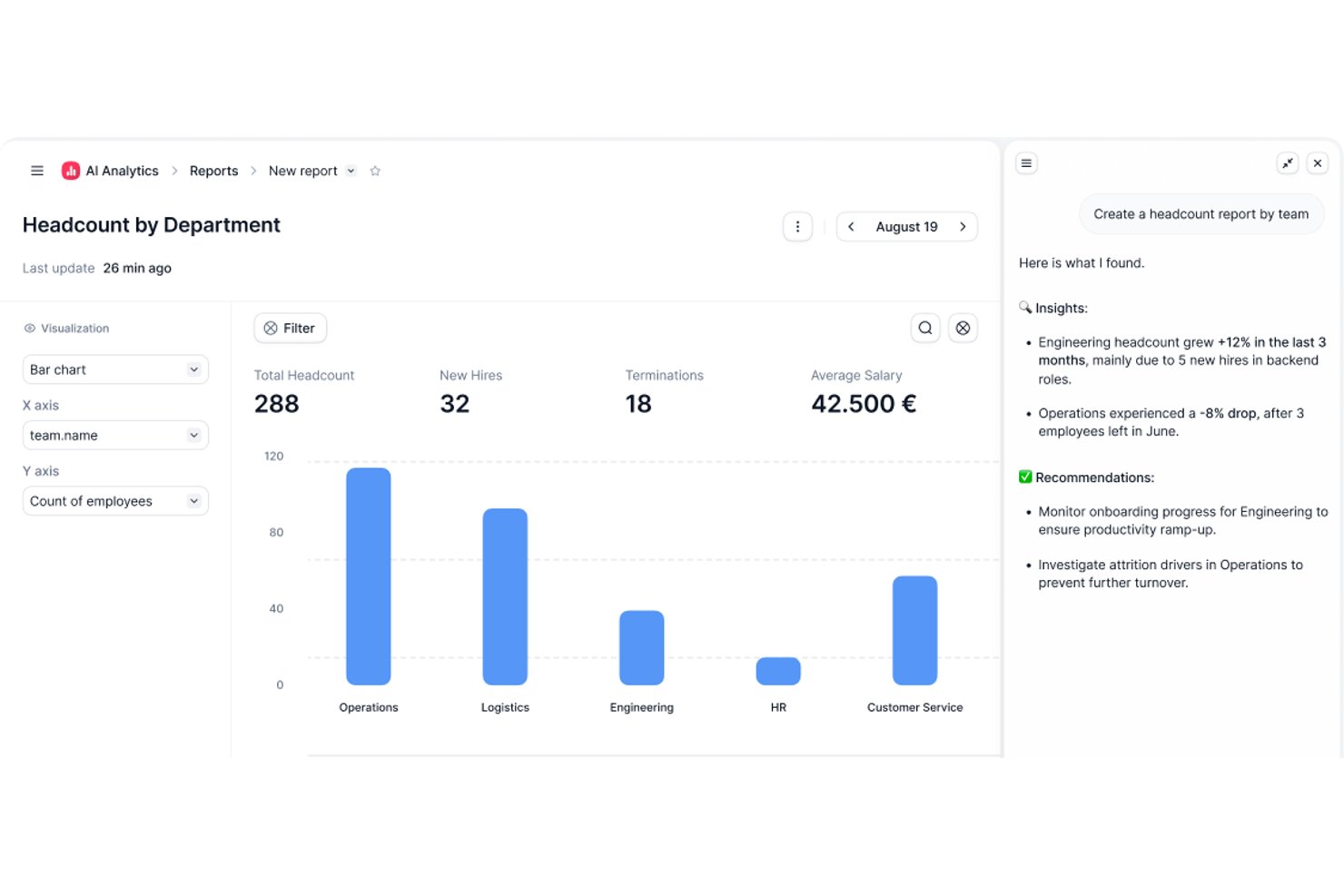
Factorial is an AI-powered HR and finance platform that handles time tracking, expense management, and project oversight alongside broader operations like shift scheduling, reporting, and employee policy Q&A.
Who Is Factorial Best For?
Factorial suits HR and operations teams at growing companies that want AI-assisted tools to handle scheduling, reporting, and employee policy questions alongside time and expense tracking.
Why I Picked Factorial
I've included Factorial in my top picks because it brings AI directly into the day-to-day operations that slow HR and finance teams down most. Its AI assistant, One, can answer employee questions about company policies and pull together expense reports on demand, cutting out a lot of back-and-forth. I also like that the AI handles receipt scanning via OCR, so logging an expense from a mobile photo takes seconds rather than manual data entry.
Factorial Key Features
- Shift scheduling: Managers can set up automated, bulk, and rotating shift schedules for their teams.
- Geolocation tracking: Time records capture where employees are working when they clock in or out.
- Expense policy controls: Automated rules can block expense submissions that fall outside company-defined spending policies.
- Factorial Cards: Companies can issue physical and virtual cards with customizable limits and spending categories, with transactions visible in real time.
Factorial Integrations
Factorial lists marketplace integrations with Microsoft Business Central, SAP Business One, Sage 100, Microsoft Power BI, Slack, Google Workspace, and Zapier. Its API supports API keys, OAuth 2.0, webhooks, and SDKs for custom integrations.
Pros and Cons
Pros:
- Project-linked hours and expenses centralize cost tracking
- OCR cuts manual receipt entry
- Mobile clock-ins help distributed teams log hours
Cons:
- Timesheet approvals lack documented audit history
- Reviewers report limited custom reporting depth
New Product Updates from Factorial
Factorial One Adds AI Automation Across HR, Finance, and IT
Factorial One adds company-context assistance, workflow automation, and connections across HR, Finance, and IT. These capabilities help employees access information, create documents, and complete routine tasks using AI. For more information, visit Factorial’s official site.
 .

TimeTrex
Best for advanced payroll integration
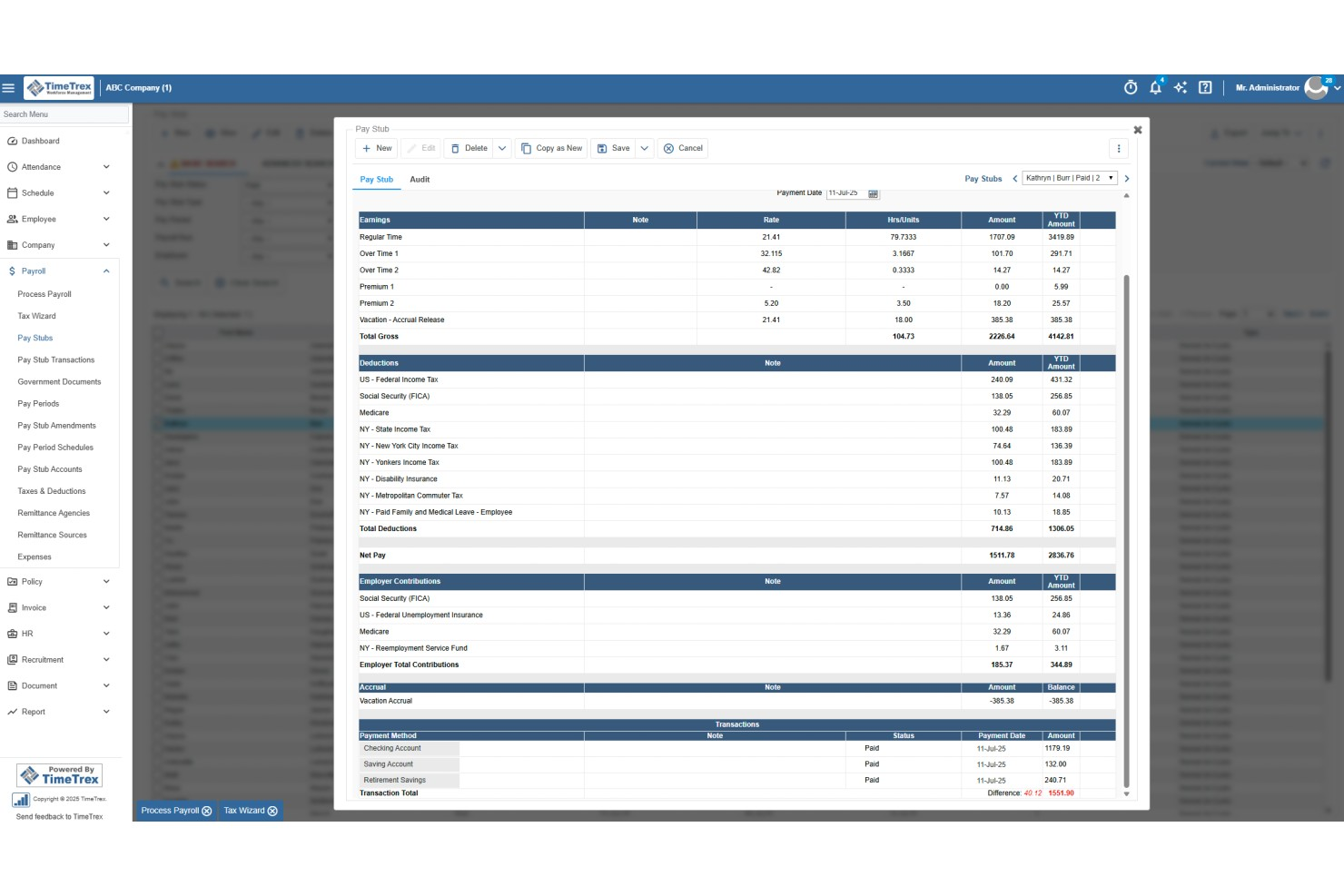
TimeTrex is a workforce management platform that combines time and attendance tracking, employee scheduling, expense management, and payroll processing in a single system.
Who Is TimeTrex Best For?
TimeTrex is a strong fit for mid-sized to enterprise businesses with hourly workforces, multiple locations, and complex payroll or compliance requirements.
Why I Picked TimeTrex
I picked TimeTrex as one of the best for advanced payroll integration because time tracking and payroll processing live in the same system. When your team clocks in and out, that data flows directly into payroll calculations without any manual exports or file transfers. I also like that TimeTrex handles multi-source direct deposit, letting you debit from several bank accounts and route payments to multiple employee accounts in one run. On top of that, the built-in payroll tax engine automatically calculates federal, state, and provincial taxes and generates compliance forms like W-2s, 940s, T4s, and ROEs.
TimeTrex Key Features
- Expense tracking: Log expenses with receipt photo capture, apply expense categories, and route submissions through a configurable approval workflow.
- Job costing: Allocate labor costs across multiple cost centers, departments, branches, and projects within a single time entry.
- Overtime and premium pay rules: Configure custom overtime, holiday, and shift differential pay rules that calculate automatically at payroll.
- Employee self-service portal: Let employees view pay stubs, check accrual balances, and update direct deposit details without HR involvement.
TimeTrex Integrations
TimeTrex offers integrations with payroll and accounting platforms, including ADP, QuickBooks, Sage, Paychex, SurePay, and Ceridian, as well as workforce and HR tools like Meditech, Insync, CompuPay, Tyler Technologies, Vensure Employer Services, Accero, and Chris21. An API is available for custom integrations.
Pros and Cons
Pros:
- Auto reimbursement via built-in payroll
- Mobile receipt capturing on the go
- Job costing tracks labor costs per project
Cons:
- Admin dashboard can feel complex
- Complex initial setup for advanced features
New Product Updates from TimeTrex
TimeTrex Redesigns Workforce Management With New Payroll, Scheduling, and AI Tools
TimeTrex redesigns its workforce management experience with new dashboards, scheduling and timesheet tools, a rebuilt payroll workflow, and expanded AI assistance. These updates give teams more flexible ways to manage schedules, payroll, reporting, and employee data. For more information, visit TimeTrex’s official site.
 .

Clockify
Best for project resource reconciliation
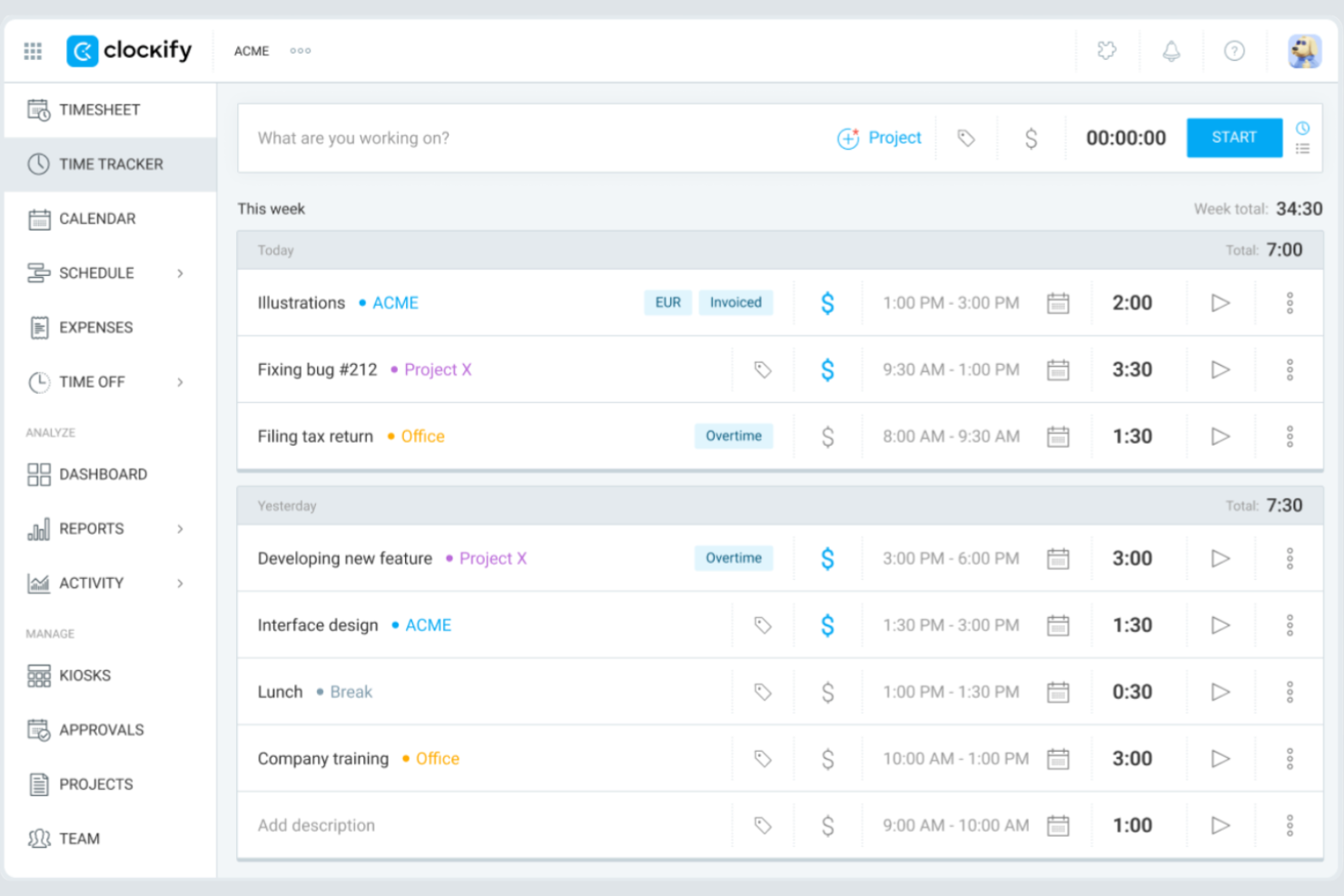
Clockify gives teams of any size a way to track time and expenses without worrying about user limits or hidden costs. It’s especially useful for agencies, consultancies, and distributed teams that need to manage multiple projects and clients on a tight budget. If you want a tool that scales with your team and offers unlimited users on its free plan, Clockify is built for that need.
Why I Picked Clockify
I selected Clockify because it allows digital project managers to reconcile actual task spending against baseline project estimates in real time. Project leads can assign custom billable and cost rates to individual team members or tasks to track gross margins and catch budget overruns before delivery. This makes it ideal for project managers who need to align project resources with strict budget caps while avoiding expensive platform overhead.
Clockify Key Features
Some other features in Clockify that may be useful for teams managing time and expenses include:
- Billable Rates: Assign custom hourly rates to users, projects, or tasks for accurate client billing.
- Expense Tracking: Log and categorize expenses alongside tracked time for each project.
- Timesheet Approvals: Set up workflows for managers to review and approve submitted timesheets.
- Detailed Reporting: Generate exportable reports on time usage, expenses, and project progress.
Clockify Integrations
Integrations include QuickBooks, Jira, Google Calendar, Outlook, Asana, Trello, GitHub, GitLab, Salesforce, and monday.com.
Pros and Cons
Pros:
- Mobile app includes offline time tracking
- Built-in timesheet approval workflows available
- 5 users included in the free plan
Cons:
- No built-in payroll processing tools
- Expense tracking lacks a receipt upload feature

My Hours
Best for flexible task-based tracking

My Hours is designed for teams and freelancers who need flexible, task-level control over their time tracking. The platform lets you organize work by projects and tasks, assign billable rates, and track time in detail for each activity. If your work involves juggling multiple clients or shifting priorities, My Hours gives you the granular tracking needed to keep everything organized and billable.
Why I Picked My Hours
What sets My Hours apart is its focus on flexible, task-based tracking that adapts to different work styles. You can break down projects into individual tasks, assign custom billable rates, and track time for each activity separately. I picked My Hours because it lets you add detailed notes to every time entry, making it easier to justify billable hours and document work for clients. For teams or freelancers who need to manage shifting priorities and multiple clients, this level of task-level control is a strong fit.
My Hours Key Features
Some other features that may be useful for teams and freelancers include:
- Automated Time Reports: Generate detailed reports by project, client, or team member for easy review and export.
- Expense Tracking: Log and categorize expenses alongside time entries for unified project accounting.
- Approval Workflows: Submit timesheets for manager approval before finalizing billable hours.
- Mobile App: Track time and manage tasks from iOS and Android devices.
My Hours Integrations
Integrations include Atlassian Jira, Microsoft Teams, Microsoft Power BI, Asana, Basecamp, monday.com, ClickUp, Microsoft Project, QuickBooks, and Xero.
Pros and Cons
Pros:
- Detailed notes can be added to time entries
- Custom billable rates per project or client
- Task-level time tracking supports granular billing
Cons:
- Lacks automatic time tracking features
- No built-in invoicing or payment processing

TimeCamp
Best for detailed productivity analytics
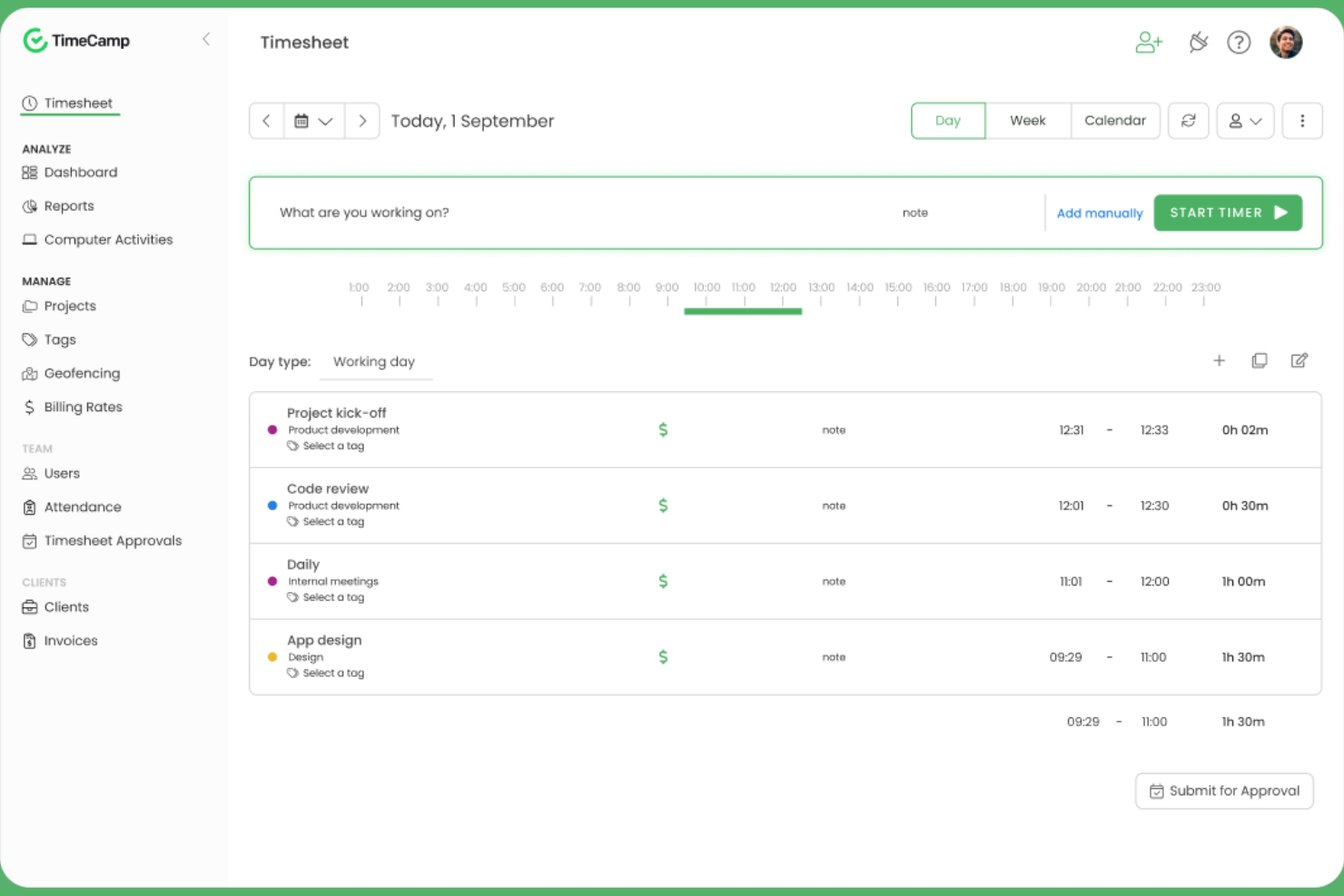
TimeCamp stands out for teams and managers who want to dig deep into how work hours are spent across projects and tasks. Its automatic time tracking and granular productivity analytics help digital agencies, consultancies, and remote teams pinpoint where time goes and identify workflow bottlenecks. If you need detailed reporting to support billing, payroll, or performance reviews, TimeCamp’s analytics-driven approach offers a clear advantage.
Why I Picked TimeCamp
When you need to understand exactly how your team spends their time, TimeCamp’s detailed productivity analytics set it apart from other time tracking tools. The platform automatically tracks time spent on apps, websites, and tasks, then compiles this data into visual reports that highlight trends and inefficiencies. I picked TimeCamp because its reporting features let you break down time usage by project, client, or team member, making it easier to spot bottlenecks and optimize workflows. For teams that want actionable insights from their time tracking data, TimeCamp’s analytics-driven approach is a strong fit.
TimeCamp Key Features
Some other features that may be helpful for teams managing time and expenses include:
- Automatic Attendance Tracking: Monitor employee attendance and time off directly within the platform.
- Billable Hours Calculation: Mark tracked time as billable or non-billable for accurate client invoicing.
- Expense Tracking Module: Log and categorize expenses alongside tracked time for unified reporting.
- Mobile App: Track time and manage tasks from iOS and Android devices.
TimeCamp Integrations
Integrations include Asana, Trello, monday.com, ClickUp, Jira, GitHub, Xero, QuickBooks, Google Calendar, and Slack.
Pros and Cons
Pros:
- Attendance and time-off tracking are built in
- Productivity analysis includes website and app usage
- Automatic time tracking runs in the background
Cons:
- Expense module lacks receipt scanning
- No mileage tracking for field teams

Harvest
Best for visual project budget tracking

Harvest stands out for teams that need to keep a close eye on project budgets with clear, visual insights. It’s a strong fit for agencies, consultancies, and project-based businesses that want to track time, expenses, and budget progress in one place. If you’re looking for a tool that makes it easy to spot budget risks before they become problems, Harvest is designed for that need.
Why I Picked Harvest
Harvest caught my attention because of its strong focus on visual project budget tracking, which is a key need for many project-driven teams. The tool displays budget progress in real time with clear visual indicators, so you can quickly see if a project is at risk of going over budget. I like that you can set budget limits by hours or fees and monitor them as your team logs time and expenses. For anyone who needs to keep budget status front and center, Harvest’s visual approach makes it easy to stay on top of project financials.
Harvest Key Features
Some other features in Harvest that may be useful for teams managing time and expenses include:
- Expense Receipt Uploads: Attach digital receipts directly to expense entries for accurate recordkeeping.
- Automated Reminders: Send automatic reminders to team members to submit timesheets on schedule.
- Invoicing Tools: Generate and send invoices to clients based on tracked time and expenses.
- Mobile Time Tracking: Track time and log expenses from iOS and Android devices.
Harvest Integrations
Integrations include Asana, Jira, Slack, Google Calendar, GitHub, Stripe, Trello, QuickBooks Online, Xero, and Basecamp.
Pros and Cons
Pros:
- Invoicing directly from tracked time and expenses
- Expense receipt uploads for reimbursement tracking
- Visual budget tracking with color-coded alerts
Cons:
- Limited offline functionality on the mobile app
- No mileage tracking for expense entries

Best for receipt scanning automation
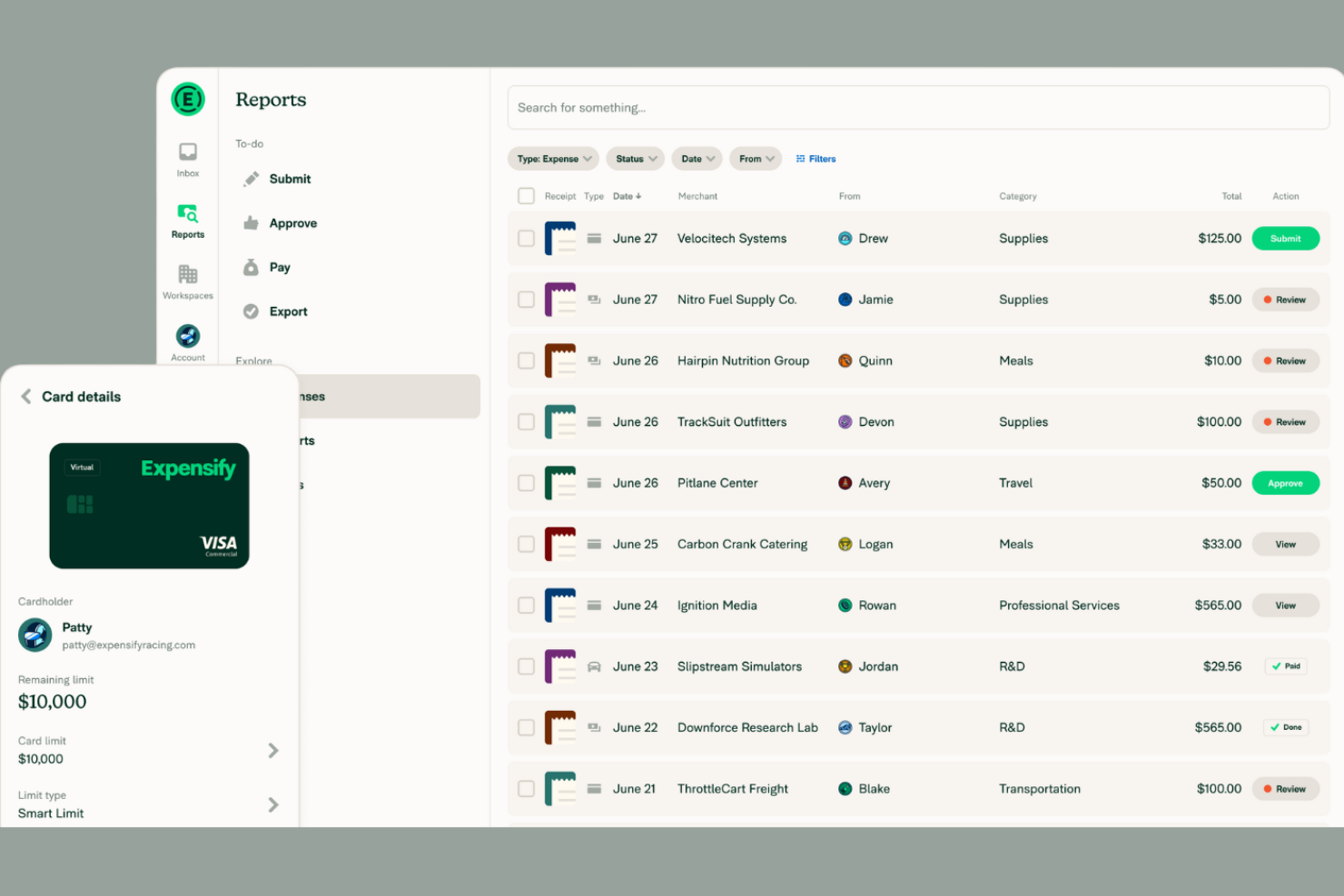
If your team spends too much time manually entering receipts, Expensify offers a way to automate that process with its advanced receipt scanning technology. It’s a strong fit for businesses of any size that want to capture, categorize, and report expenses with minimal manual effort. Expensify’s SmartScan feature quickly turns paper receipts into digital expense entries, helping finance teams and frequent travelers stay organized and audit-ready.
Why I Picked Expensify
Expensify’s receipt scanning automation is a major advantage for teams that process a high volume of expenses. The SmartScan feature reads and extracts data from receipts, automatically matching them to credit card transactions and categorizing expenses. I appreciate that Expensify can also auto-generate expense reports from scanned receipts, reducing manual entry and errors. For businesses that want to speed up reimbursement cycles and improve accuracy, Expensify’s automation tools make it a strong choice.
Expensify Key Features
Some other features that may be useful for teams managing expenses include:
- Corporate Card Management: Issue and manage Expensify Cards for employees with real-time transaction tracking.
- Multi-Level Approval Workflows: Set up custom approval chains for expense reports based on your organization’s policies.
- Mileage Tracking: Log and reimburse business travel mileage directly within the app.
- Policy Enforcement Rules: Automatically flag expenses that violate company spending policies.
Expensify Integrations
Integrations include QuickBooks, Xero, NetSuite, Sage Intacct, Gusto, Workday, ADP, Uber, Lyft, and Oracle.
Pros and Cons
Pros:
- Multi-currency support for global teams
- Corporate card transactions sync in real time
- SmartScan extracts data from receipts automatically
Cons:
- Approval workflow setup can be confusing
- No built-in project time tracking

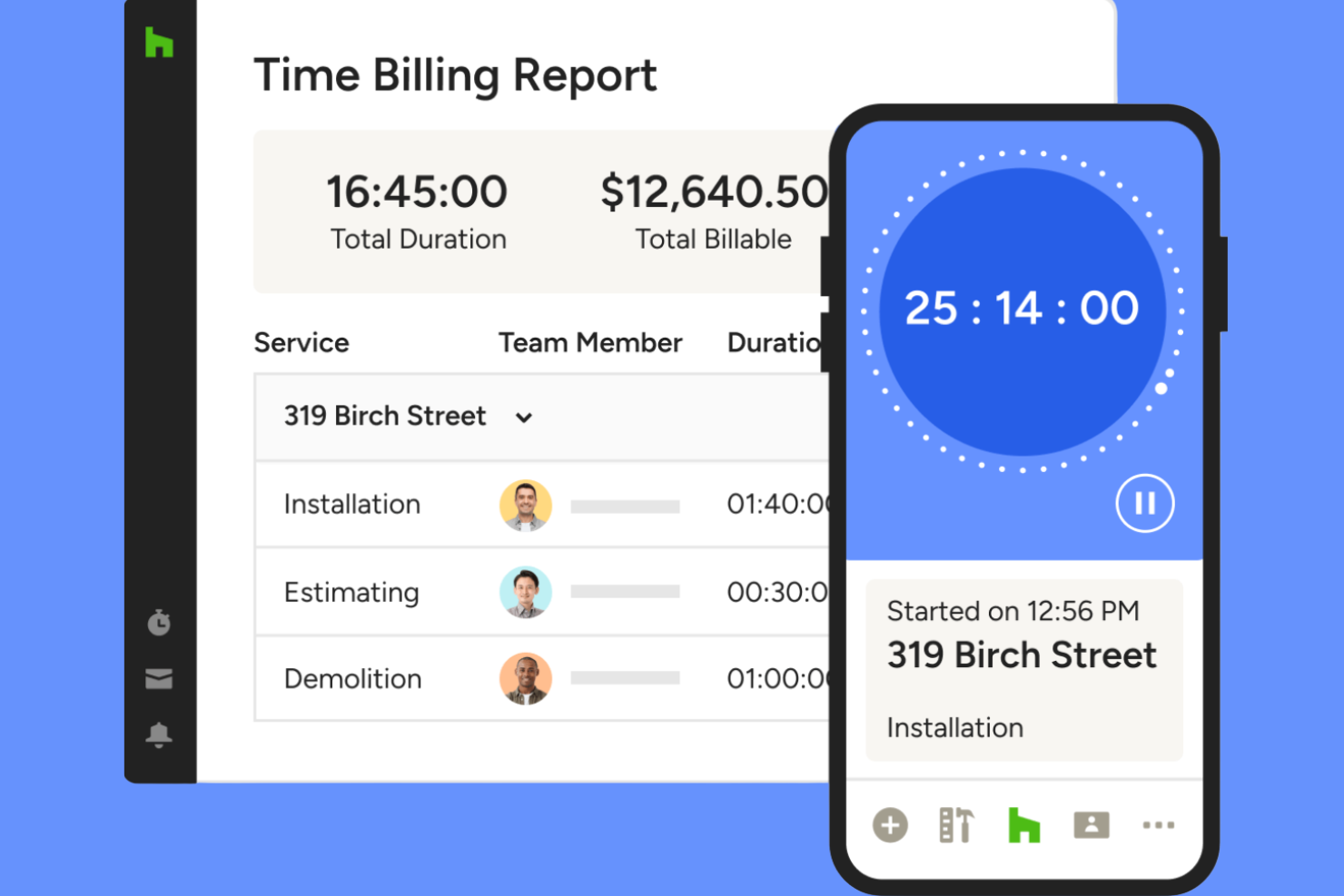
Houzz Pro is tailored for architecture and design firms that need to track project hours and expenses alongside client communications and proposals. It’s especially useful for professionals managing multiple projects, budgets, and client approvals in one place. If your team juggles design work, invoicing, and time tracking, Houzz Pro brings these functions together in a single platform.
Why I Picked Houzz Pro
Houzz Pro stands out for architecture and design firms that need to manage time and expenses within the context of project-based work. The platform lets you log billable hours directly to specific projects and attach expenses to client invoices, which is especially useful for firms handling multiple clients and phases. I like that you can generate branded proposals and invoices from tracked time and expenses, keeping everything client-facing and professional. For teams that need to keep project financials and client communications tightly connected, Houzz Pro offers a focused solution.
Houzz Pro Key Features
Some other features that may be helpful for architecture and design teams include:
- Mobile Time Tracking: Track hours and expenses from any location using the mobile app.
- Customizable Project Templates: Set up repeatable project structures for different types of jobs.
- Client Portal: Give clients access to view project progress, invoices, and shared documents.
- Task Assignment: Assign tasks to team members and monitor their completion within each project.
Houzz Pro Integrations
Integrations include QuickBooks Online, Google Calendar, iCloud, Office 365, Exchange, Outlook, Gmail, and Google Drive.
Pros and Cons
Pros:
- Project-based time tracking for multiple jobs
- Mobile app supports on-site expense capture
- Syncs time entries directly to QuickBooks Online
Cons:
- Limited reporting options for time analysis
- No built-in mileage tracking feature

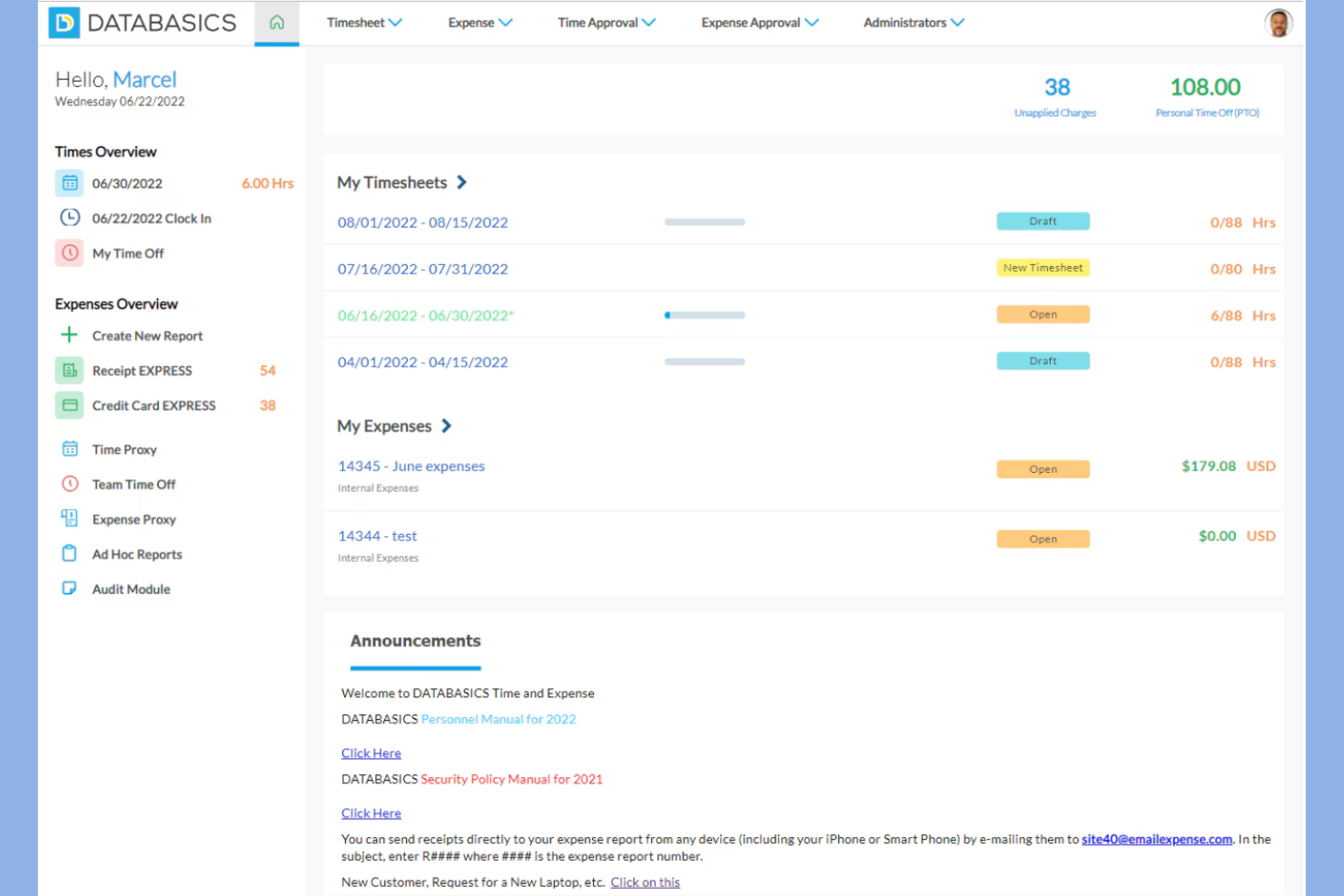
DATABASICS is built for organizations that need to meet strict compliance and audit requirements in their time and expense tracking. It’s especially relevant for government contractors, nonprofits, and enterprises with complex regulatory needs. If your team faces challenges around policy enforcement, audit trails, or multi-level approvals, DATABASICS is designed to address those priorities.
Why I Picked DATABASICS
What sets DATABASICS apart is its focus on compliance-driven organizations that need to meet strict regulatory and audit standards. The platform offers configurable policy enforcement, so you can set up rules that match your organization’s requirements and ensure every entry is compliant. I appreciate that DATABASICS provides detailed audit trails and multi-level approval workflows, which are essential for teams that need to document every step for audits or internal reviews. If your business operates in a highly regulated environment, these features make DATABASICS a strong fit for your time and expense tracking needs.
DATABASICS Key Features
Some other features in DATABASICS that may be useful for compliance-focused teams include:
- Per Diem Management: Set and manage per diem rates for travel expenses based on location and policy.
- Multi-Currency Support: Track and convert expenses in multiple currencies for global teams.
- Mobile App Entry: Submit time and expense entries directly from iOS and Android devices.
- Project-Based Tracking: Allocate time and expenses to specific projects or grants for detailed reporting.
DATABASICS Integrations
Integrations include Sage Intacct, Microsoft Dynamics, Oracle NetSuite, SAP, ADP, Paychex, QuickBooks, Ceridian, UKG, and American Express.
Pros and Cons
Pros:
- Multi-currency support for international teams
- Per diem management for travel compliance
- Audit trails for every time and expense entry
Cons:
- Mobile app interface can feel outdated
- No built-in mileage tracking feature

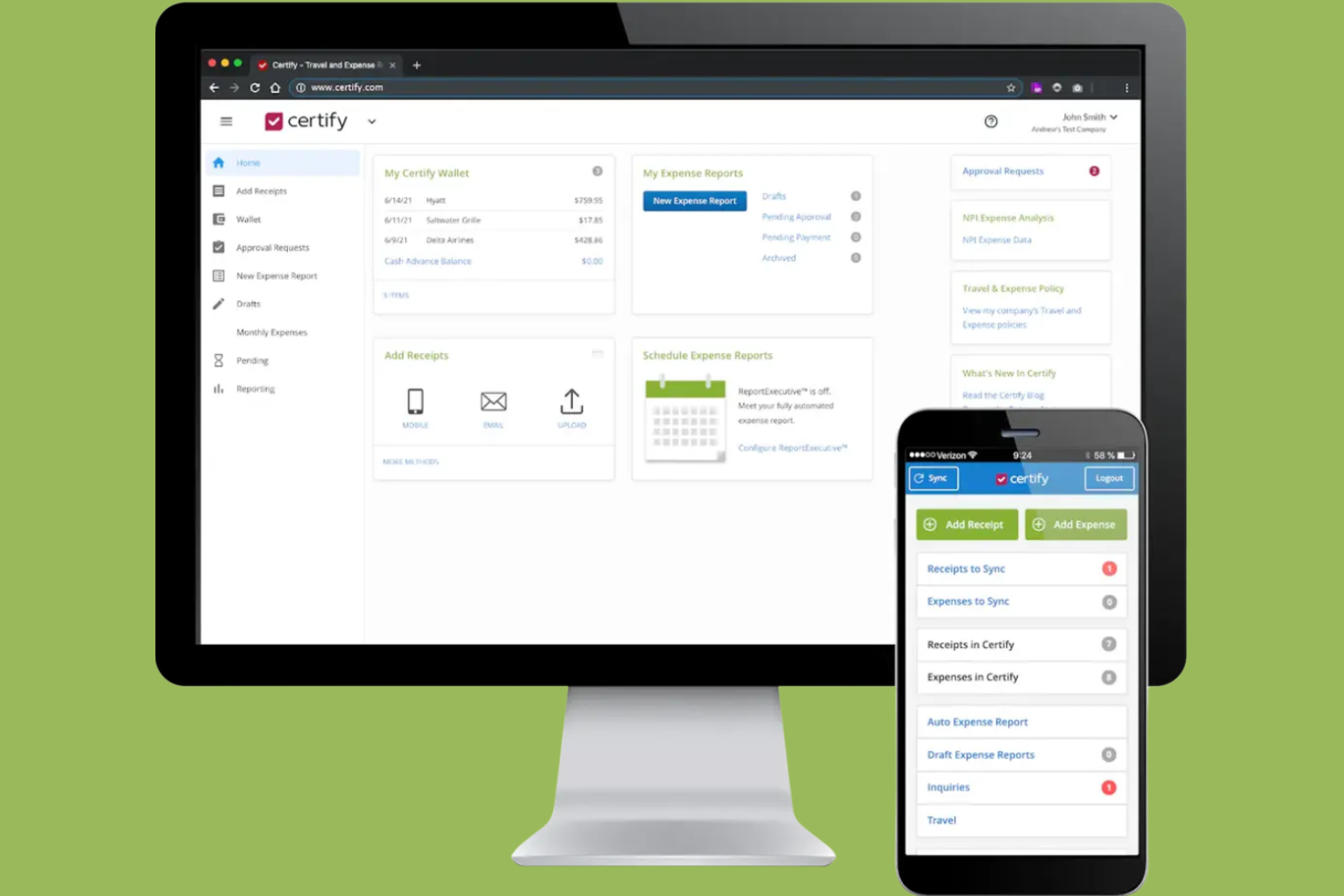
Certify stands out for teams that want to automate expense report creation and approval workflows. It’s especially useful for finance teams and organizations with frequent employee travel or recurring expenses. With features like receipt scanning and policy enforcement, Certify helps reduce manual entry and keeps expense management consistent.
Why I Picked Certify
Automating expense report creation is where Certify really shines for finance teams and frequent travelers. The platform uses receipt scanning and automatic data extraction to build expense reports with minimal manual input. I like that Certify also applies company policy checks during report creation, helping teams avoid compliance issues before submission. If you want to reduce time spent on expense paperwork and improve accuracy, Certify’s automation features are a strong fit.
Certify Key Features
Some other features that may be helpful for finance teams include:
- Automated Reimbursement Processing: Certify can trigger reimbursements directly after expense report approval.
- Credit Card Transaction Import: Syncs corporate card transactions for faster expense matching and reconciliation.
- Multi-Level Approval Routing: Supports custom approval chains based on your organization’s structure.
- Mobile App for Expense Submission: Let users capture and submit expenses from their smartphones.
Certify Integrations
Integrations include Sage Intacct, Amazon Business, Amtrav, Atriis, AWS, CTM, CWT, Direct Travel, Emburse Book, and Egencia.
Pros and Cons
Pros:
- Direct corporate card transaction import is available
- Multi-level approval routing supports complex policies
- Automated receipt scanning reduces manual entry
Cons:
- Limited reporting customization for advanced analytics
- No built-in time tracking functionality
Diğer Zaman ve Gider Takibi Yazılımları
Kısa listeme giremeyen ancak yine de göz atmaya değer bazı ek zaman ve gider takibi yazılımı seçenekleri şunlardır:
- Replicon
For global workforce management
- Minute7
For syncing with QuickBooks
- BigTime
For professional services firms
- Zoho Projects
For integrated project collaboration
- Timesheets.com
For tracking billable hours by client
- TMetric
For granular user permission controls


How I Evaluate Time and Expense Tracking Software
I evaluate these tools in two layers—core requirements like project-based time logging and expense approvals, and differentiators that matter for consulting teams, agencies, and PMOs billing clients.
Core Functionality (Table Stakes For This List)
When I'm selecting tools for my list, I rank each one on a scale from 0 (does not offer the functionality) to 5 (excels in this area) for each core functionality listed below. Then, I calculate the tool's total score into a percentage. Each tool needs to achieve a minimum total score of 65% to be considered for inclusion.
- Project-Based Time Tracking: I check whether hours can be logged against specific projects, tasks, and clients with clear billable/non-billable flags—like splitting a week across three retainer accounts.
- Expense Capture & Management: Each tool should let users record expenses, upload receipts, and tag costs to a project or client so nothing gets lost between a site visit and month-end.
- Timesheet & Expense Approvals: I look for configurable approval workflows where managers can review, approve, or reject entries—especially routing rules based on project or team structure.
- Billable Rates & Invoicing Support: Tools like Harvest and Toggl Track handle billing rates differently, so I evaluate whether a platform supports user-, role-, or project-level rates and can produce or export invoices.
- Project Budget & Cost Tracking: I evaluate how well a tool connects logged time and expenses to project budgets, showing burn rate and actuals vs. estimates before a project goes over scope.
- Reporting & Analytics: The tool should generate reports on utilization, project profitability, and expense breakdowns at the project, client, and team level—not just raw time exports.
Once I have a list of tools that meet the criteria, I consider what sets each platform apart.
Differentiating Factors (What Sets Vendors Apart)
Here's how I compare and contrast different vendors:
Standout Features
Automated time capture is a real differentiator. Tools like Harvest and Clockify offer calendar integrations that pre-fill timesheets, saving consultants from reconstructing their week every Friday. I also evaluate resource capacity planning. Knowing who's overbooked before a sprint starts matters more than finding out after. Client-facing portals are worth noting too, especially for agencies where clients want to see retainer burn-down without emailing their account manager.
Beyond Features
Integration depth matters a lot here. I check whether a tool connects natively with project management platforms like Jira or Asana and accounting systems like QuickBooks or Xero, since broken sync between timesheets and invoicing creates real billing headaches. Pricing transparency is another factor I weigh—some vendors gate expense tracking or invoicing behind higher tiers, which changes the total cost picture fast. I also consider firm-type fit, especially whether a tool supports billing models like T&M, retainer, and fixed-fee that professional services teams actually use.
Zaman ve Gider Takibi Yazılımı Nasıl Seçilir?
Uzun özellik listeleri ve karmaşık fiyatlandırma yapıları içinde kaybolmak kolaydır. Kendinize özgü yazılım seçim süreciniz üzerinde çalışırken odağınızı korumanıza yardımcı olmak için göz önünde bulundurmanız gereken faktörlerin bir kontrol listesi aşağıdadır:
| Faktör | Nelere Dikkat Edilmeli |
| Ölçeklenebilirlik | Yazılım, ekip büyüklüğünüzü ve öngörülen büyümenizi kaldırabilecek mi? Kuruluşunuz büyüdükçe kullanıcı sınırlarını ve plan esnekliğini kontrol edin. |
| Entegrasyonlar | Mevcut bordro, muhasebe veya proje yönetimi araçlarınıza yerel olarak bağlanabiliyor mu? Mevcut teknoloji altyapınızla uyumluluğunu doğrulayın. |
| Özelleştirilebilirlik | Kategorileri, onay akışlarını ve raporlamayı iş akışlarınıza göre uyarlayabiliyor musunuz? Sürecinizi uyarlamaya zorlayan katı sistemlerden kaçının. |
| Kullanım kolaylığı | Ekibiniz yazılımı hızlı bir şekilde benimseyecek mi? Açık gezinme yapısına, minimum veri girişine ve ekibinizin alışkanlıklarına uygun anlaşılır bir arayüze sahip çözümleri arayın. |
| Uygulama ve işe alıştırma | Sistemi çalışır duruma getirmek ne kadar sürecek? Veri aktarımı desteğinin, eğitim kaynaklarının ve işe alıştırma yardımının bulunabilirliğini değerlendirin. |
| Maliyet | Fiyatlandırma kademeleri şeffaf ve öngörülebilir mi? Bütçe sürprizleriyle karşılaşmamak için tüm kullanıcıları, eklentileri ve olası aşım ücretlerini hesaba katın. |
| Güvenlik önlemleri | Satıcı şifreleme, rol tabanlı erişim ve denetim günlükleri sunuyor mu? Kuruluşunuzun veri koruma standartlarına uyumluluğu sağlayın. |
| Destek bulunabilirliği | Hangi destek kanalları sunuluyor ve hangi saatlerde hizmet veriliyor? Ekibiniz için 7/24 yardıma veya özel hesap yönetimine ihtiyacınız olup olmadığını değerlendirin. |
Zaman ve Gider Takibi Yazılımı Nedir?
Zaman ve gider takibi yazılımı, işletmelerin çalışanların zamanını izlemesine, giderleri yönetmesine ve tek bir platformda doğru faturalandırmayı desteklemesine yardımcı olan hepsi bir arada bir çözümdür. Bu araçlar; müşterilere fatura kesmek, proje maliyetlerini izlemek ve finansal doğruluğu korumak için genellikle muhasebe yazılımıyla birlikte kullanılır.
Ekipler, zaman takibi yazılımını gider yönetimi yazılımıyla birleştirerek çalışma saatleri, maliyetler ve genel performans hakkında daha iyi görünürlük elde edebilir. Birçok platform kaynak yönetimini ve tahminlemeyi de destekleyerek işletmelerin iş yüklerini planlamasına, kaynakları tahsis etmesine ve projeler genelinde zaman kazanmasına yardımcı olur.
Zaman ve Gider Takip Yazılımının Özellikleri
Zaman ve gider takip yazılımı seçerken aşağıdaki temel özelliklere dikkat edin:
- Zaman girişi: Kullanıcıların, bordro veya faturalandırma için doğru kayıtlar oluşturmak amacıyla belirli projelerde, görevlerde veya müşterilerde çalıştıkları saatleri manuel olarak ya da zamanlayıcılarla kaydetmelerini sağlar.
- Gider kaydı: Kullanıcıların projeyle ilgili giderleri kaydetmesine ve kategorilere ayırmasına, makbuz eklemesine ve harcamaları bütçelere göre takip etmesine olanak tanır.
- Faturalandırılabilir ücretler: Projelere, müşterilere veya rollere farklı saatlik ücretler atanmasını destekleyerek faturaların hesaplanmasını ve kârlılığın analiz edilmesini kolaylaştırır.
- Onay iş akışları: Yöneticilerin, zaman çizelgelerini ve gider raporlarını kesinleştirilmeden veya faturalandırılmadan önce inceleyip onaylamasını sağlar.
- Raporlama ve analiz: Zaman kullanımı, giderler ve faturalandırılabilir saatler hakkında ayrıntılı raporlar oluşturarak ekiplerin proje maliyetlerini ve üretkenliğini izlemesine yardımcı olur.
- Veri dışa aktarma: Zaman çizelgelerini ve gider verilerini CSV, PDF gibi biçimlere veya doğrudan muhasebe ya da bordro sistemlerine aktarma seçenekleri sunar.
- Mobil erişim: Kullanıcıların hareket hâlindeyken zaman ve gider takibi yapabilmesi için mobil uygulamalar veya duyarlı web arayüzleri sunar.
- Entegrasyon özellikleri: İş akışlarını kolaylaştırmak için muhasebe, bordro veya proje yönetimi platformları gibi diğer iş araçlarına bağlanır.
- Role dayalı izinler: Yöneticilerin zaman ve gider kayıtlarını kimlerin görüntüleyebileceğini, düzenleyebileceğini veya onaylayabileceğini kontrol etmesini sağlayarak veri güvenliğini ve uyumluluğu destekler.
- Bildirimler ve hatırlatıcılar: Kullanıcılara zaman çizelgelerini göndermelerini hatırlatmak veya eksik kayıtları işaretlemek için otomatik uyarılar göndererek gecikmeleri ve hataları azaltır.
Zaman ve Gider Takip Yazılımının Faydaları
Zaman ve gider takip yazılımının uygulanması ekibiniz ve işletmeniz için çeşitli faydalar sağlar. Yararlanabileceğiniz faydalardan bazıları şunlardır:
- Doğru faturalandırma: Otomatik zaman ve gider kayıtları, faturaların gerçek çalışmayı ve maliyetleri yansıtmasını sağlayarak anlaşmazlıkları ve kaçırılan geliri azaltır.
- Geliştirilmiş proje görünürlüğü: Gerçek zamanlı takip ve raporlama özellikleri, ekiplerin projeler genelinde bütçeleri, zaman çizelgelerini ve kaynak dağılımını izlemesine yardımcı olur.
- Basitleştirilmiş uyumluluk: Onay iş akışları ve denetim izleri, kurum içi politikalara ve dış düzenlemelere uyulmasını destekler.
- Kolaylaştırılmış bordro ve faturalandırma: Veri dışa aktarma ve entegrasyon özellikleri, bilgilerin bordro ve muhasebe sistemlerine aktarılmasını kolaylaştırır.
- Geliştirilmiş hesap verebilirlik: Role dayalı izinler ve ayrıntılı günlükler, kayıtları kimin girdiğini, onayladığını veya değiştirdiğini netleştirerek şeffaflığı destekler.
- Daha hızlı onaylar: Otomatik bildirimler ve merkezi iş akışları, zaman çizelgesi ve gider raporu incelemelerini hızlandırır.
- Daha iyi kaynak planlaması: Analiz ve raporlama araçları, ekip kapasitesi ve proje kârlılığı hakkında içgörüler sunarak gelecekteki planlamaya yön verir.
Zaman ve Gider Takip Yazılımının Maliyetleri ve Fiyatlandırması
Zaman ve gider takip yazılımı seçmek, mevcut çeşitli fiyatlandırma modellerinin ve planların anlaşılmasını gerektirir. Maliyetler özelliklere, ekip büyüklüğüne, eklentilere ve diğer unsurlara göre değişir. Aşağıdaki tablo, zaman ve gider takip yazılımı çözümlerinde yaygın planları, bu planların ortalama fiyatlarını ve tipik olarak içerdiği özellikleri özetlemektedir:
Zaman ve Gider Takip Yazılımı için Plan Karşılaştırma Tablosu
| Plan Türü | Ortalama Fiyat | Yaygın Özellikler |
| Ücretsiz Plan | $0 | Temel zaman takibi, manuel gider girişi, sınırlı raporlama ve tek kullanıcı erişimi. |
| Kişisel Plan | $5-$10/kullanıcı/ay | Zaman ve gider takibi, temel raporlama, mobil erişim ve sınırlı entegrasyonlar. |
| İşletme Planı | $10-$25/kullanıcı/ay | Çok kullanıcılı destek, onay iş akışları, gelişmiş raporlama, entegrasyonlar ve role dayalı izinler. |
| Kurumsal Plan | $25-$50/kullanıcı/ay | Özel entegrasyonlar, özel destek, gelişmiş güvenlik, denetim izleri ve uyumluluk özellikleri. |
Zaman ve Gider Takip Yazılımı SSS
Zaman ve gider takip yazılımı hakkında sık sorulan bazı soruların yanıtları:
Zaman ve gider takip yazılımı birden fazla para birimini destekleyebilir mi?
Evet, birçok zaman ve gider takip yazılımı çözümü birden fazla para birimini destekler. Bu özellik, uluslararası müşterilerle veya uzaktan çalışanlarla çalışan ekipler için özellikle kullanışlıdır. Yazılımın proje başına varsayılan para birimleri belirlemenize ve raporlama için giderleri otomatik olarak dönüştürmesine izin verip vermediğini her zaman kontrol edin.
Zaman ve gider takip yazılımındaki onay iş akışları nasıl çalışır?
Onay iş akışları, yöneticilerin zaman çizelgelerini veya gider raporlarını kesinleştirilmeden önce inceleyip onaylamasını sağlar. Genellikle çok düzeyli onaylar oluşturabilir, onaylayanları projeye veya departmana göre atayabilir ve gönderimlerin ilgilenilmesi gerektiğinde bildirim alabilirsiniz. Bu, hataların önlenmesine ve şirket politikalarına uyulmasına yardımcı olur.
Zaman ve gider takip yazılımıyla ne tür raporlar oluşturabilirim?
Çoğu platform, faturalandırılabilir saatler, proje maliyetleri, gider kategorileri ve çalışan kullanım oranları hakkında raporlar oluşturmanıza olanak tanır. Genellikle tarih aralığına, müşteriye veya projeye göre filtreleme yapabilir ve raporları CSV veya PDF gibi biçimlerde dışa aktarabilirsiniz. Bu raporlar faturalandırma, bordro ve proje analizi süreçlerine yardımcı olur.
Zaman ve gider takip yazılımını bordro veya muhasebe sistemleriyle entegre etmek mümkün mü?
Evet, birçok çözüm popüler bordro ve muhasebe platformlarıyla doğrudan entegrasyonlar sunar. Bu, onaylanmış zaman çizelgelerini ve giderleri otomatik olarak senkronize etmenizi sağlayarak manuel veri girişini azaltır ve hataları en aza indirir. Bir araç seçmeden önce entegrasyonun mevcut sistemlerinizle uyumluluğunu her zaman doğrulayın.
Zaman ve gider takip yazılımında hangi güvenlik önlemlerini aramalıyım?
Veri şifreleme, role dayalı erişim kontrolleri ve denetim günlükleri gibi özellikleri arayın. Bu önlemler, hassas çalışan ve finansal verilerin korunmasına yardımcı olur. Kuruluşunuzun belirli uyumluluk gereksinimleri varsa sertifikaları veya üçüncü taraf güvenlik denetimlerini kontrol edin.