



Confluence vastaan Jira: vertailu ja asiantuntija-arviot vuodelle 2026



Confluence offers a collaborative workspace for your team, fostering seamless knowledge sharing and project tracking. Jira, on the other hand, is designed to help you manage and track issues and tasks with precision.
While both tools are integral to project management, Confluence excels in documentation and collaboration, whereas Jira is a powerhouse for issue tracking and agile project management. In this article, you'll find a detailed comparison of these tools, exploring their features, pros and cons, and pricing, to help you choose the right project management software for your needs.
Confluence vs. Jira: An Overview
Confluence





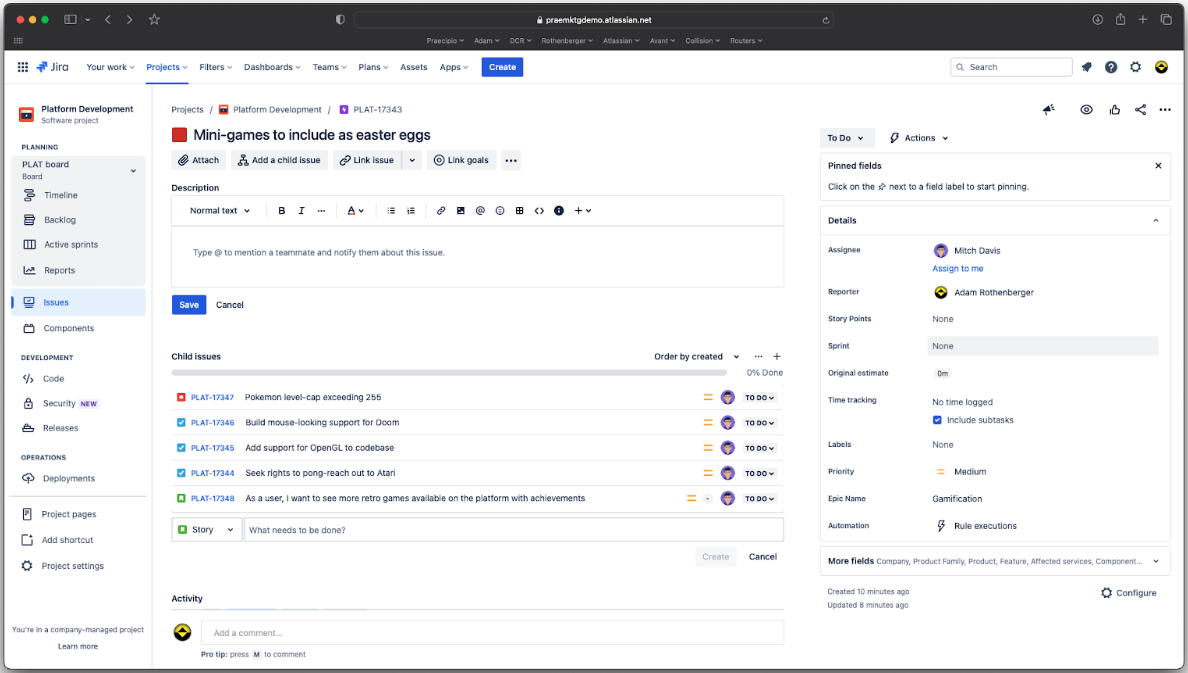
Jira
Miksi luottaa ohjelmistosuosituksiimme
Tiimimme on testannut ja arvioinut ohjelmistoja vuodesta 2012 lähtien. Projektipäällikköinä tiedämme itse, kuinka vaikeaa — ja tärkeää — oikean ohjelmiston valitseminen on.
Tätä oppaata varten arvioimme työkaluja käytännön testauksen ja itsenäisen tutkimuksen avulla, pisteyttäen työkalut valintakriteeriemme perusteella. Hyödynnämme myös alan ajatusjohtajien ja käytännön projektipäällikköasiantuntijoiden näkemyksiä.
Arvostelumme perustuvat inhimilliseen toimitukselliseen harkintaamme, eivät myyntipuheeseen.
Asiantuntija-arvioijat:
Confluence vs. Jira Pricing Comparison
| Confluence | Jira | |
|---|---|---|
| Free Trial | Free plan available | Free plan available |
| Pricing | From $5.78/user/month | From $8.48/user/month |
Confluencen ja Jiran hinnoittelu ja piilokustannukset
Confluencen hinnoittelu perustuu porrastettuun tilausmalliin, jossa kustannukset kasvavat tiimisi koon mukaan ja lisäominaisuuksista tai -tallennustilasta voidaan veloittaa erikseen.
Jiran hinnoittelu noudattaa samanlaista porrastettua rakennetta, jossa kustannukset määräytyvät käyttäjämäärän perusteella ja premium-ominaisuuksista voidaan veloittaa lisämaksuja.
Kun valitset budjettiisi sopivan työkalun, ota huomioon tiimisi tarvitsemat erityisominaisuudet ja arvioi kokonaiskustannukset, mukaan lukien mahdolliset piilokustannukset, testaamalla eri tilaustasoja ja lisäosia. Näin näet, mikä vaihtoehto sopii parhaiten työnkulkuusi ja kasvusuunnitelmiisi.
Confluence vs. Jira Feature Comparison
Confluencen yhteistyömuokkauksen ansiosta tiimit voivat luoda ja jakaa projektidokumentaatiota reaaliajassa, mikä tekee siitä erityisen hyödyllisen aivoriihissä. Jiran ketterät taulut auttavat hallitsemaan monimutkaisia projekteja seuraamalla tehtäviä ja sprinttejä tehokkaasti, mikä on erityisen hyödyllistä kehitystiimeille.
Kummallakin työkalulla on omat vahvuutensa: Confluence on suunniteltu yhteistyöhön, kun taas Jira on tarkoitettu tehtävien hallintaan.
| Confluence | Jira | |
|---|---|---|
| API | ||
| Calendar Management | ||
| Data Export | ||
| Data Import | ||
| External Integrations | ||
| Gantt Charts | ||
| Multi-User | ||
| Notifications | ||
| Project Management | ||
| Task Scheduling/Tracking |
Confluencen ja Jiran integraatiot
| Integraatio | Confluence | Jira |
| Slack | ✅ | ✅ |
| Microsoft Teams | ✅ | ✅ |
| Google Drive | ✅ | ✅ |
| Trello | ✅ | ✅ |
| GitHub | ❌ | ✅ |
| Bitbucket | ✅ | ✅ |
| Dropbox | ✅ | ✅ |
| Salesforce | ❌ | ✅ |
| API | ✅ | ✅ |
| Zapier | ✅ | ✅ |
Confluence integroituu Slackiin ja pitää tiimisi ajan tasalla asiakirjoihin tehdyistä päivityksistä reaaliajassa, mikä on hyödyllistä projektin tilannekatsauksissa. Vaikka sekä Confluence että Jira tukevat monenlaisia integraatioita, on tärkeää huomata, että jotkin niistä, kuten GitHub- tai Salesforce-integraatiot Confluencessa, edellyttävät kolmannen osapuolen työkaluja, kuten Zapieria, tai Atlassian Marketplacen sovelluksia eivätkä ole natiivisti tuettuja integraatioita.
Jira integroituu GitHubiin, joten kehitystiimit voivat seurata koodimuutoksia suoraan projektitehtävien yhteydessä. Confluence tehostaa tiimiviestintää, kun taas Jira tukee kehitystyönkulkuja.
Confluencen ja Jiran tietoturva, vaatimustenmukaisuus & luotettavuus
| Tekijä | Confluence | Jira |
| Tietosuoja | Confluence tarjoaa vaihtoehtoja tietojen sijainnin määrittämiseen, joten voit valita, missä tietosi tallennetaan. | Jira salaa tiedot siirron aikana ja levossa suojatakseen arkaluonteisia tietoja. |
| Sääntelyn noudattaminen | Confluence noudattaa GDPR:ää ja muita kansainvälisiä standardeja. | Jira noudattaa SOC2- ja ISO/IEC 27001 -standardeja varmistaakseen vahvan vaatimustenmukaisuuden. |
| Käyttöoikeuksien hallinta | Confluence tarjoaa tarkat käyttöoikeusasetukset sisällön näkyvyyden ja käyttäjien käyttöoikeuksien hallintaan. | Jira tarjoaa tarkat roolipohjaiset käyttöoikeuksien hallintatoiminnot projektitason käyttöoikeuksien ja käyttäjäroolien hallintaan. |
Sekä Confluence että Jira tarjoavat vahvat tietoturvaominaisuudet, kuten tarkat käyttöoikeuksien hallintatoiminnot, joilla käyttöoikeuksia voidaan hallita sivu- tai projektitasolla. Vaikka Jira sisältää laajemman valikoiman vaatimustenmukaisuustodistuksia, molemmat työkalut tukevat yritystason tietoturvastandardeja. Niitä arvioidessasi ota huomioon tietojen sijainti, salaus ja käyttöoikeuksien hallinnan tarkkuus, jotta voit varmistaa alustan vastaavan tiimisi tietoturva- ja hallintotarpeita.
Confluencen ja Jiran helppokäyttöisyys
| Tekijä | Confluence | Jira |
| Käyttöliittymä | Confluencessa on selkeä käyttöliittymä ja intuitiivinen navigointi dokumentoinnin yhteistyöhön. | Jiran käyttöliittymä on monimutkaisempi, sillä se on suunniteltu yksityiskohtaiseen tehtävien hallintaan ja työnkulkuihin. |
| Käyttöönotto | Confluence tarjoaa interaktiivisia oppaita ja malleja, joiden avulla uudet käyttäjät pääsevät helposti alkuun alustan käytössä. | Jira tarjoaa käyttöönotto-opastuksia, mutta sen yksityiskohtaisten ominaisuuksien vuoksi oppimiskäyrä on jyrkempi. |
| Tuki | Confluence tarjoaa yhteisöfoorumeita ja dokumentaatiota nopeaa avun saantia varten. | Jira tarjoaa kattavan tuen ja yksityiskohtaisen dokumentaation sekä aktiivisia yhteisöfoorumeita. |
Confluence on helppo oppia sen yksinkertaisen käyttöliittymän ja valmiiden mallien ansiosta, jotka tekevät asiakirjojen hallinnasta suoraviivaista. Jira puolestaan vaatii monimutkaisuutensa vuoksi enemmän aikaa oppimiseen, mutta se sopii hyvin tiimeille, jotka tarvitsevat edistyneitä projektien ja tehtävien seurantaominaisuuksia.
Confluence vs Jira: Pros & Cons
Confluence
- You can easily collaborate with your team through intuitive document sharing.
- It offers powerful search capabilities to quickly find the information you need.
- Your team can benefit from its extensive templates, saving time on setup.
- You might find its interface less visually appealing compared to other tools.
- It can be overwhelming for new users due to its extensive features.
- Your team may experience occasional performance issues with large data sets.
Jira
- Agile workflow management supports Scrum and Kanban and can improve your teams' productivity.
- Automation rules are easy to set up, which helps your team speed up their work.
- Custom filters can be created and accessed quickly, which improves your team's efficiency.
- Field names can be confusing, which might slow down your team's workflow.
- The interface can be too crowded in Scrum projects, which can make it hard for your team to navigate.
- There's a lack of resource management capabilities, which could limit your team's planning.
Best Use Cases for Confluence and Jira
Confluence
- Software development teams Your team can benefit from Confluence's strong document management features, which keep project specs and updates centralized.
- Marketing departments You can streamline campaign planning and content creation with Confluence's templates and collaboration tools.
- Educational institutions Your institution can use Confluence to support faculty collaboration and manage course materials effectively.
- Remote teams You can maintain clear communication and document sharing across distances with Confluence's online capabilities.
- Product management Your product team can track development progress and share feedback efficiently with Confluence's collaborative features.
- Non-profit organizations You can organize and manage volunteer efforts and project documentation with Confluence's easy-to-use interface.
Jira
- Software development Jira’s agile tools like Scrum and Kanban boards make it perfect for managing software projects.
- IT departments Its issue tracking capabilities help your team efficiently handle technical support and bug fixes.
- Tech startups Jira offers customization capabilities that allow your team to scale and adapt as your projects grow.
- Agile teams Sprint planning and backlog management features keep your agile processes organized and effective.
- Large enterprises Jira’s automation rules can streamline your complex workflows and improve team productivity.
- Project managers Its reporting and analytics provide insights that help you make informed decisions quickly.
Differences Between Confluence and Jira
Alta löydät tietoja siitä, mikä erottaa nämä työkalut toisistaan.
| Confluence | Jira | |
|---|---|---|
| Automation | Confluence has no built-in automation but connects with Jira rules. | Jira offers task rules, triggers, and updates to automate workflows. |
| Compliance | Confluence has basic permissions but limited compliance features. | Jira supports audit logs, controls, and setups for strict compliance |
| Pricing | Confluence uses a tiered subscription model based on user count and features | Jira also follows a tiered model, with additional costs for premium features and more users. |
| Scalability | Confluence scales with your team’s need for organized content. | Jira scales with complex projects and large teams handling tasks. |
| User Interface | Confluence offers a clean, intuitive interface for easy navigation and collaboration | Jira has a more complex interface tailored for detailed project management and workflows. |
| Read Confluence ReviewOpens new window | Read Jira ReviewOpens new window |
Similarities Between Confluence and Jira
Nyt kun tiedät, mikä erottaa ne toisistaan, tarkastellaan niiden yhtäläisyyksiä.
| Cloud-Based | Both Confluence and Jira are cloud-based, allowing your team to access them from anywhere, enhancing remote collaboration. |
|---|---|
| Customization | Both tools offer customization features, letting you tailor dashboards and workflows to fit your team’s specific needs. |
| Integrations | Confluence and Jira both integrate with a wide range of third-party apps, enhancing their functionality within your existing tech stack |
| Security | Both platforms prioritize security with features like data encryption and access controls to protect your team’s information |
| Support | Confluence and Jira both provide extensive support through documentation, forums, and active user communities to help you solve issues quickly. |
| Read Confluence ReviewOpens new window Read Jira ReviewOpens new window | |