



Asana vs. Zoho Projects: Asiantuntijavertailu ja arvostelut 2026



Asana tarjoaa sujuvan tavan tiimisi työnkulkujen organisointiin, kun taas Zoho Projects tarjoaa integroidun alustan projektien joustavaan hallintaan. Molempien työkalujen tavoitteena on auttaa parantamaan tiimin tuottavuutta, mutta ne eroavat toisistaan käyttöliittymän ja mukautusmahdollisuuksien osalta.
Olen arvioinut ja vertaillut näitä työkaluja sekä niiden keskeisiä ominaisuuksia, etuja ja haittoja sekä hinnoittelua projektipäällikön asiantuntemuksellani. Lue vertailuni alta selvittääksesi, mikä projektinhallintaohjelmisto sopii parhaiten projekteihisi ja prosesseihisi.
Asana vs. Zoho Projects: An Overview
Asana

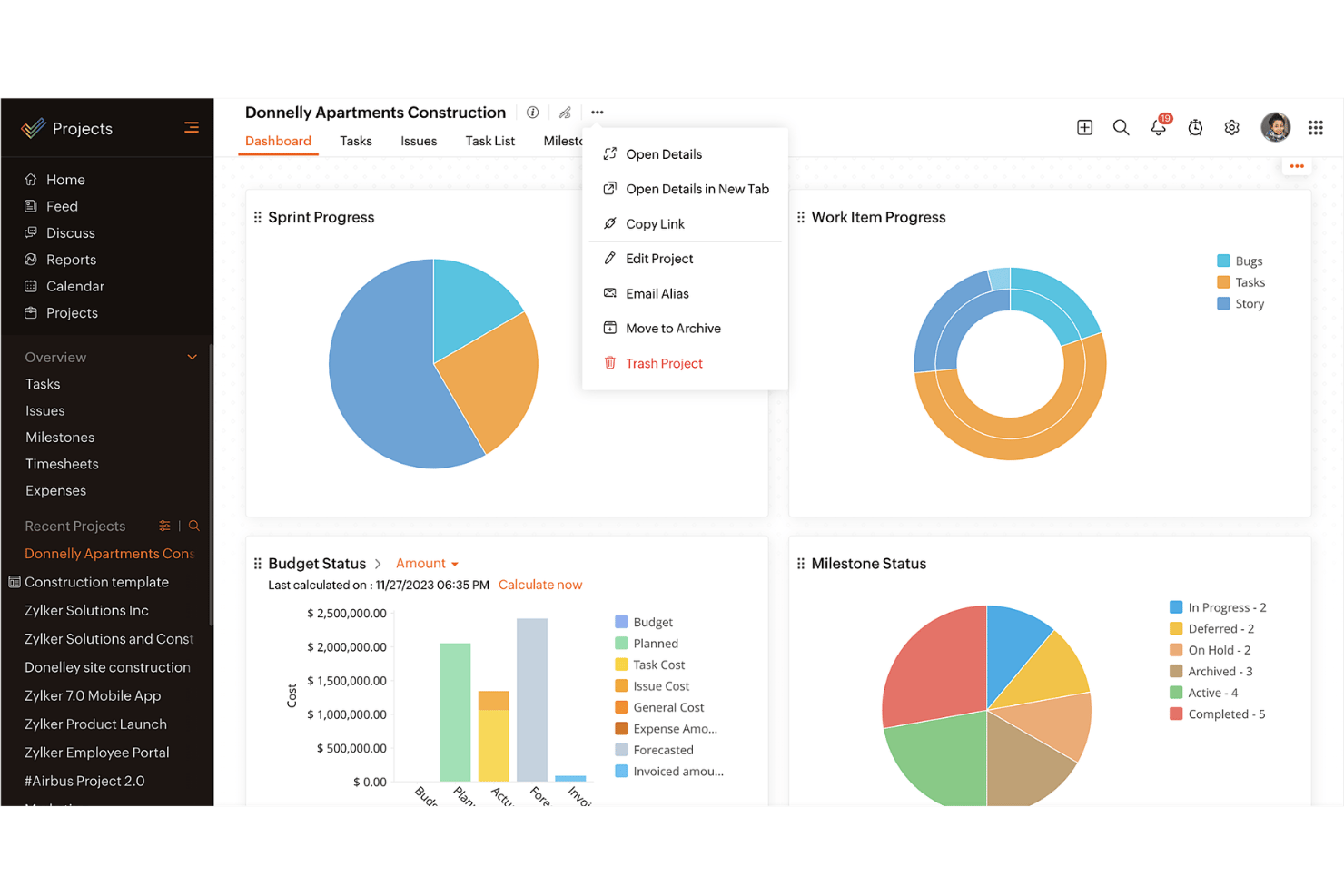
Zoho Projects


Miksi luottaa ohjelmistosuosituksiimme
Tiimimme on testannut ja arvioinut ohjelmistoja vuodesta 2012 lähtien. Projektipäällikköinä tiedämme itse, kuinka vaikeaa — ja tärkeää — oikean ohjelmiston valitseminen on.
Tätä oppaata varten arvioimme työkaluja käytännön testauksen ja itsenäisen tutkimuksen avulla, pisteyttäen työkalut valintakriteeriemme perusteella. Hyödynnämme myös alan ajatusjohtajien ja käytännön projektipäällikköasiantuntijoiden näkemyksiä.
Arvostelumme perustuvat inhimilliseen toimitukselliseen harkintaamme, eivät myyntipuheeseen.
Asiantuntija-arvioijat:
Asana vs. Zoho Projects Pricing Comparison
| Asana | Zoho Projects | |
|---|---|---|
| Free Trial | Free plan available | 15-day free trial |
| Pricing | From $10.99/user/month (billed annually) | Pricing upon request |
Asanan ja Zoho Projectsin hinnoittelu & piilokustannukset
Asanan hinnoittelu perustuu porrastettuun tilausmalliin, joka sisältää ilmaisen perusversion sekä maksullisia suunnitelmia, joiden ominaisuudet ja asiakastuki laajenevat. Myös Zoho Projectsin hinnoittelu perustuu porrastettuun malliin, joka sisältää ilmaisen suunnitelman ja maksullisia vaihtoehtoja, joissa on enemmän toiminnallisuutta ja tietoturvaominaisuuksia.
Valitaksesi itsellesi parhaan projektinhallintaohjelmiston arvioi tiimisi erityiset liiketoimintatarpeet, huomioi projektinhallintaominaisuudet, joita todella käytät, ja ota huomioon mahdolliset piilokustannukset löytääksesi budjettiisi ja työnkulkuusi parhaiten sopivan vaihtoehdon.
Asana vs. Zoho Projects Feature Comparison
Asanan tehtävienhallintaominaisuuden avulla voit helposti järjestää päivittäiset tehtävät ja alitehtävät sekä visualisoida projektien aikatauluja. Tämä sopii erinomaisesti tiimeille, jotka tarvitsevat ominaisuuksia tehtävien ja määräaikojen selkeään määrittelyyn. Zoho Projectsin integrointi muihin Zoho-sovelluksiin on erinomainen vaihtoehto yrityksille, jotka käyttävät jo Zoho-ekosysteemiä.
| Asana | Zoho Projects | |
|---|---|---|
| API | ||
| Batch Permissions & Access | ||
| Budgeting | ||
| Calendar Management | ||
| Collaboration Support | ||
| Contact Management | ||
| Contact Sharing | ||
| Customer Management | ||
| Dashboard | ||
| Dashboards | ||
| Data Export | ||
| Data Import | ||
| Data Visualization | ||
| Dependency Tracking | ||
| Document Sharing | ||
| Expense Tracking | ||
| External Integrations | ||
| File Sharing | ||
| Gantt Charts | ||
| Kanban Boards | ||
| Multi-User | ||
| Notifications | ||
| Project Management | ||
| Resource Management | ||
| Scheduling | ||
| Task Scheduling/Tracking | ||
| Third-Party Plugins/Add-Ons | ||
| Time Management | ||
| Travel Management | ||
| Workflow Management |
Asanan ja Zoho Projectsin integraatiot
| Integraatio | Asana | Zoho Projects |
|---|---|---|
| Slack | ✅ | ✅ |
| Microsoft Teams | ✅ | ✅ |
| Google Drive | ✅ | ✅ |
| Dropbox | ✅ | ✅ |
| Salesforce | ✅ | ❌ |
| Zendesk | ✅ | ✅ |
| Evernote | ✅ | ❌ |
| QuickBooks | ❌ | ❌ |
| API | ✅ | ✅ |
| Zapier | ✅ | ✅ |
Asanan integraatio Slackiin mahdollistaa keskustelujen helpon muuntamisen tehtäviksi, mikä voi nopeuttaa työnkulkuja ja parantaa viestintää. Zoho Projectsin integraation Zendeskiin avulla tukipyynnöt voi muuntaa tehtäviksi, mikä on hyödyllistä julkaisun jälkeisten seurantatoimien hallinnassa.
Asanan ja Zoho Projectsin tietoturva, vaatimustenmukaisuus \u0026 luotettavuus
| Tekijä | Asana | Zoho Projects |
|---|---|---|
| Tietosuoja | Asana ylläpitää tietosuojaa GDPR-vaatimustenmukaisuuden ja säännöllisten auditointien avulla. | Zoho Projects tarjoaa tietosuojaa GDPR-vaatimustenmukaisuuden ja salauksen avulla. |
| Salaus | Asana käyttää AES-256-salausta levossa oleville tiedoille ja TLS-salausta siirrettäville tiedoille. | Zoho Projects käyttää AES-256-salausta ja suojattuja datakeskuksia. |
| Käytettävyysaika | Asana takaa yritysasiakkaille 99.9%:n käytettävyysajan. | Zoho Projects tarjoaa 99.9%:n käytettävyysajan redundanttien datakeskusten avulla. |
Asana ja Zoho Projects asettavat molemmat tietoturvan ja vaatimustenmukaisuuden etusijalle. Huomioi tiimisi erityiset tietosuojatarpeet, tarkista toimittajien vaatimustenmukaisuustodistukset ja aseta etusijalle ominaisuudet, jotka vastaavat tietoturvakäytäntöjäsi.
Asanan ja Zoho Projectsin käytön helppous
| Tekijä | Asana | Zoho Projects |
|---|---|---|
| Käyttöliittymä | Asana tarjoaa selkeän ja helppokäyttöisen käyttöliittymän, jossa on vedä ja pudota -toiminnot. | Zoho Projectsissa on mukautettava käyttöliittymä, jonka oppimiskäyrä on jyrkempi. |
| Perehdytys | Asana tarjoaa vuorovaikutteisia opastusohjelmia ja pikaoppaita käyttöönottoa varten. | Zoho Projects tarjoaa kattavia perehdytysvideoita ja yksityiskohtaisia oppaita. |
| Tuki | Asana tarjoaa runsaasti verkkoaineistoja sekä yritysasiakkaille ympärivuorokautisen tuen. | Zoho Projects tarjoaa lukuisia ohjeartikkeleita ja tietopankin. |
Asana erottuu edukseen helppokäyttöisyydellään, suoraviivaisella käyttöliittymällään ja nopealla käyttöönotollaan. Vaikka Zoho Projects on tehokas, sen monimutkaiset mukautusvaihtoehdot voivat tehdä siitä haastavamman käyttää, ja niiden hallitseminen saattaa vaatia hieman enemmän aikaa.
Asana vs Zoho Projects: Pros & Cons
Asana
- You can easily track tasks and deadlines using Asana's intuitive interface.
- Asana's collaboration tools help your team communicate effectively in real-time.
- There are extensive customization options so you can tailor workflows and views to your specific needs.
- The reporting capabilities are somewhat basic, which may not satisfy teams needing detailed analytics.
- It can feel overwhelming if your team is small or your projects are simple.
- You might find the notification system a bit excessive or distracting.
Zoho Projects
- Task dependencies are highly visual and easy to set up.
- Built-in time tracking integrates smoothly with billing features.
- Customizable project templates support repeatable workflows.
- Reporting customization can be limited for advanced needs.
- Mobile app notifications do not always sync in real time.
- Gantt chart drag-and-drop can feel sluggish with large projects.
Best Use Cases for Asana and Zoho Projects
Asana
- Creative agencies You can manage creative workflows and client projects with Asana’s visual boards and timeline features.
- Tech startups You can coordinate product development and team tasks using Asana’s real-time updates and goal-setting tools.
- Marketing teams You can plan campaigns and track progress with Asana’s clear timelines and task comments.
- Nonprofits Asana lets you manage volunteer tasks, events, and fundraising efforts with clear task assignments and timelines.
- Remote teams You can collaborate effectively with Asana’s real-time updates and communication features.
- Event planners You can organize events easily with Asana’s task management and timeline visualization features.
Zoho Projects
- Small Agencies Kanban boards, time tracking, and client billing streamline project delivery and reporting for agency teams.
- IT Departments Issue tracking, blueprint automations, and strong permission controls provide what IT teams need for complex internal projects.
- Consulting Firms Time sheets, detailed reports, and project-level billing help consultants keep track of client hours and invoicing.
- Remote Teams Robust collaboration tools, document sharing, and project forums help distributed users stay connected.
- Marketing Teams Reusable templates, task dependencies, and timeline tracking make repeated campaigns run smoothly and transparently.
- Construction Projects Gantt charts, milestones, and resource allocation features support the scheduling needs of construction and field project managers.
Kenen kannattaa käyttää Asanaa ja kenen Zoho Projectsiä?
Omasta mielestäni Asana sopii parhaiten luoville tiimeille ja startup-yrityksille, jotka tarvitsevat yksinkertaisen ja intuitiivisen työkalun tehtävien hallintaan ja nopeaan yhteistyöhön. Jos työskentelet suuremmassa organisaatiossa tai toimialalla, jolla tarvitaan kattavia mukautusmahdollisuuksia ja integraatioita muiden liiketoimintatyökalujen kanssa, Zoho Projects sopii paremmin.
Näkemykseni mukaan Asana sopii tiimeille, jotka haluavat suoraviivaista tehtävienhallintaa, kun taas Zoho Projects on ihanteellinen niille, jotka tarvitsevat yksityiskohtaista hallintaa ja kattavaa projektiseurantaa. Zoho Projects tarjoaa myös monipuolisemmat ominaisuudet kilpailukykyiseen hintaan.
Differences Between Asana and Zoho Projects
| Asana | Zoho Projects | |
|---|---|---|
| Automation | Asana provides basic automation for task management. | Zoho Projects offers more advanced automation features for more complex project workflows. |
| Customization | Asana has limited customization and focuses on simplicity. | Zoho Projects offers extensive customization to fit complex needs. |
| User Interface | Asana has a clean, intuitive interface that makes adoption quicker. | Zoho Projects offers a customizable interface that requires more setup. |
| Read Asana ReviewOpens new window | Read Zoho Projects ReviewOpens new window |
Similarities Between Asana and Zoho Projects
| Cloud-Access | Both are cloud-based, so you can access your projects from anywhere. This is essential for remote work setups. |
|---|---|
| Collaboration | Both project management platforms provide team collaboration tools so your team members can communicate and share updates within the platform efficiently. |
| Mobile Apps | Each tool offers a mobile app that helps you manage tasks, stay updated on the go, and be productive outside the office. |
| Reporting | They both include reporting features that let you generate insights and track project performance. |
| Task Management | Both Asana and Zoho Projects offer task management features that let you assign tasks, set deadlines, and track progress easily. |
| Read Asana ReviewOpens new window Read Zoho Projects ReviewOpens new window | |