10 beste Trello-Alternativen im Jahr 2026 (kostenlose & kostenpflichtige Optionen)

10 Auswahl der besten Trello-Alternativen


Trello ist ein beliebtes Projektmanagement-Tool, aber nicht für jedes Team die perfekte Lösung. Ganz gleich, ob Sie den einfachen Boards entwachsen sind, umfassendere Berichte benötigen oder tiefere Integrationen wünschen – es gibt zahlreiche Trello-Alternativen mit leistungsstarken Funktionen und flexiblen Arbeitsabläufen, die Ihre Projekte besser unterstützen.
Ich habe führende Projektmanagement-Plattformen mit Blick auf Trello-Nutzer getestet und bewertet – mit Fokus auf Benutzerfreundlichkeit, Teamzusammenarbeit, Anpassbarkeit und Preis-Leistungs-Verhältnis. Ganz gleich, ob Sie agile Arbeitsabläufe, Kundenprojekte oder interne Teams verwalten: Hier finden Sie ein Tool, das Ihre Produktivität auf die nächste Stufe heben kann.
Was ist Trello?
Trello ist ein visuelles Projektmanagement-Tool, das Einzelpersonen und Teams dabei unterstützt, Aufgaben zu organisieren, den Fortschritt zu verfolgen und in Echtzeit zusammenzuarbeiten.
Mit einem auf Boards, Listen und Karten basierenden System erleichtert Trello die Planung von Projekten, die Zuweisung von Aufgaben und die Überwachung von Arbeitsabläufen. Es ist bei Projektmanagern, Marketingfachleuten und Entwicklern beliebt, da es Flexibilität und Benutzerfreundlichkeit bietet und die Koordination im Team optimieren kann.
Warum eine Trello-Alternative verwenden
Sie suchen möglicherweise nach einer Alternative zu Trello, wenn Sie:
- Erweiterte Berichte und Analysen benötigen, beispielsweise für eine detaillierte Projektverfolgung und fundierte Einblicke.
- Bessere Integrationsmöglichkeiten benötigen.
- Hochgradig anpassbare Arbeitsabläufe und Funktionen benötigen.
- Ständigen Zugriff auf Ihre Projektmanagement-Software ohne Internetverbindung benötigen.
- Umfassende Sicherheitsfunktionen benötigen.
Alternativen zu Trello bieten häufig Funktionen, die diese Einschränkungen beheben. Sie verfügen über fortschrittliche Berichtswerkzeuge für detaillierte Analysen, umfangreiche Integrationsmöglichkeiten für eine größere Auswahl an Software sowie mehr Anpassungsmöglichkeiten, um individuellen Arbeitsabläufen gerecht zu werden.
Verbesserte Offline-Funktionen gewährleisten den Zugriff auf Projektinformationen ohne Internetverbindung, während optimierte Sicherheitsfunktionen einen besseren Schutz sensibler Daten bieten. Diese Alternativen richten sich an Nutzer, die umfassendere Lösungen suchen, die besser auf ihre spezifischen Anforderungen an Projektmanagement und Zusammenarbeit abgestimmt sind.
Warum Sie unseren Software-Empfehlungen vertrauen können
Unser Team testet und bewertet Software seit 2012. Als Projektmanager wissen wir selbst, wie schwierig – und wichtig – es ist, die richtige Software auszuwählen.
Für diesen Leitfaden haben wir Tools mithilfe von praktischen Tests und unabhängiger Recherche bewertet und dabei unsere Bewertungskriterien angewendet. Zudem greifen wir auf Erkenntnisse von Branchenvordenkern und praktizierenden Projektmanagement-Experten zurück.
Unsere Bewertungen spiegeln unser menschliches redaktionelles Urteilsvermögen wider, keine Verkaufsstrategie.
Expertenprüfer:
Vergleichstabelle der Trello-Alternativen
Diese Vergleichstabelle fasst die Preisdetails meiner Auswahl der besten Trello-Alternativen zusammen:
| Tool | Best For | Trial Info | Price | ||
|---|---|---|---|---|---|
| 1 | Beste KI-gestützte Projektanalysen | 14 Tage kostenloser Test | Ab $6/Nutzer/Monat | Website | |
| 2 | Am besten für die Integration mit Google Workspace geeignet | Kostenloser Tarif + 14-tägige kostenlose Testversion verfügbar | Ab $3/Benutzer/Monat (jährlich abgerechnet) | Website | |
| 3 | Am besten für verschachtelte Aufgabenhierarchien geeignet | Kostenloser Tarif verfügbar | Ab $7.65/Nutzer/Monat (jährlich abgerechnet) | Website | |
| 4 | Bester Preis für Freiberufler und kleine Teams | 10 Tage kostenlos testen. Keine Kreditkarte erforderlich | Ab $4/Nutzer/Monat bei jährlicher Abrechnung. Es gibt außerdem eine kostenlose Version für bis zu 3 Nutzer und 2 Projekte. | Website | |
| 5 | Am besten geeignet für visuelles Projektmanagement | 14 Tage kostenlos testen | Ab $5/Nutzer/Monat | Website | |
| 6 | Beste Kombination mit einer vollständigen Projektmanagement-Suite | 14-tägige kostenlose Testversion | Ab $29/Nutzer/Monat | Website | |
| 7 | Am besten geeignet für Automatisierungsfunktionen | Kostenloser Plan verfügbar | Ab $8.25/Nutzer/Monat | Website | |
| 8 | Bestes kostenloses Angebot als Trello-Alternative | Kostenloser Plan + kostenlose Demo verfügbar | Für immer kostenlos, kostenpflichtige Pläne ab $5/Monat | Website | |
| 9 | Bestes persönliches Onboarding und Training | 14-tägige kostenlose Testphase + kostenlose Demo verfügbar | Ab $8/Nutzer/Monat (jährliche Abrechnung) | Website | |
| 10 | Bestes Kanban-Board für mehrere Portfolios | 30 Tage kostenlos testen | Ab $5/Lizenz/Monat und $0 für Betrachter/Abonnenten | Website |


Tests der besten Trello-Alternativen
Hier finden Sie einige der besten Trello-Alternativen sowie eine Beschreibung ihrer besonderen Eigenschaften.

Beste KI-gestützte Projektanalysen
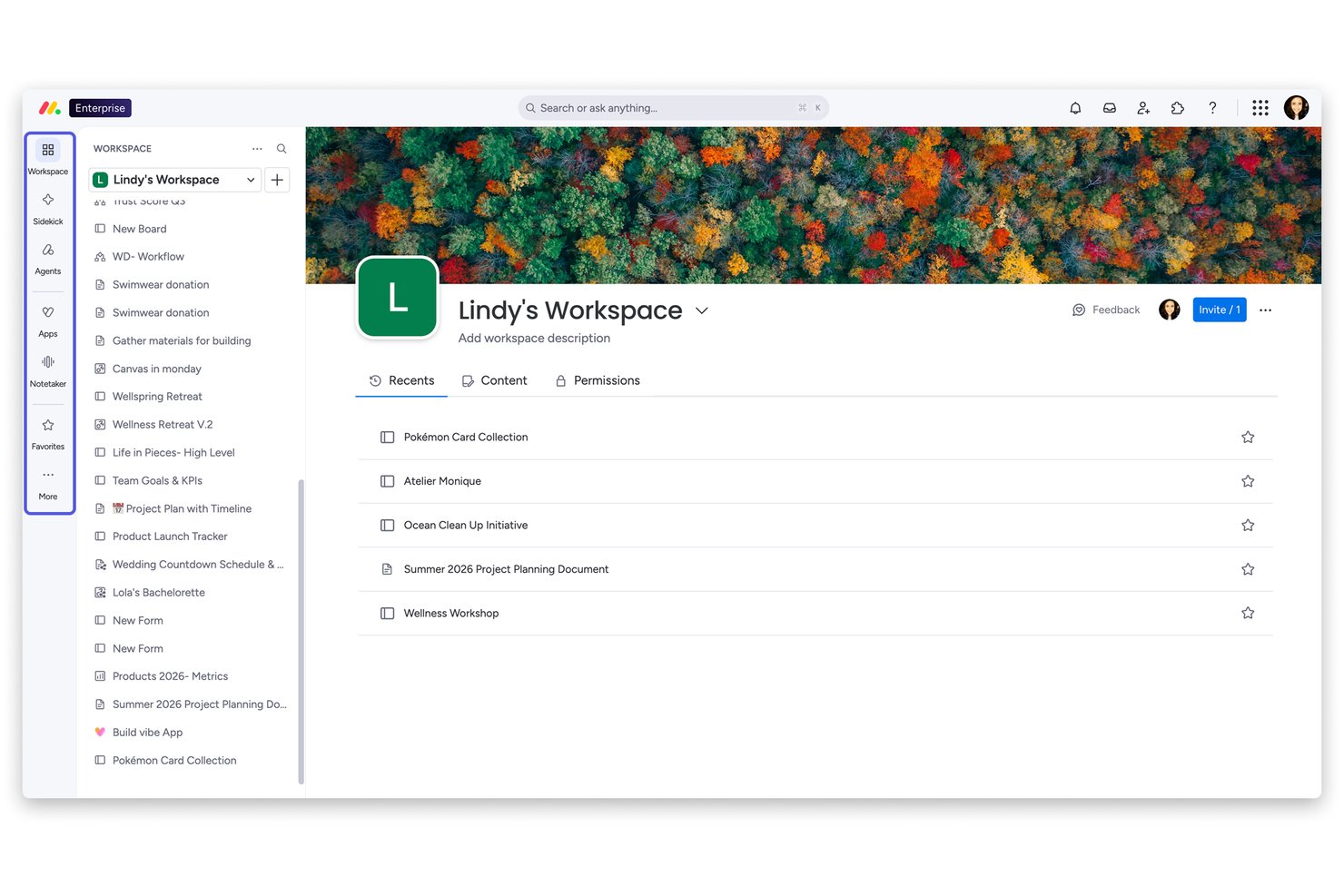
monday AI Workspace ist eine flexible Projektmanagement-Plattform, die für Teams entwickelt wurde, die über einfache Kanban-Tools hinausgewachsen sind und eine Projektplanung mit mehreren Ansichten, bereichsübergreifende Zusammenarbeit und KI-gesteuerte Automatisierung an einem Ort benötigen.
Für wen ist monday AI Workspace am besten geeignet?
Es ist besonders geeignet für mittelgroße bis große Teams, bei denen Projektmanager und PMO-Leiter eine Portfolio-übergreifende Sicht auf mehrere Arbeitsstränge benötigen.
Warum monday AI Workspace eine gute Trello-Alternative ist (kostenlose & kostenpflichtige Optionen)
Ich habe monday AI Workspace als eine der besten Optionen ausgewählt, weil seine KI-Ebene etwas bietet, das Trello einfach nicht kann: Sie überwacht aktiv Ihre Projekte und erkennt Risiken, bevor sie Zeitpläne gefährden. Der Projekt-Analyzer erkennt in Echtzeit Engpässe, während KI-Blöcke sich wiederholende Aufgaben automatisieren, wie das Kategorisieren von Aufgaben und das Zusammenfassen von Updates über Boards hinweg. Außerdem schätze ich, wie Live-Dashboards gleichzeitig auf mehrere Projekte zugreifen und vollständige Portfolio-Sichtbarkeit ohne manuelles Reporting bieten.
Wichtige Funktionen von monday AI Workspace
- Workload-Ansicht: Sehen Sie auf einen Blick die Teamkapazitäten, um Aufgaben auszugleichen und Überlastungen einzelner Personen zu vermeiden.
- Gantt- und Zeitachsenansichten: Planen Sie Projekte visuell mit Drag-and-Drop-Zeitachsen und Verfolgung des kritischen Pfads.
- Docs und Whiteboards: Arbeiten Sie gemeinsam an Dokumenten und brainstormen Sie mit integrierten Whiteboard-Tools direkt im Workspace.
- Native Zeiterfassung: Erfassen Sie die auf Aufgaben verwendete Zeit und erstellen Sie Berichte für abrechenbare Stunden oder Produktivitätsauswertungen.
monday AI Workspace Integrationen
monday AI Workspace bietet Hunderte von nativen Integrationen, darunter Slack, Google Workspace, Microsoft 365, Salesforce, HubSpot, Jira, GitHub, Zoom, Dropbox und Zendesk. Es unterstützt außerdem Zapier und stellt eine API für benutzerdefinierte Integrationen bereit.
Pros and Cons
Pros:
- KI-gestützte Projektrisikoerkennung integriert
- Portfolio-Dashboards über mehrere Projekte hinweg gleichzeitig
- Mehr Projektansichten als Trello bietet
Cons:
- Automatisierungslimits werden in den unteren Tarifen schnell erreicht
- Kann sich für kleine Teams zu komplex anfühlen
New Product Updates from monday AI Workspace
monday AI Workspace Adds Human Approval Routing
monday AI Workspace adds a human-in-the-loop approval block to AI Workflows, sending approval requests and routing workflow paths based on responses. For more information, visit monday AI Workspace's official site.

GQueues
Am besten für die Integration mit Google Workspace geeignet
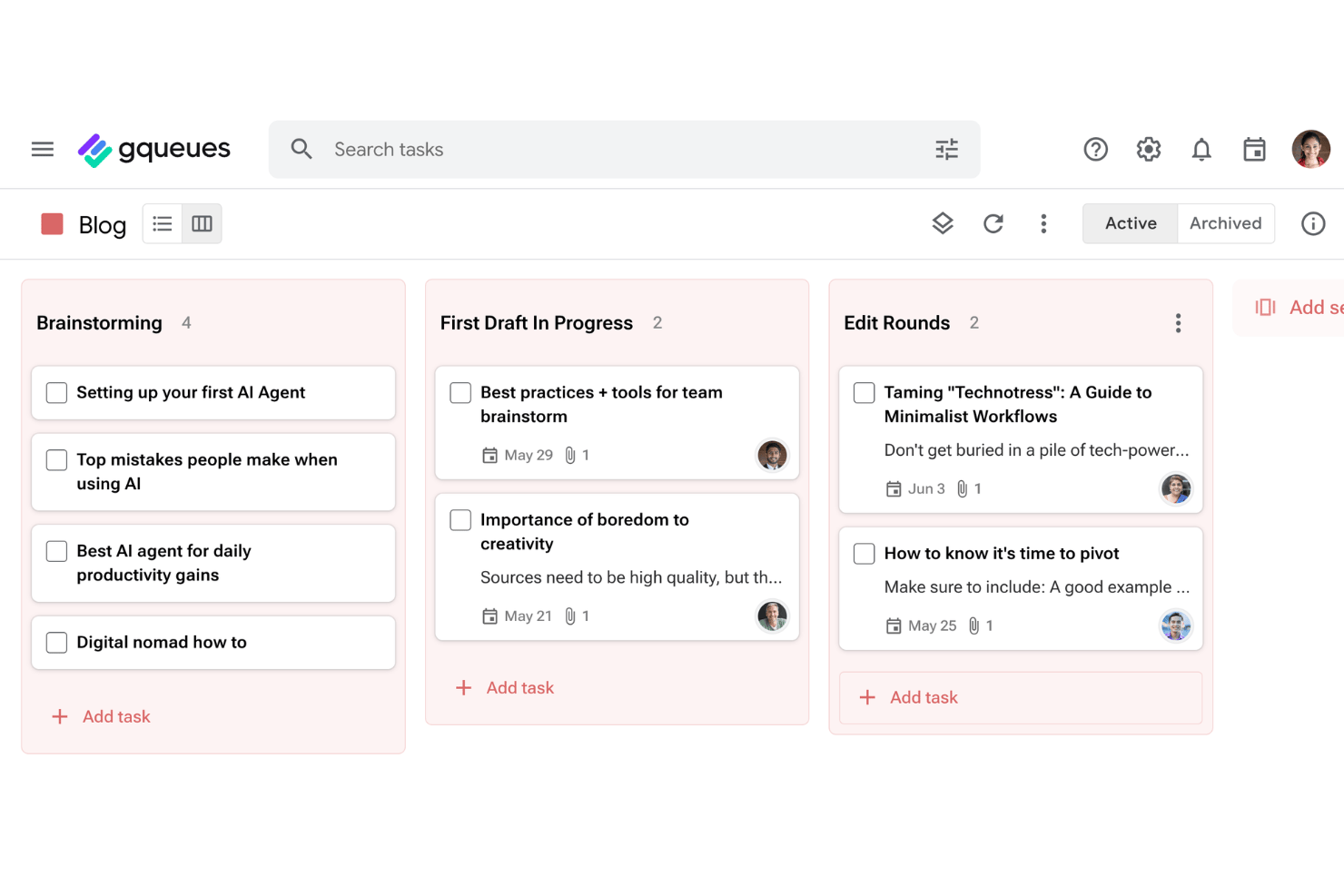
GQueues ist ein Aufgabenverwaltungstool für Teams und Einzelpersonen, die ihre Arbeit innerhalb von Google Workspace erledigen. Damit können Sie Aufgaben verfolgen, Projekte verwalten und organisiert bleiben, ohne die bereits verwendeten Google-Tools verlassen zu müssen.
Für wen eignet sich GQueues am besten?
GQueues eignet sich für kleine Teams und selbstständige Fachkräfte, die bereits in Google Workspace arbeiten und eine Aufgabenverwaltung wünschen, die mit den bereits verwendeten Tools funktioniert.
Warum GQueues eine gute Trello-Alternative ist
Ich habe GQueues ausgewählt, weil die bidirektionale Synchronisierung mit Google Kalender in der Praxis wirklich nützlich ist: Wenn Sie eine Aufgabe im Kalender verschieben, wird sie sofort in GQueues aktualisiert. Dadurch bleibt der Projektzeitplan ohne manuellen Abgleich korrekt. Außerdem schätze ich, dass separate Projekte mit separaten Kalendern synchronisiert werden können, sodass ich Kundenarbeit, interne Projekte und persönliche Aufgaben sauber voneinander trennen kann. Mit dem Gmail-Add-on kann ich eine E-Mail-Unterhaltung direkt in eine Aufgabe umwandeln, wodurch ein Schritt entfällt, den ich früher jeden Tag manuell erledigen musste.
Die wichtigsten Funktionen von GQueues
- Intelligente Warteschlangen und erweiterte Suche: Erstellen Sie dynamische, automatisch aktualisierte Aufgabenansichten mithilfe leistungsstarker Filter und gespeicherter Suchvorgänge.
- Massenaktionen und Befehlspalette: Nehmen Sie umfangreiche Änderungen vor oder greifen Sie mit Massenbearbeitungsfunktionen und Tastenkürzeln schnell auf Befehle zu.
- Integration mit Gmail und der Chrome-Erweiterung: Erstellen Sie Aufgaben direkt aus E-Mails oder Webseiten, ohne zwischen Apps wechseln zu müssen.
- Mobile Apps und Google-Workspace-Anmeldung: Greifen Sie unter iOS oder Android auf Aufgaben zu und nutzen Sie die einmalige Google-Anmeldung für einen sicheren und komfortablen Zugang.
Integrationen von GQueues
GQueues bietet native Integrationen mit Google Workspace, darunter Google Kalender, Google Drive, Gmail und Google Kontakte.
Pros and Cons
Pros:
- Unteraufgaben mit unbegrenzt vielen Hierarchieebenen
- E-Mails in Aufgaben umzuwandeln erfordert nur einen Klick
- Erschwingliche Preise eignen sich gut für kleine Teams
Cons:
- Keine Gantt- oder Zeitachsenansicht für komplexe Projekte
- Eingeschränkte Funktionen für Nutzer außerhalb des Google-Ökosystems

Quire
Am besten für verschachtelte Aufgabenhierarchien geeignet
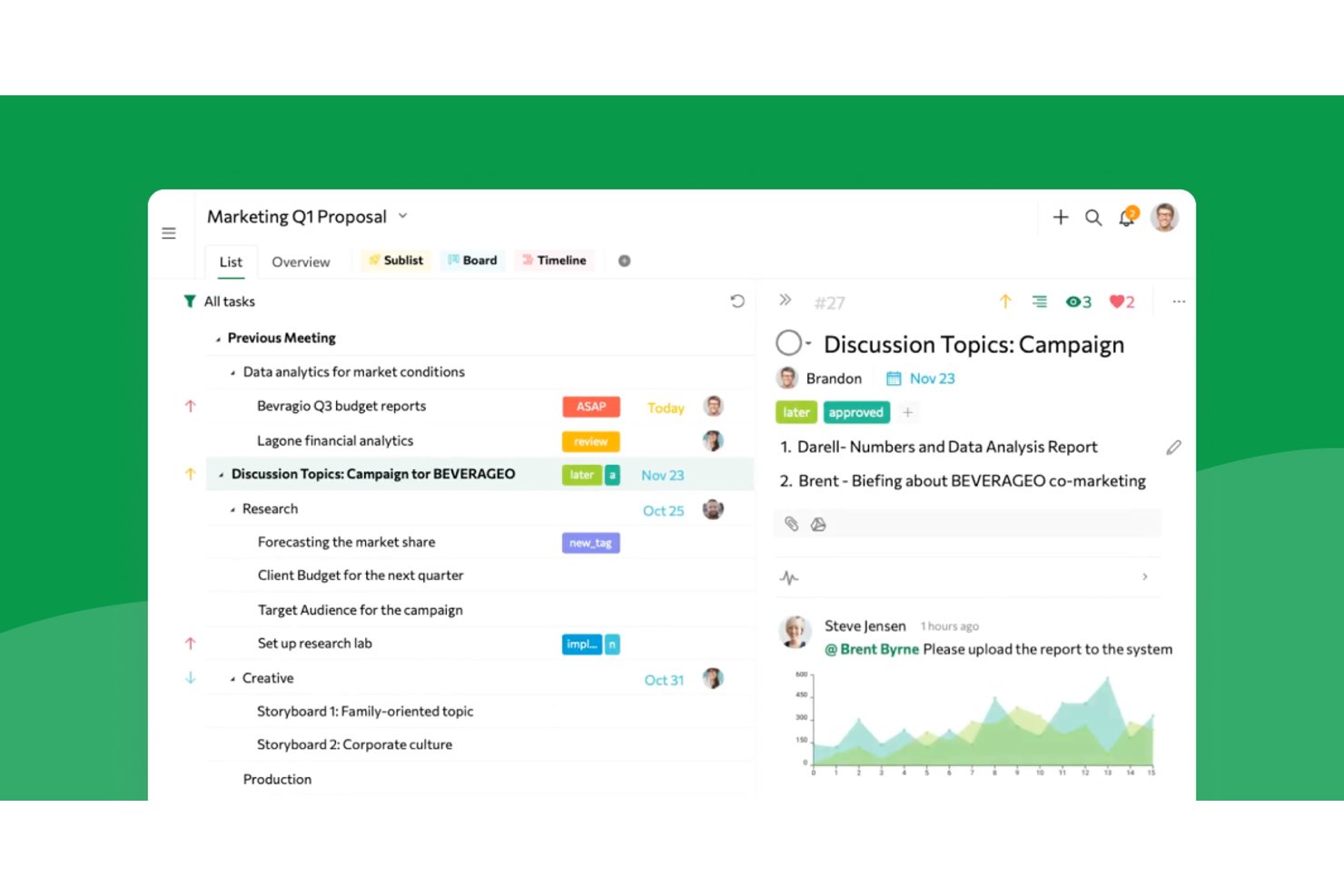
Quire bietet Produktteams, Designern und Agenturen einen visuellen Arbeitsbereich, um komplexe Projekte zu verwalten, Aufgaben aufzuschlüsseln und die teamübergreifende Zusammenarbeit zu verbessern, ohne den Überblick über Prioritäten oder Fristen zu verlieren.
Für wen ist Quire am besten geeignet?
Projektleiter, die komplexe Vorhaben in detaillierte Aufgabenhierarchien aufschlüsseln und Teams über Abteilungen hinweg aufeinander abstimmen müssen.
Warum Quire eine gute Alternative zu Trello ist (kostenlose und kostenpflichtige Optionen)
Ich habe Quire ausgewählt, weil es tiefe Aufgabenhierarchien besser verwaltet als fast jedes andere Tool, das ich ausprobiert habe. Ich nutze die kombinierten Baum- und Kanban-Ansichten, um komplexe Projekte in überschaubare Aufgaben aufzuteilen und Abhängigkeiten im Blick zu behalten, während Teams abteilungsübergreifend Unteraufgaben hinzufügen, umsortieren und priorisieren.
Die wichtigsten Funktionen von Quire
- Mehrere Projektansichten: Wechseln Sie zwischen Kanban-Board-, Zeitachsen- und Listenansichten für eine individuell abgestimmte Projektverfolgung.
- Gemeinsame Bearbeitung in Echtzeit: Bearbeiten Sie Aufgaben und Notizen gleichzeitig mit Teammitgliedern, ohne Versionskonflikte.
- Automatisierte wiederkehrende Aufgaben: Legen Sie einen benutzerdefinierten Zeitplan für wiederkehrende Aufgaben fest, um laufende Arbeiten mit weniger manueller Einrichtung zu erledigen.
- Intelligente Ordnerorganisation: Gruppieren Sie zusammengehörige Projekte und Aufgaben in Ordnern, um den Arbeitsbereich übersichtlich zu verwalten.
Quire-Integrationen
Quire bietet native Integrationen mit Slack, Google Drive und GitHub und ist auf Zapier verfügbar. Für benutzerdefinierte Integrationen steht außerdem eine API zur Verfügung.
Pros and Cons
Pros:
- Verwaltet tief verschachtelte Aufgabenhierarchien reibungslos
- Kombiniert Kanban- und Baumansichten in einer Oberfläche
- Unterstützt die gemeinsame Bearbeitung in Echtzeit für Teams
Cons:
- Begrenzte integrierte Optionen für Berichte und Analysen
- Weniger erweiterte Automatisierungsfunktionen als große Konkurrenzprodukte
New Product Updates from Quire
Quire Adds Custom Field Locking and Comment Reaction API Support
Quire adds custom field locking and API support for reading and setting emoji reactions on comments. These updates give teams more control over field data and expand comment interaction options for developers. For more information, visit Quire’s official site.
 .
.
Bester Preis für Freiberufler und kleine Teams
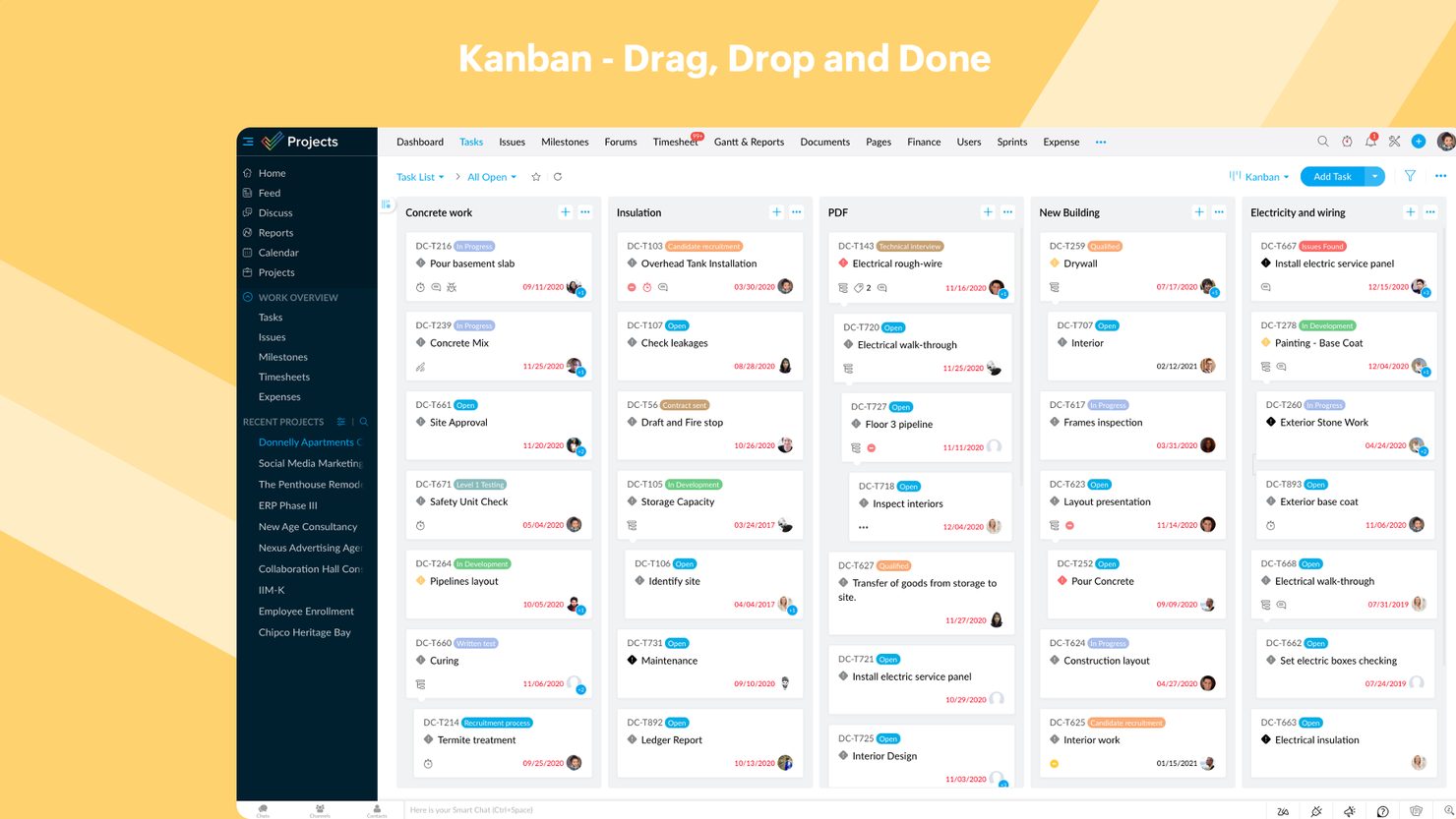
Zoho Projects ist ein Online-Tool für Projektmanagement, das speziell für Teams und Freiberufler entwickelt wurde, um Projekte effektiv zu planen, nachzuverfolgen und gemeinsam daran zu arbeiten. Es bietet eine kostengünstige Lösung zur Verwaltung von Aufgaben, Zeitplänen und Team-Workflows.
Warum Zoho Projects eine gute Trello-Alternative ist: Zoho Projects bietet Zeiterfassungsfunktionen, mit denen Ihr Team Arbeitsstunden überwachen und sicherstellen kann, dass Aufgaben im Zeitplan und im Budget bleiben. Zudem verschaffen die detaillierten Projektstatus-Berichte einen klaren Überblick über den Fortschritt, helfen Verzögerungen zu erkennen und Workflows zu optimieren. Das Tool bietet außerdem Aufgabenabhängigkeiten, die Ihrem Team helfen können, komplexe Projektstrukturen effizienter zu bearbeiten.
Herausragende Funktionen & Integrationen von Zoho Projects:
Funktionen umfassen das Nachverfolgen von Meilensteinen, wodurch Ihr Team auf Projektziele und Fristen fokussiert bleibt. Das Fehlerverfolgungsmodul ermöglicht es außerdem, Probleme zu protokollieren und zu beheben, was die Projektausführung verbessert. Die Zeiterfassung ist zudem direkt in die Aufgaben-Workflows integriert, um das Erfassen der für einzelne Aufgaben aufgewendeten Zeit zu vereinfachen.
Integrationen: Als Teil des Zoho-Ökosystems kann Projects mit mehreren Zoho-eigenen Diensten wie Zoho Books, Zoho CRM und der Zoho Finanzsuite verbunden werden. Der neue Zoho Marketplace ermöglicht auch Integrationen von Drittanbietern. Integrationen über Zapier und Zoho Flow werden ebenfalls unterstützt.
Pros and Cons
Pros:
- Enthält Gantt-Diagramme zur Anpassung der Zeitplanung
- Integriert sich gut mit anderen Zoho-Apps und -Tools
- Erschwinglich für Freiberufler und kleine Teams
Cons:
- Das Anpassen von Berichten kann zusätzlichen Zeitaufwand erfordern
- Dashboard kann in bestimmten Bereichen nur begrenzt angepasst werden
New Product Updates from Zoho Projects
Zoho Projects Adds CodeX Scripts for Custom Modules
Zoho Projects now supports CodeX Scripts for custom modules, enabling conditional logic and rules for creating, updating, and deleting records. For more information, visit Zoho Projects' official site.
 .
.
Am besten geeignet für visuelles Projektmanagement

Kanban Tool ist eine Projektmanagement-Plattform, die Teams dabei unterstützt, Arbeitsabläufe zu visualisieren, den Fortschritt zu verfolgen und die Produktivität zu steigern. Sie eignet sich ideal für Unternehmen, die eine einfache, aber effektive Möglichkeit suchen, Aufgaben zu verwalten und die Zusammenarbeit im Team zu verbessern.
Warum Kanban Tool eine gute Trello-Alternative ist: Kanban Tool überzeugt mit intuitiven, visuellen Boards, die die Organisation von Aufgaben und das Verfolgen des Fortschritts vereinfachen. Die Zeiterfassungsfunktion hilft Ihrem Team, die Produktivität direkt vom Aufgabenboard aus zu überwachen. Darüber hinaus liefern die Analysetools umsetzbare Einblicke in die Teamleistung und Engpässe im Workflow. Die Plattform lässt sich außerdem leicht anpassen, was sie besonders für Teams mit speziellen Projektanforderungen geeignet macht.
Herausragende Funktionen & Integrationen von Kanban Tool:
Funktionen umfassen eine integrierte Kalenderansicht, die einen klaren Zeitplan aller Aufgaben und Fristen bietet, um Ihrem Team ein effektives Planen zu ermöglichen. Das WIP (Work in Progress)-Limit sorgt zudem dafür, dass Ihr Team fokussiert bleibt, indem eine Überlastung mit Aufgaben in einer Workflow-Phase verhindert wird. Zudem ermöglicht der Offline-Zugriff Ihrem Team, Boards auch ohne Internetverbindung zu aktualisieren und so die Arbeitskontinuität zu wahren.
Integrationen umfassen Slack, Zapier, Dropbox, Google Drive, Microsoft Teams, Jira, GitHub, Trello, Asana und Salesforce.
Pros and Cons
Pros:
- Bietet Swimlanes zur detaillierten Aufgabenorganisation
- Unterstützt Aufgabenautomatisierung zur Reduzierung manueller Arbeiten
- Geeignet für kleine Teams und große Organisationen
Cons:
- Berichtswerkzeuge erfordern initiale Einrichtung und Konfiguration
- Weniger Flexibilität bei detaillierter Projektportfoliosteuerung

Breeze
Beste Kombination mit einer vollständigen Projektmanagement-Suite
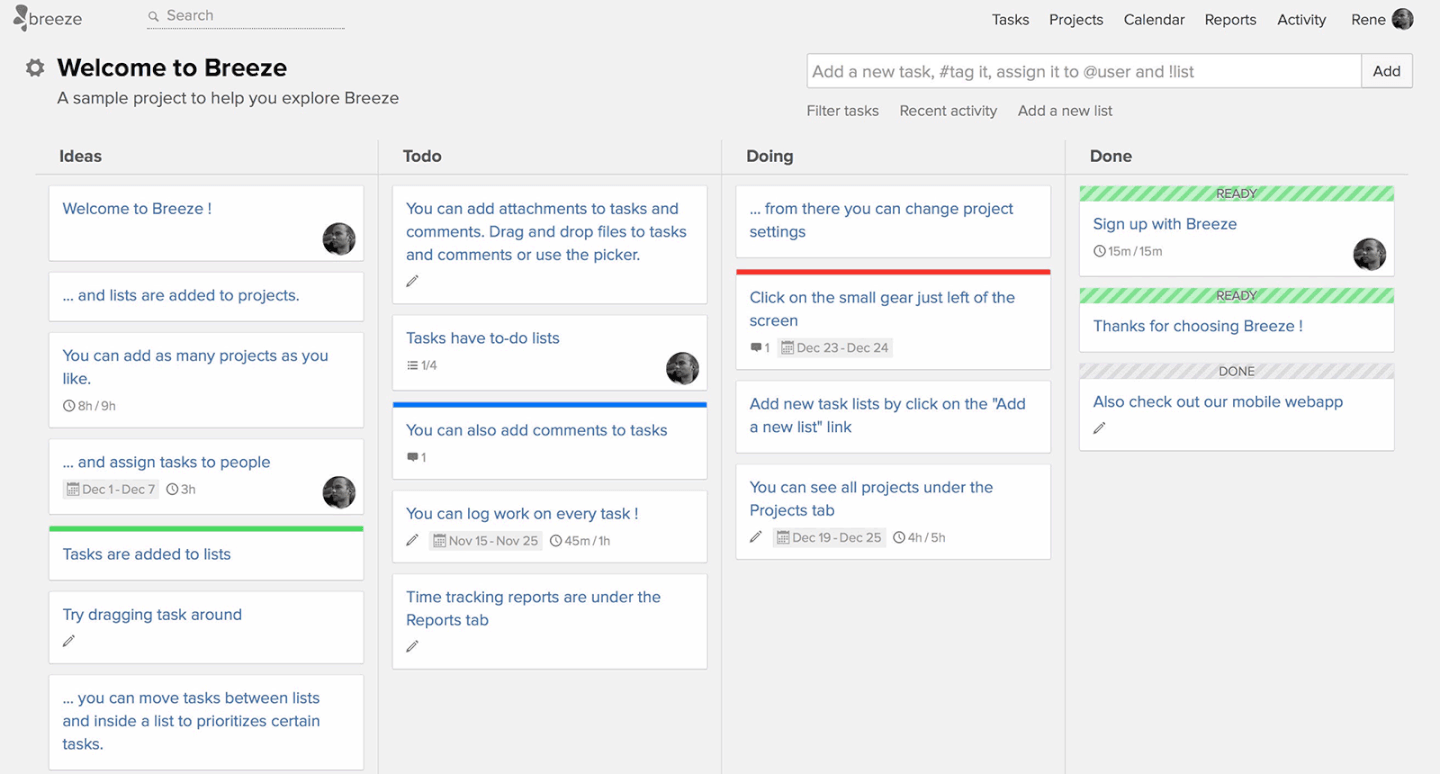
Breeze ist ein Projektmanagement-Tool, das Teams dabei unterstützt, Aufgaben zu verfolgen, Arbeitsabläufe zu verwalten und Projekte effizient zu überwachen. Es eignet sich ideal für Organisationen, die eine umfassende Plattform zur Verwaltung aller Aspekte des Projektmanagements suchen.
Warum Breeze eine gute Trello-Alternative ist: Breeze kombiniert Aufgabenverwaltung mit Funktionen wie Zeiterfassung und Ressourcenzuweisung, um Ihrem Team mehr Kontrolle über Projekte zu geben. Die visuellen Boards helfen Ihnen, Arbeitsabläufe zu organisieren und Transparenz bei den Aufgaben sicherzustellen. Die Plattform umfasst außerdem integrierte Berichtstools, mit denen Ihr Team die Leistung analysieren und fundierte Entscheidungen treffen kann. Darüber hinaus unterstützt Breeze Projektzeitpläne und Budgetierung, wodurch es sich für komplexe und vielseitige Projekte eignet.
Besondere Funktionen und Integrationen von Breeze:
Zu den Funktionen gehören fortschrittliche Tools zur Projektbudgetierung, mit denen Ihr Team finanzielle Ressourcen planen und überwachen kann. Die Funktion zur Arbeitsauslastungsverfolgung stellt außerdem sicher, dass Teammitglieder nicht überlastet sind und Ressourcen ausgewogen verteilt werden. Breeze bietet zudem ein zentrales Dateiverwaltungssystem, damit alle Ihre Projektdokumente an einem Ort zugänglich bleiben.
Zu den Integrationen gehören Slack, Trello, Google Drive, Dropbox, Microsoft Teams, GitHub, Zapier, Salesforce, Asana und QuickBooks.
Pros and Cons
Pros:
- Unterstützt wiederkehrende Aufgaben für konsistente Arbeitsabläufe
- Verbessert die Zusammenarbeit durch gemeinsame Dokumentenverwaltung
- Bietet visuelle Projektübersichten mit Kanban-Boards
Cons:
- Begrenzte vorgefertigte Vorlagen für eine schnelle Einrichtung
- Nicht ideal für Teams ohne Bedarf an Budgetverwaltung

Am besten geeignet für Automatisierungsfunktionen
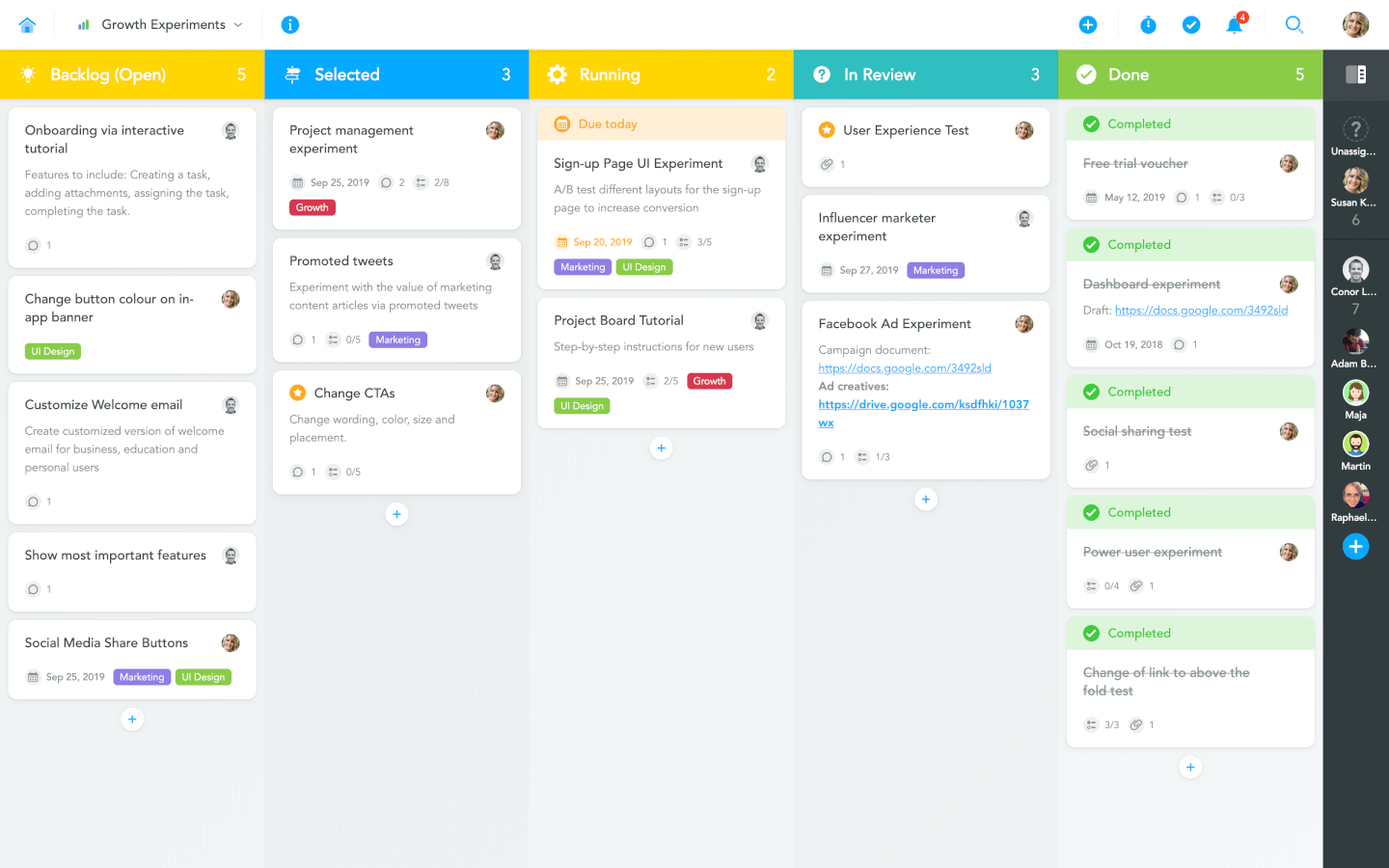
MeisterTask ist ein Projektmanagement-Tool, das Teams dabei unterstützt, Arbeitsabläufe zu automatisieren und Aufgaben effektiv zu organisieren. Es richtet sich an Teams, die einen unkomplizierten Ansatz für das Projektmanagement mit minimalem manuellen Aufwand suchen.
Warum MeisterTask eine gute Trello-Alternative ist: MeisterTask vereinfacht das Projektmanagement durch Automatisierungsfunktionen, die wiederkehrende manuelle Aufgaben reduzieren. Die vollständig anpassbaren Kanban-Boards ermöglichen es Ihrem Team, Arbeitsabläufe individuell auf spezifische Projektanforderungen zuzuschneiden. Darüber hinaus bieten die Fortschrittstracking-Widgets Echtzeit-Updates zum Projektstatus, sodass alle auf dem gleichen Stand bleiben.
MeisterTask – Herausragende Funktionen & Integrationen:
Funktionen sind unter anderem rollenbasierte Berechtigungen, mit denen Ihr Team den Zugriff auf Aufgaben und Projekte für mehr Sicherheit und bessere Organisation steuern kann. Die Agenda-Ansicht hilft dabei, persönliche Prioritäten zu verwalten, indem Aufgaben aus mehreren Projekten an einem Ort zusammengefasst werden. MeisterTask bietet zudem Aufgaben-Checklisten, um komplexe Aufgaben in kleinere, umsetzbare Schritte für mehr Übersichtlichkeit und effizientere Ausführung zu unterteilen.
Integrationen umfassen Slack, Google Drive, Dropbox, Microsoft Teams, GitHub, Zapier, Salesforce, Asana, Trello und Outlook.
Pros and Cons
Pros:
- Enthält Aufgabenbeziehungen zur Verwaltung von Projektabhängigkeiten
- Bietet integriertes Zeiterfassungstool zur Überwachung der Produktivität
- Vereinfacht die Aufgabenerstellung mit Vorlagen und Automatisierungen
Cons:
- Nicht ideal für Teams, die traditionelle Methoden verwenden
- Aufgabenbeziehungen können für Einsteiger komplex sein

ClickUp
Bestes kostenloses Angebot als Trello-Alternative
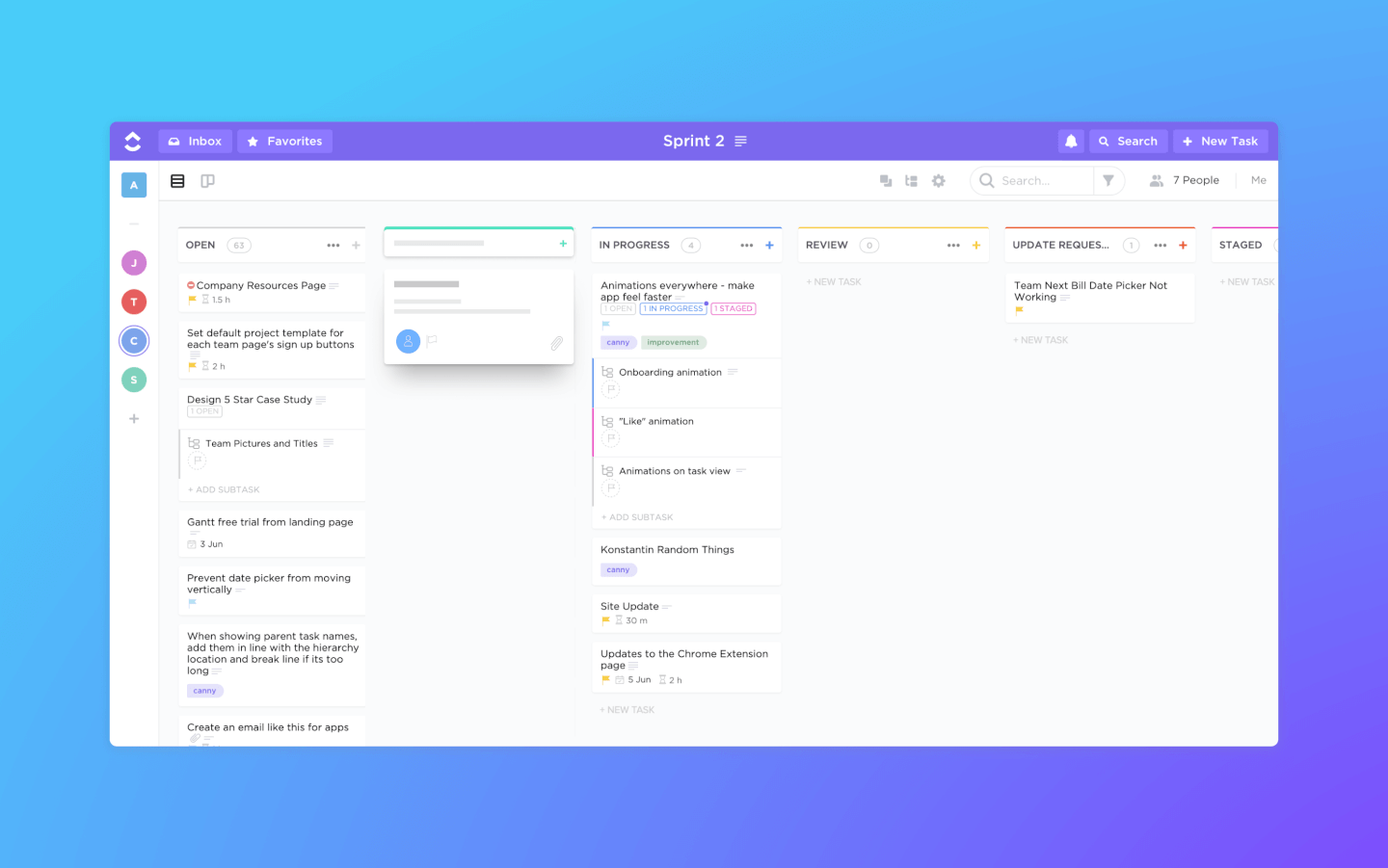
ClickUp ist eine Projektmanagement-Software und ein Kanban-Tool mit leistungsstarken Funktionen zur Verwaltung und zum Abschluss aller Projekte Ihres Teams auf einer einzigen Plattform. Nutzer können Projekte planen, Aufgaben terminieren und Ressourcen in einem zentralisierten Arbeitsbereich auf Kanban-Boards sowie Kalendern, Gantt-Diagrammen, Zeitachsen und mehr verwalten.
Zu den Aufgabenmanagement-Funktionen gehören Aufgaben-Checklisten, Unteraufgaben und Aufgabenvorlagen sowie die Möglichkeit, Aufgaben zu filtern, zu sortieren, zu suchen, problemlos neu anzuordnen und in der für das Team praktischsten Ansicht darzustellen. Nutzer können außerdem Gantt-Diagramme, Kalender und Zeitachsen erstellen, um Aufgaben zu visualisieren.
ClickUp bietet außerdem Funktionen zum Erstellen, Teilen und gemeinsamen Bearbeiten von Wikis und Dokumenten. Nutzer können Dokumente und Aufgaben kommentieren, Kommentare zuweisen und mit anderen Teammitgliedern chatten, um die Kommunikation und Zusammenarbeit zu fördern. Zu den Berichtsfunktionen gehört die Möglichkeit, benutzerdefinierte Dashboards zu erstellen, sowie sechs integrierte Berichtstypen für Teamberichte.
ClickUp bietet native Integrationen mit Slack, G Suite, Dropbox und vielen weiteren Tools sowie über 1.000+ Integrationen über Zapier.
Der kostenlose Plan von ClickUp ist sehr umfangreich und beinhaltet alle Hauptfunktionen. Der Unlimited-Plan beginnt bei $5 pro Monat und Nutzer und bietet zusätzliche Funktionen.
New Product Updates from ClickUp
ClickUp Adds Meetings Hub, Super Agent Templates, and ZoomInfo Integration
ClickUp adds a searchable Meetings Hub, new ways to clone and template Super Agents, and a ZoomInfo integration through the App Center. These updates improve meeting retrieval, agent reuse, and access to sales intelligence. For more information, visit ClickUp’s official site.

Workzone
Bestes persönliches Onboarding und Training
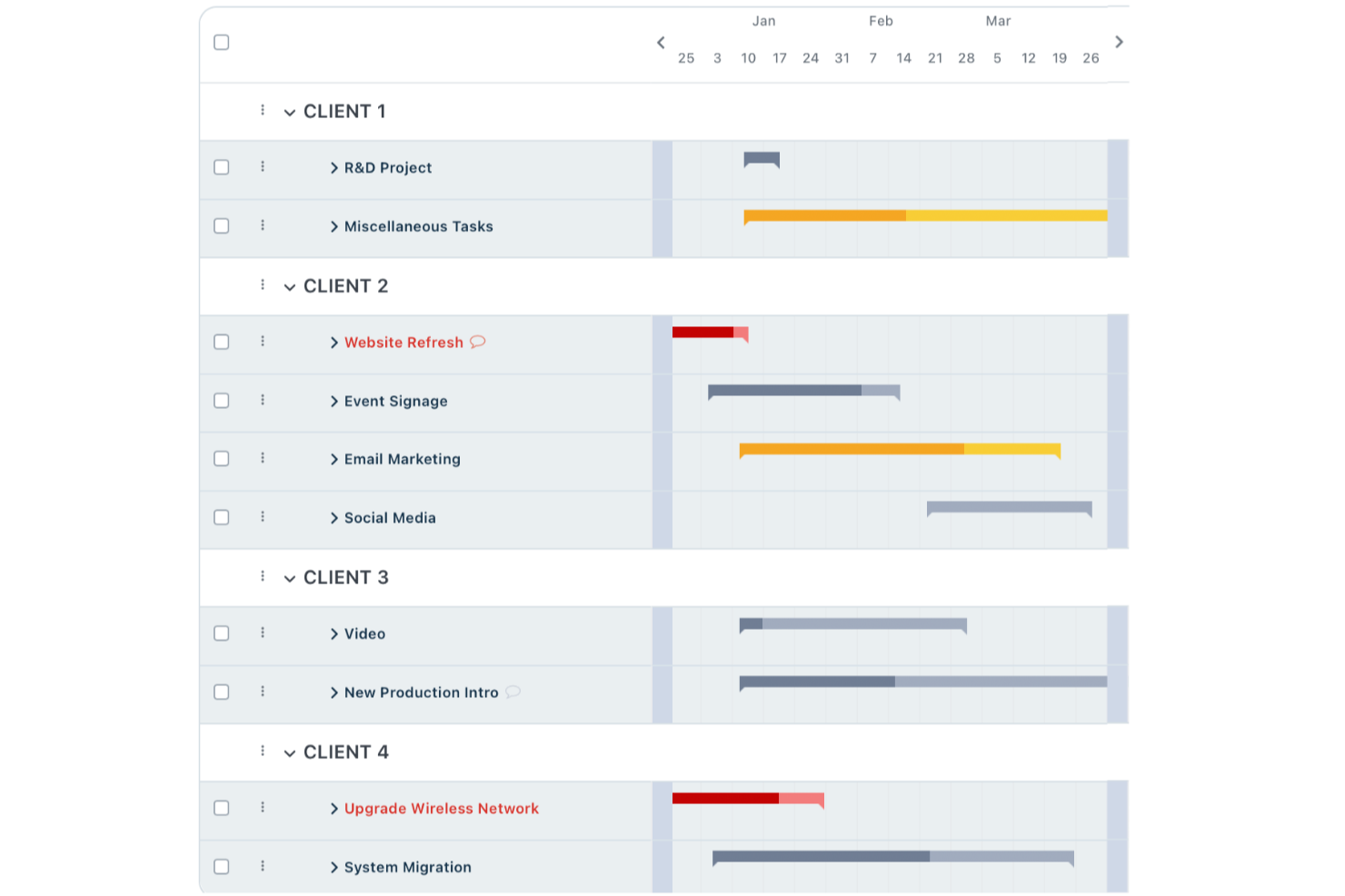
Workzone ist eine Projektmanagement-Plattform, die für Teams entwickelt wurde, die mehr Struktur und Kontrolle benötigen als grundlegende Kanban-Boards bieten. Sie eignet sich hervorragend für Teams aus den Bereichen Marketing, Betrieb oder professionelle Dienstleistungen, die komplexe Projekte verwalten, Fortschritte verfolgen und die Transparenz zwischen Teams verbessern möchten.
Für wen ist Workzone am besten geeignet?
Mittelständische Unternehmen in Marketing, Betrieb oder Kreativteams, die Projektstruktur und dedizierte Unterstützung beim Onboarding benötigen.
Warum Workzone eine gute kostenpflichtige und kostenlose Alternative zu Trello ist
Ich habe Workzone ausgewählt, weil es weit über das hinausgeht, was Trello für Teams mit echtem Schulungsbedarf bietet. Als mein Team damit begonnen hat, hatten wir Zugang zu einem dedizierten Onboarding-Spezialisten, der uns durch die Einrichtung, die Arbeitsabläufe und die Best Practices für unseren konkreten Anwendungsfall geführt hat. Mir gefällt, dass dies keine einmalige Sitzung ist – Workzone stellt fortlaufende Schulungsressourcen bereit, sodass neue Teammitglieder sich einarbeiten können, ohne dass das gesamte Team ausgebremst wird. Für Teams, die von Trello wechseln, macht diese strukturierte Unterstützung die Einarbeitung deutlich einfacher.
Wichtige Funktionen von Workzone
- Projektanfrageformulare: Übermitteln und verfolgen Sie eingehende Arbeitsanforderungen über ein standardisiertes Antragsformular, das direkt mit Ihrer Projektpipeline verbunden ist.
- Kreative Freigabe-Tools: Überprüfen und kommentieren Sie kreative Inhalte in Echtzeit, wobei Feedback zentral in der Aufgabe gesammelt wird, damit Korrekturrunden organisiert bleiben.
- Projektvorlagen: Erstellen Sie wiederverwendbare Projektvorlagen, um konsistente Arbeitsabläufe zu starten, ohne die gleiche Struktur jedes Mal neu aufbauen zu müssen.
- Arbeitslastmanagement: Sehen Sie die Teamkapazitäten über alle aktiven Aufgaben und Projekte hinweg, um Ressourcenkonflikte frühzeitig zu erkennen, bevor sie die Lieferzeiten beeinflussen.
Workzone-Integrationen
Workzone bietet native Integrationen mit Slack, Microsoft Teams, Dropbox, Box und Google Drive sowie eine API für individuelle Integrationen.
Pros and Cons
Pros:
- Personalisierte Onboarding-Sitzungen für neue Teams
- Detaillierte Projekt- und Aufgaben-Berichtoptionen
- Leistungsstarke Werkzeuge für Portfolio- und Ressourcenmanagement
Cons:
- Kein kostenloses Paket für kleine Teams
- Die Benutzeroberfläche wirkt im Vergleich zu neueren Tools veraltet
New Product Updates from Workzone

Workzone Enterprise Adds Multi-Stage Approval Workflows
Workzone Enterprise now includes Approval Workflows, enabling multi-stage document approvals to standardize complex processes and reduce manual effort. For more information, visit Workzone's official site.
 .
.
Kanban Zone
Bestes Kanban-Board für mehrere Portfolios

Kanban Zone ist ein Projektmanagement-Tool für Teams und Organisationen, die mehrere Projekte über Portfolios hinweg verwalten. Es bietet eine visuelle Aufgabenverfolgung, um die Arbeitseffizienz und die Zusammenarbeit im Team zu verbessern.
Warum Kanban Zone eine gute Trello-Alternative ist: Kanban Zone bietet hochgradig anpassbare Kanban-Boards, mit denen Ihr Team Aufgaben und Projekte über mehrere Portfolios hinweg verfolgen kann. Die Kartenhierarchie ermöglicht es außerdem, komplexe Projekte in kleinere Aufgaben zu unterteilen, was deren Verwaltung erleichtert. Darüber hinaus können Sie mit flexiblen Board-Layouts Workflows an die Anforderungen verschiedener Teams und Projekte anpassen.
Herausragende Funktionen & Integrationen von Kanban Zone:
Funktionen umfassen ein Tool zur Abhängigkeitsabbildung, das Ihrem Team dabei hilft, Aufgabenabhängigkeiten zu erkennen und zu lösen, um Verzögerungen zu vermeiden. Die Swimlane-Funktion ermöglicht es Ihnen, Aufgaben nach Priorität, Team oder Projektphase zu kategorisieren und so die Übersicht zu verbessern. Zudem sorgen Funktionen für die Zusammenarbeit in Echtzeit dafür, dass Aktualisierungen und Änderungen sofort auf allen Boards angezeigt werden, damit das Team stets auf dem gleichen Stand bleibt.
Integrationen umfassen Jira, Slack, Google Drive, Microsoft Teams, GitHub, Trello, Dropbox, Salesforce, Asana und Zapier.
Pros and Cons
Pros:
- Unterstützt hochgradig anpassbare Board-Layouts
- Ermöglicht Echtzeit-Updates für sofortige Zusammenarbeit
- Effiziente Verwaltung von Multi-Team-Workflows
Cons:
- Benötigt Zeit für Anpassung und Konfiguration der Boards
- Kann für Projekte mit nur einem Team überdimensioniert wirken
Weitere alternative Tools zu Trello
Hier finden Sie eine Liste weiterer Trello-Alternativen, die Sie in Betracht ziehen sollten.
- Shortcut
Am besten für Entwicklungsteams geeignet
- Hygger
Am besten für Softwareentwicklung
- Bonsai Agency Software
Am besten für Agenturen
- Taskworld
E Wahl für eine große Funktionsvielfalt
- Kissflow Workflow
Es kollaboratives Kanban-Tool
- Zenhub
Am besten geeignet für agiles Projektmanagement innerhalb von GitHub
- ProjectManager
Es Kanban-Board-Tool mit Berichtsfunktionen
- Planview LeanKit
Am besten für Lean-Projektmanagement geeignet
- Businessmap
Am besten geeignet für agiles Portfolio-Management
- Pneumatic Workflow
Am besten geeignet zur Optimierung digitaler Projekte


Verwandte Projektmanagement-Software
Wenn Sie hier noch nicht gefunden haben, wonach Sie suchen, sehen Sie sich diese anderen verwandten Tools an, die wir getestet und bewertet haben:
- Projektmanagement-Software
- Aufgabenverwaltungssoftware
- Tools für die Zusammenarbeit
- Gantt-Diagramm-Ersteller
- Projektverfolgungssoftware
- Projektplanungssoftware
Wie ich Trello-Alternativen bewerte
Ich betrachte Trello-Alternativen auf zwei Ebenen: Zum einen muss jedes Tool eine grundlegende Mindestanforderung erfüllen, zum anderen gibt es Unterscheidungsmerkmale – wie Gantt-Ansichten, Automatisierungstiefe und Auslastungstracking –, die bestimmen, welche Lösung am besten zu deinem Team passt.
Kernfunktionen (Grundvoraussetzungen für diese Liste)
Wenn ich Tools für meine Liste auswähle, bewerte ich jedes einzelne auf einer Skala von 0 (bietet die Funktionalität nicht) bis 5 (hervorragend in diesem Bereich) hinsichtlich jeder unten aufgeführten Kernfunktion. Anschließend rechne ich die Gesamtpunktzahl des Tools in einen Prozentwert um. Jedes Tool muss mindestens 75 % der Gesamtpunktzahl erreichen, um in Betracht gezogen zu werden.
- Visuelle Aufgabenboards: Ich prüfe, ob ein Tool Drag-and-Drop-Kanban-Boards mit anpassbaren Spalten, Kartenfilterung und Gruppierungsoptionen anbietet – die Art von Board-Flexibilität, auf die Teams täglich angewiesen sind.
- Mehrere Projektansichten: Zusätzlich zu einem Basis-Board überprüfe ich, ob Listen-, Kalender-, Gantt-/Zeitachsen- und Tabellenansichten vorhanden sind, damit Teams mitten im Sprint die Perspektive wechseln können, ohne zwischen Tools hin- und herzuspringen.
- Wesentliche Aufgabenmanagement-Funktionen: Jedes Tool sollte Verantwortliche, Fälligkeitsdaten, Unteraufgaben, Abhängigkeiten, Anhänge und benutzerdefinierte Felder unterstützen – Kernelemente, die verhindern, dass Karten bloße Klebezettel-Platzhalter bleiben.
- Workflow-Automatisierung: Ich schaue, ob regelbasierte Auslöser reale Szenarien abdecken, wie das automatische Zuweisen von Karten beim Spaltenwechsel oder das Erstellen wiederkehrender Aufgaben für wöchentliche Stand-ups.
- Team-Kollaborationsfunktionen: Geteilte Arbeitsbereiche, @Erwähnungen, Aktivitätsfeeds und Echtzeit-Benachrichtigungen spielen eine Rolle – besonders für verteilte Teams, die über Zeitzonen hinweg zusammenarbeiten.
- Integrationen & API-Zugang: Ich prüfe die Liste nativer Konnektoren für Tools wie Slack, GitHub, Google Workspace und Figma und ob die Plattform eine öffentliche API bietet und iPaaS-Tools wie Zapier oder Make unterstützt.
Sobald ich eine Liste von Tools habe, die diese Kriterien erfüllen, betrachte ich, wodurch sich die einzelnen Plattformen unterscheiden.
Unterscheidungsmerkmale (Was Anbieter besonders macht)
So vergleiche und kontrastiere ich verschiedene Anbieter:
Herausragende Funktionen
Ich achte besonders auf Auslastungsansichten, da sie zeigen, ob ein Projektmanager eine Überlastung erkennen kann, bevor sie einen Sprint aus der Bahn wirft. Dashboards und Berichtsfunktionen sind ebenso wichtig – ich bewerte, ob ein Tool Projektkennzahlen und Burndown-Daten sichtbar machen kann, ohne sie erst in eine Tabelle exportieren zu müssen. Eine integrierte Zeiterfassung ist ein weiteres Unterscheidungsmerkmal, insbesondere für Teams, die Stunden für Abrechnung oder Kapazitätsplanung zu Aufgaben erfassen müssen.
Über Funktionen hinaus
Die Migrationserfahrung spielt beim Umstieg von Trello eine große Rolle – ich schaue darauf, ob eine Plattform einen nativen Trello-Import anbietet, der Boards, Karten und Anhänge ohne manuelles Nachbauen übernimmt. Die Preisstruktur ist ebenso wichtig, vor allem ob die kostenlose Stufe wirklich nutzbar ist oder nur als Demo dient. Ich bewerte außerdem, wie gut ein Tool skaliert; ein Fünf-Personen-Team sollte nicht überfordert sein, aber dieselbe Plattform muss auch bei mehreren Projekten und 50 oder mehr Anwendern noch standhalten.
Wichtige Funktionen von Trello
Hier sind einige wichtige Funktionen von Trello, die Ihre alternative Software replizieren oder verbessern können sollte, um für Sie gut geeignet zu sein:
- Boards: Die visuellen Boards von Trello bieten einen klaren Überblick über verschiedene Projekte und helfen dabei, Aufgaben in bestimmten Kontexten organisiert zu halten.
- Listen: Listen innerhalb von Boards ermöglichen es Benutzern, Aufgaben nach Phasen oder Typen zu kategorisieren. Dadurch lassen sich Arbeitsabläufe leichter verwalten und anstehende Aufgaben besser erkennen.
- Karten: Jede Aufgabe wird durch eine Karte dargestellt, die zwischen Listen verschoben werden kann, um den Fortschritt anzuzeigen. So lässt sich der Status jeder Aufgabe visuell verfolgen.
- Labels: Labels fügen Karten farbcodierte Markierungen hinzu, sodass Benutzer Aufgabenkategorien, Prioritäten oder beteiligte Abteilungen schnell erkennen können.
- Checklisten: Checklisten innerhalb von Karten unterteilen Aufgaben in kleinere Schritte. Dadurch wird sichergestellt, dass Benutzer keine Details übersehen und Unteraufgaben problemlos verfolgen können.
- Fälligkeitsdaten: Das Festlegen von Fälligkeitsdaten für Karten hilft Benutzern, Fristen im Blick zu behalten und den rechtzeitigen Abschluss von Aufgaben sicherzustellen.
- Anhänge: Das Hinzufügen von Anhängen zu Karten bewahrt alle relevanten Dokumente und Dateien an einem Ort auf und erleichtert den Zugriff sowie die Zusammenarbeit zwischen Teammitgliedern.
- Kommentare: Die Kommentarfunktion auf Karten ermöglicht es Teammitgliedern, direkt über bestimmte Aufgaben zu kommunizieren. Das verbessert die Zusammenarbeit und sorgt dafür, dass alle Diskussionen im jeweiligen Kontext bleiben.
- Integrationen: Trello lässt sich mit verschiedenen Tools wie Slack, Google Drive und weiteren Anwendungen integrieren. Dadurch werden die Funktionen erweitert und Arbeitsabläufe optimiert, indem eine Verbindung zu anderer von Ihnen verwendeter Software hergestellt wird.
- Erweiterungen: Diese Ergänzungen erweitern die Funktionen von Trello und bieten zusätzliche Möglichkeiten wie Kalenderansichten, Automatisierungen und benutzerdefinierte Felder, mit denen sich das Tool an Ihre speziellen Anforderungen anpassen lässt.
Trello-FAQ
Hier sind einige häufige Fragen zu Trello, die wir beantworten möchten.
Wofür wird Trello verwendet?
Hier sind 10 Anwendungsbereiche von Trello:
- Projektmanagement
- Workflow-Management und Workflow-Automatisierung
- Veranstaltungsplanung
- Verwaltung persönlicher Aufgaben
- Zeiterfassung
- Verwaltung von Websites und Blogs
- Organisation von Dateien oder digitalen Sammlungen
- Einstellung und Einarbeitung von Mitarbeitenden
- Speichern und Teilen von Dateien
- Produktplanung und Roadmapping
Gibt es Trello als Windows-App?
Trello funktioniert auf allen Web- und Mobilgeräten. Es bietet mobile Apps für Android und iOS sowie Desktop-Apps für macOS und Windows.
Ist Trello Open Source?
Nein. Trello ist eine SaaS-Lösung mit geschlossenem Quellcode. Zu Trello ähnliche Open-Source-Alternativen sind Taiga, Kanboard, Wekan, TaskBoard und Restyaboard.
Was ist Kanban?
Kanban ist eine Projektmanagement- und Workflow-Methode, die auf einem Arbeitsmanagementsystem basiert, das in den 1960er-Jahren in den Produktionsstätten von Toyota entwickelt wurde. Mit der Kanban-Methode können Sie Multitasking minimieren, die Effizienz Ihrer laufenden Arbeit steigern und die Geschwindigkeit sowie die Qualität der Arbeit verbessern, die Ihre kollaborativen und selbstorganisierten Teams leisten.
Basiert Trello auf Kanban?
Die Trello-Kollaborationssoftware basiert auf der Kanban-Methode und verwendet Kanban-Boards, Karten und Swimlane-Strukturen, die für die Kanban-Methode charakteristisch sind.
Was ist, wenn ich Alternativen zu anderen Tools suche?
Wenn Sie Alternativen zu einem Ihrer anderen Tools suchen, können Sie sich einige unserer weiteren Listen mit Alternativen ansehen: