



Scoro mod BigTime: Fuld sammenligning og anmeldelser for 2026



Your projects are piling up, the billing is a mess, and every spreadsheet you open raises more questions than it answers. Before you lose another quarter to the chaos, it's time to find the platform that can finally bring your service delivery under control.
You want a professional services automation software that actually helps your team stay organized, keep clients happy, and stop projects from slipping through the cracks. Maybe you’re stuck between Scoro and BigTime—two top contenders with different approaches to tracking time, managing projects, and handling billing. If you’re tired of juggling too many spreadsheets and need more visibility into your service delivery, you’re in the right place.
In this article, you’ll get a clear head-to-head comparison of Scoro and BigTime. I’ll walk you through each tool’s pros and cons, ideal use cases, pricing, security practices, and what it’s really like to use them—so you can pick the best fit for your team.
Scoro vs. BigTime: An Overview
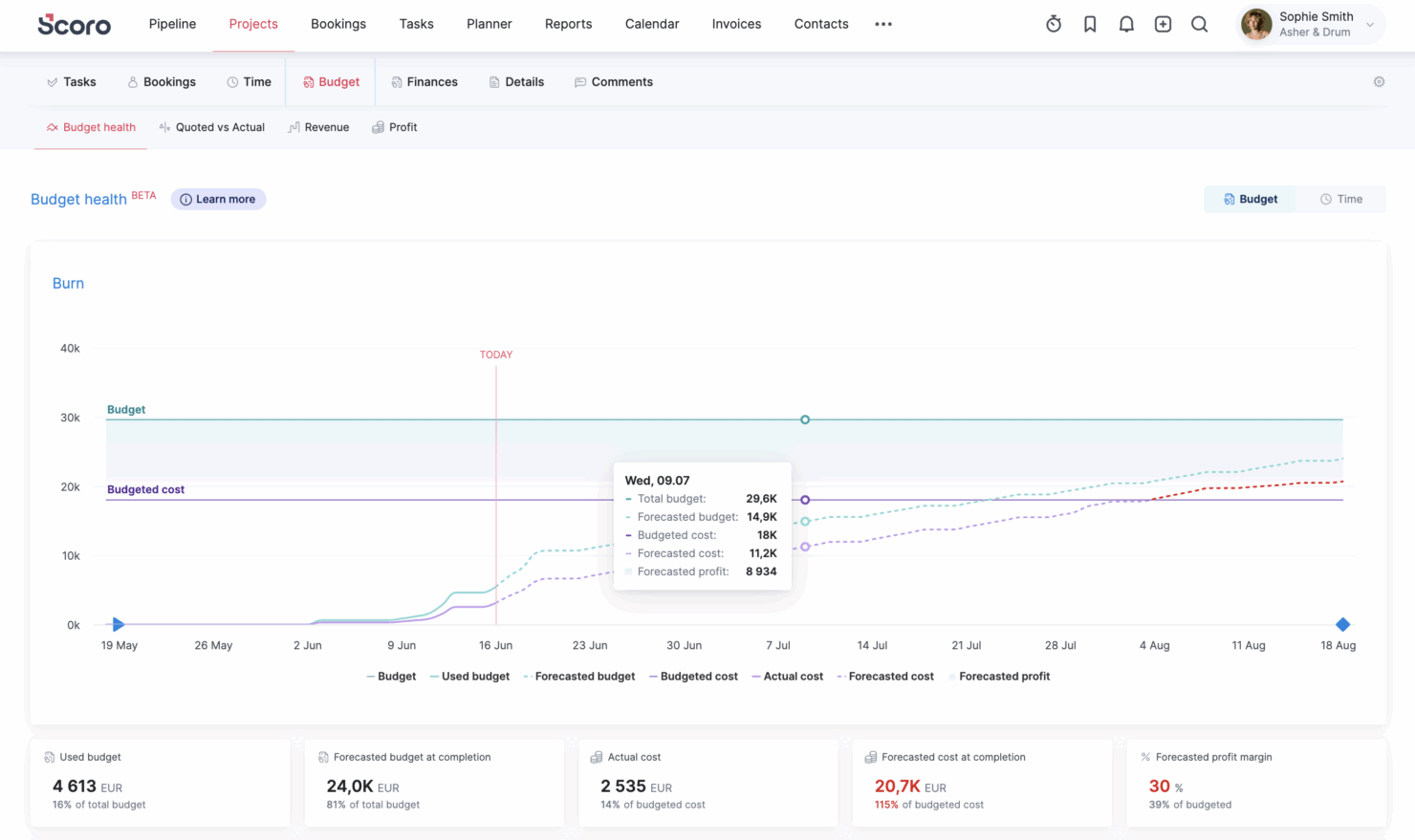
Scoro


BigTime

Why Trust Our Software Recommendations
Our team has been testing and reviewing software since 2012. As project managers ourselves, we know how difficult—and important—it is to choose the right software.
For this guide, we evaluated tools using hands-on testing and independent research, scoring tools using our selection criteria. We also draw on insights from industry thought leaders and practicing project management experts.
Our reviews reflect our human editorial judgment, not a sales pitch.
Expert reviewers:
Scoro vs. BigTime Pricing Comparison
| Scoro | BigTime | |
|---|---|---|
| Free Trial | 14-day free trial | Free demo available |
| Pricing | From $19.90/user/month (billed annually) | From $20/user/month |
Scoro versus BigTime-priser og skjulte omkostninger
Scoro bruger en gennemsigtig, modulær tilgang med en blanding af kerneapps, der er baseret på betaling pr. bruger og giver større fleksibilitet, efterhånden som du føjer flere kerneapps til dit abonnement. Med Scoro kan du også få adgang til en gratis prøveperiode, så du kan teste softwaren, før du beslutter dig. BigTime bruger også planer i niveauer, men priserne er mindre gennemsigtige og kræver typisk, at du kontakter salgsafdelingen for at forstå de nøjagtige omkostninger. Begge værktøjer kan stadig medføre ekstra gebyrer for onboarding, oplæring, opsætning, premiumsupport, ekstra brugere eller avancerede funktioner.
For at vælge den rigtige prismodel skal du begynde med at kortlægge de funktioner, du absolut har brug for, samt antallet af brugere, du får brug for i løbet af det første eller andet år. Overvej, hvilke avancerede værktøjer du rent faktisk vil bruge, og vær opmærksom på skjulte omkostninger som premiumintegrationer og onboarding. Bed begge leverandører om en komplet oversigt over, hvad der er inkluderet i hver plan, samt de samlede omkostninger over 12–24 måneder baseret på dine forventede behov – ikke kun på dagens krav.
Scoro vs. BigTime Feature Comparison
| Scoro | BigTime | |
|---|---|---|
| API | ||
| Billing/Invoicing | ||
| Budgeting | ||
| CRM Integration | ||
| Dashboards | ||
| Data Export | ||
| Data Import | ||
| Document Management | ||
| Expense Tracking | ||
| External Integrations | ||
| Financial Analysis | ||
| Forecasting | ||
| Gantt Charts | ||
| Inventory Tracking | ||
| Multi-Currency | ||
| Multi-User | ||
| Notifications | ||
| Project Management | ||
| Resource Management | ||
| Scheduling | ||
| Status Notifications | ||
| Task Scheduling/Tracking | ||
| Time Management | ||
| Workflow Management |
Scoro versus BigTime-integrationer
| Integration | Scoro | BigTime |
|---|---|---|
| QuickBooks | ✅ | ✅ |
| Xero | ✅ | ✅ |
| Sage Intacct | ✅ | ✅ |
| Jira | ✅ | ✅ |
| Slack | ✅ | ✅ |
| HubSpot | ✅ | ✅ |
| Salesforce | ✅ | ✅ |
| Lacerte | ❌ | ✅ |
| Trello | ✅ | ✅ |
| Dropbox | ✅ | ❌ |
| API | ✅ | ✅ |
| Zapier | ✅ | ✅ |
Begge platforme dækker mange af de samme vigtige integrationer, herunder centrale værktøjer til regnskab, samarbejde og arbejdsgangsstyring. Da både Scoro og BigTime tilbyder API-adgang og Zapier-forbindelse, kan de fleste integrationsmangler udfyldes, men Scoros omfattende integrationsmarkedsplads kan blive afgørende for teams, der ønsker større fleksibilitet på tværs af deres bredere teknologistak.
Scoro sammenlignet med BigTime: Sikkerhed, overholdelse af regler & pålidelighed
| Faktor | Scoro | BigTime |
|---|---|---|
| Datakryptering | Anvender SSL/HTTPS-kryptering til alle transaktioner samt AES-256-kryptering af data i hvile. | Krypterer data under overførsel via TLS 1.2 og krypterer alle data i hvile samt alle sikkerhedskopier med SHA-256-kryptering. |
| Overholdelse af regler | GDPR- og ISO 27001-certificeret. | SOC 1 Type II-certificeret samt PCI- og GDPR-kompatibel. |
| Adgangskontroller | Rollebaserede tilladelser og SSO-muligheder til håndtering af brugeradgang. | Projekt- og rollebaseret adgang, tilpasselige brugertilladelser og SSO. |
| Oppetidsgarantier | Garanterer 99.95 % tilgængelighed med gennemsigtige opdateringer af systemstatus. | 99.9 % oppetid med overvågning og beskyttelse døgnet rundt, alle årets dage. |
Både Scoro og BigTime tager sikkerhed, overholdelse af regler og pålidelighed alvorligt, men de lægger vægt på forskellige styrker. Scoro skiller sig ud med ISO 27001-certificering, overensstemmelse med GDPR, regionale muligheder for datahosting og en højere offentliggjort forpligtelse til tilgængelighed, hvilket gør løsningen velegnet til teams, der arbejder på tværs af markeder eller lægger vægt på dataplacering. BigTime er et stærkt valg for virksomheder, der prioriterer SOC 2 Type II-certificeret infrastruktur, revisionsspor, SSO/SAML, rollebaserede tilladelser, kryptering og understøttelse af e-fakturering. Jeg ville vælge Scoro, hvis oppetid, internationale datakontroller og ISO-understøttet sikkerhed er de vigtigste prioriteter; jeg ville vælge BigTime, hvis SOC 2-dokumentation, revisionsmuligheder og compliance-arbejdsgange med fokus på økonomi betyder mere.
Scoro sammenlignet med BigTime: Brugervenlighed
| Faktor | Scoro | BigTime |
|---|---|---|
| Brugergrænseflade | Rent, moderne layout med nem navigation og tilpasselige dashboards. | Enkel grænseflade med fokus på hurtig dataindtastning og nem navigation. |
| Onboarding | Små teams kan bruge selvstyrede ressourcer eller tilføje ekspertkonsultationer, mens større teams får hjælp til planlægning af arbejdsgange, konfiguration, datamigrering, oplæring eller fuldt tilpasset support. | Guidede onboarding-sessioner med en dedikeret kundeansvarlig. |
| Supportadgang | Livechat og hurtig kundeservice via e-mail samt et omfattende hjælpecenter. | Hurtigt reagerende kundesupport via livechat og e-mail samt en omfattende vidensbase. |
| Oplæringsressourcer | Selvbetjente webinarer og ressourcebibliotek, der opdateres løbende. | Webinarer, BigTime Academy og hjælpecenteret. |
BigTime kan føles en smule nemmere at tage i brug i starten, især for teams med fokus på tidsregistrering, fakturering og enkle projektarbejdsgange. Scoro kan kræve lidt mere tid at konfigurere og lære, men brugerne sætter ofte pris på det overblik, den rapportering og de sammenkoblede arbejdsgange, løsningen giver, når den først er sat op. Jeg ville vælge BigTime for hurtigere implementering i teams med fokus på fakturering, mens Scoro passer godt til teams, der ønsker et bredere system til håndtering af projekter, økonomi og virksomhedens resultater ét sted.
Scoro vs BigTime: Pros & Cons
Scoro
- Excellent multi-entity and multi-currency support for international businesses.
- Deep two-way accounting integrations.
- Scoro is highly-customizable with different permission sets, user-based menus, and settings.
- User interface can feel cluttered for new users (although this can be fixed by creating simplified views via permission sets).
- Some users find the learning curve steep for advanced features.
- Lack of built-in chat/messaging and weaker real-time collaboration features compared to others.
BigTime
- You can easily track time and expenses in one place, making project management straightforward.
- The platform offers detailed reporting, giving you insights into your team's productivity.
- Customer support is responsive and helpful, ensuring your team can resolve issues quickly.
- Some users find the interface a bit dated compared to newer tools.
- Customization options might feel limited if you're used to more flexible platforms.
- Initial setup and onboarding can be time-consuming for larger teams.
Best Use Cases for Scoro and BigTime
Scoro
- Agencies Scoro connects the sales pipeline, creative delivery, and billing in one place, so agencies can quote, resource, and invoice client work without switching tools.
- Consultancies Scoro's quoting matrix breaks down deliverables by role, hours, and cost, giving consultancies real-time margin and utilization visibility across multi-entity, multi-currency operations.
- Architecture FIrms Scoro ties project phases, budgets, and time tracking together so architecture firms can monitor scope creep and protect fee-based project margins in real time.
- IT Services With Jira integration and effortless time logging from calendars or tasks, Scoro gives IT consultancies clear visibility into billable utilization, project profit, and progress as work gets delivered.
- Event Management Scoro handles multi-currency event quoting, purchase orders for vendors, and phase-based Gantt planning, so event agencies can track supplier costs and protect margins across simultaneous productions.
- Engineering FIrms Scoro unifies resourcing, cost tracking, and reporting across teams and offices, helping engineering firms forecast capacity and keep multi-phase projects profitable.
- Software Development Through native Jira sync, Scoro lets developers keep working in their existing tools while worklogs flow back automatically for accurate reporting, invoicing, and profitability tracking.
BigTime
- Consulting Firms BigTime’s detailed billing and time tracking features ensure you bill clients accurately and optimize your project management.
- Engineering Companies You can benefit from BigTime’s robust project tracking capabilities, helping you manage resources and timelines effectively.
- Accounting Teams BigTime’s precise expense tracking and reporting features help you maintain financial accuracy and streamline client billing.
- Legal Services With its focus on accurate time and billing, BigTime helps legal teams track billable hours efficiently.
- Financial Services You’ll find BigTime invaluable for its comprehensive reporting tools, aiding in financial analysis and decision-making.
- Project Managers BigTime’s project management features allow you to oversee multiple projects, ensuring deadlines and resources are managed well.
Hvem bør bruge Scoro, og hvem bør bruge BigTime?
Scoro passer godt til projektbaserede bureauer, virksomheder med base i flere regioner, konsulentvirksomheder og virksomheder inden for professionelle tjenester, der ønsker én sammenkoblet platform til håndtering af salg, projekter, ressourcer, fakturering og rapportering. Den integrerede opsætning er især nyttig for teams, der ønsker et tydeligere overblik fra salgspipeline til lønsomhed uden at skulle samle flere værktøjer.
BigTime passer godt til virksomheder inden for professionelle tjenester, der ønsker en økonomifokuseret PSA-løsning til afgrænsning af opgaver, tids- og udgiftsregistrering, ressourceplanlægning, fakturering og rapportering. Den kan især være attraktiv for teams inden for regnskab, rådgivning, ingeniørarbejde, arkitektur og IT-tjenester, som ønsker at forbedre faktureringsnøjagtigheden, fremskynde faktureringen og gøre det nemmere at følge projektøkonomien.
Differences Between Scoro and BigTime
| Scoro | BigTime | |
|---|---|---|
| Automation Tools | Offers advanced workflow automation and recurring tasks to streamline operations. | Provides automation for routine billing and time tracking, but fewer workflow triggers. |
| Industry Focus | Strong fit for agencies, consultancies, architecture and engineering firms, IT teams, and software/service businesses that want one connected operating system. | Strong fit for accounting, architecture, consulting, engineering, and IT services firms that want to manage project financials, billable work, and delivery workflows. |
| Learning Curve | More advanced functionality results in a longer onboarding period for new users. | Prioritizes fast setup and intuitive tools with less intimidation for first-time PSA users. |
| Pricing | Uses modular pricing built from eight core apps you can mix and match, rather than one fixed package. Combinations start from $17/user/month. | Uses tiered plans but most plans still push users toward requesting a demo for full pricing and package details. |
| Visit ScoroOpens new window | Read BigTime ReviewOpens new window |
Similarities Between Scoro and BigTime
| Invoicing & Billing | Both offer integrated tools for creating invoices, tracking payments, and managing billing cycles directly from your project workspace. |
|---|---|
| Project Management | Both allow you to create, assign, and track projects and tasks across client engagements, with visibility into progress and deadlines for your team. |
| Time Tracking | Each platform helps teams log billable and non-billable hours using built-in timers or timesheet entry, making client invoicing and reporting easier. |
| User Permissions | You can customize user roles and permissions to control access to projects, financials, and sensitive client data in both systems. |
| Visit ScoroOpens new window Read BigTime ReviewOpens new window | |