


Microsoft Project kontra monday.com: Ekspertanmeldelser for 2026



Microsoft Project tilbyder en robust løsning til styring af komplekse projekter, hvilket gør det til et pålideligt valg for virksomheder. På den anden side tilbyder monday.com en fleksibel og intuitiv platform, der tilpasser sig dit teams unikke behov for arbejdsgange.
Selvom begge værktøjer er effektive, er Microsoft Project mere traditionelt og struktureret sammenlignet med monday.coms moderne og tilpasningsbare tilgang.
I denne artikel gennemgår vi en detaljeret sammenligning af disse værktøjer, hvor vi undersøger deres funktioner, fordele og ulemper, priser og meget mere for at hjælpe dig med at beslutte, hvilken projektstyringssoftware der bedst opfylder dine behov.
Microsoft Project vs. monday AI Workspace: An Overview
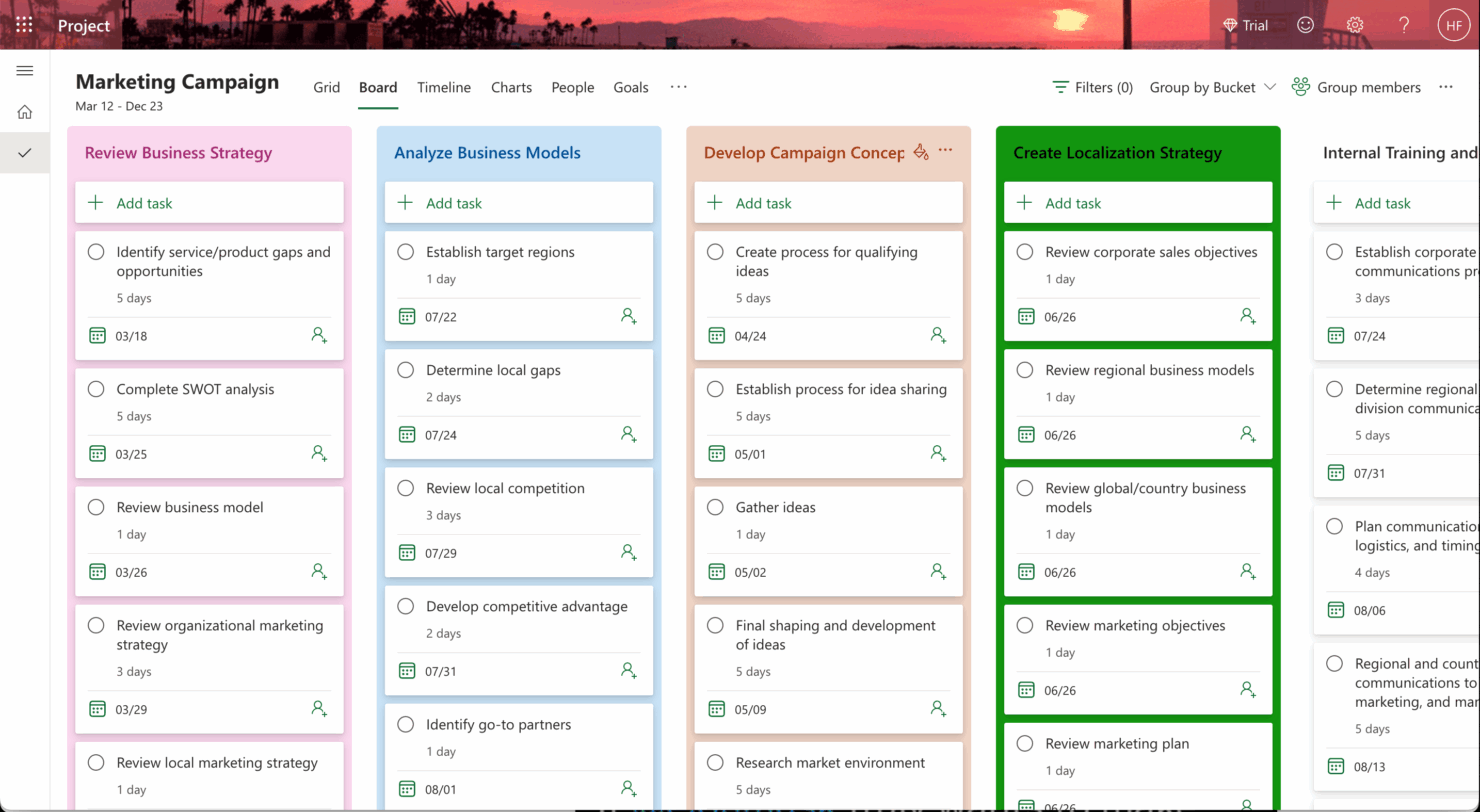
Microsoft Project




monday AI Workspace

Why Trust Our Software Recommendations
Our team has been testing and reviewing software since 2012. As project managers ourselves, we know how difficult—and important—it is to choose the right software.
For this guide, we evaluated tools using hands-on testing and independent research, scoring tools using our selection criteria. We also draw on insights from industry thought leaders and practicing project management experts.
Our reviews reflect our human editorial judgment, not a sales pitch.
Expert reviewers:
Microsoft Project vs. monday AI Workspace Pricing Comparison
| Microsoft Project | monday AI Workspace | |
|---|---|---|
| Free Trial | 30-day free trial | Free plan available |
| Pricing | From $10/user/month (billed annually) | From $9/user/month (billed annually) |
Microsoft Project vs. monday.com-priser og skjulte omkostninger
Microsoft Project-priser følger en abonnementsbaseret model, hvor omkostningerne varierer afhængigt af planen, og der kan være ekstra gebyrer for funktioner som avanceret rapportering eller integrationer.
I modsætning hertil er monday.com-priser opdelt i niveauer, der tilbyder forskellige muligheder baseret på antallet af brugere og funktioner, med potentielle ekstra omkostninger for premium-support eller tilføjelser.
Hvis du vil vælge det værktøj med den rette pris for dine behov, skal du vurdere dit teams størrelse, de nødvendige funktioner og projektets kompleksitet og derefter teste værktøjerne med gratis prøveperioder for at se, hvilket der passer bedst til din arbejdsgang og dit budget.
Microsoft Project vs. monday AI Workspace Feature Comparison
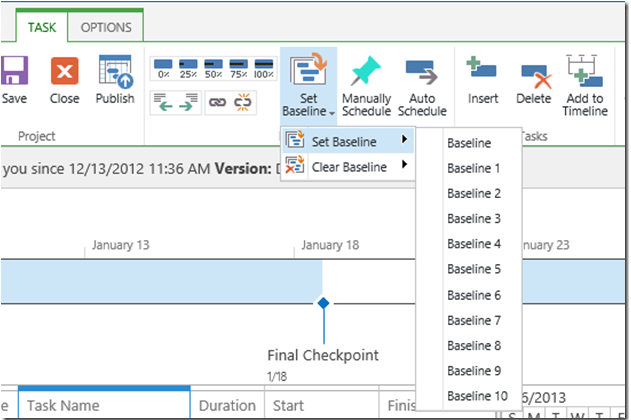
Med Microsoft Projects tidslinjefunktion med træk og slip kan du nemt administrere komplekse projektplaner, hvilket gør det ideelt til detaljeret planlægning i store virksomhedsprojekter.
Samtidig er monday.coms automatiseringer fremragende til at strømline gentagne opgaver, så du kan fokusere på strategisk beslutningstagning i dynamiske miljøer med højt tempo.
Mens Microsoft Projects tidslinje udmærker sig ved struktureret planlægning, tilbyder monday.coms automatisering fleksibilitet og effektivitet i den daglige drift.
| Microsoft Project | monday AI Workspace | |
|---|---|---|
| API | ||
| Batch Permissions & Access | ||
| Budgeting | ||
| Calendar Management | ||
| Collaboration Support | ||
| Contact Management | ||
| Contact Sharing | ||
| Customer Management | ||
| Dashboard | ||
| Dashboards | ||
| Data Export | ||
| Data Import | ||
| Data Visualization | ||
| Dependency Tracking | ||
| Document Sharing | ||
| Expense Tracking | ||
| External Integrations | ||
| File Sharing | ||
| Gantt Charts | ||
| Kanban Boards | ||
| Multi-User | ||
| Notifications | ||
| Project Management | ||
| Resource Management | ||
| Scheduling | ||
| Task Scheduling/Tracking | ||
| Third-Party Plugins/Add-Ons | ||
| Time Management | ||
| Travel Management | ||
| Workflow Management |
Microsoft Project vs monday.com-integrationer
| Integration | Microsoft Project | monday.com |
| Microsoft Teams | ✅ | ✅ |
| Slack | ❌ | ✅ |
| Jira | ✅ | ✅ |
| Trello | ❌ | ✅ |
| Salesforce | ✅ | ✅ |
| Google Workspace | ❌ | ✅ |
| Zoom | ❌ | ✅ |
| Power BI | ✅ | ❌ |
| API | ✅ | ✅ |
| Zapier | ✅ | ✅ |
Microsoft Project integrerer med Power BI for at oprette detaljerede, datadrevne rapporter, som er værdifulde for ledere, der har brug for dybdegående indsigt i projekter. monday.com integrerer med Slack, hvilket muliggør kommunikation i realtid og nemme opdateringer af opgaver for samarbejdende teams. Microsoft Project udmærker sig ved avanceret rapportering, mens monday.com understøtter agilt teamwork og kommunikation.
Microsoft Project vs monday.com Sikkerhed, overholdelse & pålidelighed
| Faktor | Microsoft Project | monday.com |
| Datakryptering | Microsoft Project bruger AES-256-kryptering til at beskytte data både i hvile og under overførsel. | monday.com anvender TLS-kryptering til data under overførsel og AES-256 til data i hvile. |
| Lovgivningsmæssig overholdelse | Microsoft Project overholder standarder som GDPR, ISO 27001 og HIPAA | monday.com overholder GDPR, ISO 27001 og SOC 2 Type II-certificeringer. |
| Databeskyttelse | Microsoft Project tilbyder tilpasningsmuligheder for privatlivsindstillinger og brugertilladelser | monday.com tilbyder rollebaseret adgangskontrol og funktioner til beskyttelse af personlige oplysninger. |
Microsoft Project og monday.com lægger vægt på sikkerhed og overholdelse, men Microsoft Project tilbyder et bredere udvalg af certificeringer. Når du vurderer disse værktøjer, bør du tage højde for din branches specifikke krav til overholdelse og bruge prøvekonti til at teste hver platforms sikkerhedsindstillinger for at afgøre, hvilken der passer bedst.
Microsoft Project vs monday.com Brugervenlighed
| Faktor | Microsoft Project | monday.com |
| Brugergrænseflade | Microsoft Project har en traditionel, funktionsrig grænseflade, der kan virke overvældende for begyndere. | monday.com tilbyder en visuelt intuitiv grænseflade med træk-og-slip-funktionalitet. |
| Introduktionsoplevelse | Microsoft Project kræver detaljerede vejledninger og oplæring for at udnytte funktionerne fuldt ud. | monday.com tilbyder interaktive vejledninger og skabeloner, så du hurtigt kan komme i gang. |
| Opsætning | Opsætningen af Microsoft Project er kompleks og kræver ofte it-support til integration. | monday.com har en enkel opsætning med trin, der er nemme at følge. |
| Support | Microsoft Project tilbyder omfattende dokumentation og et dedikeret supportteam. | monday.com tilbyder livechat-support og et brugerforum, så du hurtigt kan få hjælp. |
monday.com er nem at navigere i takket være den moderne grænseflade og den hurtige introduktionsproces. Microsoft Project har derimod en stejlere læringskurve på grund af sin kompleksitet. Selvom monday.com udmærker sig ved sin brugervenlighed, tilbyder Microsoft Project avancerede funktioner, der er nyttige for erfarne brugere, som har brug for større kontrol over projektdetaljerne.
Microsoft Project vs monday AI Workspace: Pros & Cons
Microsoft Project
- You can manage complex project schedules with ease.
- It offers robust resource management tools.
- You get detailed reporting and analytics for better decision-making.
- It has a steep learning curve for new users.
- The interface can feel outdated compared to newer tools.
- It requires significant time investment for setup and maintenance.
monday AI Workspace
- The interface is easy to use, with simple drag and drop timeline and charting mechanics.
- You can create forms that live within your project as a view.
- There is a long list of supported integrations
- The Gantt view isn't useful for building a project.
- Recurring tasks are considered automations and limited to higher tier plans.
- There is a steep learning curve for beginners.
Best Use Cases for Microsoft Project and monday AI Workspace
Microsoft Project
- Construction Firms You can manage timelines and resources effectively, ensuring project phases align perfectly.
- IT Departments You’ll find its detailed scheduling invaluable for managing multiple, overlapping projects.
- Government Agencies You can rely on its precise tracking and reporting to meet regulatory requirements.
- Engineering Teams You’ll benefit from its resource management capabilities to allocate manpower and materials efficiently.
- Large Enterprises You can handle complex project portfolios with advanced analytics and reporting tools.
- Project Managers You’ll appreciate its ability to plan and track intricate project details for successful execution.
monday AI Workspace
- Creative departments With features like collaborative docs and a proofing screen, creative teams can improve feedback loops and increase delivery speeds.
- Marketing teams Its customizable dashboards and automation features let you track campaigns and workflows efficiently.
- Content creation monday.com's file management and commenting capabilities let teams manage media files and improve collaboration.
- Event planners The platform’s timeline views and easy collaboration features make managing multiple events straightforward.
- Product development You can track progress and updates across teams to maintain alignment and meet deadlines.
- Remote teams With collaborative features and real-time updates, remote teams can maintain productivity and communication effortlessly.
Differences Between Microsoft Project and monday AI Workspace
Nedenfor finder du oplysninger om, hvad der adskiller disse værktøjer fra hinanden.
| Microsoft Project | monday AI Workspace | |
|---|---|---|
| Automation | Microsoft Project's automation is less intuitive, requiring more setup and customization. | monday.com offers easy-to-use automations that streamline repetitive tasks quickly. |
| Integrations | Microsoft Project integrates well within the Microsoft ecosystem, like with Power BI. | monday.com integrates with a wide range of apps like Slack and Trello, enhancing team collaboration. |
| Onboarding | Microsoft Project's onboarding process is extensive, often needing formal training. | monday.com provides interactive guides and templates for a quick start. |
| Pricing | Microsoft Project uses a subscription-based model with additional costs for advanced features. | monday.com offers tiered pricing based on users and features, with add-ons available. |
| User Interface | Microsoft Project has a traditional, complex interface suited for detailed planning. | monday.com features a modern, intuitive interface with drag-and-drop functionality. |
| Read Microsoft Project ReviewOpens new window | Visit monday AI WorkspaceOpens new window |
Similarities Between Microsoft Project and monday AI Workspace
Nu hvor du ved, hvad der adskiller dem, kan vi se på lighederne.
| Cloud-Based | Both platforms are cloud-based, giving you and your team access to project data from anywhere. Microsoft Project offers cloud integration with Office 365, while monday.com provides seamless access through web and mobile apps |
|---|---|
| Collaboration | You can collaborate with your team using both platforms, allowing for shared updates and comments. Microsoft Project integrates with Microsoft Teams, and monday.com provides in-app communication features. |
| Customization | You can customize workflows in both tools to fit your project's needs. Microsoft Project allows for in-depth customization, while monday.com offers easy-to-use templates and drag-and-drop functions. |
| Reporting | Both offer reporting capabilities to track project progress and performance. Microsoft Project provides detailed Gantt charts and reports, whereas monday.com offers customizable dashboards and visual reports. |
| Task Management | Both Microsoft Project and monday.com enable you to create, assign, and track tasks, helping your team stay organized and on schedule. Microsoft Project excels in detailed task dependencies, while monday.com offers visual task boards. |
| Read Microsoft Project ReviewOpens new window Visit monday AI WorkspaceOpens new window | |