



Jira vs. Scoro: Sammenligning og ekspertanmeldelser for 2026



If you’re stuck choosing between Jira and Scoro, you’re not alone. Each tool brings a different flavor to project management software, especially in the context of professional services. Balancing task tracking, billing, collaboration, and reporting can feel overwhelming, and you likely need a platform that fits your workflow and adapts as your professional services business grows.
In this article, you’ll get a clear side-by-side comparison—with pros and cons, use cases, pricing details, security, and usability—so you can find the right fit. I’ll help you see where each tool shines and where it falls short.
Jira vs. Scoro: An Overview
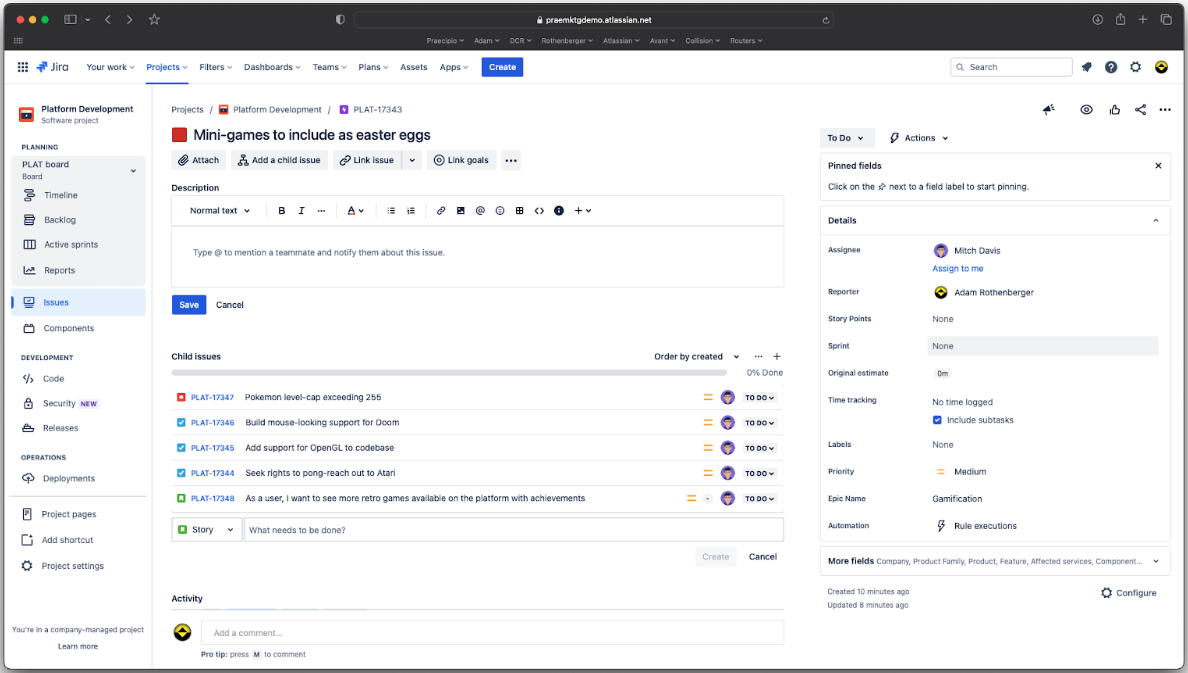
Jira
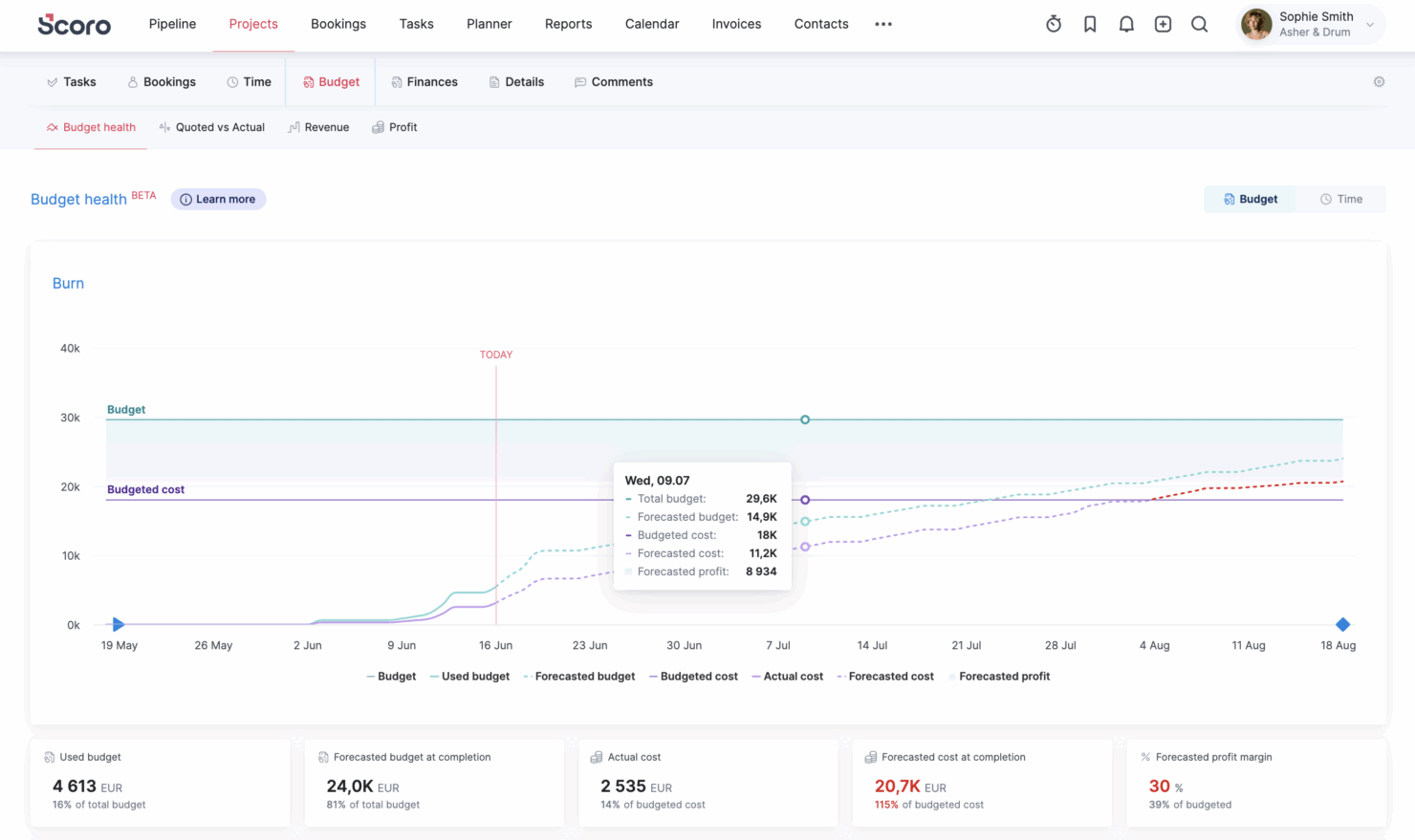
Scoro


Why Trust Our Software Recommendations
Our team has been testing and reviewing software since 2012. As project managers ourselves, we know how difficult—and important—it is to choose the right software.
For this guide, we evaluated tools using hands-on testing and independent research, scoring tools using our selection criteria. We also draw on insights from industry thought leaders and practicing project management experts.
Our reviews reflect our human editorial judgment, not a sales pitch.
Expert reviewers:
Jira vs. Scoro Pricing Comparison
| Jira | Scoro | |
|---|---|---|
| Free Trial | Free plan + 14-day free trial available | 14-day free trial |
| Pricing | From $8.48/user/month | From $19.90/user/month (billed annually) |
Jira vs. Scoro: Priser og skjulte omkostninger
Jira bruger en trindelt abonnementsmodel baseret på teamstørrelse og funktioner, hvor ekstra omkostninger ofte kommer fra tredjepartsintegrationer eller apps fra markedspladsen. Scoro tilbyder også en abonnementsmodel, der samler en lang række værktøjer i sine abonnementer, med mere avancerede funktioner, der bliver tilgængelige, efterhånden som du bevæger dig op gennem niveauerne, hvilket kan øge omkostningerne, efterhånden som dine behov vokser.
For at finde det rigtige match skal du kortlægge dit teams arbejdsgang og vækstplaner – og derefter undersøge, hvilken platform der dækker dine vigtigste funktioner i sit grundabonnement. Se efter omkostninger forbundet med skalering, såsom opgradering af brugere eller afhængighed af eksterne apps, og vær særligt opmærksom på, hvilke funktioner der reelt er inkluderet, og hvilke der kan kræve en opgradering til et højere niveau.
Jira vs. Scoro Feature Comparison
| Jira | Scoro | |
|---|---|---|
| API | ||
| Dashboards | ||
| Data Export | ||
| Data Import | ||
| External Integrations | ||
| Gantt Charts | ||
| Multi-User | ||
| Notifications | ||
| Project Management | ||
| Status Notifications | ||
| Task Scheduling/Tracking | ||
| Time Management |
Jira vs. Scoro: Integrationer
| Integration | Jira | Scoro |
|---|---|---|
| Slack | ✅ | ✅ |
| Google Drive | ✅ | ✅ |
| Microsoft Teams | ✅ | ✅ |
| Salesforce | ✅ | ✅ |
| HubSpot | ✅ | ✅ |
| Xero | ❌ | ✅ |
| GitHub | ✅ | ❌ |
| Trello | ✅ | ❌ |
| API | ✅ | ✅ |
| Zapier | ✅ | ✅ |
Jira og Scoro dækker begge det grundlæggende, når det gælder forbindelse til populære værktøjer, men Jira går videre med udviklerfokuserede integrationer som GitHub og Trello (som Scoro også tilbyder, men via Zapier – ikke indbygget), mens Scoro udmærker sig, når du har brug for finans- og CRM-integrationer. Begge platforme tilbyder en API og understøttelse af Zapier, så du har masser af muligheder, uanset om du ønsker forbindelser, der fungerer direkte fra start, eller tilpassede forbindelser.
Jira vs. Scoro Sikkerhed, overholdelse af regler & pålidelighed
| Faktor | Jira | Scoro |
|---|---|---|
| Datakryptering | Bruger TLS- og AES-256-kryptering til data under overførsel og i hvile. | Beskytter data med HTTPS og stærk kryptering i hvile. |
| Lovgivningsmæssig overholdelse | Har SOC 2-, ISO 27001- og GDPR-certificeringer. | Overholder GDPR og leverer en DPA til EU-kunder. |
| Pålidelighed | 99.9 % oppetid i henhold til SLA med statusopdateringer i realtid. | Regelmæssige sikkerhedskopier af data og høj tilgængelighed på tværs af EU-servere. |
| Adgangskontroller | Tilbyder SSO, 2FA og rollebaserede tilladelser. | Giver mulighed for rollebaseret adgang, SSO og brugerdefinerede tilladelser. |
Både Jira og Scoro opfylder de vigtigste krav til overholdelse af regler, men Jira tilbyder et højere niveau af certificeringer og løfter om pålidelighed, som hænger sammen med den bredere Atlassian-infrastruktur. Jeg har tillid til Jira til store eller komplekse teams, der har brug for avancerede kontroller, men Scoro dækker det grundlæggende og gør det godt for konsulentvirksomheder i vækst.
Jira vs. Scoro Brugervenlighed
| Faktor | Jira | Scoro |
|---|---|---|
| Brugergrænseflade | Kan tilpasses, men kan føles kompleks for nye brugere, især uden vejledning i opsætningen. | En enkel og intuitiv opbygning med menuer og dashboards til erhvervsbrugere. |
| Introduktion | Tilbyder guidede rundvisninger, men det kræver mere tid at mestre alle funktionerne. | Kort indlæringskurve og tydelig introduktion for nye teams. |
| Opgavestyring | Avancerede muligheder for konfiguration af arbejdsgange, selvom det kan kræve mere oplæring. | Det er enkelt at tildele, følge og administrere opgaver direkte fra start. |
| Opsætningsproces | Meget fleksibel, men opsætningen kan være tidskrævende og kræve stor opmærksomhed på detaljer. | Hurtig opsætning trin for trin, der er målrettet hurtig projektstart. |
| Kundesupport | Aktivt brugerfællesskab, hjælpedokumentation og billetbaseret support. | Livechat, hurtig support og nyttige videoressourcer. |
Scoro vinder, når det gælder enkelhed og problemfri introduktion, mens Jiras tilpasningsmuligheder kommer med en pris i form af større kompleksitet. Jeg synes, Scoro er bedre til teams, der vil hurtigt i gang, men Jira betaler sig, hvis du er villig til at investere i opsætningen for at få større kontrol.
Jira vs Scoro: Pros & Cons
Jira
- Agile workflow management supports Scrum and Kanban and can improve your teams' productivity.
- Automation rules are easy to set up, which helps your team speed up their work.
- Custom filters can be created and accessed quickly, which improves your team's efficiency.
- Field names can be confusing, which might slow down your team's workflow.
- The interface can be too crowded in Scrum projects, which can make it hard for your team to navigate.
- There's a lack of resource management capabilities, which could limit your team's planning.
Scoro
- Excellent multi-entity and multi-currency support for international businesses.
- Deep two-way accounting integrations.
- Scoro is highly-customizable with different permission sets, user-based menus, and settings.
- User interface can feel cluttered for new users (although this can be fixed by creating simplified views via permission sets).
- Some users find the learning curve steep for advanced features.
- Lack of built-in chat/messaging and weaker real-time collaboration features compared to others.
Best Use Cases for Jira and Scoro
Jira
- Software development Jira’s agile tools like Scrum and Kanban boards make it perfect for managing software projects.
- IT departments Its issue tracking capabilities help your team efficiently handle technical support and bug fixes.
- Tech startups Jira offers customization capabilities that allow your team to scale and adapt as your projects grow.
- Agile teams Sprint planning and backlog management features keep your agile processes organized and effective.
- Large enterprises Jira’s automation rules can streamline your complex workflows and improve team productivity.
- Project managers Its reporting and analytics provide insights that help you make informed decisions quickly.
Scoro
- Agencies Scoro connects the sales pipeline, creative delivery, and billing in one place, so agencies can quote, resource, and invoice client work without switching tools.
- Consultancies Scoro's quoting matrix breaks down deliverables by role, hours, and cost, giving consultancies real-time margin and utilization visibility across multi-entity, multi-currency operations.
- Architecture FIrms Scoro ties project phases, budgets, and time tracking together so architecture firms can monitor scope creep and protect fee-based project margins in real time.
- IT Services With Jira integration and effortless time logging from calendars or tasks, Scoro gives IT consultancies clear visibility into billable utilization, project profit, and progress as work gets delivered.
- Event Management Scoro handles multi-currency event quoting, purchase orders for vendors, and phase-based Gantt planning, so event agencies can track supplier costs and protect margins across simultaneous productions.
- Engineering FIrms Scoro unifies resourcing, cost tracking, and reporting across teams and offices, helping engineering firms forecast capacity and keep multi-phase projects profitable.
- Software Development Through native Jira sync, Scoro lets developers keep working in their existing tools while worklogs flow back automatically for accurate reporting, invoicing, and profitability tracking.
Hvem bør bruge Jira, og hvem bør bruge Scoro?
Hvis du driver et team inden for professionelle tjenesteydelser, som i høj grad baserer sig på teknisk projektstyring eller arbejdsgange til produktudvikling, vil jeg anbefale Jira. Efter min erfaring skinner Jira, når dit arbejde drejer sig om tickets, backlogs, sprintplanlægning og arbejdsgange, der kan tilpasses i høj grad.
Hvis dit team omfatter udviklere, IT-specialister eller andre, der allerede er fortrolige med agile rammeværk, vil du sandsynligvis sætte pris på, hvor fleksibelt og skalerbart det er. Når det er sagt, skal du være indstillet på at sætte yderligere værktøjer (eller integrationer) sammen for at håndtere ting som budgettering, fakturering eller ressourcestyring – det er ikke indbygget fra start.
Scoro er derimod et langt bedre valg, hvis din virksomhed inden for professionelle tjenesteydelser har brug for et samlet overblik over projekter, økonomi og ressourcer ét sted. Jeg vil anbefale det til bureauer, konsulentvirksomheder eller servicebaserede teams, der går lige så meget op i rentabilitet og ressourceudnyttelse som i opgavestyring.
Du får indbyggede værktøjer til tilbudsgivning, tidsregistrering, fakturering og rapportering, hvilket betyder mindre afhængighed af eksterne systemer. Hvis du ønsker én platform til både at drive dine projekter og din virksomheds drift – og ikke vil sammensætte en hel værktøjspakke – vil Scoro føles langt mere sammenhængende.
Differences Between Jira and Scoro
| Jira | Scoro | |
|---|---|---|
| Business Management | Focuses on project and issue tracking; requires integrations or add-ons for quoting, billing, and CRM. | Built-in business management suite including quoting, invoicing, CRM, budgeting, and profitability tracking. |
| Core Use Case | Built primarily for software development, IT, and agile project management. | Designed for professional services businesses needing project + financial management. |
| Financial Tracking | Minimal native financial tools; relies on integrations for budgeting or revenue tracking. | Robust financial management including cost tracking, revenue forecasting, and profitability analysis. |
| Resource Management | Limited native resource planning; often requires add-ons or external tools. | Advanced built-in resource planning, capacity management, and utilization tracking. |
| Workflow Automation | Advanced automation with custom rules, triggers, and complex issue dependencies across projects. | Strong automation with triggers and actions, especially in higher tiers, but less flexible than Jira’s rule engine. |
| Read Jira ReviewOpens new window | Visit ScoroOpens new window |
Similarities Between Jira and Scoro
| Collaboration | Each includes built-in collaboration tools like comments, notifications, and shared project views to keep teams aligned. |
|---|---|
| Integration Options | Jira and Scoro support integration with popular third-party tools (like Slack, Google Drive, and Zapier) as well as offer an API for deeper connections. |
| Reporting & Dashboards | Both provide customizable dashboards and project reports, letting you visualize work progress, deadlines, or team workload with interactive widgets. |
| Task Management | Both offer robust tools for planning, tracking, and updating project tasks, supporting checklists, status changes, and team assignments. |
| Time Tracking | Each platform includes built-in time tracking so teams can log work and monitor billable hours. |
| Read Jira ReviewOpens new window Visit ScoroOpens new window | |