

2026’da Eşzamansız Video için En İyi 10 Loom Alternatifi

10 En İyi Loom Alternatifleri Kısa Listesi


Proje yöneticisi olmak zor olabilir. Son teslim tarihlerini yönetmeniz, ekipleri koordine etmeniz ve üretkenliği artırmaya çalışmanız gerekir. Loom gibi video iletişim araçları birçok kişi için vazgeçilmez olsa da bazen ekibinizin ihtiyaçlarına uygun olmayabilir.
Belki daha iyi özellikler, daha fazla depolama alanı veya belirli uyumluluk gereksinimleri arıyorsunuz. Deneyimlerime göre doğru aracı bulmak, iş birliği ve verimlilik açısından büyük fark yaratabilir.
Bu makalede sizi en iyi Loom alternatifleriyle tanıştıracağım. Size en uygun seçeneği bulmanıza yardımcı olmak için her seçeneği bağımsız olarak test edip inceledim. Ekibinizin kendine özgü zorluklarını gerçekten destekleyebilecek çözümleri birlikte keşfedelim.
Loom Nedir?
Loom, video mesajlarını kolayca kaydetmenizi ve paylaşmanızı sağlayan bir video iletişimi ve iş birliği yazılımıdır. Karmaşık fikirleri hızlı bir şekilde iletmesi gereken proje yöneticileri, eğitimciler ve pazarlamacılar gibi profesyoneller tarafından yaygın olarak kullanılır.
Kayıt, ekran paylaşımı ve anında paylaşım özellikleriyle Loom, sizin ve ekibinizin mesajları etkili bir şekilde iletmesine yardımcı olur. Genel olarak Loom, ekipler içindeki iletişimi ve iş birliğini geliştirmek için basit bir yöntem sunar.
Loom Alternatifleri Karşılaştırma Tablosu
Aşağıdaki tablo, en iyi Loom alternatifleri için fiyatlandırma ayrıntılarını karşılaştırır.
| Tool | Starting Price | Website | |
|---|---|---|---|
| Best for multilingual tutorial documentation | — | $40/month 10-day free trial + free demo available | Website |
| Best for AI-narrated SOP guides | 5.0 out of 5 | $29/creator/month Free plan + free demo available | Website |
| Best for marketing teams | 4.6 out of 5 | $79/month Free plan available | Website |
| Best for video editing | 4.6 out of 5 | $39/year Free plan available | Website |
| Best for transcription | 4.5 out of 5 | $12/user/month Free plan available | Website |
| Best for video analytics | — | $59/user/month Free plan + free trial + free demo available | Website |
| Best for file sharing | — | $8.25 /member/month 7-day free trial | Website |
| Best for sales engagement | — | $42/month Free demo available | Website |
| Best for simple screen recording | — | $8.16/user/month Free plan available | Website |
| Best for creative storytelling | — | $13/month 7-day free trial available | Website |
Why Trust Our Software Recommendations
Our team has been testing and reviewing software since 2012. As project managers ourselves, we know how difficult—and important—it is to choose the right software.
For this guide, we evaluated tools using hands-on testing and independent research, scoring tools using our selection criteria. We also draw on insights from industry thought leaders and practicing project management experts.
Our reviews reflect our human editorial judgment, not a sales pitch.
Expert reviewers:
En İyi Loom Alternatifleri İncelemeleri
Aşağıda kısa listeme giren en iyi Loom alternatiflerinin ayrıntılı özetlerini bulabilirsiniz. İncelemelerim, size en uygun seçeneği bulmanıza yardımcı olmak için her aracın temel özelliklerine, avantajlarına ve dezavantajlarına, entegrasyonlarına ve ideal kullanım alanlarına ayrıntılı bir bakış sunar.

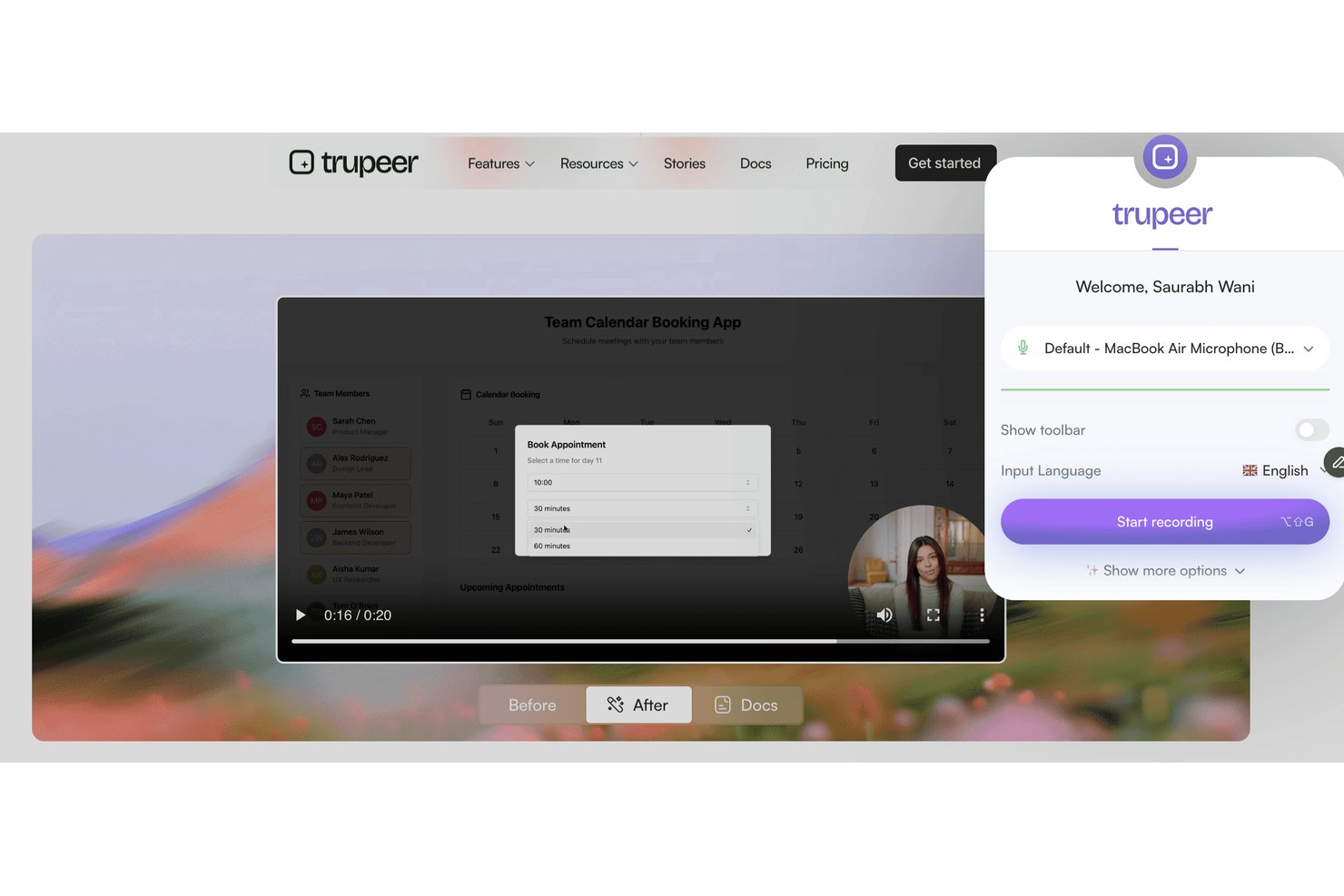
Trupeer is a screen recording and video messaging platform designed for teams who need to deliver clear visual instructions, onboard users, or share process walkthroughs across distributed or multicultural teams.
Who Is Trupeer Best For?
Trupeer is a fit for global teams that need to create, share, and localize visual process documentation across different languages.
Why Trupeer Is a Good Loom Alternative
I picked Trupeer because my team needs to deliver training and walkthroughs in several languages. Trupeer's automatic multilingual screen recording and video messaging features let me create process documentation for global teams, then instantly localize instructions and share tutorials with users in their preferred language.
Trupeer Key Features
- In-app recording dashboard: Record your screen, camera, or both directly from your browser without installing extra software.
- Branded video templates: Customize your recordings with your company’s logo, colors, and branded layouts.
- Advanced viewer analytics: Track who watched each video, how long they viewed, and drop-off points.
- Granular access controls: Set permissions for videos at the workspace, team, or user level to manage privacy and sharing.
Trupeer Integrations
Trupeer offers native integrations with Slack, Notion, Jira, and Confluence, plus Loom and Zoom imports. Enterprise customers can build custom integrations through the REST API, while MCP connects Trupeer with Claude and ChatGPT.
Pros and Cons
Pros:
- Granular viewer tracking and access controls
- Branded video templates for company consistency
- Multilingual tutorials auto-generated from recordings
Cons:
- Pricing not transparent without contacting sales
- No native direct third-party integrations

Best for AI-narrated SOP guides
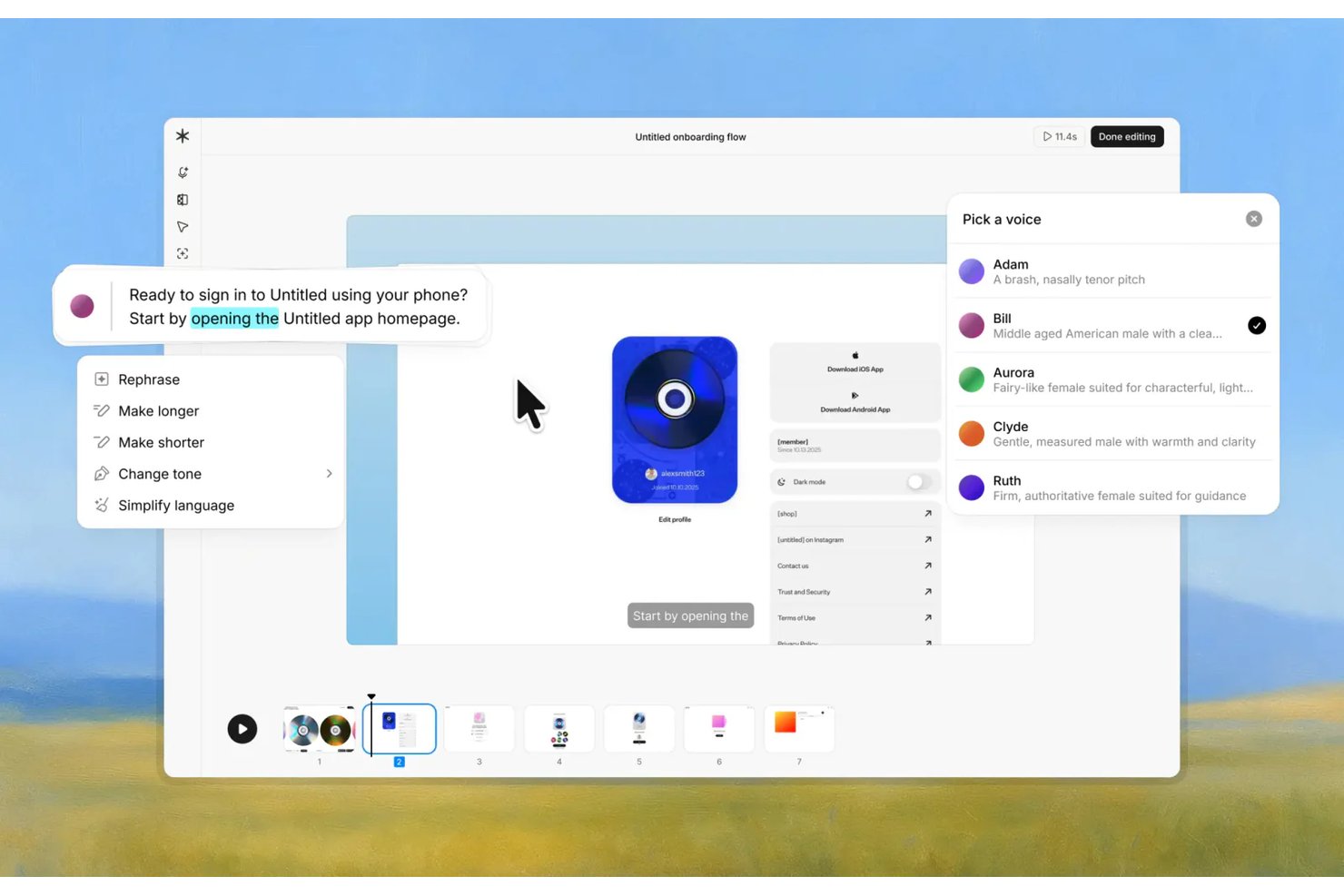
Guideless is a screen recording tool for tech and digital teams that turns workplace processes into clear guides, helping project managers document workflows and onboard teammates without relying on Loom.
Who Is Guideless Best For?
Guideless suits project managers and operations leads at tech teams who need narrated SOPs for onboarding, workflow documentation, and repeatable processes.
Why Guideless Is a Good Best Loom Alternatives
I picked Guideless because it turns screen recordings into AI-narrated SOP guides, rather than leaving teammates with raw video. I use it to document workflows such as onboarding and recurring project operations, creating clear guides that teammates can follow without a live walkthrough.
Guideless Key Features
- AI-powered editor: Annotate screenshots, blur sensitive information, and regenerate guide content.
- Multi-format exports: Export guides as MP4, PDF, or Markdown files.
- Engagement analytics: Track views, play rates, completions, and viewer drop-off points.
- Team workspaces: Invite teammates, assign roles, and organize guides with folders and search.
Guideless Integrations
Guideless supports integrations with Slack, Notion, and Confluence for sharing software guides.
Pros and Cons
Pros:
- Multiple export formats support documentation reuse
- Visual editing includes blur and annotations
- AI narration turns recordings into SOPs
Cons:
- Less suited to spontaneous video conversations
- Generated guides may need manual fact-checking

Wistia
Best for marketing teams

Wistia is a video hosting platform tailored for businesses looking to create and manage video content. It's ideal for marketing and creative teams who want to enhance brand storytelling and engage audiences.
Why it's a good Loom alternative: Wistia provides advanced marketing tools that let you track viewer engagement and integrate a clickable call to action into your videos. You can customize your video player to align with your brand, creating a consistent look. The platform also allows for detailed video analytics, helping you understand audience behavior. These features make Wistia a strong choice for marketing teams focused on data-driven video strategies.
Standout features & integrations:
Features include video SEO tools to improve discoverability and heatmaps to visualize viewer engagement. Wistia also provides lead generation forms to capture audience information.
Integrations include HubSpot, Mailchimp, Salesforce, Adobe Marketo Engage, Zapier, Google Analytics, Pardot, and more.
Pros and Cons
Pros:
- Includes detailed analytics
- Advanced marketing tools
- Customizable video player
Cons:
- Only include basic annotation tools
- Limited built-in editing tools

Camtasia
Best for video editing

Camtasia is a video editing and screen recording software designed for creating professional-quality videos. It's widely used by educators, marketing teams, and corporate trainers who need to produce polished content with ease.
Why it's a good Loom alternative: Camtasia offers advanced editing tools that allow you to fine-tune your videos with precision. Features like multitrack timelines and animations enable detailed customization. The software also provides built-in templates and options to enhance your projects. These capabilities make Camtasia an excellent choice for users focused on comprehensive video editing.
Standout features & integrations:
Features include green screen effects for creative backgrounds, voice narration to add personal touches to videos, and quiz creation to make interactive content.
Integrations are not publicly listed.
Pros and Cons
Pros:
- Offers interactive quizzes
- High-quality output
- Advanced editing capabilities
Cons:
- Interactive video features could be considered basic
- No real-time co-editing

VEED
Best for transcription

Veed is an online video editing tool for creators and teams who need simple video production and editing. It's popular among marketing teams, educators, and content creators who want to produce polished videos quickly.
Why it's a good Loom alternative: Veed offers transcription services that automatically convert speech to text, making it easier for you to create accessible content. Its user-friendly interface allows you to edit videos with features such as text overlays and subtitles. The platform supports exporting videos in multiple formats, catering to various distribution needs. These features make Veed a strong option for those focusing on transcription and accessibility.
Standout features & integrations:
Features include video trimming and cutting to refine your content, filters and effects to enhance visual appeal, and background noise removal for clearer audio.
Integrations are not listed publicly.
Pros and Cons
Pros:
- No software download needed
- Simple editing interface
- Easy transcription tools
Cons:
- Editing restrictions for large files
- Limited advanced features


Vidyard is a video platform designed for businesses to create, host, and share video content. It's mainly used by marketing and sales teams looking to enhance engagement and track video performance.
Why it's a good Loom alternative: Vidyard offers advanced video analytics, helping you monitor viewer engagement and video performance. With features like personalized video creation and interactive calls to action, it supports targeted communication. The platform allows for easy video sharing across various channels, enhancing your reach. These capabilities make Vidyard a strong choice for businesses focused on data-driven video strategies.
Standout features & integrations:
Features include video hosting for easy management, customizable video players that match your brand, and video SEO tools to increase search visibility.
Integrations include Salesforce, HubSpot, Marketo, LinkedIn, Facebook, YouTube, Slack, Google Analytics, and more.
Pros and Cons
Pros:
- Strong branding capabilities
- Interactive features
- Includes advanced analytics tools
Cons:
- Minimal on-video annotations
- Limited collaboration tools


Jumpshare is a file-sharing and screen-recording tool designed for teams and individuals who need quick and efficient content sharing. It's widely used by professionals who prioritize collaboration and communication through visual content.
Why it's a good Loom alternative: Jumpshare excels in file sharing with its drag-and-drop functionality, allowing you to share files instantly. You can record your screen and share video links without lengthy uploads. The tool also offers visual annotations to help you convey your message clearly. These features make it ideal for teams focused on quick and effective communication.
Standout features & integrations:
Features include screenshot capture with annotation to highlight key points, GIF creation for engaging content, and scheduled sharing to control file access.
Integrations include Slack, Trello, Asana, Microsoft Teams, Google Drive, Dropbox, Jira, Salesforce, Zendesk, and Basecamp.
Pros and Cons
Pros:
- GIF creation
- Visual annotations
- Instant file sharing
Cons:
- Minimal audio editing capabilities
- Limited video editing


Dubb is a video communication platform designed to enhance sales and marketing efforts through personalized video messaging. It's primarily used by sales and marketing teams who want to engage prospective customers and current clients with interactive video content.
Why it's a good Loom alternative: Dubb offers features like video email and SMS campaigns that help you reach your audience directly. You can include call-to-action buttons in your videos to drive engagement and conversions. The platform also allows for video tracking, so you know how your audience interacts with your content. These features make Dubb a valuable tool for teams focused on boosting sales engagement.
Standout features & integrations:
Features include customizable video landing pages to match your brand, automated workflows to streamline communication, and video analytics to track performance.
Integrations include Salesforce, HubSpot, Mailchimp, YouTube, Zoho CRM, and more.
Pros and Cons
Pros:
- Video tracking capabilities
- Interactive call-to-action buttons
- Personalized video messaging
Cons:
- Minimal audio controls
- Few annotation tools


Cap is an open-source screen recording tool designed for users who need straightforward video capture. It's ideal for teams and individuals looking to record screens in high quality.
Why it's a good Loom alternative: Cap offers simple screen recording with features such as 4K recording and 60fps capture. Its intelligent compression ensures your videos are of high quality without large file sizes. Instant and Studio Modes provide flexibility in how you capture your content. These features make it a great choice for those focusing on efficient and high-quality video recording.
Standout features & integrations:
Features include auto-generated transcriptions for accessibility as well as titles and summaries that help keep your content organized. Cap also has async collaboration tools with comments and reactions for team feedback.
Integrations include Google Drive, Dropbox, Slack, Trello, Asana, Jira, Zoom, Microsoft Teams, and monday.com.
Pros and Cons
Pros:
- Easy to set up
- Open-source flexibility
- High-quality recording
Cons:
- No mobile app
- Limited advanced editing


Tella is a video recording and editing tool designed for creators and teams who want to produce engaging video content. It's popular with marketing teams, educators, and content creators who focus on storytelling and presentation.
Why it's a good Loom alternative: Tella provides creative storytelling features that let you combine video clips, screen recordings, and text overlays. You can customize your videos with different layouts and backgrounds, adding a unique touch to your content. The tool also supports easy sharing and collaboration, making it ideal for team projects. These features cater to those looking to enhance their storytelling with video.
Standout features & integrations:
Features include customizable video templates for quick editing, automatic captioning to make content accessible, and the ability to export videos in multiple formats for different platforms.
Integrations include Google Drive, Dropbox, Slack, Trello, Asana, Zoom, Microsoft Teams, YouTube, Vimeo, and LinkedIn.
Pros and Cons
Pros:
- Includes automatic captions
- Engaging templates
- Creative editing options
Cons:
- Lacks advanced visuals/effects
- Limited audio control options
Diğer Loom Alternatifleri
İşte kısa listeme giremeyen ancak yine de göz atmaya değer bazı ek Loom alternatifleri:
- Clueso
For AI insights
- ScreenRec
For privacy controls
- Poindeo
For team collaboration
- UserGuiding
For user onboarding
- Screenflow
For Mac users
- Bandicam Screen Recorder
For gaming videos
- OBS Studio
For live streaming


How I Evaluate Loom Alternatives
I split my evaluation into two layers: baseline requirements every async video tool must clear, and the differentiators—like PM integrations and AI summaries—that make one the right fit.
Core Functionality (Table Stakes For This List)
When I'm selecting tools for my list, I rank each one on a scale from 0 (does not offer the functionality) to 5 (excels in this area) for each core functionality listed below. Then, I calculate the tool's total score into a percentage. Each tool needs to achieve a minimum total score of 65% to be considered for inclusion.
- Screen Recording Options: I check whether you can capture a full screen, specific window, or selected region—like recording just your Gantt chart without exposing the rest of your desktop.
- Webcam & Audio Capture: A floating webcam overlay paired with mic input adds the human element that makes async updates feel personal, so I evaluate overlay controls and audio quality.
- Instant Shareable Links: After hitting stop, the tool should generate a cloud-hosted link right away—no manual uploads, no file attachments clogging up Slack threads.
- Cloud Video Library: I look for organized storage with folders, workspaces, and search so your team can find last quarter's sprint retrospective walkthrough months later without scrolling endlessly.
- Viewer Engagement Tools: Timestamped comments and emoji reactions turn a one-way recording into a conversation, so I evaluate how each tool handles viewer feedback on specific moments in a video.
- Project Tool Integrations: Embedding a video directly into a Jira ticket or Notion doc keeps context where work happens, so I look at the depth of native integrations across PM and communication platforms.
Once I have a list of tools that meet this criteria, I consider what sets each platform apart.
Differentiating Factors (What Sets Vendors Apart)
Here's how I compare and contrast different vendors:
Standout Features
AI-generated transcripts and summaries matter because a PM juggling three workstreams doesn't have time to rewatch a 10-minute update—they need key points pulled out automatically. Built-in editing tools like trimming dead air and removing filler words help you ship polished walkthroughs without opening a separate editor. I also evaluate viewer analytics, since knowing whether stakeholders actually watched your sprint review recording tells you more than a read receipt ever will.
Beyond Features
Pricing structure plays a big role when you're rolling out an async video tool across a 20-person project team—I look at whether per-seat costs stay reasonable at scale and whether free tiers impose recording limits that would block daily use. Security matters too: teams sharing internal roadmaps and stakeholder updates need SOC 2 compliance and SSO at a minimum. I also evaluate collaboration controls, particularly guest access permissions for sharing project recordings with external clients or contractors.
Neden Bir Loom Alternatifi Aramalısınız?
Loom iyi bir video iletişimi ve iş birliği yazılımı seçeneği olsa da bazı kullanıcıların alternatif çözümler aramasının çeşitli nedenleri vardır. Aşağıdaki nedenlerle bir Loom alternatifi arıyor olabilirsiniz:
- Gelişmiş video düzenleme özelliklerine ihtiyacınız vardır
- Ekip üyeleriniz daha fazla depolama alanına ihtiyaç duyar
- Videolar için daha iyi analizler istersiniz
- Veri düzenlemelerine uymanız gerekir
- Ekibinizin çevrim dışı erişime ihtiyacı vardır
- Daha fazla özelleştirme seçeneğine ihtiyaç duyarsınız
Bunlardan biri size uyuyorsa doğru yere geldiniz. Listemde, ücretli veya ücretsiz bir Loom alternatifi arayan ekipler için uygun olabilecek çeşitli web tabanlı ve masaüstü video düzenleme yazılımı seçenekleri yer alıyor.
Loom'un Temel Özellikleri
Alternatif çözümlerin sunduklarını karşılaştırmanıza yardımcı olmak için Loom'un temel özelliklerinden bazıları şunlardır:
- Ses ve ekran kaydı: macOS, Windows ve mobil cihazlarda ekran ve ses kaydedilebilir; bu da ekiplerin herhangi bir platformda kolayca video içeriği oluşturmasını sağlar.
- Anında paylaşım: Videoları bağlantılar, e-posta veya web sitelerine yerleştirerek anında paylaşın.
- Temel düzenleme araçları: Kırpma ve açıklama ekleme özellikleri, videoları özelleştirmenize ve izleyiciler için önemli noktaları vurgulamanıza olanak tanır.
- Geri bildirim seçenekleri: Etkileşimli iletişimi ve geri bildirimi teşvik etmek için izleyicilerle yorumlar ve emojiler aracılığıyla etkileşim kurun.
- Altyazı ekleme: Erişilebilirliği iyileştirmek ve daha geniş bir kitleye ulaşmak için videolara altyazı ekleyin.
- Chrome uzantısı: Uzantının kurulumu kolaydır ve kayıt özelliklerine hızlı ve pratik erişim sağlar.
- Kayıt seçenekleri: Yalnızca ekranı, yalnızca web kamerasını veya her ikisini birden kaydetme seçenekleri, içerik sunumunda esneklik sağlar.
- Cihaz uyumluluğu: Mac, Windows, iOS ve Android cihazlarda erişilebilir olması, ekiplerin nerede olurlarsa olsunlar aracı kullanabilmesini sağlar.
- 720p kayıt: Ücretsiz sürümde 720p'ye kadar kayıt yapın; daha yüksek kaliteli video üretimi için yükseltme seçenekleri sunulur.