10 meilleures alternatives à Trello en 2026 (options gratuites et payantes)

10 Sélection des meilleures alternatives à Trello


Trello est un outil de gestion de projet populaire, mais il ne convient pas parfaitement à toutes les équipes. Que vous ayez dépassé le stade de ses tableaux simples, que vous ayez besoin de rapports plus complets ou que vous souhaitiez des intégrations plus poussées, il existe de nombreuses alternatives à Trello qui offrent des fonctionnalités puissantes et des flux de travail flexibles pour mieux accompagner vos projets.
J’ai testé et évalué les principales plateformes de gestion de projet en pensant aux utilisateurs de Trello, en me concentrant sur la facilité d’utilisation, la collaboration d’équipe, la personnalisation et le rapport qualité-prix. Que vous gériez des flux de travail agiles, des projets clients ou des équipes internes, vous trouverez ici un outil capable de faire passer votre productivité au niveau supérieur.
Qu’est-ce que Trello ?
Trello est un outil visuel de gestion de projet qui aide les particuliers et les équipes à organiser les tâches, à suivre les progrès et à collaborer en temps réel.
Grâce à un système fondé sur des tableaux, des listes et des cartes, Trello facilite la planification des projets, l’attribution des tâches et le suivi des flux de travail. Il est très apprécié des chefs de projet, des spécialistes du marketing et des développeurs pour sa flexibilité, sa facilité d’utilisation et sa capacité à simplifier la coordination des équipes.
Pourquoi utiliser une alternative à Trello
Vous pourriez rechercher une alternative à Trello si vous :
- Avez besoin de rapports et d’analyses avancés, notamment pour assurer un suivi détaillé des projets et obtenir des informations utiles.
- Avez besoin de meilleures options d’intégration.
- Avez besoin de flux de travail et de fonctionnalités hautement personnalisables.
- Avez besoin d’un accès continu à votre logiciel de gestion de projet sans connexion Internet.
- Avez besoin de fonctionnalités de sécurité complètes.
Les alternatives à Trello proposent souvent des fonctionnalités qui répondent à ces limites. Elles offrent des outils de création de rapports avancés pour des analyses approfondies, de nombreuses options d’intégration avec un plus large éventail de logiciels et davantage de possibilités de personnalisation pour s’adapter aux flux de travail spécifiques.
Les fonctionnalités hors ligne améliorées garantissent l’accès aux informations des projets sans connexion Internet, tandis que des fonctionnalités de sécurité renforcées assurent une meilleure protection des données sensibles. Ces alternatives s’adressent aux utilisateurs à la recherche de solutions plus complètes, mieux adaptées à leurs besoins spécifiques en matière de gestion de projet et de collaboration.
Pourquoi faire confiance à nos recommandations de logiciels
Notre équipe teste et évalue des logiciels depuis 2012. En tant que chefs de projet nous-mêmes, nous savons à quel point il est difficile — et important — de choisir le bon logiciel.
Pour ce guide, nous avons évalué les outils grâce à des tests pratiques et une recherche indépendante, en notant les outils selon nos critères de sélection. Nous nous appuyons également sur les enseignements de leaders d’opinion du secteur et de professionnels de la gestion de projet en activité.
Nos avis reflètent notre jugement éditorial humain, et non un argumentaire de vente.
Réviseurs experts:
Tableau comparatif des alternatives à Trello
Ce tableau comparatif résume les détails tarifaires de ma sélection des meilleures alternatives à Trello :
| Tool | Best For | Trial Info | Price | ||
|---|---|---|---|---|---|
| 1 | Meilleure visibilité projet grâce à l’IA | Essai gratuit de 14 jours | À partir de $6/utilisateur/mois | Website | |
| 2 | Idéal pour l'intégration à Google Workspace | Formule gratuite + essai gratuit de 14 jours disponible | À partir de $3/utilisateur/mois (facturé annuellement) | Website | |
| 3 | Idéal pour les hiérarchies de tâches imbriquées | Forfait gratuit disponible | À partir de $7.65/utilisateur/mois (facturé annuellement) | Website | |
| 4 | Meilleur prix pour les freelances et les petites équipes | Essai gratuit de 10 jours. Aucune carte de crédit requise | À partir de 4 $/utilisateur/mois facturé annuellement. Une version freemium est aussi disponible jusqu’à 3 utilisateurs pour 2 projets | Website | |
| 5 | Idéal pour une gestion visuelle de projets | Essai gratuit de 14 jours | À partir de $5/utilisateur/mois | Website | |
| 6 | Meilleure combinaison avec une suite complète de gestion de projet | Essai gratuit de 14 jours | À partir de $29/utilisateur/mois | Website | |
| 7 | Idéal pour ses capacités d'automatisation | Plan gratuit disponible | À partir de 8,25 $/utilisateur/mois | Website | |
| 8 | Meilleur forfait gratuit parmi les alternatives à Trello | Formule gratuite + démo gratuite disponible | Gratuit pour toujours avec des forfaits payants à partir de 5 $/mois | Website | |
| 9 | Meilleur accompagnement personnalisé pour l'intégration et la formation | Essai gratuit de 14 jours + démo gratuite disponible | À partir de 8 $/utilisateur/mois (facturé annuellement) | Website | |
| 10 | Meilleur tableau Kanban multi-portefeuilles | Essai gratuit de 30 jours | À partir de 5 $/licence/mois et 0 $ pour les spectateurs/abonnés | Website |


Avis sur les meilleures alternatives à Trello
Voici quelques-unes des meilleures alternatives à Trello, ainsi qu’une description de ce qui les rend uniques.

Meilleure visibilité projet grâce à l’IA
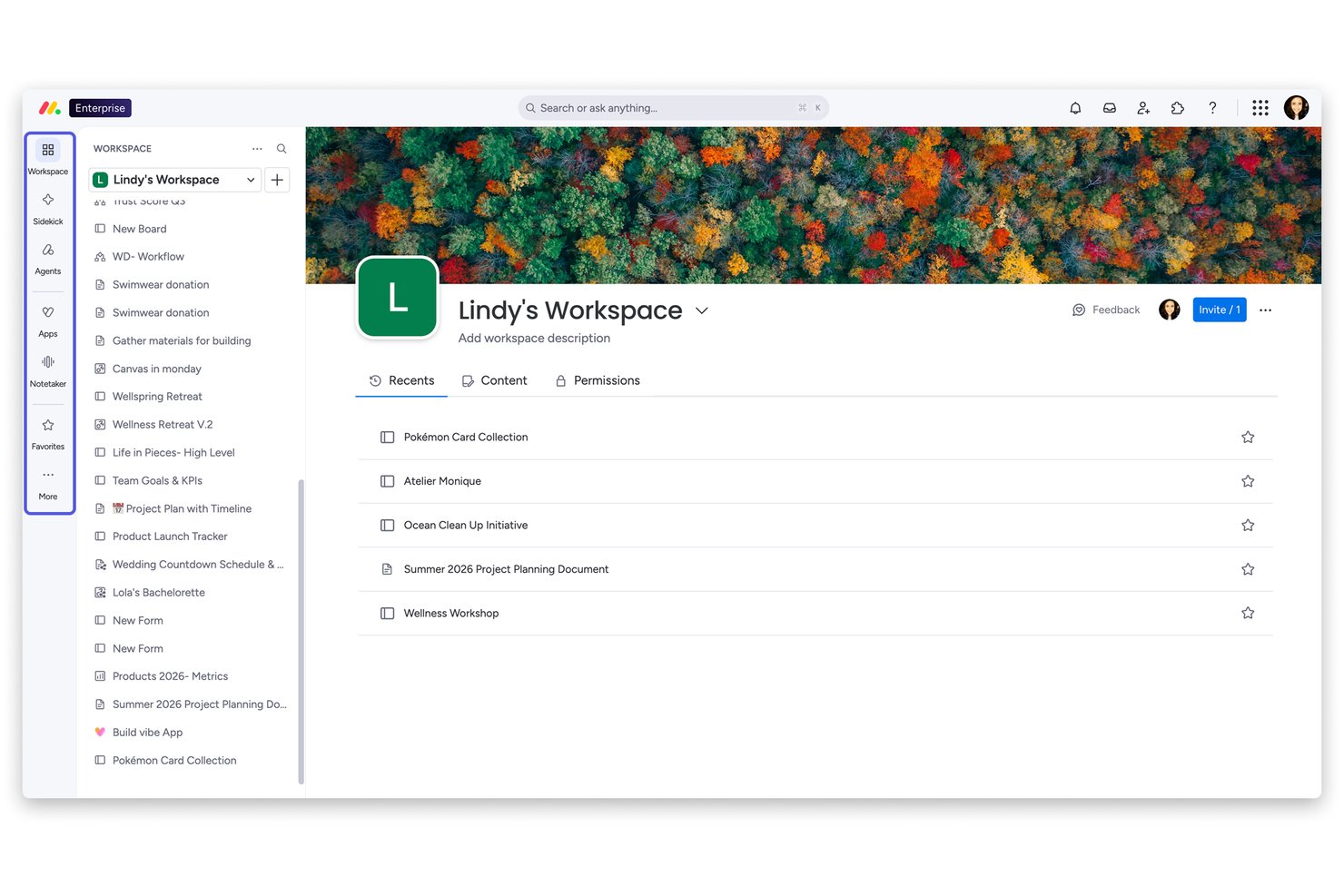
monday AI Workspace est une plateforme de gestion de projet flexible conçue pour les équipes qui ont dépassé les outils Kanban simples et ont besoin d’une planification de projet multi-vues, d’une collaboration interfonctionnelle et d’une automatisation pilotée par l’IA réunis en un seul endroit.
À qui s’adresse monday AI Workspace ?
C’est une excellente solution pour les équipes de taille moyenne à grande où les chefs de projet et responsables PMO ont besoin d’une visibilité au niveau du portefeuille sur plusieurs flux de travail.
Pourquoi monday AI Workspace est-il une bonne alternative à Trello (options gratuites et payantes) ?
J’ai choisi monday AI Workspace comme l’un des meilleurs parce que sa couche IA apporte ce que Trello ne peut pas faire : surveiller activement vos projets et mettre en évidence les risques avant qu’ils ne compromettent les délais. L’Analyseur de projet signale les goulets d’étranglement en temps réel, tandis que les Blocs IA automatisent les tâches répétitives comme la catégorisation des tâches et la synthèse des mises à jour sur les tableaux. J’apprécie également que les tableaux de bord dynamiques regroupent plusieurs projets en même temps, offrant ainsi une visibilité complète du portefeuille sans rapport manuel.
Fonctionnalités clés de monday AI Workspace
- Vue de la charge de travail : Visualisez la capacité de l’équipe en un coup d’œil pour équilibrer les affectations et éviter les surcharges.
- Vues Gantt et chronologie : Planifiez les projets visuellement avec des chronologies à glisser-déposer et un suivi du chemin critique.
- Docs et tableaux blancs : Collaborez sur des documents et animez des séances de réflexion grâce à des outils de tableau blanc intégrés au sein de votre espace de travail.
- Suivi du temps natif : Saisissez le temps passé sur les tâches et générez des rapports pour la facturation ou l’analyse de la productivité.
Intégrations monday AI Workspace
monday AI Workspace propose des centaines d’intégrations natives, dont Slack, Google Workspace, Microsoft 365, Salesforce, HubSpot, Jira, GitHub, Zoom, Dropbox et Zendesk. Il prend également en charge Zapier et offre une API pour des intégrations personnalisées.
Pros and Cons
Pros:
- Détection des risques projet par IA intégrée
- Tableaux de bord portefeuille couvrant plusieurs projets à la fois
- Plus de vues projet que Trello
Cons:
- Les limites d’automatisation sont vite atteintes sur les formules inférieures
- Peut sembler trop complexe pour les petites équipes
New Product Updates from monday AI Workspace
monday AI Workspace Adds Human Approval Routing
monday AI Workspace adds a human-in-the-loop approval block to AI Workflows, sending approval requests and routing workflow paths based on responses. For more information, visit monday AI Workspace's official site.

GQueues
Idéal pour l'intégration à Google Workspace
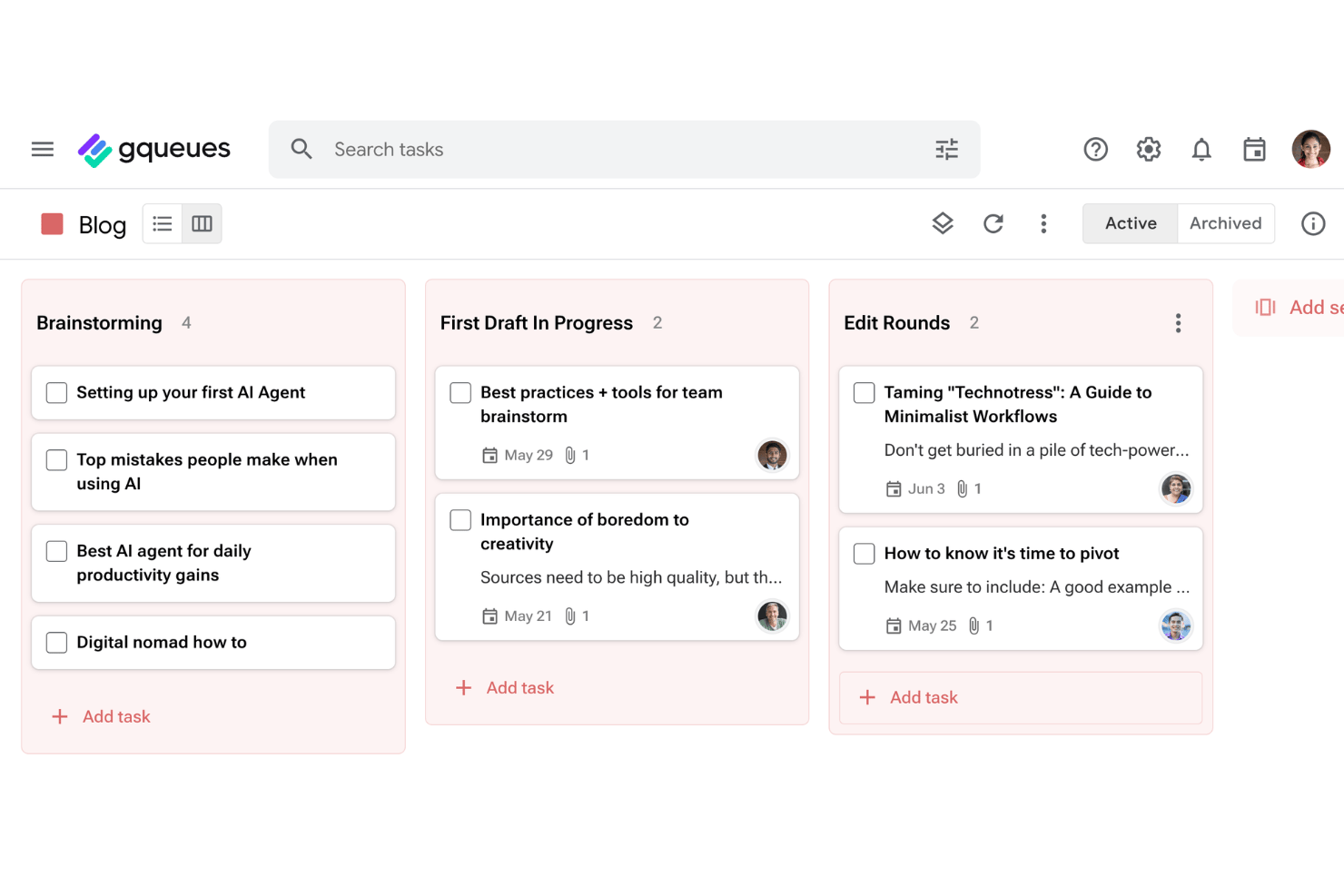
GQueues est un outil de gestion des tâches conçu pour les équipes et les particuliers qui travaillent au sein de Google Workspace. Il vous permet de suivre les tâches, de gérer les projets et de rester organisé sans quitter les outils Google que vous utilisez déjà.
À qui GQueues convient-il le mieux ?
GQueues convient aux petites équipes et aux professionnels indépendants qui utilisent déjà Google Workspace au quotidien et souhaitent une gestion des tâches compatible avec les outils qu'ils utilisent déjà.
Pourquoi GQueues est une bonne alternative à Trello
J'ai choisi GQueues parce que sa synchronisation bidirectionnelle avec Google Agenda est réellement utile au quotidien : reprogrammez une tâche dans Agenda et elle est instantanément mise à jour dans GQueues, ce qui permet de conserver une chronologie de projet exacte sans rapprochement manuel. J'apprécie également que des projets distincts puissent être synchronisés avec des agendas distincts, afin de séparer clairement le travail client, les projets internes et les tâches personnelles. Le module complémentaire Gmail me permet de transformer directement un fil d'e-mails en tâche, ce qui élimine une étape que j'effectuais manuellement chaque jour.
Fonctionnalités principales de GQueues
- Files intelligentes et recherche avancée : Créez des vues dynamiques et automatiquement mises à jour de vos tâches à l'aide de filtres puissants et de recherches enregistrées.
- Actions groupées et palette de commandes : Effectuez des modifications à grande échelle ou accédez rapidement aux commandes grâce aux outils de modification groupée et aux raccourcis clavier.
- Intégration avec Gmail et l'extension Chrome : Créez des tâches directement à partir d'e-mails ou de pages web sans passer d'une application à l'autre.
- Applications mobiles et connexion à Google Workspace : Accédez à vos tâches sur iOS ou Android et utilisez l'authentification unique Google pour une connexion sécurisée et pratique.
Intégrations de GQueues
GQueues propose une intégration native avec Google Workspace, notamment Google Agenda, Google Drive, Gmail et Google Contacts.
Pros and Cons
Pros:
- Sous-tâches avec un nombre illimité de niveaux hiérarchiques
- Transformer des e-mails en tâches ne prend qu'un clic
- Une tarification abordable, adaptée aux petites équipes
Cons:
- Aucune vue de diagramme de Gantt ou de chronologie pour les projets complexes
- Fonctionnalités limitées pour les utilisateurs qui n'utilisent pas Google

Quire
Idéal pour les hiérarchies de tâches imbriquées
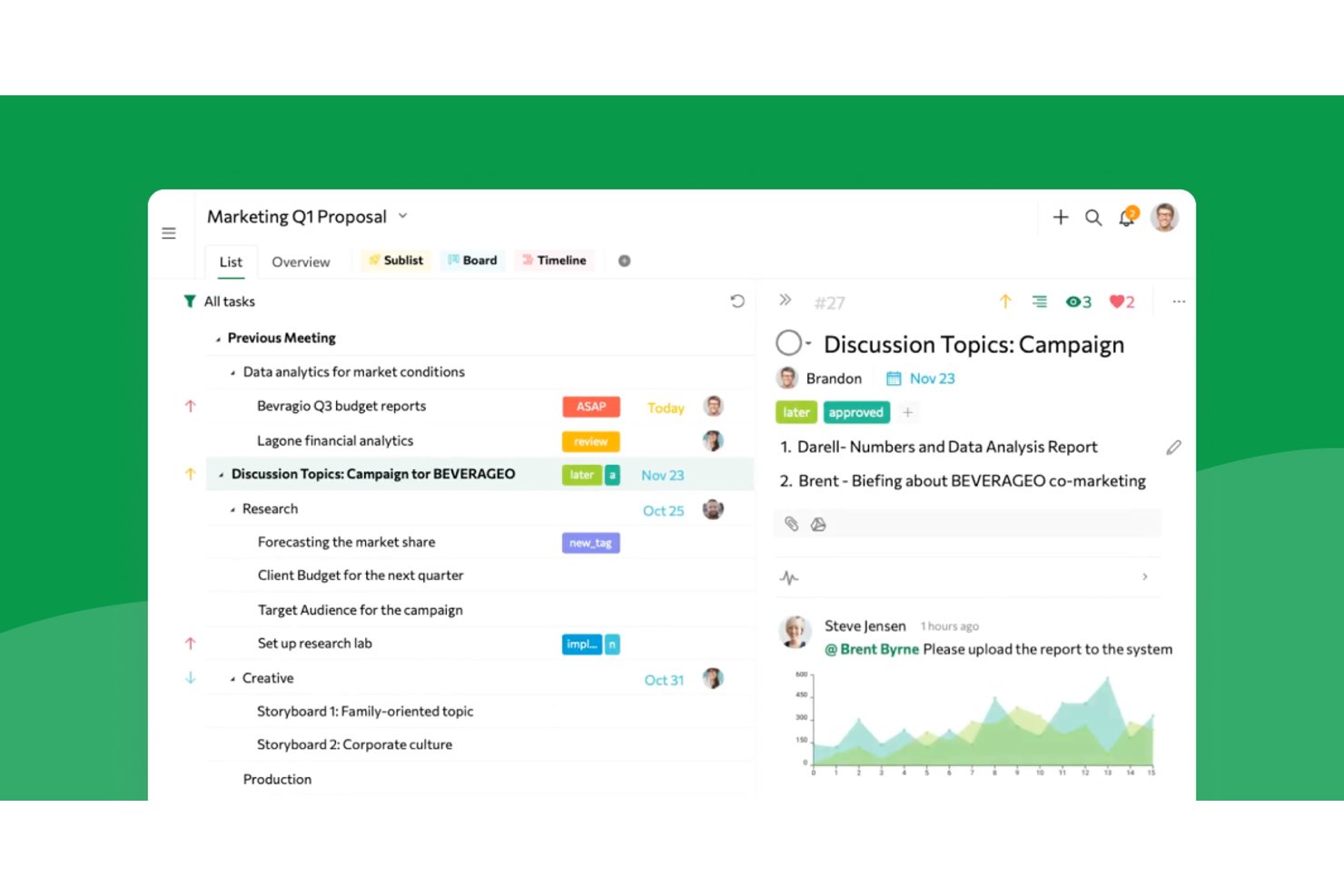
Quire offre aux équipes produit, aux designers et aux agences un espace de travail visuel pour gérer des projets complexes, décomposer les tâches et renforcer la collaboration entre équipes sans perdre de vue les priorités ni les échéances.
À qui Quire convient-il le mieux ?
Aux responsables de projets qui doivent décomposer des initiatives complexes en hiérarchies détaillées de tâches et maintenir l’alignement des équipes entre les services.
Pourquoi Quire est une bonne alternative à Trello (options gratuites et payantes)
J’ai choisi Quire parce qu’il gère les hiérarchies de tâches complexes mieux que presque tous les autres outils que j’ai essayés. J’utilise ses vues hybrides arborescente et kanban pour décomposer les projets complexes en tâches gérables et maintenir une vision claire des dépendances lorsque les équipes ajoutent, réorganisent et hiérarchisent les sous-tâches entre les services.
Fonctionnalités principales de Quire
- Vues de projet multiples : passez d’une vue en tableau kanban à une vue chronologique ou en liste pour suivre vos projets selon vos besoins.
- Édition collaborative en temps réel : modifiez les tâches et les notes simultanément avec vos collègues sans conflits de versions.
- Tâches récurrentes automatisées : configurez la répétition des tâches selon un calendrier personnalisé pour gérer les activités récurrentes avec moins de configuration manuelle.
- Organisation intelligente par dossiers : regroupez les projets et tâches associés dans des dossiers pour gérer votre espace de travail de manière organisée.
Intégrations de Quire
Quire propose des intégrations natives avec Slack, Google Drive et GitHub, et est disponible sur Zapier. Une API est également disponible pour les intégrations personnalisées.
Pros and Cons
Pros:
- Gère efficacement les hiérarchies de tâches profondément imbriquées
- Combine les vues kanban et arborescente dans une seule interface
- Prend en charge l’édition collaborative en temps réel pour les équipes
Cons:
- Options intégrées limitées pour les rapports et les analyses
- Moins de fonctionnalités d’automatisation avancées que les principaux concurrents
New Product Updates from Quire

Quire Adds Task and Standalone Reminders
Quire adds task reminders and standalone reminders with shared notifications, recurring schedules, and automatic date tracking. These updates help teams stay ahead of deadlines and manage reminders that do not need a task. For more information, visit Quire’s official site.
 .
.
Meilleur prix pour les freelances et les petites équipes

Zoho Projects est un outil de gestion de projet en ligne conçu pour les équipes et les freelances afin de planifier, suivre et collaborer efficacement sur leurs projets. Il propose une solution abordable pour gérer les tâches, les échéances et les flux de travail en équipe.
Pourquoi Zoho Projects est une bonne alternative à Trello : Zoho Projects comprend des fonctionnalités de suivi du temps permettant à votre équipe de surveiller les heures de travail et de garantir que les tâches respectent les délais et le budget. De plus, les rapports détaillés sur l'état des projets offrent une vue d’ensemble claire de l’avancement, aidant à identifier les retards et à optimiser les flux de travail. L’outil propose également la gestion des dépendances entre tâches, facilitant la prise en charge de projets complexes.
Fonctionnalités et intégrations remarquables de Zoho Projects :
Fonctionnalités : suivi des jalons garantissant à votre équipe de rester alignée sur les objectifs et échéances du projet. Le module de suivi des problèmes permet également d’enregistrer et de traiter les difficultés, améliorant ainsi la livraison des projets. De plus, la saisie du temps est directement intégrée dans les flux de travail des tâches pour faciliter le suivi des heures travaillées par tâche.
Intégrations : En faisant partie de l’écosystème Zoho, Projects se connecte à plusieurs services de Zoho comme Zoho Books, Zoho CRM et la suite financière de Zoho. Le nouveau marketplace Zoho permet aussi des intégrations tierces. Les intégrations via Zapier et Zoho Flow sont également prises en charge.
Pros and Cons
Pros:
- Inclut des diagrammes de Gantt pour ajuster les calendriers
- S’intègre bien avec les autres applications et outils Zoho
- Abordable pour les freelances et les petites équipes
Cons:
- La personnalisation des rapports peut demander plus de temps
- La personnalisation du tableau de bord est limitée dans certains domaines
New Product Updates from Zoho Projects
Zoho Projects Adds CodeX Scripts for Custom Modules
Zoho Projects now supports CodeX Scripts for custom modules, enabling conditional logic and rules for creating, updating, and deleting records. For more information, visit Zoho Projects' official site.
 .
.
Idéal pour une gestion visuelle de projets
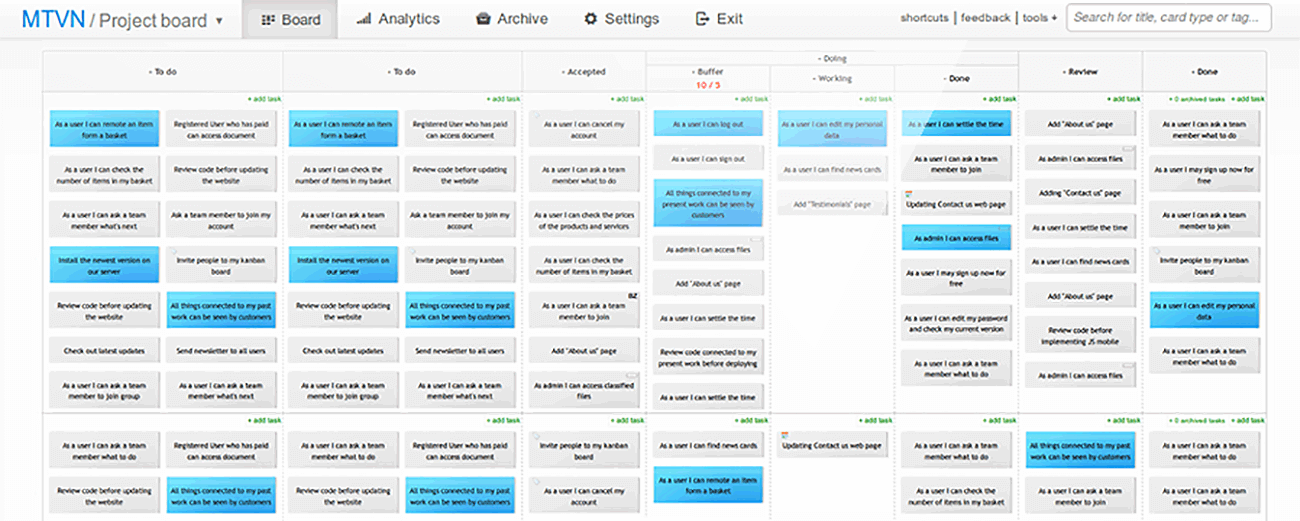
Kanban Tool est une plateforme de gestion de projets qui aide les équipes à visualiser les flux de travail, suivre les progrès et améliorer la productivité. Elle est idéale pour les entreprises à la recherche d’un moyen simple mais efficace de gérer les tâches et d'améliorer la collaboration d’équipe.
Pourquoi Kanban Tool est une bonne alternative à Trello : Kanban Tool excelle dans la proposition de tableaux visuels intuitifs qui simplifient l’organisation des tâches et le suivi des progrès. Sa fonctionnalité de suivi du temps permet à votre équipe de surveiller la productivité directement depuis le tableau de tâches. De plus, ses outils analytiques fournissent des informations exploitables sur la performance de l’équipe et les goulots d’étranglement du flux de travail. La plateforme est également facile à personnaliser, ce qui la rend particulièrement adaptée aux équipes ayant des exigences spécifiques pour leurs projets.
Fonctionnalités et intégrations remarquables de Kanban Tool :
Les fonctionnalités incluent une vue calendrier intégrée qui offre une chronologie claire des tâches et échéances pour aider votre équipe à planifier efficacement. La fonctionnalité de limitation du travail en cours (WIP) garantit aussi que votre équipe reste concentrée en évitant la surcharge de tâches à n’importe quelle étape du flux de travail. De plus, la capacité d’accès hors ligne permet à votre équipe de mettre à jour les tableaux même sans connexion Internet, assurant ainsi la continuité du travail.
Les intégrations comprennent Slack, Zapier, Dropbox, Google Drive, Microsoft Teams, Jira, GitHub, Trello, Asana et Salesforce.
Pros and Cons
Pros:
- Propose des swimlanes pour une organisation détaillée des tâches
- Prend en charge l’automatisation des tâches pour réduire le travail manuel
- Convient aussi bien aux petites équipes qu’aux grandes organisations
Cons:
- Les outils de reporting nécessitent une configuration initiale
- Moins de flexibilité pour une gestion détaillée du portefeuille de projets

Breeze
Meilleure combinaison avec une suite complète de gestion de projet
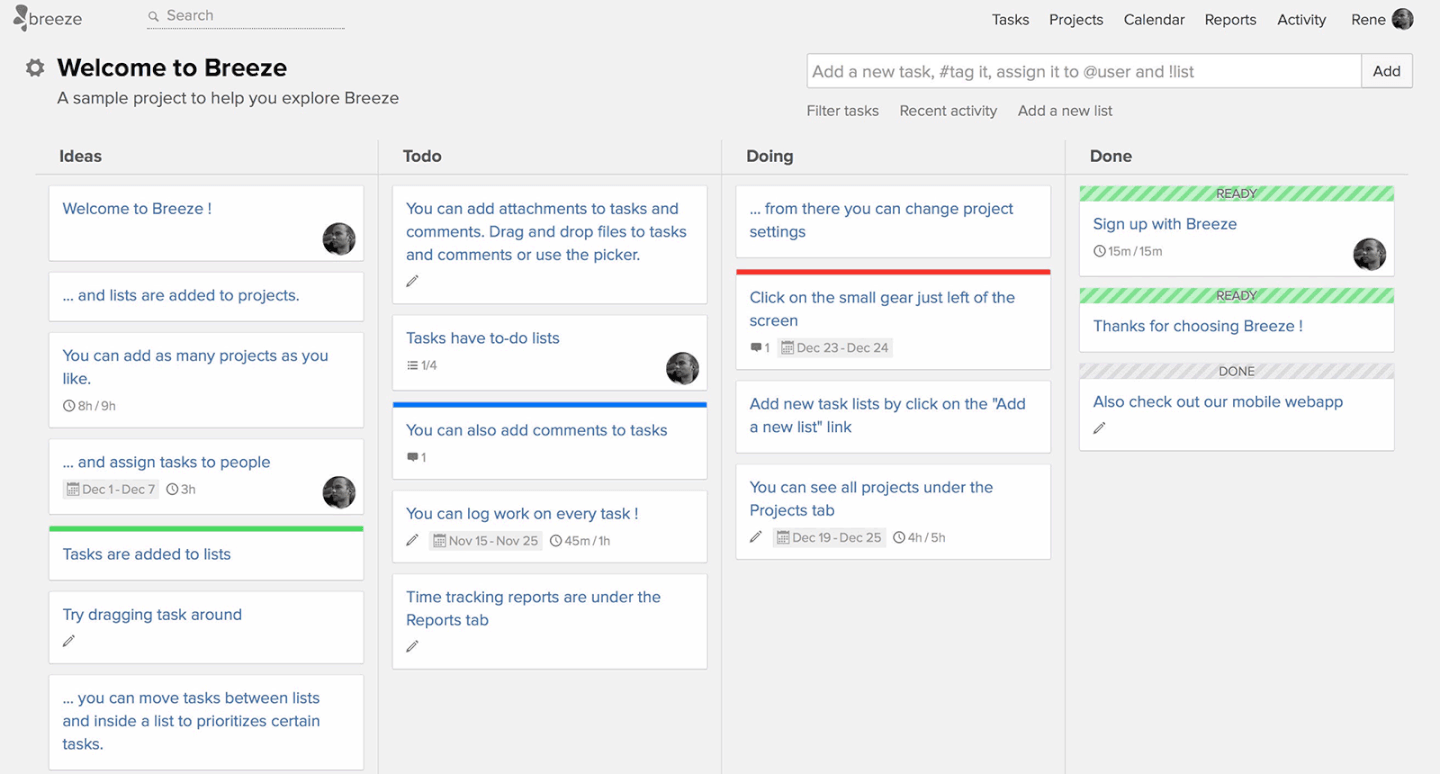
Breeze est un outil de gestion de projet qui aide les équipes à suivre les tâches, à gérer les flux de travail et à superviser efficacement les projets. Il est idéal pour les organisations à la recherche d’une plateforme complète capable de gérer tous les aspects de la gestion de projet.
Pourquoi Breeze est une bonne alternative à Trello : Breeze associe la gestion des tâches à des fonctionnalités telles que le suivi du temps et l’allocation des ressources afin de donner à votre équipe un meilleur contrôle sur les projets. Ses tableaux visuels vous aident à organiser les flux de travail et à garantir la transparence entre les tâches. La plateforme comprend également des outils de reporting intégrés pour aider votre équipe à analyser les performances et à prendre des décisions éclairées. De plus, Breeze prend en charge les échéanciers et la budgétisation des projets, ce qui en fait un outil adapté aux projets complexes et multidimensionnels.
Fonctionnalités et intégrations remarquables de Breeze :
Les fonctionnalités comprennent des outils avancés de budgétisation de projets qui permettent à votre équipe de planifier et de surveiller les ressources financières. La fonctionnalité de suivi de la charge de travail veille également à ce que les membres de l’équipe ne soient pas surchargés et à ce que les ressources soient équilibrées. Breeze propose aussi un système centralisé de gestion des fichiers afin de conserver tous vos documents de projet accessibles au même endroit.
Les intégrations comprennent Slack, Trello, Google Drive, Dropbox, Microsoft Teams, GitHub, Zapier, Salesforce, Asana et QuickBooks.
Pros and Cons
Pros:
- Prend en charge les tâches récurrentes pour des flux de travail cohérents
- Améliore la collaboration grâce à la gestion partagée des documents
- Fournit une vue d’ensemble visuelle des projets grâce aux tableaux Kanban
Cons:
- Nombre limité de modèles préconçus pour une configuration rapide
- Ne convient pas aux équipes qui n’ont pas besoin de gérer un budget

Idéal pour ses capacités d'automatisation
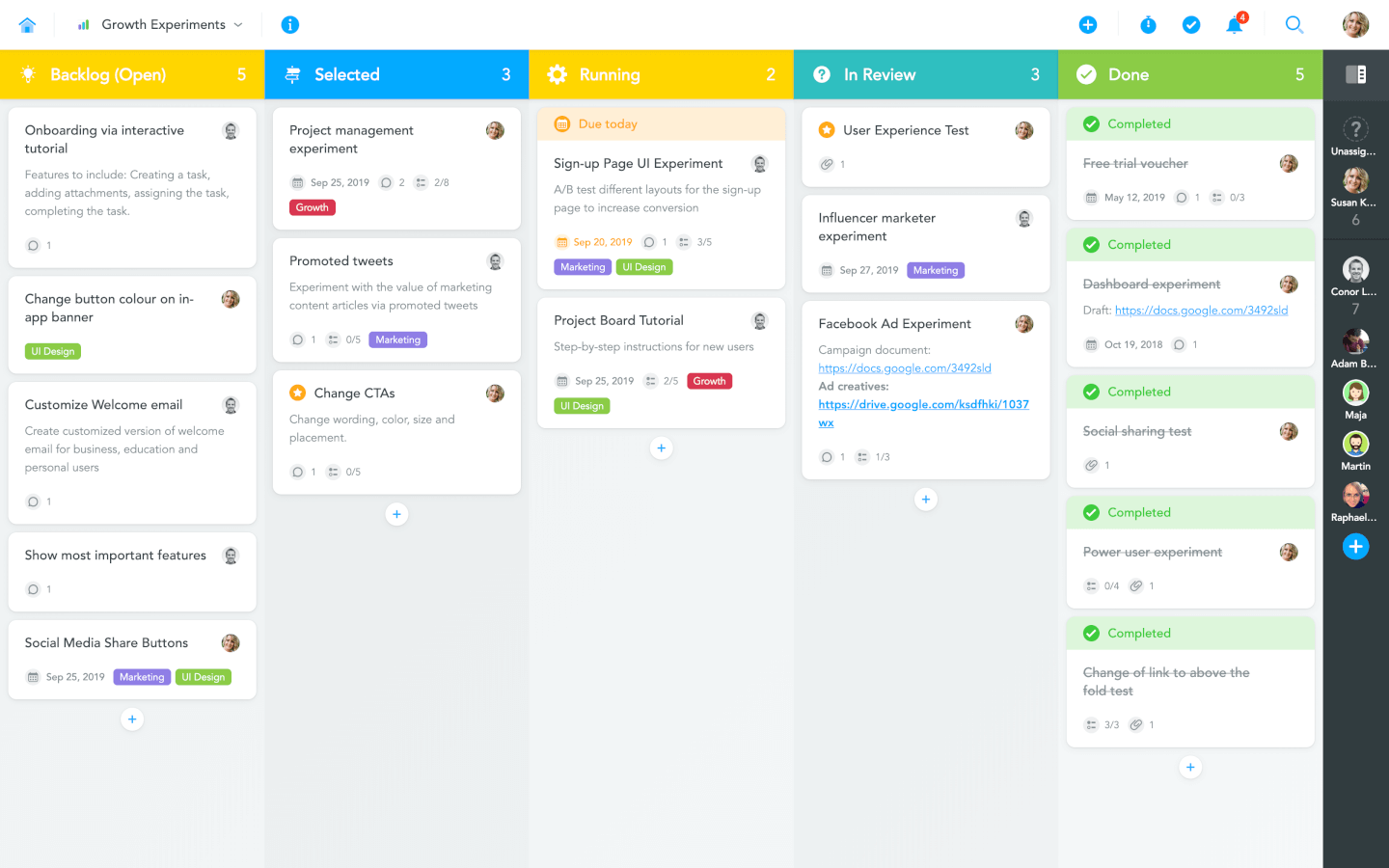
MeisterTask est un outil de gestion de projet conçu pour aider les équipes à automatiser les flux de travail et à organiser les tâches efficacement. Il s'adresse aux équipes recherchant une approche simplifiée pour gérer les projets avec un minimum d'interventions manuelles.
Pourquoi MeisterTask est une bonne alternative à Trello : MeisterTask simplifie la gestion de projet grâce à des fonctionnalités d'automatisation qui réduisent les tâches manuelles répétitives. Ses tableaux Kanban entièrement personnalisables permettent à votre équipe d'adapter les flux de travail aux besoins spécifiques de chaque projet. De plus, ses widgets de suivi de progression offrent des mises à jour en temps réel sur l'état d'avancement des projets, permettant à tous de rester synchronisés.
Fonctionnalités et intégrations remarquables de MeisterTask :
Fonctionnalités : des autorisations basées sur les rôles permettent à votre équipe de contrôler l'accès aux tâches et aux projets pour une meilleure sécurité et organisation. La vue agenda aide les utilisateurs à gérer leurs priorités personnelles en regroupant les tâches de plusieurs projets en un seul endroit. MeisterTask propose également des listes de contrôle au sein des tâches pour décomposer les tâches complexes en étapes plus petites et réalisables pour une meilleure clarté et exécution.
Intégrations : Slack, Google Drive, Dropbox, Microsoft Teams, GitHub, Zapier, Salesforce, Asana, Trello et Outlook.
Pros and Cons
Pros:
- Inclut des relations de tâches pour gérer les dépendances de projet
- Propose un suivi du temps intégré pour surveiller la productivité
- Simplifie la création de tâches grâce aux modèles et aux automatisations
Cons:
- Peu adapté aux équipes utilisant des méthodologies traditionnelles
- Les relations de tâches peuvent être complexes pour les débutants

ClickUp
Meilleur forfait gratuit parmi les alternatives à Trello
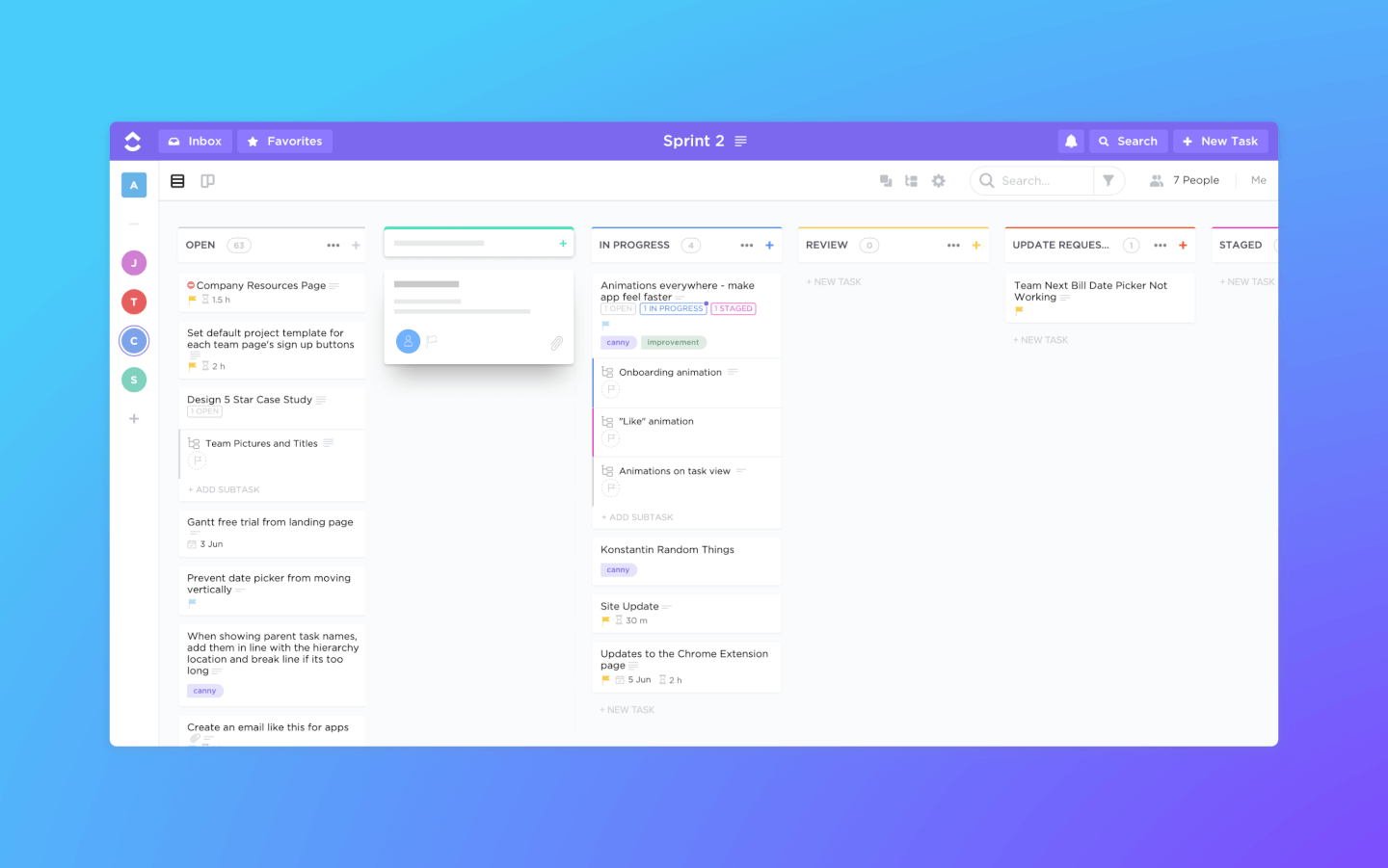
ClickUp est un logiciel de gestion de projets et un outil Kanban doté de fonctionnalités puissantes pour gérer et mener à bien tous les projets de votre équipe sur une seule plateforme. Les utilisateurs peuvent planifier des projets, programmer des tâches et gérer les ressources dans un espace de travail centralisé via des tableaux Kanban, ainsi que des calendriers, des diagrammes de Gantt, des chronologies et plus encore.
Les fonctionnalités de gestion des tâches incluent des listes de vérification pour les tâches, des sous-tâches et des modèles de tâches, ainsi que la possibilité de filtrer, trier, rechercher, réorganiser facilement et visualiser les tâches de la manière la plus pratique pour l'équipe. Les utilisateurs peuvent également créer des diagrammes de Gantt, des calendriers et des chronologies pour visualiser les tâches.
ClickUp propose aussi des outils pour créer, partager et éditer de manière collaborative des wikis et des documents. Les utilisateurs peuvent commenter des documents et des tâches, attribuer des commentaires et discuter avec d'autres membres de l'équipe pour une meilleure communication et collaboration. Les fonctionnalités de reporting incluent la possibilité de créer des tableaux de bord personnalisés, ainsi que six types de rapports intégrés pour le suivi d'équipe.
ClickUp offre des intégrations natives avec Slack, G Suite, Dropbox et de nombreux autres outils, ainsi que plus de 1 000 intégrations via Zapier.
Le forfait gratuit de ClickUp est complet et inclut toutes les fonctionnalités principales. Le forfait illimité commence à 5 $ par mois et par utilisateur et offre des fonctionnalités supplémentaires.
New Product Updates from ClickUp
ClickUp Adds Meetings Hub, Super Agent Templates, and ZoomInfo Integration
ClickUp adds a searchable Meetings Hub, new ways to clone and template Super Agents, and a ZoomInfo integration through the App Center. These updates improve meeting retrieval, agent reuse, and access to sales intelligence. For more information, visit ClickUp’s official site.

Workzone
Meilleur accompagnement personnalisé pour l'intégration et la formation
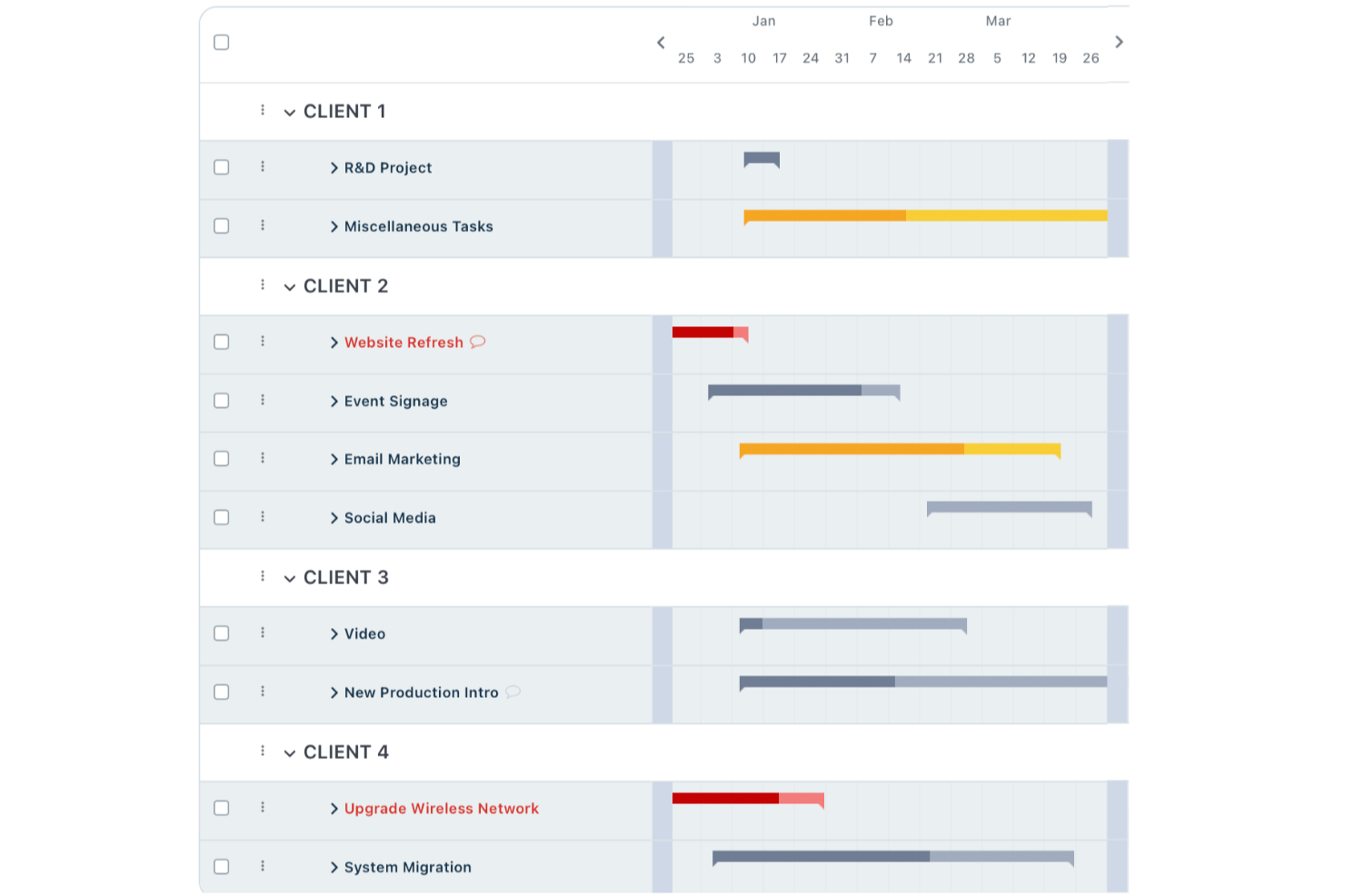
Workzone est une plateforme de gestion de projets conçue pour les équipes qui ont besoin de plus de structure et de contrôle que ce que proposent de simples tableaux kanban. Elle est idéale pour les équipes de marketing, des opérations ou des services professionnels souhaitant gérer des projets complexes, suivre la progression et améliorer la visibilité inter-équipes.
Pour qui Workzone est-il le mieux adapté ?
Entreprises de taille moyenne dans le marketing, les opérations ou les équipes créatives ayant besoin de structurer leurs projets et d'un accompagnement dédié lors de la prise en main.
Pourquoi Workzone est une bonne alternative à Trello (options gratuites et payantes)
J'ai choisi Workzone car il va bien au-delà de ce que Trello offre aux équipes qui ont besoin d'un réel accompagnement pour l'intégration. Lorsque mon équipe a commencé à l'utiliser, nous avons bénéficié de l'accompagnement d'un spécialiste dédié à l'intégration, qui nous a guidés lors de la configuration, des flux de travail et des bonnes pratiques pour notre utilisation spécifique. J'apprécie que cela ne se limite pas à une seule session : Workzone offre des ressources de formation continues afin que les nouveaux membres puissent se familiariser sans perturber le reste de l'équipe. Pour les équipes passant de Trello à Workzone, ce type de soutien structuré facilite grandement l'adoption.
Fonctionnalités clés de Workzone
- Formulaires de demande de projet : Soumettez et suivez les nouvelles demandes de travail via un formulaire d'entrée standardisé, directement lié à votre pipeline de projets.
- Outils d'épreuves créatives : Révisez et annotez les ressources créatives en temps réel, avec un retour centralisé au sein de la tâche pour organiser les cycles de corrections.
- Modèles de projet : Créez des modèles de projet réutilisables afin de lancer des workflows cohérents sans devoir reconstruire la structure à chaque fois.
- Gestion de la charge de travail : Visualisez la capacité de l'équipe sur l'ensemble des tâches et projets actifs afin de détecter les conflits de ressources avant que cela n'impacte les délais de livraison.
Intégrations Workzone
Workzone propose des intégrations natives avec Slack, Microsoft Teams, Dropbox, Box et Google Drive, ainsi qu'une API pour des intégrations personnalisées.
Pros and Cons
Pros:
- Sessions d'intégration personnalisées pour les nouvelles équipes
- Options détaillées de rapport sur les projets et les tâches
- Outils puissants pour la gestion de portefeuille et des ressources
Cons:
- Pas de version gratuite pour les petites équipes
- L'interface paraît datée comparée à des outils plus récents
New Product Updates from Workzone

Workzone Enterprise Adds Multi-Stage Approval Workflows
Workzone Enterprise now includes Approval Workflows, enabling multi-stage document approvals to standardize complex processes and reduce manual effort. For more information, visit Workzone's official site.
 .
.
Kanban Zone
Meilleur tableau Kanban multi-portefeuilles
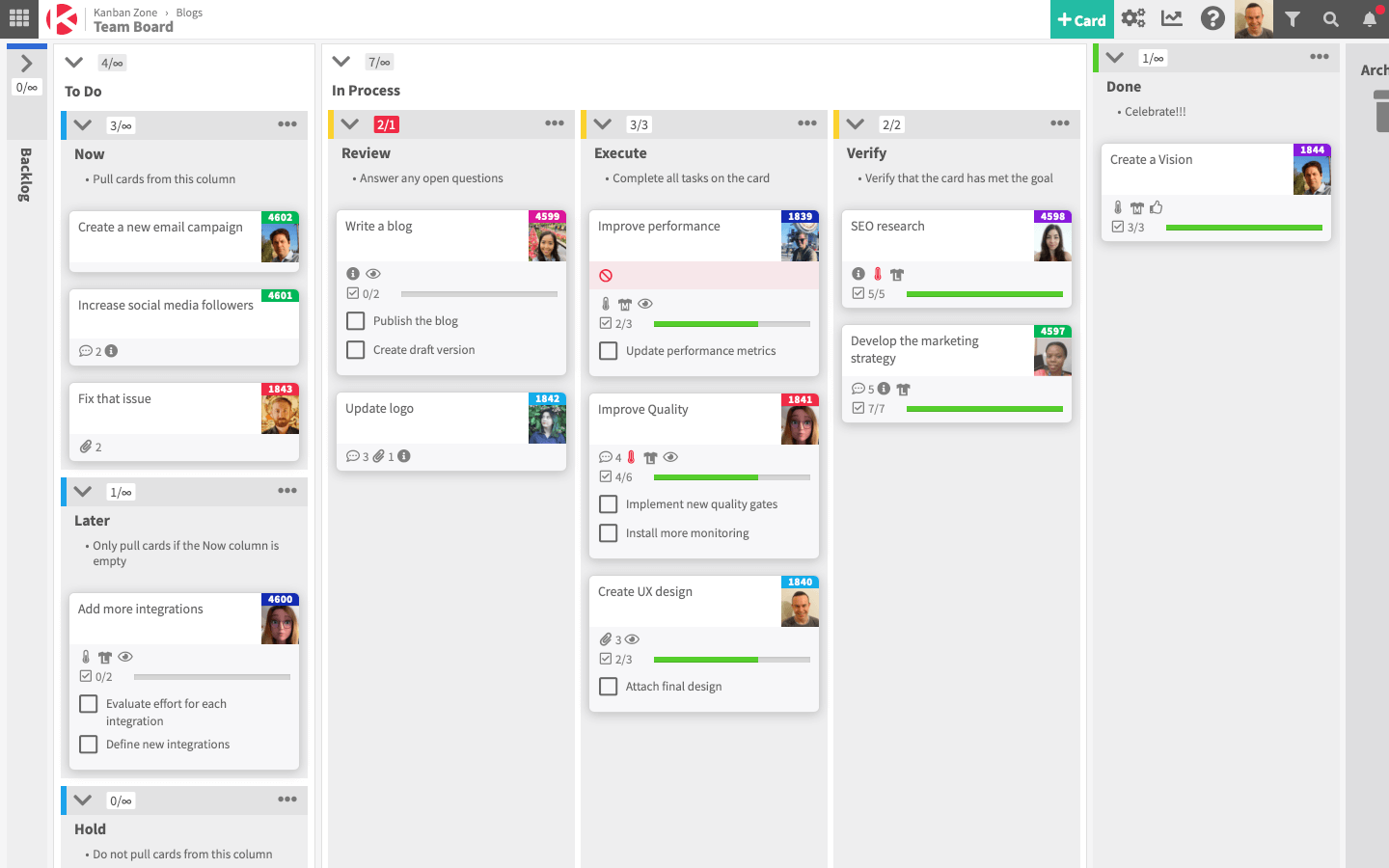
Kanban Zone est un outil de gestion de projet conçu pour les équipes et organisations gérant plusieurs projets au sein de portefeuilles. Il offre un suivi visuel des tâches afin d'améliorer l'efficacité des flux de travail et la collaboration entre les membres de l'équipe.
Pourquoi Kanban Zone est une bonne alternative à Trello : Kanban Zone propose des tableaux Kanban hautement personnalisables qui permettent à votre équipe de suivre les tâches et projets à travers de multiples portefeuilles. Sa fonctionnalité de hiérarchie de cartes vous permet également de décomposer des projets complexes en tâches plus petites, les rendant ainsi plus faciles à gérer. De plus, grâce à des dispositions de tableaux flexibles, vous pouvez adapter les flux de travail aux besoins de différentes équipes et projets.
Fonctionnalités et intégrations remarquables de Kanban Zone :
Fonctionnalités : un outil de cartographie des dépendances aide votre équipe à identifier et résoudre les dépendances entre tâches afin d'éviter les retards. La fonctionnalité Swimlane permet de catégoriser les tâches par priorité, équipe ou étape du projet pour une meilleure visibilité. De plus, les fonctionnalités de collaboration en temps réel garantissent que les mises à jour et modifications sont instantanément reflétées sur tous les tableaux afin d’assurer l’alignement de l'équipe.
Intégrations : Jira, Slack, Google Drive, Microsoft Teams, GitHub, Trello, Dropbox, Salesforce, Asana et Zapier.
Pros and Cons
Pros:
- Prend en charge des dispositions de tableaux hautement personnalisables
- Permet des mises à jour en temps réel pour une collaboration instantanée
- Gère efficacement les flux de travail multi-équipes
Cons:
- Nécessite du temps pour personnaliser et configurer les tableaux
- Peut sembler excessif pour les projets d'une seule équipe
Autres outils alternatifs à Trello
Voici une liste de quelques autres alternatives à Trello qui méritent votre attention.
- Shortcut
Idéal pour les équipes de développement
- Hygger
Idéal pour le développement logiciel
- Bonsai Agency Software
Idéal pour les agences
- Taskworld
Idéal pour la grande variété de fonctionnalités
- Kissflow Workflow
Meilleur outil Kanban collaboratif
- Zenhub
Idéal pour la gestion de projets agile dans GitHub
- ProjectManager
Meilleur outil Kanban avec fonctionnalités de rapports
- Planview LeanKit
Idéal pour la gestion de projet lean
- Businessmap
Idéal pour la gestion de portefeuille agile
- Pneumatic Workflow
Idéal pour rationaliser les projets digitaux


Logiciels de gestion de projet associés
Si vous n’avez toujours pas trouvé ce que vous cherchez ici, consultez ces autres outils associés que nous avons testés et évalués :
- Logiciels de gestion de projet
- Logiciels de gestion des tâches
- Outils de collaboration
- Créateurs de diagrammes de Gantt
- Logiciels de suivi de projet
- Logiciels de planification de projet
Comment j'évalue les alternatives à Trello
J'examine les alternatives à Trello selon deux niveaux : un socle de base que chaque outil doit atteindre, et des éléments différenciants—comme les vues Gantt, la profondeur de l'automatisation et le suivi de la charge de travail—qui déterminent le meilleur choix pour votre équipe.
Fonctionnalités de base (Pré-requis pour cette liste)
Lorsque je sélectionne des outils pour ma liste, j'attribue à chacun une note de 0 (la fonctionnalité n'est pas proposée) à 5 (excellence dans ce domaine) pour chaque fonctionnalité clé listée ci-dessous. Ensuite, je calcule le score total de l'outil en pourcentage. Chaque outil doit atteindre un score total minimum de 75% pour être pris en compte.
- Tableaux de tâches visuels : J'évalue si l'outil propose des tableaux Kanban avec glisser-déposer, colonnes personnalisables, filtres de cartes, et options de regroupement—le type de flexibilité dont les équipes ont besoin au quotidien.
- Multiples vues de projet : Au-delà du simple tableau, je vérifie la présence de vues en liste, calendrier, Gantt/chronologie et tableau afin que les équipes puissent changer de perspective en cours de sprint sans avoir à jongler entre plusieurs outils.
- Essentiels de la gestion des tâches : Chaque outil doit permettre d'attribuer des responsables, des dates d'échéance, des sous-tâches, des dépendances, des pièces jointes et des champs personnalisés—des caractéristiques clés pour éviter que les cartes ne deviennent des post-its sans suivi.
- Automatisation des workflows : J'analyse si des déclencheurs basés sur des règles gèrent des scénarios réels, comme l’assignation automatique d’une carte lors d’un changement de colonne ou la création de tâches récurrentes pour les points hebdomadaires.
- Outils de collaboration d'équipe : Espaces de travail partagés, mentions @, fils d'activité et notifications en temps réel sont pris en compte—surtout pour les équipes distribuées à travers plusieurs fuseaux horaires.
- Intégrations & accès API : J'examine les listes de connecteurs natifs pour des outils comme Slack, GitHub, Google Workspace et Figma, et si la plateforme propose une API publique et prend en charge des outils iPaaS comme Zapier ou Make.
Une fois la liste des outils répondant à ces critères établie, j'analyse ce qui distingue chaque plateforme.
Facteurs différenciants (les éléments qui font la différence)
Voici comment je compare et distingue les différents fournisseurs :
Fonctionnalités exceptionnelles
Je prête une attention particulière aux vues de charge de travail, car elles permettent à un chef de projet de repérer une surcharge avant qu'elle ne fasse dérailler un sprint. Les tableaux de bord et rapports sont tout aussi importants—j'évalue si l'outil peut présenter des indicateurs de santé du projet et des données de burndown sans imposer une exportation vers un tableur. Le suivi du temps intégré est un autre critère clé, surtout pour les équipes qui doivent comptabiliser les heures par tâche pour la facturation ou la planification de la capacité.
Au-delà des fonctionnalités
L'expérience de migration compte beaucoup lors d'un passage depuis Trello—je regarde si la plateforme propose une importation native depuis Trello qui conserve les tableaux, cartes et pièces jointes, sans avoir à tout reconstruire manuellement. La structure tarifaire est tout aussi cruciale, notamment si le forfait gratuit est réellement utilisable ou s'il ne s'agit que d'une simple démo. J'analyse aussi la capacité de l'outil à monter en charge : une équipe de cinq personnes ne doit pas être submergée, mais la même plateforme doit rester performante lorsque le nombre de projets ou de collaborateurs grimpe à cinquante ou plus.
Fonctionnalités clés de Trello
Voici quelques fonctionnalités clés de Trello que votre logiciel alternatif devrait pouvoir reproduire ou améliorer afin de répondre à vos besoins :
- Tableaux : les tableaux visuels de Trello offrent une vue d’ensemble claire des différents projets et aident à organiser les tâches dans des contextes spécifiques.
- Listes : les listes au sein des tableaux permettent aux utilisateurs de classer les tâches par étapes ou par types, ce qui facilite la gestion des flux de travail et l’identification des éléments nécessitant une attention particulière.
- Cartes : chaque tâche est représentée par une carte qui peut être déplacée d’une liste à l’autre pour indiquer sa progression, ce qui permet de suivre visuellement l’état de chaque tâche.
- Étiquettes : les étiquettes ajoutent aux cartes des balises associées à des couleurs, permettant aux utilisateurs d’identifier rapidement les catégories de tâches, les priorités ou les services concernés.
- Listes de contrôle : les listes de contrôle au sein des cartes décomposent les tâches en étapes plus petites, afin de s’assurer que les utilisateurs ne négligent aucun détail et puissent facilement suivre les sous-tâches.
- Dates d’échéance : l’ajout de dates d’échéance aux cartes aide les utilisateurs à suivre les délais et garantit l’achèvement des tâches dans les temps.
- Pièces jointes : l’ajout de pièces jointes aux cartes regroupe tous les documents et fichiers pertinents au même endroit, facilitant leur accès et la collaboration entre les membres de l’équipe.
- Commentaires : la fonctionnalité de commentaires sur les cartes permet aux membres de l’équipe de communiquer directement au sujet de tâches spécifiques, améliorant la collaboration et conservant toutes les discussions dans leur contexte.
- Intégrations : Trello s’intègre à divers outils tels que Slack, Google Drive et bien d’autres, ce qui enrichit ses fonctionnalités et fluidifie le flux de travail en le connectant à d’autres logiciels que j’utilise.
- Extensions : ces modules complémentaires étendent les fonctionnalités de Trello en proposant des options supplémentaires telles que des vues de calendrier, l’automatisation et des champs personnalisés pour adapter l’outil à vos besoins spécifiques.
FAQ sur Trello
Voici quelques questions courantes sur Trello auxquelles nous avons pensé répondre.
À quoi sert Trello ?
Voici 10 utilisations de Trello :
\u003col\u003e
\u003cli\u003eGestion de projet\u003c/li\u003e
\u003cli\u003eGestion des flux de travail et automatisation des flux de travail\u003c/li\u003e
\u003cli\u003ePlanification d’événements\u003c/li\u003e
\u003cli\u003eGestion des tâches personnelles\u003c/li\u003e
\u003cli\u003eSuivi du temps\u003c/li\u003e
\u003cli\u003eGestion de sites web et de blogs\u003c/li\u003e
\u003cli\u003eOrganisation de fichiers ou de collections numériques\u003c/li\u003e
\u003cli\u003eRecrutement et intégration des employés\u003c/li\u003e
\u003cli\u003eStockage et partage de fichiers\u003c/li\u003e
\u003cli\u003ePlanification des produits et élaboration de feuilles de route\u003c/li\u003e
\u003c/ol\u003e
Trello est-il une application Windows ?
\u003cspan style=\u0022font-weight: 400\u0022\u003eTrello fonctionne sur tous les appareils web et mobiles. L’application propose des applications mobiles pour Android et iOS, ainsi que des applications de bureau pour macOS et Windows.\u003c/span\u003e
Trello est-il à code source ouvert ?
Non. Trello est un logiciel SaaS à code source fermé. Parmi les alternatives à code source ouvert similaires à Trello figurent Taiga, Kanboard, Wekan, TaskBoard et Restyaboard.
Qu’est-ce que le Kanban ?
Le Kanban est une méthode de gestion de projet et des flux de travail fondée sur un système de gestion du travail mis au point dans les usines Toyota dans les années 1960. La méthode Kanban vous permet de limiter le multitâche, d’optimiser l’efficacité de votre travail en cours et d’améliorer la rapidité et la qualité du travail produit par vos équipes collaboratives et autogérées.
Trello est-il fondé sur le Kanban ?
Le logiciel de collaboration Trello repose sur la méthode Kanban et utilise des tableaux Kanban, des cartes et des structures en couloirs, caractéristiques de cette méthode.
Que faire si je cherche des alternatives à d’autres outils ?
Si vous souhaitez trouver des alternatives à l’un de vos autres outils, consultez certaines de nos autres listes d’alternatives :
\u003c!– wp:list –\u003e
\u003cul\u003e
\u003cli style=\u0022list-style-type: none\u0022\u003e
\u003cul\u003e\u003c!– wp:list-item –\u003e
\u003cli\u003e\u003ca href=\u0022https://thedigitalprojectmanager.com/tools/microsoft-project-alternatives/\u0022\u003eAlternatives à Microsoft Project\u003c/a\u003e\u003c/li\u003e
\u003c/ul\u003e
\u003c/li\u003e
\u003c/ul\u003e
\u003c!– /wp:list-item –\u003e \u003c!– wp:list-item –\u003e
\u003cul\u003e
\u003cli style=\u0022list-style-type: none\u0022\u003e
\u003cul\u003e
\u003cli\u003e\u003ca href=\u0022https://thedigitalprojectmanager.com/tools/best-basecamp-alternatives/\u0022\u003eAlternatives à Basecamp\u003c/a\u003e\u003c/li\u003e
\u003c/ul\u003e
\u003c/li\u003e
\u003c/ul\u003e
\u003c!– /wp:list-item –\u003e \u003c!– wp:list-item –\u003e
\u003cul\u003e
\u003cli style=\u0022list-style-type: none\u0022\u003e
\u003cul\u003e
\u003cli\u003e\u003ca href=\u0022https://thedigitalprojectmanager.com/tools/best-smartsheet-alternative/\u0022\u003eAlternatives à Smartsheet\u003c/a\u003e\u003c/li\u003e
\u003c/ul\u003e
\u003c/li\u003e
\u003c/ul\u003e