



Wrike vs. Zoho Projects: vertailu ja asiantuntija-arviot 2026



Wrike on projektinhallinta-alusta, joka auttaa tiimejä hallitsemaan työtä tehokkaasti ja selkeästi. Zoho Projects keskittyy tehtävien järjestämiseen ja tiimityöhön. Vaikka molemmat työkalut tukevat sujuvampia projektityönkulkuja, niiden mukautus- ja integraatiovaihtoehdot eroavat toisistaan – nämä ovat keskeisiä tekijöitä tiimeille, jotka etsivät tarpeisiinsa sopivaa ratkaisua.
Tässä artikkelissa vertaillaan yksityiskohtaisesti näitä projektinhallintaohjelmistoja sekä tarkastellaan niiden ominaisuuksia, etuja ja haittoja, hinnoittelua ja muuta.
Wrike vs. Zoho Projects: An Overview
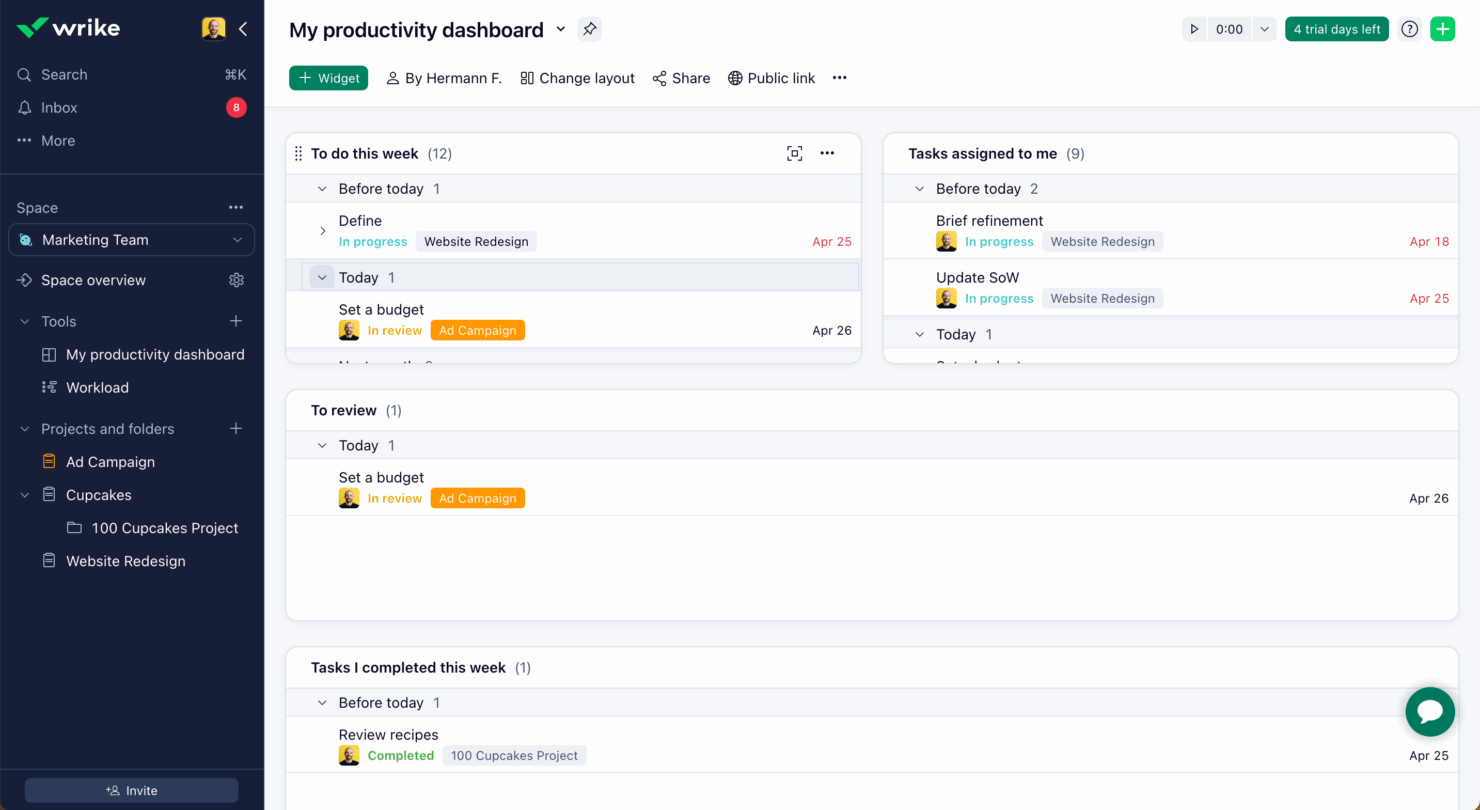
Wrike
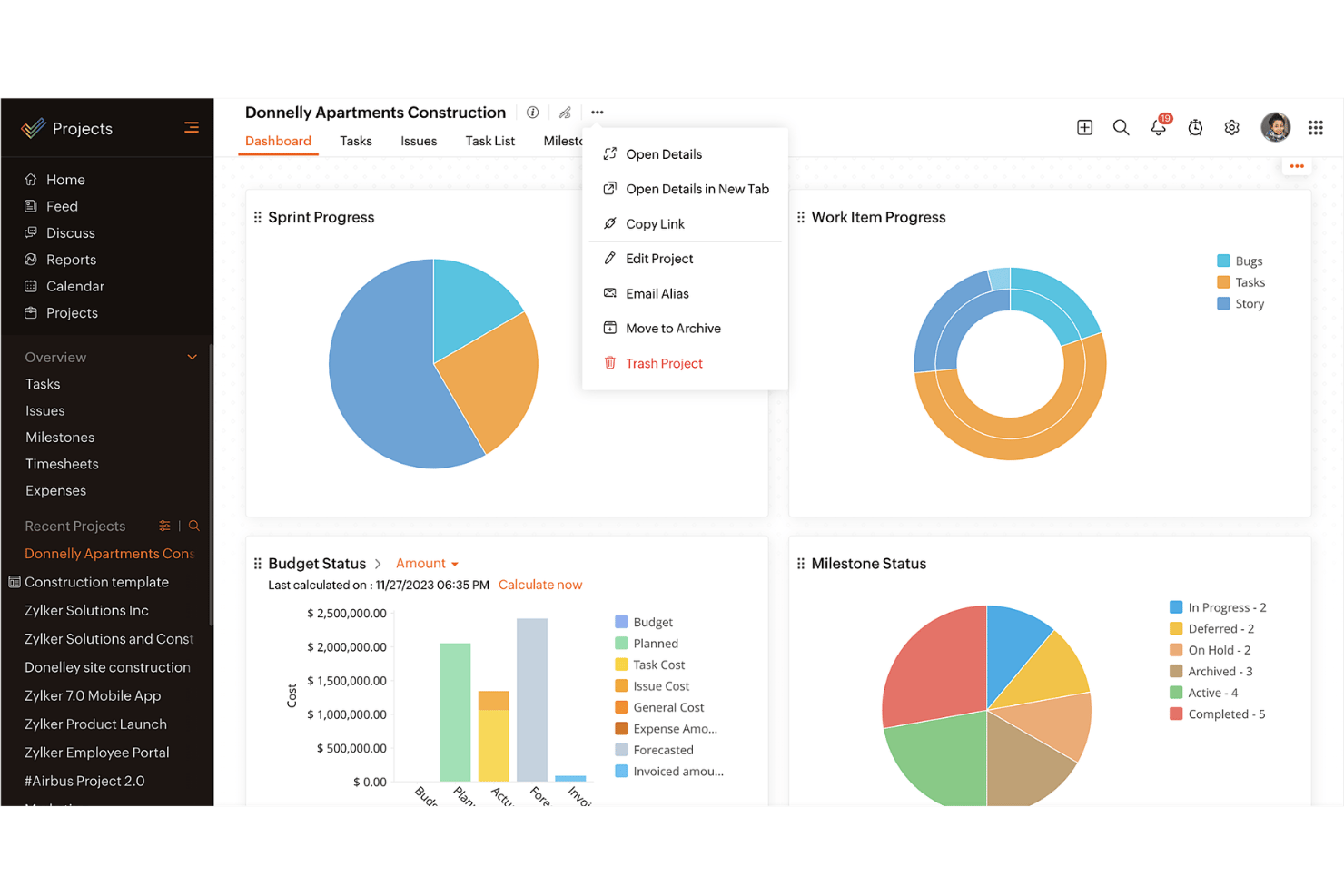
Zoho Projects
Why Trust Our Software Recommendations
Our team has been testing and reviewing software since 2012. As project managers ourselves, we know how difficult—and important—it is to choose the right software.
For this guide, we evaluated tools using hands-on testing and independent research, scoring tools using our selection criteria. We also draw on insights from industry thought leaders and practicing project management experts.
Our reviews reflect our human editorial judgment, not a sales pitch.
Expert reviewers:
Wrike vs. Zoho Projects Pricing Comparison
| Wrike | Zoho Projects | |
|---|---|---|
| Free Trial | 14-day free trial | Free plan available |
| Pricing | From $10/user/month (billed annually) | From $4/user/month (billed annually) |
Wrike vs. Zoho Projects Feature Comparison
Tässä ominaisuuskohtaisessa vertailussa tuodaan esiin Wriken ja Zoho Projectsin keskeiset toiminnot, jotta voit arvioida, mikä alusta tukee parhaiten projektinhallintatarpeitasi.
| Wrike | Zoho Projects | |
|---|---|---|
| API | ||
| Batch Permissions & Access | ||
| Budgeting | ||
| Calendar Management | ||
| Collaboration Support | ||
| Contact Management | ||
| Contact Sharing | ||
| Customer Management | ||
| Dashboard | ||
| Dashboards | ||
| Data Export | ||
| Data Import | ||
| Data Visualization | ||
| Dependency Tracking | ||
| Document Sharing | ||
| Expense Tracking | ||
| External Integrations | ||
| File Sharing | ||
| Gantt Charts | ||
| Kanban Boards | ||
| Multi-User | ||
| Notifications | ||
| Project Management | ||
| Resource Management | ||
| Scheduling | ||
| Task Scheduling/Tracking | ||
| Third-Party Plugins/Add-Ons | ||
| Time Management | ||
| Travel Management | ||
| Workflow Management |
Wriken ja Zoho Projectsin integraatiot
| Integraatio | Wrike | Zoho Projects |
| Slack | ✅ | ❌ |
| Microsoft Teams | ✅ | ✅ |
| Google Drive | ✅ | ✅ |
| Salesforce | ✅ | ❌ |
| Dropbox | ✅ | ✅ |
| QuickBooks | ❌ | ✅ |
| GitHub | ✅ | ❌ |
| Zoho CRM | ❌ | ✅ |
| API | ✅ | ✅ |
| Zapier | ✅ | ❌ |
Wrike integroituu Slackiin, mikä tukee reaaliaikaista viestintää ja pitää tiimisi ajan tasalla ilman työkalujen välillä vaihtamista. Tämä sopii hyvin tiimeille, jotka luottavat pikaviestintään.
Zoho Projects muodostaa yhteyden Zoho CRM:ään, mikä mahdollistaa tietojen sujuvan vaihdon myynnin ja projektinhallinnan välillä niille, jotka käyttävät jo Zohon ohjelmistopakettia. Wrike keskittyy reaaliaikaisen yhteistyön työkaluihin, kun taas Zoho Projects painottaa sisäisen ekosysteemin tehokkuutta.
Wriken ja Zoho Projectsin tietoturva, vaatimustenmukaisuus & luotettavuus
| Tekijä | Wrike | Zoho Projects |
| Tietojen salaus | Wrike käyttää kehittynyttä AES-256-salausta levossa oleville ja siirrettäville tiedoille. | Zoho Projects käyttää AES-256-salausta suojatakseen tietoja sekä niiden ollessa levossa että siirron aikana. |
| Sääntelyn mukaisuus | Wrike on GDPR:n mukainen ja tarjoaa HIPAA-vaatimustenmukaisuutta tukevia ominaisuuksia. | Zoho Projects on GDPR:n mukainen ja tarjoaa HIPAA-vaatimustenmukaisuuteen liittyviä työkaluja. |
| Käytettävyyden luotettavuus | Wrike takaa 99 %:n käytettävyyden vankan infrastruktuurin avulla. | Zoho Projects takaa 99,9 %:n käytettävyyden luotettavan palvelinarkkitehtuurin tukemana. |
Wrike ja Zoho Projects tarjoavat molemmat vahvoja tietoturva- ja vaatimustenmukaisuusominaisuuksia, mutta Wrikellä saattaa olla etulyöntiasema kehittyneen salauksensa ja kohdennettujen vaatimustenmukaisuusvaihtoehtojensa ansiosta.
Kun valitset palveluntarjoajaa, huomioi toimialasi erityiset vaatimustenmukaisuustarpeet, salausstandardit, käytettävyyttä koskevat takuut sekä se, miten kukin työkalu vastaa organisaatiosi tietoturvakäytäntöjä.
Wrike vs. Zoho Projects - helppokäyttöisyys
| Tekijä | Wrike | Zoho Projects |
| Käyttöliittymä | Wrike tarjoaa selkeän ja muokattavan käyttöliittymän, jonka avulla voit mukauttaa koontinäytöt tarpeidesi mukaan. | Zoho Projects tarjoaa suoraviivaisen käyttöliittymän, jossa on loogiset navigointipolut. |
| Käyttöönotto | Wrike sisältää interaktiivisia opastuksia ja resursseja nopeaa aloitusta varten. | Zoho Projects tarjoaa ohjatun käyttöönoton hyödyllisine kehotteineen ja vinkkeineen. |
| Tuki | Wrike tarjoaa ympärivuorokautista tukea ja kattavan ohjekeskuksen. | Zoho Projects tarjoaa tukea työaikana ja laajan tietopohjan. |
Wriken helppokäyttöisyyttä parantavat sen muokattava käyttöliittymä ja ympärivuorokautinen tuki, joten se sopii erinomaisesti tiimeille, jotka tarvitsevat joustavuutta ja jatkuvaa apua.
Zoho Projects puolestaan erottuu edukseen yksinkertaisuudellaan ja intuitiivisella navigoinnillaan, vaikka sen rajoitetut tukiajat voivat olla haaste joillekin käyttäjille.
Wrike vs Zoho Projects: Pros & Cons
Wrike
- Wrike's proofing feature allows you to compare file versions dynamically.
- The user-friendly interface ensures easy navigation for your team.
- Wrike's AI features are available in all plans at no extra cost.
- It can be unclear where form responses are stored within the tool.
- Some integrations require an additional cost, regardless of the plan.
- Two-factor authentication is only available with the enterprise plan.
Zoho Projects
- Task dependencies are highly visual and easy to set up.
- Built-in time tracking integrates smoothly with billing features.
- Customizable project templates support repeatable workflows.
- Reporting customization can be limited for advanced needs.
- Mobile app notifications do not always sync in real time.
- Gantt chart drag-and-drop can feel sluggish with large projects.
Best Use Cases for Wrike and Zoho Projects
Wrike
- Marketing Teams Wrike’s proofing feature helps you streamline creative approval processes with ease.
- Creative Agencies Wrike’s dynamic file version comparison keeps your creative projects on track.
- IT Departments Wrike’s user-friendly interface simplifies complex project coordination for your team.
- Product Development Wrike’s AI features boost your team’s productivity without extra costs.
- Event Management Wrike’s task scheduling ensures your events are planned and executed flawlessly.
- Construction Projects Wrike’s robust project tracking keeps your construction timelines and budgets in check.
Zoho Projects
- Small Agencies Kanban boards, time tracking, and client billing streamline project delivery and reporting for agency teams.
- IT Departments Issue tracking, blueprint automations, and strong permission controls provide what IT teams need for complex internal projects.
- Consulting Firms Time sheets, detailed reports, and project-level billing help consultants keep track of client hours and invoicing.
- Remote Teams Robust collaboration tools, document sharing, and project forums help distributed users stay connected.
- Marketing Teams Reusable templates, task dependencies, and timeline tracking make repeated campaigns run smoothly and transparently.
- Construction Projects Gantt charts, milestones, and resource allocation features support the scheduling needs of construction and field project managers.
Differences Between Wrike and Zoho Projects
Tässä vertailussa esitellään Wriken ja Zoho Projectsin keskeiset erot, jotta voit päättää, kumpi alusta sopii parhaiten tarpeisiisi.
| Wrike | Zoho Projects | |
|---|---|---|
| Automation | Wrike offers advanced automation capabilities for complex workflows | Zoho Projects includes basic automation tools for task management. |
| Customization | Wrike offers extensive customization with dashboards and workflows. | Zoho Projects provides basic customization options for simpler setups. |
| Integrations | Wrike integrates with a wide range of third-party apps like Slack | Zoho Projects integrates well within the Zoho Ecosystem, like Zoho CRM. |
| Pricing | Wrike uses a tiered subscription with additional costs for premium features. | Zoho Projects follows a tiered pricing model with fewer hidden costs. |
| User Interface | Wrike features a clean, customizable UI for tailored experiences. | Zoho Projects has a straightforward interface with logical navigation. |
| Visit WrikeOpens new window | Read Zoho Projects ReviewOpens new window |
Similarities Between Wrike and Zoho Projects
Vaikka Wrike ja Zoho Projects eroavat toisistaan, niillä on myös useita yhteisiä perusominaisuuksia, jotka tukevat tehokasta projektinhallintaa eri tiimeissä.
| Collaboration | Both tools support team collaboration through features like file sharing and real-time updates. Wrike connects with various communication apps, while Zoho Projects includes built-in chat and discussion forums. |
|---|---|
| Mobile Usability | Wrike and Zoho Projects both offer mobile apps for managing projects on the go. Wrike’s app allows offline access, while Zoho Projects’ app is known for its user-friendly design. |
| Reporting | Both platforms offer reporting tools to help you track project progress. Wrike provides advanced analytics and fully customizable reports, while Zoho Projects includes pre-built reports that can be tailored to your needs. |
| Task Management | Both Wrike and Zoho Projects offer strong task management features that let you assign, track, and prioritize work efficiently. Wrike stands out with its detailed task dependencies, while Zoho Projects offers easy-to-use task lists and Kanban boards. |
| Time Tracking | Both solutions include time tracking to monitor hours spent on tasks. Wrike integrates time tracking directly into its project management workflow, while Zoho Projects provides built-in timers and detailed timesheet reports. |
| Visit WrikeOpens new window Read Zoho Projects ReviewOpens new window | |