


ClickUp-projektinhallintaohjelmiston arvostelu vuodelle 2026



ClickUp is a project management software that helps teams plan, track, and collaborate on tasks in one workspace. It’s a great fit for fast-moving product teams, agencies balancing multiple clients, and operations leads managing cross-functional workflows. ClickUp helps your team stay aligned, save time, and keep work moving with less friction.
In this article, I'm sharing the results of dozens of hours spent training myself to use the tool, talking to project managers who use it, and having conversations with experts so that you have an easier time figuring out if this software is for you.
You’ll get a clear look at ClickUp’s features, pros and cons, best and worst use cases, pricing, and more. If you’re trying to find a tool that keeps your projects organized and your team on the same page, you’re in the right place.
ClickUp Evaluation Summary
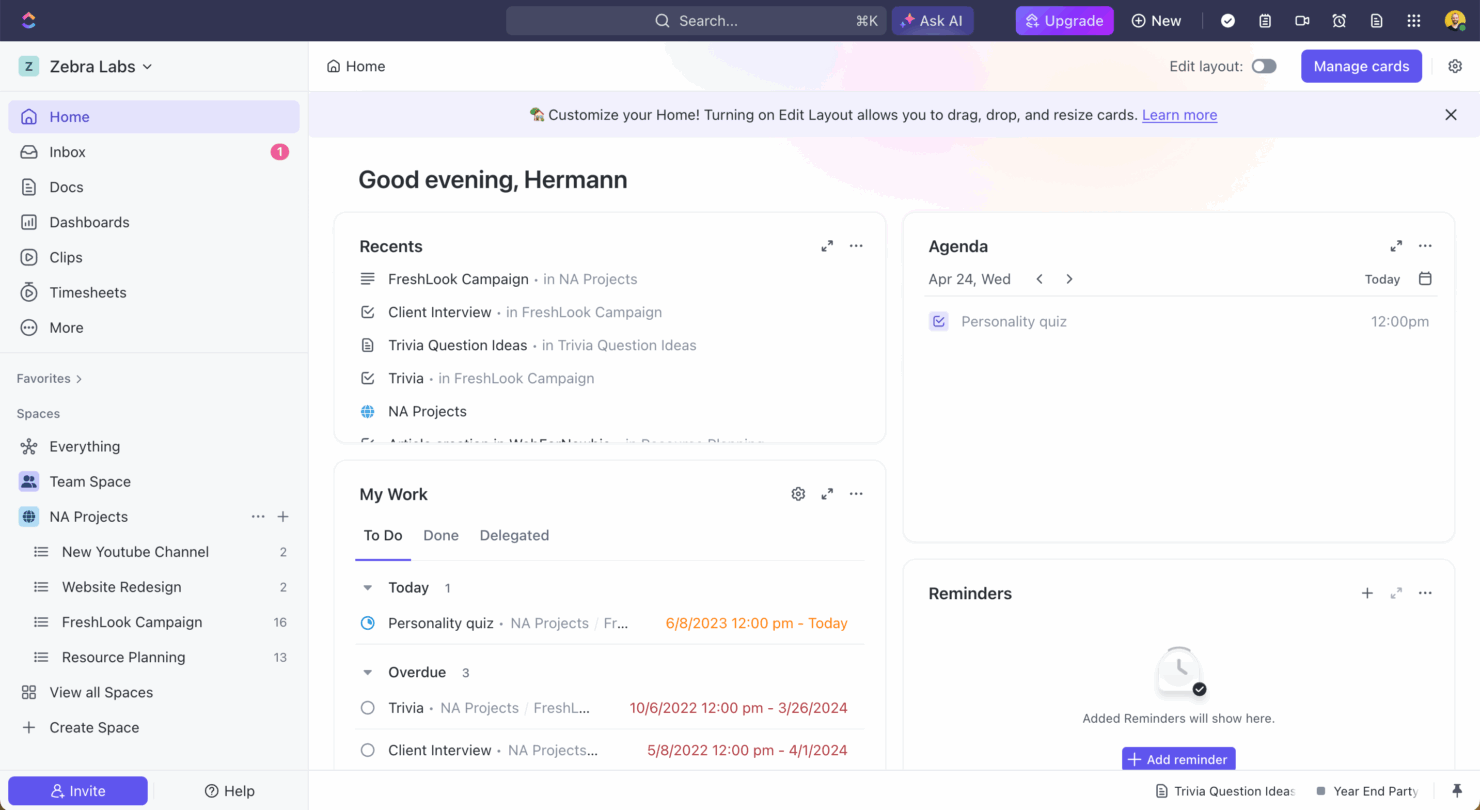
- From $7/user/month (billed annually)
- Free plan + free demo available
Why Trust Our Software Recommendations
Our team has been testing and reviewing software since 2012. As project managers ourselves, we know how difficult—and important—it is to choose the right software.
For this guide, we evaluated tools using hands-on testing and independent research, scoring tools using our selection criteria. We also draw on insights from industry thought leaders and practicing project management experts.
Our reviews reflect our human editorial judgment, not a sales pitch.
Expert reviewers:
ClickUp Overview
In my opinion, ClickUp is one of the most versatile project management software options out there, especially for teams that want to centralize everything in one place. Compared to competitors like Asana or Trello, it offers way more flexibility and customization, which is great if you’ve got complex workflows.
Unlike other big platforms in the market, where you can sense the patchwork approach to new features, most features within ClickUp integrate seamlessly and give you fewer reasons to leave the software for other work. You can send emails, brainstorm, start screen recordings, and even join Zoom meetings without leaving the tool. That said, it can feel overwhelming at first—there’s a steep learning curve if you’re not used to that level of depth.
I think it’s best suited for fast-paced teams who can spend a bit of time upfront learning the system and want the freedom to build out their own processes. If you’re looking for simplicity or just need a basic task board, you might be better off with something lighter. But if you want lots of features, good value, and room to scale, ClickUp’s a strong contender.
pros
-
Extensive task management features keep your projects organized and on track
-
Real-time collaboration makes team communication more effective
-
Built-in automations reduce manual work and speed up your workflow
cons
-
Users often find the learning curve steep due to its rich feature set
-
Some users report occasional performance lags when managing large projects
-
Mobile app can be less intuitive than the desktop version
Is ClickUp Right For Your Needs?
Who Would be a Good Fit for ClickUp?
ClickUp is perfect for creative agencies, tech startups, and marketing teams that need to manage multiple projects and deadlines. Its customizable interface and strong task management features allow your team to tailor workflows and keep every project organized. If your work requires real-time collaboration and communication, ClickUp’s capabilities make it an ideal choice for improving team productivity and efficiency.
Organizations that work with non-standardized projects, which typically require non-standard fields to capture information, can also benefit from ClickUp's flexible platform and custom fields.
-
Creative agencies
ClickUp's customizable dashboards and task automation features can help you manage client projects, track feedback and revisions, and keep creative teams aligned.
-
Tech startups
ClickUp supports agile development with sprints and real-time collaboration features that can help teams iterate quickly.
-
Marketing teams
You can streamline campaign planning and execution using ClickUp’s task dependencies and timelines.
-
Remote teams
ClickUp's real-time updates and collaboration tools keep everyone on the same page, no matter where they are.
-
Product managers
ClickUp’s roadmaps and goal-tracking features help you align development with business objectives.
-
Freelancers
You can track your tasks and deadlines efficiently with ClickUp’s simple task and time management tools.
Who Would be a Bad Fit for ClickUp?
ClickUp may not suit small teams or solo entrepreneurs who need a straightforward tool without a steep learning curve. Its extensive features can overwhelm users who need simple task tracking without customization. If your team prefers traditional project management methods or lacks the time to explore its complex functionalities, you might find ClickUp’s rich feature set more of a hindrance than a help. Companies that need only a subset of the features offered by ClickUp should probably look for a specialized tool instead.
-
Small businesses
ClickUp’s complexity might be overkill for those needing basic task management.
-
Non-tech savvy users
ClickUp’s comprehensive features can overwhelm teams without the tech skills or time to invest in setup and training.
-
Simple task tracking
If you only need to track basic to-do lists, ClickUp’s features can seem excessive.
-
Traditional offices
Teams relying on paper-based methods may find ClickUp’s digital platform challenging.
-
Short-term projects
The setup time for ClickUp might not be worth it for short-term or one-off projects.
-
Budget-conscious teams
If your budget is tight, the time investment to fully utilize ClickUp may not seem justified.
Our Review Methodology
How We Test & Score Tools
We’ve spent years building, refining, and improving our software testing and scoring system. The rubric is designed to capture the nuances of software selection and what makes a tool effective, focusing on critical aspects of the decision-making process.
Below, you can see exactly how our testing and scoring works across seven criteria. It allows us to provide an unbiased evaluation of the software based on core functionality, standout features, ease of use, onboarding, customer support, integrations, customer reviews, and value for money.
Core Functionality (25% of final scoring)
The starting point of our evaluation is always the core functionality of the tool. Does it have the basic features and functions that a user would expect to see? Are any of those core features locked to higher-tiered pricing plans? At its core, we expect a tool to stand up against the baseline capabilities of its competitors.
Standout Features (25% of final scoring)
Next, we evaluate uncommon standout features that go above and beyond the core functionality typically found in tools of its kind. A high score reflects specialized or unique features that make the product faster, more efficient, or offer additional value to the user.
We also evaluate how easy it is to integrate with other tools typically found in the tech stack to expand the functionality and utility of the software. Tools offering plentiful native integrations, 3rd party connections, and API access to build custom integrations score best.
Ease of Use (10% of final scoring)
We consider how quick and easy it is to execute the tasks defined in the core functionality using the tool. High scoring software is well designed, intuitive to use, offers mobile apps, provides templates, and makes relatively complex tasks seem simple.
Onboarding (10% of final scoring)
We know how important rapid team adoption is for a new platform, so we evaluate how easy it is to learn and use a tool with minimal training. We evaluate how quickly a team member can get set up and start using the tool with no experience. High scoring solutions indicate little or no support is required.
Customer Support (10% of final scoring)
We review how quick and easy it is to get unstuck and find help by phone, live chat, or knowledge base. Tools and companies that provide real-time support score best, while chatbots score worst.
Customer Reviews (10% of final scoring)
Beyond our own testing and evaluation, we consider the net promoter score from current and past customers. We review their likelihood, given the option, to choose the tool again for the core functionality. A high scoring software reflects a high net promoter score from current or past customers.
Value for Money (10% of final scoring)
Lastly, in consideration of all the other criteria, we review the average price of entry level plans against the core features and consider the value of the other evaluation criteria. Software that delivers more, for less, will score higher.
New Product Updates from ClickUp
ClickUp Adds Meetings Hub, Super Agent Templates, and ZoomInfo Integration
\ClickUp brings meeting notes and recordings into one searchable hub, adds cloning and reusable templates for Super Agents, and connects ZoomInfo data through MCP Templates in the App Center. These updates make it easier to find meeting context, reuse AI agents, and pull external sales data into workflows. Highlights include:
- Meetings Hub: Brings notes and recordings from SyncUps, Zoom, Google Meet, and Teams into one searchable location.
- Meeting Search: Lets users filter meetings and use Brain to find decisions, action items, and topics across past conversations.
- Super Agent Cloning: Creates editable copies of existing agents while preserving instructions, tools, knowledge, and Workspace connections.
- Agent Templates: Lets teams save and share reusable Super Agent templates across Workspaces.
- ZoomInfo Integration: Connects ZoomInfo through App Center MCP Templates for contacts, company records, intent signals, and other sales data.
- Brain and Super Agent Access: Lets users query connected ZoomInfo data directly through Brain or Super Agents.
Visit ClickUp’s official site for more details.
 for more details.
ClickUp Adds Custom Fields, Slack Imports, and AI Notes
ClickUp adds task-type Custom Fields, flexible Slack history imports, and chat capture in AI Notetaker. These updates help teams surface relevant fields, bring existing conversations into ClickUp, and include written meeting discussions in generated notes. Highlights include:
- Custom Fields by Task Type: Groups and assigns fields based on task types such as bugs, accounts, or campaigns.
- Slack History Imports: Lets users map Slack channels to existing ClickUp Channels, Spaces, Folders, or Lists.
- AI Notetaker Chat Capture: Adds Zoom, Google Meet, and Microsoft Teams chat messages to meeting notes with sender attribution.
Visit ClickUp’s official site for more details.
ClickUp Brain² Expands AI Creation and Automation
ClickUp Brain² adds artifact creation, access to multiple AI models, memory across conversations, autonomous Super Agents, and connected email and calendar actions. These updates expand how teams can create, automate, and complete work directly from Brain². Highlights include:
- AI Artifact Creation: Generates dashboards, slides, websites, apps, and prototypes using workspace context.
- Multi-Model Access: Supports models such as Claude, Gemini, and GPT, with automatic or manual model selection.
- Persistent Memory: Remembers preferences, writing style, and project context across conversations.
- Super Agents: Converts repeatable requests into reusable agents that can run autonomously.
- Email and Calendar Automation: Connects with Gmail, Google Calendar, Outlook, and other services for AI-assisted actions.
Visit ClickUp’s official site for more details.

ClickUp Introduces Brain² Company AI
ClickUp has launched Brain², positioning it as a company AI that gets better over time and helps teams execute real work end-to-end. The release focuses on faster outputs, smarter model selection, and richer results by using your organization’s context. Highlights include:
- Brain² Company AI: Completes work such as creating websites, presentations, reports, and managing projects.
- Multi-Model AI Routing: Automatically selects the best AI model for each task from supported providers.
- Company Context: Uses workspace knowledge to provide more relevant responses and improve collaboration over time.
Visit ClickUp's official site for more details.

ClickUp Adds Google Drive Automations and Advanced Workload Planning
ClickUp introduces new automation, workload, onboarding, and AI improvements across the platform. The updates help teams reduce manual setup and improve planning visibility. Highlights include:
- Google Drive Automations: Teams can automatically create Google Drive folders and Docs from ClickUp workflows and trigger notifications when new Drive files are added.
- Advanced Workload Grouping: Workload View now supports a second grouping layer to break down team capacity by department, project, or assignee.
- Pre-Assign Invited Users: Admins can now add pending users to Teams before they join the Workspace.
- AI Workflow Improvements: Super Agents now support GPT-5.4, AI Hub workflow switching, and usage tracking from agent profiles.
Visit ClickUp’s official site for more details.

ClickUp Adds Gantt Baselines, Mobile Brain, and AI Integrations
ClickUp released new updates including Gantt Baselines, Brain for mobile, ChatGPT integration, enhanced Super Agents, and ClickUp support inside Cursor. These updates improve project visibility, streamline task management, and expand AI-powered workflows across desktop and mobile environments. Highlights include:
- Gantt Baselines: Compares original project schedules against live timelines to track delays and changes.
- Brain on Mobile: Brings ClickUp Brain features to iOS and Android with synced conversations and voice input support.
- ChatGPT Integration: Lets users access ClickUp tasks, updates, and priorities directly inside ChatGPT.
- Enhanced Super Agents: Adds reminder automation, hourly scheduling, and easier agent management workflows.
- Cursor Integration: Allows users to access ClickUp tasks, Docs, and comments directly within Cursor.
Visit ClickUp's official site for more details.
ClickUp Specs
- API
- Batch Permissions & Access
- Budgeting
- Calendar Management
- Collaboration Support
- Contact Management
- Contact Sharing
- Customer Management
- Dashboard
- Dashboards
- Data Export
- Data Import
- Data Visualization
- Dependency Tracking
- Document Sharing
- Expense Tracking
- External Integrations
- File Sharing
- Gantt Charts
- Kanban Boards
- Multi-User
- Notifications
- Project Management
- Resource Management
- Scheduling
- Task Scheduling/Tracking
- Third-Party Plugins/Add-Ons
- Time Management
- Travel Management
- Workflow Management
ClickUp FAQs
How does ClickUp handle data security and compliance?
Can I customize ClickUp to fit my team’s workflow?
Is there a mobile app for ClickUp?
How does ClickUp support remote teams?
How does ClickUp facilitate team collaboration?
Can ClickUp help with resource management?
How easy is it to switch to ClickUp from another tool?
ClickUp Company Overview & History
ClickUp is a productivity platform founded in 2017 by Zeb Evans and Alex Yurkowski, headquartered in San Diego, California. The company has experienced rapid growth, employing approximately 900 people as of mid-2023. ClickUp is known for its customizable approach to work management and its fast-paced, transparent work culture. Notable customers include Chick-fil-A, Cartoon Network, and Dish.
ClickUp Major Milestones
- 2017: ClickUp was founded by Zeb Evans and Alex Yurkowski
- 2020: Raised $35 million in Series A funding led by Craft Ventures, with participation from Georgian Partners
- 2020: Closed $100 million Series B funding round, valuing the company at $1 billion
- 2021: Secured $400 million in Series C funding co-led by Andreessen Horowitz and Tiger Global, bringing the company's valuation to $4 billion
- 2022: Launched ClickUp 3.0, featuring a major redesign and platform improvements