



Wrike mod Zoho Projects: Sammenligning & ekspertanmeldelser 2026



Wrike er en projektstyringsplatform, der hjælper teams med at administrere arbejdet effektivt og overskueligt. Zoho Projects fokuserer på organisering af opgaver og teamsamarbejde. Selvom begge værktøjer understøtter mere smidige projektarbejdsgange, adskiller de sig med hensyn til tilpasnings- og integrationsmuligheder – vigtige faktorer for teams, der leder efter den rette løsning.
I denne artikel finder du en detaljeret sammenligning af denne projektstyringssoftware, hvor vi gennemgår funktioner, fordele og ulemper, priser med mere.
Wrike vs. Zoho Projects: An Overview
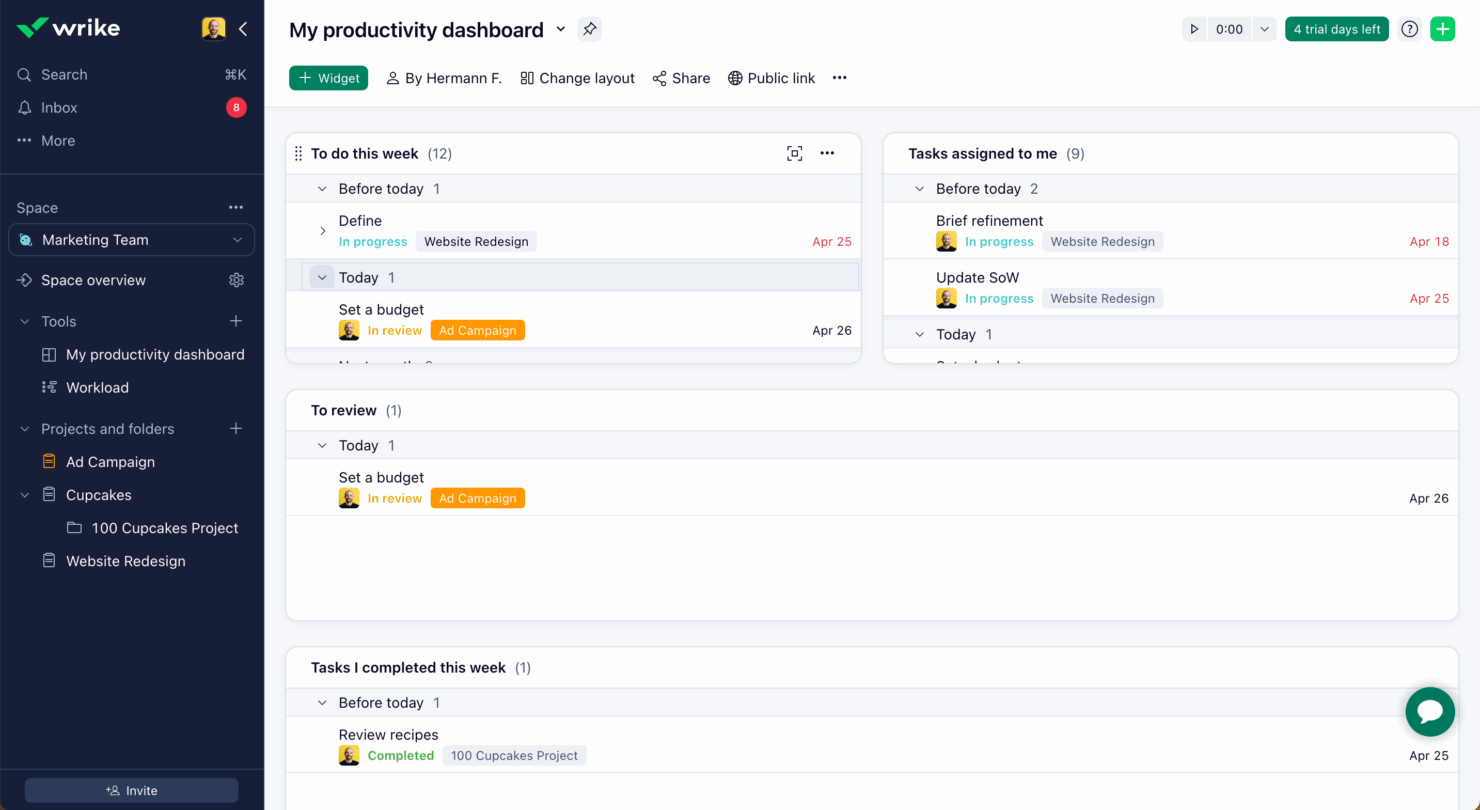
Wrike
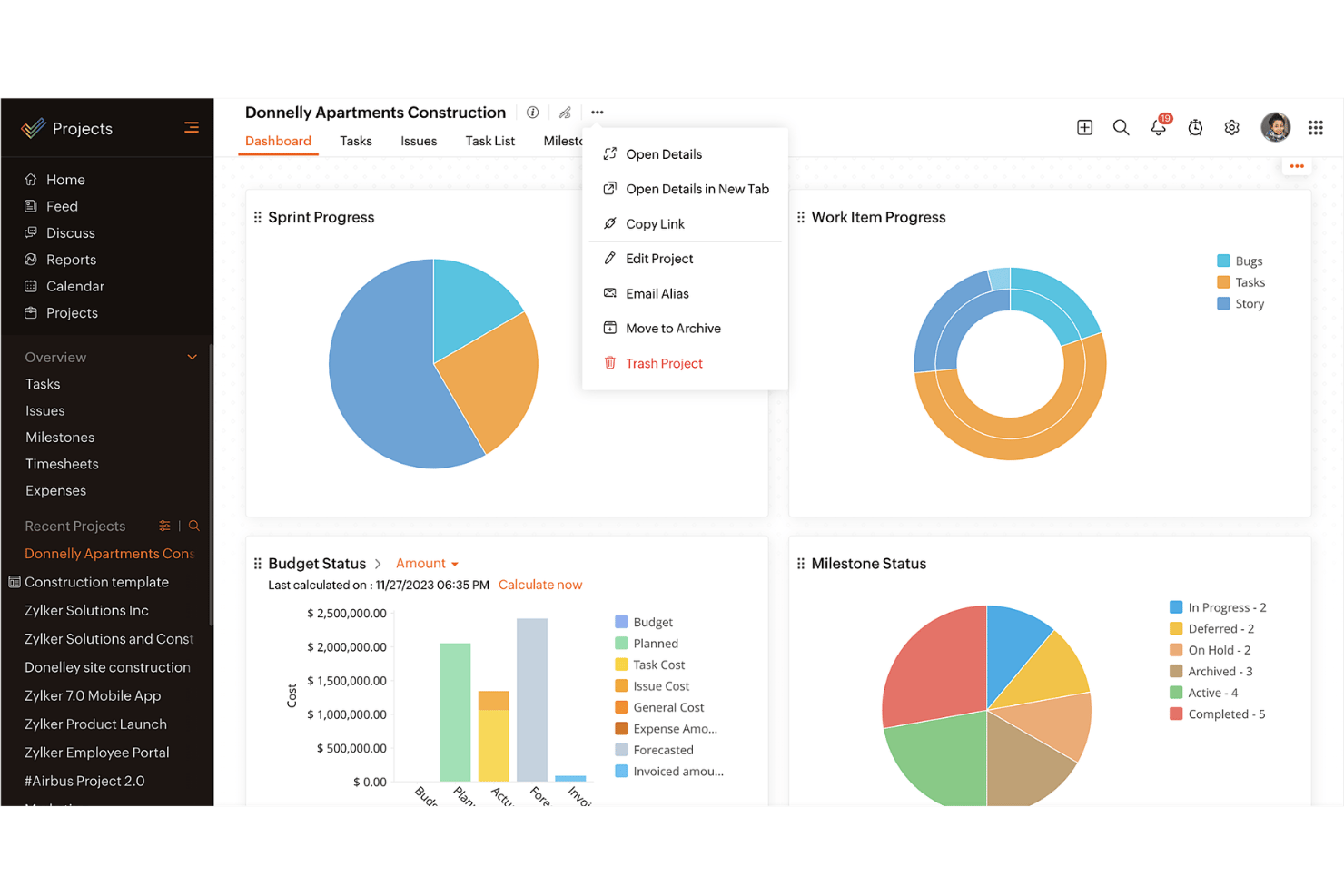
Zoho Projects
Why Trust Our Software Recommendations
Our team has been testing and reviewing software since 2012. As project managers ourselves, we know how difficult—and important—it is to choose the right software.
For this guide, we evaluated tools using hands-on testing and independent research, scoring tools using our selection criteria. We also draw on insights from industry thought leaders and practicing project management experts.
Our reviews reflect our human editorial judgment, not a sales pitch.
Expert reviewers:
Wrike vs. Zoho Projects Pricing Comparison
| Wrike | Zoho Projects | |
|---|---|---|
| Free Trial | Free plan + 14-day free trial + free demo available | Free plan available |
| Pricing | From $10/user/month (billed annually) | From $4/user/month (billed annually) |
Wrike vs. Zoho Projects Feature Comparison
Denne sammenligning af funktioner fremhæver de vigtigste funktioner, som Wrike og Zoho Projects tilbyder, så du kan vurdere, hvilken platform der bedst understøtter dine behov for projektstyring.
| Wrike | Zoho Projects | |
|---|---|---|
| API | ||
| Batch Permissions & Access | ||
| Budgeting | ||
| Calendar Management | ||
| Collaboration Support | ||
| Contact Management | ||
| Contact Sharing | ||
| Customer Management | ||
| Dashboard | ||
| Dashboards | ||
| Data Export | ||
| Data Import | ||
| Data Visualization | ||
| Dependency Tracking | ||
| Document Sharing | ||
| Expense Tracking | ||
| External Integrations | ||
| File Sharing | ||
| Gantt Charts | ||
| Kanban Boards | ||
| Multi-User | ||
| Notifications | ||
| Project Management | ||
| Resource Management | ||
| Scheduling | ||
| Task Scheduling/Tracking | ||
| Third-Party Plugins/Add-Ons | ||
| Time Management | ||
| Travel Management | ||
| Workflow Management |
Wrike sammenlignet med Zoho Projects: Integrationer
| Integration | Wrike | Zoho Projects |
| Slack | ✅ | ❌ |
| Microsoft Teams | ✅ | ✅ |
| Google Drive | ✅ | ✅ |
| Salesforce | ✅ | ❌ |
| Dropbox | ✅ | ✅ |
| QuickBooks | ❌ | ✅ |
| GitHub | ✅ | ❌ |
| Zoho CRM | ❌ | ✅ |
| API | ✅ | ✅ |
| Zapier | ✅ | ❌ |
Wrike integreres med Slack for at understøtte kommunikation i realtid og holde dit team opdateret uden at skifte mellem værktøjer. Det fungerer godt for teams, der er afhængige af onlinemeddelelser.
Zoho Projects opretter forbindelse til Zoho CRM, hvilket muliggør en problemfri udveksling af data mellem salg og projektstyring for dem, der allerede bruger Zoho-pakken. Wrike fokuserer på værktøjer til samarbejde i realtid, mens Zoho Projects lægger vægt på effektivitet i det interne økosystem.
Wrike sammenlignet med Zoho Projects: Sikkerhed, overholdelse & pålidelighed
| Faktor | Wrike | Zoho Projects |
| Datakryptering | Wrike bruger avanceret AES-256-kryptering til data i hvile og under overførsel. | Zoho Projects anvender AES-256-kryptering for at beskytte data både i hvile og under overførsel. |
| Overholdelse af lovgivning | Wrike overholder GDPR og tilbyder funktioner, der understøtter HIPAA | Zoho Projects overholder GDPR og tilbyder værktøjer til overholdelse af HIPAA. |
| Oppetidens pålidelighed | Wrike garanterer 99 % oppetid med en robust infrastruktur. | Zoho Projects sikrer 99,9 % oppetid understøttet af en pålidelig serverarkitektur. |
Wrike og Zoho Projects tilbyder begge stærke sikkerheds- og compliancefunktioner, men Wrike kan have en fordel med sin avancerede kryptering og målrettede muligheder for overholdelse af lovgivning.
Når du vælger leverandør, bør du overveje din branches specifikke krav til overholdelse af lovgivning, krypteringsstandarder, garantier for oppetid, og hvordan hvert værktøj stemmer overens med din organisations sikkerhedspolitikker.
Wrike vs. Zoho Projects Brugervenlighed
| Faktor | Wrike | Zoho Projects |
| Brugergrænseflade | Wrike tilbyder en ren og tilpasningsvenlig brugergrænseflade, der giver dig mulighed for at skræddersy dashboards efter dine behov. | Zoho Projects har en enkel brugergrænseflade med logiske navigationsstier. |
| Introduktionsoplevelse | Wrike indeholder interaktive vejledninger og ressourcer, så du hurtigt kan komme i gang. | Zoho Projects tilbyder en guidet opsætning med nyttige anvisninger og tips. |
| Kundesupport | Wrike tilbyder support døgnet rundt med et omfattende hjælpecenter. | Zoho Projects tilbyder support i åbningstiden og en omfattende vidensbase. |
Wrikes brugervenlighed forbedres af den tilpasningsvenlige brugergrænseflade og support døgnet rundt, hvilket gør løsningen velegnet til teams, der har brug for fleksibilitet og konstant hjælp.
På den anden side udmærker Zoho Projects sig ved enkelhed og intuitiv navigation, selvom de begrænsede supporttider kan være en udfordring for nogle.
Wrike vs Zoho Projects: Pros & Cons
Wrike
- Wrike's proofing feature allows you to compare file versions dynamically.
- The user-friendly interface ensures easy navigation for your team.
- Wrike's AI features are available in all plans at no extra cost.
- It can be unclear where form responses are stored within the tool.
- Some integrations require an additional cost, regardless of the plan.
- Two-factor authentication is only available with the enterprise plan.
Zoho Projects
- Task dependencies are highly visual and easy to set up.
- Built-in time tracking integrates smoothly with billing features.
- Customizable project templates support repeatable workflows.
- Reporting customization can be limited for advanced needs.
- Mobile app notifications do not always sync in real time.
- Gantt chart drag-and-drop can feel sluggish with large projects.
Best Use Cases for Wrike and Zoho Projects
Wrike
- Marketing Teams Wrike’s proofing feature helps you streamline creative approval processes with ease.
- Creative Agencies Wrike’s dynamic file version comparison keeps your creative projects on track.
- IT Departments Wrike’s user-friendly interface simplifies complex project coordination for your team.
- Product Development Wrike’s AI features boost your team’s productivity without extra costs.
- Event Management Wrike’s task scheduling ensures your events are planned and executed flawlessly.
- Construction Projects Wrike’s robust project tracking keeps your construction timelines and budgets in check.
Zoho Projects
- Small Agencies Kanban boards, time tracking, and client billing streamline project delivery and reporting for agency teams.
- IT Departments Issue tracking, blueprint automations, and strong permission controls provide what IT teams need for complex internal projects.
- Consulting Firms Time sheets, detailed reports, and project-level billing help consultants keep track of client hours and invoicing.
- Remote Teams Robust collaboration tools, document sharing, and project forums help distributed users stay connected.
- Marketing Teams Reusable templates, task dependencies, and timeline tracking make repeated campaigns run smoothly and transparently.
- Construction Projects Gantt charts, milestones, and resource allocation features support the scheduling needs of construction and field project managers.
Differences Between Wrike and Zoho Projects
Denne sammenligning beskriver de vigtigste forskelle mellem Wrike og Zoho Projects for at hjælpe dig med at afgøre, hvilken platform der passer bedst.
| Wrike | Zoho Projects | |
|---|---|---|
| Automation | Wrike offers advanced automation capabilities for complex workflows | Zoho Projects includes basic automation tools for task management. |
| Customization | Wrike offers extensive customization with dashboards and workflows. | Zoho Projects provides basic customization options for simpler setups. |
| Integrations | Wrike integrates with a wide range of third-party apps like Slack | Zoho Projects integrates well within the Zoho Ecosystem, like Zoho CRM. |
| Pricing | Wrike uses a tiered subscription with additional costs for premium features. | Zoho Projects follows a tiered pricing model with fewer hidden costs. |
| User Interface | Wrike features a clean, customizable UI for tailored experiences. | Zoho Projects has a straightforward interface with logical navigation. |
| Visit WrikeOpens new window | Read Zoho Projects ReviewOpens new window |
Similarities Between Wrike and Zoho Projects
Selvom Wrike og Zoho Projects har deres forskelle, deler de også flere centrale funktioner, der understøtter effektiv projektstyring på tværs af teams.
| Collaboration | Both tools support team collaboration through features like file sharing and real-time updates. Wrike connects with various communication apps, while Zoho Projects includes built-in chat and discussion forums. |
|---|---|
| Mobile Usability | Wrike and Zoho Projects both offer mobile apps for managing projects on the go. Wrike’s app allows offline access, while Zoho Projects’ app is known for its user-friendly design. |
| Reporting | Both platforms offer reporting tools to help you track project progress. Wrike provides advanced analytics and fully customizable reports, while Zoho Projects includes pre-built reports that can be tailored to your needs. |
| Task Management | Both Wrike and Zoho Projects offer strong task management features that let you assign, track, and prioritize work efficiently. Wrike stands out with its detailed task dependencies, while Zoho Projects offers easy-to-use task lists and Kanban boards. |
| Time Tracking | Both solutions include time tracking to monitor hours spent on tasks. Wrike integrates time tracking directly into its project management workflow, while Zoho Projects provides built-in timers and detailed timesheet reports. |
| Visit WrikeOpens new window Read Zoho Projects ReviewOpens new window | |